Basics of
Networking
Network
• Interconnection of two or more devices is called as a network.
• The communication between two or more interconnected devices is called
networking.
• An internetwork is a connection of two or more networks.
• Internetworking means communication between different networks.
Types of Networks
• LAN
Local Area Networks are used to connect networking devices that are in a
very close geographic area such as a floor of a building, a building itself or
within a campus.
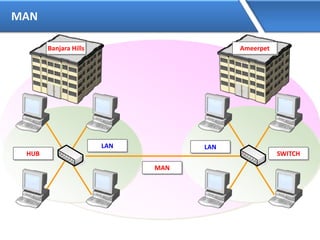
• MAN
Metropolitan Area Network are used to connect networking devices that
may span around the entire city.
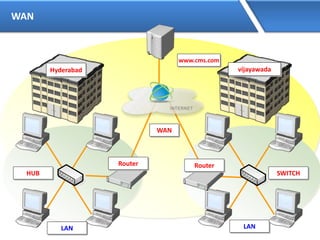
• WAN
Wide Area Networks which connects two or more LANs present at different
geographical locations.
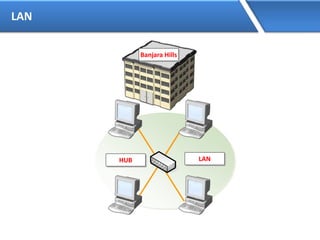
LAN
LANHUB
Banjara Hills
MAN
LANLAN
HUB SWITCH
MAN
Banjara Hills Ameerpet
WAN
LANLAN
HUB SWITCH
Hyderabad vijayawada
www.cms.com
WAN
Router Router
Basic requirements to form a network
• NIC (Network interface card) also called as LAN card
• Media
• Networking devices (Hub, Switch, Router, etc.)
• Protocols
• Logical Address (IP address)
NIC(Network Interface Card)
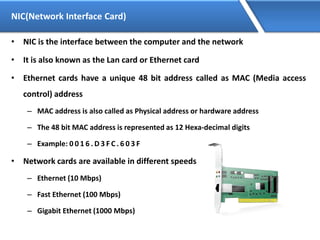
• NIC is the interface between the computer and the network
• It is also known as the Lan card or Ethernet card
• Ethernet cards have a unique 48 bit address called as MAC (Media access
control) address
– MAC address is also called as Physical address or hardware address
– The 48 bit MAC address is represented as 12 Hexa-decimal digits
– Example: 0 0 1 6 . D 3 F C . 6 0 3 F
• Network cards are available in different speeds
– Ethernet (10 Mbps)
– Fast Ethernet (100 Mbps)
– Gigabit Ethernet (1000 Mbps)
Media
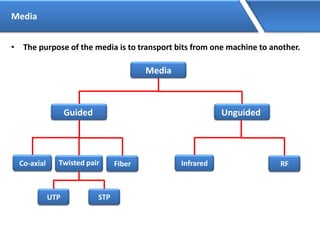
• The purpose of the media is to transport bits from one machine to another.
Media
Guided Unguided
Co-axial Twisted pair Fiber
UTP STP
Infrared RF
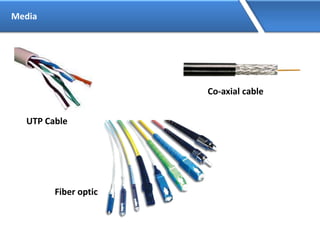
Media
UTP Cable
Co-axial cable
Fiber optic
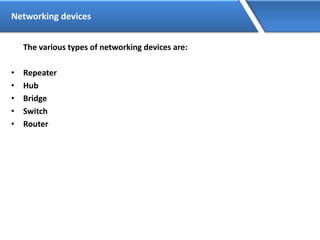
Networking devices
The various types of networking devices are:
• Repeater
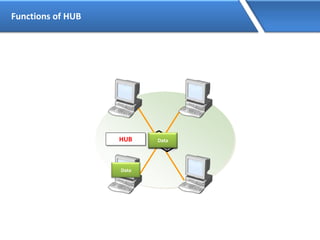
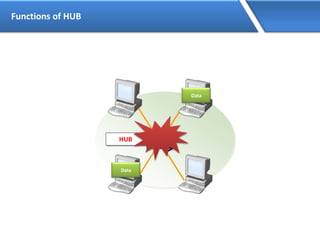
• Hub
• Bridge
• Switch
• Router
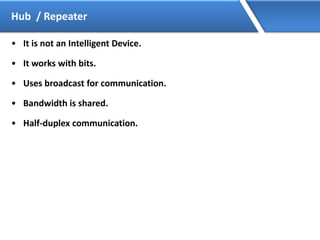
Hub / Repeater
• It is not an Intelligent Device.
• It works with bits.
• Uses broadcast for communication.
• Bandwidth is shared.
• Half-duplex communication.
Functions of HUB
HUB
Data
DataDataDataData
Functions of HUB
HUB
Data
DataDataDataData
Data
Switch
• It is an Intelligent device.
• It maintains MAC address table (hardware address).
• Each port of the switch has fixed bandwidth.
• It works with Flooding and Unicast.
• Supports full duplex communication
Functions of a Switch
• MAC Address Learning
• Forwarding
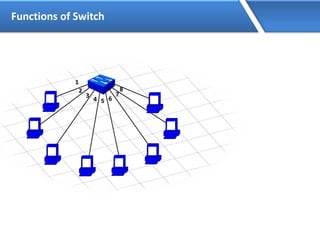
Functions of Switch
1
2
3
4 5 6
7
8
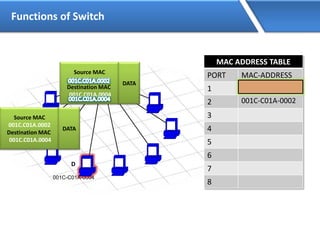
Functions of Switch
MAC ADDRESS TABLE
PORT MAC-ADDRESS
1
2
3
4
5
6
7
8
001C-C01A-0002
001C-C01A-0004
001C-C01A-0002
1
2
3
4 5 6
7
8
S
D
DataDataDataDataDataData
Data
Source MAC
001C.C01A.0002
Destination MAC
001C.C01A.0004
DATA
Source MAC
001C.C01A.0002
Destination MAC
001C.C01A.0004
DATA
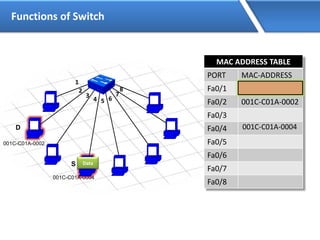
Functions of Switch
MAC ADDRESS TABLE
PORT MAC-ADDRESS
Fa0/1
Fa0/2 001C-C01A-0002
Fa0/3
Fa0/4
Fa0/5
Fa0/6
Fa0/7
Fa0/8
001C-C01A-0004
001C-C01A-0002
001C-C01A-0004
1
2
3
4 5 6
7
8
D
S Data
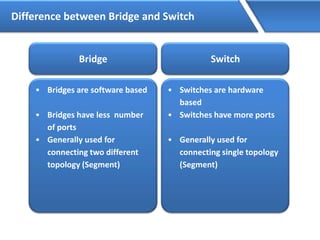
Difference between Bridge and Switch
Bridge
• Bridges are software based
• Bridges have less number
of ports
• Generally used for
connecting two different
topology (Segment)
Switch
• Switches are hardware
based
• Switches have more ports
• Generally used for
connecting single topology
(Segment)
Router
• It is an Intelligent device
• It works with Logical Addressing (i.e. IP, IPX, AppleTalk)
• It works with Fixed bandwidth
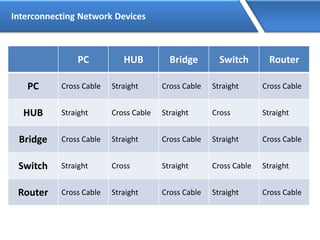
Interconnecting Network Devices
PC HUB Bridge Switch Router
PC Cross Cable Straight Cross Cable Straight Cross Cable
HUB Straight Cross Cable Straight Cross Straight
Bridge Cross Cable Straight Cross Cable Straight Cross Cable
Switch Straight Cross Straight Cross Cable Straight
Router Cross Cable Straight Cross Cable Straight Cross Cable
Topology
Topology is a physical layout of the systems connected in a network.
Different types of topology are:
• Bus
• Ring
• Mesh
• Star
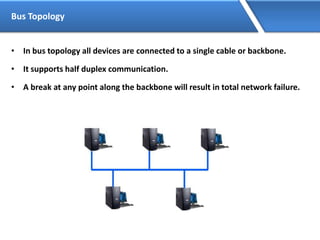
Bus Topology
• In bus topology all devices are connected to a single cable or backbone.
• It supports half duplex communication.
• A break at any point along the backbone will result in total network failure.
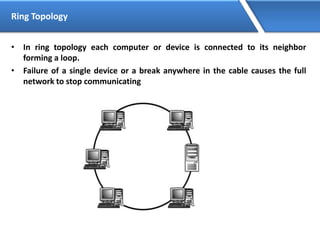
Ring Topology
• In ring topology each computer or device is connected to its neighbor
forming a loop.
• Failure of a single device or a break anywhere in the cable causes the full
network to stop communicating
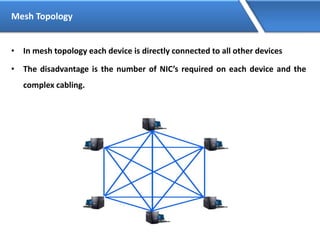
Mesh Topology
• In mesh topology each device is directly connected to all other devices
• The disadvantage is the number of NIC’s required on each device and the
complex cabling.
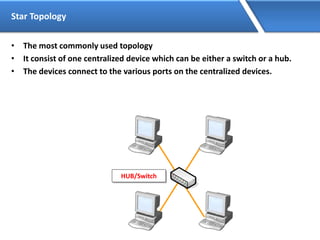
Star Topology
• The most commonly used topology
• It consist of one centralized device which can be either a switch or a hub.
• The devices connect to the various ports on the centralized devices.
HUB/Switch
IP Address
• IP Address is a Logical Address
• It is a Network Layer address (Layer 3)
• Two Versions of IP:
• IP version 4 is a 32 bit address
• IP version 6 is a 128 bit address
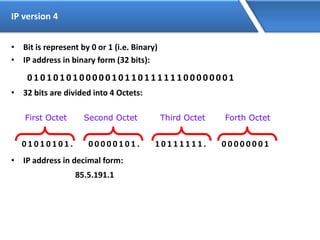
IP version 4
• Bit is represent by 0 or 1 (i.e. Binary)
• IP address in binary form (32 bits):
0 1 0 1 0 1 0 1 0 0 0 0 0 1 0 1 1 0 1 1 1 1 1 1 0 0 0 0 0 0 0 1
• 32 bits are divided into 4 Octets:
0 1 0 1 0 1 0 1 . 0 0 0 0 0 1 0 1 . 1 0 1 1 1 1 1 1 . 0 0 0 0 0 0 0 1
• IP address in decimal form:
85.5.191.1
First Octet Second Octet Third Octet Forth Octet
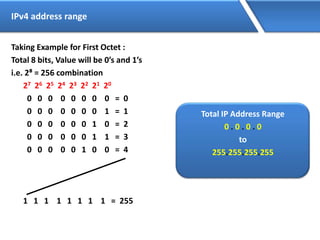
IPv4 address range
Taking Example for First Octet :
Total 8 bits, Value will be 0’s and 1’s
i.e. 2⁸ = 256 combination
27 26 25 24 23 22 21 20
0 0 0 0 0 0 0 0 = 0
0 0 0 0 0 0 0 1 = 1
0 0 0 0 0 0 1 0 = 2
0 0 0 0 0 0 1 1 = 3
0 0 0 0 0 1 0 0 = 4
1 1 1 1 1 1 1 1 = 255
Total IP Address Range
0 . 0 . 0 . 0
to
255.255.255.255
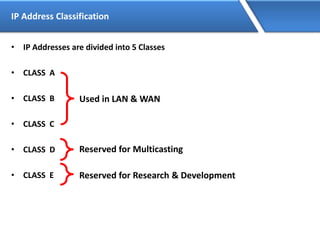
IP Address Classification
• IP Addresses are divided into 5 Classes
• CLASS A
• CLASS B
• CLASS C
• CLASS D
• CLASS E
Used in LAN & WAN
Reserved for Multicasting
Reserved for Research & Development
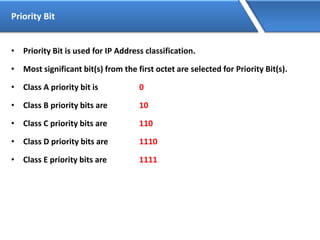
Priority Bit
• Priority Bit is used for IP Address classification.
• Most significant bit(s) from the first octet are selected for Priority Bit(s).
• Class A priority bit is 0
• Class B priority bits are 10
• Class C priority bits are 110
• Class D priority bits are 1110
• Class E priority bits are 1111
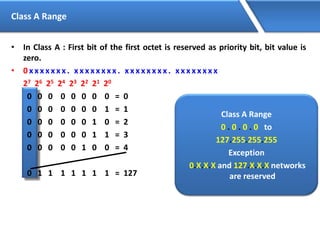
Class A Range
• In Class A : First bit of the first octet is reserved as priority bit, bit value is
zero.
• 0 x x x x x x x . x x x x x x x x . x x x x x x x x . x x x x x x x x
27 26 25 24 23 22 21 20
0 0 0 0 0 0 0 0 = 0
0 0 0 0 0 0 0 1 = 1
0 0 0 0 0 0 1 0 = 2
0 0 0 0 0 0 1 1 = 3
0 0 0 0 0 1 0 0 = 4
0 1 1 1 1 1 1 1 = 127
Class A Range
0 . 0 . 0 . 0 to
127.255.255.255
Exception
0.X.X.X and 127.X.X.X networks
are reserved
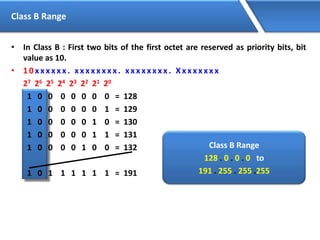
Class B Range
• In Class B : First two bits of the first octet are reserved as priority bits, bit
value as 10.
• 1 0 x x x x x x . x x x x x x x x . x x x x x x x x . Xx x x x x x x
27 26 25 24 23 22 21 20
1 0 0 0 0 0 0 0 = 128
1 0 0 0 0 0 0 1 = 129
1 0 0 0 0 0 1 0 = 130
1 0 0 0 0 0 1 1 = 131
1 0 0 0 0 1 0 0 = 132
1 0 1 1 1 1 1 1 = 191
Class B Range
128 . 0 . 0 . 0 to
191 . 255 . 255 .255
Class C Range
• In Class C : First three bits of the first octet are reserved as priority bits, bit
value as 110.
• 1 1 0 x x x x x . x x x x x x x x . x x x x x x x x . Xx x x x x x x
27 26 25 24 23 22 21 20
1 1 0 0 0 0 0 0 = 192
1 1 0 0 0 0 0 1 = 193
1 1 0 0 0 0 1 0 = 194
1 1 0 0 0 0 1 1 = 195
1 1 0 0 0 1 0 0 = 196
1 1 0 1 1 1 1 1 = 223
Class C Range
192 . 0 . 0 . 0 to
223 . 255 . 255 .255
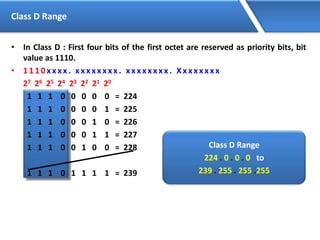
Class D Range
• In Class D : First four bits of the first octet are reserved as priority bits, bit
value as 1110.
• 1 1 1 0 x x x x . x x x x x x x x . x x x x x x x x . Xx x x x x x x
27 26 25 24 23 22 21 20
1 1 1 0 0 0 0 0 = 224
1 1 1 0 0 0 0 1 = 225
1 1 1 0 0 0 1 0 = 226
1 1 1 0 0 0 1 1 = 227
1 1 1 0 0 1 0 0 = 228
1 1 1 0 1 1 1 1 = 239
Class D Range
224 . 0 . 0 . 0 to
239 . 255 . 255 .255
Class E Range
• In Class E : First four bits of the first octet are reserved as priority bits, bit
value as 1111.
• 1 1 1 1 x x x x . x x x x x x x x . x x x x x x x x . Xx x x x x x x
27 26 25 24 23 22 21 20
1 1 1 1 0 0 0 0 = 240
1 1 1 1 0 0 0 1 = 241
1 1 1 1 0 0 1 0 = 242
1 1 1 1 0 0 1 1 = 243
1 1 1 1 0 1 0 0 = 244
1 1 1 1 1 1 1 1 = 255
Class E Range
240 . 0 . 0 . 0 to
255 . 255 . 255 .255
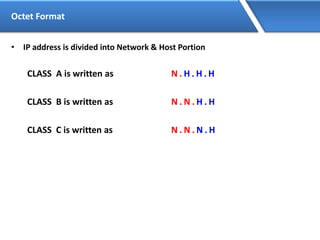
Octet Format
• IP address is divided into Network & Host Portion
CLASS A is written as N . H . H . H
CLASS B is written as N . N . H . H
CLASS C is written as N . N . N . H
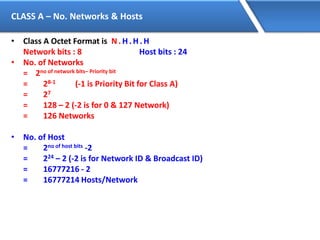
CLASS A – No. Networks & Hosts
• Class A Octet Format is N. H. H. H
Network bits : 8 Host bits : 24
• No. of Networks
= 2no of network bits– Priority bit
= 28-1 (-1 is Priority Bit for Class A)
= 27
= 128 – 2 (-2 is for 0 & 127 Network)
= 126 Networks
• No. of Host
= 2no of host bits -2
= 224 – 2 (-2 is for Network ID & Broadcast ID)
= 16777216 - 2
= 16777214 Hosts/Network
CLASS B – No. Networks & Hosts
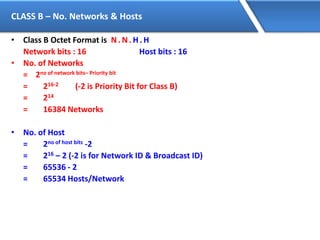
• Class B Octet Format is N. N. H. H
Network bits : 16 Host bits : 16
• No. of Networks
= 2no of network bits– Priority bit
= 216-2 (-2 is Priority Bit for Class B)
= 214
= 16384 Networks
• No. of Host
= 2no of host bits -2
= 216 – 2 (-2 is for Network ID & Broadcast ID)
= 65536 - 2
= 65534 Hosts/Network
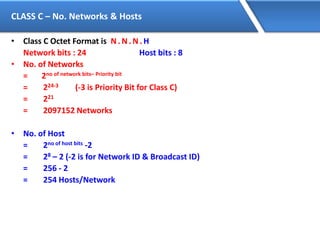
CLASS C – No. Networks & Hosts
• Class C Octet Format is N. N. N. H
Network bits : 24 Host bits : 8
• No. of Networks
= 2no of network bits– Priority bit
= 224-3 (-3 is Priority Bit for Class C)
= 221
= 2097152 Networks
• No. of Host
= 2no of host bits -2
= 28 – 2 (-2 is for Network ID & Broadcast ID)
= 256 - 2
= 254 Hosts/Network
Network & Broadcast Address
• Network address: IP address with all bits as ZERO in the host portion.
• Broadcast address: IP address with all bits as ONES in the host portion.
• Valid IP Addresses lie between the Network Address and the Broadcast
Address.
• Only Valid IP Addresses are assigned to hosts/clients
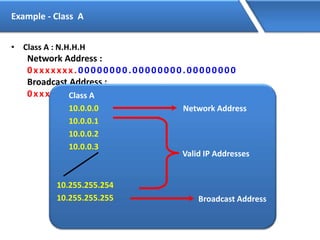
Example - Class A
• Class A : N.H.H.H
Network Address :
0xxxxxxx.00000000.00000000.00000000
Broadcast Address :
0xxxxxxx.11111111.11111111.11111111Class A
10.0.0.0
10.0.0.1
10.0.0.2
10.0.0.3
10.255.255.254
10.255.255.255
Network Address
Broadcast Address
Valid IP Addresses
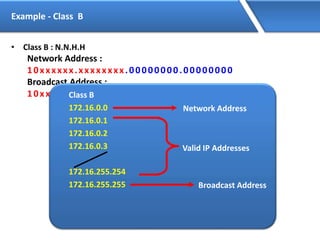
Example - Class B
• Class B : N.N.H.H
Network Address :
10xxxxxx.xxxxxxxx.00000000.00000000
Broadcast Address :
10xxxxxx.xxxxxxxx.11111111.11111111Class B
172.16.0.0
172.16.0.1
172.16.0.2
172.16.0.3
172.16.255.254
172.16.255.255
Network Address
Broadcast Address
Valid IP Addresses
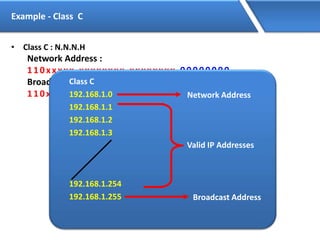
Example - Class C
• Class C : N.N.N.H
Network Address :
110xxxxx.xxxxxxxx.xxxxxxxx.00000000
Broadcast Address :
110xxxxx.xxxxxxxx.xxxxxxxx.11111111
Class C
192.168.1.0
192.168.1.1
192.168.1.2
192.168.1.3
192.168.1.254
192.168.1.255
Network Address
Broadcast Address
Valid IP Addresses
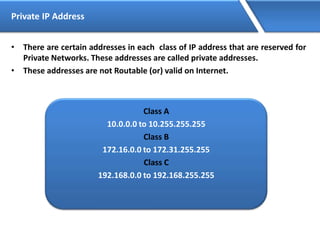
Private IP Address
• There are certain addresses in each class of IP address that are reserved for
Private Networks. These addresses are called private addresses.
• These addresses are not Routable (or) valid on Internet.
Class A
10.0.0.0 to 10.255.255.255
Class B
172.16.0.0 to 172.31.255.255
Class C
192.168.0.0 to 192.168.255.255
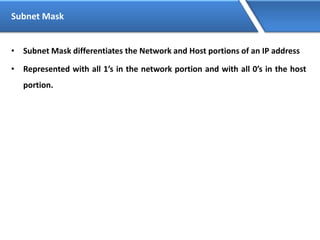
Subnet Mask
• Subnet Mask differentiates the Network and Host portions of an IP address
• Represented with all 1’s in the network portion and with all 0’s in the host
portion.
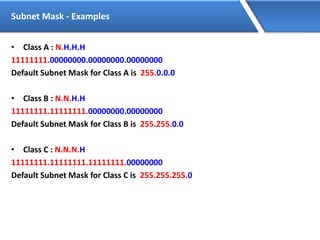
Subnet Mask - Examples
• Class A : N.H.H.H
11111111.00000000.00000000.00000000
Default Subnet Mask for Class A is 255.0.0.0
• Class B : N.N.H.H
11111111.11111111.00000000.00000000
Default Subnet Mask for Class B is 255.255.0.0
• Class C : N.N.N.H
11111111.11111111.11111111.00000000
Default Subnet Mask for Class C is 255.255.255.0
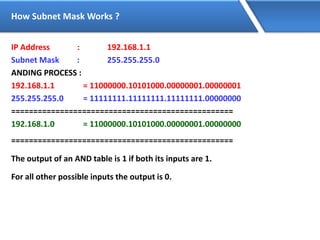
How Subnet Mask Works ?
IP Address : 192.168.1.1
Subnet Mask : 255.255.255.0
ANDING PROCESS :
192.168.1.1 = 11000000.10101000.00000001.00000001
255.255.255.0 = 11111111.11111111.11111111.00000000
==================================================
192.168.1.0 = 11000000.10101000.00000001.00000000
==================================================
The output of an AND table is 1 if both its inputs are 1.
For all other possible inputs the output is 0.
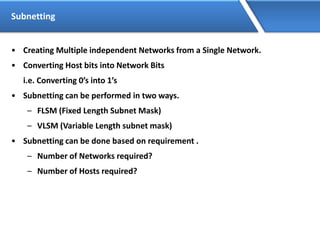
Subnetting
• Creating Multiple independent Networks from a Single Network.
• Converting Host bits into Network Bits
i.e. Converting 0’s into 1’s
• Subnetting can be performed in two ways.
– FLSM (Fixed Length Subnet Mask)
– VLSM (Variable Length subnet mask)
• Subnetting can be done based on requirement .
– Number of Networks required?
– Number of Hosts required?
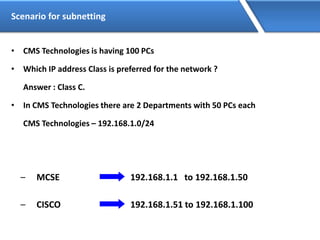
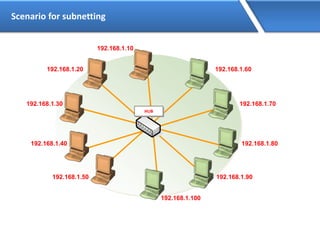
Scenario for subnetting
• CMS Technologies is having 100 PCs
• Which IP address Class is preferred for the network ?
Answer : Class C.
• In CMS Technologies there are 2 Departments with 50 PCs each
CMS Technologies – 192.168.1.0/24
– MCSE 192.168.1.1 to 192.168.1.50
192.168.1.51 to 192.168.1.100– CISCO
Scenario for subnetting
LAN
HUB
Scenario for subnetting
LAN
192.168.1.20
192.168.1.30
192.168.1.40
192.168.1.50
192.168.1.60
192.168.1.70
192.168.1.80
192.168.1.90
HUB
192.168.1.10
192.168.1.100
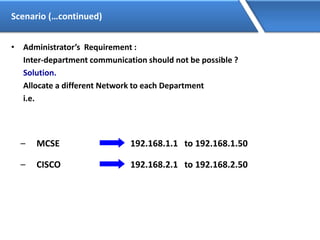
Scenario (…continued)
• Administrator’s Requirement :
Inter-department communication should not be possible ?
Solution.
Allocate a different Network to each Department
i.e.
– MCSE 192.168.1.1 to 192.168.1.50
192.168.2.1 to 192.168.2.50– CISCO
Scenario for subnetting
LAN
HUB
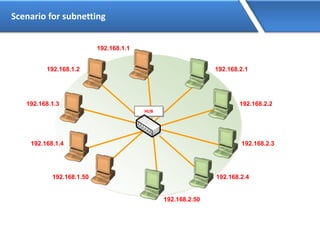
Scenario for subnetting
LAN
192.168.1.2
192.168.1.3
192.168.1.4
192.168.1.50
192.168.2.1
192.168.2.2
192.168.2.3
192.168.2.4
HUB
192.168.1.1
192.168.2.50
Main Aim of Subnetting
• Problem with the previous Scenario is :-
• Wastage of IP addresses if it is public(Approximately 400)
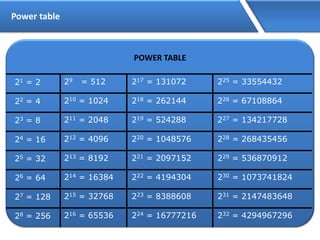
Power table
POWER TABLE
21 = 2
22 = 4
23 = 8
24 = 16
25 = 32
26 = 64
27 = 128
28 = 256
29 = 512
210 = 1024
211 = 2048
212 = 4096
213 = 8192
214 = 16384
215 = 32768
216 = 65536
217 = 131072
218 = 262144
219 = 524288
220 = 1048576
221 = 2097152
222 = 4194304
223 = 8388608
224 = 16777216
225 = 33554432
226 = 67108864
227 = 134217728
228 = 268435456
229 = 536870912
230 = 1073741824
231 = 2147483648
232 = 4294967296
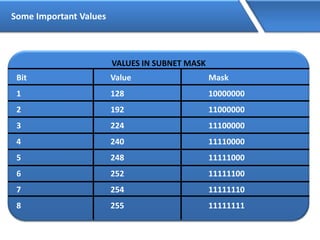
Some Important Values
VALUES IN SUBNET MASK
Bit Value Mask
1 128 10000000
2 192 11000000
3 224 11100000
4 240 11110000
5 248 11111000
6 252 11111100
7 254 11111110
8 255 11111111
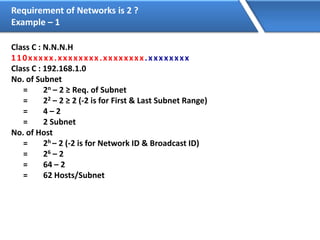
Requirement of Networks is 2 ?
Example – 1
Class C : N.N.N.H
110xxxxx.xxxxxxxx.xxxxxxxx.xxxxxxxx
Class C : 192.168.1.0
No. of Subnet
= 2n – 2 ≥ Req. of Subnet
= 22 – 2 ≥ 2 (-2 is for First & Last Subnet Range)
= 4 – 2
= 2 Subnet
No. of Host
= 2h – 2 (-2 is for Network ID & Broadcast ID)
= 26 – 2
= 64 – 2
= 62 Hosts/Subnet
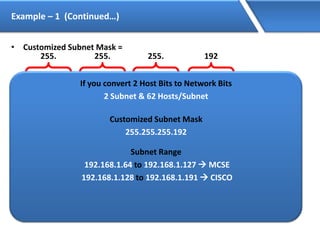
Example – 1 (Continued…)
• Customized Subnet Mask =
255.
11111111.
255.
11111111.
255.
11111111. 11000000
192
Range of Networks
Network ID Broadcast ID
192.168.1.0
192.168.1.64
192.168.1.128
192.168.1.192
192.168.1.63
192.168.1.127
192.168.1.191
192.168.1.255
Valid Subnets
192.168.1.0 192.168.1.63
192.168.1.192 192.168.1.255
If you convert 2 Host Bits to Network Bits
2 Subnet & 62 Hosts/Subnet
Customized Subnet Mask
255.255.255.192
Subnet Range
192.168.1.64 to 192.168.1.127  MCSE
192.168.1.128 to 192.168.1.191  CISCO
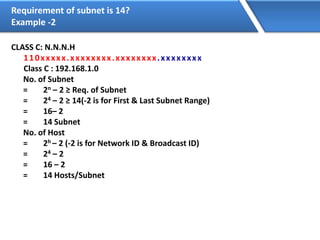
Requirement of subnet is 14?
Example -2
CLASS C: N.N.N.H
110xxxxx.xxxxxxxx.xxxxxxxx.xxxxxxxx
Class C : 192.168.1.0
No. of Subnet
= 2n – 2 ≥ Req. of Subnet
= 24 – 2 ≥ 14(-2 is for First & Last Subnet Range)
= 16– 2
= 14 Subnet
No. of Host
= 2h – 2 (-2 is for Network ID & Broadcast ID)
= 24 – 2
= 16 – 2
= 14 Hosts/Subnet
EXAMPLE – 2 (Continued…)
Customized Subnet Mask =
255.
11111111.
255.
11111111.
255.
11111111. 11110000
240
Range of Networks
Network ID Broadcast ID
192.168.1.0
192.168.1.16
192.168.1.32
192.168.1.48
192.168.1.224
192.168.1.240
192.168.1.15
192.168.1.31
192.168.1.47
192.168.1.63
192.168.1.239
192.168.1.255
Valid Subnets
192.168.1.0 192.168.1.15
192.168.1.240 192.168.1.255
If you convert 4 Host Bits to Network Bits
14 Subnet & 14 Hosts/Subnet
Customized Subnet Mask
255.255.255.240
Subnet Range
192.168.1.16 to 192.168.1.31
192.168.1.32 to 192.168.1.47
192.168.1.48 to 192.168.1.63
192.168.1.64 to 192.168.1.79
192.168.1.240 to 192.168.1.255
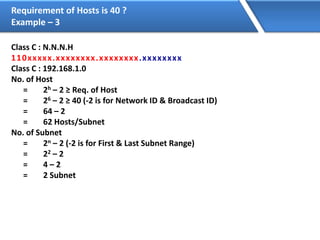
Requirement of Hosts is 40 ?
Example – 3
Class C : N.N.N.H
110xxxxx.xxxxxxxx.xxxxxxxx.xxxxxxxx
Class C : 192.168.1.0
No. of Host
= 2h – 2 ≥ Req. of Host
= 26 – 2 ≥ 40 (-2 is for Network ID & Broadcast ID)
= 64 – 2
= 62 Hosts/Subnet
No. of Subnet
= 2n – 2 (-2 is for First & Last Subnet Range)
= 22 – 2
= 4 – 2
= 2 Subnet
Example – 3 (Continued…)
Customized Subnet Mask =
255.
11111111.
255.
11111111.
255.
11111111. 11000000
192
Range of Networks
Network ID Broadcast ID
192.168.1.0
192.168.1.64
192.168.1.128
192.168.1.192
192.168.1.63
192.168.1.127
192.168.1.191
192.168.1.255
Valid Subnets
192.168.1.0 192.168.1.63
192.168.1.192 192.168.1.255
If you convert 2 Host Bits to Network Bits
2 Subnet & 62 Hosts/Subnet
Customized Subnet Mask
255.255.255.192
Subnet Range
192.168.1.64 to 192.168.1.127
192.168.1.128 to 192.168.1.191
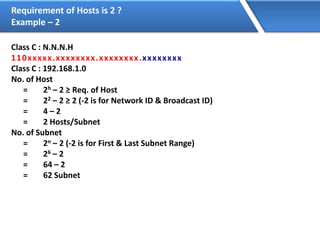
Requirement of Hosts is 2 ?
Example – 2
Class C : N.N.N.H
110xxxxx.xxxxxxxx.xxxxxxxx.xxxxxxxx
Class C : 192.168.1.0
No. of Host
= 2h – 2 ≥ Req. of Host
= 22 – 2 ≥ 2 (-2 is for Network ID & Broadcast ID)
= 4 – 2
= 2 Hosts/Subnet
No. of Subnet
= 2n – 2 (-2 is for First & Last Subnet Range)
= 26 – 2
= 64 – 2
= 62 Subnet
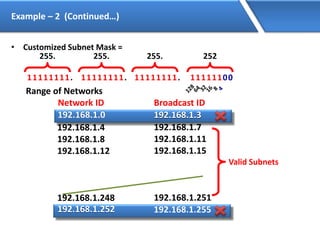
Example – 2 (Continued…)
• Customized Subnet Mask =
255.
11111111.
255.
11111111.
255.
11111111. 11111100
252
Range of Networks
Network ID Broadcast ID
192.168.1.0
192.168.1.4
192.168.1.8
192.168.1.12
192.168.1.248
192.168.1.252
192.168.1.3
192.168.1.7
192.168.1.11
192.168.1.15
192.168.1.251
192.168.1.255
Valid Subnets
192.168.1.0 192.168.1.3
192.168.1.252 192.168.1.255
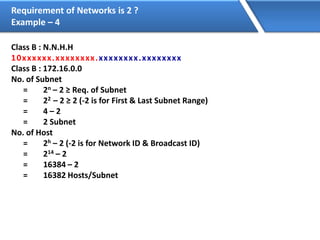
Requirement of Networks is 2 ?
Example – 4
Class B : N.N.H.H
10xxxxxx.xxxxxxxx.xxxxxxxx.xxxxxxxx
Class B : 172.16.0.0
No. of Subnet
= 2n – 2 ≥ Req. of Subnet
= 22 – 2 ≥ 2 (-2 is for First & Last Subnet Range)
= 4 – 2
= 2 Subnet
No. of Host
= 2h – 2 (-2 is for Network ID & Broadcast ID)
= 214 – 2
= 16384 – 2
= 16382 Hosts/Subnet
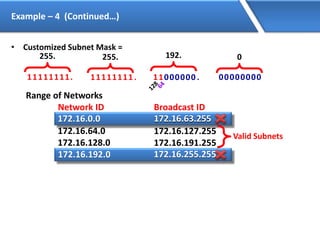
Example – 4 (Continued…)
• Customized Subnet Mask =
255.
11111111.
255.
11111111.
0
11000000. 00000000
192.
Range of Networks
Network ID Broadcast ID
172.16.0.0
172.16.64.0
172.16.128.0
172.16.192.0
172.16.63.255
172.16.127.255
172.16.191.255
172.16.255.255
Valid Subnets
172.16.0.0 172.16.63.255
172.16.192.0 172.16.255.255
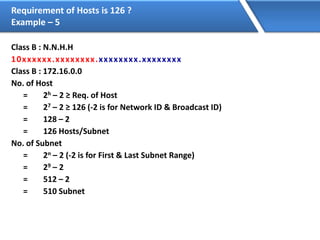
Requirement of Hosts is 126 ?
Example – 5
Class B : N.N.H.H
10xxxxxx.xxxxxxxx.xxxxxxxx.xxxxxxxx
Class B : 172.16.0.0
No. of Host
= 2h – 2 ≥ Req. of Host
= 27 – 2 ≥ 126 (-2 is for Network ID & Broadcast ID)
= 128 – 2
= 126 Hosts/Subnet
No. of Subnet
= 2n – 2 (-2 is for First & Last Subnet Range)
= 29 – 2
= 512 – 2
= 510 Subnet
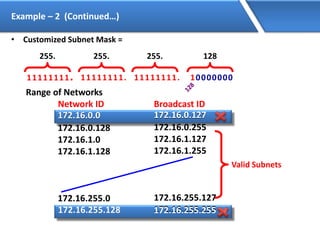
Example – 2 (Continued…)
• Customized Subnet Mask =
255.
11111111.
255.
11111111.
255.
11111111. 10000000
128
Range of Networks
Network ID Broadcast ID
172.16.0.0
172.16.0.128
172.16.1.0
172.16.1.128
172.16.255.0
172.16.255.128
172.16.0.127
172.16.0.255
172.16.1.127
172.16.1.255
172.16.255.127
172.16.255.255
Valid Subnets
172.16.0.0 172.16.0.127
172.16.255.128 172.16.255.255
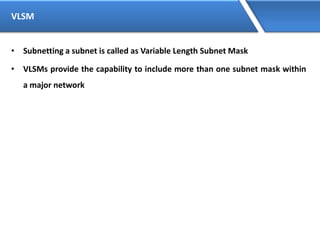
VLSM
• Subnetting a subnet is called as Variable Length Subnet Mask
• VLSMs provide the capability to include more than one subnet mask within
a major network
Scenario
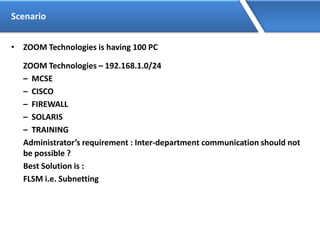
• ZOOM Technologies is having 100 PC
ZOOM Technologies – 192.168.1.0/24
– MCSE
– CISCO
– FIREWALL
– SOLARIS
– TRAINING
Administrator’s requirement : Inter-department communication should not
be possible ?
Best Solution is :
FLSM i.e. Subnetting
Scenario (…continued)
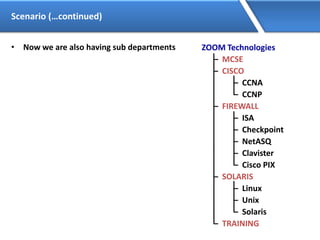
• Now we are also having sub departments ZOOM Technologies
– MCSE
– CISCO
– CCNA
– CCNP
– FIREWALL
– ISA
– Checkpoint
– NetASQ
– Clavister
– Cisco PIX
– SOLARIS
– Linux
– Unix
– Solaris
– TRAINING
Scenario (…continued)
Administrator does not want inter-department communication in the sub
departments ?
Answer : You will use the subnet range to further divide it into smaller ranges,
this time its Subnetting of a Subnet i.e. VLSM.
Calculation of FLSM
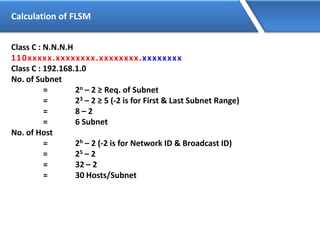
Class C : N.N.N.H
110xxxxx.xxxxxxxx.xxxxxxxx.xxxxxxxx
Class C : 192.168.1.0
No. of Subnet
= 2n – 2 ≥ Req. of Subnet
= 23 – 2 ≥ 5 (-2 is for First & Last Subnet Range)
= 8 – 2
= 6 Subnet
No. of Host
= 2h – 2 (-2 is for Network ID & Broadcast ID)
= 25 – 2
= 32 – 2
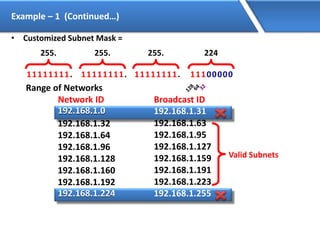
= 30 Hosts/Subnet
Example – 1 (Continued…)
• Customized Subnet Mask =
255.
11111111.
255.
11111111.
255.
11111111. 11100000
224
Range of Networks
Network ID Broadcast ID
192.168.1.0
192.168.1.32
192.168.1.64
192.168.1.96
192.168.1.128
192.168.1.160
192.168.1.192
192.168.1.224
192.168.1.31
192.168.1.63
192.168.1.95
192.168.1.127
192.168.1.159
192.168.1.191
192.168.1.223
192.168.1.255
Valid Subnets
192.168.1.0 192.168.1.31
192.168.1.224 192.168.1.255
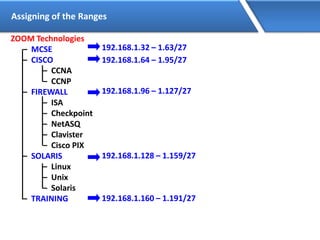
Assigning of the Ranges
ZOOM Technologies
– MCSE
– CISCO
– CCNA
– CCNP
– FIREWALL
– ISA
– Checkpoint
– NetASQ
– Clavister
– Cisco PIX
– SOLARIS
– Linux
– Unix
– Solaris
– TRAINING
192.168.1.32 – 1.63/27
192.168.1.64 – 1.95/27
192.168.1.96 – 1.127/27
192.168.1.128 – 1.159/27
192.168.1.160 – 1.191/27
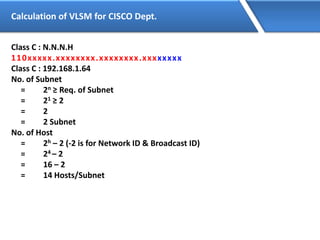
Calculation of VLSM for CISCO Dept.
Class C : N.N.N.H
110xxxxx.xxxxxxxx.xxxxxxxx.xxxxxxxx
Class C : 192.168.1.64
No. of Subnet
= 2n ≥ Req. of Subnet
= 21 ≥ 2
= 2
= 2 Subnet
No. of Host
= 2h – 2 (-2 is for Network ID & Broadcast ID)
= 24 – 2
= 16 – 2
= 14 Hosts/Subnet
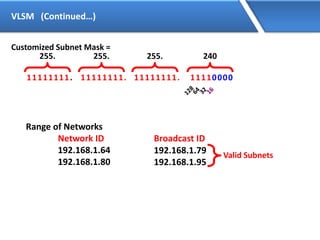
VLSM (Continued…)
Customized Subnet Mask =
255.
11111111.
255.
11111111.
255.
11111111. 11110000
240
Range of Networks
Network ID Broadcast ID
192.168.1.64
192.168.1.80
192.168.1.79
192.168.1.95
Valid Subnets
Assigning of the Ranges
192.168.1.64 – 1.79/28
192.168.1.80 – 1.95/28
ZOOM Technologies
– MCSE
– CISCO
– CCNA
– CCNP
– FIREWALL
– ISA
– Checkpoint
– NetASQ
– Clavister
– Cisco PIX
– SOLARIS
– Linux
– Unix
– Solaris
– TRAINING
192.168.1.32 – 1.63/27
192.168.1.64 – 1.95/27
192.168.1.96 – 1.127/27
192.168.1.128 – 1.159/27
192.168.1.160 – 1.191/27
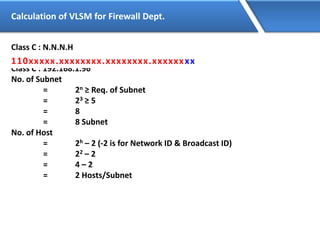
Calculation of VLSM for Firewall Dept.
Class C : N.N.N.H
110xxxxx.xxxxxxxx.xxxxxxxx.xxxxxxxx
Class C : 192.168.1.96
No. of Subnet
= 2n ≥ Req. of Subnet
= 23 ≥ 5
= 8
= 8 Subnet
No. of Host
= 2h – 2 (-2 is for Network ID & Broadcast ID)
= 22 – 2
= 4 – 2
= 2 Hosts/Subnet
110xxxxx.xxxxxxxx.xxxxxxxx.xxxxxxxx
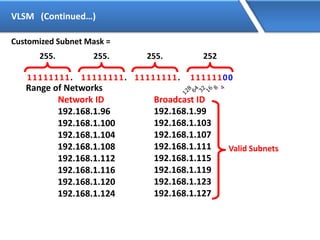
VLSM (Continued…)
Customized Subnet Mask =
255.
11111111.
255.
11111111.
255.
11111111. 11111100
252
Range of Networks
Network ID Broadcast ID
192.168.1.96
192.168.1.100
192.168.1.104
192.168.1.108
192.168.1.112
192.168.1.116
192.168.1.120
192.168.1.124
192.168.1.99
192.168.1.103
192.168.1.107
192.168.1.111
192.168.1.115
192.168.1.119
192.168.1.123
192.168.1.127
Valid Subnets
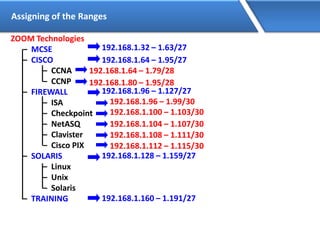
Assigning of the Ranges
192.168.1.96 – 1.99/30
192.168.1.100 – 1.103/30
192.168.1.104 – 1.107/30
192.168.1.108 – 1.111/30
192.168.1.112 – 1.115/30
ZOOM Technologies
– MCSE
– CISCO
– CCNA
– CCNP
– FIREWALL
– ISA
– Checkpoint
– NetASQ
– Clavister
– Cisco PIX
– SOLARIS
– Linux
– Unix
– Solaris
– TRAINING
192.168.1.32 – 1.63/27
192.168.1.64 – 1.95/27
192.168.1.96 – 1.127/27
192.168.1.128 – 1.159/27
192.168.1.160 – 1.191/27
192.168.1.64 – 1.79/28
192.168.1.80 – 1.95/28
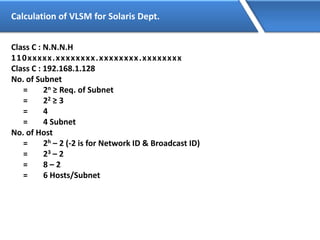
Calculation of VLSM for Solaris Dept.
Class C : N.N.N.H
110xxxxx.xxxxxxxx.xxxxxxxx.xxxxxxxx
Class C : 192.168.1.128
No. of Subnet
= 2n ≥ Req. of Subnet
= 22 ≥ 3
= 4
= 4 Subnet
No. of Host
= 2h – 2 (-2 is for Network ID & Broadcast ID)
= 23 – 2
= 8 – 2
= 6 Hosts/Subnet
VLSM (Continued…)
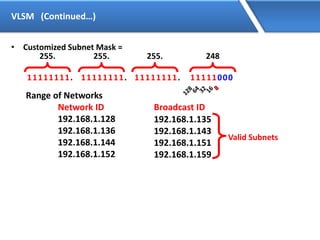
• Customized Subnet Mask =
255.
11111111.
255.
11111111.
255.
11111111. 11111000
248
Range of Networks
Network ID Broadcast ID
192.168.1.128
192.168.1.136
192.168.1.144
192.168.1.152
192.168.1.135
192.168.1.143
192.168.1.151
192.168.1.159
Valid Subnets
Assigning of the Ranges
192.168.1.128 – 1.135/29
192.168.1.136 – 1.143/29
192.168.1.144 – 1.151/29
ZOOM Technologies
– MCSE
– CISCO
– CCNA
– CCNP
– FIREWALL
– ISA
– Checkpoint
– NetASQ
– Clavister
– Cisco PIX
– SOLARIS
– Linux
– Unix
– Solaris
– TRAINING
192.168.1.32 – 1.63/27
192.168.1.64 – 1.95/27
192.168.1.96 – 1.127/27
192.168.1.128 – 1.159/27
192.168.1.160 – 1.191/27
192.168.1.96 – 1.99/30
192.168.1.100 – 1.103/30
192.168.1.104 – 1.107/30
192.168.1.108 – 1.111/30
192.168.1.112 – 1.115/30
192.168.1.64 – 1.79/28
192.168.1.80 – 1.95/28
OSI
• OSI was developed by the International Organization for Standardization
(ISO) and introduced in 1984.
• It is a layered architecture (consists of seven layers).
• Each layer defines a set of functions which takes part in data
communication.
OSI Model Layers
Application
Presentation
Session
Transport
Network
Data Link
Physical
Layer - 7
Layer - 6
Layer - 5
Layer - 4
Layer - 3
Layer - 2
Layer - 1
User support Layers
or
Software Layers
Network support Layers
or
Hardware Layers
Core layer of the
OSI
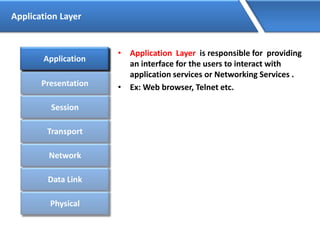
Application Layer
• Application Layer is responsible for providing
an interface for the users to interact with
application services or Networking Services .
• Ex: Web browser, Telnet etc.
Application
Presentation
Session
Transport
Network
Data Link
Physical
Application
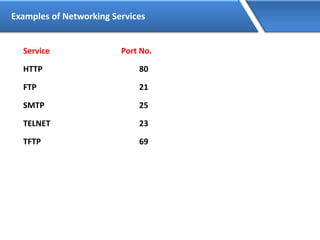
Examples of Networking Services
Service Port No.
HTTP 80
FTP 21
SMTP 25
TELNET 23
TFTP 69
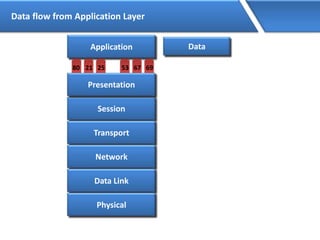
Data flow from Application Layer
Application
2180 25 6753 69
Session
Transport
Network
Data Link
Physical
Presentation
Data
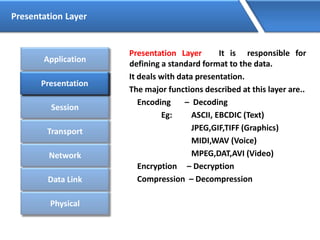
Presentation Layer
Presentation Layer It is responsible for
defining a standard format to the data.
It deals with data presentation.
The major functions described at this layer are..
Encoding – Decoding
Eg: ASCII, EBCDIC (Text)
JPEG,GIF,TIFF (Graphics)
MIDI,WAV (Voice)
MPEG,DAT,AVI (Video)
Encryption – Decryption
Compression – Decompression
Application
Presentation
Session
Transport
Network
Data Link
Physical
Presentation
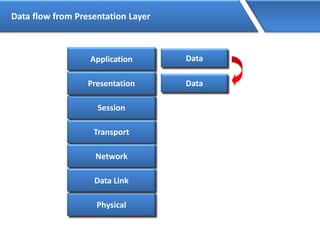
Data flow from Presentation Layer
Physical
Application
Session
Transport
Network
Data Link
Presentation
Data
Data
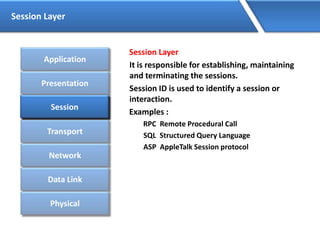
Session Layer
Session Layer
It is responsible for establishing, maintaining
and terminating the sessions.
Session ID is used to identify a session or
interaction.
Examples :
RPC Remote Procedural Call
SQL Structured Query Language
ASP AppleTalk Session protocol
Application
Presentation
Session
Transport
Network
Data Link
Physical
Session
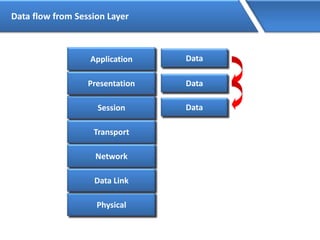
Data flow from Session Layer
Physical
Application
Session
Transport
Network
Data Link
Presentation
Data
Data
Data
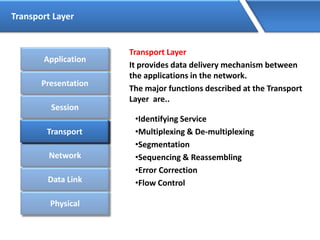
Transport Layer
Transport Layer
It provides data delivery mechanism between
the applications in the network.
The major functions described at the Transport
Layer are..
•Identifying Service
•Multiplexing & De-multiplexing
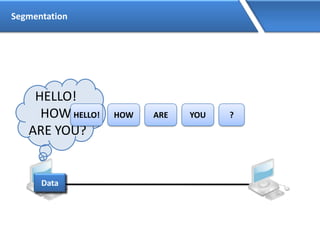
•Segmentation
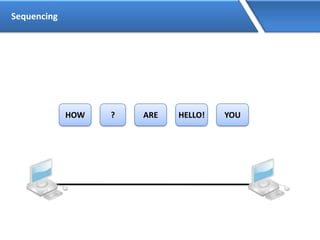
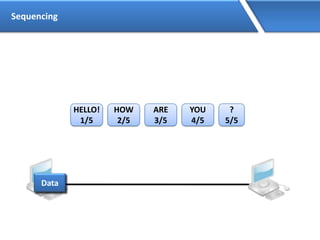
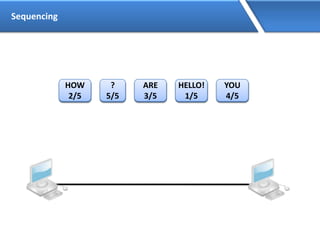
•Sequencing & Reassembling
•Error Correction
•Flow Control
Application
Presentation
Session
Transport
Network
Data Link
Physical
Transport
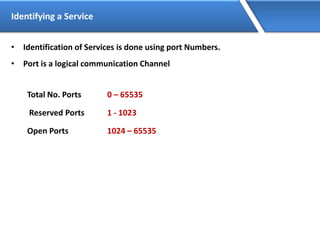
Identifying a Service
• Identification of Services is done using port Numbers.
• Port is a logical communication Channel
Total No. Ports 0 – 65535
Reserved Ports 1 - 1023
Open Ports 1024 – 65535
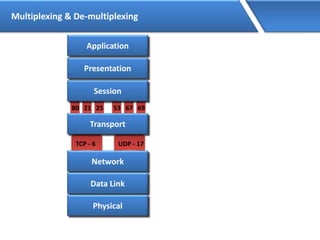
Multiplexing & De-multiplexing
TCP - 6 UDP - 17
2180 25 6753 69
Transport
Network
Data Link
Physical
Session
Presentation
Application
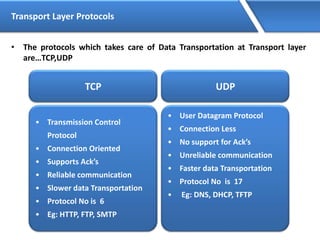
Transport Layer Protocols
• The protocols which takes care of Data Transportation at Transport layer
are…TCP,UDP
TCP
• Transmission Control
Protocol
• Connection Oriented
• Supports Ack’s
• Reliable communication
• Slower data Transportation
• Protocol No is 6
• Eg: HTTP, FTP, SMTP
UDP
• User Datagram Protocol
• Connection Less
• No support for Ack’s
• Unreliable communication
• Faster data Transportation
• Protocol No is 17
• Eg: DNS, DHCP, TFTP
Segmentation
HELLO!
HOW
ARE YOU?
HELLO! HOW ARE YOU ?
Data
Sequencing
HELLO!
HOW
ARE YOU?
HELLO! HOW ARE YOU ?
Data
Sequencing
HELLO!HOW ARE YOU?
Sequencing
HELLO!
1/5
HOW
2/5
ARE
3/5
YOU
4/5
?
5/5
Data
Sequencing
HELLO!
1/5
HOW
2/5
ARE
3/5
YOU
4/5
?
5/5
HELLO!
1/5
HOW
2/5
ARE
3/5
YOU
4/5
?
5/5
Data flow from Transport Layer
Physical
Application
Presentation
Session
Transport
Network
Data Link
Data
Data
Data
DataTHSegment
Network Layer
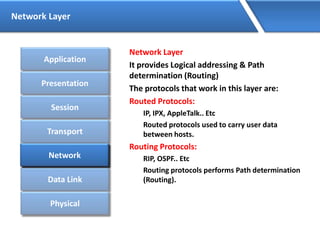
Network Layer
It provides Logical addressing & Path
determination (Routing)
The protocols that work in this layer are:
Routed Protocols:
IP, IPX, AppleTalk.. Etc
Routed protocols used to carry user data
between hosts.
Routing Protocols:
RIP, OSPF.. Etc
Routing protocols performs Path determination
(Routing).
Application
Presentation
Session
Transport
Network
Data Link
Physical
Network
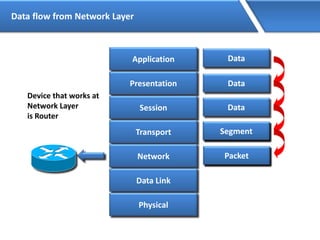
Data flow from Network Layer
Application
Presentation
Session
Transport
Network
Data Link
Physical
Data
Data
Data
DataTHSegment
SegmentNH Packet
Device that works at
Network Layer
is Router
Datalink Layer
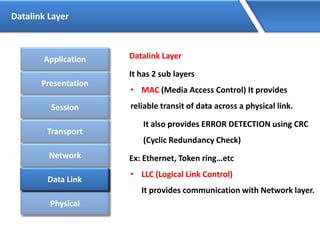
Datalink Layer
It has 2 sub layers
• MAC (Media Access Control) It provides
reliable transit of data across a physical link.
It also provides ERROR DETECTION using CRC
(Cyclic Redundancy Check)
Ex: Ethernet, Token ring…etc
• LLC (Logical Link Control)
It provides communication with Network layer.
Application
Presentation
Session
Transport
Network
Data Link
Physical
Data Link
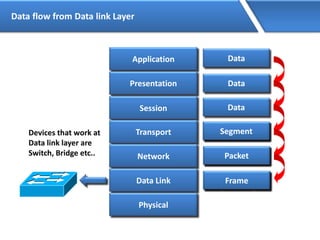
Data flow from Data link Layer
Application
Presentation
Session
Transport
Network
Data Link
Physical
Data
Data
Data
DataTHSegment
SegmentNH Packet
DT Packet DHFrame
Devices that work at
Data link layer are
Switch, Bridge etc..
Physical Layer
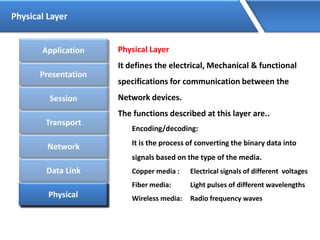
Physical Layer
It defines the electrical, Mechanical & functional
specifications for communication between the
Network devices.
The functions described at this layer are..
Encoding/decoding:
It is the process of converting the binary data into
signals based on the type of the media.
Copper media : Electrical signals of different voltages
Fiber media: Light pulses of different wavelengths
Wireless media: Radio frequency waves
Application
Presentation
Session
Transport
Network
Data Link
PhysicalPhysical
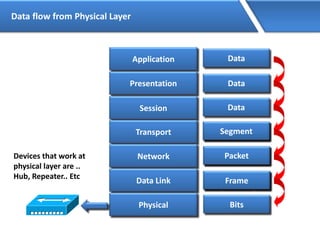
Data flow from Physical Layer
Application
Presentation
Session
Transport
Network
Data Link
Physical
Data
Data
Data
DataTHSegment
SegmentNH Packet
DT Packet DHFrame
Bits
Devices that work at
physical layer are ..
Hub, Repeater.. Etc
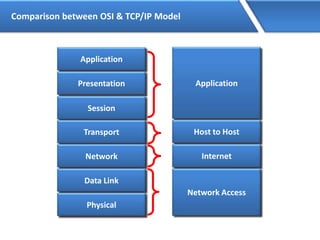
Comparison between OSI & TCP/IP Model
Application
Presentation
Session
Transport
Network
Data Link
Physical
Application
Host to Host
Internet
Network Access

Computer networking

  • 1.
  • 2.
    Network • Interconnection oftwo or more devices is called as a network. • The communication between two or more interconnected devices is called networking. • An internetwork is a connection of two or more networks. • Internetworking means communication between different networks.
  • 3.
    Types of Networks •LAN Local Area Networks are used to connect networking devices that are in a very close geographic area such as a floor of a building, a building itself or within a campus. • MAN Metropolitan Area Network are used to connect networking devices that may span around the entire city. • WAN Wide Area Networks which connects two or more LANs present at different geographical locations.
  • 4.
  • 5.
  • 6.
  • 7.
    Basic requirements toform a network • NIC (Network interface card) also called as LAN card • Media • Networking devices (Hub, Switch, Router, etc.) • Protocols • Logical Address (IP address)
  • 8.
    NIC(Network Interface Card) •NIC is the interface between the computer and the network • It is also known as the Lan card or Ethernet card • Ethernet cards have a unique 48 bit address called as MAC (Media access control) address – MAC address is also called as Physical address or hardware address – The 48 bit MAC address is represented as 12 Hexa-decimal digits – Example: 0 0 1 6 . D 3 F C . 6 0 3 F • Network cards are available in different speeds – Ethernet (10 Mbps) – Fast Ethernet (100 Mbps) – Gigabit Ethernet (1000 Mbps)
  • 9.
    Media • The purposeof the media is to transport bits from one machine to another. Media Guided Unguided Co-axial Twisted pair Fiber UTP STP Infrared RF
  • 10.
  • 11.
    Networking devices The varioustypes of networking devices are: • Repeater • Hub • Bridge • Switch • Router
  • 12.
    Hub / Repeater •It is not an Intelligent Device. • It works with bits. • Uses broadcast for communication. • Bandwidth is shared. • Half-duplex communication.
  • 13.
  • 14.
  • 15.
    Switch • It isan Intelligent device. • It maintains MAC address table (hardware address). • Each port of the switch has fixed bandwidth. • It works with Flooding and Unicast. • Supports full duplex communication
  • 16.
    Functions of aSwitch • MAC Address Learning • Forwarding
  • 17.
  • 18.
    Functions of Switch MACADDRESS TABLE PORT MAC-ADDRESS 1 2 3 4 5 6 7 8 001C-C01A-0002 001C-C01A-0004 001C-C01A-0002 1 2 3 4 5 6 7 8 S D DataDataDataDataDataData Data Source MAC 001C.C01A.0002 Destination MAC 001C.C01A.0004 DATA Source MAC 001C.C01A.0002 Destination MAC 001C.C01A.0004 DATA
  • 19.
    Functions of Switch MACADDRESS TABLE PORT MAC-ADDRESS Fa0/1 Fa0/2 001C-C01A-0002 Fa0/3 Fa0/4 Fa0/5 Fa0/6 Fa0/7 Fa0/8 001C-C01A-0004 001C-C01A-0002 001C-C01A-0004 1 2 3 4 5 6 7 8 D S Data
  • 20.
    Difference between Bridgeand Switch Bridge • Bridges are software based • Bridges have less number of ports • Generally used for connecting two different topology (Segment) Switch • Switches are hardware based • Switches have more ports • Generally used for connecting single topology (Segment)
  • 21.
    Router • It isan Intelligent device • It works with Logical Addressing (i.e. IP, IPX, AppleTalk) • It works with Fixed bandwidth
  • 22.
    Interconnecting Network Devices PCHUB Bridge Switch Router PC Cross Cable Straight Cross Cable Straight Cross Cable HUB Straight Cross Cable Straight Cross Straight Bridge Cross Cable Straight Cross Cable Straight Cross Cable Switch Straight Cross Straight Cross Cable Straight Router Cross Cable Straight Cross Cable Straight Cross Cable
  • 23.
    Topology Topology is aphysical layout of the systems connected in a network. Different types of topology are: • Bus • Ring • Mesh • Star
  • 24.
    Bus Topology • Inbus topology all devices are connected to a single cable or backbone. • It supports half duplex communication. • A break at any point along the backbone will result in total network failure.
  • 25.
    Ring Topology • Inring topology each computer or device is connected to its neighbor forming a loop. • Failure of a single device or a break anywhere in the cable causes the full network to stop communicating
  • 26.
    Mesh Topology • Inmesh topology each device is directly connected to all other devices • The disadvantage is the number of NIC’s required on each device and the complex cabling.
  • 27.
    Star Topology • Themost commonly used topology • It consist of one centralized device which can be either a switch or a hub. • The devices connect to the various ports on the centralized devices. HUB/Switch
  • 29.
    IP Address • IPAddress is a Logical Address • It is a Network Layer address (Layer 3) • Two Versions of IP: • IP version 4 is a 32 bit address • IP version 6 is a 128 bit address
  • 30.
    IP version 4 •Bit is represent by 0 or 1 (i.e. Binary) • IP address in binary form (32 bits): 0 1 0 1 0 1 0 1 0 0 0 0 0 1 0 1 1 0 1 1 1 1 1 1 0 0 0 0 0 0 0 1 • 32 bits are divided into 4 Octets: 0 1 0 1 0 1 0 1 . 0 0 0 0 0 1 0 1 . 1 0 1 1 1 1 1 1 . 0 0 0 0 0 0 0 1 • IP address in decimal form: 85.5.191.1 First Octet Second Octet Third Octet Forth Octet
  • 31.
    IPv4 address range TakingExample for First Octet : Total 8 bits, Value will be 0’s and 1’s i.e. 2⁸ = 256 combination 27 26 25 24 23 22 21 20 0 0 0 0 0 0 0 0 = 0 0 0 0 0 0 0 0 1 = 1 0 0 0 0 0 0 1 0 = 2 0 0 0 0 0 0 1 1 = 3 0 0 0 0 0 1 0 0 = 4 1 1 1 1 1 1 1 1 = 255 Total IP Address Range 0 . 0 . 0 . 0 to 255.255.255.255
  • 32.
    IP Address Classification •IP Addresses are divided into 5 Classes • CLASS A • CLASS B • CLASS C • CLASS D • CLASS E Used in LAN & WAN Reserved for Multicasting Reserved for Research & Development
  • 33.
    Priority Bit • PriorityBit is used for IP Address classification. • Most significant bit(s) from the first octet are selected for Priority Bit(s). • Class A priority bit is 0 • Class B priority bits are 10 • Class C priority bits are 110 • Class D priority bits are 1110 • Class E priority bits are 1111
  • 34.
    Class A Range •In Class A : First bit of the first octet is reserved as priority bit, bit value is zero. • 0 x x x x x x x . x x x x x x x x . x x x x x x x x . x x x x x x x x 27 26 25 24 23 22 21 20 0 0 0 0 0 0 0 0 = 0 0 0 0 0 0 0 0 1 = 1 0 0 0 0 0 0 1 0 = 2 0 0 0 0 0 0 1 1 = 3 0 0 0 0 0 1 0 0 = 4 0 1 1 1 1 1 1 1 = 127 Class A Range 0 . 0 . 0 . 0 to 127.255.255.255 Exception 0.X.X.X and 127.X.X.X networks are reserved
  • 35.
    Class B Range •In Class B : First two bits of the first octet are reserved as priority bits, bit value as 10. • 1 0 x x x x x x . x x x x x x x x . x x x x x x x x . Xx x x x x x x 27 26 25 24 23 22 21 20 1 0 0 0 0 0 0 0 = 128 1 0 0 0 0 0 0 1 = 129 1 0 0 0 0 0 1 0 = 130 1 0 0 0 0 0 1 1 = 131 1 0 0 0 0 1 0 0 = 132 1 0 1 1 1 1 1 1 = 191 Class B Range 128 . 0 . 0 . 0 to 191 . 255 . 255 .255
  • 36.
    Class C Range •In Class C : First three bits of the first octet are reserved as priority bits, bit value as 110. • 1 1 0 x x x x x . x x x x x x x x . x x x x x x x x . Xx x x x x x x 27 26 25 24 23 22 21 20 1 1 0 0 0 0 0 0 = 192 1 1 0 0 0 0 0 1 = 193 1 1 0 0 0 0 1 0 = 194 1 1 0 0 0 0 1 1 = 195 1 1 0 0 0 1 0 0 = 196 1 1 0 1 1 1 1 1 = 223 Class C Range 192 . 0 . 0 . 0 to 223 . 255 . 255 .255
  • 37.
    Class D Range •In Class D : First four bits of the first octet are reserved as priority bits, bit value as 1110. • 1 1 1 0 x x x x . x x x x x x x x . x x x x x x x x . Xx x x x x x x 27 26 25 24 23 22 21 20 1 1 1 0 0 0 0 0 = 224 1 1 1 0 0 0 0 1 = 225 1 1 1 0 0 0 1 0 = 226 1 1 1 0 0 0 1 1 = 227 1 1 1 0 0 1 0 0 = 228 1 1 1 0 1 1 1 1 = 239 Class D Range 224 . 0 . 0 . 0 to 239 . 255 . 255 .255
  • 38.
    Class E Range •In Class E : First four bits of the first octet are reserved as priority bits, bit value as 1111. • 1 1 1 1 x x x x . x x x x x x x x . x x x x x x x x . Xx x x x x x x 27 26 25 24 23 22 21 20 1 1 1 1 0 0 0 0 = 240 1 1 1 1 0 0 0 1 = 241 1 1 1 1 0 0 1 0 = 242 1 1 1 1 0 0 1 1 = 243 1 1 1 1 0 1 0 0 = 244 1 1 1 1 1 1 1 1 = 255 Class E Range 240 . 0 . 0 . 0 to 255 . 255 . 255 .255
  • 39.
    Octet Format • IPaddress is divided into Network & Host Portion CLASS A is written as N . H . H . H CLASS B is written as N . N . H . H CLASS C is written as N . N . N . H
  • 40.
    CLASS A –No. Networks & Hosts • Class A Octet Format is N. H. H. H Network bits : 8 Host bits : 24 • No. of Networks = 2no of network bits– Priority bit = 28-1 (-1 is Priority Bit for Class A) = 27 = 128 – 2 (-2 is for 0 & 127 Network) = 126 Networks • No. of Host = 2no of host bits -2 = 224 – 2 (-2 is for Network ID & Broadcast ID) = 16777216 - 2 = 16777214 Hosts/Network
  • 41.
    CLASS B –No. Networks & Hosts • Class B Octet Format is N. N. H. H Network bits : 16 Host bits : 16 • No. of Networks = 2no of network bits– Priority bit = 216-2 (-2 is Priority Bit for Class B) = 214 = 16384 Networks • No. of Host = 2no of host bits -2 = 216 – 2 (-2 is for Network ID & Broadcast ID) = 65536 - 2 = 65534 Hosts/Network
  • 42.
    CLASS C –No. Networks & Hosts • Class C Octet Format is N. N. N. H Network bits : 24 Host bits : 8 • No. of Networks = 2no of network bits– Priority bit = 224-3 (-3 is Priority Bit for Class C) = 221 = 2097152 Networks • No. of Host = 2no of host bits -2 = 28 – 2 (-2 is for Network ID & Broadcast ID) = 256 - 2 = 254 Hosts/Network
  • 43.
    Network & BroadcastAddress • Network address: IP address with all bits as ZERO in the host portion. • Broadcast address: IP address with all bits as ONES in the host portion. • Valid IP Addresses lie between the Network Address and the Broadcast Address. • Only Valid IP Addresses are assigned to hosts/clients
  • 44.
    Example - ClassA • Class A : N.H.H.H Network Address : 0xxxxxxx.00000000.00000000.00000000 Broadcast Address : 0xxxxxxx.11111111.11111111.11111111Class A 10.0.0.0 10.0.0.1 10.0.0.2 10.0.0.3 10.255.255.254 10.255.255.255 Network Address Broadcast Address Valid IP Addresses
  • 45.
    Example - ClassB • Class B : N.N.H.H Network Address : 10xxxxxx.xxxxxxxx.00000000.00000000 Broadcast Address : 10xxxxxx.xxxxxxxx.11111111.11111111Class B 172.16.0.0 172.16.0.1 172.16.0.2 172.16.0.3 172.16.255.254 172.16.255.255 Network Address Broadcast Address Valid IP Addresses
  • 46.
    Example - ClassC • Class C : N.N.N.H Network Address : 110xxxxx.xxxxxxxx.xxxxxxxx.00000000 Broadcast Address : 110xxxxx.xxxxxxxx.xxxxxxxx.11111111 Class C 192.168.1.0 192.168.1.1 192.168.1.2 192.168.1.3 192.168.1.254 192.168.1.255 Network Address Broadcast Address Valid IP Addresses
  • 47.
    Private IP Address •There are certain addresses in each class of IP address that are reserved for Private Networks. These addresses are called private addresses. • These addresses are not Routable (or) valid on Internet. Class A 10.0.0.0 to 10.255.255.255 Class B 172.16.0.0 to 172.31.255.255 Class C 192.168.0.0 to 192.168.255.255
  • 48.
    Subnet Mask • SubnetMask differentiates the Network and Host portions of an IP address • Represented with all 1’s in the network portion and with all 0’s in the host portion.
  • 49.
    Subnet Mask -Examples • Class A : N.H.H.H 11111111.00000000.00000000.00000000 Default Subnet Mask for Class A is 255.0.0.0 • Class B : N.N.H.H 11111111.11111111.00000000.00000000 Default Subnet Mask for Class B is 255.255.0.0 • Class C : N.N.N.H 11111111.11111111.11111111.00000000 Default Subnet Mask for Class C is 255.255.255.0
  • 50.
    How Subnet MaskWorks ? IP Address : 192.168.1.1 Subnet Mask : 255.255.255.0 ANDING PROCESS : 192.168.1.1 = 11000000.10101000.00000001.00000001 255.255.255.0 = 11111111.11111111.11111111.00000000 ================================================== 192.168.1.0 = 11000000.10101000.00000001.00000000 ================================================== The output of an AND table is 1 if both its inputs are 1. For all other possible inputs the output is 0.
  • 52.
    Subnetting • Creating Multipleindependent Networks from a Single Network. • Converting Host bits into Network Bits i.e. Converting 0’s into 1’s • Subnetting can be performed in two ways. – FLSM (Fixed Length Subnet Mask) – VLSM (Variable Length subnet mask) • Subnetting can be done based on requirement . – Number of Networks required? – Number of Hosts required?
  • 53.
    Scenario for subnetting •CMS Technologies is having 100 PCs • Which IP address Class is preferred for the network ? Answer : Class C. • In CMS Technologies there are 2 Departments with 50 PCs each CMS Technologies – 192.168.1.0/24 – MCSE 192.168.1.1 to 192.168.1.50 192.168.1.51 to 192.168.1.100– CISCO
  • 54.
  • 55.
  • 56.
    Scenario (…continued) • Administrator’sRequirement : Inter-department communication should not be possible ? Solution. Allocate a different Network to each Department i.e. – MCSE 192.168.1.1 to 192.168.1.50 192.168.2.1 to 192.168.2.50– CISCO
  • 57.
  • 58.
  • 59.
    Main Aim ofSubnetting • Problem with the previous Scenario is :- • Wastage of IP addresses if it is public(Approximately 400)
  • 60.
    Power table POWER TABLE 21= 2 22 = 4 23 = 8 24 = 16 25 = 32 26 = 64 27 = 128 28 = 256 29 = 512 210 = 1024 211 = 2048 212 = 4096 213 = 8192 214 = 16384 215 = 32768 216 = 65536 217 = 131072 218 = 262144 219 = 524288 220 = 1048576 221 = 2097152 222 = 4194304 223 = 8388608 224 = 16777216 225 = 33554432 226 = 67108864 227 = 134217728 228 = 268435456 229 = 536870912 230 = 1073741824 231 = 2147483648 232 = 4294967296
  • 61.
    Some Important Values VALUESIN SUBNET MASK Bit Value Mask 1 128 10000000 2 192 11000000 3 224 11100000 4 240 11110000 5 248 11111000 6 252 11111100 7 254 11111110 8 255 11111111
  • 62.
    Requirement of Networksis 2 ? Example – 1 Class C : N.N.N.H 110xxxxx.xxxxxxxx.xxxxxxxx.xxxxxxxx Class C : 192.168.1.0 No. of Subnet = 2n – 2 ≥ Req. of Subnet = 22 – 2 ≥ 2 (-2 is for First & Last Subnet Range) = 4 – 2 = 2 Subnet No. of Host = 2h – 2 (-2 is for Network ID & Broadcast ID) = 26 – 2 = 64 – 2 = 62 Hosts/Subnet
  • 63.
    Example – 1(Continued…) • Customized Subnet Mask = 255. 11111111. 255. 11111111. 255. 11111111. 11000000 192 Range of Networks Network ID Broadcast ID 192.168.1.0 192.168.1.64 192.168.1.128 192.168.1.192 192.168.1.63 192.168.1.127 192.168.1.191 192.168.1.255 Valid Subnets 192.168.1.0 192.168.1.63 192.168.1.192 192.168.1.255 If you convert 2 Host Bits to Network Bits 2 Subnet & 62 Hosts/Subnet Customized Subnet Mask 255.255.255.192 Subnet Range 192.168.1.64 to 192.168.1.127  MCSE 192.168.1.128 to 192.168.1.191  CISCO
  • 65.
    Requirement of subnetis 14? Example -2 CLASS C: N.N.N.H 110xxxxx.xxxxxxxx.xxxxxxxx.xxxxxxxx Class C : 192.168.1.0 No. of Subnet = 2n – 2 ≥ Req. of Subnet = 24 – 2 ≥ 14(-2 is for First & Last Subnet Range) = 16– 2 = 14 Subnet No. of Host = 2h – 2 (-2 is for Network ID & Broadcast ID) = 24 – 2 = 16 – 2 = 14 Hosts/Subnet
  • 66.
    EXAMPLE – 2(Continued…) Customized Subnet Mask = 255. 11111111. 255. 11111111. 255. 11111111. 11110000 240 Range of Networks Network ID Broadcast ID 192.168.1.0 192.168.1.16 192.168.1.32 192.168.1.48 192.168.1.224 192.168.1.240 192.168.1.15 192.168.1.31 192.168.1.47 192.168.1.63 192.168.1.239 192.168.1.255 Valid Subnets 192.168.1.0 192.168.1.15 192.168.1.240 192.168.1.255 If you convert 4 Host Bits to Network Bits 14 Subnet & 14 Hosts/Subnet Customized Subnet Mask 255.255.255.240 Subnet Range 192.168.1.16 to 192.168.1.31 192.168.1.32 to 192.168.1.47 192.168.1.48 to 192.168.1.63 192.168.1.64 to 192.168.1.79 192.168.1.240 to 192.168.1.255
  • 67.
    Requirement of Hostsis 40 ? Example – 3 Class C : N.N.N.H 110xxxxx.xxxxxxxx.xxxxxxxx.xxxxxxxx Class C : 192.168.1.0 No. of Host = 2h – 2 ≥ Req. of Host = 26 – 2 ≥ 40 (-2 is for Network ID & Broadcast ID) = 64 – 2 = 62 Hosts/Subnet No. of Subnet = 2n – 2 (-2 is for First & Last Subnet Range) = 22 – 2 = 4 – 2 = 2 Subnet
  • 68.
    Example – 3(Continued…) Customized Subnet Mask = 255. 11111111. 255. 11111111. 255. 11111111. 11000000 192 Range of Networks Network ID Broadcast ID 192.168.1.0 192.168.1.64 192.168.1.128 192.168.1.192 192.168.1.63 192.168.1.127 192.168.1.191 192.168.1.255 Valid Subnets 192.168.1.0 192.168.1.63 192.168.1.192 192.168.1.255 If you convert 2 Host Bits to Network Bits 2 Subnet & 62 Hosts/Subnet Customized Subnet Mask 255.255.255.192 Subnet Range 192.168.1.64 to 192.168.1.127 192.168.1.128 to 192.168.1.191
  • 69.
    Requirement of Hostsis 2 ? Example – 2 Class C : N.N.N.H 110xxxxx.xxxxxxxx.xxxxxxxx.xxxxxxxx Class C : 192.168.1.0 No. of Host = 2h – 2 ≥ Req. of Host = 22 – 2 ≥ 2 (-2 is for Network ID & Broadcast ID) = 4 – 2 = 2 Hosts/Subnet No. of Subnet = 2n – 2 (-2 is for First & Last Subnet Range) = 26 – 2 = 64 – 2 = 62 Subnet
  • 70.
    Example – 2(Continued…) • Customized Subnet Mask = 255. 11111111. 255. 11111111. 255. 11111111. 11111100 252 Range of Networks Network ID Broadcast ID 192.168.1.0 192.168.1.4 192.168.1.8 192.168.1.12 192.168.1.248 192.168.1.252 192.168.1.3 192.168.1.7 192.168.1.11 192.168.1.15 192.168.1.251 192.168.1.255 Valid Subnets 192.168.1.0 192.168.1.3 192.168.1.252 192.168.1.255
  • 71.
    Requirement of Networksis 2 ? Example – 4 Class B : N.N.H.H 10xxxxxx.xxxxxxxx.xxxxxxxx.xxxxxxxx Class B : 172.16.0.0 No. of Subnet = 2n – 2 ≥ Req. of Subnet = 22 – 2 ≥ 2 (-2 is for First & Last Subnet Range) = 4 – 2 = 2 Subnet No. of Host = 2h – 2 (-2 is for Network ID & Broadcast ID) = 214 – 2 = 16384 – 2 = 16382 Hosts/Subnet
  • 72.
    Example – 4(Continued…) • Customized Subnet Mask = 255. 11111111. 255. 11111111. 0 11000000. 00000000 192. Range of Networks Network ID Broadcast ID 172.16.0.0 172.16.64.0 172.16.128.0 172.16.192.0 172.16.63.255 172.16.127.255 172.16.191.255 172.16.255.255 Valid Subnets 172.16.0.0 172.16.63.255 172.16.192.0 172.16.255.255
  • 73.
    Requirement of Hostsis 126 ? Example – 5 Class B : N.N.H.H 10xxxxxx.xxxxxxxx.xxxxxxxx.xxxxxxxx Class B : 172.16.0.0 No. of Host = 2h – 2 ≥ Req. of Host = 27 – 2 ≥ 126 (-2 is for Network ID & Broadcast ID) = 128 – 2 = 126 Hosts/Subnet No. of Subnet = 2n – 2 (-2 is for First & Last Subnet Range) = 29 – 2 = 512 – 2 = 510 Subnet
  • 74.
    Example – 2(Continued…) • Customized Subnet Mask = 255. 11111111. 255. 11111111. 255. 11111111. 10000000 128 Range of Networks Network ID Broadcast ID 172.16.0.0 172.16.0.128 172.16.1.0 172.16.1.128 172.16.255.0 172.16.255.128 172.16.0.127 172.16.0.255 172.16.1.127 172.16.1.255 172.16.255.127 172.16.255.255 Valid Subnets 172.16.0.0 172.16.0.127 172.16.255.128 172.16.255.255
  • 75.
    VLSM • Subnetting asubnet is called as Variable Length Subnet Mask • VLSMs provide the capability to include more than one subnet mask within a major network
  • 76.
    Scenario • ZOOM Technologiesis having 100 PC ZOOM Technologies – 192.168.1.0/24 – MCSE – CISCO – FIREWALL – SOLARIS – TRAINING Administrator’s requirement : Inter-department communication should not be possible ? Best Solution is : FLSM i.e. Subnetting
  • 77.
    Scenario (…continued) • Nowwe are also having sub departments ZOOM Technologies – MCSE – CISCO – CCNA – CCNP – FIREWALL – ISA – Checkpoint – NetASQ – Clavister – Cisco PIX – SOLARIS – Linux – Unix – Solaris – TRAINING
  • 78.
    Scenario (…continued) Administrator doesnot want inter-department communication in the sub departments ? Answer : You will use the subnet range to further divide it into smaller ranges, this time its Subnetting of a Subnet i.e. VLSM.
  • 79.
    Calculation of FLSM ClassC : N.N.N.H 110xxxxx.xxxxxxxx.xxxxxxxx.xxxxxxxx Class C : 192.168.1.0 No. of Subnet = 2n – 2 ≥ Req. of Subnet = 23 – 2 ≥ 5 (-2 is for First & Last Subnet Range) = 8 – 2 = 6 Subnet No. of Host = 2h – 2 (-2 is for Network ID & Broadcast ID) = 25 – 2 = 32 – 2 = 30 Hosts/Subnet
  • 80.
    Example – 1(Continued…) • Customized Subnet Mask = 255. 11111111. 255. 11111111. 255. 11111111. 11100000 224 Range of Networks Network ID Broadcast ID 192.168.1.0 192.168.1.32 192.168.1.64 192.168.1.96 192.168.1.128 192.168.1.160 192.168.1.192 192.168.1.224 192.168.1.31 192.168.1.63 192.168.1.95 192.168.1.127 192.168.1.159 192.168.1.191 192.168.1.223 192.168.1.255 Valid Subnets 192.168.1.0 192.168.1.31 192.168.1.224 192.168.1.255
  • 81.
    Assigning of theRanges ZOOM Technologies – MCSE – CISCO – CCNA – CCNP – FIREWALL – ISA – Checkpoint – NetASQ – Clavister – Cisco PIX – SOLARIS – Linux – Unix – Solaris – TRAINING 192.168.1.32 – 1.63/27 192.168.1.64 – 1.95/27 192.168.1.96 – 1.127/27 192.168.1.128 – 1.159/27 192.168.1.160 – 1.191/27
  • 82.
    Calculation of VLSMfor CISCO Dept. Class C : N.N.N.H 110xxxxx.xxxxxxxx.xxxxxxxx.xxxxxxxx Class C : 192.168.1.64 No. of Subnet = 2n ≥ Req. of Subnet = 21 ≥ 2 = 2 = 2 Subnet No. of Host = 2h – 2 (-2 is for Network ID & Broadcast ID) = 24 – 2 = 16 – 2 = 14 Hosts/Subnet
  • 83.
    VLSM (Continued…) Customized SubnetMask = 255. 11111111. 255. 11111111. 255. 11111111. 11110000 240 Range of Networks Network ID Broadcast ID 192.168.1.64 192.168.1.80 192.168.1.79 192.168.1.95 Valid Subnets
  • 84.
    Assigning of theRanges 192.168.1.64 – 1.79/28 192.168.1.80 – 1.95/28 ZOOM Technologies – MCSE – CISCO – CCNA – CCNP – FIREWALL – ISA – Checkpoint – NetASQ – Clavister – Cisco PIX – SOLARIS – Linux – Unix – Solaris – TRAINING 192.168.1.32 – 1.63/27 192.168.1.64 – 1.95/27 192.168.1.96 – 1.127/27 192.168.1.128 – 1.159/27 192.168.1.160 – 1.191/27
  • 85.
    Calculation of VLSMfor Firewall Dept. Class C : N.N.N.H 110xxxxx.xxxxxxxx.xxxxxxxx.xxxxxxxx Class C : 192.168.1.96 No. of Subnet = 2n ≥ Req. of Subnet = 23 ≥ 5 = 8 = 8 Subnet No. of Host = 2h – 2 (-2 is for Network ID & Broadcast ID) = 22 – 2 = 4 – 2 = 2 Hosts/Subnet 110xxxxx.xxxxxxxx.xxxxxxxx.xxxxxxxx
  • 86.
    VLSM (Continued…) Customized SubnetMask = 255. 11111111. 255. 11111111. 255. 11111111. 11111100 252 Range of Networks Network ID Broadcast ID 192.168.1.96 192.168.1.100 192.168.1.104 192.168.1.108 192.168.1.112 192.168.1.116 192.168.1.120 192.168.1.124 192.168.1.99 192.168.1.103 192.168.1.107 192.168.1.111 192.168.1.115 192.168.1.119 192.168.1.123 192.168.1.127 Valid Subnets
  • 87.
    Assigning of theRanges 192.168.1.96 – 1.99/30 192.168.1.100 – 1.103/30 192.168.1.104 – 1.107/30 192.168.1.108 – 1.111/30 192.168.1.112 – 1.115/30 ZOOM Technologies – MCSE – CISCO – CCNA – CCNP – FIREWALL – ISA – Checkpoint – NetASQ – Clavister – Cisco PIX – SOLARIS – Linux – Unix – Solaris – TRAINING 192.168.1.32 – 1.63/27 192.168.1.64 – 1.95/27 192.168.1.96 – 1.127/27 192.168.1.128 – 1.159/27 192.168.1.160 – 1.191/27 192.168.1.64 – 1.79/28 192.168.1.80 – 1.95/28
  • 88.
    Calculation of VLSMfor Solaris Dept. Class C : N.N.N.H 110xxxxx.xxxxxxxx.xxxxxxxx.xxxxxxxx Class C : 192.168.1.128 No. of Subnet = 2n ≥ Req. of Subnet = 22 ≥ 3 = 4 = 4 Subnet No. of Host = 2h – 2 (-2 is for Network ID & Broadcast ID) = 23 – 2 = 8 – 2 = 6 Hosts/Subnet
  • 89.
    VLSM (Continued…) • CustomizedSubnet Mask = 255. 11111111. 255. 11111111. 255. 11111111. 11111000 248 Range of Networks Network ID Broadcast ID 192.168.1.128 192.168.1.136 192.168.1.144 192.168.1.152 192.168.1.135 192.168.1.143 192.168.1.151 192.168.1.159 Valid Subnets
  • 90.
    Assigning of theRanges 192.168.1.128 – 1.135/29 192.168.1.136 – 1.143/29 192.168.1.144 – 1.151/29 ZOOM Technologies – MCSE – CISCO – CCNA – CCNP – FIREWALL – ISA – Checkpoint – NetASQ – Clavister – Cisco PIX – SOLARIS – Linux – Unix – Solaris – TRAINING 192.168.1.32 – 1.63/27 192.168.1.64 – 1.95/27 192.168.1.96 – 1.127/27 192.168.1.128 – 1.159/27 192.168.1.160 – 1.191/27 192.168.1.96 – 1.99/30 192.168.1.100 – 1.103/30 192.168.1.104 – 1.107/30 192.168.1.108 – 1.111/30 192.168.1.112 – 1.115/30 192.168.1.64 – 1.79/28 192.168.1.80 – 1.95/28
  • 92.
    OSI • OSI wasdeveloped by the International Organization for Standardization (ISO) and introduced in 1984. • It is a layered architecture (consists of seven layers). • Each layer defines a set of functions which takes part in data communication.
  • 93.
    OSI Model Layers Application Presentation Session Transport Network DataLink Physical Layer - 7 Layer - 6 Layer - 5 Layer - 4 Layer - 3 Layer - 2 Layer - 1 User support Layers or Software Layers Network support Layers or Hardware Layers Core layer of the OSI
  • 94.
    Application Layer • ApplicationLayer is responsible for providing an interface for the users to interact with application services or Networking Services . • Ex: Web browser, Telnet etc. Application Presentation Session Transport Network Data Link Physical Application
  • 95.
    Examples of NetworkingServices Service Port No. HTTP 80 FTP 21 SMTP 25 TELNET 23 TFTP 69
  • 96.
    Data flow fromApplication Layer Application 2180 25 6753 69 Session Transport Network Data Link Physical Presentation Data
  • 97.
    Presentation Layer Presentation LayerIt is responsible for defining a standard format to the data. It deals with data presentation. The major functions described at this layer are.. Encoding – Decoding Eg: ASCII, EBCDIC (Text) JPEG,GIF,TIFF (Graphics) MIDI,WAV (Voice) MPEG,DAT,AVI (Video) Encryption – Decryption Compression – Decompression Application Presentation Session Transport Network Data Link Physical Presentation
  • 98.
    Data flow fromPresentation Layer Physical Application Session Transport Network Data Link Presentation Data Data
  • 99.
    Session Layer Session Layer Itis responsible for establishing, maintaining and terminating the sessions. Session ID is used to identify a session or interaction. Examples : RPC Remote Procedural Call SQL Structured Query Language ASP AppleTalk Session protocol Application Presentation Session Transport Network Data Link Physical Session
  • 100.
    Data flow fromSession Layer Physical Application Session Transport Network Data Link Presentation Data Data Data
  • 101.
    Transport Layer Transport Layer Itprovides data delivery mechanism between the applications in the network. The major functions described at the Transport Layer are.. •Identifying Service •Multiplexing & De-multiplexing •Segmentation •Sequencing & Reassembling •Error Correction •Flow Control Application Presentation Session Transport Network Data Link Physical Transport
  • 102.
    Identifying a Service •Identification of Services is done using port Numbers. • Port is a logical communication Channel Total No. Ports 0 – 65535 Reserved Ports 1 - 1023 Open Ports 1024 – 65535
  • 103.
    Multiplexing & De-multiplexing TCP- 6 UDP - 17 2180 25 6753 69 Transport Network Data Link Physical Session Presentation Application
  • 104.
    Transport Layer Protocols •The protocols which takes care of Data Transportation at Transport layer are…TCP,UDP TCP • Transmission Control Protocol • Connection Oriented • Supports Ack’s • Reliable communication • Slower data Transportation • Protocol No is 6 • Eg: HTTP, FTP, SMTP UDP • User Datagram Protocol • Connection Less • No support for Ack’s • Unreliable communication • Faster data Transportation • Protocol No is 17 • Eg: DNS, DHCP, TFTP
  • 105.
  • 106.
  • 107.
  • 108.
  • 109.
  • 110.
    Data flow fromTransport Layer Physical Application Presentation Session Transport Network Data Link Data Data Data DataTHSegment
  • 111.
    Network Layer Network Layer Itprovides Logical addressing & Path determination (Routing) The protocols that work in this layer are: Routed Protocols: IP, IPX, AppleTalk.. Etc Routed protocols used to carry user data between hosts. Routing Protocols: RIP, OSPF.. Etc Routing protocols performs Path determination (Routing). Application Presentation Session Transport Network Data Link Physical Network
  • 112.
    Data flow fromNetwork Layer Application Presentation Session Transport Network Data Link Physical Data Data Data DataTHSegment SegmentNH Packet Device that works at Network Layer is Router
  • 113.
    Datalink Layer Datalink Layer Ithas 2 sub layers • MAC (Media Access Control) It provides reliable transit of data across a physical link. It also provides ERROR DETECTION using CRC (Cyclic Redundancy Check) Ex: Ethernet, Token ring…etc • LLC (Logical Link Control) It provides communication with Network layer. Application Presentation Session Transport Network Data Link Physical Data Link
  • 114.
    Data flow fromData link Layer Application Presentation Session Transport Network Data Link Physical Data Data Data DataTHSegment SegmentNH Packet DT Packet DHFrame Devices that work at Data link layer are Switch, Bridge etc..
  • 115.
    Physical Layer Physical Layer Itdefines the electrical, Mechanical & functional specifications for communication between the Network devices. The functions described at this layer are.. Encoding/decoding: It is the process of converting the binary data into signals based on the type of the media. Copper media : Electrical signals of different voltages Fiber media: Light pulses of different wavelengths Wireless media: Radio frequency waves Application Presentation Session Transport Network Data Link PhysicalPhysical
  • 116.
    Data flow fromPhysical Layer Application Presentation Session Transport Network Data Link Physical Data Data Data DataTHSegment SegmentNH Packet DT Packet DHFrame Bits Devices that work at physical layer are .. Hub, Repeater.. Etc
  • 117.
    Comparison between OSI& TCP/IP Model Application Presentation Session Transport Network Data Link Physical Application Host to Host Internet Network Access