Forensic Processing
Brent Muir – 2014
 SecureAccess V1
 Encryption
 Bypass
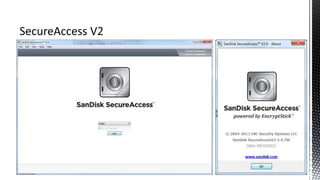
 SecureAccess V2
 Encryption
 Changes
 Flashing USB Devices
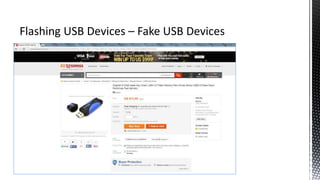
 Fake USB devices?
 Anatomy of USB
 PID & VID
 Serial Number
 Emulating a SanDisk Device
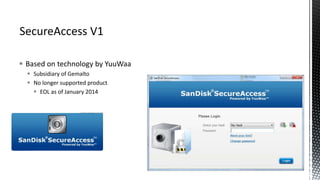
 Based on technology by YuuWaa
 Subsidiary of Gemalto
 No longer supported product
 EOL as of January 2014
The old method:
1. Enable write-blocking (SW or HW)
2. Image device
3. Mount forensic image as write-cached (FTK Imager V3.x)
4. Run SecureAccess software
5. Decrypt contents and add to forensic container
Bypass published in August 2013:
1. Open Explorer  Click on Folder and Search options  click on view  make sure that you can see hidden files
2. Go to the MyVaults folder, located in the same location as RunSanDiskSecureAccess_Win.exe.
3. In the MyVaults folder go to the folder named as the same thing the vault you want to access is named.
4. Open the dmOption.xml file in Notepad or any other word processing program
5. Look for DoCrypt"true" and change true to “false”. Then save the file.
6. At login screen leave password field blank and click “OK”
http://www.hackforums.net/showthread.php?tid=3637837
 Based on EncryptStick
 ENC Security Systems
 AES 128 bit encryption algorithm
 No bypass is currently known
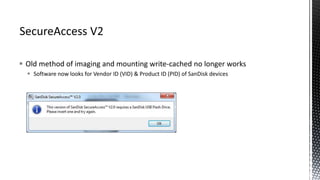
 Old method of imaging and mounting write-cached no longer works
 Software now looks for Vendor ID (VID) & Product ID (PID) of SanDisk devices
 So how can we recreate a SanDisk device?
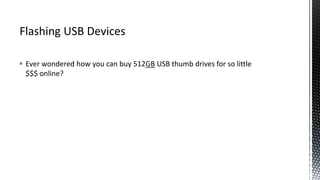
 Ever wondered how you can buy 512GB USB thumb drives for so little
$$$ online?
 online?
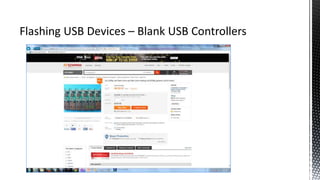
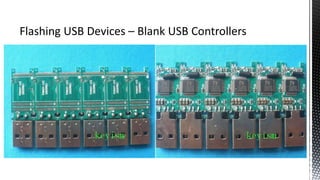
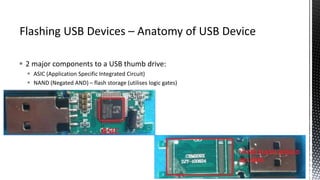
 2 major components to a USB thumb drive:
 ASIC (Application Specific Integrated Circuit)
 NAND (Negated AND) – flash storage (utilises logic gates)
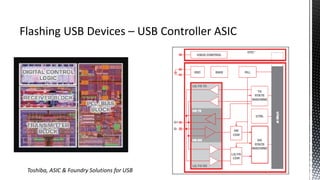
Toshiba, ASIC & Foundry Solutions for USB
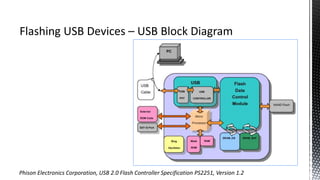
Phison Electronics Corporation, USB 2.0 Flash Controller Specification PS2251, Version 1.2
 USB devices are NOT created equal
 Same make and model ≠ same USB controller chipset and FW
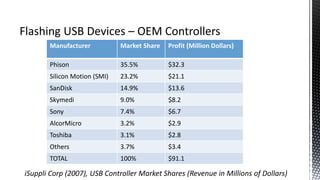
Manufacturer Market Share Profit (Million Dollars)
Phison 35.5% $32.3
Silicon Motion (SMI) 23.2% $21.1
SanDisk 14.9% $13.6
Skymedi 9.0% $8.2
Sony 7.4% $6.7
AlcorMicro 3.2% $2.9
Toshiba 3.1% $2.8
Others 3.7% $3.4
TOTAL 100% $91.1
iSuppli Corp (2007), USB Controller Market Shares (Revenue in Millions of Dollars)
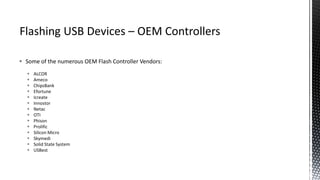
 Some of the numerous OEM Flash Controller Vendors:
 ALCOR
 Ameco
 ChipsBank
 Efortune
 Icreate
 Innostor
 Netac
 OTI
 Phison
 Prolific
 Silicon Micro
 Skymedi
 Solid State System
 USBest
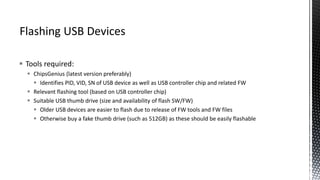
 Tools required:
 ChipsGenius (latest version preferably)
 Identifies PID, VID, SN of USB device as well as USB controller chip and related FW
 Relevant flashing tool (based on USB controller chip)
 Suitable USB thumb drive (size and availability of flash SW/FW)
 Older USB devices are easier to flash due to release of FW tools and FW files
 Otherwise buy a fake thumb drive (such as 512GB) as these should be easily flashable
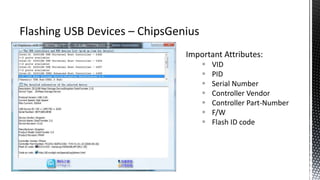
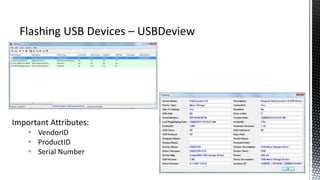
Important Attributes:
 VID
 PID
 Serial Number
 Controller Vendor
 Controller Part-Number
 F/W
 Flash ID code
Important Attributes:
 VendorID
 ProductID
 Serial Number
 Steps required:
1. Identify VID & PID of SanDisk device using ChipsGenius or USBDeview
 E.G. VID 0781 & PID 5581 = SanDisk
2. Flash* suitable USB device with the original VID & PID
3. Copy logical contents across from original exhibit
 What happens when you try to run the SecureAccess software now?
*WARNING: All data on device will be wiped during flashing
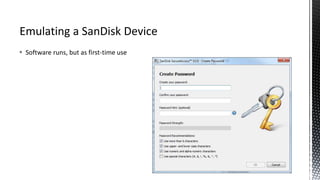
 Software runs, but as first-time use
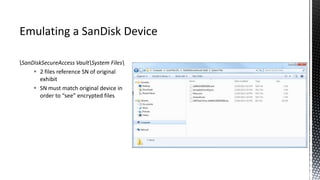
SanDiskSecureAccess VaultSystem Files
 2 files reference SN of original
exhibit
 SN must match original device in
order to “see” encrypted files
 Steps required:
1. Identify VID & PID of SanDisk device using ChipsGenius or USBDeview
 E.G. VID 0781 & PID 5581 = SanDisk
2. Flash* suitable USB device with the original VID, PID, & SN
3. Copy logical contents across from original exhibit
 What happens when you try to run the SecureAccess software now?
*WARNING: All data on device will be wiped during flashing
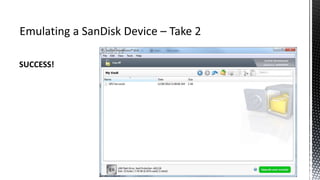
SUCCESS!
 Files can now be decrypted and added to forensic container
 HackForums - http://www.hackforums.net/showthread.php?tid=3637837
 ChipsGenius – http://www.usbdev.ru/ - hosts many flashing tools including ChipsGenius (Russian)
 http://flashboot.ru/iflash/ - good database for locating flashing tools that work with various chipsets (Russian)
 http://dl.mydigit.net/ - contains many flashing tools for various chipsets (Chinese)
 https://viaforensics.com/computer-forensics/forensic-acquisition-analysis-u3-usb-drive.html
 Harman, R. (2014) Controlling USB Flash Drive Controllers: Exposé of Hidden Features, Smoocon, URL:
 Bang, J., Yoo, B. and Lee, S. (2010) Secure USB Bypassing Tool, , URL:http://www.dfrws.org/2010/proceedings/bang.pdf
 http://usbspeed.nirsoft.net/ - lists some VID and PID
 http://www.scribd.com/doc/216218953/PS2251# - Phison Electronics Corporation USB 2.0 Flash Controller Specification PS2251
Version 1.2

SanDisk SecureAccess Encryption - Forensic Processing & USB Flashing

  • 1.
  • 2.
     SecureAccess V1 Encryption  Bypass  SecureAccess V2  Encryption  Changes  Flashing USB Devices  Fake USB devices?  Anatomy of USB  PID & VID  Serial Number  Emulating a SanDisk Device
  • 3.
     Based ontechnology by YuuWaa  Subsidiary of Gemalto  No longer supported product  EOL as of January 2014
  • 4.
    The old method: 1.Enable write-blocking (SW or HW) 2. Image device 3. Mount forensic image as write-cached (FTK Imager V3.x) 4. Run SecureAccess software 5. Decrypt contents and add to forensic container
  • 5.
    Bypass published inAugust 2013: 1. Open Explorer  Click on Folder and Search options  click on view  make sure that you can see hidden files 2. Go to the MyVaults folder, located in the same location as RunSanDiskSecureAccess_Win.exe. 3. In the MyVaults folder go to the folder named as the same thing the vault you want to access is named. 4. Open the dmOption.xml file in Notepad or any other word processing program 5. Look for DoCrypt"true" and change true to “false”. Then save the file. 6. At login screen leave password field blank and click “OK” http://www.hackforums.net/showthread.php?tid=3637837
  • 6.
     Based onEncryptStick  ENC Security Systems  AES 128 bit encryption algorithm  No bypass is currently known
  • 8.
     Old methodof imaging and mounting write-cached no longer works  Software now looks for Vendor ID (VID) & Product ID (PID) of SanDisk devices
  • 9.
     So howcan we recreate a SanDisk device?
  • 10.
     Ever wonderedhow you can buy 512GB USB thumb drives for so little $$$ online?
  • 11.
  • 14.
     2 majorcomponents to a USB thumb drive:  ASIC (Application Specific Integrated Circuit)  NAND (Negated AND) – flash storage (utilises logic gates)
  • 15.
    Toshiba, ASIC &Foundry Solutions for USB
  • 16.
    Phison Electronics Corporation,USB 2.0 Flash Controller Specification PS2251, Version 1.2
  • 17.
     USB devicesare NOT created equal  Same make and model ≠ same USB controller chipset and FW
  • 18.
    Manufacturer Market ShareProfit (Million Dollars) Phison 35.5% $32.3 Silicon Motion (SMI) 23.2% $21.1 SanDisk 14.9% $13.6 Skymedi 9.0% $8.2 Sony 7.4% $6.7 AlcorMicro 3.2% $2.9 Toshiba 3.1% $2.8 Others 3.7% $3.4 TOTAL 100% $91.1 iSuppli Corp (2007), USB Controller Market Shares (Revenue in Millions of Dollars)
  • 19.
     Some ofthe numerous OEM Flash Controller Vendors:  ALCOR  Ameco  ChipsBank  Efortune  Icreate  Innostor  Netac  OTI  Phison  Prolific  Silicon Micro  Skymedi  Solid State System  USBest
  • 20.
     Tools required: ChipsGenius (latest version preferably)  Identifies PID, VID, SN of USB device as well as USB controller chip and related FW  Relevant flashing tool (based on USB controller chip)  Suitable USB thumb drive (size and availability of flash SW/FW)  Older USB devices are easier to flash due to release of FW tools and FW files  Otherwise buy a fake thumb drive (such as 512GB) as these should be easily flashable
  • 21.
    Important Attributes:  VID PID  Serial Number  Controller Vendor  Controller Part-Number  F/W  Flash ID code
  • 22.
    Important Attributes:  VendorID ProductID  Serial Number
  • 23.
     Steps required: 1.Identify VID & PID of SanDisk device using ChipsGenius or USBDeview  E.G. VID 0781 & PID 5581 = SanDisk 2. Flash* suitable USB device with the original VID & PID 3. Copy logical contents across from original exhibit  What happens when you try to run the SecureAccess software now? *WARNING: All data on device will be wiped during flashing
  • 24.
     Software runs,but as first-time use
  • 25.
    SanDiskSecureAccess VaultSystem Files 2 files reference SN of original exhibit  SN must match original device in order to “see” encrypted files
  • 26.
     Steps required: 1.Identify VID & PID of SanDisk device using ChipsGenius or USBDeview  E.G. VID 0781 & PID 5581 = SanDisk 2. Flash* suitable USB device with the original VID, PID, & SN 3. Copy logical contents across from original exhibit  What happens when you try to run the SecureAccess software now? *WARNING: All data on device will be wiped during flashing
  • 27.
  • 28.
     Files cannow be decrypted and added to forensic container
  • 29.
     HackForums -http://www.hackforums.net/showthread.php?tid=3637837  ChipsGenius – http://www.usbdev.ru/ - hosts many flashing tools including ChipsGenius (Russian)  http://flashboot.ru/iflash/ - good database for locating flashing tools that work with various chipsets (Russian)  http://dl.mydigit.net/ - contains many flashing tools for various chipsets (Chinese)  https://viaforensics.com/computer-forensics/forensic-acquisition-analysis-u3-usb-drive.html  Harman, R. (2014) Controlling USB Flash Drive Controllers: Exposé of Hidden Features, Smoocon, URL:  Bang, J., Yoo, B. and Lee, S. (2010) Secure USB Bypassing Tool, , URL:http://www.dfrws.org/2010/proceedings/bang.pdf  http://usbspeed.nirsoft.net/ - lists some VID and PID  http://www.scribd.com/doc/216218953/PS2251# - Phison Electronics Corporation USB 2.0 Flash Controller Specification PS2251 Version 1.2