Building Real-World Dojo Web
         Applications

           Andrew Ferrier
 IBM Software Services for WebSphere
Agenda
●   How has building web applications changed?
    ●   Web 1.0 to Web 2.0
    ●   AJAX / REST / JSON
●   What is Dojo?
●   Why is IBM interested and how does it fit in to
    WebSphere?
●   A flavor of Dojo
●   How do we design applications for Dojo?
●   Some Dojo Best Practices
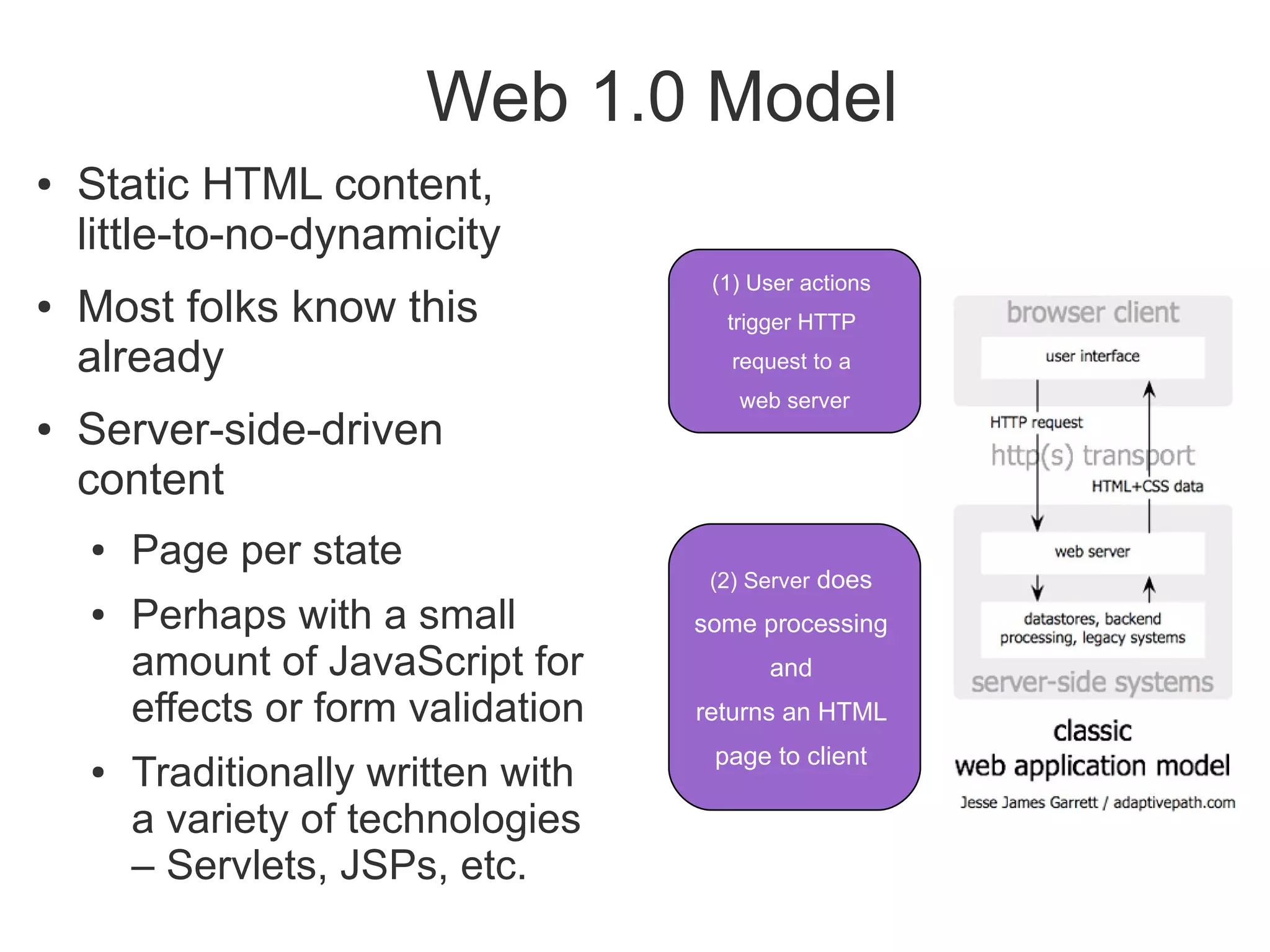
Web 1.0 Model
●   Static HTML content,
    little-to-no-dynamicity
                                      (1) User actions
●   Most folks know this               trigger HTTP
    already                             request to a
                                        web server
●   Server-side-driven
    content
    ●   Page per state
                                      (2) Server does
    ●   Perhaps with a small         some processing
        amount of JavaScript for           and
        effects or form validation   returns an HTML
                                      page to client
    ●   Traditionally written with
        a variety of technologies
        – Servlets, JSPs, etc.
But this has disadvantages...
●   Interaction is awkward
●   Slow response time – every action requires a
    entire page refresh
    ●   W3C states that 1 second is highest acceptable
        response time for interactive action
●   Often ugly, flickery, content
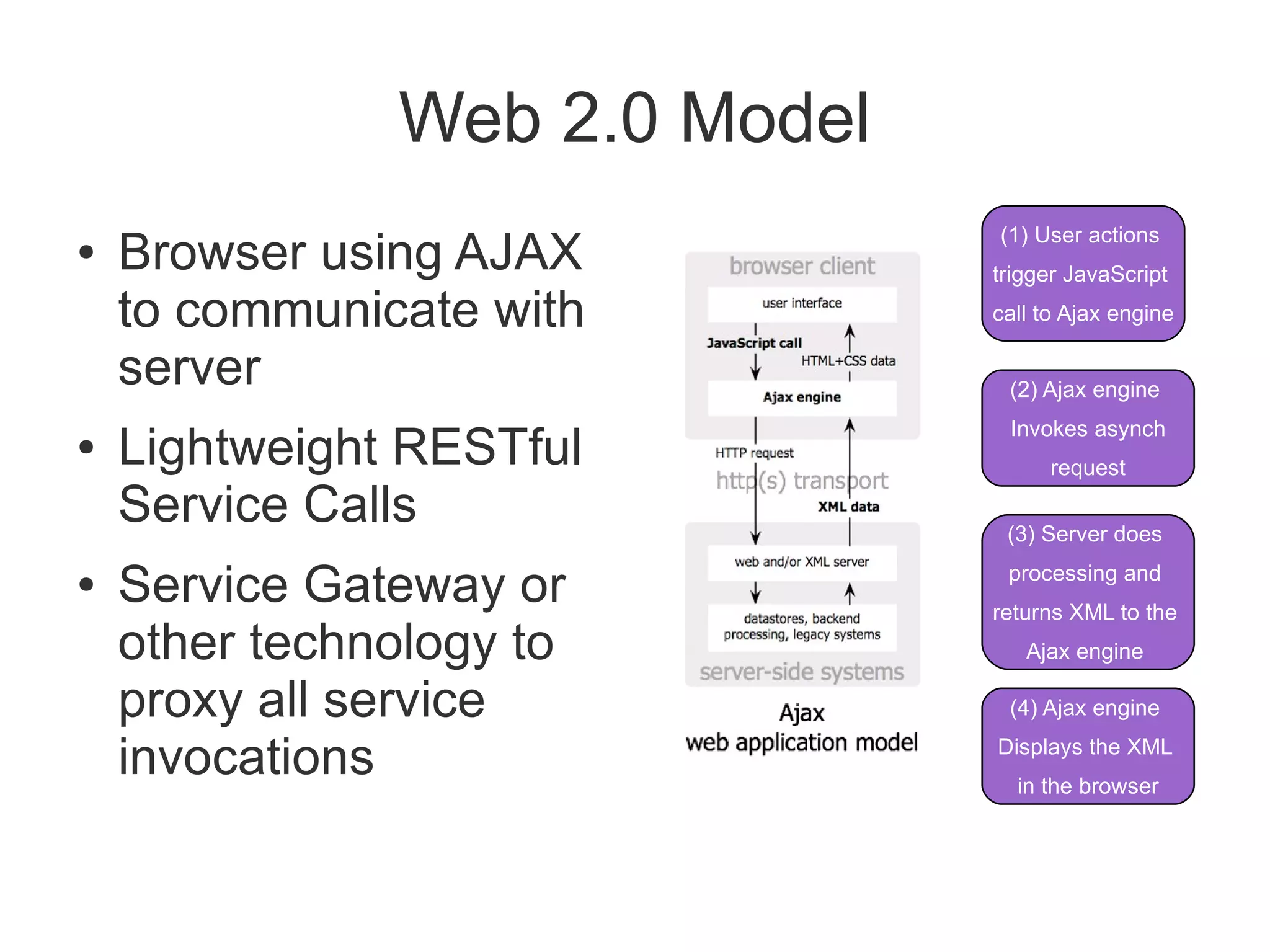
Web 2.0 Model
                               (1) User actions
●   Browser using AJAX         trigger JavaScript

    to communicate with        call to Ajax engine

    server                      (2) Ajax engine
                                Invokes asynch
●   Lightweight RESTful              request

    Service Calls               (3) Server does

●   Service Gateway or          processing and
                               returns XML to the
    other technology to           Ajax engine

    proxy all service           (4) Ajax engine

    invocations                Displays the XML
                                 in the browser
What is AJAX?
●   Asynchronous JavaScript and XML
    ●   Doesn't have to be about XML, and often isn't
●   Uses XMLHTTPRequest feature of browser to
    make an HTTP invocation without refreshing
    page
    ●   Used to retrieve data
    ●   90% of the time this is formatted in JSON
        (JavaScript Object Notation)
JSON
{
    “customerName”: “Andrew Ferrier”
    “customerHeightInCm”: 100
    “customerAddresses”: [
        { “addressType”: “home”,
          “addressLine1”: “123 Anytown”,
          “addressPostcode”: “AB12 3CD”
        }
    ]
}
What is REST?
●   Use resource-driven URLs:
    ●   e.g. /rest/customer/1234
●   Leverages HTTP Verbs
    ●   GET, PUT, POST, DELETE
●   Leverages HTTP Response Codes
    ●   200, 401, 403, etc.
●   Typically uses lightweight data format
    ●   JSON, plain text
●   Particularly well-suited to CRUD
Web 2.0 Browser Model
●   Thick-ish client
●   JavaScript code runs in browser
●   Events on page are used to drive code
    (onLoad, onClick, etc...)
●   Extra data and code are requested from server
    using XHRs, with async callbacks in code
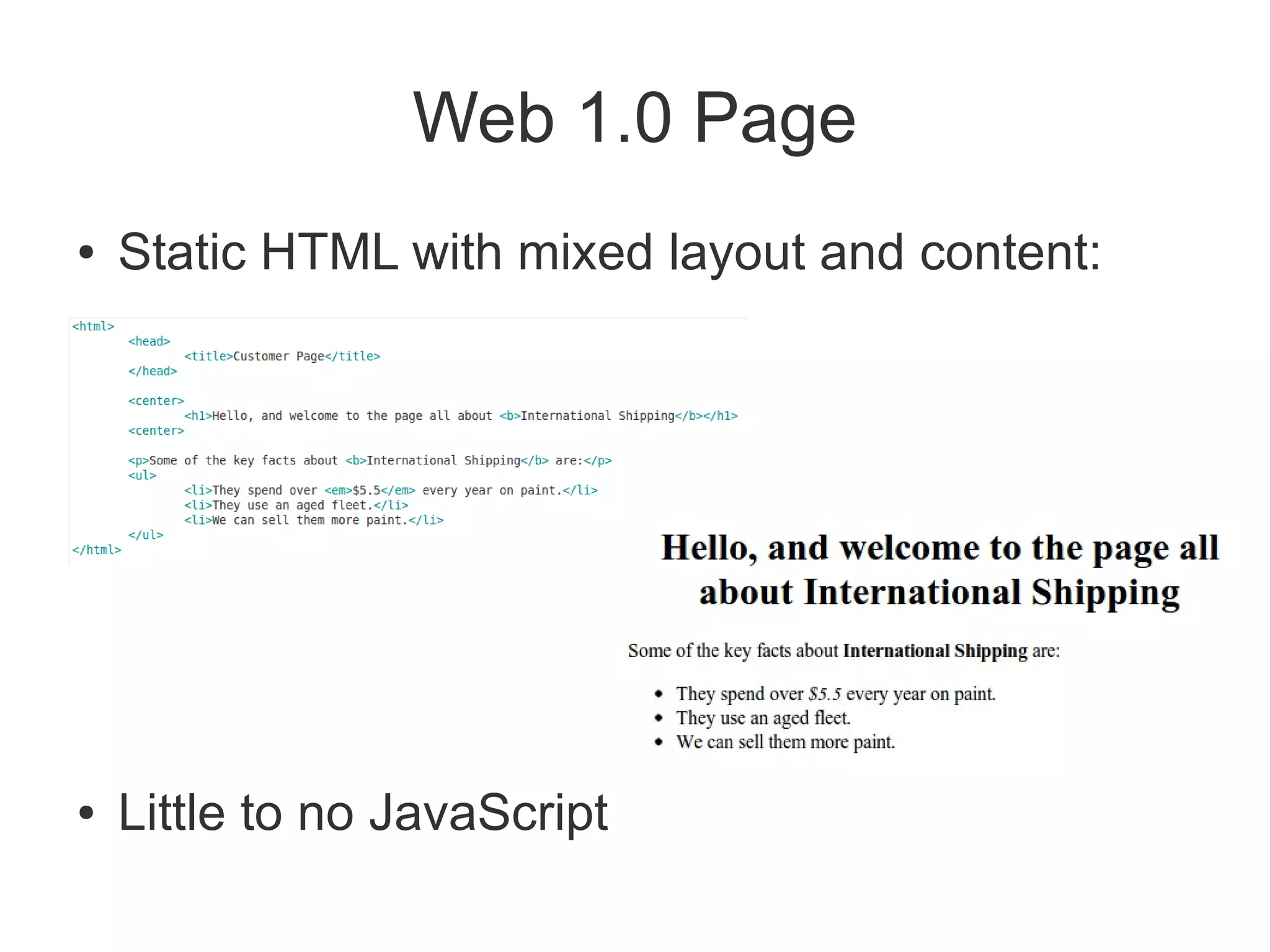
Web 1.0 Page
●   Static HTML with mixed layout and content:


●   Little to no JavaScript
Web 2.0 Page
●   3 primary components:
    ●   HTML (DOM Model)
        –   Tree-like structure of HTML tags
        –   These days we use <div> a lot, we avoid 'styled' tags like
            <b>.
    ●   JavaScript (including Dojo)
    ●   CSS for Styling
Browser – Separation of Concerns
●   Model (DOM) / View (CSS) / Controller
    (JavaScript) allows for:
     ●   Decoupling of styling and layout (CSS) from content
         (HTML)
     ●   Decoupling of code (JavaScript) from page model
         (DOM)
     ●   Event-driven programming model
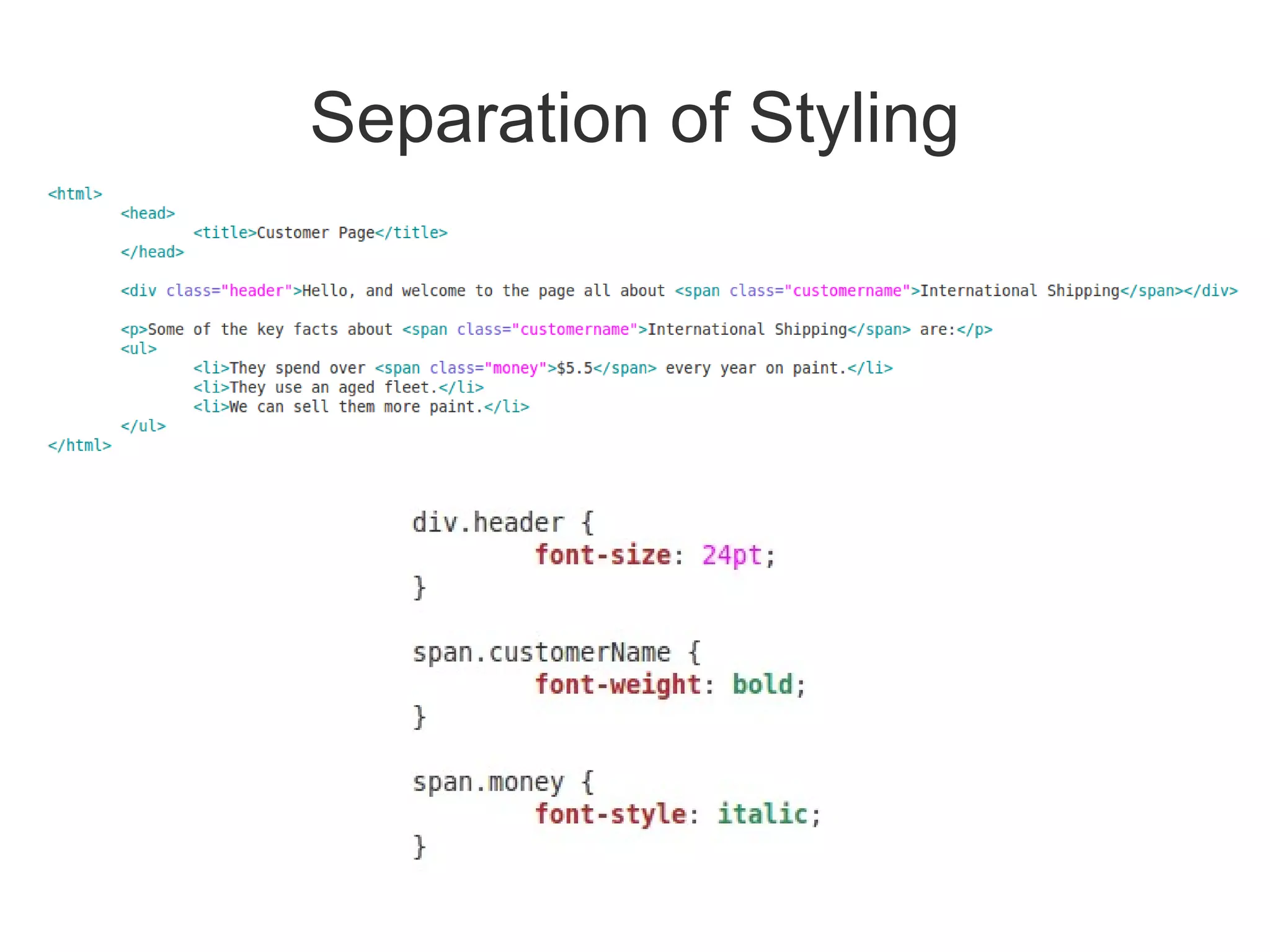
Separation of Styling
Let's not forget the Service
                  Gateway...
●   Facades RESTful services to UI, primarily to
    resolve cross-domain security restrictions
●   Can be implemented in a variety of
    technologies:
    ●   JAX-RS
    ●   Servlets
    ●   WebSphere ESB and Process Server
    ●   … virtually anything else that can host HTTP
What's wrong with JavaScript?
●   Traditional JavaScript weak at:
    ●   Structured code – no classes, modules
    ●   Cross-browser support – incompatibilities,
        especially with the dreaded IE6
        (http://www.ie6countdown.com/)
    ●   No support for complex or rich form controls
    ●   Hard to handle JavaScript context and other
        awkwardnesses
So what is Dojo?
●
    Dojo is a set of common JavaScript libraries used for creating
    Ajax and DHTML web applications
●
    http://dojotoolkit.org
    ●
        Open Source
    ●
        Large widget collection (“dijits”)
    ●
        Powerful I/O (XHR)
    ●
        Data abstraction layer
    ●
        Event management
    ●
        Logging and debugging
    ●
        Extensible modular architecture
    ●
        Declarative and programmatic
Why is this exciting and important?
●   Rich, powerful user experience, bridging
    interactivity gap
●   Low barrier to entry in many environments
    ●   Main requirement is a modern web browser
        –   Firefox 3.5+, Chrome, Safari
        –   IE 7+ also OK-ish
●   With some kind of service gateway technology,
    can connect to most types of backend
Why Is IBM Interested?
●   Part of an overall business solution
●   IBM does more than middleware
●   Web 2.0 Feature Pack for WAS contains
    Dojo
●   Building Modern Rich Applications
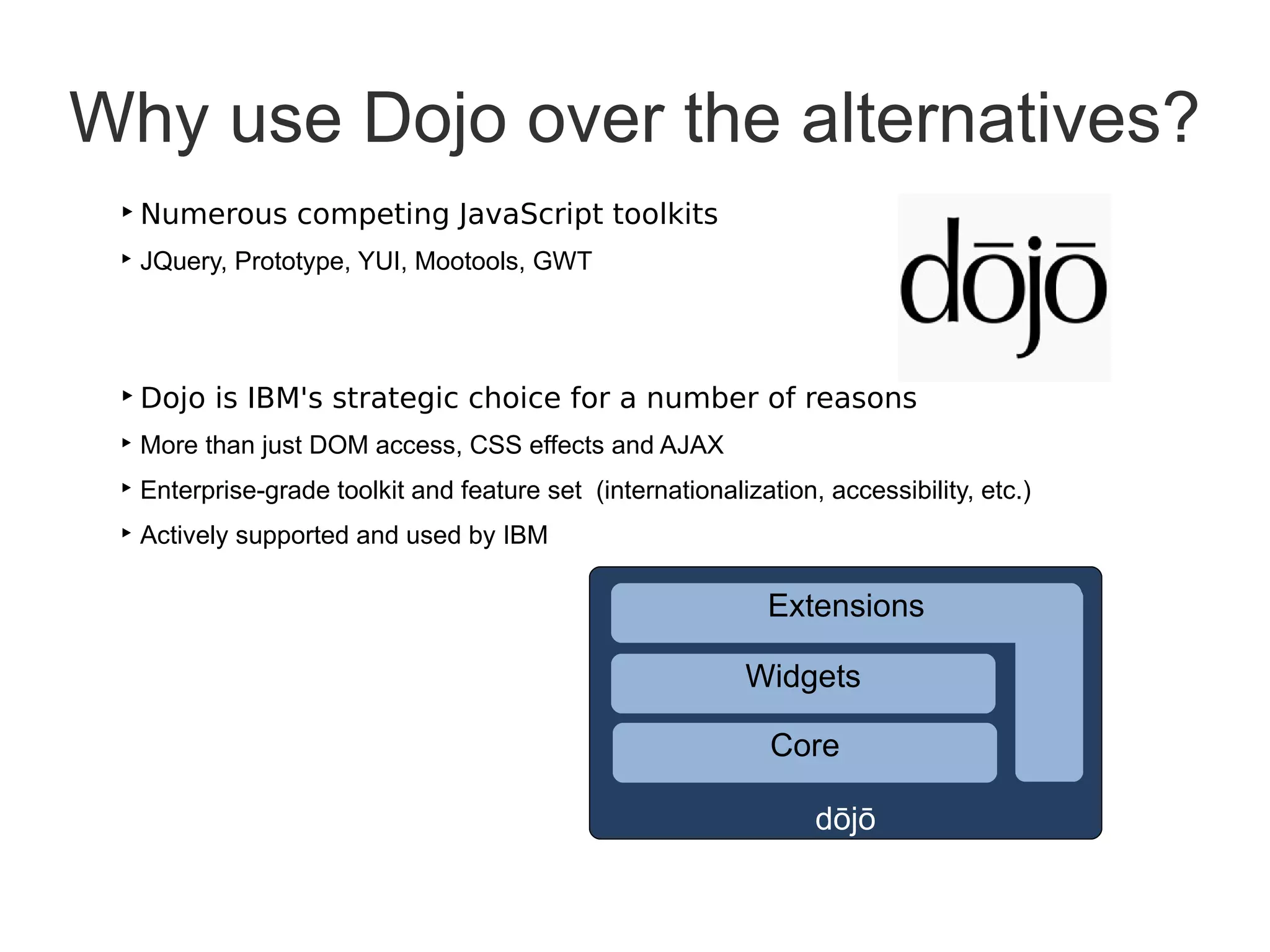
Why use Dojo over the alternatives?
 ‣ Numerous competing JavaScript toolkits
 ‣ JQuery, Prototype, YUI, Mootools, GWT


 ‣ Dojo is IBM's strategic choice for a number of reasons
 ‣ More than just DOM access, CSS effects and AJAX
 ‣ Enterprise-grade toolkit and feature set (internationalization, accessibility, etc.)
 ‣ Actively supported and used by IBM

                                                              Extensions

                                                            Widgets

                                                              Core

                                                                  dōjō
A Flavor of Dojo
Dojo Base
    ●
        Dojo “Base” libraries are Dojo functions that are always
        available inside the base dojo.js bootstrap

•   Module Loader                    •Events (simple connect)
•   Lang Utils & Array Extras        •Color functions
•   Cookie functions                 •Browser detection
•   Query, Node & Style Utils        •URL functions
•   I/O (Ajax)                       •Doc Load/Unload Hooks
•   JSON serialization               •Animation & Effects
•   Fast CSS Style manipulation            Fade, slide
•   Deferreds                              CSS colors
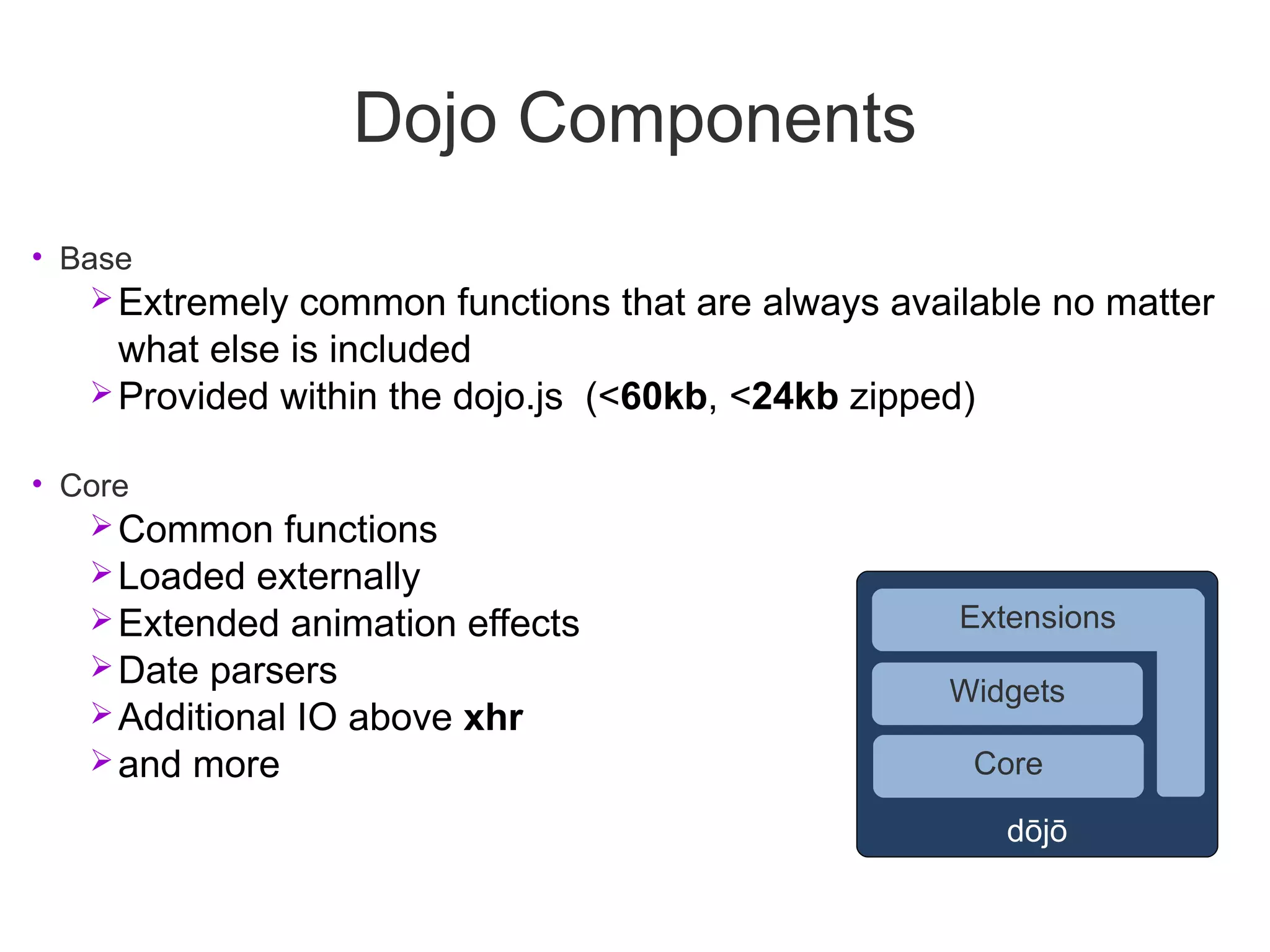
Dojo Components
• Base
    Extremely common functions that are always available no matter
     what else is included
    Provided within the dojo.js (<60kb, <24kb zipped)

• Core
    Common functions
    Loaded externally
    Extended animation effects                      Extensions
    Date parsers
                                                    Widgets
    Additional IO above xhr
    and more                                        Core

                                                         dōjō
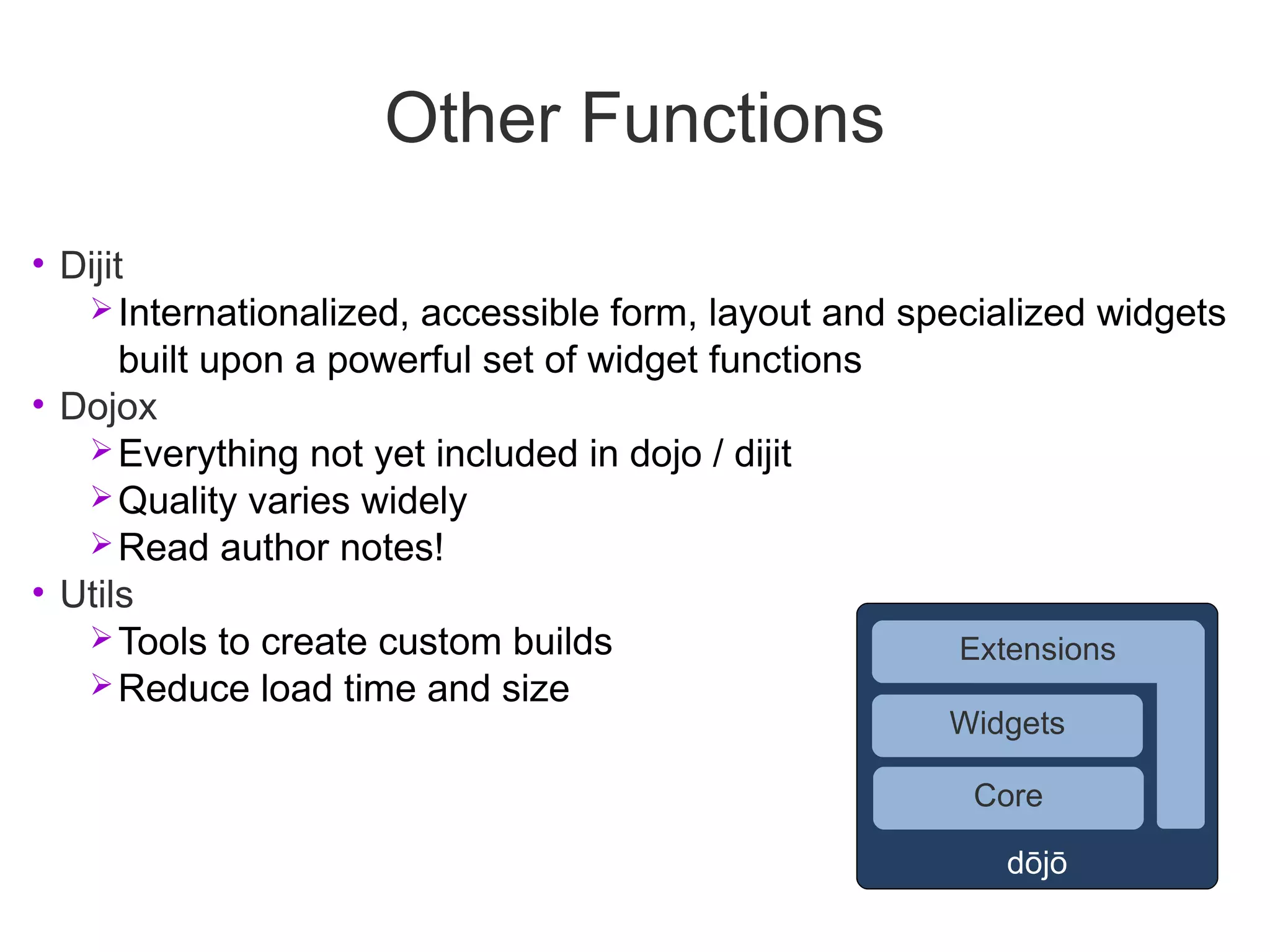
Other Functions
• Dijit
    Internationalized, accessible form, layout and specialized widgets
       built upon a powerful set of widget functions
• Dojox
    Everything not yet included in dojo / dijit
    Quality varies widely
    Read author notes!
• Utils
    Tools to create custom builds                     Extensions
    Reduce load time and size
                                                      Widgets

                                                       Core

                                                         dōjō
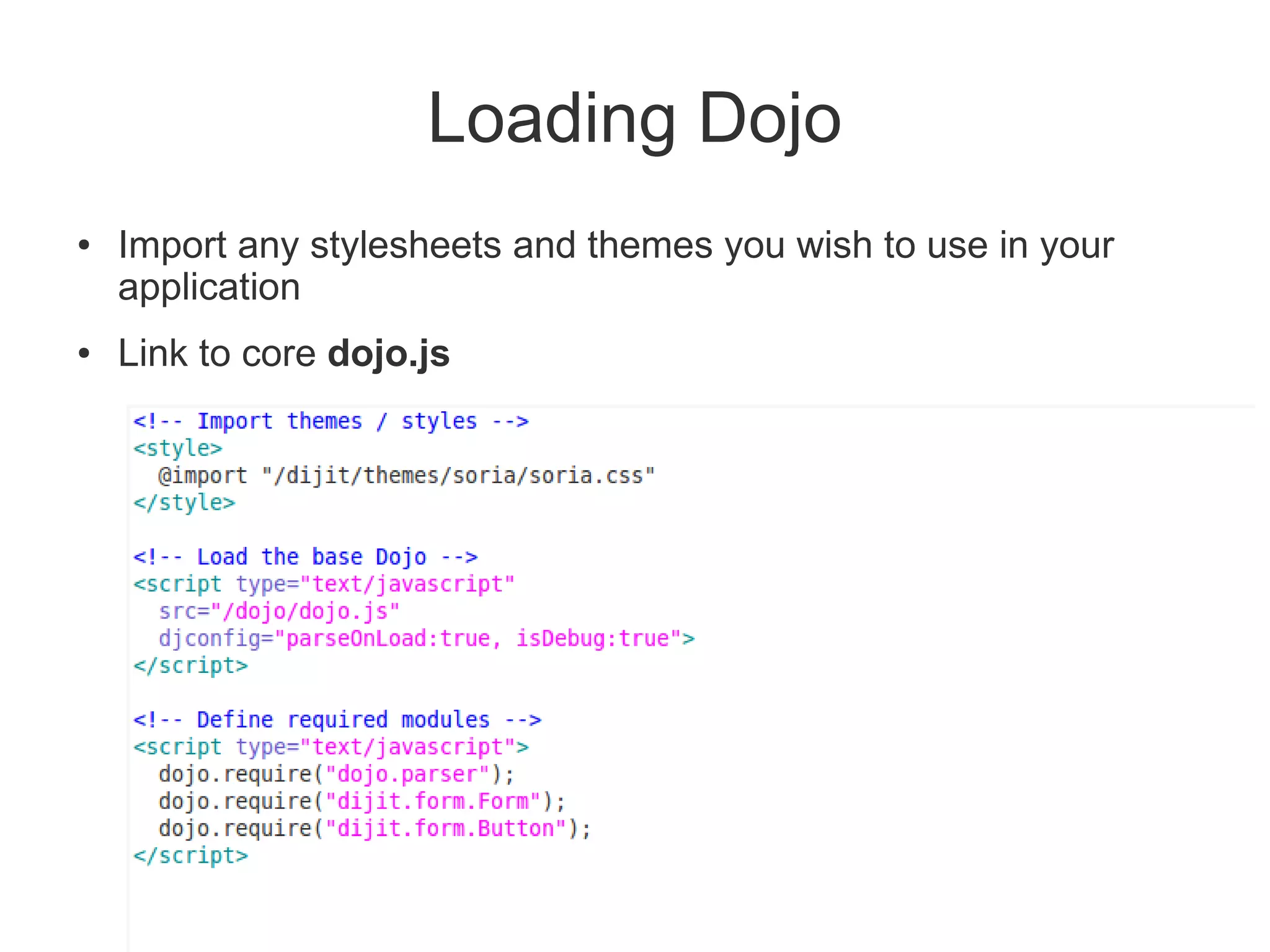
Loading Dojo
●   Import any stylesheets and themes you wish to use in your
    application
●   Link to core dojo.js
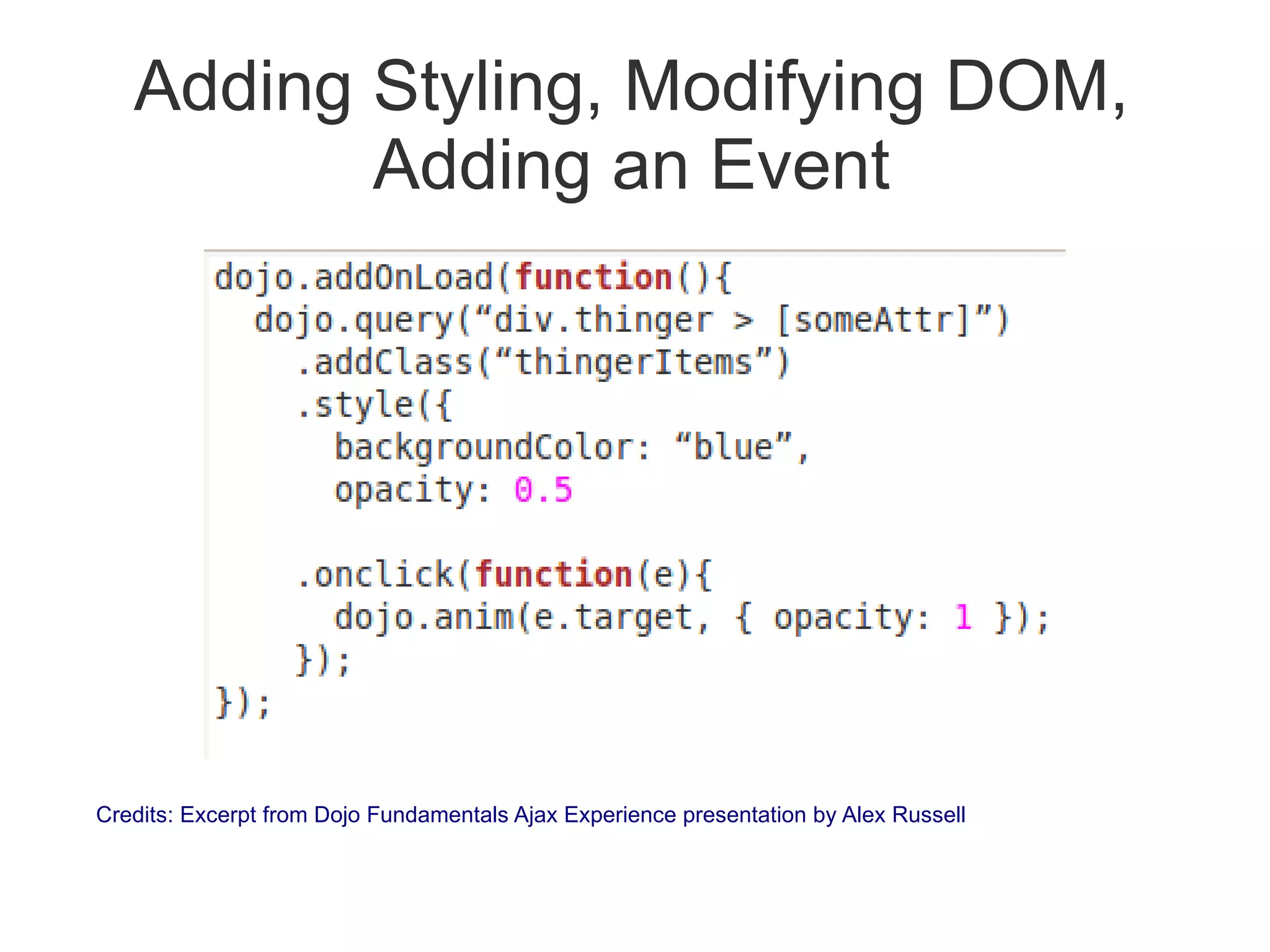
Adding Styling, Modifying DOM,
          Adding an Event


Credits: Excerpt from Dojo Fundamentals Ajax Experience presentation by Alex Russell
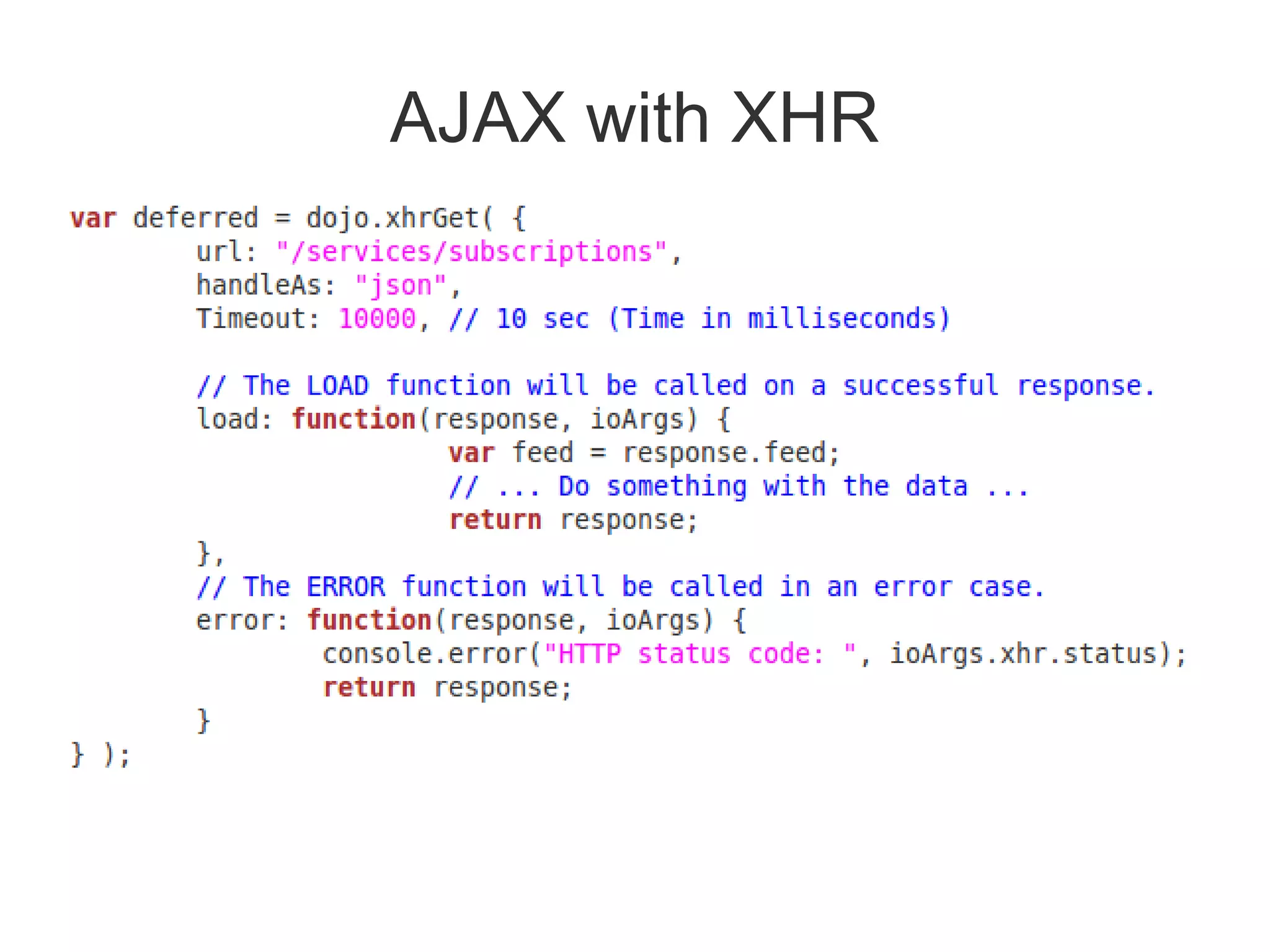
AJAX with XHR
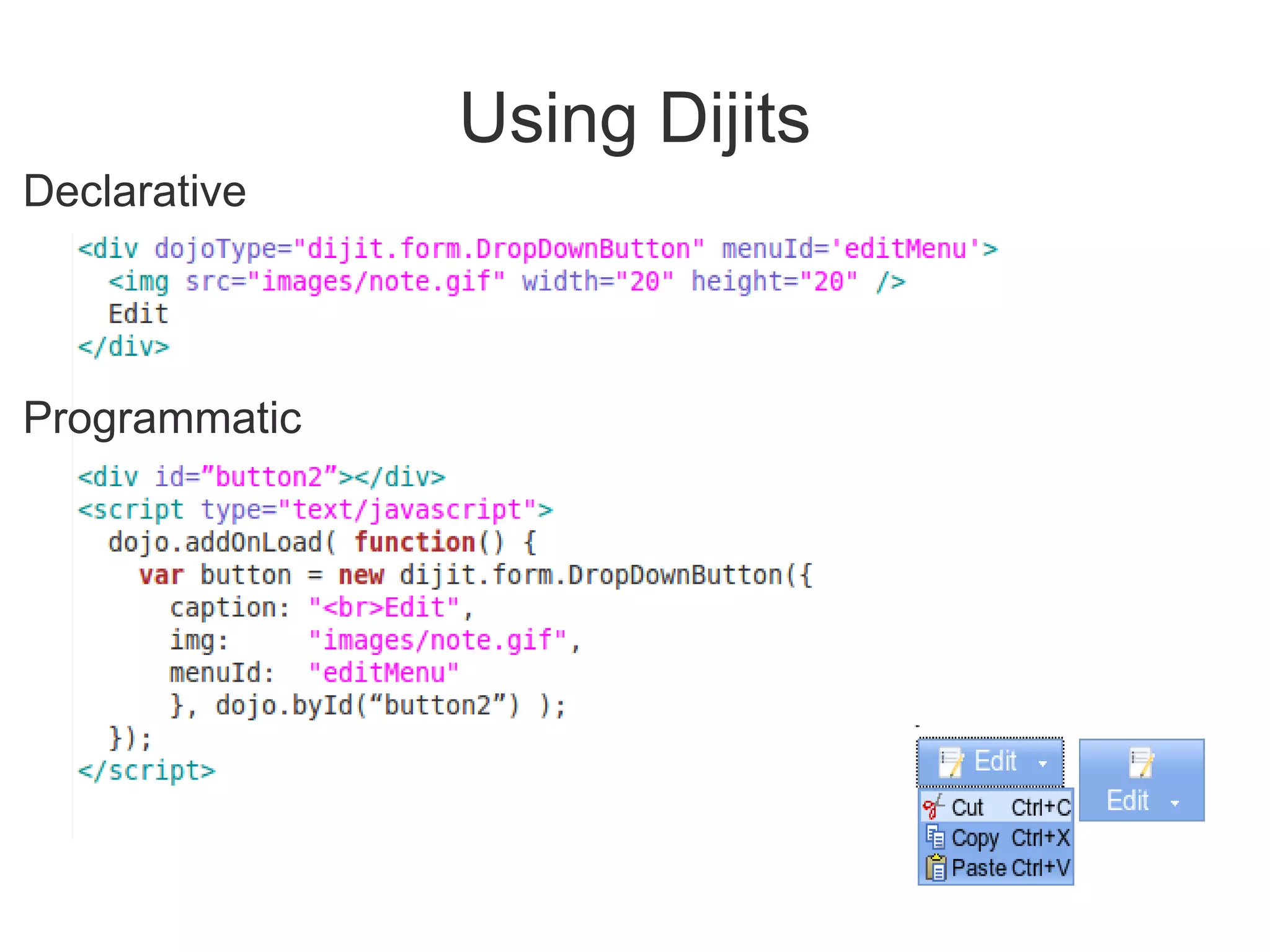
Using Dijits
Declarative


Programmatic
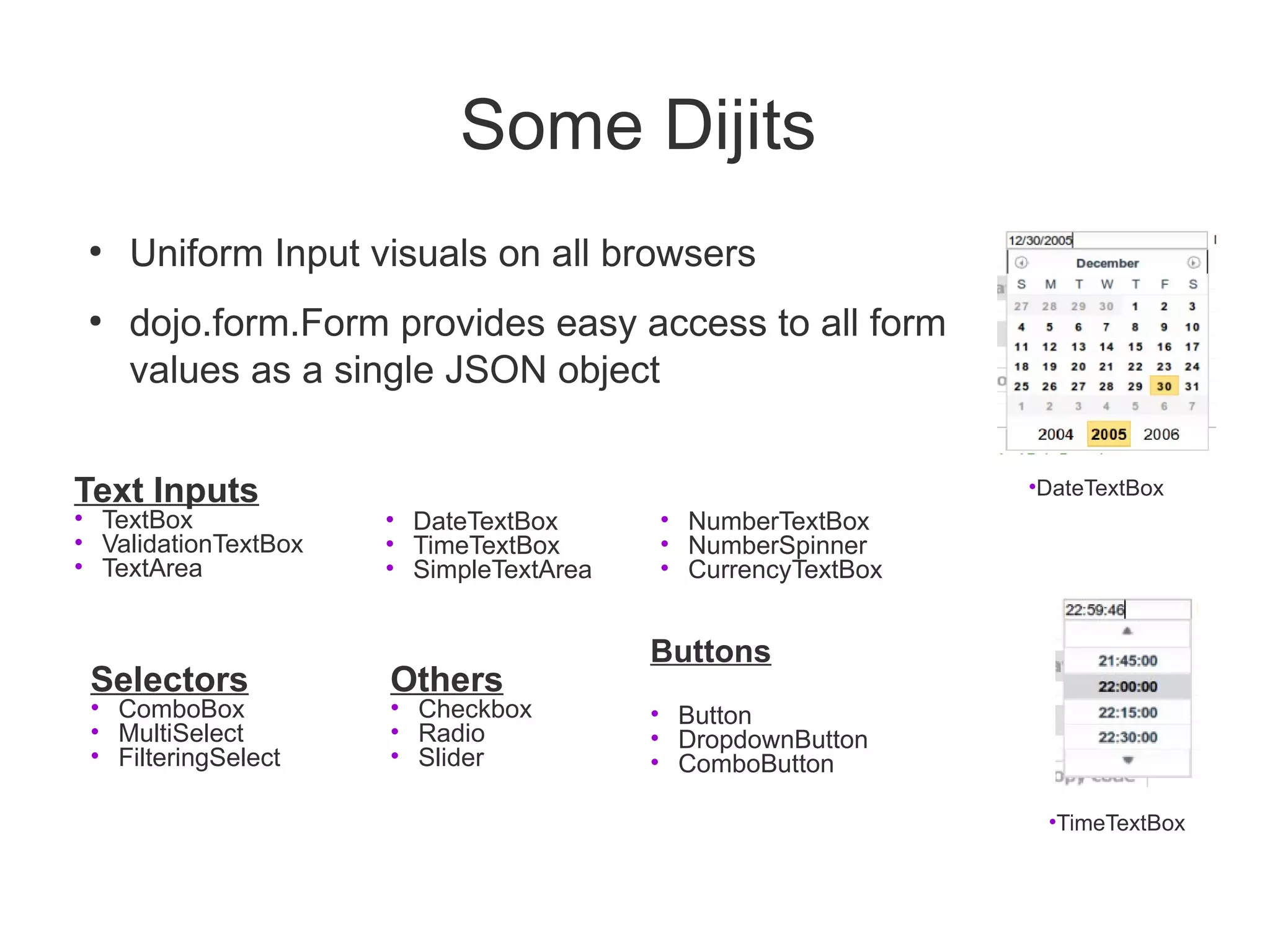
Some Dijits
 ●
     Uniform Input visuals on all browsers
 ●
     dojo.form.Form provides easy access to all form
     values as a single JSON object


Text Inputs                                                  •DateTextBox
• TextBox             • DateTextBox      • NumberTextBox
• ValidationTextBox   • TimeTextBox      • NumberSpinner
• TextArea            • SimpleTextArea   • CurrencyTextBox


                                         Buttons
 Selectors            Others
 • ComboBox           • Checkbox         • Button
 • MultiSelect        • Radio            • DropdownButton
 • FilteringSelect    • Slider           • ComboButton

                                                              •TimeTextBox
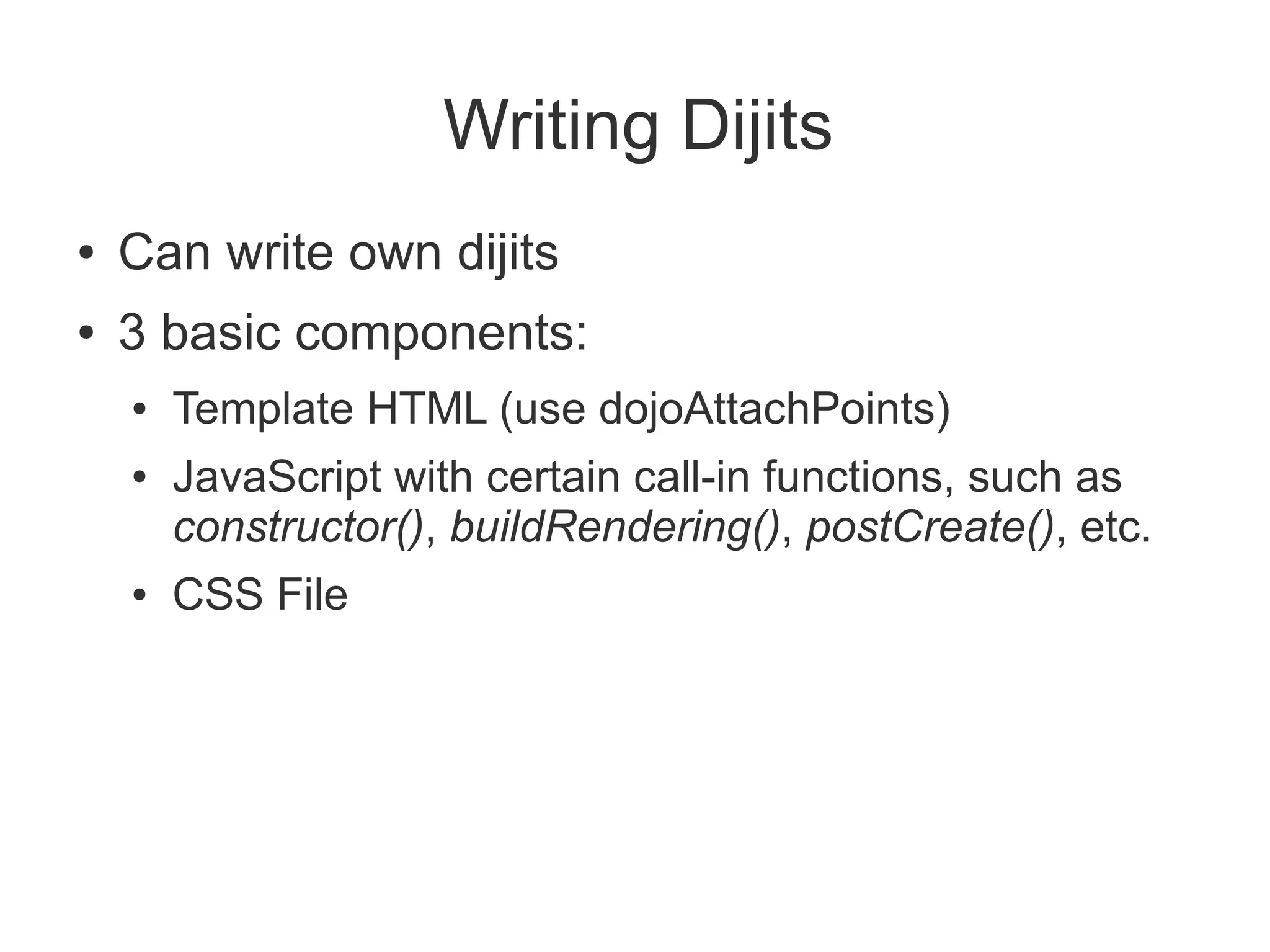
Writing Dijits
●   Can write own dijits
●   3 basic components:
    ●   Template HTML (use dojoAttachPoints)
    ●   JavaScript with certain call-in functions, such as
        constructor(), buildRendering(), postCreate(), etc.
    ●   CSS File
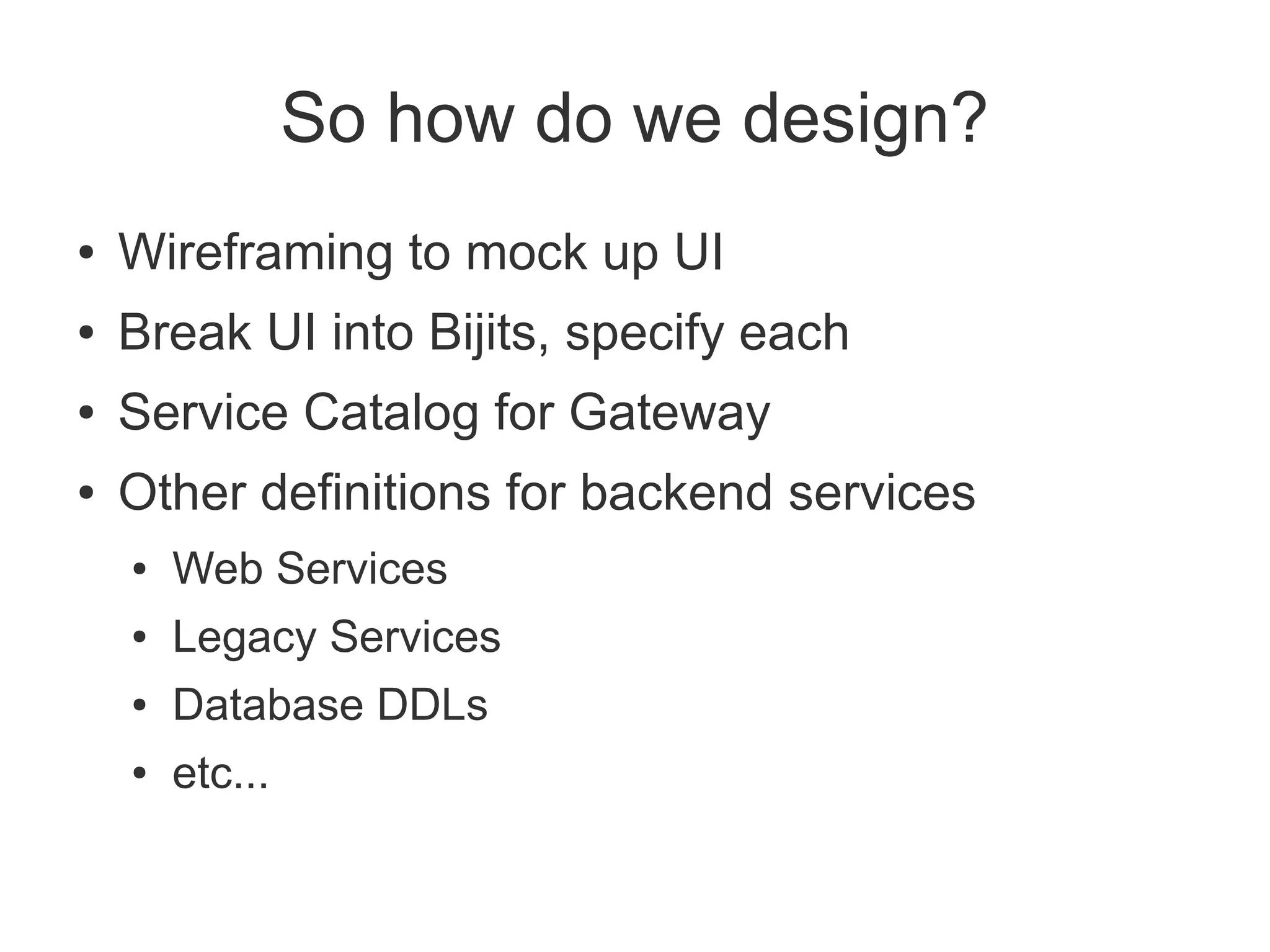
So how do we design?
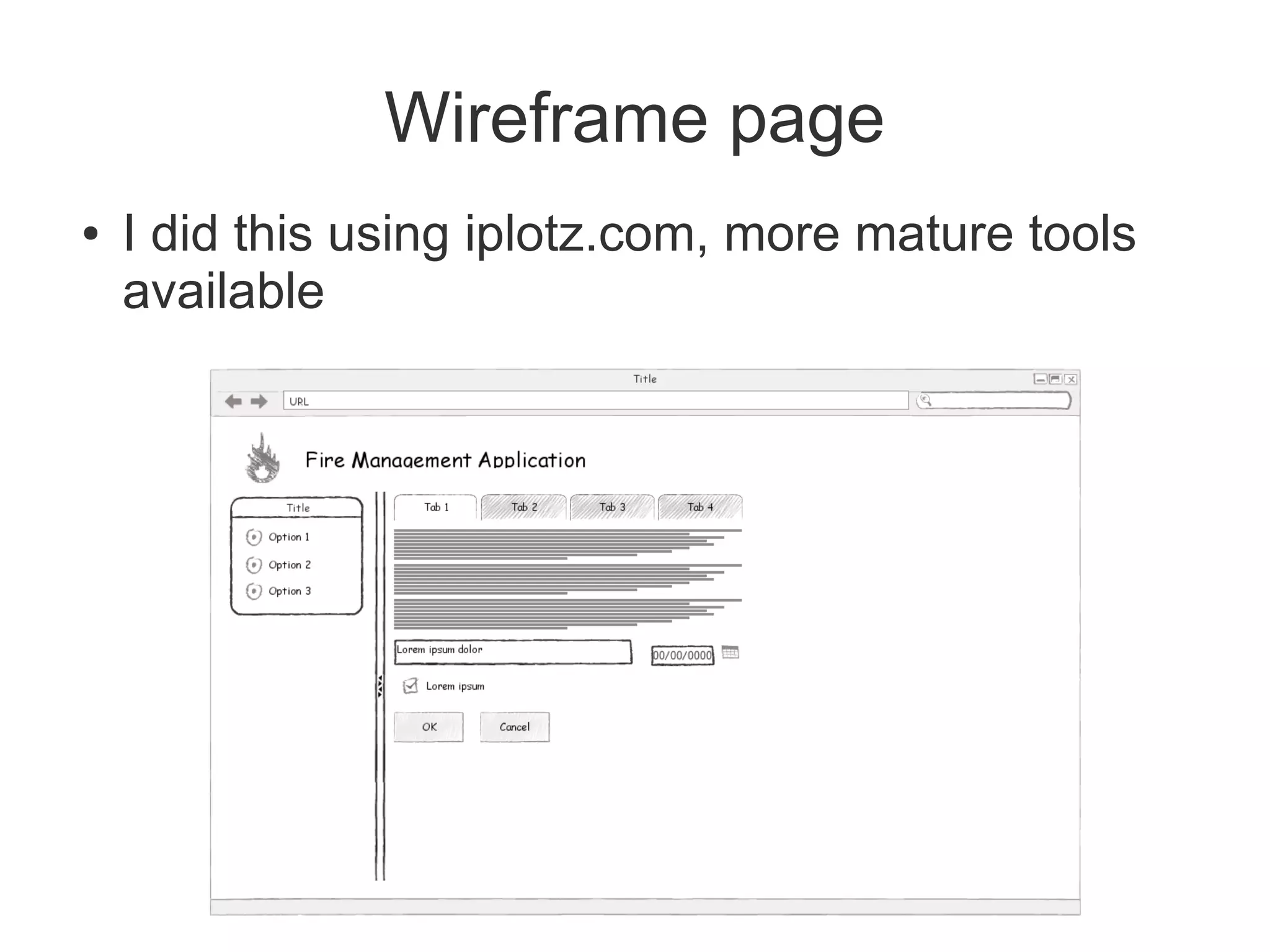
●   Wireframing to mock up UI
●   Break UI into Bijits, specify each
●   Service Catalog for Gateway
●   Other definitions for backend services
    ●   Web Services
    ●   Legacy Services
    ●   Database DDLs
    ●   etc...
Wireframe page
●   I did this using iplotz.com, more mature tools
    available
Designing pages
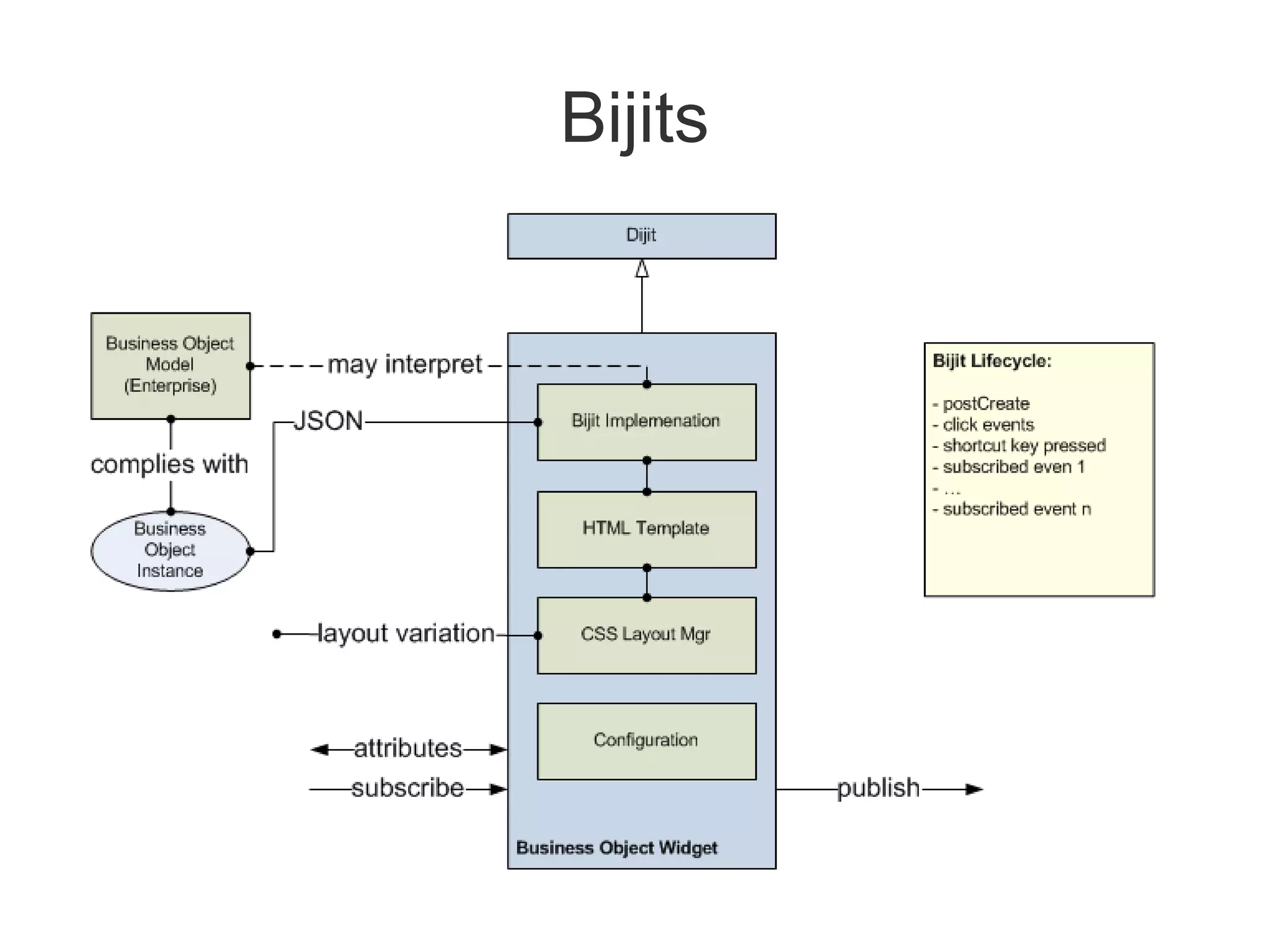
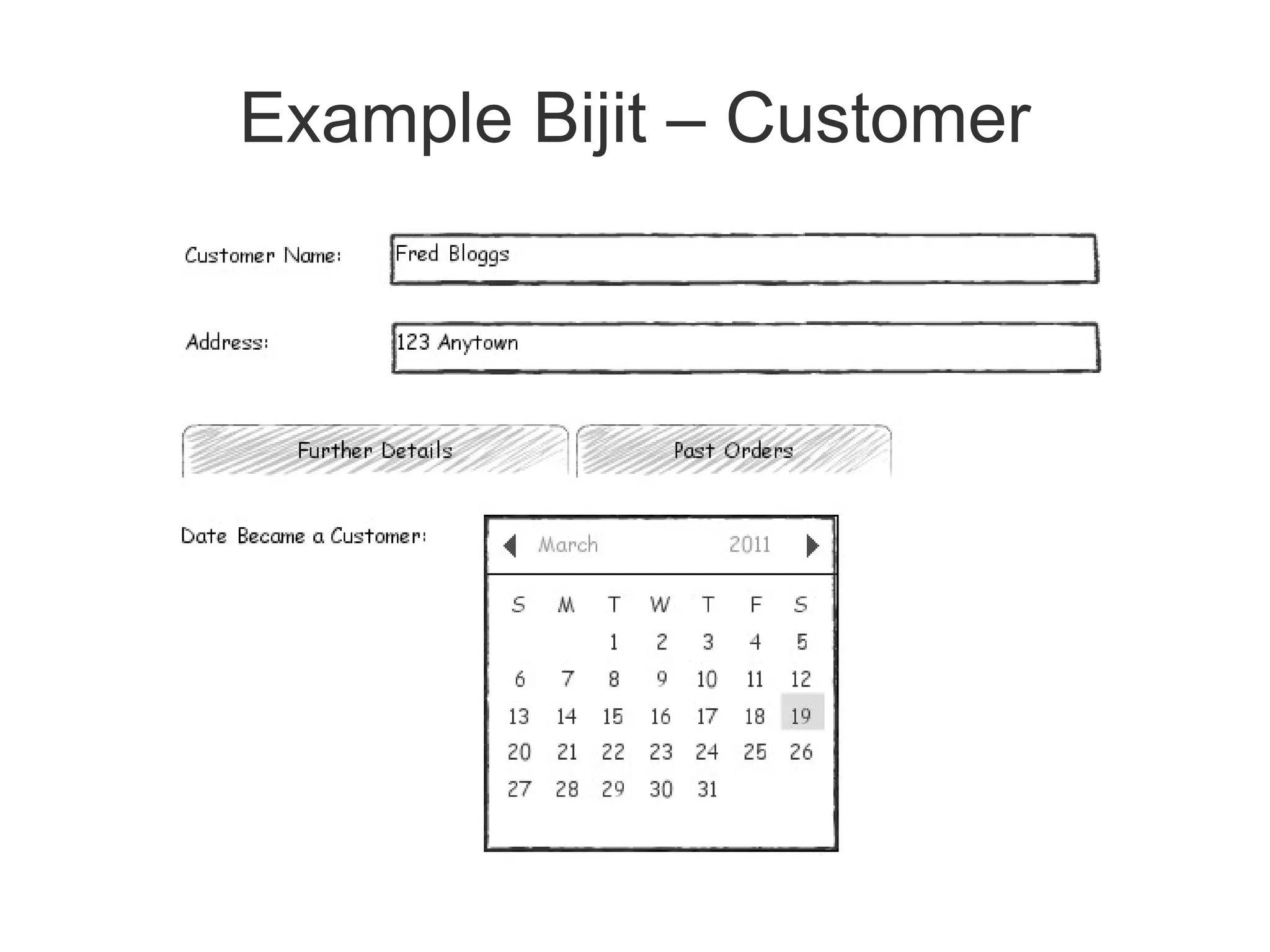
●   Break page into re-usable bijits
●   Each is effectively a dijit with a business
    function
    ●   Has well-defined properties, events, etc.
●   Nothing special about bijits – you don't need
    explicit support
●   Tie then together using a page controller (e.g.
    page controller concept from IBM's Kuba)
    ●   Just a class that does wiring
Bijits
Example Bijit – Customer
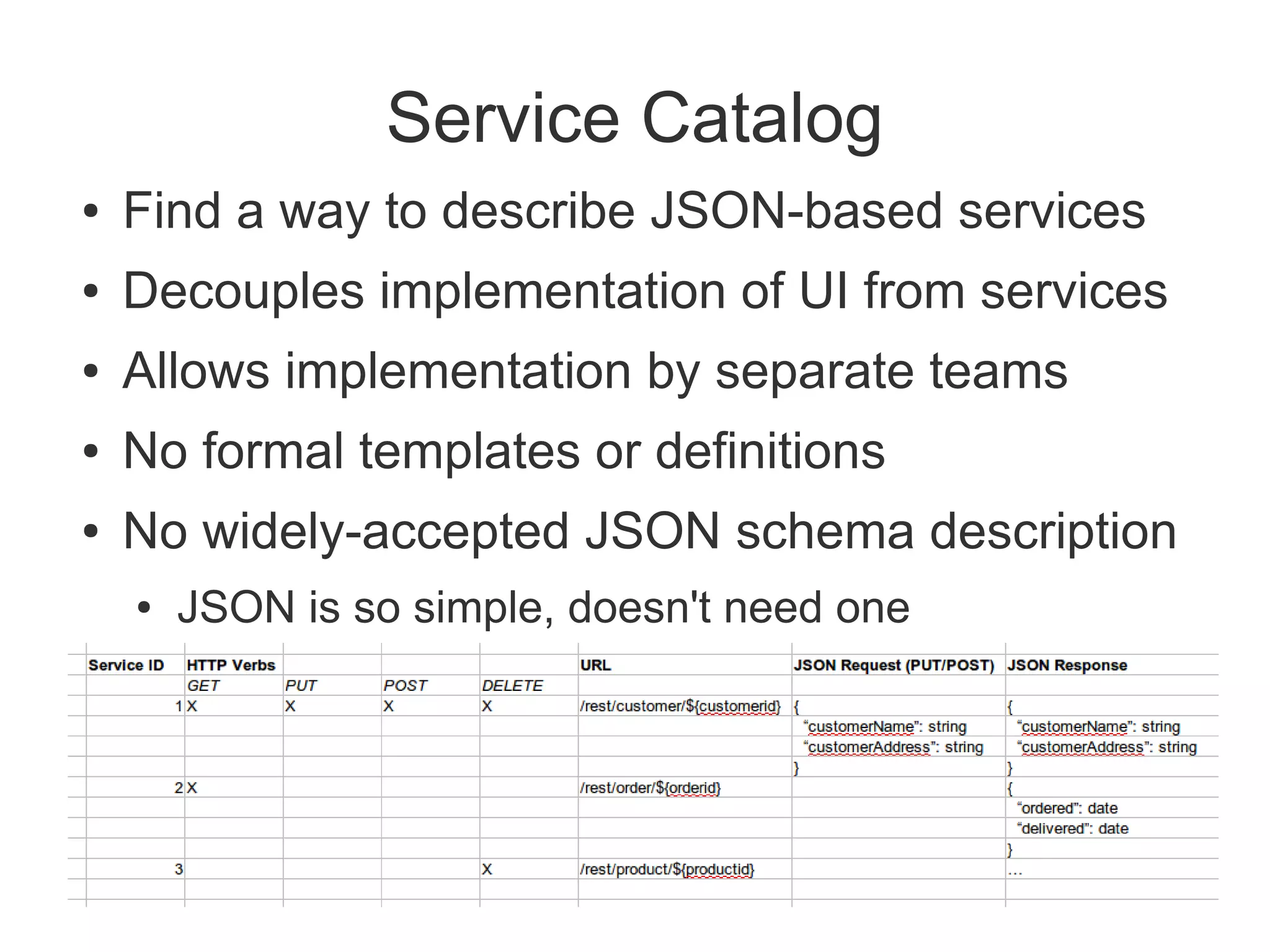
Service Catalog
●   Find a way to describe JSON-based services
●   Decouples implementation of UI from services
●   Allows implementation by separate teams
●   No formal templates or definitions
●   No widely-accepted JSON schema description
    ●   JSON is so simple, doesn't need one
Service Catalog Best Practices
●   Keep services fine-grained
    ●   Coarse-grained is a warning sign
●   If you must do coarse-grained, always describe
    JSON envelope in detail
●   Services should always be short-running
Best Practices
●   Develop in Chrome or Firefox with Firebug
●   Don't Forget Internet Explorer (esp. IE6). To
    debug:
    ●   Use IE 8 in backwards-compat mode with
        debugging console
    ●   Use JSLint...
•   By Doug Crockford
•   www.jslint.com
•   Javascript developer's “honest” friend
•   Examine the entire output!
    – Do all those globals look right?
• Play with options
• Works with HTML and JSON data too

• Install JSLint Eclipse plugin from Rock Star Apps
Best Practices
●   Do Unit Testing - Dojo DOH framework:
    http://www.sitepen.com/blog/2008/04/15/unit-
    testing-custom-code-with-the-dojo-objective-
    harness/
●   Continuous Integration
    ●   Use a continuous integration server such as
        Hudson, Bamboo, etc...
●   Need CSS experience on project – an often
    over-looked skill
●   Learn how to use HTTP headers to leverage
    caching
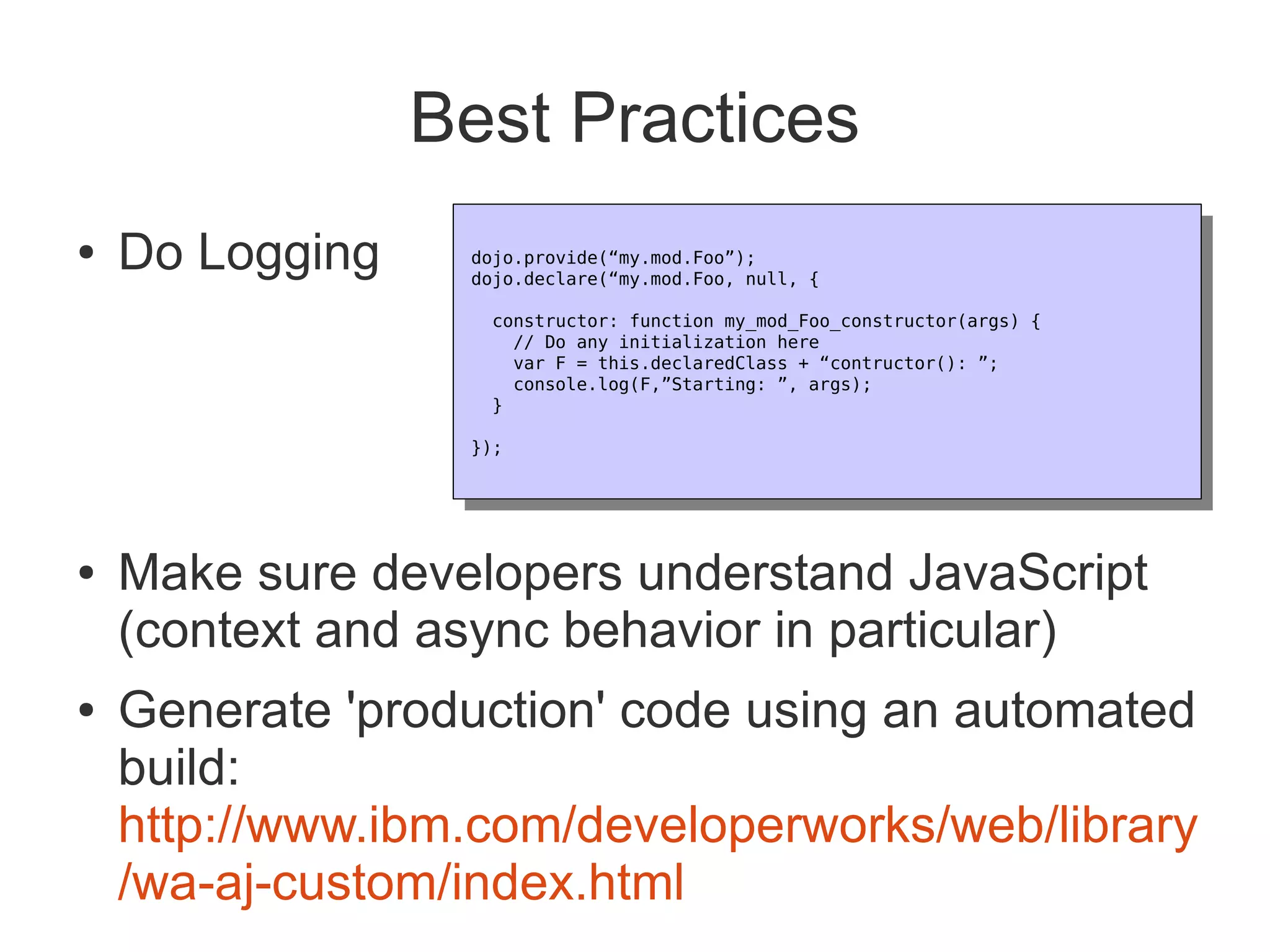
Best Practices
●   Do Logging    dojo.provide(“my.mod.Foo”);
                   dojo.provide(“my.mod.Foo”);
                  dojo.declare(“my.mod.Foo, null, {
                   dojo.declare(“my.mod.Foo, null, {
                   constructor: function my_mod_Foo_constructor(args) {
                     constructor: function my_mod_Foo_constructor(args) {
                      // Do any initialization here
                       // Do any initialization here
                      var F = this.declaredClass + “contructor(): ”;
                       var F = this.declaredClass + “contructor(): ”;
                      console.log(F,”Starting: ”, args);
                       console.log(F,”Starting: ”, args);
                   }
                     }
                  });
                   });


●   Make sure developers understand JavaScript
    (context and async behavior in particular)
●   Generate 'production' code using an automated
    build:
    http://www.ibm.com/developerworks/web/library
    /wa-aj-custom/index.html
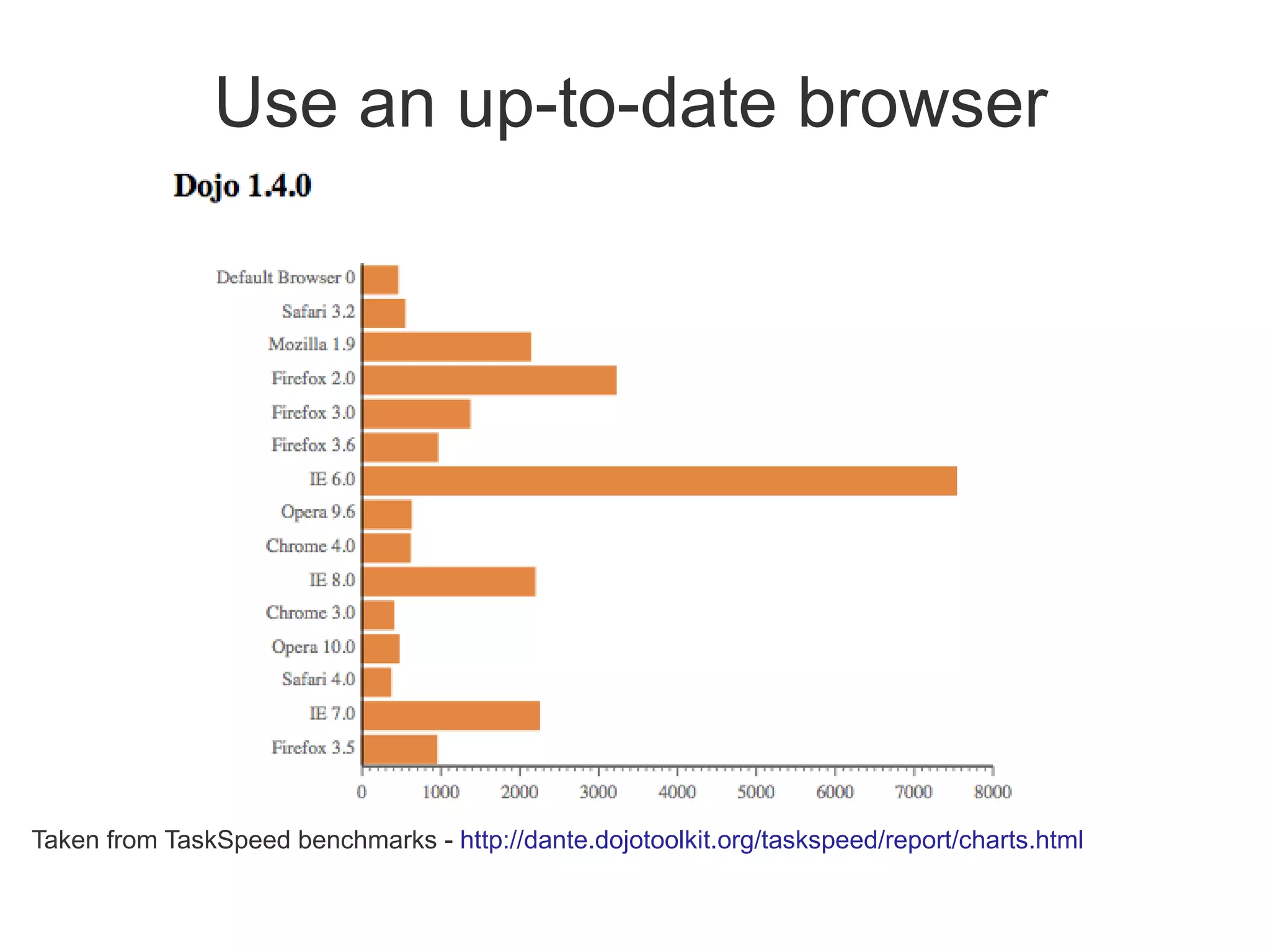
Use an up-to-date browser


Taken from TaskSpeed benchmarks - http://dante.dojotoolkit.org/taskspeed/report/charts.html
Further Learning
●   http://dojotipsntricks.com/
●   O'Reilly Books
●   http://dojocampus.org/
●   http://dojotoolkit.org/
Summary
●   Modern, interactive, Web 2.0 applications are
    the future
●   Dojo helps you build these quickly, efficient, and
    to a high quality
●   To design:
    ●   Wireframe pages
    ●   Break them into bijits
    ●   Write a service catalog


               andrew.ferrier@uk.ibm.com

Building Real-World Dojo Web Applications

  • 1.
    Building Real-World DojoWeb Applications Andrew Ferrier IBM Software Services for WebSphere
  • 2.
    Agenda ● How has building web applications changed? ● Web 1.0 to Web 2.0 ● AJAX / REST / JSON ● What is Dojo? ● Why is IBM interested and how does it fit in to WebSphere? ● A flavor of Dojo ● How do we design applications for Dojo? ● Some Dojo Best Practices
  • 3.
    Web 1.0 Model ● Static HTML content, little-to-no-dynamicity (1) User actions ● Most folks know this trigger HTTP already request to a web server ● Server-side-driven content ● Page per state (2) Server does ● Perhaps with a small some processing amount of JavaScript for and effects or form validation returns an HTML page to client ● Traditionally written with a variety of technologies – Servlets, JSPs, etc.
  • 4.
    But this hasdisadvantages... ● Interaction is awkward ● Slow response time – every action requires a entire page refresh ● W3C states that 1 second is highest acceptable response time for interactive action ● Often ugly, flickery, content
  • 5.
    Web 2.0 Model (1) User actions ● Browser using AJAX trigger JavaScript to communicate with call to Ajax engine server (2) Ajax engine Invokes asynch ● Lightweight RESTful request Service Calls (3) Server does ● Service Gateway or processing and returns XML to the other technology to Ajax engine proxy all service (4) Ajax engine invocations Displays the XML in the browser
  • 6.
    What is AJAX? ● Asynchronous JavaScript and XML ● Doesn't have to be about XML, and often isn't ● Uses XMLHTTPRequest feature of browser to make an HTTP invocation without refreshing page ● Used to retrieve data ● 90% of the time this is formatted in JSON (JavaScript Object Notation)
  • 7.
    JSON { “customerName”: “Andrew Ferrier” “customerHeightInCm”: 100 “customerAddresses”: [ { “addressType”: “home”, “addressLine1”: “123 Anytown”, “addressPostcode”: “AB12 3CD” } ] }
  • 8.
    What is REST? ● Use resource-driven URLs: ● e.g. /rest/customer/1234 ● Leverages HTTP Verbs ● GET, PUT, POST, DELETE ● Leverages HTTP Response Codes ● 200, 401, 403, etc. ● Typically uses lightweight data format ● JSON, plain text ● Particularly well-suited to CRUD
  • 9.
    Web 2.0 BrowserModel ● Thick-ish client ● JavaScript code runs in browser ● Events on page are used to drive code (onLoad, onClick, etc...) ● Extra data and code are requested from server using XHRs, with async callbacks in code
  • 10.
    Web 1.0 Page ● Static HTML with mixed layout and content: ● Little to no JavaScript
  • 11.
    Web 2.0 Page ● 3 primary components: ● HTML (DOM Model) – Tree-like structure of HTML tags – These days we use <div> a lot, we avoid 'styled' tags like <b>. ● JavaScript (including Dojo) ● CSS for Styling
  • 12.
    Browser – Separationof Concerns ● Model (DOM) / View (CSS) / Controller (JavaScript) allows for: ● Decoupling of styling and layout (CSS) from content (HTML) ● Decoupling of code (JavaScript) from page model (DOM) ● Event-driven programming model
  • 13.
  • 14.
    Let's not forgetthe Service Gateway... ● Facades RESTful services to UI, primarily to resolve cross-domain security restrictions ● Can be implemented in a variety of technologies: ● JAX-RS ● Servlets ● WebSphere ESB and Process Server ● … virtually anything else that can host HTTP
  • 15.
    What's wrong withJavaScript? ● Traditional JavaScript weak at: ● Structured code – no classes, modules ● Cross-browser support – incompatibilities, especially with the dreaded IE6 (http://www.ie6countdown.com/) ● No support for complex or rich form controls ● Hard to handle JavaScript context and other awkwardnesses
  • 16.
    So what isDojo? ● Dojo is a set of common JavaScript libraries used for creating Ajax and DHTML web applications ● http://dojotoolkit.org ● Open Source ● Large widget collection (“dijits”) ● Powerful I/O (XHR) ● Data abstraction layer ● Event management ● Logging and debugging ● Extensible modular architecture ● Declarative and programmatic
  • 17.
    Why is thisexciting and important? ● Rich, powerful user experience, bridging interactivity gap ● Low barrier to entry in many environments ● Main requirement is a modern web browser – Firefox 3.5+, Chrome, Safari – IE 7+ also OK-ish ● With some kind of service gateway technology, can connect to most types of backend
  • 18.
    Why Is IBMInterested? ● Part of an overall business solution ● IBM does more than middleware ● Web 2.0 Feature Pack for WAS contains Dojo ● Building Modern Rich Applications
  • 19.
    Why use Dojoover the alternatives? ‣ Numerous competing JavaScript toolkits ‣ JQuery, Prototype, YUI, Mootools, GWT ‣ Dojo is IBM's strategic choice for a number of reasons ‣ More than just DOM access, CSS effects and AJAX ‣ Enterprise-grade toolkit and feature set (internationalization, accessibility, etc.) ‣ Actively supported and used by IBM Extensions Widgets Core dōjō
  • 20.
  • 21.
    Dojo Base ● Dojo “Base” libraries are Dojo functions that are always available inside the base dojo.js bootstrap • Module Loader •Events (simple connect) • Lang Utils & Array Extras •Color functions • Cookie functions •Browser detection • Query, Node & Style Utils •URL functions • I/O (Ajax) •Doc Load/Unload Hooks • JSON serialization •Animation & Effects • Fast CSS Style manipulation  Fade, slide • Deferreds  CSS colors
  • 22.
    Dojo Components • Base  Extremely common functions that are always available no matter what else is included  Provided within the dojo.js (<60kb, <24kb zipped) • Core  Common functions  Loaded externally  Extended animation effects Extensions  Date parsers Widgets  Additional IO above xhr  and more Core dōjō
  • 23.
    Other Functions • Dijit  Internationalized, accessible form, layout and specialized widgets built upon a powerful set of widget functions • Dojox  Everything not yet included in dojo / dijit  Quality varies widely  Read author notes! • Utils  Tools to create custom builds Extensions  Reduce load time and size Widgets Core dōjō
  • 24.
    Loading Dojo ● Import any stylesheets and themes you wish to use in your application ● Link to core dojo.js
  • 25.
    Adding Styling, ModifyingDOM, Adding an Event Credits: Excerpt from Dojo Fundamentals Ajax Experience presentation by Alex Russell
  • 26.
  • 27.
  • 28.
    Some Dijits ● Uniform Input visuals on all browsers ● dojo.form.Form provides easy access to all form values as a single JSON object Text Inputs •DateTextBox • TextBox • DateTextBox • NumberTextBox • ValidationTextBox • TimeTextBox • NumberSpinner • TextArea • SimpleTextArea • CurrencyTextBox Buttons Selectors Others • ComboBox • Checkbox • Button • MultiSelect • Radio • DropdownButton • FilteringSelect • Slider • ComboButton •TimeTextBox
  • 29.
    Writing Dijits ● Can write own dijits ● 3 basic components: ● Template HTML (use dojoAttachPoints) ● JavaScript with certain call-in functions, such as constructor(), buildRendering(), postCreate(), etc. ● CSS File
  • 30.
    So how dowe design? ● Wireframing to mock up UI ● Break UI into Bijits, specify each ● Service Catalog for Gateway ● Other definitions for backend services ● Web Services ● Legacy Services ● Database DDLs ● etc...
  • 31.
    Wireframe page ● I did this using iplotz.com, more mature tools available
  • 32.
    Designing pages ● Break page into re-usable bijits ● Each is effectively a dijit with a business function ● Has well-defined properties, events, etc. ● Nothing special about bijits – you don't need explicit support ● Tie then together using a page controller (e.g. page controller concept from IBM's Kuba) ● Just a class that does wiring
  • 33.
  • 34.
  • 35.
    Service Catalog ● Find a way to describe JSON-based services ● Decouples implementation of UI from services ● Allows implementation by separate teams ● No formal templates or definitions ● No widely-accepted JSON schema description ● JSON is so simple, doesn't need one
  • 36.
    Service Catalog BestPractices ● Keep services fine-grained ● Coarse-grained is a warning sign ● If you must do coarse-grained, always describe JSON envelope in detail ● Services should always be short-running
  • 37.
    Best Practices ● Develop in Chrome or Firefox with Firebug ● Don't Forget Internet Explorer (esp. IE6). To debug: ● Use IE 8 in backwards-compat mode with debugging console ● Use JSLint...
  • 38.
    By Doug Crockford • www.jslint.com • Javascript developer's “honest” friend • Examine the entire output! – Do all those globals look right? • Play with options • Works with HTML and JSON data too • Install JSLint Eclipse plugin from Rock Star Apps
  • 39.
    Best Practices ● Do Unit Testing - Dojo DOH framework: http://www.sitepen.com/blog/2008/04/15/unit- testing-custom-code-with-the-dojo-objective- harness/ ● Continuous Integration ● Use a continuous integration server such as Hudson, Bamboo, etc... ● Need CSS experience on project – an often over-looked skill ● Learn how to use HTTP headers to leverage caching
  • 40.
    Best Practices ● Do Logging dojo.provide(“my.mod.Foo”); dojo.provide(“my.mod.Foo”); dojo.declare(“my.mod.Foo, null, { dojo.declare(“my.mod.Foo, null, { constructor: function my_mod_Foo_constructor(args) { constructor: function my_mod_Foo_constructor(args) { // Do any initialization here // Do any initialization here var F = this.declaredClass + “contructor(): ”; var F = this.declaredClass + “contructor(): ”; console.log(F,”Starting: ”, args); console.log(F,”Starting: ”, args); } } }); }); ● Make sure developers understand JavaScript (context and async behavior in particular) ● Generate 'production' code using an automated build: http://www.ibm.com/developerworks/web/library /wa-aj-custom/index.html
  • 41.
    Use an up-to-datebrowser Taken from TaskSpeed benchmarks - http://dante.dojotoolkit.org/taskspeed/report/charts.html
  • 42.
    Further Learning ● http://dojotipsntricks.com/ ● O'Reilly Books ● http://dojocampus.org/ ● http://dojotoolkit.org/
  • 43.
    Summary ● Modern, interactive, Web 2.0 applications are the future ● Dojo helps you build these quickly, efficient, and to a high quality ● To design: ● Wireframe pages ● Break them into bijits ● Write a service catalog andrew.ferrier@uk.ibm.com