www.jetxpert.com
New tools for inkjet development
Yair Kipman, Imagexpert Inc
www.jetxpert.com
www.jetxpert.com
Presentation Outline
• Overview of Inkjet Analysis
• How is In-Flight Analysis Used?
• JetXpert for Visualization and Analysis of Drops-In-Flight
– JetXpert System Overview
– Adding Greater Capabilities
– JetXpert OEM
– New: JetXpert Surface
– New: JetXpert Latency
– New: JetXpert Stitch
• JetXpert Print Station
• Automated Print Quality Analysis, and Part Inspection
– Hardware Platforms
– Overview of Tools for Print Quality Analysis
– Summary, Q&A
www.jetxpert.com
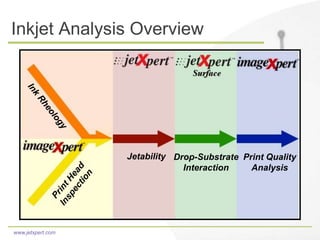
Inkjet Analysis Overview
Jetability Drop-Substrate
Interaction
Print Quality
Analysis
www.jetxpert.com
Visualization and Analysis
of Drops in Flight
www.jetxpert.com
Why Analyze Drops In-Flight?
• Visualize Drop Formation
- Adjusting jetting parameters and ink formulation to optimize
drop formation means faster turnaround and cheaper
development. It also removes added complications from
substrate interaction.
• Test Sustainability
- The ability to test jet sustainability both automatically and
offline, saves both time and money. 30% of printer failures are
due to jet out.
• Diagnose Misting
- Usually less important for graphics, but critical for printed circuit
boards and other printed electronics applications.
www.jetxpert.com
Why Analyze Drops In-Flight?
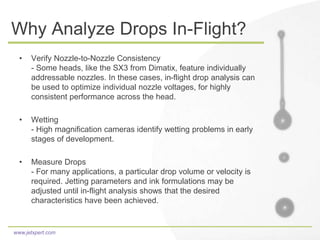
• Verify Nozzle-to-Nozzle Consistency
- Some heads, like the SX3 from Dimatix, feature individually
addressable nozzles. In these cases, in-flight drop analysis can
be used to optimize individual nozzle voltages, for highly
consistent performance across the head.
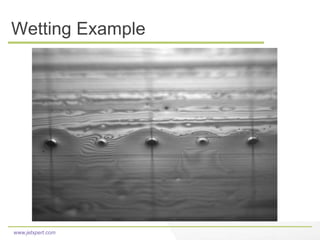
• Wetting
- High magnification cameras identify wetting problems in early
stages of development.
• Measure Drops
- For many applications, a particular drop volume or velocity is
required. Jetting parameters and ink formulations may be
adjusted until in-flight analysis shows that the desired
characteristics have been achieved.
www.jetxpert.com
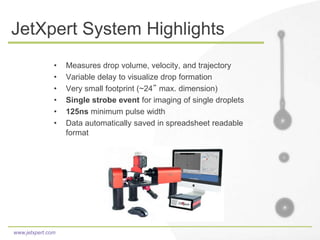
JetXpert System Highlights
• Measures drop volume, velocity, and trajectory
• Variable delay to visualize drop formation
• Very small footprint (~24” max. dimension)
• Single strobe event for imaging of single droplets
• 125ns minimum pulse width
• Data automatically saved in spreadsheet readable
format
www.jetxpert.com
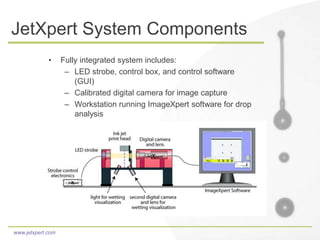
JetXpert System Components
• Fully integrated system includes:
– LED strobe, control box, and control software
(GUI)
– Calibrated digital camera for image capture
– Workstation running ImageXpert software for drop
analysis
www.jetxpert.com
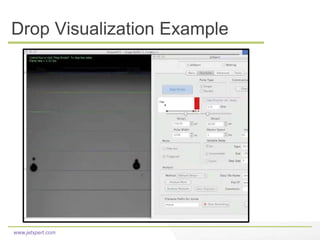
Drop Visualization Example
www.jetxpert.com
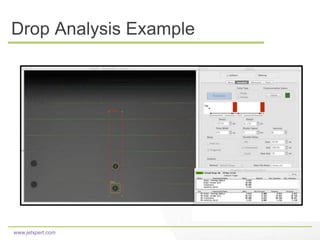
Drop Analysis Example
www.jetxpert.com
Wetting Example
www.jetxpert.com
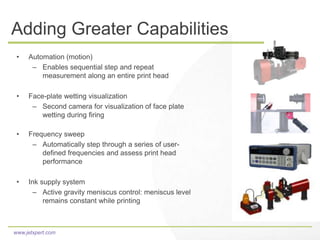
Adding Greater Capabilities
• Automation (motion)
– Enables sequential step and repeat
measurement along an entire print head
• Face-plate wetting visualization
– Second camera for visualization of face plate
wetting during firing
• Frequency sweep
– Automatically step through a series of user-
defined frequencies and assess print head
performance
• Ink supply system
– Active gravity meniscus control: meniscus level
remains constant while printing
www.jetxpert.com
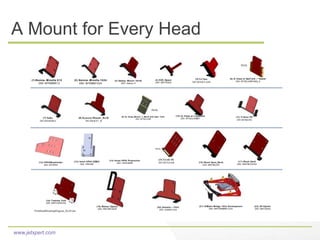
A Mount for Every Head
PrintHeadMountingDiagram_RevH.doc
(5) S-Class
285-MTSCLASS
(9) Q- Class_Mount- 1_RevA with Sub- Tank
285- MTQCLASS
PEEK
(3) Galaxy- Mount- Vers2
285- Galaxy A
(6) S- Class w/ SubTank + Heater
285- MTSCLASSTANK_A
PEEK
(20) Dimatix – 1024
285- DIAMX1024
(17) Ricoh Gen5
285- MNTRICOH5A
(7) Seiko
285-MTSEIKO
(19) Meteor Option
285- MNTMETEOR
(21) DiMatic Bridge 1024 Development
285- MNTDMBRID1024
(22) XX Option
285- MNTXXXX
X
(18) Toshiba Tech
285- MNTOSTECHA
(4) DX5, Epson
285- MNTDX5A
(1)Konica- Minolta 512
285- MTKMM512
(2) Konica- Minolta 1024
285- MTKMM1024
(16) Ricoh Gen4_RevA
285- MNTRICOH
(14) Imtex HP45 Production
285- HP45IMPR(12) HP45ShoeHolder
285- MTHP45
(8) Kyocera-Mount1_RevB
285-MTKY1_B
(13) Imtex HP45 DEMO
285- HP45IM
(10) Q- Class w/ o Subtank
285- MTQCLASSNT
PEEK
(15) XAAR 101
285-MTXAAR
(11) Trident 256
285-MTRI256
www.jetxpert.com
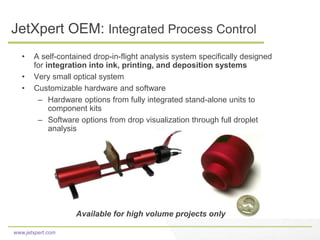
JetXpert OEM: Integrated Process Control
• A self-contained drop-in-flight analysis system specifically designed
for integration into ink, printing, and deposition systems
• Very small optical system
• Customizable hardware and software
– Hardware options from fully integrated stand-alone units to
component kits
– Software options from drop visualization through full droplet
analysis
Available for high volume projects only
www.jetxpert.com
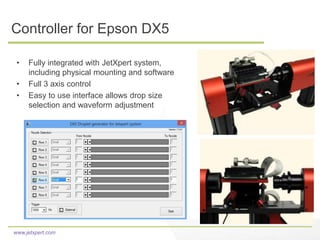
Controller for Epson DX5
• Fully integrated with JetXpert system,
including physical mounting and software
• Full 3 axis control
• Easy to use interface allows drop size
selection and waveform adjustment
www.jetxpert.com
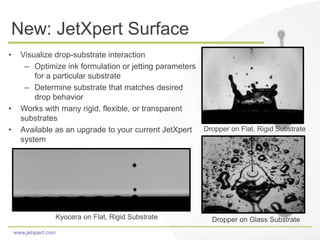
New: JetXpert Surface
• Visualize drop-substrate interaction
– Optimize ink formulation or jetting parameters
for a particular substrate
– Determine substrate that matches desired
drop behavior
• Works with many rigid, flexible, or transparent
substrates
• Available as an upgrade to your current JetXpert
system
Dropper on Flat, Rigid Substrate
Dropper on Glass SubstrateKyocera on Flat, Rigid Substrate
www.jetxpert.com
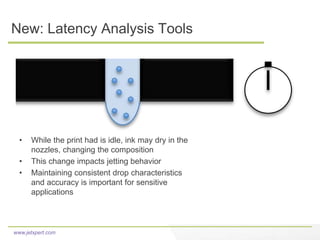
New: Latency Analysis Tools
• While the print had is idle, ink may dry in the
nozzles, changing the composition
• This change impacts jetting behavior
• Maintaining consistent drop characteristics
and accuracy is important for sensitive
applications
www.jetxpert.com
New: Latency Analysis Tools
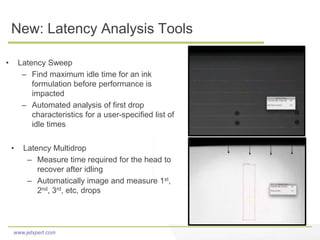
• Latency Sweep
– Find maximum idle time for an ink
formulation before performance is
impacted
– Automated analysis of first drop
characteristics for a user-specified list of
idle times
• Latency Multidrop
– Measure time required for the head to
recover after idling
– Automatically image and measure 1st,
2nd, 3rd, etc, drops
www.jetxpert.com
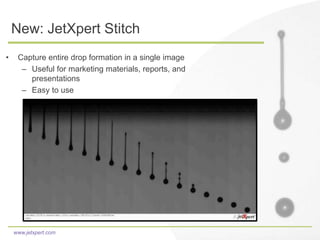
New: JetXpert Stitch
• Capture entire drop formation in a single image
– Useful for marketing materials, reports, and
presentations
– Easy to use
www.jetxpert.com
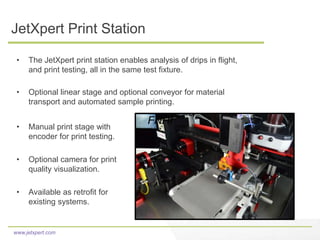
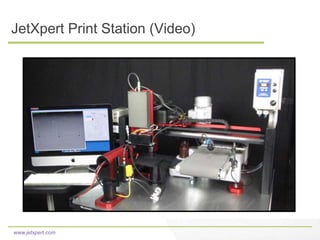
JetXpert Print Station
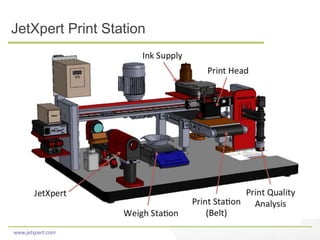
• The JetXpert print station enables analysis of drips in flight,
and print testing, all in the same test fixture.
• Optional linear stage and optional conveyor for material
transport and automated sample printing.
• Manual print stage with
encoder for print testing.
• Optional camera for print
quality visualization.
• Available as retrofit for
existing systems.
FNHI
www.jetxpert.com
JetXpert Print Station
www.jetxpert.com
JetXpert Print Station (Video)
www.jetxpert.com
Automated Print Quality
Analysis & Part Inspection
www.jetxpert.com
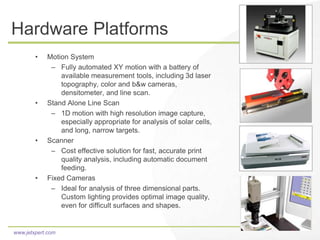
Hardware Platforms
• Motion System
– Fully automated XY motion with a battery of
available measurement tools, including 3d laser
topography, color and b&w cameras,
densitometer, and line scan.
• Stand Alone Line Scan
– 1D motion with high resolution image capture,
especially appropriate for analysis of solar cells,
and long, narrow targets.
• Scanner
– Cost effective solution for fast, accurate print
quality analysis, including automatic document
feeding.
• Fixed Cameras
– Ideal for analysis of three dimensional parts.
Custom lighting provides optimal image quality,
even for difficult surfaces and shapes.
www.jetxpert.com
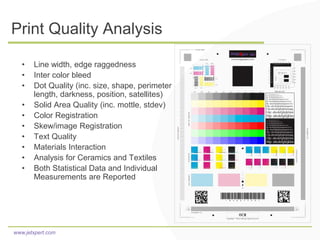
Print Quality Analysis
• Line width, edge raggedness
• Inter color bleed
• Dot Quality (inc. size, shape, perimeter
length, darkness, position, satellites)
• Solid Area Quality (inc. mottle, stdev)
• Color Registration
• Skew/image Registration
• Text Quality
• Materials Interaction
• Analysis for Ceramics and Textiles
• Both Statistical Data and Individual
Measurements are Reported
www.jetxpert.com
Summary
www.jetxpert.com
A Range of Applications
ImageXpert systems offer flexible solutions to meet a
wide variety of applications, in diverse industries.
• Powerful, customizable ImageXpert image analysis
software is at the core of all of our systems
• Optics and lighting are tailored to meet the needs of
each application.
• All of our systems are expandable and can be
upgraded as customer needs change
www.jetxpert.com
Support and Service
• At ImageXpert, we are committed to excellent customer
service and support.
• We offer:
– Personalized attention
– Customization and application engineering
– Production line and R&D service contracts
– In-Depth Training
www.jetxpert.com
www.jetxpert.com
info@imagexpert.com
603-598-2500
Thank you!

Drop watcher jetxpert for inkjet applications

  • 1.
    www.jetxpert.com New tools forinkjet development Yair Kipman, Imagexpert Inc www.jetxpert.com
  • 2.
    www.jetxpert.com Presentation Outline • Overviewof Inkjet Analysis • How is In-Flight Analysis Used? • JetXpert for Visualization and Analysis of Drops-In-Flight – JetXpert System Overview – Adding Greater Capabilities – JetXpert OEM – New: JetXpert Surface – New: JetXpert Latency – New: JetXpert Stitch • JetXpert Print Station • Automated Print Quality Analysis, and Part Inspection – Hardware Platforms – Overview of Tools for Print Quality Analysis – Summary, Q&A
  • 3.
    www.jetxpert.com Inkjet Analysis Overview JetabilityDrop-Substrate Interaction Print Quality Analysis
  • 4.
  • 5.
    www.jetxpert.com Why Analyze DropsIn-Flight? • Visualize Drop Formation - Adjusting jetting parameters and ink formulation to optimize drop formation means faster turnaround and cheaper development. It also removes added complications from substrate interaction. • Test Sustainability - The ability to test jet sustainability both automatically and offline, saves both time and money. 30% of printer failures are due to jet out. • Diagnose Misting - Usually less important for graphics, but critical for printed circuit boards and other printed electronics applications.
  • 6.
    www.jetxpert.com Why Analyze DropsIn-Flight? • Verify Nozzle-to-Nozzle Consistency - Some heads, like the SX3 from Dimatix, feature individually addressable nozzles. In these cases, in-flight drop analysis can be used to optimize individual nozzle voltages, for highly consistent performance across the head. • Wetting - High magnification cameras identify wetting problems in early stages of development. • Measure Drops - For many applications, a particular drop volume or velocity is required. Jetting parameters and ink formulations may be adjusted until in-flight analysis shows that the desired characteristics have been achieved.
  • 7.
    www.jetxpert.com JetXpert System Highlights •Measures drop volume, velocity, and trajectory • Variable delay to visualize drop formation • Very small footprint (~24” max. dimension) • Single strobe event for imaging of single droplets • 125ns minimum pulse width • Data automatically saved in spreadsheet readable format
  • 8.
    www.jetxpert.com JetXpert System Components •Fully integrated system includes: – LED strobe, control box, and control software (GUI) – Calibrated digital camera for image capture – Workstation running ImageXpert software for drop analysis
  • 9.
  • 10.
  • 11.
  • 12.
    www.jetxpert.com Adding Greater Capabilities •Automation (motion) – Enables sequential step and repeat measurement along an entire print head • Face-plate wetting visualization – Second camera for visualization of face plate wetting during firing • Frequency sweep – Automatically step through a series of user- defined frequencies and assess print head performance • Ink supply system – Active gravity meniscus control: meniscus level remains constant while printing
  • 13.
    www.jetxpert.com A Mount forEvery Head PrintHeadMountingDiagram_RevH.doc (5) S-Class 285-MTSCLASS (9) Q- Class_Mount- 1_RevA with Sub- Tank 285- MTQCLASS PEEK (3) Galaxy- Mount- Vers2 285- Galaxy A (6) S- Class w/ SubTank + Heater 285- MTSCLASSTANK_A PEEK (20) Dimatix – 1024 285- DIAMX1024 (17) Ricoh Gen5 285- MNTRICOH5A (7) Seiko 285-MTSEIKO (19) Meteor Option 285- MNTMETEOR (21) DiMatic Bridge 1024 Development 285- MNTDMBRID1024 (22) XX Option 285- MNTXXXX X (18) Toshiba Tech 285- MNTOSTECHA (4) DX5, Epson 285- MNTDX5A (1)Konica- Minolta 512 285- MTKMM512 (2) Konica- Minolta 1024 285- MTKMM1024 (16) Ricoh Gen4_RevA 285- MNTRICOH (14) Imtex HP45 Production 285- HP45IMPR(12) HP45ShoeHolder 285- MTHP45 (8) Kyocera-Mount1_RevB 285-MTKY1_B (13) Imtex HP45 DEMO 285- HP45IM (10) Q- Class w/ o Subtank 285- MTQCLASSNT PEEK (15) XAAR 101 285-MTXAAR (11) Trident 256 285-MTRI256
  • 14.
    www.jetxpert.com JetXpert OEM: IntegratedProcess Control • A self-contained drop-in-flight analysis system specifically designed for integration into ink, printing, and deposition systems • Very small optical system • Customizable hardware and software – Hardware options from fully integrated stand-alone units to component kits – Software options from drop visualization through full droplet analysis Available for high volume projects only
  • 15.
    www.jetxpert.com Controller for EpsonDX5 • Fully integrated with JetXpert system, including physical mounting and software • Full 3 axis control • Easy to use interface allows drop size selection and waveform adjustment
  • 16.
    www.jetxpert.com New: JetXpert Surface •Visualize drop-substrate interaction – Optimize ink formulation or jetting parameters for a particular substrate – Determine substrate that matches desired drop behavior • Works with many rigid, flexible, or transparent substrates • Available as an upgrade to your current JetXpert system Dropper on Flat, Rigid Substrate Dropper on Glass SubstrateKyocera on Flat, Rigid Substrate
  • 17.
    www.jetxpert.com New: Latency AnalysisTools • While the print had is idle, ink may dry in the nozzles, changing the composition • This change impacts jetting behavior • Maintaining consistent drop characteristics and accuracy is important for sensitive applications
  • 18.
    www.jetxpert.com New: Latency AnalysisTools • Latency Sweep – Find maximum idle time for an ink formulation before performance is impacted – Automated analysis of first drop characteristics for a user-specified list of idle times • Latency Multidrop – Measure time required for the head to recover after idling – Automatically image and measure 1st, 2nd, 3rd, etc, drops
  • 19.
    www.jetxpert.com New: JetXpert Stitch •Capture entire drop formation in a single image – Useful for marketing materials, reports, and presentations – Easy to use
  • 20.
    www.jetxpert.com JetXpert Print Station •The JetXpert print station enables analysis of drips in flight, and print testing, all in the same test fixture. • Optional linear stage and optional conveyor for material transport and automated sample printing. • Manual print stage with encoder for print testing. • Optional camera for print quality visualization. • Available as retrofit for existing systems. FNHI
  • 21.
  • 22.
  • 23.
  • 24.
    www.jetxpert.com Hardware Platforms • MotionSystem – Fully automated XY motion with a battery of available measurement tools, including 3d laser topography, color and b&w cameras, densitometer, and line scan. • Stand Alone Line Scan – 1D motion with high resolution image capture, especially appropriate for analysis of solar cells, and long, narrow targets. • Scanner – Cost effective solution for fast, accurate print quality analysis, including automatic document feeding. • Fixed Cameras – Ideal for analysis of three dimensional parts. Custom lighting provides optimal image quality, even for difficult surfaces and shapes.
  • 25.
    www.jetxpert.com Print Quality Analysis •Line width, edge raggedness • Inter color bleed • Dot Quality (inc. size, shape, perimeter length, darkness, position, satellites) • Solid Area Quality (inc. mottle, stdev) • Color Registration • Skew/image Registration • Text Quality • Materials Interaction • Analysis for Ceramics and Textiles • Both Statistical Data and Individual Measurements are Reported
  • 26.
  • 27.
    www.jetxpert.com A Range ofApplications ImageXpert systems offer flexible solutions to meet a wide variety of applications, in diverse industries. • Powerful, customizable ImageXpert image analysis software is at the core of all of our systems • Optics and lighting are tailored to meet the needs of each application. • All of our systems are expandable and can be upgraded as customer needs change
  • 28.
    www.jetxpert.com Support and Service •At ImageXpert, we are committed to excellent customer service and support. • We offer: – Personalized attention – Customization and application engineering – Production line and R&D service contracts – In-Depth Training
  • 29.