
No App Left Behind: How to
Migrate Existing Applications to
AWS without Re-engineering
© 2017 SoftNAS®, Inc.
Agenda
• Security and Data Concerns
• Design/Architectural Considerations
– Security and Access Control
– Performance
– Backup and Data Protection
– Mobility and Elasticity
– High Availability
• SoftNAS Cloud NAS Overview
• Q&A
© 2017 SoftNAS®, Inc.
SoftNAS Story
• Born in the cloud (2012)
• Cloud NAS virtual storage appliance
• Over 2,000 AWS VPC deployments
• No App Left Behind™
• Fortune 500 to SMB implementations
• Thousands of AWS subscribers
• SoftNAS owns several patents, including patents for:
– HA in the cloud
– Data migration
© 2017 SoftNAS®, Inc.
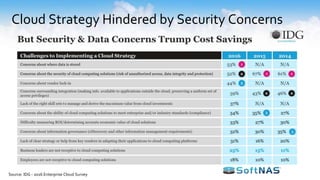
Cloud Strategy Hindered by Security Concerns
Source: IDG - 2016 Enterprise Cloud Survey
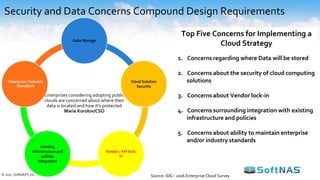
Security and Data Concerns Compound Design Requirements
Enterprises considering adopting public
clouds are concerned about where their
data is located and how it's protected
Maria Korolov/CSO
Data Storage
Cloud Solution
Security
Vendor / API lock-
in
Existing
infrastructure and
policies
Integration
Enterprise / Industry
Standards
Top Five Concerns for Implementing a
Cloud Strategy
1. Concerns regarding where Data will be stored
2. Concerns about the security of cloud computing
solutions
3. Concerns about Vendor lock-in
4. Concerns surrounding integration with existing
infrastructure and policies
5. Concerns about ability to maintain enterprise
and/or industry standards
© 2017 SoftNAS®, Inc. Source: IDG - 2016 Enterprise Cloud Survey
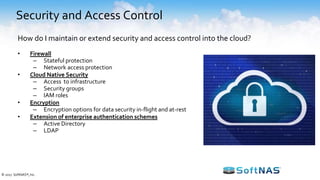
Security and Access Control
• Firewall
– Stateful protection
– Network access protection
• Cloud Native Security
– Access to infrastructure
– Security groups
– IAM roles
• Encryption
– Encryption options for data security in-flight and at-rest
• Extension of enterprise authentication schemes
– Active Directory
– LDAP
How do I maintain or extend security and access control into the cloud?
© 2017 SoftNAS®, Inc.
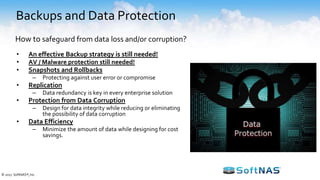
Backups and Data Protection
• An effective Backup strategy is still needed!
• AV / Malware protection still needed!
• Snapshots and Rollbacks
– Protecting against user error or compromise
• Replication
– Data redundancy is key in every enterprise solution
• Protection from Data Corruption
– Design for data integrity while reducing or eliminating
the possibility of data corruption
• Data Efficiency
– Minimize the amount of data while designing for cost
savings.
How to safeguard from data loss and/or corruption?
© 2017 SoftNAS®, Inc.
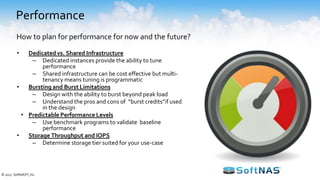
Performance
• Dedicated vs. Shared Infrastructure
– Dedicated instances provide the ability to tune
performance
– Shared infrastructure can be cost effective but multi-
tenancy means tuning is programmatic
• Bursting and Burst Limitations
– Design with the ability to burst beyond peak load
– Understand the pros and cons of “burst credits”if used
in the design
• Predictable Performance Levels
– Use benchmark programs to validate baseline
performance
• Storage Throughput and IOPS
– Determine storage tier suited for your use-case
How to plan for performance for now and the future?
© 2017 SoftNAS®, Inc.
Performance
• Dedicated vs. Shared Infrastructure
– Dedicated instances provide the ability to tune
performance
– Shared infrastructure can be cost effective but multi-
tenancy means tuning is programmatic
• Bursting and Burst Limitations
– Design with the ability to burst beyond peak load
– Understand the pros and cons of “burst credits”if used
in the design
• Predictable Performance Levels
– Use benchmark programs to validate baseline
performance
• Storage Throughput and IOPS
– Determine storage tier suited for your use-case
How to plan for performance for now and the future?
© 2017 SoftNAS®, Inc.
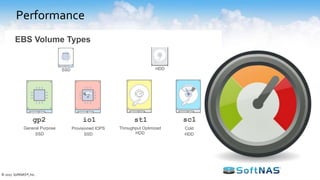
EBS Volume Types
General Purpose
SSD
gp2
Provisioned IOPS
SSD
io1
Throughput Optimized
HDD
st1
Cold
HDD
sc1
SSD HDD
Performance
• Dedicated vs. Shared Infrastructure
– Dedicated instances provide the ability to tune
performance
– Shared infrastructure can be cost effective but multi-
tenancy means tuning is programmatic
• Bursting and Burst Limitations
– Design with the ability to burst beyond peak load
– Understand the pros and cons of “burst credits”if used
in the design
• Predictable Performance Levels
– Use benchmark programs to validate baseline
performance
• Storage Throughput and IOPS
– Determine storage tier suited for your use-case
How to plan for performance for now and the future?
© 2017 SoftNAS®, Inc.
EBS Volume Types
General Purpose
SSD
gp2
Provisioned IOPS
SSD
io1
Throughput Optimized
HDD
st1
Cold
HDD
sc1
SSD HDD
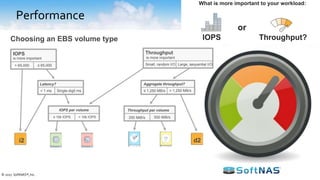
Throughput
is more important
Small, random I/O Large, sequential I/O
Latency?
i2
gp2 io1 sc1 st1
d2
Choosing an EBS volume type
IOPS
≤ 65,000> 65,000
< 1 ms Single-digit ms ≤ 1,250 MB/s
Aggregate throughput?
> 1,250 MB/s
is more important
≤ 10k IOPS > 10k IOPS
Throughput per volume
250 MiB/s 500 MiB/s
IOPS per volume
Throughput?
or
IOPS
What is more important to your workload:
Performance
• Dedicated vs. Shared Infrastructure
– Dedicated instances provide the ability to tune
performance
– Shared infrastructure can be cost effective but multi-
tenancy means tuning is programmatic
• Bursting and Burst Limitations
– Design with the ability to burst beyond peak load
– Understand the pros and cons of “burst credits”if used
in the design
• Predictable Performance Levels
– Use benchmark programs to validate baseline
performance
• Storage Throughput and IOPS
– Determine storage tier suited for your use-case
How to plan for performance for now and the future?
© 2017 SoftNAS®, Inc.
EBS Volume Types
General Purpose
SSD
gp2
Provisioned IOPS
SSD
io1
Throughput Optimized
HDD
st1
Cold
HDD
sc1
SSD HDD
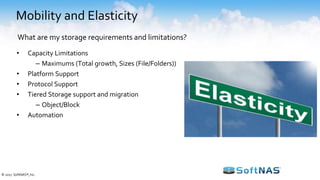
Mobility and Elasticity
• Capacity Limitations
– Maximums (Total growth, Sizes (File/Folders))
• Platform Support
• Protocol Support
• Tiered Storage support and migration
– Object/Block
• Automation
What are my storage requirements and limitations?
© 2017 SoftNAS®, Inc.
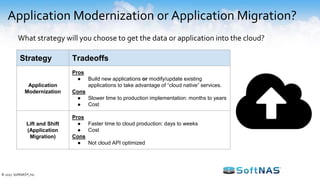
Application Modernization or Application Migration?
What strategy will you choose to get the data or application into the cloud?
Strategy Tradeoffs
Application
Modernization
Pros
● Build new applications or modify/update existing
applications to take advantage of “cloud native” services.
Cons
● Slower time to production implementation: months to years
● Cost
Lift and Shift
(Application
Migration)
Pros
● Faster time to cloud production: days to weeks
● Cost
Cons
● Not cloud API optimized
© 2017 SoftNAS®, Inc.
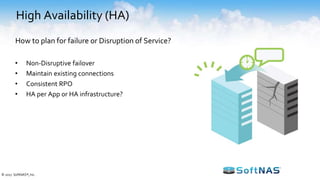
High Availability (HA)
• Non-Disruptive failover
• Maintain existing connections
• Consistent RPO
• HA per App or HA infrastructure?
How to plan for failure or Disruption of Service?
© 2017 SoftNAS®, Inc.
“Selecting SoftNAS Cloud has enabled us to quickly provision and manage storage, which has contributed to a hassle-free experience.” Keith Son -
Director, Infrastructure- iN DEMAND
“I have found SoftNAS Cloud to be a highly reliable, cost-effective and secure solution for storing massive amounts of data in the AWS environment.”
John Crites - CIO - Modus
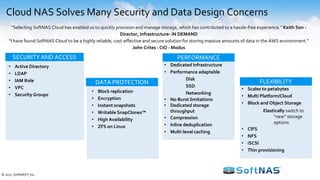
Cloud NAS Solves Many Security and Data Design Concerns
SECURITY AND ACCESS
DATA PROTECTION
• Active Directory
• LDAP
• IAM Role
• VPC
• Security Groups
• Block replication
• Encryption
• Instant snapshots
• Writable SnapClones™
• High Availability
• ZFS on Linux
PERFORMANCE
• Dedicated Infrastructure
• Performance adaptable
Disk
SSD
Networking
• No Burst limitations
• Dedicated storage
throughput
• Compression
• Inline deduplication
• Multi-level caching
FLEXIBILITY
• Scales to petabytes
• Multi Platform/Cloud
• Block and Object Storage
Elastically switch to
“new” storage
options
• CIFS
• NFS
• iSCSI
• Thin provisioning
© 2017 SoftNAS®, Inc.
End-user
desktops, devices
Applications
and servers
Volumes
AFP iSCSI
Storage pools
CIFS NFS
Site A
Site B Public
Cloud
NFS
CIFS/SMB
iSCSI
AFP
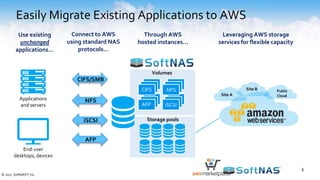
Use existing
unchanged
applications…
Connect to AWS
using standard NAS
protocols…
Through AWS
hosted instances…
Leveraging AWS storage
services for flexible capacity
6
Easily Migrate Existing Applications to AWS
© 2017 SoftNAS®, Inc.
Technology Partners
© 2017 SoftNAS, Inc.
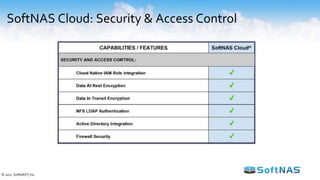
SoftNAS Cloud: Security & Access Control
© 2017 SoftNAS®, Inc.
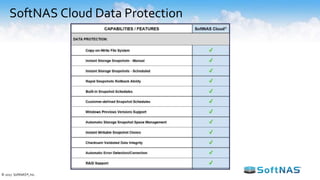
SoftNAS Cloud Data Protection
© 2017 SoftNAS®, Inc.
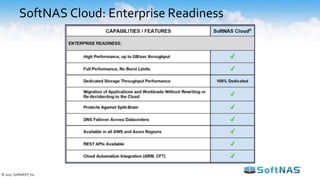
SoftNAS Cloud: Enterprise Readiness
© 2017 SoftNAS®, Inc.
Brands You Know Trust SoftNAS
Earn $100 AWS Credit!
First 100 attendees to register
ter.li/zt5un2
© 2017 SoftNAS, Inc.
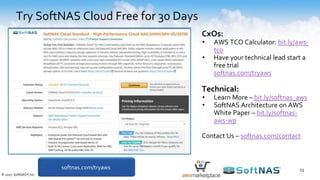
Try SoftNAS Cloud Free for 30 Days
23
CxOs:
• AWS TCO Calculator: bit.ly/aws-
tco
• Have your technical lead start a
free trial
softnas.com/tryaws
Technical:
• Learn More – bit.ly/softnas_aws
• SoftNAS Architecture on AWS
White Paper – bit.ly/softnas-
aws-wp
Contact Us – softnas.com/contact
softnas.com/tryaws
© 2017 SoftNAS®, Inc.

Migrate Existing Applications to AWS without Re-engineering

  • 1.
    No App LeftBehind: How to Migrate Existing Applications to AWS without Re-engineering © 2017 SoftNAS®, Inc.
  • 2.
    Agenda • Security andData Concerns • Design/Architectural Considerations – Security and Access Control – Performance – Backup and Data Protection – Mobility and Elasticity – High Availability • SoftNAS Cloud NAS Overview • Q&A © 2017 SoftNAS®, Inc.
  • 3.
    SoftNAS Story • Bornin the cloud (2012) • Cloud NAS virtual storage appliance • Over 2,000 AWS VPC deployments • No App Left Behind™ • Fortune 500 to SMB implementations • Thousands of AWS subscribers • SoftNAS owns several patents, including patents for: – HA in the cloud – Data migration © 2017 SoftNAS®, Inc.
  • 4.
    Cloud Strategy Hinderedby Security Concerns Source: IDG - 2016 Enterprise Cloud Survey
  • 5.
    Security and DataConcerns Compound Design Requirements Enterprises considering adopting public clouds are concerned about where their data is located and how it's protected Maria Korolov/CSO Data Storage Cloud Solution Security Vendor / API lock- in Existing infrastructure and policies Integration Enterprise / Industry Standards Top Five Concerns for Implementing a Cloud Strategy 1. Concerns regarding where Data will be stored 2. Concerns about the security of cloud computing solutions 3. Concerns about Vendor lock-in 4. Concerns surrounding integration with existing infrastructure and policies 5. Concerns about ability to maintain enterprise and/or industry standards © 2017 SoftNAS®, Inc. Source: IDG - 2016 Enterprise Cloud Survey
  • 6.
    Security and AccessControl • Firewall – Stateful protection – Network access protection • Cloud Native Security – Access to infrastructure – Security groups – IAM roles • Encryption – Encryption options for data security in-flight and at-rest • Extension of enterprise authentication schemes – Active Directory – LDAP How do I maintain or extend security and access control into the cloud? © 2017 SoftNAS®, Inc.
  • 7.
    Backups and DataProtection • An effective Backup strategy is still needed! • AV / Malware protection still needed! • Snapshots and Rollbacks – Protecting against user error or compromise • Replication – Data redundancy is key in every enterprise solution • Protection from Data Corruption – Design for data integrity while reducing or eliminating the possibility of data corruption • Data Efficiency – Minimize the amount of data while designing for cost savings. How to safeguard from data loss and/or corruption? © 2017 SoftNAS®, Inc.
  • 8.
    Performance • Dedicated vs.Shared Infrastructure – Dedicated instances provide the ability to tune performance – Shared infrastructure can be cost effective but multi- tenancy means tuning is programmatic • Bursting and Burst Limitations – Design with the ability to burst beyond peak load – Understand the pros and cons of “burst credits”if used in the design • Predictable Performance Levels – Use benchmark programs to validate baseline performance • Storage Throughput and IOPS – Determine storage tier suited for your use-case How to plan for performance for now and the future? © 2017 SoftNAS®, Inc.
  • 9.
    Performance • Dedicated vs.Shared Infrastructure – Dedicated instances provide the ability to tune performance – Shared infrastructure can be cost effective but multi- tenancy means tuning is programmatic • Bursting and Burst Limitations – Design with the ability to burst beyond peak load – Understand the pros and cons of “burst credits”if used in the design • Predictable Performance Levels – Use benchmark programs to validate baseline performance • Storage Throughput and IOPS – Determine storage tier suited for your use-case How to plan for performance for now and the future? © 2017 SoftNAS®, Inc. EBS Volume Types General Purpose SSD gp2 Provisioned IOPS SSD io1 Throughput Optimized HDD st1 Cold HDD sc1 SSD HDD
  • 10.
    Performance • Dedicated vs.Shared Infrastructure – Dedicated instances provide the ability to tune performance – Shared infrastructure can be cost effective but multi- tenancy means tuning is programmatic • Bursting and Burst Limitations – Design with the ability to burst beyond peak load – Understand the pros and cons of “burst credits”if used in the design • Predictable Performance Levels – Use benchmark programs to validate baseline performance • Storage Throughput and IOPS – Determine storage tier suited for your use-case How to plan for performance for now and the future? © 2017 SoftNAS®, Inc. EBS Volume Types General Purpose SSD gp2 Provisioned IOPS SSD io1 Throughput Optimized HDD st1 Cold HDD sc1 SSD HDD Throughput is more important Small, random I/O Large, sequential I/O Latency? i2 gp2 io1 sc1 st1 d2 Choosing an EBS volume type IOPS ≤ 65,000> 65,000 < 1 ms Single-digit ms ≤ 1,250 MB/s Aggregate throughput? > 1,250 MB/s is more important ≤ 10k IOPS > 10k IOPS Throughput per volume 250 MiB/s 500 MiB/s IOPS per volume Throughput? or IOPS What is more important to your workload:
  • 11.
    Performance • Dedicated vs.Shared Infrastructure – Dedicated instances provide the ability to tune performance – Shared infrastructure can be cost effective but multi- tenancy means tuning is programmatic • Bursting and Burst Limitations – Design with the ability to burst beyond peak load – Understand the pros and cons of “burst credits”if used in the design • Predictable Performance Levels – Use benchmark programs to validate baseline performance • Storage Throughput and IOPS – Determine storage tier suited for your use-case How to plan for performance for now and the future? © 2017 SoftNAS®, Inc. EBS Volume Types General Purpose SSD gp2 Provisioned IOPS SSD io1 Throughput Optimized HDD st1 Cold HDD sc1 SSD HDD
  • 12.
    Mobility and Elasticity •Capacity Limitations – Maximums (Total growth, Sizes (File/Folders)) • Platform Support • Protocol Support • Tiered Storage support and migration – Object/Block • Automation What are my storage requirements and limitations? © 2017 SoftNAS®, Inc.
  • 13.
    Application Modernization orApplication Migration? What strategy will you choose to get the data or application into the cloud? Strategy Tradeoffs Application Modernization Pros ● Build new applications or modify/update existing applications to take advantage of “cloud native” services. Cons ● Slower time to production implementation: months to years ● Cost Lift and Shift (Application Migration) Pros ● Faster time to cloud production: days to weeks ● Cost Cons ● Not cloud API optimized © 2017 SoftNAS®, Inc.
  • 14.
    High Availability (HA) •Non-Disruptive failover • Maintain existing connections • Consistent RPO • HA per App or HA infrastructure? How to plan for failure or Disruption of Service? © 2017 SoftNAS®, Inc.
  • 15.
    “Selecting SoftNAS Cloudhas enabled us to quickly provision and manage storage, which has contributed to a hassle-free experience.” Keith Son - Director, Infrastructure- iN DEMAND “I have found SoftNAS Cloud to be a highly reliable, cost-effective and secure solution for storing massive amounts of data in the AWS environment.” John Crites - CIO - Modus Cloud NAS Solves Many Security and Data Design Concerns SECURITY AND ACCESS DATA PROTECTION • Active Directory • LDAP • IAM Role • VPC • Security Groups • Block replication • Encryption • Instant snapshots • Writable SnapClones™ • High Availability • ZFS on Linux PERFORMANCE • Dedicated Infrastructure • Performance adaptable Disk SSD Networking • No Burst limitations • Dedicated storage throughput • Compression • Inline deduplication • Multi-level caching FLEXIBILITY • Scales to petabytes • Multi Platform/Cloud • Block and Object Storage Elastically switch to “new” storage options • CIFS • NFS • iSCSI • Thin provisioning © 2017 SoftNAS®, Inc.
  • 16.
    End-user desktops, devices Applications and servers Volumes AFPiSCSI Storage pools CIFS NFS Site A Site B Public Cloud NFS CIFS/SMB iSCSI AFP Use existing unchanged applications… Connect to AWS using standard NAS protocols… Through AWS hosted instances… Leveraging AWS storage services for flexible capacity 6 Easily Migrate Existing Applications to AWS © 2017 SoftNAS®, Inc.
  • 17.
  • 18.
    SoftNAS Cloud: Security& Access Control © 2017 SoftNAS®, Inc.
  • 19.
    SoftNAS Cloud DataProtection © 2017 SoftNAS®, Inc.
  • 20.
    SoftNAS Cloud: EnterpriseReadiness © 2017 SoftNAS®, Inc.
  • 21.
    Brands You KnowTrust SoftNAS
  • 22.
    Earn $100 AWSCredit! First 100 attendees to register ter.li/zt5un2 © 2017 SoftNAS, Inc.
  • 23.
    Try SoftNAS CloudFree for 30 Days 23 CxOs: • AWS TCO Calculator: bit.ly/aws- tco • Have your technical lead start a free trial softnas.com/tryaws Technical: • Learn More – bit.ly/softnas_aws • SoftNAS Architecture on AWS White Paper – bit.ly/softnas- aws-wp Contact Us – softnas.com/contact softnas.com/tryaws © 2017 SoftNAS®, Inc.