1
Contents
• Introduction
• What is Green Computing
• Why Go For Green Computing
• How Computing Harm Environment
• Road to Green Computing
• Approaches to Green Computing
• Simple Tasks to Go Green
• Industrial Implementation
• Conclusion
2
What is Green Computing?
 Green computing or green IT, refers to environmentally sustainable
computing or IT.
 It is “the study and practice of Designing, Manufacturing, Using, and
Disposing of computers, servers, and associated subsystems efficiently and
effectively with minimal or no impact on the environment.”
 Green computing is the environmentally responsible and eco-friendly use
of computers and their resources.
3
Why Go For Green Computing
 Today, the main problem of the world is Global warming.
 The atmosphere is becoming hot & is causing many problems to
living organisms
 Tons of Electronic Waste
 Limited Resources
 Energy Cost
 Computers also play a major role in polluting the world.
4
How Computing Harm Environment
 Increase in power, cooling and space for data
centre.
 2007-$4.5 billion of electricity
 2011-$7.4 billion of electricity( i.e. 25 power
plants) it will double the CO2 output ( 62 million
metric tons) by electronic appliances.
5
How Computing Harm Environment
 Desktop requires 85 watts just to idle(Monitor off)
 Left on 24 hrs/day-1,500 pounds of CO2 per year.
 A tree absorbs between 3 and 15 pounds of CO2 each year.(up
to 500 trees)
6
How Computing Harm Environment
 According to reports from the German Federal
Environment Office, devices consume around 17
billion (kWh) in a year in standby mode.
 The CO2 dissipated from ‘sleeping’ devices = 1/7th
the CO2 emitted by an automobile.
 Manufacturers do not provide a proper shut-off
button in devices.
 Windows Vista’s default shut down mode is a deep
sleep mode that requires power.
7
 Hazardous materials inside computers.
 These contain
 Cadmium (damage your kidneys)
 Mercury (neurological damage)
 Lead (disrupt brain neurotransmitters).
8
How Computing Harm Environment
Road to Green Computing
 Green Use
 Green Disposal
 Green Design
 Green Manufacturing
9
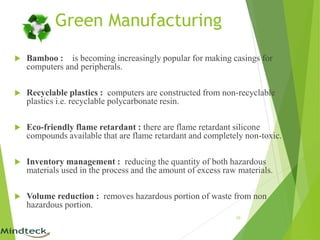
Green Manufacturing
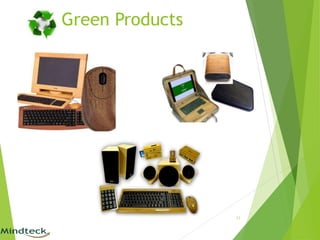
 Bamboo : is becoming increasingly popular for making casings for
computers and peripherals.
 Recyclable plastics : computers are constructed from non-recyclable
plastics i.e. recyclable polycarbonate resin.
 Eco-friendly flame retardant : there are flame retardant silicone
compounds available that are flame retardant and completely non-toxic.
 Inventory management : reducing the quantity of both hazardous
materials used in the process and the amount of excess raw materials.
 Volume reduction : removes hazardous portion of waste from non
hazardous portion.
10
Green Products
11
Approaches to Green Computing
 Virtualization
 Power management
 Storage
12
Approaches to Green Computing
Virtualization:
 It includes Server virtualization, Desktop
virtualization & Storage consolidation.
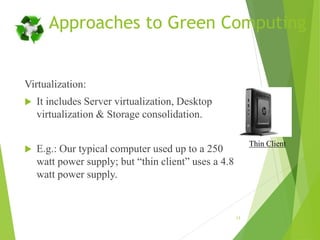
 E.g.: Our typical computer used up to a 250
watt power supply; but “thin client” uses a 4.8
watt power supply.
13
Thin Client
Approaches to Green Computing
Power management:
 Prolong battery life.
 Reduce cooling requirements.
 Reduce operating costs for energy and cooling.
 Lower power consumption.
 Following the ACPI (Advanced Configuration and Power Interface),
an open industry standard.
14
Storage:
 Among 3.5" desktop hard drive, 2.5" laptop hard drive
and a solid state hard drive (SSD); (SSD) consumes less
power than other disks.
15
Approaches to Green Computing
IT Equipment Recycling:
 If you can extend the working life of your IT
products, you reduce the environmental
consequences of mining, manufacture,
packaging, shipping and disposal.
 Many organizations, including some
manufacturers themselves, are willing to take
equipment back and recycle the components into
new products.
16
Approaches to Green Computing
Product Longevity:
 Gartner, Inc. research result says that the PC
manufacturing process accounts for 70 % of the natural
resources used in the life cycle of a PC.
 Another report from Gartner, Inc. recommends us to go
for upgradability and modularity instead of buying new
PCs or subsystems.
17
Operating System Support:
 Windows 7 includes refinements for more efficient user
of operating system timers, processor power
management, and display panel brightness.
 Linux Os utilizing less resources than other Os, and also
have a better power management facility.
Terminal servers:
 Terminals can be combined with thin clients, which use
up to 1/8 the amount of energy of a normal workstation.
18
Approaches to Green Computing
Algorithmic efficiency:
 The Efficiency of algorithms is used to describe
properties of an algorithm relating to how much
resources it consumes.
 Algorithms are the base of any computing system or
electronic device, each and every computer chip has a
certain algorithm that allows it to complete its function.
 Even though these chips are small, they use a lot of
power.
19
Approaches to Green Computing
Simple Tasks to Go Green
 Buy and use a low power desktop or a laptop computer (40-90
watts) rather a higher power desktop (e.g. 300 watts).
 Thin clients can use only 4 to 8 watts of power at the desktop as
the processing is done by a server.
 Buy hardware from manufacturers that have a hardware
recycling scheme, and recycle your old computer equipment
rather than sending it to landfill.
20
Simple Tasks to Go Green
 Turn your computer and monitor off when you are not
using it.
 Enable hibernation using the power management
settings. Standby does not save as much power.
 Replace your CRT screen with an LCD screen.
 Save Your Paper! Use e-documents more frequently.
21
Industrial Implementation
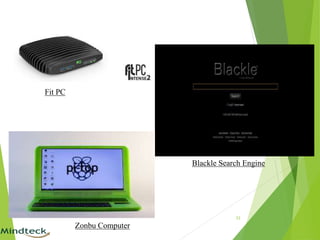
 Blackle (Uses: 59 watt): Search Engine powered by Google. Black Google Would Save
750 Megawatt-hours a Year.
 Fit-PC (compact, quiet and green): is a range of state-of-the-art miniature fan less PCs
that are extremely small, very low power and have more features than any other PC in
their category.
 Zonbu Computer: Zonbu's hybrid OS combines a robust, yet easy-to-use, linux-based
desktop environment with a complementary suite of cloud-based services including:
 remote access from any browser
 data synchronization and automatic backups
 online storage that grows with you
 the ability to edit and share documents and files on the fly.
 Consumes one third of the power of a typical light bulb.
22
23
Blackle Search Engine
Fit PC
Zonbu Computer
Special Fact about Blackle
 Take at look at Google, who gets about 200 million queries a day.
 Let's assume each query is displayed for about 10 seconds; that
means Google is running for about 550,000 hours every day on
some desktop.
 Assuming that users run Blackle in full screen mode, the shift to a
black background [on a CRT monitor!] will save a total of 15 (74-
59) watts.
 That turns into a global savings of 8.3 Megawatt-hours per day, or
about 3000 Megawatt-hours a year.
 Now take into account that about 25 percent of the monitors in the
world are CRTs, and at 10 cents a kilowatt-hour, that's $75,000, a
goodly amount of energy and dollars for changing a few color
codes.
24
VS
Conclusion
 The beauty of pursuing a green IT/ Computing strategy
is its multifaceted benefits.
 Green computing is not about going out and designing
biodegradable packaging for products.
 Now the time has come to think about the efficiently use
computers and the resources which are non renewable.
 It opens a new window for the new entrepreneur for
harvesting with E-Waste materials and scrap computers.
 The greenest computer will not miraculously fall from
the sky one day, it’ll be the product of year of
improvements.
25
26
27

Green computing 28thdec15_siddharth

  • 1.
  • 2.
    Contents • Introduction • Whatis Green Computing • Why Go For Green Computing • How Computing Harm Environment • Road to Green Computing • Approaches to Green Computing • Simple Tasks to Go Green • Industrial Implementation • Conclusion 2
  • 3.
    What is GreenComputing?  Green computing or green IT, refers to environmentally sustainable computing or IT.  It is “the study and practice of Designing, Manufacturing, Using, and Disposing of computers, servers, and associated subsystems efficiently and effectively with minimal or no impact on the environment.”  Green computing is the environmentally responsible and eco-friendly use of computers and their resources. 3
  • 4.
    Why Go ForGreen Computing  Today, the main problem of the world is Global warming.  The atmosphere is becoming hot & is causing many problems to living organisms  Tons of Electronic Waste  Limited Resources  Energy Cost  Computers also play a major role in polluting the world. 4
  • 5.
    How Computing HarmEnvironment  Increase in power, cooling and space for data centre.  2007-$4.5 billion of electricity  2011-$7.4 billion of electricity( i.e. 25 power plants) it will double the CO2 output ( 62 million metric tons) by electronic appliances. 5
  • 6.
    How Computing HarmEnvironment  Desktop requires 85 watts just to idle(Monitor off)  Left on 24 hrs/day-1,500 pounds of CO2 per year.  A tree absorbs between 3 and 15 pounds of CO2 each year.(up to 500 trees) 6
  • 7.
    How Computing HarmEnvironment  According to reports from the German Federal Environment Office, devices consume around 17 billion (kWh) in a year in standby mode.  The CO2 dissipated from ‘sleeping’ devices = 1/7th the CO2 emitted by an automobile.  Manufacturers do not provide a proper shut-off button in devices.  Windows Vista’s default shut down mode is a deep sleep mode that requires power. 7
  • 8.
     Hazardous materialsinside computers.  These contain  Cadmium (damage your kidneys)  Mercury (neurological damage)  Lead (disrupt brain neurotransmitters). 8 How Computing Harm Environment
  • 9.
    Road to GreenComputing  Green Use  Green Disposal  Green Design  Green Manufacturing 9
  • 10.
    Green Manufacturing  Bamboo: is becoming increasingly popular for making casings for computers and peripherals.  Recyclable plastics : computers are constructed from non-recyclable plastics i.e. recyclable polycarbonate resin.  Eco-friendly flame retardant : there are flame retardant silicone compounds available that are flame retardant and completely non-toxic.  Inventory management : reducing the quantity of both hazardous materials used in the process and the amount of excess raw materials.  Volume reduction : removes hazardous portion of waste from non hazardous portion. 10
  • 11.
  • 12.
    Approaches to GreenComputing  Virtualization  Power management  Storage 12
  • 13.
    Approaches to GreenComputing Virtualization:  It includes Server virtualization, Desktop virtualization & Storage consolidation.  E.g.: Our typical computer used up to a 250 watt power supply; but “thin client” uses a 4.8 watt power supply. 13 Thin Client
  • 14.
    Approaches to GreenComputing Power management:  Prolong battery life.  Reduce cooling requirements.  Reduce operating costs for energy and cooling.  Lower power consumption.  Following the ACPI (Advanced Configuration and Power Interface), an open industry standard. 14
  • 15.
    Storage:  Among 3.5"desktop hard drive, 2.5" laptop hard drive and a solid state hard drive (SSD); (SSD) consumes less power than other disks. 15 Approaches to Green Computing
  • 16.
    IT Equipment Recycling: If you can extend the working life of your IT products, you reduce the environmental consequences of mining, manufacture, packaging, shipping and disposal.  Many organizations, including some manufacturers themselves, are willing to take equipment back and recycle the components into new products. 16 Approaches to Green Computing
  • 17.
    Approaches to GreenComputing Product Longevity:  Gartner, Inc. research result says that the PC manufacturing process accounts for 70 % of the natural resources used in the life cycle of a PC.  Another report from Gartner, Inc. recommends us to go for upgradability and modularity instead of buying new PCs or subsystems. 17
  • 18.
    Operating System Support: Windows 7 includes refinements for more efficient user of operating system timers, processor power management, and display panel brightness.  Linux Os utilizing less resources than other Os, and also have a better power management facility. Terminal servers:  Terminals can be combined with thin clients, which use up to 1/8 the amount of energy of a normal workstation. 18 Approaches to Green Computing
  • 19.
    Algorithmic efficiency:  TheEfficiency of algorithms is used to describe properties of an algorithm relating to how much resources it consumes.  Algorithms are the base of any computing system or electronic device, each and every computer chip has a certain algorithm that allows it to complete its function.  Even though these chips are small, they use a lot of power. 19 Approaches to Green Computing
  • 20.
    Simple Tasks toGo Green  Buy and use a low power desktop or a laptop computer (40-90 watts) rather a higher power desktop (e.g. 300 watts).  Thin clients can use only 4 to 8 watts of power at the desktop as the processing is done by a server.  Buy hardware from manufacturers that have a hardware recycling scheme, and recycle your old computer equipment rather than sending it to landfill. 20
  • 21.
    Simple Tasks toGo Green  Turn your computer and monitor off when you are not using it.  Enable hibernation using the power management settings. Standby does not save as much power.  Replace your CRT screen with an LCD screen.  Save Your Paper! Use e-documents more frequently. 21
  • 22.
    Industrial Implementation  Blackle(Uses: 59 watt): Search Engine powered by Google. Black Google Would Save 750 Megawatt-hours a Year.  Fit-PC (compact, quiet and green): is a range of state-of-the-art miniature fan less PCs that are extremely small, very low power and have more features than any other PC in their category.  Zonbu Computer: Zonbu's hybrid OS combines a robust, yet easy-to-use, linux-based desktop environment with a complementary suite of cloud-based services including:  remote access from any browser  data synchronization and automatic backups  online storage that grows with you  the ability to edit and share documents and files on the fly.  Consumes one third of the power of a typical light bulb. 22
  • 23.
  • 24.
    Special Fact aboutBlackle  Take at look at Google, who gets about 200 million queries a day.  Let's assume each query is displayed for about 10 seconds; that means Google is running for about 550,000 hours every day on some desktop.  Assuming that users run Blackle in full screen mode, the shift to a black background [on a CRT monitor!] will save a total of 15 (74- 59) watts.  That turns into a global savings of 8.3 Megawatt-hours per day, or about 3000 Megawatt-hours a year.  Now take into account that about 25 percent of the monitors in the world are CRTs, and at 10 cents a kilowatt-hour, that's $75,000, a goodly amount of energy and dollars for changing a few color codes. 24 VS
  • 25.
    Conclusion  The beautyof pursuing a green IT/ Computing strategy is its multifaceted benefits.  Green computing is not about going out and designing biodegradable packaging for products.  Now the time has come to think about the efficiently use computers and the resources which are non renewable.  It opens a new window for the new entrepreneur for harvesting with E-Waste materials and scrap computers.  The greenest computer will not miraculously fall from the sky one day, it’ll be the product of year of improvements. 25
  • 26.
  • 27.