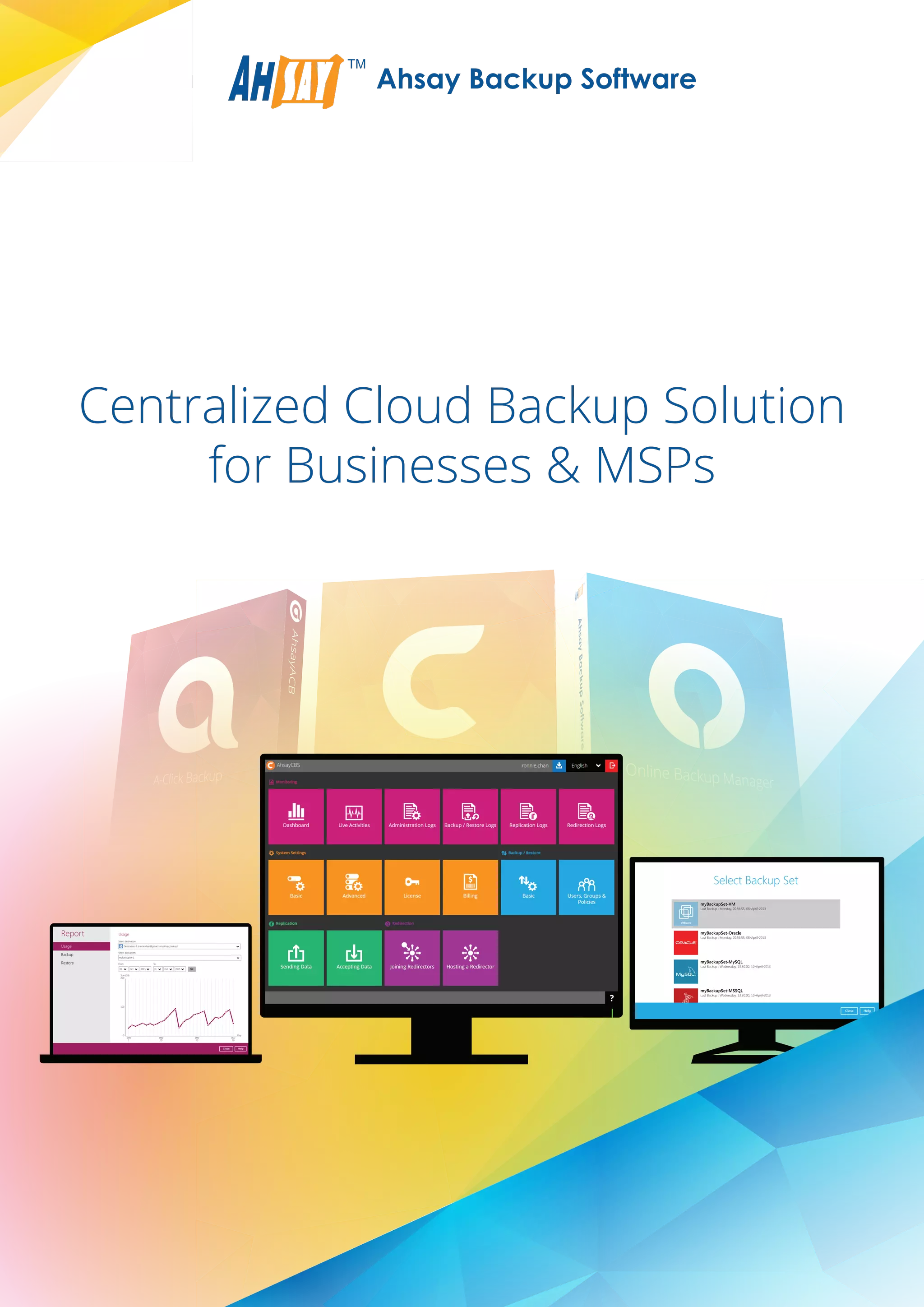
Centralized Cloud Backup Solution
for Businesses & MSPs
Usage
Backup
Restore
Report Usage
HelpClose
Size (GB)
200
0
100
Day
JAN
1
JAN
10
JAN
20
JAN
30
Oct 201501 Oct 201531
Destination-1 (ronnie.chan@gmail.com/ahsay_backup/
Select destination
MyBackupSet-1
Select backupsets
From To
Go
Robust Cloud & Local Backup Software
Server
Desktop / Laptop
Centralized Web
Management
Console
Cloud Storage
Local / Network
Storage
INTERNET
Server / VMServer / VM
Replication
Ahsay Cloud Backup Suite (AhsayCBS) is an advanced client-server based on-premises and cloud
backup solution for Businesses and MSPs. The whole solution can be deployed within a company to
back up all virtual machines, servers, desktops and laptops. MSPs can also use it for offering secure
managed backup service to their clients.
Ahsay Cloud Backup Suite consists of 3 core software components, AhsayOBM, AhsayACB, and AhsayCBS.
For those who need to increase the efficiency of your backup server by running multiple AhsayCBS instances on it, AhsayPRD is
the component you need.
If you wish to build a backup / replication appliance economically, AhsayUBS is what you need. It is a low price operating system
for installing on a bare computer / server to be used as a backup / replication appliance. All of its parameters have been
optimized to allow AhsayCBS running smoothly on it.
AhsayCBS is a server component to be
installed on a physical server or virtual
machine. It comes with a web based
central management console for
system administrator to easily manage
the whole backup system, as well as all
AhsayOBM / AhsayACB backup users
and their backup data through any web
browser.
Users' backup data can be hosted on
AhsayCBS internal storage, FTP / SFTP
server, and cloud storage (e.g. Amazon
S3, Google Cloud Storage, Microsoft
Azure, etc.).
AhsayCBS
With the Replication module enabled,
backed up data and system settings can
be replicated to another AhsayCBS
machine, FTP / SFTP server, and cloud
storage.
Replication Module
AhsayOBM is a comprehensive client
agent for backing up servers, databases
and virtual machines.
Various add-on modules can be used in conjunction with
AhsayOBM for backing up VMware, Hyper-V, Microsoft
Exchange Server, Microsoft SQL Server, Oracle Database,
MySQL Database, Lotus Domino, Lotus Notes, Windows
System, Windows System State (Active Directory), and File.
Data can be backed up to AhsayCBS storage, local /
mapped network storage (e.g. USB drive, NAS, and file
server), FTP / SFTP server, and cloud storage (e.g. Amazon
S3, Google Cloud Storage, Microsoft Azure, etc.).
AhsayACB is an easy to use client agent
for backing up PCs and Macs.
It is equipped with modules for backing
up File, Lotus Notes, and Windows
System.
Data can be backed up to AhsayCBS
storage, local / mapped network
storage (e.g. USB drive, NAS, and file
server), FTP / SFTP server, and cloud
storage (e.g. Amazon S3, Google Cloud
Storage, Microsoft Azure, etc.).
AhsayOBM
AhsayACB
Core Components
High Efficiency Component
OS for Backup Appliance
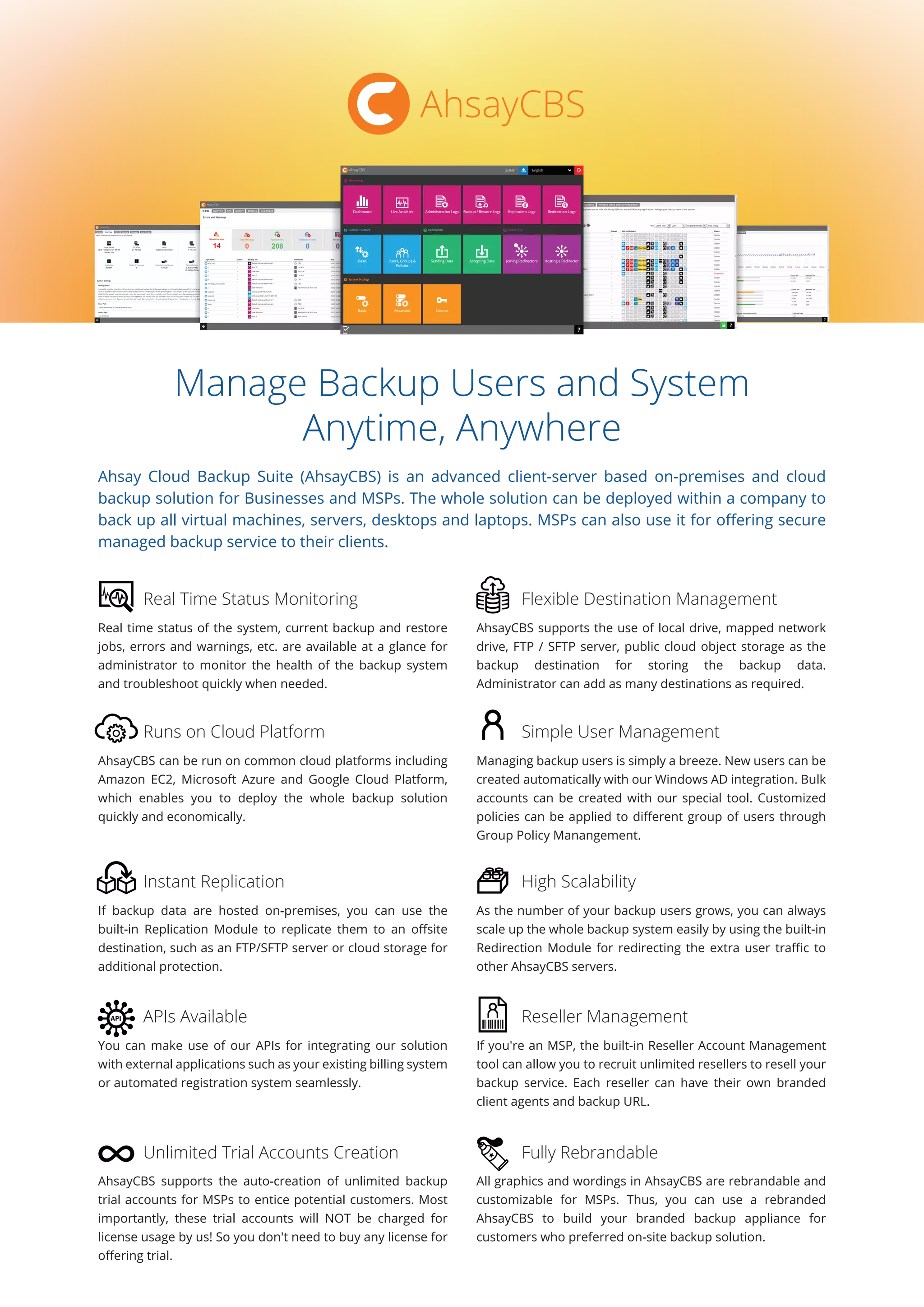
Manage Backup Users and System
Anytime, Anywhere
Ahsay Cloud Backup Suite (AhsayCBS) is an advanced client-server based on-premises and cloud
backup solution for Businesses and MSPs. The whole solution can be deployed within a company to
back up all virtual machines, servers, desktops and laptops. MSPs can also use it for offering secure
managed backup service to their clients.
Real time status of the system, current backup and restore
jobs, errors and warnings, etc. are available at a glance for
administrator to monitor the health of the backup system
and troubleshoot quickly when needed.
AhsayCBS supports the use of local drive, mapped network
drive, FTP / SFTP server, public cloud object storage as the
backup destination for storing the backup data.
Administrator can add as many destinations as required.
Real Time Status Monitoring Flexible Destination Management
AhsayCBS can be run on common cloud platforms including
Amazon EC2, Microsoft Azure and Google Cloud Platform,
which enables you to deploy the whole backup solution
quickly and economically.
Managing backup users is simply a breeze. New users can be
created automatically with our Windows AD integration. Bulk
accounts can be created with our special tool. Customized
policies can be applied to different group of users through
Group Policy Manangement.
Runs on Cloud Platform Simple User Management
If backup data are hosted on-premises, you can use the
built-in Replication Module to replicate them to an offsite
destination, such as an FTP/SFTP server or cloud storage for
additional protection.
As the number of your backup users grows, you can always
scale up the whole backup system easily by using the built-in
Redirection Module for redirecting the extra user traffic to
other AhsayCBS servers.
Instant Replication High Scalability
You can make use of our APIs for integrating our solution
with external applications such as your existing billing system
or automated registration system seamlessly.
If you're an MSP, the built-in Reseller Account Management
tool can allow you to recruit unlimited resellers to resell your
backup service. Each reseller can have their own branded
client agents and backup URL.
APIs Available Reseller Management
AhsayCBS supports the auto-creation of unlimited backup
trial accounts for MSPs to entice potential customers. Most
importantly, these trial accounts will NOT be charged for
license usage by us! So you don't need to buy any license for
offering trial.
All graphics and wordings in AhsayCBS are rebrandable and
customizable for MSPs. Thus, you can use a rebranded
AhsayCBS to build your branded backup appliance for
customers who preferred on-site backup solution.
Unlimited Trial Accounts Creation Fully Rebrandable
AhsayCBS
Comprehensive Features
AhsayCBS comes with comprehensive features for centrally managing the whole backup system and
users.
Monitoring
Errors and warnings summarized under a To-Dos tab
(Including missed / failed failed backups, system / replication / API / email errors)
Clear overview of system resources information
(Including Java virtual machine, underlying operating system, CPU architecture, number of processor,
committed virtual memory, pysical memory, and swap space)
Current CPU usage, memory usage, storage usage and live thread monitoring
Live activities monitoring
(Including statuses of backup, restore, replication, receiver, and redirection)
Administration logs monitoring
(Including SNMP log, message history, activities log, and audit trails)
Backup and restore logs monitoring
(Including backup jobs, restored jobs, backup errors, backup set log, and activities log)
Replication logs monitoring
(Including replication sent, replication received, and activities log)
AhsayOBM / AhsayACB redirection logs monitoring
System Configuration
Support of using public cloud, FTP / SFTP servers, and local / mapped drives as storage backend
Configurable host name, system home directory, connectors and SSL certificate
Support of multiple SMTP servers and administrator contacts for sending outbound email reports to users
Creation of administrators with different roles
(Including super administrator, read-only administrator, API user, and sub-administrator)
20 languages support
Automatically save all the server settings to the Ahsay's cloud
Proxy support
Support IP exclusion for Proxy connection
Publish system and error messages to third parties' monitoring tools through SNMP
Publish system logs to Windows Event Log
Retrieve system related files for troubleshooting through built-in file explorer
Java runtime options configuration
(Including maximum and minimum heap sizes, thread stack size)
Blocking of IPs from accessing AhsayCBS
Backup User Management
Auto backup user creation via Windows AD
One user assignable to multiple user groups
Push user to update client software from server
Broadcast message to all / selected users
High Scalability
Achieve High Scalability by building a farm AhsayCBS servers to serve growing number of customers
Redirect AhsayOBM / AhsayACB users to their corresponding AhsayCBS servers by built-in redirector
Replication to Cloud / Another AhsayCBS
Close to real time replication of the whole AhsayCBS or selected backup sets to cloud or another AhsayCBS
Set traffic limit for sending data during different time intervals
Set replication down to backup set level
Receiving Data Replicated from Multiple AhsayCBS Servers
Creat multiple receivers on AhsayCBS for receiving replication data from multiple AhsayCBS servers
Define ranges of IP address that will be restricted to access this receiver
Run Cyclic Redundancy Check on the 2nd and 4th Saturdays every month
Set traffic limit for receiving data during different time intervals
Features for MSPs
Unlimited free trial accounts creation
Fully rebrandable
Reseller management, each reseller can have its own branding on web console and client agents
Build rebranded AhsayOBM and AhsayACB installers through AhsayCBS web console
(under Admin or Sub-Admin account)
Group Policy Management
Assign multiple group policies to a user group
Define the backup destinations which are visible to users
Define the features in GUI which are visible to / usable by users
Set the default values for all user configurable fields
Preempt values to specific fields
Enforce users to run preempted backup sets
Windows Active Directory integration for new account creation
Trigger backup for selected backup sets from server
Backup User Management
Auto backup user creation via Windows AD
Export selected users' statistics to CSV file
Export user's profile and backup data
Rebuild storage statistics for selected users
Force users to upload encryption key in encrypted file to AhsayCBS
(System administrator won't be able to decrypted the encrypted file. If needed, the file can be sent to Ahsay and
we will send the decrypted data to the backup user's registered email address)
Set a user as paid or trial user type
Assign storage quota to individual users
View effective policies of a user if multiple policies have been applied to him/her
Assign a user to multiple user groups
AhsayCBS Screenshots
Login screen Home control panel
Download page Dashboard
System overview Live monitoring
User group management Policy management
Backup storage monitoring Live threads
Backup Status User management
The replication module for AhsayCBS (previously known as AhsayRPS) is for immediate replication of backed up data and
backup server settings to cloud storage or another AhsayCBS for additional protection on the backed up data.
Modules for Enhanced Protection and Scalability
Need better protection on the backed up data, or high scalability for serving more backup users?
These modules are for you.
Replication Module
After data are backed up to AhsayCBS backup server,
replication will be triggered almost instantly.
Close to real time replication
When a corresponding AhsayCBS backup server is
down, the replication server can be quickly converted
into a backup server to keep serving the backup users.
Quickly convertible to a backup server
Retention period and restore point interval can be
configured for keeping multiple replication versions.
Retention policy for replicated data
Cloud storage can be used as the replication destination
for saving hardware and hosting investments.
Zero hardware investment by
cloud replication
The redirection module for AhsayCBS (previously known as AhsayRDR) is a high scalability module for building a farm of multiple
AhsayCBS backup servers to serve a large number of backup users.
Redirection Module
When AhsayCBS is configured as a redirection server, it
can redirect backup users to multiple backup servers.
Redirecting to multiple backup servers
User management can be simplified as all backup users
on different backup servers just need to use a single
URL as the backup server URL.
Single public backup server URL
When creating users, user names will be checked on all
backup servers in the farm to prevent duplication.
Duplicated user checking
Detailed redirection logs are available for troubleshooting
purpose.
Detailed redirection log
Real time redirection status can be tracked in the
System Panel of AhsayCBS.
Real time redirection status tracking
System administrator can choose individual and more
critical backup sets to replicate.
Individual backup sets replication
IP restriction can be set to prevent unwanted IPs from
accessing the replication server.
IP restriction
Traffic limit can be set for specific period of time to
reserve bandwidth for other purpose.
Traffic limit
Cyclic redundancy checking (CRC) can be set to run
automatically for verifying the integrity of the replicated
data.
CRC data integrity verification
One AhsayCBS replication server can be used for
receiving data replicated from multiple backup servers.
Protecting many backup servers
Both SSL and proxy server are supported for enhancing
the security and compatibility of the replication server.
SSL and proxy server support
Real time replication and receiver status can be tracked
in the System Panel of AhsayCBS.
Real time replication status tracking
Detailed replication logs are available for troubleshooting
purpose.
Detailed replication log
AhsayOBM AhsayACB
Advanced Backup Agents for
VM, Database and Workstation Backup
Ahsay offers 2 client backup agents. AhsayOBM is for backing up servers, databases and virtual
machines. AhsayACB is for backing up workstations. Both of them support local, cloud and hybrid
backups. They are fast and equipped with many dedicated database and virtual machine modules for
you to properly backup your databases, VMs and email applications. They are fully rebrandable for
MSPs to integrate into their service offering mix.
Both AhsayOBM & AhsayACB supports backup to multiple
local and cloud destinations, e.g. USB hard drive, mapped
network drive, private FTP / SFTP servers, and public cloud
storage such as Microsoft Azure and Amazon S3.
Dedicated backup modules can be used in conjunction with
them to let you back up VMware, Hyper-V, Microsoft
Exchange Server, Microsoft SQL Server, Oracle and MySQL
Databases, Lotus Domino / Notes, Windows System and
System State professionally.
Multi-Destinations Backup Various Dedicated Backup Modules
With our new VM Run Direct feature, backed up VMware and
Hyper-V VM can be run directly from backup within minutes. You
can also choose to play and migrate the VM simultaneously.
Both AhsayOBM and AhsayACB can generate a truly
randomized 256-bit full length AES encryption key to encrypt
the backup data by default. Such encryption is simply
unbreakable by any super computer.
Run VM Directly from Backup Super Secure Encryption
They are the fastest backup applications equipped with all
speed optimizing technologies, such as multi-threading,
In-File Delta, fast indexing, small files optimization, etc. Speed
hungry customers will definitely love them.
No one wants to experience trouble during restore.
Therefore, you need a backup solution that can guarantee
the restorability of your backed up data. With the built-in CRC
data integrity checking, verification and rectification, your
backup data are 100% restorable.
High Speed Restorability Guaranteed
Both AhsayOBM & AhsayACB are rebrandable for MSPs. All
the graphics and wordings are customizable. You can even
hide the features that you don't want your customers to use
through setting appropriate group policy.
They are the most affordable backup software you can find in
the market. Our cumulative discount scheme offers you
discount based on the historical volume you have purchased.
Therefore, the more you purchase, the more you save.
Show / Hide Features from GUI Cumulative Volume Discount
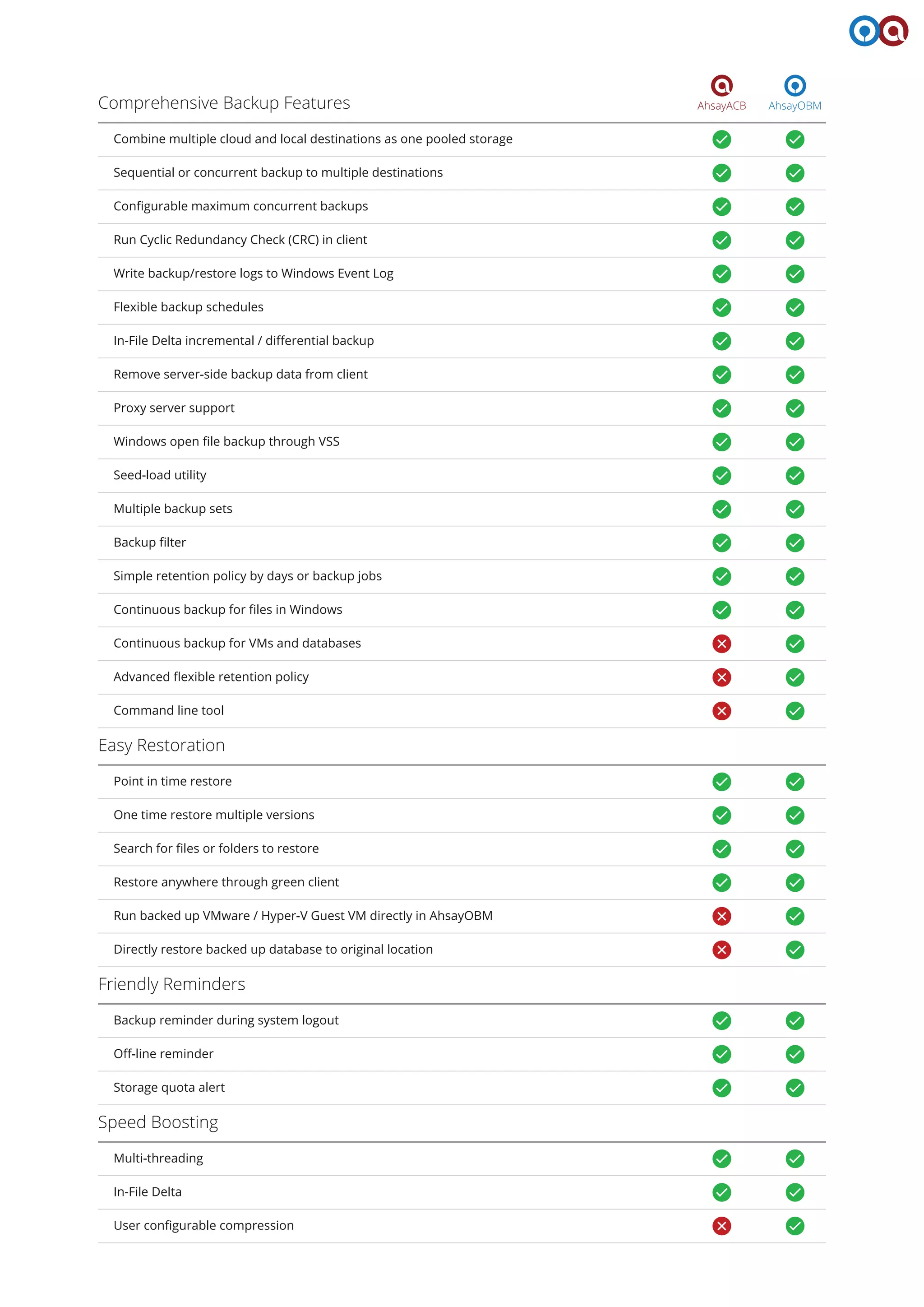
Comprehensive Features
Among all backup software available in the market, AhsayOBM and AhsayACB comes with the most
comprehensive features for virtual machine, server and workstation backup. Remember, AhsayOBM
is a comprehensive client backup application designed for backing up servers, databases, VMs,
Windows System and System State, while AhsayACB is a simplified version designed for backing up
files, Windows System, and Lotus Notes in workstations.
AhsayOBMAhsayACBSupport Cloud & Local Destinations
AhsayCBS storage
Aliyun
Amazon S3
Amazon AWS Compatible Storage
CTYun
Dropbox
Google Cloud Storage
Microsoft Azure
Microsoft OneDrive / OneDrive for Business
OpenStack
Rackspace
FTP / SFTP
USB drive / local drive / mapped network drive
Backup Various Data Types
File
IBM Lotus Notes
Outlook / Outlook Express / Windows Live Mail
Windows System
IBM Lotus Domino
Microsoft Exchange Server (database, brick-level, DAG)
Microsoft SQL Server
MySQL Database
Oracle Database
Synology NAS
VMware
Hyper-V (standalone, cluster)
Windows System State
AhsayOBMAhsayACBComprehensive Backup Features
Combine multiple cloud and local destinations as one pooled storage
Sequential or concurrent backup to multiple destinations
Configurable maximum concurrent backups
Run Cyclic Redundancy Check (CRC) in client
Write backup/restore logs to Windows Event Log
Flexible backup schedules
In-File Delta incremental / differential backup
Remove server-side backup data from client
Proxy server support
Easy Restoration
Point in time restore
One time restore multiple versions
Search for files or folders to restore
Restore anywhere through green client
Run backed up VMware / Hyper-V Guest VM directly in AhsayOBM
Friendly Reminders
Backup reminder during system logout
Off-line reminder
Storage quota alert
Speed Boosting
Multi-threading
In-File Delta
User configurable compression
Directly restore backed up database to original location
Windows open file backup through VSS
Seed-load utility
Multiple backup sets
Backup filter
Simple retention policy by days or backup jobs
Continuous backup for files in Windows
Continuous backup for VMs and databases
Advanced flexible retention policy
Command line tool
AhsayOBMAhsayACBUncompromised Security / Privacy
Password protection
256-bit SSL transmission
Lost encryption key recovery if this feature is enabled on AhsayCBS
Auto-generate 256-bit truly randomized encrypting key for each backup set
Filename and content encryption
Features Specifically Designed for MSPs
Direct rebranding and customization in AhsayCBS
Customize AhsayOBM/AhsayACB application name and icon shown in cloud storage
Show / hide in-app features through group policy
Create trial account from client application (if trial registration is enabled on AhsayCBS)
Auto-upgrade client application pushed from AhsayCBS
20 languages support
Support Common Operating Systems
Mac
Windows for Desktop
Windows for Server
Linux
UNIX
In-App Reporting Tools
Graphical usage report by destination / backup set
Backup report
Restore report
Write backup/restore logs to Windows Event Log
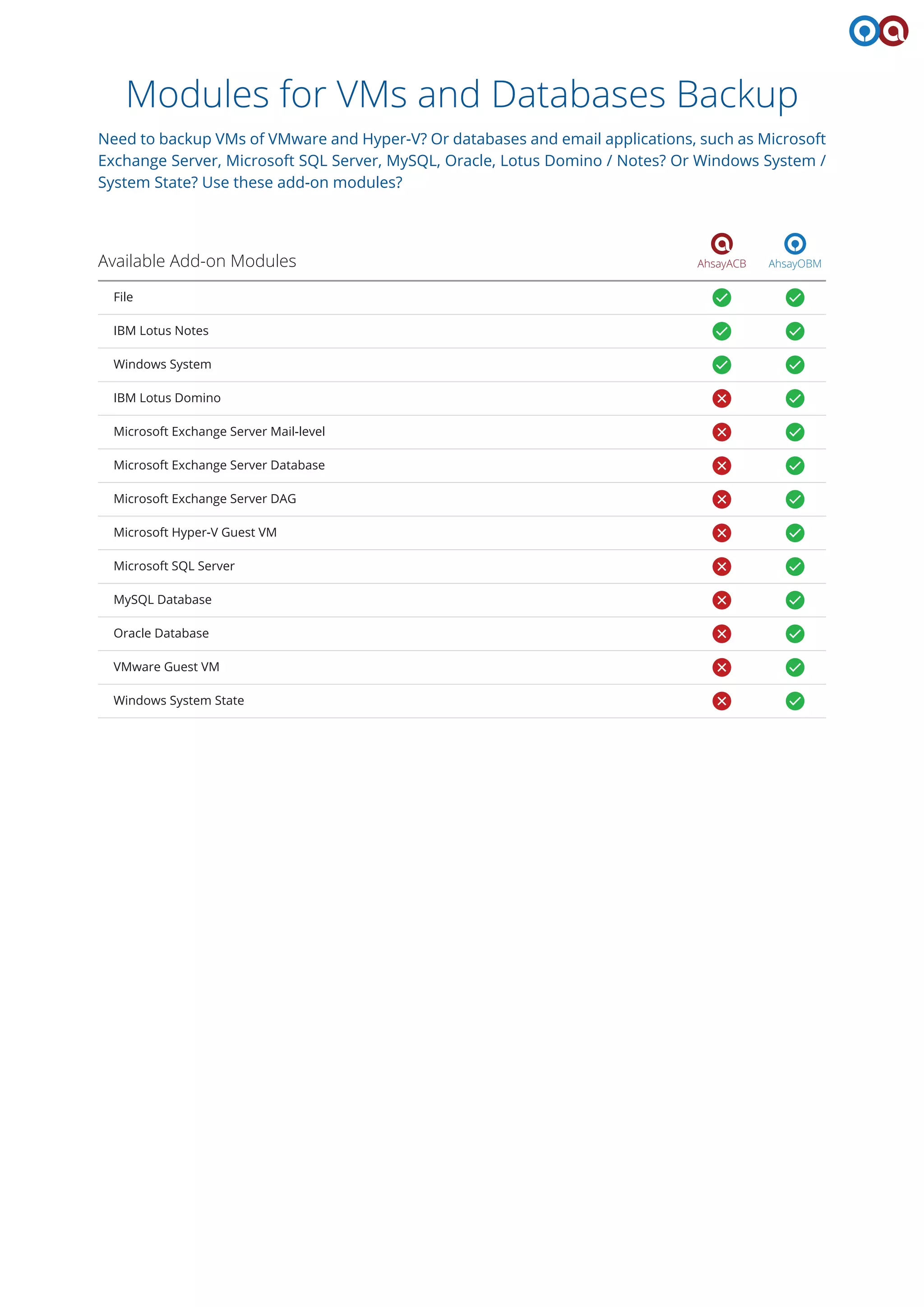
Modules for VMs and Databases Backup
Need to backup VMs of VMware and Hyper-V? Or databases and email applications, such as Microsoft
Exchange Server, Microsoft SQL Server, MySQL, Oracle, Lotus Domino / Notes? Or Windows System /
System State? Use these add-on modules?
AhsayOBMAhsayACBAvailable Add-on Modules
File
IBM Lotus Notes
Windows System
IBM Lotus Domino
Microsoft Exchange Server Mail-level
Microsoft Exchange Server Database
Microsoft Exchange Server DAG
Microsoft Hyper-V Guest VM
Microsoft SQL Server
MySQL Database
Oracle Database
VMware Guest VM
Windows System State
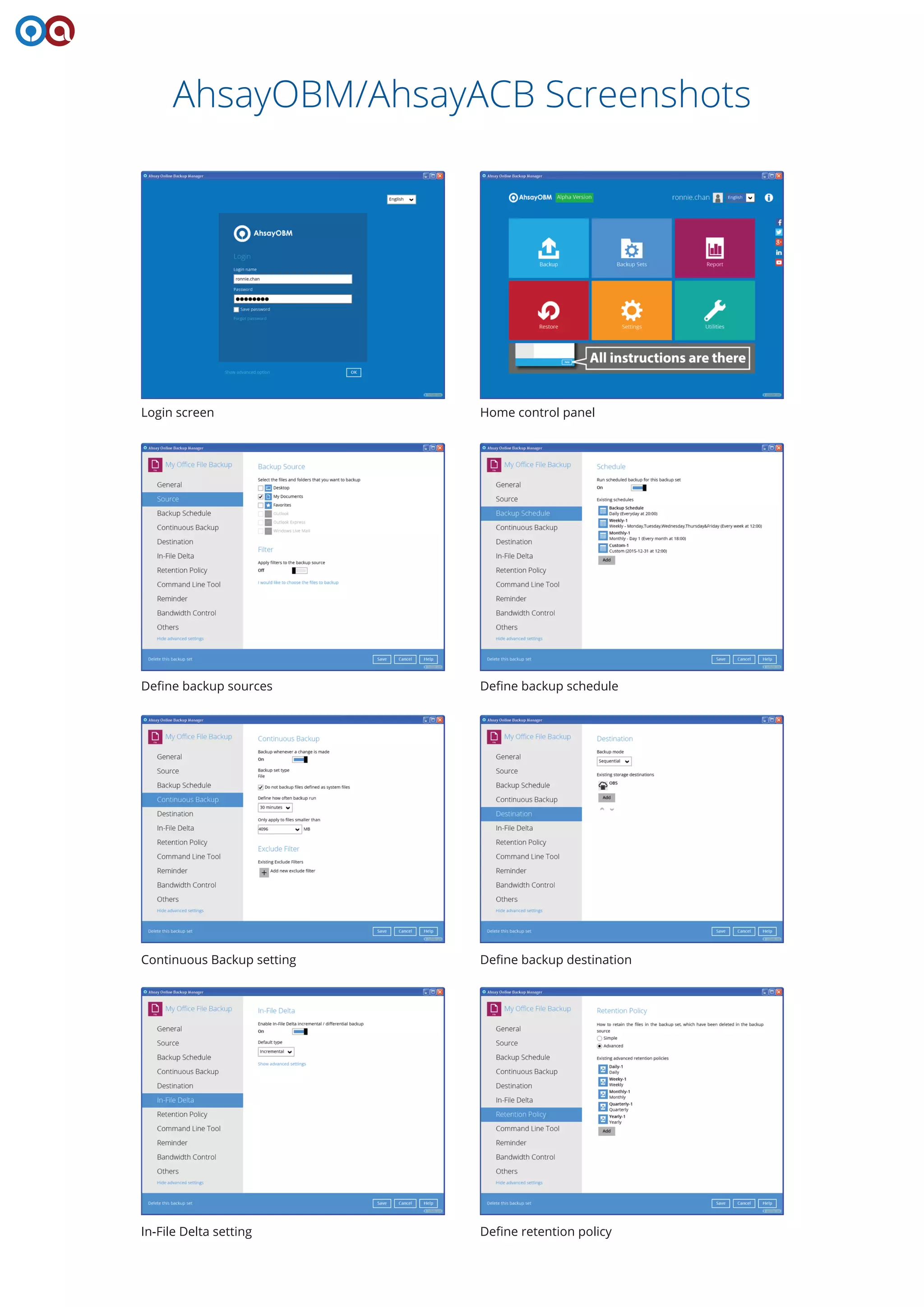
AhsayOBM/AhsayACB Screenshots
Login screen Home control panel
Define backup sources Define backup schedule
Continuous Backup setting Define backup destination
In-File Delta setting Define retention policy
Bandwidth control setting Other options 1
Other options 2 Backup
Restore Windows event logs
Comprehensive reports CRC Data Integrity Check function
AhsayPRD
Reduce Your Cost on Server Hardware
If you wish to host multiple instances of AhsayCBS on a single server hardware to fully utilize its
processing power, AhsayPRD (Ahsay Proxy Redirector) is the component you need.
AhsayPRD is designed for customers and partners to host
multiple branded AhsayCBS instances on one physical
backup server hardware through internal domain
redirection. Since AhsayCBS is not resource demanding,
setting up multiple AhsayCBS instances on one hardware
allows you to fully utilize the power of that hardware.
With AhsayPRD, only one operating system license is
required now, as all AhsayCBS instances are running on the
same operating system. Moreover, you only need one IP, as
routing to the individual AhsayCBS instances can be done
through the use of server ports. If the multiple AhsayCBS
instances you intend to use can be under one domain, only
one SSL certificate is required. Thus, you can have great
savings on the operating system, IP, and SSL certificate.
Hardware Better Utilized
Save Expenses
By using AhsayPRD, individual AhsayCBS instances can have
their own brandings, including branded AhsayCBS,
AhsayOBM, AhsayACB and AhsayRPS applications, branded
reports, customized settings, automatic updating of
AhsayOBM and AhsayACB, etc. It thus allows a service
provider to set up different AhsayOBS instances with
different brandings for their resellers effortlessly. Moreover,
as each AhsayCBS instance can have its own domain name,
each reseller can have its own branded AhsayCBS for offering
its own braned online backup business.
AhsayPRD redirects the incoming Internet traffic calling to different AhsayCBS URLs, eg: CBS1.ahsay.com and CBS2.ahsay.com,
through the ports defined in the AhsayPRD configuration file.
As you can add new AhsayCBS instances anytime, it provides
you with the scalability for the expansion of your backup
system in the future.
Unique Branding for Resellers
Add New AhsayCBS Anytime
Internal Redirection Architecture
AhsayCBSAhsayCBS AhsayCBS
Server Desktop / Laptop
Server / VM
All AhsayOBM and AhsayACB users are
routed to their corresponding AhsayCBS
instance through AhsayPRD
AhsayOBM AhsayACB
AhsayPRD
AhsayPRD
LAN/WANSSL
AhsayUBS
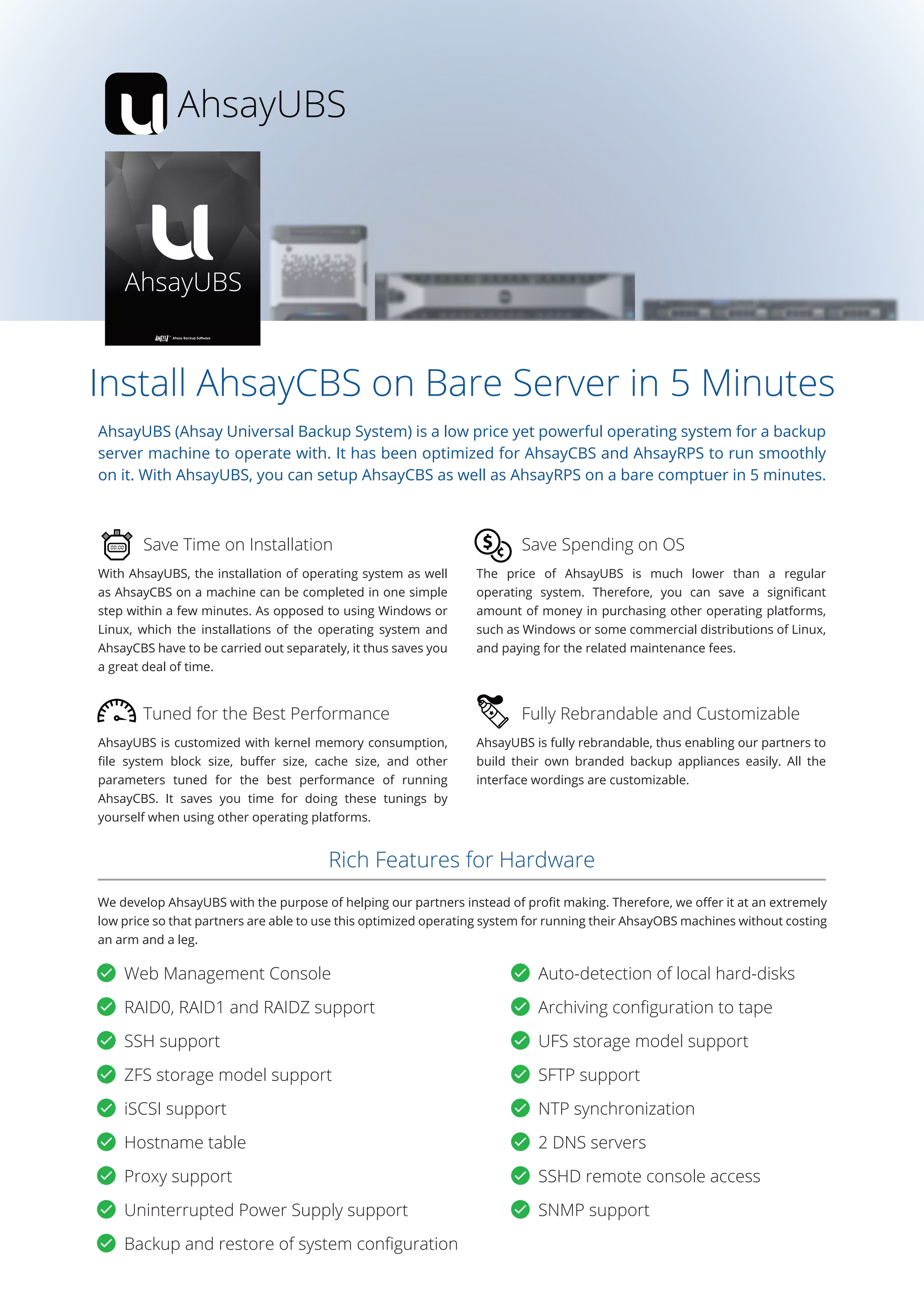
Install AhsayCBS on Bare Server in 5 Minutes
AhsayUBS (Ahsay Universal Backup System) is a low price yet powerful operating system for a backup
server machine to operate with. It has been optimized for AhsayCBS and AhsayRPS to run smoothly
on it. With AhsayUBS, you can setup AhsayCBS as well as AhsayRPS on a bare comptuer in 5 minutes.
With AhsayUBS, the installation of operating system as well
as AhsayCBS on a machine can be completed in one simple
step within a few minutes. As opposed to using Windows or
Linux, which the installations of the operating system and
AhsayCBS have to be carried out separately, it thus saves you
a great deal of time.
AhsayUBS is fully rebrandable, thus enabling our partners to
build their own branded backup appliances easily. All the
interface wordings are customizable.
Save Time on Installation
Fully Rebrandable and Customizable
AhsayUBS is customized with kernel memory consumption,
file system block size, buffer size, cache size, and other
parameters tuned for the best performance of running
AhsayCBS. It saves you time for doing these tunings by
yourself when using other operating platforms.
The price of AhsayUBS is much lower than a regular
operating system. Therefore, you can save a significant
amount of money in purchasing other operating platforms,
such as Windows or some commercial distributions of Linux,
and paying for the related maintenance fees.
Tuned for the Best Performance
Save Spending on OS
We develop AhsayUBS with the purpose of helping our partners instead of profit making. Therefore, we offer it at an extremely
low price so that partners are able to use this optimized operating system for running their AhsayOBS machines without costing
an arm and a leg.
Rich Features for Hardware
Web Management Console Auto-detection of local hard-disks
RAID0, RAID1 and RAIDZ support Archiving configuration to tape
SSH support UFS storage model support
ZFS storage model support SFTP support
iSCSI support NTP synchronization
Hostname table 2 DNS servers
Proxy support SSHD remote console access
Uninterrupted Power Supply support SNMP support
Backup and restore of system configuration
Ahsay Backup Appliance
Need an affordable backup appliance for backing up the data? Ahsay Backup Appliance pre-installed
with AhsayCBS is an ideal option. It can back up 12/44TB (depends on the hardware model)
compressed backup data. Restoration of data can be done quickly through internal network. VM,
database, and file backups are all supported. You can even replicate the backed up data to public
cloud storage such as Microsoft Azure, Amazon S3, and Google Cloud Storage for disaster recovery.
We'll deliver it to your office, fire it up for you, help you install AhsayOBM and AhsayACB on the client
machines that need to be backed up, and make sure everything is running smoothly. 3 years of
TotalCare hardware and software support is included. (For Hong Kong customers only)
Model
RAM
CPU
Hard Drive
Storage Space
Firmware
Console app.
Client app.
HP ProLiant MicroServer Gen8
4GB DDR3
Intel Pentium G2020T
(2 core, 2.5 GHz, 3MB, 35W)
4 x 4TB Seagate Enterprise
Capacity (RAID-5)
12TB
Dell PowerEdge R430
8GB RDIMM
Intel Xeon E5-2630 v3 2.4GHz,
20M Cache,8.00GT/s QPI,Turbo,
HT,8C/16T (85W) Max Mem
1866MHz
4 x 4TB 7.2K RPM SATA 6Gbps
3.5in Hot-plug Hard Drive
(RAID-5)
12TB
AhsayUBS v7
AhsayCBS v7
AhsayOBM and/or AhsayACB v7
Dell PowerEdge R730xd
16GB RDIMM
Intel Xeon E5-2620 v3 2.4GHz,
15M Cache,8.00GT/s QPI,Turbo,
HT,6C/12T (85W) Max Mem
1866MHz
12 x 4TB 7.2K RPM SATA 6Gbps
3.5in Hot-plug Hard Drive,13G
(RAID-5)
44TB
When using this Ahsay Backup Appliance as a backup server,
you can choose to purchase whatever number of AhsayOBM
or AhsayACB client-side backup application licenses based on
the number of servers, desktops and laptops you need to
back up.
Ahsay Backup Appliance can also be used a replication server
for receiving data from another AhsayCBS. When using this
appliance as a replication server, you need to purchase
AhsayCBS Replication Module license. After proper
configuration, this replication server can be used to receive
data replicated from one or multiple AhsayCBS servers.
For Backup
Hardware
Software
Maintenance and Support
3 years of software upgrade and maintenance
3 years of hardware maintenance and next business day failed hardware replacement
3 years of phone, email, forum support and remote troubleshooting during Hong Kong working hours
For Replication
How it works
AhsayOBM AhsayACB
SSL
Backup Replication
Server Desktop / laptop
Ahsay Backup
Appliance
Ahsay Backup
Appliance
SSL
AhsayCBS AhsayCBS
The US dollar presented above is for your reference only. Our settlement and transaction currency is in Hong Kong Dollar (HKD), which has been pegged to US dollar
at 7.8 (+- 0.05) H.K. dollar = 1 U.S. dollar by Hong Kong Monetary Authority. Since your local financial institute may charge you at different exchange rate, you are advised
to contact your financial institute for their prevailing exchange rate.
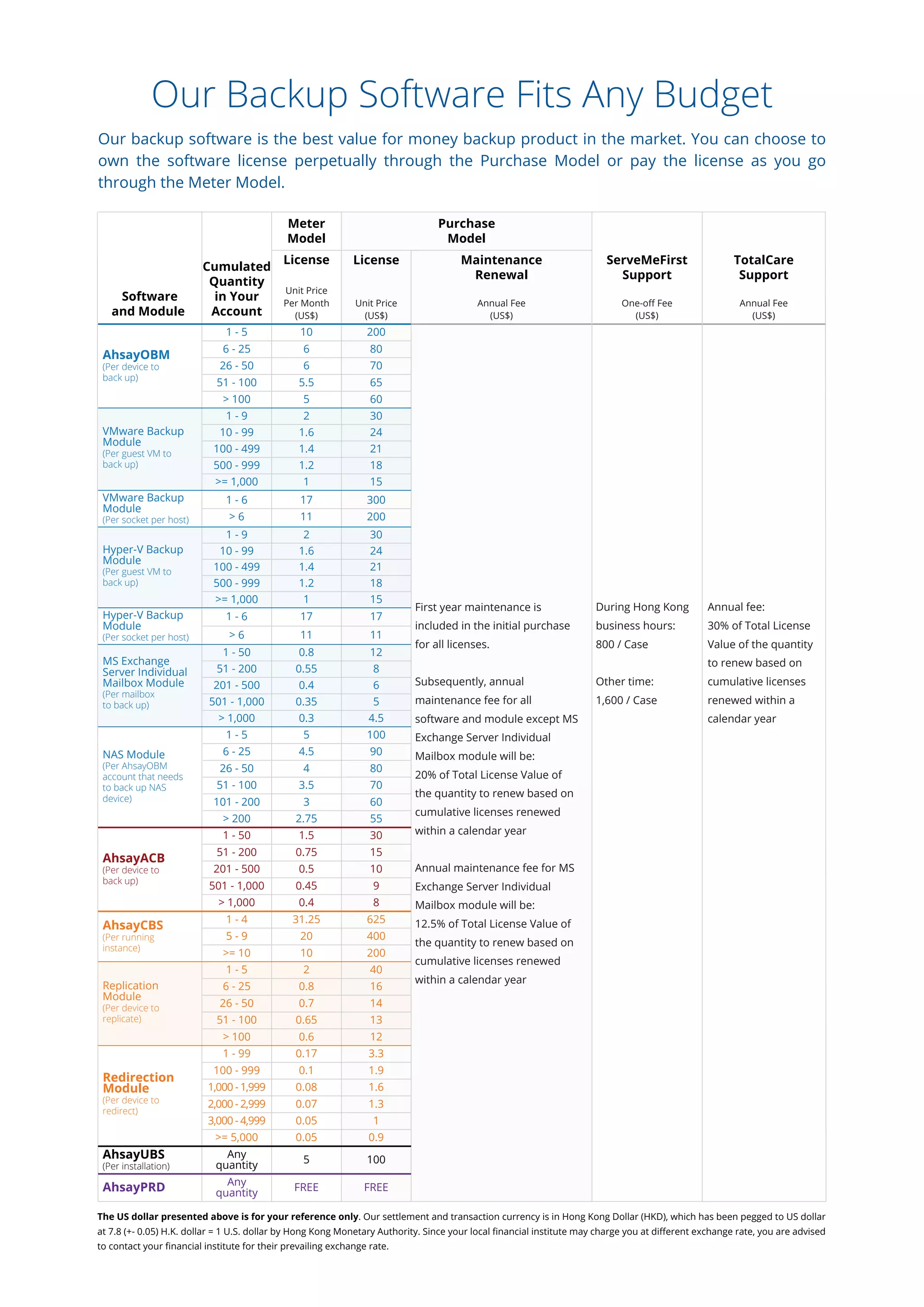
Our Backup Software Fits Any Budget
Our backup software is the best value for money backup product in the market. You can choose to
own the software license perpetually through the Purchase Model or pay the license as you go
through the Meter Model.
Software
and Module
Cumulated
Quantity
in Your
Account
Meter
Model
Purchase
Model
License
Unit Price
Per Month
(US$)
License
Unit Price
(US$)
Maintenance
Renewal
Annual Fee
(US$)
ServeMeFirst
Support
One-off Fee
(US$)
TotalCare
Support
Annual Fee
(US$)
1 - 5 10 200
6 - 25 6 80
AhsayOBM
(Per device to
back up)
AhsayACB
(Per device to
back up)
AhsayCBS
(Per running
instance)
AhsayUBS
(Per installation)
AhsayPRD
26 - 50 6 70
51 - 100 5.5 65
> 100 5 60
1 - 9 2 30
10 - 99 1.6 24VMware Backup
Module
(Per guest VM to
back up)
VMware Backup
Module
(Per socket per host)
100 - 499 1.4 21
500 - 999 1.2 18
>= 1,000 1 15
1 - 9 2 30
10 - 99 1.6 24Hyper-V Backup
Module
(Per guest VM to
back up)
Hyper-V Backup
Module
(Per socket per host)
100 - 499 1.4 21
500 - 999 1.2 18
>= 1,000 1 15
1 - 6 17 300
> 6 11 200
1 - 6 17 17
> 6 11 11
1 - 50 0.8 12
51 - 200 0.55 8
MS Exchange
Server Individual
Mailbox Module
(Per mailbox
to back up)
201 - 500 0.4 6
501 - 1,000 0.35 5
First year maintenance is
included in the initial purchase
for all licenses.
Subsequently, annual
maintenance fee for all
software and module except MS
Exchange Server Individual
Mailbox module will be:
20% of Total License Value of
the quantity to renew based on
cumulative licenses renewed
within a calendar year
Annual maintenance fee for MS
Exchange Server Individual
Mailbox module will be:
12.5% of Total License Value of
the quantity to renew based on
cumulative licenses renewed
within a calendar year
During Hong Kong
business hours:
800 / Case
Other time:
1,600 / Case
Annual fee:
30% of Total License
Value of the quantity
to renew based on
cumulative licenses
renewed within a
calendar year> 1,000 0.3 4.5
1 - 5 5 100
6 - 25 4.5 90NAS Module
(Per AhsayOBM
account that needs
to back up NAS
device)
Replication
Module
(Per device to
replicate)
Redirection
Module
(Per device to
redirect)
26 - 50 4 80
51 - 100 3.5 70
101 - 200 3 60
> 200 2.75 55
1 - 50 1.5 30
51 - 200 0.75 15
201 - 500 0.5 10
501 - 1,000 0.45 9
> 1,000 0.4 8
1 - 4 31.25 625
5 - 9 20 400
>= 10 10 200
1 - 5 2 40
6 - 25 0.8 16
26 - 50 0.7 14
51 - 100 0.65 13
> 100 0.6 12
1 - 99 0.17 3.3
100 - 999 0.1 1.9
1,000 - 1,999 0.08 1.6
2,000 - 2,999 0.07
13,000 - 4,999 0.05
1.3
>= 5,000 0.05 0.9
Any
quantity
5 100
Any
quantity
FREE FREE
Operating Systems compatibility
Software Compatibility List (SCL)
for version 7.3 or above (5001)
Operating System Supported Application
Supported
Version
Support
End Date
(YYYY/MM/DD)
Vista (Home Basic / Home Premium / Business / Enterprise / Ultimate) 7.3.0.0 or above 2017/04/11
Windows platforms: [1, 2, 3]
7 (Home Basic / Home Premium / Business / Enterprise / Ultimate) 7.3.0.0 or above 2020/01/14
8 (Pro / Enterprise) 7.3.0.0 or above 2023/01/10
8.1 (Pro / Enterprise) 7.3.0.0 or above 2023/01/10
CentOS 6 7.3.0.0 or above 2017/11/30
Linux platforms: [4, 5, 6]
CentOS 7 7.3.0.0 or above 2024/06/30
Red Hat Enterprise Linux 6 7.3.0.0 or above 2020/11/30
Red Hat Enterprise Linux 7 7.3.0.0 or above 2024/06/30
10 (Pro / Enterprise) 7.3.2.0 or above 2025/10/14
Server 2008 (Standard / Enterprise / Datacenter) 7.3.0.0 or above 2020/01/14
Server 2008 R2 (Standard / Enterprise / Datacenter) 7.3.0.0 or above 2020/01/14
Server 2012 (Standard / Essentials / Datacenter) 7.3.0.0 or above 2023/01/10
Server 2012 R2 (Standard / Essentials / Datacenter) 7.3.0.0 or above 2023/01/10
Small Business Server 2008 (Standard / Premium) 7.3.0.0 or above --
Small Business Server 2011 (Standard / Essentials / Premium) 7.3.0.0 or above --
[1] AhsayCBS is only supported on 64 bit Windows platforms.
[2] For AhsayACB installation on Windows, you can only install it on a Windows desktop operating system such as Windows 7, 8, 8.1.
[3] For AhsayOBM installation on 64 bit Windows platforms, Adobe Flash Player 11 - 64 bit version for Internet Explorer must be installed:
http://get.adobe.com/flashplayer/otherversions
[4] AhsayCBS is only supported on 64 bit Linux platforms.
[5] Other Linux distributions such as Fedora are not officially supported, but should work.
[6] System without graphical environment are supported by AhsayOBM version 7.5.0.0 or above. GUI support Gnome, but KDE should work.
FreeBSD (9.0 / 9.1 / 9.2 / 10.0) [9] 7.3.0.0 or above EOS reached
UNIX platforms: [7, 8]
FreeBSD 10.1 7.3.0.0 or above 2016/12/31
Solaris 10 x86 7.3.0.0 or above 2018/01/31
Solaris 11 Express x86 7.3.0.0 or above --
Solaris 11 Express x86 7.3.0.0 or above 2024/11/30
[7] AhsayCBS is only supported for 64 bit Unix platform.
[8] Support system with graphical environment only. GUI support for Gnome, but KDE should work.
[9] Limited support, no intensive testing has been performed on this platform, but should work. Best effort support will be provided.
Mac OS X 10.7.3 or above [10] 7.3.0.0 or above --
Mac OS X
Mac OS X 10.8 7.3.0.0 or above --
Mac OS X 10.9 7.3.0.0 or above --
Mac OS X 10.10 7.3.0.0 or above --
Mac OS X 10.11 7.3.0.0 or above --
[10] Support for Java 7 starts at Mac OS X 10.7.3.
AhsayCBS AhsayCBS
(Replication Module)
AhsayCBS
(Redirection Module)
AhsayPRD AhsayOBM AhsayACB
Applications and Database Compatible With AhsayOBM
Application Supported Version
Support End Date
(YYYY/MM/DD)
Exchange Server 2007 (Standard / Enterprise) 2017/04/11
MS Exchange:
Exchange Server 2010 (Standard / Enterprise) [11] 2020/01/14
Exchange Server 2013 (Standard / Enterprise) [11] 2023/04/11
Exchange Server 2016 (Standard / Enterprise) [12] 2025/10/14
7.3.0.0 or above
7.3.0.0 or above
7.3.0.0 or above
7.7.0.0 or above
MS SQL:
[11] Database Availability Group (DAG) for Exchange 2010 and 2013 are supported by AhsayOBM version 7.5.0.0 or above.
[12] Support MS Exchange Server Backup Module for Exchange Server 2016 and Exchange Server 2016 Database Availability Group (DAG).
[13] Backup performed using file backup set with pre-backup command.
SQL Server 2005 (Standard / Express / Enterprise) 2016/04/12
SQL Server 2008 (Standard / Express / Enterprise) 2019/01/08
SQL Server 2008 R2 (Standard / Express / Enterprise) 2019/01/08
SQL Server 2012 (Standard / Express / Enterprise) 2022/07/12
7.3.0.0 or above
7.3.0.0 or above
7.3.0.0 or above
7.3.0.0 or above
SQL Server 2014 (Standard / Express / Enterprise) 2024/07/097.3.0.0 or above
Hyper-V Server 2008 2020/01/14
MS Virtualization Platforms: [16, 17]
Hyper-V Server 2008 R2 2020/01/14
Hyper-V Server 2012 2023/01/10
Hyper-V Server 2012 R2 2023/01/10
7.3.0.0 or above
7.3.0.0 or above
7.3.0.0 or above
7.3.0.0 or above
[16] Hyper-V Server 2008 R2, 2012, and 2012 R2 Cluster are supported by AhsayOBM version 7.5.0.0 or above.
[17] Run Direct feature is not available on Hyper-V Server 2008 and Hyper-V Server 2008 Stand-alone Server.
Hyper-V Server 2008 Stand-alone Server 2020/01/04
Hyper-V Server 2008 R2 Stand-alone Server 2023/01/10
Hyper-V Server 2012 Stand-alone Server 2020/01/04
Hyper-V Server 2012 R2 Stand-alone Server 2023/01/10
7.3.0.0 or above
7.3.0.0 or above
7.3.0.0 or above
7.3.0.0 or above
MS SharePoint: [13]
SharePoint Server 2007 2017/10/10
SharePoint Server 2010 2020/10/13
7.3.0.0 or above
7.3.0.0 or above
[14] Oracle Database 12c is only support on Windows platforms.
Oracle:
Oracle Database 11g Release 2 2018/01/01
Oracle Database 12c Release 1 [14] 2021/07/01
7.3.0.0 or above
7.3.0.0 or above
[15] Domino and Notes version 8.5.2 are not supported, and Notes is only support on Windows platforms by AhsayOBM and AhsayACB.
VMware Player 6.x [18] 2015/09/04
VMware Virtualization Platforms:
VMware Player 7.x [18] 2016/06/02
VMware Workstation 10.x [18] 2015/09/04
VMware Workstation 11.x [18] 2016/06/02
7.3.0.0 or above
7.3.0.0 or above
7.3.0.0 or above
7.3.0.0 or above
ShadowProtect 5.2.3 (Desktop / Server) --
StorageCraft ShadowProtect:
7.3.0.0 or above
VMware Workstation 12.x Pro [18] 2017/02/25
VMware Fusion 6.x 2015/09/04
VMware Fusion 7.x 2016/03/03
VMware Fusion 8.x 2017/02/25
7.5.0.0 or above
7.3.0.0 or above
Server 2008
--
System State Backup Module:
Server 2008 R2
--Server 2012
--Server 2012 R2
--
7.3.0.0 or above
7.3.0.0 or above
7.3.0.0 or above
7.3.0.0 or above
Small Business Server 2008
--Small Business Server 2011
--
7.3.0.0 or above
7.3.0.0 or above
7.3.0.0 or above
7.5.0.0 or above
VMware ESXi Server 5.x 2018/08/247.3.0.0 or above
VMware ESXi Server 6.0 update 1 2020/03/12
VMware ESXi Server 6.0 update 2 2020/03/12
VMware vCenter Server 5.x 2016/08/08
VMware vCenter Server 6 update 1 2020/03/12
7.3.0.0 or above
7.7.0.0 or above
Vista
--
MS Windows System Backup Module:
7
--8
--8.1
--
7.3.0.0 or above
7.3.0.0 or above
7.3.0.0 or above
7.3.0.0 or above
10
--Server 2008
--Server 2008 R2
--Server 2012
--
7.3.2.0 or above
7.3.0.0 or above
7.3.0.0 or above
7.3.0.0 or above
Server 2012 R2 --7.3.0.0 or above
Small Business Server 2008 --
Small Business Server 2011 --
7.3.0.0 or above
7.3.0.0 or above
7.3.0.0 or above
7.3.0.0 or above
Lotus Domino / Notes: [15]
Domino / Notes 8.5.x --
[18] VMware Player 6.x or above, and Workstation 10.x or above is only support on Windows platforms.
Domino / Notes 9.0.x --
7.3.0.0 or above
7.3.0.0 or above
MySQL:
MySQL 5.5.x (Standard / Enterprise) --
MySQL 5.6.x (Standard / Enterprise) --
7.3.0.0 or above
7.3.0.0 or above
Get Served by Our Support Engineers
Our professional customer support team is dedicated to help our customers solve any problems
encountered through one of the following services.
Standard
Support
ServeMeFirst
Support
Premium Loyalty
Support
Support Ticket
Valid maintenance
Valid maintenance
+
TotalCare Annual Fee
that equals 30% of
total license value
+
Hong Kong Customer
Valid maintenance
+
US$800 per case
during office hours
or US$1,600 per case
during other hours
Valid maintenance
+
By invitation /
US$12,000
Annual Fee
2 biz days 2 biz days 1 biz day
1 day
(including weekends
and public holidays)
4 biz days 4 biz days 1 biz day
3 days
(including weekends
and public holidays)
5 biz days 4 biz days 1 biz day
3 days
(including weekends
and public holidays)
Every biz day Every biz day Continuous
Everyday
(including weekends
and public holidays)
16 x 5
(0900 to 1800 &
2200 to 0600 GMT+8)
16 x 5
(0900 to 1800 &
2200 to 0600 GMT+8)
16 x 5
(0900 to 1800 &
2200 to 0600 GMT+8)
24 x 7
4 biz hours 4 biz hours 1 hour
8 hours
(during biz days)
24 hours
(including weekends
and public holidays)
Communication Channel
Live Chat
Toll Free
Canada : 1 844 874 4021
Denmark : 80 253 422
Netherlands : 0800 0226996
UK : 0808 2349320
US : 1 844 418 4963
Hotline
International : +852 3580 8037
Dedicated support engineer
Work in your time zone
WhatsApp
Direct email communication
TotalCare
Support
Urgent known issue resolution
Resolution
Urgent unknown issue resolution
Non-urgent issue resolution
First response
Progress update frequency
Progress Update
Support hours
Support Hours
Support case escalated to the 1st position in queue
Priority Escalation
Continuous system monitoring
Free usage of monitoring software
Proactive Support
Remote troubleshooting
Onsite troubleshooting
Problem Solving
Appliance hardware delivery
Initial software installation
Software upgrade by Ahsay
Appliance hardware maintenance
Next business day hardware replacement
Other Services
Eligibility
Eligibility
Ahsay Systems Corporation Limited
(A wholly owned subsidiary of Ahsay Backup Software Development Company
Limited [HKEx Stock Code: 8290])
Address
Opening Hours
International Hotline
Online Enquiry
Free Trial
Website
28/F., Ford Glory Plaza, 37 Wing Hong Street, Lai Chi
Kok, Kowloon, Hong Kong.
Monday - Friday 09:00 - 18:00 (GMT + 08:00)
+852 3580 8091
www.ahsay.com/jsp/en/contact/kbQuestion.jsp
www.ahsay.com/freetrial
www.ahsay.com
2012

Ahsay Backup Software v7 - Datasheet

  • 1.
    Centralized Cloud BackupSolution for Businesses & MSPs Usage Backup Restore Report Usage HelpClose Size (GB) 200 0 100 Day JAN 1 JAN 10 JAN 20 JAN 30 Oct 201501 Oct 201531 Destination-1 (ronnie.chan@gmail.com/ahsay_backup/ Select destination MyBackupSet-1 Select backupsets From To Go
  • 2.
    Robust Cloud &Local Backup Software Server Desktop / Laptop Centralized Web Management Console Cloud Storage Local / Network Storage INTERNET Server / VMServer / VM Replication Ahsay Cloud Backup Suite (AhsayCBS) is an advanced client-server based on-premises and cloud backup solution for Businesses and MSPs. The whole solution can be deployed within a company to back up all virtual machines, servers, desktops and laptops. MSPs can also use it for offering secure managed backup service to their clients. Ahsay Cloud Backup Suite consists of 3 core software components, AhsayOBM, AhsayACB, and AhsayCBS. For those who need to increase the efficiency of your backup server by running multiple AhsayCBS instances on it, AhsayPRD is the component you need. If you wish to build a backup / replication appliance economically, AhsayUBS is what you need. It is a low price operating system for installing on a bare computer / server to be used as a backup / replication appliance. All of its parameters have been optimized to allow AhsayCBS running smoothly on it. AhsayCBS is a server component to be installed on a physical server or virtual machine. It comes with a web based central management console for system administrator to easily manage the whole backup system, as well as all AhsayOBM / AhsayACB backup users and their backup data through any web browser. Users' backup data can be hosted on AhsayCBS internal storage, FTP / SFTP server, and cloud storage (e.g. Amazon S3, Google Cloud Storage, Microsoft Azure, etc.). AhsayCBS With the Replication module enabled, backed up data and system settings can be replicated to another AhsayCBS machine, FTP / SFTP server, and cloud storage. Replication Module AhsayOBM is a comprehensive client agent for backing up servers, databases and virtual machines. Various add-on modules can be used in conjunction with AhsayOBM for backing up VMware, Hyper-V, Microsoft Exchange Server, Microsoft SQL Server, Oracle Database, MySQL Database, Lotus Domino, Lotus Notes, Windows System, Windows System State (Active Directory), and File. Data can be backed up to AhsayCBS storage, local / mapped network storage (e.g. USB drive, NAS, and file server), FTP / SFTP server, and cloud storage (e.g. Amazon S3, Google Cloud Storage, Microsoft Azure, etc.). AhsayACB is an easy to use client agent for backing up PCs and Macs. It is equipped with modules for backing up File, Lotus Notes, and Windows System. Data can be backed up to AhsayCBS storage, local / mapped network storage (e.g. USB drive, NAS, and file server), FTP / SFTP server, and cloud storage (e.g. Amazon S3, Google Cloud Storage, Microsoft Azure, etc.). AhsayOBM AhsayACB Core Components High Efficiency Component OS for Backup Appliance
  • 3.
    Manage Backup Usersand System Anytime, Anywhere Ahsay Cloud Backup Suite (AhsayCBS) is an advanced client-server based on-premises and cloud backup solution for Businesses and MSPs. The whole solution can be deployed within a company to back up all virtual machines, servers, desktops and laptops. MSPs can also use it for offering secure managed backup service to their clients. Real time status of the system, current backup and restore jobs, errors and warnings, etc. are available at a glance for administrator to monitor the health of the backup system and troubleshoot quickly when needed. AhsayCBS supports the use of local drive, mapped network drive, FTP / SFTP server, public cloud object storage as the backup destination for storing the backup data. Administrator can add as many destinations as required. Real Time Status Monitoring Flexible Destination Management AhsayCBS can be run on common cloud platforms including Amazon EC2, Microsoft Azure and Google Cloud Platform, which enables you to deploy the whole backup solution quickly and economically. Managing backup users is simply a breeze. New users can be created automatically with our Windows AD integration. Bulk accounts can be created with our special tool. Customized policies can be applied to different group of users through Group Policy Manangement. Runs on Cloud Platform Simple User Management If backup data are hosted on-premises, you can use the built-in Replication Module to replicate them to an offsite destination, such as an FTP/SFTP server or cloud storage for additional protection. As the number of your backup users grows, you can always scale up the whole backup system easily by using the built-in Redirection Module for redirecting the extra user traffic to other AhsayCBS servers. Instant Replication High Scalability You can make use of our APIs for integrating our solution with external applications such as your existing billing system or automated registration system seamlessly. If you're an MSP, the built-in Reseller Account Management tool can allow you to recruit unlimited resellers to resell your backup service. Each reseller can have their own branded client agents and backup URL. APIs Available Reseller Management AhsayCBS supports the auto-creation of unlimited backup trial accounts for MSPs to entice potential customers. Most importantly, these trial accounts will NOT be charged for license usage by us! So you don't need to buy any license for offering trial. All graphics and wordings in AhsayCBS are rebrandable and customizable for MSPs. Thus, you can use a rebranded AhsayCBS to build your branded backup appliance for customers who preferred on-site backup solution. Unlimited Trial Accounts Creation Fully Rebrandable AhsayCBS
  • 4.
    Comprehensive Features AhsayCBS comeswith comprehensive features for centrally managing the whole backup system and users. Monitoring Errors and warnings summarized under a To-Dos tab (Including missed / failed failed backups, system / replication / API / email errors) Clear overview of system resources information (Including Java virtual machine, underlying operating system, CPU architecture, number of processor, committed virtual memory, pysical memory, and swap space) Current CPU usage, memory usage, storage usage and live thread monitoring Live activities monitoring (Including statuses of backup, restore, replication, receiver, and redirection) Administration logs monitoring (Including SNMP log, message history, activities log, and audit trails) Backup and restore logs monitoring (Including backup jobs, restored jobs, backup errors, backup set log, and activities log) Replication logs monitoring (Including replication sent, replication received, and activities log) AhsayOBM / AhsayACB redirection logs monitoring System Configuration Support of using public cloud, FTP / SFTP servers, and local / mapped drives as storage backend Configurable host name, system home directory, connectors and SSL certificate Support of multiple SMTP servers and administrator contacts for sending outbound email reports to users Creation of administrators with different roles (Including super administrator, read-only administrator, API user, and sub-administrator) 20 languages support Automatically save all the server settings to the Ahsay's cloud Proxy support Support IP exclusion for Proxy connection Publish system and error messages to third parties' monitoring tools through SNMP Publish system logs to Windows Event Log Retrieve system related files for troubleshooting through built-in file explorer Java runtime options configuration (Including maximum and minimum heap sizes, thread stack size) Blocking of IPs from accessing AhsayCBS Backup User Management Auto backup user creation via Windows AD One user assignable to multiple user groups Push user to update client software from server Broadcast message to all / selected users
  • 5.
    High Scalability Achieve HighScalability by building a farm AhsayCBS servers to serve growing number of customers Redirect AhsayOBM / AhsayACB users to their corresponding AhsayCBS servers by built-in redirector Replication to Cloud / Another AhsayCBS Close to real time replication of the whole AhsayCBS or selected backup sets to cloud or another AhsayCBS Set traffic limit for sending data during different time intervals Set replication down to backup set level Receiving Data Replicated from Multiple AhsayCBS Servers Creat multiple receivers on AhsayCBS for receiving replication data from multiple AhsayCBS servers Define ranges of IP address that will be restricted to access this receiver Run Cyclic Redundancy Check on the 2nd and 4th Saturdays every month Set traffic limit for receiving data during different time intervals Features for MSPs Unlimited free trial accounts creation Fully rebrandable Reseller management, each reseller can have its own branding on web console and client agents Build rebranded AhsayOBM and AhsayACB installers through AhsayCBS web console (under Admin or Sub-Admin account) Group Policy Management Assign multiple group policies to a user group Define the backup destinations which are visible to users Define the features in GUI which are visible to / usable by users Set the default values for all user configurable fields Preempt values to specific fields Enforce users to run preempted backup sets Windows Active Directory integration for new account creation Trigger backup for selected backup sets from server Backup User Management Auto backup user creation via Windows AD Export selected users' statistics to CSV file Export user's profile and backup data Rebuild storage statistics for selected users Force users to upload encryption key in encrypted file to AhsayCBS (System administrator won't be able to decrypted the encrypted file. If needed, the file can be sent to Ahsay and we will send the decrypted data to the backup user's registered email address) Set a user as paid or trial user type Assign storage quota to individual users View effective policies of a user if multiple policies have been applied to him/her Assign a user to multiple user groups
  • 6.
    AhsayCBS Screenshots Login screenHome control panel Download page Dashboard System overview Live monitoring
  • 7.
    User group managementPolicy management Backup storage monitoring Live threads Backup Status User management
  • 8.
    The replication modulefor AhsayCBS (previously known as AhsayRPS) is for immediate replication of backed up data and backup server settings to cloud storage or another AhsayCBS for additional protection on the backed up data. Modules for Enhanced Protection and Scalability Need better protection on the backed up data, or high scalability for serving more backup users? These modules are for you. Replication Module After data are backed up to AhsayCBS backup server, replication will be triggered almost instantly. Close to real time replication When a corresponding AhsayCBS backup server is down, the replication server can be quickly converted into a backup server to keep serving the backup users. Quickly convertible to a backup server Retention period and restore point interval can be configured for keeping multiple replication versions. Retention policy for replicated data Cloud storage can be used as the replication destination for saving hardware and hosting investments. Zero hardware investment by cloud replication The redirection module for AhsayCBS (previously known as AhsayRDR) is a high scalability module for building a farm of multiple AhsayCBS backup servers to serve a large number of backup users. Redirection Module When AhsayCBS is configured as a redirection server, it can redirect backup users to multiple backup servers. Redirecting to multiple backup servers User management can be simplified as all backup users on different backup servers just need to use a single URL as the backup server URL. Single public backup server URL When creating users, user names will be checked on all backup servers in the farm to prevent duplication. Duplicated user checking Detailed redirection logs are available for troubleshooting purpose. Detailed redirection log Real time redirection status can be tracked in the System Panel of AhsayCBS. Real time redirection status tracking System administrator can choose individual and more critical backup sets to replicate. Individual backup sets replication IP restriction can be set to prevent unwanted IPs from accessing the replication server. IP restriction Traffic limit can be set for specific period of time to reserve bandwidth for other purpose. Traffic limit Cyclic redundancy checking (CRC) can be set to run automatically for verifying the integrity of the replicated data. CRC data integrity verification One AhsayCBS replication server can be used for receiving data replicated from multiple backup servers. Protecting many backup servers Both SSL and proxy server are supported for enhancing the security and compatibility of the replication server. SSL and proxy server support Real time replication and receiver status can be tracked in the System Panel of AhsayCBS. Real time replication status tracking Detailed replication logs are available for troubleshooting purpose. Detailed replication log
  • 9.
    AhsayOBM AhsayACB Advanced BackupAgents for VM, Database and Workstation Backup Ahsay offers 2 client backup agents. AhsayOBM is for backing up servers, databases and virtual machines. AhsayACB is for backing up workstations. Both of them support local, cloud and hybrid backups. They are fast and equipped with many dedicated database and virtual machine modules for you to properly backup your databases, VMs and email applications. They are fully rebrandable for MSPs to integrate into their service offering mix. Both AhsayOBM & AhsayACB supports backup to multiple local and cloud destinations, e.g. USB hard drive, mapped network drive, private FTP / SFTP servers, and public cloud storage such as Microsoft Azure and Amazon S3. Dedicated backup modules can be used in conjunction with them to let you back up VMware, Hyper-V, Microsoft Exchange Server, Microsoft SQL Server, Oracle and MySQL Databases, Lotus Domino / Notes, Windows System and System State professionally. Multi-Destinations Backup Various Dedicated Backup Modules With our new VM Run Direct feature, backed up VMware and Hyper-V VM can be run directly from backup within minutes. You can also choose to play and migrate the VM simultaneously. Both AhsayOBM and AhsayACB can generate a truly randomized 256-bit full length AES encryption key to encrypt the backup data by default. Such encryption is simply unbreakable by any super computer. Run VM Directly from Backup Super Secure Encryption They are the fastest backup applications equipped with all speed optimizing technologies, such as multi-threading, In-File Delta, fast indexing, small files optimization, etc. Speed hungry customers will definitely love them. No one wants to experience trouble during restore. Therefore, you need a backup solution that can guarantee the restorability of your backed up data. With the built-in CRC data integrity checking, verification and rectification, your backup data are 100% restorable. High Speed Restorability Guaranteed Both AhsayOBM & AhsayACB are rebrandable for MSPs. All the graphics and wordings are customizable. You can even hide the features that you don't want your customers to use through setting appropriate group policy. They are the most affordable backup software you can find in the market. Our cumulative discount scheme offers you discount based on the historical volume you have purchased. Therefore, the more you purchase, the more you save. Show / Hide Features from GUI Cumulative Volume Discount
  • 10.
    Comprehensive Features Among allbackup software available in the market, AhsayOBM and AhsayACB comes with the most comprehensive features for virtual machine, server and workstation backup. Remember, AhsayOBM is a comprehensive client backup application designed for backing up servers, databases, VMs, Windows System and System State, while AhsayACB is a simplified version designed for backing up files, Windows System, and Lotus Notes in workstations. AhsayOBMAhsayACBSupport Cloud & Local Destinations AhsayCBS storage Aliyun Amazon S3 Amazon AWS Compatible Storage CTYun Dropbox Google Cloud Storage Microsoft Azure Microsoft OneDrive / OneDrive for Business OpenStack Rackspace FTP / SFTP USB drive / local drive / mapped network drive Backup Various Data Types File IBM Lotus Notes Outlook / Outlook Express / Windows Live Mail Windows System IBM Lotus Domino Microsoft Exchange Server (database, brick-level, DAG) Microsoft SQL Server MySQL Database Oracle Database Synology NAS VMware Hyper-V (standalone, cluster) Windows System State
  • 11.
    AhsayOBMAhsayACBComprehensive Backup Features Combinemultiple cloud and local destinations as one pooled storage Sequential or concurrent backup to multiple destinations Configurable maximum concurrent backups Run Cyclic Redundancy Check (CRC) in client Write backup/restore logs to Windows Event Log Flexible backup schedules In-File Delta incremental / differential backup Remove server-side backup data from client Proxy server support Easy Restoration Point in time restore One time restore multiple versions Search for files or folders to restore Restore anywhere through green client Run backed up VMware / Hyper-V Guest VM directly in AhsayOBM Friendly Reminders Backup reminder during system logout Off-line reminder Storage quota alert Speed Boosting Multi-threading In-File Delta User configurable compression Directly restore backed up database to original location Windows open file backup through VSS Seed-load utility Multiple backup sets Backup filter Simple retention policy by days or backup jobs Continuous backup for files in Windows Continuous backup for VMs and databases Advanced flexible retention policy Command line tool
  • 12.
    AhsayOBMAhsayACBUncompromised Security /Privacy Password protection 256-bit SSL transmission Lost encryption key recovery if this feature is enabled on AhsayCBS Auto-generate 256-bit truly randomized encrypting key for each backup set Filename and content encryption Features Specifically Designed for MSPs Direct rebranding and customization in AhsayCBS Customize AhsayOBM/AhsayACB application name and icon shown in cloud storage Show / hide in-app features through group policy Create trial account from client application (if trial registration is enabled on AhsayCBS) Auto-upgrade client application pushed from AhsayCBS 20 languages support Support Common Operating Systems Mac Windows for Desktop Windows for Server Linux UNIX In-App Reporting Tools Graphical usage report by destination / backup set Backup report Restore report Write backup/restore logs to Windows Event Log
  • 13.
    Modules for VMsand Databases Backup Need to backup VMs of VMware and Hyper-V? Or databases and email applications, such as Microsoft Exchange Server, Microsoft SQL Server, MySQL, Oracle, Lotus Domino / Notes? Or Windows System / System State? Use these add-on modules? AhsayOBMAhsayACBAvailable Add-on Modules File IBM Lotus Notes Windows System IBM Lotus Domino Microsoft Exchange Server Mail-level Microsoft Exchange Server Database Microsoft Exchange Server DAG Microsoft Hyper-V Guest VM Microsoft SQL Server MySQL Database Oracle Database VMware Guest VM Windows System State
  • 14.
    AhsayOBM/AhsayACB Screenshots Login screenHome control panel Define backup sources Define backup schedule Continuous Backup setting Define backup destination In-File Delta setting Define retention policy
  • 15.
    Bandwidth control settingOther options 1 Other options 2 Backup Restore Windows event logs Comprehensive reports CRC Data Integrity Check function
  • 16.
    AhsayPRD Reduce Your Coston Server Hardware If you wish to host multiple instances of AhsayCBS on a single server hardware to fully utilize its processing power, AhsayPRD (Ahsay Proxy Redirector) is the component you need. AhsayPRD is designed for customers and partners to host multiple branded AhsayCBS instances on one physical backup server hardware through internal domain redirection. Since AhsayCBS is not resource demanding, setting up multiple AhsayCBS instances on one hardware allows you to fully utilize the power of that hardware. With AhsayPRD, only one operating system license is required now, as all AhsayCBS instances are running on the same operating system. Moreover, you only need one IP, as routing to the individual AhsayCBS instances can be done through the use of server ports. If the multiple AhsayCBS instances you intend to use can be under one domain, only one SSL certificate is required. Thus, you can have great savings on the operating system, IP, and SSL certificate. Hardware Better Utilized Save Expenses By using AhsayPRD, individual AhsayCBS instances can have their own brandings, including branded AhsayCBS, AhsayOBM, AhsayACB and AhsayRPS applications, branded reports, customized settings, automatic updating of AhsayOBM and AhsayACB, etc. It thus allows a service provider to set up different AhsayOBS instances with different brandings for their resellers effortlessly. Moreover, as each AhsayCBS instance can have its own domain name, each reseller can have its own branded AhsayCBS for offering its own braned online backup business. AhsayPRD redirects the incoming Internet traffic calling to different AhsayCBS URLs, eg: CBS1.ahsay.com and CBS2.ahsay.com, through the ports defined in the AhsayPRD configuration file. As you can add new AhsayCBS instances anytime, it provides you with the scalability for the expansion of your backup system in the future. Unique Branding for Resellers Add New AhsayCBS Anytime Internal Redirection Architecture AhsayCBSAhsayCBS AhsayCBS Server Desktop / Laptop Server / VM All AhsayOBM and AhsayACB users are routed to their corresponding AhsayCBS instance through AhsayPRD AhsayOBM AhsayACB AhsayPRD AhsayPRD LAN/WANSSL
  • 17.
    AhsayUBS Install AhsayCBS onBare Server in 5 Minutes AhsayUBS (Ahsay Universal Backup System) is a low price yet powerful operating system for a backup server machine to operate with. It has been optimized for AhsayCBS and AhsayRPS to run smoothly on it. With AhsayUBS, you can setup AhsayCBS as well as AhsayRPS on a bare comptuer in 5 minutes. With AhsayUBS, the installation of operating system as well as AhsayCBS on a machine can be completed in one simple step within a few minutes. As opposed to using Windows or Linux, which the installations of the operating system and AhsayCBS have to be carried out separately, it thus saves you a great deal of time. AhsayUBS is fully rebrandable, thus enabling our partners to build their own branded backup appliances easily. All the interface wordings are customizable. Save Time on Installation Fully Rebrandable and Customizable AhsayUBS is customized with kernel memory consumption, file system block size, buffer size, cache size, and other parameters tuned for the best performance of running AhsayCBS. It saves you time for doing these tunings by yourself when using other operating platforms. The price of AhsayUBS is much lower than a regular operating system. Therefore, you can save a significant amount of money in purchasing other operating platforms, such as Windows or some commercial distributions of Linux, and paying for the related maintenance fees. Tuned for the Best Performance Save Spending on OS We develop AhsayUBS with the purpose of helping our partners instead of profit making. Therefore, we offer it at an extremely low price so that partners are able to use this optimized operating system for running their AhsayOBS machines without costing an arm and a leg. Rich Features for Hardware Web Management Console Auto-detection of local hard-disks RAID0, RAID1 and RAIDZ support Archiving configuration to tape SSH support UFS storage model support ZFS storage model support SFTP support iSCSI support NTP synchronization Hostname table 2 DNS servers Proxy support SSHD remote console access Uninterrupted Power Supply support SNMP support Backup and restore of system configuration
  • 18.
    Ahsay Backup Appliance Needan affordable backup appliance for backing up the data? Ahsay Backup Appliance pre-installed with AhsayCBS is an ideal option. It can back up 12/44TB (depends on the hardware model) compressed backup data. Restoration of data can be done quickly through internal network. VM, database, and file backups are all supported. You can even replicate the backed up data to public cloud storage such as Microsoft Azure, Amazon S3, and Google Cloud Storage for disaster recovery. We'll deliver it to your office, fire it up for you, help you install AhsayOBM and AhsayACB on the client machines that need to be backed up, and make sure everything is running smoothly. 3 years of TotalCare hardware and software support is included. (For Hong Kong customers only) Model RAM CPU Hard Drive Storage Space Firmware Console app. Client app. HP ProLiant MicroServer Gen8 4GB DDR3 Intel Pentium G2020T (2 core, 2.5 GHz, 3MB, 35W) 4 x 4TB Seagate Enterprise Capacity (RAID-5) 12TB Dell PowerEdge R430 8GB RDIMM Intel Xeon E5-2630 v3 2.4GHz, 20M Cache,8.00GT/s QPI,Turbo, HT,8C/16T (85W) Max Mem 1866MHz 4 x 4TB 7.2K RPM SATA 6Gbps 3.5in Hot-plug Hard Drive (RAID-5) 12TB AhsayUBS v7 AhsayCBS v7 AhsayOBM and/or AhsayACB v7 Dell PowerEdge R730xd 16GB RDIMM Intel Xeon E5-2620 v3 2.4GHz, 15M Cache,8.00GT/s QPI,Turbo, HT,6C/12T (85W) Max Mem 1866MHz 12 x 4TB 7.2K RPM SATA 6Gbps 3.5in Hot-plug Hard Drive,13G (RAID-5) 44TB When using this Ahsay Backup Appliance as a backup server, you can choose to purchase whatever number of AhsayOBM or AhsayACB client-side backup application licenses based on the number of servers, desktops and laptops you need to back up. Ahsay Backup Appliance can also be used a replication server for receiving data from another AhsayCBS. When using this appliance as a replication server, you need to purchase AhsayCBS Replication Module license. After proper configuration, this replication server can be used to receive data replicated from one or multiple AhsayCBS servers. For Backup Hardware Software Maintenance and Support 3 years of software upgrade and maintenance 3 years of hardware maintenance and next business day failed hardware replacement 3 years of phone, email, forum support and remote troubleshooting during Hong Kong working hours For Replication How it works AhsayOBM AhsayACB SSL Backup Replication Server Desktop / laptop Ahsay Backup Appliance Ahsay Backup Appliance SSL AhsayCBS AhsayCBS
  • 19.
    The US dollarpresented above is for your reference only. Our settlement and transaction currency is in Hong Kong Dollar (HKD), which has been pegged to US dollar at 7.8 (+- 0.05) H.K. dollar = 1 U.S. dollar by Hong Kong Monetary Authority. Since your local financial institute may charge you at different exchange rate, you are advised to contact your financial institute for their prevailing exchange rate. Our Backup Software Fits Any Budget Our backup software is the best value for money backup product in the market. You can choose to own the software license perpetually through the Purchase Model or pay the license as you go through the Meter Model. Software and Module Cumulated Quantity in Your Account Meter Model Purchase Model License Unit Price Per Month (US$) License Unit Price (US$) Maintenance Renewal Annual Fee (US$) ServeMeFirst Support One-off Fee (US$) TotalCare Support Annual Fee (US$) 1 - 5 10 200 6 - 25 6 80 AhsayOBM (Per device to back up) AhsayACB (Per device to back up) AhsayCBS (Per running instance) AhsayUBS (Per installation) AhsayPRD 26 - 50 6 70 51 - 100 5.5 65 > 100 5 60 1 - 9 2 30 10 - 99 1.6 24VMware Backup Module (Per guest VM to back up) VMware Backup Module (Per socket per host) 100 - 499 1.4 21 500 - 999 1.2 18 >= 1,000 1 15 1 - 9 2 30 10 - 99 1.6 24Hyper-V Backup Module (Per guest VM to back up) Hyper-V Backup Module (Per socket per host) 100 - 499 1.4 21 500 - 999 1.2 18 >= 1,000 1 15 1 - 6 17 300 > 6 11 200 1 - 6 17 17 > 6 11 11 1 - 50 0.8 12 51 - 200 0.55 8 MS Exchange Server Individual Mailbox Module (Per mailbox to back up) 201 - 500 0.4 6 501 - 1,000 0.35 5 First year maintenance is included in the initial purchase for all licenses. Subsequently, annual maintenance fee for all software and module except MS Exchange Server Individual Mailbox module will be: 20% of Total License Value of the quantity to renew based on cumulative licenses renewed within a calendar year Annual maintenance fee for MS Exchange Server Individual Mailbox module will be: 12.5% of Total License Value of the quantity to renew based on cumulative licenses renewed within a calendar year During Hong Kong business hours: 800 / Case Other time: 1,600 / Case Annual fee: 30% of Total License Value of the quantity to renew based on cumulative licenses renewed within a calendar year> 1,000 0.3 4.5 1 - 5 5 100 6 - 25 4.5 90NAS Module (Per AhsayOBM account that needs to back up NAS device) Replication Module (Per device to replicate) Redirection Module (Per device to redirect) 26 - 50 4 80 51 - 100 3.5 70 101 - 200 3 60 > 200 2.75 55 1 - 50 1.5 30 51 - 200 0.75 15 201 - 500 0.5 10 501 - 1,000 0.45 9 > 1,000 0.4 8 1 - 4 31.25 625 5 - 9 20 400 >= 10 10 200 1 - 5 2 40 6 - 25 0.8 16 26 - 50 0.7 14 51 - 100 0.65 13 > 100 0.6 12 1 - 99 0.17 3.3 100 - 999 0.1 1.9 1,000 - 1,999 0.08 1.6 2,000 - 2,999 0.07 13,000 - 4,999 0.05 1.3 >= 5,000 0.05 0.9 Any quantity 5 100 Any quantity FREE FREE
  • 20.
    Operating Systems compatibility SoftwareCompatibility List (SCL) for version 7.3 or above (5001) Operating System Supported Application Supported Version Support End Date (YYYY/MM/DD) Vista (Home Basic / Home Premium / Business / Enterprise / Ultimate) 7.3.0.0 or above 2017/04/11 Windows platforms: [1, 2, 3] 7 (Home Basic / Home Premium / Business / Enterprise / Ultimate) 7.3.0.0 or above 2020/01/14 8 (Pro / Enterprise) 7.3.0.0 or above 2023/01/10 8.1 (Pro / Enterprise) 7.3.0.0 or above 2023/01/10 CentOS 6 7.3.0.0 or above 2017/11/30 Linux platforms: [4, 5, 6] CentOS 7 7.3.0.0 or above 2024/06/30 Red Hat Enterprise Linux 6 7.3.0.0 or above 2020/11/30 Red Hat Enterprise Linux 7 7.3.0.0 or above 2024/06/30 10 (Pro / Enterprise) 7.3.2.0 or above 2025/10/14 Server 2008 (Standard / Enterprise / Datacenter) 7.3.0.0 or above 2020/01/14 Server 2008 R2 (Standard / Enterprise / Datacenter) 7.3.0.0 or above 2020/01/14 Server 2012 (Standard / Essentials / Datacenter) 7.3.0.0 or above 2023/01/10 Server 2012 R2 (Standard / Essentials / Datacenter) 7.3.0.0 or above 2023/01/10 Small Business Server 2008 (Standard / Premium) 7.3.0.0 or above -- Small Business Server 2011 (Standard / Essentials / Premium) 7.3.0.0 or above -- [1] AhsayCBS is only supported on 64 bit Windows platforms. [2] For AhsayACB installation on Windows, you can only install it on a Windows desktop operating system such as Windows 7, 8, 8.1. [3] For AhsayOBM installation on 64 bit Windows platforms, Adobe Flash Player 11 - 64 bit version for Internet Explorer must be installed: http://get.adobe.com/flashplayer/otherversions [4] AhsayCBS is only supported on 64 bit Linux platforms. [5] Other Linux distributions such as Fedora are not officially supported, but should work. [6] System without graphical environment are supported by AhsayOBM version 7.5.0.0 or above. GUI support Gnome, but KDE should work. FreeBSD (9.0 / 9.1 / 9.2 / 10.0) [9] 7.3.0.0 or above EOS reached UNIX platforms: [7, 8] FreeBSD 10.1 7.3.0.0 or above 2016/12/31 Solaris 10 x86 7.3.0.0 or above 2018/01/31 Solaris 11 Express x86 7.3.0.0 or above -- Solaris 11 Express x86 7.3.0.0 or above 2024/11/30 [7] AhsayCBS is only supported for 64 bit Unix platform. [8] Support system with graphical environment only. GUI support for Gnome, but KDE should work. [9] Limited support, no intensive testing has been performed on this platform, but should work. Best effort support will be provided. Mac OS X 10.7.3 or above [10] 7.3.0.0 or above -- Mac OS X Mac OS X 10.8 7.3.0.0 or above -- Mac OS X 10.9 7.3.0.0 or above -- Mac OS X 10.10 7.3.0.0 or above -- Mac OS X 10.11 7.3.0.0 or above -- [10] Support for Java 7 starts at Mac OS X 10.7.3. AhsayCBS AhsayCBS (Replication Module) AhsayCBS (Redirection Module) AhsayPRD AhsayOBM AhsayACB
  • 21.
    Applications and DatabaseCompatible With AhsayOBM Application Supported Version Support End Date (YYYY/MM/DD) Exchange Server 2007 (Standard / Enterprise) 2017/04/11 MS Exchange: Exchange Server 2010 (Standard / Enterprise) [11] 2020/01/14 Exchange Server 2013 (Standard / Enterprise) [11] 2023/04/11 Exchange Server 2016 (Standard / Enterprise) [12] 2025/10/14 7.3.0.0 or above 7.3.0.0 or above 7.3.0.0 or above 7.7.0.0 or above MS SQL: [11] Database Availability Group (DAG) for Exchange 2010 and 2013 are supported by AhsayOBM version 7.5.0.0 or above. [12] Support MS Exchange Server Backup Module for Exchange Server 2016 and Exchange Server 2016 Database Availability Group (DAG). [13] Backup performed using file backup set with pre-backup command. SQL Server 2005 (Standard / Express / Enterprise) 2016/04/12 SQL Server 2008 (Standard / Express / Enterprise) 2019/01/08 SQL Server 2008 R2 (Standard / Express / Enterprise) 2019/01/08 SQL Server 2012 (Standard / Express / Enterprise) 2022/07/12 7.3.0.0 or above 7.3.0.0 or above 7.3.0.0 or above 7.3.0.0 or above SQL Server 2014 (Standard / Express / Enterprise) 2024/07/097.3.0.0 or above Hyper-V Server 2008 2020/01/14 MS Virtualization Platforms: [16, 17] Hyper-V Server 2008 R2 2020/01/14 Hyper-V Server 2012 2023/01/10 Hyper-V Server 2012 R2 2023/01/10 7.3.0.0 or above 7.3.0.0 or above 7.3.0.0 or above 7.3.0.0 or above [16] Hyper-V Server 2008 R2, 2012, and 2012 R2 Cluster are supported by AhsayOBM version 7.5.0.0 or above. [17] Run Direct feature is not available on Hyper-V Server 2008 and Hyper-V Server 2008 Stand-alone Server. Hyper-V Server 2008 Stand-alone Server 2020/01/04 Hyper-V Server 2008 R2 Stand-alone Server 2023/01/10 Hyper-V Server 2012 Stand-alone Server 2020/01/04 Hyper-V Server 2012 R2 Stand-alone Server 2023/01/10 7.3.0.0 or above 7.3.0.0 or above 7.3.0.0 or above 7.3.0.0 or above MS SharePoint: [13] SharePoint Server 2007 2017/10/10 SharePoint Server 2010 2020/10/13 7.3.0.0 or above 7.3.0.0 or above [14] Oracle Database 12c is only support on Windows platforms. Oracle: Oracle Database 11g Release 2 2018/01/01 Oracle Database 12c Release 1 [14] 2021/07/01 7.3.0.0 or above 7.3.0.0 or above [15] Domino and Notes version 8.5.2 are not supported, and Notes is only support on Windows platforms by AhsayOBM and AhsayACB. VMware Player 6.x [18] 2015/09/04 VMware Virtualization Platforms: VMware Player 7.x [18] 2016/06/02 VMware Workstation 10.x [18] 2015/09/04 VMware Workstation 11.x [18] 2016/06/02 7.3.0.0 or above 7.3.0.0 or above 7.3.0.0 or above 7.3.0.0 or above ShadowProtect 5.2.3 (Desktop / Server) -- StorageCraft ShadowProtect: 7.3.0.0 or above VMware Workstation 12.x Pro [18] 2017/02/25 VMware Fusion 6.x 2015/09/04 VMware Fusion 7.x 2016/03/03 VMware Fusion 8.x 2017/02/25 7.5.0.0 or above 7.3.0.0 or above Server 2008 -- System State Backup Module: Server 2008 R2 --Server 2012 --Server 2012 R2 -- 7.3.0.0 or above 7.3.0.0 or above 7.3.0.0 or above 7.3.0.0 or above Small Business Server 2008 --Small Business Server 2011 -- 7.3.0.0 or above 7.3.0.0 or above 7.3.0.0 or above 7.5.0.0 or above VMware ESXi Server 5.x 2018/08/247.3.0.0 or above VMware ESXi Server 6.0 update 1 2020/03/12 VMware ESXi Server 6.0 update 2 2020/03/12 VMware vCenter Server 5.x 2016/08/08 VMware vCenter Server 6 update 1 2020/03/12 7.3.0.0 or above 7.7.0.0 or above Vista -- MS Windows System Backup Module: 7 --8 --8.1 -- 7.3.0.0 or above 7.3.0.0 or above 7.3.0.0 or above 7.3.0.0 or above 10 --Server 2008 --Server 2008 R2 --Server 2012 -- 7.3.2.0 or above 7.3.0.0 or above 7.3.0.0 or above 7.3.0.0 or above Server 2012 R2 --7.3.0.0 or above Small Business Server 2008 -- Small Business Server 2011 -- 7.3.0.0 or above 7.3.0.0 or above 7.3.0.0 or above 7.3.0.0 or above Lotus Domino / Notes: [15] Domino / Notes 8.5.x -- [18] VMware Player 6.x or above, and Workstation 10.x or above is only support on Windows platforms. Domino / Notes 9.0.x -- 7.3.0.0 or above 7.3.0.0 or above MySQL: MySQL 5.5.x (Standard / Enterprise) -- MySQL 5.6.x (Standard / Enterprise) -- 7.3.0.0 or above 7.3.0.0 or above
  • 22.
    Get Served byOur Support Engineers Our professional customer support team is dedicated to help our customers solve any problems encountered through one of the following services. Standard Support ServeMeFirst Support Premium Loyalty Support Support Ticket Valid maintenance Valid maintenance + TotalCare Annual Fee that equals 30% of total license value + Hong Kong Customer Valid maintenance + US$800 per case during office hours or US$1,600 per case during other hours Valid maintenance + By invitation / US$12,000 Annual Fee 2 biz days 2 biz days 1 biz day 1 day (including weekends and public holidays) 4 biz days 4 biz days 1 biz day 3 days (including weekends and public holidays) 5 biz days 4 biz days 1 biz day 3 days (including weekends and public holidays) Every biz day Every biz day Continuous Everyday (including weekends and public holidays) 16 x 5 (0900 to 1800 & 2200 to 0600 GMT+8) 16 x 5 (0900 to 1800 & 2200 to 0600 GMT+8) 16 x 5 (0900 to 1800 & 2200 to 0600 GMT+8) 24 x 7 4 biz hours 4 biz hours 1 hour 8 hours (during biz days) 24 hours (including weekends and public holidays) Communication Channel Live Chat Toll Free Canada : 1 844 874 4021 Denmark : 80 253 422 Netherlands : 0800 0226996 UK : 0808 2349320 US : 1 844 418 4963 Hotline International : +852 3580 8037 Dedicated support engineer Work in your time zone WhatsApp Direct email communication TotalCare Support Urgent known issue resolution Resolution Urgent unknown issue resolution Non-urgent issue resolution First response Progress update frequency Progress Update Support hours Support Hours Support case escalated to the 1st position in queue Priority Escalation Continuous system monitoring Free usage of monitoring software Proactive Support Remote troubleshooting Onsite troubleshooting Problem Solving Appliance hardware delivery Initial software installation Software upgrade by Ahsay Appliance hardware maintenance Next business day hardware replacement Other Services Eligibility Eligibility
  • 23.
    Ahsay Systems CorporationLimited (A wholly owned subsidiary of Ahsay Backup Software Development Company Limited [HKEx Stock Code: 8290]) Address Opening Hours International Hotline Online Enquiry Free Trial Website 28/F., Ford Glory Plaza, 37 Wing Hong Street, Lai Chi Kok, Kowloon, Hong Kong. Monday - Friday 09:00 - 18:00 (GMT + 08:00) +852 3580 8091 www.ahsay.com/jsp/en/contact/kbQuestion.jsp www.ahsay.com/freetrial www.ahsay.com 2012