NGINX: Basics and Best
Practices
Faisal Memon
Product Marketing Manager, NGINX
Formerly:
• Sr. Technical Marketing Engineer, Riverbed
• Technical Marketing Engineer, Cisco
• Software Engineer, Cisco
Who are we?
Anthony Leverington
Country Manager, ANZ, NGINX
Formerly:
• Account Manager, AWS
• Cloud Sales Specialist, Optus
• Technical Pre-Sales, VMWare
Agenda
• Introducing NGINX
• Installing NGINX and NGINX Plus
• Key files, commands, and directories
• Basic configurations
• Advanced configurations
• Logging and monitoring
• Summary
“I wanted people to use it, so I
made it open source.”
- Igor Sysoev, NGINX creator and founder
336 million
Total sites running on NGINX
Source: Netcraft June 2018 Web Server Survey
64%
Busiest 10,000
run on NGINX
Source: w3techs, June 2018
Our Customers
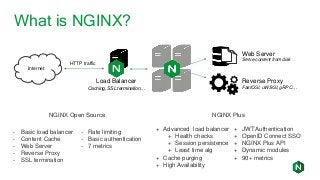
What is NGINX?
Internet
Web Server
Serve content from disk
Reverse Proxy
FastCGI, uWSGI, gRPC…
Load Balancer
Caching, SSL termination…
HTTP traffic
- Basic load balancer
- Content Cache
- Web Server
- Reverse Proxy
- SSL termination
- Rate limiting
- Basic authentication
- 7 metrics
NGINX Open Source NGINX Plus
+ Advanced load balancer
+ Health checks
+ Session persistence
+ Least time alg
+ Cache purging
+ High Availability
+ JWT Authentication
+ OpenID Connect SSO
+ NGINX Plus API
+ Dynamic modules
+ 90+ metrics
About NGINX, Inc.
• Founded in 2011, NGINX Plus first released in
2013
• Series C funding of $43 million from Goldman
Sachs and NEA
• Offices in SF, London, Cork, Singapore,
Sydney, and Moscow
• 1,500+ commercial customers
• 200+ employees
Agenda
• Introducing NGINX
• Installing NGINX and NGINX Plus
• Key files, commands, and directories
• Basic configurations
• Advanced configurations
• Logging and monitoring
• Summary
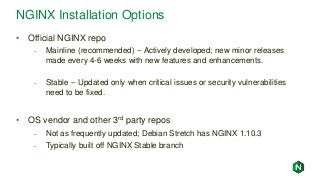
NGINX Installation Options
• Official NGINX repo
- Mainline (recommended) -- Actively developed; new minor releases
made every 4-6 weeks with new features and enhancements.
- Stable -- Updated only when critical issues or security vulnerabilities
need to be fixed.
• OS vendor and other 3rd party repos
- Not as frequently updated; Debian Stretch has NGINX 1.10.3
- Typically built off NGINX Stable branch
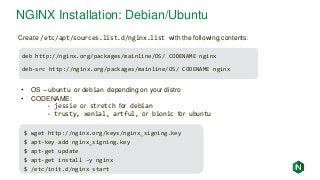
NGINX Installation: Debian/Ubuntu
deb http://nginx.org/packages/mainline/OS/ CODENAME nginx
deb-src http://nginx.org/packages/mainline/OS/ CODENAME nginx
Create /etc/apt/sources.list.d/nginx.list with the following contents:
• OS – ubuntu or debian depending on your distro
• CODENAME:
- jessie or stretch for debian
- trusty, xenial, artful, or bionic for ubuntu
$ wget http://nginx.org/keys/nginx_signing.key
$ apt-key add nginx_signing.key
$ apt-get update
$ apt-get install –y nginx
$ /etc/init.d/nginx start
NGINX Installation: CentOS/Red Hat
[nginx]
name=nginx repo
baseurl=http://nginx.org/packages/mainline/OS/OSRELEASE/$basearch/
gpgcheck=0
enabled=1
Create /etc/yum.repos.d/nginx.repo with the following contents:
• OS -- rhel or centos depending on your distro
• OSRELEASE -- 6 or 7 for 6.x or 7.x versions, respectively
$ yum –y install nginx
$ systemctl enable nginx
$ systemctl start nginx
$ firewall-cmd --permanent --zone=public --add-port=80/tcp
$ firewall-cmd --reload
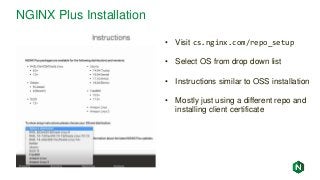
NGINX Plus Installation
• Visit cs.nginx.com/repo_setup
• Select OS from drop down list
• Instructions similar to OSS installation
• Mostly just using a different repo and
installing client certificate
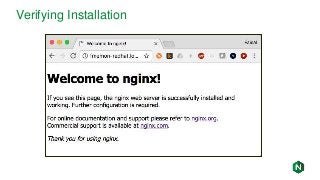
Verifying Installation
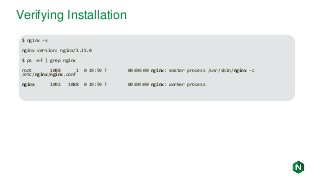
$ nginx -v
nginx version: nginx/1.15.0
$ ps -ef | grep nginx
root 1088 1 0 19:59 ? 00:00:00 nginx: master process /usr/sbin/nginx -c
/etc/nginx/nginx.conf
nginx 1092 1088 0 19:59 ? 00:00:00 nginx: worker process
Verifying Installation
NGINX Installation Misc
• For more installation details: http://nginx.org/en/linux_packages.html
- List of all supported distros and CPUs
- Suse Linux installation instructions
• For NGINX Plus, see: https://cs.nginx.com/repo_setup
- List of all supported distros and CPUs, including FreeBSD
Agenda
• Introducing NGINX
• Installing NGINX and NGINX Plus
• Key files, commands, and directories
• Basic configurations
• Advanced configurations
• Logging and monitoring
• Summary
server {
listen <parameters>;
location <url> {
----------------
}
}
upstream {
-------------------
}
server {
listen <parameters>;
location <url> {
----------------
}
}
upstream {
-------------------
}
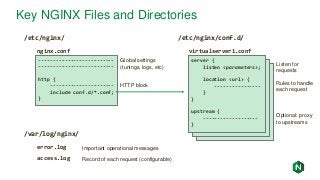
Key NGINX Files and Directories
/etc/nginx/
--------------------------
--------------------------
http {
----------------------
include conf.d/*.conf;
}
Global settings
(tunings, logs, etc)
HTTP block
nginx.conf virtualserver1.conf
server {
listen <parameters>;
location <url> {
----------------
}
}
upstream {
-------------------
}
/etc/nginx/conf.d/
/var/log/nginx/
error.log
access.log
Important operational messages
Record of each request (configurable)
Listen for
requests
Rules to handle
each request
Optional: proxy
to upstreams
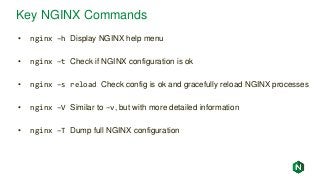
Key NGINX Commands
• nginx –h Display NGINX help menu
• nginx –t Check if NGINX configuration is ok
• nginx –s reload Check config is ok and gracefully reload NGINX processes
• nginx –V Similar to –v, but with more detailed information
• nginx –T Dump full NGINX configuration
Agenda
• Introducing NGINX
• Installing NGINX and NGINX Plus
• Key files, commands, and directories
• Basic configurations
• Advanced configurations
• Logging and monitoring
• Summary
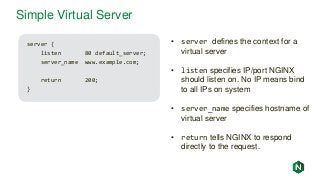
Simple Virtual Server
server {
listen 80 default_server;
server_name www.example.com;
return 200;
}
• server defines the context for a
virtual server
• listen specifies IP/port NGINX
should listen on. No IP means bind
to all IPs on system
• server_name specifies hostname of
virtual server
• return tells NGINX to respond
directly to the request.
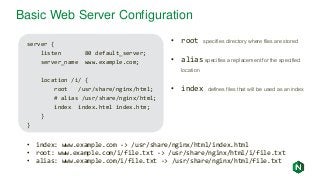
Basic Web Server Configuration
server {
listen 80 default_server;
server_name www.example.com;
location /i/ {
root /usr/share/nginx/html;
# alias /usr/share/nginx/html;
index index.html index.htm;
}
}
• index: www.example.com -> /usr/share/nginx/html/index.html
• root: www.example.com/i/file.txt -> /usr/share/nginx/html/i/file.txt
• alias: www.example.com/i/file.txt -> /usr/share/nginx/html/file.txt
• root specifies directory where files are stored
• alias specifies a replacement for the specified
location
• index defines files that will be used as an index
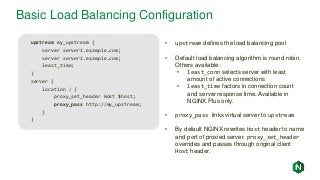
Basic Load Balancing Configuration
upstream my_upstream {
server server1.example.com;
server server2.example.com;
least_time;
}
server {
location / {
proxy_set_header Host $host;
proxy_pass http://my_upstream;
}
}
• upstream defines the load balancing pool
• Default load balancing algorithm is round robin.
Others available:
• least_conn selects server with least
amount of active connections
• least_time factors in connection count
and server response time. Available in
NGINX Plus only.
• proxy_pass links virtual server to upstream
• By default NGINX rewrites Host header to name
and port of proxied server. proxy_set_header
overrides and passes through original client
Host header.
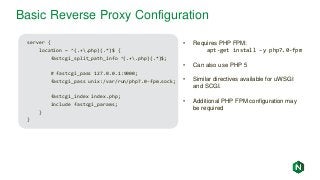
Basic Reverse Proxy Configuration
server {
location ~ ^(.+.php)(.*)$ {
fastcgi_split_path_info ^(.+.php)(.*)$;
# fastcgi_pass 127.0.0.1:9000;
fastcgi_pass unix:/var/run/php7.0-fpm.sock;
fastcgi_index index.php;
include fastcgi_params;
}
}
• Requires PHP FPM:
apt-get install –y php7.0-fpm
• Can also use PHP 5
• Similar directives available for uWSGI
and SCGI.
• Additional PHP FPM configuration may
be required
Basic Caching Configuration
proxy_cache_path /path/to/cache levels=1:2
keys_zone=my_cache:10m max_size=10g
inactive=60m use_temp_path=off;
server {
location / {
proxy_cache my_cache;
proxy_set_header Host $host;
proxy_pass http://my_upstream;
}
}
• proxy_cache_path defines the
parameters of the cache.
• keys_zone defines the size of
memory to store cache keys in. A
1 MB zone can store data for
about 8,000 keys.
• max_size sets upper limit of
cache size. Optional.
• inactive defines how long an
object can stay in cache without
being accessed. Default is 10 m.
• proxy_cache enables
caching for the context it is in
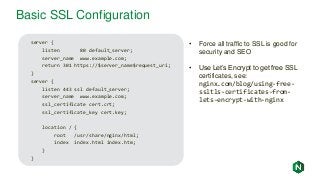
Basic SSL Configuration
server {
listen 80 default_server;
server_name www.example.com;
return 301 https://$server_name$request_uri;
}
server {
listen 443 ssl default_server;
server_name www.example.com;
ssl_certificate cert.crt;
ssl_certificate_key cert.key;
location / {
root /usr/share/nginx/html;
index index.html index.htm;
}
}
• Force all traffic to SSL is good for
security and SEO
• Use Let’s Encrypt to get free SSL
certificates, see:
nginx.com/blog/using-free-
ssltls-certificates-from-
lets-encrypt-with-nginx
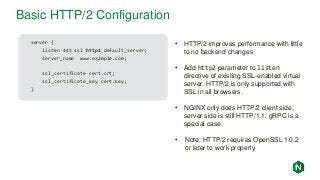
Basic HTTP/2 Configuration
server {
listen 443 ssl http2 default_server;
server_name www.example.com;
ssl_certificate cert.crt;
ssl_certificate_key cert.key;
}
• HTTP/2 improves performance with little
to no backend changes
• Add http2 parameter to listen
directive of existing SSL-enabled virtual
server. HTTP/2 is only supported with
SSL in all browsers.
• NGINX only does HTTP/2 client side,
server side is still HTTP/1.1. gRPC is a
special case.
• Note: HTTP/2 requires OpenSSL 1.0.2
or later to work properly
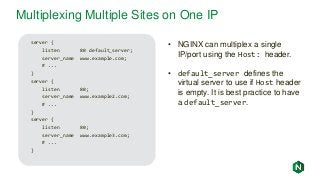
Multiplexing Multiple Sites on One IP
server {
listen 80 default_server;
server_name www.example.com;
# ...
}
server {
listen 80;
server_name www.example2.com;
# ...
}
server {
listen 80;
server_name www.example3.com;
# ...
}
• NGINX can multiplex a single
IP/port using the Host: header.
• default_server defines the
virtual server to use if Host header
is empty. It is best practice to have
a default_server.
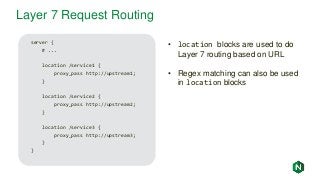
Layer 7 Request Routing
server {
# ...
location /service1 {
proxy_pass http://upstream1;
}
location /service2 {
proxy_pass http://upstream2;
}
location /service3 {
proxy_pass http://upstream3;
}
}
• location blocks are used to do
Layer 7 routing based on URL
• Regex matching can also be used
in location blocks
Agenda
• Introducing NGINX
• Installing NGINX and NGINX Plus
• Key files, commands, and directories
• Basic configurations
• Advanced configurations
• Logging and monitoring
• Summary
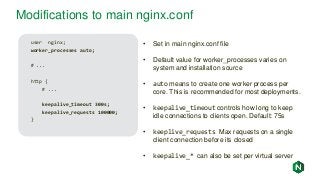
Modifications to main nginx.conf
user nginx;
worker_processes auto;
# ...
http {
# ...
keepalive_timeout 300s;
keepalive_requests 100000;
}
• Set in main nginx.conf file
• Default value for worker_processes varies on
system and installation source
• auto means to create one worker process per
core. This is recommended for most deployments.
• keepalive_timeout controls how long to keep
idle connections to clients open. Default: 75s
• keeplive_requests Max requests on a single
client connection before its closed
• keepalive_* can also be set per virtual server
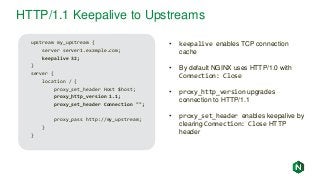
HTTP/1.1 Keepalive to Upstreams
upstream my_upstream {
server server1.example.com;
keepalive 32;
}
server {
location / {
proxy_set_header Host $host;
proxy_http_version 1.1;
proxy_set_header Connection "";
proxy_pass http://my_upstream;
}
}
• keepalive enables TCP connection
cache
• By default NGINX uses HTTP/1.0 with
Connection: Close
• proxy_http_version upgrades
connection to HTTP/1.1
• proxy_set_header enables keepalive by
clearing Connection: Close HTTP
header
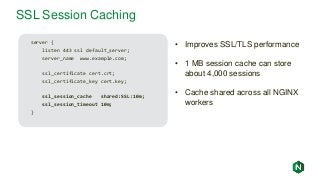
SSL Session Caching
server {
listen 443 ssl default_server;
server_name www.example.com;
ssl_certificate cert.crt;
ssl_certificate_key cert.key;
ssl_session_cache shared:SSL:10m;
ssl_session_timeout 10m;
}
• Improves SSL/TLS performance
• 1 MB session cache can store
about 4,000 sessions
• Cache shared across all NGINX
workers
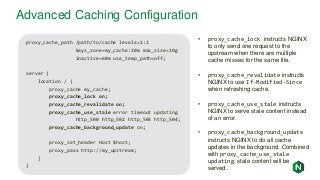
Advanced Caching Configuration
proxy_cache_path /path/to/cache levels=1:2
keys_zone=my_cache:10m max_size=10g
inactive=60m use_temp_path=off;
server {
location / {
proxy_cache my_cache;
proxy_cache_lock on;
proxy_cache_revalidate on;
proxy_cache_use_stale error timeout updating
http_500 http_502 http_503 http_504;
proxy_cache_background_update on;
proxy_set_header Host $host;
proxy_pass http://my_upstream;
}
}
• proxy_cache_lock instructs NGINX
to only send one request to the
upstream when there are multiple
cache misses for the same file.
• proxy_cache_revalidate instructs
NGINX to use If-Modified-Since
when refreshing cache.
• proxy_cache_use_stale instructs
NGINX to serve stale content instead
of an error.
• proxy_cache_background_update
instructs NGINX to do all cache
updates in the background. Combined
with proxy_cache_use_stale
updating, stale content will be
served.
gRPC Proxying with SSL Termination
server {
listen 443 ssl http2;
ssl_certificate server.crt;
ssl_certificate_key server.key;
location / {
grpc_pass grpc://localhost:50051;
}
}
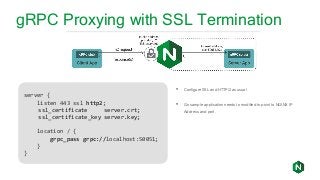
• Configure SSL and HTTP/2 as usual
• Go sample application needs to modified to point to NGINX IP
Address and port.
d
Active Health Checks
upstream my_upstream {
zone my_upstream 64k;
server server1.example.com slow_start=30s;
}
server {
# ...
location /health {
internal;
health_check interval=5s uri=/test.php
match=statusok;
proxy_set_header HOST www.example.com;
proxy_pass http://my_upstream;
}
match statusok {
# Used for /test.php health check
status 200;
header Content-Type = text/html;
body ~ "Server[0-9]+ is alive";
}
• Polls /test.php every 5 seconds
• If response is not 200, server marked
as failed
• If response body does not contain
“ServerN is alive”, server marked as
failed
• Recovered/new servers will slowly
ramp up traffic over 30 seconds
• Exclusive to NGINX Plus
Sticky Cookie Session Persistence
upstream my_upstream {
server server1.example.com;
server server2.example.com;
sticky cookie name expires=1h
domain=.example.com path=/;
}
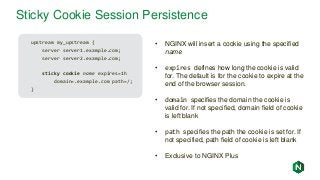
• NGINX will insert a cookie using the specified
name
• expires defines how long the cookie is valid
for. The default is for the cookie to expire at the
end of the browser session.
• domain specifies the domain the cookie is
valid for. If not specified, domain field of cookie
is left blank
• path specifies the path the cookie is set for. If
not specified, path field of cookie is left blank
• Exclusive to NGINX Plus
Agenda
• Introducing NGINX
• Installing NGINX and NGINX Plus
• Key files, commands, and directories
• Basic configurations
• Advanced configurations
• Logging and monitoring
• Summary
NGINX Stub Status Module
server {
location /basic_status {
stub_status;
}
}
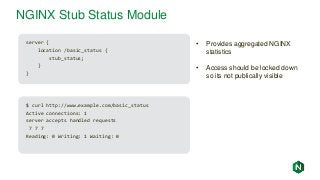
• Provides aggregated NGINX
statistics
• Access should be locked down
so its not publically visible
$ curl http://www.example.com/basic_status
Active connections: 1
server accepts handled requests
7 7 7
Reading: 0 Writing: 1 Waiting: 0
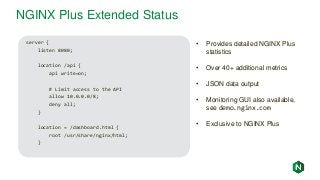
NGINX Plus Extended Status
• Provides detailed NGINX Plus
statistics
• Over 40+ additional metrics
• JSON data output
• Monitoring GUI also available,
see demo.nginx.com
• Exclusive to NGINX Plus
server {
listen 8080;
location /api {
api write=on;
# Limit access to the API
allow 10.0.0.0/8;
deny all;
}
location = /dashboard.html {
root /usr/share/nginx/html;
}
NGINX Access Logs
192.168.179.1 - - [15/May/2017:16:36:25 -0700] "GET / HTTP/1.1" 200 612 "-" "Mozilla/5.0
(Macintosh; Intel Mac OS X 10_12_3) AppleWebKit/537.36 (KHTML, like Gecko)
Chrome/58.0.3029.110 Safari/537.36" "-"
192.168.179.1 - - [15/May/2017:16:36:26 -0700] "GET /favicon.ico HTTP/1.1" 404 571
"http://fmemon-redhat.local/" “Mozilla/5.0 (Macintosh; Intel Mac OS X 10_12_3)
AppleWebKit/537.36 (KHTML, like Gecko) Chrome/58.0.3029.110 Safari/537.36" "-"
192.168.179.1 - - [15/May/2017:16:36:31 -0700] "GET /basic_status HTTP/1.1" 200 100 "-"
"Mozilla/5.0 (Macintosh; Intel Mac OS X 10_12_3) AppleWebKit/537.36 (KHTML, like Gecko)
Chrome/58.0.3029.110 Safari/537.36" "-"
• Enabled by default, can be shut off by adding “access_log off” to improve
performance
• By default lists client IP, date, request , referrer, user agent, etc. Can add additional
NGINX variables, see nginx.org/en/docs/varindex.html
• Log format configurable with the log_format directive
Summary
• It is recommended to use the NGINX mainline branch for most deployments
• All configuration should go into separate files in /etc/nginx/conf.d/*.conf
• Forcing all traffic to SSL improves security and improves search rankings
• Keepalive connections improve performance by reusing TCP connections
• SSL session caching and HTTP/2 improve SSL performance
• NGINX status module and logging capability provide visibility
Try NGINX Plus for free at nginx.com/free-trial-request
Q & ATry NGINX Plus free for 30 days: nginx.com/free-trial-request

NGINX: Basics and Best Practices

  • 1.
    NGINX: Basics andBest Practices
  • 2.
    Faisal Memon Product MarketingManager, NGINX Formerly: • Sr. Technical Marketing Engineer, Riverbed • Technical Marketing Engineer, Cisco • Software Engineer, Cisco Who are we? Anthony Leverington Country Manager, ANZ, NGINX Formerly: • Account Manager, AWS • Cloud Sales Specialist, Optus • Technical Pre-Sales, VMWare
  • 3.
    Agenda • Introducing NGINX •Installing NGINX and NGINX Plus • Key files, commands, and directories • Basic configurations • Advanced configurations • Logging and monitoring • Summary
  • 4.
    “I wanted peopleto use it, so I made it open source.” - Igor Sysoev, NGINX creator and founder
  • 5.
    336 million Total sitesrunning on NGINX Source: Netcraft June 2018 Web Server Survey
  • 6.
    64% Busiest 10,000 run onNGINX Source: w3techs, June 2018
  • 7.
  • 8.
    What is NGINX? Internet WebServer Serve content from disk Reverse Proxy FastCGI, uWSGI, gRPC… Load Balancer Caching, SSL termination… HTTP traffic - Basic load balancer - Content Cache - Web Server - Reverse Proxy - SSL termination - Rate limiting - Basic authentication - 7 metrics NGINX Open Source NGINX Plus + Advanced load balancer + Health checks + Session persistence + Least time alg + Cache purging + High Availability + JWT Authentication + OpenID Connect SSO + NGINX Plus API + Dynamic modules + 90+ metrics
  • 9.
    About NGINX, Inc. •Founded in 2011, NGINX Plus first released in 2013 • Series C funding of $43 million from Goldman Sachs and NEA • Offices in SF, London, Cork, Singapore, Sydney, and Moscow • 1,500+ commercial customers • 200+ employees
  • 10.
    Agenda • Introducing NGINX •Installing NGINX and NGINX Plus • Key files, commands, and directories • Basic configurations • Advanced configurations • Logging and monitoring • Summary
  • 11.
    NGINX Installation Options •Official NGINX repo - Mainline (recommended) -- Actively developed; new minor releases made every 4-6 weeks with new features and enhancements. - Stable -- Updated only when critical issues or security vulnerabilities need to be fixed. • OS vendor and other 3rd party repos - Not as frequently updated; Debian Stretch has NGINX 1.10.3 - Typically built off NGINX Stable branch
  • 12.
    NGINX Installation: Debian/Ubuntu debhttp://nginx.org/packages/mainline/OS/ CODENAME nginx deb-src http://nginx.org/packages/mainline/OS/ CODENAME nginx Create /etc/apt/sources.list.d/nginx.list with the following contents: • OS – ubuntu or debian depending on your distro • CODENAME: - jessie or stretch for debian - trusty, xenial, artful, or bionic for ubuntu $ wget http://nginx.org/keys/nginx_signing.key $ apt-key add nginx_signing.key $ apt-get update $ apt-get install –y nginx $ /etc/init.d/nginx start
  • 13.
    NGINX Installation: CentOS/RedHat [nginx] name=nginx repo baseurl=http://nginx.org/packages/mainline/OS/OSRELEASE/$basearch/ gpgcheck=0 enabled=1 Create /etc/yum.repos.d/nginx.repo with the following contents: • OS -- rhel or centos depending on your distro • OSRELEASE -- 6 or 7 for 6.x or 7.x versions, respectively $ yum –y install nginx $ systemctl enable nginx $ systemctl start nginx $ firewall-cmd --permanent --zone=public --add-port=80/tcp $ firewall-cmd --reload
  • 14.
    NGINX Plus Installation •Visit cs.nginx.com/repo_setup • Select OS from drop down list • Instructions similar to OSS installation • Mostly just using a different repo and installing client certificate
  • 15.
    Verifying Installation $ nginx-v nginx version: nginx/1.15.0 $ ps -ef | grep nginx root 1088 1 0 19:59 ? 00:00:00 nginx: master process /usr/sbin/nginx -c /etc/nginx/nginx.conf nginx 1092 1088 0 19:59 ? 00:00:00 nginx: worker process
  • 16.
  • 17.
    NGINX Installation Misc •For more installation details: http://nginx.org/en/linux_packages.html - List of all supported distros and CPUs - Suse Linux installation instructions • For NGINX Plus, see: https://cs.nginx.com/repo_setup - List of all supported distros and CPUs, including FreeBSD
  • 18.
    Agenda • Introducing NGINX •Installing NGINX and NGINX Plus • Key files, commands, and directories • Basic configurations • Advanced configurations • Logging and monitoring • Summary
  • 19.
    server { listen <parameters>; location<url> { ---------------- } } upstream { ------------------- } server { listen <parameters>; location <url> { ---------------- } } upstream { ------------------- } Key NGINX Files and Directories /etc/nginx/ -------------------------- -------------------------- http { ---------------------- include conf.d/*.conf; } Global settings (tunings, logs, etc) HTTP block nginx.conf virtualserver1.conf server { listen <parameters>; location <url> { ---------------- } } upstream { ------------------- } /etc/nginx/conf.d/ /var/log/nginx/ error.log access.log Important operational messages Record of each request (configurable) Listen for requests Rules to handle each request Optional: proxy to upstreams
  • 20.
    Key NGINX Commands •nginx –h Display NGINX help menu • nginx –t Check if NGINX configuration is ok • nginx –s reload Check config is ok and gracefully reload NGINX processes • nginx –V Similar to –v, but with more detailed information • nginx –T Dump full NGINX configuration
  • 21.
    Agenda • Introducing NGINX •Installing NGINX and NGINX Plus • Key files, commands, and directories • Basic configurations • Advanced configurations • Logging and monitoring • Summary
  • 22.
    Simple Virtual Server server{ listen 80 default_server; server_name www.example.com; return 200; } • server defines the context for a virtual server • listen specifies IP/port NGINX should listen on. No IP means bind to all IPs on system • server_name specifies hostname of virtual server • return tells NGINX to respond directly to the request.
  • 23.
    Basic Web ServerConfiguration server { listen 80 default_server; server_name www.example.com; location /i/ { root /usr/share/nginx/html; # alias /usr/share/nginx/html; index index.html index.htm; } } • index: www.example.com -> /usr/share/nginx/html/index.html • root: www.example.com/i/file.txt -> /usr/share/nginx/html/i/file.txt • alias: www.example.com/i/file.txt -> /usr/share/nginx/html/file.txt • root specifies directory where files are stored • alias specifies a replacement for the specified location • index defines files that will be used as an index
  • 24.
    Basic Load BalancingConfiguration upstream my_upstream { server server1.example.com; server server2.example.com; least_time; } server { location / { proxy_set_header Host $host; proxy_pass http://my_upstream; } } • upstream defines the load balancing pool • Default load balancing algorithm is round robin. Others available: • least_conn selects server with least amount of active connections • least_time factors in connection count and server response time. Available in NGINX Plus only. • proxy_pass links virtual server to upstream • By default NGINX rewrites Host header to name and port of proxied server. proxy_set_header overrides and passes through original client Host header.
  • 25.
    Basic Reverse ProxyConfiguration server { location ~ ^(.+.php)(.*)$ { fastcgi_split_path_info ^(.+.php)(.*)$; # fastcgi_pass 127.0.0.1:9000; fastcgi_pass unix:/var/run/php7.0-fpm.sock; fastcgi_index index.php; include fastcgi_params; } } • Requires PHP FPM: apt-get install –y php7.0-fpm • Can also use PHP 5 • Similar directives available for uWSGI and SCGI. • Additional PHP FPM configuration may be required
  • 26.
    Basic Caching Configuration proxy_cache_path/path/to/cache levels=1:2 keys_zone=my_cache:10m max_size=10g inactive=60m use_temp_path=off; server { location / { proxy_cache my_cache; proxy_set_header Host $host; proxy_pass http://my_upstream; } } • proxy_cache_path defines the parameters of the cache. • keys_zone defines the size of memory to store cache keys in. A 1 MB zone can store data for about 8,000 keys. • max_size sets upper limit of cache size. Optional. • inactive defines how long an object can stay in cache without being accessed. Default is 10 m. • proxy_cache enables caching for the context it is in
  • 27.
    Basic SSL Configuration server{ listen 80 default_server; server_name www.example.com; return 301 https://$server_name$request_uri; } server { listen 443 ssl default_server; server_name www.example.com; ssl_certificate cert.crt; ssl_certificate_key cert.key; location / { root /usr/share/nginx/html; index index.html index.htm; } } • Force all traffic to SSL is good for security and SEO • Use Let’s Encrypt to get free SSL certificates, see: nginx.com/blog/using-free- ssltls-certificates-from- lets-encrypt-with-nginx
  • 28.
    Basic HTTP/2 Configuration server{ listen 443 ssl http2 default_server; server_name www.example.com; ssl_certificate cert.crt; ssl_certificate_key cert.key; } • HTTP/2 improves performance with little to no backend changes • Add http2 parameter to listen directive of existing SSL-enabled virtual server. HTTP/2 is only supported with SSL in all browsers. • NGINX only does HTTP/2 client side, server side is still HTTP/1.1. gRPC is a special case. • Note: HTTP/2 requires OpenSSL 1.0.2 or later to work properly
  • 29.
    Multiplexing Multiple Siteson One IP server { listen 80 default_server; server_name www.example.com; # ... } server { listen 80; server_name www.example2.com; # ... } server { listen 80; server_name www.example3.com; # ... } • NGINX can multiplex a single IP/port using the Host: header. • default_server defines the virtual server to use if Host header is empty. It is best practice to have a default_server.
  • 30.
    Layer 7 RequestRouting server { # ... location /service1 { proxy_pass http://upstream1; } location /service2 { proxy_pass http://upstream2; } location /service3 { proxy_pass http://upstream3; } } • location blocks are used to do Layer 7 routing based on URL • Regex matching can also be used in location blocks
  • 31.
    Agenda • Introducing NGINX •Installing NGINX and NGINX Plus • Key files, commands, and directories • Basic configurations • Advanced configurations • Logging and monitoring • Summary
  • 32.
    Modifications to mainnginx.conf user nginx; worker_processes auto; # ... http { # ... keepalive_timeout 300s; keepalive_requests 100000; } • Set in main nginx.conf file • Default value for worker_processes varies on system and installation source • auto means to create one worker process per core. This is recommended for most deployments. • keepalive_timeout controls how long to keep idle connections to clients open. Default: 75s • keeplive_requests Max requests on a single client connection before its closed • keepalive_* can also be set per virtual server
  • 33.
    HTTP/1.1 Keepalive toUpstreams upstream my_upstream { server server1.example.com; keepalive 32; } server { location / { proxy_set_header Host $host; proxy_http_version 1.1; proxy_set_header Connection ""; proxy_pass http://my_upstream; } } • keepalive enables TCP connection cache • By default NGINX uses HTTP/1.0 with Connection: Close • proxy_http_version upgrades connection to HTTP/1.1 • proxy_set_header enables keepalive by clearing Connection: Close HTTP header
  • 34.
    SSL Session Caching server{ listen 443 ssl default_server; server_name www.example.com; ssl_certificate cert.crt; ssl_certificate_key cert.key; ssl_session_cache shared:SSL:10m; ssl_session_timeout 10m; } • Improves SSL/TLS performance • 1 MB session cache can store about 4,000 sessions • Cache shared across all NGINX workers
  • 35.
    Advanced Caching Configuration proxy_cache_path/path/to/cache levels=1:2 keys_zone=my_cache:10m max_size=10g inactive=60m use_temp_path=off; server { location / { proxy_cache my_cache; proxy_cache_lock on; proxy_cache_revalidate on; proxy_cache_use_stale error timeout updating http_500 http_502 http_503 http_504; proxy_cache_background_update on; proxy_set_header Host $host; proxy_pass http://my_upstream; } } • proxy_cache_lock instructs NGINX to only send one request to the upstream when there are multiple cache misses for the same file. • proxy_cache_revalidate instructs NGINX to use If-Modified-Since when refreshing cache. • proxy_cache_use_stale instructs NGINX to serve stale content instead of an error. • proxy_cache_background_update instructs NGINX to do all cache updates in the background. Combined with proxy_cache_use_stale updating, stale content will be served.
  • 36.
    gRPC Proxying withSSL Termination server { listen 443 ssl http2; ssl_certificate server.crt; ssl_certificate_key server.key; location / { grpc_pass grpc://localhost:50051; } } • Configure SSL and HTTP/2 as usual • Go sample application needs to modified to point to NGINX IP Address and port.
  • 37.
    d Active Health Checks upstreammy_upstream { zone my_upstream 64k; server server1.example.com slow_start=30s; } server { # ... location /health { internal; health_check interval=5s uri=/test.php match=statusok; proxy_set_header HOST www.example.com; proxy_pass http://my_upstream; } match statusok { # Used for /test.php health check status 200; header Content-Type = text/html; body ~ "Server[0-9]+ is alive"; } • Polls /test.php every 5 seconds • If response is not 200, server marked as failed • If response body does not contain “ServerN is alive”, server marked as failed • Recovered/new servers will slowly ramp up traffic over 30 seconds • Exclusive to NGINX Plus
  • 38.
    Sticky Cookie SessionPersistence upstream my_upstream { server server1.example.com; server server2.example.com; sticky cookie name expires=1h domain=.example.com path=/; } • NGINX will insert a cookie using the specified name • expires defines how long the cookie is valid for. The default is for the cookie to expire at the end of the browser session. • domain specifies the domain the cookie is valid for. If not specified, domain field of cookie is left blank • path specifies the path the cookie is set for. If not specified, path field of cookie is left blank • Exclusive to NGINX Plus
  • 39.
    Agenda • Introducing NGINX •Installing NGINX and NGINX Plus • Key files, commands, and directories • Basic configurations • Advanced configurations • Logging and monitoring • Summary
  • 40.
    NGINX Stub StatusModule server { location /basic_status { stub_status; } } • Provides aggregated NGINX statistics • Access should be locked down so its not publically visible $ curl http://www.example.com/basic_status Active connections: 1 server accepts handled requests 7 7 7 Reading: 0 Writing: 1 Waiting: 0
  • 41.
    NGINX Plus ExtendedStatus • Provides detailed NGINX Plus statistics • Over 40+ additional metrics • JSON data output • Monitoring GUI also available, see demo.nginx.com • Exclusive to NGINX Plus server { listen 8080; location /api { api write=on; # Limit access to the API allow 10.0.0.0/8; deny all; } location = /dashboard.html { root /usr/share/nginx/html; }
  • 42.
    NGINX Access Logs 192.168.179.1- - [15/May/2017:16:36:25 -0700] "GET / HTTP/1.1" 200 612 "-" "Mozilla/5.0 (Macintosh; Intel Mac OS X 10_12_3) AppleWebKit/537.36 (KHTML, like Gecko) Chrome/58.0.3029.110 Safari/537.36" "-" 192.168.179.1 - - [15/May/2017:16:36:26 -0700] "GET /favicon.ico HTTP/1.1" 404 571 "http://fmemon-redhat.local/" “Mozilla/5.0 (Macintosh; Intel Mac OS X 10_12_3) AppleWebKit/537.36 (KHTML, like Gecko) Chrome/58.0.3029.110 Safari/537.36" "-" 192.168.179.1 - - [15/May/2017:16:36:31 -0700] "GET /basic_status HTTP/1.1" 200 100 "-" "Mozilla/5.0 (Macintosh; Intel Mac OS X 10_12_3) AppleWebKit/537.36 (KHTML, like Gecko) Chrome/58.0.3029.110 Safari/537.36" "-" • Enabled by default, can be shut off by adding “access_log off” to improve performance • By default lists client IP, date, request , referrer, user agent, etc. Can add additional NGINX variables, see nginx.org/en/docs/varindex.html • Log format configurable with the log_format directive
  • 43.
    Summary • It isrecommended to use the NGINX mainline branch for most deployments • All configuration should go into separate files in /etc/nginx/conf.d/*.conf • Forcing all traffic to SSL improves security and improves search rankings • Keepalive connections improve performance by reusing TCP connections • SSL session caching and HTTP/2 improve SSL performance • NGINX status module and logging capability provide visibility Try NGINX Plus for free at nginx.com/free-trial-request
  • 45.
    Q & ATryNGINX Plus free for 30 days: nginx.com/free-trial-request

Editor's Notes

  • #4 - We will
  • #5 NGINX was created by Igor Sysoev as a side project while he was working as a sysadmin at Ramblr, a Russian equivalent of Yahoo!. While at Ramblr, Igor was asked to look into enabling the Apache HTTP servers to better handle the influx of traffic the company was receiving. While looking for ways to improve Apache's performance, Igor found himself blocked by several inherent design choices that hampered Apache's ability to handle 10,000 simultaneous users, commonly known as the C10K problem. In the spring of 2002 Igor started developing NGINX with an event-driven architecture that addressed the shortcomings in Apache. On October 4th, 2004, the anniversary of the launch of Sputnik, the first space satellite, Igor publicly released the source code of NGINX for free.
  • #6 Source: https://news.netcraft.com/archives/category/web-server-survey/ From there NGINX grew rapidly and now is used by over 447 million websites world wide, including Uber, Netflix, Airbnb, Twitch, Stripe and other innovative companies. NOTE: In “Misc. Extras” section, there is a slide of relevant OSS users.
  • #7 About 20% of the internet
  • #8 There is our some of our most significant customers: McDonalds is building apps in the AWS using NGINX Plus Starbucks pivoted to a microservice architecture in the cloud using NGINX Plus Some other notable names not listed here: Volvo, Carnival cruise lines, Liberty Mutual, BofA, Comcast, Footlocker, ARM.
  • #9 NGINX Plus gives you all the tools you need to deliver your application reliably. Web Server NGINX is a fully featured web server that can directly serve static content. NGINX Plus can scale to handle hundreds of thousands of clients simultaneously, and serve hundreds of thousands of content resources per second. Application Gateway NGINX handles all HTTP traffic, and forwards requests in a smooth, controlled manner to PHP, Ruby, Java, and other application types, using FastCGI, uWSGI, and Linux sockets. Reverse Proxy NGINX is a reverse proxy that you can put in front of your applications. NGINX can cache both static and dynamic content to improve overall performance, as well as load balance traffic enabling you to scale-out.
  • #11 - We will
  • #12 - We will
  • #16 - We will
  • #17 - We will
  • #18 - We will
  • #19 - We will
  • #20 - We will
  • #21 - We will
  • #22 - We will
  • #23 - We recommend configuration to be put into conf.d directory, not sites-enabled or sites-available
  • #25 - We will
  • #26 Very basic configuration that listens on port 80
  • #27 Very basic configuration that listens on port 80
  • #35 - We will
  • #40 Part of HTTP/2 specification
  • #43 - We will