Let’s build a private clod
2
Who am I?
●
Kevin Honka
●
Senior System Engineer at AD IT Systems
●
Twitter: @piratehonk
●
Mastodon: @piratehonk@norden.social
●
Mail: kevin (at) honka.dev
3
Roadmap
●
What is a private cloud
●
How does one build it
●
Pros / Cons
●
Monitoring
●
Difficulties
4
What is a private cloud?
●
Similar to
– Google cloud
– AWS
– Azure
●
But on our own hardware
5
What is a private cloud?
●
KVM on steroids
●
Loads of services
●
Lots of Infrastructure automation
●
Kept together by tears and duct tape
6
Building a cloud
●
Commercial
– VMWare
– Nutanix
– Red Hat Openstack / Openshift
– Mirantis Openstack
– Nebula
7
Building a cloud
●
Non Commercial
– Apache Mesos
– Openstack Foundation
8
Building a cloud
●
Manpower
●
Money
●
Time
●
Knowledge
●
Scale
9
Building a cloud
●
Openstack
– SDN
– Easily scalable
– Good documentation
– External support available from multiple companies
10
Building a cloud
●
Minimum of 3 nodes
●
Split control, network, storage, compute
●
Scale later when necessary
11
Building a cloud
●
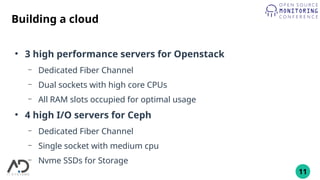
3 high performance servers for Openstack
– Dedicated Fiber Channel
– Dual sockets with high core CPUs
– All RAM slots occupied for optimal usage
●
4 high I/O servers for Ceph
– Dedicated Fiber Channel
– Single socket with medium cpu
– Nvme SSDs for Storage
12
Building a cloud
●
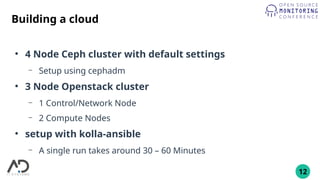
4 Node Ceph cluster with default settings
– Setup using cephadm
●
3 Node Openstack cluster
– 1 Control/Network Node
– 2 Compute Nodes
●
setup with kolla-ansible
– A single run takes around 30 – 60 Minutes
13
Building a cloud
●
kolla-ansible
– Modifed ansible
– Runs on a single YAML File
16
Pros
●
Good documentation
●
Highly customizable
●
Control over all services
●
Great for learning new things
– Kvm
– Linux Storage handling
– Networking
17
Cons
●
Steep learning curve
– Kvm
– Networking
– Openstack services
– Integration in existing environments
●
Overspecific documentation
●
Takes a long time to mvp
18
Monitoring
●
Prometheus
– Exporter for most services
– Predefined alert rules available
●
Graylog
– Log collection via nxlog
– Processing for data extraction
19
Monitoring
●
Many different formats
– Json
– Classic system logging
– Custom logging setups
– Multi line logs
20
Placement logs
●
2022-11-09 10:03:15.070 25 INFO placement.requestlog [req-6e970f73-e493-4418-ad9c-25b7ff34ba57
ba26e9e5beaa41018db4a3e00c6e7ef9 9abdc13c709a42949a985af187d64a4b - default default] 10.XX.XX.XX "GET
/resource_providers/480ccd47-c2c0-4a49-8972-b1486598f6e9/allocations" status: 200 len: 575 microversion: 1.0
●
2022-11-09 10:03:15.097 24 INFO placement.requestlog [req-d1118868-c205-4b38-8567-eb1c7db17811
ba26e9e5beaa41018db4a3e00c6e7ef9 9abdc13c709a42949a985af187d64a4b - default default] 10.XX.XX.XX "GET
/resource_providers?in_tree=480ccd47-c2c0-4a49-8972-b1486598f6e9" status: 200 len: 817 microversion: 1.14
●
2022-11-09 10:03:15.123 22 INFO placement.requestlog [req-e77ad21e-ead7-4b5e-9e03-b3350b188234
ba26e9e5beaa41018db4a3e00c6e7ef9 9abdc13c709a42949a985af187d64a4b - default default] 10.XX.XX.XX "GET
/resource_providers/480ccd47-c2c0-4a49-8972-b1486598f6e9/inventories" status: 200 len: 410 microversion: 1.0
●
2022-11-09 10:03:15.143 23 INFO placement.requestlog [req-7e8f0090-69f7-4b5c-b63d-6d8aeffa6312
ba26e9e5beaa41018db4a3e00c6e7ef9 9abdc13c709a42949a985af187d64a4b - default default] 10.XX.XX.XX "GET
/resource_providers/480ccd47-c2c0-4a49-8972-b1486598f6e9/aggregates" status: 200 len: 54 microversion: 1.19
●
2022-11-09 10:03:15.178 21 INFO placement.requestlog [req-416b2d05-eebc-4fac-b75d-10c02c7df252
ba26e9e5beaa41018db4a3e00c6e7ef9 9abdc13c709a42949a985af187d64a4b - default default] 10.XX.XX.XX "GET
/resource_providers/480ccd47-c2c0-4a49-8972-b1486598f6e9/traits" status: 200 len: 1593 microversion: 1.6
21
Placement logs
●
2022-11-09 10:03:15.070 25 INFO placement.requestlog
[req-6e970f73-e493-4418-ad9c-25b7ff34ba57
ba26e9e5beaa41018db4a3e00c6e7ef9
9abdc13c709a42949a985af187d64a4b - default default]
10.XX.XX.XX "GET /resource_providers/480ccd47-c2c0-4a49-
8972-b1486598f6e9/allocations" status: 200 len: 575
microversion: 1.0
22
Log components
●
Time: 2022-11-09 10:03:15.070
●
Loglevel: INFO
●
Origin: 10.XX.XX.XX
●
HTTP Method: GET
●
URL: /resource_providers/480ccd47-c2c0-4a49-8972-
b1486598f6e9/allocations
●
HTTP Status: “status: 200”
23
Tracing
●
Request ID: req-6e970f73-e493-4418-ad9c-25b7ff34ba57
●
Other Identifiers:
– Ba26e9e5beaa41018db4a3e00c6e7ef9
– 9abdc13c709a42949a985af187d64a4b
●
Random data: default default
24
Difficulties
●
Slow Interface / API
●
Performance inconsistencies in VM
●
Bad I/O
25
Slow Interface / API
●
Long loading times
●
Sometimes timeouts
26
Slow Interface / API
●
Why is this happening?
●
How do we resolve this?
27
Slow Interface / API
●
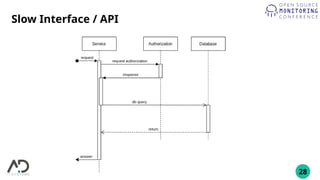
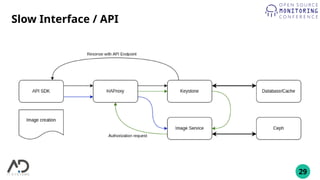
Understanding how the Services work
●
Which way do requests take?
28
Slow Interface / API
29
Slow Interface / API
30
Slow Interface / API
●
Why is this happening?
– Too many connections via HAProxy
●
A single request can generate up to 500-2000 internal requests
●
How do we resolve this?
– Use HAProxy only for incomming requests
– Remove HAProxy completely
31
Slow Interface / API
●
Use HAProxy only for incomming requests
– Minimal impact
– Easy to configure
●
Remove HAProxy completely
– Loss of high availability
– One less service to worry about
32
Slow Interface / API
●
Monitoring takeaways
– Check logs for dropped connections
– Monitor open tcp connections and times of the linux kernel
33
Performance inconsistencies
●
I/O Wait
●
CPU lag
34
Performance inconsistencies
●
Why is this happening?
– Problem with KVM?
– Hardware issues?
– Something with the Network?
– Ceph Issues?
35
Performance inconsistencies
36
Performance inconsistencies
●
No progress after a week of debugging
●
A hint from @isotopp@chaos.social
– Old story about a MySQL DB
– Something about Numa swapping
37
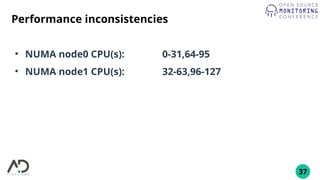
Performance inconsistencies
●
NUMA node0 CPU(s): 0-31,64-95
●
NUMA node1 CPU(s): 32-63,96-127
38
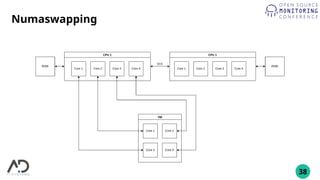
Numaswapping
39
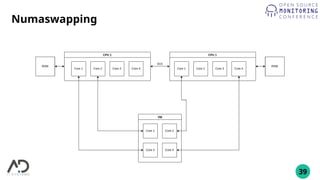
Numaswapping
40
Numaswapping
41
Numaswapping
●
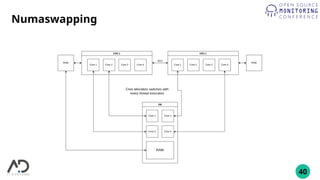
KVM Processes jump between Cores
●
On Socket change, Memory is behind a different CPU
– Increased memory access time
– Slower PCIe access
42
Performance inconsistencies
●
Activate CPU pinning
– CPU cores will be exclusive to a single KVM Thread
– Less available resources on compute nodes
– Need more compute nodes for same amount of VMs
●
Run KVM NUMA aware
– KVM Threads will always run on the same NUMA Node
– No exclusive cores
43
Performance inconsistencies
●
Monitoring takeaways
– Impossible to monitor
●
Intel Resource Director Technology can help
– Not available on AMD systems
44
Bad I/O
●
Ceph RDB volumes for VMs
●
Causes?
– Network?
– Wrong configuration?
– Hardware limits?
45
Bad I/O
●
Symptoms
– Slow writes; less than 300 op/s
– Inconsistent reads; fluctuating between 20k and 20 op/s
– Slow commits; more than 50 msec
46
Bad I/O
●
Searching for a solution
– Many tipps for optimizations
●
Stabilized I/O but did not increase it to estimated levels
– Estimation
●
NVMe SSDs
●
Atleast 100k op/s
●
Fast commit to disk; less than 500 usec
47
Bad I/O
●
Searching for a solution
– Network works at peak, with 20GBps
– Hardware resources are hardly touched
– Possible Problem with Ceph?
●
Nothing in the documentation
●
No recommendations
– Accept it as fate and move to local storage?
48
Bad I/O
●
A random link to a ceph mailing list
– OSDs should be at a max of 1TB
else performance will be poor
49
Bad I/O
●
Reconfiguring the ceph cluster to OSDs with a max size of
1TB
– OSDs increase from 20 to 60
– Each OSD gets it’s own core
●
No NUMA swapping
– Each SSD contains 3 OSDs
50
Bad I/O
●
Success?
– Partially
– I/O Performance
●
Commit down to 40 µsec
●
Consistent 15k+ op/s
– Could be better could be worse
51
Bad I/O
●
Monitoring takeaway
– Collect the metrics from libvirt
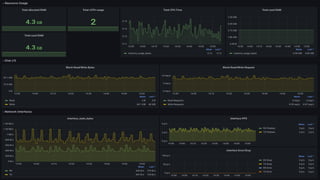
– Plotting graphs can actually help here
52
53
Monitoring takeaways
●
Use existing Tools
– Prometheus exporter
●
Openstack
●
Ceph
●
Visualize everything!
– Use existing Dashboards and customize
54
What happened since then?
●
Implementation of Prometheus for all Services and
Servers
●
Grafana Dashboards for everything important
●
Custom alert rules based on aggregated metrics
55
Questions ?
56
Thank you and safe travels

OSMC 2022 | Let’s build a private cloud – how hard can it be? by Kevin Honka

  • 1.
    Let’s build aprivate clod
  • 2.
    2 Who am I? ● KevinHonka ● Senior System Engineer at AD IT Systems ● Twitter: @piratehonk ● Mastodon: @piratehonk@norden.social ● Mail: kevin (at) honka.dev
  • 3.
    3 Roadmap ● What is aprivate cloud ● How does one build it ● Pros / Cons ● Monitoring ● Difficulties
  • 4.
    4 What is aprivate cloud? ● Similar to – Google cloud – AWS – Azure ● But on our own hardware
  • 5.
    5 What is aprivate cloud? ● KVM on steroids ● Loads of services ● Lots of Infrastructure automation ● Kept together by tears and duct tape
  • 6.
    6 Building a cloud ● Commercial –VMWare – Nutanix – Red Hat Openstack / Openshift – Mirantis Openstack – Nebula
  • 7.
    7 Building a cloud ● NonCommercial – Apache Mesos – Openstack Foundation
  • 8.
  • 9.
    9 Building a cloud ● Openstack –SDN – Easily scalable – Good documentation – External support available from multiple companies
  • 10.
    10 Building a cloud ● Minimumof 3 nodes ● Split control, network, storage, compute ● Scale later when necessary
  • 11.
    11 Building a cloud ● 3high performance servers for Openstack – Dedicated Fiber Channel – Dual sockets with high core CPUs – All RAM slots occupied for optimal usage ● 4 high I/O servers for Ceph – Dedicated Fiber Channel – Single socket with medium cpu – Nvme SSDs for Storage
  • 12.
    12 Building a cloud ● 4Node Ceph cluster with default settings – Setup using cephadm ● 3 Node Openstack cluster – 1 Control/Network Node – 2 Compute Nodes ● setup with kolla-ansible – A single run takes around 30 – 60 Minutes
  • 13.
    13 Building a cloud ● kolla-ansible –Modifed ansible – Runs on a single YAML File
  • 16.
    16 Pros ● Good documentation ● Highly customizable ● Controlover all services ● Great for learning new things – Kvm – Linux Storage handling – Networking
  • 17.
    17 Cons ● Steep learning curve –Kvm – Networking – Openstack services – Integration in existing environments ● Overspecific documentation ● Takes a long time to mvp
  • 18.
    18 Monitoring ● Prometheus – Exporter formost services – Predefined alert rules available ● Graylog – Log collection via nxlog – Processing for data extraction
  • 19.
    19 Monitoring ● Many different formats –Json – Classic system logging – Custom logging setups – Multi line logs
  • 20.
    20 Placement logs ● 2022-11-09 10:03:15.07025 INFO placement.requestlog [req-6e970f73-e493-4418-ad9c-25b7ff34ba57 ba26e9e5beaa41018db4a3e00c6e7ef9 9abdc13c709a42949a985af187d64a4b - default default] 10.XX.XX.XX "GET /resource_providers/480ccd47-c2c0-4a49-8972-b1486598f6e9/allocations" status: 200 len: 575 microversion: 1.0 ● 2022-11-09 10:03:15.097 24 INFO placement.requestlog [req-d1118868-c205-4b38-8567-eb1c7db17811 ba26e9e5beaa41018db4a3e00c6e7ef9 9abdc13c709a42949a985af187d64a4b - default default] 10.XX.XX.XX "GET /resource_providers?in_tree=480ccd47-c2c0-4a49-8972-b1486598f6e9" status: 200 len: 817 microversion: 1.14 ● 2022-11-09 10:03:15.123 22 INFO placement.requestlog [req-e77ad21e-ead7-4b5e-9e03-b3350b188234 ba26e9e5beaa41018db4a3e00c6e7ef9 9abdc13c709a42949a985af187d64a4b - default default] 10.XX.XX.XX "GET /resource_providers/480ccd47-c2c0-4a49-8972-b1486598f6e9/inventories" status: 200 len: 410 microversion: 1.0 ● 2022-11-09 10:03:15.143 23 INFO placement.requestlog [req-7e8f0090-69f7-4b5c-b63d-6d8aeffa6312 ba26e9e5beaa41018db4a3e00c6e7ef9 9abdc13c709a42949a985af187d64a4b - default default] 10.XX.XX.XX "GET /resource_providers/480ccd47-c2c0-4a49-8972-b1486598f6e9/aggregates" status: 200 len: 54 microversion: 1.19 ● 2022-11-09 10:03:15.178 21 INFO placement.requestlog [req-416b2d05-eebc-4fac-b75d-10c02c7df252 ba26e9e5beaa41018db4a3e00c6e7ef9 9abdc13c709a42949a985af187d64a4b - default default] 10.XX.XX.XX "GET /resource_providers/480ccd47-c2c0-4a49-8972-b1486598f6e9/traits" status: 200 len: 1593 microversion: 1.6
  • 21.
    21 Placement logs ● 2022-11-09 10:03:15.07025 INFO placement.requestlog [req-6e970f73-e493-4418-ad9c-25b7ff34ba57 ba26e9e5beaa41018db4a3e00c6e7ef9 9abdc13c709a42949a985af187d64a4b - default default] 10.XX.XX.XX "GET /resource_providers/480ccd47-c2c0-4a49- 8972-b1486598f6e9/allocations" status: 200 len: 575 microversion: 1.0
  • 22.
    22 Log components ● Time: 2022-11-0910:03:15.070 ● Loglevel: INFO ● Origin: 10.XX.XX.XX ● HTTP Method: GET ● URL: /resource_providers/480ccd47-c2c0-4a49-8972- b1486598f6e9/allocations ● HTTP Status: “status: 200”
  • 23.
    23 Tracing ● Request ID: req-6e970f73-e493-4418-ad9c-25b7ff34ba57 ● OtherIdentifiers: – Ba26e9e5beaa41018db4a3e00c6e7ef9 – 9abdc13c709a42949a985af187d64a4b ● Random data: default default
  • 24.
    24 Difficulties ● Slow Interface /API ● Performance inconsistencies in VM ● Bad I/O
  • 25.
    25 Slow Interface /API ● Long loading times ● Sometimes timeouts
  • 26.
    26 Slow Interface /API ● Why is this happening? ● How do we resolve this?
  • 27.
    27 Slow Interface /API ● Understanding how the Services work ● Which way do requests take?
  • 28.
  • 29.
  • 30.
    30 Slow Interface /API ● Why is this happening? – Too many connections via HAProxy ● A single request can generate up to 500-2000 internal requests ● How do we resolve this? – Use HAProxy only for incomming requests – Remove HAProxy completely
  • 31.
    31 Slow Interface /API ● Use HAProxy only for incomming requests – Minimal impact – Easy to configure ● Remove HAProxy completely – Loss of high availability – One less service to worry about
  • 32.
    32 Slow Interface /API ● Monitoring takeaways – Check logs for dropped connections – Monitor open tcp connections and times of the linux kernel
  • 33.
  • 34.
    34 Performance inconsistencies ● Why isthis happening? – Problem with KVM? – Hardware issues? – Something with the Network? – Ceph Issues?
  • 35.
  • 36.
    36 Performance inconsistencies ● No progressafter a week of debugging ● A hint from @isotopp@chaos.social – Old story about a MySQL DB – Something about Numa swapping
  • 37.
    37 Performance inconsistencies ● NUMA node0CPU(s): 0-31,64-95 ● NUMA node1 CPU(s): 32-63,96-127
  • 38.
  • 39.
  • 40.
  • 41.
    41 Numaswapping ● KVM Processes jumpbetween Cores ● On Socket change, Memory is behind a different CPU – Increased memory access time – Slower PCIe access
  • 42.
    42 Performance inconsistencies ● Activate CPUpinning – CPU cores will be exclusive to a single KVM Thread – Less available resources on compute nodes – Need more compute nodes for same amount of VMs ● Run KVM NUMA aware – KVM Threads will always run on the same NUMA Node – No exclusive cores
  • 43.
    43 Performance inconsistencies ● Monitoring takeaways –Impossible to monitor ● Intel Resource Director Technology can help – Not available on AMD systems
  • 44.
    44 Bad I/O ● Ceph RDBvolumes for VMs ● Causes? – Network? – Wrong configuration? – Hardware limits?
  • 45.
    45 Bad I/O ● Symptoms – Slowwrites; less than 300 op/s – Inconsistent reads; fluctuating between 20k and 20 op/s – Slow commits; more than 50 msec
  • 46.
    46 Bad I/O ● Searching fora solution – Many tipps for optimizations ● Stabilized I/O but did not increase it to estimated levels – Estimation ● NVMe SSDs ● Atleast 100k op/s ● Fast commit to disk; less than 500 usec
  • 47.
    47 Bad I/O ● Searching fora solution – Network works at peak, with 20GBps – Hardware resources are hardly touched – Possible Problem with Ceph? ● Nothing in the documentation ● No recommendations – Accept it as fate and move to local storage?
  • 48.
    48 Bad I/O ● A randomlink to a ceph mailing list – OSDs should be at a max of 1TB else performance will be poor
  • 49.
    49 Bad I/O ● Reconfiguring theceph cluster to OSDs with a max size of 1TB – OSDs increase from 20 to 60 – Each OSD gets it’s own core ● No NUMA swapping – Each SSD contains 3 OSDs
  • 50.
    50 Bad I/O ● Success? – Partially –I/O Performance ● Commit down to 40 µsec ● Consistent 15k+ op/s – Could be better could be worse
  • 51.
    51 Bad I/O ● Monitoring takeaway –Collect the metrics from libvirt – Plotting graphs can actually help here
  • 52.
  • 53.
    53 Monitoring takeaways ● Use existingTools – Prometheus exporter ● Openstack ● Ceph ● Visualize everything! – Use existing Dashboards and customize
  • 54.
    54 What happened sincethen? ● Implementation of Prometheus for all Services and Servers ● Grafana Dashboards for everything important ● Custom alert rules based on aggregated metrics
  • 55.
  • 56.
    56 Thank you andsafe travels