Agile	Prac+ces	using	Jira	Atlassian	
Michal	Epstein	
Agile	Coach	
michal@agilesparks.com	
©	2017	Michal	Epstein	and	AgileSparks	
All	rights	reserved.	No	part	of	this	
publicaCon	may	be	reproduced,	
distributed,	or	otherwise	used	in	any	form	
or	by	any	means	without	the	prior	wriGen	
permission	of	the	publishers.
Agenda	
•  Introduc+on	-	Agile	exercise	
•  Basic	concepts	in	Jira	
•  Backlog	hierarchy	
•  Features	and	Epics	
•  User	stories,	Tasks	and	Sub	tasks	
•  Bugs	
•  Projects	and	teams	(boards)	
•  A	day	in	a	life	of	a	Scrum	Team	
•  Planning	-	Prepare	the	sprint	backlog	
•  Daily	-	Focus	on	the	right	thing	
•  RetrospecCve	–	Reports	
•  Prac+ce
Agenda	
•  Agile	at	Scale	
•  Tracking	progress	
•  Feature	board	
•  Dashboard	
•  Release	(PI)	planning	
•  Release/PI	planning	using	Jira	Por?olio	
•  Summary	
•  Q&A
Basic	Concepts
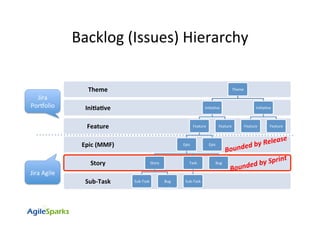
Backlog	(Issues)	Hierarchy	
Sub-Task	
Story	
Epic	(MMF)	
Feature	
Ini+a+ve	
Theme	 Theme		
IniCaCve	
Feature	
Epic	
Story	
Sub-Task	 Bug	
Task	
Sub-Task	
Bug	
Epic	
Feature	
IniCaCve	
Feature	 Feature	
Bounded	by	Release	
Bounded	by	Sprint	
Jira	
PorVolio	
Jira	Agile
Projects	and	Boards		
•  Each	scrum	team	should	own	a	single	and	unique	board	to	manage	it’s	
backlog	and	daily	work.	
•  The	project	enCty	can	represent	project/product/product	area	in	your	
organizaCon.	
•  One	or	more	teams	can	share	the	same	project	(user	stories	are	unique	
per	team)
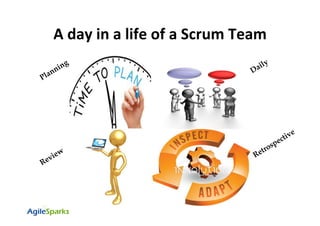
A	day	in	a	life	of	a	Scrum	Team
Planning
•  The	board	backlog	view	is	used	mainly	for	planning	
•  All	backlog	acCviCes	are	available	from	there	
-  Create	user	stories	and	epics	and	releases	
-  EsCmate	
-  Assign	epics	and	releases	to	stories	
-  PrioriCze	the	backlog	
•  PO	can	create	future	sprints	or	use	the	future	sprints	to	manage	the	
backlog	by	theme	(for	example	–	refactoring	tasks,	automaCon,	different	
product	areas,	etc)	
•  TIP	–	Use	color	coding	to	highlight	fields	that	you	wish	to	easily	grasp	
(example:	issue	status,	hard	vs.	stretched	commitment,	etc.)	
Scrum	Board	–	Backlog	view	
Sprint	Planning
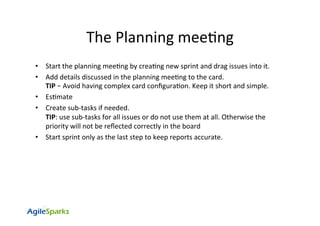
The	Planning	meeCng	
•  Start	the	planning	meeCng	by	creaCng	new	sprint	and	drag	issues	into	it.	
•  Add	details	discussed	in	the	planning	meeCng	to	the	card.		
TIP	–	Avoid	having	complex	card	configuraCon.	Keep	it	short	and	simple.	
•  EsCmate		
•  Create	sub-tasks	if	needed.		
TIP:	use	sub-tasks	for	all	issues	or	do	not	use	them	at	all.	Otherwise	the	
priority	will	not	be	reflected	correctly	in	the	board	
•  Start	sprint	only	as	the	last	step	to	keep	reports	accurate.
Daily	(Standup)
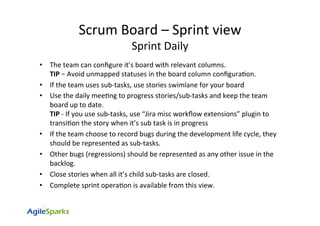
Scrum	Board	–	Sprint	view	
Sprint	Daily	
•  The	team	can	configure	it’s	board	with	relevant	columns.	
TIP	–	Avoid	unmapped	statuses	in	the	board	column	configuraCon.	
•  If	the	team	uses	sub-tasks,	use	stories	swimlane	for	your	board	
•  Use	the	daily	meeCng	to	progress	stories/sub-tasks	and	keep	the	team	
board	up	to	date.	
TIP	-	If	you	use	sub-tasks,	use	“Jira	misc	workflow	extensions”	plugin	to	
transiCon	the	story	when	it’s	sub	task	is	in	progress	
•  If	the	team	choose	to	record	bugs	during	the	development	life	cycle,	they	
should	be	represented	as	sub-tasks.	
•  Other	bugs	(regressions)	should	be	represented	as	any	other	issue	in	the	
backlog.	
•  Close	stories	when	all	it’s	child	sub-tasks	are	closed.	
•  Complete	sprint	operaCon	is	available	from	this	view.
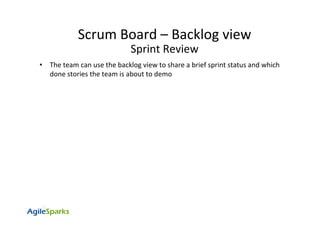
Review
•  The	team	can	use	the	backlog	view	to	share	a	brief	sprint	status	and	which	
done	stories	the	team	is	about	to	demo	
Scrum	Board	–	Backlog	view	
Sprint	Review
Let’s	Prac+ce	-	
Retrospec+ve	Retrospec+ve
•  It	is	recommended	to	review	the	board	reports	to	support	the	
retrospecCve	process	
Mostly	used	reports:	
–  Velocity	Chart	
•  Predictability	
•  Easier	capacity	planning	
–  Burn	down	Chart	
•  Risk	reducCon	during	sprint	
–  Control	chart	(cycle	Cme,	lead	Cme)	
•  Ask	quesCons		
–  What	can	you	conclude	from	the	report?	
–  What	data	is	missing?	
–  Where	can	you	gain	this	data?	
–  What	acCon	items	can	be	taken	to	improve?	
•  Do	not	compare	teams	result,	measure	each	team	improvement	
•  Follow	trends,	not	numbers	
Scrum	Board	–	Reports	view	
Sprint	RetrospecCve
Agile	at	Scale	–	
Tracking	progress
Agile	at	Scale	
•  In	order	to	track	progress	of	a	project	or	product	that	is	shared	across	
several	teams,	you	can	use	Kanban	boards	with	different	configuraCons.	
•  These	boards	might	include	the	whole	value	stream	of	the	organizaCon.	
•  These	boards	should	be	used	as	“view	only”	since	they	share	the	same	
content	from	the	teams	board.	
•  In	the	next	slides	I	share	several	ideas	for	such	boards
High	Level	Epic	Board	
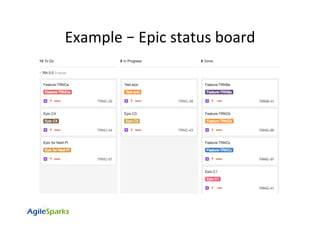
•  Create	kanban	board	to	include	only	epics	from	all	relevant	teams		
•  Configure	the	columns	to	represent	the	enCre	value	stream	
•  The	board	shows	high	level	status	of	epics	
–  Epic	status	can	only	be	updated	manually.
–  Use	swimlanes	per	release/project/etc	
–  Can	use	“AutomaCon	for	Jira”	plugin	for	automaCc	transiCon	
•  Reports:	
–  CFD:	Epics	burn	up	and	wip	limit		
–  Control	chart:	Measure	lead	and	cycle	Cme
Example	–	Epic	status	board
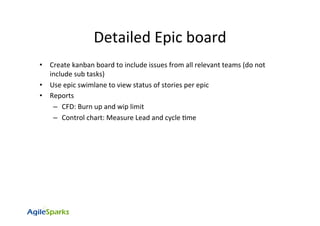
Detailed	Epic	board	
•  Create	kanban	board	to	include	issues	from	all	relevant	teams	(do	not	
include	sub	tasks)	
•  Use	epic	swimlane	to	view	status	of	stories	per	epic		
•  Reports	
–  CFD:	Burn	up	and	wip	limit		
–  Control	chart:	Measure	Lead	and	cycle	Cme
Example	–	Issues	status	per	epic
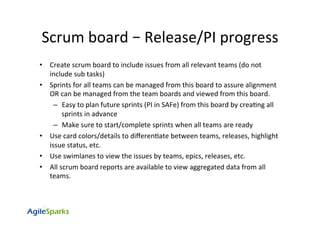
Scrum	board	–	Release/PI	progress	
•  Create	scrum	board	to	include	issues	from	all	relevant	teams	(do	not	
include	sub	tasks)	
•  Sprints	for	all	teams	can	be	managed	from	this	board	to	assure	alignment	
OR	can	be	managed	from	the	team	boards	and	viewed	from	this	board.	
–  Easy	to	plan	future	sprints	(PI	in	SAFe)	from	this	board	by	creaCng	all	
sprints	in	advance		
–  Make	sure	to	start/complete	sprints	when	all	teams	are	ready	
•  Use	card	colors/details	to	differenCate	between	teams,	releases,	highlight	
issue	status,	etc.	
•  Use	swimlanes	to	view	the	issues	by	teams,	epics,	releases,	etc.	
•  All	scrum	board	reports	are	available	to	view	aggregated	data	from	all	
teams.
Mostly	used	reports	
•  Epic	Report	–	view	progress	per	epic	
•  Version	Report	–enable	predictability	
•  Velocity	chart	–	aggregaCve	data		
•  CFD	–	burn	up,	wip	limit,	predictability	
Scrum	board	–Release/PI	Reports
Agile	at	Scale	–		
Jira	Por?olio
Jira	PorVolio	
The	Jira	porVolio	main	goal	is	to	be	able	to	manage	the	porVolio	level,	plan	
future	releases	and	track	progress.	
Once	a	plan	is	created	based	on	Jira	projects	and	boards,	all	changes	in	Jira	
will	automaCcally	be	reflected	in	the	porVolio.	
Changes	done	in	the	porVolio	should	be	commiGed	to	Jira	manually.	
Main	capabiliCes	and	benefits	of	Jira	PorVolio:	
•  Release	management	
–  Manage	porVolio	level	releases	
–  Ability	to	create	cross	project	releases	
•  Team	management	
–  Define	teams	velocity	to	enable	future	planning	accordingly	(velocity	can	be	manually	
defined	or	automaCcally	calculated)	
•  Scope	
–  Ability	to	create	and	manage	hierarchy	for	the	por?olio	at	any	level		
–  View	progress	of	any	issue-type	by	its’	child	issue	count	
–  Manage	dependencies
Agile practices using jira atlassian

Agile practices using jira atlassian