Luca Maiano
Pervasive Systems 2017/18
Engineering in Computer Science - Sapienza
https://www.linkedin.com/in/lucamaiano/
https://github.com/lucamaiano
“Build natural and reach conversational
experiences”
It is powered by Google’s
machine learning and
natural language
processing techniques
Runs on Google Cloud
Platform and easily scales
to a large number of
users
Works across any device,
on many platforms and
supports more than 20
languages
Who is using Dialogflow?
Basics of a conversation
Invocation
In order to start the
conversation the user
needs to invoke the
agent.
Agent
It is the container of the
project and transforms a
user’s requests into
actionable data. This
transformation occurs
when a user input
matches one of the
intents inside your agent.
Fulfillment
The API sends
information to your
webhook. It parses the
data, and sends back a
response.
Build your first
agent
1. Create the
Agent
1. Create the
Agent
XX% sales increase
2. Create an
Intent
3. Add
responses
1. Create the
Agent
XX% sales increase
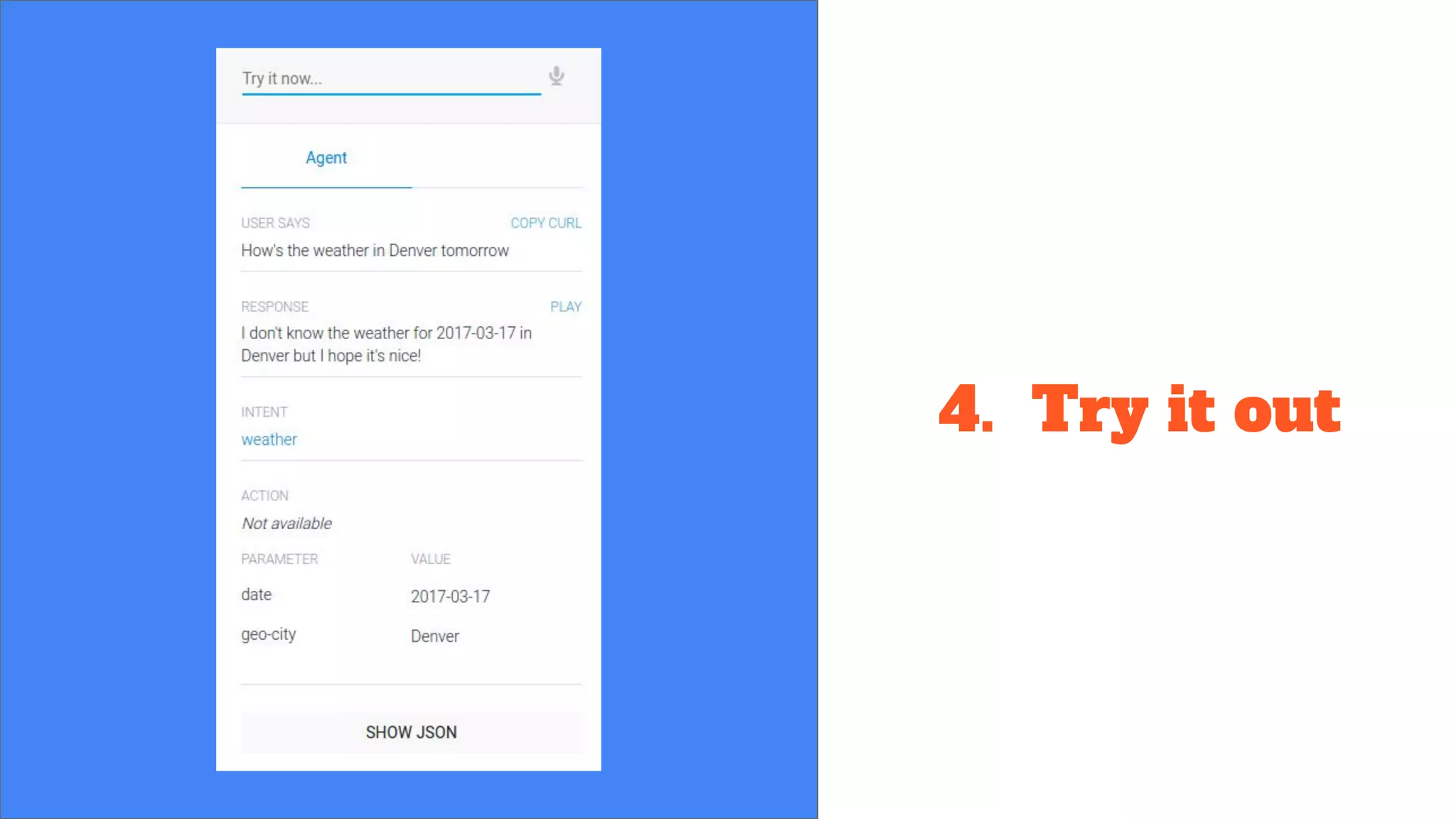
4. Try it out
5.1 Fulfill
You have just created your first agent that can recognize requests from users!
In order to serve the actual information the user is requesting, you'll need to setup
fulfillment. It requires deploying a service and calling an API.
Once that you have written your service, deploy it with the following command:
gcloud beta functions deploy helloHttp --stage-bucket [BUCKET_NAME] --trigger-http
“helloHttp” is the name of your project and “[BUCKET_NAME]” can be found on your
Google Cloud project and click on Cloud Storage under the Resources section.
5.2 Fulfill
Make note of the httpsTrigger url:
https://[REGION]-[PROJECT_ID].cloudfunctions.net
/helloHttp
Enable Fulfillment in Intent clicking Use
Webhook.
You’re done!

Dialogflow

  • 1.
    Luca Maiano Pervasive Systems2017/18 Engineering in Computer Science - Sapienza https://www.linkedin.com/in/lucamaiano/ https://github.com/lucamaiano
  • 2.
    “Build natural andreach conversational experiences” It is powered by Google’s machine learning and natural language processing techniques Runs on Google Cloud Platform and easily scales to a large number of users Works across any device, on many platforms and supports more than 20 languages
  • 3.
    Who is usingDialogflow?
  • 4.
    Basics of aconversation Invocation In order to start the conversation the user needs to invoke the agent. Agent It is the container of the project and transforms a user’s requests into actionable data. This transformation occurs when a user input matches one of the intents inside your agent. Fulfillment The API sends information to your webhook. It parses the data, and sends back a response.
  • 6.
  • 7.
  • 8.
    1. Create the Agent XX%sales increase 2. Create an Intent
  • 9.
  • 10.
    1. Create the Agent XX%sales increase 4. Try it out
  • 11.
    5.1 Fulfill You havejust created your first agent that can recognize requests from users! In order to serve the actual information the user is requesting, you'll need to setup fulfillment. It requires deploying a service and calling an API. Once that you have written your service, deploy it with the following command: gcloud beta functions deploy helloHttp --stage-bucket [BUCKET_NAME] --trigger-http “helloHttp” is the name of your project and “[BUCKET_NAME]” can be found on your Google Cloud project and click on Cloud Storage under the Resources section.
  • 12.
    5.2 Fulfill Make noteof the httpsTrigger url: https://[REGION]-[PROJECT_ID].cloudfunctions.net /helloHttp Enable Fulfillment in Intent clicking Use Webhook.
  • 13.