



Minimizing Major Version
Upgrade Downtime
Using Slony!
Jeff Frost | SCALE | 2017/03/03
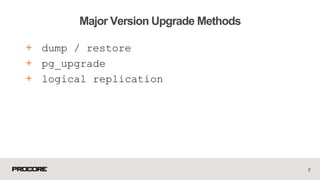
+ dump / restore
+ pg_upgrade
+ logical replication
2
Major Version Upgrade Methods
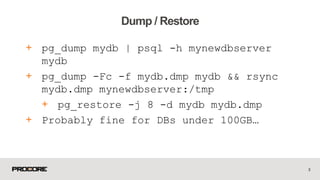
+ pg_dump mydb | psql -h mynewdbserver
mydb
+ pg_dump -Fc -f mydb.dmp mydb && rsync
mydb.dmp mynewdbserver:/tmp
+ pg_restore -j 8 -d mydb mydb.dmp
+ Probably fine for DBs under 100GB…
3
Dump / Restore
4
ZZZZzzzzzzzz………….
+ A good option if you need to do the
upgrade in place
+ A good option if you are missing
primary keys (gasp!) on larger tables
+ It’s a one way trip! (You tested the
new PostgreSQL version with your
workload, right?)
5
pg_upgrade
+ Bucardo -
https://bucardo.org/wiki/Bucardo
+ Londiste -
http://pgfoundry.org/projects/skytool
s
+ Slony! - http://www.slony.info/
6
Logical Replication
+ Graceful Switchover
+ **AND**
+ Graceful Switchback!!
7
Why Slony?
+ Trigger based logical replication
+ Requires Primary Keys on all replicated
tables
+ Kicks off an initial sync
+ Triggers store data modification
statements in log tables for later replay
+ Slony Trivia: Slony is Russian for a
Group of Elephants
8
Slony High Level
+ Cluster
+ Node
+ Set
+ Origin
+ Provider
+ Subscriber
9
Slony Basic Terminology
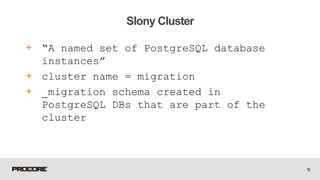
+ “A named set of PostgreSQL database
instances”
+ cluster name = migration
+ _migration schema created in
PostgreSQL DBs that are part of the
cluster
10
Slony Cluster
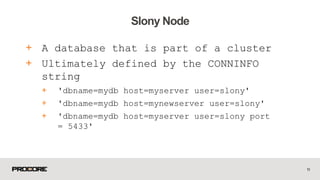
+ A database that is part of a cluster
+ Ultimately defined by the CONNINFO
string
+ 'dbname=mydb host=myserver user=slony'
+ 'dbname=mydb host=mynewserver user=slony'
+ 'dbname=mydb host=myserver user=slony port
= 5433'
11
Slony Node
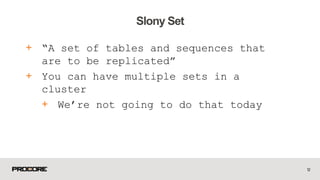
+ “A set of tables and sequences that
are to be replicated”
+ You can have multiple sets in a
cluster
+ We’re not going to do that today
12
Slony Set
+ Origin is the read/write master
+ Origin is also the first Provider
+ Subscriber nodes receive their data
from Providers
+ For the purpose of this tutorial, we
will have an Origin node which is the
only Provider node
13
Slony Origin/Provider/Subscriber
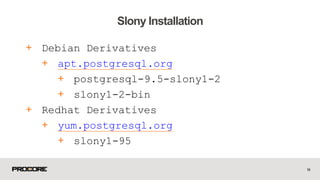
+ Debian Derivatives
+ apt.postgresql.org
+ postgresql-9.5-slony1-2
+ slony1-2-bin
+ Redhat Derivatives
+ yum.postgresql.org
+ slony1-95
14
Slony Installation
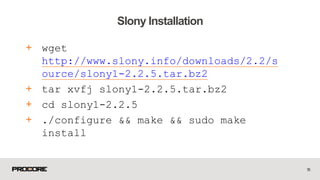
+ wget
http://www.slony.info/downloads/2.2/s
ource/slony1-2.2.5.tar.bz2
+ tar xvfj slony1-2.2.5.tar.bz2
+ cd slony1-2.2.5
+ ./configure && make && sudo make
install
15
Slony Installation
+ Don’t make any schema changes while
you’ve got slony running
16
One item of Note!
+ Make a schema-only copy of the DB
+ Our first “slonik” script
+ Preamble
+ Cluster Initialization
+ Node Path Info
+ Set Creation
+ Table Addition
+ Sequence Addition
+ Subscribe
+ Kick off replication!
17
Let’s get started!
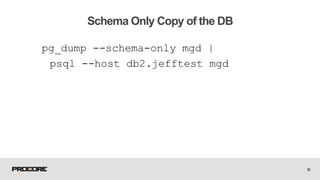
pg_dump --schema-only mgd |
psql --host db2.jefftest mgd
18
Schema Only Copy of the DB
Let’s Not Do That!
19
Who Wants to See a LIVE Demo?
20
Schema Only Copy of the DB
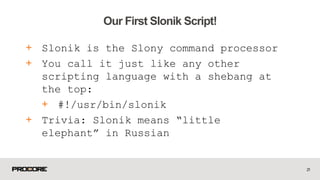
+ Slonik is the Slony command processor
+ You call it just like any other
scripting language with a shebang at
the top:
+ #!/usr/bin/slonik
+ Trivia: Slonik means “little
elephant” in Russian
21
Our First Slonik Script!
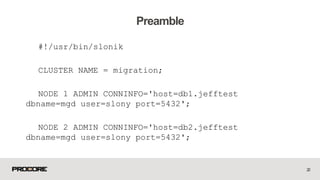
#!/usr/bin/slonik
CLUSTER NAME = migration;
NODE 1 ADMIN CONNINFO='host=db1.jefftest
dbname=mgd user=slony port=5432';
NODE 2 ADMIN CONNINFO='host=db2.jefftest
dbname=mgd user=slony port=5432';
22
Preamble
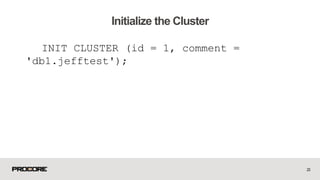
INIT CLUSTER (id = 1, comment =
'db1.jefftest');
23
Initialize the Cluster
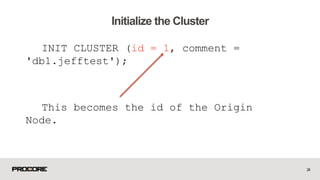
INIT CLUSTER (id = 1, comment =
'db1.jefftest');
This becomes the id of the Origin
Node.
24
Initialize the Cluster
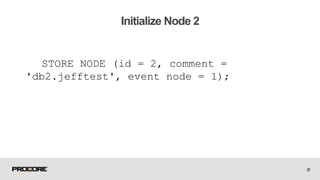
STORE NODE (id = 2, comment =
'db2.jefftest', event node = 1);
25
Initialize Node 2
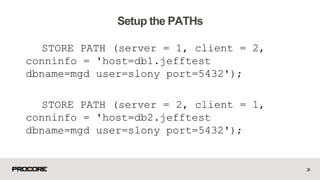
STORE PATH (server = 1, client = 2,
conninfo = 'host=db1.jefftest
dbname=mgd user=slony port=5432');
STORE PATH (server = 2, client = 1,
conninfo = 'host=db2.jefftest
dbname=mgd user=slony port=5432');
26
Setup the PATHs
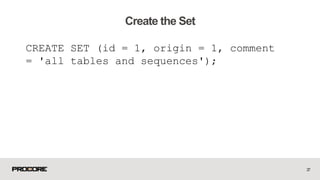
CREATE SET (id = 1, origin = 1, comment
= 'all tables and sequences');
27
Create the Set
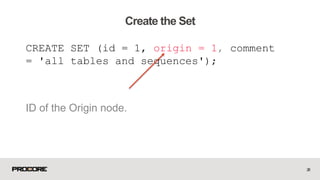
CREATE SET (id = 1, origin = 1, comment
= 'all tables and sequences');
ID of the Origin node.
28
Create the Set
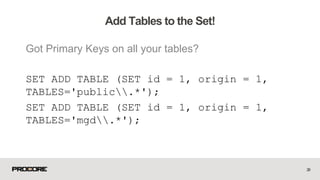
Got Primary Keys on all your tables?
SET ADD TABLE (SET id = 1, origin = 1,
TABLES='public.*');
SET ADD TABLE (SET id = 1, origin = 1,
TABLES='mgd.*');
29
Add Tables to the Set!
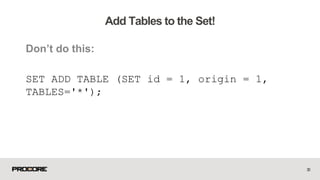
Don’t do this:
SET ADD TABLE (SET id = 1, origin = 1,
TABLES='*');
30
Add Tables to the Set!
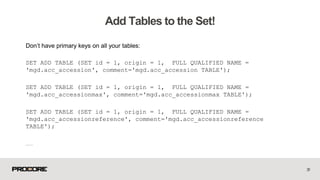
Don’t have primary keys on all your tables:
SET ADD TABLE (SET id = 1, origin = 1, FULL QUALIFIED NAME =
'mgd.acc_accession', comment='mgd.acc_accession TABLE');
SET ADD TABLE (SET id = 1, origin = 1, FULL QUALIFIED NAME =
'mgd.acc_accessionmax', comment='mgd.acc_accessionmax TABLE');
SET ADD TABLE (SET id = 1, origin = 1, FULL QUALIFIED NAME =
'mgd.acc_accessionreference', comment='mgd.acc_accessionreference
TABLE');
……
31
Add Tables to the Set!
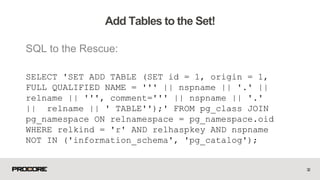
SQL to the Rescue:
SELECT 'SET ADD TABLE (SET id = 1, origin = 1,
FULL QUALIFIED NAME = ''' || nspname || '.' ||
relname || ''', comment=''' || nspname || '.'
|| relname || ' TABLE'');' FROM pg_class JOIN
pg_namespace ON relnamespace = pg_namespace.oid
WHERE relkind = 'r' AND relhaspkey AND nspname
NOT IN ('information_schema', 'pg_catalog');
32
Add Tables to the Set!
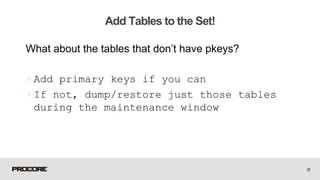
What about the tables that don’t have pkeys?
+Add primary keys if you can
+ If not, dump/restore just those tables
during the maintenance window
33
Add Tables to the Set!
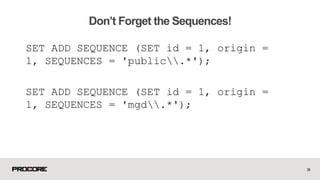
SET ADD SEQUENCE (SET id = 1, origin =
1, SEQUENCES = 'public.*');
SET ADD SEQUENCE (SET id = 1, origin =
1, SEQUENCES = 'mgd.*');
34
Don’t Forget the Sequences!
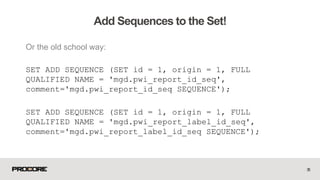
Or the old school way:
SET ADD SEQUENCE (SET id = 1, origin = 1, FULL
QUALIFIED NAME = 'mgd.pwi_report_id_seq',
comment='mgd.pwi_report_id_seq SEQUENCE');
SET ADD SEQUENCE (SET id = 1, origin = 1, FULL
QUALIFIED NAME = 'mgd.pwi_report_label_id_seq',
comment='mgd.pwi_report_label_id_seq SEQUENCE');
35
Add Sequences to the Set!
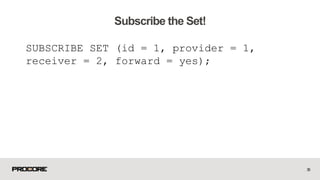
SUBSCRIBE SET (id = 1, provider = 1,
receiver = 2, forward = yes);
36
Subscribe the Set!
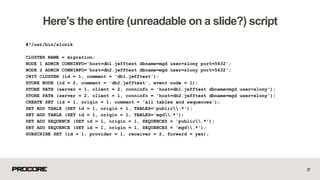
#!/usr/bin/slonik
CLUSTER NAME = migration;
NODE 1 ADMIN CONNINFO='host=db1.jefftest dbname=mgd user=slony port=5432';
NODE 2 ADMIN CONNINFO='host=db2.jefftest dbname=mgd user=slony port=5432';
INIT CLUSTER (id = 1, comment = 'db1.jefftest');
STORE NODE (id = 2, comment = 'db2.jefftest', event node = 1);
STORE PATH (server = 1, client = 2, conninfo = 'host=db1.jefftest dbname=mgd user=slony');
STORE PATH (server = 2, client = 1, conninfo = 'host=db2.jefftest dbname=mgd user=slony');
CREATE SET (id = 1, origin = 1, comment = 'all tables and sequences');
SET ADD TABLE (SET id = 1, origin = 1, TABLES='public.*');
SET ADD TABLE (SET id = 1, origin = 1, TABLES='mgd.*');
SET ADD SEQUENCE (SET id = 1, origin = 1, SEQUENCES = 'public.*');
SET ADD SEQUENCE (SET id = 1, origin = 1, SEQUENCES = 'mgd.*');
SUBSCRIBE SET (id = 1, provider = 1, receiver = 2, forward = yes);
37
Here’s the entire (unreadable on a slide?) script
38
Kick Off Our Script!
OMG The Site is Down!!!
39
40
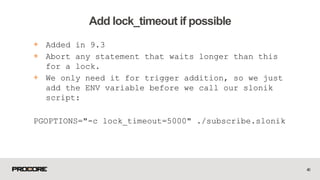
Add lock_timeout if possible
+ Added in 9.3
+ Abort any statement that waits longer than this
for a lock.
+ We only need it for trigger addition, so we just
add the ENV variable before we call our slonik
script:
PGOPTIONS="-c lock_timeout=5000" ./subscribe.slonik
41
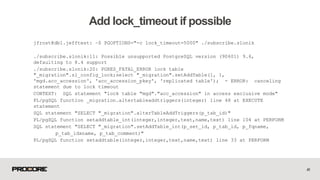
Add lock_timeout if possible
jfrost@db1.jefftest: ~$ PGOPTIONS="-c lock_timeout=5000" ./subscribe.slonik
./subscribe.slonik:11: Possible unsupported PostgreSQL version (90601) 9.6,
defaulting to 8.4 support
./subscribe.slonik:20: PGRES_FATAL_ERROR lock table
"_migration".sl_config_lock;select "_migration".setAddTable(1, 1,
'mgd.acc_accession', 'acc_accession_pkey', 'replicated table'); - ERROR: canceling
statement due to lock timeout
CONTEXT: SQL statement "lock table "mgd"."acc_accession" in access exclusive mode"
PL/pgSQL function _migration.altertableaddtriggers(integer) line 48 at EXECUTE
statement
SQL statement "SELECT "_migration".alterTableAddTriggers(p_tab_id)"
PL/pgSQL function setaddtable_int(integer,integer,text,name,text) line 104 at PERFORM
SQL statement "SELECT "_migration".setAddTable_int(p_set_id, p_tab_id, p_fqname,
p_tab_idxname, p_tab_comment)"
PL/pgSQL function setaddtable(integer,integer,text,name,text) line 33 at PERFORM
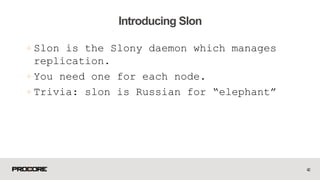
+Slon is the Slony daemon which manages
replication.
+ You need one for each node.
+ Trivia: slon is Russian for “elephant”
42
Introducing Slon
nohup /usr/bin/slon migration "dbname=mgd
host=db1.jefftest user=slony" >>
~/slony.log &
nohup /usr/bin/slon migration "dbname=mgd
host=db2.jefftest user=slony" >>
~/slony.log &
43
Start up the Slons!
44
Start up the Slons!
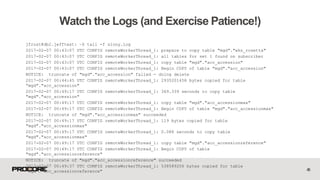
jfrost@db2.jefftest: ~$ tail -f slony.log
2017-02-07 00:43:07 UTC CONFIG remoteWorkerThread_1: prepare to copy table "mgd"."wks_rosetta"
2017-02-07 00:43:07 UTC CONFIG remoteWorkerThread_1: all tables for set 1 found on subscriber
2017-02-07 00:43:07 UTC CONFIG remoteWorkerThread_1: copy table "mgd"."acc_accession"
2017-02-07 00:43:07 UTC CONFIG remoteWorkerThread_1: Begin COPY of table "mgd"."acc_accession"
NOTICE: truncate of "mgd"."acc_accession" failed - doing delete
2017-02-07 00:44:45 UTC CONFIG remoteWorkerThread_1: 2935201458 bytes copied for table
“mgd"."acc_accession"
2017-02-07 00:49:17 UTC CONFIG remoteWorkerThread_1: 369.339 seconds to copy table
"mgd"."acc_accession"
2017-02-07 00:49:17 UTC CONFIG remoteWorkerThread_1: copy table "mgd"."acc_accessionmax"
2017-02-07 00:49:17 UTC CONFIG remoteWorkerThread_1: Begin COPY of table "mgd"."acc_accessionmax"
NOTICE: truncate of "mgd"."acc_accessionmax" succeeded
2017-02-07 00:49:17 UTC CONFIG remoteWorkerThread_1: 119 bytes copied for table
"mgd"."acc_accessionmax"
2017-02-07 00:49:17 UTC CONFIG remoteWorkerThread_1: 0.088 seconds to copy table
"mgd"."acc_accessionmax"
2017-02-07 00:49:17 UTC CONFIG remoteWorkerThread_1: copy table "mgd"."acc_accessionreference"
2017-02-07 00:49:17 UTC CONFIG remoteWorkerThread_1: Begin COPY of table
"mgd"."acc_accessionreference"
NOTICE: truncate of "mgd"."acc_accessionreference" succeeded
2017-02-07 00:49:37 UTC CONFIG remoteWorkerThread_1: 538589206 bytes copied for table
"mgd"."acc_accessionreference" 45
Watch the Logs (and Exercise Patience!)
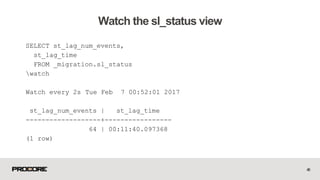
SELECT st_lag_num_events,
st_lag_time
FROM _migration.sl_status
watch
Watch every 2s Tue Feb 7 00:52:01 2017
st_lag_num_events | st_lag_time
-------------------+-----------------
64 | 00:11:40.097368
(1 row)
46
Watch the sl_status view
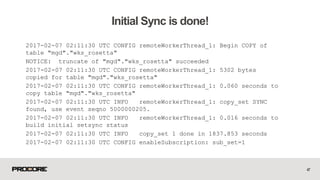
2017-02-07 02:11:30 UTC CONFIG remoteWorkerThread_1: Begin COPY of
table "mgd"."wks_rosetta"
NOTICE: truncate of "mgd"."wks_rosetta" succeeded
2017-02-07 02:11:30 UTC CONFIG remoteWorkerThread_1: 5302 bytes
copied for table "mgd"."wks_rosetta"
2017-02-07 02:11:30 UTC CONFIG remoteWorkerThread_1: 0.060 seconds to
copy table "mgd"."wks_rosetta"
2017-02-07 02:11:30 UTC INFO remoteWorkerThread_1: copy_set SYNC
found, use event seqno 5000000205.
2017-02-07 02:11:30 UTC INFO remoteWorkerThread_1: 0.016 seconds to
build initial setsync status
2017-02-07 02:11:30 UTC INFO copy_set 1 done in 1837.853 seconds
2017-02-07 02:11:30 UTC CONFIG enableSubscription: sub_set=1
47
Initial Sync is done!
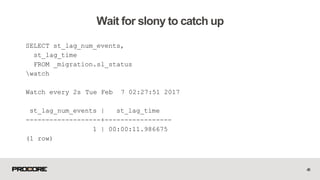
SELECT st_lag_num_events,
st_lag_time
FROM _migration.sl_status
watch
Watch every 2s Tue Feb 7 02:27:51 2017
st_lag_num_events | st_lag_time
-------------------+-----------------
1 | 00:00:11.986675
(1 row)
48
Wait for slony to catch up
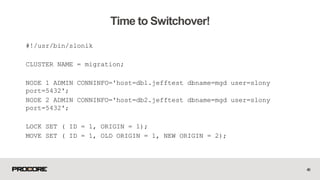
#!/usr/bin/slonik
CLUSTER NAME = migration;
NODE 1 ADMIN CONNINFO='host=db1.jefftest dbname=mgd user=slony
port=5432';
NODE 2 ADMIN CONNINFO='host=db2.jefftest dbname=mgd user=slony
port=5432';
LOCK SET ( ID = 1, ORIGIN = 1);
MOVE SET ( ID = 1, OLD ORIGIN = 1, NEW ORIGIN = 2);
49
Time to Switchover!
50
Time to Switchover!
51
Let’s check!
+Test
+ Test!
+Test!!
+ Exercise patience
52
Now What?
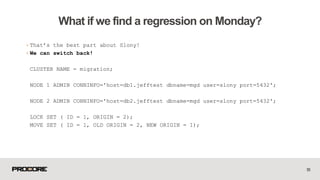
+That’s the best part about Slony!
+We can switch back!
CLUSTER NAME = migration;
NODE 1 ADMIN CONNINFO='host=db1.jefftest dbname=mgd user=slony port=5432';
NODE 2 ADMIN CONNINFO='host=db2.jefftest dbname=mgd user=slony port=5432';
LOCK SET ( ID = 1, ORIGIN = 2);
MOVE SET ( ID = 1, OLD ORIGIN = 2, NEW ORIGIN = 1);
53
What if we find a regression on Monday?
54
Let’s give it a shot!
+Let’s rip it out!
+ Can be as simple as:
+killall slon
+DROP SCHEMA _migration CASCADE;
+ Watch out for locking!
55
What if we didn’t find a regression?
56
Let’s give it a shot!
@ProcoreJobs
Questions?

SCALE 15x Minimizing PostgreSQL Major Version Upgrade Downtime

  • 1.
    Minimizing Major Version UpgradeDowntime Using Slony! Jeff Frost | SCALE | 2017/03/03
  • 2.
    + dump /restore + pg_upgrade + logical replication 2 Major Version Upgrade Methods
  • 3.
    + pg_dump mydb| psql -h mynewdbserver mydb + pg_dump -Fc -f mydb.dmp mydb && rsync mydb.dmp mynewdbserver:/tmp + pg_restore -j 8 -d mydb mydb.dmp + Probably fine for DBs under 100GB… 3 Dump / Restore
  • 4.
  • 5.
    + A goodoption if you need to do the upgrade in place + A good option if you are missing primary keys (gasp!) on larger tables + It’s a one way trip! (You tested the new PostgreSQL version with your workload, right?) 5 pg_upgrade
  • 6.
    + Bucardo - https://bucardo.org/wiki/Bucardo +Londiste - http://pgfoundry.org/projects/skytool s + Slony! - http://www.slony.info/ 6 Logical Replication
  • 7.
    + Graceful Switchover +**AND** + Graceful Switchback!! 7 Why Slony?
  • 8.
    + Trigger basedlogical replication + Requires Primary Keys on all replicated tables + Kicks off an initial sync + Triggers store data modification statements in log tables for later replay + Slony Trivia: Slony is Russian for a Group of Elephants 8 Slony High Level
  • 9.
    + Cluster + Node +Set + Origin + Provider + Subscriber 9 Slony Basic Terminology
  • 10.
    + “A namedset of PostgreSQL database instances” + cluster name = migration + _migration schema created in PostgreSQL DBs that are part of the cluster 10 Slony Cluster
  • 11.
    + A databasethat is part of a cluster + Ultimately defined by the CONNINFO string + 'dbname=mydb host=myserver user=slony' + 'dbname=mydb host=mynewserver user=slony' + 'dbname=mydb host=myserver user=slony port = 5433' 11 Slony Node
  • 12.
    + “A setof tables and sequences that are to be replicated” + You can have multiple sets in a cluster + We’re not going to do that today 12 Slony Set
  • 13.
    + Origin isthe read/write master + Origin is also the first Provider + Subscriber nodes receive their data from Providers + For the purpose of this tutorial, we will have an Origin node which is the only Provider node 13 Slony Origin/Provider/Subscriber
  • 14.
    + Debian Derivatives +apt.postgresql.org + postgresql-9.5-slony1-2 + slony1-2-bin + Redhat Derivatives + yum.postgresql.org + slony1-95 14 Slony Installation
  • 15.
    + wget http://www.slony.info/downloads/2.2/s ource/slony1-2.2.5.tar.bz2 + tarxvfj slony1-2.2.5.tar.bz2 + cd slony1-2.2.5 + ./configure && make && sudo make install 15 Slony Installation
  • 16.
    + Don’t makeany schema changes while you’ve got slony running 16 One item of Note!
  • 17.
    + Make aschema-only copy of the DB + Our first “slonik” script + Preamble + Cluster Initialization + Node Path Info + Set Creation + Table Addition + Sequence Addition + Subscribe + Kick off replication! 17 Let’s get started!
  • 18.
    pg_dump --schema-only mgd| psql --host db2.jefftest mgd 18 Schema Only Copy of the DB
  • 19.
    Let’s Not DoThat! 19 Who Wants to See a LIVE Demo?
  • 20.
  • 21.
    + Slonik isthe Slony command processor + You call it just like any other scripting language with a shebang at the top: + #!/usr/bin/slonik + Trivia: Slonik means “little elephant” in Russian 21 Our First Slonik Script!
  • 22.
    #!/usr/bin/slonik CLUSTER NAME =migration; NODE 1 ADMIN CONNINFO='host=db1.jefftest dbname=mgd user=slony port=5432'; NODE 2 ADMIN CONNINFO='host=db2.jefftest dbname=mgd user=slony port=5432'; 22 Preamble
  • 23.
    INIT CLUSTER (id= 1, comment = 'db1.jefftest'); 23 Initialize the Cluster
  • 24.
    INIT CLUSTER (id= 1, comment = 'db1.jefftest'); This becomes the id of the Origin Node. 24 Initialize the Cluster
  • 25.
    STORE NODE (id= 2, comment = 'db2.jefftest', event node = 1); 25 Initialize Node 2
  • 26.
    STORE PATH (server= 1, client = 2, conninfo = 'host=db1.jefftest dbname=mgd user=slony port=5432'); STORE PATH (server = 2, client = 1, conninfo = 'host=db2.jefftest dbname=mgd user=slony port=5432'); 26 Setup the PATHs
  • 27.
    CREATE SET (id= 1, origin = 1, comment = 'all tables and sequences'); 27 Create the Set
  • 28.
    CREATE SET (id= 1, origin = 1, comment = 'all tables and sequences'); ID of the Origin node. 28 Create the Set
  • 29.
    Got Primary Keyson all your tables? SET ADD TABLE (SET id = 1, origin = 1, TABLES='public.*'); SET ADD TABLE (SET id = 1, origin = 1, TABLES='mgd.*'); 29 Add Tables to the Set!
  • 30.
    Don’t do this: SETADD TABLE (SET id = 1, origin = 1, TABLES='*'); 30 Add Tables to the Set!
  • 31.
    Don’t have primarykeys on all your tables: SET ADD TABLE (SET id = 1, origin = 1, FULL QUALIFIED NAME = 'mgd.acc_accession', comment='mgd.acc_accession TABLE'); SET ADD TABLE (SET id = 1, origin = 1, FULL QUALIFIED NAME = 'mgd.acc_accessionmax', comment='mgd.acc_accessionmax TABLE'); SET ADD TABLE (SET id = 1, origin = 1, FULL QUALIFIED NAME = 'mgd.acc_accessionreference', comment='mgd.acc_accessionreference TABLE'); …… 31 Add Tables to the Set!
  • 32.
    SQL to theRescue: SELECT 'SET ADD TABLE (SET id = 1, origin = 1, FULL QUALIFIED NAME = ''' || nspname || '.' || relname || ''', comment=''' || nspname || '.' || relname || ' TABLE'');' FROM pg_class JOIN pg_namespace ON relnamespace = pg_namespace.oid WHERE relkind = 'r' AND relhaspkey AND nspname NOT IN ('information_schema', 'pg_catalog'); 32 Add Tables to the Set!
  • 33.
    What about thetables that don’t have pkeys? +Add primary keys if you can + If not, dump/restore just those tables during the maintenance window 33 Add Tables to the Set!
  • 34.
    SET ADD SEQUENCE(SET id = 1, origin = 1, SEQUENCES = 'public.*'); SET ADD SEQUENCE (SET id = 1, origin = 1, SEQUENCES = 'mgd.*'); 34 Don’t Forget the Sequences!
  • 35.
    Or the oldschool way: SET ADD SEQUENCE (SET id = 1, origin = 1, FULL QUALIFIED NAME = 'mgd.pwi_report_id_seq', comment='mgd.pwi_report_id_seq SEQUENCE'); SET ADD SEQUENCE (SET id = 1, origin = 1, FULL QUALIFIED NAME = 'mgd.pwi_report_label_id_seq', comment='mgd.pwi_report_label_id_seq SEQUENCE'); 35 Add Sequences to the Set!
  • 36.
    SUBSCRIBE SET (id= 1, provider = 1, receiver = 2, forward = yes); 36 Subscribe the Set!
  • 37.
    #!/usr/bin/slonik CLUSTER NAME =migration; NODE 1 ADMIN CONNINFO='host=db1.jefftest dbname=mgd user=slony port=5432'; NODE 2 ADMIN CONNINFO='host=db2.jefftest dbname=mgd user=slony port=5432'; INIT CLUSTER (id = 1, comment = 'db1.jefftest'); STORE NODE (id = 2, comment = 'db2.jefftest', event node = 1); STORE PATH (server = 1, client = 2, conninfo = 'host=db1.jefftest dbname=mgd user=slony'); STORE PATH (server = 2, client = 1, conninfo = 'host=db2.jefftest dbname=mgd user=slony'); CREATE SET (id = 1, origin = 1, comment = 'all tables and sequences'); SET ADD TABLE (SET id = 1, origin = 1, TABLES='public.*'); SET ADD TABLE (SET id = 1, origin = 1, TABLES='mgd.*'); SET ADD SEQUENCE (SET id = 1, origin = 1, SEQUENCES = 'public.*'); SET ADD SEQUENCE (SET id = 1, origin = 1, SEQUENCES = 'mgd.*'); SUBSCRIBE SET (id = 1, provider = 1, receiver = 2, forward = yes); 37 Here’s the entire (unreadable on a slide?) script
  • 38.
  • 39.
    OMG The Siteis Down!!! 39
  • 40.
    40 Add lock_timeout ifpossible + Added in 9.3 + Abort any statement that waits longer than this for a lock. + We only need it for trigger addition, so we just add the ENV variable before we call our slonik script: PGOPTIONS="-c lock_timeout=5000" ./subscribe.slonik
  • 41.
    41 Add lock_timeout ifpossible jfrost@db1.jefftest: ~$ PGOPTIONS="-c lock_timeout=5000" ./subscribe.slonik ./subscribe.slonik:11: Possible unsupported PostgreSQL version (90601) 9.6, defaulting to 8.4 support ./subscribe.slonik:20: PGRES_FATAL_ERROR lock table "_migration".sl_config_lock;select "_migration".setAddTable(1, 1, 'mgd.acc_accession', 'acc_accession_pkey', 'replicated table'); - ERROR: canceling statement due to lock timeout CONTEXT: SQL statement "lock table "mgd"."acc_accession" in access exclusive mode" PL/pgSQL function _migration.altertableaddtriggers(integer) line 48 at EXECUTE statement SQL statement "SELECT "_migration".alterTableAddTriggers(p_tab_id)" PL/pgSQL function setaddtable_int(integer,integer,text,name,text) line 104 at PERFORM SQL statement "SELECT "_migration".setAddTable_int(p_set_id, p_tab_id, p_fqname, p_tab_idxname, p_tab_comment)" PL/pgSQL function setaddtable(integer,integer,text,name,text) line 33 at PERFORM
  • 42.
    +Slon is theSlony daemon which manages replication. + You need one for each node. + Trivia: slon is Russian for “elephant” 42 Introducing Slon
  • 43.
    nohup /usr/bin/slon migration"dbname=mgd host=db1.jefftest user=slony" >> ~/slony.log & nohup /usr/bin/slon migration "dbname=mgd host=db2.jefftest user=slony" >> ~/slony.log & 43 Start up the Slons!
  • 44.
  • 45.
    jfrost@db2.jefftest: ~$ tail-f slony.log 2017-02-07 00:43:07 UTC CONFIG remoteWorkerThread_1: prepare to copy table "mgd"."wks_rosetta" 2017-02-07 00:43:07 UTC CONFIG remoteWorkerThread_1: all tables for set 1 found on subscriber 2017-02-07 00:43:07 UTC CONFIG remoteWorkerThread_1: copy table "mgd"."acc_accession" 2017-02-07 00:43:07 UTC CONFIG remoteWorkerThread_1: Begin COPY of table "mgd"."acc_accession" NOTICE: truncate of "mgd"."acc_accession" failed - doing delete 2017-02-07 00:44:45 UTC CONFIG remoteWorkerThread_1: 2935201458 bytes copied for table “mgd"."acc_accession" 2017-02-07 00:49:17 UTC CONFIG remoteWorkerThread_1: 369.339 seconds to copy table "mgd"."acc_accession" 2017-02-07 00:49:17 UTC CONFIG remoteWorkerThread_1: copy table "mgd"."acc_accessionmax" 2017-02-07 00:49:17 UTC CONFIG remoteWorkerThread_1: Begin COPY of table "mgd"."acc_accessionmax" NOTICE: truncate of "mgd"."acc_accessionmax" succeeded 2017-02-07 00:49:17 UTC CONFIG remoteWorkerThread_1: 119 bytes copied for table "mgd"."acc_accessionmax" 2017-02-07 00:49:17 UTC CONFIG remoteWorkerThread_1: 0.088 seconds to copy table "mgd"."acc_accessionmax" 2017-02-07 00:49:17 UTC CONFIG remoteWorkerThread_1: copy table "mgd"."acc_accessionreference" 2017-02-07 00:49:17 UTC CONFIG remoteWorkerThread_1: Begin COPY of table "mgd"."acc_accessionreference" NOTICE: truncate of "mgd"."acc_accessionreference" succeeded 2017-02-07 00:49:37 UTC CONFIG remoteWorkerThread_1: 538589206 bytes copied for table "mgd"."acc_accessionreference" 45 Watch the Logs (and Exercise Patience!)
  • 46.
    SELECT st_lag_num_events, st_lag_time FROM _migration.sl_status watch Watchevery 2s Tue Feb 7 00:52:01 2017 st_lag_num_events | st_lag_time -------------------+----------------- 64 | 00:11:40.097368 (1 row) 46 Watch the sl_status view
  • 47.
    2017-02-07 02:11:30 UTCCONFIG remoteWorkerThread_1: Begin COPY of table "mgd"."wks_rosetta" NOTICE: truncate of "mgd"."wks_rosetta" succeeded 2017-02-07 02:11:30 UTC CONFIG remoteWorkerThread_1: 5302 bytes copied for table "mgd"."wks_rosetta" 2017-02-07 02:11:30 UTC CONFIG remoteWorkerThread_1: 0.060 seconds to copy table "mgd"."wks_rosetta" 2017-02-07 02:11:30 UTC INFO remoteWorkerThread_1: copy_set SYNC found, use event seqno 5000000205. 2017-02-07 02:11:30 UTC INFO remoteWorkerThread_1: 0.016 seconds to build initial setsync status 2017-02-07 02:11:30 UTC INFO copy_set 1 done in 1837.853 seconds 2017-02-07 02:11:30 UTC CONFIG enableSubscription: sub_set=1 47 Initial Sync is done!
  • 48.
    SELECT st_lag_num_events, st_lag_time FROM _migration.sl_status watch Watchevery 2s Tue Feb 7 02:27:51 2017 st_lag_num_events | st_lag_time -------------------+----------------- 1 | 00:00:11.986675 (1 row) 48 Wait for slony to catch up
  • 49.
    #!/usr/bin/slonik CLUSTER NAME =migration; NODE 1 ADMIN CONNINFO='host=db1.jefftest dbname=mgd user=slony port=5432'; NODE 2 ADMIN CONNINFO='host=db2.jefftest dbname=mgd user=slony port=5432'; LOCK SET ( ID = 1, ORIGIN = 1); MOVE SET ( ID = 1, OLD ORIGIN = 1, NEW ORIGIN = 2); 49 Time to Switchover!
  • 50.
  • 51.
  • 52.
    +Test + Test! +Test!! + Exercisepatience 52 Now What?
  • 53.
    +That’s the bestpart about Slony! +We can switch back! CLUSTER NAME = migration; NODE 1 ADMIN CONNINFO='host=db1.jefftest dbname=mgd user=slony port=5432'; NODE 2 ADMIN CONNINFO='host=db2.jefftest dbname=mgd user=slony port=5432'; LOCK SET ( ID = 1, ORIGIN = 2); MOVE SET ( ID = 1, OLD ORIGIN = 2, NEW ORIGIN = 1); 53 What if we find a regression on Monday?
  • 54.
  • 55.
    +Let’s rip itout! + Can be as simple as: +killall slon +DROP SCHEMA _migration CASCADE; + Watch out for locking! 55 What if we didn’t find a regression?
  • 56.
  • 57.

Editor's Notes

  • #2 Slony = plural for (many) elephants Slonik = little elephant (in a cute way) Slon = 1 elephant
  • #4 The old fashioned, tried/true method. It always works! Depending on your maintenance window requirements and disk subsystem But, you might end up like this poor fella…..
  • #8 What do I mean by this? In slony a switchover reverses the direction of the subscription.
  • #17 It’s going to be very different than what you’re used to and it can break replication. So just put a freeze on DDL changes till the migration is complete.
  • #22 Interprets the slony confguration and command scripting language
  • #23 Define the cluster name Admin Conninfo is how the slonik interpreter will connect to the nodes.
  • #24 Creating the _migration slony schema in the primary DB Prefer to make the “comment” the name of the DB server Might not make sense if you’re replicating to a DB on the same server In that case, maybe use something like db1.jefftest.old and db1.jefftest.new
  • #27 This is how the slon daemons will connect to each node. This is usually the same as the ADMIN CONNINFO, but not necessarily.
  • #31 It’ll subscribe the slony schema as well and chaos will ensue after the initial sync.
  • #34 * Make sure you script up *and test* that dump / restore to minimize the downtime and also don’t forget to script up dump/restoring them the opposite direction in case you need to revert.
  • #42 Might have to break up your slonik script into multiple SET ADD TABLE scripts Outside the scope of this talk, but you can talk to me later if you’re interested
  • #48 * Which is about 30 minutes for our 40GB mgd database
  • #53 You probably did this off hours or on a weekend! Wait until you’ve had at least a day or two running on the new PostgreSQL version before you tear it down.
  • #56 * Might also want to uninstall the packages