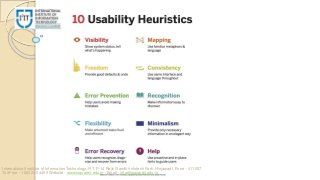
The 10 most general principles for interaction design. They are called 'heuristics' because they are more in the nature of rules of thumb than specific usability guidelines
http://www.isquareit.edu.in/
Usability Heuristics
Jakob Nielsen's10 general principles for interaction design.
They are called "heuristics" because they are broad rules of
thumb and not specific usability guidelines.
International Institute of Information Technology, I²IT, P-14 Rajiv Gandhi Infotech Park, Hinjawadi, Pune - 411 057
Toll Free - 1800 233 4499 Website - www.isquareit.edu.in ; Email - info@isquareit.edu.in
2.
International Institute ofInformation Technology, I²IT, P-14 Rajiv Gandhi Infotech Park, Hinjawadi, Pune - 411 057
Toll Free - 1800 233 4499 Website - www.isquareit.edu.in ; Email - info@isquareit.edu.in
3.
1. Visibility ofSystem Status
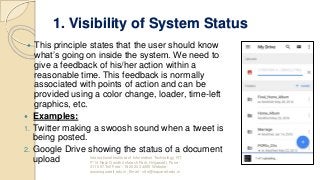
This principle states that the user should know
what’s going on inside the system. We need to
give a feedback of his/her action within a
reasonable time. This feedback is normally
associated with points of action and can be
provided using a color change, loader, time-left
graphics, etc.
Examples:
1. Twitter making a swoosh sound when a tweet is
being posted.
2. Google Drive showing the status of a document
upload International Institute of Information Technology, I²IT,
P-14 Rajiv Gandhi Infotech Park, Hinjawadi, Pune -
411 057 Toll Free - 1800 233 4499 Website -
www.isquareit.edu.in; Email - info@isquareit.edu.in
4.
2. Match betweensystem and the
real world
Is there something on your application
that a user may not understand? This is
very common to miss since we get
associated with the product for over a
period of time. It’s also important for the
application to speak the language of the
target user base.
Example:
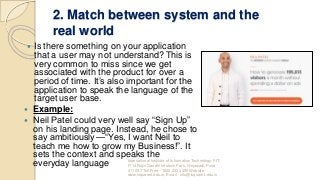
Neil Patel could very well say “Sign Up”
on his landing page. Instead, he chose to
say ambitiously — “Yes, I want Neil to
teach me how to grow my Business!”. It
sets the context and speaks the
everyday language International Institute of Information Technology, I²IT,
P-14 Rajiv Gandhi Infotech Park, Hinjawadi, Pune -
411 057 Toll Free - 1800 233 4499 Website -
www.isquareit.edu.in; Email - info@isquareit.edu.in
5.
3. User Controland Freedom
This principle talks about giving the
user the freedom to navigate and
perform actions. The freedom to undo
any accidental actions.
Examples:
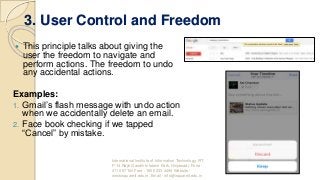
1. Gmail’s flash message with undo action
when we accidentally delete an email.
2. Face book checking if we tapped
“Cancel” by mistake.
International Institute of Information Technology, I²IT,
P-14 Rajiv Gandhi Infotech Park, Hinjawadi, Pune -
411 057 Toll Free - 1800 233 4499 Website -
www.isquareit.edu.in; Email - info@isquareit.edu.in
6.
4. Consistency andStandards
Consistency is the key. A Submit button in one page should
look the same across the site on any page. If we show the
data in a particular table format on one page, it should look the
same the next time data is being shown in tabular format. If the
header is displayed in a certain way on the public pages, it
should be the same when he/she logs in.
Examples:
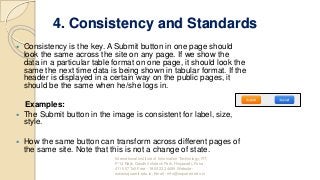
The Submit button in the image is consistent for label, size,
style.
How the same button can transform across different pages of
the same site. Note that this is not a change of state.
International Institute of Information Technology, I²IT,
P-14 Rajiv Gandhi Infotech Park, Hinjawadi, Pune -
411 057 Toll Free - 1800 233 4499 Website -
www.isquareit.edu.in; Email - info@isquareit.edu.in
7.
5. Error Prevention
How many times did your outlook remind you
that there is no attachment in the email while
you mentioned that something is attached?
Outlook intuitively scans the email for such
keywords and alerts the user before sending.
This is Error Prevention.
Examples:
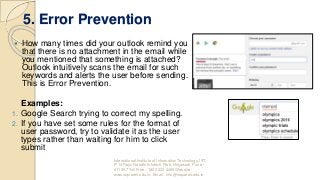
1. Google Search trying to correct my spelling.
2. If you have set some rules for the format of
user password, try to validate it as the user
types rather than waiting for him to click
submit
International Institute of Information Technology, I²IT,
P-14 Rajiv Gandhi Infotech Park, Hinjawadi, Pune -
411 057 Toll Free - 1800 233 4499 Website -
www.isquareit.edu.in; Email - info@isquareit.edu.in
8.
6. Recognition ratherthan recall
It’s always better to suggest the user a set of options than to
let him remember and type the whole thing. The goal is to
minimize the application of user memory.
Example:
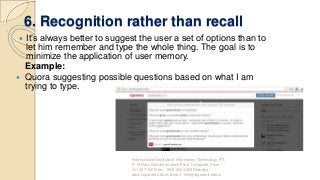
Quora suggesting possible questions based on what I am
trying to type.
•International Institute of Information Technology, I²IT,
P-14 Rajiv Gandhi Infotech Park, Hinjawadi, Pune -
411 057 Toll Free - 1800 233 4499 Website -
www.isquareit.edu.in; Email - info@isquareit.edu.in
9.
7. Flexibility andEfficiency of use
The Interface should be flexible transforming itself between a
novice user and an advanced user. One frequents this option
while installing a new software that asks if the user wants to go
ahead with default installation or custom installation. An
advanced user chooses a custom installation to cut out the
unnecessary services.
Examples:
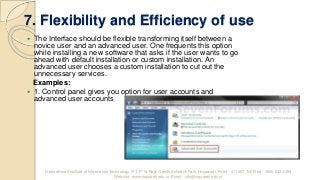
1. Control panel gives you option for user accounts and
advanced user accounts
International Institute of Information Technology, I²IT, P-14 Rajiv Gandhi Infotech Park, Hinjawadi, Pune - 411 057 Toll Free - 1800 233 4499
Website - www.isquareit.edu.in; Email - info@isquareit.edu.in
10.
8. Aesthetic andminimalist design
Interfaces need to be cleared of unnecessary elements and content that
do not support the page goals and tasks.
Prioritization comes to play when this aspect is being considered. For
the designer or the developer, all the information that’s being presented
on the page is relevant. The product manager needs to ask the end
user if it is so. Is every information displayed on interface necessary and
useful?
Example:
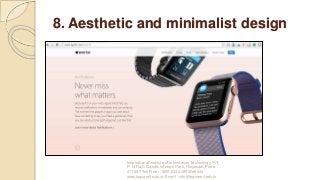
Apple provides only the basic information of feature hiding
additional information under “Learn More”. Check the same product on a
retail website to understand the importance of clutter-free experience.
International Institute of Information Technology, I²IT,
P-14 Rajiv Gandhi Infotech Park, Hinjawadi, Pune -
411 057 Toll Free - 1800 233 4499 Website -
www.isquareit.edu.in; Email - info@isquareit.edu.in
11.
8. Aesthetic andminimalist design
International Institute of Information Technology, I²IT,
P-14 Rajiv Gandhi Infotech Park, Hinjawadi, Pune -
411 057 Toll Free - 1800 233 4499 Website -
www.isquareit.edu.in; Email - info@isquareit.edu.in
12.
9. Help usersrecognize, diagnose, and
recover from errors
Errors are inadvertent in the user journey. A check needs to be
made if those errors are being explained to the user in
understandable language.
A check needs to be done if exception handling is done across the
application so that relevant messages can be shown to the user.
Example:
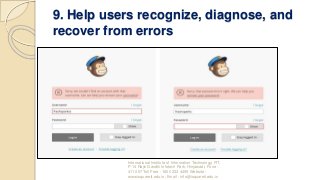
In many cases for login, I have entered a fictitious username and
password and the error message I got is “either the username or
the password is incorrect”. Here we are not informing the user if
the username is invalid or if the password is wrong.
International Institute of Information Technology, I²IT,
P-14 Rajiv Gandhi Infotech Park, Hinjawadi, Pune -
411 057 Toll Free - 1800 233 4499 Website -
www.isquareit.edu.in; Email - info@isquareit.edu.in
13.
9. Help usersrecognize, diagnose, and
recover from errors
International Institute of Information Technology, I²IT,
P-14 Rajiv Gandhi Infotech Park, Hinjawadi, Pune -
411 057 Toll Free - 1800 233 4499 Website -
www.isquareit.edu.in; Email - info@isquareit.edu.in
14.
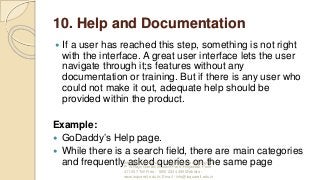
10. Help andDocumentation
If a user has reached this step, something is not right
with the interface. A great user interface lets the user
navigate through it;s features without any
documentation or training. But if there is any user who
could not make it out, adequate help should be
provided within the product.
Example:
GoDaddy’s Help page.
While there is a search field, there are main categories
and frequently asked queries on the same pageInternational Institute of Information Technology, I²IT,
P-14 Rajiv Gandhi Infotech Park, Hinjawadi, Pune -
411 057 Toll Free - 1800 233 4499 Website -
www.isquareit.edu.in; Email - info@isquareit.edu.in
15.
10. Help andDocumentation
International Institute of Information Technology, I²IT,
P-14 Rajiv Gandhi Infotech Park, Hinjawadi, Pune -
411 057 Toll Free - 1800 233 4499 Website -
www.isquareit.edu.in; Email - info@isquareit.edu.in
16.
About I²IT
I²IT aspiresto be an academic leader recognized for
innovation, quality teaching and research, holding high
moral values and a forward thinking institution that explores
creative approaches for the future.
I²IT has always propagated ‘Innovation and Leadership’ as
their mantra to bring ground-breaking ideas and provide a
rock solid foundation for learning. With the vision and
mission of providing quality education, the Institute is
constructed by world renowned architects with its uniquely
designed dome as its temple of learning.
International Institute of Information Technology, I²IT,
P-14 Rajiv Gandhi Infotech Park, Hinjawadi, Pune -
411 057 Toll Free - 1800 233 4499 Website -
www.isquareit.edu.in; Email - info@isquareit.edu.in
17.
Contact Us
International Instituteof Information Technology (I²IT)
P-14, Rajiv Gandhi Infotech Park, Phase – 1,
Hinjawadi,
Pune– 411057, India
Phone: +91 20 2293 3441 / 2 / 3
Email: info@isquareit.edu.in
Web: www.isquareit.edu.in
International Institute of Information Technology, I²IT,
P-14 Rajiv Gandhi Infotech Park, Hinjawadi, Pune -
411 057 Toll Free - 1800 233 4499 Website -
www.isquareit.edu.in; Email - info@isquareit.edu.in