SUMMER INTERNSHIP
PRESENTATION
Presented by
Huzaifa Asghar Ali
Engineering Intern
Summer 2015
17th Jun 15 - 12 Aug 15
Supervised by
Mai Kolachi Team
Guide and Mentor
Mr. Abdul Wadood
DCC
MY VIEWPOINT
Flexible working hours
Feels good
Flat Hierarchy
Easy to Communicate
Friendly and co-operative environment
Too much helpful for fresher’s and interns
Perfect school for interns
Enriched study materials
Introduction
 I completed my required 8
weeks of internship at DCC
Tech.
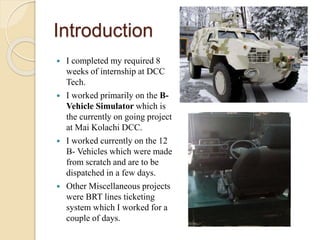
 I worked primarily on the B-
Vehicle Simulator which is
the currently on going project
at Mai Kolachi DCC.
 I worked currently on the 12
B- Vehicles which were made
from scratch and are to be
dispatched in a few days.
 Other Miscellaneous projects
were BRT lines ticketing
system which I worked for a
couple of days.
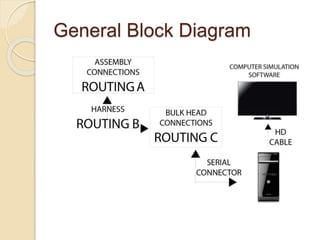
General Block Diagram
Bulk Head
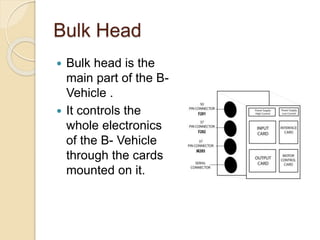
 Bulk head is the
main part of the B-
Vehicle .
 It controls the
whole electronics
of the B- Vehicle
through the cards
mounted on it.
Mechanical
Assemblies
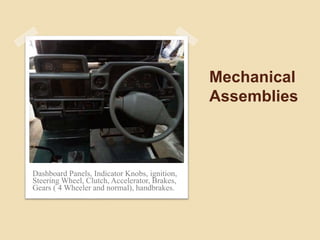
Dashboard Panels, Indicator Knobs, ignition,
Steering Wheel, Clutch, Accelerator, Brakes,
Gears ( 4 Wheeler and normal), handbrakes.
Instructor Console
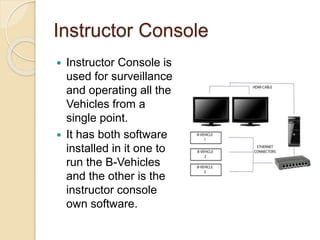
 Instructor Console is
used for surveillance
and operating all the
Vehicles from a
single point.
 It has both software
installed in it one to
run the B-Vehicles
and the other is the
instructor console
own software.
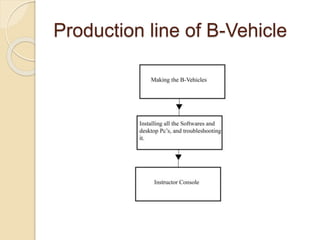
Production line of B-Vehicle
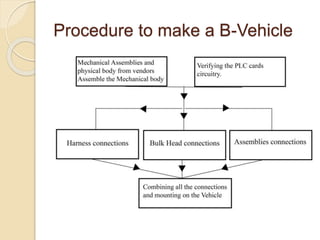
Procedure to make a B-Vehicle
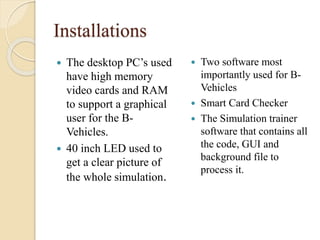
Installations
 The desktop PC’s used
have high memory
video cards and RAM
to support a graphical
user for the B-
Vehicles.
 40 inch LED used to
get a clear picture of
the whole simulation.
 Two software most
importantly used for B-
Vehicles
 Smart Card Checker
 The Simulation trainer
software that contains all
the code, GUI and
background file to
process it.
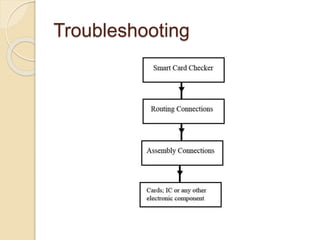
Troubleshooting
Troubleshooting
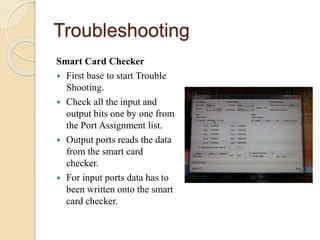
Smart Card Checker
 First base to start Trouble
Shooting.
 Check all the input and
output bits one by one from
the Port Assignment list.
 Output ports reads the data
from the smart card
checker.
 For input ports data has to
been written onto the smart
card checker.
Troubleshooting
Routing
 If the smart card checker finds a fault then check for the
whole routing connections as shown in the first diagram
using the diode test.
 Start from the biggest routing (Route C to Route A) and
if a fault is found then go for further route combinations
to find an actual fault.
Troubleshooting
Assembly Connection
 If the routing connections are ok then dissemble the
instrument you’re getting an error with and check for the
internal wiring of the instrument again using a diode
test.
 The instrument also incubates a special pcb which are
connections for different functions of the instrument.
 Put one pin to ground and the other to the switch pin if
the pin is working properly then the buzzer sound should
be heard when switched on.
Troubleshooting
Card Faults
 If the assembly connections are also verified
then check for the temperature of the IC or any
other electronic component.
 Code not burned into the microcontroller.
 Check for any power supply faults.
 Check for cabling faults.
 Check for power connections to the card.
 Check the power supply.
 Replace the card.
Recommendations
Electronics
 Use a full fledged motherboard or a complex PCB
design which have less wiring to do.
 A challenging work for engineers to do.
 It can be long lasting.
Recommendations
Software
 Improvements in graphics.
 Speech and text training to the drivers (like a GPS
system).
 General improvements in code such as the indicator
system, steering wheel.
Recommendations
Mechanical
 Diameter of the steering wheel is too small as compared
to original B-vehicles.
 The structure of the simulator does not replicate with the
original jeeps of the buyers, which are mostly army men.
SUMMER INTERNSHIP PRESENTATION

SUMMER INTERNSHIP PRESENTATION

  • 1.
    SUMMER INTERNSHIP PRESENTATION Presented by HuzaifaAsghar Ali Engineering Intern Summer 2015 17th Jun 15 - 12 Aug 15 Supervised by Mai Kolachi Team Guide and Mentor Mr. Abdul Wadood
  • 2.
    DCC MY VIEWPOINT Flexible workinghours Feels good Flat Hierarchy Easy to Communicate Friendly and co-operative environment Too much helpful for fresher’s and interns Perfect school for interns Enriched study materials
  • 3.
    Introduction  I completedmy required 8 weeks of internship at DCC Tech.  I worked primarily on the B- Vehicle Simulator which is the currently on going project at Mai Kolachi DCC.  I worked currently on the 12 B- Vehicles which were made from scratch and are to be dispatched in a few days.  Other Miscellaneous projects were BRT lines ticketing system which I worked for a couple of days.
  • 4.
  • 5.
    Bulk Head  Bulkhead is the main part of the B- Vehicle .  It controls the whole electronics of the B- Vehicle through the cards mounted on it.
  • 6.
    Mechanical Assemblies Dashboard Panels, IndicatorKnobs, ignition, Steering Wheel, Clutch, Accelerator, Brakes, Gears ( 4 Wheeler and normal), handbrakes.
  • 7.
    Instructor Console  InstructorConsole is used for surveillance and operating all the Vehicles from a single point.  It has both software installed in it one to run the B-Vehicles and the other is the instructor console own software.
  • 8.
  • 9.
    Procedure to makea B-Vehicle
  • 10.
    Installations  The desktopPC’s used have high memory video cards and RAM to support a graphical user for the B- Vehicles.  40 inch LED used to get a clear picture of the whole simulation.  Two software most importantly used for B- Vehicles  Smart Card Checker  The Simulation trainer software that contains all the code, GUI and background file to process it.
  • 11.
  • 12.
    Troubleshooting Smart Card Checker First base to start Trouble Shooting.  Check all the input and output bits one by one from the Port Assignment list.  Output ports reads the data from the smart card checker.  For input ports data has to been written onto the smart card checker.
  • 13.
    Troubleshooting Routing  If thesmart card checker finds a fault then check for the whole routing connections as shown in the first diagram using the diode test.  Start from the biggest routing (Route C to Route A) and if a fault is found then go for further route combinations to find an actual fault.
  • 14.
    Troubleshooting Assembly Connection  Ifthe routing connections are ok then dissemble the instrument you’re getting an error with and check for the internal wiring of the instrument again using a diode test.  The instrument also incubates a special pcb which are connections for different functions of the instrument.  Put one pin to ground and the other to the switch pin if the pin is working properly then the buzzer sound should be heard when switched on.
  • 15.
    Troubleshooting Card Faults  Ifthe assembly connections are also verified then check for the temperature of the IC or any other electronic component.  Code not burned into the microcontroller.  Check for any power supply faults.  Check for cabling faults.  Check for power connections to the card.  Check the power supply.  Replace the card.
  • 16.
    Recommendations Electronics  Use afull fledged motherboard or a complex PCB design which have less wiring to do.  A challenging work for engineers to do.  It can be long lasting.
  • 17.
    Recommendations Software  Improvements ingraphics.  Speech and text training to the drivers (like a GPS system).  General improvements in code such as the indicator system, steering wheel.
  • 18.
    Recommendations Mechanical  Diameter ofthe steering wheel is too small as compared to original B-vehicles.  The structure of the simulator does not replicate with the original jeeps of the buyers, which are mostly army men.