Leveraging Technology in Your Practice
Tool for working remotely
Military Spouse JD Network
Making the Right Moves
Oct. 23, 2015, Seattle, WA
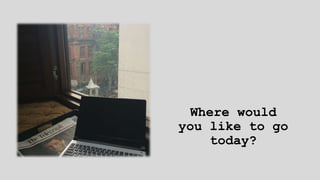
Where would
you like to go
today?
Road to Zero Point
15,000 ft
North Sikkim
India
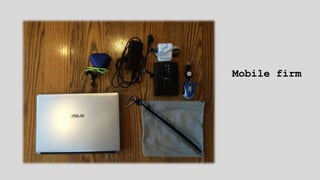
Mobile firm
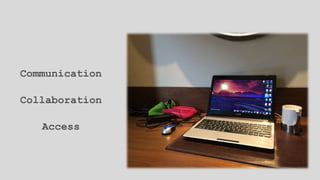
Communication
Collaboration
Access
Communication
Collaboration
Access
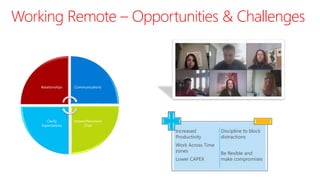
Working Remote – Opportunities & Challenges
Relationships Communications
Instant/Persistent
Chat
Clarify
Expectations
Increased
Productivity
Work Across Time
zones
Lower CAPEX
Discipline to block
distractions
Be flexible and
make compromises
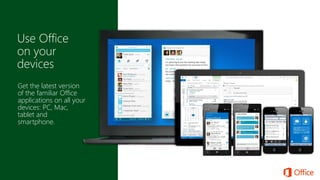
Get the latest version
of the familiar Office
applications on all your
devices: PC, Mac,
tablet and
smartphone.
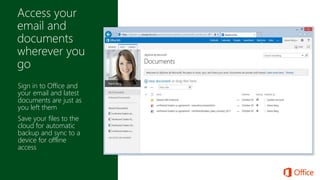
Sign in to Office and
your email and latest
documents are just as
you left them
Save your files to the
cloud for automatic
backup and sync to a
device for offline
access
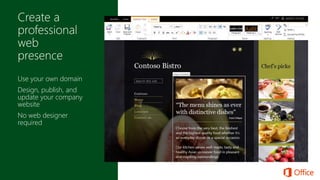
Use your own domain
Design, publish, and
update your company
website
No web designer
required
Share directly from Office
applications
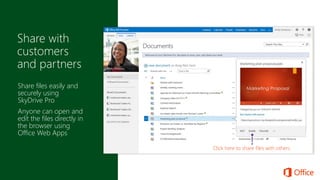
Click here to share files with others
Share files easily and
securely using
SkyDrive Pro
Anyone can open and
edit the files directly in
the browser using
Office Web Apps
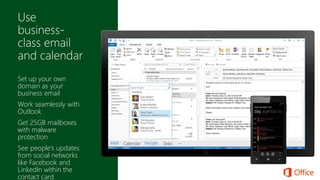
Set up your own
domain as your
business email
Work seamlessly with
Outlook
Get 25GB mailboxes
with malware
protection
See people’s updates
from social networks
like Facebook and
LinkedIn within the
contact card
Impact of Microsoft Lync on the Enterprise Voice Market
Leadership in Telephony is about much more than telephony
Goalsof the Virtual Lawyer Managing Client Data
Goals
1. Protect client data at all times while
2. Being able to access the client data
whenever the need arises.
Lots of Options
See the handout.cc: Ame Otoko - https://www.flickr.com/photos/30674850@N00
Encryptionand security of client data
cc: FutUndBeidl - https://www.flickr.com/photos/61423903@N06
Turning Information into Useless Gibberish
(Unless You Have the Key)
cc: Daniel Kulinski - https://www.flickr.com/photos/7729940@N06
Why Encrypt? (pt. 1)
RPC 1.6(a): You shall not reveal client information.
RPC 1.6(a) Comment 16:
You shall competently safeguard client information.
RPC 1.6(a) Comment 17:
You shall take reasonable precautions when transmitting client data.
Why Encrypt? (pt. 2)
Packet Sniffers, Hackers, Data Breaches, etc.
cc: swong95765 - https://www.flickr.com/photos/29487672@N07
Data in Transit
Enjoy that latte, but turn on your VPN first.cc: paurian - https://www.flickr.com/photos/70387215@N00
Data at RestWho do you trust?
cc: launceston_lad - https://www.flickr.com/photos/61364433@N00
Questions?
cc: whitney waller - https://www.flickr.com/photos/22702863@N06

Working remotely as an attorney

  • 1.
    Leveraging Technology inYour Practice Tool for working remotely Military Spouse JD Network Making the Right Moves Oct. 23, 2015, Seattle, WA
  • 2.
  • 3.
    Road to ZeroPoint 15,000 ft North Sikkim India
  • 4.
  • 5.
  • 6.
  • 8.
    Working Remote –Opportunities & Challenges Relationships Communications Instant/Persistent Chat Clarify Expectations Increased Productivity Work Across Time zones Lower CAPEX Discipline to block distractions Be flexible and make compromises
  • 10.
    Get the latestversion of the familiar Office applications on all your devices: PC, Mac, tablet and smartphone.
  • 11.
    Sign in toOffice and your email and latest documents are just as you left them Save your files to the cloud for automatic backup and sync to a device for offline access
  • 12.
    Use your owndomain Design, publish, and update your company website No web designer required
  • 13.
    Share directly fromOffice applications Click here to share files with others Share files easily and securely using SkyDrive Pro Anyone can open and edit the files directly in the browser using Office Web Apps
  • 14.
    Set up yourown domain as your business email Work seamlessly with Outlook Get 25GB mailboxes with malware protection See people’s updates from social networks like Facebook and LinkedIn within the contact card
  • 16.
    Impact of MicrosoftLync on the Enterprise Voice Market Leadership in Telephony is about much more than telephony
  • 18.
    Goalsof the VirtualLawyer Managing Client Data
  • 19.
    Goals 1. Protect clientdata at all times while 2. Being able to access the client data whenever the need arises.
  • 20.
    Lots of Options Seethe handout.cc: Ame Otoko - https://www.flickr.com/photos/30674850@N00
  • 21.
    Encryptionand security ofclient data cc: FutUndBeidl - https://www.flickr.com/photos/61423903@N06
  • 22.
    Turning Information intoUseless Gibberish (Unless You Have the Key) cc: Daniel Kulinski - https://www.flickr.com/photos/7729940@N06
  • 23.
    Why Encrypt? (pt.1) RPC 1.6(a): You shall not reveal client information.
  • 24.
    RPC 1.6(a) Comment16: You shall competently safeguard client information.
  • 25.
    RPC 1.6(a) Comment17: You shall take reasonable precautions when transmitting client data.
  • 26.
    Why Encrypt? (pt.2) Packet Sniffers, Hackers, Data Breaches, etc. cc: swong95765 - https://www.flickr.com/photos/29487672@N07
  • 27.
    Data in Transit Enjoythat latte, but turn on your VPN first.cc: paurian - https://www.flickr.com/photos/70387215@N00
  • 28.
    Data at RestWhodo you trust? cc: launceston_lad - https://www.flickr.com/photos/61364433@N00
  • 29.
    Questions? cc: whitney waller- https://www.flickr.com/photos/22702863@N06

Editor's Notes

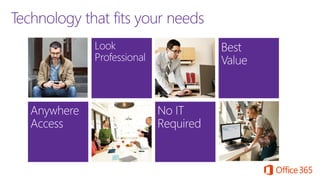
  • #10 Slide purpose: Explain how Office 365 is the right technology based on the challenges and pain points outlined in the previous slide. How to present this slide: Transition from previous slide by saying, “Given all these challenges, what you are really looking for is technology that fits the needs of your business.” Use this slide to tee-up how technology can help with giving them anywhere access, looking professional, getting technology with IT expertise, and getting the best bang for their buck. Talk track Benefits of Anywhere Access: Anywhere access is important because you want to have easy access to email, content, and business-ready tools to work on the devices you use already. Even when you don’t have your devices, you want to be able to securely access your content and tools to do what you need to do This is especially important when you are dealing with customer requests because you want to respond immediately and provide the best service You also want to be able to create a sense of community even when not everyone comes to work in the same office everyday. Benefits of Looking Professional: You want technology that can help you level your playing field with the bigger players Technology that can save you time by getting things done faster without the need for any professional help Business tools that are built to work together out of the box to help you with email, creating documents, sharing documents, managing projects, and customer meetings Benefits of Easy IT with no IT expertise required: You want to reduce your IT headaches by reducing your IT You want to be able to control access to sensitive documents without the need to be a security expert You want to all the services to work with each other out of the box so you can work seamlessly with each other and with partners or customers You need to have a business continuity plan when unfortunate events happen, such as a power outage, leakage, or natural disaster You want IT-level phone support to be available when you need help You want to secure all the mobile devices Benefits of Best Value: Every dollar counts. You want the best technology to support the growth of your business But you also want to make sure you invest in technologies that have the lowest total cost of ownership (TCO) but also the highest return in end-user productivity. You want to have predictability of your IT cost each month and be able to easily scale up and down. You want to simplify licensing, and one that supports the use of mobile devices at work You don’t want to keep paying for IT maintenance costs to take care of your servers
  • #11 Before the click: Office 365 includes the latest version of all the familiar Office applications – including Word, PowerPoint, Excel, Outlook – for you to use on your PCs and Macs. After the Click: In addition, it also provides access to certain Office applications that are optimized for tablets and smartphones. For example, Outlook for Windows tablets is optimized for touch experience and makes it easier for users to interact, compose and manage their email on the go. Lync and OneNote for Windows Phones as well as iOS and Android operating system provide the rich experience on the mobile phones. For each Office 365 licensed user, you can use Office on up to 5 PC or Mac, and 5 mobile devices.
  • #12 There is no use for Office on all your devices if you can’t get to your documents. With Office 365, your documents are saved to the cloud by default so they are automatically backed up. You now have a “drive” in the cloud called SkyDrive Pro for documents that you are managing and working on but can also share with others (see screenshot, point to the SkyDrive Pro link at the top right bar) Because everything is saved to the cloud, when you sign into Office from any browser, you will always have the latest version of your documents follow you. See this list of your latest documents (point to the screenshot on the left). This also goes for settings like your personal dictionary and custom templates. When your documents are saved in the cloud, you can also sync (point to the sync button on the top right) these files to your laptop or mobile devices so you can still access and work on them when you are offline. It will automatically re-sync it back to the cloud when you have your connection back.
  • #13 Office 365 helps you establish a professional web presence by making it easy for you to: Use your own domain name as the website address Design, publish, and update your company website using professionally-designed templates so you don’t have to hire a web designer
  • #14 With Office 365, you can now share large files with your customers and partners easily and securely With SkyDrive Pro or any other document library within SharePoint Online, you can easily share documents from the preview pane. This preview pane helps ensure it is the right file you want to share. Any external user you shared the file with can open and edit the file directly in the browser using Office Web Apps, making this a better solution than other file sharing sites. [Click] You can also easily share documents from within each of the Office applications by clicking share.
  • #15 Office 365 includes business-class email and calendaring so you can use your own domain name as your business address. This works natively with Outlook which means it won’t have any syncing problems like some other email services. Each user has a 25GB mailboxes with industry’s best spam and malware protection. The latest Outlook connects with social networks like Facebook and LinkedIn so you can see your contacts updates from within the contact card.