Digital Security, Ethics, and Privacy:
Threats, Issues and Defenses
Objectives Overview
Define the term, digital
security risks, and
briefly describe the
types of cybercriminals
Describe various types
of internet and network
attacks, and explain
ways to safeguard
against these attacks
Discuss techniques to
prevent unauthorized
computer access and
use
Explain the ways that
software manufactures
protect against software
piracy
Discuss how encryption,
digital signatures, and
digital certificates work
Objectives Overview
Identify safeguards
against hardware theft,
vandalism, and failure
Explain the options
available for backing up
Identify risks and
safeguards associated
with wireless
communications
Recoqgnize issues
related to information
accuracy, intellectual
property rights, codes of
conduct, and green
computing
Discuss issues
surrounding information
privacy
Digital Security Risks
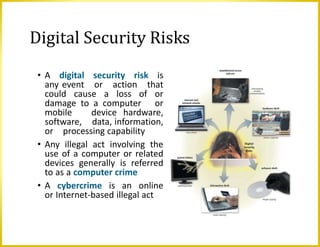
• A digital security risk is
any event or action that
could cause a loss of or
damage to a computer or
mobile device hardware,
software, data, information,
or processing capability
• Any illegal act involving the
use of a computer or related
devices generally is referred
to as a computer crime
• A cybercrime is an online
or Internet-based illegal act
Digital Security Risks
Perpetrators of cybercrime:
• A hacker, originally means a computer enthusiast, now has
a derogatory meaning and refers to someone who accesses a
computer or network illegally.
• A cracker accesses a computer or network illegally to destroy
data, steal information, or do other malicious action
• A script kiddie has the same intent as a cracker but does not
have the technical skills an knowledge.
• Often use prewritten hacking and cracking programs
Digital Security Risks
• Some corporate spies hired to break into a specific computer and
steal its proprietary data and information, or to help identify
security risks in their own organization.
• Unethical employees may break into their employers’ computers
for a variety of reasons.
• A cyberextortionist is someone who demands payment to stop an
attack on an organization’s technology infrastructure.
• A cyberterrorist is someone who uses the Internet or network
to destroy or damage computers for political reasons.
Internet and Network Attacks
• Information transmitted
over networks has a
higher degree of security
risk than information
kept on an organization’s
premises
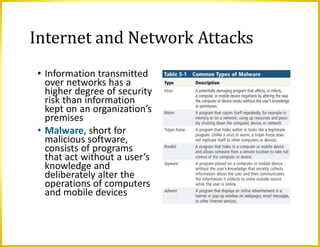
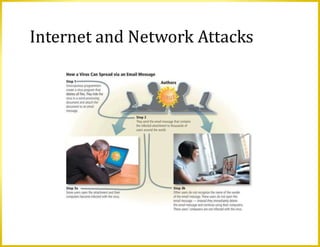
• Malware, short for
malicious software,
consists of programs
that act without a user’s
knowledge and
deliberately alter the
operations of computers
and mobile devices
Internet and Network Attacks
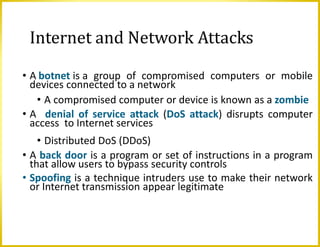
• A botnet is a group of compromised computers or mobile
devices connected to a network
• A compromised computer or device is known as a zombie
• A denial of service attack (DoS attack) disrupts computer
access to Internet services
• Distributed DoS (DDoS)
• A back door is a program or set of instructions in a program
that allow users to bypass security controls
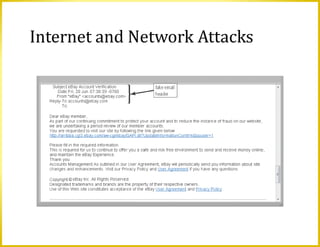
• Spoofing is a technique intruders use to make their network
or Internet transmission appear legitimate
Internet and Network Attacks
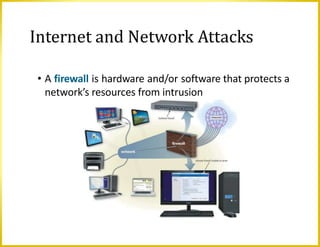
• A firewall is hardware and/or software that protects a
network’s resources from intrusion
Unauthorized access is
the use of a computer
or network without
permission
Unauthorized use is the
use of a computer or
its data for unapproved
or possibly illegal
activities
Unauthorized Access and Use
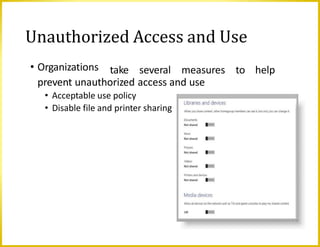
• Organizations take several measures to help
prevent unauthorized access and use
• Acceptable use policy
• Disable file and printer sharing
Unauthorized Access and Use
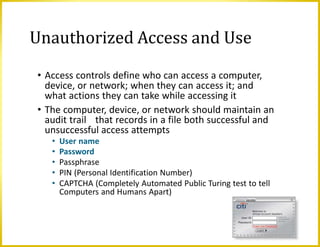
• Access controls define who can access a computer,
device, or network; when they can access it; and
what actions they can take while accessing it
• The computer, device, or network should maintain an
audit trail that records in a file both successful and
unsuccessful access attempts
• User name
• Password
• Passphrase
• PIN (Personal Identification Number)
• CAPTCHA (Completely Automated Public Turing test to tell
Computers and Humans Apart)
Unauthorized Access and Use
• A possessed object is any
item that you must carry to
gain access to a computer or
computer facility
• Badges, cards, and keys.
• Often are used in combination
with a PIN (personal
identification number) Two-
Step Verification
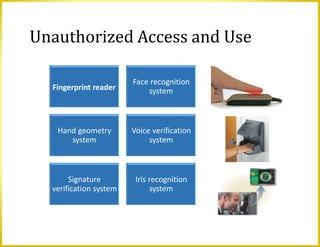
• A biometric device
authenticates a person’s
identity by translating a
personal characteristic into
a digital code that is
compared with a digital
code in a computer
Unauthorized Access and Use
Fingerprint reader
Face recognition
system
Hand geometry
system
Voice verification
system
Signature
verification system
Iris recognition
system
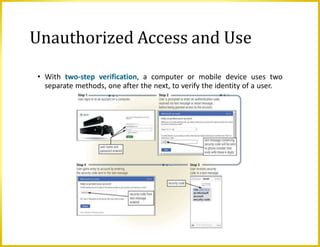
• With two-step verification, a computer or mobile device uses two
separate methods, one after the next, to verify the identity of a user.
Unauthorized Access and Use
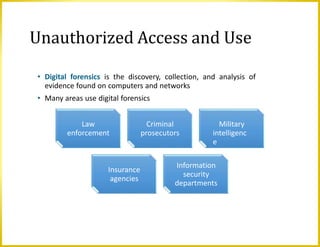
• Digital forensics is the discovery, collection, and analysis of
evidence found on computers and networks
• Many areas use digital forensics
Unauthorized Access and Use
Law
enforcement
Criminal
prosecutors
Military
intelligenc
e
Insurance
agencies
Information
security
departments
Software Theft
• Many manufactures incorporate an activation
process into their programs to ensure the
software is not installed on more computers than
legally licensed
• During the product activation, which is
conducted either online or by phone, users
provide the software product’s identification
number to associate the software with the
computer or mobile device on which the software
is installed
Software Theft
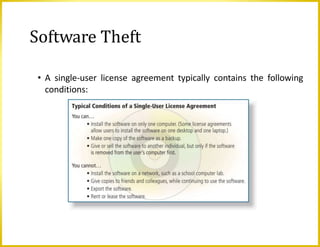
• A single-user license agreement typically contains the following
conditions:
Information Theft
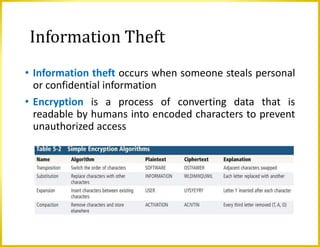
• Information theft occurs when someone steals personal
or confidential information
• Encryption is a process of converting data that is
readable by humans into encoded characters to prevent
unauthorized access
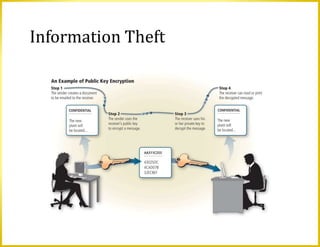
Information Theft
Information Theft
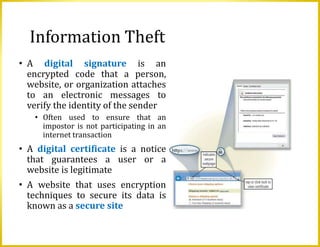
• A digital signature is an
encrypted code that a person,
website, or organization attaches
to an electronic messages to
verify the identity of the sender
• Often used to ensure that an
impostor is not participating in an
internet transaction
• A digital certificate is a notice
that guarantees a user or a
website is legitimate
• A website that uses encryption
techniques to secure its data is
known as a secure site
Hardware Theft, Vandalism, and Failure
• Hardware theft is the act of stealing digital equipment.
• Hardware vandalism involves defacing or destroying digital
equipment
• Hardware failure can occur due to variety of reasons: aging
hardware, natural or man-made disasters, or random
events such as electrical power problems, and even errors
in programs or apps.
Hardware Theft, Vandalism, and Failure
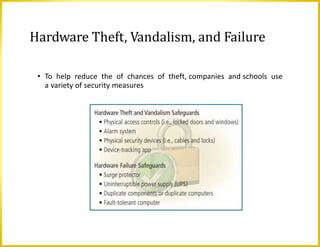
• To help reduce the of chances of theft, companies and schools use
a variety of security measures
Backing Up – The Ultimate Safeguard
• A backup is a duplicate of a file, program, or
media that can be used if the original is lost,
damaged, or destroyed
• To back up a file means to make a copy of it
• Off-site backups are stored in a location separate
from the computer or mobile device site
Cloud Storage
Backing Up – The Ultimate Safeguard
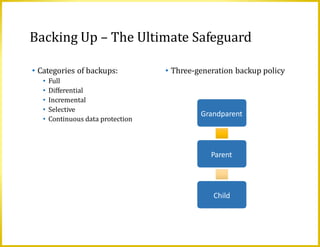
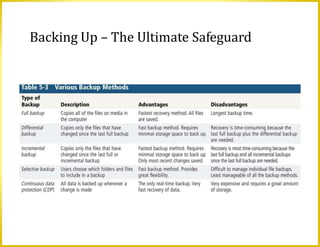
• Categories of backups:
• Full
• Differential
• Incremental
• Selective
• Continuous data protection
• Three-generation backup policy
Grandparent
Parent
Child
Backing Up – The Ultimate Safeguard
Wireless Security
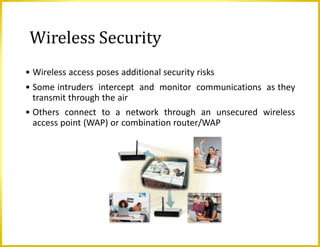
• Wireless access poses additional security risks
• Some intruders intercept and monitor communications as they
transmit through the air
• Others connect to a network through an unsecured wireless
access point (WAP) or combination router/WAP
Ethics and Society
• Computer ethics are the moral guidelines that govern
the use of computers, mobile devices, and information
systems
• Information accuracy is a concern
• Not all information on the web is correct
Ethics and Society
•Intellectual property refers to unique and original
works such as ideas, inventions, art, writings,
processes, company and product names, and logos
•Intellectual property rights are the rights to which
creators are entitled to their work
•A copyright protects any tangible form of expression
•Digital rights management (DRM) is a strategy
designed to prevent illegal distribution of movies,
music, and other digital content
Ethics and Society
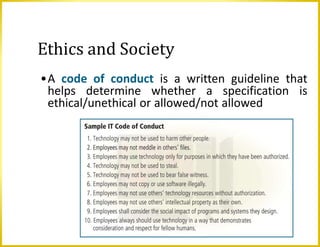
•A code of conduct is a written guideline that
helps determine whether a specification is
ethical/unethical or allowed/not allowed
Ethics and Society
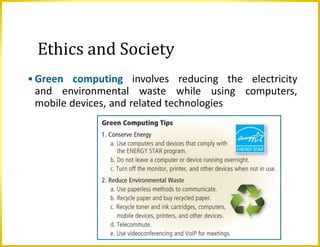
•Green computing involves reducing the electricity
and environmental waste while using computers,
mobile devices, and related technologies
Information Privacy
• Information privacy refers to the right of
individuals and companies to deny or restrict the
collection and use of information about them
• Huge databases store data online
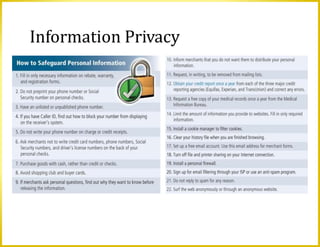
• It is important to safeguard your information
Information Privacy
Information Privacy
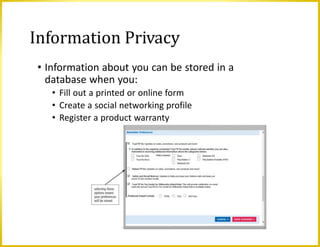
• Information about you can be stored in a
database when you:
• Fill out a printed or online form
• Create a social networking profile
• Register a product warranty
Information Privacy
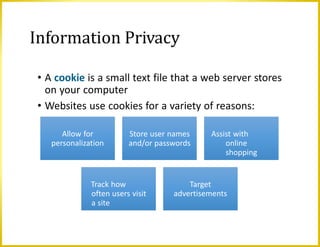
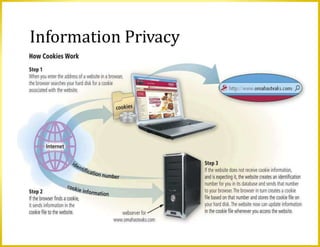
• A cookie is a small text file that a web server stores
on your computer
• Websites use cookies for a variety of reasons:
Allow for
personalization
Store user names
and/or passwords
Assist with
online
shopping
Track how
often users visit
a site
Target
advertisements
Information Privacy
Information Privacy
• Phising is a scam in which a perpetrator sends an official
looking email message that attempts to obtain your
personal and/or financial information
• With clickjacking, an object that can be clicked on a
website contains a malicious program
• Spyware is a program placed on a computer or mobile
device without the user’s knowledge that secretly
collects information about the user and then
communicates the information it collects to some
outside source while the user is online
• Adware is a program that displays an online
advertisement in a banner or pop-up window on
webpages, email messages, or other Internet services
Information Privacy
• Social engineering is defined as gaining
unauthorized access to or obtaining confidential
information by taking advantage of the trusting
human nature of some victims and the naivety of
others
• The concern about privacy has led to the
enactment of laws regarding the storage and
disclosure of personal data
Information Privacy
Employee monitoring involves the use of computers, mobile devices,
or cameras to observe, record, and review an employee’s use of a
technology, including communications such as email messages,
keyboard activity (used to measure productivity), and websites
visited
Many programs exist that easily allow employers to monitor
employees. Further, it is legal for employers to use these
programs
Ethics and Society
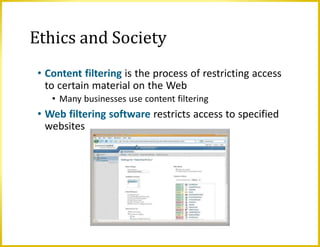
• Content filtering is the process of restricting access
to certain material on the Web
• Many businesses use content filtering
• Web filtering software restricts access to specified
websites
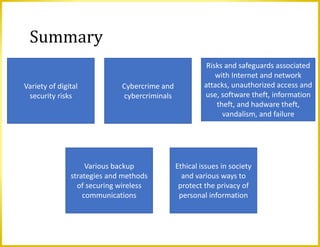
Summary
Variety of digital
security risks
Cybercrime and
cybercriminals
Risks and safeguards associated
with Internet and network
attacks, unauthorized access and
use, software theft, information
theft, and hadware theft,
vandalism, and failure
Various backup
strategies and methods
of securing wireless
communications
Ethical issues in society
and various ways to
protect the privacy of
personal information
Chapter 5 - Digital Security, Ethics, Privacy.pptx

Chapter 5 - Digital Security, Ethics, Privacy.pptx

  • 1.
    Digital Security, Ethics,and Privacy: Threats, Issues and Defenses
  • 2.
    Objectives Overview Define theterm, digital security risks, and briefly describe the types of cybercriminals Describe various types of internet and network attacks, and explain ways to safeguard against these attacks Discuss techniques to prevent unauthorized computer access and use Explain the ways that software manufactures protect against software piracy Discuss how encryption, digital signatures, and digital certificates work
  • 3.
    Objectives Overview Identify safeguards againsthardware theft, vandalism, and failure Explain the options available for backing up Identify risks and safeguards associated with wireless communications Recoqgnize issues related to information accuracy, intellectual property rights, codes of conduct, and green computing Discuss issues surrounding information privacy
  • 4.
    Digital Security Risks •A digital security risk is any event or action that could cause a loss of or damage to a computer or mobile device hardware, software, data, information, or processing capability • Any illegal act involving the use of a computer or related devices generally is referred to as a computer crime • A cybercrime is an online or Internet-based illegal act
  • 5.
    Digital Security Risks Perpetratorsof cybercrime: • A hacker, originally means a computer enthusiast, now has a derogatory meaning and refers to someone who accesses a computer or network illegally. • A cracker accesses a computer or network illegally to destroy data, steal information, or do other malicious action • A script kiddie has the same intent as a cracker but does not have the technical skills an knowledge. • Often use prewritten hacking and cracking programs
  • 6.
    Digital Security Risks •Some corporate spies hired to break into a specific computer and steal its proprietary data and information, or to help identify security risks in their own organization. • Unethical employees may break into their employers’ computers for a variety of reasons. • A cyberextortionist is someone who demands payment to stop an attack on an organization’s technology infrastructure. • A cyberterrorist is someone who uses the Internet or network to destroy or damage computers for political reasons.
  • 7.
    Internet and NetworkAttacks • Information transmitted over networks has a higher degree of security risk than information kept on an organization’s premises • Malware, short for malicious software, consists of programs that act without a user’s knowledge and deliberately alter the operations of computers and mobile devices
  • 8.
  • 9.
    Internet and NetworkAttacks • A botnet is a group of compromised computers or mobile devices connected to a network • A compromised computer or device is known as a zombie • A denial of service attack (DoS attack) disrupts computer access to Internet services • Distributed DoS (DDoS) • A back door is a program or set of instructions in a program that allow users to bypass security controls • Spoofing is a technique intruders use to make their network or Internet transmission appear legitimate
  • 10.
  • 11.
    Internet and NetworkAttacks • A firewall is hardware and/or software that protects a network’s resources from intrusion
  • 12.
    Unauthorized access is theuse of a computer or network without permission Unauthorized use is the use of a computer or its data for unapproved or possibly illegal activities Unauthorized Access and Use
  • 13.
    • Organizations takeseveral measures to help prevent unauthorized access and use • Acceptable use policy • Disable file and printer sharing Unauthorized Access and Use
  • 14.
    • Access controlsdefine who can access a computer, device, or network; when they can access it; and what actions they can take while accessing it • The computer, device, or network should maintain an audit trail that records in a file both successful and unsuccessful access attempts • User name • Password • Passphrase • PIN (Personal Identification Number) • CAPTCHA (Completely Automated Public Turing test to tell Computers and Humans Apart) Unauthorized Access and Use
  • 15.
    Unauthorized Access andUse • A possessed object is any item that you must carry to gain access to a computer or computer facility • Badges, cards, and keys. • Often are used in combination with a PIN (personal identification number) Two- Step Verification • A biometric device authenticates a person’s identity by translating a personal characteristic into a digital code that is compared with a digital code in a computer
  • 16.
    Unauthorized Access andUse Fingerprint reader Face recognition system Hand geometry system Voice verification system Signature verification system Iris recognition system
  • 17.
    • With two-stepverification, a computer or mobile device uses two separate methods, one after the next, to verify the identity of a user. Unauthorized Access and Use
  • 18.
    • Digital forensicsis the discovery, collection, and analysis of evidence found on computers and networks • Many areas use digital forensics Unauthorized Access and Use Law enforcement Criminal prosecutors Military intelligenc e Insurance agencies Information security departments
  • 19.
    Software Theft • Manymanufactures incorporate an activation process into their programs to ensure the software is not installed on more computers than legally licensed • During the product activation, which is conducted either online or by phone, users provide the software product’s identification number to associate the software with the computer or mobile device on which the software is installed
  • 20.
    Software Theft • Asingle-user license agreement typically contains the following conditions:
  • 21.
    Information Theft • Informationtheft occurs when someone steals personal or confidential information • Encryption is a process of converting data that is readable by humans into encoded characters to prevent unauthorized access
  • 22.
  • 23.
    Information Theft • Adigital signature is an encrypted code that a person, website, or organization attaches to an electronic messages to verify the identity of the sender • Often used to ensure that an impostor is not participating in an internet transaction • A digital certificate is a notice that guarantees a user or a website is legitimate • A website that uses encryption techniques to secure its data is known as a secure site
  • 24.
    Hardware Theft, Vandalism,and Failure • Hardware theft is the act of stealing digital equipment. • Hardware vandalism involves defacing or destroying digital equipment • Hardware failure can occur due to variety of reasons: aging hardware, natural or man-made disasters, or random events such as electrical power problems, and even errors in programs or apps.
  • 25.
    Hardware Theft, Vandalism,and Failure • To help reduce the of chances of theft, companies and schools use a variety of security measures
  • 26.
    Backing Up –The Ultimate Safeguard • A backup is a duplicate of a file, program, or media that can be used if the original is lost, damaged, or destroyed • To back up a file means to make a copy of it • Off-site backups are stored in a location separate from the computer or mobile device site Cloud Storage
  • 27.
    Backing Up –The Ultimate Safeguard • Categories of backups: • Full • Differential • Incremental • Selective • Continuous data protection • Three-generation backup policy Grandparent Parent Child
  • 28.
    Backing Up –The Ultimate Safeguard
  • 29.
    Wireless Security • Wirelessaccess poses additional security risks • Some intruders intercept and monitor communications as they transmit through the air • Others connect to a network through an unsecured wireless access point (WAP) or combination router/WAP
  • 30.
    Ethics and Society •Computer ethics are the moral guidelines that govern the use of computers, mobile devices, and information systems • Information accuracy is a concern • Not all information on the web is correct
  • 31.
    Ethics and Society •Intellectualproperty refers to unique and original works such as ideas, inventions, art, writings, processes, company and product names, and logos •Intellectual property rights are the rights to which creators are entitled to their work •A copyright protects any tangible form of expression •Digital rights management (DRM) is a strategy designed to prevent illegal distribution of movies, music, and other digital content
  • 32.
    Ethics and Society •Acode of conduct is a written guideline that helps determine whether a specification is ethical/unethical or allowed/not allowed
  • 33.
    Ethics and Society •Greencomputing involves reducing the electricity and environmental waste while using computers, mobile devices, and related technologies
  • 34.
    Information Privacy • Informationprivacy refers to the right of individuals and companies to deny or restrict the collection and use of information about them • Huge databases store data online • It is important to safeguard your information
  • 35.
  • 36.
    Information Privacy • Informationabout you can be stored in a database when you: • Fill out a printed or online form • Create a social networking profile • Register a product warranty
  • 37.
    Information Privacy • Acookie is a small text file that a web server stores on your computer • Websites use cookies for a variety of reasons: Allow for personalization Store user names and/or passwords Assist with online shopping Track how often users visit a site Target advertisements
  • 38.
  • 39.
    Information Privacy • Phisingis a scam in which a perpetrator sends an official looking email message that attempts to obtain your personal and/or financial information • With clickjacking, an object that can be clicked on a website contains a malicious program • Spyware is a program placed on a computer or mobile device without the user’s knowledge that secretly collects information about the user and then communicates the information it collects to some outside source while the user is online • Adware is a program that displays an online advertisement in a banner or pop-up window on webpages, email messages, or other Internet services
  • 40.
    Information Privacy • Socialengineering is defined as gaining unauthorized access to or obtaining confidential information by taking advantage of the trusting human nature of some victims and the naivety of others • The concern about privacy has led to the enactment of laws regarding the storage and disclosure of personal data
  • 41.
    Information Privacy Employee monitoringinvolves the use of computers, mobile devices, or cameras to observe, record, and review an employee’s use of a technology, including communications such as email messages, keyboard activity (used to measure productivity), and websites visited Many programs exist that easily allow employers to monitor employees. Further, it is legal for employers to use these programs
  • 42.
    Ethics and Society •Content filtering is the process of restricting access to certain material on the Web • Many businesses use content filtering • Web filtering software restricts access to specified websites
  • 43.
    Summary Variety of digital securityrisks Cybercrime and cybercriminals Risks and safeguards associated with Internet and network attacks, unauthorized access and use, software theft, information theft, and hadware theft, vandalism, and failure Various backup strategies and methods of securing wireless communications Ethical issues in society and various ways to protect the privacy of personal information