Protecting Video Course Content
A Simple Use of MemberPress
Bob Spies
Flying Seal Systems
bob@flyingsealsystems.com
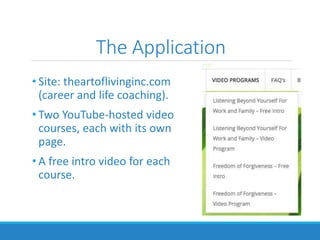
The Application
• Site: theartoflivinginc.com
(career and life coaching).
• Two YouTube-hosted video
courses, each with its own
page.
• A free intro video for each
course.
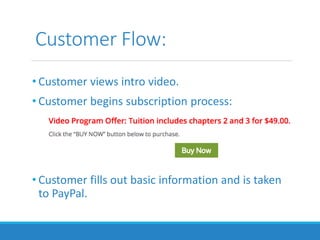
Customer Flow:
• Customer views intro video.
• Customer begins subscription process:
• Customer fills out basic information and is taken
to PayPal.
Customer Flow (2):
•Customer is returned from PayPal to the
“thank you” page for the course in question.
• In future, s/he simply goes to the course page.
•If a customer goes directly to the Course page
and isn’t logged in, s/he is presented with
options.
Setup
•Membership Definition
• Description
• Price
• Registration thank you message
Setup (continued)
•Protection Rule
• Specifies content and which memberships can
access it.
• Message shown if someone without permission
attempts to access the content.
Setup (continued)
•Payment method(s)
• MemberPress supports
• PayPal
• Stripe
• Authorize.net
Why I Chose MemberPress
• Experience working with it on a prior project.
• Knew MemberPress was the most flexible of all the solutions
I had evaluated then.
• I had received excellent support.
• Needed ability for customer to purchase multiple
independent memberships.
• Chris Lema reviews.
Ease of Use
• Simple and straightforward, except for Payment setup.
• Payment documentation for PayPal was confusing, out-of-
date, incomplete, and in one case wrong.
• Gotcha: Setting things up so only MemberPress PayPal
customers are returned to the Video purchase thankyou
page.
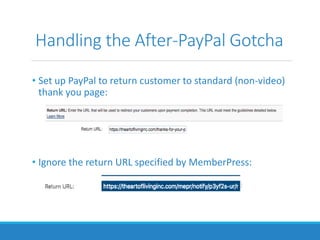
Handling the After-PayPal Gotcha
• Set up PayPal to return customer to standard (non-video)
thank you page:
• Ignore the return URL specified by MemberPress:
Handling the After-PayPal Gotcha (2)
• Now non-video (non-MemberPress) customers will get
returned to the standard thank you page.
• Video customers will still get returned to the video thank
you page with text specific to the video course they have
purchased.
• (MemberPress will override the return page specified on
PayPal.)
What I Liked About MemberPress
• Clean, flexible architecture.
• “Rules”-based architecture doesn’t make limiting
assumptions as to how a Membership will be implemented.
• (From prior project) Actions and filters to handle any kind of
customization required.
• Easy to use, except for the Payment setup.
• Great technical support.
What I Didn’t Like About
MemberPress
• Relatively poor documentation.
• Not well organized.
• PayPal-related documentation out-of-date, uses different
terminology than PayPal does.
• Relies mostly on videos.
• Didn’t include handling the “other PayPal customers” Gotcha.
• Confusing PayPal setup Admin panel.

WordPress Membership Plugins: MemberPress

  • 1.
    Protecting Video CourseContent A Simple Use of MemberPress Bob Spies Flying Seal Systems bob@flyingsealsystems.com
  • 2.
    The Application • Site:theartoflivinginc.com (career and life coaching). • Two YouTube-hosted video courses, each with its own page. • A free intro video for each course.
  • 3.
    Customer Flow: • Customerviews intro video. • Customer begins subscription process: • Customer fills out basic information and is taken to PayPal.
  • 4.
    Customer Flow (2): •Customeris returned from PayPal to the “thank you” page for the course in question. • In future, s/he simply goes to the course page. •If a customer goes directly to the Course page and isn’t logged in, s/he is presented with options.
  • 5.
    Setup •Membership Definition • Description •Price • Registration thank you message
  • 6.
    Setup (continued) •Protection Rule •Specifies content and which memberships can access it. • Message shown if someone without permission attempts to access the content.
  • 7.
    Setup (continued) •Payment method(s) •MemberPress supports • PayPal • Stripe • Authorize.net
  • 8.
    Why I ChoseMemberPress • Experience working with it on a prior project. • Knew MemberPress was the most flexible of all the solutions I had evaluated then. • I had received excellent support. • Needed ability for customer to purchase multiple independent memberships. • Chris Lema reviews.
  • 9.
    Ease of Use •Simple and straightforward, except for Payment setup. • Payment documentation for PayPal was confusing, out-of- date, incomplete, and in one case wrong. • Gotcha: Setting things up so only MemberPress PayPal customers are returned to the Video purchase thankyou page.
  • 10.
    Handling the After-PayPalGotcha • Set up PayPal to return customer to standard (non-video) thank you page: • Ignore the return URL specified by MemberPress:
  • 11.
    Handling the After-PayPalGotcha (2) • Now non-video (non-MemberPress) customers will get returned to the standard thank you page. • Video customers will still get returned to the video thank you page with text specific to the video course they have purchased. • (MemberPress will override the return page specified on PayPal.)
  • 12.
    What I LikedAbout MemberPress • Clean, flexible architecture. • “Rules”-based architecture doesn’t make limiting assumptions as to how a Membership will be implemented. • (From prior project) Actions and filters to handle any kind of customization required. • Easy to use, except for the Payment setup. • Great technical support.
  • 13.
    What I Didn’tLike About MemberPress • Relatively poor documentation. • Not well organized. • PayPal-related documentation out-of-date, uses different terminology than PayPal does. • Relies mostly on videos. • Didn’t include handling the “other PayPal customers” Gotcha. • Confusing PayPal setup Admin panel.