LOGO
Dilip Singh Panwar(dilip.dsp@gmail.com)
Android Component
Contents
What is Mobile Computing?1
2 What is ANDROID?2
Android Architecture3
4
Mobile Computing
What is Mobile Computing?
 Mobile computing is the ability to use computing
capability without a pre-defined location and/or
connection to a network to publish and/or subscribe to
information
ANDROID
What is Android?
 Android is a software stack for mobile devices that
includes an operating system, middleware and key
applications.
 Based on Linux Kernel
 Allows writing managed code in the Java language
 Developed by Google and later the Open Handset
Alliance (OHA)
ANDROID
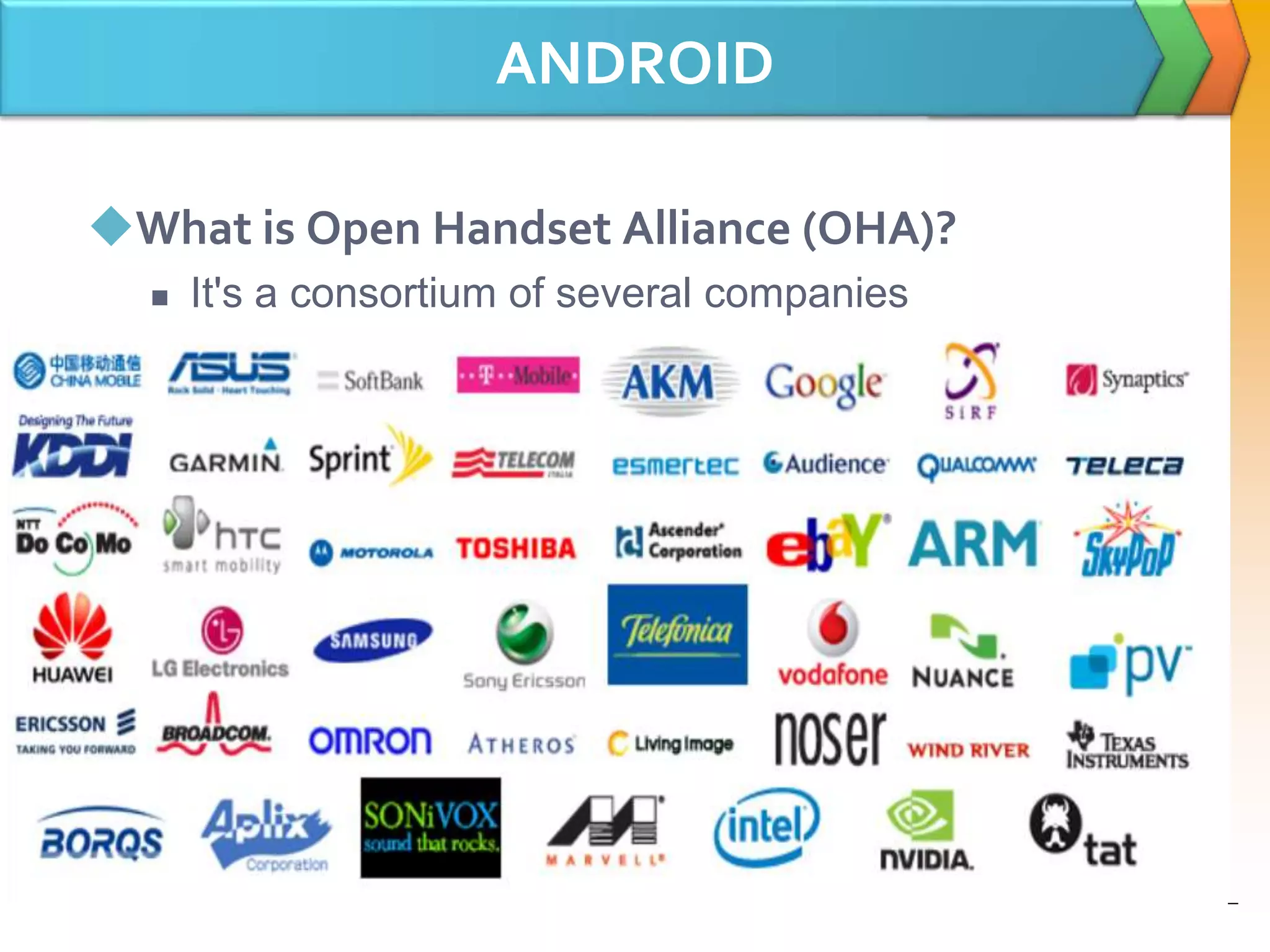
What is Open Handset Alliance (OHA)?
 It's a consortium of several companies
ANDROID Features
What is Android features?
 Application framework enabling reuse and
replacement of components
 Dalvik virtual machine optimized for mobile devices
 Integrated browser based on the open source WebKit
engine
 Optimized graphics powered by a custom 2D graphics
library; 3D graphics based on the OpenGL ES 1.0
specification (hardware acceleration optional)
 SQLite for structured data storage
ANDROID Features
 Media support for common audio, video, and still image
formats (MPEG4, H.264, MP3, AAC, AMR, JPG, PNG,
GIF)
 GSM Telephony (hardware dependent)
 Bluetooth, EDGE, 3G, and WiFi (hardware dependent)
 Camera, GPS, compass, and accelerometer (hardware
dependent)
 Rich development environment including a device
emulator, tools for debugging, memory and
performance profiling, and a plugin for the Eclipse IDE
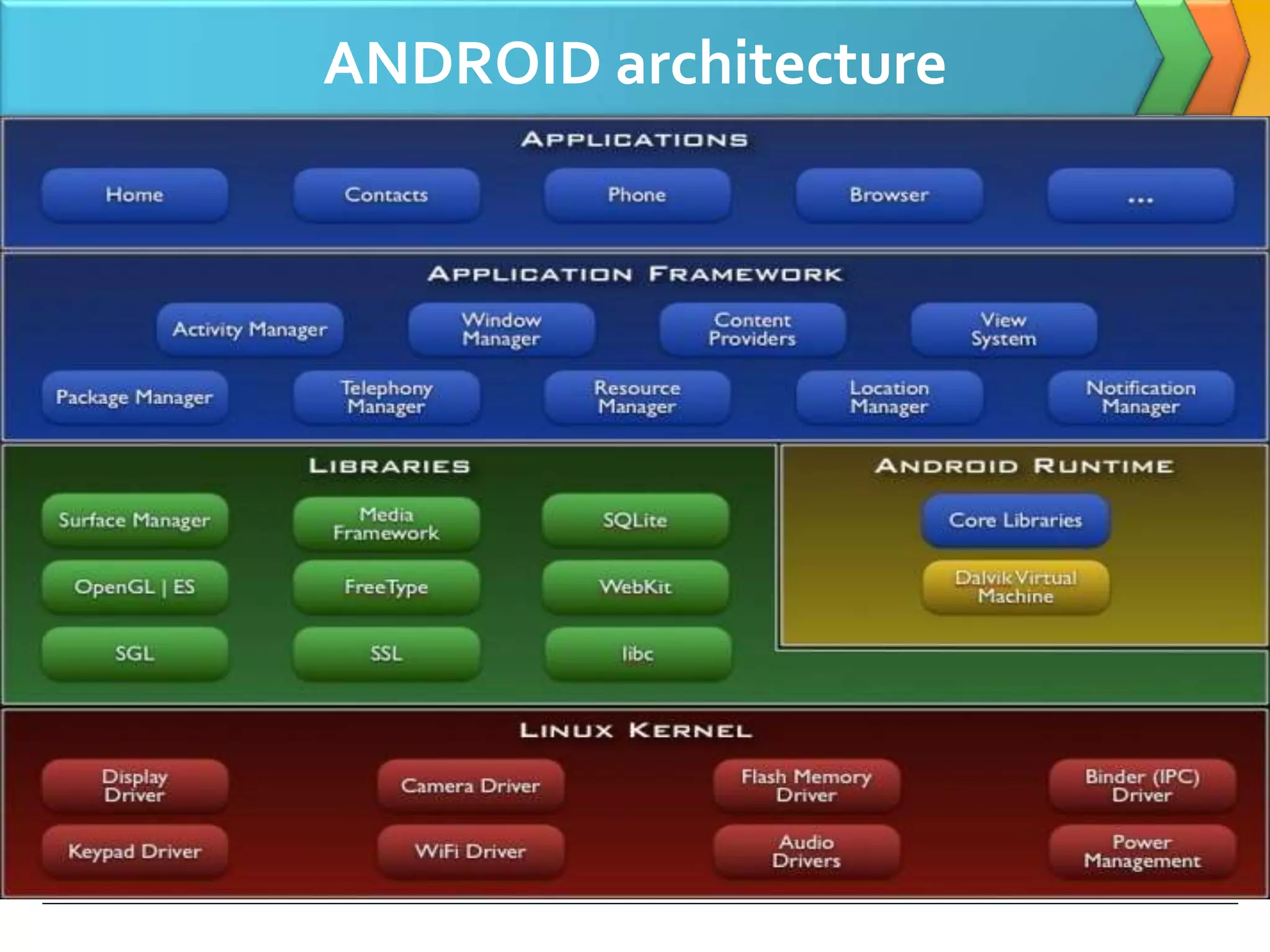
ANDROID architecture
Applications
 Android will ship with a set of core applications
including an email client, SMS program, calendar, maps,
browser, contacts, and others. All applications are
written using the Java programming language
Applications framework
 By providing an open development platform, Android
offers developers the ability to build extremely rich and
innovative applications. Developers are free to take
advantage of the device hardware, access location
information, run background services, set alarms, add
notifications to the status bar, and much, much more.
Applications framework
 Underlying all applications is a set of services and
systems, including:
 A rich and extensible set of Views that can be used to
build an application, including lists, grids, text boxes,
buttons, and even an embeddable web browser
 Content Providers that enable applications to access
data from other applications (such as Contacts), or to
share their own data
 A Resource Manager, providing access to non-code
resources such as localized strings, graphics, and
layout files
Applications framework
 A Notification Manager that enables all applications to
display custom alerts in the status bar
 An Activity Manager that manages the lifecycle of
applications and provides a common navigation
backstack
Libraries
 Android includes a set of C/C++ libraries used by various
components of the Android system. Some of the core
libraries are listed below:
 System C library - a BSD-derived implementation of
the standard C system library (libc), tuned for
embedded Linux-based devices
 Media Libraries - based on PacketVideo's
OpenCORE; the libraries support playback and
recording of many popular audio and video formats,
as well as static image files, including MPEG4, H.264,
MP3, AAC, AMR, JPG, and PNG
Libraries
 Surface Manager - manages access to the display
subsystem and seamlessly composites 2D and 3D
graphic layers from multiple applications
 LibWebCore - a modern web browser engine which
powers both the Android browser and an
embeddable web view
 SGL - the underlying 2D graphics engine
 3D libraries - an implementation based on OpenGL
ES 1.0 APIs; the libraries use either hardware 3D
acceleration (where available) or the included, highly
optimized 3D software rasterizer
Libraries
 FreeType - bitmap and vector font rendering
 SQLite - a powerful and lightweight relational
database engine available to all applications
Android Runtime
 Android includes a set of core libraries that provides
most of the functionality available in the core libraries of
the Java programming language.
 Every Android application runs in its own process, with
its own instance of the Dalvik virtual machine. Dalvik
has been written so that a device can run multiple VMs
efficiently. The Dalvik VM executes files in the Dalvik
Executable (.dex) format which is optimized for minimal
memory footprint.
 The Dalvik VM relies on the Linux kernel for underlying
functionality such as threading and low-level memory
management.
Linux Kernel
 Android relies on Linux version 2.6 for core system
services such as security, memory management,
process management, network stack, and driver model.
 The kernel also acts as an abstraction layer between the
hardware and the rest of the software stack.
Application Fundamentals
 Android applications are written in the Java
programming language. The Android SDK tools compile
the code—along with any data and resource files—into
an Android package, an archive file with an .apk suffix.
All the code in a single .apk file is considered to be one
application and is the file that Android-powered devices
use to install the application.
Application Components
 Application components are the essential building
blocks of an Android application.
 Each component is a different point through which the
system can enter your application.
 There are four different types of application
components. Each type serves a distinct purpose and
has a distinct lifecycle that defines how the component
is created and destroyed.
 Activities
 Services
 Content providers
 Broadcast Receivers
Activities
 An activity represents a single screen with a user
interface.
 For example, an email application might have one
activity that shows a list of new emails, another activity
to compose an email, and another activity for reading
emails.
Services
 A service is a component that runs in the background to
perform long-running operations or to perform work for
remote processes.
 A service does not provide a user interface.
 For example, a service might play music in the
background while the user is in a different application,
Content providers
 A content provider manages a shared set of application
data. You can store the data in the file system, an
SQLite database, on the web, or any other persistent
storage location your application can access.
 Content providers are also useful for reading and writing
data that is private to your application and not shared.
For example, the Note Pad sample application uses a
content provider to save notes.
Broadcast Receivers
 A broadcast receiver is a component that responds to
system-wide broadcast announcements. Many
broadcasts originate from the system
 for example, a broadcast announcing that the screen
has turned off, the battery is low, or a picture was
captured.
 Applications can also initiate broadcasts
 for example, to let other applications know that some
data has been downloaded to the device and is available
for them to use.
Activating Component
 Three of the four component types—activities, services,
and broadcast receivers—are activated by an
asynchronous message called an intent. Intents bind
individual components to each other at runtime
whether the component belongs to your application or
another.
 For activities and services, an intent defines the action
to perform (for example, to "view" or "send" something)
 For example, an intent might convey a request for an
activity to show an image or to open a web page.
 For broadcast receivers, the intent simply defines the
announcement being broadcast (for example, a
broadcast to indicate the device battery is low
Application Resources
 An Android application is composed of more than just
code—it requires resources that are separate from the
source code, such as images, audio files, and anything
relating to the visual presentation of the application.
LOGO
Dilip Singh Panwar

Android 1-intro n architecture

  • 1.
  • 2.
    Android Component Contents What isMobile Computing?1 2 What is ANDROID?2 Android Architecture3 4
  • 3.
    Mobile Computing What isMobile Computing?  Mobile computing is the ability to use computing capability without a pre-defined location and/or connection to a network to publish and/or subscribe to information
  • 4.
    ANDROID What is Android? Android is a software stack for mobile devices that includes an operating system, middleware and key applications.  Based on Linux Kernel  Allows writing managed code in the Java language  Developed by Google and later the Open Handset Alliance (OHA)
  • 5.
    ANDROID What is OpenHandset Alliance (OHA)?  It's a consortium of several companies
  • 6.
    ANDROID Features What isAndroid features?  Application framework enabling reuse and replacement of components  Dalvik virtual machine optimized for mobile devices  Integrated browser based on the open source WebKit engine  Optimized graphics powered by a custom 2D graphics library; 3D graphics based on the OpenGL ES 1.0 specification (hardware acceleration optional)  SQLite for structured data storage
  • 7.
    ANDROID Features  Mediasupport for common audio, video, and still image formats (MPEG4, H.264, MP3, AAC, AMR, JPG, PNG, GIF)  GSM Telephony (hardware dependent)  Bluetooth, EDGE, 3G, and WiFi (hardware dependent)  Camera, GPS, compass, and accelerometer (hardware dependent)  Rich development environment including a device emulator, tools for debugging, memory and performance profiling, and a plugin for the Eclipse IDE
  • 8.
  • 9.
    Applications  Android willship with a set of core applications including an email client, SMS program, calendar, maps, browser, contacts, and others. All applications are written using the Java programming language
  • 10.
    Applications framework  Byproviding an open development platform, Android offers developers the ability to build extremely rich and innovative applications. Developers are free to take advantage of the device hardware, access location information, run background services, set alarms, add notifications to the status bar, and much, much more.
  • 11.
    Applications framework  Underlyingall applications is a set of services and systems, including:  A rich and extensible set of Views that can be used to build an application, including lists, grids, text boxes, buttons, and even an embeddable web browser  Content Providers that enable applications to access data from other applications (such as Contacts), or to share their own data  A Resource Manager, providing access to non-code resources such as localized strings, graphics, and layout files
  • 12.
    Applications framework  ANotification Manager that enables all applications to display custom alerts in the status bar  An Activity Manager that manages the lifecycle of applications and provides a common navigation backstack
  • 13.
    Libraries  Android includesa set of C/C++ libraries used by various components of the Android system. Some of the core libraries are listed below:  System C library - a BSD-derived implementation of the standard C system library (libc), tuned for embedded Linux-based devices  Media Libraries - based on PacketVideo's OpenCORE; the libraries support playback and recording of many popular audio and video formats, as well as static image files, including MPEG4, H.264, MP3, AAC, AMR, JPG, and PNG
  • 14.
    Libraries  Surface Manager- manages access to the display subsystem and seamlessly composites 2D and 3D graphic layers from multiple applications  LibWebCore - a modern web browser engine which powers both the Android browser and an embeddable web view  SGL - the underlying 2D graphics engine  3D libraries - an implementation based on OpenGL ES 1.0 APIs; the libraries use either hardware 3D acceleration (where available) or the included, highly optimized 3D software rasterizer
  • 15.
    Libraries  FreeType -bitmap and vector font rendering  SQLite - a powerful and lightweight relational database engine available to all applications
  • 16.
    Android Runtime  Androidincludes a set of core libraries that provides most of the functionality available in the core libraries of the Java programming language.  Every Android application runs in its own process, with its own instance of the Dalvik virtual machine. Dalvik has been written so that a device can run multiple VMs efficiently. The Dalvik VM executes files in the Dalvik Executable (.dex) format which is optimized for minimal memory footprint.  The Dalvik VM relies on the Linux kernel for underlying functionality such as threading and low-level memory management.
  • 17.
    Linux Kernel  Androidrelies on Linux version 2.6 for core system services such as security, memory management, process management, network stack, and driver model.  The kernel also acts as an abstraction layer between the hardware and the rest of the software stack.
  • 18.
    Application Fundamentals  Androidapplications are written in the Java programming language. The Android SDK tools compile the code—along with any data and resource files—into an Android package, an archive file with an .apk suffix. All the code in a single .apk file is considered to be one application and is the file that Android-powered devices use to install the application.
  • 19.
    Application Components  Applicationcomponents are the essential building blocks of an Android application.  Each component is a different point through which the system can enter your application.  There are four different types of application components. Each type serves a distinct purpose and has a distinct lifecycle that defines how the component is created and destroyed.  Activities  Services  Content providers  Broadcast Receivers
  • 20.
    Activities  An activityrepresents a single screen with a user interface.  For example, an email application might have one activity that shows a list of new emails, another activity to compose an email, and another activity for reading emails.
  • 21.
    Services  A serviceis a component that runs in the background to perform long-running operations or to perform work for remote processes.  A service does not provide a user interface.  For example, a service might play music in the background while the user is in a different application,
  • 22.
    Content providers  Acontent provider manages a shared set of application data. You can store the data in the file system, an SQLite database, on the web, or any other persistent storage location your application can access.  Content providers are also useful for reading and writing data that is private to your application and not shared. For example, the Note Pad sample application uses a content provider to save notes.
  • 23.
    Broadcast Receivers  Abroadcast receiver is a component that responds to system-wide broadcast announcements. Many broadcasts originate from the system  for example, a broadcast announcing that the screen has turned off, the battery is low, or a picture was captured.  Applications can also initiate broadcasts  for example, to let other applications know that some data has been downloaded to the device and is available for them to use.
  • 24.
    Activating Component  Threeof the four component types—activities, services, and broadcast receivers—are activated by an asynchronous message called an intent. Intents bind individual components to each other at runtime whether the component belongs to your application or another.  For activities and services, an intent defines the action to perform (for example, to "view" or "send" something)  For example, an intent might convey a request for an activity to show an image or to open a web page.  For broadcast receivers, the intent simply defines the announcement being broadcast (for example, a broadcast to indicate the device battery is low
  • 25.
    Application Resources  AnAndroid application is composed of more than just code—it requires resources that are separate from the source code, such as images, audio files, and anything relating to the visual presentation of the application.
  • 26.

Editor's Notes

  • #6 Devoted to advancing open standards for mobile devices Develop technologies that will significantly lower the cost of developing and distributing mobile devices and services Android is under version 2 of the Apache Software License (ASL)
  • #17 The VM is register-based, and runs classes compiled by a Java language compiler that have been transformed into the .dex format by the included "dx" tool.
  • #18 The VM is register-based, and runs classes compiled by a Java language compiler that have been transformed into the .dex format by the included "dx" tool.
  • #19 The VM is register-based, and runs classes compiled by a Java language compiler that have been transformed into the .dex format by the included "dx" tool.
  • #21 The VM is register-based, and runs classes compiled by a Java language compiler that have been transformed into the .dex format by the included "dx" tool.
  • #22 The VM is register-based, and runs classes compiled by a Java language compiler that have been transformed into the .dex format by the included "dx" tool.
  • #23 The VM is register-based, and runs classes compiled by a Java language compiler that have been transformed into the .dex format by the included "dx" tool.
  • #24 The VM is register-based, and runs classes compiled by a Java language compiler that have been transformed into the .dex format by the included "dx" tool.
  • #25 The VM is register-based, and runs classes compiled by a Java language compiler that have been transformed into the .dex format by the included "dx" tool.
  • #26 For example, you should define animations, menus, styles, colors, and the layout of activity user interfaces with XML files.