Seamless migration from Nova-network 
to Neutron in eBay production 
Chengyuan Li, Han Zhou
Agenda 
•Overview of eBay Cloud Environment 
•Nova-network to Neutron Migration 
–Control Plane Migration 
–Data Plane Migration 
–Post-migration. 
•Demo 
Presentation Title Goes Here 2
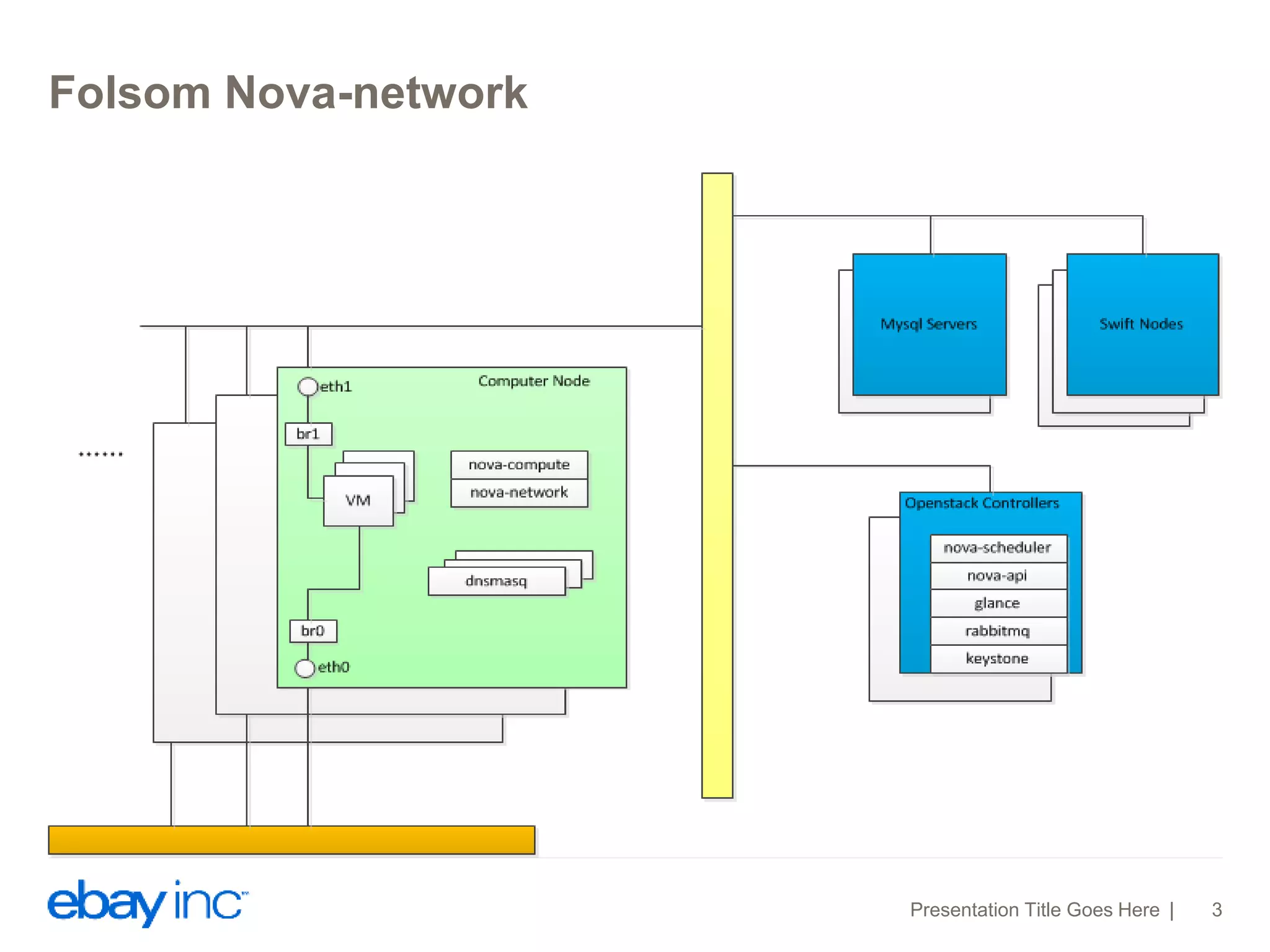
Folsom Nova-network 
Presentation Title Goes Here 3
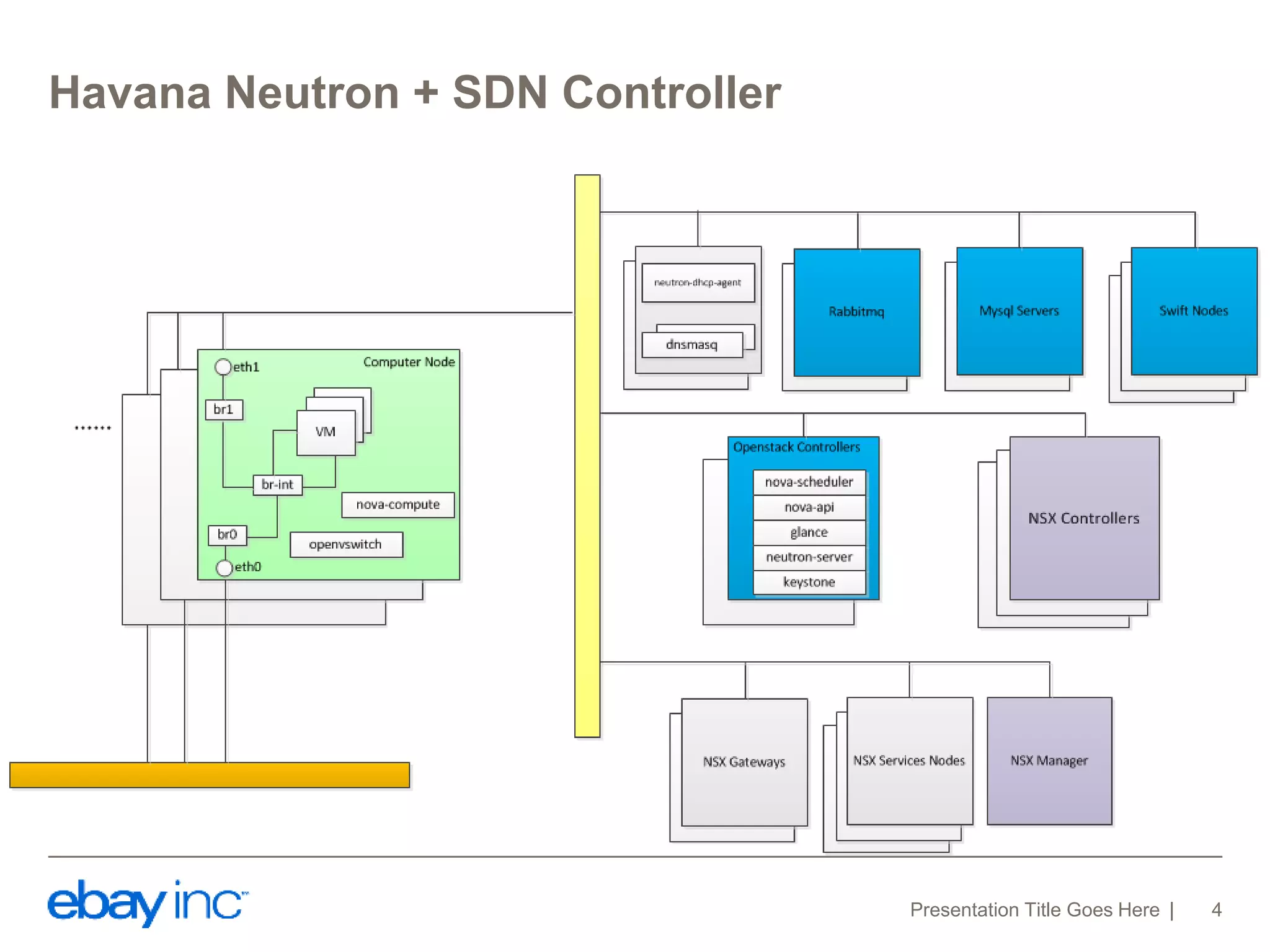
Havana Neutron + SDN Controller 
Presentation Title Goes Here 4
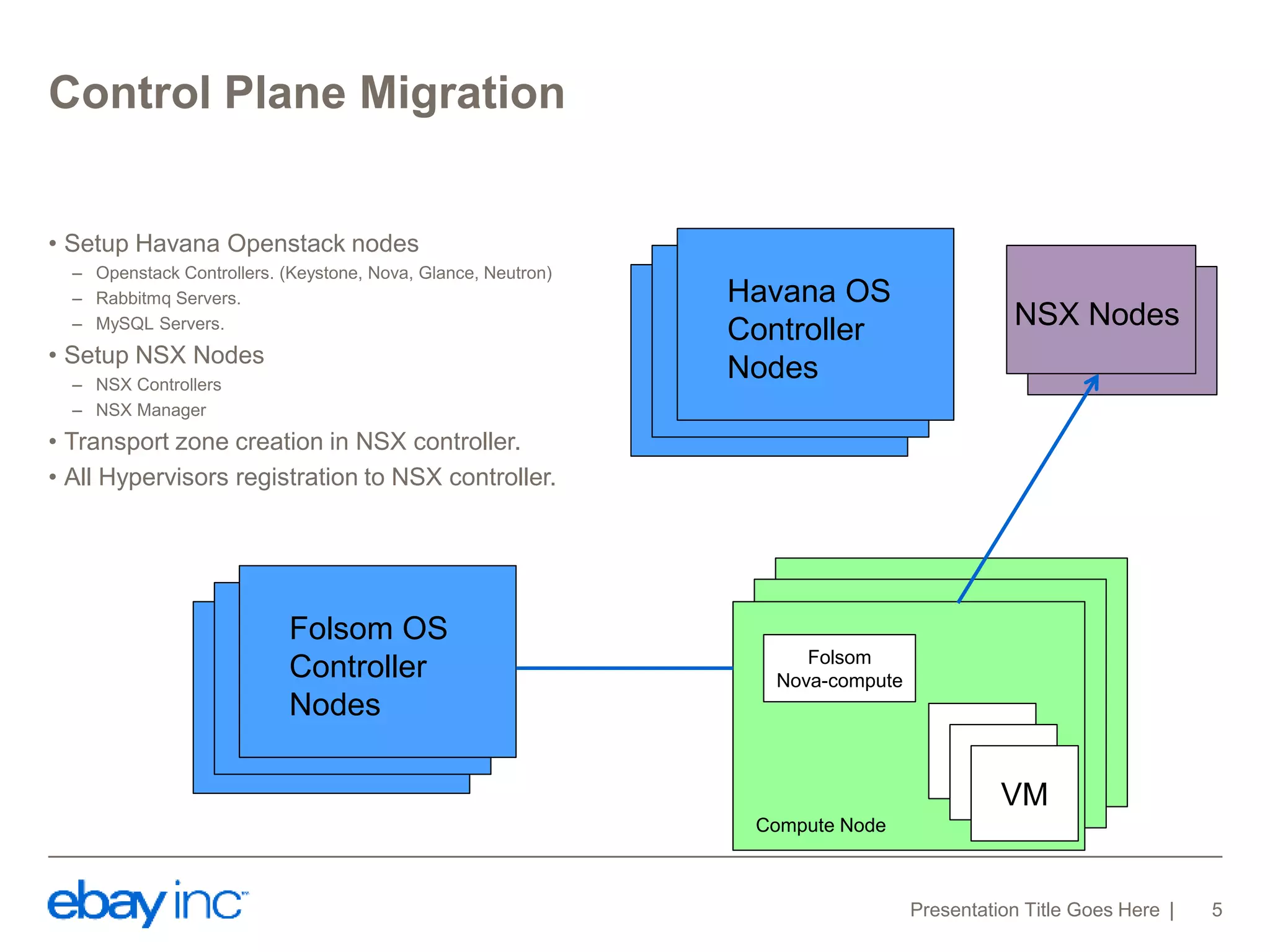
Control Plane Migration 
• Setup Havana Openstack nodes 
– Openstack Controllers. (Keystone, Nova, Glance, Neutron) 
– Rabbitmq Servers. 
– MySQL Servers. 
• Setup NSX Nodes 
– NSX Controllers 
– NSX Manager 
• Transport zone creation in NSX controller. 
• All Hypervisors registration to NSX controller. 
Presentation Title Goes Here 5 
Folsom 
Nova-compute 
VM 
VM 
VM 
Compute Node 
Folsom OS 
Controller 
Nodes 
Havana OS 
Controller 
Nodes 
NSX Nodes
Control Plane Migration 
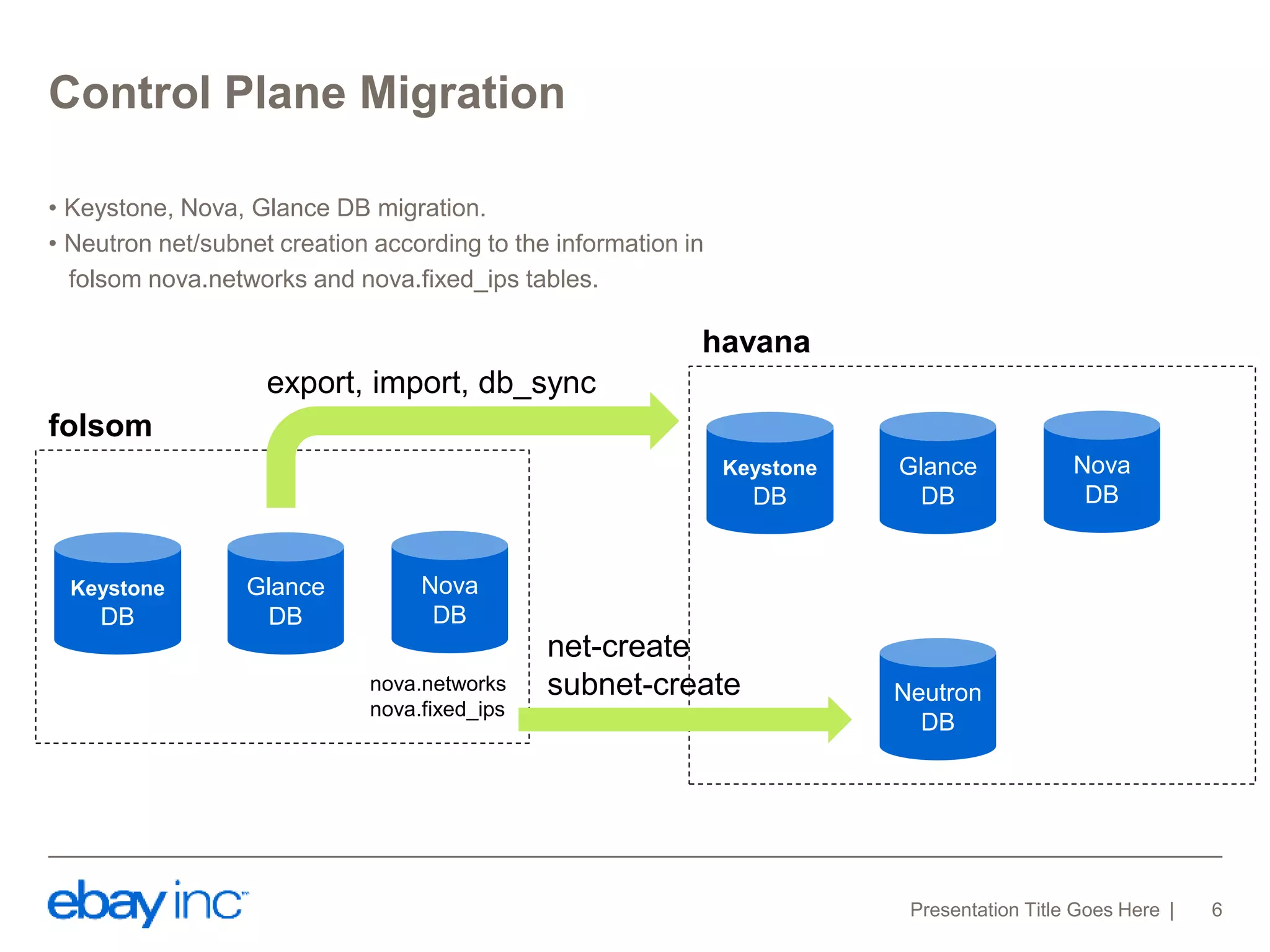
• Keystone, Nova, Glance DB migration. 
• Neutron net/subnet creation according to the information in 
folsom nova.networks and nova.fixed_ips tables. 
Glance 
DB 
Presentation Title Goes Here 6 
Keystone 
DB 
Nova 
DB 
Neutron 
DB 
export, import, db_sync 
Glance 
DB 
Keystone 
DB 
Nova 
DB 
folsom 
havana 
nova.networks 
nova.fixed_ips 
net-create 
subnet-create
Control Plane Migration 
• Enable fake driver in nova-compute, and register to Controller. 
• Create port in Neutron and Attach port to VM 
Neutron 
DB 
NSX 
Controller 
Presentation Title Goes Here 7 
new_port = { 
"port": { 
"network_id": network_id, 
"mac_address": mac, 
"fixed_ips": [ 
{ 
"subnet_id": subnet_id, 
"ip_address": ip, 
} 
], 
"tenant_id": tenant 
} 
} 
neutron.create_port(new_port) 
nova.interface_attach(port_id, "", "") 
Nova-compute 
with fake driver 
Nova 
DB 
VM 
vnet 
Havana 
Openstack 
Controller
Control Plane Migration 
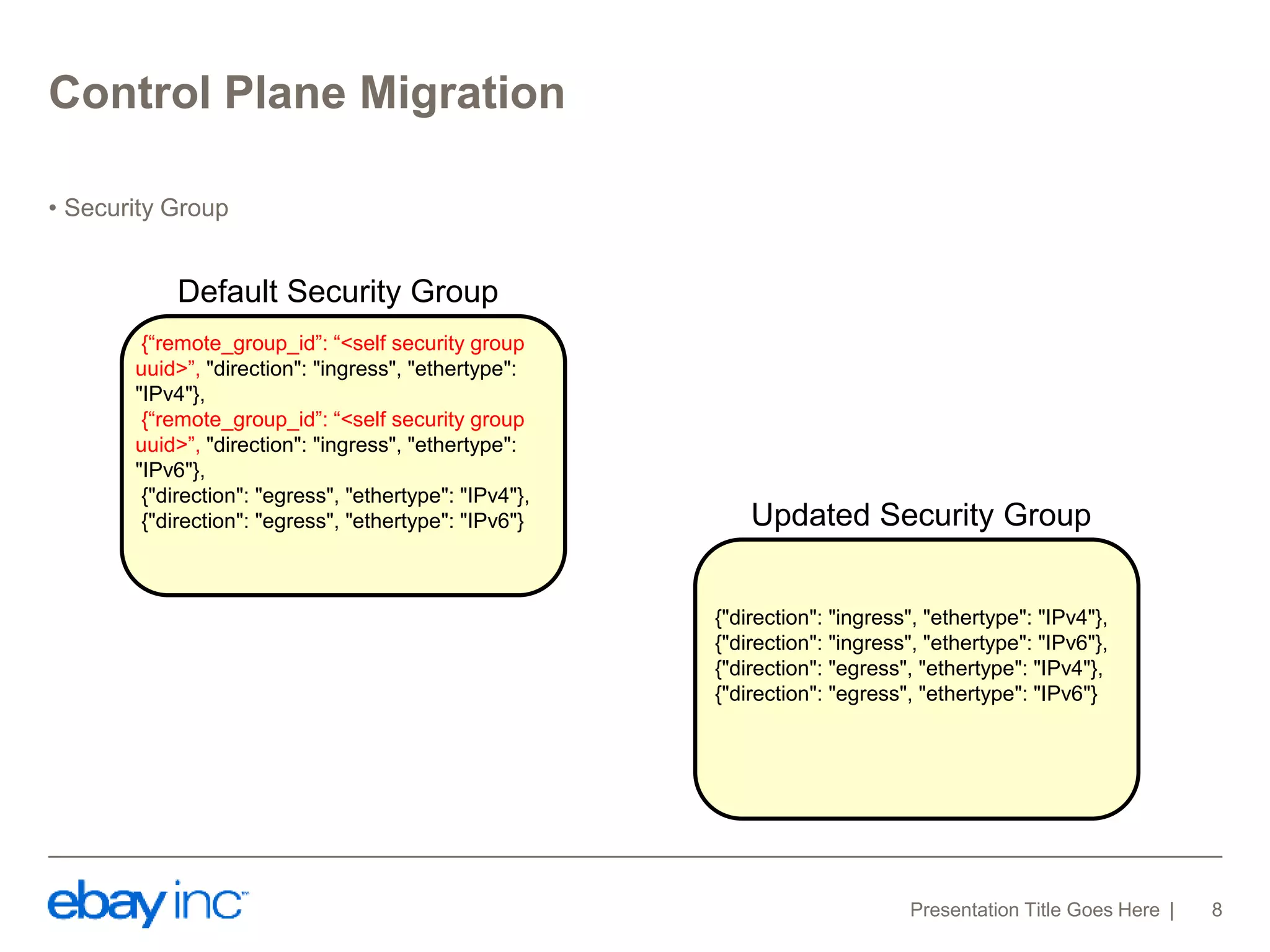
• Security Group 
Presentation Title Goes Here 8 
{“remote_group_id”: “<self security group 
uuid>”, "direction": "ingress", "ethertype": 
"IPv4"}, 
{“remote_group_id”: “<self security group 
uuid>”, "direction": "ingress", "ethertype": 
"IPv6"}, 
{"direction": "egress", "ethertype": "IPv4"}, 
{"direction": "egress", "ethertype": "IPv6"} 
{"direction": "ingress", "ethertype": "IPv4"}, 
{"direction": "ingress", "ethertype": "IPv6"}, 
{"direction": "egress", "ethertype": "IPv4"}, 
{"direction": "egress", "ethertype": "IPv6"} 
Default Security Group 
Updated Security Group
Data Plane Migration 
Presentation Title Goes Here 9 
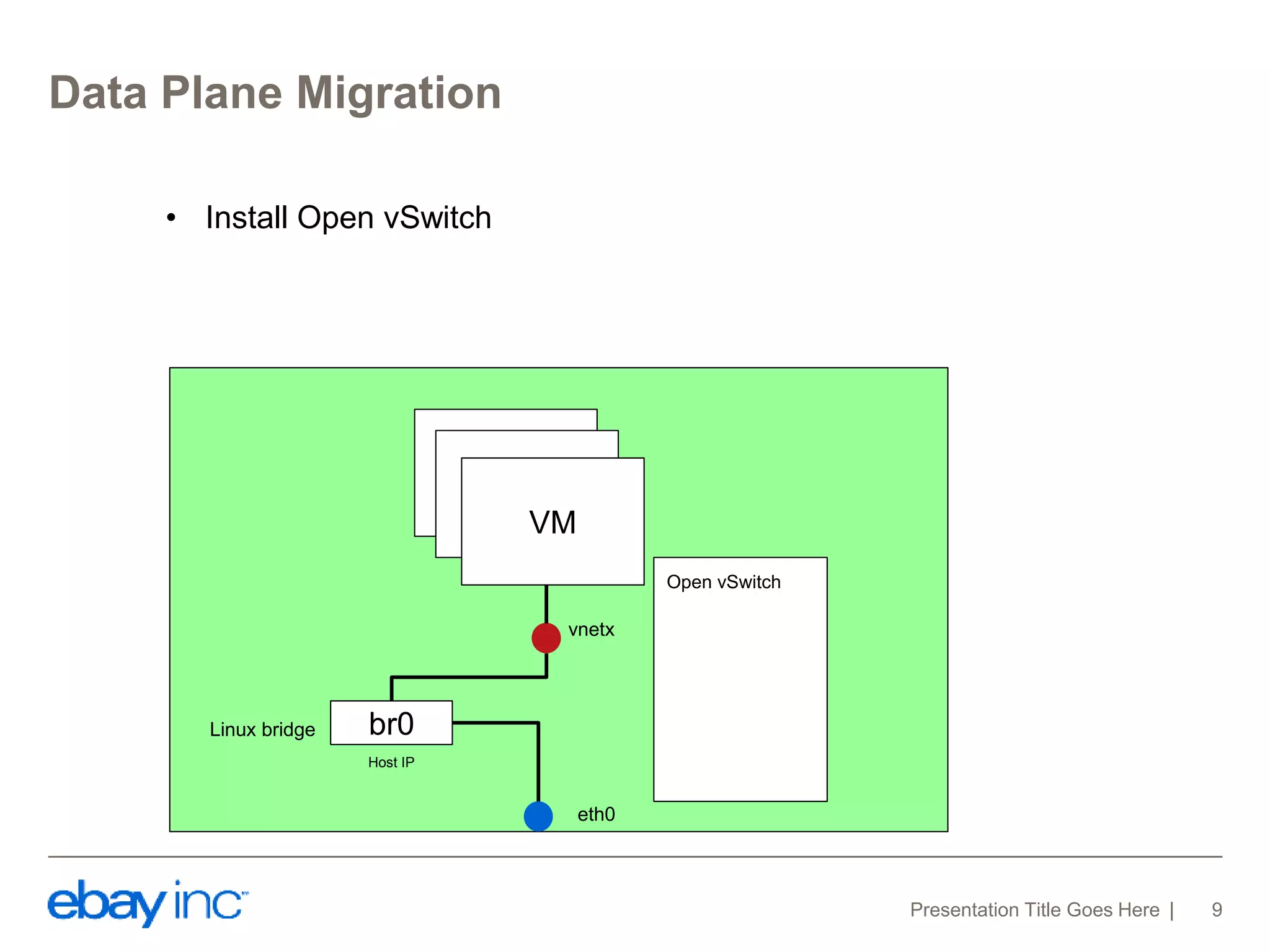
VM 
br0 
vnetx 
eth0 
Host IP 
Linux bridge 
Open vSwitch 
VM 
VM 
• Install Open vSwitch
Data Plane Migration 
Presentation Title Goes Here 10 
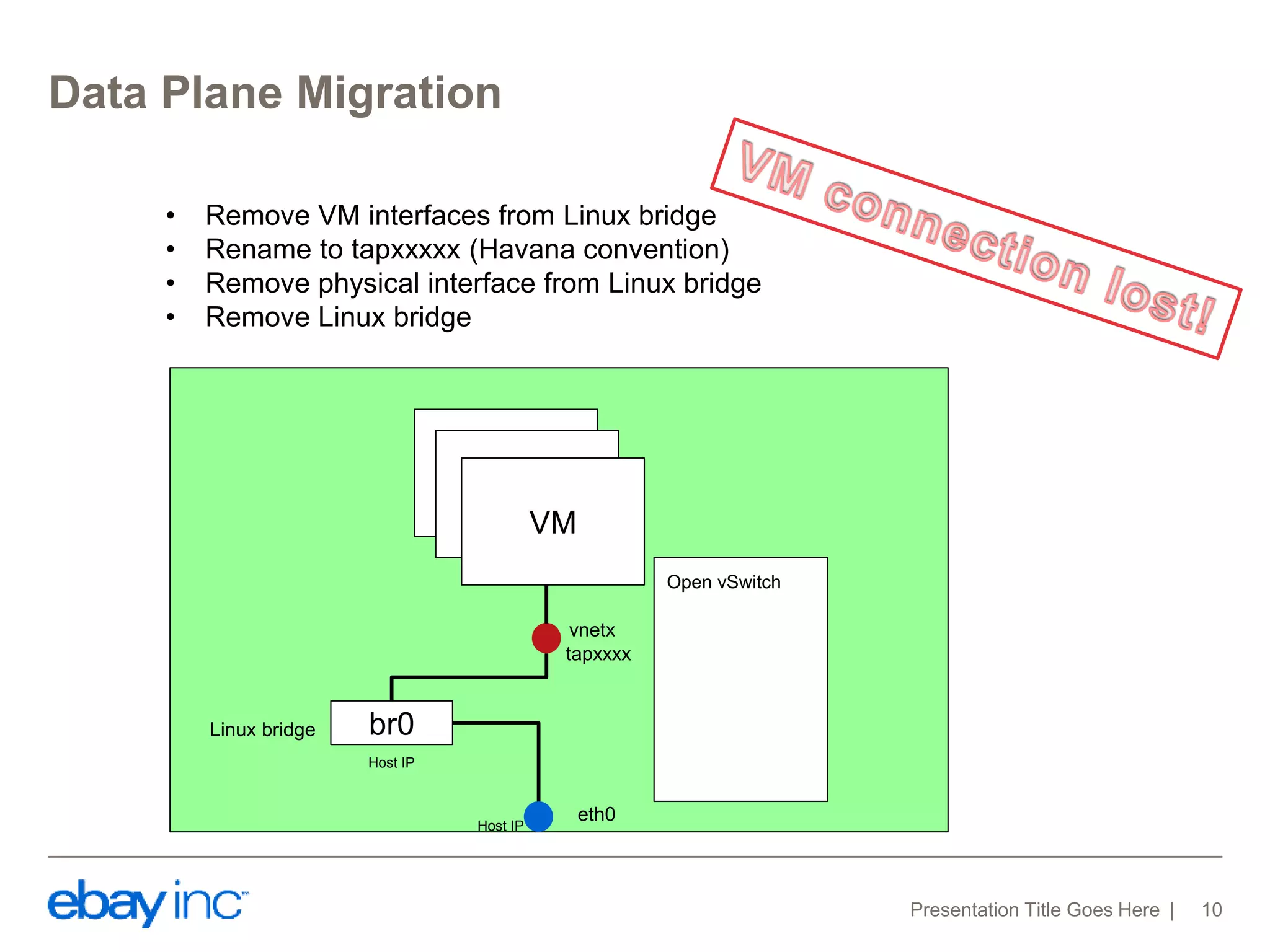
• Remove VM interfaces from Linux bridge 
• Rename to tapxxxxx (Havana convention) 
• Remove physical interface from Linux bridge 
• Remove Linux bridge 
VM 
br0 
vnetx 
eth0 
Host IP 
Linux bridge 
Open vSwitch 
VM 
VM 
tapxxxx 
Host IP
Data Plane Migration 
Presentation Title Goes Here 11 
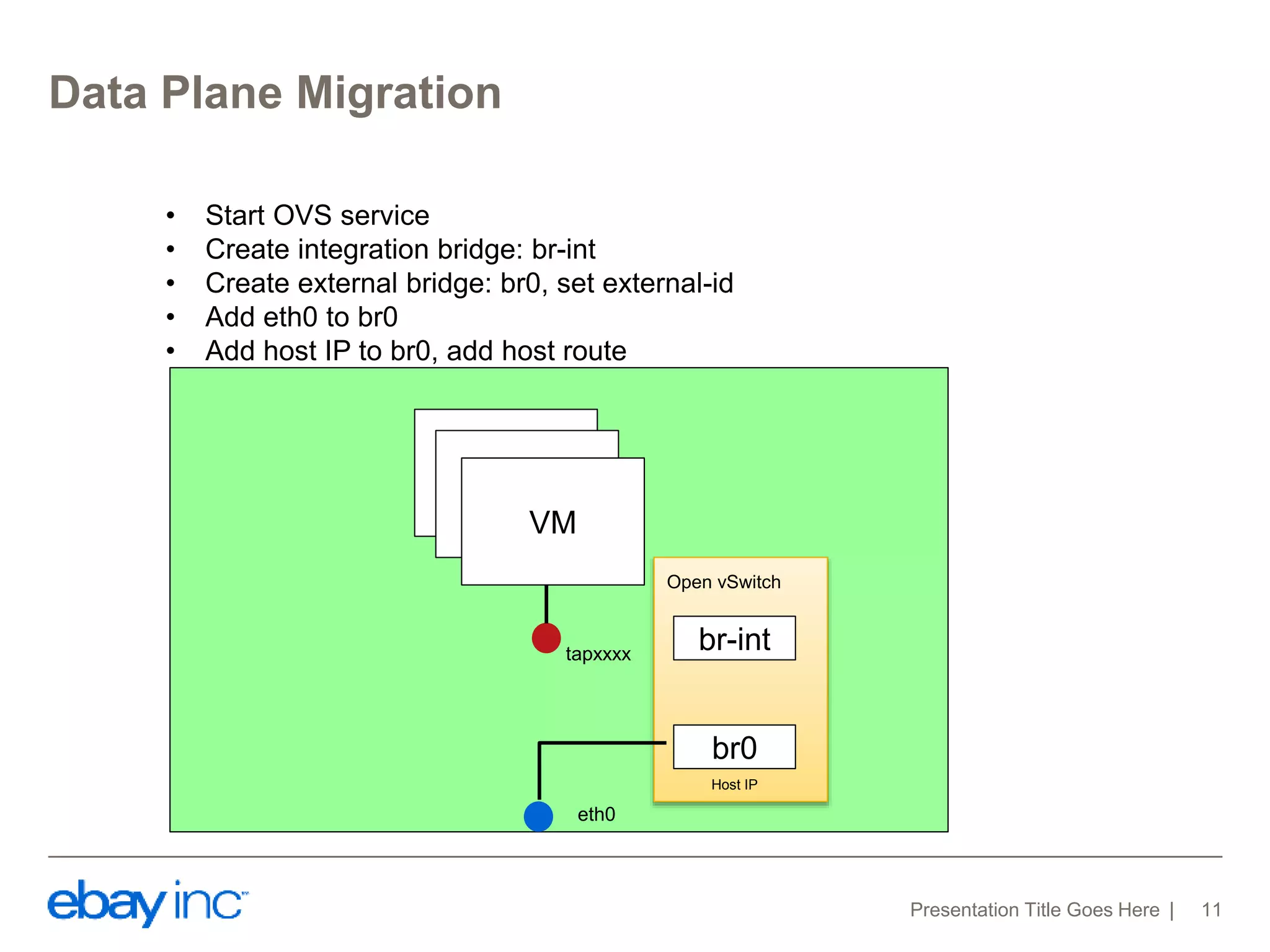
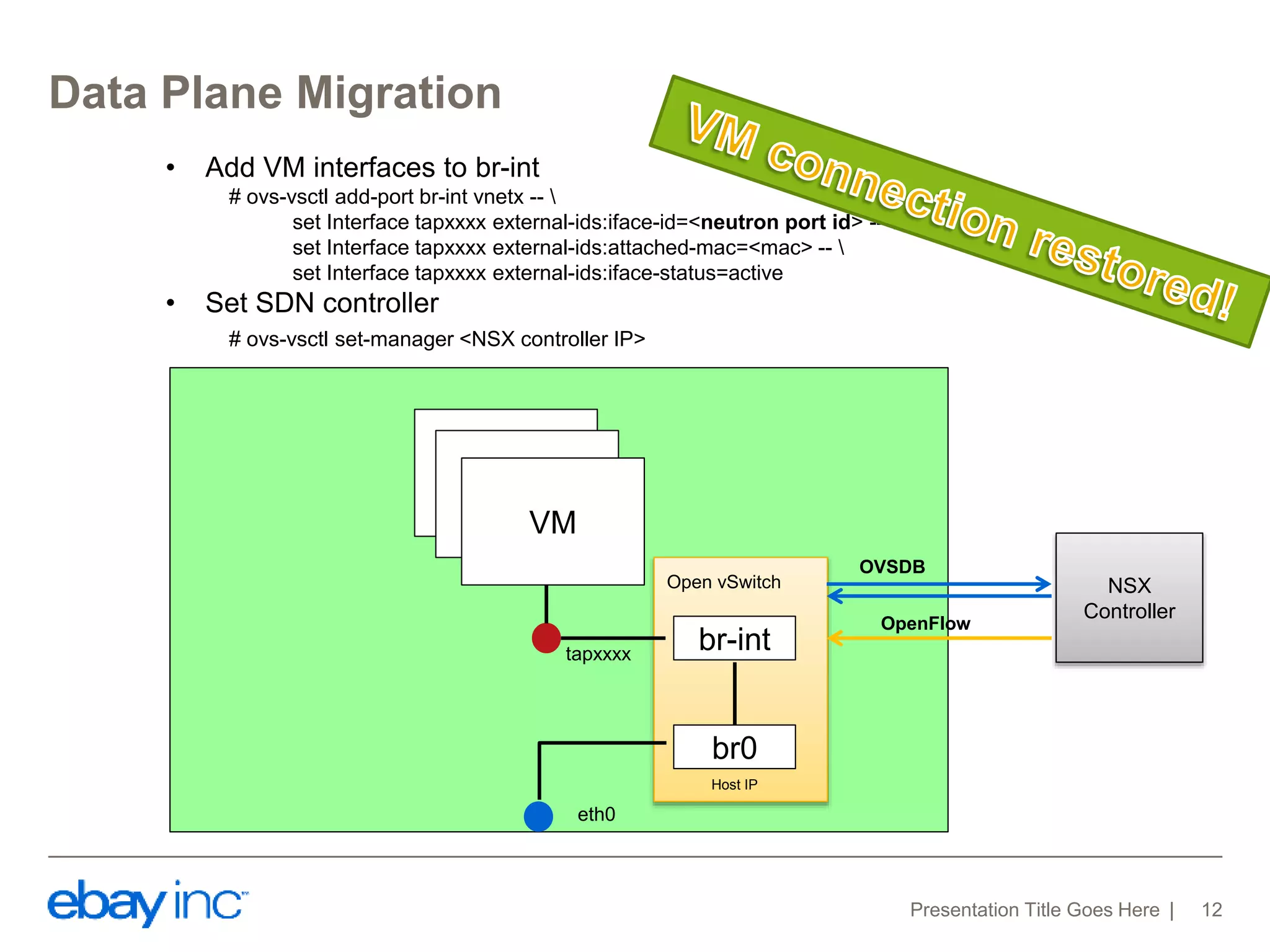
• Start OVS service 
• Create integration bridge: br-int 
• Create external bridge: br0, set external-id 
• Add eth0 to br0 
• Add host IP to br0, add host route 
VM 
eth0 
Open vSwitch 
VM 
VM 
br-int 
br0 
Host IP 
tapxxxx
Data Plane Migration 
Presentation Title Goes Here 12 
VM 
eth0 
Open vSwitch 
VM 
VM 
br-int 
br0 
Host IP 
• Add VM interfaces to br-int 
# ovs-vsctl add-port br-int vnetx --  
set Interface tapxxxx external-ids:iface-id=<neutron port id> --  
set Interface tapxxxx external-ids:attached-mac=<mac> --  
set Interface tapxxxx external-ids:iface-status=active 
• Set SDN controller 
# ovs-vsctl set-manager <NSX controller IP> 
OVSDB 
OpenFlow 
NSX 
Controller 
tapxxxx
Post-migration 
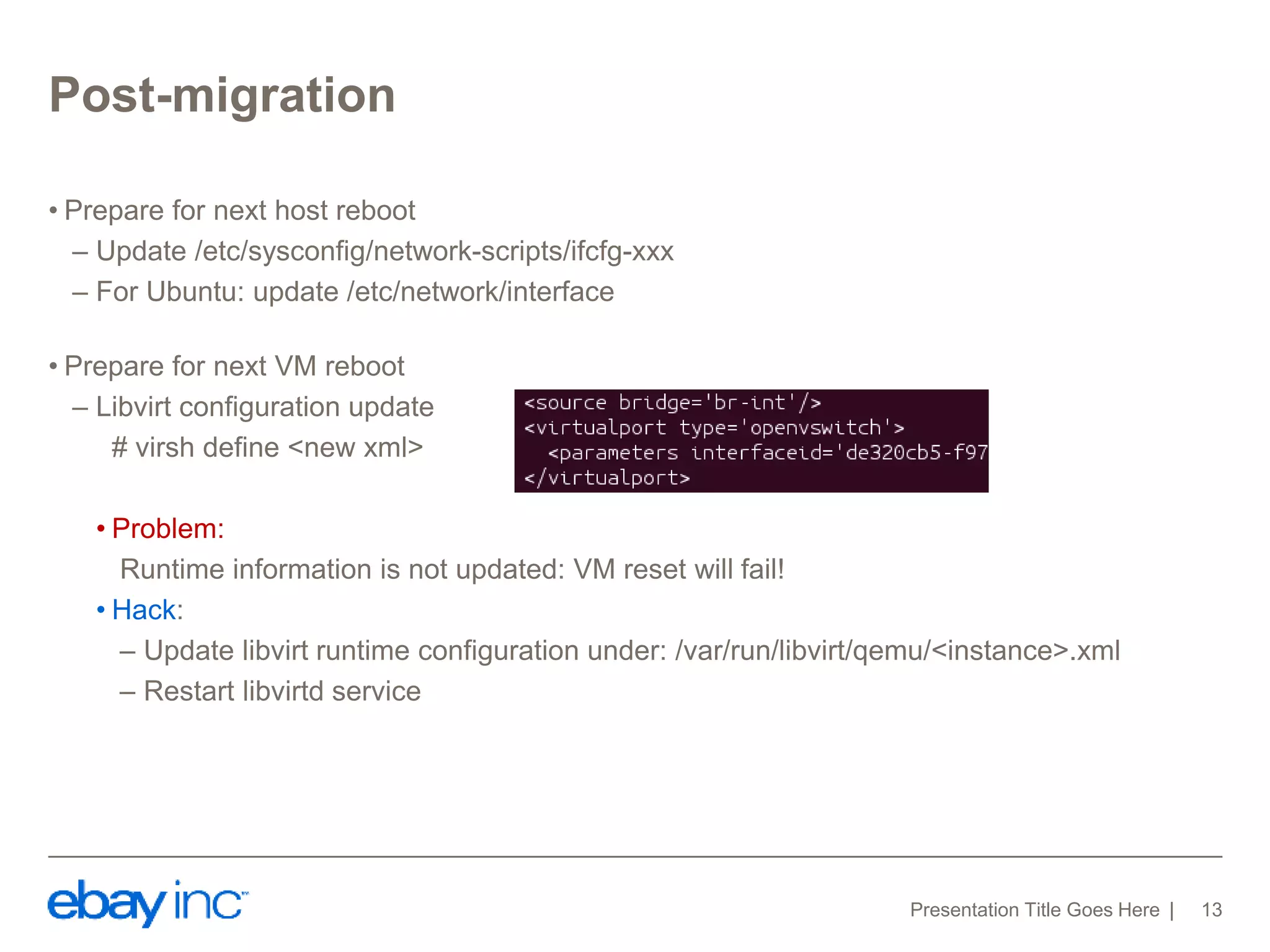
• Prepare for next host reboot 
– Update /etc/sysconfig/network-scripts/ifcfg-xxx 
– For Ubuntu: update /etc/network/interface 
• Prepare for next VM reboot 
– Libvirt configuration update 
# virsh define <new xml> 
• Problem: 
Runtime information is not updated: VM reset will fail! 
• Hack: 
– Update libvirt runtime configuration under: /var/run/libvirt/qemu/<instance>.xml 
– Restart libvirtd service 
Presentation Title Goes Here 13
Rollback 
• You never know … 
•Support rollback 
– Revert the steps 
•Automation 
Presentation Title Goes Here 14
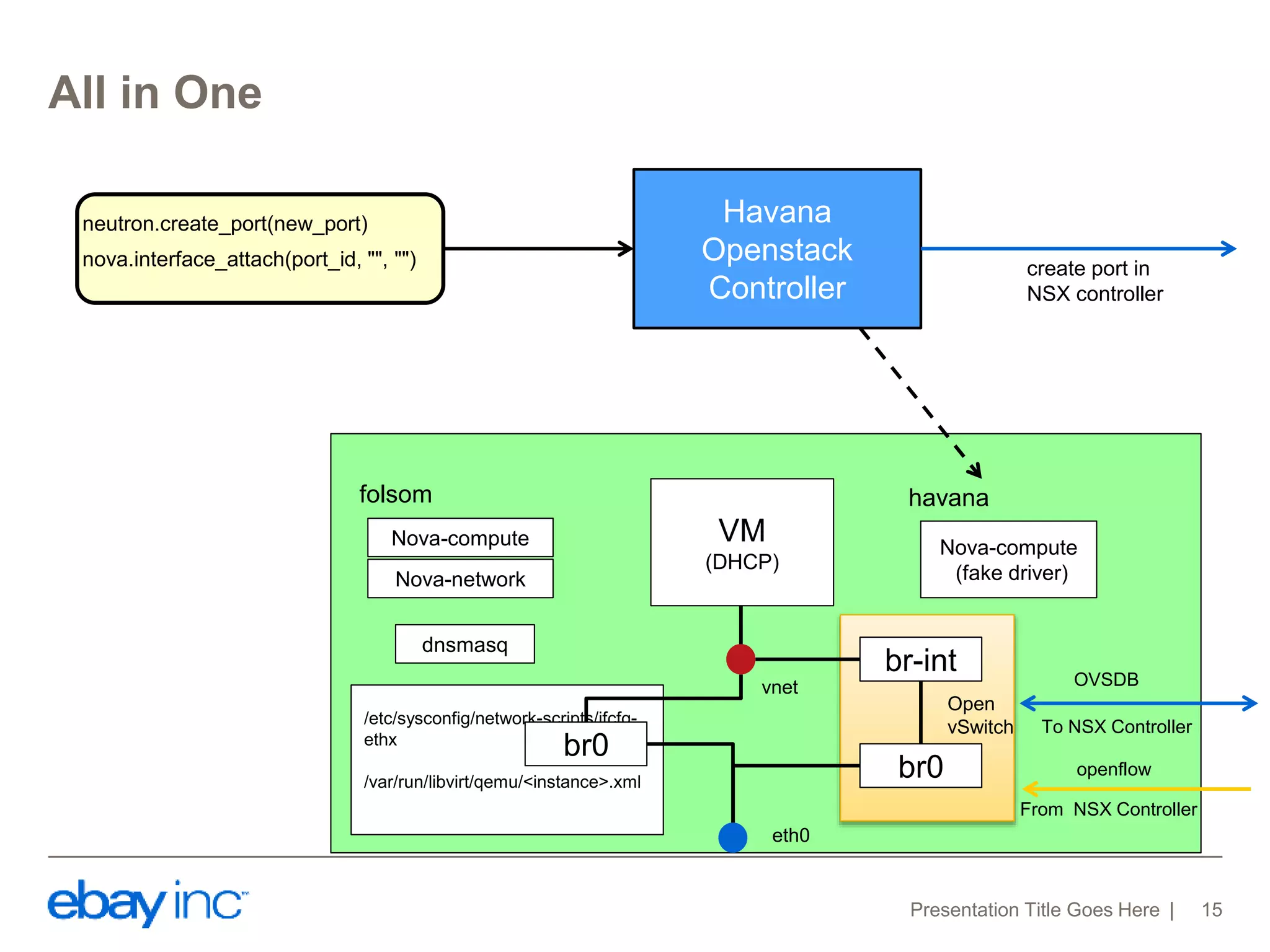
All in One 
neutron.create_port(new_port) 
nova.interface_attach(port_id, "", "") 
folsom havana 
Presentation Title Goes Here 15 
VM 
(DHCP) 
vnet 
eth0 
Nova-compute 
Nova-network 
dnsmasq 
Nova-compute 
(fake driver) 
br0 
HV IP 
HV IP 
OVSDB 
Linux bridge 
Havana 
Openstack 
Controller 
create port in 
NSX controller 
/etc/sysconfig/network-scripts/ifcfg-ethx 
/var/run/libvirt/qemu/<instance>.xml 
br-int 
br0 
Open 
vSwitch To NSX Controller 
openflow 
From NSX Controller
Demo

Seamless migration from nova network to neutron in e bay production

  • 1.
    Seamless migration fromNova-network to Neutron in eBay production Chengyuan Li, Han Zhou
  • 2.
    Agenda •Overview ofeBay Cloud Environment •Nova-network to Neutron Migration –Control Plane Migration –Data Plane Migration –Post-migration. •Demo Presentation Title Goes Here 2
  • 3.
  • 4.
    Havana Neutron +SDN Controller Presentation Title Goes Here 4
  • 5.
    Control Plane Migration • Setup Havana Openstack nodes – Openstack Controllers. (Keystone, Nova, Glance, Neutron) – Rabbitmq Servers. – MySQL Servers. • Setup NSX Nodes – NSX Controllers – NSX Manager • Transport zone creation in NSX controller. • All Hypervisors registration to NSX controller. Presentation Title Goes Here 5 Folsom Nova-compute VM VM VM Compute Node Folsom OS Controller Nodes Havana OS Controller Nodes NSX Nodes
  • 6.
    Control Plane Migration • Keystone, Nova, Glance DB migration. • Neutron net/subnet creation according to the information in folsom nova.networks and nova.fixed_ips tables. Glance DB Presentation Title Goes Here 6 Keystone DB Nova DB Neutron DB export, import, db_sync Glance DB Keystone DB Nova DB folsom havana nova.networks nova.fixed_ips net-create subnet-create
  • 7.
    Control Plane Migration • Enable fake driver in nova-compute, and register to Controller. • Create port in Neutron and Attach port to VM Neutron DB NSX Controller Presentation Title Goes Here 7 new_port = { "port": { "network_id": network_id, "mac_address": mac, "fixed_ips": [ { "subnet_id": subnet_id, "ip_address": ip, } ], "tenant_id": tenant } } neutron.create_port(new_port) nova.interface_attach(port_id, "", "") Nova-compute with fake driver Nova DB VM vnet Havana Openstack Controller
  • 8.
    Control Plane Migration • Security Group Presentation Title Goes Here 8 {“remote_group_id”: “<self security group uuid>”, "direction": "ingress", "ethertype": "IPv4"}, {“remote_group_id”: “<self security group uuid>”, "direction": "ingress", "ethertype": "IPv6"}, {"direction": "egress", "ethertype": "IPv4"}, {"direction": "egress", "ethertype": "IPv6"} {"direction": "ingress", "ethertype": "IPv4"}, {"direction": "ingress", "ethertype": "IPv6"}, {"direction": "egress", "ethertype": "IPv4"}, {"direction": "egress", "ethertype": "IPv6"} Default Security Group Updated Security Group
  • 9.
    Data Plane Migration Presentation Title Goes Here 9 VM br0 vnetx eth0 Host IP Linux bridge Open vSwitch VM VM • Install Open vSwitch
  • 10.
    Data Plane Migration Presentation Title Goes Here 10 • Remove VM interfaces from Linux bridge • Rename to tapxxxxx (Havana convention) • Remove physical interface from Linux bridge • Remove Linux bridge VM br0 vnetx eth0 Host IP Linux bridge Open vSwitch VM VM tapxxxx Host IP
  • 11.
    Data Plane Migration Presentation Title Goes Here 11 • Start OVS service • Create integration bridge: br-int • Create external bridge: br0, set external-id • Add eth0 to br0 • Add host IP to br0, add host route VM eth0 Open vSwitch VM VM br-int br0 Host IP tapxxxx
  • 12.
    Data Plane Migration Presentation Title Goes Here 12 VM eth0 Open vSwitch VM VM br-int br0 Host IP • Add VM interfaces to br-int # ovs-vsctl add-port br-int vnetx -- set Interface tapxxxx external-ids:iface-id=<neutron port id> -- set Interface tapxxxx external-ids:attached-mac=<mac> -- set Interface tapxxxx external-ids:iface-status=active • Set SDN controller # ovs-vsctl set-manager <NSX controller IP> OVSDB OpenFlow NSX Controller tapxxxx
  • 13.
    Post-migration • Preparefor next host reboot – Update /etc/sysconfig/network-scripts/ifcfg-xxx – For Ubuntu: update /etc/network/interface • Prepare for next VM reboot – Libvirt configuration update # virsh define <new xml> • Problem: Runtime information is not updated: VM reset will fail! • Hack: – Update libvirt runtime configuration under: /var/run/libvirt/qemu/<instance>.xml – Restart libvirtd service Presentation Title Goes Here 13
  • 14.
    Rollback • Younever know … •Support rollback – Revert the steps •Automation Presentation Title Goes Here 14
  • 15.
    All in One neutron.create_port(new_port) nova.interface_attach(port_id, "", "") folsom havana Presentation Title Goes Here 15 VM (DHCP) vnet eth0 Nova-compute Nova-network dnsmasq Nova-compute (fake driver) br0 HV IP HV IP OVSDB Linux bridge Havana Openstack Controller create port in NSX controller /etc/sysconfig/network-scripts/ifcfg-ethx /var/run/libvirt/qemu/<instance>.xml br-int br0 Open vSwitch To NSX Controller openflow From NSX Controller
  • 16.