Actions in QTP – The Basics
                                                           By Anish Pillai


             Automation Repository @ http://www.automationrepository.com


www.automationrepository.com                 Automation Repository -   QTP Tutorials Made Easy
What you would read in this PPT:

 What are QTP Actions.

 What are the different types of QTP actions.

 How actions access data from QTP data tables.

 How to call actions in your QTP scripts.


 www.automationrepository.com          Automation Repository -   QTP Tutorials Made Easy
What is a QTP Action?

QTP Action is a placeholder or a component in which you can write your
scripts or code.

You can write your code in QTP actions in the same way you do in a
function library or scripted business component.

Just like functions, actions also help to divide your test script into logical
units or business flows.

In fact, a QTP test script is itself a collection of one or more actions.

Whenever you create a new test case, an action will also be created
automatically for that test case.


 www.automationrepository.com              Automation Repository -   QTP Tutorials Made Easy
What is a QTP Action – contd..

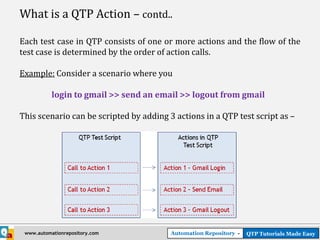
Each test case in QTP consists of one or more actions and the flow of the
test case is determined by the order of action calls.

Example: Consider a scenario where you

           login to gmail >> send an email >> logout from gmail

This scenario can be scripted by adding 3 actions in a QTP test script as –


 www.automationrepository.com            Automation Repository -   QTP Tutorials Made Easy
What is a QTP Action – contd..

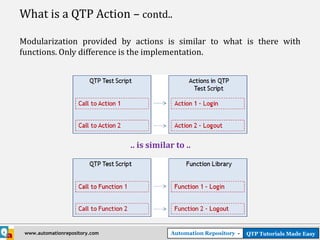
Modularization provided by actions is similar to what is there with
functions. Only difference is the implementation.


                                .. is similar to ..


 www.automationrepository.com               Automation Repository -   QTP Tutorials Made Easy
Different Types of QTP Actions

QTP actions can be classified into the following different types -


                                    Different Types of QTP Actions


NOTE: QTP documentation doesn’t specify an action type as ‘Internal’. We have just extended the ‘External
Action’ type to come up with ‘Internal Action’.


  www.automationrepository.com                           Automation Repository -     QTP Tutorials Made Easy
Different Types of QTP Actions – contd..

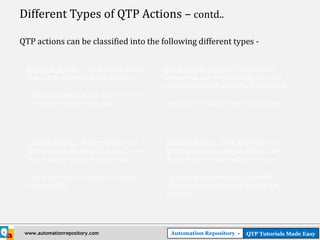
QTP actions can be classified into the following different types -


  Reusable Actions : These are the actions      Non-Reusable Actions : These are the
  that can be called multiple times by –        actions that can be called only once and
                                                that too in the test where they are stored.
   - the same test in which it is stored, and
  - by other external tests also.               These can’t be called from external tests.


  Internal Actions : With reference to a        External Actions : With reference to a
  QTP test case, an internal action is one      QTP test case, an external action is one
  that is stored within that test case.         that is stored in some other test case.

  This action can be reusable as well as        External actions should be reusable
  non-reusable.                                 otherwise it can’t be used outside the
                                                test case.


 www.automationrepository.com                     Automation Repository -   QTP Tutorials Made Easy
QTP Actions and Data Sheets

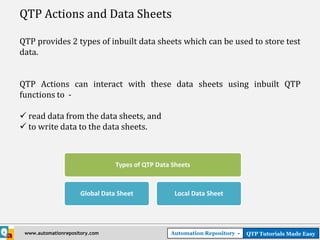
QTP provides 2 types of inbuilt data sheets which can be used to store test
data.


QTP Actions can interact with these data sheets using inbuilt QTP
functions to -

 read data from the data sheets, and
 to write data to the data sheets.


                                 Types of QTP Data Sheets


                      Global Data Sheet            Local Data Sheet


 www.automationrepository.com                     Automation Repository -   QTP Tutorials Made Easy
QTP Actions and Data Sheets – contd..


                     • A Global Data sheet is one                             • A local Data Sheet is one which
Global Data Sheets


                                                          Local Data Sheets
                       which can be accessed by all the                         can be accessed by only one
                       actions in the test case.                                action.

                     • Each test case has only one                            • The number of local sheets is
                       Global Sheet.                                            equal to the number of actions
                                                                                in the test case. [Each action
                     • The name of the Global Data                              will have its own data sheet]
                       Sheet is ‘Global’.
                                                                              • The name of the local sheet is
                     • This sheet can be used when                              same as the name of its
                       you want to pass data between                            associated action.
                       multiple actions.
                                                                              • Local data sheet can be used to
                                                                                store data that would be used
                                                                                within that action only.


        www.automationrepository.com                        Automation Repository -                QTP Tutorials Made Easy
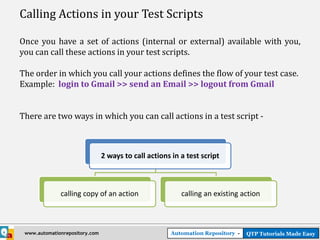
Calling Actions in your Test Scripts

Once you have a set of actions (internal or external) available with you,
you can call these actions in your test scripts.

The order in which you call your actions defines the flow of your test case.
Example: login to Gmail >> send an Email >> logout from Gmail


There are two ways in which you can call actions in a test script -


                                2 ways to call actions in a test script


              calling copy of an action                   calling an existing action


 www.automationrepository.com                          Automation Repository -   QTP Tutorials Made Easy
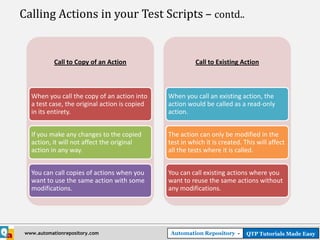
Calling Actions in your Test Scripts – contd..


            Call to Copy of an Action                     Call to Existing Action


   When you call the copy of an action into     When you call an existing action, the
   a test case, the original action is copied   action would be called as a read-only
   in its entirety.                             action.


   If you make any changes to the copied        The action can only be modified in the
   action, it will not affect the original      test in which it is created. This will affect
   action in any way.                           all the tests where it is called.


   You can call copies of actions when you      You can call existing actions where you
   want to use the same action with some        want to reuse the same actions without
   modifications.                               any modifications.


 www.automationrepository.com                   Automation Repository -       QTP Tutorials Made Easy
THANK YOU

 We are always eager to know what you think about our
 content. For feedback, suggestions or any queries, please
 email us at anish@automationrepository.com


 For more QTP Tutorials, visit –

  www.automationrepository.com
 www.automationrepository.com/tutorials-for-qtp-beginners/


www.automationrepository.com        Automation Repository -   QTP Tutorials Made Easy

Actions in QTP

  • 1.
    Actions in QTP– The Basics By Anish Pillai Automation Repository @ http://www.automationrepository.com www.automationrepository.com Automation Repository - QTP Tutorials Made Easy
  • 2.
    What you wouldread in this PPT:  What are QTP Actions.  What are the different types of QTP actions.  How actions access data from QTP data tables.  How to call actions in your QTP scripts. www.automationrepository.com Automation Repository - QTP Tutorials Made Easy
  • 3.
    What is aQTP Action? QTP Action is a placeholder or a component in which you can write your scripts or code. You can write your code in QTP actions in the same way you do in a function library or scripted business component. Just like functions, actions also help to divide your test script into logical units or business flows. In fact, a QTP test script is itself a collection of one or more actions. Whenever you create a new test case, an action will also be created automatically for that test case. www.automationrepository.com Automation Repository - QTP Tutorials Made Easy
  • 4.
    What is aQTP Action – contd.. Each test case in QTP consists of one or more actions and the flow of the test case is determined by the order of action calls. Example: Consider a scenario where you login to gmail >> send an email >> logout from gmail This scenario can be scripted by adding 3 actions in a QTP test script as – www.automationrepository.com Automation Repository - QTP Tutorials Made Easy
  • 5.
    What is aQTP Action – contd.. Modularization provided by actions is similar to what is there with functions. Only difference is the implementation. .. is similar to .. www.automationrepository.com Automation Repository - QTP Tutorials Made Easy
  • 6.
    Different Types ofQTP Actions QTP actions can be classified into the following different types - Different Types of QTP Actions NOTE: QTP documentation doesn’t specify an action type as ‘Internal’. We have just extended the ‘External Action’ type to come up with ‘Internal Action’. www.automationrepository.com Automation Repository - QTP Tutorials Made Easy
  • 7.
    Different Types ofQTP Actions – contd.. QTP actions can be classified into the following different types - Reusable Actions : These are the actions Non-Reusable Actions : These are the that can be called multiple times by – actions that can be called only once and that too in the test where they are stored. - the same test in which it is stored, and - by other external tests also. These can’t be called from external tests. Internal Actions : With reference to a External Actions : With reference to a QTP test case, an internal action is one QTP test case, an external action is one that is stored within that test case. that is stored in some other test case. This action can be reusable as well as External actions should be reusable non-reusable. otherwise it can’t be used outside the test case. www.automationrepository.com Automation Repository - QTP Tutorials Made Easy
  • 8.
    QTP Actions andData Sheets QTP provides 2 types of inbuilt data sheets which can be used to store test data. QTP Actions can interact with these data sheets using inbuilt QTP functions to -  read data from the data sheets, and  to write data to the data sheets. Types of QTP Data Sheets Global Data Sheet Local Data Sheet www.automationrepository.com Automation Repository - QTP Tutorials Made Easy
  • 9.
    QTP Actions andData Sheets – contd.. • A Global Data sheet is one • A local Data Sheet is one which Global Data Sheets Local Data Sheets which can be accessed by all the can be accessed by only one actions in the test case. action. • Each test case has only one • The number of local sheets is Global Sheet. equal to the number of actions in the test case. [Each action • The name of the Global Data will have its own data sheet] Sheet is ‘Global’. • The name of the local sheet is • This sheet can be used when same as the name of its you want to pass data between associated action. multiple actions. • Local data sheet can be used to store data that would be used within that action only. www.automationrepository.com Automation Repository - QTP Tutorials Made Easy
  • 10.
    Calling Actions inyour Test Scripts Once you have a set of actions (internal or external) available with you, you can call these actions in your test scripts. The order in which you call your actions defines the flow of your test case. Example: login to Gmail >> send an Email >> logout from Gmail There are two ways in which you can call actions in a test script - 2 ways to call actions in a test script calling copy of an action calling an existing action www.automationrepository.com Automation Repository - QTP Tutorials Made Easy
  • 11.
    Calling Actions inyour Test Scripts – contd.. Call to Copy of an Action Call to Existing Action When you call the copy of an action into When you call an existing action, the a test case, the original action is copied action would be called as a read-only in its entirety. action. If you make any changes to the copied The action can only be modified in the action, it will not affect the original test in which it is created. This will affect action in any way. all the tests where it is called. You can call copies of actions when you You can call existing actions where you want to use the same action with some want to reuse the same actions without modifications. any modifications. www.automationrepository.com Automation Repository - QTP Tutorials Made Easy
  • 12.
    THANK YOU Weare always eager to know what you think about our content. For feedback, suggestions or any queries, please email us at anish@automationrepository.com For more QTP Tutorials, visit –  www.automationrepository.com www.automationrepository.com/tutorials-for-qtp-beginners/ www.automationrepository.com Automation Repository - QTP Tutorials Made Easy