What Happened to Network
Domain & Service Provider in
Google Analytics?
WHAT YOU’LL LEARN:
1
2
3
What Network Domain & Service
Provider Are & How They’re Used
What Happened To Them
What Marketers Can Do About It
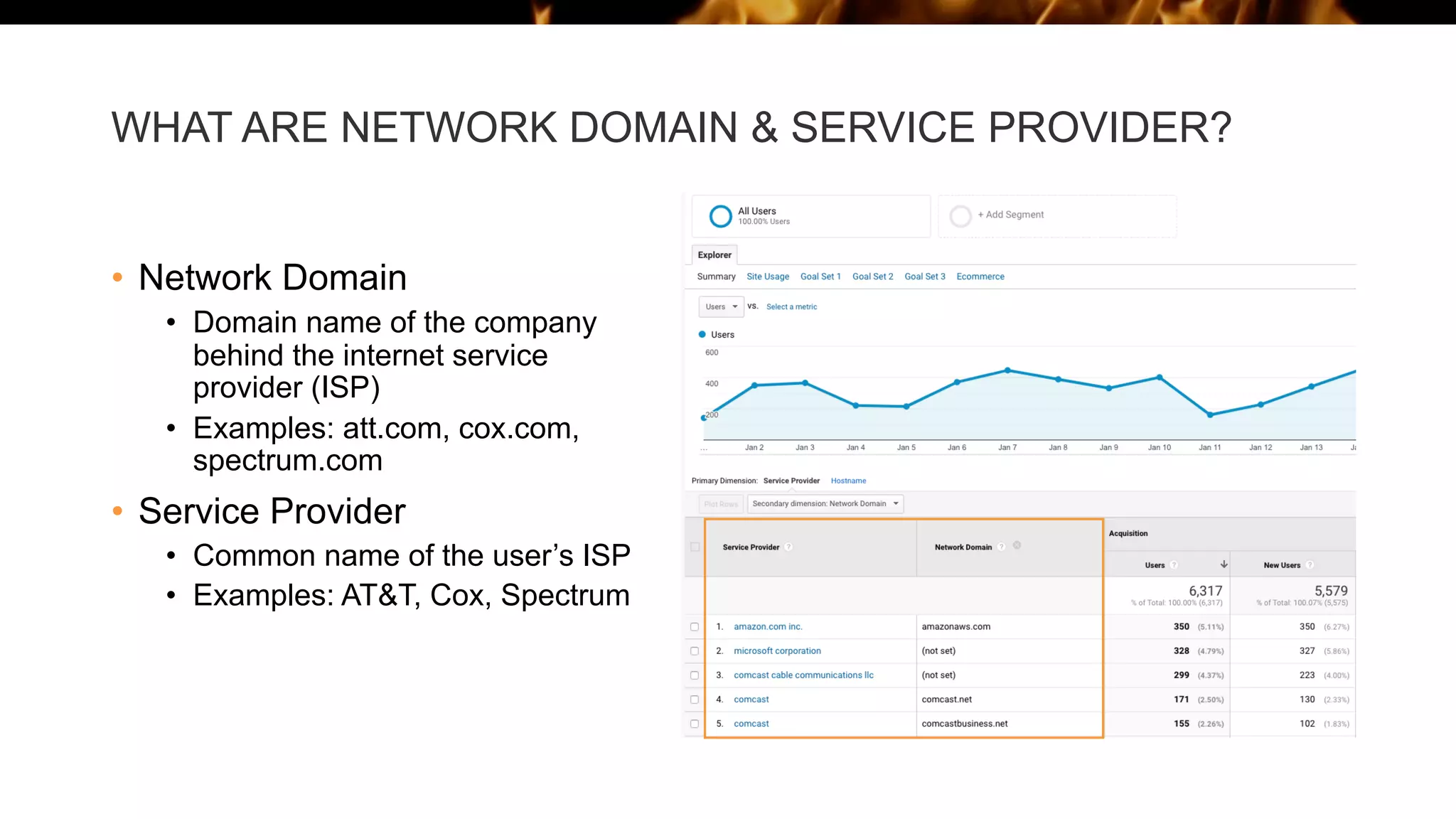
WHAT ARE NETWORK DOMAIN & SERVICE PROVIDER?
• Network Domain
• Domain name of the company
behind the internet service
provider (ISP)
• Examples: att.com, cox.com,
spectrum.com
• Service Provider
• Common name of the user’s ISP
• Examples: AT&T, Cox, Spectrum
HOW ARE THESE DIMENSIONS USED?
• These dimensions have been used by marketers and sales teams to
provide insights into website traffic, such as:
• Tracking marketing campaign attribution and ROI
• Excluding internal website traffic from website analytics reporting
• Monitoring bot, spam, and internal traffic
• And more
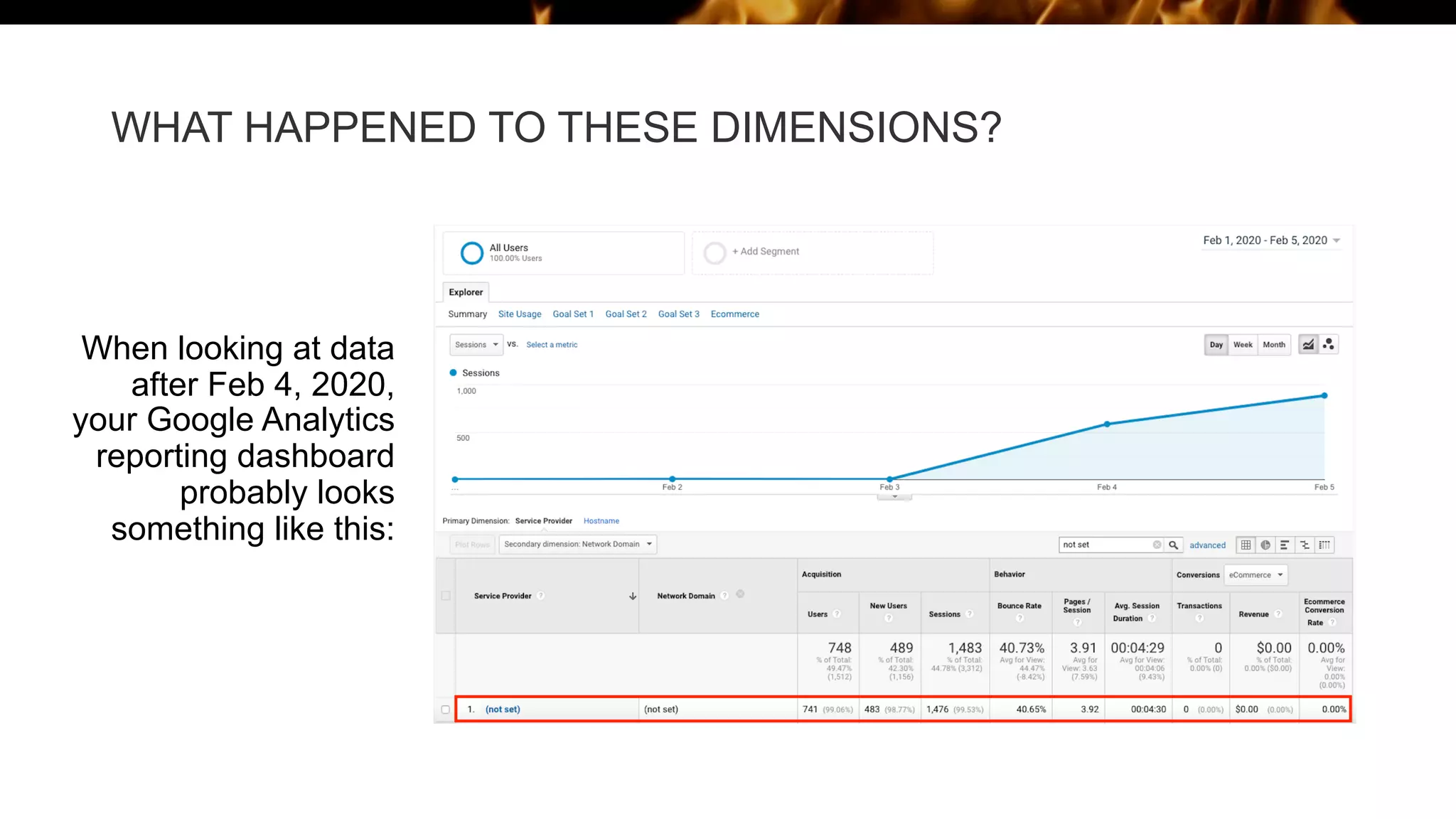
WHAT HAPPENED TO THESE DIMENSIONS?
When looking at data
after Feb 4, 2020,
your Google Analytics
reporting dashboard
probably looks
something like this:
HERE’S WHAT WE KNOW SO FAR:
• On February 4th, 2020, Google abruptly deleted these dimensions from
their analytics reporting
• This is not a mistake or a bug within Google Analytics, this was an
intentional change
• This issue affects both free and paid versions of Google Analytics
WHAT DOES THIS MEAN FOR MARKETERS?
• For companies that relied on Network Domain or Service Provider
information for their sales and marketing strategies, here are a few areas
that were impacted:
• Marketing attribution and ROI reporting will become much more difficult
• Ad Campaign performance tracking will be nearly impossible
• Fraudulent ad clicks will go unnoticed
• Bot, spam, and internal traffic will be indistinguishable from external traffic
• Justifying ad spend will become more difficult
WHAT CAN WE DO ABOUT IT?
• Unfortunately, all indications are that Google has no plans to bring back
these dimensions any time soon, but don’t give up on Google Analytics
yet!
• KickFire for Google provides more accurate account-level data than
Google’s previous Network Domain/Service Provider, and enhanced
firmographic data associated with your website traffic
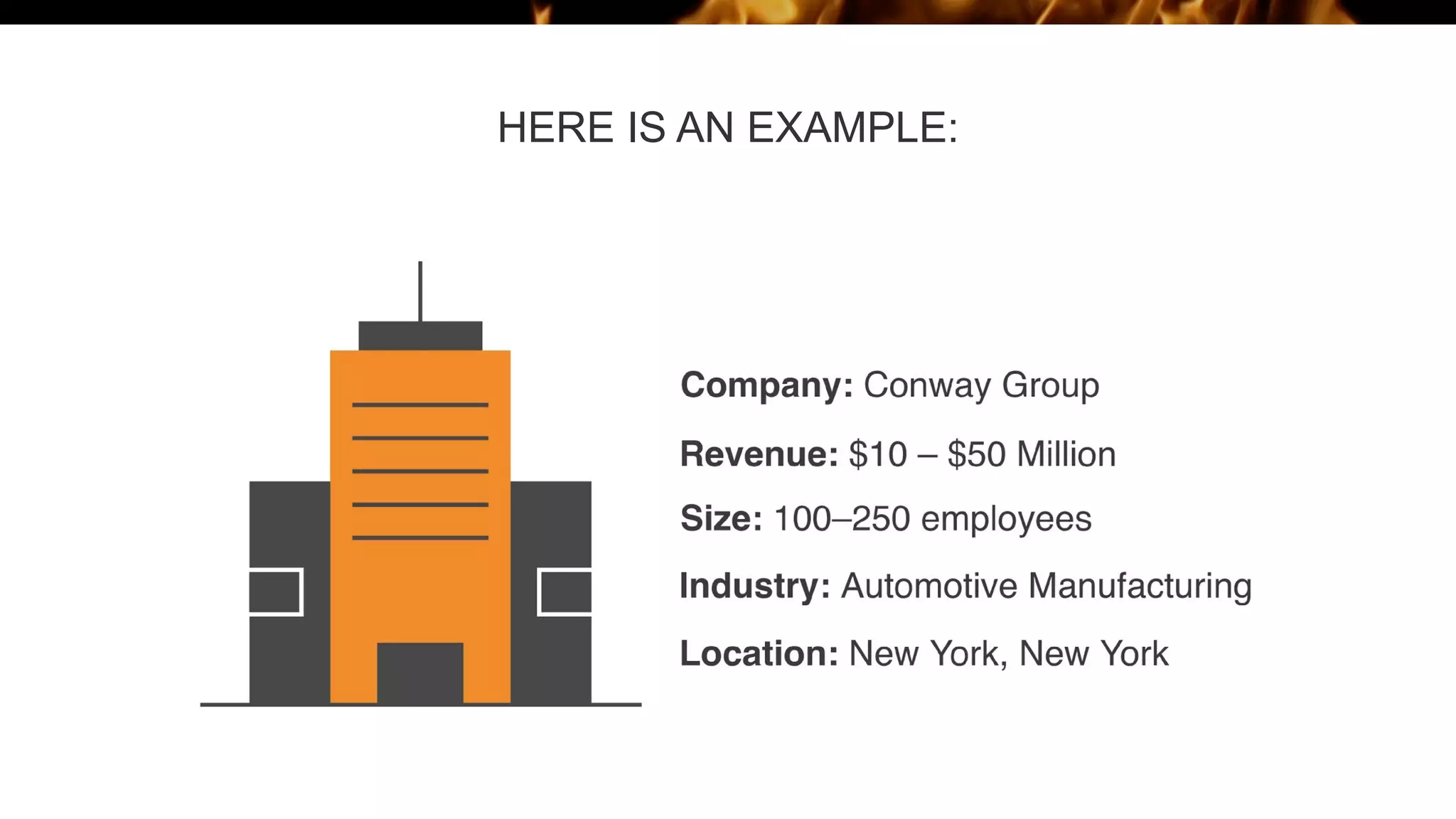
WHAT IS FIRMOGRAPHIC DATA?
• Company attributes B2B marketers use to define and target their
audiences, including:
• Company Name
• Company Trade Name
• Company Website
• Company Address (City, Region/State, Country, Postal/Zip Code)
• Employee Range
• Revenue Range
• Industry Description (SIC, NAICS)
• And many more
HERE IS AN EXAMPLE:
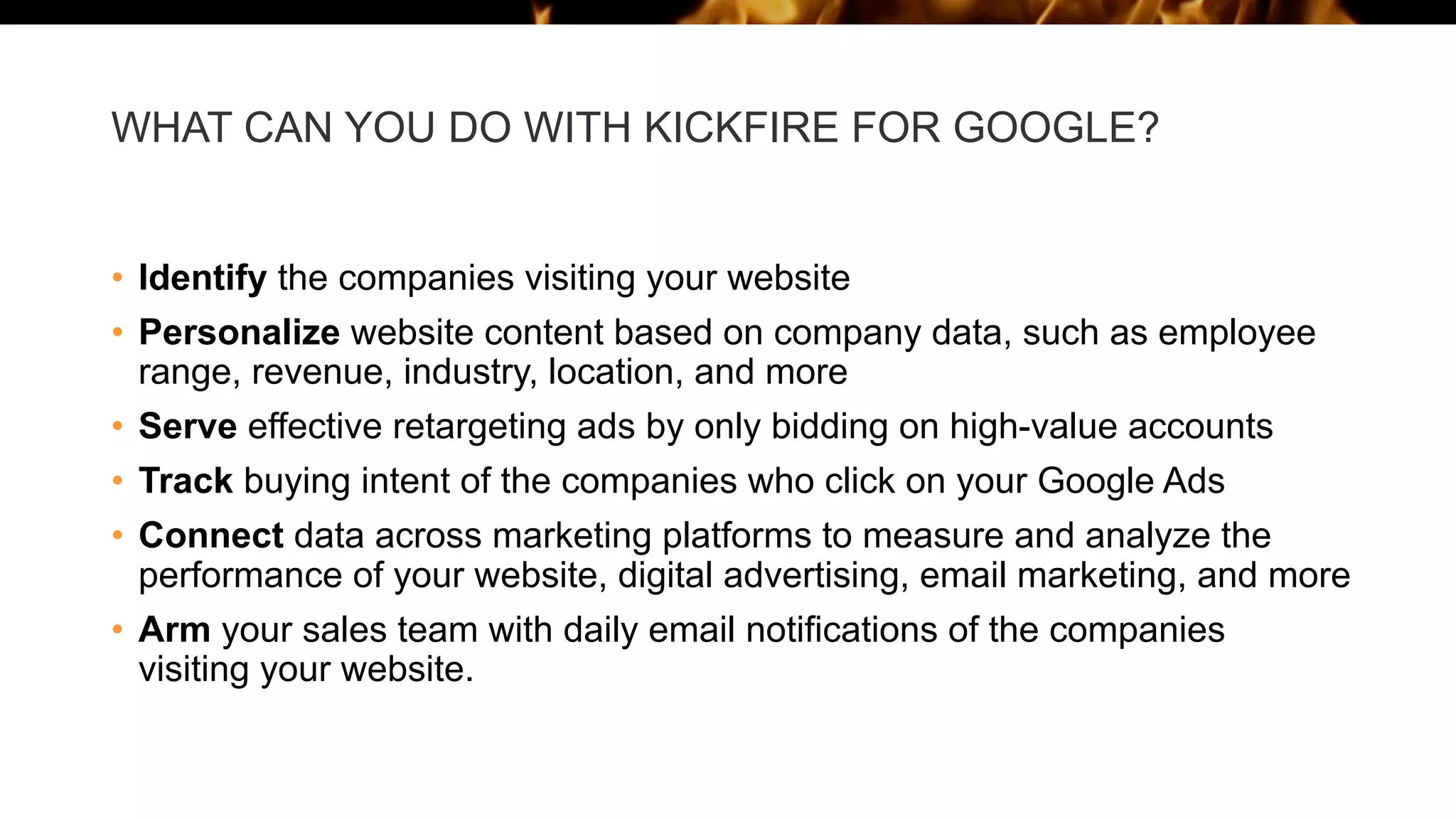
WHAT CAN YOU DO WITH KICKFIRE FOR GOOGLE?
• Identify the companies visiting your website
• Personalize website content based on company data, such as employee
range, revenue, industry, location, and more
• Serve effective retargeting ads by only bidding on high-value accounts
• Track buying intent of the companies who click on your Google Ads
• Connect data across marketing platforms to measure and analyze the
performance of your website, digital advertising, email marketing, and more
• Arm your sales team with daily email notifications of the companies
visiting your website.
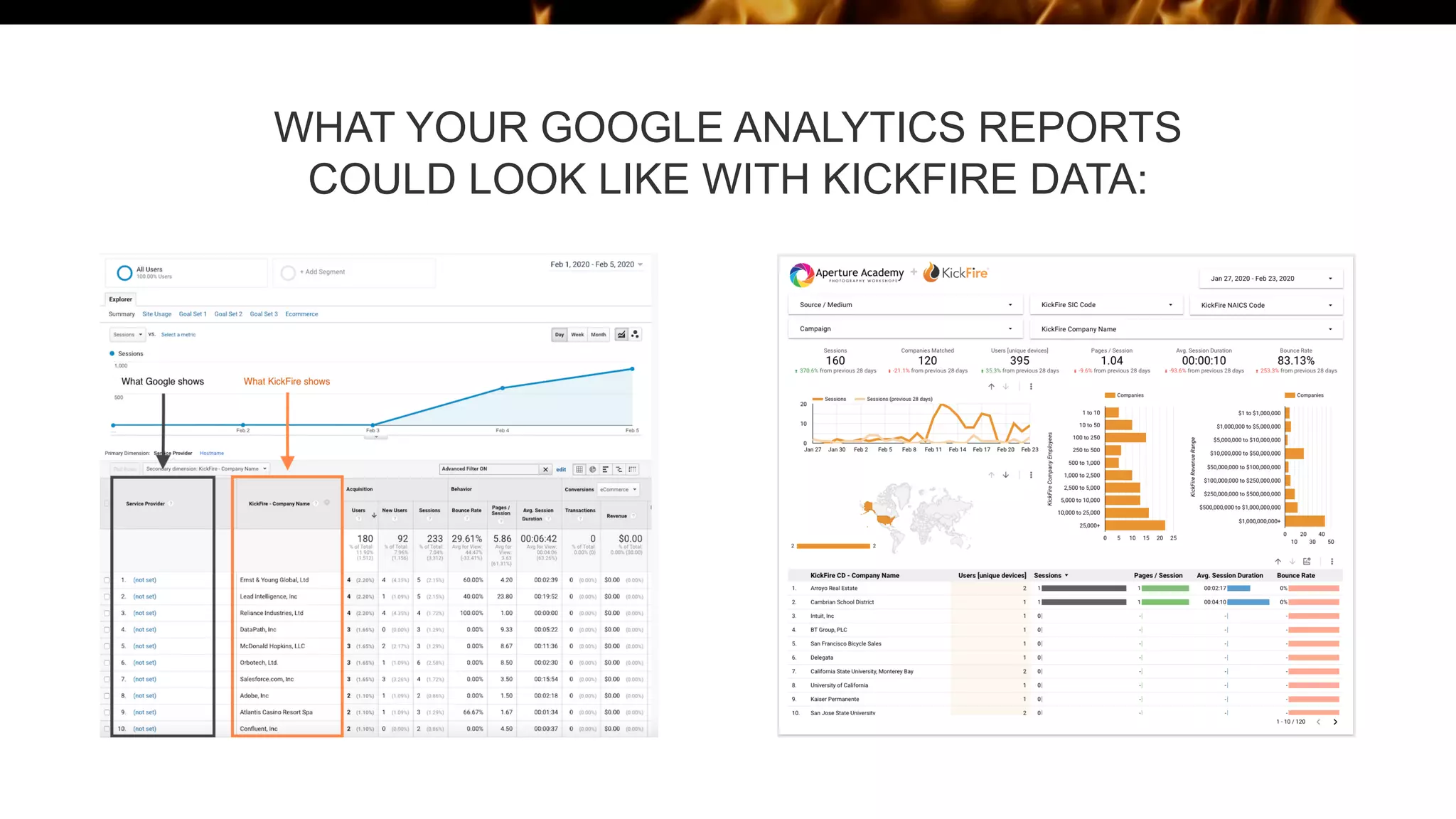
WHAT YOUR GOOGLE ANALYTICS REPORTS
COULD LOOK LIKE WITH KICKFIRE DATA:
WATCH WHAT KICKFIRE FOR GOOGLE CAN DO FOR
YOUR ACCOUNT-BASED MARKETING STRATEGY
WANT TO LEARN MORE?
Check out these additional resources:
• Articles:
• 5 Ways to Decrease Ad Waste in Google Analytics & Google Ads
• Google Removed Network Domain and Service Provider – What
Can You Do About It?
• Webinars On-Demand:
• Service Provider & Network Domain Disappear from Google
Analytics
• Optimize Ad Spend with Keyword Intent Search &
Personalization in Google Analytics
• Eliminate Ad Waste with Account-Based Marketing in Google
Analytics
KickFire
sales@kickfire.com
(408) 493-0456

What Happened to Network Domain & Service Provider in Google Analytics?

  • 1.
    What Happened toNetwork Domain & Service Provider in Google Analytics?
  • 2.
    WHAT YOU’LL LEARN: 1 2 3 WhatNetwork Domain & Service Provider Are & How They’re Used What Happened To Them What Marketers Can Do About It
  • 3.
    WHAT ARE NETWORKDOMAIN & SERVICE PROVIDER? • Network Domain • Domain name of the company behind the internet service provider (ISP) • Examples: att.com, cox.com, spectrum.com • Service Provider • Common name of the user’s ISP • Examples: AT&T, Cox, Spectrum
  • 4.
    HOW ARE THESEDIMENSIONS USED? • These dimensions have been used by marketers and sales teams to provide insights into website traffic, such as: • Tracking marketing campaign attribution and ROI • Excluding internal website traffic from website analytics reporting • Monitoring bot, spam, and internal traffic • And more
  • 5.
    WHAT HAPPENED TOTHESE DIMENSIONS? When looking at data after Feb 4, 2020, your Google Analytics reporting dashboard probably looks something like this:
  • 6.
    HERE’S WHAT WEKNOW SO FAR: • On February 4th, 2020, Google abruptly deleted these dimensions from their analytics reporting • This is not a mistake or a bug within Google Analytics, this was an intentional change • This issue affects both free and paid versions of Google Analytics
  • 7.
    WHAT DOES THISMEAN FOR MARKETERS? • For companies that relied on Network Domain or Service Provider information for their sales and marketing strategies, here are a few areas that were impacted: • Marketing attribution and ROI reporting will become much more difficult • Ad Campaign performance tracking will be nearly impossible • Fraudulent ad clicks will go unnoticed • Bot, spam, and internal traffic will be indistinguishable from external traffic • Justifying ad spend will become more difficult
  • 8.
    WHAT CAN WEDO ABOUT IT? • Unfortunately, all indications are that Google has no plans to bring back these dimensions any time soon, but don’t give up on Google Analytics yet! • KickFire for Google provides more accurate account-level data than Google’s previous Network Domain/Service Provider, and enhanced firmographic data associated with your website traffic
  • 9.
    WHAT IS FIRMOGRAPHICDATA? • Company attributes B2B marketers use to define and target their audiences, including: • Company Name • Company Trade Name • Company Website • Company Address (City, Region/State, Country, Postal/Zip Code) • Employee Range • Revenue Range • Industry Description (SIC, NAICS) • And many more
  • 10.
    HERE IS ANEXAMPLE:
  • 11.
    WHAT CAN YOUDO WITH KICKFIRE FOR GOOGLE? • Identify the companies visiting your website • Personalize website content based on company data, such as employee range, revenue, industry, location, and more • Serve effective retargeting ads by only bidding on high-value accounts • Track buying intent of the companies who click on your Google Ads • Connect data across marketing platforms to measure and analyze the performance of your website, digital advertising, email marketing, and more • Arm your sales team with daily email notifications of the companies visiting your website.
  • 12.
    WHAT YOUR GOOGLEANALYTICS REPORTS COULD LOOK LIKE WITH KICKFIRE DATA:
  • 13.
    WATCH WHAT KICKFIREFOR GOOGLE CAN DO FOR YOUR ACCOUNT-BASED MARKETING STRATEGY
  • 14.
    WANT TO LEARNMORE? Check out these additional resources: • Articles: • 5 Ways to Decrease Ad Waste in Google Analytics & Google Ads • Google Removed Network Domain and Service Provider – What Can You Do About It? • Webinars On-Demand: • Service Provider & Network Domain Disappear from Google Analytics • Optimize Ad Spend with Keyword Intent Search & Personalization in Google Analytics • Eliminate Ad Waste with Account-Based Marketing in Google Analytics
  • 15.