1
SPLUNK OVERVIEW
ALEXANDER FOK
BIG DATA ARCHITECT
FEBRUARY 2017
2
• What is Splunk?
• Splunk Main Functionality
• Why Splunk?
• Demo
Agenda
3
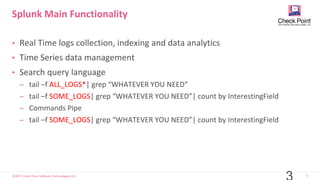
• Real Time logs collection, indexing and data analytics
• Time Series data management
• Search query language
̶ tail –f ALL_LOGS*| grep “WHATEVER YOU NEED”
̶ tail –f SOME_LOGS| grep “WHATEVER YOU NEED”| count by InterestingField
̶ Commands Pipe
̶ tail –f SOME_LOGS| grep “WHATEVER YOU NEED”| count by InterestingField
Splunk Main Functionality
4
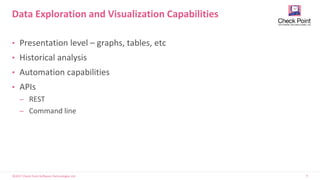
• Presentation level – graphs, tables, etc
• Historical analysis
• Automation capabilities
• APIs
̶ REST
̶ Command line
Data Exploration and Visualization Capabilities
5
• Rolls Royce in the field
• Proven field success
• Flexible, User friendly, modern tool
• Enterprise grade – users access
management, security, multitenant
platform, data retention
management policy
•Reach Echo system
•Splunk appstore –
splunkbase.splunk.com
Why Splunk?
6
•Strong Visualization Capabilities – reports, dashboards
•Infinite scale – up to hundreds of TB logs per day
•Strong Post processing capabilities - Calculated and Extracted Fields
•Various Optimizations
̶ Frequent Reports precalculation
̶ Lookup tables
̶ Field Tags
•Advanced Data Models - CIM
Why Splunk?
7
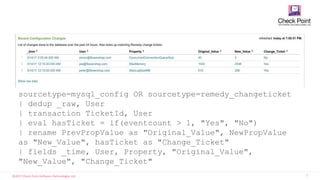
sourcetype=mysql_config OR sourcetype=remedy_changeticket
| dedup _raw, User
| transaction TicketId, User
| eval hasTicket = if(eventcount > 1, "Yes", "No")
| rename PrevPropValue as "Original_Value", NewPropValue
as "New_Value", hasTicket as "Change_Ticket"
| fields _time, User, Property, "Original_Value",
"New_Value", "Change_Ticket"
8
• Web logs
• Log4J, JMS, JMX
• .NET events
• Code and scripts
• Configurations
• syslog
• SNMP
• netflow
• Configurations
• Audit/query logs
• Tables
• Schemas
• Hypervisor
• Guest OS, Apps
• Cloud
• Configurations
• syslog
• File system
• ps, iostat, top
• Registry
• Event logs
• File system
• sysinternals
Logfiles Configs Messages Traps
Alerts
Metrics Scripts TicketsChanges
Linux/UnixWindows NetworkingDatabasesApplications
Virtualization
& Cloud
• Click-stream data
• Shopping cart data
• Online transaction
data
Customer
Facing Data
Outside the
Datacenter
• Manufacturing,
logistics…
• CDRs & IPDRs
• Power consumption
• RFID data
• GPS data
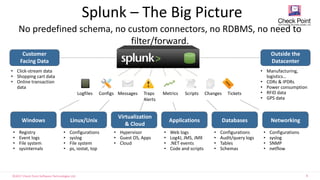
No predefined schema, no custom connectors, no RDBMS, no need to
filter/forward.
Splunk – The Big Picture
8
9
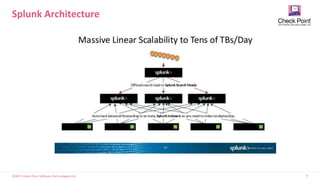
Splunk Architecture
10
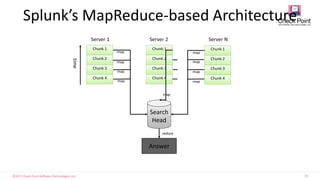
Splunk’s MapReduce-based Architecture
1
0
Chunk 1
Chunk 2
Chunk 3
Chunk 4
Chunk 1
Chunk 2
Chunk 3
Chunk 4
Chunk 1
Chunk 2
Chunk 3
Chunk 4
Search
Head
map
map
map
map
map
map
map
map
map
Answer
reduce
Server 1 Server 2 Server N
time
11
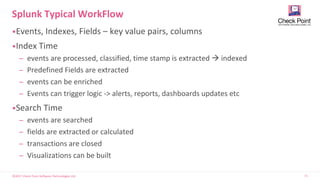
•Events, Indexes, Fields – key value pairs, columns
•Index Time
̶ events are processed, classified, time stamp is extracted  indexed
̶ Predefined Fields are extracted
̶ events can be enriched
̶ Events can trigger logic -> alerts, reports, dashboards updates etc
•Search Time
̶ events are searched
̶ fields are extracted or calculated
̶ transactions are closed
̶ Visualizations can be built
Splunk Typical WorkFlow
12
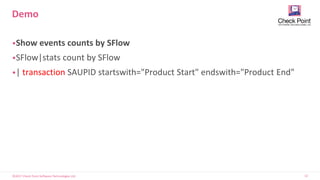
•Show events counts by SFlow
•SFlow|stats count by SFlow
•| transaction SAUPID startswith="Product Start" endswith="Product End"
Demo
13
What is An App?
• Terminology
• Apps – A workspace that solves a specific use case with a navigable view
• Add-on – A reusable Splunk component that does not contain a view
• Example
• Splunk for Cisco Security is an App
• The collection of field extractions/sourcetypes/transforms/eventypes that
map raw firewall logs is an Add-on
14
•CIM – Common Information Model
•Domain centric data models – OSSEC, networking, ticket management
•Data normalization
•Validation
•Visualization
•Action generation
Splunk as SIEM
15
Marathon Tel Aviv 2017 – See you tomorrow
16
Alexander Fok, Big Data Architect
THANK YOU

Splunk Architecture overview

  • 1.
    1 SPLUNK OVERVIEW ALEXANDER FOK BIGDATA ARCHITECT FEBRUARY 2017
  • 2.
    2 • What isSplunk? • Splunk Main Functionality • Why Splunk? • Demo Agenda
  • 3.
    3 • Real Timelogs collection, indexing and data analytics • Time Series data management • Search query language ̶ tail –f ALL_LOGS*| grep “WHATEVER YOU NEED” ̶ tail –f SOME_LOGS| grep “WHATEVER YOU NEED”| count by InterestingField ̶ Commands Pipe ̶ tail –f SOME_LOGS| grep “WHATEVER YOU NEED”| count by InterestingField Splunk Main Functionality
  • 4.
    4 • Presentation level– graphs, tables, etc • Historical analysis • Automation capabilities • APIs ̶ REST ̶ Command line Data Exploration and Visualization Capabilities
  • 5.
    5 • Rolls Roycein the field • Proven field success • Flexible, User friendly, modern tool • Enterprise grade – users access management, security, multitenant platform, data retention management policy •Reach Echo system •Splunk appstore – splunkbase.splunk.com Why Splunk?
  • 6.
    6 •Strong Visualization Capabilities– reports, dashboards •Infinite scale – up to hundreds of TB logs per day •Strong Post processing capabilities - Calculated and Extracted Fields •Various Optimizations ̶ Frequent Reports precalculation ̶ Lookup tables ̶ Field Tags •Advanced Data Models - CIM Why Splunk?
  • 7.
    7 sourcetype=mysql_config OR sourcetype=remedy_changeticket |dedup _raw, User | transaction TicketId, User | eval hasTicket = if(eventcount > 1, "Yes", "No") | rename PrevPropValue as "Original_Value", NewPropValue as "New_Value", hasTicket as "Change_Ticket" | fields _time, User, Property, "Original_Value", "New_Value", "Change_Ticket"
  • 8.
    8 • Web logs •Log4J, JMS, JMX • .NET events • Code and scripts • Configurations • syslog • SNMP • netflow • Configurations • Audit/query logs • Tables • Schemas • Hypervisor • Guest OS, Apps • Cloud • Configurations • syslog • File system • ps, iostat, top • Registry • Event logs • File system • sysinternals Logfiles Configs Messages Traps Alerts Metrics Scripts TicketsChanges Linux/UnixWindows NetworkingDatabasesApplications Virtualization & Cloud • Click-stream data • Shopping cart data • Online transaction data Customer Facing Data Outside the Datacenter • Manufacturing, logistics… • CDRs & IPDRs • Power consumption • RFID data • GPS data No predefined schema, no custom connectors, no RDBMS, no need to filter/forward. Splunk – The Big Picture 8
  • 9.
  • 10.
    10 Splunk’s MapReduce-based Architecture 1 0 Chunk1 Chunk 2 Chunk 3 Chunk 4 Chunk 1 Chunk 2 Chunk 3 Chunk 4 Chunk 1 Chunk 2 Chunk 3 Chunk 4 Search Head map map map map map map map map map Answer reduce Server 1 Server 2 Server N time
  • 11.
    11 •Events, Indexes, Fields– key value pairs, columns •Index Time ̶ events are processed, classified, time stamp is extracted  indexed ̶ Predefined Fields are extracted ̶ events can be enriched ̶ Events can trigger logic -> alerts, reports, dashboards updates etc •Search Time ̶ events are searched ̶ fields are extracted or calculated ̶ transactions are closed ̶ Visualizations can be built Splunk Typical WorkFlow
  • 12.
    12 •Show events countsby SFlow •SFlow|stats count by SFlow •| transaction SAUPID startswith="Product Start" endswith="Product End" Demo
  • 13.
    13 What is AnApp? • Terminology • Apps – A workspace that solves a specific use case with a navigable view • Add-on – A reusable Splunk component that does not contain a view • Example • Splunk for Cisco Security is an App • The collection of field extractions/sourcetypes/transforms/eventypes that map raw firewall logs is an Add-on
  • 14.
    14 •CIM – CommonInformation Model •Domain centric data models – OSSEC, networking, ticket management •Data normalization •Validation •Visualization •Action generation Splunk as SIEM
  • 15.
    15 Marathon Tel Aviv2017 – See you tomorrow
  • 16.
    16 Alexander Fok, BigData Architect THANK YOU