Practical Lessons in
Memory Analysis
Krum Tsvetkov
SAP AG
Andrew Johnson
IBM United Kingdom Limited
2
GOAL
> Learn practical tips and tricks for the analysis of
common memory-related problems
3
Agenda
> Introduction
> Analyzing Memory Leaks
> Analyzing a Heavy Request
> Reducing Memory Footprint
> Non-heap Memory
> Summary
> Q & A
4
Why Care about Memory?
> Memory is a crucial resource
> Excessive memory usage can cause:
 Crashes in the application
 Unresponsive applications
 Unpredictable program behavior
> Memory analysis is complicated
5
How Will This Session Help Me?
> Present common memory-related issues
> Give hints how to solve them using heap dumps
and Memory Analyzer
> Show many demos using real-life heap dumps
> Show how to simplify analysis by automating it
6
Heap Dumps Are Useful for Analysis
> Heap dumps come “for free”
> They are suitable for production
> The comprehensive data allows detailed analysis
> There is a wide platform coverage
 HPROF dumps from HotSpot based JVMs
 DTFJ and PHD dumps from IBM JVMs
7
Agenda
> Introduction
> Analyzing Memory Leaks
> Analyzing a Heavy Request
> Reducing Memory Footprint
> Non-heap Memory
> Summary
> Q & A
8
First, Collect Data For Analysis
> Enable heap dumps on OutOfMemoryError
> Trigger heap dumps on demand if needed
> How-to for getting a heap dump:
http://wiki.eclipse.org/index.php/MemoryAnalyzer#Getting_a_Heap_Dump
9
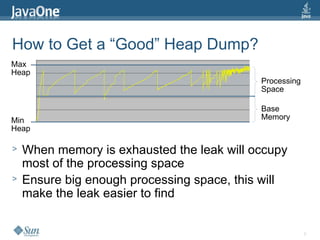
How to Get a “Good” Heap Dump?
> When memory is exhausted the leak will occupy
most of the processing space
> Ensure big enough processing space, this will
make the leak easier to find
Max
Heap
Min
Heap
Processing
Space
Base
Memory
10
How to Analyze Memory Leaks
> Find the biggest objects
> Analyze why they are kept in memory
> Analyze what makes them big
11
DEMO
> Analysis of a Memory Leak
12
How the Leak Analysis Was Done
> Got a “good” heap dump
> Found the biggest objects (in the dominator tree)
> Analyzed who kept them alive (using paths)
> Analyzed what made them big (looking at their
retained set)
> Used “Leak Report” to automate the analysis
13
Agenda
> Introduction
> Analyzing Memory Leaks
> Analyzing a Heavy Request
> Reducing Memory Footprint
> Non-heap Memory
> Summary
> Q & A
14
What Is a Heavy Request?
> An expensive operation which can cause an
OutOfMemoryError
> “Acute” rather than a “chronic” problem
> Examples:
 Reading a big file in memory not in chunks
 Try to load a whole DB table in memory
15
Inspect the Thread to Find Its Activity
> Look at the thread attributes - name, class, etc...
> Look at the local variables
> Look at the stack of the thread
16
DEMO
> Analysis of a Heavy Request
17
How Thread Activity Was Analyzed
> Inspected thread attributes and local variables (in
object explorer)
> Analyzed stack trace
18
Agenda
> Introduction
> Analyzing Memory Leaks
> Analyzing a Heavy Request
> Reducing Memory Footprint
> Non-heap Memory
> Summary
> Q & A
19
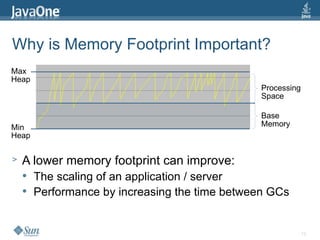
Why is Memory Footprint Important?
> A lower memory footprint can improve:
 The scaling of an application / server
 Performance by increasing the time between GCs
Max
Heap
Min
Heap
Processing
Space
Base
Memory
20
Find Where Footprint Can Be Optimized
> Inspect the set of retained objects
> Search for inefficiently used data structures
> Look for redundant data
21
DEMO
> Analysis of High Memory Footprint
22
How Memory Footprint Was Analyzed
> Analyzed retained objects (in dominator tree,
retained set)
> Used “Group by Value” to find redundant objects
> Used the commands from the “Collections” group
> Used “Component Report” to automate the
analysis
23
Agenda
> Introduction
> Analyzing Memory Leaks
> Analyzing a Heavy Request
> Reducing Memory Footprint
> Non-heap Memory
> Summary
> Q & A
24
Non-heap Memory Can Be Exhausted
> What is in the non-heap memory?
 Metadata for classes
 Interned Strings (for some JVMs)
> How can it be exhausted?
 Too many interned Strings
 Classes packaged and loaded multiple times
 Class loaders which are not properly released
25
Why Is a Class Loader Not Released?
> The trivial case – there is a “normal” reference to it
> A common case – it is the context class loader of a
thread
> The registry problem – one instance is enough
26
How to Analyze “Leaking” Class Loaders
> Find classes loaded more than once
> Find redundant loaders by their name
> Look at the paths to the suspect class loaders
27
DEMO
> Analyzing “Leaking” Class Loaders
28
How Was the “Leaking” Class Loaders
Analysis Done
> Used the “Duplicate Classes” query
> Found the loaders that load redundant classes
> Analyzed why they are not released (using paths)
29
Agenda
> Introduction
> Analyzing Memory Leaks
> Analyzing a Heavy Request
> Reducing Memory Footprint
> Non-heap Memory
> Summary
> Q & A
30
Summary
> Heap dumps are very helpful for memory analysis
> Memory Analyzer offers rich analysis feature set
> The analysis can often be automated
31
Questions and Answers
> Memory Analyzer Homepage @ Eclipse
 http://www.eclipse.org/mat/
32
Krum Tsvetkov
krum.tsvetkov@sap.com
Andrew Johnson
andrew_johnson@uk.ibm.com
http://www.eclipse.org/mat

Ps ts 4118-304118_230-1_fin_v1

  • 1.
    Practical Lessons in MemoryAnalysis Krum Tsvetkov SAP AG Andrew Johnson IBM United Kingdom Limited
  • 2.
    2 GOAL > Learn practicaltips and tricks for the analysis of common memory-related problems
  • 3.
    3 Agenda > Introduction > AnalyzingMemory Leaks > Analyzing a Heavy Request > Reducing Memory Footprint > Non-heap Memory > Summary > Q & A
  • 4.
    4 Why Care aboutMemory? > Memory is a crucial resource > Excessive memory usage can cause:  Crashes in the application  Unresponsive applications  Unpredictable program behavior > Memory analysis is complicated
  • 5.
    5 How Will ThisSession Help Me? > Present common memory-related issues > Give hints how to solve them using heap dumps and Memory Analyzer > Show many demos using real-life heap dumps > Show how to simplify analysis by automating it
  • 6.
    6 Heap Dumps AreUseful for Analysis > Heap dumps come “for free” > They are suitable for production > The comprehensive data allows detailed analysis > There is a wide platform coverage  HPROF dumps from HotSpot based JVMs  DTFJ and PHD dumps from IBM JVMs
  • 7.
    7 Agenda > Introduction > AnalyzingMemory Leaks > Analyzing a Heavy Request > Reducing Memory Footprint > Non-heap Memory > Summary > Q & A
  • 8.
    8 First, Collect DataFor Analysis > Enable heap dumps on OutOfMemoryError > Trigger heap dumps on demand if needed > How-to for getting a heap dump: http://wiki.eclipse.org/index.php/MemoryAnalyzer#Getting_a_Heap_Dump
  • 9.
    9 How to Geta “Good” Heap Dump? > When memory is exhausted the leak will occupy most of the processing space > Ensure big enough processing space, this will make the leak easier to find Max Heap Min Heap Processing Space Base Memory
  • 10.
    10 How to AnalyzeMemory Leaks > Find the biggest objects > Analyze why they are kept in memory > Analyze what makes them big
  • 11.
    11 DEMO > Analysis ofa Memory Leak
  • 12.
    12 How the LeakAnalysis Was Done > Got a “good” heap dump > Found the biggest objects (in the dominator tree) > Analyzed who kept them alive (using paths) > Analyzed what made them big (looking at their retained set) > Used “Leak Report” to automate the analysis
  • 13.
    13 Agenda > Introduction > AnalyzingMemory Leaks > Analyzing a Heavy Request > Reducing Memory Footprint > Non-heap Memory > Summary > Q & A
  • 14.
    14 What Is aHeavy Request? > An expensive operation which can cause an OutOfMemoryError > “Acute” rather than a “chronic” problem > Examples:  Reading a big file in memory not in chunks  Try to load a whole DB table in memory
  • 15.
    15 Inspect the Threadto Find Its Activity > Look at the thread attributes - name, class, etc... > Look at the local variables > Look at the stack of the thread
  • 16.
    16 DEMO > Analysis ofa Heavy Request
  • 17.
    17 How Thread ActivityWas Analyzed > Inspected thread attributes and local variables (in object explorer) > Analyzed stack trace
  • 18.
    18 Agenda > Introduction > AnalyzingMemory Leaks > Analyzing a Heavy Request > Reducing Memory Footprint > Non-heap Memory > Summary > Q & A
  • 19.
    19 Why is MemoryFootprint Important? > A lower memory footprint can improve:  The scaling of an application / server  Performance by increasing the time between GCs Max Heap Min Heap Processing Space Base Memory
  • 20.
    20 Find Where FootprintCan Be Optimized > Inspect the set of retained objects > Search for inefficiently used data structures > Look for redundant data
  • 21.
    21 DEMO > Analysis ofHigh Memory Footprint
  • 22.
    22 How Memory FootprintWas Analyzed > Analyzed retained objects (in dominator tree, retained set) > Used “Group by Value” to find redundant objects > Used the commands from the “Collections” group > Used “Component Report” to automate the analysis
  • 23.
    23 Agenda > Introduction > AnalyzingMemory Leaks > Analyzing a Heavy Request > Reducing Memory Footprint > Non-heap Memory > Summary > Q & A
  • 24.
    24 Non-heap Memory CanBe Exhausted > What is in the non-heap memory?  Metadata for classes  Interned Strings (for some JVMs) > How can it be exhausted?  Too many interned Strings  Classes packaged and loaded multiple times  Class loaders which are not properly released
  • 25.
    25 Why Is aClass Loader Not Released? > The trivial case – there is a “normal” reference to it > A common case – it is the context class loader of a thread > The registry problem – one instance is enough
  • 26.
    26 How to Analyze“Leaking” Class Loaders > Find classes loaded more than once > Find redundant loaders by their name > Look at the paths to the suspect class loaders
  • 27.
  • 28.
    28 How Was the“Leaking” Class Loaders Analysis Done > Used the “Duplicate Classes” query > Found the loaders that load redundant classes > Analyzed why they are not released (using paths)
  • 29.
    29 Agenda > Introduction > AnalyzingMemory Leaks > Analyzing a Heavy Request > Reducing Memory Footprint > Non-heap Memory > Summary > Q & A
  • 30.
    30 Summary > Heap dumpsare very helpful for memory analysis > Memory Analyzer offers rich analysis feature set > The analysis can often be automated
  • 31.
    31 Questions and Answers >Memory Analyzer Homepage @ Eclipse  http://www.eclipse.org/mat/
  • 32.