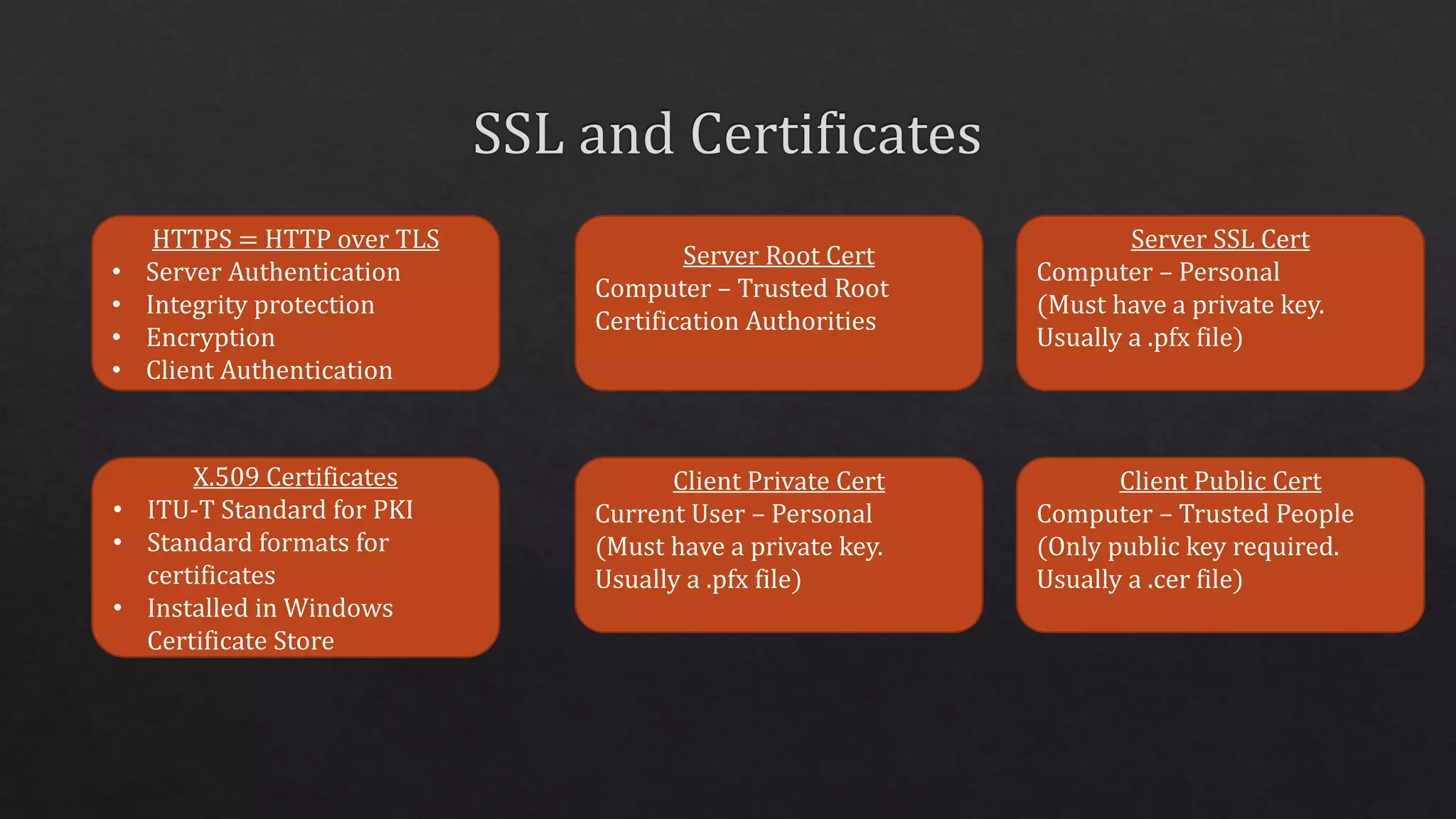
HTTPS = HTTP over TLS
• Server Authentication
• Integrity protection
• Encryption
• Client Authentication
Server Root Cert
Computer – Trusted Root
Certification Authorities
Server SSL Cert
Computer – Personal
(Must have a private key.
Usually a .pfx file)
Client Private Cert
Current User – Personal
(Must have a private key.
Usually a .pfx file)
X.509 Certificates
• ITU-T Standard for PKI
• Standard formats for
certificates
• Installed in Windows
Certificate Store
Client Public Cert
Computer – Trusted People
(Only public key required.
Usually a .cer file)
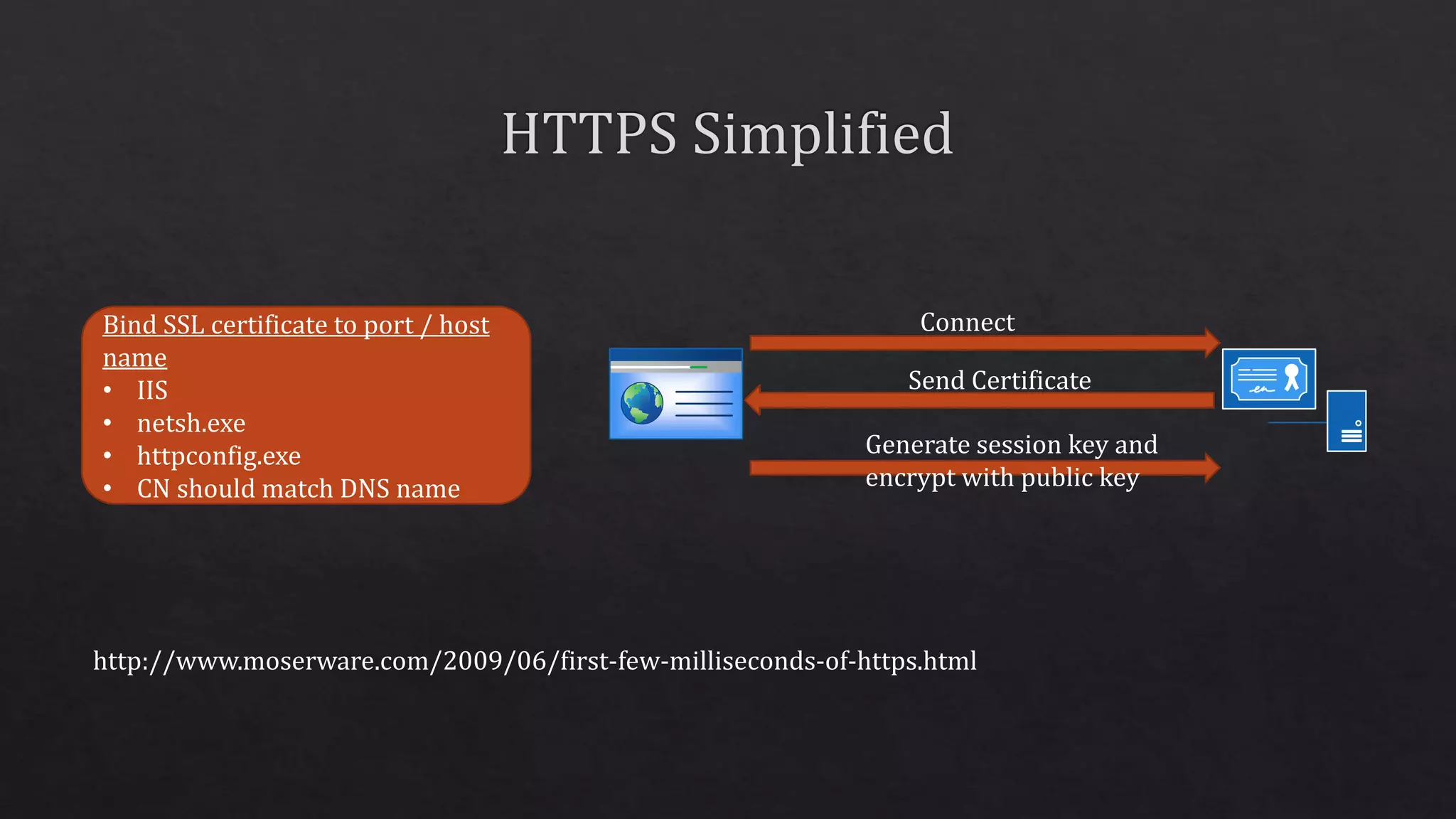
Bind SSL certificate to port / host
name
• IIS
• netsh.exe
• httpconfig.exe
• CN should match DNS name
Connect
Send Certificate
Generate session key and
encrypt with public key
http://www.moserware.com/2009/06/first-few-milliseconds-of-https.html
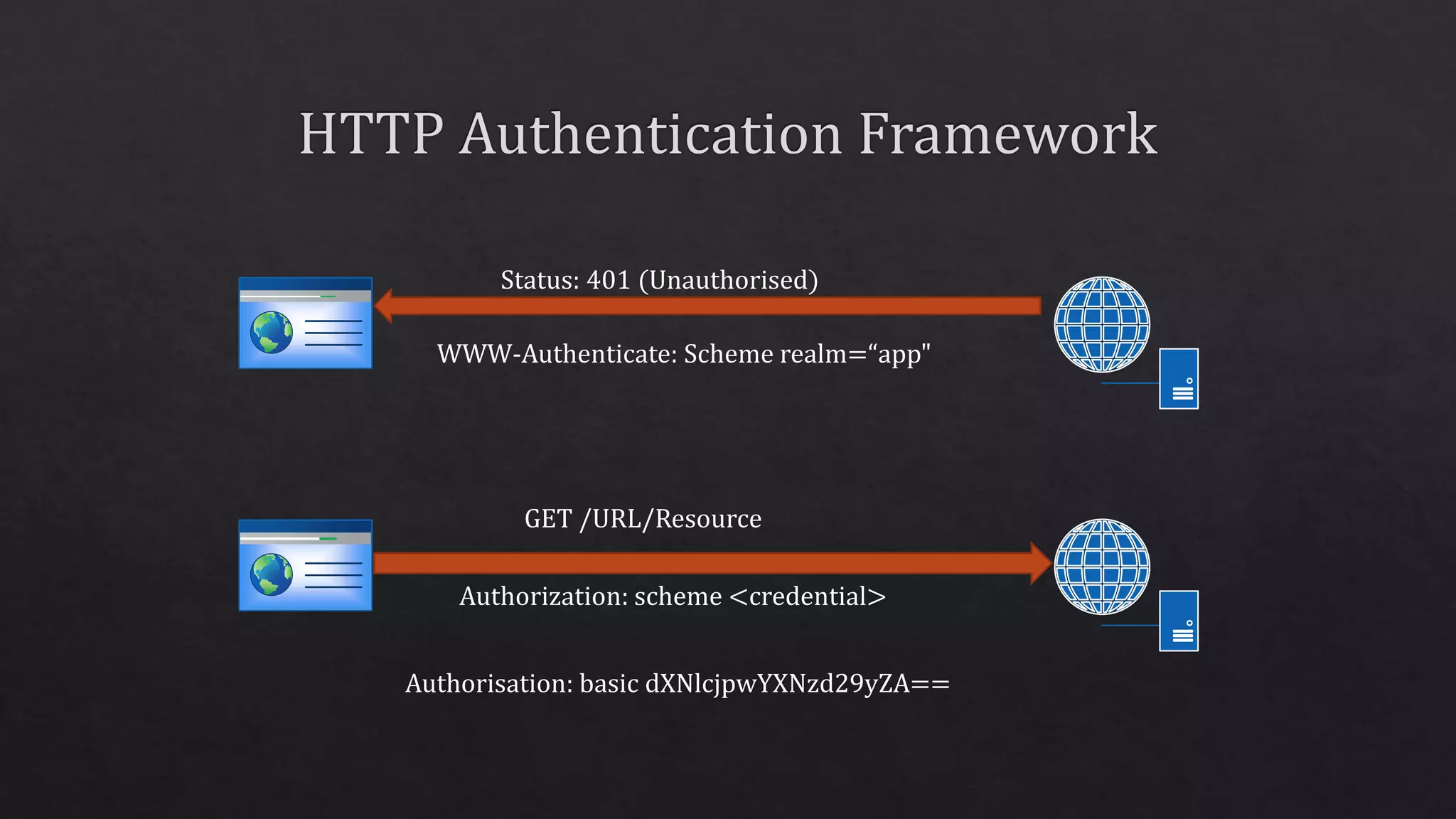
Status: 401 (Unauthorised)
WWW-Authenticate: Scheme realm=“app"
GET /URL/Resource
Authorization: scheme <credential>
Authorisation: basic dXNlcjpwYXNzd29yZA==
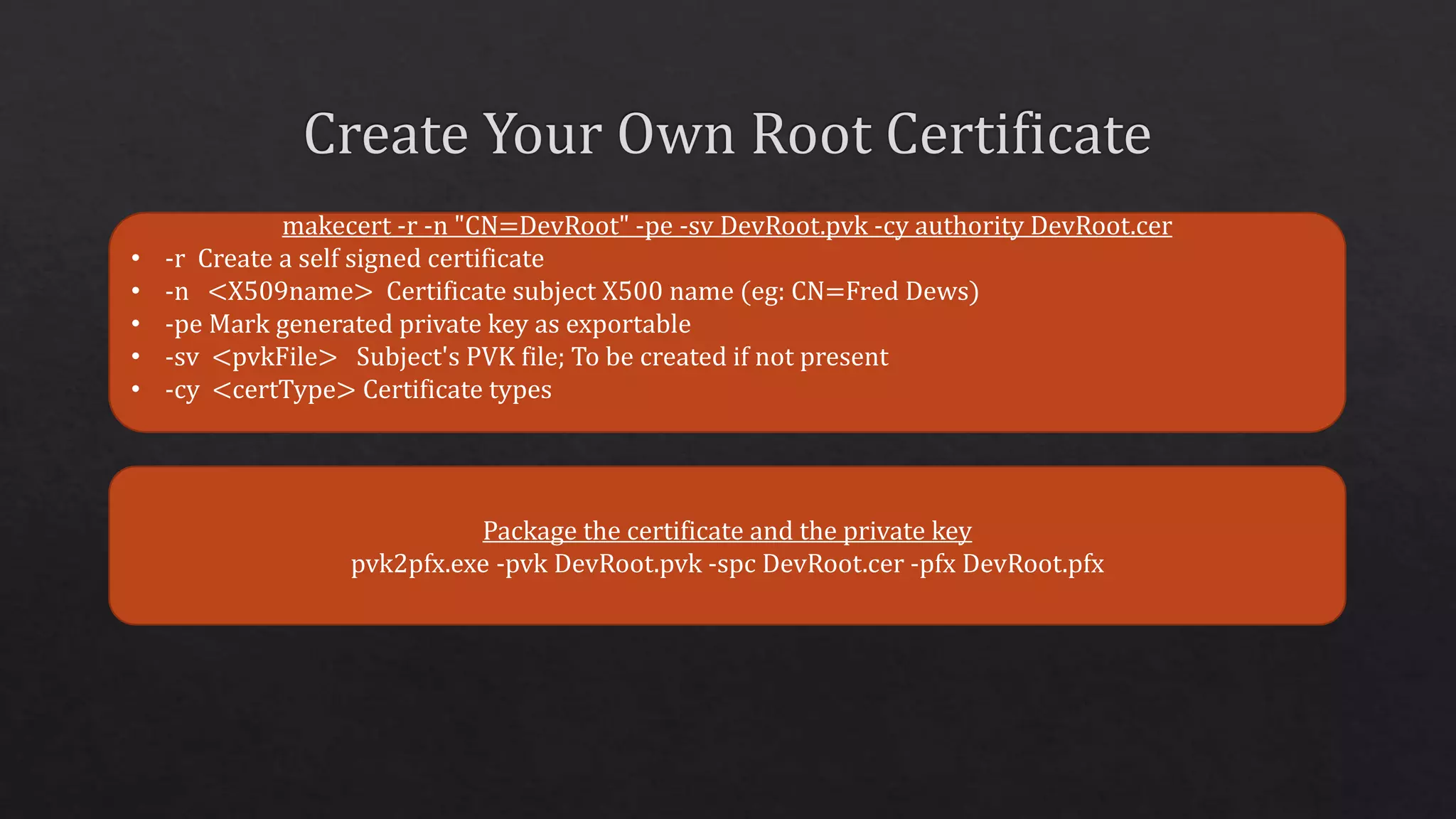
makecert -r -n "CN=DevRoot" -pe -sv DevRoot.pvk -cy authority DevRoot.cer
• -r Create a self signed certificate
• -n <X509name> Certificate subject X500 name (eg: CN=Fred Dews)
• -pe Mark generated private key as exportable
• -sv <pvkFile> Subject's PVK file; To be created if not present
• -cy <certType> Certificate types
Package the certificate and the private key
pvk2pfx.exe -pvk DevRoot.pvk -spc DevRoot.cer -pfx DevRoot.pfx
makecert -iv DevRoot.pvk -ic DevRoot.cer -n "CN=site.local" -pe -sv %1.pvk -sky exchange
site.local.cer -eku 1.3.6.1.5.5.7.3.1
• -iv <pvkFile> Issuer's PVK file
• -ic <file> Issuer's certificate file
• -n <X509name> Certificate subject X500 name (eg: CN=Fred Dews)
• -pe Mark generated private key as exportable
• -sv <pvkFile> Subject's PVK file; To be created if not present
• -sky <keytype> Subject key type
• -eku <oid[<,oid>]> Comma separated enhanced key usage OIDs
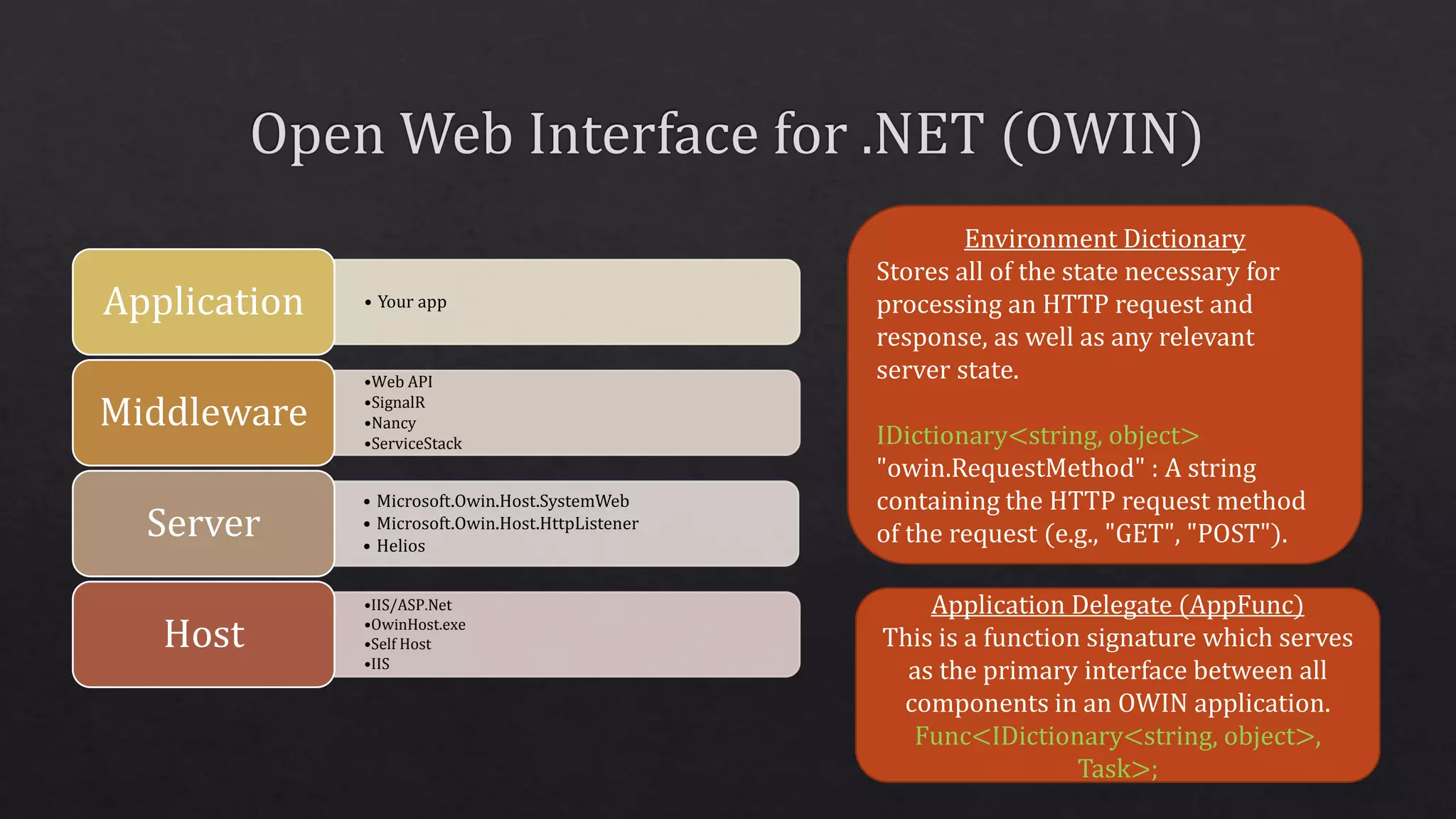
Environment Dictionary
Stores all of the state necessary for
processing an HTTP request and
response, as well as any relevant
server state.
IDictionary<string, object>
"owin.RequestMethod" : A string
containing the HTTP request method
of the request (e.g., "GET", "POST").
Application Delegate (AppFunc)
This is a function signature which serves
as the primary interface between all
components in an OWIN application.
Func<IDictionary<string, object>,
Task>;
• Your appApplication
•Web API
•SignalR
•Nancy
•ServiceStack
Middleware
• Microsoft.Owin.Host.SystemWeb
• Microsoft.Owin.Host.HttpListener
• Helios
Server
•IIS/ASP.Net
•OwinHost.exe
•Self Host
•IIS
Host
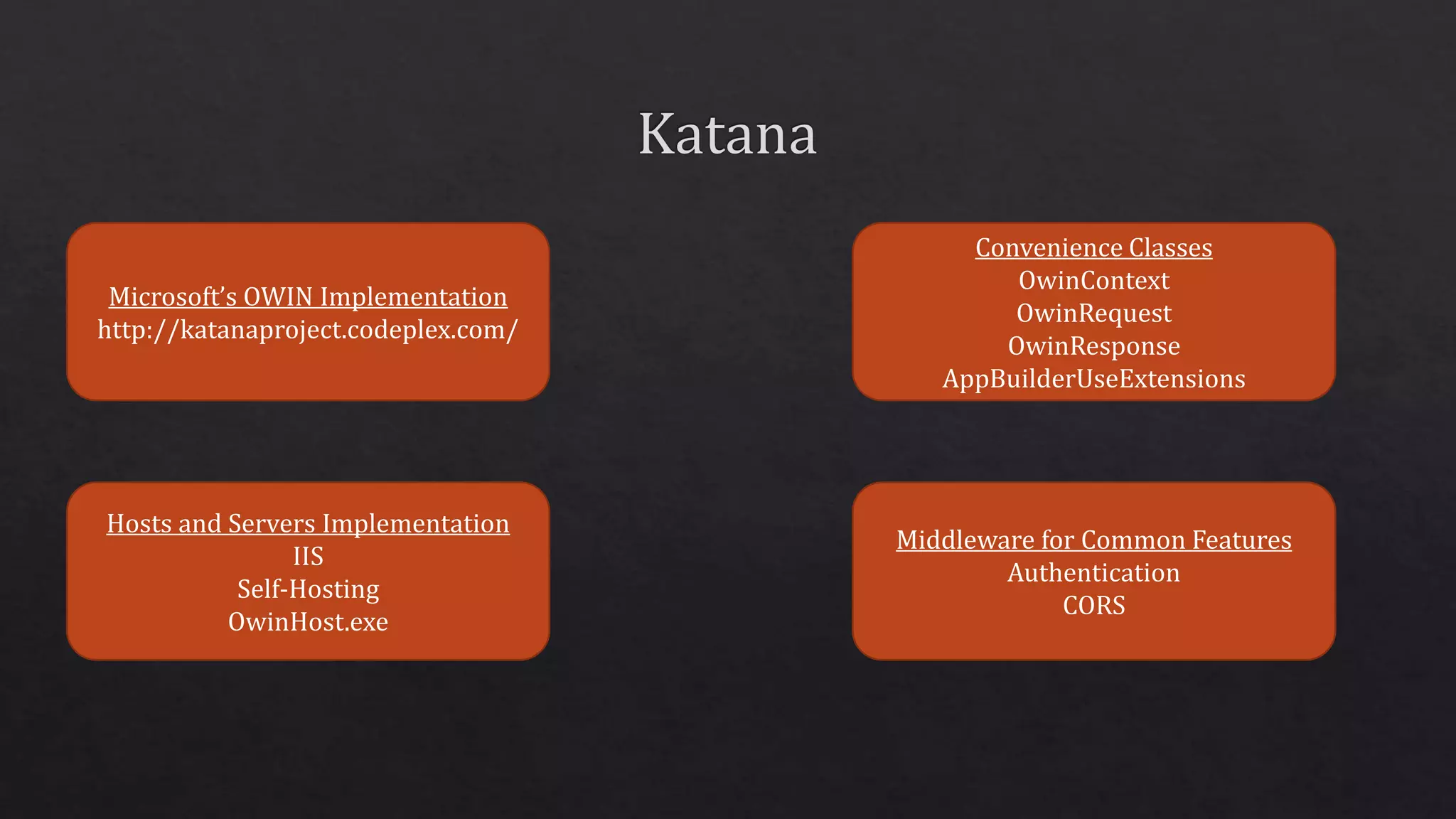
Microsoft’s OWIN Implementation
http://katanaproject.codeplex.com/
Hosts and Servers Implementation
IIS
Self-Hosting
OwinHost.exe
Convenience Classes
OwinContext
OwinRequest
OwinResponse
AppBuilderUseExtensions
Middleware for Common Features
Authentication
CORS
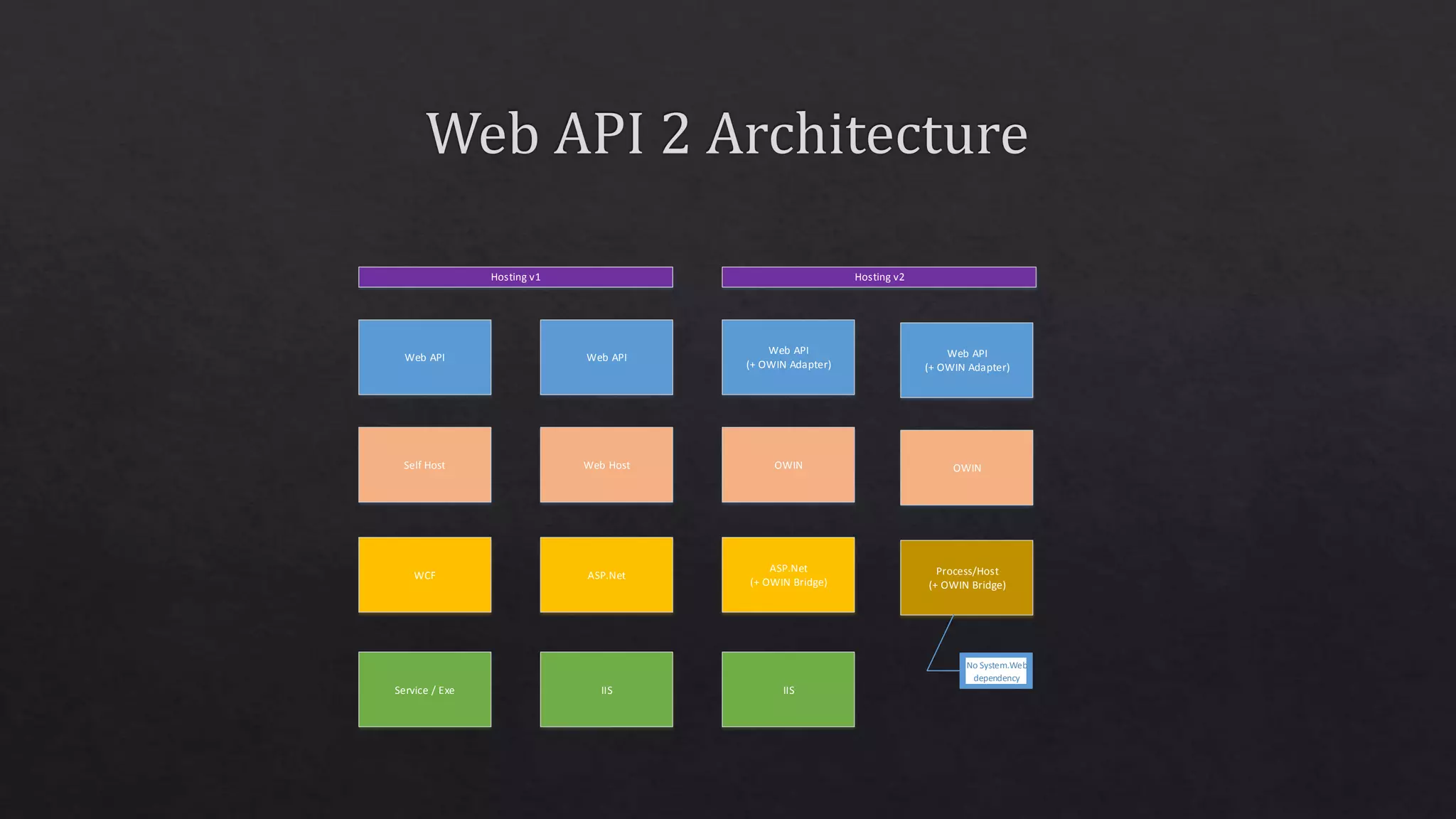
Web API Web API
Web API
(+ OWIN Adapter)
Self Host Web Host OWIN
WCF ASP.Net
ASP.Net
(+ OWIN Bridge)
Service / Exe IIS IIS
Hosting v1 Hosting v2
Web API
(+ OWIN Adapter)
OWIN
Process/Host
(+ OWIN Bridge)
No System.Web
dependency
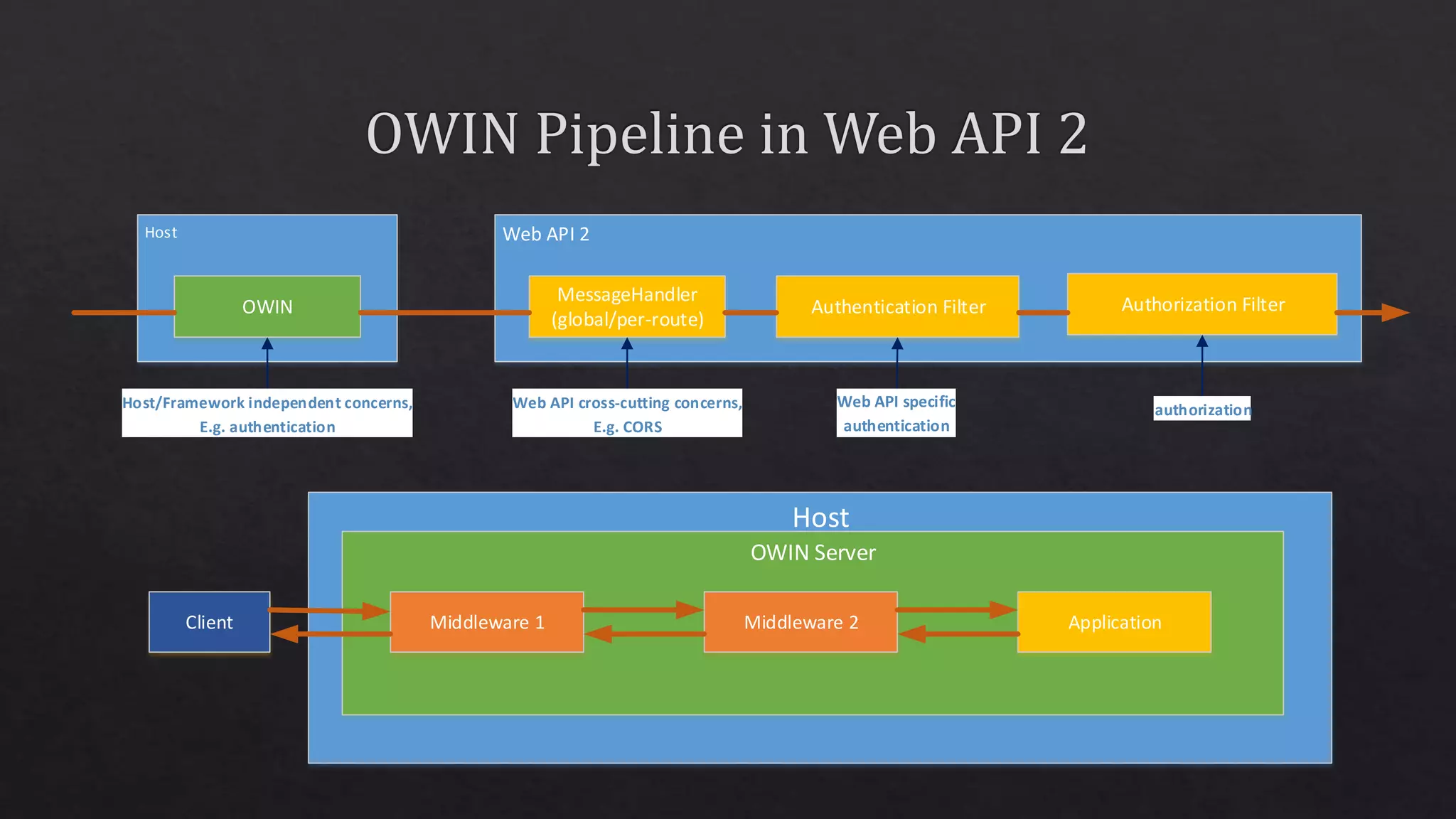
Host Web API 2
OWIN
MessageHandler
(global/per-route)
Authentication Filter Authorization Filter
Host/Framework independent concerns,
E.g. authentication
Web API cross-cutting concerns,
E.g. CORS
authorization
Host
OWIN Server
Middleware 1 Middleware 2 ApplicationClient
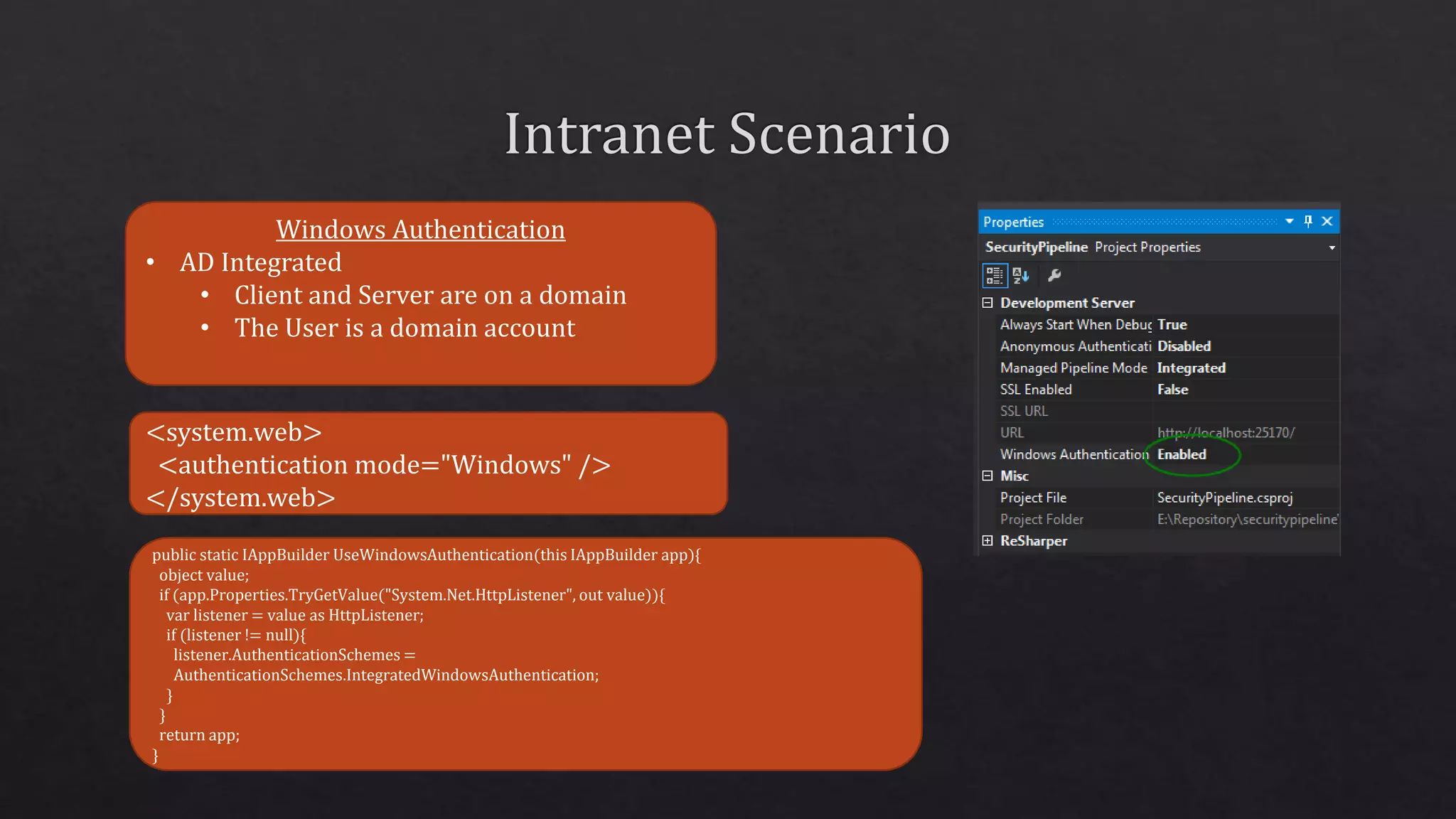
Windows Authentication
• AD Integrated
• Client and Server are on a domain
• The User is a domain account
<system.web>
<authentication mode="Windows" />
</system.web>
public static IAppBuilder UseWindowsAuthentication(this IAppBuilder app){
object value;
if (app.Properties.TryGetValue("System.Net.HttpListener", out value)){
var listener = value as HttpListener;
if (listener != null){
listener.AuthenticationSchemes =
AuthenticationSchemes.IntegratedWindowsAuthentication;
}
}
return app;
}
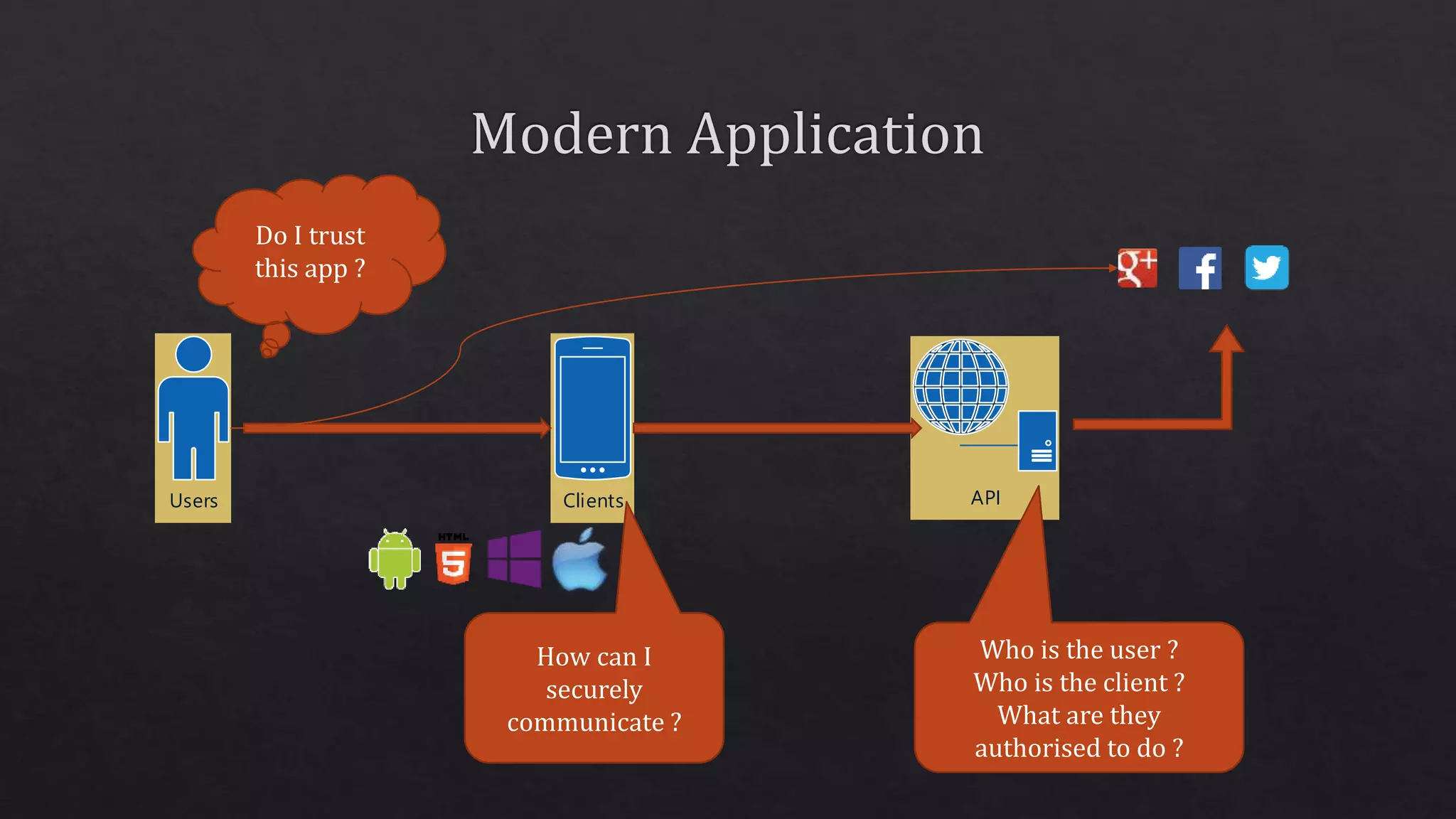
Users Clients
Do I trust
this app ?
How can I
securely
communicate ?
API
Who is the user ?
Who is the client ?
What are they
authorised to do ?
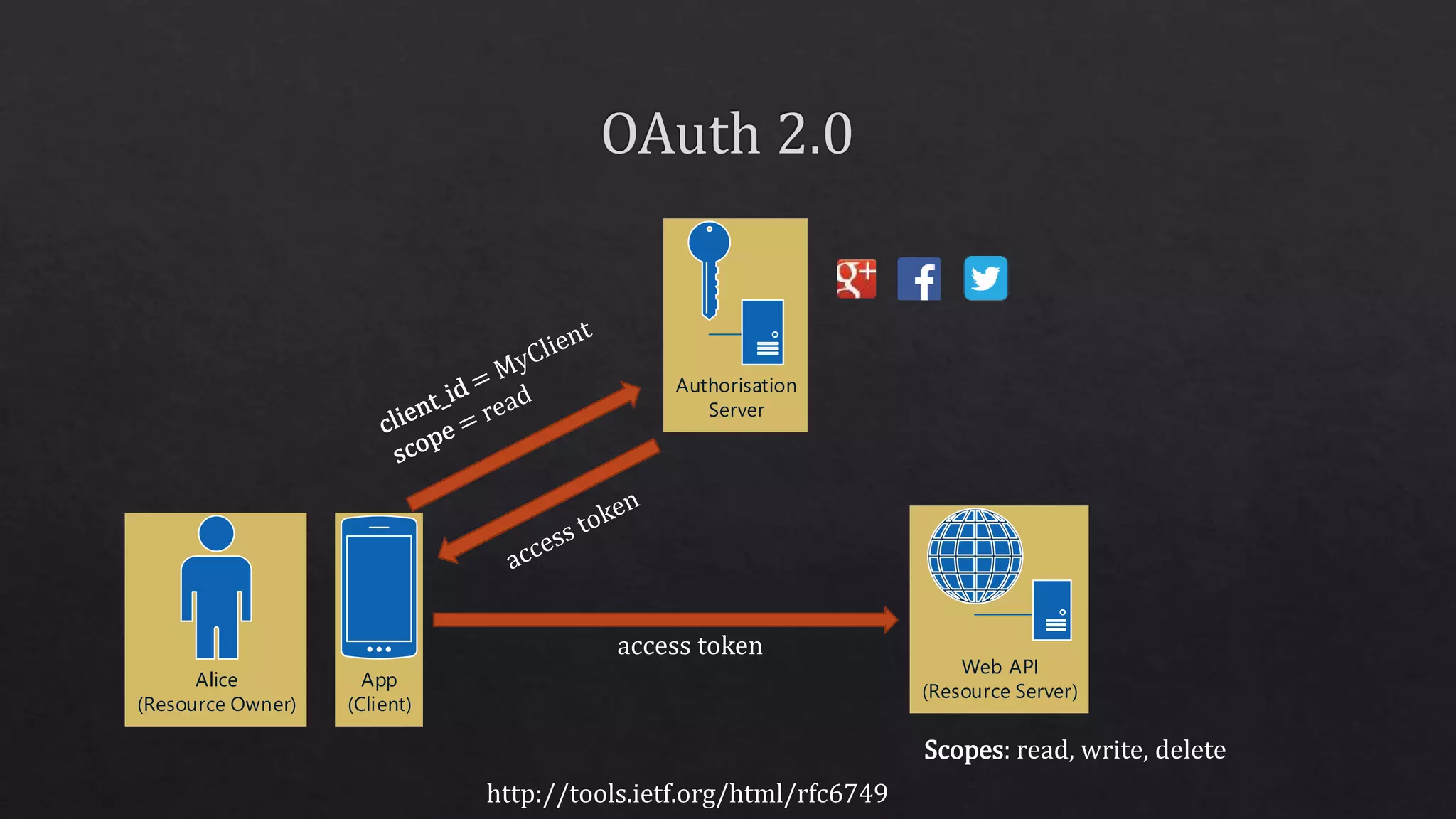
Authorisation
Server
access token
Scopes: read, write, delete
Alice
(Resource Owner)
App
(Client)
Web API
(Resource Server)
http://tools.ietf.org/html/rfc6749
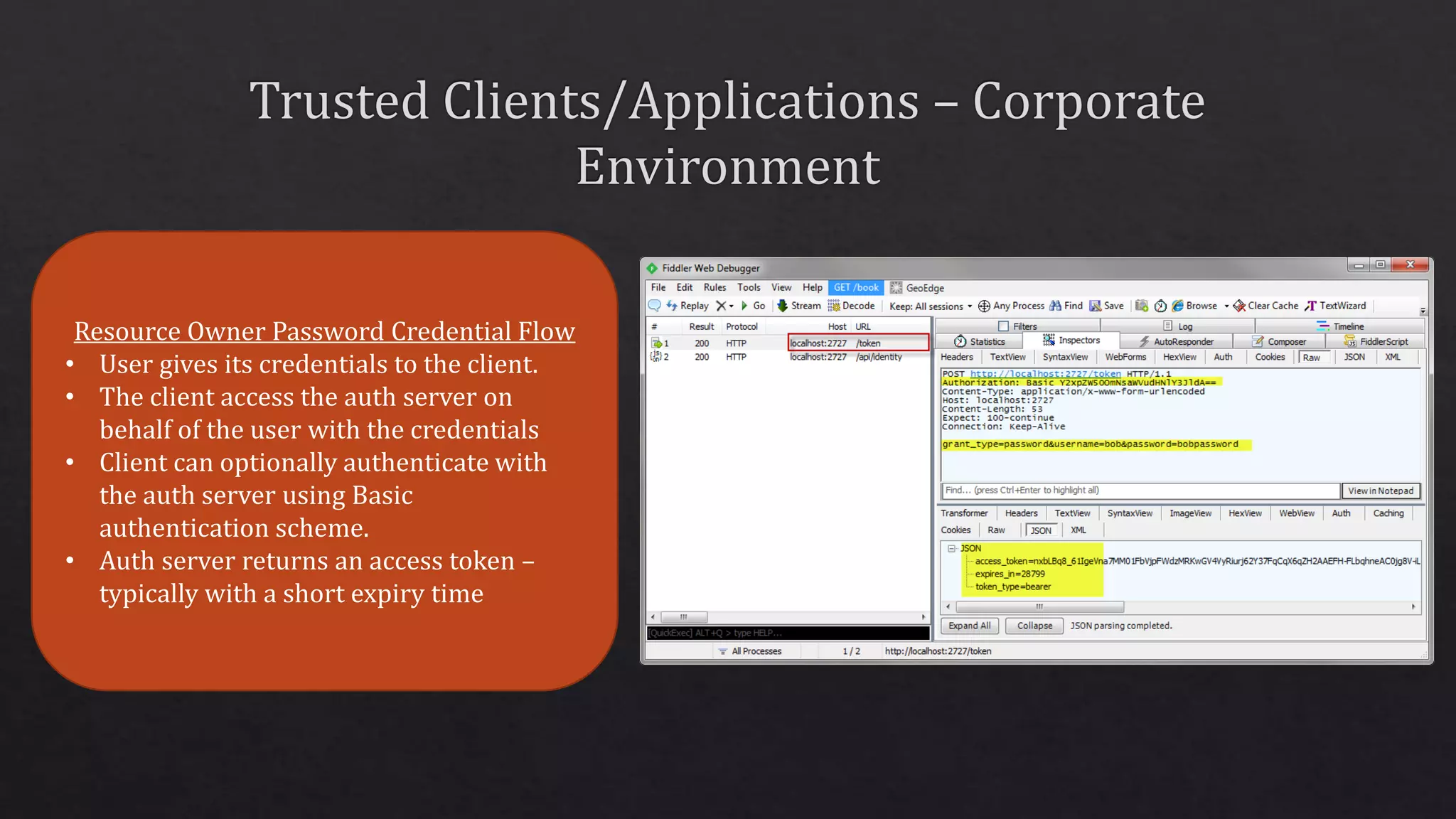
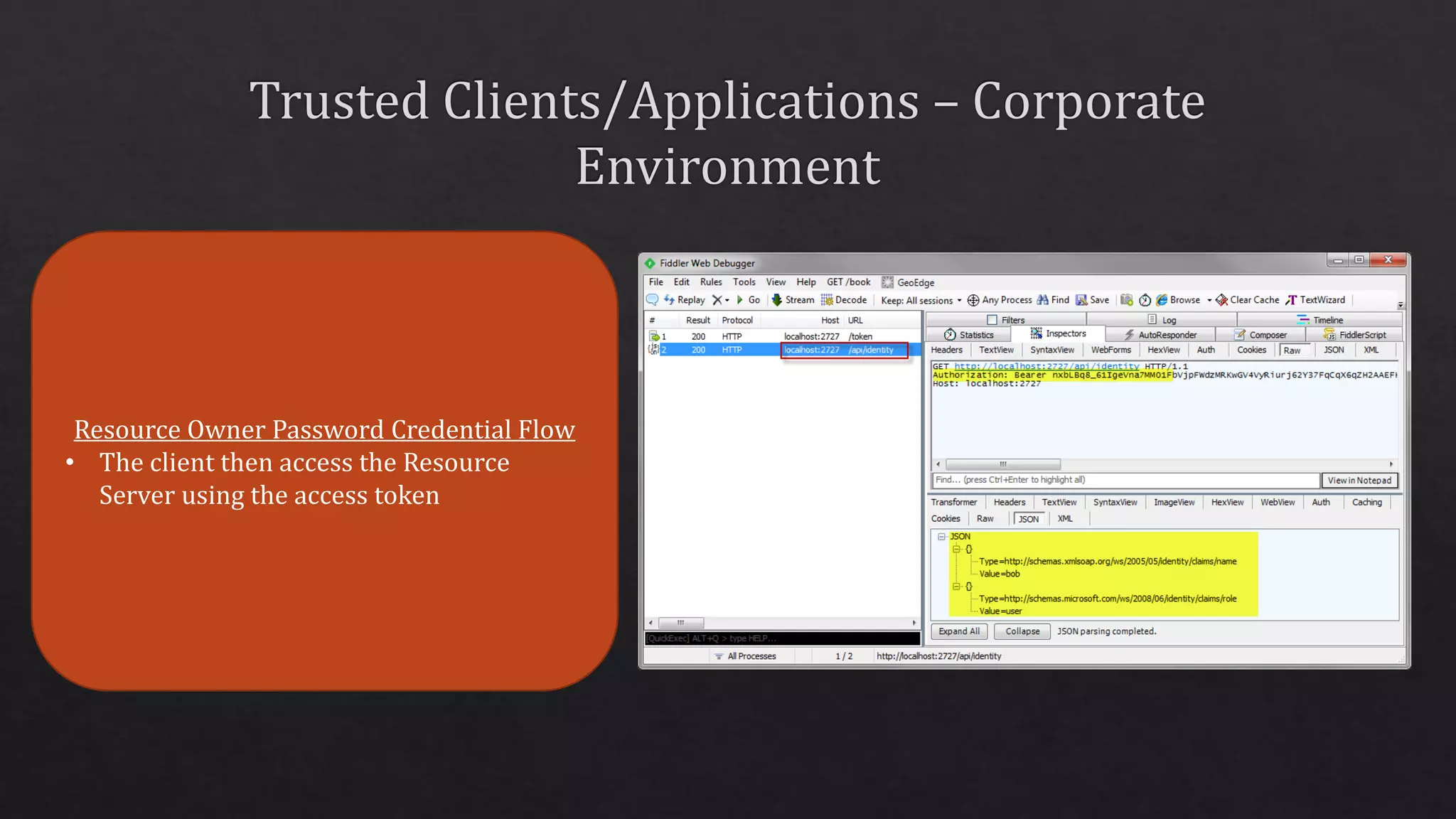
Resource Owner Password Credential Flow
• User gives its credentials to the client.
• The client access the auth server on
behalf of the user with the credentials
• Client can optionally authenticate with
the auth server using Basic
authentication scheme.
• Auth server returns an access token –
typically with a short expiry time
Resource Owner Password Credential Flow
• The client then access the Resource
Server using the access token
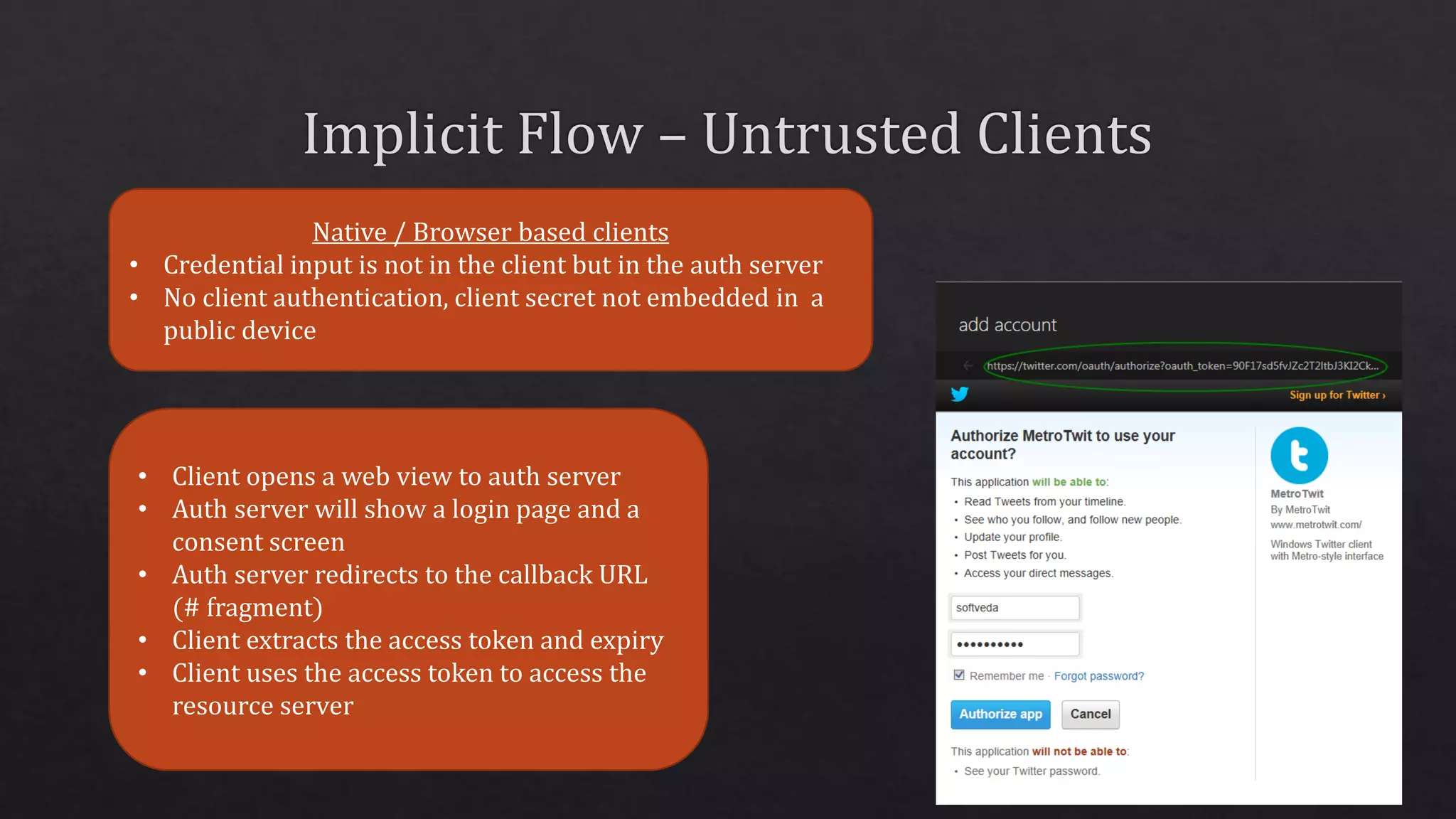
Native / Browser based clients
• Credential input is not in the client but in the auth server
• No client authentication, client secret not embedded in a
public device
• Client opens a web view to auth server
• Auth server will show a login page and a
consent screen
• Auth server redirects to the callback URL
(# fragment)
• Client extracts the access token and expiry
• Client uses the access token to access the
resource server
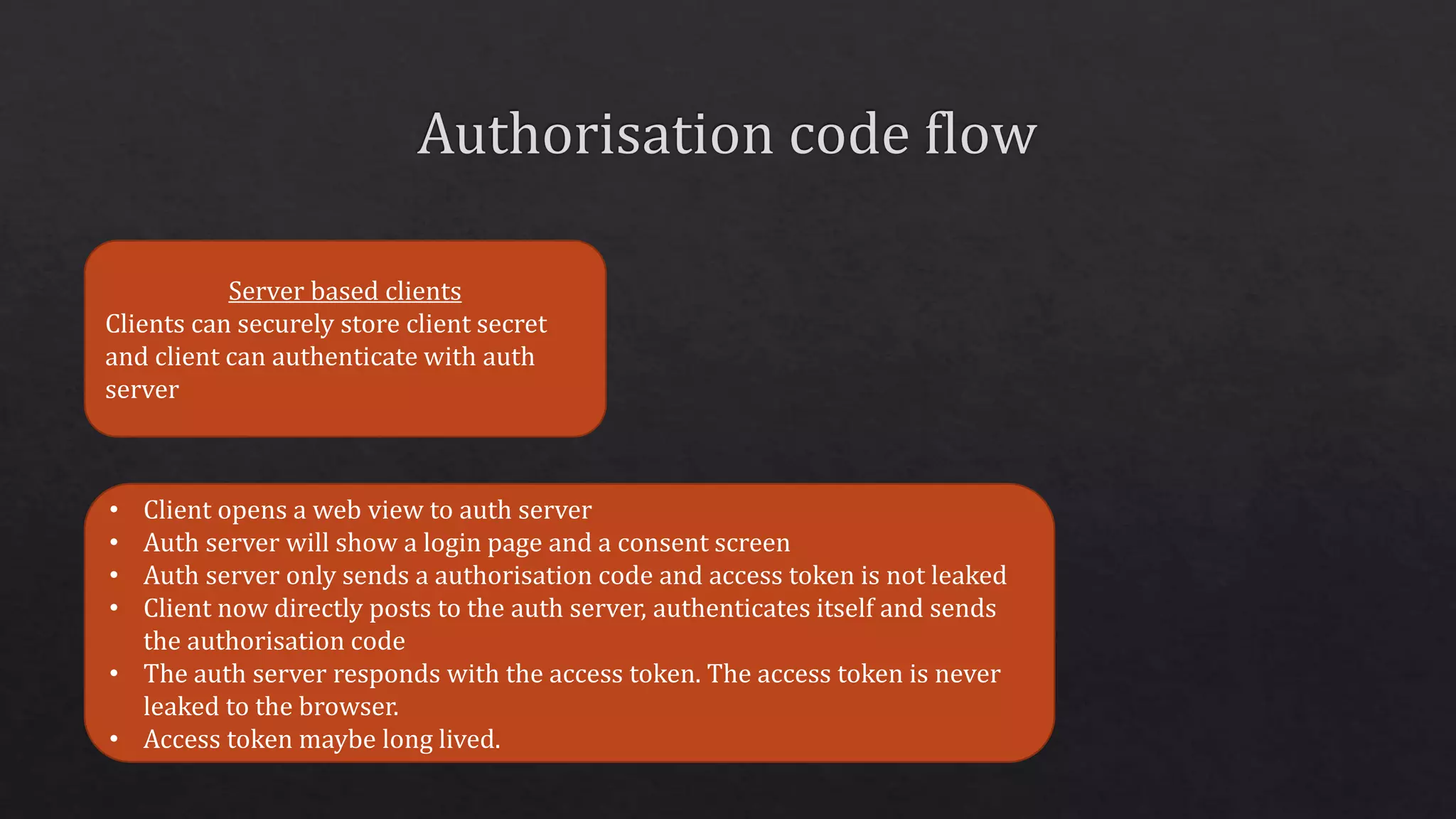
Server based clients
Clients can securely store client secret
and client can authenticate with auth
server
• Client opens a web view to auth server
• Auth server will show a login page and a consent screen
• Auth server only sends a authorisation code and access token is not leaked
• Client now directly posts to the auth server, authenticates itself and sends
the authorisation code
• The auth server responds with the access token. The access token is never
leaked to the browser.
• Access token maybe long lived.
• So far auth server and resource server are
in same trusted subsystem
• Allow users to login using Facebook and
then using the Facebook identity to
access the backend services
• Facebook only does authorisation for
their own backend not your backend
Same Origin Policy in Browsers
• AJAX requests to a different host, port or protocol
will fails
• CORS is a W3C standard that allows cross origin
http requests
• The request itself succeeds but the browser
returns an error
• Supported in modern browsers only, IE 10+
CORS support in Web API
• Install-Package
Microsoft.AspNet.WebApi.Cors
• WebApiConfig.cs –
config.EnableCors();
• Controller.cs –
[EnableCors("origin", "headers", "verbs")]
public class MyController : ApiController
{
}
Request Header
Origin: http://cors.local/
Response Header
Access-Control-Allow-Origin: *
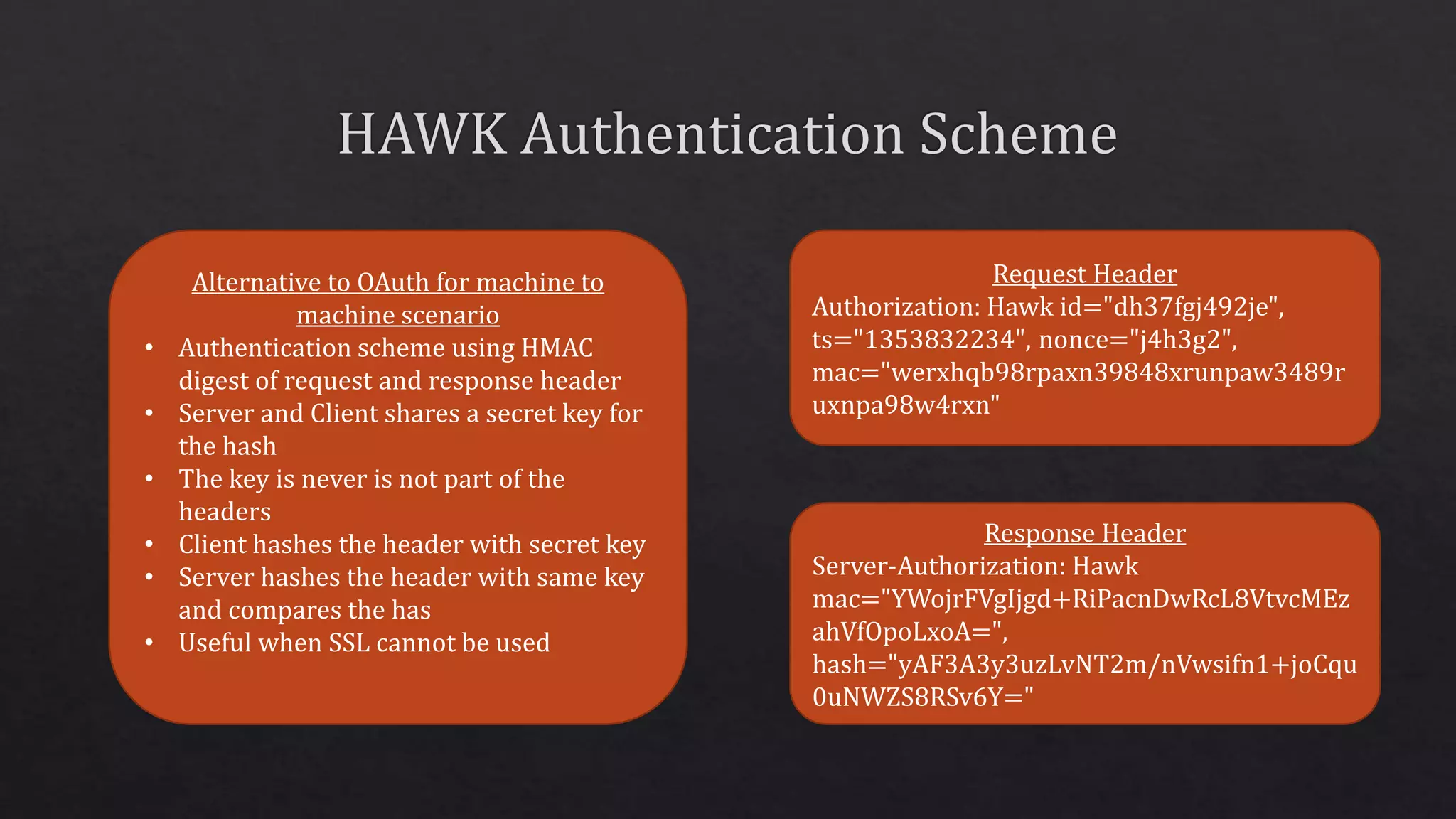
Alternative to OAuth for machine to
machine scenario
• Authentication scheme using HMAC
digest of request and response header
• Server and Client shares a secret key for
the hash
• The key is never is not part of the
headers
• Client hashes the header with secret key
• Server hashes the header with same key
and compares the has
• Useful when SSL cannot be used
Request Header
Authorization: Hawk id="dh37fgj492je",
ts="1353832234", nonce="j4h3g2",
mac="werxhqb98rpaxn39848xrunpaw3489r
uxnpa98w4rxn"
Response Header
Server-Authorization: Hawk
mac="YWojrFVgIjgd+RiPacnDwRcL8VtvcMEz
ahVfOpoLxoA=",
hash="yAF3A3y3uzLvNT2m/nVwsifn1+joCqu
0uNWZS8RSv6Y="
With thanks to our sponsors
THANK YOU !

DDD Melbourne 2014 security in ASP.Net Web API 2

  • 3.
    HTTPS = HTTPover TLS • Server Authentication • Integrity protection • Encryption • Client Authentication Server Root Cert Computer – Trusted Root Certification Authorities Server SSL Cert Computer – Personal (Must have a private key. Usually a .pfx file) Client Private Cert Current User – Personal (Must have a private key. Usually a .pfx file) X.509 Certificates • ITU-T Standard for PKI • Standard formats for certificates • Installed in Windows Certificate Store Client Public Cert Computer – Trusted People (Only public key required. Usually a .cer file)
  • 4.
    Bind SSL certificateto port / host name • IIS • netsh.exe • httpconfig.exe • CN should match DNS name Connect Send Certificate Generate session key and encrypt with public key http://www.moserware.com/2009/06/first-few-milliseconds-of-https.html
  • 5.
    Status: 401 (Unauthorised) WWW-Authenticate:Scheme realm=“app" GET /URL/Resource Authorization: scheme <credential> Authorisation: basic dXNlcjpwYXNzd29yZA==
  • 6.
    makecert -r -n"CN=DevRoot" -pe -sv DevRoot.pvk -cy authority DevRoot.cer • -r Create a self signed certificate • -n <X509name> Certificate subject X500 name (eg: CN=Fred Dews) • -pe Mark generated private key as exportable • -sv <pvkFile> Subject's PVK file; To be created if not present • -cy <certType> Certificate types Package the certificate and the private key pvk2pfx.exe -pvk DevRoot.pvk -spc DevRoot.cer -pfx DevRoot.pfx
  • 7.
    makecert -iv DevRoot.pvk-ic DevRoot.cer -n "CN=site.local" -pe -sv %1.pvk -sky exchange site.local.cer -eku 1.3.6.1.5.5.7.3.1 • -iv <pvkFile> Issuer's PVK file • -ic <file> Issuer's certificate file • -n <X509name> Certificate subject X500 name (eg: CN=Fred Dews) • -pe Mark generated private key as exportable • -sv <pvkFile> Subject's PVK file; To be created if not present • -sky <keytype> Subject key type • -eku <oid[<,oid>]> Comma separated enhanced key usage OIDs
  • 8.
    Environment Dictionary Stores allof the state necessary for processing an HTTP request and response, as well as any relevant server state. IDictionary<string, object> "owin.RequestMethod" : A string containing the HTTP request method of the request (e.g., "GET", "POST"). Application Delegate (AppFunc) This is a function signature which serves as the primary interface between all components in an OWIN application. Func<IDictionary<string, object>, Task>; • Your appApplication •Web API •SignalR •Nancy •ServiceStack Middleware • Microsoft.Owin.Host.SystemWeb • Microsoft.Owin.Host.HttpListener • Helios Server •IIS/ASP.Net •OwinHost.exe •Self Host •IIS Host
  • 9.
    Microsoft’s OWIN Implementation http://katanaproject.codeplex.com/ Hostsand Servers Implementation IIS Self-Hosting OwinHost.exe Convenience Classes OwinContext OwinRequest OwinResponse AppBuilderUseExtensions Middleware for Common Features Authentication CORS
  • 11.
    Web API WebAPI Web API (+ OWIN Adapter) Self Host Web Host OWIN WCF ASP.Net ASP.Net (+ OWIN Bridge) Service / Exe IIS IIS Hosting v1 Hosting v2 Web API (+ OWIN Adapter) OWIN Process/Host (+ OWIN Bridge) No System.Web dependency
  • 12.
    Host Web API2 OWIN MessageHandler (global/per-route) Authentication Filter Authorization Filter Host/Framework independent concerns, E.g. authentication Web API cross-cutting concerns, E.g. CORS authorization Host OWIN Server Middleware 1 Middleware 2 ApplicationClient
  • 14.
    Windows Authentication • ADIntegrated • Client and Server are on a domain • The User is a domain account <system.web> <authentication mode="Windows" /> </system.web> public static IAppBuilder UseWindowsAuthentication(this IAppBuilder app){ object value; if (app.Properties.TryGetValue("System.Net.HttpListener", out value)){ var listener = value as HttpListener; if (listener != null){ listener.AuthenticationSchemes = AuthenticationSchemes.IntegratedWindowsAuthentication; } } return app; }
  • 15.
    Users Clients Do Itrust this app ? How can I securely communicate ? API Who is the user ? Who is the client ? What are they authorised to do ?
  • 17.
    Authorisation Server access token Scopes: read,write, delete Alice (Resource Owner) App (Client) Web API (Resource Server) http://tools.ietf.org/html/rfc6749
  • 19.
    Resource Owner PasswordCredential Flow • User gives its credentials to the client. • The client access the auth server on behalf of the user with the credentials • Client can optionally authenticate with the auth server using Basic authentication scheme. • Auth server returns an access token – typically with a short expiry time
  • 20.
    Resource Owner PasswordCredential Flow • The client then access the Resource Server using the access token
  • 21.
    Native / Browserbased clients • Credential input is not in the client but in the auth server • No client authentication, client secret not embedded in a public device • Client opens a web view to auth server • Auth server will show a login page and a consent screen • Auth server redirects to the callback URL (# fragment) • Client extracts the access token and expiry • Client uses the access token to access the resource server
  • 22.
    Server based clients Clientscan securely store client secret and client can authenticate with auth server • Client opens a web view to auth server • Auth server will show a login page and a consent screen • Auth server only sends a authorisation code and access token is not leaked • Client now directly posts to the auth server, authenticates itself and sends the authorisation code • The auth server responds with the access token. The access token is never leaked to the browser. • Access token maybe long lived.
  • 23.
    • So farauth server and resource server are in same trusted subsystem • Allow users to login using Facebook and then using the Facebook identity to access the backend services • Facebook only does authorisation for their own backend not your backend
  • 24.
    Same Origin Policyin Browsers • AJAX requests to a different host, port or protocol will fails • CORS is a W3C standard that allows cross origin http requests • The request itself succeeds but the browser returns an error • Supported in modern browsers only, IE 10+ CORS support in Web API • Install-Package Microsoft.AspNet.WebApi.Cors • WebApiConfig.cs – config.EnableCors(); • Controller.cs – [EnableCors("origin", "headers", "verbs")] public class MyController : ApiController { } Request Header Origin: http://cors.local/ Response Header Access-Control-Allow-Origin: *
  • 25.
    Alternative to OAuthfor machine to machine scenario • Authentication scheme using HMAC digest of request and response header • Server and Client shares a secret key for the hash • The key is never is not part of the headers • Client hashes the header with secret key • Server hashes the header with same key and compares the has • Useful when SSL cannot be used Request Header Authorization: Hawk id="dh37fgj492je", ts="1353832234", nonce="j4h3g2", mac="werxhqb98rpaxn39848xrunpaw3489r uxnpa98w4rxn" Response Header Server-Authorization: Hawk mac="YWojrFVgIjgd+RiPacnDwRcL8VtvcMEz ahVfOpoLxoA=", hash="yAF3A3y3uzLvNT2m/nVwsifn1+joCqu 0uNWZS8RSv6Y="
  • 26.
    With thanks toour sponsors
  • 27.