FHIR® is the registered trademark of HL7 and is used with the permission of HL7. The Flame Design mark is the registered trademark of HL7 and is used with the permission of HL7.
Amsterdam, 15-17 November | @fhir_furore | #fhirdevdays17 | www.fhirdevdays.com
Overview over security in FHIR & Security Labels
Grahame Grieve, Health Intersections
Security Problem Space
• Basic Web Security
• Authentication / Authorization / Access Control
• Digital Signatures
• Audit Trail / Provenance tracking
• Security Labels
• An insecure system is an unsafe system
Basic Web Security
• Use a time synchronization protocol
• Use SSL / TLS (almost always)
• Keep your security libraries up to date
• Use CORS correctly (hard)
• No Buffer overflows, XSS, etc
• Narrative Handling
• Recommended: https://www.troyhunt.com/
Content Issues
• Base Content Rules:
• No DTD references
• No Active Content in XHTML
• XML: Ignore Processing Instructions
• XHTML:
• White list external references
• Don’t leak headers processing external references (images, css, etc)
• Check media types of attachments
AuthZ
• Authentication: Who is the user? (and their agent?)
• Authorization: What does the user allow in this context?
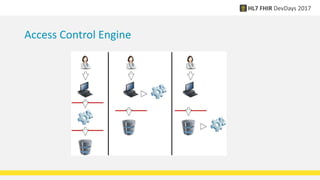
• Access Control: Is this request allowed, given
• The data in the request
• The user’s rights
• The user’s authorization
• The rules on the underlying data
Access Control Engine
OAuth
• Delegating Authorization
• Implicit: Delegating Authentication
• openID Connect: Make this explicit
• Two layer OAuth (demonstration)
• Smart App Launch (http://hl7.org/fhir/smart-app-launch)
• A profile on OAuth + openID Connect
• Should always use this wherever possible for interoperability
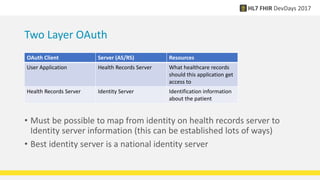
Two Layer OAuth
• Must be possible to map from identity on health records server to
Identity server information (this can be established lots of ways)
• Best identity server is a national identity server
OAuth Client Server (AS/RS) Resources
User Application Health Records Server What healthcare records
should this application get
access to
Health Records Server Identity Server Identification information
about the patient
OAuth
• Delegating Authorization
• Implicit: Delegating Authentication
• openID Connect: Make this explicit
• Two layer OAuth (demonstration)
• Smart App Launch (http://hl7.org/fhir/smart-app-launch)
• A profile on OAuth + openID Connect
• Should always use this wherever possible for interoperability
Smart App Launch
• Confidential Client (can keep a secret) – server / secure enclave
• Public Client
• Backend services
• Not much supported, and not part of STU standard
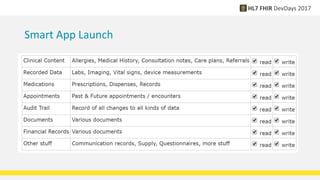
Smart App Launch Scopes
• [class]/[type].[mode]
• Class = patient | user | system
• Type = * or a FHIR resource type
• Mode = * | read | write
• Examples: patient/*.read user/*.* system/Communication.write
• Also: openid profile launch offline_access online_access
Smart App Launch
Alternative Approach
• Instead of Smart Scopes, scopes are URIs that identify Consent
resource
• Application identifies the consent resource it wants to work under
• User chooses which consent resource to proceed under
• Server replies with the consent resource that the user chose
• Makes decisions obscure to the interface, but…
• Possibly going to be tested in January connectathon
Access Control
• The Smart OAuth scopes interact with access control
• Access Control Engine engine:
• What scopes can a user allow?
• What operations/data does a user have rights for?
• What scopes has the user allowed in this context?
• What other Consents are applicable in this context? (+ jurisdictional rules)
• FHIR does not standardise the access control layer
• Should we?
• SCIM for user management – what’s the mapping between users and roles?
AuditEvent and Provenance
AuditEvent
• Record of an event
• Login/logout
• RESTful API transaction
• Higher level event (RWE)
• Typically Create (no
update/delete)
• Consider signing the audit trail
(blockchain?)
• Provenance
• Information about source of data
• Applies to a set of resources
• W5: Who What When Where Why
• This information is denormalised
into resources variably
• Can provide it in an HTTP header
• Can populate the AuditEvent
Digital Signatures
• Formal Support:
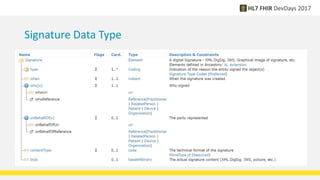
• Signature Data type
• Provenance.signature
• Bundle.signature
Signature Data Type
Using the Signature Data Type
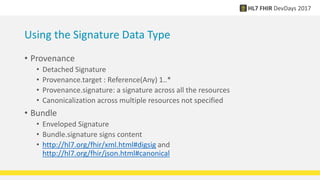
• Provenance
• Detached Signature
• Provenance.target : Reference(Any) 1..*
• Provenance.signature: a signature across all the resources
• Canonicalization across multiple resources not specified
• Bundle
• Enveloped Signature
• Bundle.signature signs content
• http://hl7.org/fhir/xml.html#digsig and
http://hl7.org/fhir/json.html#canonical
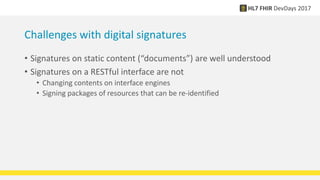
Challenges with digital signatures
• Signatures on static content (“documents”) are well understood
• Signatures on a RESTful interface are not
• Changing contents on interface engines
• Signing packages of resources that can be re-identified
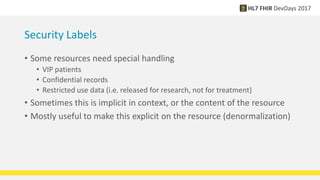
Security Labels
• Some resources need special handling
• VIP patients
• Confidential records
• Restricted use data (i.e. released for research, not for treatment)
• Sometimes this is implicit in context, or the content of the resource
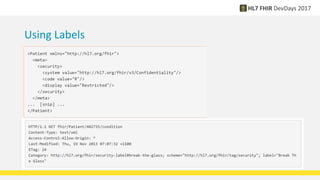
• Mostly useful to make this explicit on the resource (denormalization)
Using Labels
• Text to add to slide
• Indent item
• Another item
Core Labels
• Purpose of Use
• Treatment, research, legal, claims… etc
• Confidentiality Codes
• Unrestricted  normal  restricted  very restricted
• Delete after use / No Reuse
• All applications are required to know what these labels mean and
observe/obey them if relevant
• There are 500+ total labels, and growing….
Summary
• Security is hard
• Requires clear thinking
• Ongoing development around Authorization and Consent
• Questions…

Security overview (grahame)

  • 1.
    FHIR® is theregistered trademark of HL7 and is used with the permission of HL7. The Flame Design mark is the registered trademark of HL7 and is used with the permission of HL7. Amsterdam, 15-17 November | @fhir_furore | #fhirdevdays17 | www.fhirdevdays.com Overview over security in FHIR & Security Labels Grahame Grieve, Health Intersections
  • 2.
    Security Problem Space •Basic Web Security • Authentication / Authorization / Access Control • Digital Signatures • Audit Trail / Provenance tracking • Security Labels • An insecure system is an unsafe system
  • 3.
    Basic Web Security •Use a time synchronization protocol • Use SSL / TLS (almost always) • Keep your security libraries up to date • Use CORS correctly (hard) • No Buffer overflows, XSS, etc • Narrative Handling • Recommended: https://www.troyhunt.com/
  • 4.
    Content Issues • BaseContent Rules: • No DTD references • No Active Content in XHTML • XML: Ignore Processing Instructions • XHTML: • White list external references • Don’t leak headers processing external references (images, css, etc) • Check media types of attachments
  • 5.
    AuthZ • Authentication: Whois the user? (and their agent?) • Authorization: What does the user allow in this context? • Access Control: Is this request allowed, given • The data in the request • The user’s rights • The user’s authorization • The rules on the underlying data
  • 6.
  • 7.
    OAuth • Delegating Authorization •Implicit: Delegating Authentication • openID Connect: Make this explicit • Two layer OAuth (demonstration) • Smart App Launch (http://hl7.org/fhir/smart-app-launch) • A profile on OAuth + openID Connect • Should always use this wherever possible for interoperability
  • 8.
    Two Layer OAuth •Must be possible to map from identity on health records server to Identity server information (this can be established lots of ways) • Best identity server is a national identity server OAuth Client Server (AS/RS) Resources User Application Health Records Server What healthcare records should this application get access to Health Records Server Identity Server Identification information about the patient
  • 9.
    OAuth • Delegating Authorization •Implicit: Delegating Authentication • openID Connect: Make this explicit • Two layer OAuth (demonstration) • Smart App Launch (http://hl7.org/fhir/smart-app-launch) • A profile on OAuth + openID Connect • Should always use this wherever possible for interoperability
  • 10.
    Smart App Launch •Confidential Client (can keep a secret) – server / secure enclave • Public Client • Backend services • Not much supported, and not part of STU standard
  • 11.
    Smart App LaunchScopes • [class]/[type].[mode] • Class = patient | user | system • Type = * or a FHIR resource type • Mode = * | read | write • Examples: patient/*.read user/*.* system/Communication.write • Also: openid profile launch offline_access online_access
  • 12.
  • 13.
    Alternative Approach • Insteadof Smart Scopes, scopes are URIs that identify Consent resource • Application identifies the consent resource it wants to work under • User chooses which consent resource to proceed under • Server replies with the consent resource that the user chose • Makes decisions obscure to the interface, but… • Possibly going to be tested in January connectathon
  • 14.
    Access Control • TheSmart OAuth scopes interact with access control • Access Control Engine engine: • What scopes can a user allow? • What operations/data does a user have rights for? • What scopes has the user allowed in this context? • What other Consents are applicable in this context? (+ jurisdictional rules) • FHIR does not standardise the access control layer • Should we? • SCIM for user management – what’s the mapping between users and roles?
  • 15.
    AuditEvent and Provenance AuditEvent •Record of an event • Login/logout • RESTful API transaction • Higher level event (RWE) • Typically Create (no update/delete) • Consider signing the audit trail (blockchain?) • Provenance • Information about source of data • Applies to a set of resources • W5: Who What When Where Why • This information is denormalised into resources variably • Can provide it in an HTTP header • Can populate the AuditEvent
  • 16.
    Digital Signatures • FormalSupport: • Signature Data type • Provenance.signature • Bundle.signature
  • 17.
  • 18.
    Using the SignatureData Type • Provenance • Detached Signature • Provenance.target : Reference(Any) 1..* • Provenance.signature: a signature across all the resources • Canonicalization across multiple resources not specified • Bundle • Enveloped Signature • Bundle.signature signs content • http://hl7.org/fhir/xml.html#digsig and http://hl7.org/fhir/json.html#canonical
  • 19.
    Challenges with digitalsignatures • Signatures on static content (“documents”) are well understood • Signatures on a RESTful interface are not • Changing contents on interface engines • Signing packages of resources that can be re-identified
  • 20.
    Security Labels • Someresources need special handling • VIP patients • Confidential records • Restricted use data (i.e. released for research, not for treatment) • Sometimes this is implicit in context, or the content of the resource • Mostly useful to make this explicit on the resource (denormalization)
  • 21.
    Using Labels • Textto add to slide • Indent item • Another item
  • 22.
    Core Labels • Purposeof Use • Treatment, research, legal, claims… etc • Confidentiality Codes • Unrestricted  normal  restricted  very restricted • Delete after use / No Reuse • All applications are required to know what these labels mean and observe/obey them if relevant • There are 500+ total labels, and growing….
  • 23.
    Summary • Security ishard • Requires clear thinking • Ongoing development around Authorization and Consent • Questions…