Quality Assurance
& Software Testing
What is Quality Assurance?
 Quality Control
 Planned Systematic Activities
 Monitoring of Processes
 ISO 9000 Standards
 CMM Level Standards
 Six Sigma Standards
 Measurement and Comparison with Standards
What is Software Testing?

 Requirement Gathering
 Requirement Analysis
 Sign Off Requirement
 Test Plan/ Strategy
 Preparing Test Cases
 Review and Freeze Test Cases
 Execution of Test Cases
What is Software Testing? (Contd.)
  Report the Bugs
  Fixing the Bugs
  Retest and Close the Bugs
  Prepare the Defect Summary Report
  Signoff QA
V&V
 Verification: Have we built the software right?
 (i.e., does it match the specification).

 Validation: Have we built the right software?
 (i.e., is this what the customer wants).
IT Project Team Structure
 Project Manager
 Development Manager
 Dev. Lead/ Module Lead/ Sr. Developers
 Developers
 Business Analyst
 Production Support Team
 Web/ Application Server Support Team
 Database Administrators
 Test Manager/ Lead
 Sr. QA Tester/ Sr. QA Analyst/ Sr. QA Engineer
 QA Tester/ QA Analyst/ QA Engineer
What is SDLC?
 SDLC: Software Development Life Cycle

Types of SDLC –

 Waterfall Model
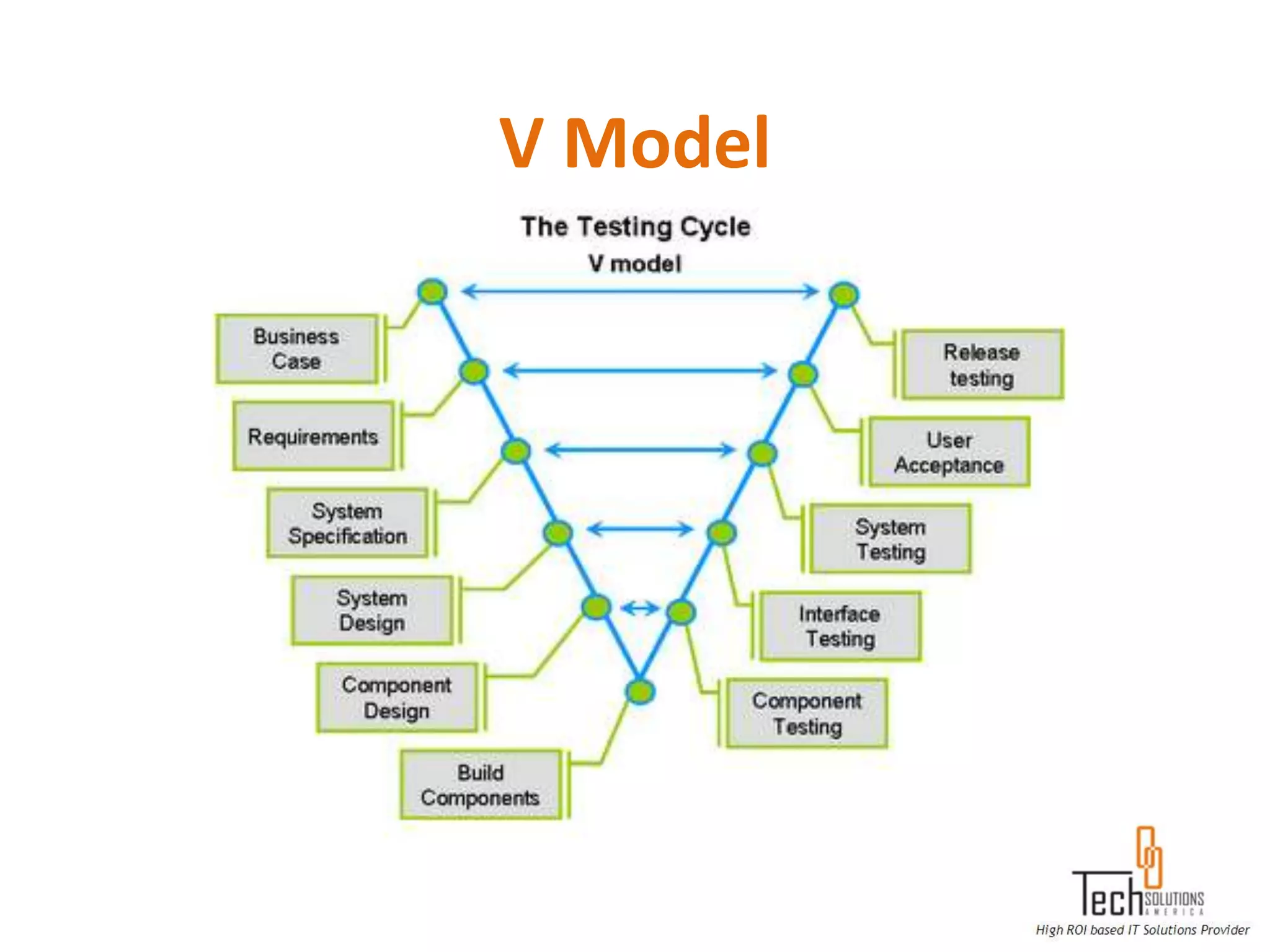
 V Model
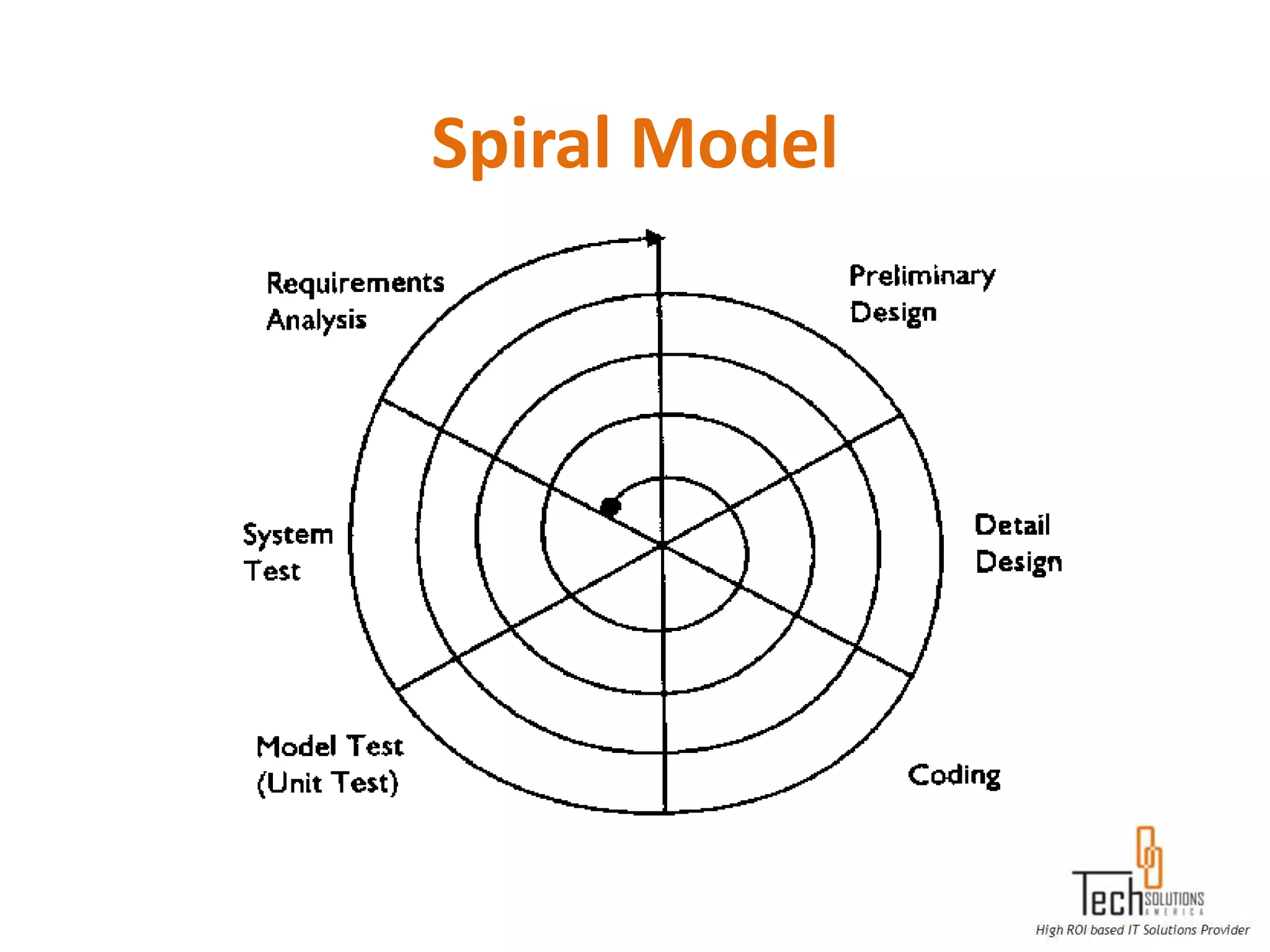
 Spiral Model etc.
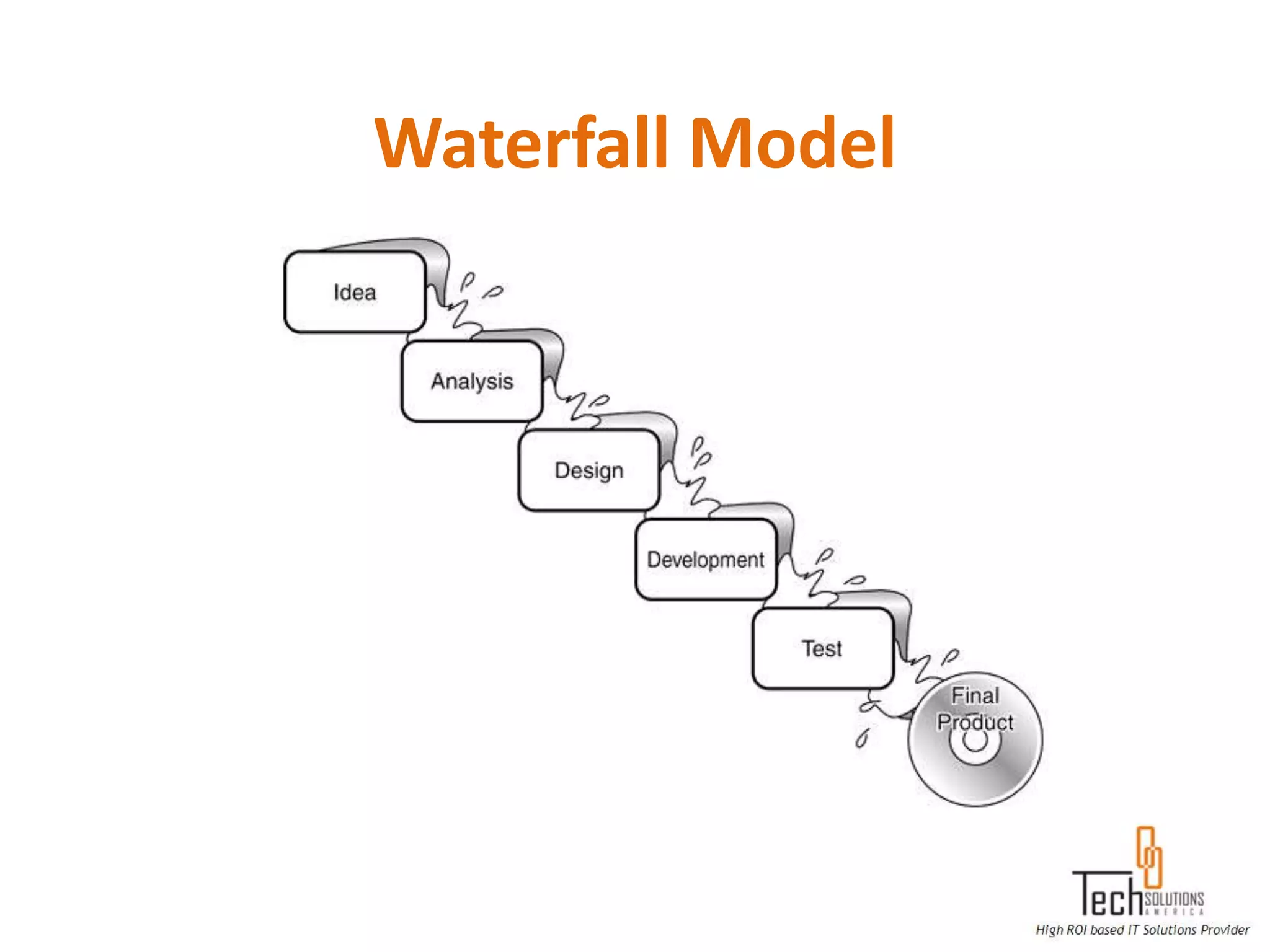
Waterfall Model
V Model
Spiral Model
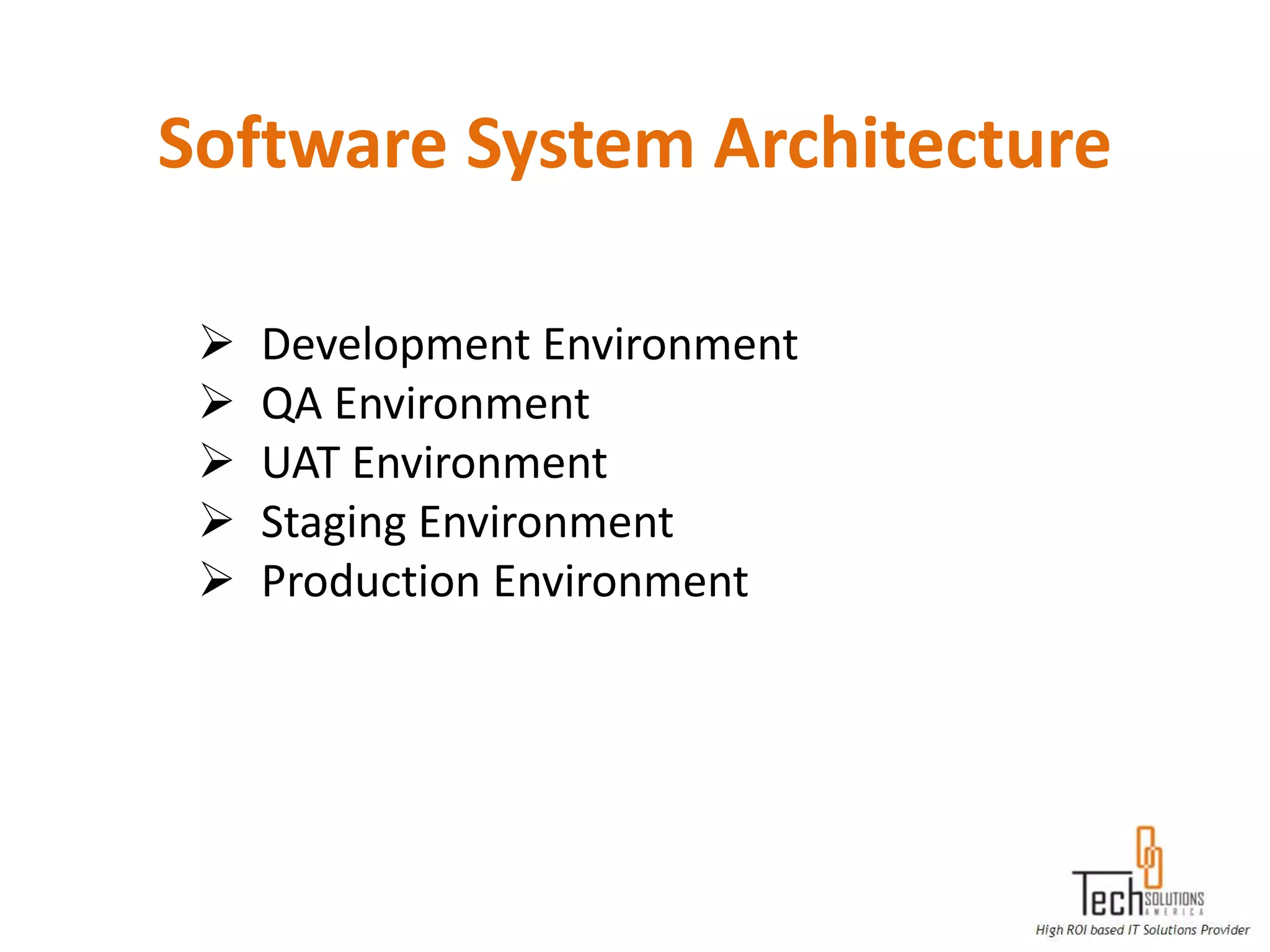
Software System Architecture

    Development Environment
    QA Environment
    UAT Environment
    Staging Environment
    Production Environment
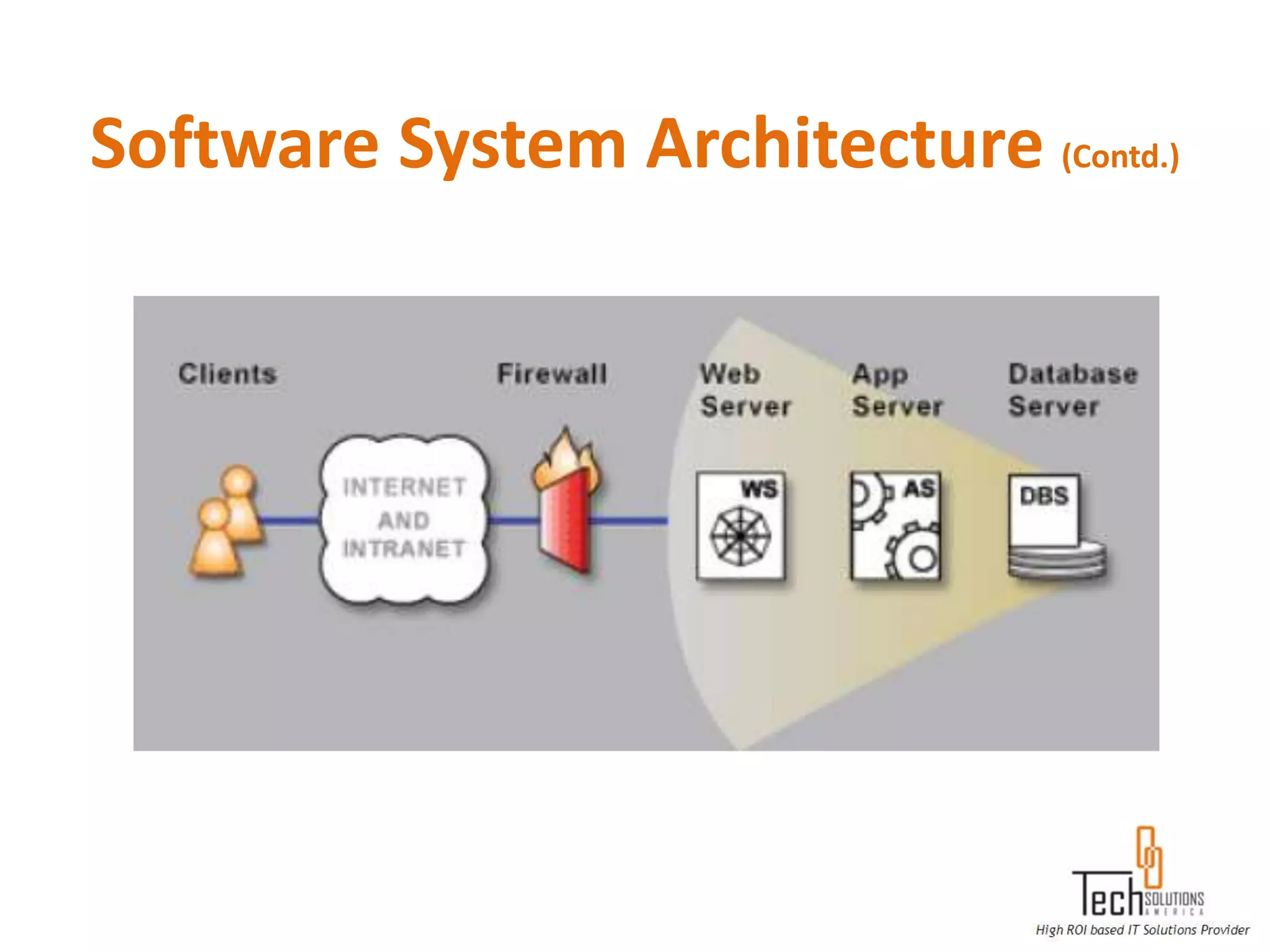
Software System Architecture (Contd.)
Methods of Testing
Unit Testing: The primary goal of unit testing is to take the smallest piece of
testable software in the application, isolate it from the remainder of the
code, and determine whether it behaves exactly as you expect

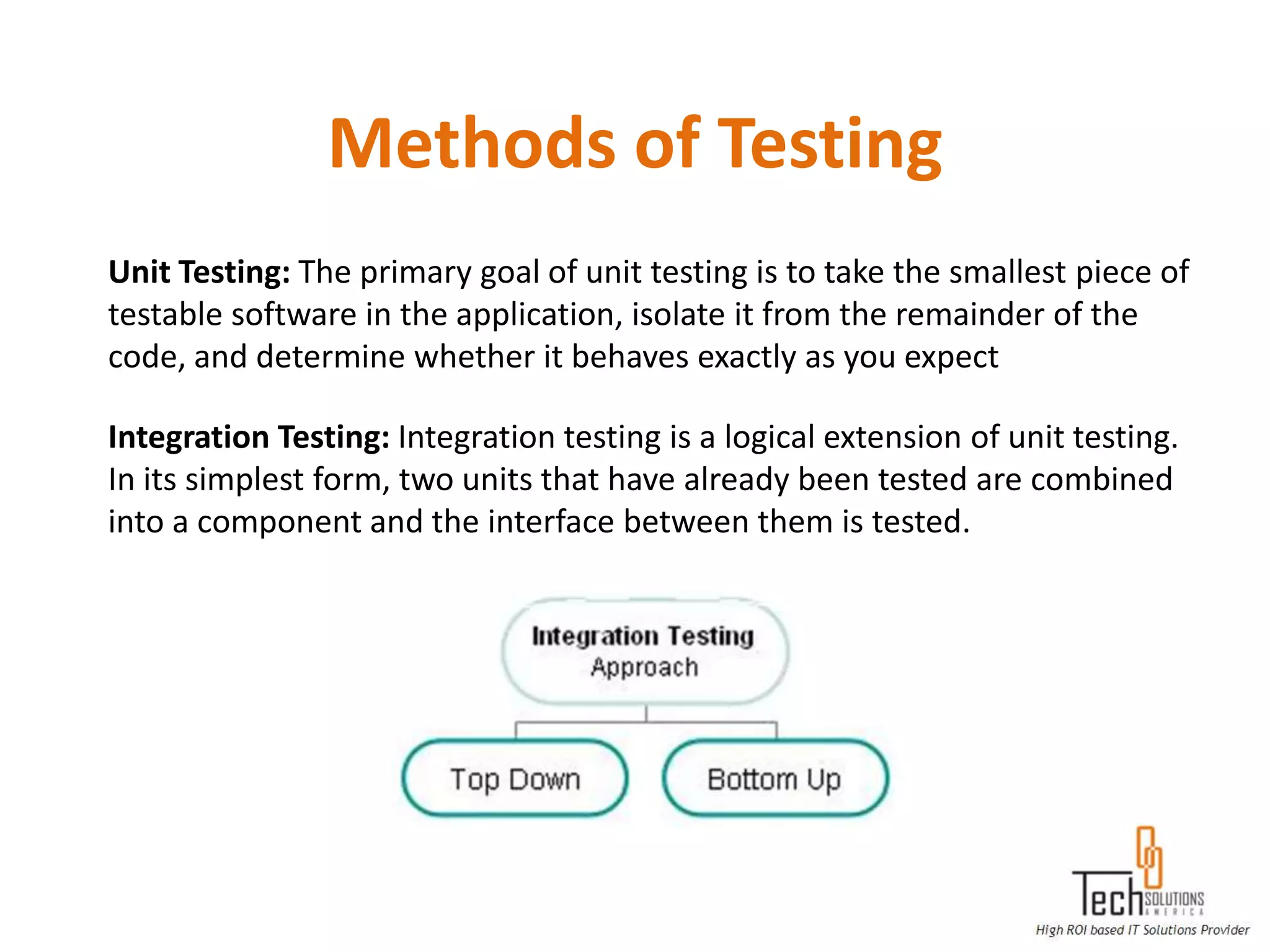
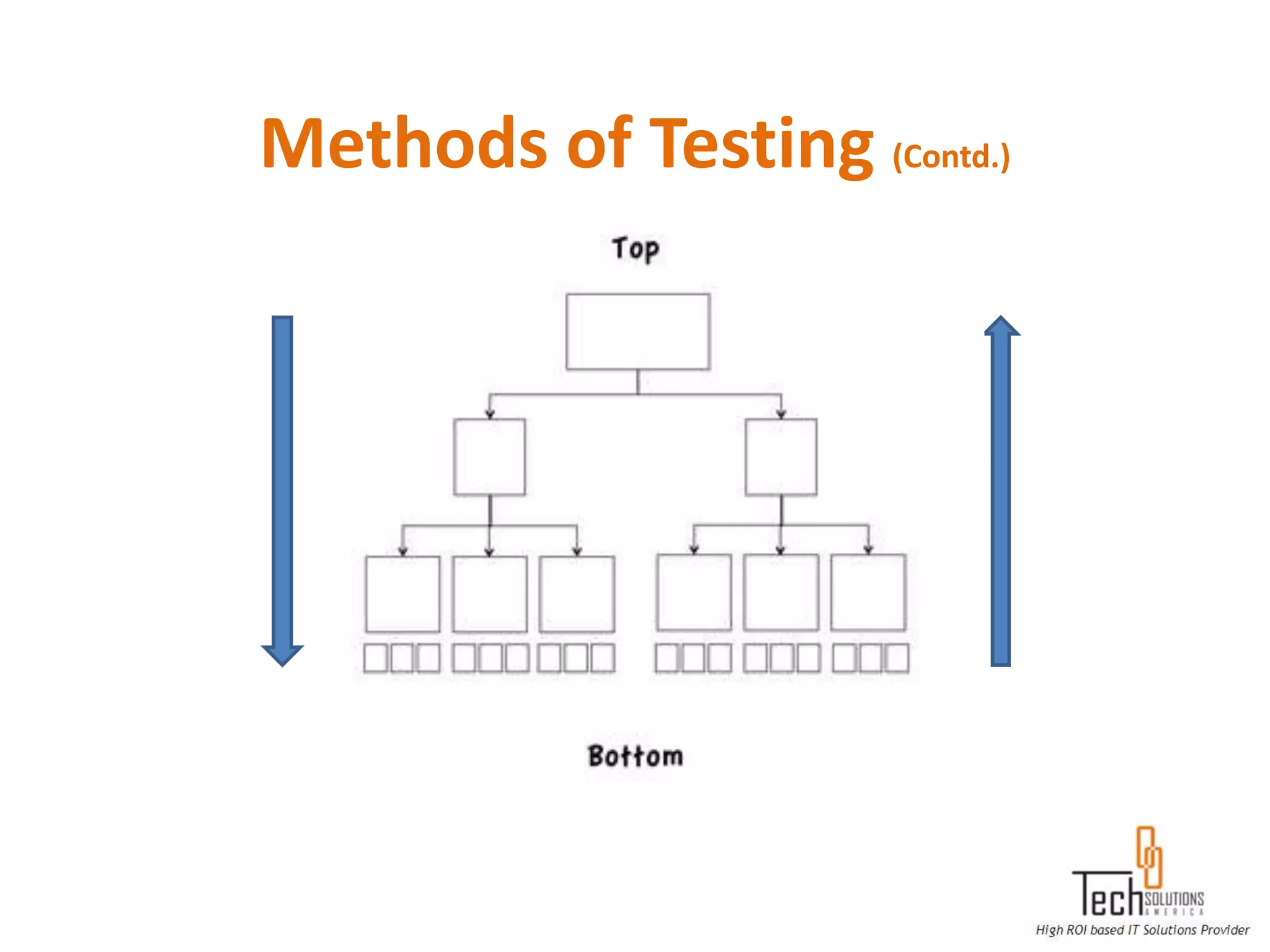
Integration Testing: Integration testing is a logical extension of unit testing.
In its simplest form, two units that have already been tested are combined
into a component and the interface between them is tested.
Methods of Testing (Contd.)
Regression Testing: Regression testing is the process of testing changes to
computer programs to make sure that the older programming still works
with the new changes.
Functional Testing: Functional testing is a type of black box testing that
bases its test cases on the specifications of the software component under
test. Functions are tested by feeding them input and examining the
output, and internal program structure is not considered.

System Testing: System testing of software or hardware is testing
conducted on a complete, integrated system to evaluate the system's
compliance with its specified requirements. System testing falls within the
scope of black box testing, and as such, should require no knowledge of
the inner design of the code or logic.
Methods of Testing (Contd.)
System Integration Testing: System Integration Testing (SIT) is a testing
process that exercises a software system's coexistence with others. With
multiple integrated systems, assuming that each have already passed
system testing, SIT proceeds to test their required interactions

User Acceptance Testing: User Acceptance Testing is often the final step
before rolling out the application. Usually the end users who will be using
the applications test the application before ‘accepting’ the application.

Black- box Testing: Black-box testing is a method of software testing that
tests the functionality of an application as opposed to its internal
structures or workings. Specific knowledge of the application's code/
internal structure and programming knowledge in general is not required.
Methods of Testing (Contd.)
White- box Testing: White-box testing (also known as Clear box
Testing, Glass box Testing, Transparent box Testing and Structural Testing)
is a method of testing software that tests internal structures or workings of
an application, as opposed to its functionality (i.e. black-box testing). In
white-box testing an internal perspective of the system, as well as
programming skills, are used to design test cases. The tester chooses
inputs to exercise paths through the code and determine the appropriate
outputs.

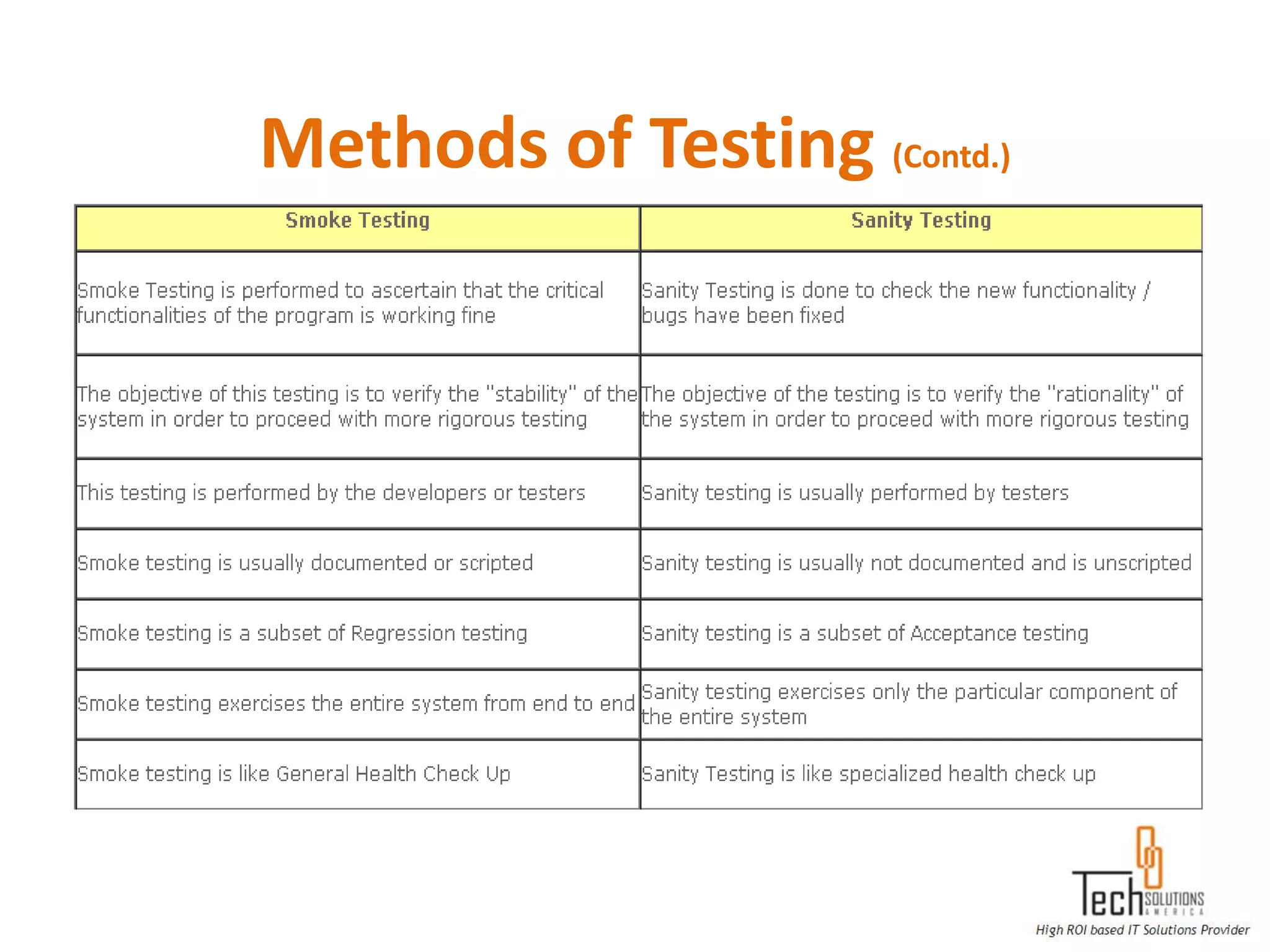
Sanity Testing: Sanity testing is a quick test of the software build which
ensures the build is ready for a major testing effort.

Smoke Testing: Smoke testing is to test all major functionalities in the
application.
Methods of Testing (Contd.)
Business Process Testing: The Business Process Testing model is role-
based, allowing non-technical Subject Matter Experts (working in
Quality Center) to collaborate effectively with Automation Engineers
(working in Quick Test Professional). Subject Matter Experts define and
document business processes, business components, and business
process tests, while Automation Engineers define the required
resources and settings, such as shared object repositories, function
libraries, and recovery scenarios. Together, they can build, data-drive,
document, and run business process tests, without requiring
programming knowledge on the part of the Subject Matter Expert.
Methods of Testing (Contd.)
Backend/ Database Testing: Executing SQL statements to check if the
data submitted by a GUI program is updated in the database or not?
Backend testing is the testing the integration between the application
and the database. It is also checking the changes made in the database
is getting reflected in the application.
Example: A new column is added in the table. Here we test by giving
values in the application and value has to be stored in the table.

Exploratory Testing: Exploratory testing is a form of quality checking
that does not rely on test scripts. A tester is let loose on the system,
often with very little introduction, and they are encouraged to report
any and all issues they find.
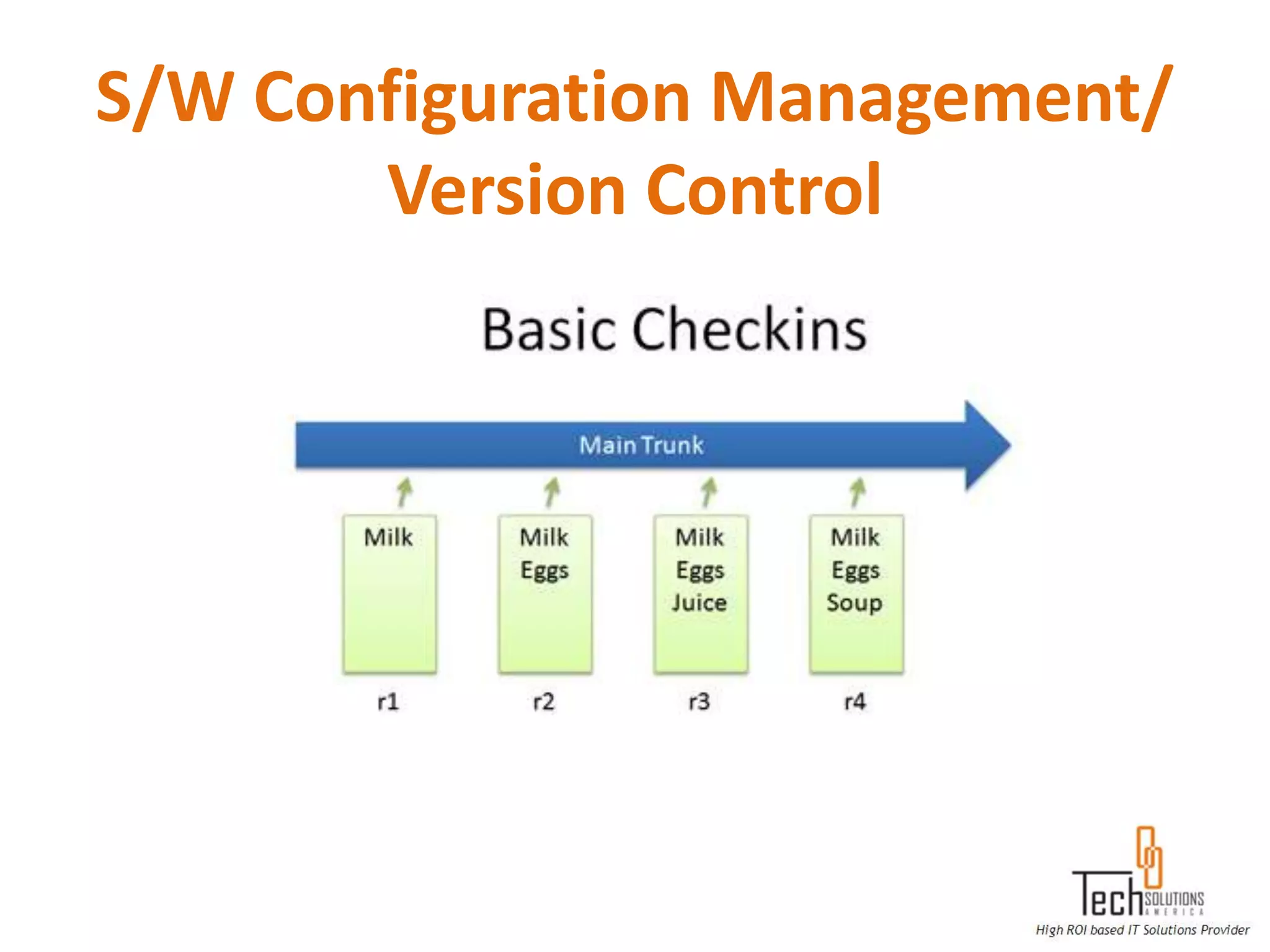
S/W Configuration Management/
       Version Control
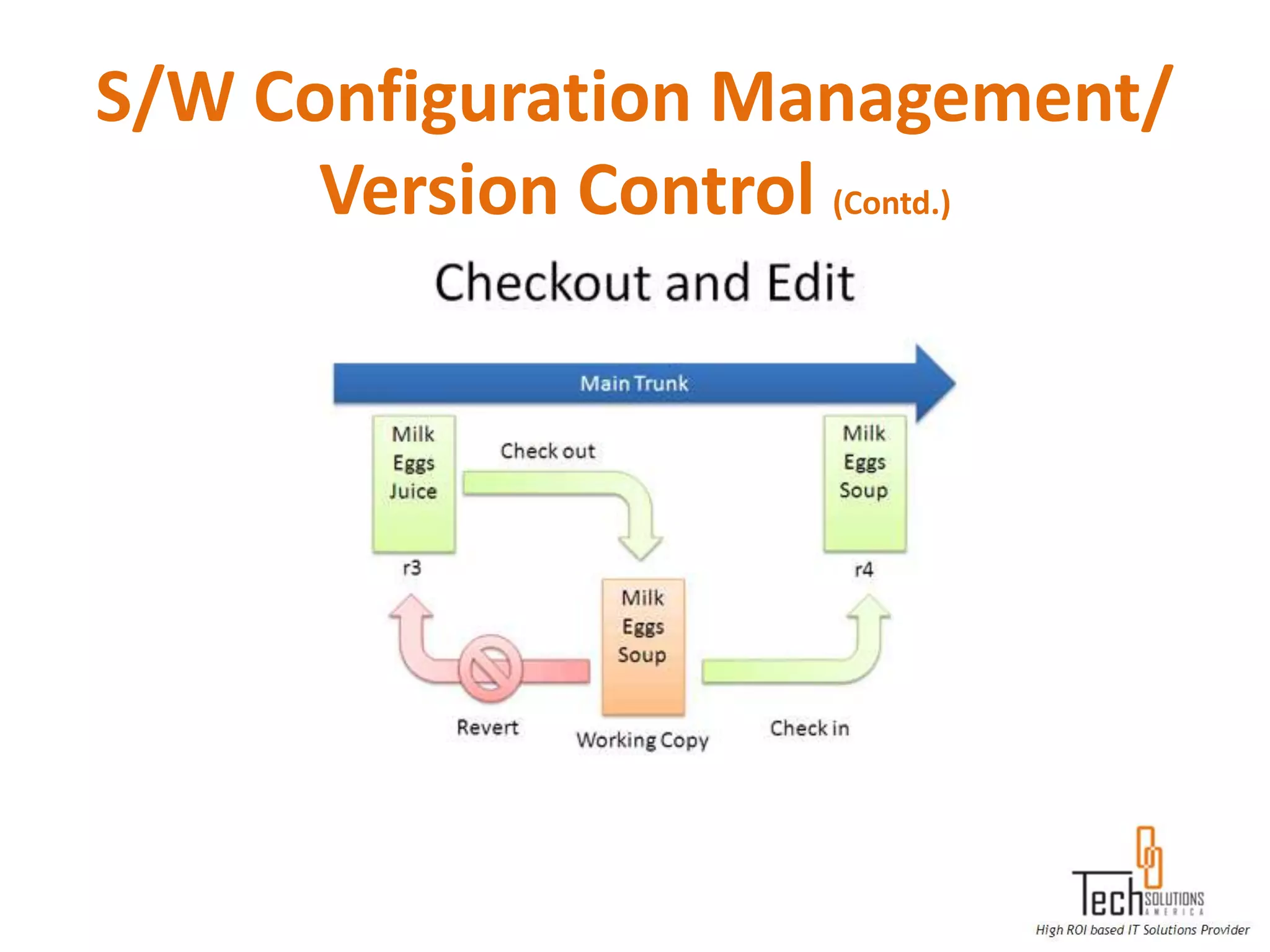
S/W Configuration Management/
      Version Control (Contd.)
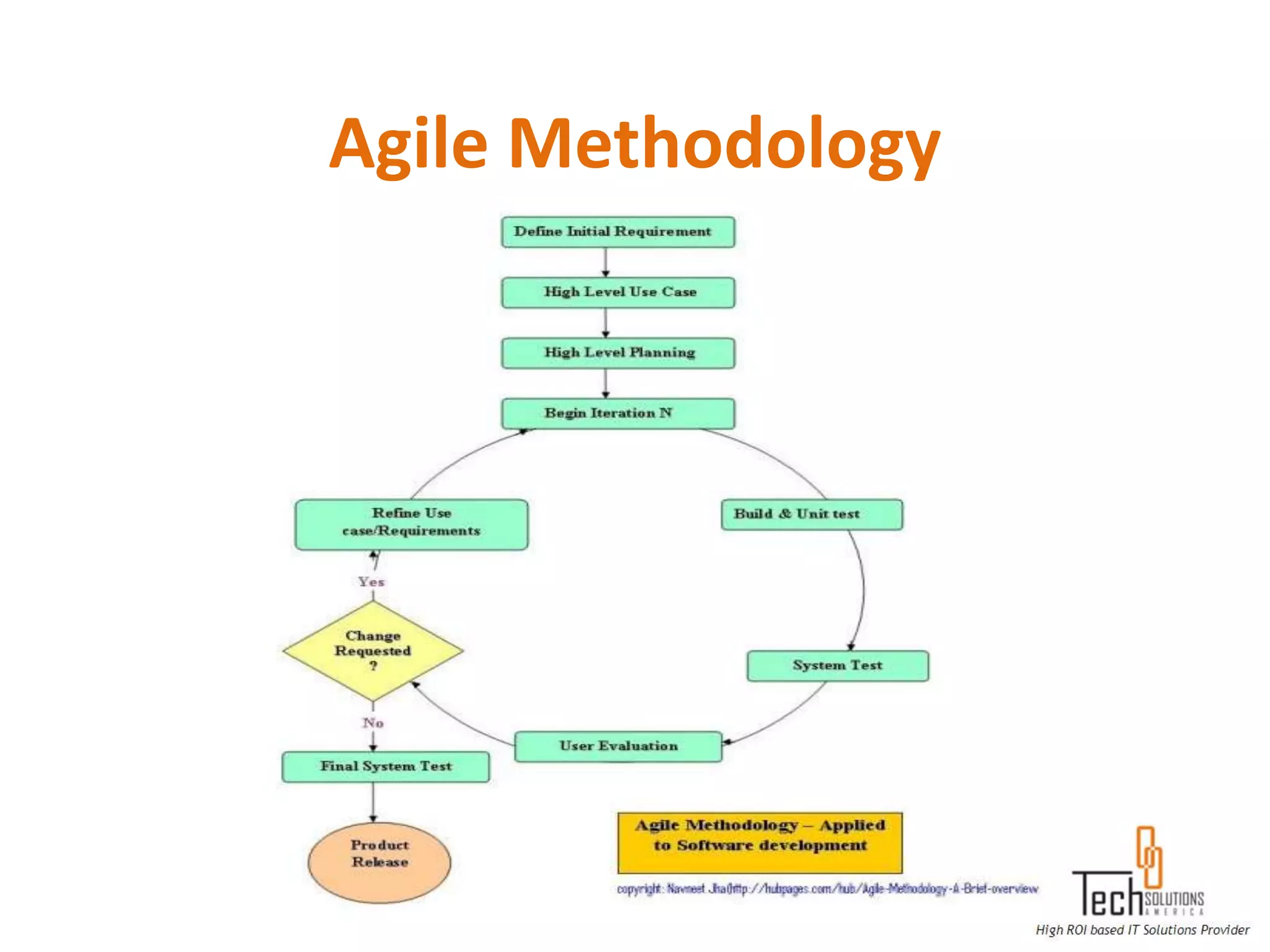
Agile Methodology
QA Documentation

 BRD/ SRS/ SRD/ Requirements Document
 FDD/ FRS/ Functional Document
 TDD/ Technical Document
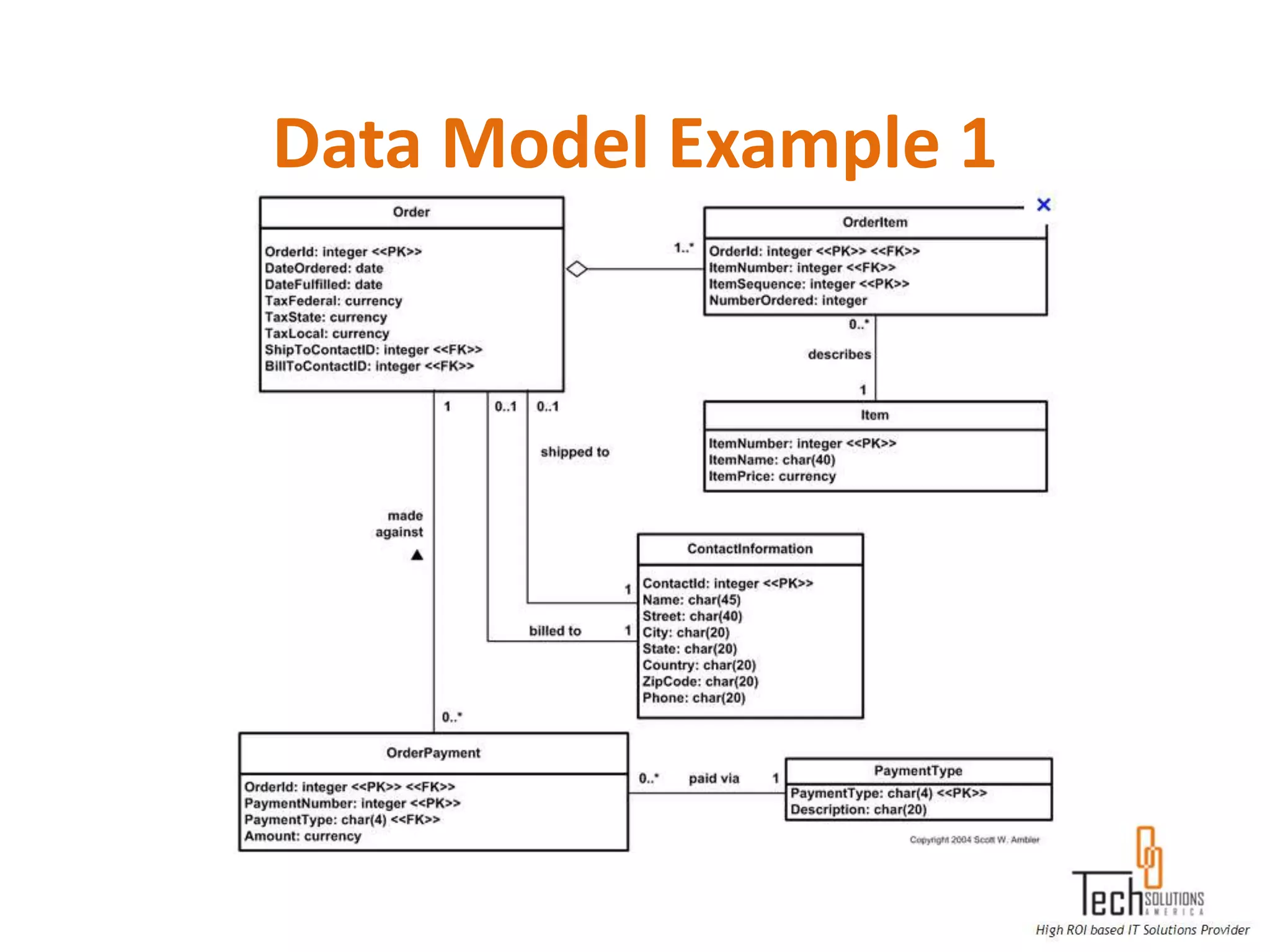
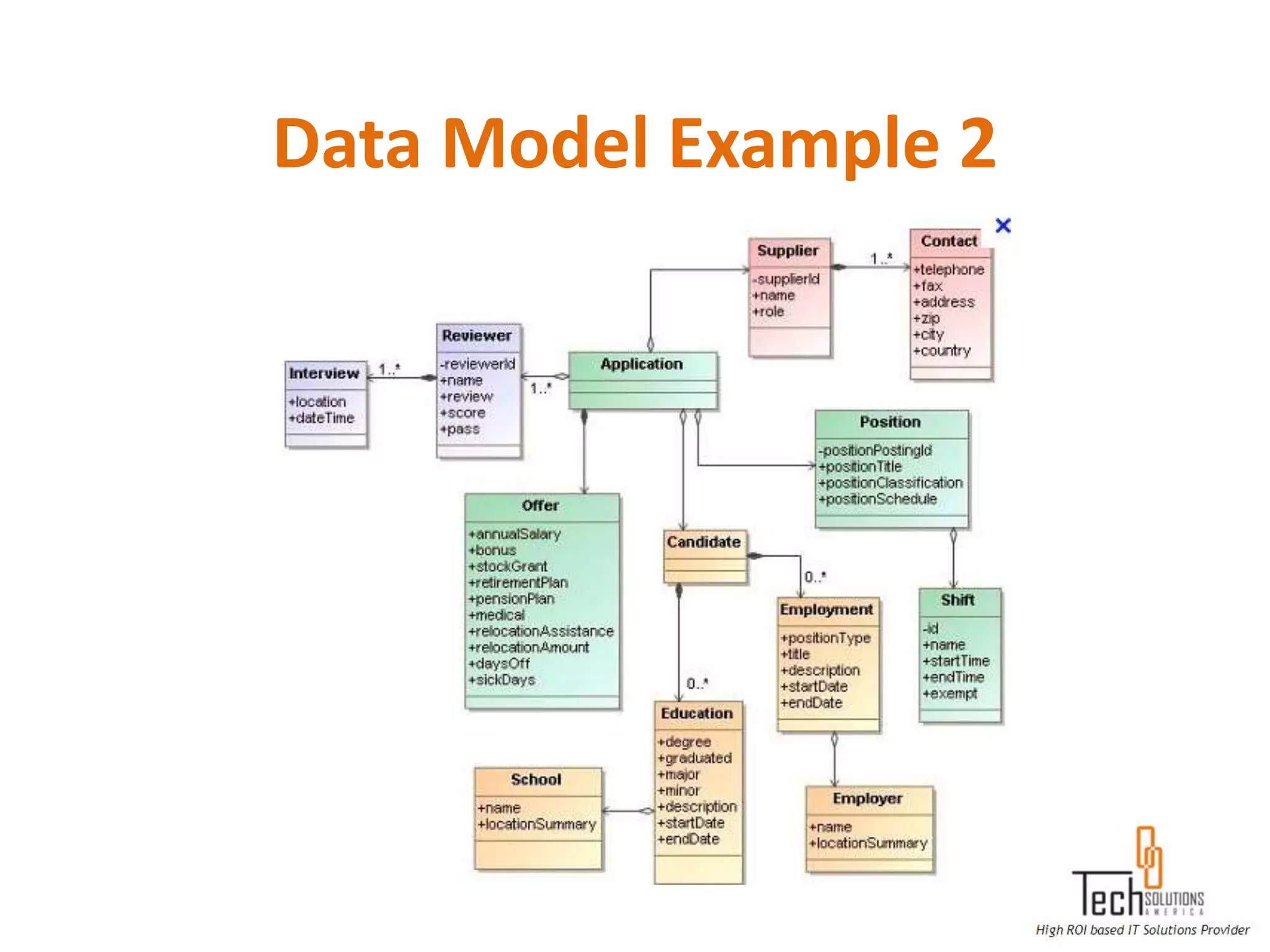
 Data Model/ Database Model
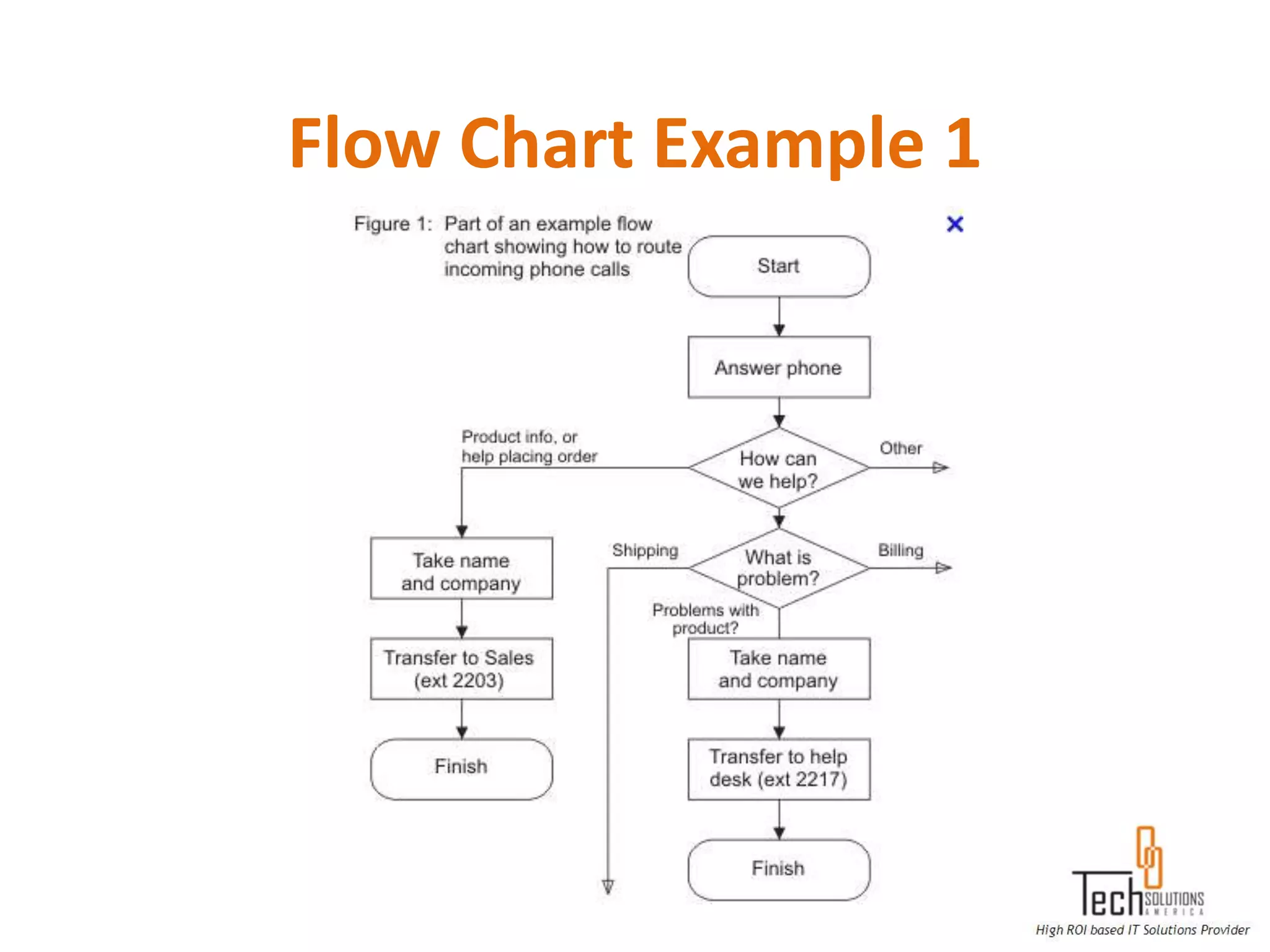
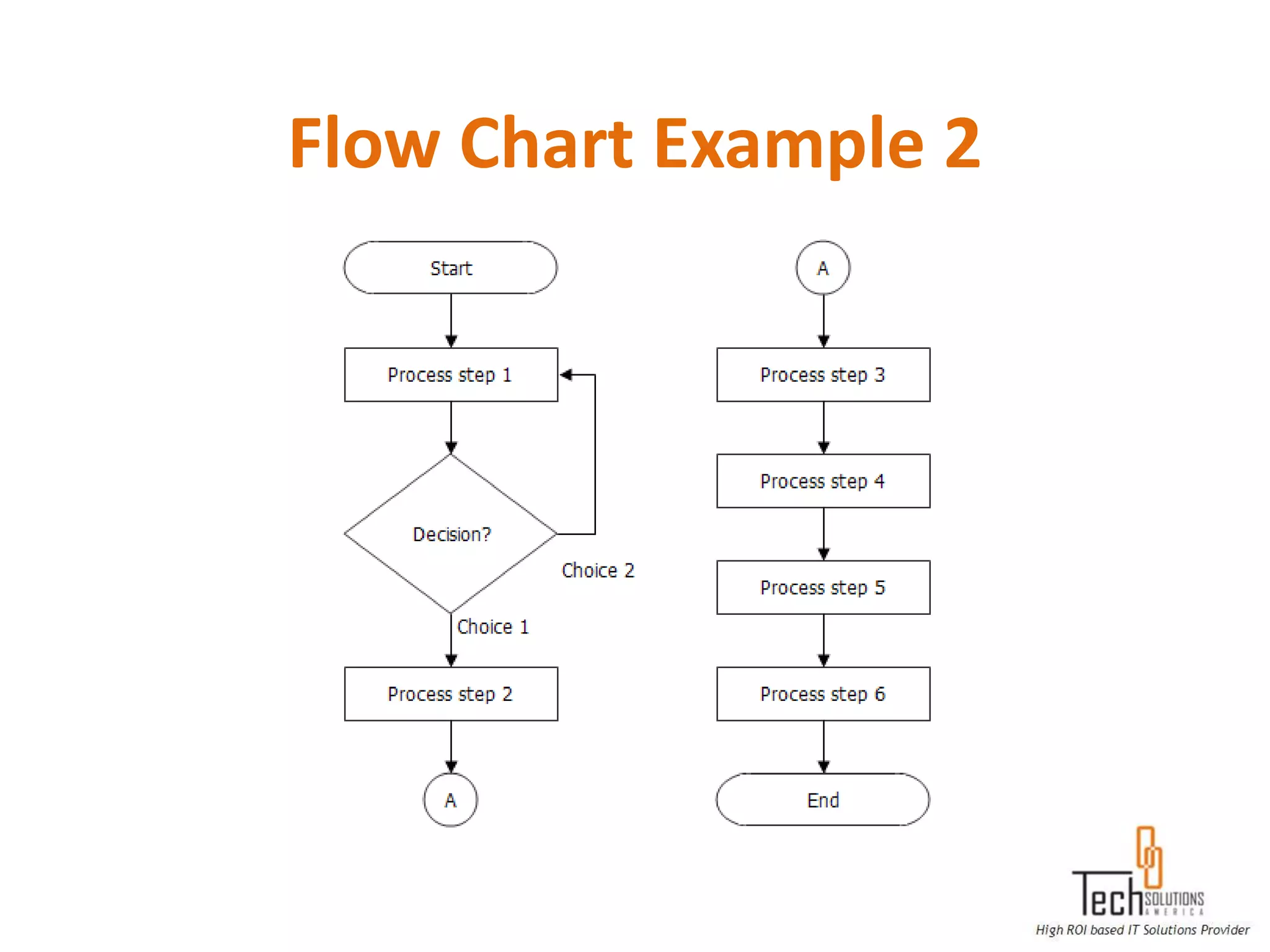
 Flow Charts/ Flow Diagrams
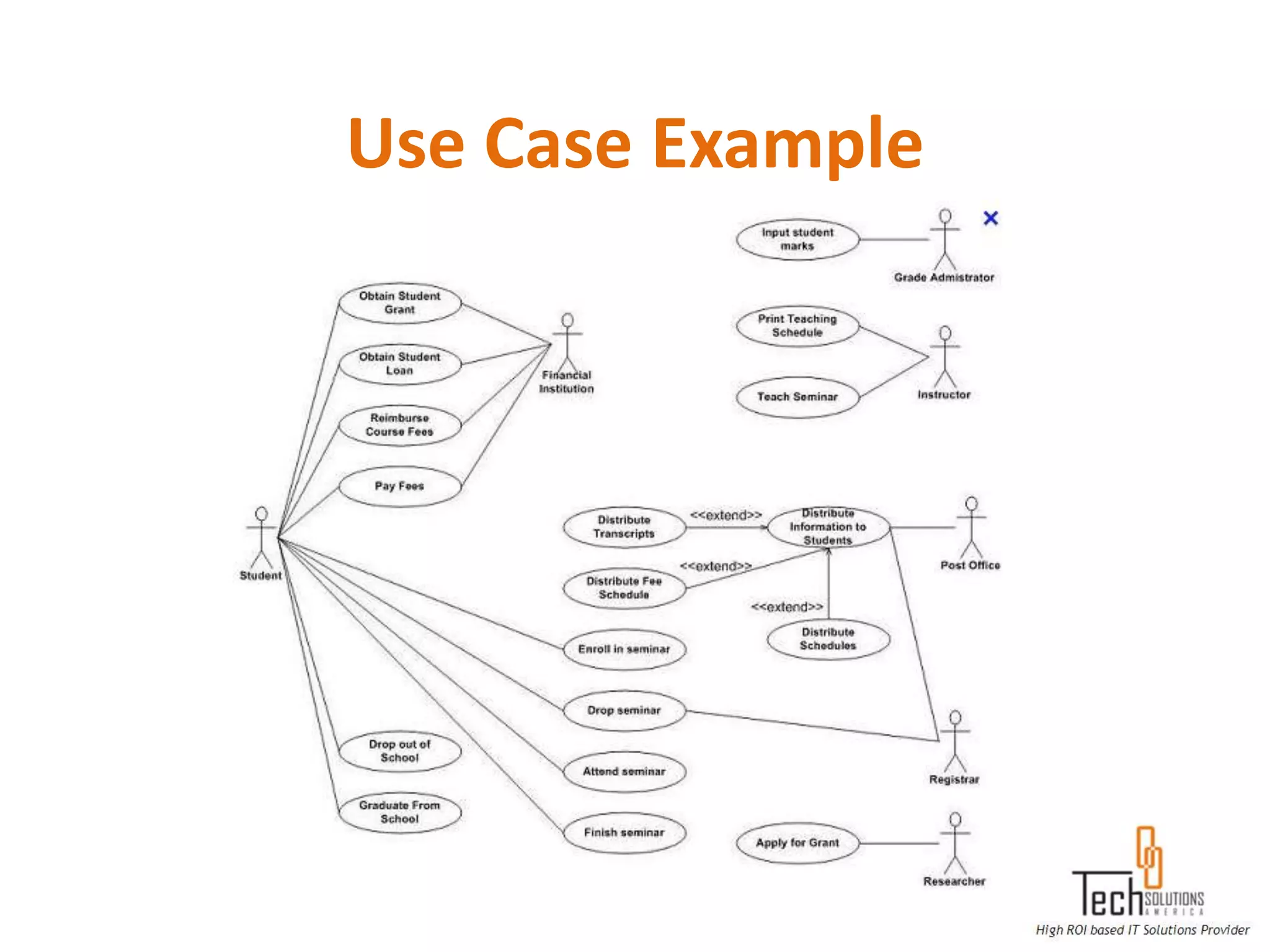
 Use Cases
 User Guides
Data Model Example 1
Data Model Example 2
Flow Chart Example 1
Flow Chart Example 2
Use Case Example
QA Artifacts
 Test Plan
 Test Scenarios
 Test Cases
 Test Steps
 Test Data
 Test Estimation
 Test Schedule
 Security/ Access/ Entitlement requirements
Entry/ Exit Criteria in a Test Plan
 Examples of Entry Criteria:
  Testing Environment Established
  Approved Business Requirements
  Adequate Test data is available
  Test plans are completed
  Documented Test Cases and Results from prior test phase
  Completed and reviewed Test cases / Test scripts
  Access rights for the Testers were established

 Examples of Exit Criteria:
  All items in scope was tested
  All test cases (100%) are executed: failed cases have a satisfactory resolution
  Defects were documented and reported
  All severity 1 (critical) and 2 (Major) defects are resolved and implemented
  Applicable sign-off on testing was obtained
Test Case/ Test Steps Concepts
 Pre-Conditions
 Business Rules
 Field Level Validations
 User Interface Validations
 Taking Screenshots
 System Error/ Exception Messages
 System / Confirmation Messages
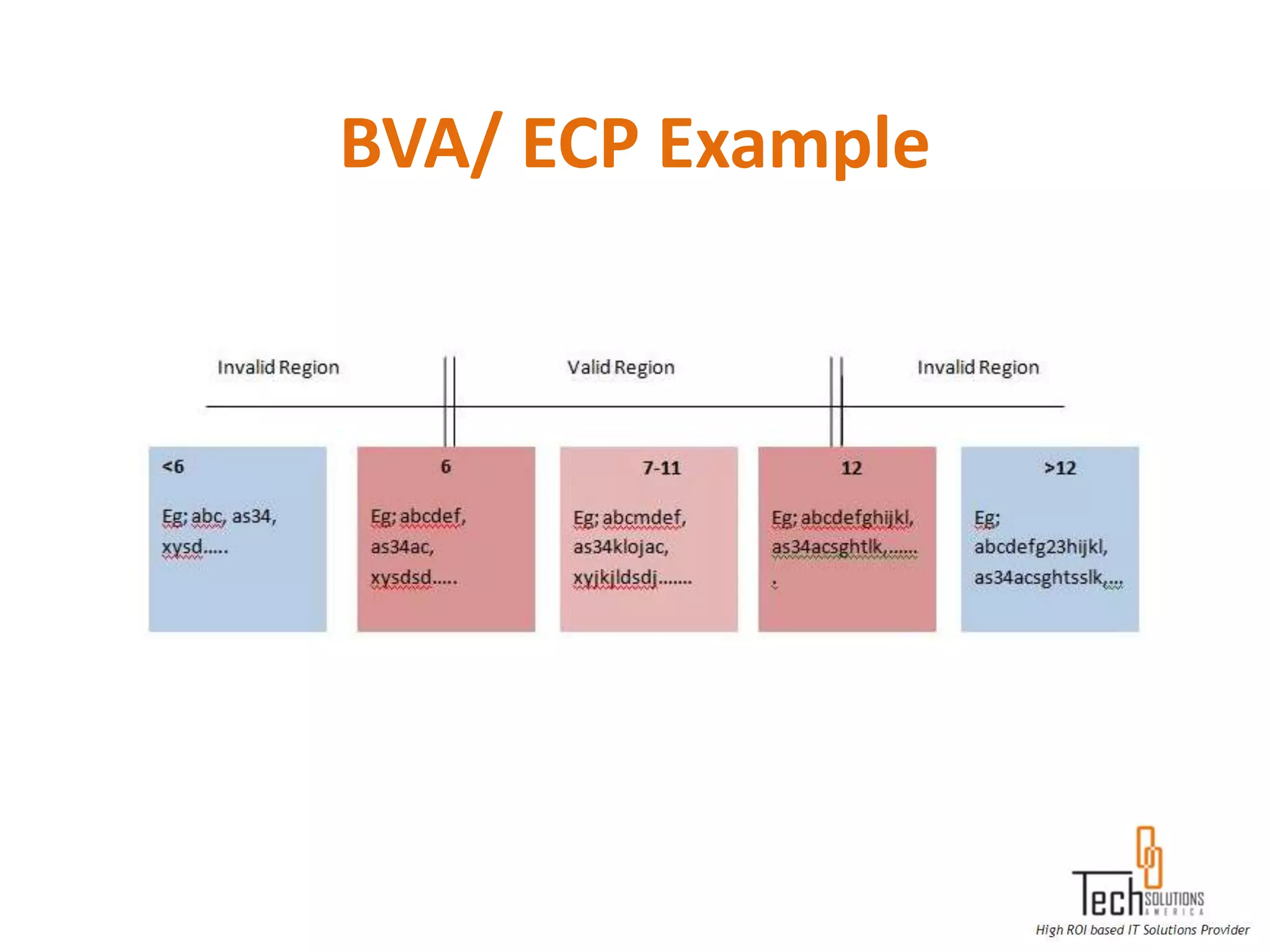
 Boundary Value Analysis
 Equivalence Class Partisans
BVA/ ECP Example
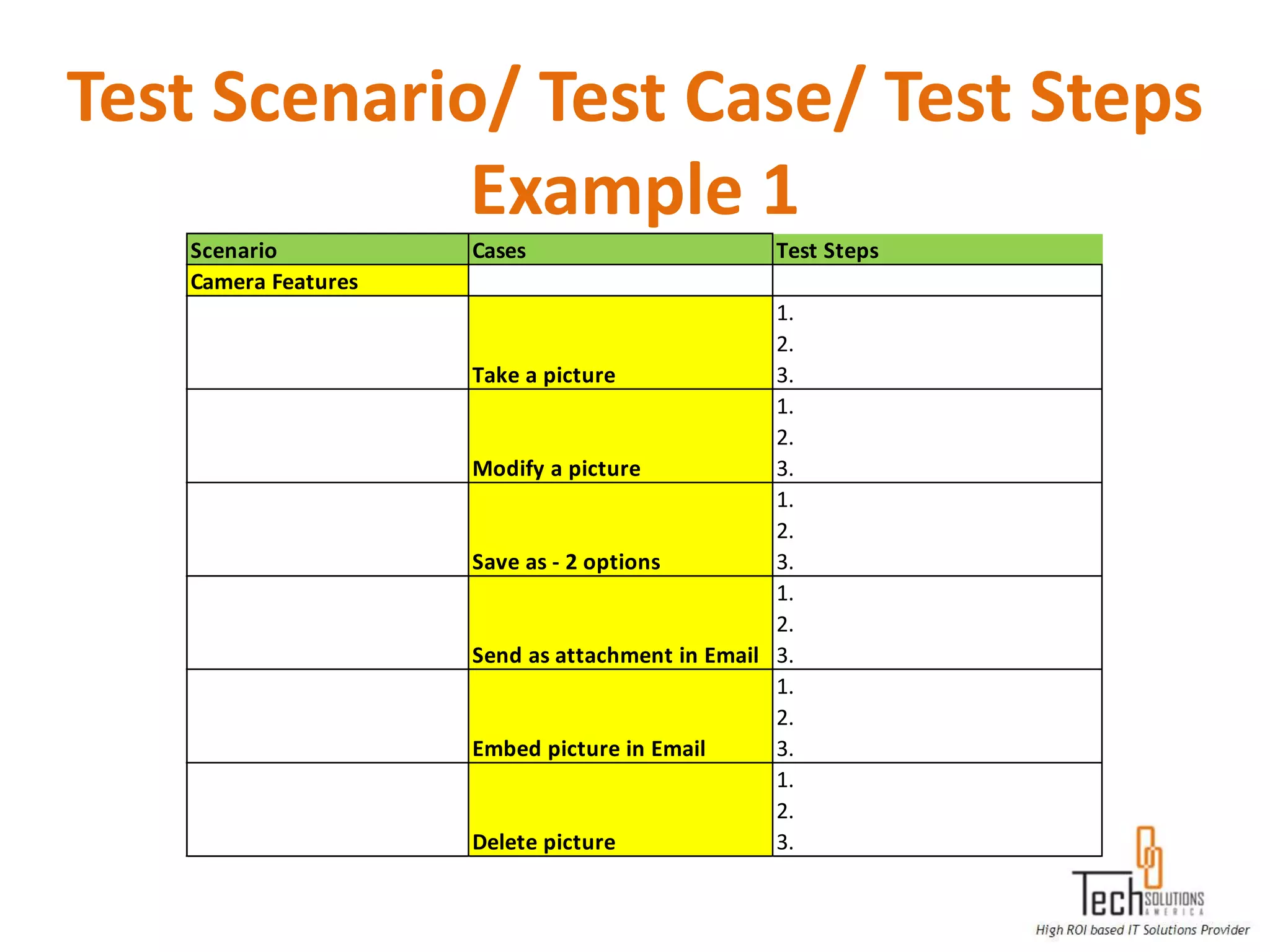
Test Scenario/ Test Case/ Test Steps
             Example 1
   Scenario          Cases                       Test Steps
   Camera Features
                                                 1.
                                                 2.
                     Take a picture              3.
                                                 1.
                                                 2.
                     Modify a picture            3.
                                                 1.
                                                 2.
                     Save as - 2 options         3.
                                                 1.
                                                 2.
                     Send as attachment in Email 3.
                                                 1.
                                                 2.
                     Embed picture in Email      3.
                                                 1.
                                                 2.
                     Delete picture              3.
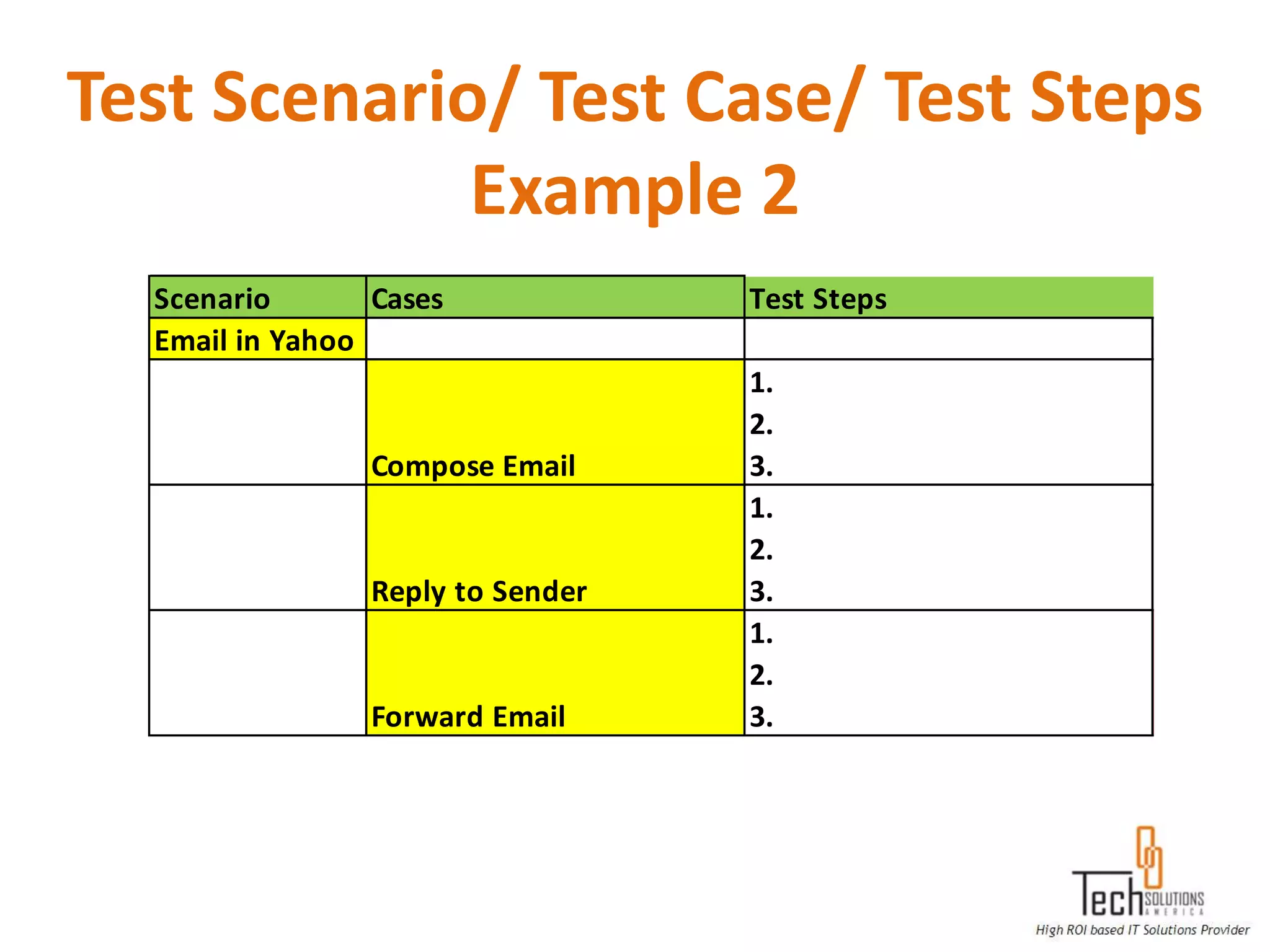
Test Scenario/ Test Case/ Test Steps
             Example 2
  Scenario       Cases             Test Steps
  Email in Yahoo
                                   1.
                                   2.
                 Compose Email     3.
                                   1.
                                   2.
                 Reply to Sender   3.
                                   1.
                                   2.
                 Forward Email     3.
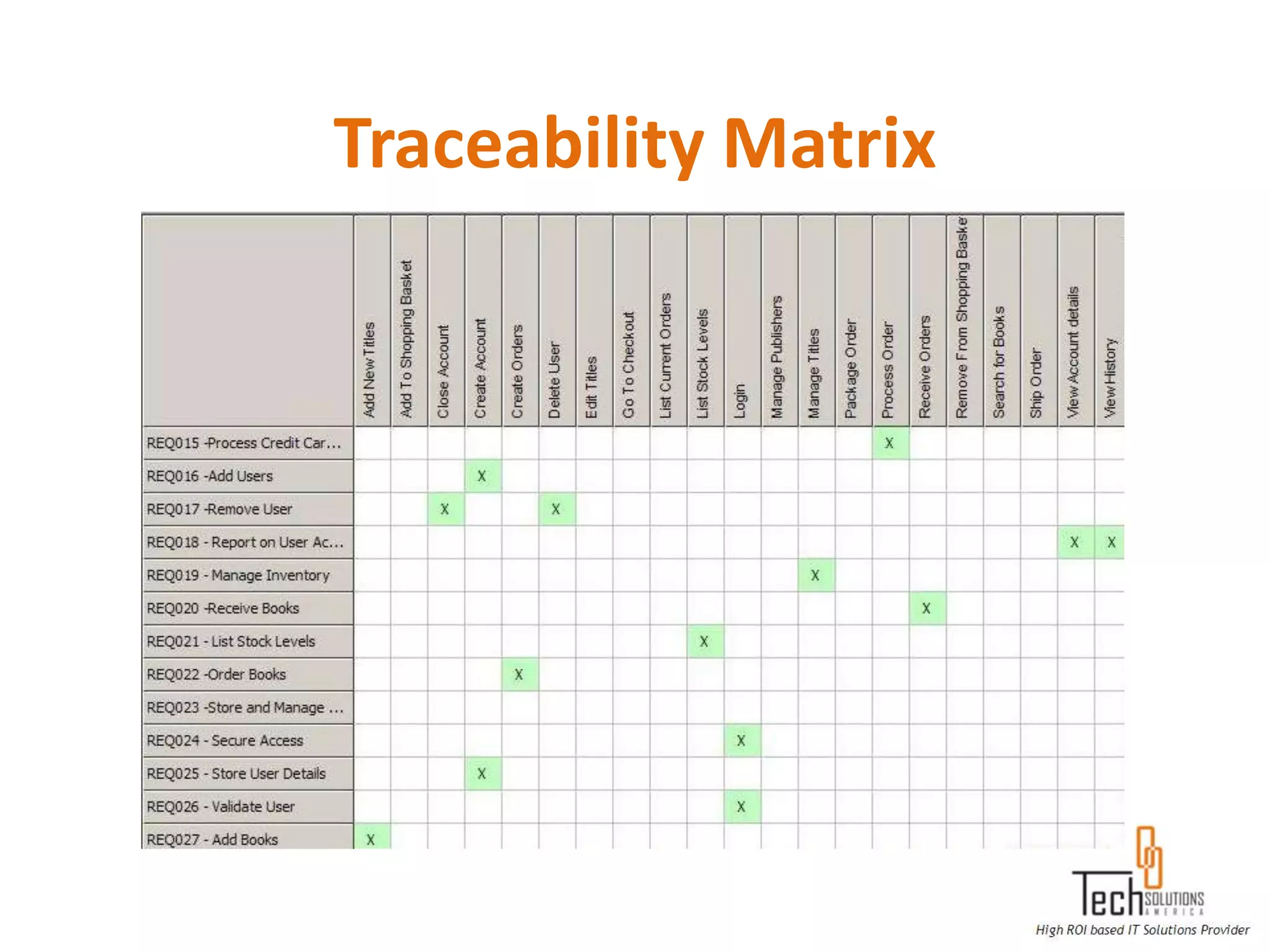
Traceability Matrix
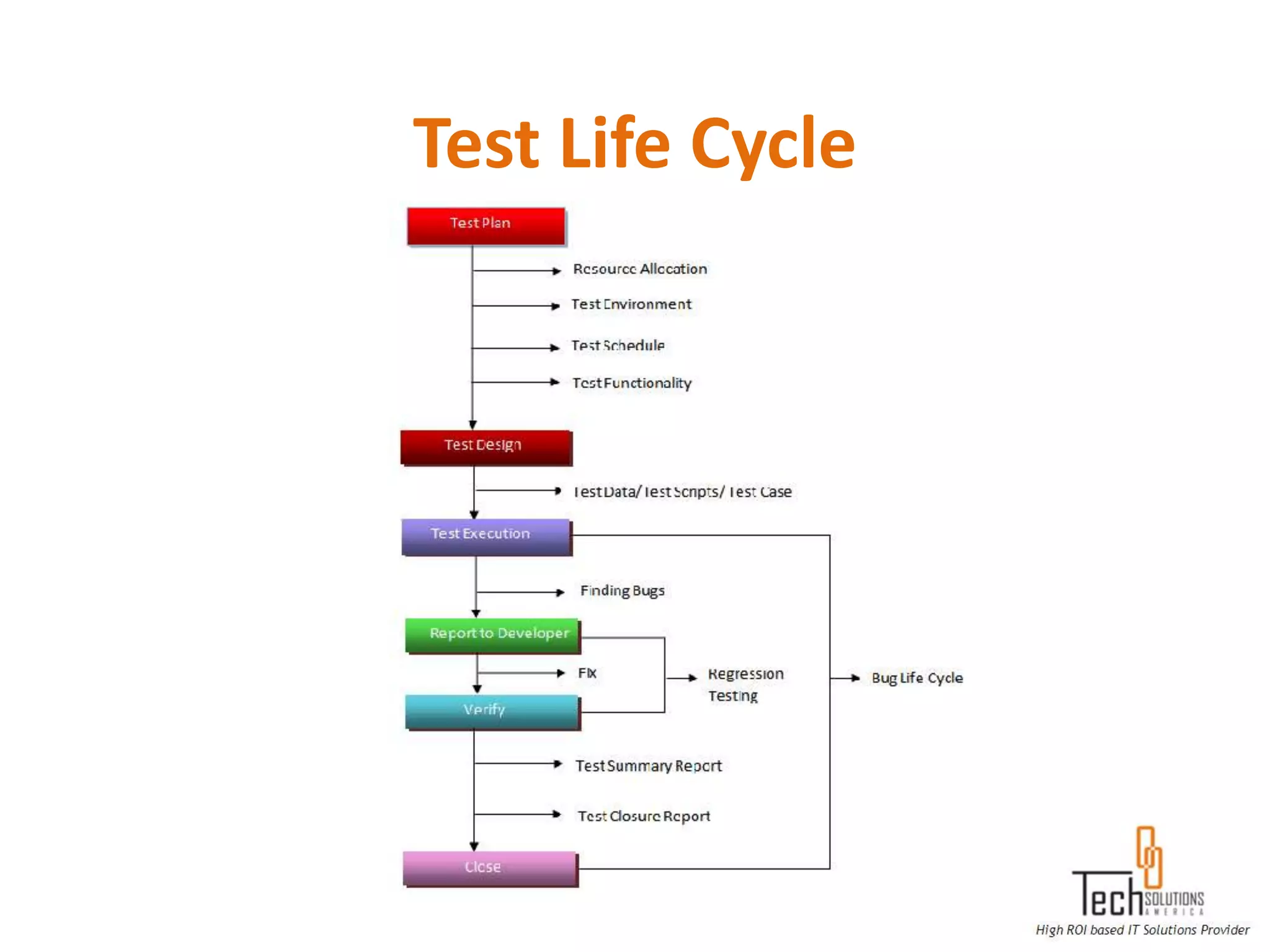
Test Life Cycle
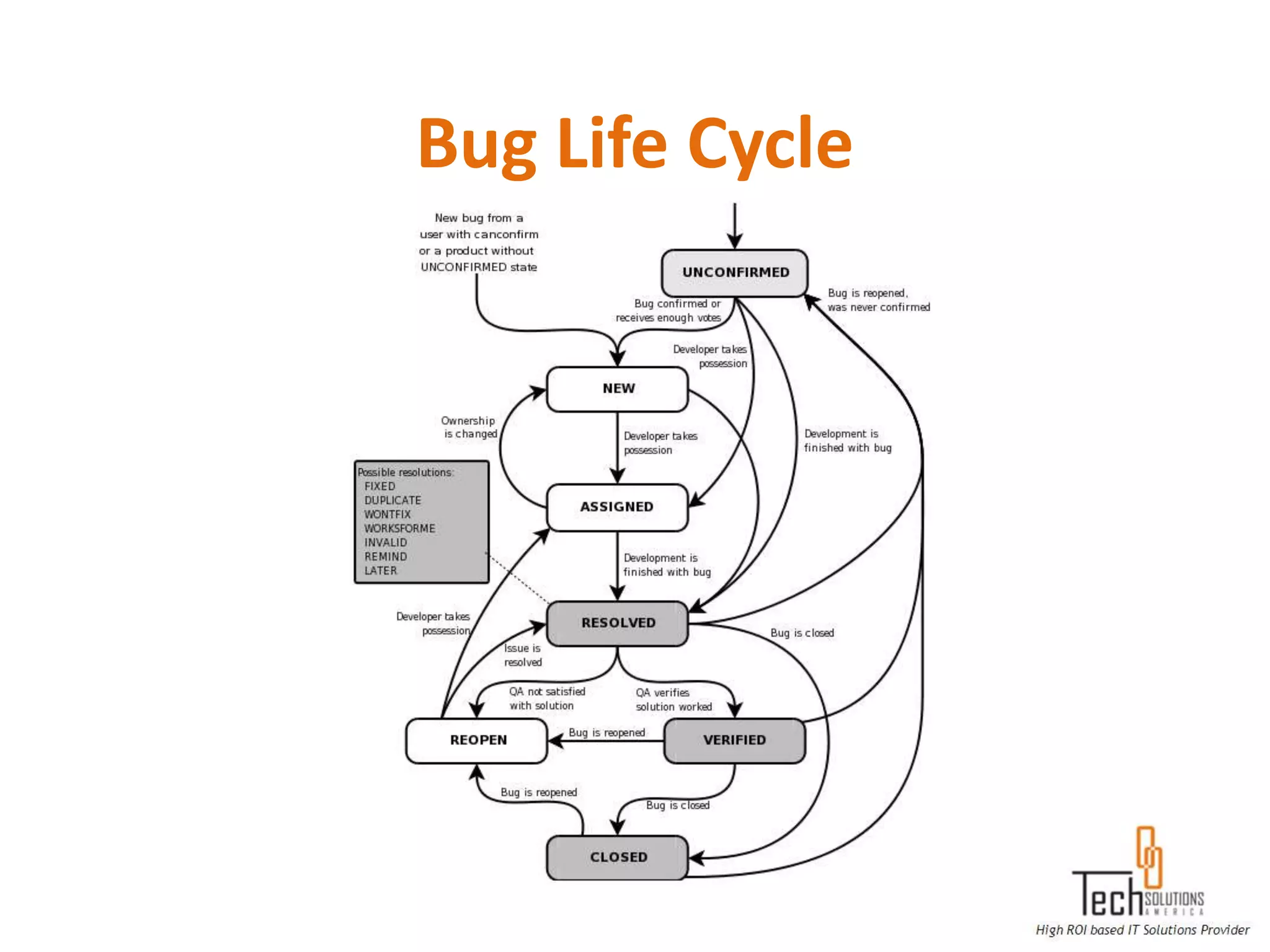
Bug Life Cycle
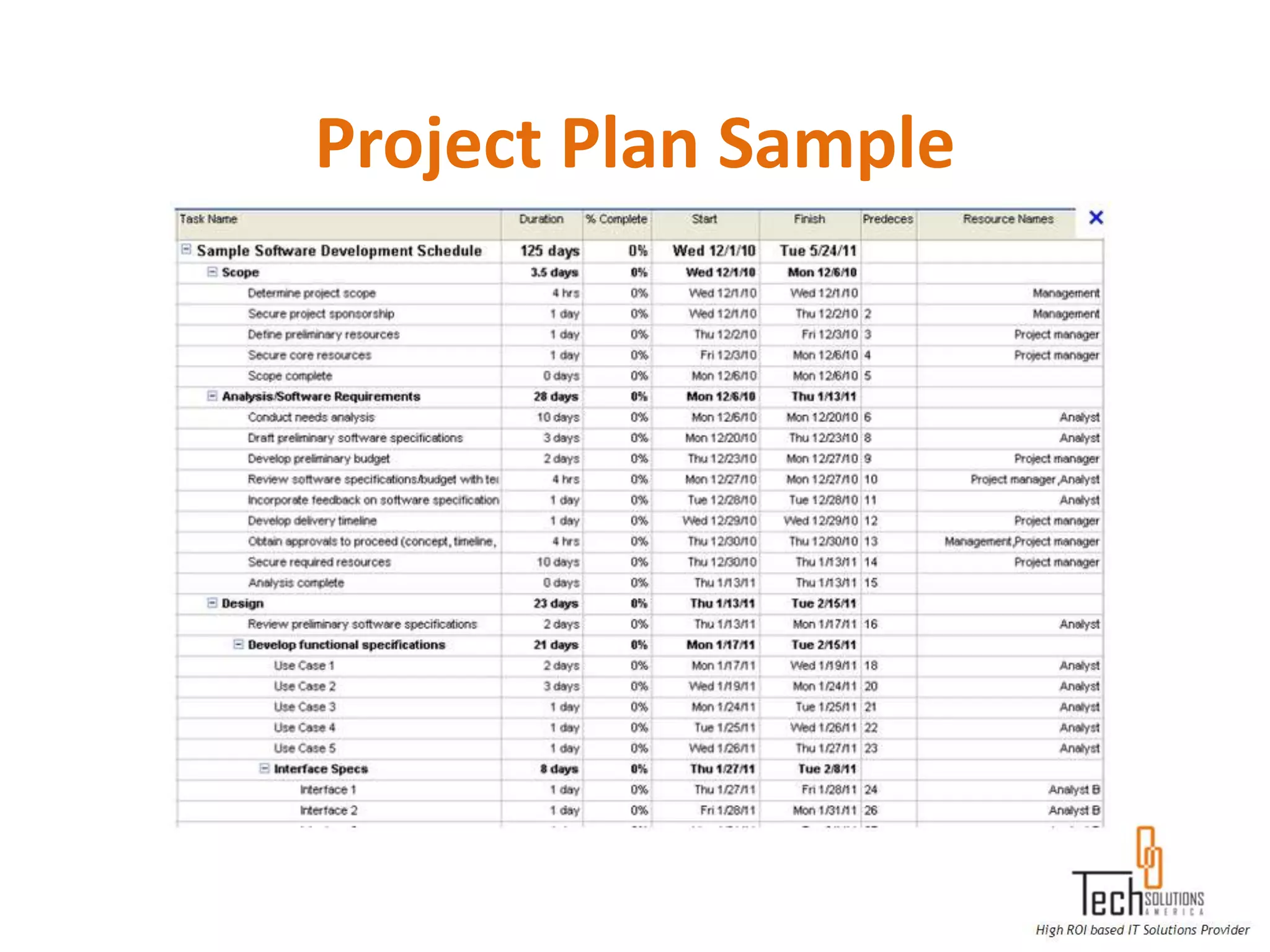
Project Plan Sample
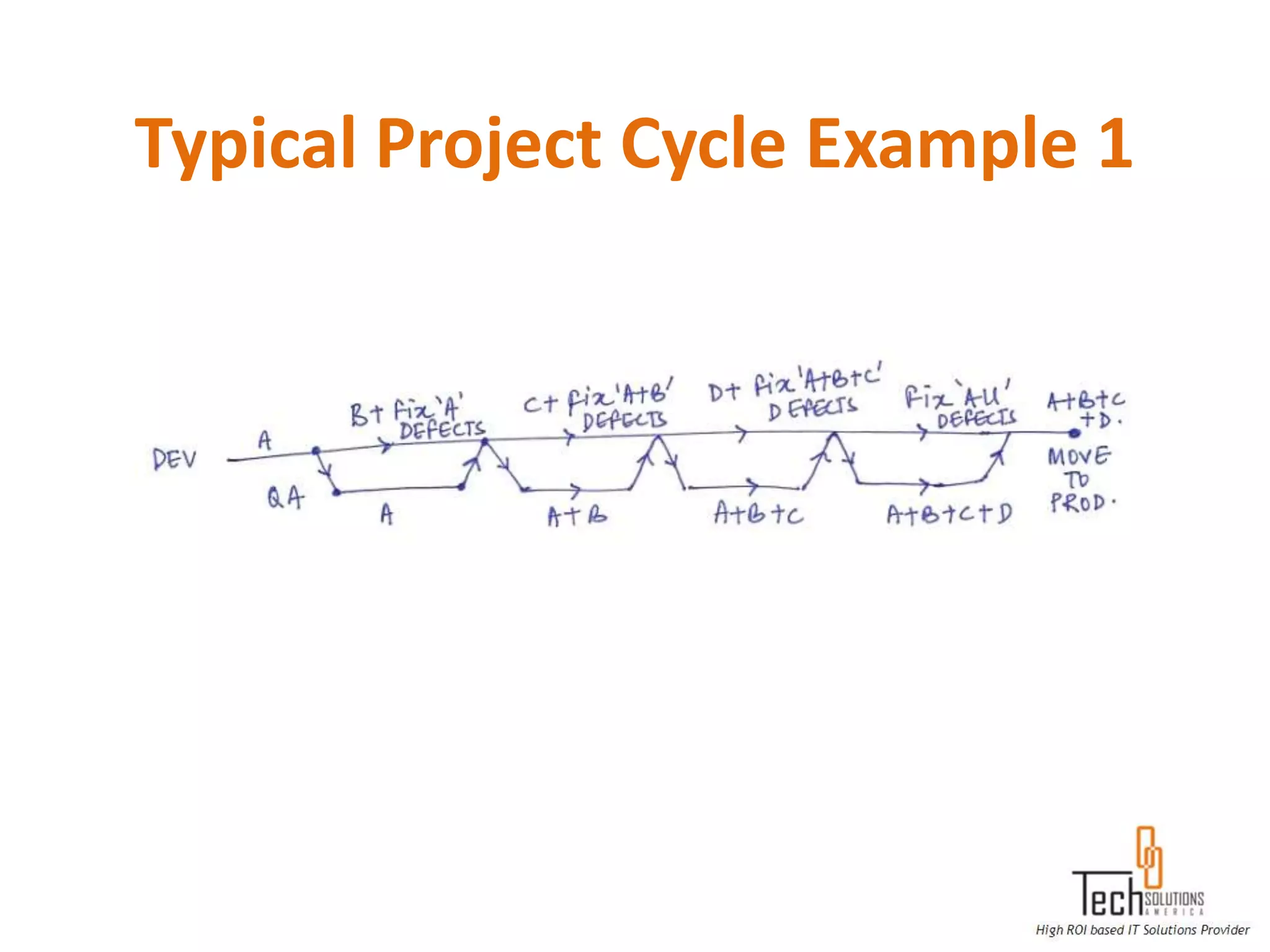
Typical Project Cycle Example 1
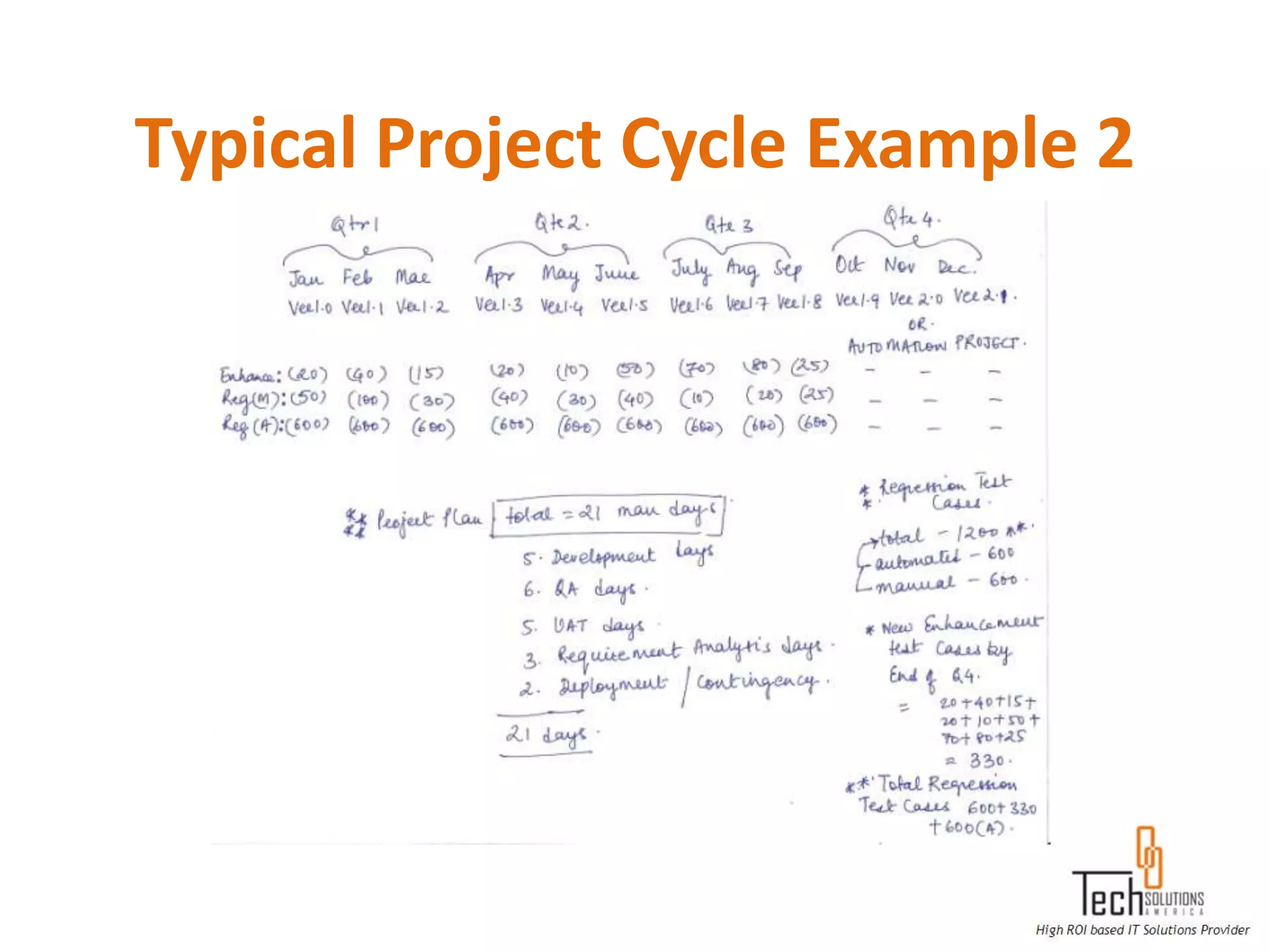
Typical Project Cycle Example 2

Quality Assurance and Software Testing

  • 1.
  • 2.
    What is QualityAssurance?  Quality Control  Planned Systematic Activities  Monitoring of Processes  ISO 9000 Standards  CMM Level Standards  Six Sigma Standards  Measurement and Comparison with Standards
  • 3.
    What is SoftwareTesting?  Requirement Gathering  Requirement Analysis  Sign Off Requirement  Test Plan/ Strategy  Preparing Test Cases  Review and Freeze Test Cases  Execution of Test Cases
  • 4.
    What is SoftwareTesting? (Contd.)  Report the Bugs  Fixing the Bugs  Retest and Close the Bugs  Prepare the Defect Summary Report  Signoff QA
  • 5.
    V&V  Verification: Havewe built the software right? (i.e., does it match the specification).  Validation: Have we built the right software? (i.e., is this what the customer wants).
  • 6.
    IT Project TeamStructure  Project Manager  Development Manager  Dev. Lead/ Module Lead/ Sr. Developers  Developers  Business Analyst  Production Support Team  Web/ Application Server Support Team  Database Administrators  Test Manager/ Lead  Sr. QA Tester/ Sr. QA Analyst/ Sr. QA Engineer  QA Tester/ QA Analyst/ QA Engineer
  • 7.
    What is SDLC? SDLC: Software Development Life Cycle Types of SDLC –  Waterfall Model  V Model  Spiral Model etc.
  • 8.
  • 9.
  • 10.
  • 11.
    Software System Architecture  Development Environment  QA Environment  UAT Environment  Staging Environment  Production Environment
  • 12.
  • 13.
    Methods of Testing UnitTesting: The primary goal of unit testing is to take the smallest piece of testable software in the application, isolate it from the remainder of the code, and determine whether it behaves exactly as you expect Integration Testing: Integration testing is a logical extension of unit testing. In its simplest form, two units that have already been tested are combined into a component and the interface between them is tested.
  • 14.
  • 15.
    Methods of Testing(Contd.) Regression Testing: Regression testing is the process of testing changes to computer programs to make sure that the older programming still works with the new changes. Functional Testing: Functional testing is a type of black box testing that bases its test cases on the specifications of the software component under test. Functions are tested by feeding them input and examining the output, and internal program structure is not considered. System Testing: System testing of software or hardware is testing conducted on a complete, integrated system to evaluate the system's compliance with its specified requirements. System testing falls within the scope of black box testing, and as such, should require no knowledge of the inner design of the code or logic.
  • 16.
    Methods of Testing(Contd.) System Integration Testing: System Integration Testing (SIT) is a testing process that exercises a software system's coexistence with others. With multiple integrated systems, assuming that each have already passed system testing, SIT proceeds to test their required interactions User Acceptance Testing: User Acceptance Testing is often the final step before rolling out the application. Usually the end users who will be using the applications test the application before ‘accepting’ the application. Black- box Testing: Black-box testing is a method of software testing that tests the functionality of an application as opposed to its internal structures or workings. Specific knowledge of the application's code/ internal structure and programming knowledge in general is not required.
  • 17.
    Methods of Testing(Contd.) White- box Testing: White-box testing (also known as Clear box Testing, Glass box Testing, Transparent box Testing and Structural Testing) is a method of testing software that tests internal structures or workings of an application, as opposed to its functionality (i.e. black-box testing). In white-box testing an internal perspective of the system, as well as programming skills, are used to design test cases. The tester chooses inputs to exercise paths through the code and determine the appropriate outputs. Sanity Testing: Sanity testing is a quick test of the software build which ensures the build is ready for a major testing effort. Smoke Testing: Smoke testing is to test all major functionalities in the application.
  • 18.
  • 19.
    Methods of Testing(Contd.) Business Process Testing: The Business Process Testing model is role- based, allowing non-technical Subject Matter Experts (working in Quality Center) to collaborate effectively with Automation Engineers (working in Quick Test Professional). Subject Matter Experts define and document business processes, business components, and business process tests, while Automation Engineers define the required resources and settings, such as shared object repositories, function libraries, and recovery scenarios. Together, they can build, data-drive, document, and run business process tests, without requiring programming knowledge on the part of the Subject Matter Expert.
  • 20.
    Methods of Testing(Contd.) Backend/ Database Testing: Executing SQL statements to check if the data submitted by a GUI program is updated in the database or not? Backend testing is the testing the integration between the application and the database. It is also checking the changes made in the database is getting reflected in the application. Example: A new column is added in the table. Here we test by giving values in the application and value has to be stored in the table. Exploratory Testing: Exploratory testing is a form of quality checking that does not rely on test scripts. A tester is let loose on the system, often with very little introduction, and they are encouraged to report any and all issues they find.
  • 21.
  • 22.
    S/W Configuration Management/ Version Control (Contd.)
  • 23.
  • 24.
    QA Documentation  BRD/SRS/ SRD/ Requirements Document  FDD/ FRS/ Functional Document  TDD/ Technical Document  Data Model/ Database Model  Flow Charts/ Flow Diagrams  Use Cases  User Guides
  • 25.
  • 26.
  • 27.
  • 28.
  • 29.
  • 30.
    QA Artifacts  TestPlan  Test Scenarios  Test Cases  Test Steps  Test Data  Test Estimation  Test Schedule  Security/ Access/ Entitlement requirements
  • 31.
    Entry/ Exit Criteriain a Test Plan Examples of Entry Criteria:  Testing Environment Established  Approved Business Requirements  Adequate Test data is available  Test plans are completed  Documented Test Cases and Results from prior test phase  Completed and reviewed Test cases / Test scripts  Access rights for the Testers were established Examples of Exit Criteria:  All items in scope was tested  All test cases (100%) are executed: failed cases have a satisfactory resolution  Defects were documented and reported  All severity 1 (critical) and 2 (Major) defects are resolved and implemented  Applicable sign-off on testing was obtained
  • 32.
    Test Case/ TestSteps Concepts  Pre-Conditions  Business Rules  Field Level Validations  User Interface Validations  Taking Screenshots  System Error/ Exception Messages  System / Confirmation Messages  Boundary Value Analysis  Equivalence Class Partisans
  • 33.
  • 34.
    Test Scenario/ TestCase/ Test Steps Example 1 Scenario Cases Test Steps Camera Features 1. 2. Take a picture 3. 1. 2. Modify a picture 3. 1. 2. Save as - 2 options 3. 1. 2. Send as attachment in Email 3. 1. 2. Embed picture in Email 3. 1. 2. Delete picture 3.
  • 35.
    Test Scenario/ TestCase/ Test Steps Example 2 Scenario Cases Test Steps Email in Yahoo 1. 2. Compose Email 3. 1. 2. Reply to Sender 3. 1. 2. Forward Email 3.
  • 36.
  • 37.
  • 38.
  • 39.
  • 40.
  • 41.