Retail Data Warehouse

Loading...

Flash Player 9 (or above) is needed to view presentations.
We have detected that you do not have it on your computer. To install it, go here.

0 comments

Post a comment

    Post a comment
    Embed Video
    Edit your comment Cancel

    Favorites, Groups & Events

    Retail Data Warehouse - Presentation Transcript

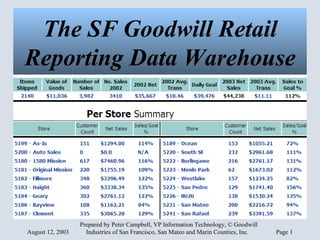
    1. The SF Goodwill Retail Reporting Data Warehouse
      • Because few affordable POS products incorporate comparisons to goal and other cross-departmental reports.
      • Because a data warehouse provides control over what data you see.
      • Because data can be integrated with other management reporting systems for a one-stop overview of agency performance.
      Why Build a Data Warehouse?
    2. Project Goals
      • One-Stop for Sales and Inventory Reports.
      • High-level information including sales to shipment and performance compared to goals.
      • Web-based, automated reports available from in or outside of the office first thing in the morning.
    3. POS Requirements
      • Logical database structure.
      • Easy export of all pertinent data to common format (text delimited or SQL).
      • Automation tools to support hands-off collection of data.
      • Reliable internet connections between all stores and main office.
    4. Warehouse Requirements
      • Simple to read, drill-down reporting
      • No duplicate data entry - all sales and inventory to be pulled from POS system; sales/inventory goals to be entered annually.
      • Standardized design tools - SQL, HTML and PHP with documentation of all code.
    5. Report Features
      • High level info summarized at top; drill down for details.
      • Filter reports by store, district, or any combination.
      • Export to Excel by clicking icon for current page’s data.
      • Web-based - available to authorized Intranet members from office or remote locations.
    6. Opening Summary Page
    7. Reports Screen
    8. Cash/Tender Report
    9. Inventory Reports
    10. Inventory Reports - Color
    11. Inventory Reports - Price Point
    12. Sellthru Report
    13. Sales Goal Report
    14. Time of Day Report
    15. Exception Report
    16. Reporting Toolbar Report Criteria Selection:Stores, Dates, Custom Reports, Period to Date Tools:Navigation, Export to Excel, Retail and Promotional Calendars, Help
    17. Reporting Toolbar (Cont.)
    18. Custom Reports
    19. Notes
      • All work © Goodwill Industries of San Francisco, Inc., 2003.
      • Consulting, installation and customization of these reports on your system is available.
      • Contact:
        • Peter Campbell, VP Information Technology
        • Goodwill Industries of San Francisco
        • 1500 Mission St., SF, CA, 94103
        • 415.575.2151 * pcampbell @ sfgoodwill .org
    SlideShare Zeitgeist 2009

    + Peter CampbellPeter Campbell Nominate

    custom

    1003 views, 0 favs, 2 embeds more stats

    Slideshow introducing the SF Goodwill Retail Data W more

    More info about this document

    © All Rights Reserved

    Go to text version

    • Total Views 1003
      • 989 on SlideShare
      • 14 from embeds
    • Comments 0
    • Favorites 0
    • Downloads 55
    Most viewed embeds
    • 8 views on http://www.meetyourmission.org
    • 6 views on http://techcafeteria.com

    more

    All embeds
    • 8 views on http://www.meetyourmission.org
    • 6 views on http://techcafeteria.com

    less

    Flagged as inappropriate Flag as inappropriate
    Flag as inappropriate

    Select your reason for flagging this presentation as inappropriate. If needed, use the feedback form to let us know more details.

    Cancel
    File a copyright complaint
    Having problems? Go to our helpdesk?

    Categories