Jason Kleinman
Project Controls Systems Integration Specialist
Parsons Corporation
Case Study: Migrating from
P6v7/CM13 to P6R8.2/CM14
Parsons by the numbers
 Headquartered in Pasadena, CA
 More than 11,500 Employees
 $2.7 billion in revenue in 2011
 100% owned by Employee Stock Ownership Trust
 2,200 Projects
 50 States
 25 Countries
 79 Languages spoken
 7,700 college degrees/professional registrations
2
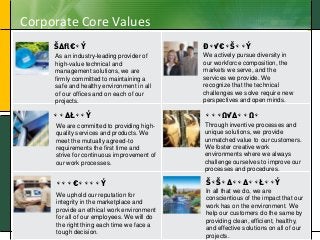
Corporate Core Values
3
SAFETY
QUALITY
INTEGRITY
DIVERSITY
INNOVATION
SUSTAINABILITY
As an industry-leading provider of
high-value technical and
management solutions, we are
firmly committed to maintaining a
safe and healthy environment in all
of our offices and on each of our
projects.
We are committed to providing high-
quality services and products. We
meet the mutually agreed-to
requirements the first time and
strive for continuous improvement of
our work processes.
We uphold our reputation for
integrity in the marketplace and
provide an ethical work environment
for all of our employees. We will do
the right thing each time we face a
tough decision.
We actively pursue diversity in
our workforce composition, the
markets we serve, and the
services we provide. We
recognize that the technical
challenges we solve require new
perspectives and open minds.
Through inventive processes and
unique solutions, we provide
unmatched value to our customers.
We foster creative work
environments where we always
challenge ourselves to improve our
processes and procedures.
In all that we do, we are
conscientious of the impact that our
work has on the environment. We
help our customers do the same by
providing clean, efficient, healthy,
and effective solutions on all of our
projects.
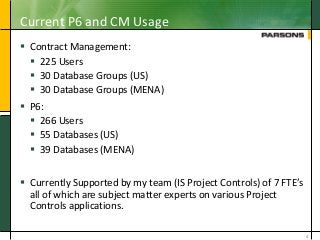
Current P6 and CM Usage
 Contract Management:
 225 Users
 30 Database Groups (US)
 30 Database Groups (MENA)
 P6:
 266 Users
 55 Databases (US)
 39 Databases (MENA)
 Currently Supported by my team (IS Project Controls) of 7 FTE’s
all of which are subject matter experts on various Project
Controls applications.
4
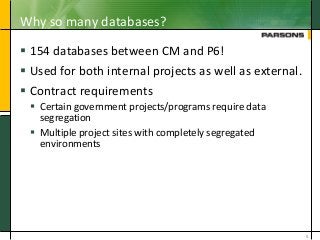
Why so many databases?
 154 databases between CM and P6!
 Used for both internal projects as well as external.
 Contract requirements
 Certain government projects/programs require data
segregation
 Multiple project sites with completely segregated
environments
5
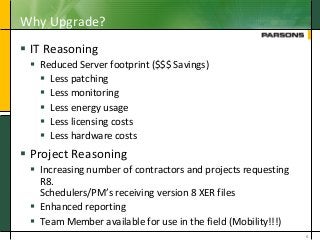
Why Upgrade?
 IT Reasoning
 Reduced Server footprint ($$$ Savings)
 Less patching
 Less monitoring
 Less energy usage
 Less licensing costs
 Less hardware costs
 Project Reasoning
 Increasing number of contractors and projects requesting
R8.
Schedulers/PM’s receiving version 8 XER files
 Enhanced reporting
 Team Member available for use in the field (Mobility!!!)
6
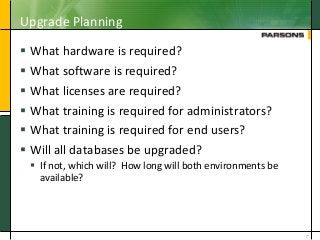
Upgrade Planning
 What hardware is required?
 What software is required?
 What licenses are required?
 What training is required for administrators?
 What training is required for end users?
 Will all databases be upgraded?
 If not, which will? How long will both environments be
available?
7
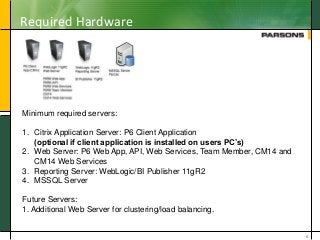
Required Hardware
8
Minimum required servers:
1. Citrix Application Server: P6 Client Application
(optional if client application is installed on users PC’s)
2. Web Server: P6 Web App, API, Web Services, Team Member, CM14 and
CM14 Web Services
3. Reporting Server: WebLogic/BI Publisher 11gR2
4. MSSQL Server
Future Servers:
1. Additional Web Server for clustering/load balancing.
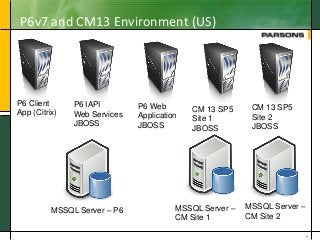
P6v7 and CM13 Environment (US)
9
P6 Client
App (Citrix)
P6 IAPI
Web Services
JBOSS
P6 Web
Application
JBOSS
CM 13 SP5
Site 1
JBOSS
CM 13 SP5
Site 2
JBOSS
MSSQL Server – P6 MSSQL Server –
CM Site 1
MSSQL Server –
CM Site 2
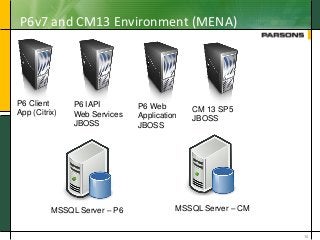
P6v7 and CM13 Environment (MENA)
10
P6 Client
App (Citrix)
P6 IAPI
Web Services
JBOSS
P6 Web
Application
JBOSS
CM 13 SP5
JBOSS
MSSQL Server – P6 MSSQL Server – CM
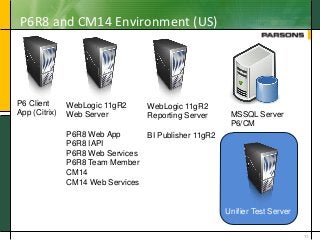
P6R8 and CM14 Environment (US)
11
P6 Client
App (Citrix)
WebLogic 11gR2
Web Server
P6R8 Web App
P6R8 IAPI
P6R8 Web Services
P6R8 Team Member
CM14
CM14 Web Services
WebLogic 11gR2
Reporting Server
BI Publisher 11gR2
MSSQL Server
P6/CM
Unifier Test Server
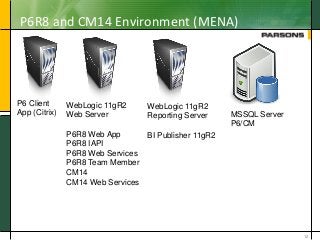
P6R8 and CM14 Environment (MENA)
12
P6 Client
App (Citrix)
WebLogic 11gR2
Web Server
P6R8 Web App
P6R8 IAPI
P6R8 Web Services
P6R8 Team Member
CM14
CM14 Web Services
WebLogic 11gR2
Reporting Server
BI Publisher 11gR2
MSSQL Server
P6/CM
Unifier Test Server
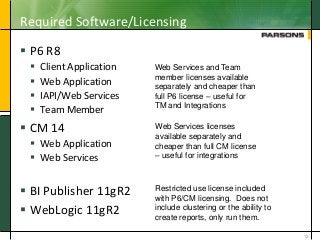
Required Software/Licensing
 P6 R8
 Client Application
 Web Application
 IAPI/Web Services
 Team Member
 CM 14
 Web Application
 Web Services
 BI Publisher 11gR2
 WebLogic 11gR2
13
Web Services and Team
member licenses available
separately and cheaper than
full P6 license – useful for
TM and Integrations
Web Services licenses
available separately and
cheaper than full CM license
– useful for integrations
Restricted use license included
with P6/CM licensing. Does not
include clustering or the ability to
create reports, only run them.
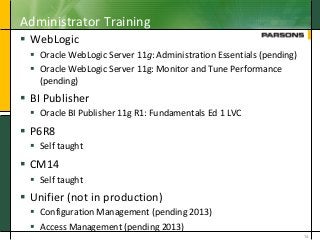
Administrator Training
 WebLogic
 Oracle WebLogic Server 11g: Administration Essentials (pending)
 Oracle WebLogic Server 11g: Monitor and Tune Performance
(pending)
 BI Publisher
 Oracle BI Publisher 11g R1: Fundamentals Ed 1 LVC
 P6R8
 Self taught
 CM14
 Self taught
 Unifier (not in production)
 Configuration Management (pending 2013)
 Access Management (pending 2013)
14
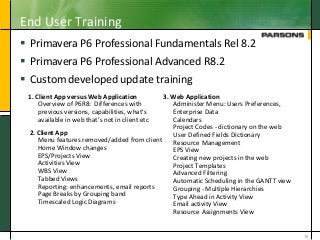
End User Training
 Primavera P6 Professional Fundamentals Rel 8.2
 Primavera P6 Professional Advanced R8.2
 Custom developed update training
15
1. Client App versus Web Application
Overview of P6R8: Differences with
previous versions, capabilities, what's
available in web that’s not in client etc
2. Client App
Menu features removed/added from client
Home Window changes
EPS/Projects View
Activities View
WBS View
Tabbed Views
Reporting: enhancements, email reports
Page Breaks by Grouping band
Timescaled Logic Diagrams
3. Web Application
Administer Menu: Users Preferences,
Enterprise Data
Calendars
Project Codes - dictionary on the web
User Defined Fields Dictionary
Resource Management
EPS View
Creating new projects in the web
Project Templates
Advanced Filtering
Automatic Scheduling in the GANTT view
Grouping - Multiple Hierarchies
Type Ahead in Activity View
Email activity View
Resource Assignments View
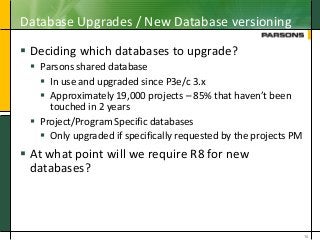
Database Upgrades / New Database versioning
 Deciding which databases to upgrade?
 Parsons shared database
 In use and upgraded since P3e/c 3.x
 Approximately 19,000 projects – 85% that haven’t been
touched in 2 years
 Project/Program Specific databases
 Only upgraded if specifically requested by the projects PM
 At what point will we require R8 for new
databases?
16
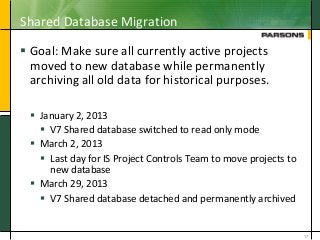
Shared Database Migration
 Goal: Make sure all currently active projects
moved to new database while permanently
archiving all old data for historical purposes.
 January 2, 2013
 V7 Shared database switched to read only mode
 March 2, 2013
 Last day for IS Project Controls Team to move projects to
new database
 March 29, 2013
 V7 Shared database detached and permanently archived
17
Challenges
 End User Buy-In
 Training
 IT Challenges
 Self Learning
18
End User Buy In
 People generally hate change!
 Planted the seed for upgrade a year prior to
implementation
 Introduced to our OSS Group (PM’s, Program Managers,
Schedulers, etc)
 Showed them new functionality
 Performed brown bag sessions online for all end
users
 2 Sessions for P6 and 2 for CM at different date’s and times.
 Introduced all new features and functionality
19
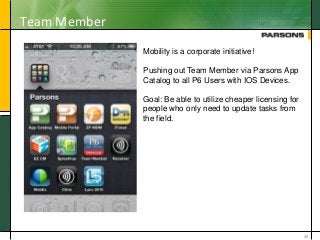
Team Member
20
Mobility is a corporate initiative!
Pushing out Team Member via Parsons App
Catalog to all P6 Users with IOS Devices.
Goal: Be able to utilize cheaper licensing for
people who only need to update tasks from
the field.
Training Challenges
 People began asking us for access to new software
before it was available.
 People began asking us for training before it was
available.
21
IT Challenges
 LDAP Authentication
 P6 – Easy
 CM – Not in use currently
 BI Publisher and WebLogic – Difficult
 BI Publisher
 Multiple Data Sources and Report Folders
 Access privileges
 Configuring data models to pull from correct databases
 Running as a windows service
 WebLogic
 Running as a windows service
 Currently researching using WLST to run Admin and
Managed servers
22
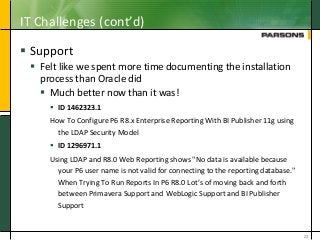
IT Challenges (cont’d)
 Support
 Felt like we spent more time documenting the installation
process than Oracle did
 Much better now than it was!
 ID 1462323.1
How To Configure P6 R8.x Enterprise Reporting With BI Publisher 11g using
the LDAP Security Model
 ID 1296971.1
Using LDAP and R8.0 Web Reporting shows "No data is available because
your P6 user name is not valid for connecting to the reporting database."
When Trying To Run Reports In P6 R8.0 Lot’s of moving back and forth
between Primavera Support and WebLogic Support and BI Publisher
Support
23
Self Learning
 Time is money
 Administrative
 Could have saved weeks of time if training done before
implementation
 Users
 Establish training environment earlier
 Learned more by working through problems than
we would have accomplished by any training class
24
Feedback from Users
Mostly Positive!
 P6
 Web Application
 Positive comments about GANTT chart
 Enhanced calendar functionality
 Templates
 Currently being looked into for future projects
 Type Ahead in activities view
 Client Application
 Tabbed grouping
 Page Breaks by grouping
25
Negative: Having to switch between client and web to
perform administrative functions
Lessons Learned
 WebLogic
 Perform lots of performance testing with development environment
before determining hardware requirements for production.
 BI Publisher
 Do lots of testing prior to rolling out!
 If you know Infomaker or P6 Report writer, you do NOT know BI
Publisher.
 Lots of work to have different report folders for different databases
 Lots of work to make it function with LDAP
 R8 Web
 Have training available prior to letting users know about upgrade.
 Have a “Sandbox” database available prior to letting users know about
upgrade.
26
Questions/Comments
27
Contact Info
Name Jason Kleinman
Position Project Controls Systems Integration
Specialist
Email Jason.Kleinman@Parsons.com
LinkedIn http://www.linkedin.com/in/jkleinman/
28

206670 migration from p6 v7 cm13 to p6 rel8 cm14

  • 1.
    Jason Kleinman Project ControlsSystems Integration Specialist Parsons Corporation Case Study: Migrating from P6v7/CM13 to P6R8.2/CM14
  • 2.
    Parsons by thenumbers  Headquartered in Pasadena, CA  More than 11,500 Employees  $2.7 billion in revenue in 2011  100% owned by Employee Stock Ownership Trust  2,200 Projects  50 States  25 Countries  79 Languages spoken  7,700 college degrees/professional registrations 2
  • 3.
    Corporate Core Values 3 SAFETY QUALITY INTEGRITY DIVERSITY INNOVATION SUSTAINABILITY Asan industry-leading provider of high-value technical and management solutions, we are firmly committed to maintaining a safe and healthy environment in all of our offices and on each of our projects. We are committed to providing high- quality services and products. We meet the mutually agreed-to requirements the first time and strive for continuous improvement of our work processes. We uphold our reputation for integrity in the marketplace and provide an ethical work environment for all of our employees. We will do the right thing each time we face a tough decision. We actively pursue diversity in our workforce composition, the markets we serve, and the services we provide. We recognize that the technical challenges we solve require new perspectives and open minds. Through inventive processes and unique solutions, we provide unmatched value to our customers. We foster creative work environments where we always challenge ourselves to improve our processes and procedures. In all that we do, we are conscientious of the impact that our work has on the environment. We help our customers do the same by providing clean, efficient, healthy, and effective solutions on all of our projects.
  • 4.
    Current P6 andCM Usage  Contract Management:  225 Users  30 Database Groups (US)  30 Database Groups (MENA)  P6:  266 Users  55 Databases (US)  39 Databases (MENA)  Currently Supported by my team (IS Project Controls) of 7 FTE’s all of which are subject matter experts on various Project Controls applications. 4
  • 5.
    Why so manydatabases?  154 databases between CM and P6!  Used for both internal projects as well as external.  Contract requirements  Certain government projects/programs require data segregation  Multiple project sites with completely segregated environments 5
  • 6.
    Why Upgrade?  ITReasoning  Reduced Server footprint ($$$ Savings)  Less patching  Less monitoring  Less energy usage  Less licensing costs  Less hardware costs  Project Reasoning  Increasing number of contractors and projects requesting R8. Schedulers/PM’s receiving version 8 XER files  Enhanced reporting  Team Member available for use in the field (Mobility!!!) 6
  • 7.
    Upgrade Planning  Whathardware is required?  What software is required?  What licenses are required?  What training is required for administrators?  What training is required for end users?  Will all databases be upgraded?  If not, which will? How long will both environments be available? 7
  • 8.
    Required Hardware 8 Minimum requiredservers: 1. Citrix Application Server: P6 Client Application (optional if client application is installed on users PC’s) 2. Web Server: P6 Web App, API, Web Services, Team Member, CM14 and CM14 Web Services 3. Reporting Server: WebLogic/BI Publisher 11gR2 4. MSSQL Server Future Servers: 1. Additional Web Server for clustering/load balancing.
  • 9.
    P6v7 and CM13Environment (US) 9 P6 Client App (Citrix) P6 IAPI Web Services JBOSS P6 Web Application JBOSS CM 13 SP5 Site 1 JBOSS CM 13 SP5 Site 2 JBOSS MSSQL Server – P6 MSSQL Server – CM Site 1 MSSQL Server – CM Site 2
  • 10.
    P6v7 and CM13Environment (MENA) 10 P6 Client App (Citrix) P6 IAPI Web Services JBOSS P6 Web Application JBOSS CM 13 SP5 JBOSS MSSQL Server – P6 MSSQL Server – CM
  • 11.
    P6R8 and CM14Environment (US) 11 P6 Client App (Citrix) WebLogic 11gR2 Web Server P6R8 Web App P6R8 IAPI P6R8 Web Services P6R8 Team Member CM14 CM14 Web Services WebLogic 11gR2 Reporting Server BI Publisher 11gR2 MSSQL Server P6/CM Unifier Test Server
  • 12.
    P6R8 and CM14Environment (MENA) 12 P6 Client App (Citrix) WebLogic 11gR2 Web Server P6R8 Web App P6R8 IAPI P6R8 Web Services P6R8 Team Member CM14 CM14 Web Services WebLogic 11gR2 Reporting Server BI Publisher 11gR2 MSSQL Server P6/CM Unifier Test Server
  • 13.
    Required Software/Licensing  P6R8  Client Application  Web Application  IAPI/Web Services  Team Member  CM 14  Web Application  Web Services  BI Publisher 11gR2  WebLogic 11gR2 13 Web Services and Team member licenses available separately and cheaper than full P6 license – useful for TM and Integrations Web Services licenses available separately and cheaper than full CM license – useful for integrations Restricted use license included with P6/CM licensing. Does not include clustering or the ability to create reports, only run them.
  • 14.
    Administrator Training  WebLogic Oracle WebLogic Server 11g: Administration Essentials (pending)  Oracle WebLogic Server 11g: Monitor and Tune Performance (pending)  BI Publisher  Oracle BI Publisher 11g R1: Fundamentals Ed 1 LVC  P6R8  Self taught  CM14  Self taught  Unifier (not in production)  Configuration Management (pending 2013)  Access Management (pending 2013) 14
  • 15.
    End User Training Primavera P6 Professional Fundamentals Rel 8.2  Primavera P6 Professional Advanced R8.2  Custom developed update training 15 1. Client App versus Web Application Overview of P6R8: Differences with previous versions, capabilities, what's available in web that’s not in client etc 2. Client App Menu features removed/added from client Home Window changes EPS/Projects View Activities View WBS View Tabbed Views Reporting: enhancements, email reports Page Breaks by Grouping band Timescaled Logic Diagrams 3. Web Application Administer Menu: Users Preferences, Enterprise Data Calendars Project Codes - dictionary on the web User Defined Fields Dictionary Resource Management EPS View Creating new projects in the web Project Templates Advanced Filtering Automatic Scheduling in the GANTT view Grouping - Multiple Hierarchies Type Ahead in Activity View Email activity View Resource Assignments View
  • 16.
    Database Upgrades /New Database versioning  Deciding which databases to upgrade?  Parsons shared database  In use and upgraded since P3e/c 3.x  Approximately 19,000 projects – 85% that haven’t been touched in 2 years  Project/Program Specific databases  Only upgraded if specifically requested by the projects PM  At what point will we require R8 for new databases? 16
  • 17.
    Shared Database Migration Goal: Make sure all currently active projects moved to new database while permanently archiving all old data for historical purposes.  January 2, 2013  V7 Shared database switched to read only mode  March 2, 2013  Last day for IS Project Controls Team to move projects to new database  March 29, 2013  V7 Shared database detached and permanently archived 17
  • 18.
    Challenges  End UserBuy-In  Training  IT Challenges  Self Learning 18
  • 19.
    End User BuyIn  People generally hate change!  Planted the seed for upgrade a year prior to implementation  Introduced to our OSS Group (PM’s, Program Managers, Schedulers, etc)  Showed them new functionality  Performed brown bag sessions online for all end users  2 Sessions for P6 and 2 for CM at different date’s and times.  Introduced all new features and functionality 19
  • 20.
    Team Member 20 Mobility isa corporate initiative! Pushing out Team Member via Parsons App Catalog to all P6 Users with IOS Devices. Goal: Be able to utilize cheaper licensing for people who only need to update tasks from the field.
  • 21.
    Training Challenges  Peoplebegan asking us for access to new software before it was available.  People began asking us for training before it was available. 21
  • 22.
    IT Challenges  LDAPAuthentication  P6 – Easy  CM – Not in use currently  BI Publisher and WebLogic – Difficult  BI Publisher  Multiple Data Sources and Report Folders  Access privileges  Configuring data models to pull from correct databases  Running as a windows service  WebLogic  Running as a windows service  Currently researching using WLST to run Admin and Managed servers 22
  • 23.
    IT Challenges (cont’d) Support  Felt like we spent more time documenting the installation process than Oracle did  Much better now than it was!  ID 1462323.1 How To Configure P6 R8.x Enterprise Reporting With BI Publisher 11g using the LDAP Security Model  ID 1296971.1 Using LDAP and R8.0 Web Reporting shows "No data is available because your P6 user name is not valid for connecting to the reporting database." When Trying To Run Reports In P6 R8.0 Lot’s of moving back and forth between Primavera Support and WebLogic Support and BI Publisher Support 23
  • 24.
    Self Learning  Timeis money  Administrative  Could have saved weeks of time if training done before implementation  Users  Establish training environment earlier  Learned more by working through problems than we would have accomplished by any training class 24
  • 25.
    Feedback from Users MostlyPositive!  P6  Web Application  Positive comments about GANTT chart  Enhanced calendar functionality  Templates  Currently being looked into for future projects  Type Ahead in activities view  Client Application  Tabbed grouping  Page Breaks by grouping 25 Negative: Having to switch between client and web to perform administrative functions
  • 26.
    Lessons Learned  WebLogic Perform lots of performance testing with development environment before determining hardware requirements for production.  BI Publisher  Do lots of testing prior to rolling out!  If you know Infomaker or P6 Report writer, you do NOT know BI Publisher.  Lots of work to have different report folders for different databases  Lots of work to make it function with LDAP  R8 Web  Have training available prior to letting users know about upgrade.  Have a “Sandbox” database available prior to letting users know about upgrade. 26
  • 27.
  • 28.
    Contact Info Name JasonKleinman Position Project Controls Systems Integration Specialist Email Jason.Kleinman@Parsons.com LinkedIn http://www.linkedin.com/in/jkleinman/ 28