Introduction to GDB 2010-04-15 Owen Hsu
Outline What's GDB ? Why GDB ? Basic GDB Commands  Starting up GDB Examples
What's GDB ? GNU Debugger A text debugger for several language, including C/C++
Features An interactive shell Learn once, debug anywhere
Why GDB ?
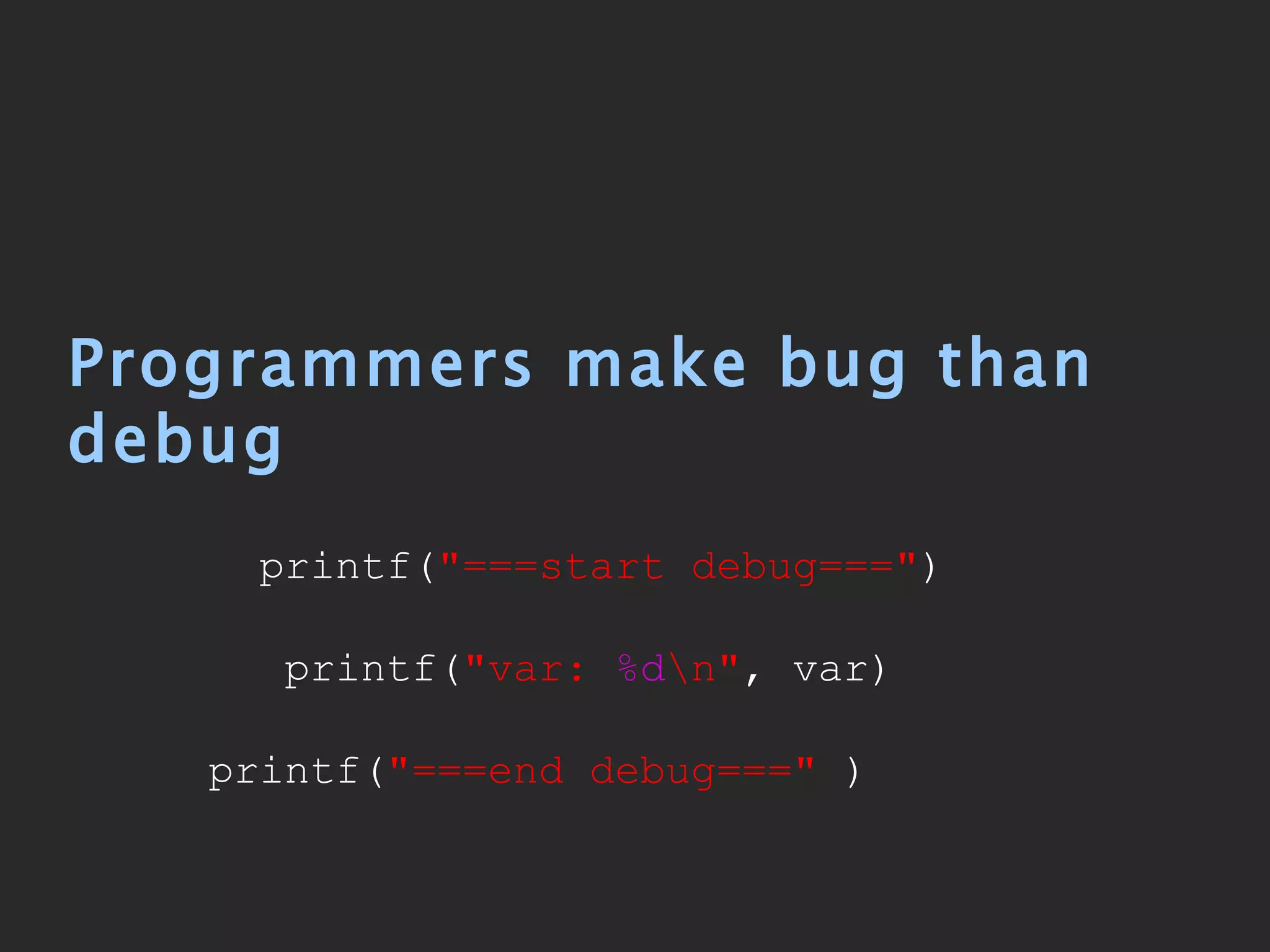
Programmers make bug than debug printf( "===start debug===" ) printf( "var:  %d \n" , var) printf( "===end debug==="  )
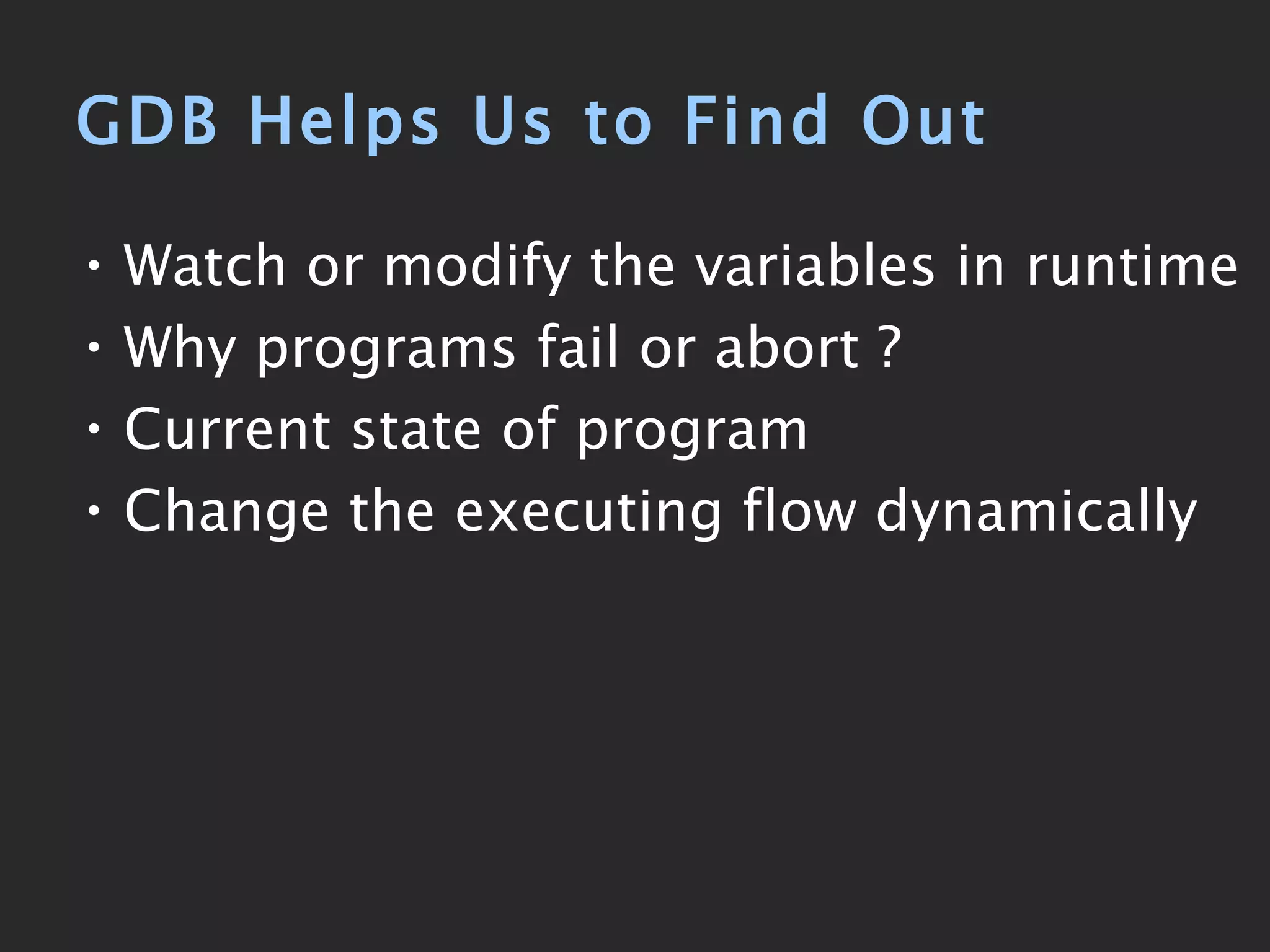
GDB Helps Us to Find Out Watch or modify the variables in runtime Why programs fail or abort ? Current state of program Change the executing flow dynamically
HelloWorld Example 01   #include   <stdio.h> 02   void  func( char  *pMem) { 03   printf( &quot;- func:   %p\n\n &quot; , pMem); 04   } 03 05   const   char  *szHello = &quot;Hello World&quot;; 06   int  main( int  argc,  char  *argv[]) 07   { 08   printf( &quot; \n%s\n\n &quot; , szHello); 09 10   int  i; 11   for  (i= 0 ; i<argc; i++) { 12   printf( &quot;argv[ %d ] \n &quot; , i); 13   printf( &quot;- main:  %s\n &quot; , argv[i]); 14   func(argv[i]); 15   } 16 17   return   0 ; 18   }
Compile hello.c # gcc  -Wall  hello.c -o hello # ./hello 123 abc Hello World argv[0] - main: ./hello - func: 0xbfbf099b argv[1] - main: 123 - func: 0xbfbf09a3 argv[2] - main: abc - func: 0xbfbf09a7 display  all  messages
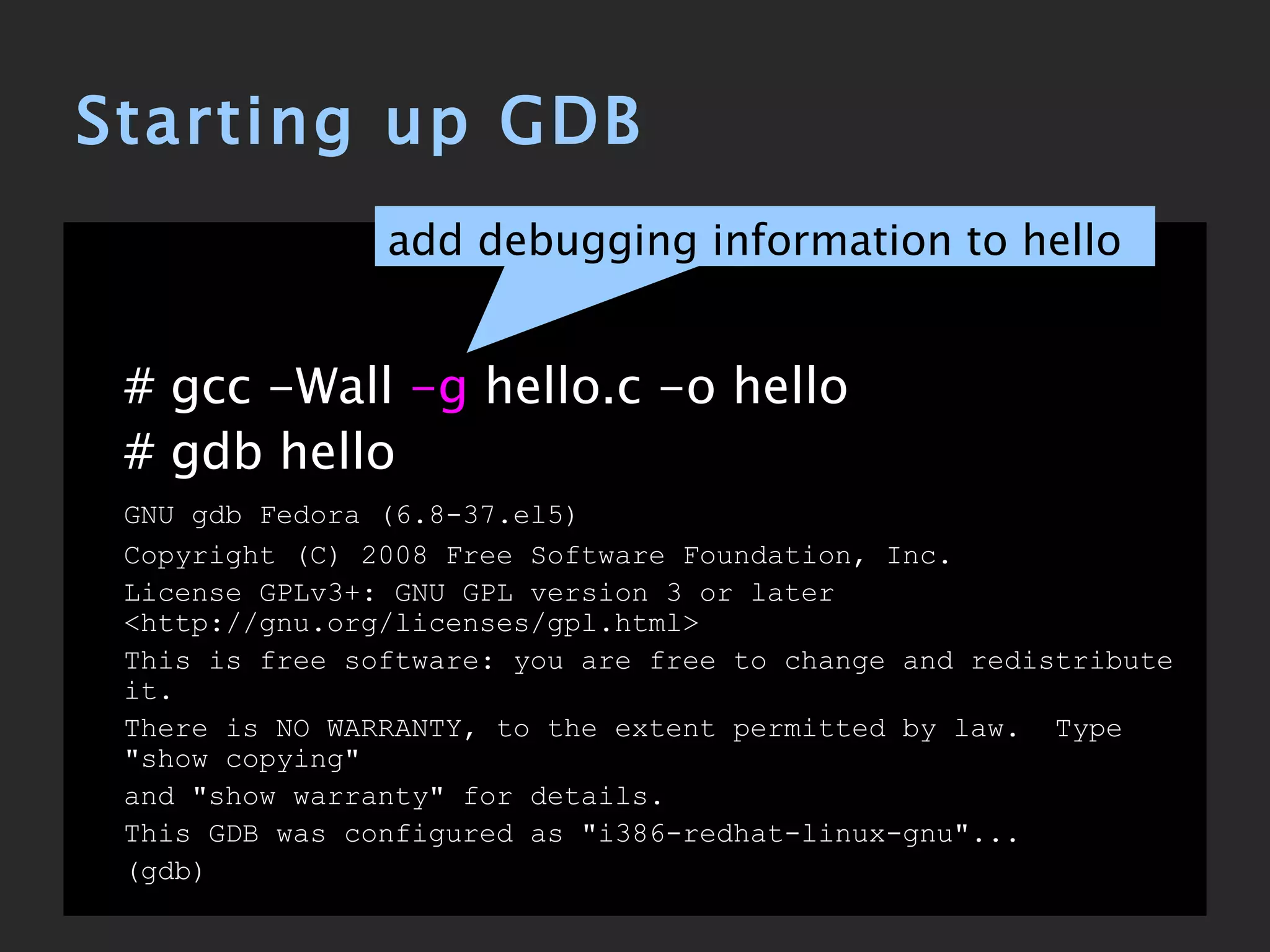
Starting up GDB # gcc -Wall  -g  hello.c -o hello # gdb hello GNU gdb Fedora (6.8-37.el5) Copyright (C) 2008 Free Software Foundation, Inc. License GPLv3+: GNU GPL version 3 or later <http://gnu.org/licenses/gpl.html> This is free software: you are free to change and redistribute it. There is NO WARRANTY, to the extent permitted by law.  Type &quot;show copying&quot; and &quot;show warranty&quot; for details. This GDB was configured as &quot;i386-redhat-linux-gnu&quot;... (gdb) add debugging information to hello
Basic GDB Commands 顯示目前堆疊 (stack) 狀況 backtrace 顯示 expression 的值 [exp] print 說明 Command 說明 [subcommand] help 即時修改變數的值 [var=val] print 列出程式碼 [line/function] list 單步執行 ( 會進入 function) step 單步執行 ( 不會進入 function) next 執行到被中斷為止 continue 在條件成立時中斷 [condition] break 設定 breakpoint [line/function] break 開始執行 ( 並自動在 main break) [args] start 開始執行 [args] run
This GDB was configured as &quot;i386-redhat-linux-gnu&quot;... (gdb)  break main Breakpoint 1 at 0x80483b3: file hello.c, line 9. (gdb)  run 123 abc Starting program: /root/gdb/hello Breakpoint 1, main (argc=3, argv=0xbffe6a24) at hello.c:9 9  printf(&quot;\n%s\n\n&quot;, szHello); (gdb)  list 4  } 5 6  char *szHello = &quot;Hello World&quot;; 7  int main(int argc, char *argv[]) 8  { 9  printf(&quot;\n%s\n\n&quot;, szHello); 10 11  int i; 12  for (i=0; i<argc; i++) { 13  printf(&quot;argv[%d]\n&quot;, i); (gdb)  break 14 Breakpoint 2 at 0x80483e4: file hello.c, line 14. (gdb)  continue Continuing. Hello World argv[0] Breakpoint 2, main (argc=3, argv=0xbffe6a24) at hello.c:14 14  printf(&quot;- main: %s\n&quot;, argv[i]); set breakpoint at  main run  with @parm 123 abc list  code set breakpoint at  14th line continue  to breakpoint
(gdb)  next - main: /root/gdb/hello 15  func(argv[i]); (gdb)  step func (pMem=0xbffe797e &quot;/root/gdb/hello&quot;) at hello.c:3 3  printf(&quot;- func: %x\n\n&quot;, pMem); (gdb)  backtrace #0  func ( pMem=0xbffe797e &quot;/root/gdb/hello&quot; ) at hello.c:3 #1  0x08048418 in main (argc=3, argv=0xbffe6a24) at hello.c:15 (gdb)  list 1  #include <stdio.h> 2  void func(char *pMem) { 3  printf(&quot;- func: %x\n\n&quot;, pMem); 4  } 5 6  char *szHello = &quot;Hello World&quot;; 7  int main(int argc, char *argv[]) 8  { 9  printf(&quot;\n%s\n\n&quot;, szHello); 10 (gdb)  print pMem $1 = 0xbffe797e &quot;/root/gdb/hello&quot;  (gdb)  continue Continuing. - func: 0xbffe797e argv[1] Breakpoint 2, main (argc=3, argv=0xbffe6a24) at hello.c:14 14  printf(&quot;- main: %s\n&quot;, argv[i]); execute to  next  statement step  into to next statement print  backtrace  of all stack frames print  the value of pMem
(gdb)  next - main: 123 15  func(argv[i]); (gdb)  step func (pMem=0xbffe798e &quot;123&quot;) at hello.c:3 3  printf(&quot;- func: %x\n\n&quot;, pMem); (gdb)  print pMem $2 = 0xbffe798e &quot;123&quot; (gdb)  print *pMem $3 = 49 '1' (gdb)  continue Continuing. - func: 0xbffe798e argv[2] Breakpoint 2, main (argc=3, argv=0xbffe6a24) at hello.c:14 14  printf(&quot;- main: %s\n&quot;, argv[i]); (gdb)  next - main: abc 15  func(argv[i]); (gdb)  next - func: 0xbffe7992 12  for (i=0; i<argc; i++) { (gdb)  continue Continuing. Program exited normally. pMem 的型態為 char*,  因此只會印出 1 的 ASCII 碼
程式沒錯誤時 , GDB 是用心酸的… 醒醒吧 ,  我們的 code 裡有很多 bug 的 而這些 bug 常常是別人發現的
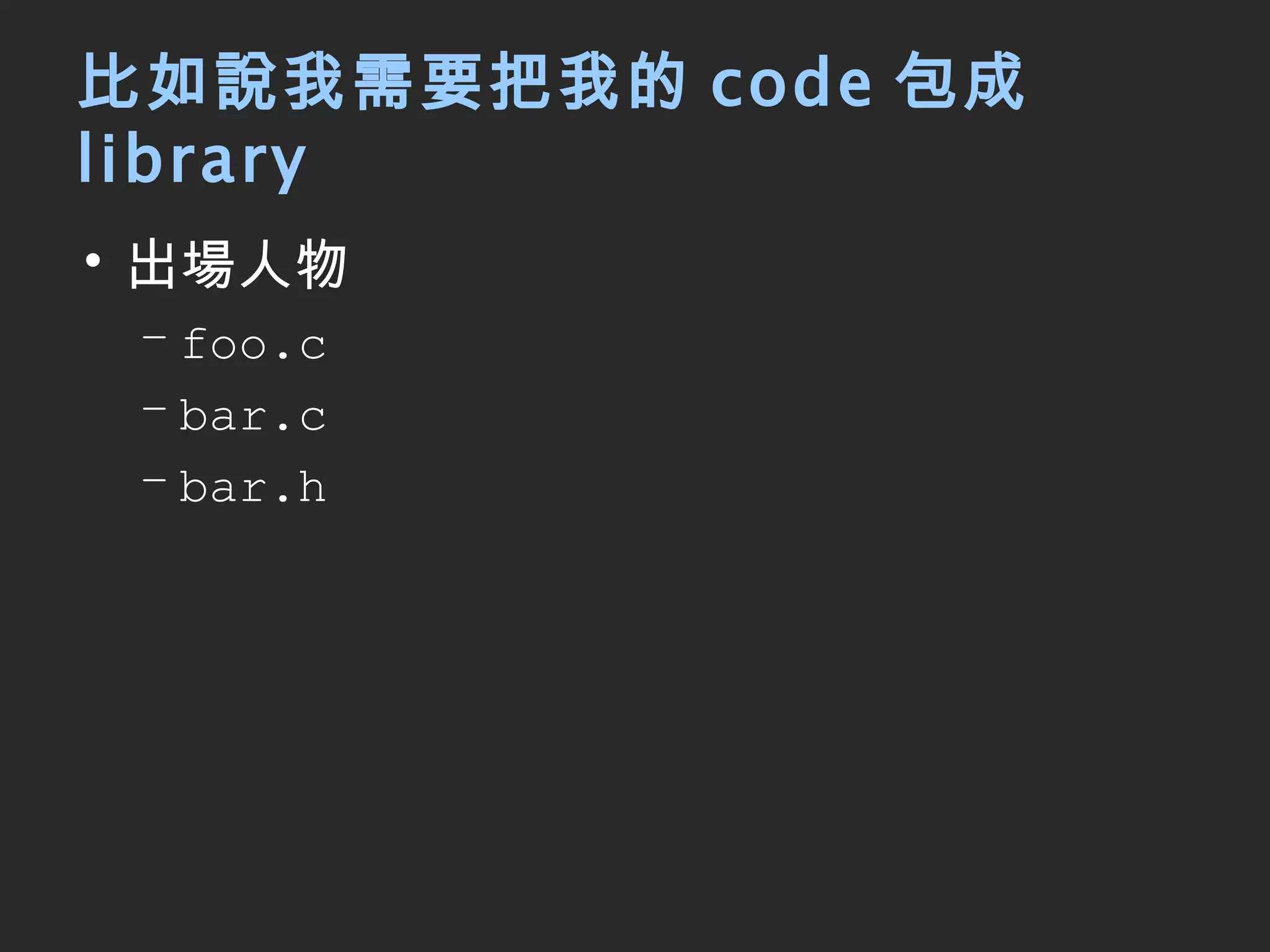
比如說我需要把我的 code 包成 library 出場人物 foo.c bar.c bar.h
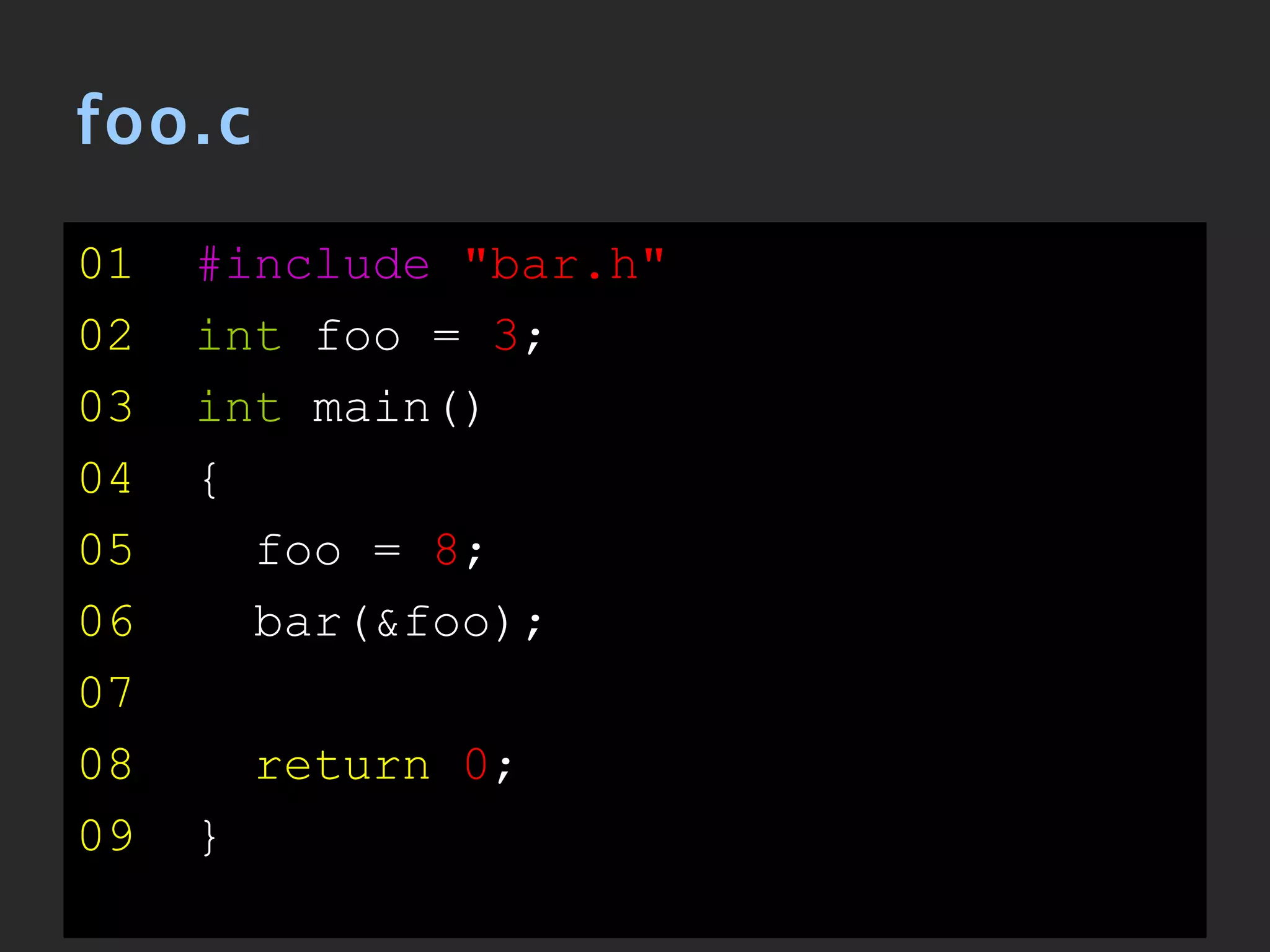
foo.c 01   #include   &quot;bar.h&quot; 02   int  foo =  3 ; 03   int  main() 04   { 05   foo =  8 ; 06   bar(&foo); 07 08  return   0 ; 09   }
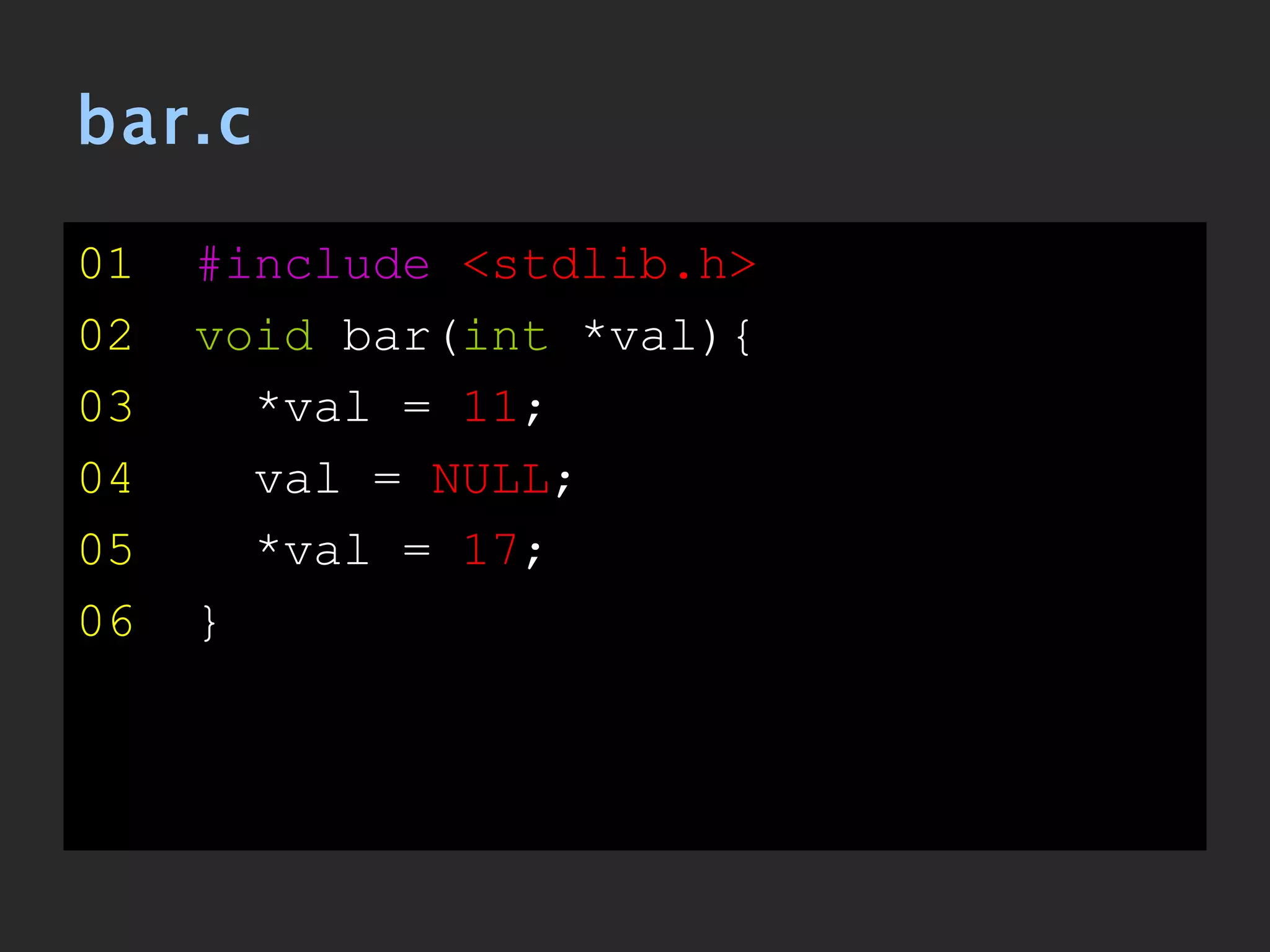
bar.c 01   #include   <stdlib.h> 02   void  bar( int  *val){ 03   *val =  11 ; 04   val =  NULL ; 05   *val =  17 ; 06   }
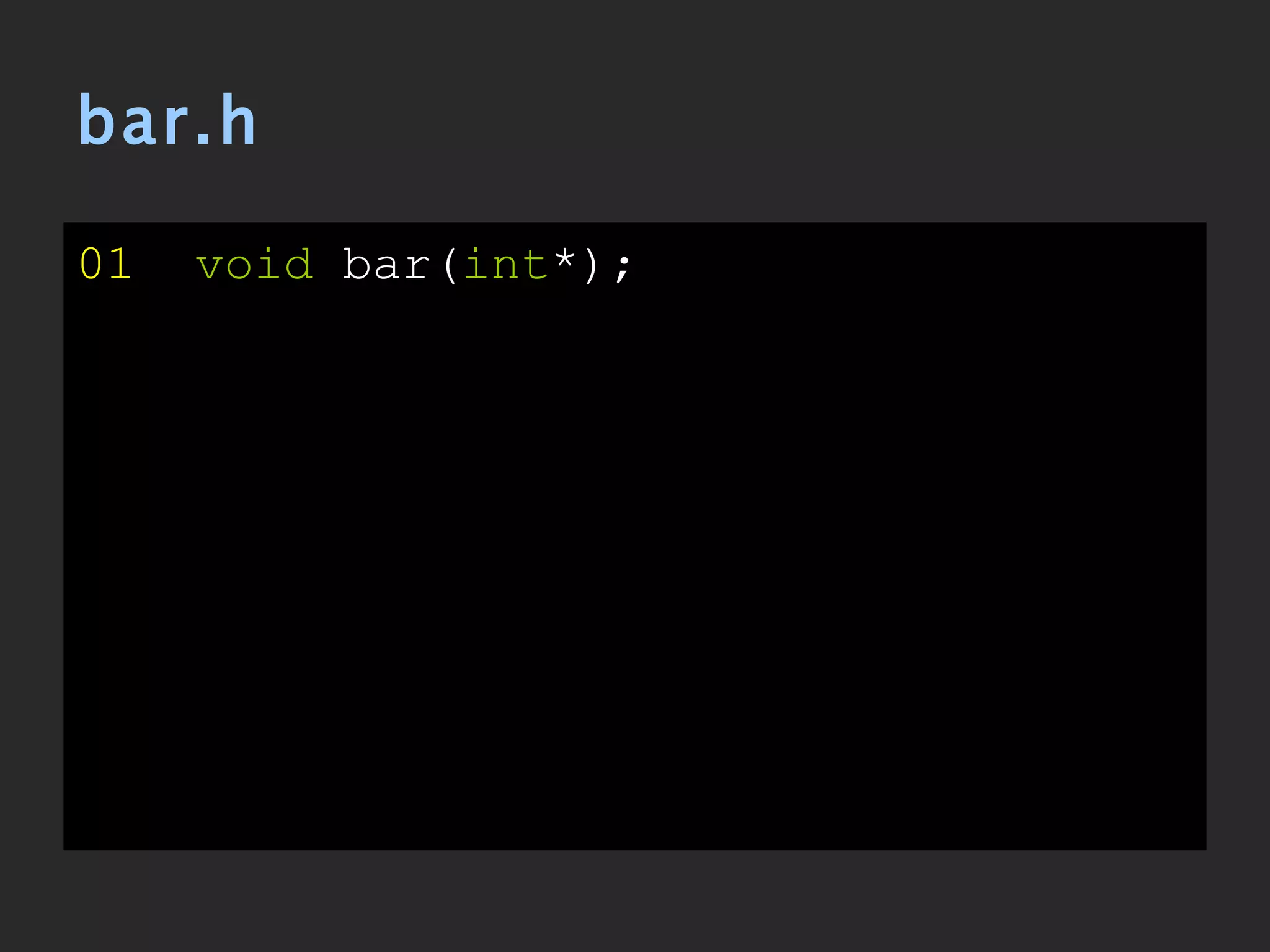
bar.h 01   void  bar( int *);
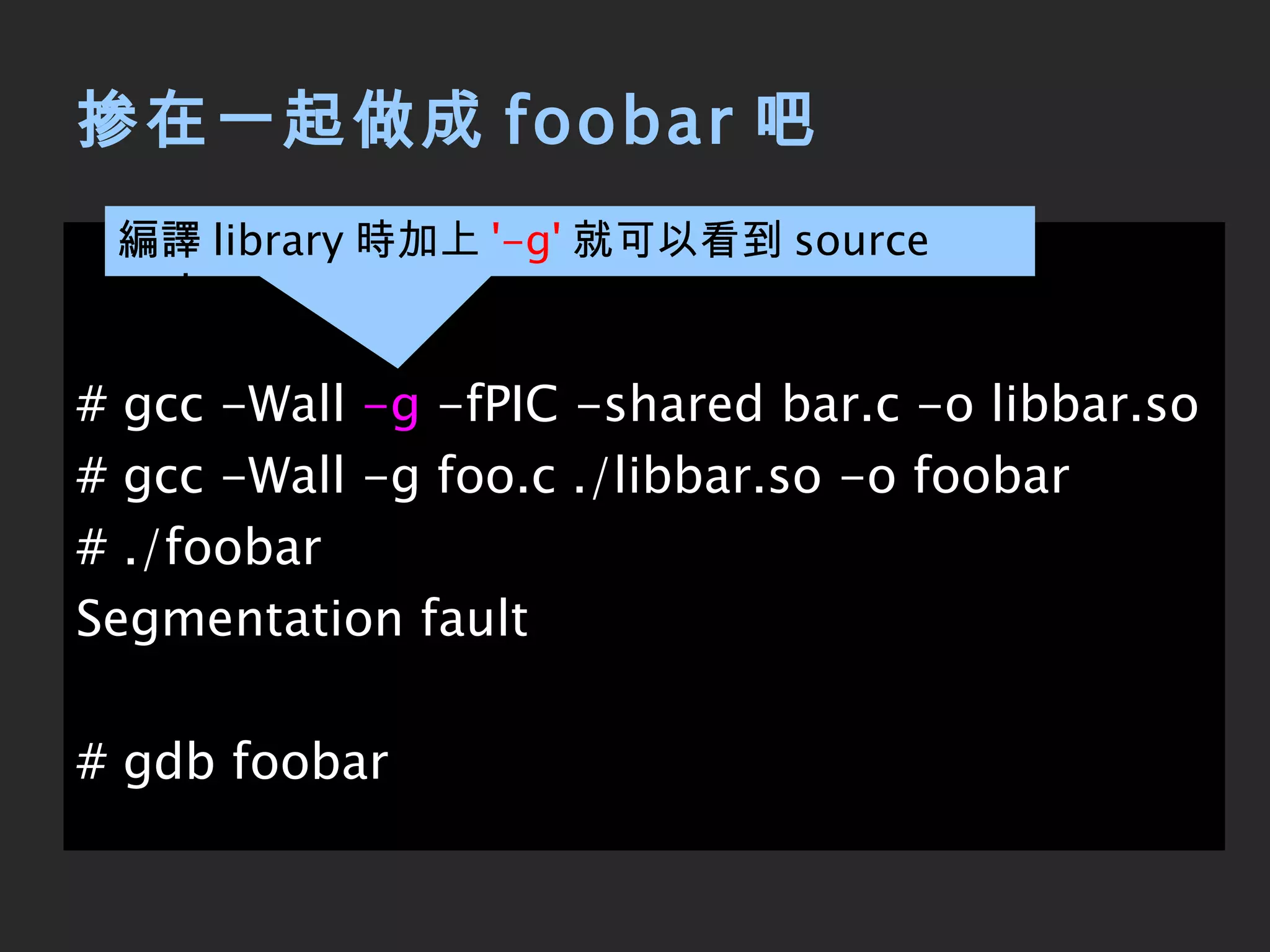
掺在一起做成 foobar 吧 # gcc -Wall  -g  -fPIC -shared bar.c -o libbar.so # gcc -Wall -g foo.c ./libbar.so -o foobar # ./foobar Segmentation fault # gdb foobar 編譯 library 時加上 '-g' 就可以看到 source code
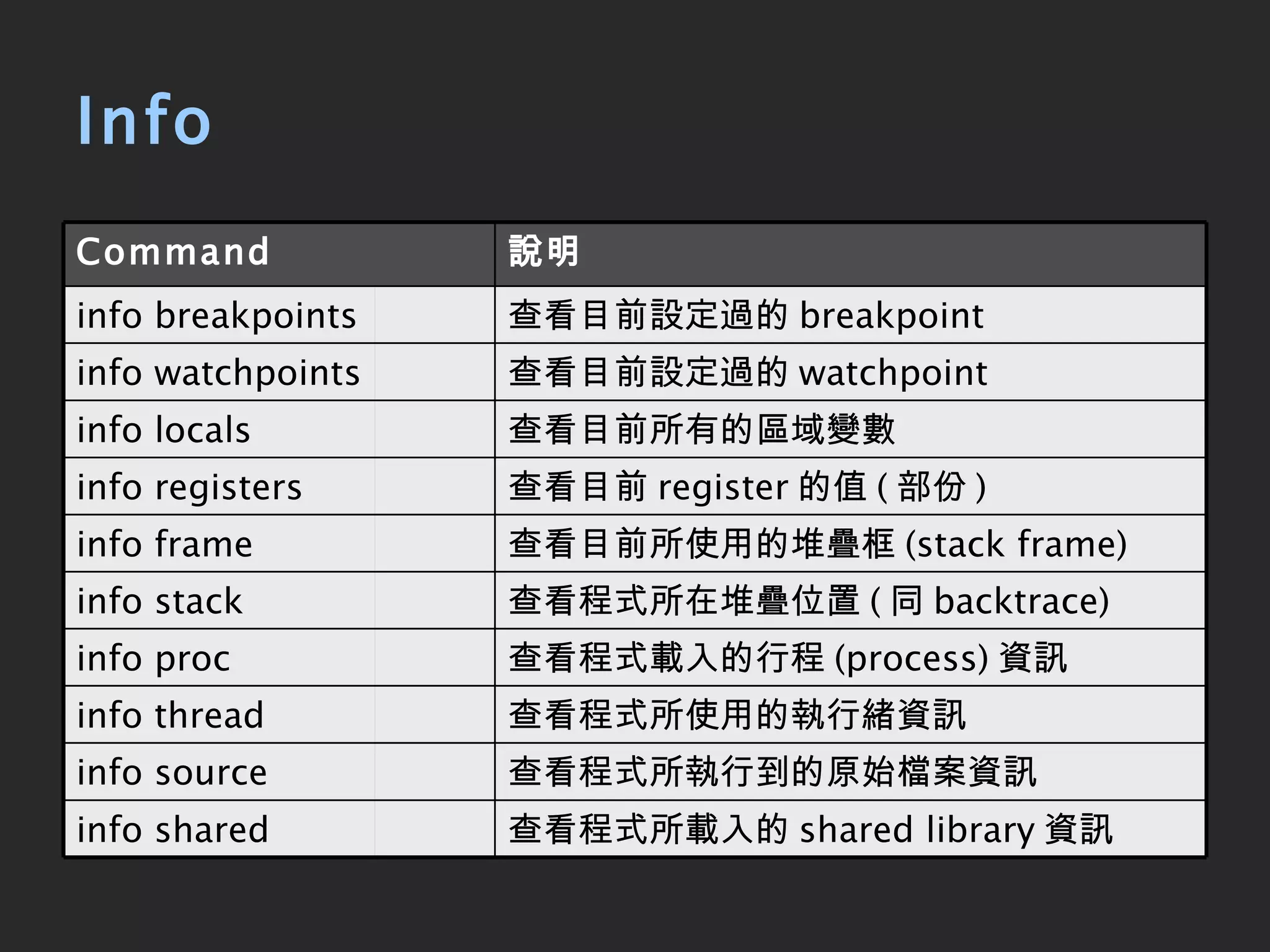
Info 查看目前 register 的值 ( 部份 ) info registers 說明 Command 查看程式所載入的 shared library 資訊 info shared 查看程式所執行到的原始檔案資訊 info source 查看程式所使用的執行緒資訊 info thread 查看程式載入的行程 (process) 資訊 info proc 查看程式所在堆疊位置 ( 同 backtrace) info stack 查看目前所使用的堆疊框 (stack frame) info frame 查看目前所有的區域變數 info locals 查看目前設定過的 watchpoint info watchpoints 查看目前設定過的 breakpoint info breakpoints
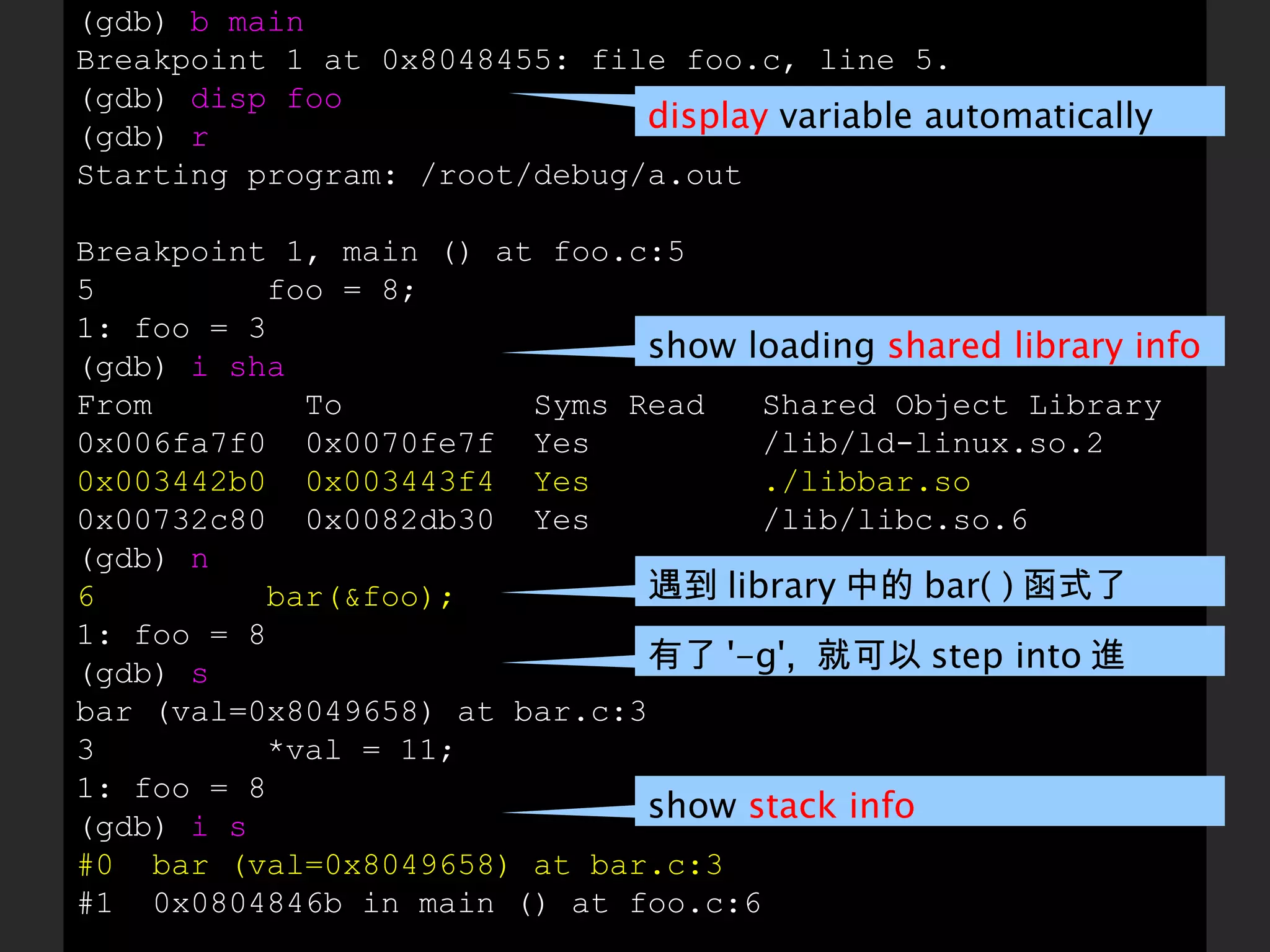
(gdb)  b main Breakpoint 1 at 0x8048455: file foo.c, line 5. (gdb)  disp foo (gdb)  r Starting program: /root/debug/a.out Breakpoint 1, main () at foo.c:5 5  foo = 8; 1: foo = 3 (gdb)  i sha From  To  Syms Read  Shared Object Library 0x006fa7f0  0x0070fe7f  Yes  /lib/ld-linux.so.2 0x003442b0  0x003443f4  Yes  ./libbar.so 0x00732c80  0x0082db30  Yes  /lib/libc.so.6 (gdb)  n 6  bar(&foo); 1: foo = 8 (gdb)  s bar (val=0x8049658) at bar.c:3 3  *val = 11; 1: foo = 8 (gdb)  i s #0  bar (val=0x8049658) at bar.c:3 #1  0x0804846b in main () at foo.c:6 遇到 library 中的 bar( ) 函式了 display  variable automatically show loading  shared library info 有了 '-g',  就可以 step into 進 library show  stack info
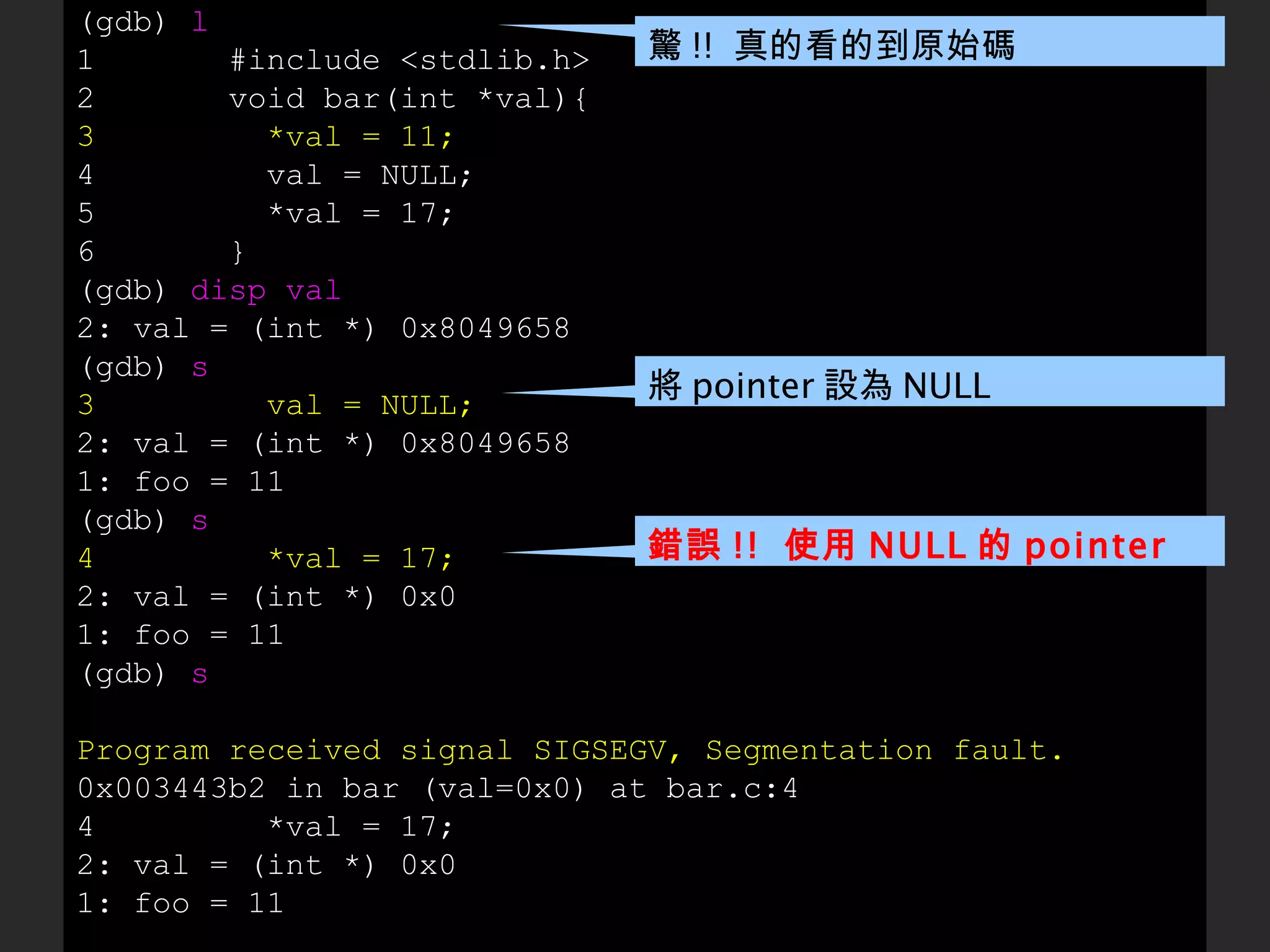
(gdb)  l 1  #include <stdlib.h> 2  void bar(int *val){ 3  *val = 11; 4  val = NULL; 5  *val = 17; 6  } (gdb)  disp val 2: val = (int *) 0x8049658 (gdb)  s 3  val = NULL; 2: val = (int *) 0x8049658 1: foo = 11 (gdb)  s 4  *val = 17; 2: val = (int *) 0x0 1: foo = 11 (gdb)  s Program received signal SIGSEGV, Segmentation fault. 0x003443b2 in bar (val=0x0) at bar.c:4 4  *val = 17; 2: val = (int *) 0x0 1: foo = 11 將 pointer 設為 NULL 錯誤 !!  使用 NULL 的 pointer 驚 !!  真的看的到原始碼
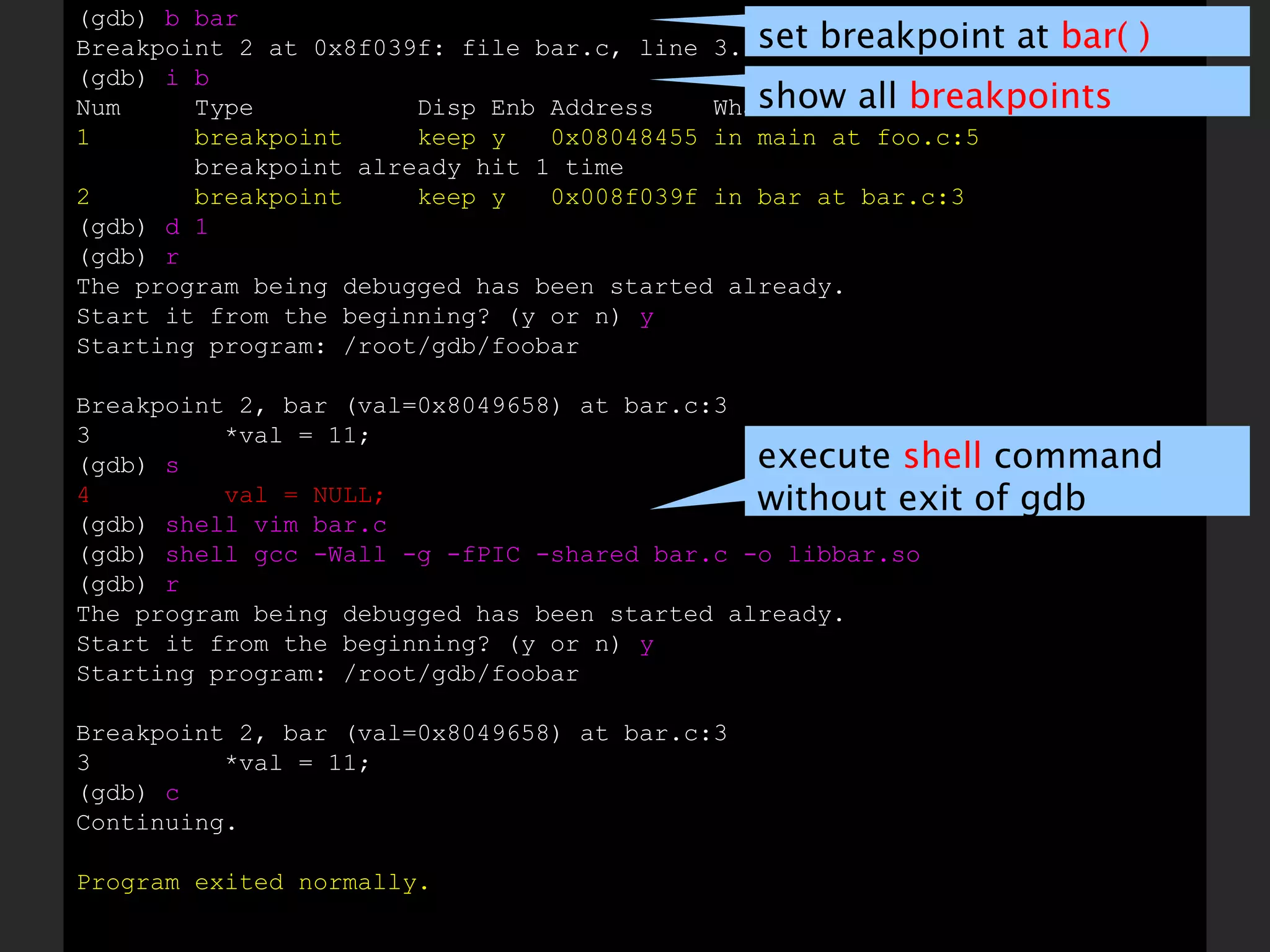
(gdb)  b bar Breakpoint 2 at 0x8f039f: file bar.c, line 3. (gdb)  i b Num  Type  Disp Enb Address  What 1  breakpoint  keep y  0x08048455 in main at foo.c:5 breakpoint already hit 1 time 2  breakpoint  keep y  0x008f039f in bar at bar.c:3 (gdb)  d 1 (gdb)  r The program being debugged has been started already. Start it from the beginning? (y or n)  y Starting program: /root/gdb/foobar Breakpoint 2, bar (val=0x8049658) at bar.c:3 3  *val = 11; (gdb)  s 4  val = NULL; (gdb)  shell vim bar.c (gdb)  shell gcc -Wall -g -fPIC -shared bar.c -o libbar.so (gdb)  r The program being debugged has been started already. Start it from the beginning? (y or n)  y Starting program: /root/gdb/foobar Breakpoint 2, bar (val=0x8049658) at bar.c:3 3  *val = 11; (gdb)  c Continuing. Program exited normally. set breakpoint at  bar( ) show all  breakpoints execute  shell  command without exit of gdb
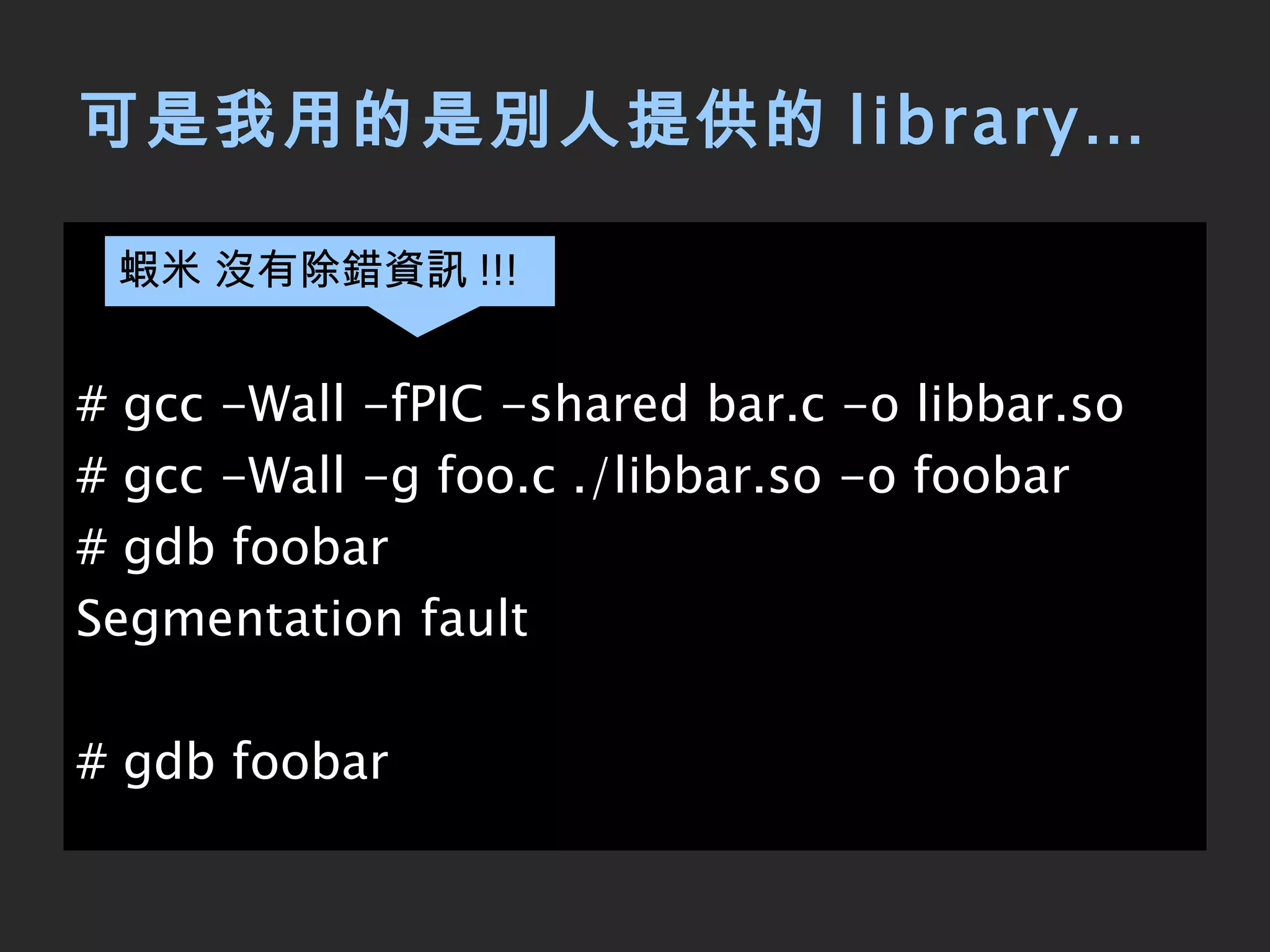
可是我用的是別人提供的 library… # gcc -Wall -fPIC -shared bar.c -o libbar.so # gcc -Wall -g foo.c ./libbar.so -o foobar # gdb foobar Segmentation fault # gdb foobar 蝦米 沒有除錯資訊 !!!
Breakpoint 單指令執行 ( 會進入 function) stepi 說明 Command 將特定記憶體位址區段做反組譯 [addr] disassemble 單指令執行 ( 不會進入 function) nexti 刪除 breakpoint( 編號 ) [n] delete 當 expression 變動時 break [exp] watch
(gdb)  wa foo Hardware watchpoint 1: foo (gdb)  r Starting program: /root/gdb/foobar Hardware watchpoint 1: foo Old value = 3 New value = 8 main () at foo.c:6 6  bar(&foo); (gdb)  si 0x08048466  6  bar(&foo); (gdb)  si 0x08048340 in bar@plt () (gdb)  i s #0  0x08048340 in bar@plt () #1  0x0804846b in main () at foo.c:6 (gdb)  i f Stack level 0, frame at 0xbfa76670: eip = 0x8048340 in bar@plt; saved eip 0x804846b called by frame at 0xbfa76680 Arglist at 0xbfa76668, args: Locals at 0xbfa76668, Previous frame's sp is 0xbfa76670 Saved registers: eip at 0xbfa7666c set  watchpoint  to foo  當 foo 改變時 ,  將自動顯示 step  one  instruction  exactly show stack  frame info 在 main 中呼叫 [email_address]
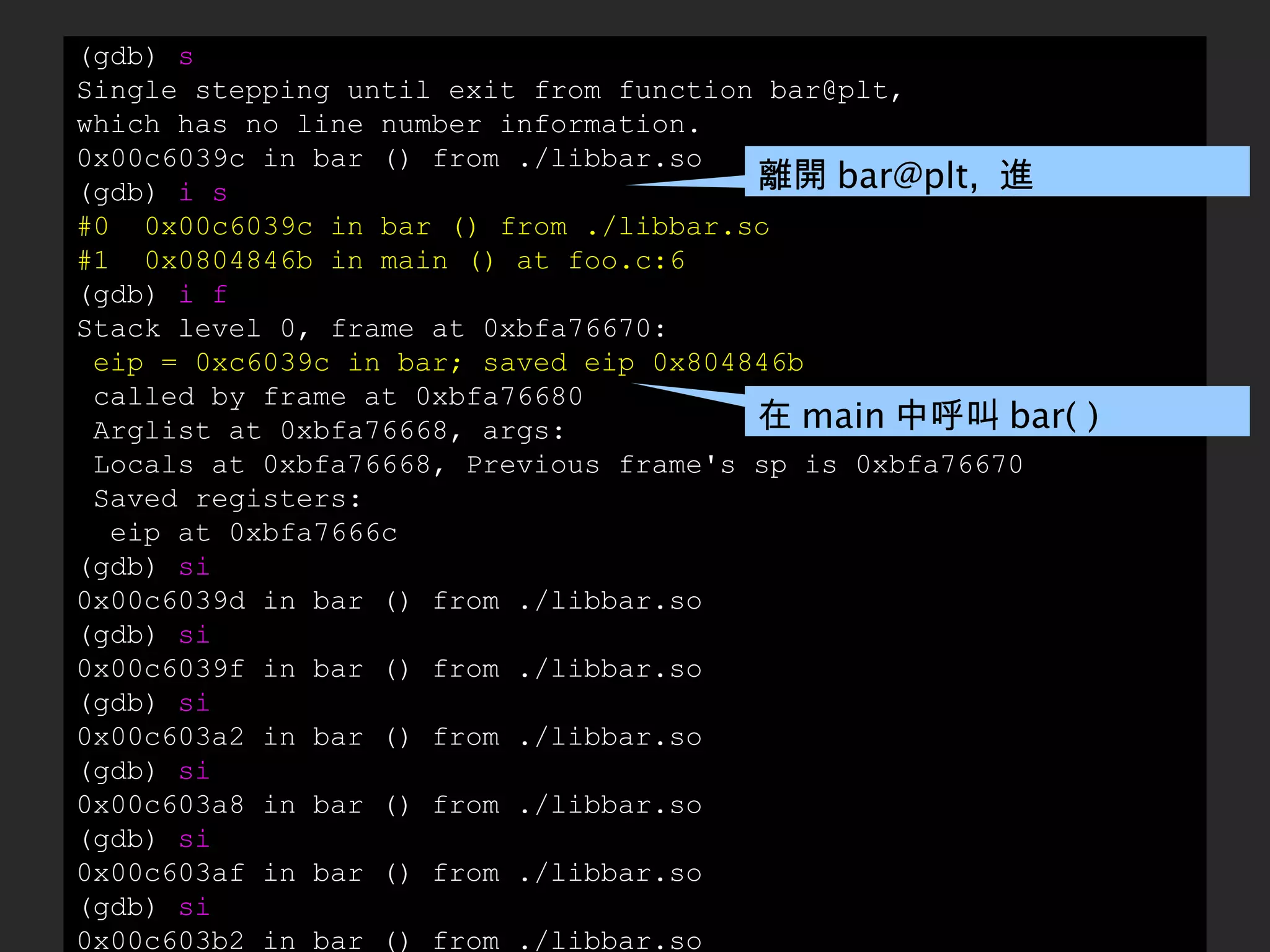
(gdb)  s Single stepping until exit from function bar@plt, which has no line number information. 0x00c6039c in bar () from ./libbar.so (gdb)  i s #0  0x00c6039c in bar () from ./libbar.so #1  0x0804846b in main () at foo.c:6 (gdb)  i f Stack level 0, frame at 0xbfa76670: eip = 0xc6039c in bar; saved eip 0x804846b called by frame at 0xbfa76680 Arglist at 0xbfa76668, args: Locals at 0xbfa76668, Previous frame's sp is 0xbfa76670 Saved registers: eip at 0xbfa7666c (gdb)  si 0x00c6039d in bar () from ./libbar.so (gdb)  si 0x00c6039f in bar () from ./libbar.so (gdb)  si 0x00c603a2 in bar () from ./libbar.so (gdb)  si 0x00c603a8 in bar () from ./libbar.so (gdb)  si 0x00c603af in bar () from ./libbar.so (gdb)  si 0x00c603b2 in bar () from ./libbar.so 在 main 中呼叫 bar( ) 離開 bar@plt,  進入 ./libbar.so
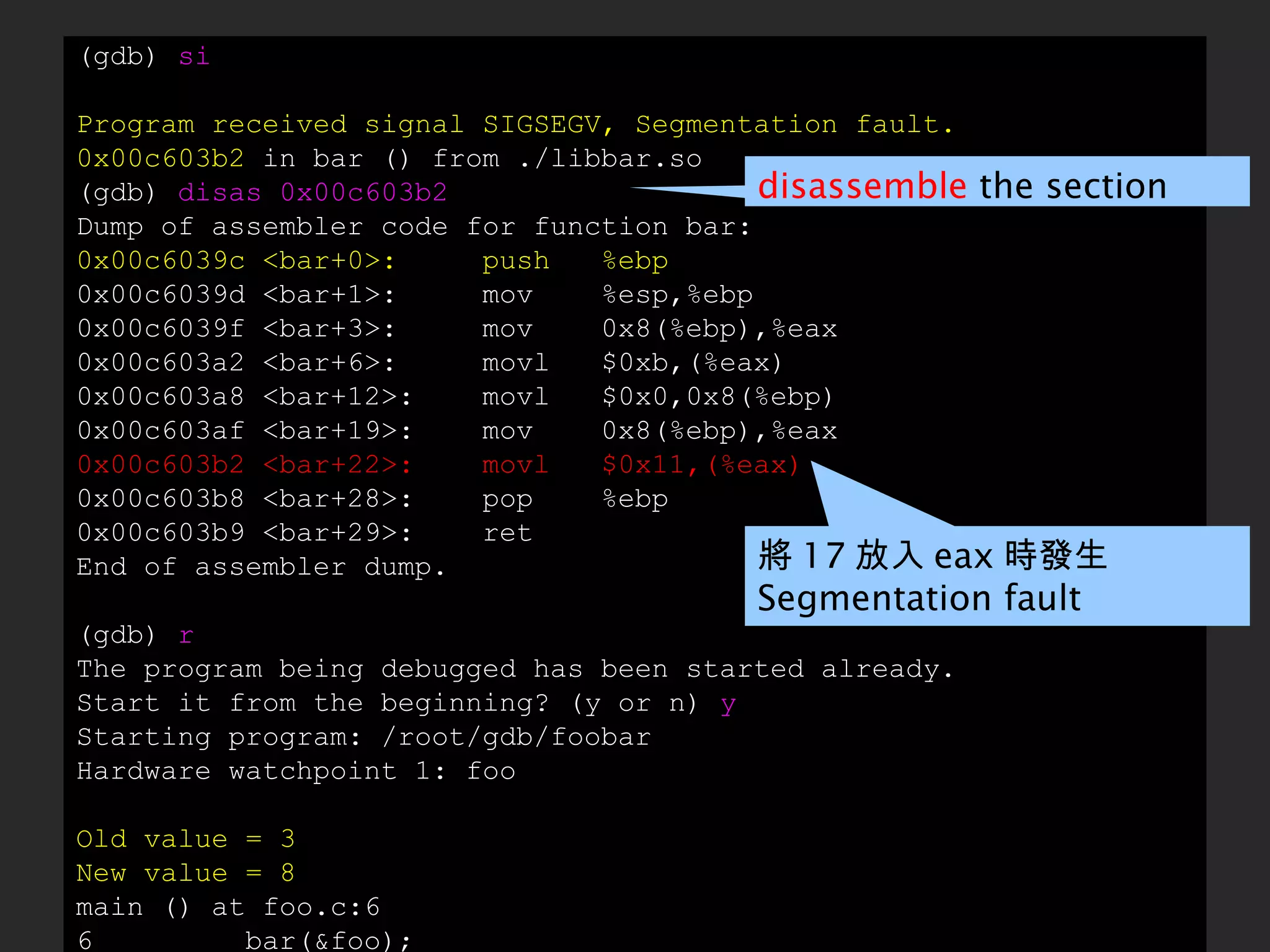
(gdb)  si Program received signal SIGSEGV, Segmentation fault. 0x00c603b2  in bar () from ./libbar.so (gdb)  disas 0x00c603b2 Dump of assembler code for function bar: 0x00c6039c <bar+0>:  push  %ebp 0x00c6039d <bar+1>:  mov  %esp,%ebp 0x00c6039f <bar+3>:  mov  0x8(%ebp),%eax 0x00c603a2 <bar+6>:  movl  $0xb,(%eax) 0x00c603a8 <bar+12>:  movl  $0x0,0x8(%ebp) 0x00c603af <bar+19>:  mov  0x8(%ebp),%eax 0x00c603b2 <bar+22>:  movl  $0x11,(%eax) 0x00c603b8 <bar+28>:  pop  %ebp 0x00c603b9 <bar+29>:  ret End of assembler dump. (gdb)  r The program being debugged has been started already. Start it from the beginning? (y or n)  y Starting program: /root/gdb/foobar Hardware watchpoint 1: foo Old value = 3 New value = 8 main () at foo.c:6 6  bar(&foo); disassemble  the section 將 17 放入 eax 時發生  Segmentation fault
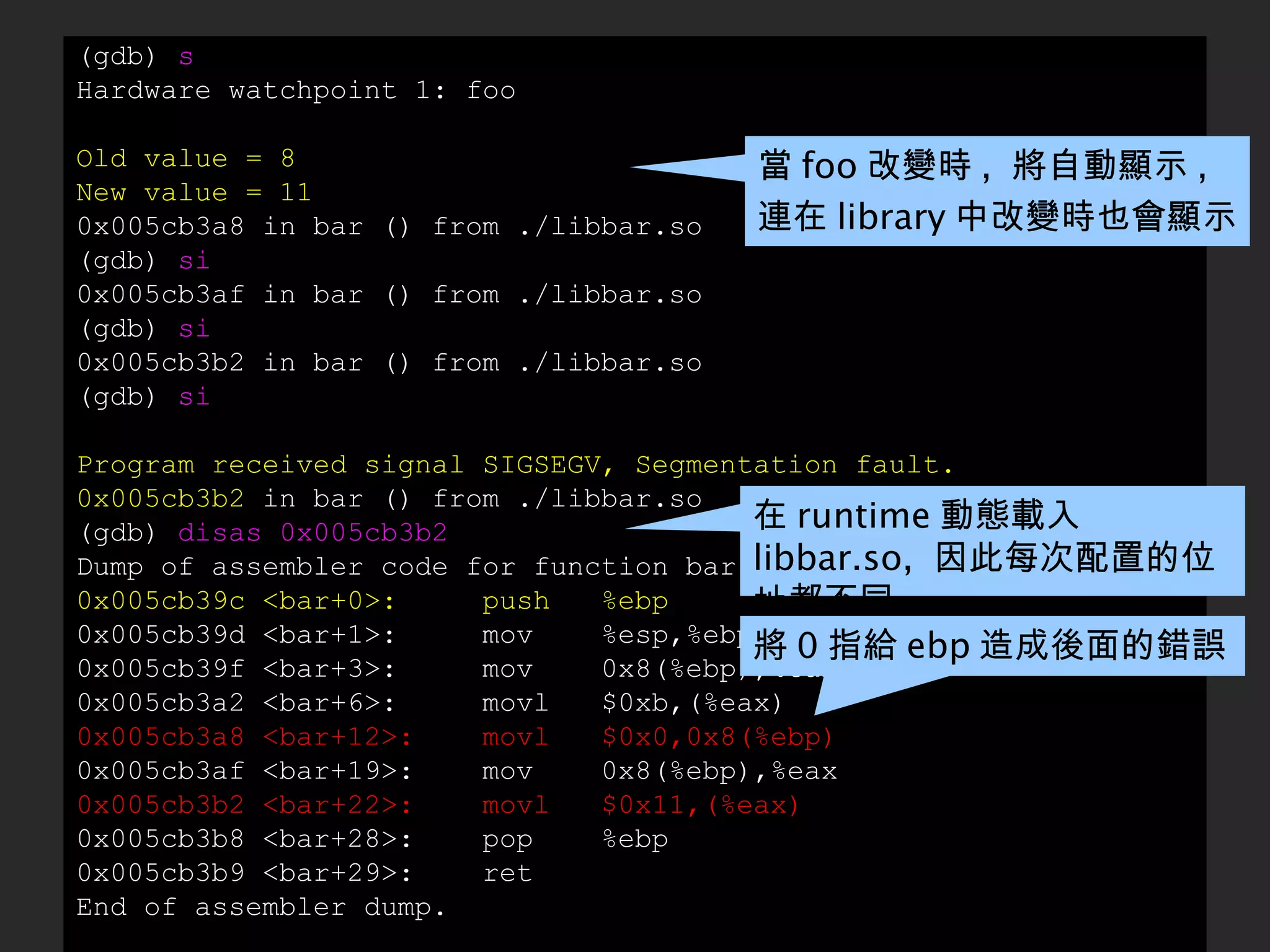
(gdb)  s Hardware watchpoint 1: foo Old value = 8 New value = 11 0x005cb3a8 in bar () from ./libbar.so (gdb)  si 0x005cb3af in bar () from ./libbar.so (gdb)  si 0x005cb3b2 in bar () from ./libbar.so (gdb)  si Program received signal SIGSEGV, Segmentation fault. 0x005cb3b2  in bar () from ./libbar.so (gdb)  disas 0x005cb3b2 Dump of assembler code for function bar: 0x005cb39c <bar+0>:  push  %ebp 0x005cb39d <bar+1>:  mov  %esp,%ebp 0x005cb39f <bar+3>:  mov  0x8(%ebp),%eax 0x005cb3a2 <bar+6>:  movl  $0xb,(%eax) 0x005cb3a8 <bar+12>:  movl  $0x0,0x8(%ebp) 0x005cb3af <bar+19>:  mov  0x8(%ebp),%eax 0x005cb3b2 <bar+22>:  movl  $0x11,(%eax) 0x005cb3b8 <bar+28>:  pop  %ebp 0x005cb3b9 <bar+29>:  ret End of assembler dump. 當 foo 改變時 ,  將自動顯示 ,  連在 library 中改變時也會顯示 在 runtime 動態載入 libbar.so,  因此每次配置的位址都不同 將 0 指給 ebp 造成後面的錯誤
(gdb)  shell objdump -d libbar.so|less (gdb)  shell vim libbar.so :%!xxd ... 0000390: d283 c404 5b5d c38b 1c24 c390 5589 e58b  ....[]...$..U... 00003a0: 4508 c700 0b00 0000  c745 0800 0000 00 8b  E........E...... 00003b0: 4508 c700 1100 0000 5dc3 9090 9090 9090  E.......]....... ... ... 0000390: d283 c404 5b5d c38b 1c24 c390 5589 e58b  ....[]...$..U... 00003a0: 4508 c700 0b00 0000  9090 9090 9090 90 8b  E........E...... 00003b0: 4508 c700 1100 0000 5dc3 9090 9090 9090  E.......]....... ... :%!xxd -r :wq! (gdb)  r The program being debugged has been started already. Start it from the beginning? (y or n) y Starting program: /root/foo/foobar Program exited normally. 只好手動修改 libbar.so 內容
GDB 只有這樣子嗎  ?
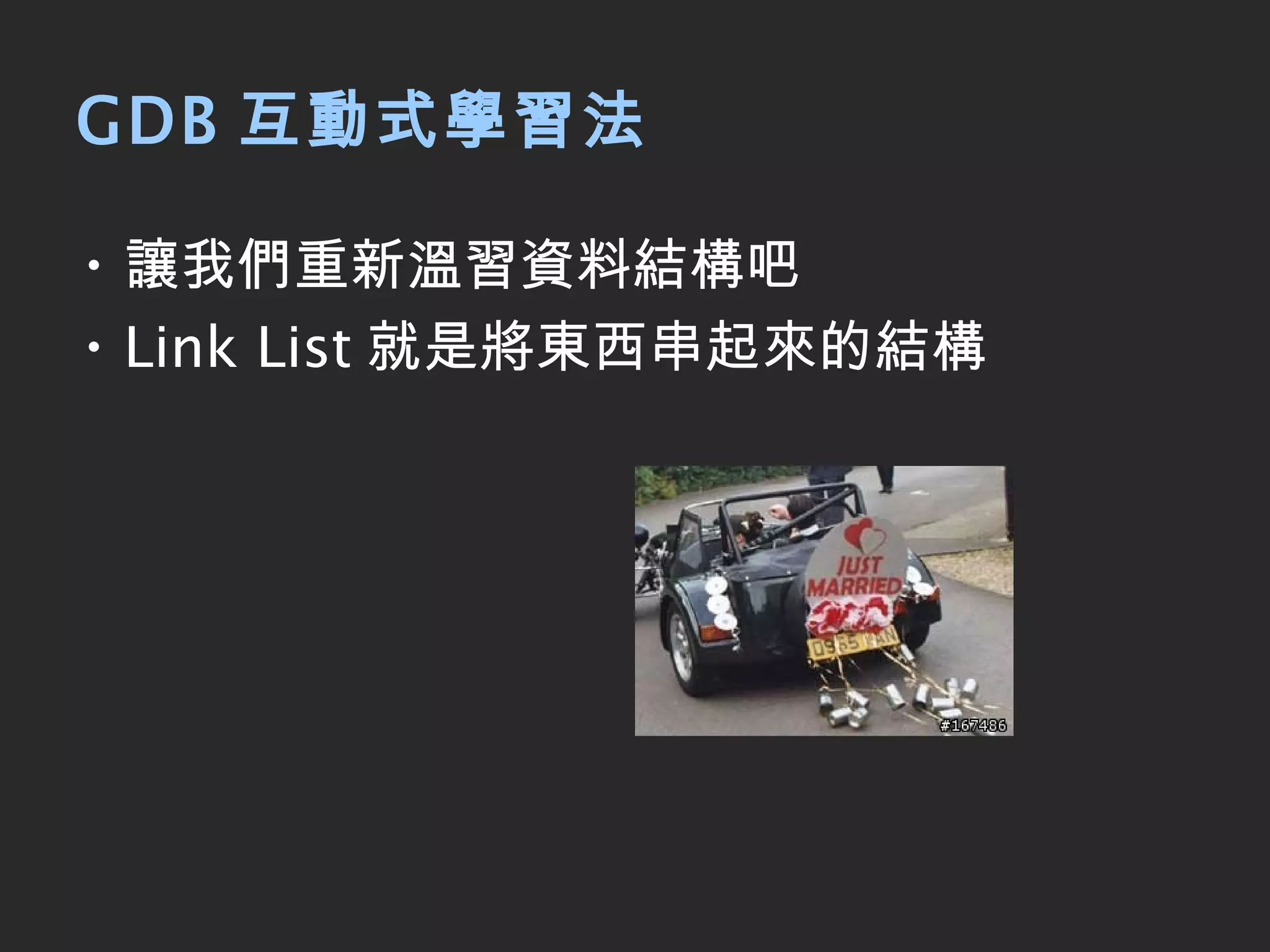
GDB 互動式學習法 讓我們重新溫習資料結構吧 Link List 就是將東西串起來的結構
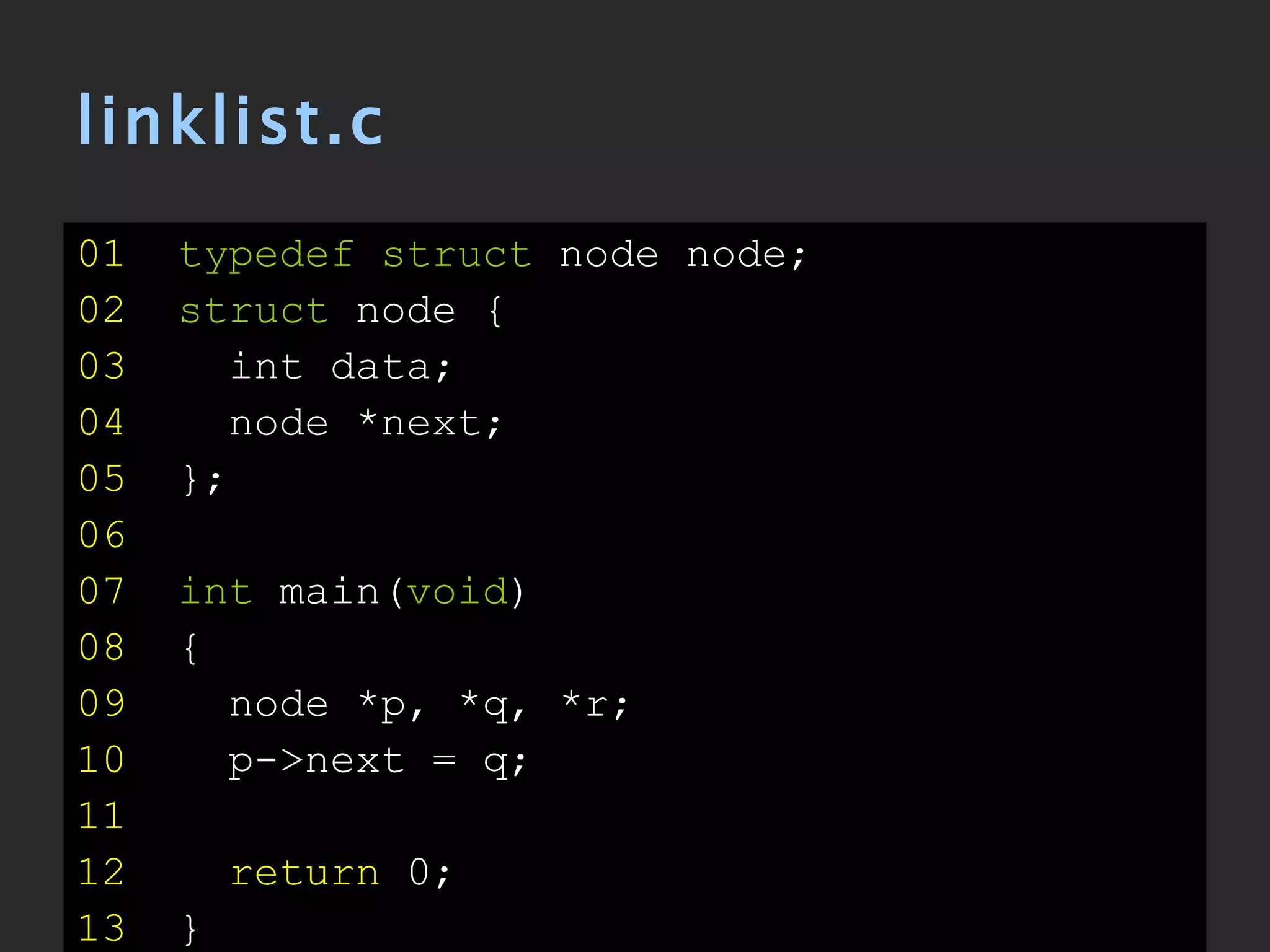
linklist.c 01   typedef struct  node node; 02   struct  node { 03   int data; 04   node *next; 05   }; 06   07   int  main( void ) 08   { 09   node *p, *q, *r; 10   p->next = q; 11 12   return  0; 13   }
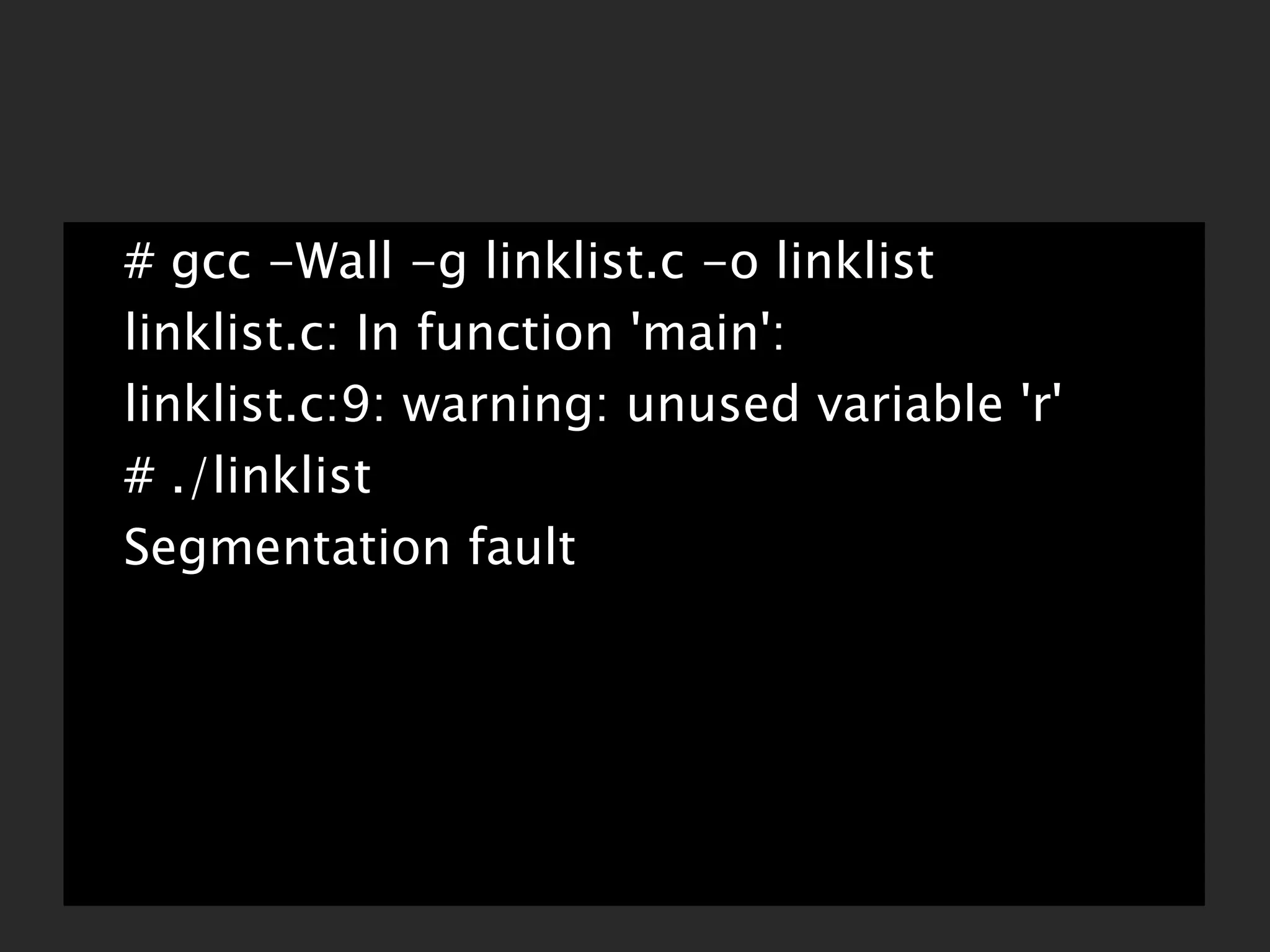
# gcc -Wall -g linklist.c -o linklist linklist.c: In function 'main': linklist.c:9: warning: unused variable 'r' # ./linklist Segmentation fault
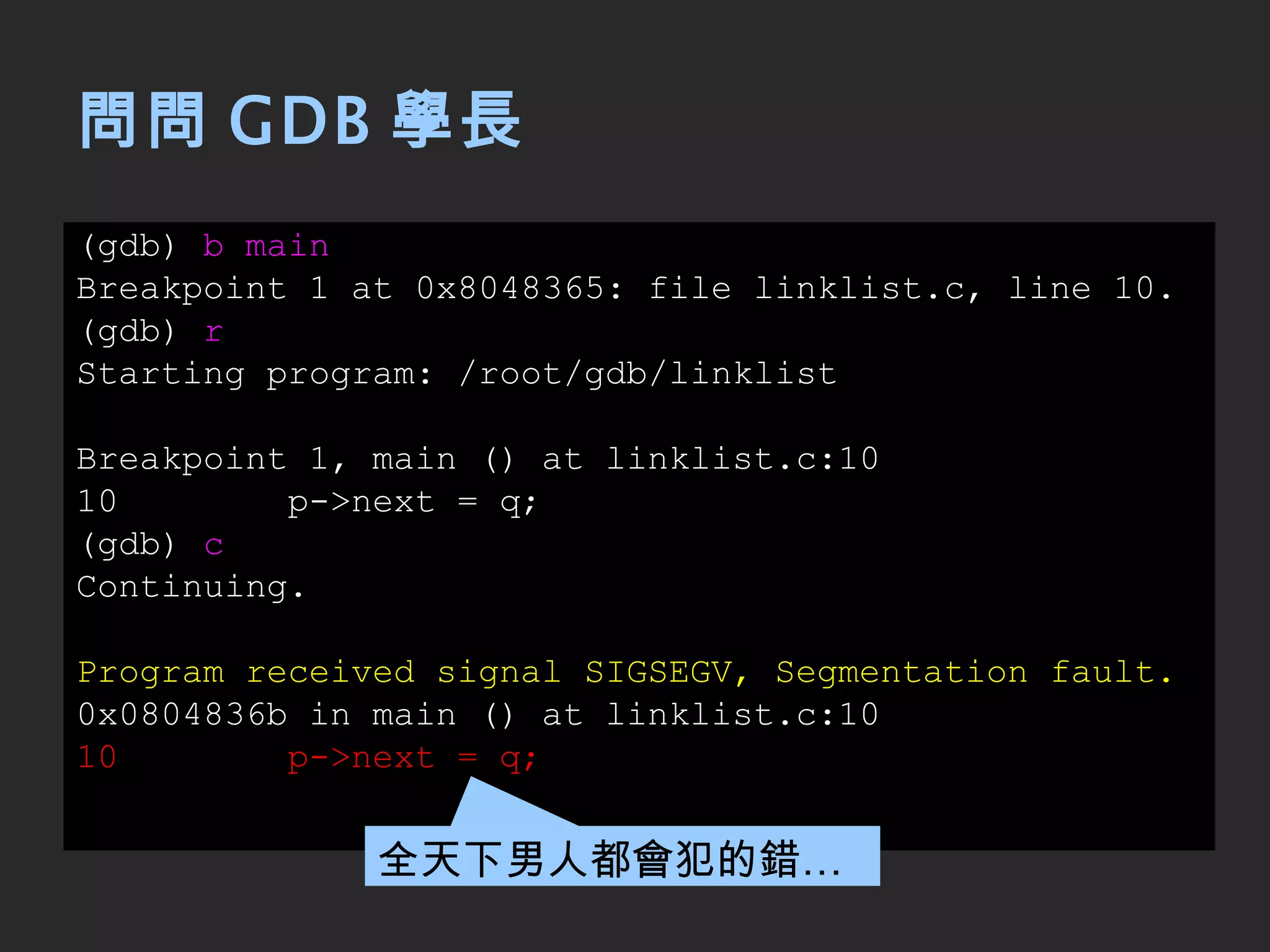
問問 GDB 學長 (gdb)  b main Breakpoint 1 at 0x8048365: file linklist.c, line 10. (gdb)  r Starting program: /root/gdb/linklist Breakpoint 1, main () at linklist.c:10 10  p->next = q; (gdb)  c Continuing. Program received signal SIGSEGV, Segmentation fault. 0x0804836b in main () at linklist.c:10 10  p->next = q; 全天下男人都會犯的錯…
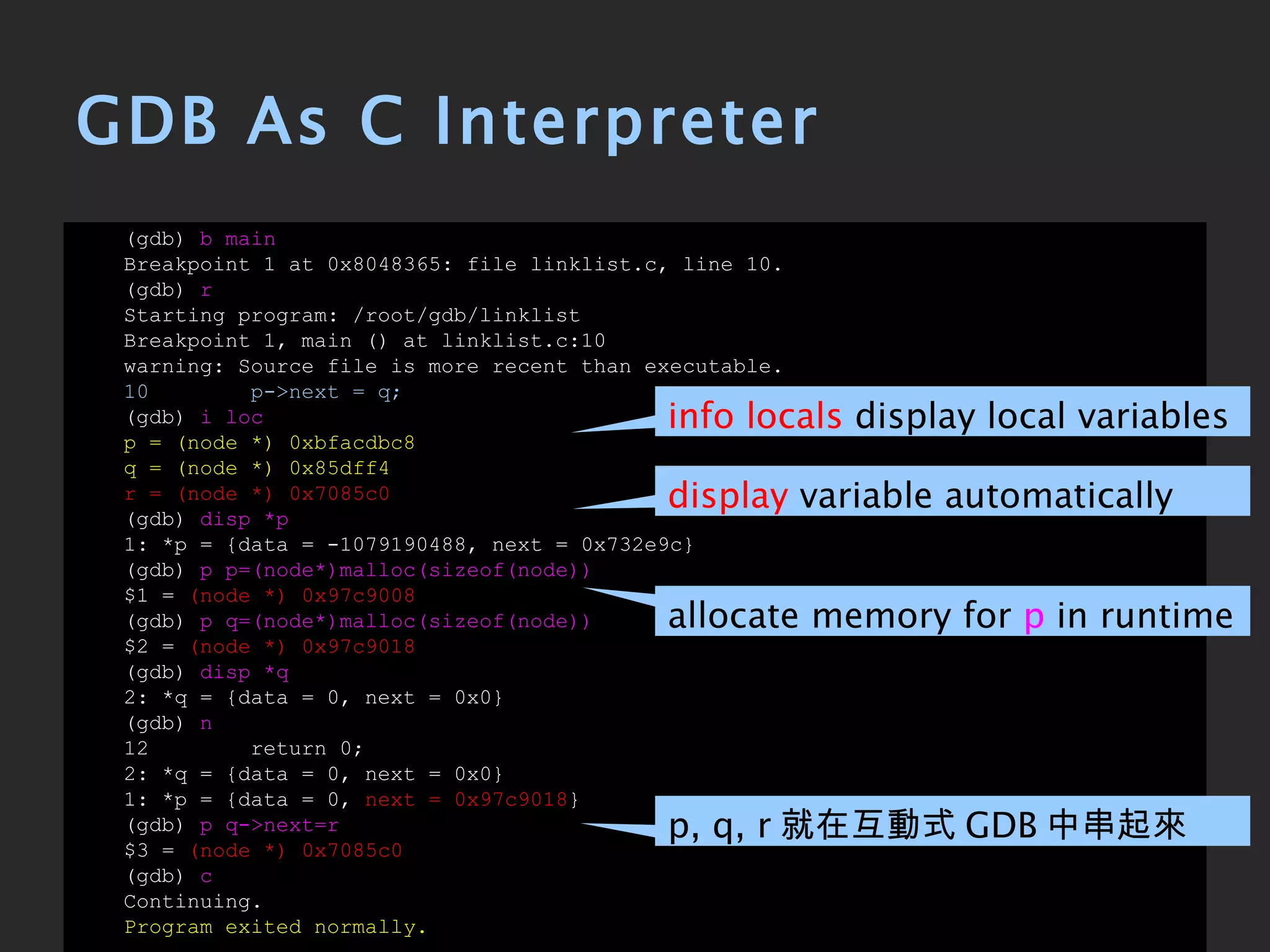
GDB As C Interpreter (gdb)  b main Breakpoint 1 at 0x8048365: file linklist.c, line 10. (gdb)  r Starting program: /root/gdb/linklist Breakpoint 1, main () at linklist.c:10 warning: Source file is more recent than executable. 10  p->next = q; (gdb)  i loc p = (node *) 0xbfacdbc8 q = (node *) 0x85dff4 r = (node *) 0x7085c0 (gdb)  disp *p 1: *p = {data = -1079190488, next = 0x732e9c} (gdb)  p p=(node*)malloc(sizeof(node)) $1 =  (node *) 0x97c9008 (gdb)  p q=(node*)malloc(sizeof(node)) $2 =  (node *) 0x97c9018 (gdb)  disp *q 2: *q = {data = 0, next = 0x0} (gdb)  n 12  return 0; 2: *q = {data = 0, next = 0x0} 1: *p = {data = 0,  next = 0x97c9018 } (gdb)  p q->next=r $3 =  (node *) 0x7085c0 (gdb)  c Continuing. Program exited normally. info locals  display local variables display  variable automatically allocate memory for  p  in runtime p, q, r 就在互動式 GDB 中串起來了 !!
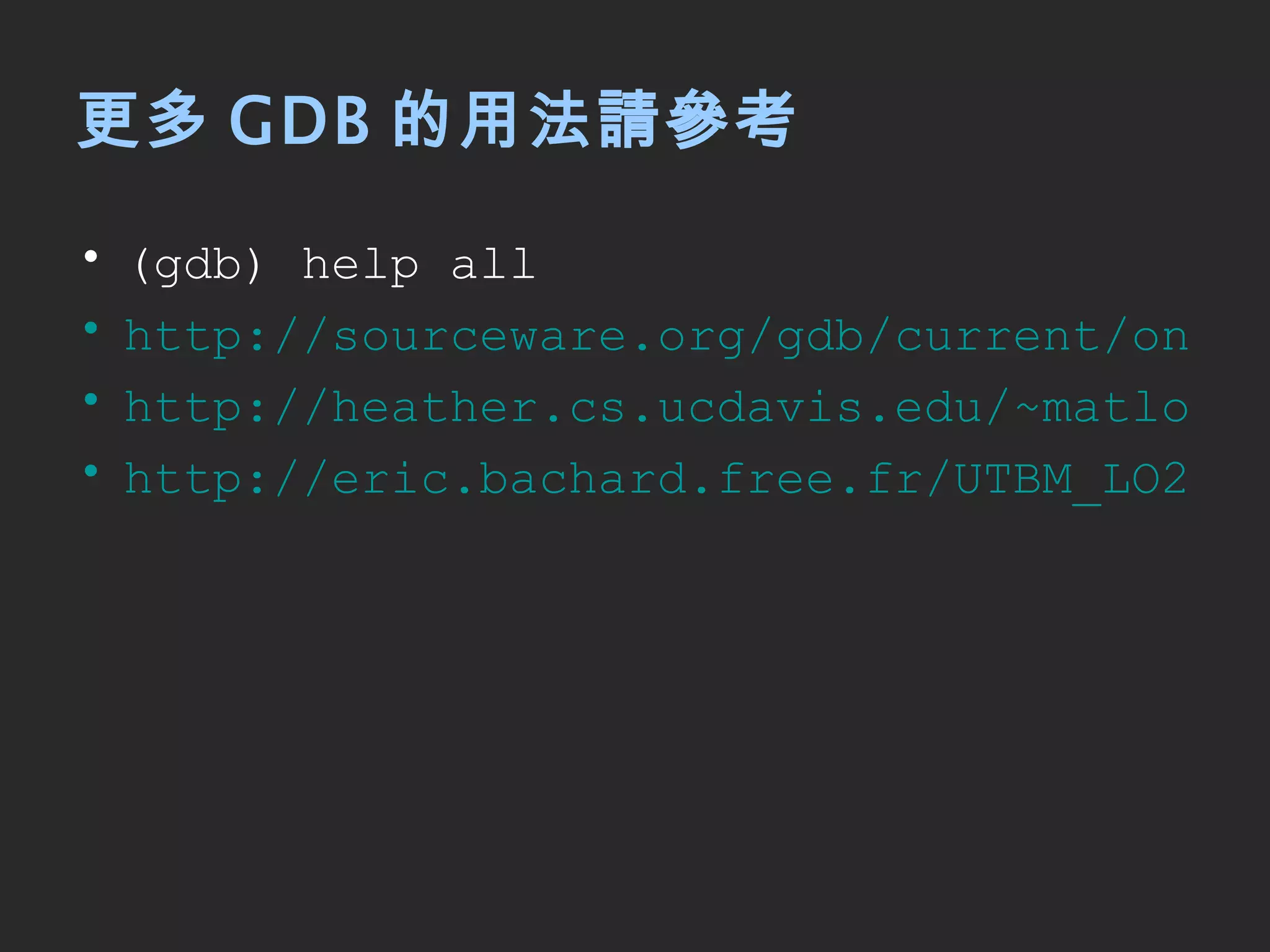
更多 GDB 的用法請參考 (gdb) help all http://sourceware.org/gdb/current/onlinedocs/gdb/ http://heather.cs.ucdavis.edu/~matloff/UnixAndC/CLanguage/Debug.html http://eric.bachard.free.fr/UTBM_LO22/P07/C/Documentation/C/tutorial_gdb/Peter%27s_gdb_Tutorial.html
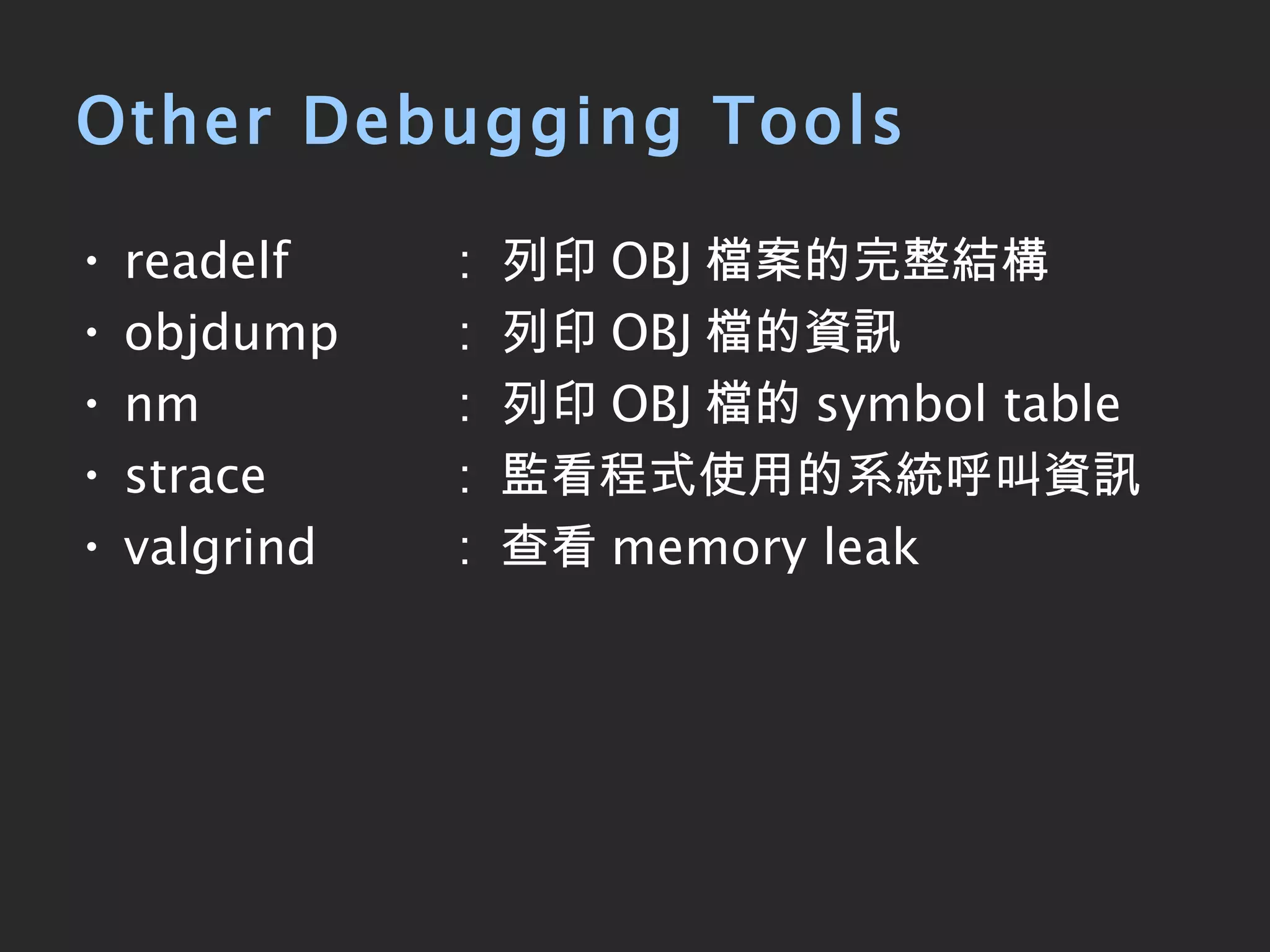
Other Debugging Tools  readelf   :  列印 OBJ 檔案的完整結構 objdump  :  列印 OBJ 檔的資訊  nm  :  列印 OBJ 檔的 symbol table strace  :  監看程式使用的系統呼叫資訊 valgrind  :  查看 memory leak
參考資訊 快快樂樂學 GNU Debugger ( gdb)Part  I -  概念與初體驗 快快樂樂學 GNU Debugger ( gdb)Part  II -  實務與應用 GNU GDB

Introduction to gdb

  • 1.
    Introduction to GDB2010-04-15 Owen Hsu
  • 2.
    Outline What's GDB? Why GDB ? Basic GDB Commands Starting up GDB Examples
  • 3.
    What's GDB ?GNU Debugger A text debugger for several language, including C/C++
  • 4.
    Features An interactiveshell Learn once, debug anywhere
  • 5.
  • 6.
    Programmers make bugthan debug printf( &quot;===start debug===&quot; ) printf( &quot;var: %d \n&quot; , var) printf( &quot;===end debug===&quot; )
  • 7.
    GDB Helps Usto Find Out Watch or modify the variables in runtime Why programs fail or abort ? Current state of program Change the executing flow dynamically
  • 8.
    HelloWorld Example 01 #include <stdio.h> 02 void func( char *pMem) { 03 printf( &quot;- func: %p\n\n &quot; , pMem); 04 } 03 05 const char *szHello = &quot;Hello World&quot;; 06 int main( int argc, char *argv[]) 07 { 08 printf( &quot; \n%s\n\n &quot; , szHello); 09 10 int i; 11 for (i= 0 ; i<argc; i++) { 12 printf( &quot;argv[ %d ] \n &quot; , i); 13 printf( &quot;- main: %s\n &quot; , argv[i]); 14 func(argv[i]); 15 } 16 17 return 0 ; 18 }
  • 9.
    Compile hello.c #gcc -Wall hello.c -o hello # ./hello 123 abc Hello World argv[0] - main: ./hello - func: 0xbfbf099b argv[1] - main: 123 - func: 0xbfbf09a3 argv[2] - main: abc - func: 0xbfbf09a7 display all messages
  • 10.
    Starting up GDB# gcc -Wall -g hello.c -o hello # gdb hello GNU gdb Fedora (6.8-37.el5) Copyright (C) 2008 Free Software Foundation, Inc. License GPLv3+: GNU GPL version 3 or later <http://gnu.org/licenses/gpl.html> This is free software: you are free to change and redistribute it. There is NO WARRANTY, to the extent permitted by law. Type &quot;show copying&quot; and &quot;show warranty&quot; for details. This GDB was configured as &quot;i386-redhat-linux-gnu&quot;... (gdb) add debugging information to hello
  • 11.
    Basic GDB Commands顯示目前堆疊 (stack) 狀況 backtrace 顯示 expression 的值 [exp] print 說明 Command 說明 [subcommand] help 即時修改變數的值 [var=val] print 列出程式碼 [line/function] list 單步執行 ( 會進入 function) step 單步執行 ( 不會進入 function) next 執行到被中斷為止 continue 在條件成立時中斷 [condition] break 設定 breakpoint [line/function] break 開始執行 ( 並自動在 main break) [args] start 開始執行 [args] run
  • 12.
    This GDB wasconfigured as &quot;i386-redhat-linux-gnu&quot;... (gdb) break main Breakpoint 1 at 0x80483b3: file hello.c, line 9. (gdb) run 123 abc Starting program: /root/gdb/hello Breakpoint 1, main (argc=3, argv=0xbffe6a24) at hello.c:9 9 printf(&quot;\n%s\n\n&quot;, szHello); (gdb) list 4 } 5 6 char *szHello = &quot;Hello World&quot;; 7 int main(int argc, char *argv[]) 8 { 9 printf(&quot;\n%s\n\n&quot;, szHello); 10 11 int i; 12 for (i=0; i<argc; i++) { 13 printf(&quot;argv[%d]\n&quot;, i); (gdb) break 14 Breakpoint 2 at 0x80483e4: file hello.c, line 14. (gdb) continue Continuing. Hello World argv[0] Breakpoint 2, main (argc=3, argv=0xbffe6a24) at hello.c:14 14 printf(&quot;- main: %s\n&quot;, argv[i]); set breakpoint at main run with @parm 123 abc list code set breakpoint at 14th line continue to breakpoint
  • 13.
    (gdb) next- main: /root/gdb/hello 15 func(argv[i]); (gdb) step func (pMem=0xbffe797e &quot;/root/gdb/hello&quot;) at hello.c:3 3 printf(&quot;- func: %x\n\n&quot;, pMem); (gdb) backtrace #0 func ( pMem=0xbffe797e &quot;/root/gdb/hello&quot; ) at hello.c:3 #1 0x08048418 in main (argc=3, argv=0xbffe6a24) at hello.c:15 (gdb) list 1 #include <stdio.h> 2 void func(char *pMem) { 3 printf(&quot;- func: %x\n\n&quot;, pMem); 4 } 5 6 char *szHello = &quot;Hello World&quot;; 7 int main(int argc, char *argv[]) 8 { 9 printf(&quot;\n%s\n\n&quot;, szHello); 10 (gdb) print pMem $1 = 0xbffe797e &quot;/root/gdb/hello&quot; (gdb) continue Continuing. - func: 0xbffe797e argv[1] Breakpoint 2, main (argc=3, argv=0xbffe6a24) at hello.c:14 14 printf(&quot;- main: %s\n&quot;, argv[i]); execute to next statement step into to next statement print backtrace of all stack frames print the value of pMem
  • 14.
    (gdb) next- main: 123 15 func(argv[i]); (gdb) step func (pMem=0xbffe798e &quot;123&quot;) at hello.c:3 3 printf(&quot;- func: %x\n\n&quot;, pMem); (gdb) print pMem $2 = 0xbffe798e &quot;123&quot; (gdb) print *pMem $3 = 49 '1' (gdb) continue Continuing. - func: 0xbffe798e argv[2] Breakpoint 2, main (argc=3, argv=0xbffe6a24) at hello.c:14 14 printf(&quot;- main: %s\n&quot;, argv[i]); (gdb) next - main: abc 15 func(argv[i]); (gdb) next - func: 0xbffe7992 12 for (i=0; i<argc; i++) { (gdb) continue Continuing. Program exited normally. pMem 的型態為 char*, 因此只會印出 1 的 ASCII 碼
  • 15.
    程式沒錯誤時 , GDB是用心酸的… 醒醒吧 , 我們的 code 裡有很多 bug 的 而這些 bug 常常是別人發現的
  • 16.
    比如說我需要把我的 code 包成library 出場人物 foo.c bar.c bar.h
  • 17.
    foo.c 01 #include &quot;bar.h&quot; 02 int foo = 3 ; 03 int main() 04 { 05 foo = 8 ; 06 bar(&foo); 07 08 return 0 ; 09 }
  • 18.
    bar.c 01 #include <stdlib.h> 02 void bar( int *val){ 03 *val = 11 ; 04 val = NULL ; 05 *val = 17 ; 06 }
  • 19.
    bar.h 01 void bar( int *);
  • 20.
    掺在一起做成 foobar 吧# gcc -Wall -g -fPIC -shared bar.c -o libbar.so # gcc -Wall -g foo.c ./libbar.so -o foobar # ./foobar Segmentation fault # gdb foobar 編譯 library 時加上 '-g' 就可以看到 source code
  • 21.
    Info 查看目前 register的值 ( 部份 ) info registers 說明 Command 查看程式所載入的 shared library 資訊 info shared 查看程式所執行到的原始檔案資訊 info source 查看程式所使用的執行緒資訊 info thread 查看程式載入的行程 (process) 資訊 info proc 查看程式所在堆疊位置 ( 同 backtrace) info stack 查看目前所使用的堆疊框 (stack frame) info frame 查看目前所有的區域變數 info locals 查看目前設定過的 watchpoint info watchpoints 查看目前設定過的 breakpoint info breakpoints
  • 22.
    (gdb) bmain Breakpoint 1 at 0x8048455: file foo.c, line 5. (gdb) disp foo (gdb) r Starting program: /root/debug/a.out Breakpoint 1, main () at foo.c:5 5 foo = 8; 1: foo = 3 (gdb) i sha From To Syms Read Shared Object Library 0x006fa7f0 0x0070fe7f Yes /lib/ld-linux.so.2 0x003442b0 0x003443f4 Yes ./libbar.so 0x00732c80 0x0082db30 Yes /lib/libc.so.6 (gdb) n 6 bar(&foo); 1: foo = 8 (gdb) s bar (val=0x8049658) at bar.c:3 3 *val = 11; 1: foo = 8 (gdb) i s #0 bar (val=0x8049658) at bar.c:3 #1 0x0804846b in main () at foo.c:6 遇到 library 中的 bar( ) 函式了 display variable automatically show loading shared library info 有了 '-g', 就可以 step into 進 library show stack info
  • 23.
    (gdb) l1 #include <stdlib.h> 2 void bar(int *val){ 3 *val = 11; 4 val = NULL; 5 *val = 17; 6 } (gdb) disp val 2: val = (int *) 0x8049658 (gdb) s 3 val = NULL; 2: val = (int *) 0x8049658 1: foo = 11 (gdb) s 4 *val = 17; 2: val = (int *) 0x0 1: foo = 11 (gdb) s Program received signal SIGSEGV, Segmentation fault. 0x003443b2 in bar (val=0x0) at bar.c:4 4 *val = 17; 2: val = (int *) 0x0 1: foo = 11 將 pointer 設為 NULL 錯誤 !! 使用 NULL 的 pointer 驚 !! 真的看的到原始碼
  • 24.
    (gdb) bbar Breakpoint 2 at 0x8f039f: file bar.c, line 3. (gdb) i b Num Type Disp Enb Address What 1 breakpoint keep y 0x08048455 in main at foo.c:5 breakpoint already hit 1 time 2 breakpoint keep y 0x008f039f in bar at bar.c:3 (gdb) d 1 (gdb) r The program being debugged has been started already. Start it from the beginning? (y or n) y Starting program: /root/gdb/foobar Breakpoint 2, bar (val=0x8049658) at bar.c:3 3 *val = 11; (gdb) s 4 val = NULL; (gdb) shell vim bar.c (gdb) shell gcc -Wall -g -fPIC -shared bar.c -o libbar.so (gdb) r The program being debugged has been started already. Start it from the beginning? (y or n) y Starting program: /root/gdb/foobar Breakpoint 2, bar (val=0x8049658) at bar.c:3 3 *val = 11; (gdb) c Continuing. Program exited normally. set breakpoint at bar( ) show all breakpoints execute shell command without exit of gdb
  • 25.
    可是我用的是別人提供的 library… #gcc -Wall -fPIC -shared bar.c -o libbar.so # gcc -Wall -g foo.c ./libbar.so -o foobar # gdb foobar Segmentation fault # gdb foobar 蝦米 沒有除錯資訊 !!!
  • 26.
    Breakpoint 單指令執行 (會進入 function) stepi 說明 Command 將特定記憶體位址區段做反組譯 [addr] disassemble 單指令執行 ( 不會進入 function) nexti 刪除 breakpoint( 編號 ) [n] delete 當 expression 變動時 break [exp] watch
  • 27.
    (gdb) wafoo Hardware watchpoint 1: foo (gdb) r Starting program: /root/gdb/foobar Hardware watchpoint 1: foo Old value = 3 New value = 8 main () at foo.c:6 6 bar(&foo); (gdb) si 0x08048466 6 bar(&foo); (gdb) si 0x08048340 in bar@plt () (gdb) i s #0 0x08048340 in bar@plt () #1 0x0804846b in main () at foo.c:6 (gdb) i f Stack level 0, frame at 0xbfa76670: eip = 0x8048340 in bar@plt; saved eip 0x804846b called by frame at 0xbfa76680 Arglist at 0xbfa76668, args: Locals at 0xbfa76668, Previous frame's sp is 0xbfa76670 Saved registers: eip at 0xbfa7666c set watchpoint to foo 當 foo 改變時 , 將自動顯示 step one instruction exactly show stack frame info 在 main 中呼叫 [email_address]
  • 28.
    (gdb) sSingle stepping until exit from function bar@plt, which has no line number information. 0x00c6039c in bar () from ./libbar.so (gdb) i s #0 0x00c6039c in bar () from ./libbar.so #1 0x0804846b in main () at foo.c:6 (gdb) i f Stack level 0, frame at 0xbfa76670: eip = 0xc6039c in bar; saved eip 0x804846b called by frame at 0xbfa76680 Arglist at 0xbfa76668, args: Locals at 0xbfa76668, Previous frame's sp is 0xbfa76670 Saved registers: eip at 0xbfa7666c (gdb) si 0x00c6039d in bar () from ./libbar.so (gdb) si 0x00c6039f in bar () from ./libbar.so (gdb) si 0x00c603a2 in bar () from ./libbar.so (gdb) si 0x00c603a8 in bar () from ./libbar.so (gdb) si 0x00c603af in bar () from ./libbar.so (gdb) si 0x00c603b2 in bar () from ./libbar.so 在 main 中呼叫 bar( ) 離開 bar@plt, 進入 ./libbar.so
  • 29.
    (gdb) siProgram received signal SIGSEGV, Segmentation fault. 0x00c603b2 in bar () from ./libbar.so (gdb) disas 0x00c603b2 Dump of assembler code for function bar: 0x00c6039c <bar+0>: push %ebp 0x00c6039d <bar+1>: mov %esp,%ebp 0x00c6039f <bar+3>: mov 0x8(%ebp),%eax 0x00c603a2 <bar+6>: movl $0xb,(%eax) 0x00c603a8 <bar+12>: movl $0x0,0x8(%ebp) 0x00c603af <bar+19>: mov 0x8(%ebp),%eax 0x00c603b2 <bar+22>: movl $0x11,(%eax) 0x00c603b8 <bar+28>: pop %ebp 0x00c603b9 <bar+29>: ret End of assembler dump. (gdb) r The program being debugged has been started already. Start it from the beginning? (y or n) y Starting program: /root/gdb/foobar Hardware watchpoint 1: foo Old value = 3 New value = 8 main () at foo.c:6 6 bar(&foo); disassemble the section 將 17 放入 eax 時發生 Segmentation fault
  • 30.
    (gdb) sHardware watchpoint 1: foo Old value = 8 New value = 11 0x005cb3a8 in bar () from ./libbar.so (gdb) si 0x005cb3af in bar () from ./libbar.so (gdb) si 0x005cb3b2 in bar () from ./libbar.so (gdb) si Program received signal SIGSEGV, Segmentation fault. 0x005cb3b2 in bar () from ./libbar.so (gdb) disas 0x005cb3b2 Dump of assembler code for function bar: 0x005cb39c <bar+0>: push %ebp 0x005cb39d <bar+1>: mov %esp,%ebp 0x005cb39f <bar+3>: mov 0x8(%ebp),%eax 0x005cb3a2 <bar+6>: movl $0xb,(%eax) 0x005cb3a8 <bar+12>: movl $0x0,0x8(%ebp) 0x005cb3af <bar+19>: mov 0x8(%ebp),%eax 0x005cb3b2 <bar+22>: movl $0x11,(%eax) 0x005cb3b8 <bar+28>: pop %ebp 0x005cb3b9 <bar+29>: ret End of assembler dump. 當 foo 改變時 , 將自動顯示 , 連在 library 中改變時也會顯示 在 runtime 動態載入 libbar.so, 因此每次配置的位址都不同 將 0 指給 ebp 造成後面的錯誤
  • 31.
    (gdb) shellobjdump -d libbar.so|less (gdb) shell vim libbar.so :%!xxd ... 0000390: d283 c404 5b5d c38b 1c24 c390 5589 e58b ....[]...$..U... 00003a0: 4508 c700 0b00 0000 c745 0800 0000 00 8b E........E...... 00003b0: 4508 c700 1100 0000 5dc3 9090 9090 9090 E.......]....... ... ... 0000390: d283 c404 5b5d c38b 1c24 c390 5589 e58b ....[]...$..U... 00003a0: 4508 c700 0b00 0000 9090 9090 9090 90 8b E........E...... 00003b0: 4508 c700 1100 0000 5dc3 9090 9090 9090 E.......]....... ... :%!xxd -r :wq! (gdb) r The program being debugged has been started already. Start it from the beginning? (y or n) y Starting program: /root/foo/foobar Program exited normally. 只好手動修改 libbar.so 內容
  • 32.
  • 33.
    GDB 互動式學習法 讓我們重新溫習資料結構吧Link List 就是將東西串起來的結構
  • 34.
    linklist.c 01 typedef struct node node; 02 struct node { 03 int data; 04 node *next; 05 }; 06 07 int main( void ) 08 { 09 node *p, *q, *r; 10 p->next = q; 11 12 return 0; 13 }
  • 35.
    # gcc -Wall-g linklist.c -o linklist linklist.c: In function 'main': linklist.c:9: warning: unused variable 'r' # ./linklist Segmentation fault
  • 36.
    問問 GDB 學長(gdb) b main Breakpoint 1 at 0x8048365: file linklist.c, line 10. (gdb) r Starting program: /root/gdb/linklist Breakpoint 1, main () at linklist.c:10 10 p->next = q; (gdb) c Continuing. Program received signal SIGSEGV, Segmentation fault. 0x0804836b in main () at linklist.c:10 10 p->next = q; 全天下男人都會犯的錯…
  • 37.
    GDB As CInterpreter (gdb) b main Breakpoint 1 at 0x8048365: file linklist.c, line 10. (gdb) r Starting program: /root/gdb/linklist Breakpoint 1, main () at linklist.c:10 warning: Source file is more recent than executable. 10 p->next = q; (gdb) i loc p = (node *) 0xbfacdbc8 q = (node *) 0x85dff4 r = (node *) 0x7085c0 (gdb) disp *p 1: *p = {data = -1079190488, next = 0x732e9c} (gdb) p p=(node*)malloc(sizeof(node)) $1 = (node *) 0x97c9008 (gdb) p q=(node*)malloc(sizeof(node)) $2 = (node *) 0x97c9018 (gdb) disp *q 2: *q = {data = 0, next = 0x0} (gdb) n 12 return 0; 2: *q = {data = 0, next = 0x0} 1: *p = {data = 0, next = 0x97c9018 } (gdb) p q->next=r $3 = (node *) 0x7085c0 (gdb) c Continuing. Program exited normally. info locals display local variables display variable automatically allocate memory for p in runtime p, q, r 就在互動式 GDB 中串起來了 !!
  • 38.
    更多 GDB 的用法請參考(gdb) help all http://sourceware.org/gdb/current/onlinedocs/gdb/ http://heather.cs.ucdavis.edu/~matloff/UnixAndC/CLanguage/Debug.html http://eric.bachard.free.fr/UTBM_LO22/P07/C/Documentation/C/tutorial_gdb/Peter%27s_gdb_Tutorial.html
  • 39.
    Other Debugging Tools readelf : 列印 OBJ 檔案的完整結構 objdump : 列印 OBJ 檔的資訊 nm : 列印 OBJ 檔的 symbol table strace : 監看程式使用的系統呼叫資訊 valgrind : 查看 memory leak
  • 40.
    參考資訊 快快樂樂學 GNUDebugger ( gdb)Part I - 概念與初體驗 快快樂樂學 GNU Debugger ( gdb)Part II - 實務與應用 GNU GDB