Branching
    in
 TFS 2010

 Part V
   by John Varan
Branching in TFS 2010: Part V
 Sharing Common Code

 Several Options
 • Share source code as projects
 • Manually copy assemblies
 • Branching
Branching in TFS 2010: Part V
 Sharing Source Code

 • Multiple versions are too hard to
   manage
 • Allows access to source to all
   developers
 • Increases build times of all projects
Branching in TFS 2010: Part V
 Manually Copying Assemblies

 •   Multiple versions easier to manage
 •   Restricts access to source code
 •   Build times are not affected
 •   No tracking or auditing
Branching in TFS 2010: Part V
 Branching Assemblies

 • All advantages of manually
   copying
 • TFS provides tracking and auditing
 • TFS provides ability to rollback
 • Slightly more complicated (if new
   to branching)
Branching in TFS 2010: Part V
 Setting it Up:

 • Need a “Deploy” folder in common
   library project
 • Built assembly goes in here for
   each release
 • This can be automated
Branching in TFS 2010: Part V
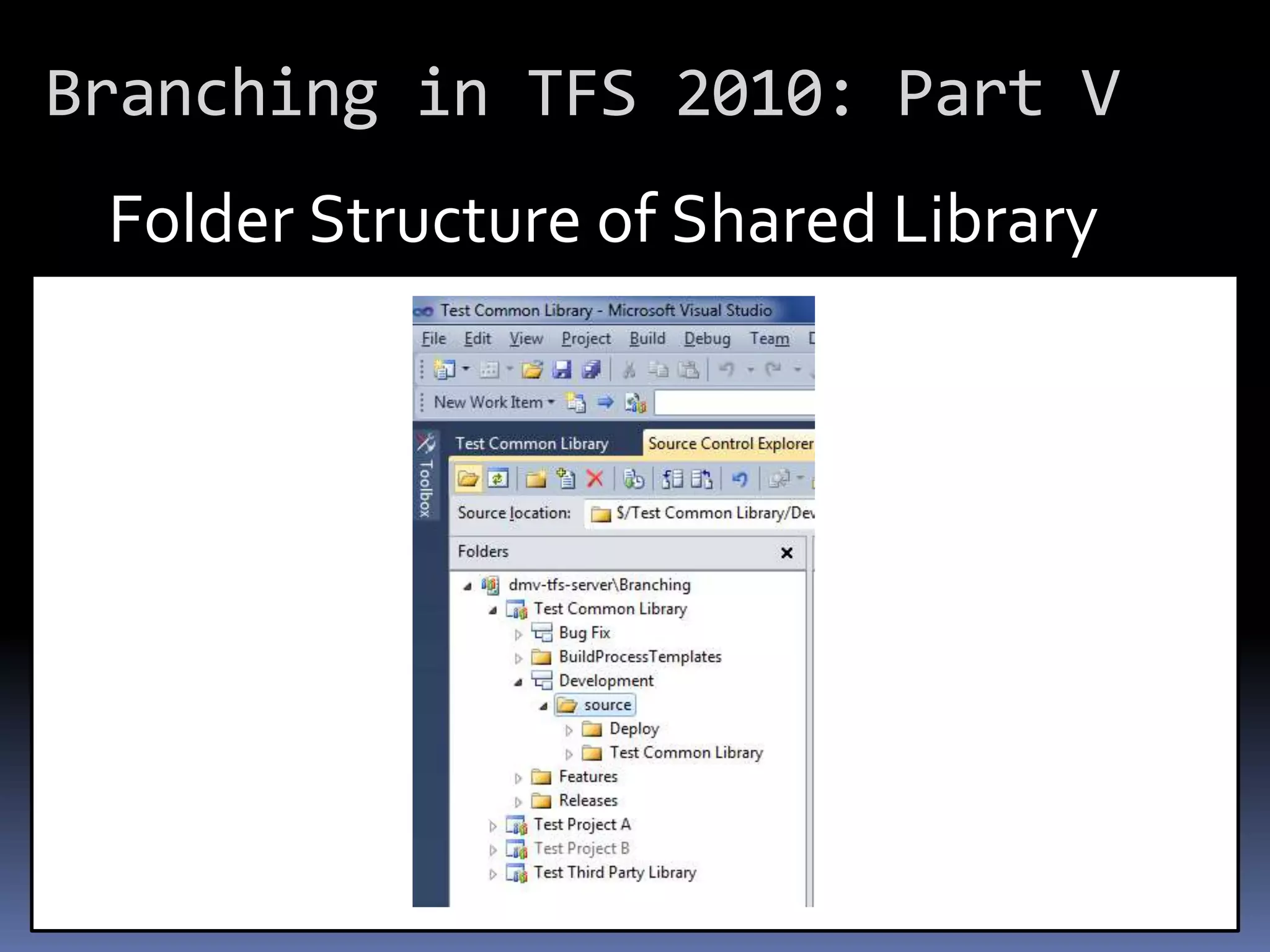
 Folder Structure of Shared Library
Branching in TFS 2010: Part V
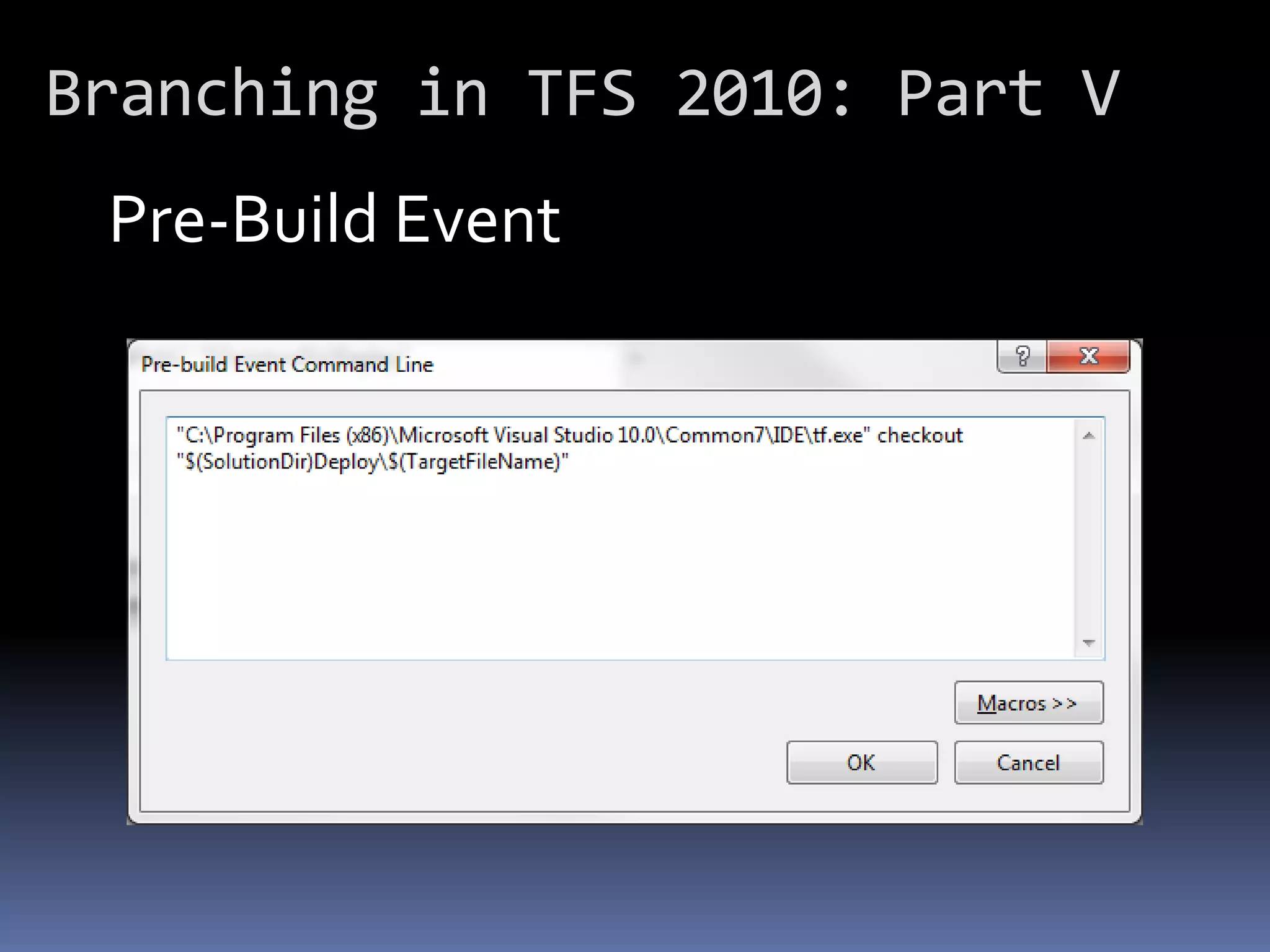
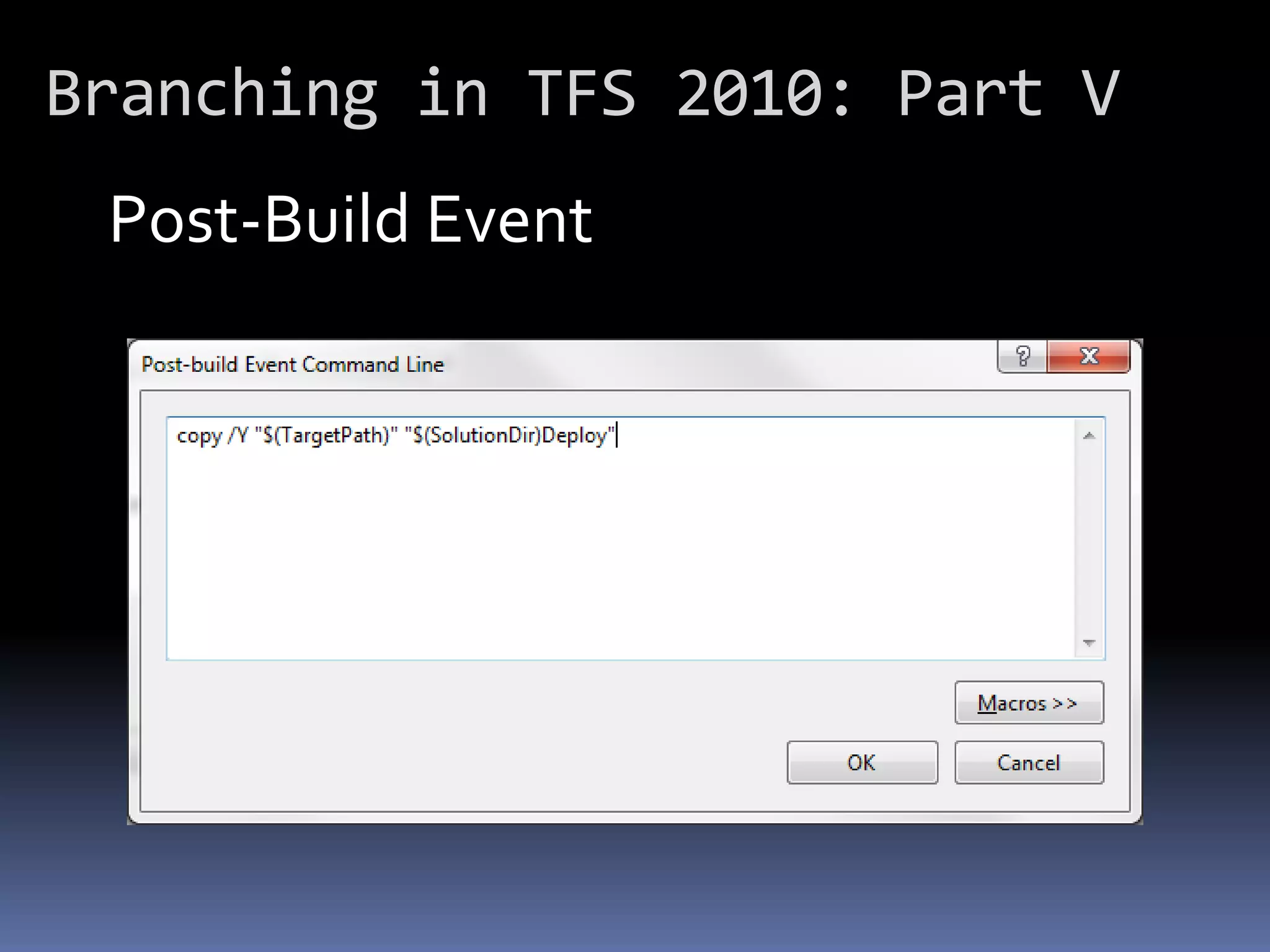
 Automating the “Deploy” folder:

 • Post-build event to copy output
   assembly to “Deploy” folder
 • Existing assembly might be read-
   only
 • Pre-build event to check out
   assembly
Branching in TFS 2010: Part V
 Pre-Build Event
Branching in TFS 2010: Part V
 Post-Build Event
Branching in TFS 2010: Part V
 Set Up of Referencing Application

 Needs a “Lib” folder. Two Options:

 • One for entire solution
 • One for each project
Branching in TFS 2010: Part V
 Per Solution

   • Easier
   • No duplicates per project
   • Can only have one version per
     solution
Branching in TFS 2010: Part V
 Per Project

   • Duplicates per project
   • Slightly more complicated
   • Can have different versions
     mixed in solution
Branching in TFS 2010: Part V
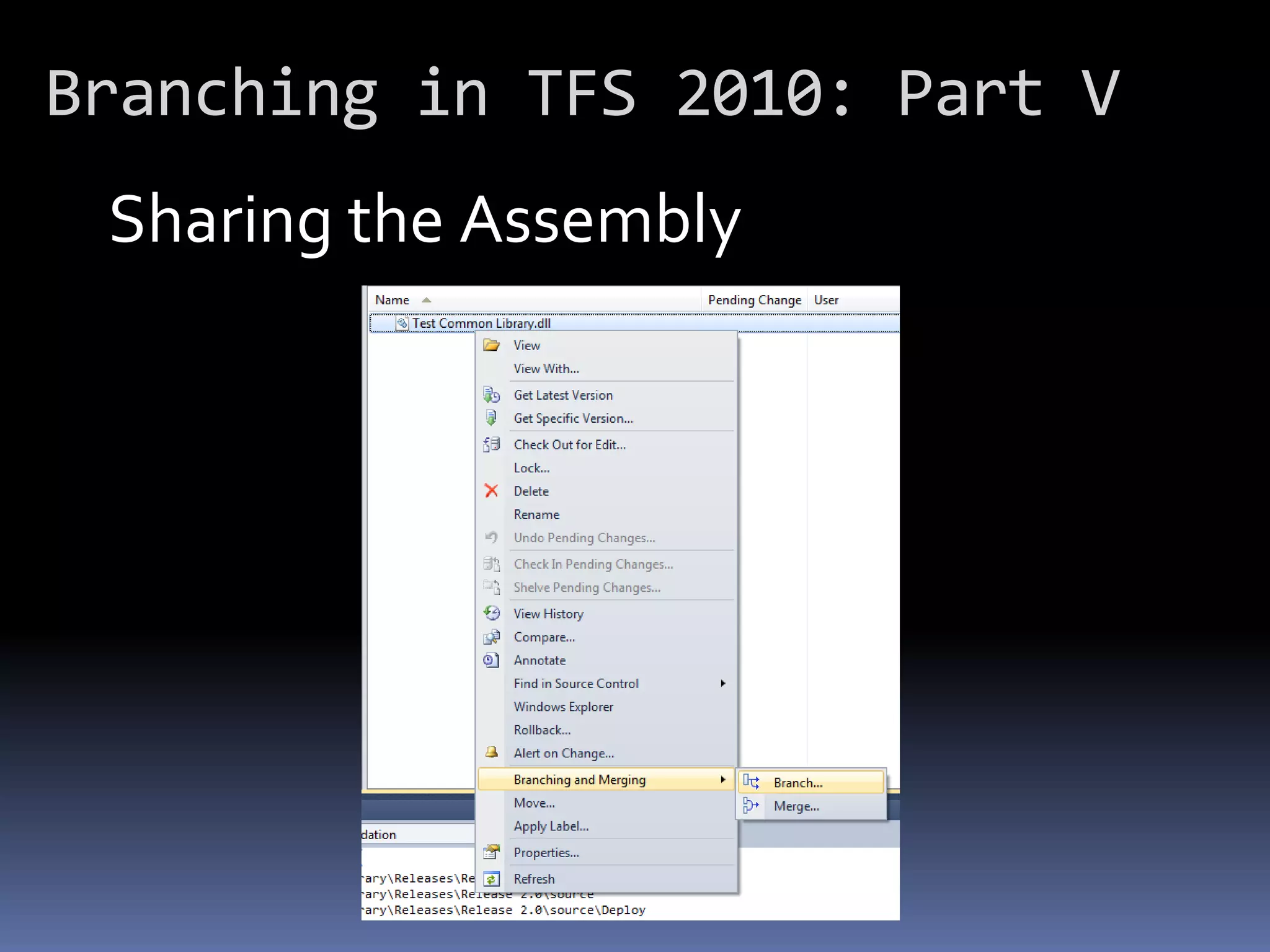
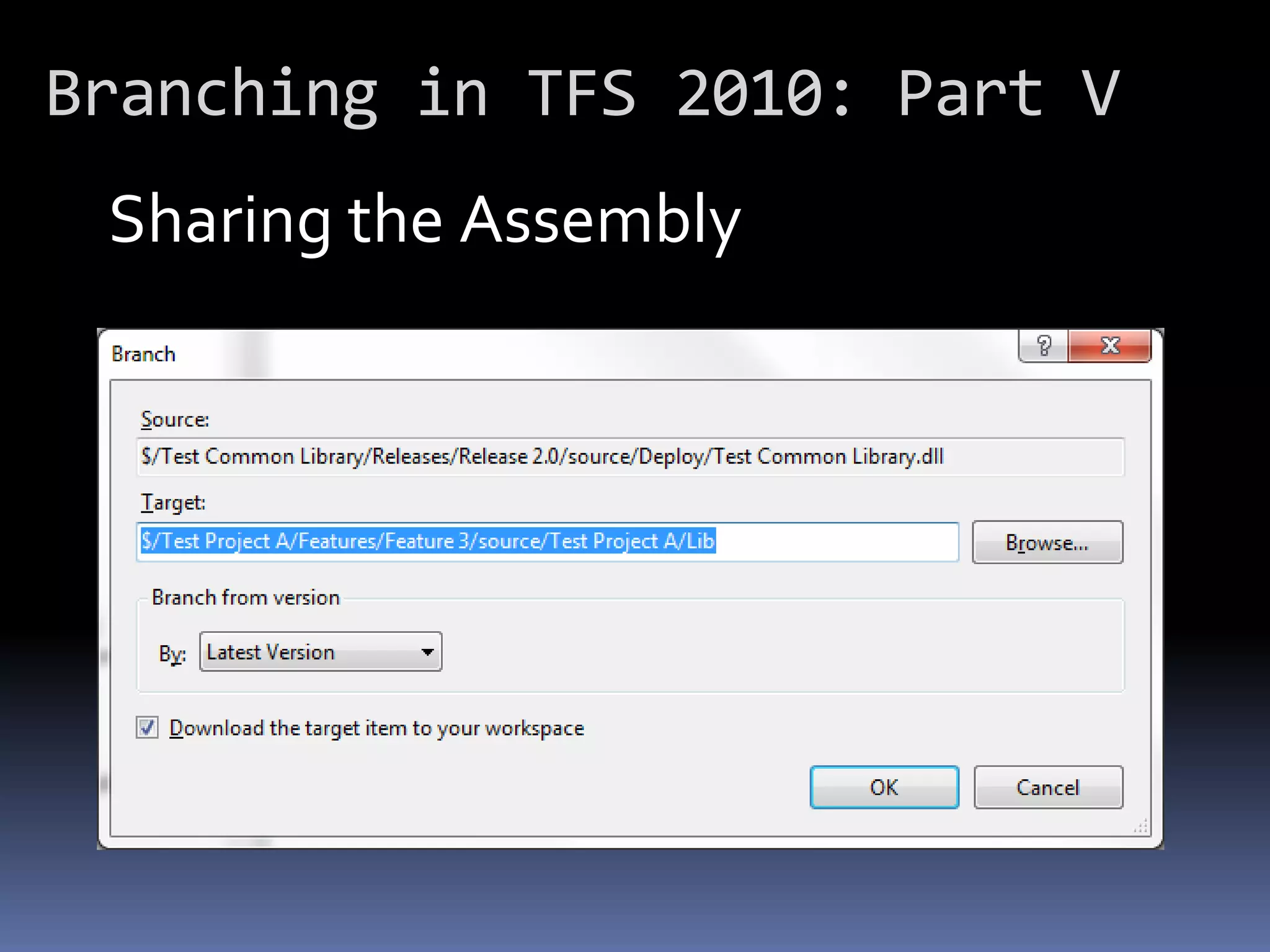
 Sharing the Assembly

 • Pick a specific release branch
 • Open the “Deploy” folder
 • Branch the actual .dll file to
   another project’s “Lib” folder
Branching in TFS 2010: Part V
 Sharing the Assembly
Branching in TFS 2010: Part V
 Sharing the Assembly
Branching in TFS 2010: Part V
           End of Part V

Branching in TFS 2010 Part V (Sharing Code)

  • 1.
    Branching in TFS 2010 Part V by John Varan
  • 2.
    Branching in TFS2010: Part V Sharing Common Code Several Options • Share source code as projects • Manually copy assemblies • Branching
  • 3.
    Branching in TFS2010: Part V Sharing Source Code • Multiple versions are too hard to manage • Allows access to source to all developers • Increases build times of all projects
  • 4.
    Branching in TFS2010: Part V Manually Copying Assemblies • Multiple versions easier to manage • Restricts access to source code • Build times are not affected • No tracking or auditing
  • 5.
    Branching in TFS2010: Part V Branching Assemblies • All advantages of manually copying • TFS provides tracking and auditing • TFS provides ability to rollback • Slightly more complicated (if new to branching)
  • 6.
    Branching in TFS2010: Part V Setting it Up: • Need a “Deploy” folder in common library project • Built assembly goes in here for each release • This can be automated
  • 7.
    Branching in TFS2010: Part V Folder Structure of Shared Library
  • 8.
    Branching in TFS2010: Part V Automating the “Deploy” folder: • Post-build event to copy output assembly to “Deploy” folder • Existing assembly might be read- only • Pre-build event to check out assembly
  • 9.
    Branching in TFS2010: Part V Pre-Build Event
  • 10.
    Branching in TFS2010: Part V Post-Build Event
  • 11.
    Branching in TFS2010: Part V Set Up of Referencing Application Needs a “Lib” folder. Two Options: • One for entire solution • One for each project
  • 12.
    Branching in TFS2010: Part V Per Solution • Easier • No duplicates per project • Can only have one version per solution
  • 13.
    Branching in TFS2010: Part V Per Project • Duplicates per project • Slightly more complicated • Can have different versions mixed in solution
  • 14.
    Branching in TFS2010: Part V Sharing the Assembly • Pick a specific release branch • Open the “Deploy” folder • Branch the actual .dll file to another project’s “Lib” folder
  • 15.
    Branching in TFS2010: Part V Sharing the Assembly
  • 16.
    Branching in TFS2010: Part V Sharing the Assembly
  • 17.
    Branching in TFS2010: Part V End of Part V