iWEB s
How to add a
new font type
in iWeb
Howtoaddanewfonttype Add new font into iWeb is only possible if the font
provided is previously tested and rendered in our system.
Every font is converted to swf file following the Adobe
Flash requirements
The font provided to us must have the following
propierties:
• Font Name
• Only True Type Font. With extension file *.ttf
• Not possible Open Type Font. With extensión file *.otf
• Font Subfamily Name Regular and Bold
• Embeddability for any Font.
• Not Preview & Print embeding allowed, because is not
usable.
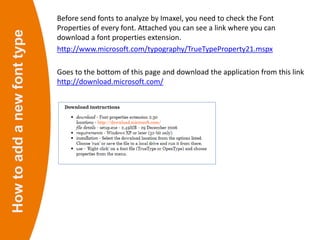
Howtoaddanewfonttype Before send fonts to analyze by Imaxel, you need to check the Font
Properties of every font. Attached you can see a link where you can
download a font properties extension.
http://www.microsoft.com/typography/TrueTypeProperty21.mspx
Goes to the bottom of this page and download the application from this link
http://download.microsoft.com/
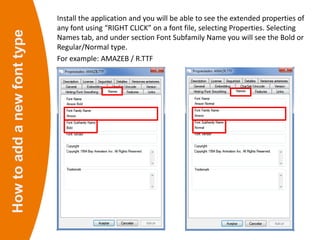
Howtoaddanewfonttype Install the application and you will be able to see the extended properties of
any font using “RIGHT CLICK” on a font file, selecting Properties. Selecting
Names tab, and under section Font Subfamily Name you will see the Bold or
Regular/Normal type.
For example: AMAZEB / R.TTF
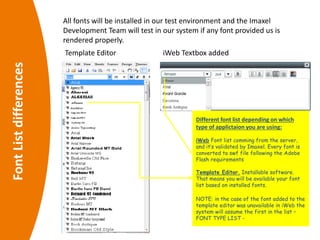
FontListdifferences
Template Editor iWeb Textbox added
Different font list depending on which
type of applictaion you are using:
iWeb Font list comming from the server,
and it’s validated by Imaxel. Every font is
converted to swf file following the Adobe
Flash requirements
Template Editor. Installable software.
That means you will be available your font
list based on installed fonts.
NOTE: in the case of the font added to the
template editor was unavailable in iWeb the
system will assume the first in the list –
FONT TYPE LIST -
All fonts will be installed in our test environment and the Imaxel
Development Team will test in our system if any font provided us is
rendered properly.
Font Type List
1. Amaze
2. Arial
3. AvantGarde
4. B691
5. BookAntiqua
6. Calibri
7. CenturyGothic
8. Columbia
9. ComicSans
10. CopperplateGothic
11. CourierNew
12. Diamante
13. FranklinGothic
14. Georgia
15. Impact
16. LetterGothic
17. Lucida
18. LucidaHandwriting
19. LucidaSans
20. Matisse
21. Mexico
22. Nebraska
23. OnStage
24. Palatino
25. ScriptMTBold
26. ShowcardGothic
27. Tahoma
28. TimesNewRoman
29. Trebuchet
30. Typewriter
31. Varennes
32. Verdana
33. Westmister
Font List Optimized to render in iWeb due to Flash characteristics

How to add a new font type

  • 1.
    iWEB s How toadd a new font type in iWeb
  • 2.
    Howtoaddanewfonttype Add newfont into iWeb is only possible if the font provided is previously tested and rendered in our system. Every font is converted to swf file following the Adobe Flash requirements The font provided to us must have the following propierties: • Font Name • Only True Type Font. With extension file *.ttf • Not possible Open Type Font. With extensión file *.otf • Font Subfamily Name Regular and Bold • Embeddability for any Font. • Not Preview & Print embeding allowed, because is not usable.
  • 3.
    Howtoaddanewfonttype Before sendfonts to analyze by Imaxel, you need to check the Font Properties of every font. Attached you can see a link where you can download a font properties extension. http://www.microsoft.com/typography/TrueTypeProperty21.mspx Goes to the bottom of this page and download the application from this link http://download.microsoft.com/
  • 4.
    Howtoaddanewfonttype Install theapplication and you will be able to see the extended properties of any font using “RIGHT CLICK” on a font file, selecting Properties. Selecting Names tab, and under section Font Subfamily Name you will see the Bold or Regular/Normal type. For example: AMAZEB / R.TTF
  • 5.
    FontListdifferences Template Editor iWebTextbox added Different font list depending on which type of applictaion you are using: iWeb Font list comming from the server, and it’s validated by Imaxel. Every font is converted to swf file following the Adobe Flash requirements Template Editor. Installable software. That means you will be available your font list based on installed fonts. NOTE: in the case of the font added to the template editor was unavailable in iWeb the system will assume the first in the list – FONT TYPE LIST - All fonts will be installed in our test environment and the Imaxel Development Team will test in our system if any font provided us is rendered properly.
  • 6.
    Font Type List 1.Amaze 2. Arial 3. AvantGarde 4. B691 5. BookAntiqua 6. Calibri 7. CenturyGothic 8. Columbia 9. ComicSans 10. CopperplateGothic 11. CourierNew 12. Diamante 13. FranklinGothic 14. Georgia 15. Impact 16. LetterGothic 17. Lucida 18. LucidaHandwriting 19. LucidaSans 20. Matisse 21. Mexico 22. Nebraska 23. OnStage 24. Palatino 25. ScriptMTBold 26. ShowcardGothic 27. Tahoma 28. TimesNewRoman 29. Trebuchet 30. Typewriter 31. Varennes 32. Verdana 33. Westmister Font List Optimized to render in iWeb due to Flash characteristics