SAP Extended Warehouse Management (SAP EWM) can be used to increase efficiency and accuracy for production processes. SAP EWM integrates warehouse management with production execution by facilitating the dynamic needs of production. It can leverage tools like radio frequency, conveyors, and barcodes. Key concepts include handling units, batch management, quality inspection, and stock management. The organizational structure and master data setup are critical for integrating SAP EWM with production order management and compliance.
In This Session…
How to Leverage SAP
Extended Warehouse
Management to Increase
Volume, Efficiency, and
Accuracy for Production
Processes
• Pino Villa
• Independent Consultant
1
2.
In This Session…
• Get tips and best practices for leveraging SAP Extended
Warehouse Management (SAP EWM) 7.0 to more effectively
integrate warehouse management with production execution
• Understand how SAP EWM can be utilized to facilitate the
dynamic needs of production processes
• Get tips for setting up SAP EWM to integrate with key
manufacturing tools and components, such as radio frequency
(RF), automated guided vehicles (AGV), conveyors, and barcodes
• Understand how warehousing concepts, such as consumption,
stock adjustment, and multi-level handling units (nested HU)
integrate with production
• Come away with a solid understanding of the concepts,
processes, and skill sets required to leverage SAP EWM to
manage production execution
2
3.
What We’ll Cover…
• About SAP EWM
• SAP EWM and production
• SAP EWM master data
• SAP EWM production process
• SAP EWM integration to radio frequency, barcode, and Material
Flow System (MFS)
• SAP EWM and compliance
• SAP EWM project considerations
• Wrap-up
3
4.
About SAP EWM
EWM OVERVIEW
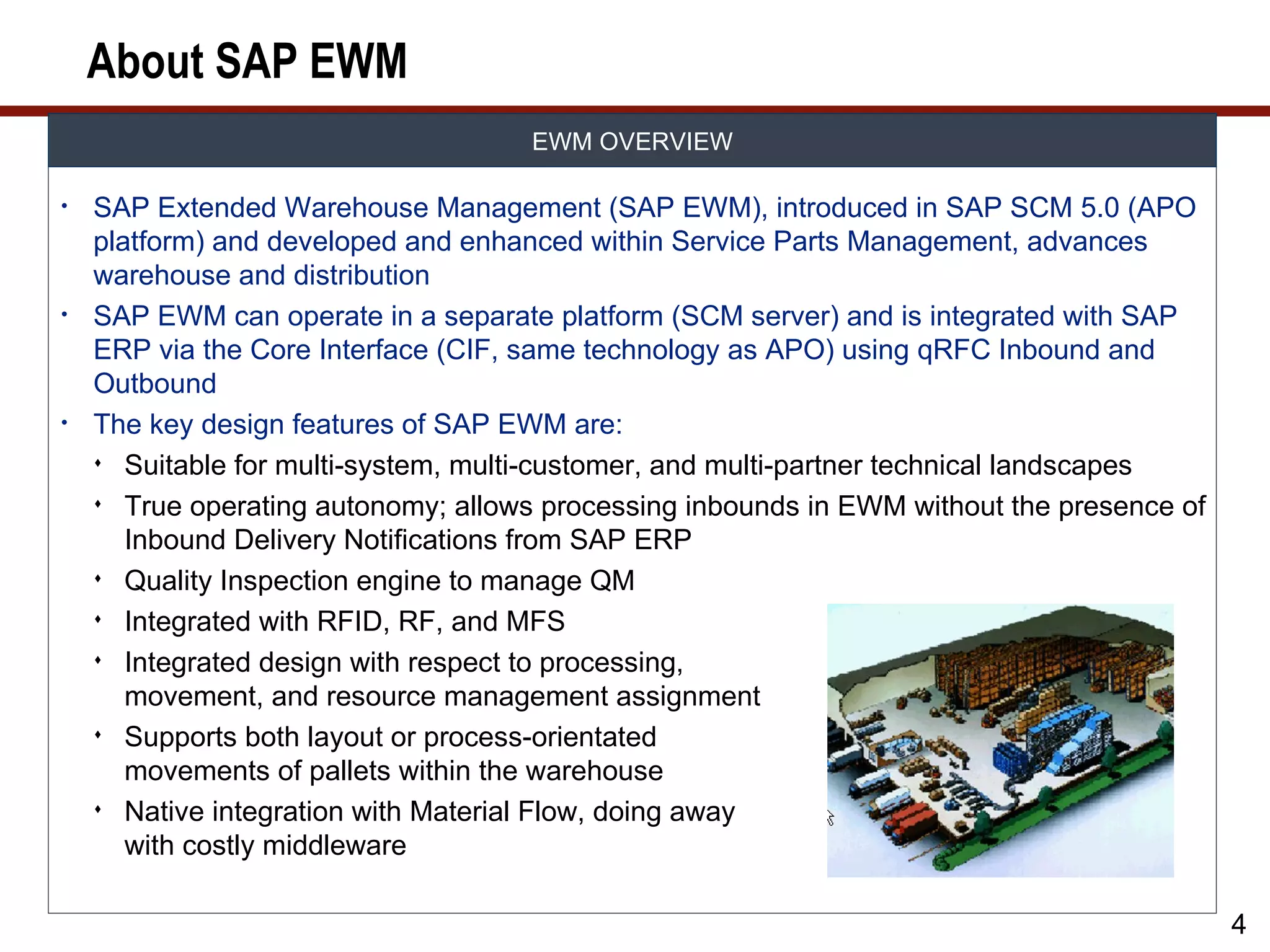
• SAP Extended Warehouse Management (SAP EWM), introduced in SAP SCM 5.0 (APO
platform) and developed and enhanced within Service Parts Management, advances
warehouse and distribution
• SAP EWM can operate in a separate platform (SCM server) and is integrated with SAP
ERP via the Core Interface (CIF, same technology as APO) using qRFC Inbound and
Outbound
• The key design features of SAP EWM are:
Suitable for multi-system, multi-customer, and multi-partner technical landscapes
True operating autonomy; allows processing inbounds in EWM without the presence of
Inbound Delivery Notifications from SAP ERP
Quality Inspection engine to manage QM
Integrated with RFID, RF, and MFS
Integrated design with respect to processing,
movement, and resource management assignment
Supports both layout or process-orientated
movements of pallets within the warehouse
Native integration with Material Flow, doing away
with costly middleware
4
5.
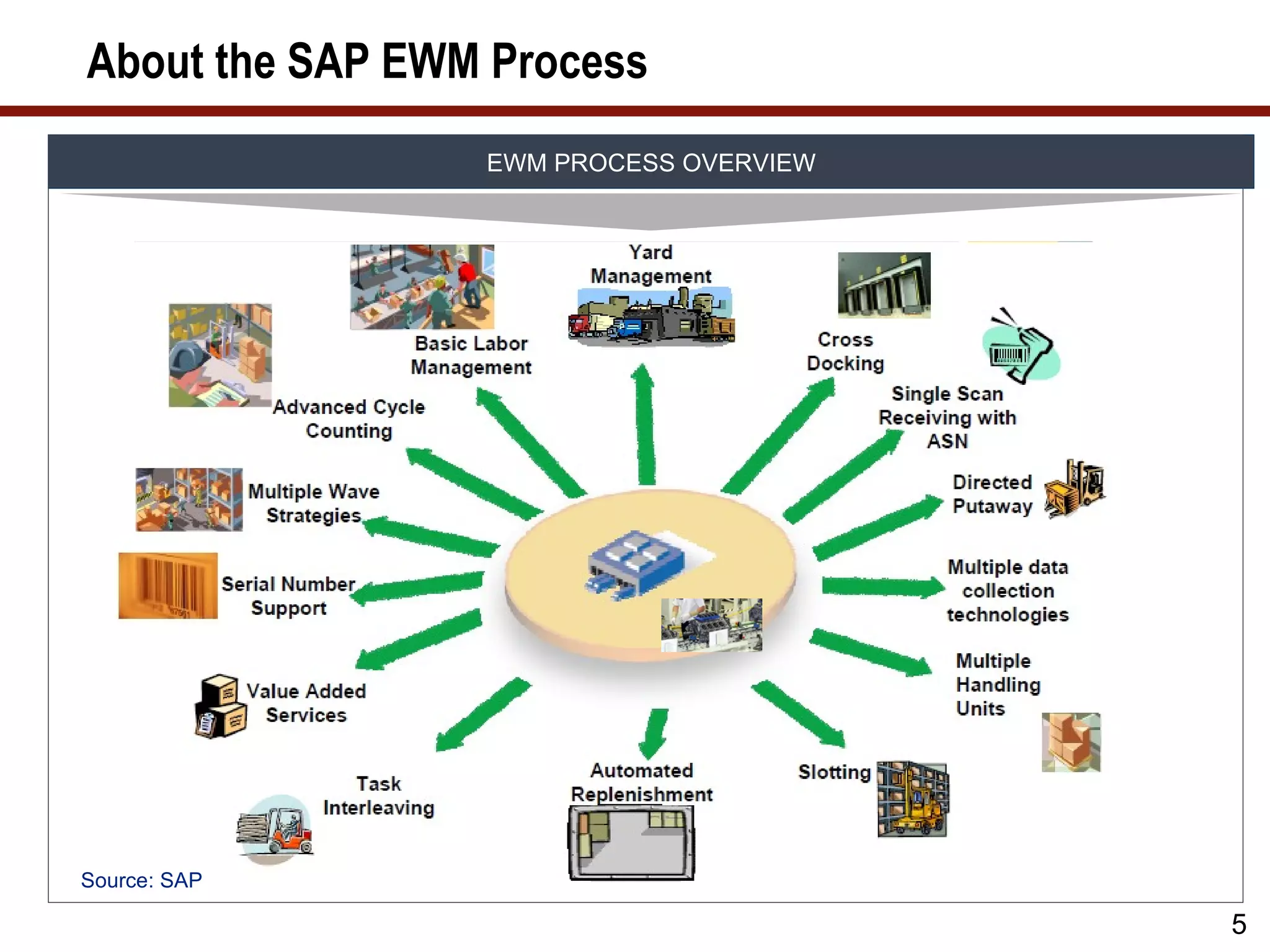
About the SAPEWM Process
EWM PROCESS OVERVIEW
Source: SAP
5
6.
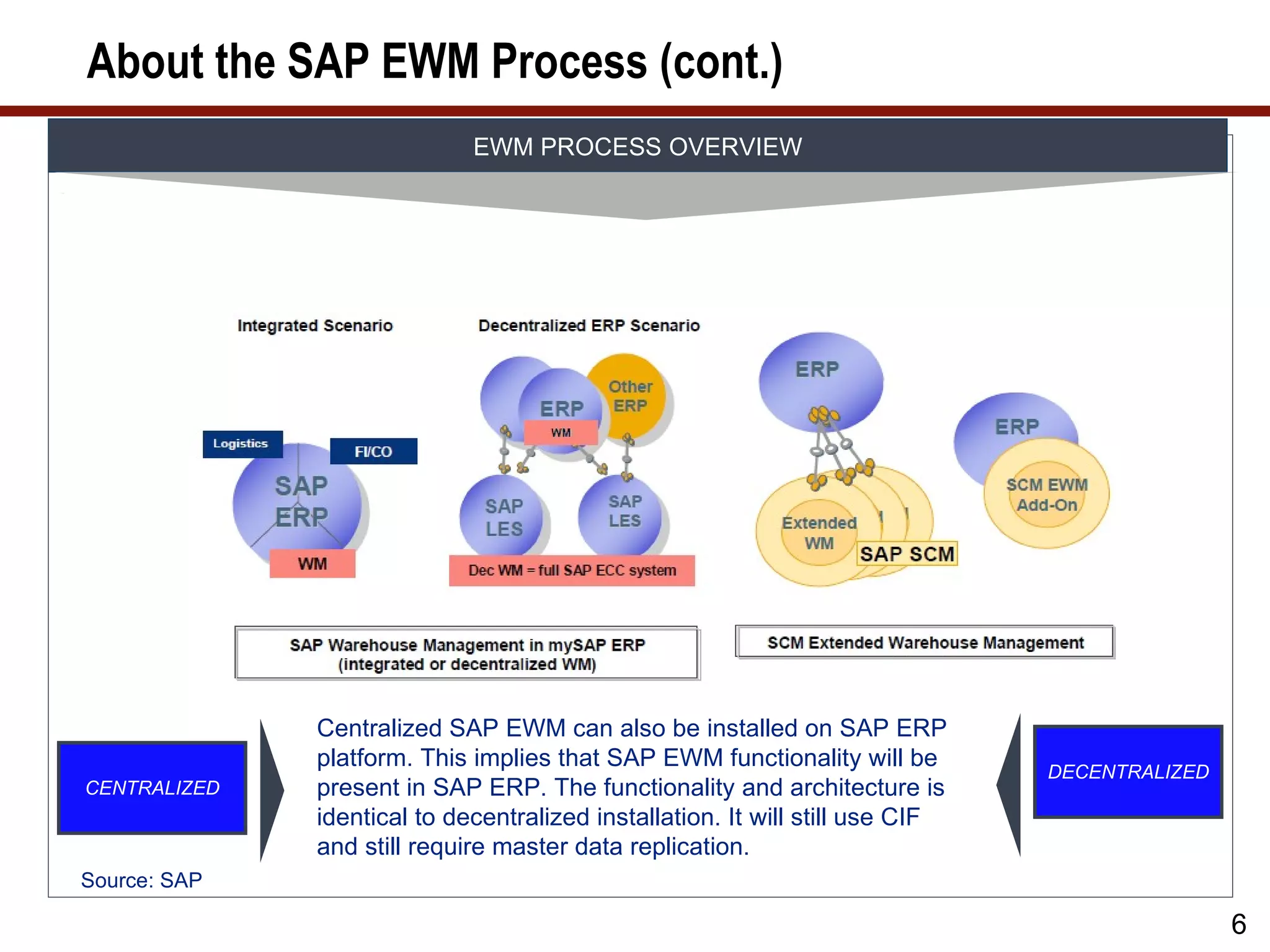
About the SAPEWM Process (cont.)
EWM PROCESS OVERVIEW
Centralized SAP EWM can also be installed on SAP ERP
platform. This implies that SAP EWM functionality will be
DECENTRALIZED
CENTRALIZED present in SAP ERP. The functionality and architecture is
identical to decentralized installation. It will still use CIF
and still require master data replication.
Source: SAP
6
7.
What We’ll Cover…
• About SAP EWM
• SAP EWM and production
• SAP EWM master data
• SAP EWM production process
• SAP EWM integration to radio frequency, barcode, and Material
Flow System (MFS)
• SAP EWM and compliance
• SAP EWM project considerations
• Wrap-up
7
8.
Production Integration
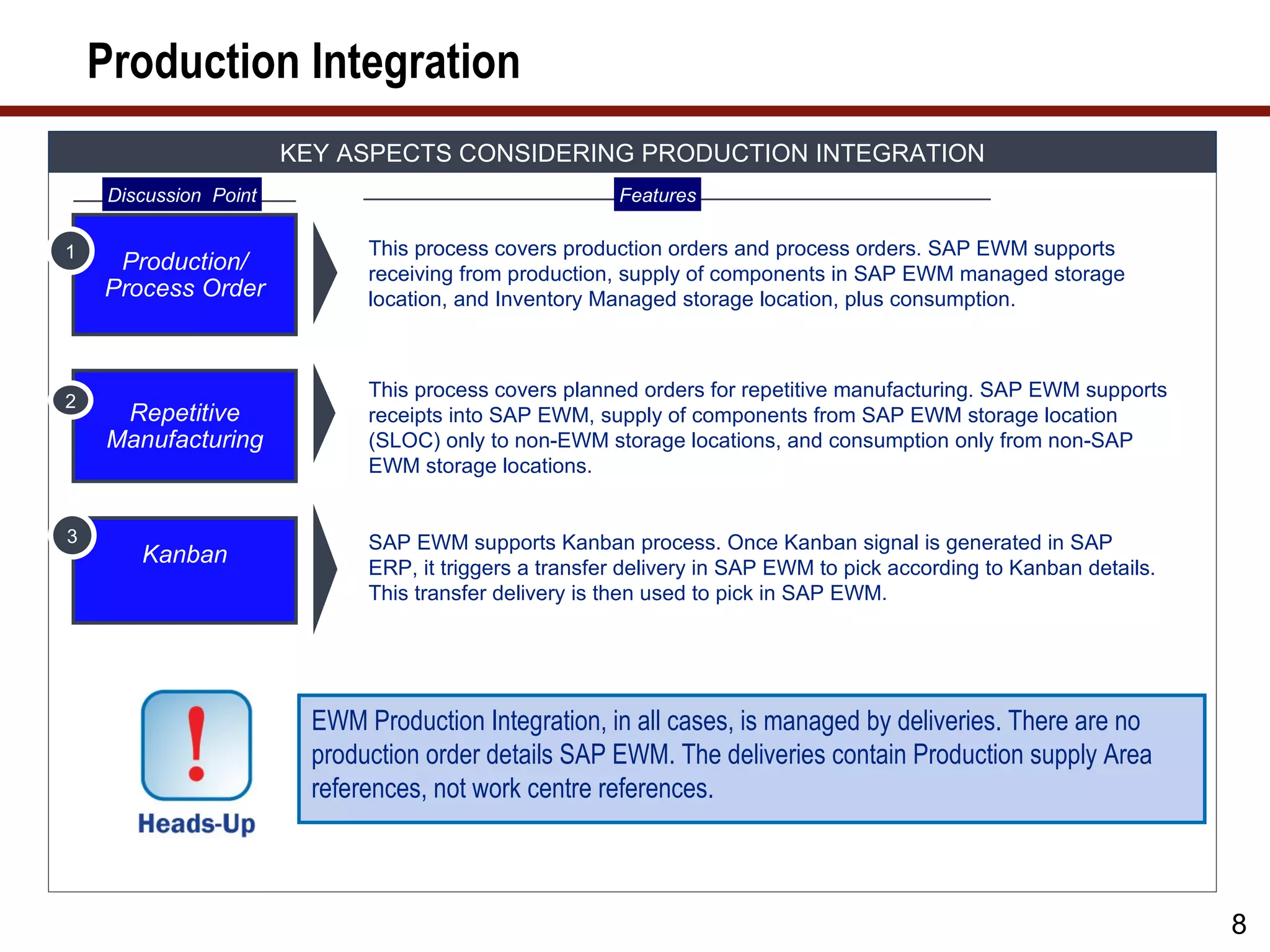
KEY ASPECTS CONSIDERING PRODUCTION INTEGRATION
Discussion Point Features
1 This process covers production orders and process orders. SAP EWM supports
Production/ receiving from production, supply of components in SAP EWM managed storage
Process Order location, and Inventory Managed storage location, plus consumption.
This process covers planned orders for repetitive manufacturing. SAP EWM supports
2
Repetitive receipts into SAP EWM, supply of components from SAP EWM storage location
Manufacturing (SLOC) only to non-EWM storage locations, and consumption only from non-SAP
EWM storage locations.
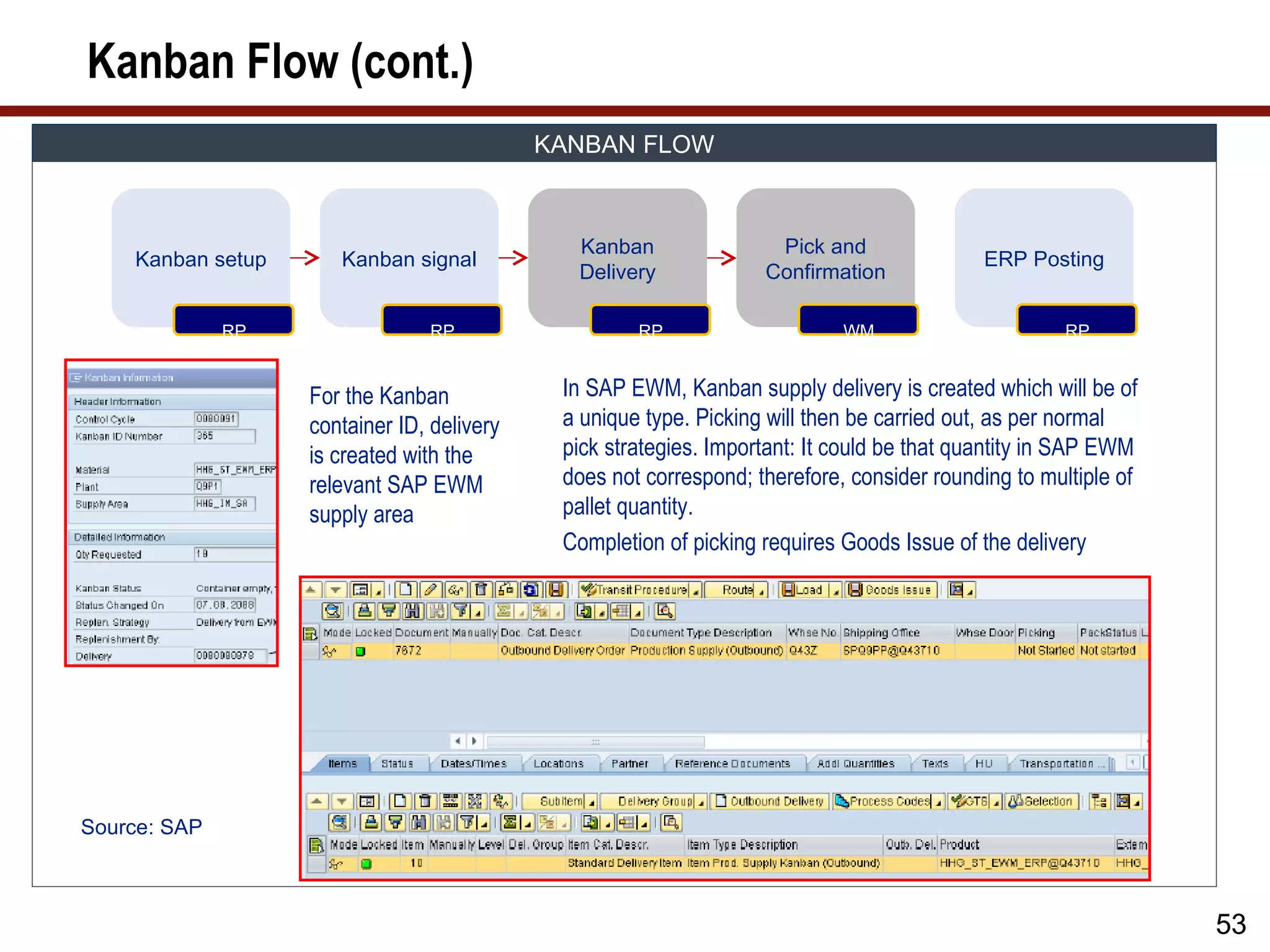
3 SAP EWM supports Kanban process. Once Kanban signal is generated in SAP
Kanban ERP, it triggers a transfer delivery in SAP EWM to pick according to Kanban details.
This transfer delivery is then used to pick in SAP EWM.
EWM Production Integration, in all cases, is managed by deliveries. There are no
production order details SAP EWM. The deliveries contain Production supply Area
references, not work centre references.
8
9.
Production Integration Process
PRODUCTION INTEGRATION: KEY PROCESS
Major Process Features
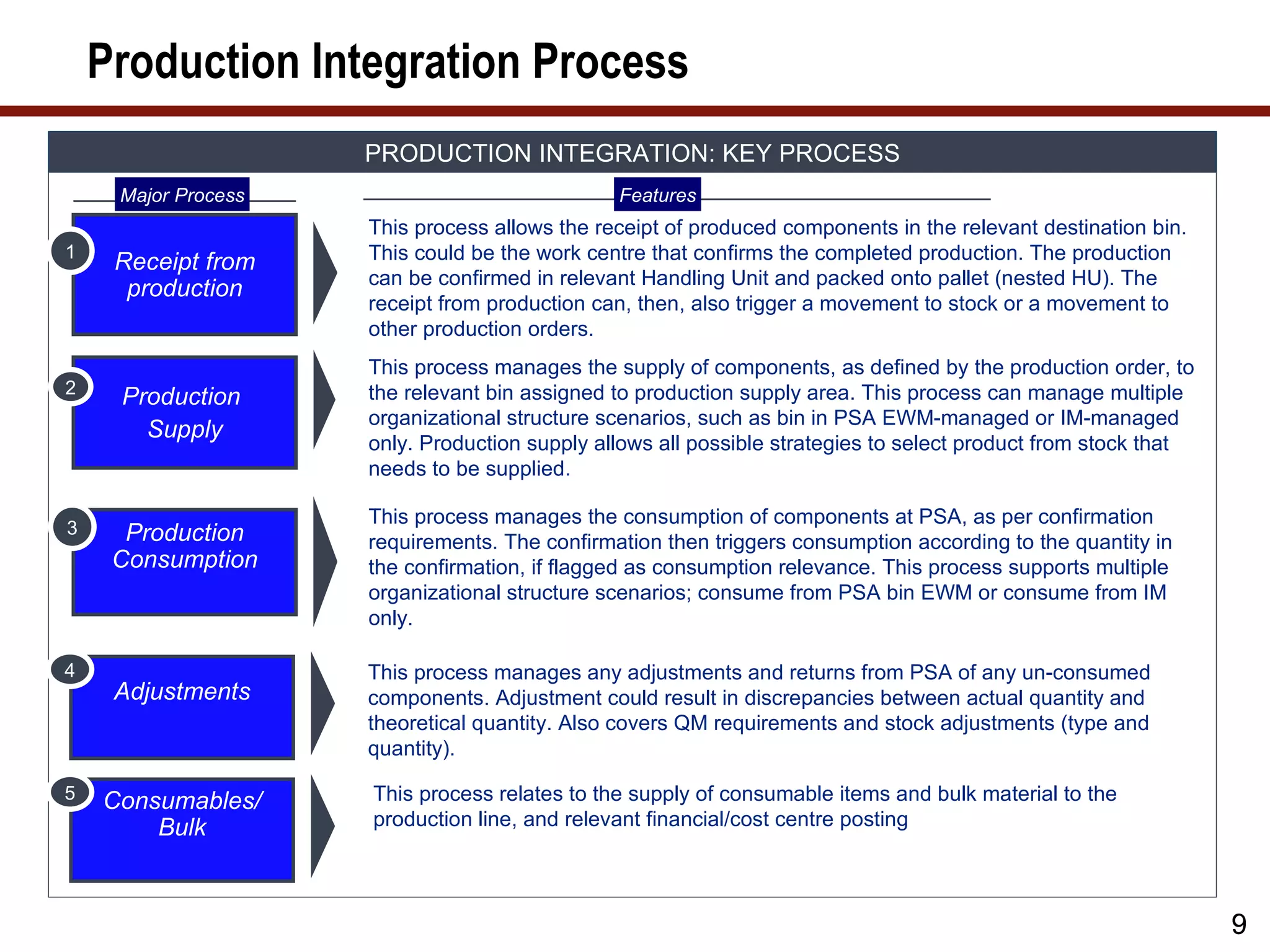
This process allows the receipt of produced components in the relevant destination bin.
1
Receipt from This could be the work centre that confirms the completed production. The production
can be confirmed in relevant Handling Unit and packed onto pallet (nested HU). The
production
receipt from production can, then, also trigger a movement to stock or a movement to
other production orders.
This process manages the supply of components, as defined by the production order, to
2 the relevant bin assigned to production supply area. This process can manage multiple
Production
organizational structure scenarios, such as bin in PSA EWM-managed or IM-managed
Supply
only. Production supply allows all possible strategies to select product from stock that
needs to be supplied.
This process manages the consumption of components at PSA, as per confirmation
3 Production requirements. The confirmation then triggers consumption according to the quantity in
Consumption the confirmation, if flagged as consumption relevance. This process supports multiple
organizational structure scenarios; consume from PSA bin EWM or consume from IM
only.
4 This process manages any adjustments and returns from PSA of any un-consumed
Adjustments components. Adjustment could result in discrepancies between actual quantity and
theoretical quantity. Also covers QM requirements and stock adjustments (type and
quantity).
5 Consumables/ This process relates to the supply of consumable items and bulk material to the
Bulk production line, and relevant financial/cost centre posting
9
10.
EWM and Production
PRODUCTION INTEGRATION: TECHNICAL OBJECTS TO KEY PROCESSES
Major Process Features
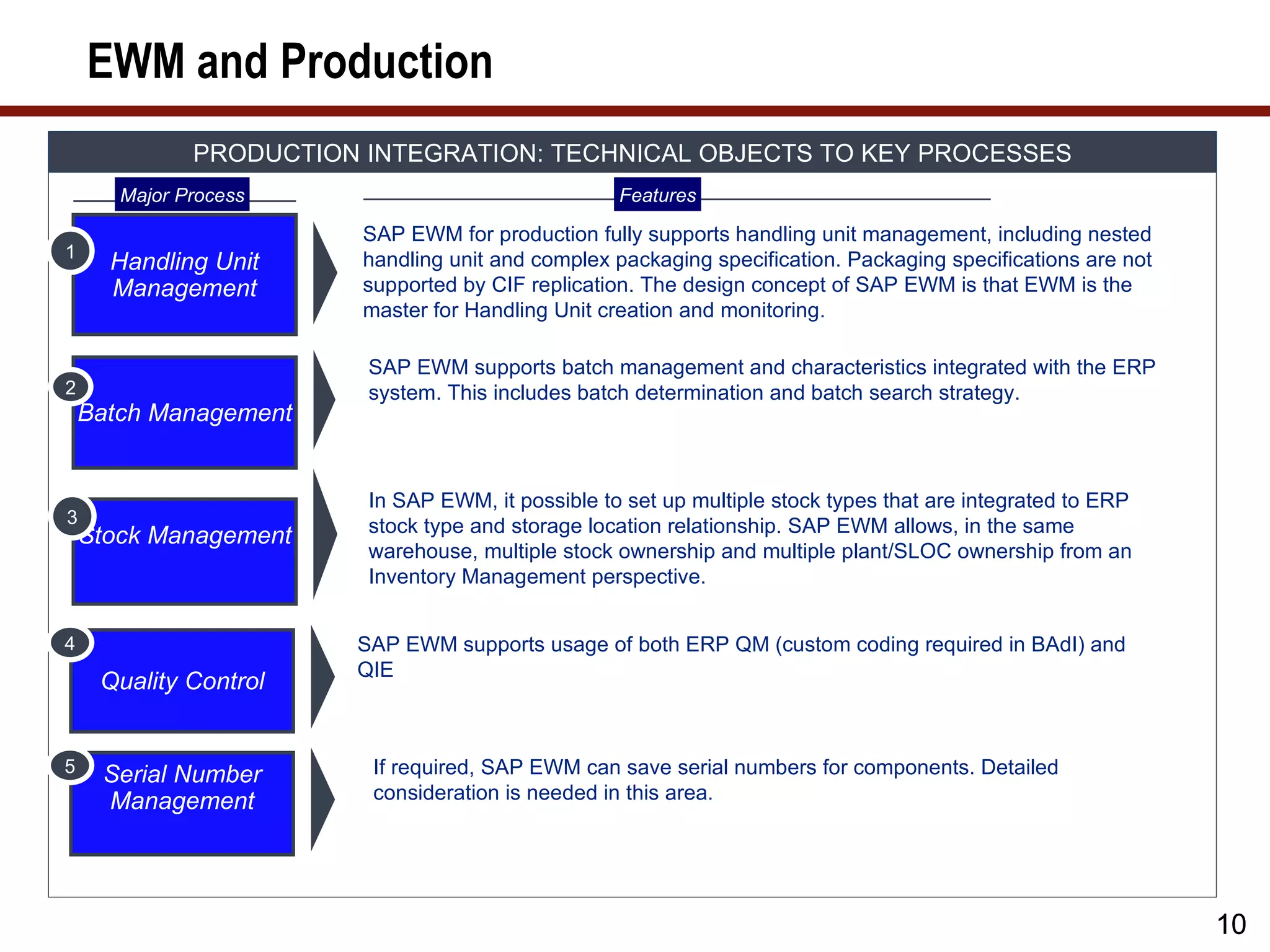
SAP EWM for production fully supports handling unit management, including nested
1
Handling Unit handling unit and complex packaging specification. Packaging specifications are not
Management supported by CIF replication. The design concept of SAP EWM is that EWM is the
master for Handling Unit creation and monitoring.
SAP EWM supports batch management and characteristics integrated with the ERP
2 system. This includes batch determination and batch search strategy.
Batch Management
In SAP EWM, it possible to set up multiple stock types that are integrated to ERP
3 stock type and storage location relationship. SAP EWM allows, in the same
Stock Management
warehouse, multiple stock ownership and multiple plant/SLOC ownership from an
Inventory Management perspective.
4 SAP EWM supports usage of both ERP QM (custom coding required in BAdI) and
QIE
Quality Control
5 Serial Number If required, SAP EWM can save serial numbers for components. Detailed
Management consideration is needed in this area.
10
11.
What We’ll Cover…
• About SAP EWM
• SAP EWM and production
• SAP EWM master data
• SAP EWM production process
• SAP EWM integration to radio frequency, barcode, and Material
Flow System (MFS)
• SAP EWM and compliance
• SAP EWM project considerations
• Wrap-up
11
12.
Organizational Structure
EWM ORGANIZATION STRUCTURE FOR PRODUCTION
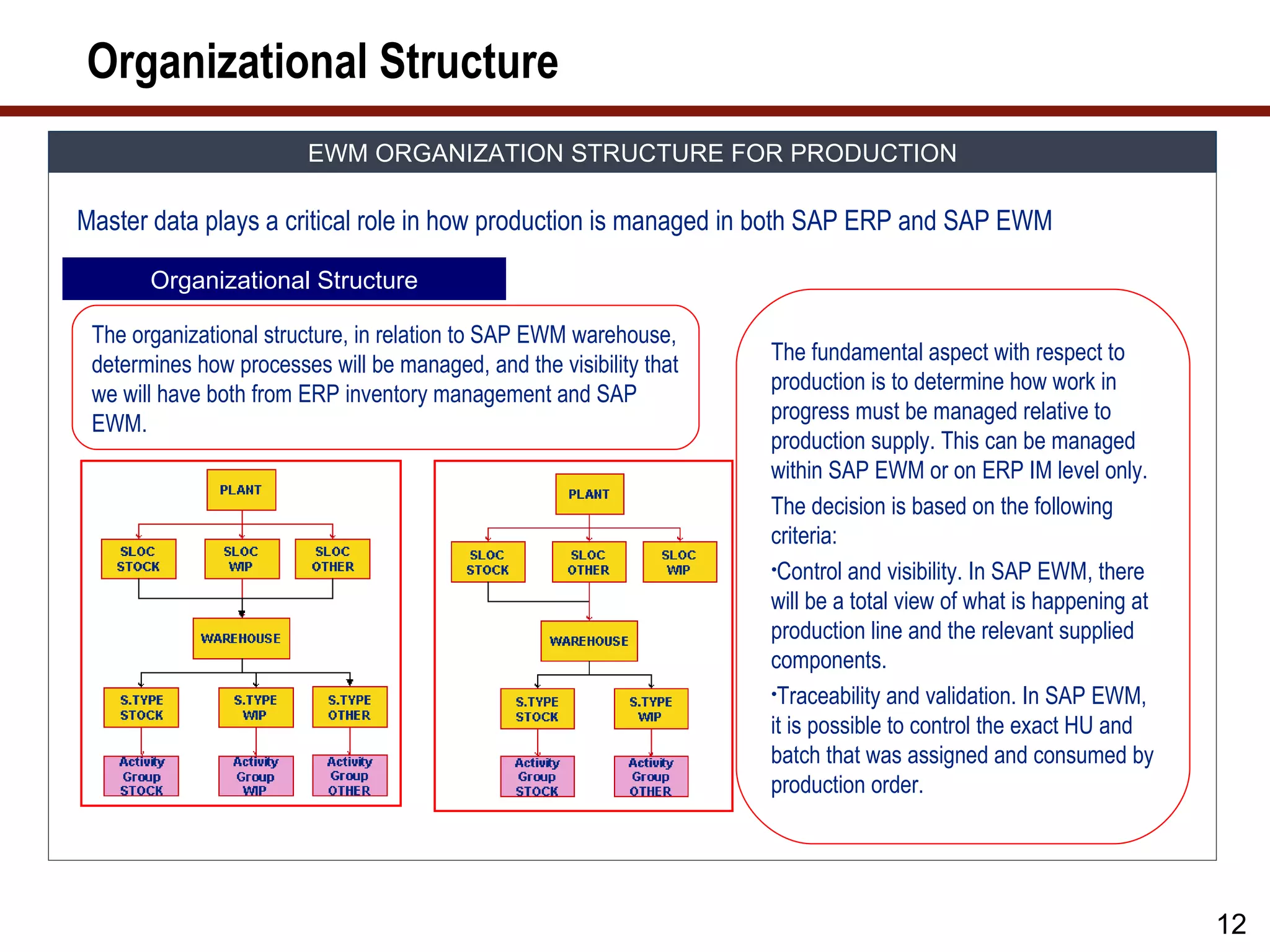
Master data plays a critical role in how production is managed in both SAP ERP and SAP EWM
Organizational Structure
The organizational structure, in relation to SAP EWM warehouse,
The fundamental aspect with respect to
determines how processes will be managed, and the visibility that
production is to determine how work in
we will have both from ERP inventory management and SAP
progress must be managed relative to
EWM.
production supply. This can be managed
within SAP EWM or on ERP IM level only.
The decision is based on the following
criteria:
•Control and visibility. In SAP EWM, there
will be a total view of what is happening at
production line and the relevant supplied
components.
•Traceability and validation. In SAP EWM,
it is possible to control the exact HU and
batch that was assigned and consumed by
production order.
12
13.
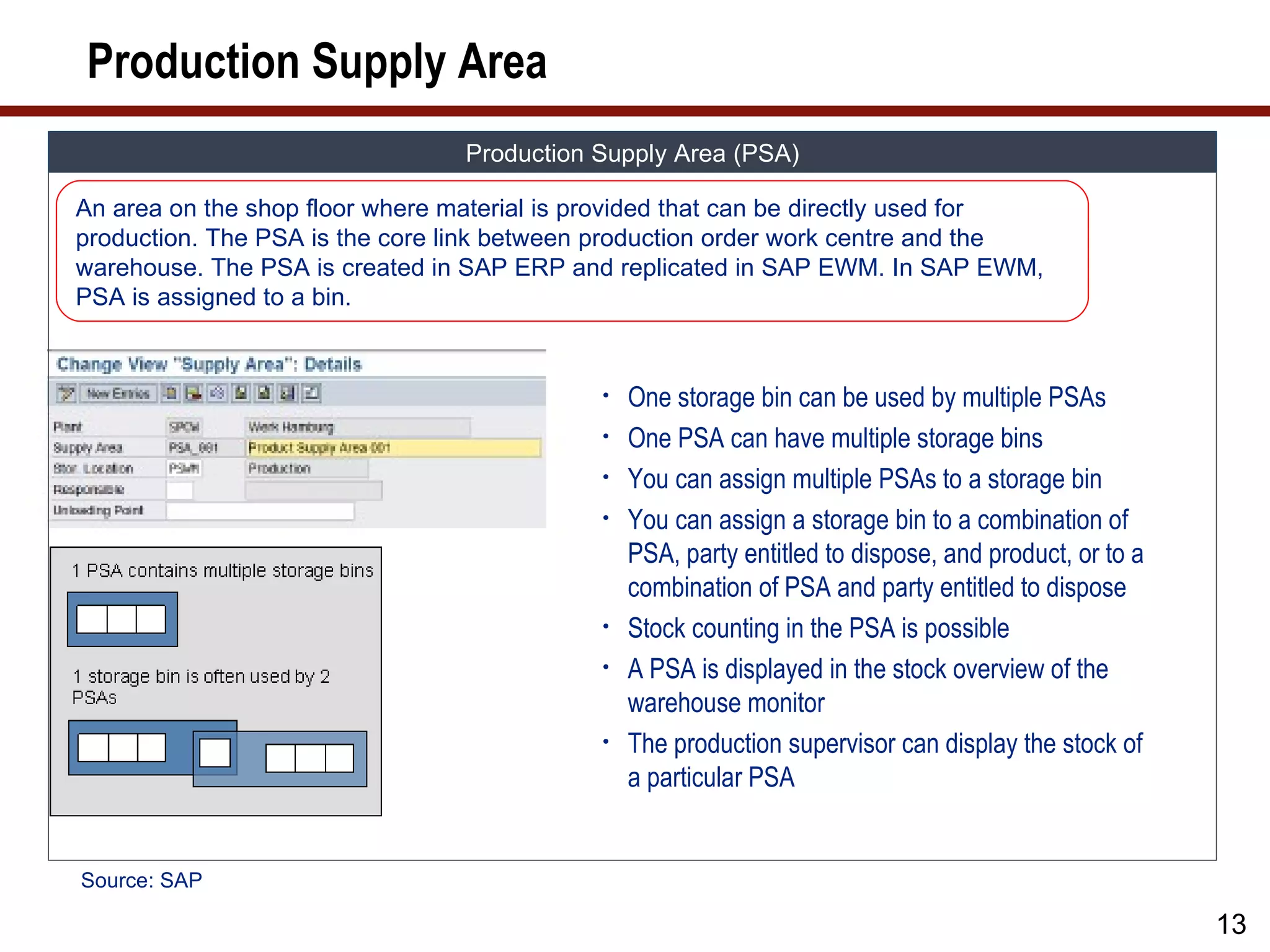
Production Supply Area
Production Supply Area (PSA)
An area on the shop floor where material is provided that can be directly used for
production. The PSA is the core link between production order work centre and the
warehouse. The PSA is created in SAP ERP and replicated in SAP EWM. In SAP EWM,
PSA is assigned to a bin.
• One storage bin can be used by multiple PSAs
• One PSA can have multiple storage bins
• You can assign multiple PSAs to a storage bin
• You can assign a storage bin to a combination of
PSA, party entitled to dispose, and product, or to a
combination of PSA and party entitled to dispose
• Stock counting in the PSA is possible
• A PSA is displayed in the stock overview of the
warehouse monitor
• The production supervisor can display the stock of
a particular PSA
Source: SAP
13
14.
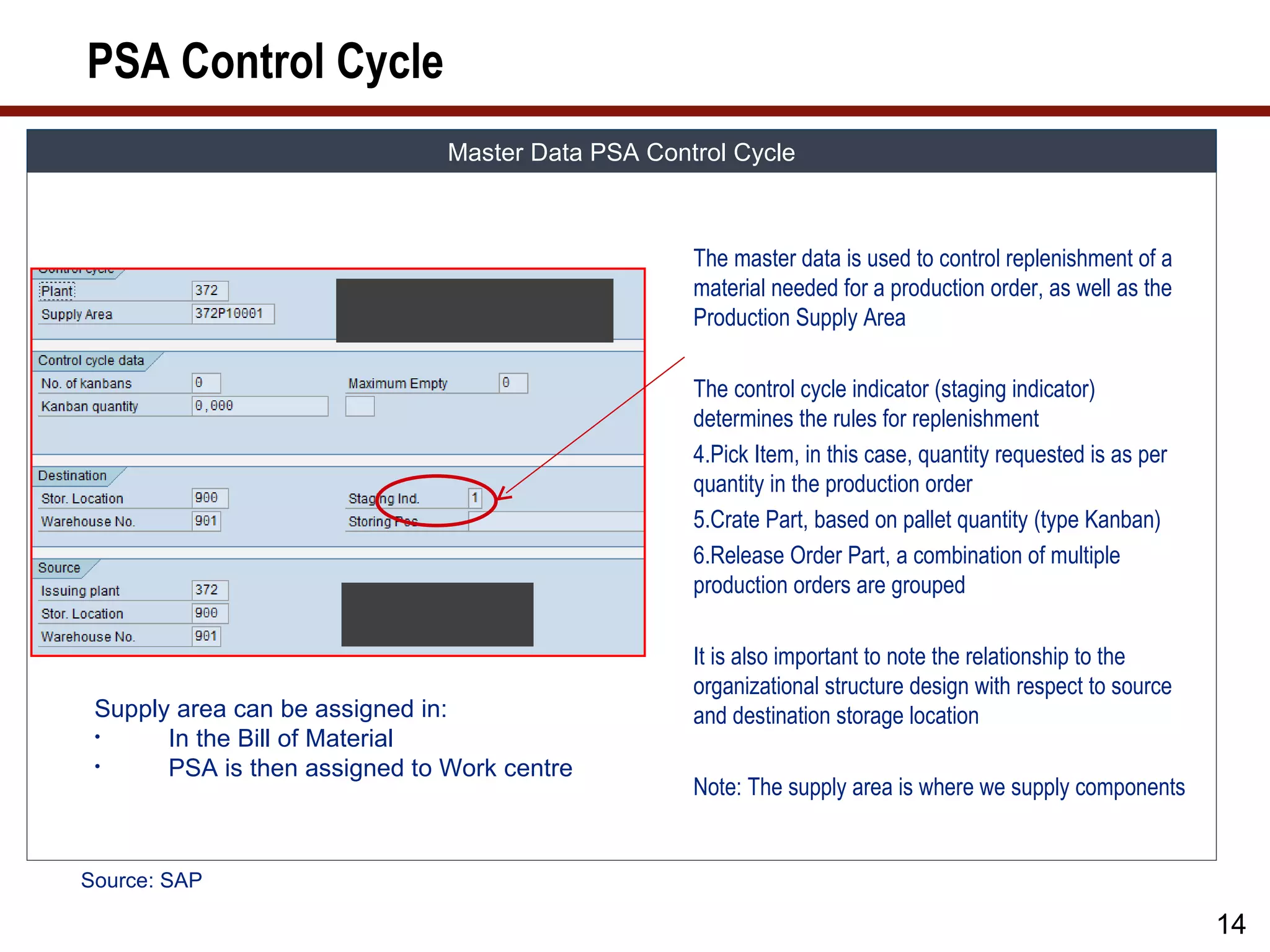
PSA Control Cycle
Master Data PSA Control Cycle
The master data is used to control replenishment of a
material needed for a production order, as well as the
Production Supply Area
The control cycle indicator (staging indicator)
determines the rules for replenishment
4.Pick Item, in this case, quantity requested is as per
quantity in the production order
5.Crate Part, based on pallet quantity (type Kanban)
6.Release Order Part, a combination of multiple
production orders are grouped
It is also important to note the relationship to the
organizational structure design with respect to source
Supply area can be assigned in: and destination storage location
• In the Bill of Material
• PSA is then assigned to Work centre
Note: The supply area is where we supply components
Source: SAP
14
15.
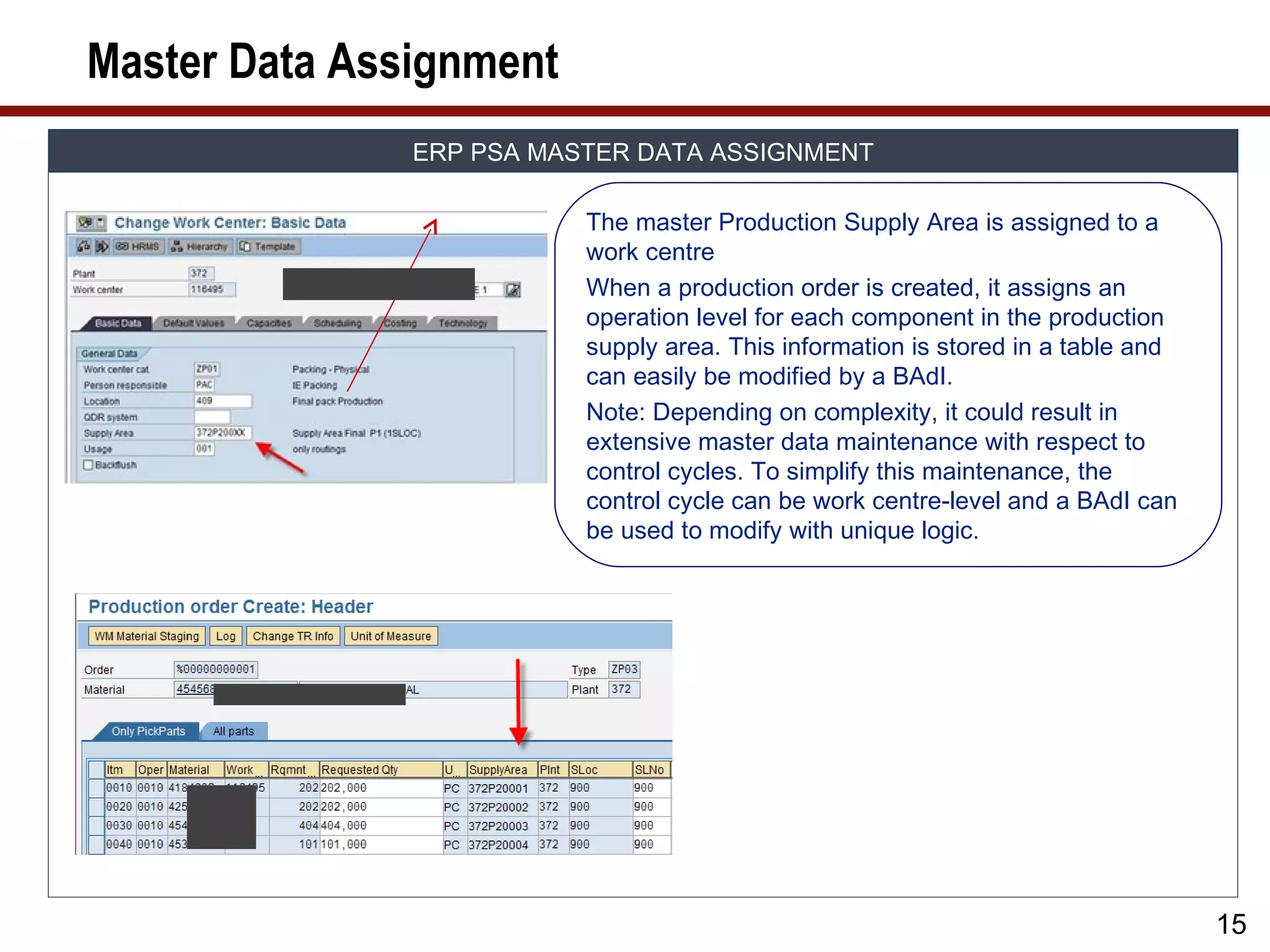
Master Data Assignment
ERP PSA MASTER DATA ASSIGNMENT
The master Production Supply Area is assigned to a
work centre
When a production order is created, it assigns an
operation level for each component in the production
supply area. This information is stored in a table and
can easily be modified by a BAdI.
Note: Depending on complexity, it could result in
extensive master data maintenance with respect to
control cycles. To simplify this maintenance, the
control cycle can be work centre-level and a BAdI can
be used to modify with unique logic.
15
16.
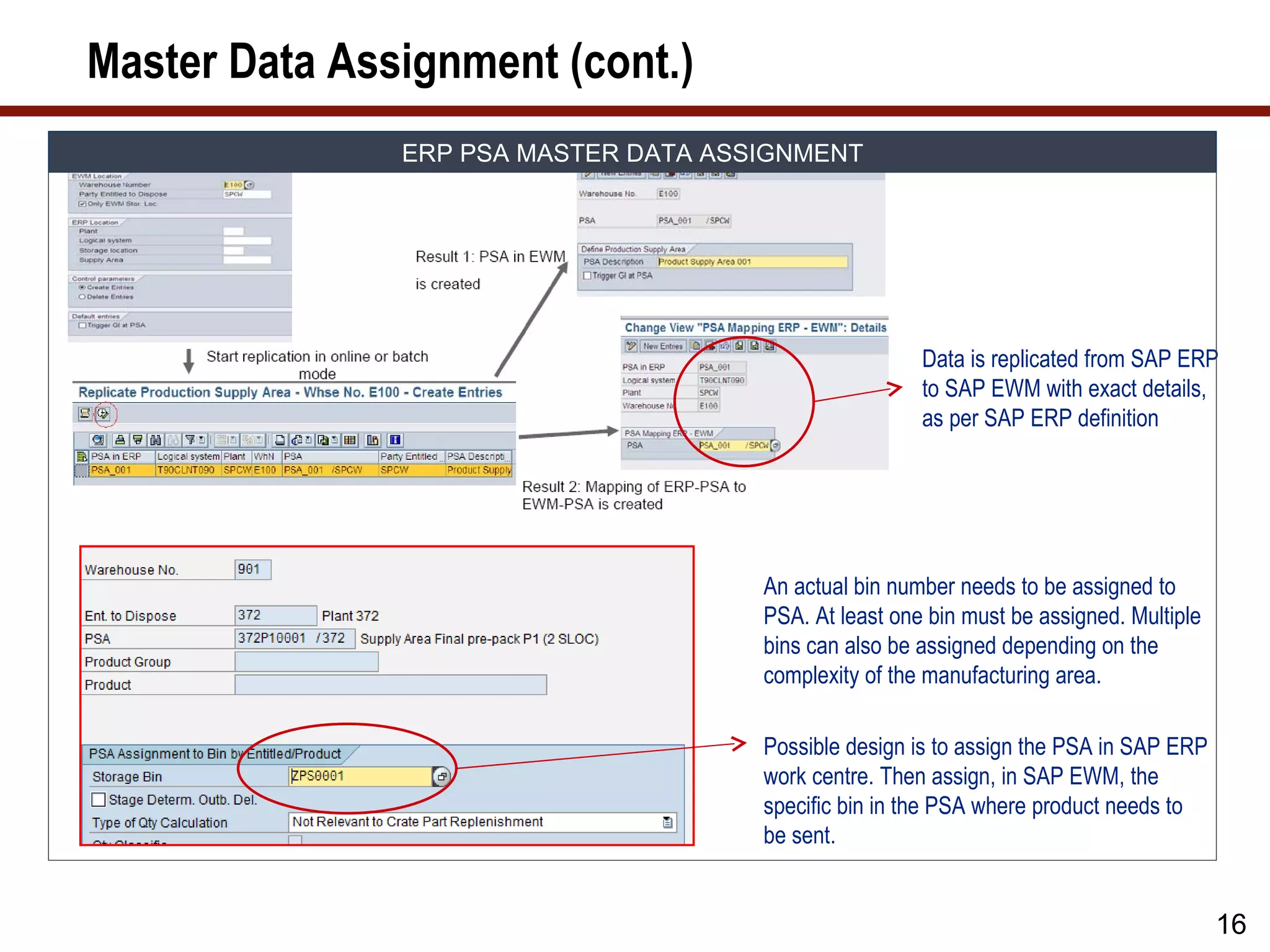
Master Data Assignment(cont.)
ERP PSA MASTER DATA ASSIGNMENT
Data is replicated from SAP ERP
to SAP EWM with exact details,
as per SAP ERP definition
An actual bin number needs to be assigned to
PSA. At least one bin must be assigned. Multiple
bins can also be assigned depending on the
complexity of the manufacturing area.
Possible design is to assign the PSA in SAP ERP
work centre. Then assign, in SAP EWM, the
specific bin in the PSA where product needs to
be sent.
16
17.
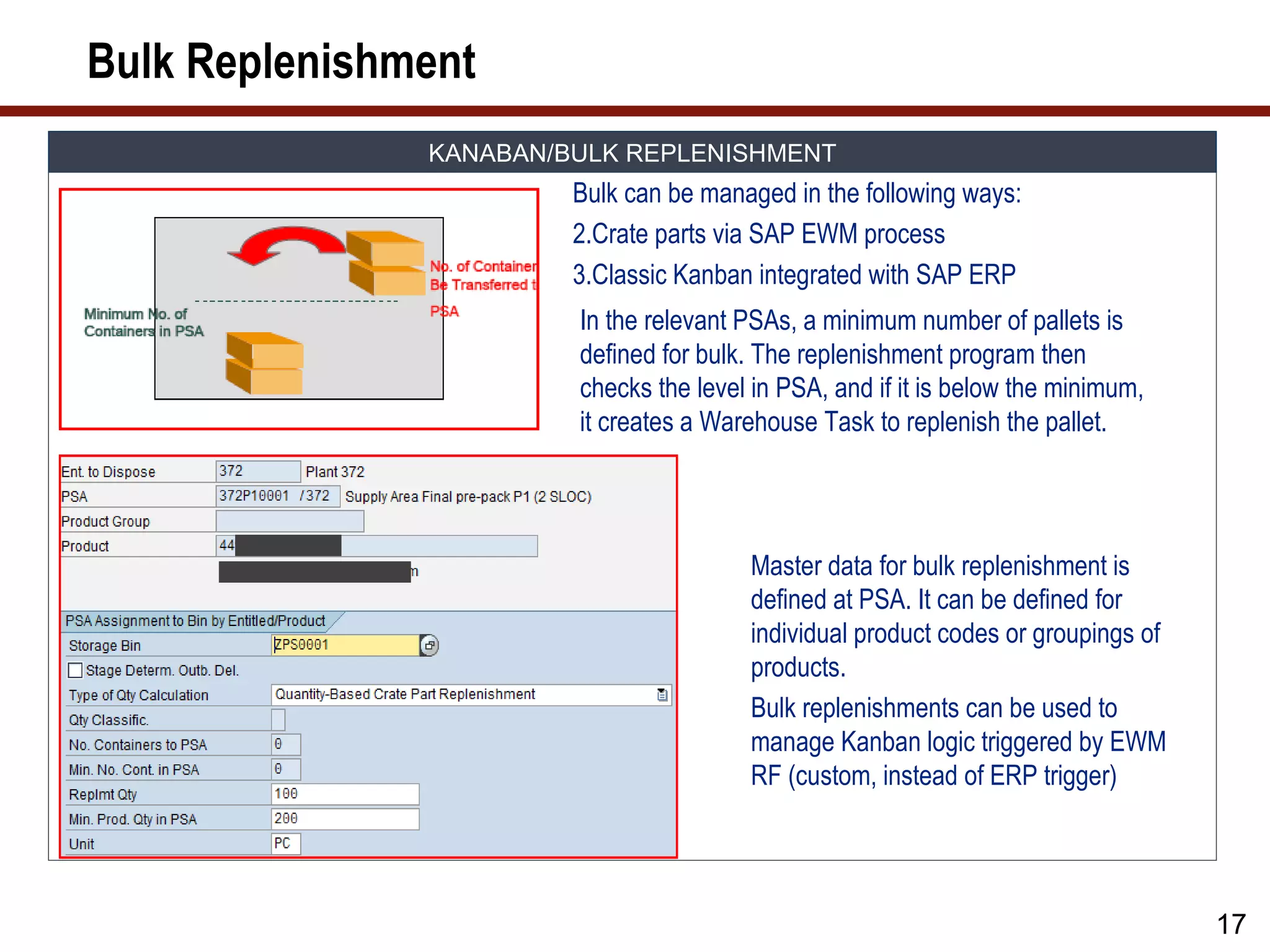
Bulk Replenishment
KANABAN/BULK REPLENISHMENT
Bulk can be managed in the following ways:
2.Crate parts via SAP EWM process
3.Classic Kanban integrated with SAP ERP
In the relevant PSAs, a minimum number of pallets is
defined for bulk. The replenishment program then
checks the level in PSA, and if it is below the minimum,
it creates a Warehouse Task to replenish the pallet.
Master data for bulk replenishment is
defined at PSA. It can be defined for
individual product codes or groupings of
products.
Bulk replenishments can be used to
manage Kanban logic triggered by EWM
RF (custom, instead of ERP trigger)
17
18.
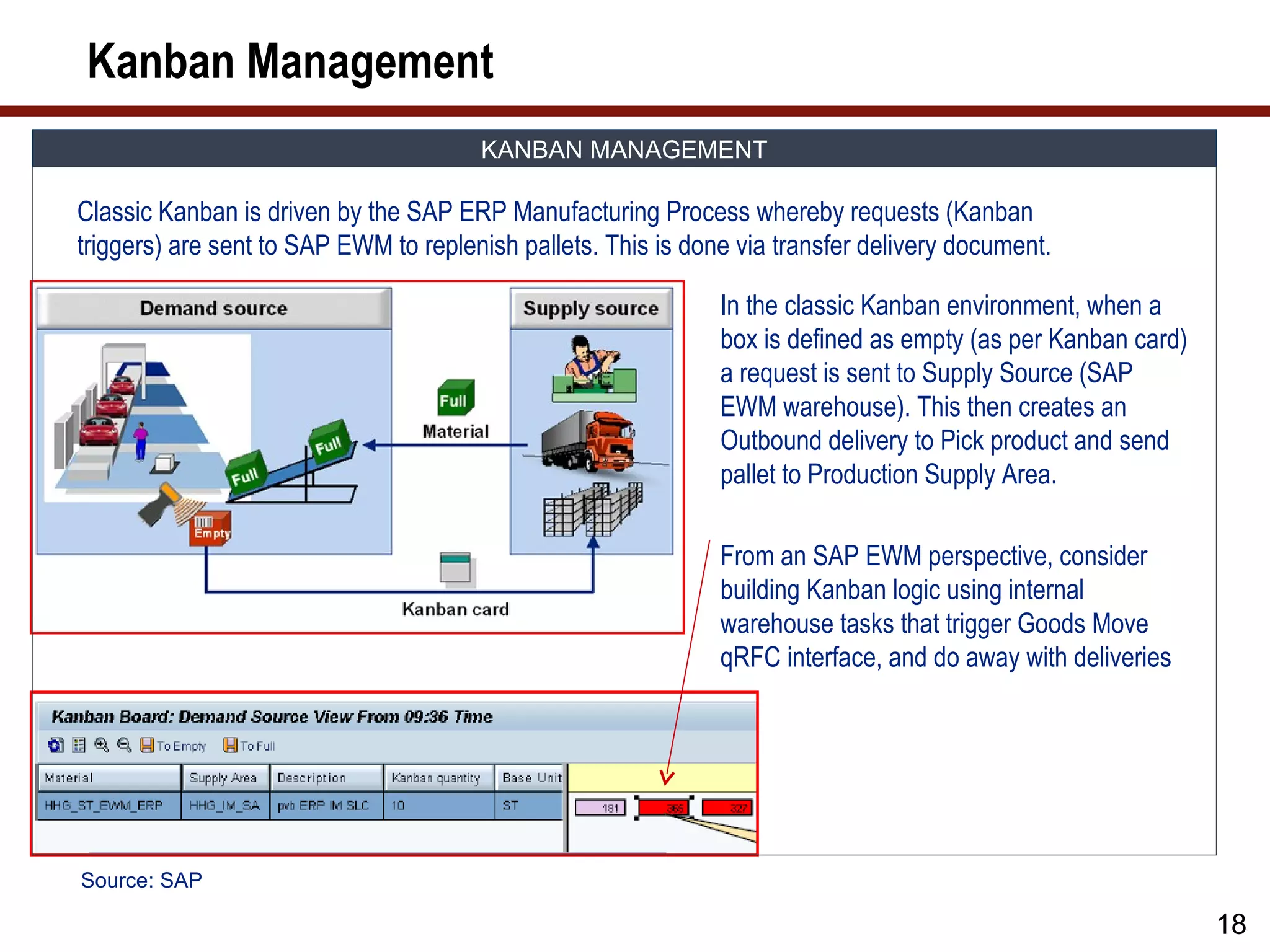
Kanban Management
KANBAN MANAGEMENT
Classic Kanban is driven by the SAP ERP Manufacturing Process whereby requests (Kanban
triggers) are sent to SAP EWM to replenish pallets. This is done via transfer delivery document.
In the classic Kanban environment, when a
box is defined as empty (as per Kanban card)
a request is sent to Supply Source (SAP
EWM warehouse). This then creates an
Outbound delivery to Pick product and send
pallet to Production Supply Area.
From an SAP EWM perspective, consider
building Kanban logic using internal
warehouse tasks that trigger Goods Move
qRFC interface, and do away with deliveries
Source: SAP
18
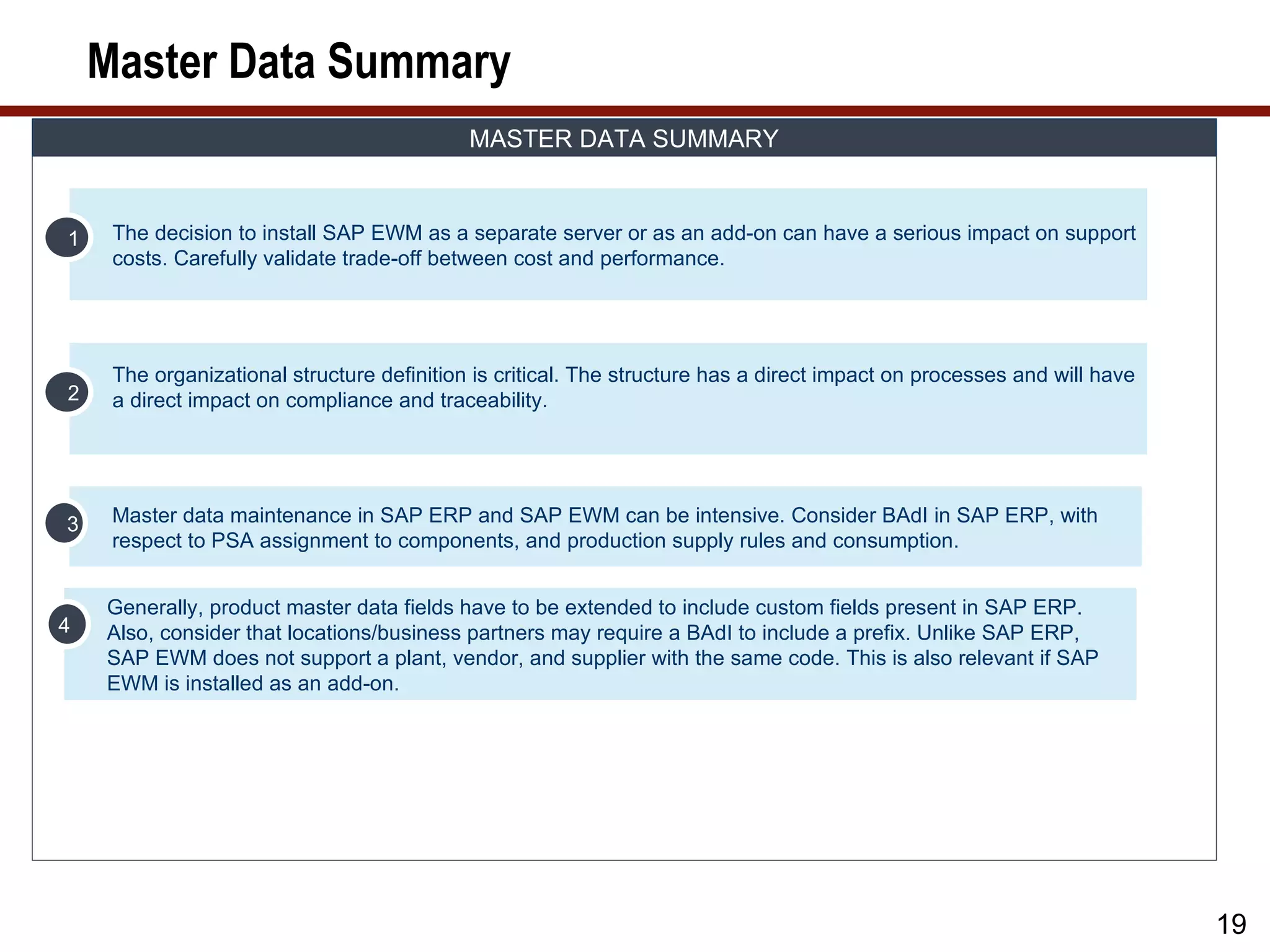
19.
Master Data Summary
MASTER DATA SUMMARY
1 The decision to install SAP EWM as a separate server or as an add-on can have a serious impact on support
costs. Carefully validate trade-off between cost and performance.
The organizational structure definition is critical. The structure has a direct impact on processes and will have
2 a direct impact on compliance and traceability.
3 Master data maintenance in SAP ERP and SAP EWM can be intensive. Consider BAdI in SAP ERP, with
respect to PSA assignment to components, and production supply rules and consumption.
Generally, product master data fields have to be extended to include custom fields present in SAP ERP.
4 Also, consider that locations/business partners may require a BAdI to include a prefix. Unlike SAP ERP,
SAP EWM does not support a plant, vendor, and supplier with the same code. This is also relevant if SAP
EWM is installed as an add-on.
19
20.
What We’ll Cover…
• About SAP EWM
• SAP EWM and production
• SAP EWM master data
• SAP EWM production process
• SAP EWM integration to radio frequency, barcode, and Material
Flow System (MFS)
• SAP EWM and compliance
• SAP EWM project considerations
• Wrap-up
20
21.
EWM Production Process
PRODUCTION CONSIDERATION
• SAP ERP integration is fundamental
• SAP EWM must consider the dynamics of production; re-
scheduling, quantity changes, work centre changes. SAP EWM
must ensure on-time delivery of components to work centre.
• SAP EWM must consider that produced items’ labels must contain
relevant information, such as machine number tooling, etc.
• Compliance is critical, with respect to quality management, stock
control, and stock alignment
• System must provide long-term traceability information, what was
produced, when, and where was it supplied
• Zero process defect
21
22.
Production Dynamics
PROUCTION DYNAMICS
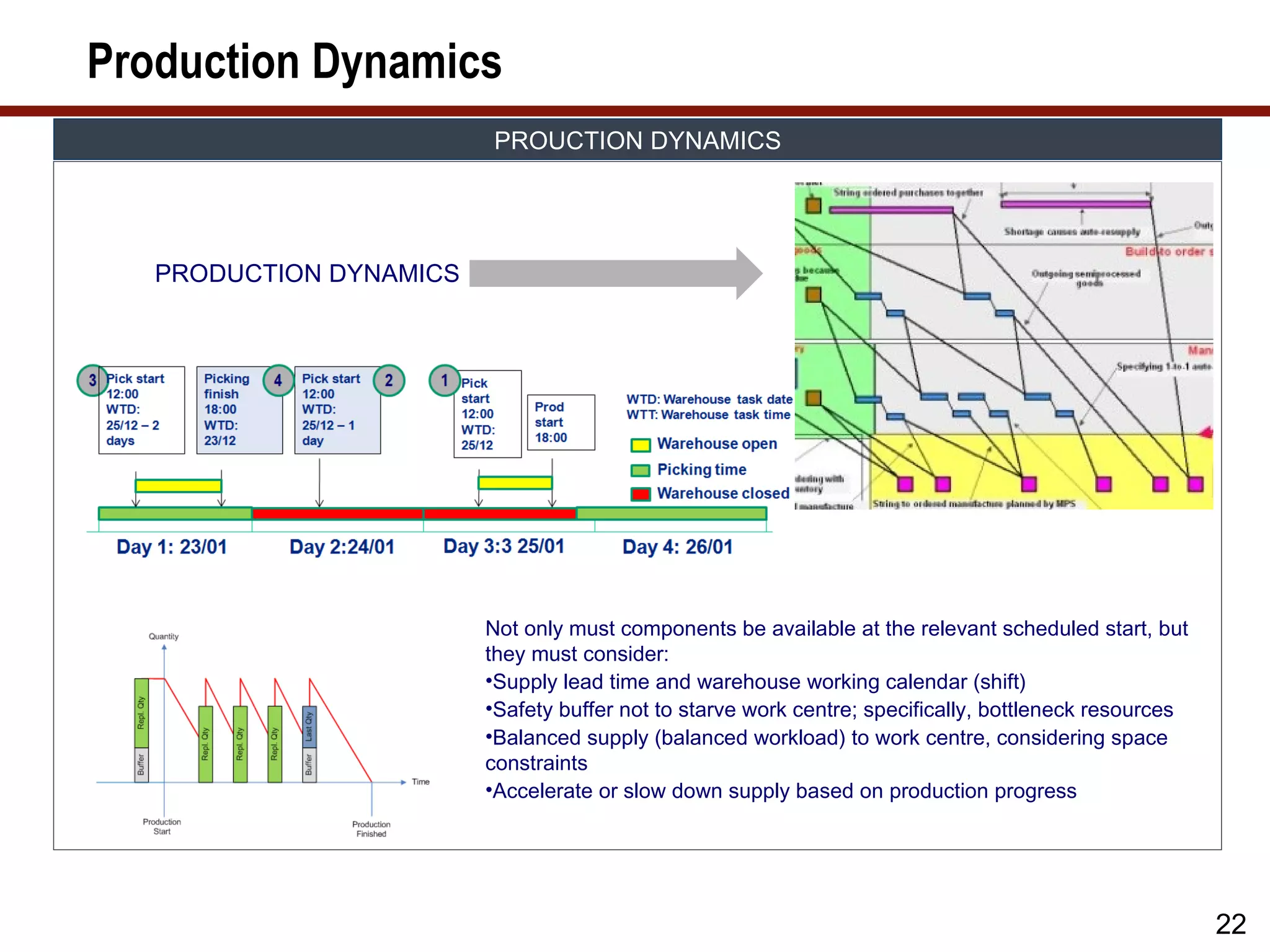
PRODUCTION DYNAMICS
Not only must components be available at the relevant scheduled start, but
they must consider:
•Supply lead time and warehouse working calendar (shift)
•Safety buffer not to starve work centre; specifically, bottleneck resources
•Balanced supply (balanced workload) to work centre, considering space
constraints
•Accelerate or slow down supply based on production progress
22
23.
Goods Receipt
GOODS REICPT
Putaway of Consumption
Goods
Manufactured of supply
Receipt
item components
GR on Order Back flush of
Production Confirmation Components
Order on quantity
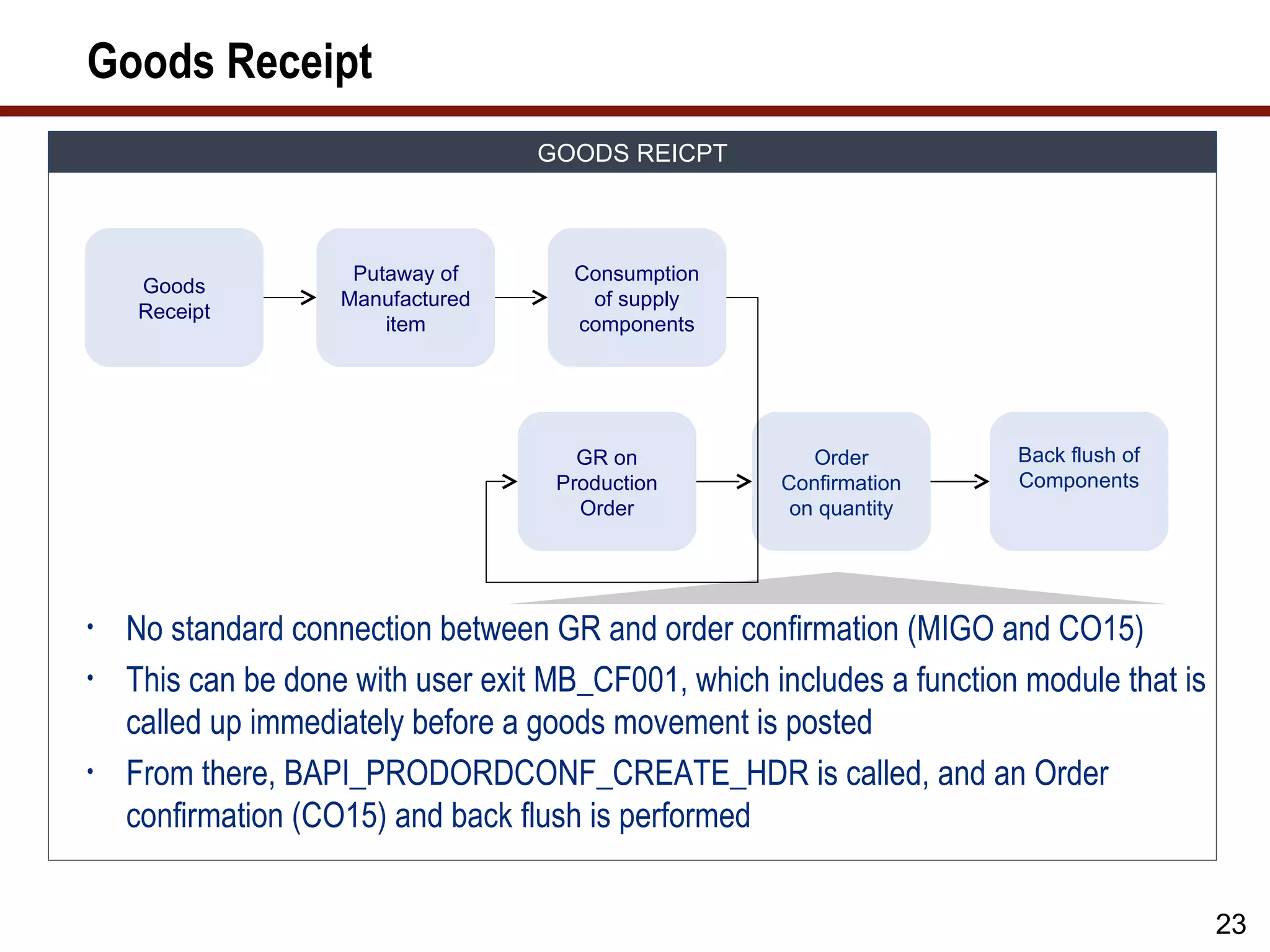
• No standard connection between GR and order confirmation (MIGO and CO15)
• This can be done with user exit MB_CF001, which includes a function module that is
called up immediately before a goods movement is posted
• From there, BAPI_PRODORDCONF_CREATE_HDR is called, and an Order
confirmation (CO15) and back flush is performed
23
24.
Goods Receipt ProcessFlow
GOODS RECEIPT PROCESS FLOW
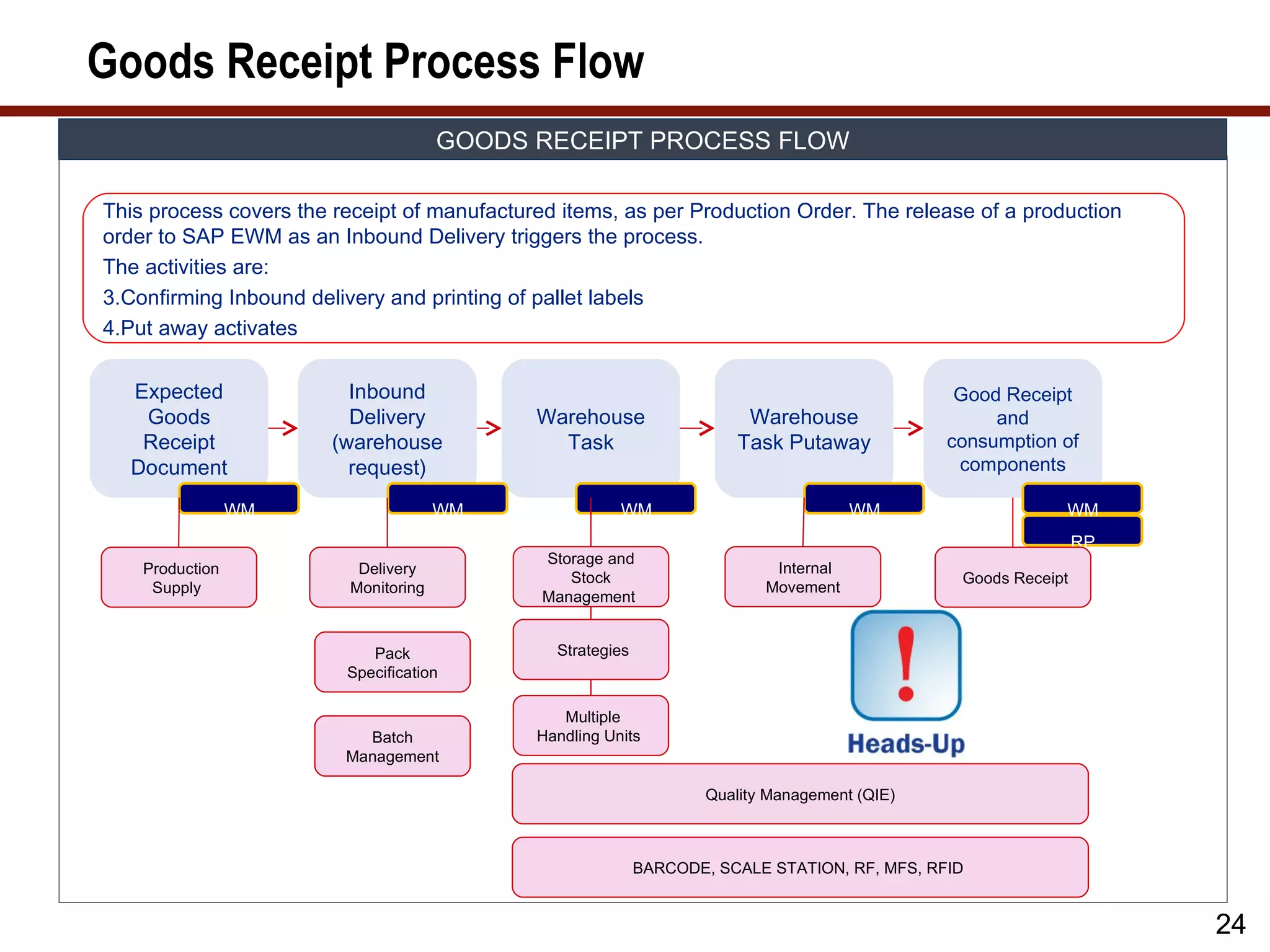
This process covers the receipt of manufactured items, as per Production Order. The release of a production
order to SAP EWM as an Inbound Delivery triggers the process.
The activities are:
3.Confirming Inbound delivery and printing of pallet labels
4.Put away activates
Expected Inbound Good Receipt
Goods Delivery Warehouse Warehouse and
Receipt (warehouse Task Task Putaway consumption of
Document request) components
WM WM WM WM WM
RP
Storage and
Production Delivery Internal
Stock Goods Receipt
Supply Monitoring Movement
Management
Pack Strategies
Specification
Multiple
Batch Handling Units
Management
Quality Management (QIE)
BARCODE, SCALE STATION, RF, MFS, RFID
24
25.
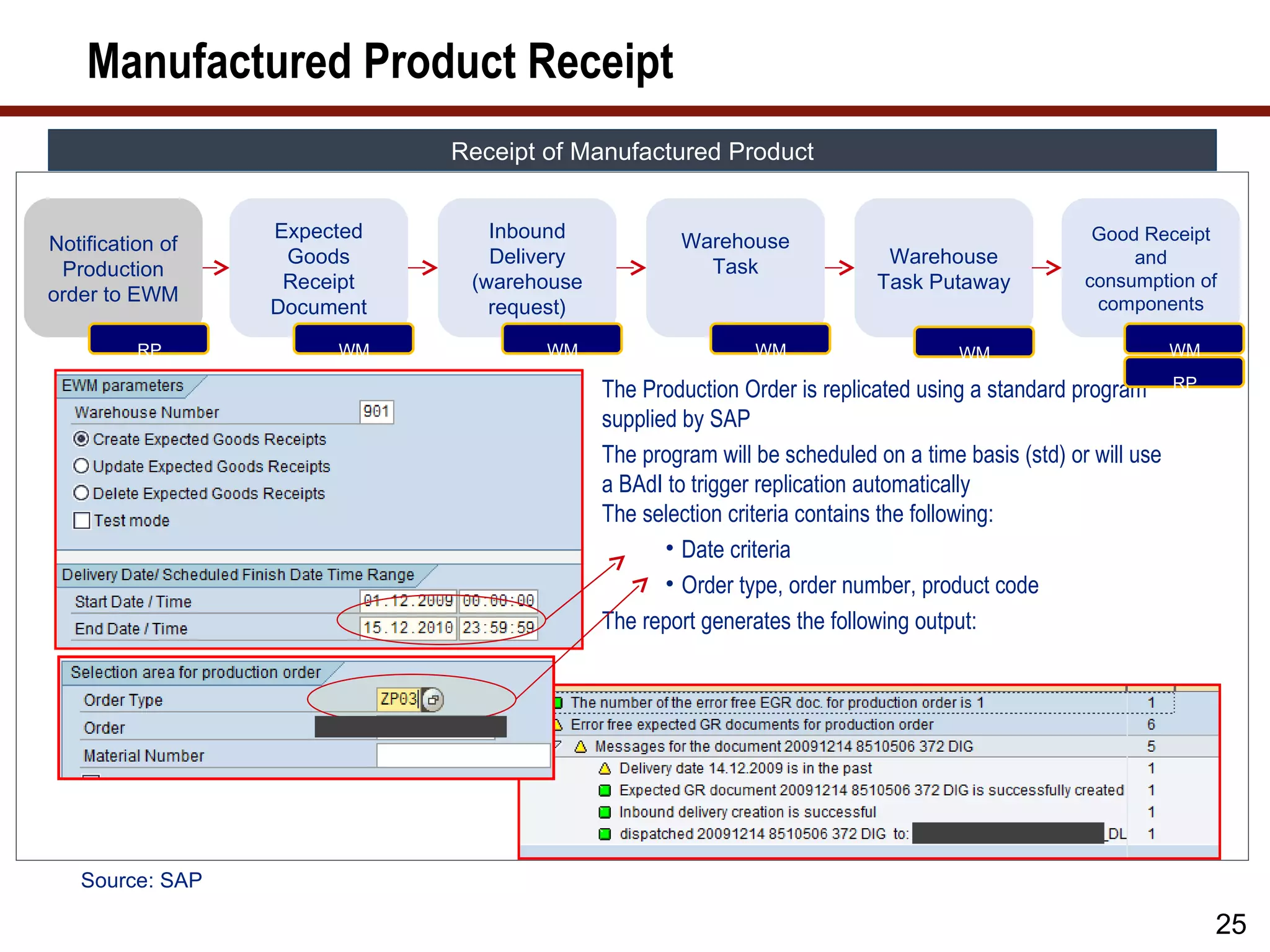
Manufactured Product Receipt
Receipt of Manufactured Product
Expected Inbound Warehouse Good Receipt
Notification of
Goods Delivery Task Warehouse and
Production
Receipt (warehouse Task Putaway consumption of
order to EWM components
Document request)
RP WM WM WM WM WM
The Production Order is replicated using a standard program RP
supplied by SAP
The program will be scheduled on a time basis (std) or will use
a BAdI to trigger replication automatically
The selection criteria contains the following:
• Date criteria
• Order type, order number, product code
The report generates the following output:
Source: SAP
25
26.
Manufactured Product Receipt(cont.)
Receipt of Manufactured Product
Expected Inbound Good Receipt
Goods Delivery Warehouse Warehouse and
Receipt (warehouse Task Task Putaway consumption of
Document request) components
WM WM WM WM RP
WM
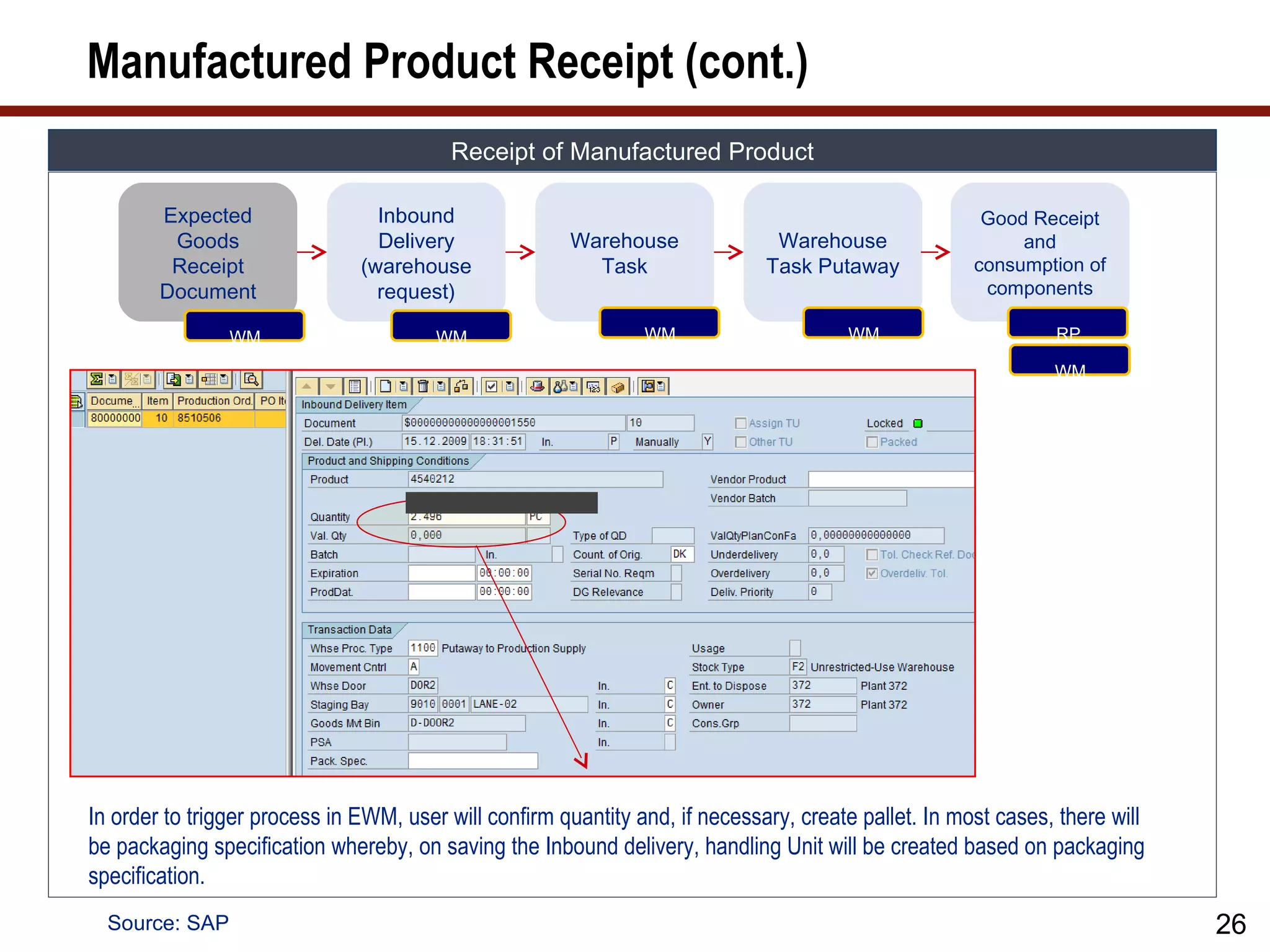
In order to trigger process in EWM, user will confirm quantity and, if necessary, create pallet. In most cases, there will
be packaging specification whereby, on saving the Inbound delivery, handling Unit will be created based on packaging
specification.
Source: SAP 26
27.
Manufactured Product Receipt(cont.)
Receipt of Manufactured Product
Expected Inbound Good Receipt
Goods Delivery Warehouse Warehouse and
Receipt (warehouse Task Task Putaway consumption of
Document request) components
WM WM WM WM RP
WM
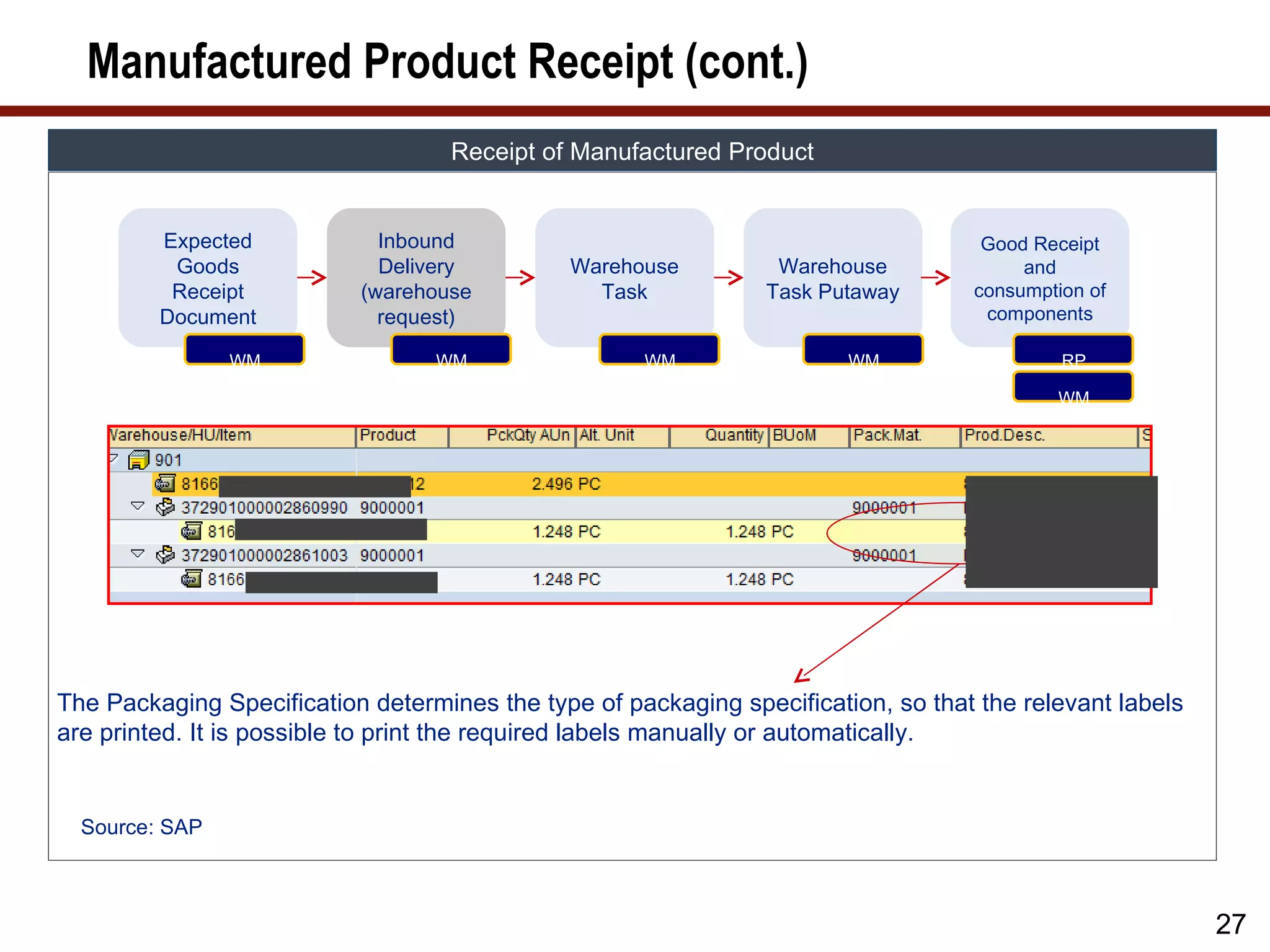
The Packaging Specification determines the type of packaging specification, so that the relevant labels
are printed. It is possible to print the required labels manually or automatically.
Source: SAP
27
28.
Manufactured Product Receipt(cont.)
Receipt of Manufactured Product
Expected Inbound Good Receipt
Goods Delivery Warehouse Warehouse and
Receipt (warehouse Task Task Putaway consumption of
Document request) components
WM WM WM WM RP
WM
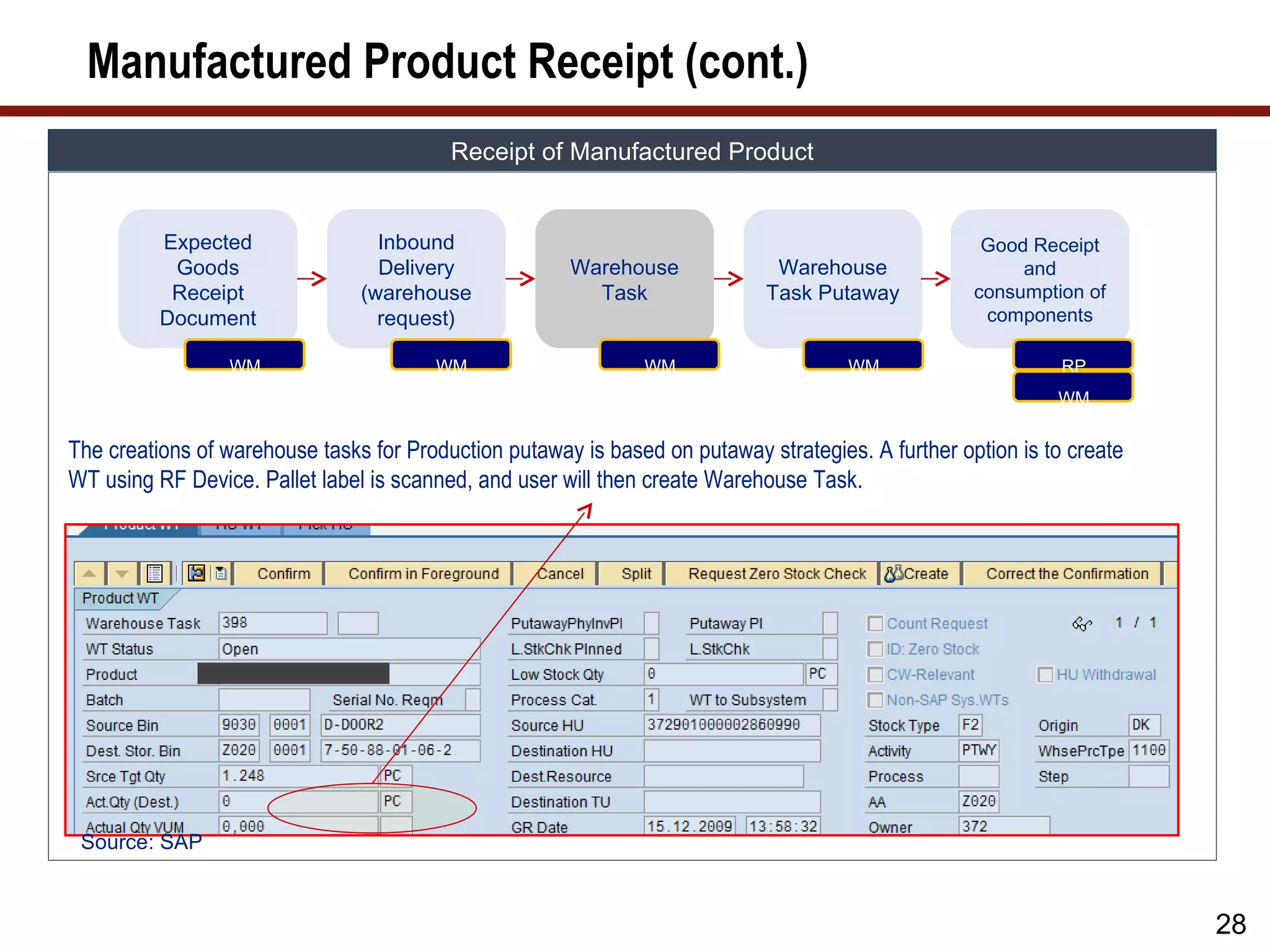
The creations of warehouse tasks for Production putaway is based on putaway strategies. A further option is to create
WT using RF Device. Pallet label is scanned, and user will then create Warehouse Task.
Source: SAP
28
29.
Manufactured Product Receipt(cont.)
Receipt of Manufactured Product
Expected Inbound Good Receipt
Goods Delivery Warehouse Warehouse and
Receipt (warehouse Task Task Putaway consumption of
Document request) components
WM WM WM WM RP
WM
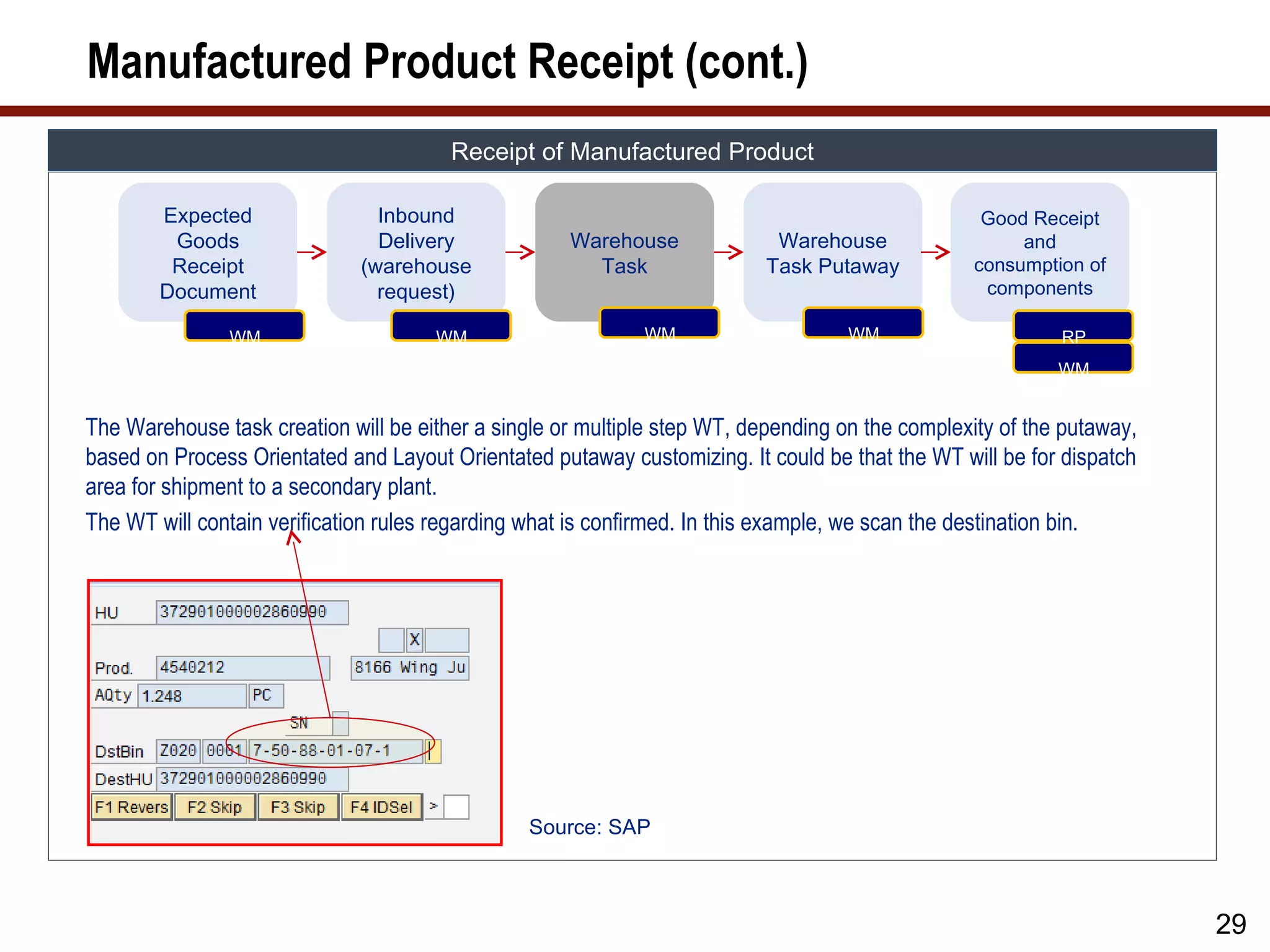
The Warehouse task creation will be either a single or multiple step WT, depending on the complexity of the putaway,
based on Process Orientated and Layout Orientated putaway customizing. It could be that the WT will be for dispatch
area for shipment to a secondary plant.
The WT will contain verification rules regarding what is confirmed. In this example, we scan the destination bin.
Source: SAP
29
30.
Manufactured Product Receipt(cont.)
Receipt of Manufactured Product
Expected Inbound Warehouse Good Receipt
Notification of
Goods Delivery Task Warehouse and
Production
Receipt (warehouse Task Putaway consumption
order to EWM
Document request) of components
RP WM WM WM WM WM
RP
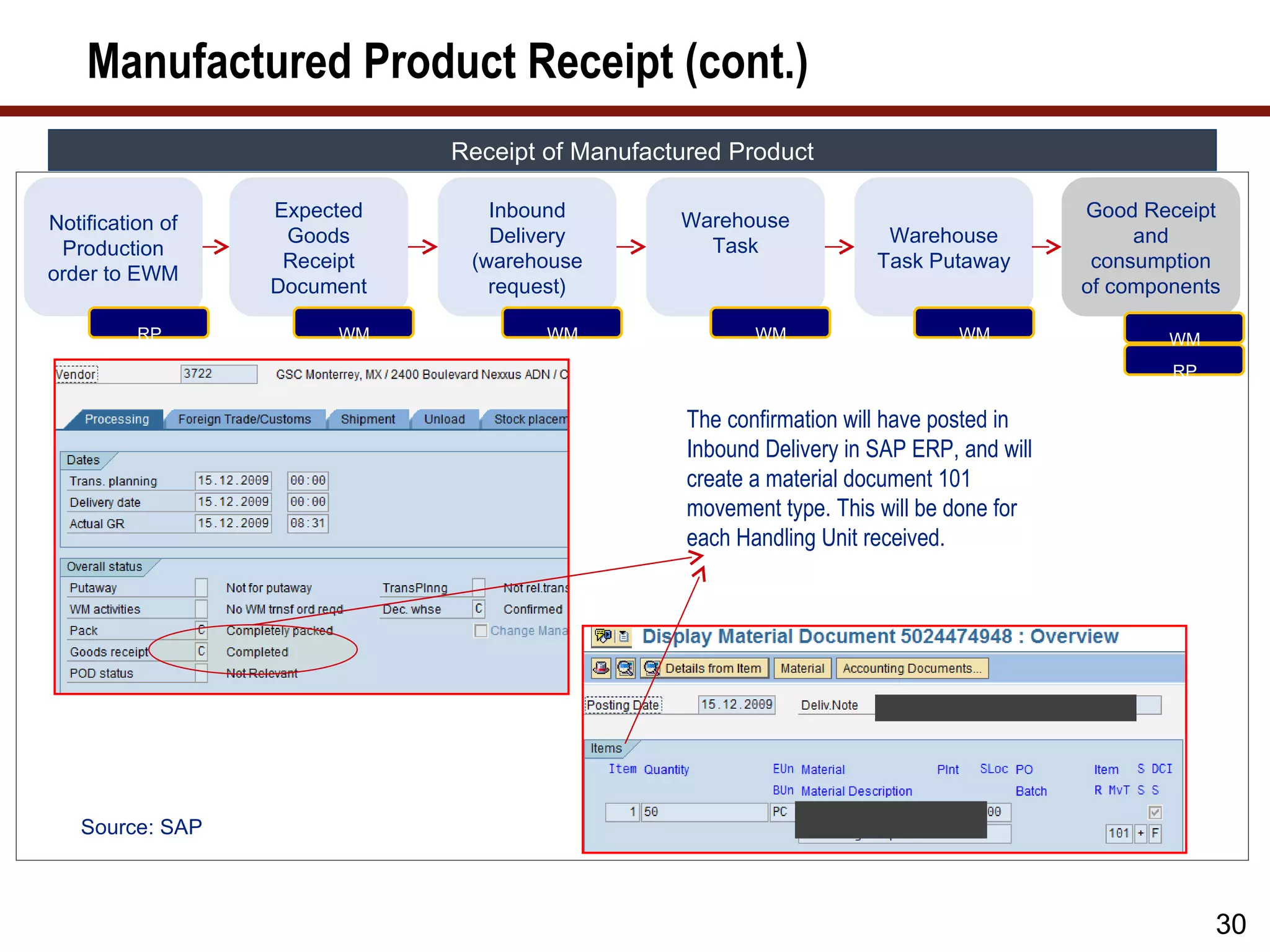
The confirmation will have posted in
Inbound Delivery in SAP ERP, and will
create a material document 101
movement type. This will be done for
each Handling Unit received.
Source: SAP
30
31.
Receipt and Supplyof Components
CROSS-DOCK OR RECEIPT AND SUPPLY OF COMPONENTS
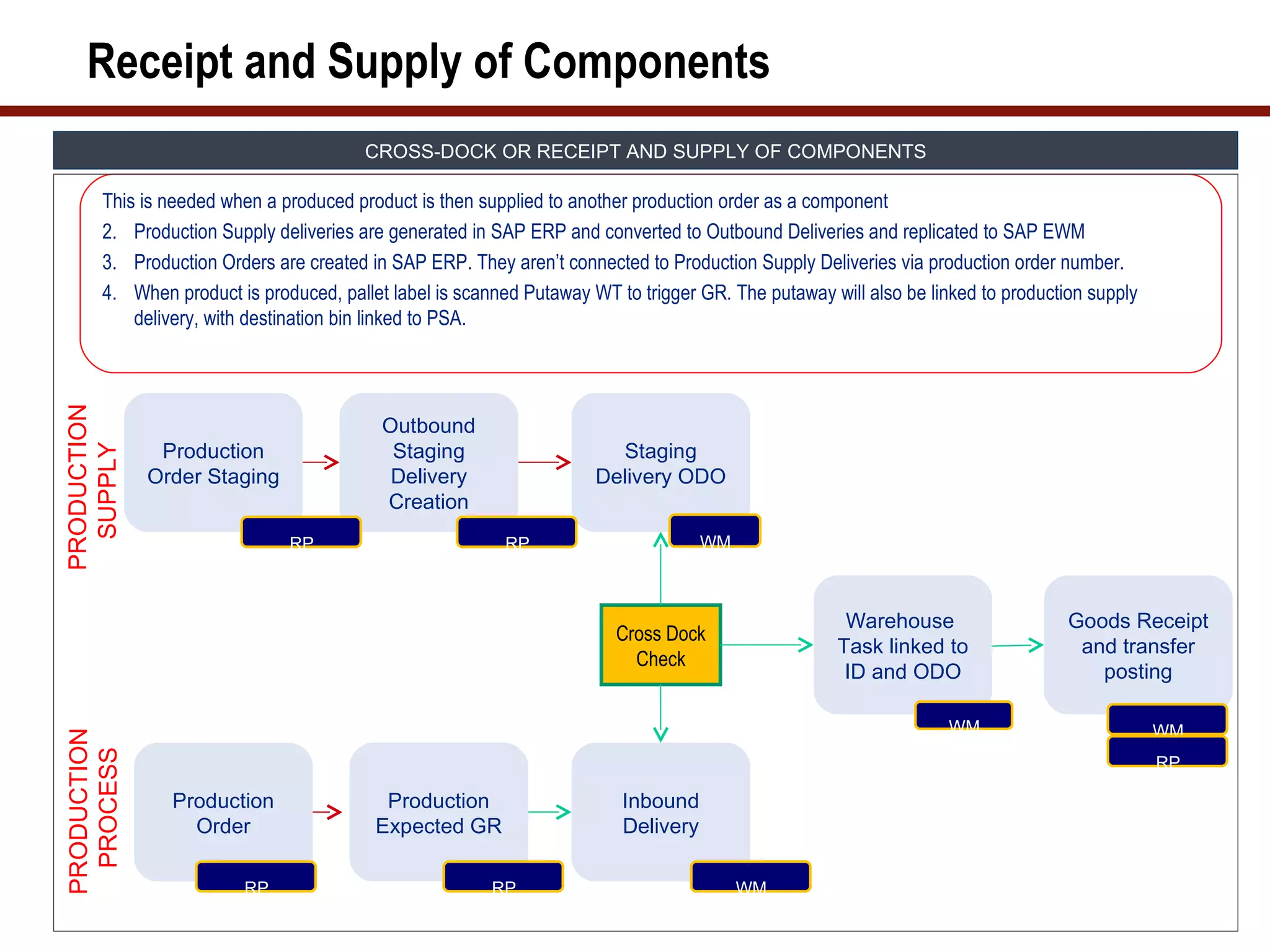
This is needed when a produced product is then supplied to another production order as a component
2. Production Supply deliveries are generated in SAP ERP and converted to Outbound Deliveries and replicated to SAP EWM
3. Production Orders are created in SAP ERP. They aren’t connected to Production Supply Deliveries via production order number.
4. When product is produced, pallet label is scanned Putaway WT to trigger GR. The putaway will also be linked to production supply
delivery, with destination bin linked to PSA.
PRODUCTION
Outbound
Production Staging Staging
SUPPLY
Order Staging Delivery Delivery ODO
Creation
RP RP WM
Warehouse Goods Receipt
Cross Dock
Task linked to and transfer
Check
ID and ODO posting
WM WM
PRODUCTION
PROCESS
RP
Production Production Inbound
Order Expected GR Delivery
RP RP WM
32.
Cross-Dock Process
CROSS-DOCK PROCESS
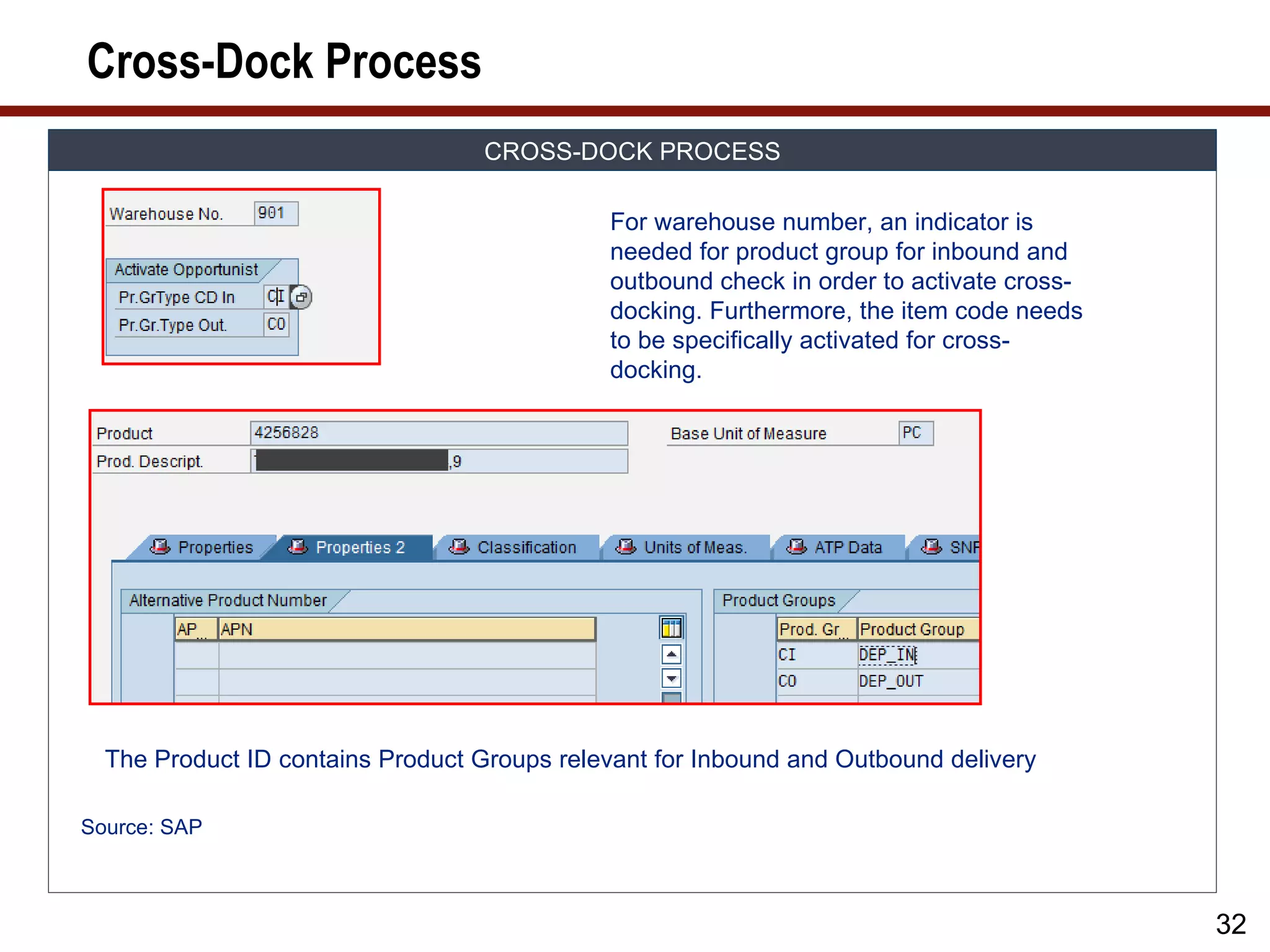
For warehouse number, an indicator is
needed for product group for inbound and
outbound check in order to activate cross-
docking. Furthermore, the item code needs
to be specifically activated for cross-
docking.
The Product ID contains Product Groups relevant for Inbound and Outbound delivery
Source: SAP
32
33.
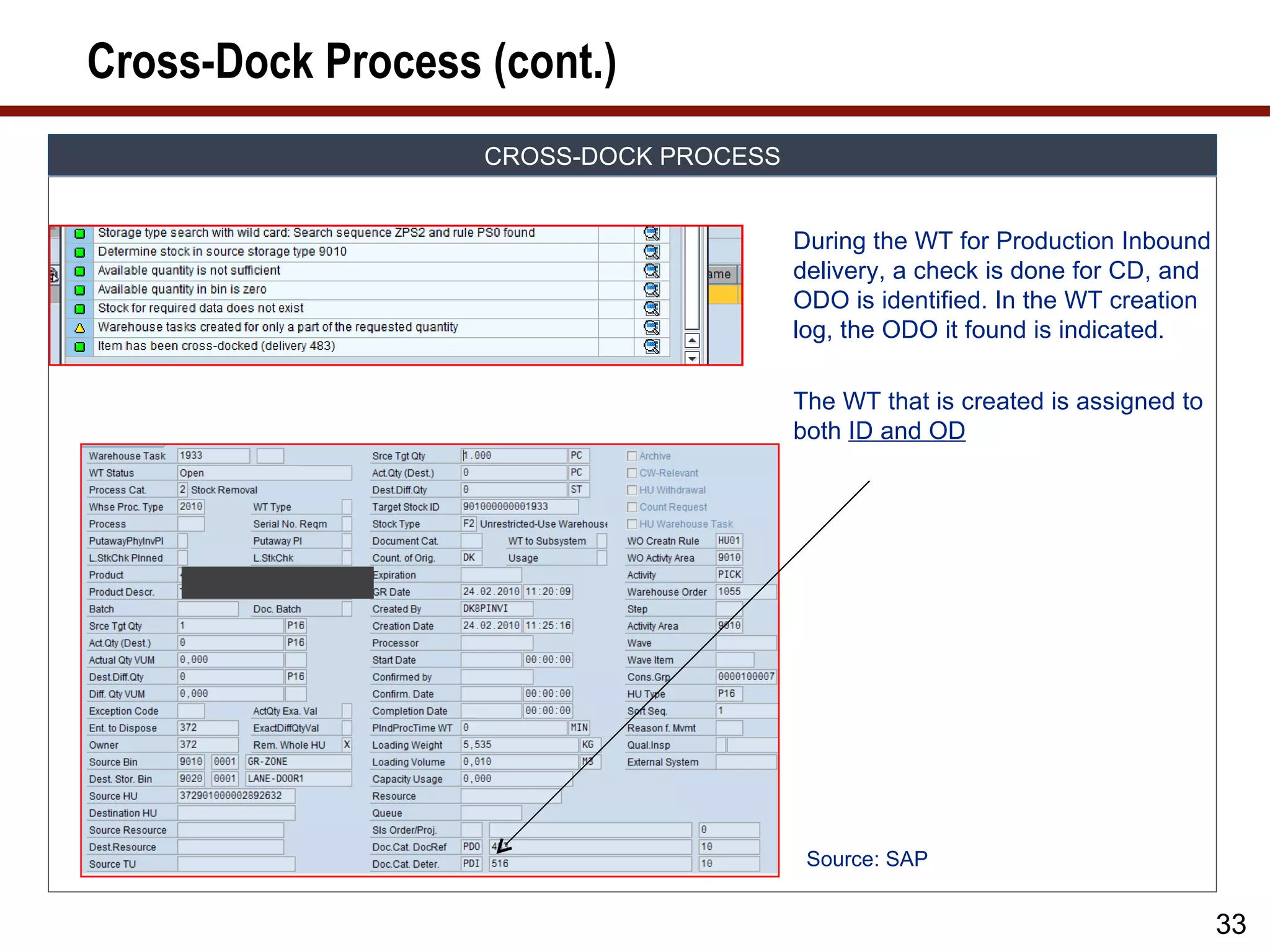
Cross-Dock Process (cont.)
CROSS-DOCK PROCESS
During the WT for Production Inbound
delivery, a check is done for CD, and
ODO is identified. In the WT creation
log, the ODO it found is indicated.
The WT that is created is assigned to
both ID and OD
Source: SAP
33
34.
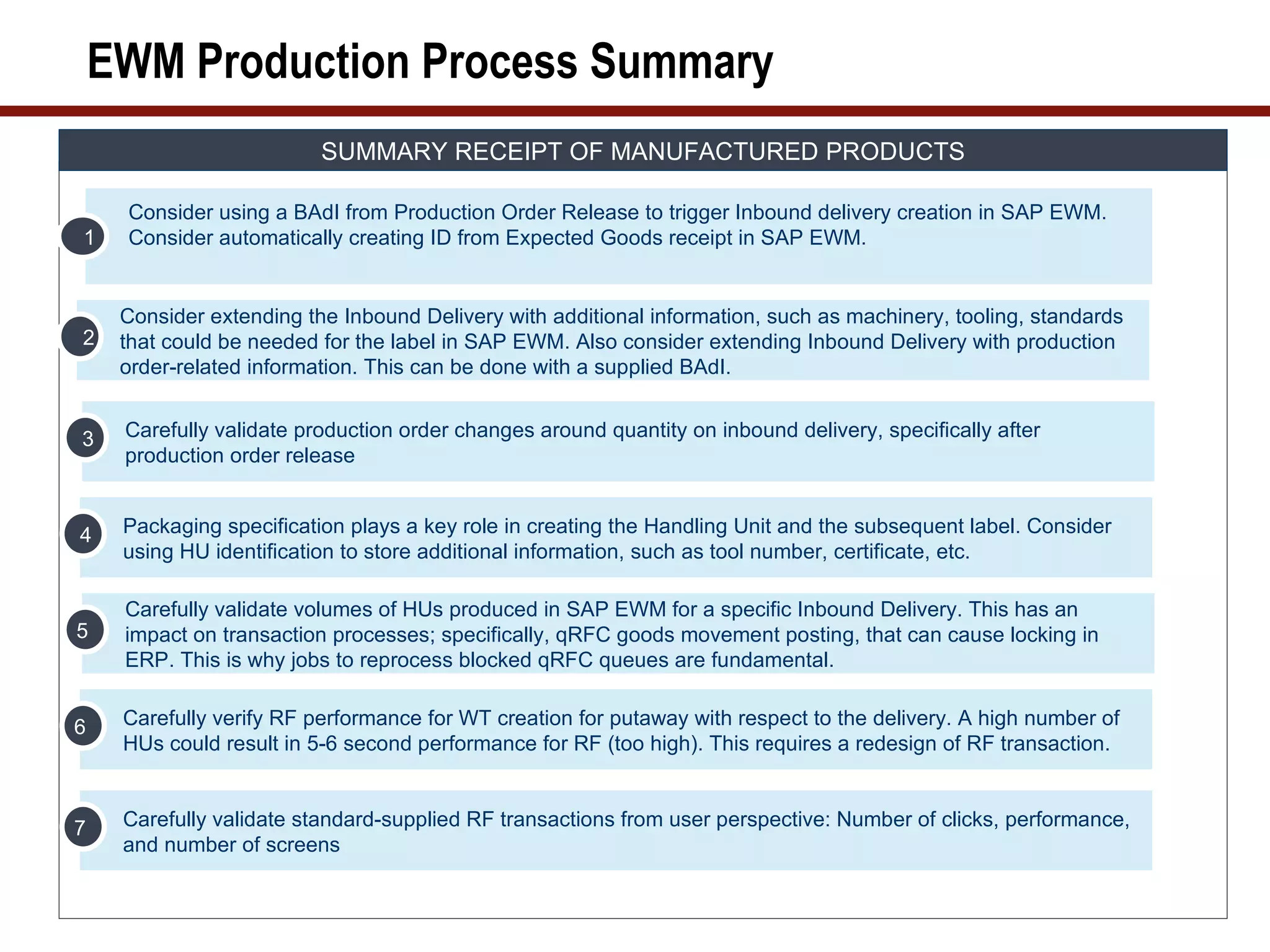
EWM Production ProcessSummary
SUMMARY RECEIPT OF MANUFACTURED PRODUCTS
Consider using a BAdI from Production Order Release to trigger Inbound delivery creation in SAP EWM.
1 Consider automatically creating ID from Expected Goods receipt in SAP EWM.
Consider extending the Inbound Delivery with additional information, such as machinery, tooling, standards
2 that could be needed for the label in SAP EWM. Also consider extending Inbound Delivery with production
order-related information. This can be done with a supplied BAdI.
3 Carefully validate production order changes around quantity on inbound delivery, specifically after
production order release
4 Packaging specification plays a key role in creating the Handling Unit and the subsequent label. Consider
using HU identification to store additional information, such as tool number, certificate, etc.
Carefully validate volumes of HUs produced in SAP EWM for a specific Inbound Delivery. This has an
5 impact on transaction processes; specifically, qRFC goods movement posting, that can cause locking in
ERP. This is why jobs to reprocess blocked qRFC queues are fundamental.
6 Carefully verify RF performance for WT creation for putaway with respect to the delivery. A high number of
HUs could result in 5-6 second performance for RF (too high). This requires a redesign of RF transaction.
7 Carefully validate standard-supplied RF transactions from user perspective: Number of clicks, performance,
and number of screens
35.
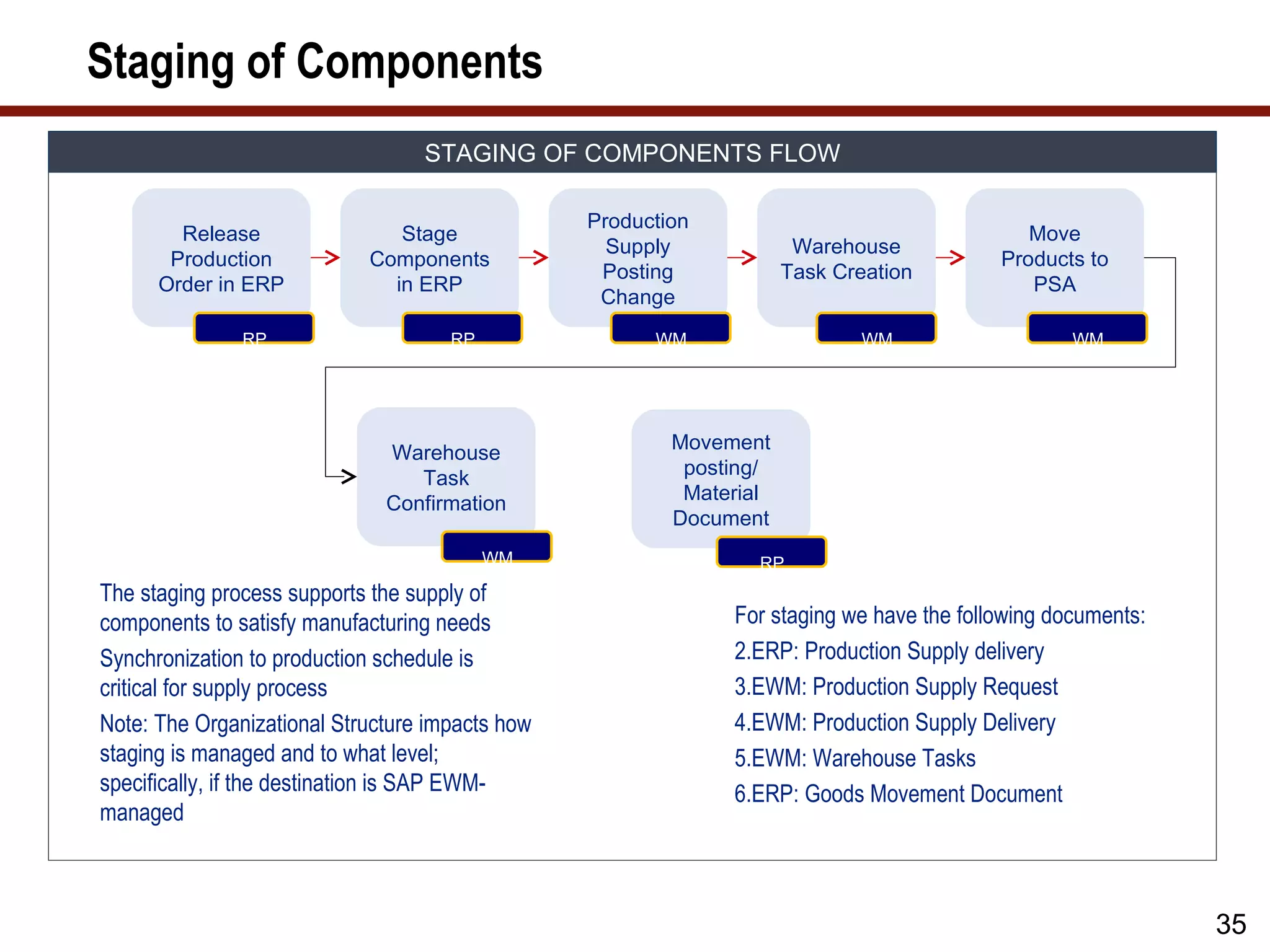
Staging of Components
STAGING OF COMPONENTS FLOW
Production
Release Stage Move
Supply Warehouse
Production Components Products to
Posting Task Creation
Order in ERP in ERP PSA
Change
RP RP WM WM WM
Warehouse Movement
Task posting/
Confirmation Material
Document
WM RP
The staging process supports the supply of
components to satisfy manufacturing needs For staging we have the following documents:
Synchronization to production schedule is 2.ERP: Production Supply delivery
critical for supply process 3.EWM: Production Supply Request
Note: The Organizational Structure impacts how 4.EWM: Production Supply Delivery
staging is managed and to what level; 5.EWM: Warehouse Tasks
specifically, if the destination is SAP EWM- 6.ERP: Goods Movement Document
managed
35
36.
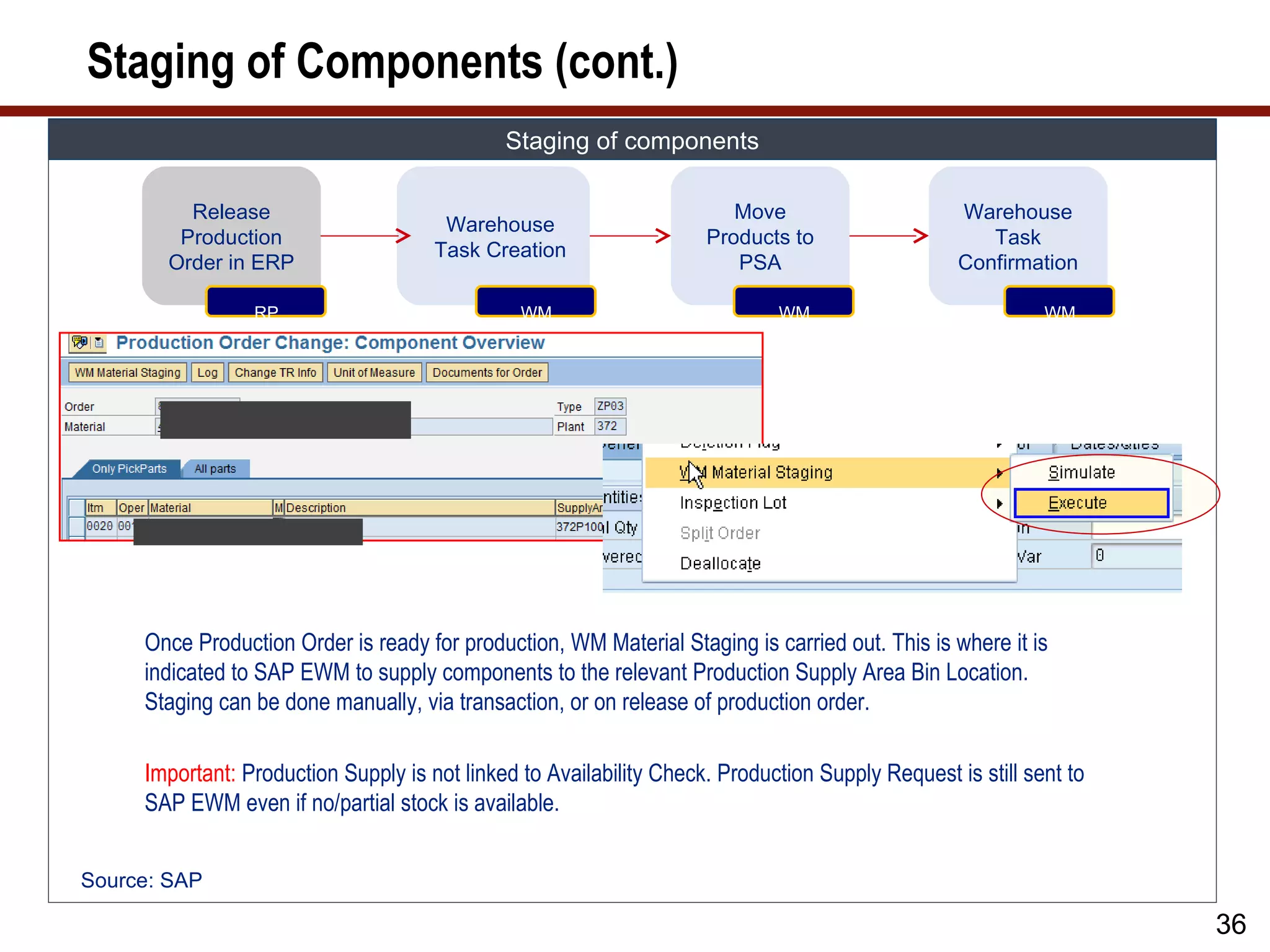
Staging of Components(cont.)
Staging of components
Release Move Warehouse
Warehouse
Warehouse
Production Products to Task
Task Creation
Task Creation
Order in ERP PSA Confirmation
RP WM WM WM
Once Production Order is ready for production, WM Material Staging is carried out. This is where it is
indicated to SAP EWM to supply components to the relevant Production Supply Area Bin Location.
Staging can be done manually, via transaction, or on release of production order.
Important: Production Supply is not linked to Availability Check. Production Supply Request is still sent to
SAP EWM even if no/partial stock is available.
Source: SAP
36
37.
Staging of Components(cont.)
STAGING OF COMPONENTS
Production
Release Stage Move Warehouse
Supply Warehouse
Production Components Products to Task
Posting Task Creation
Order in ERP in ERP PSA Confirmation
Change
WM
RP RP WM WM WM
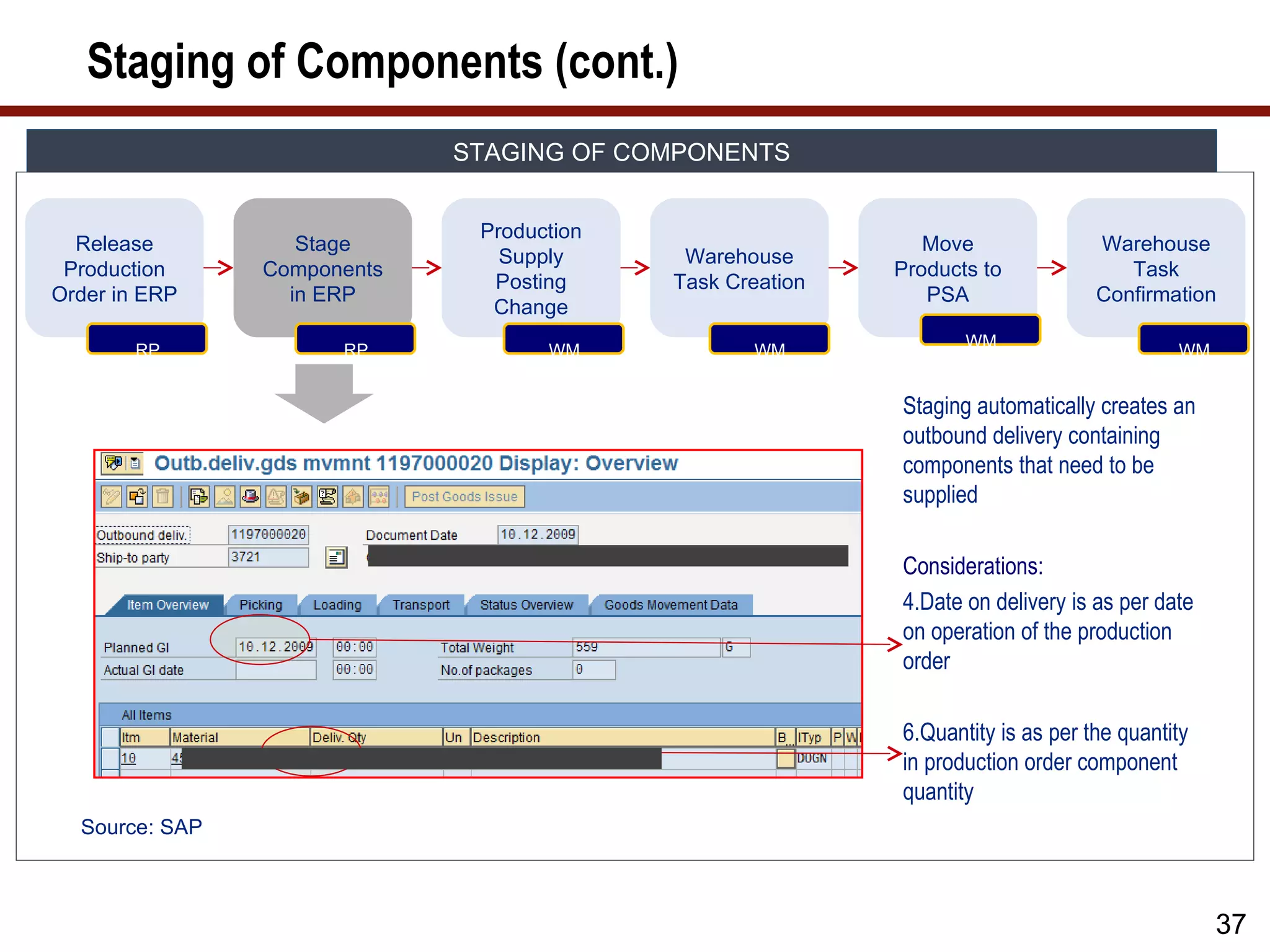
Staging automatically creates an
outbound delivery containing
components that need to be
supplied
Considerations:
4.Date on delivery is as per date
on operation of the production
order
6.Quantity is as per the quantity
in production order component
quantity
Source: SAP
37
38.
Staging of Components(cont.)
STAGING OF COMPONENTS
Production
Release Stage Move Warehouse
Supply Warehouse
Production Components Products to Task
Posting Task Creation
Order in ERP in ERP PSA Confirmation
Change
Page 38
RP RP WM WM WM WM
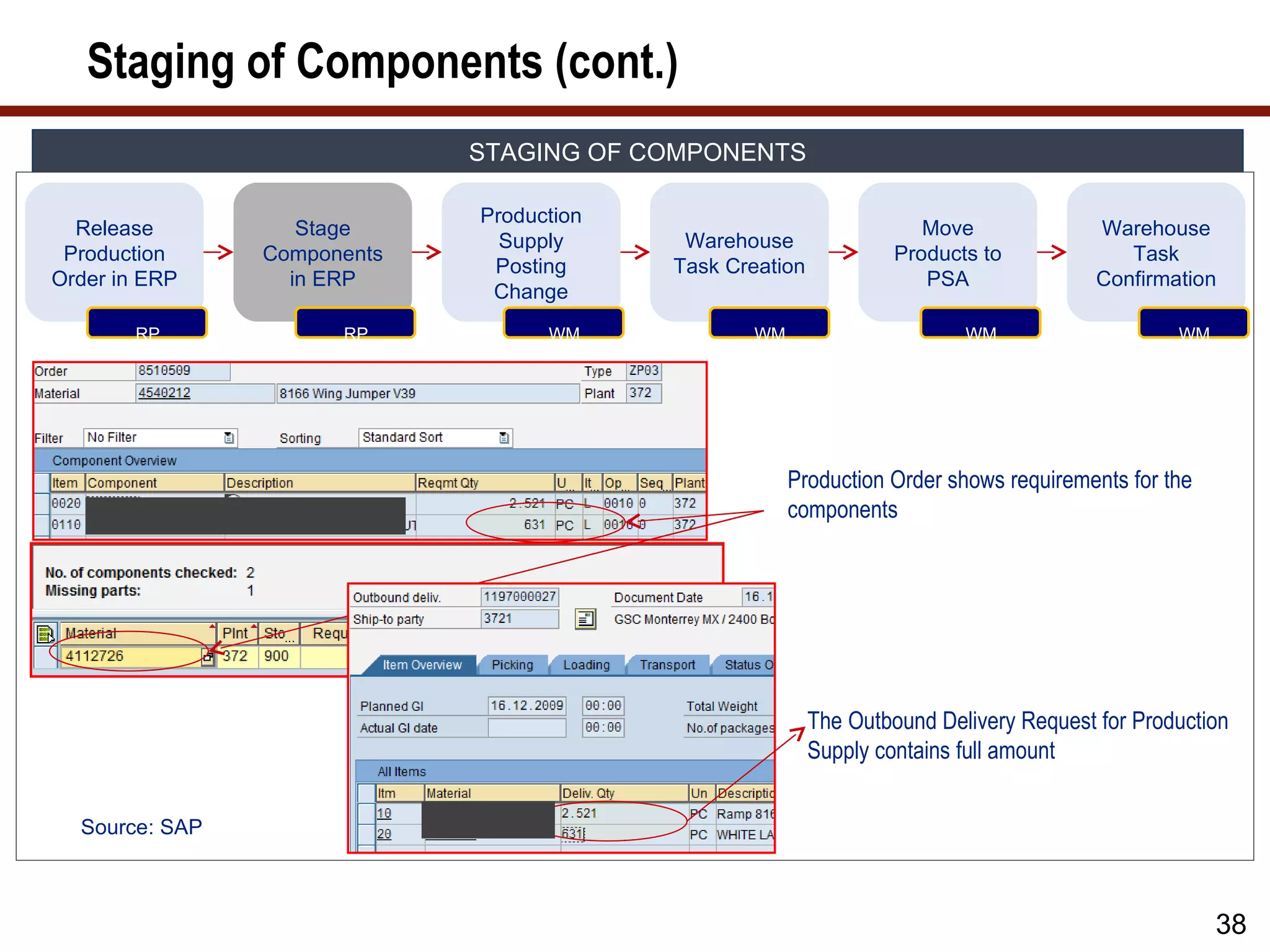
Production Order shows requirements for the
components
The Outbound Delivery Request for Production
Supply contains full amount
Source: SAP
38
39.
Staging of Components(cont.)
STAGING OF COMPONENTS
Production
Release Stage Move Warehouse
Supply Warehouse
Production Components Products to Task
Posting Task Creation
Order in ERP in ERP PSA Confirmation
Change
Page 39
RP RP WM WM WM WM
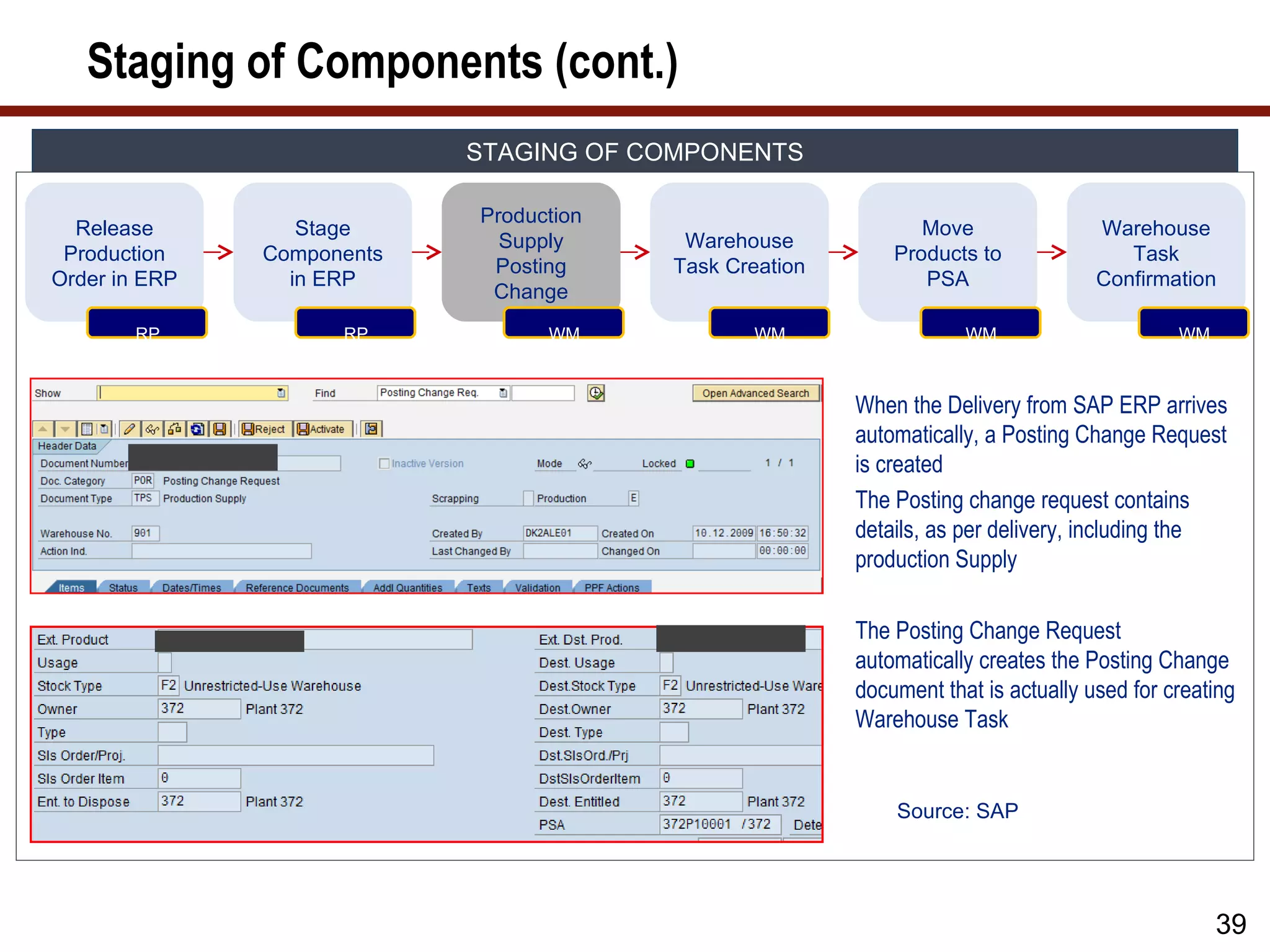
When the Delivery from SAP ERP arrives
automatically, a Posting Change Request
is created
The Posting change request contains
details, as per delivery, including the
production Supply
The Posting Change Request
automatically creates the Posting Change
document that is actually used for creating
Warehouse Task
Source: SAP
39
40.
Staging of Components(cont.)
STAGING OF COMPONENTS
Production
Release Stage Move Warehouse
Supply Warehouse
Production Components Products to Task
Posting Task Creation
Order in ERP in ERP PSA Confirmation
Change
Page 40
RP RP WM WM WM WM
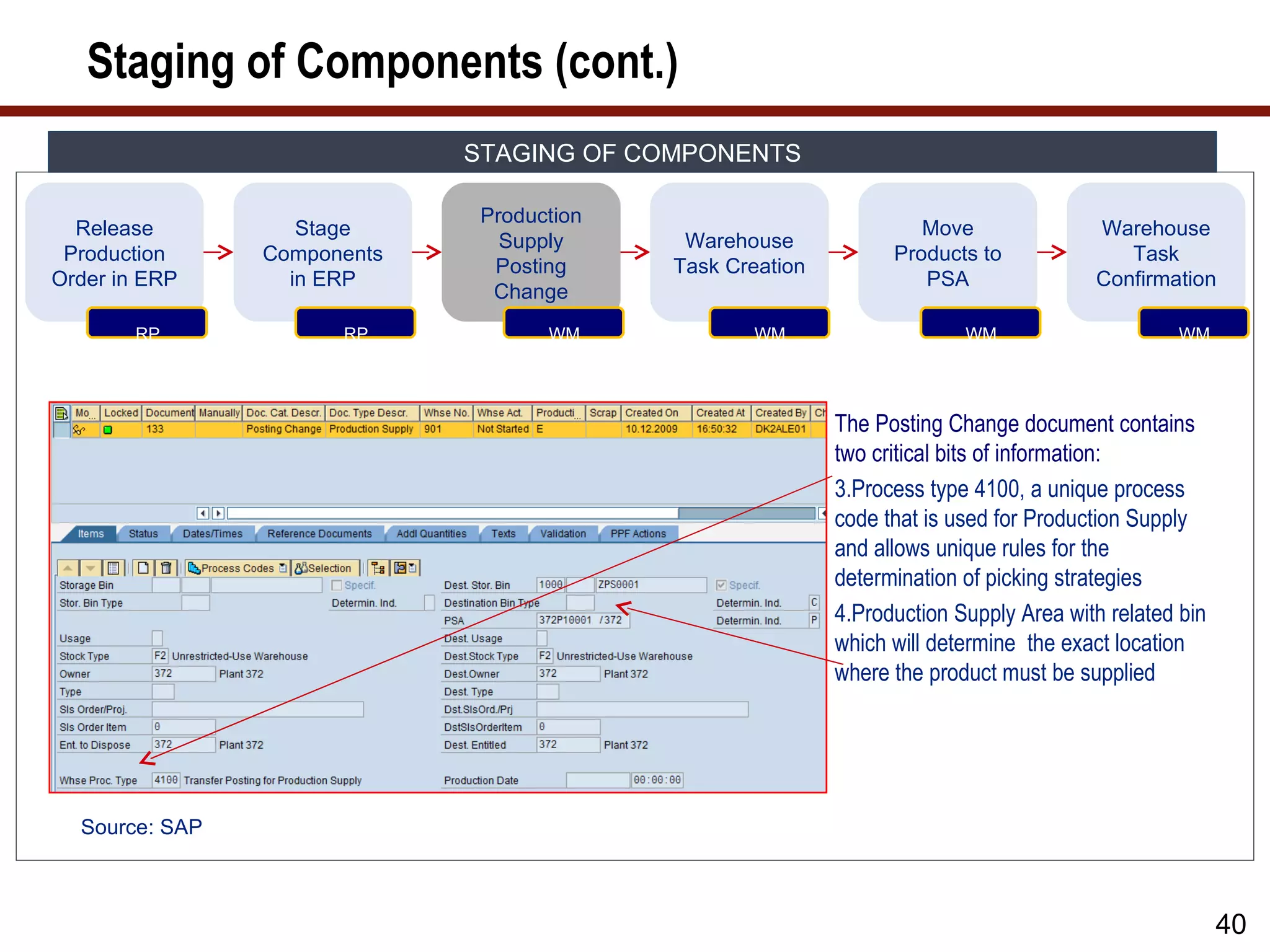
The Posting Change document contains
two critical bits of information:
3.Process type 4100, a unique process
code that is used for Production Supply
and allows unique rules for the
determination of picking strategies
4.Production Supply Area with related bin
which will determine the exact location
where the product must be supplied
Source: SAP
40
41.
Staging of Components(cont.)
STAGING OF COMPONENTS
Production
Release Stage Move Warehouse
Supply Warehouse
Production Components Products to Task
Posting Task Creation
Order in ERP in ERP PSA Confirmation
Change
Page 41
RP RP WM WM WM WM
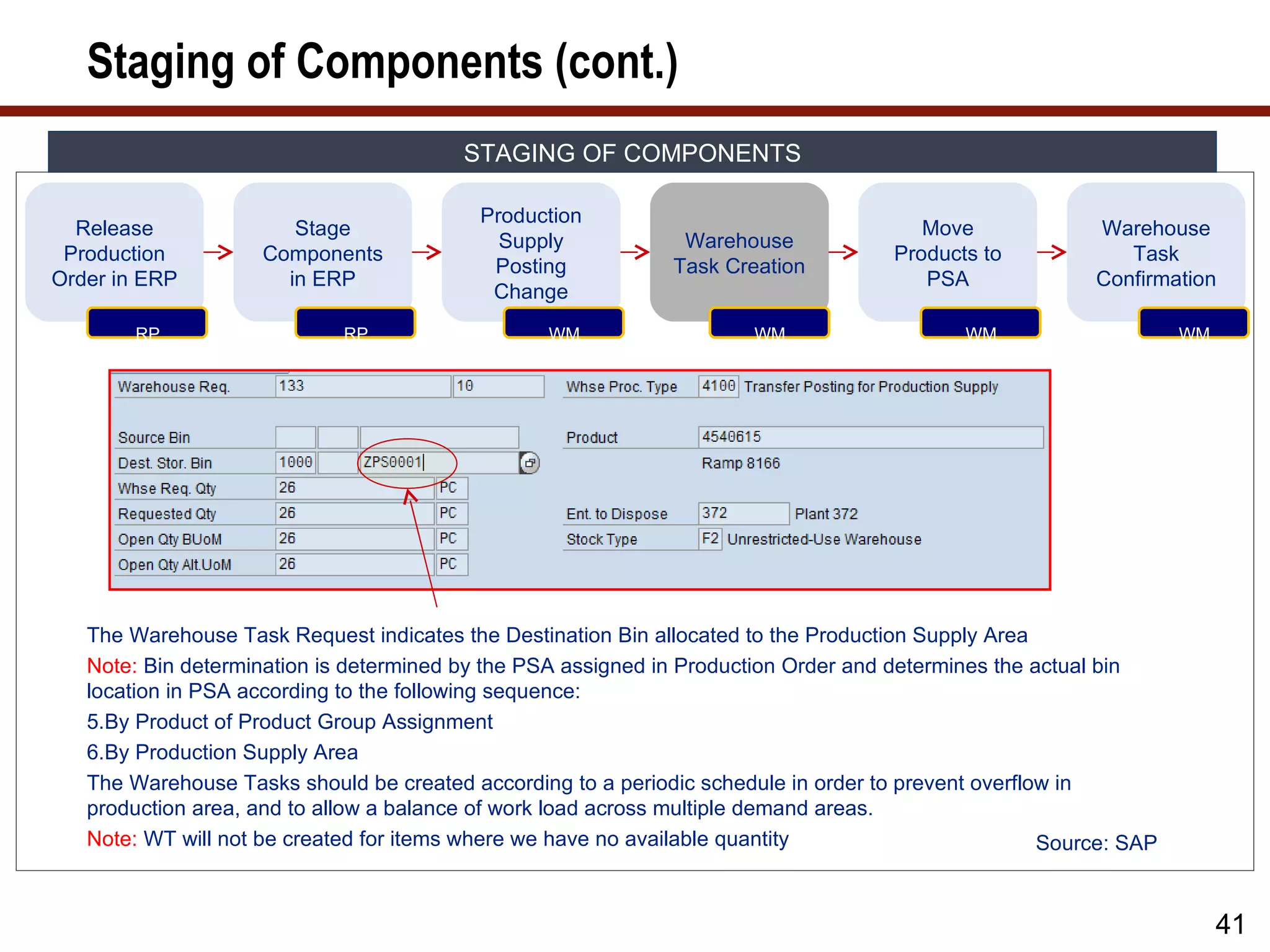
The Warehouse Task Request indicates the Destination Bin allocated to the Production Supply Area
Note: Bin determination is determined by the PSA assigned in Production Order and determines the actual bin
location in PSA according to the following sequence:
5.By Product of Product Group Assignment
6.By Production Supply Area
The Warehouse Tasks should be created according to a periodic schedule in order to prevent overflow in
production area, and to allow a balance of work load across multiple demand areas.
Note: WT will not be created for items where we have no available quantity Source: SAP
41
42.
Staging of Components(cont.)
STAGING OF COMPONENTS
Production
Release Stage Move Warehouse
Supply Warehouse
Production Components Products to Task
Posting Task Creation
Order in ERP in ERP PSA Confirmation
Change
Page 42
RP RP WM WM WM WM
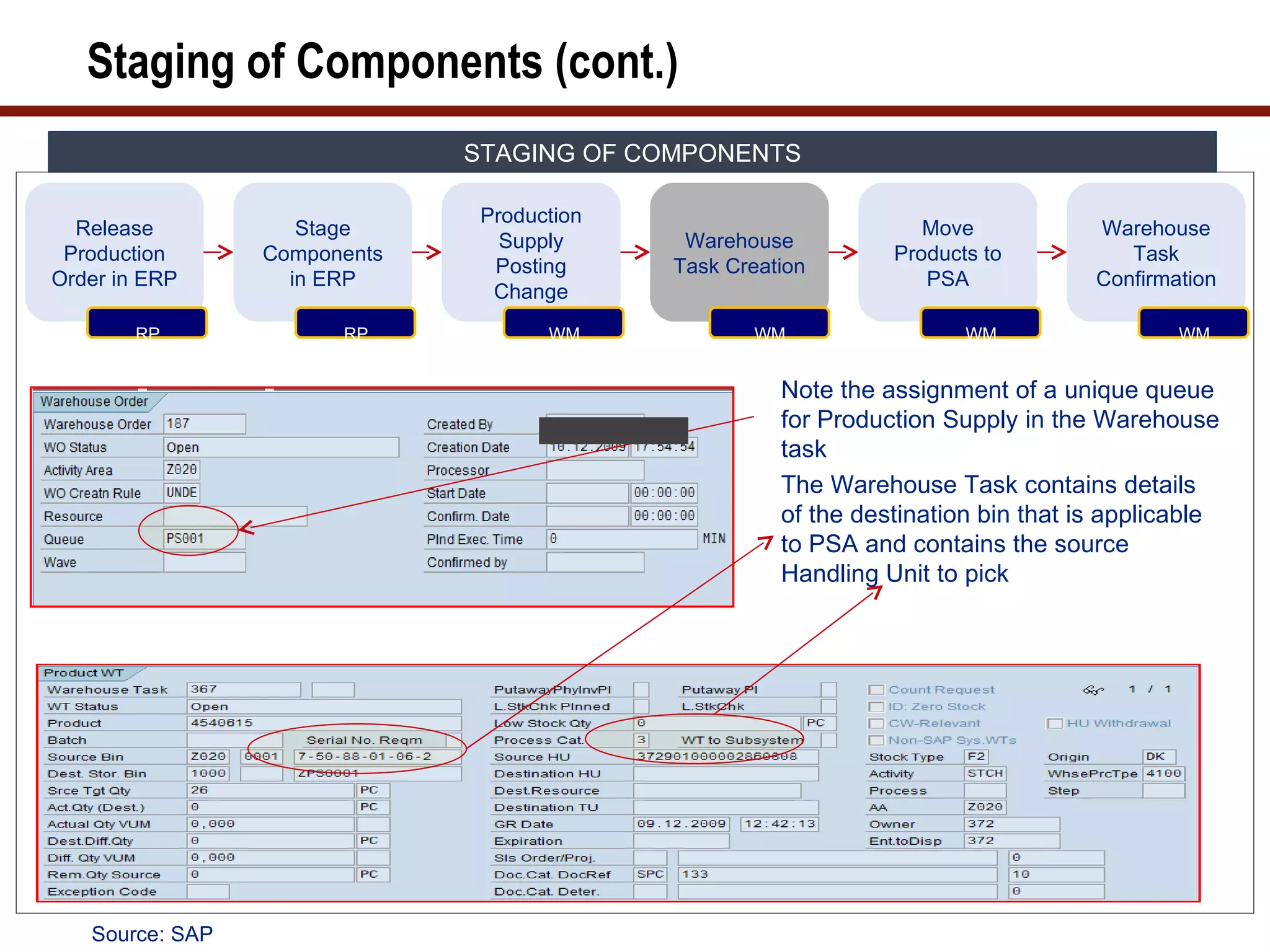
Note the assignment of a unique queue
for Production Supply in the Warehouse
task
The Warehouse Task contains details
of the destination bin that is applicable
to PSA and contains the source
Handling Unit to pick
Source: SAP
43.
Staging of Components(cont.)
STAGING OF COMPONENTS
Production
Release Stage Move Warehouse
Supply Warehouse
Production Components Products to Task
Posting Task Creation
Order in ERP in ERP PSA Confirmation
Change
Page 43
RP RP WM WM WM WM
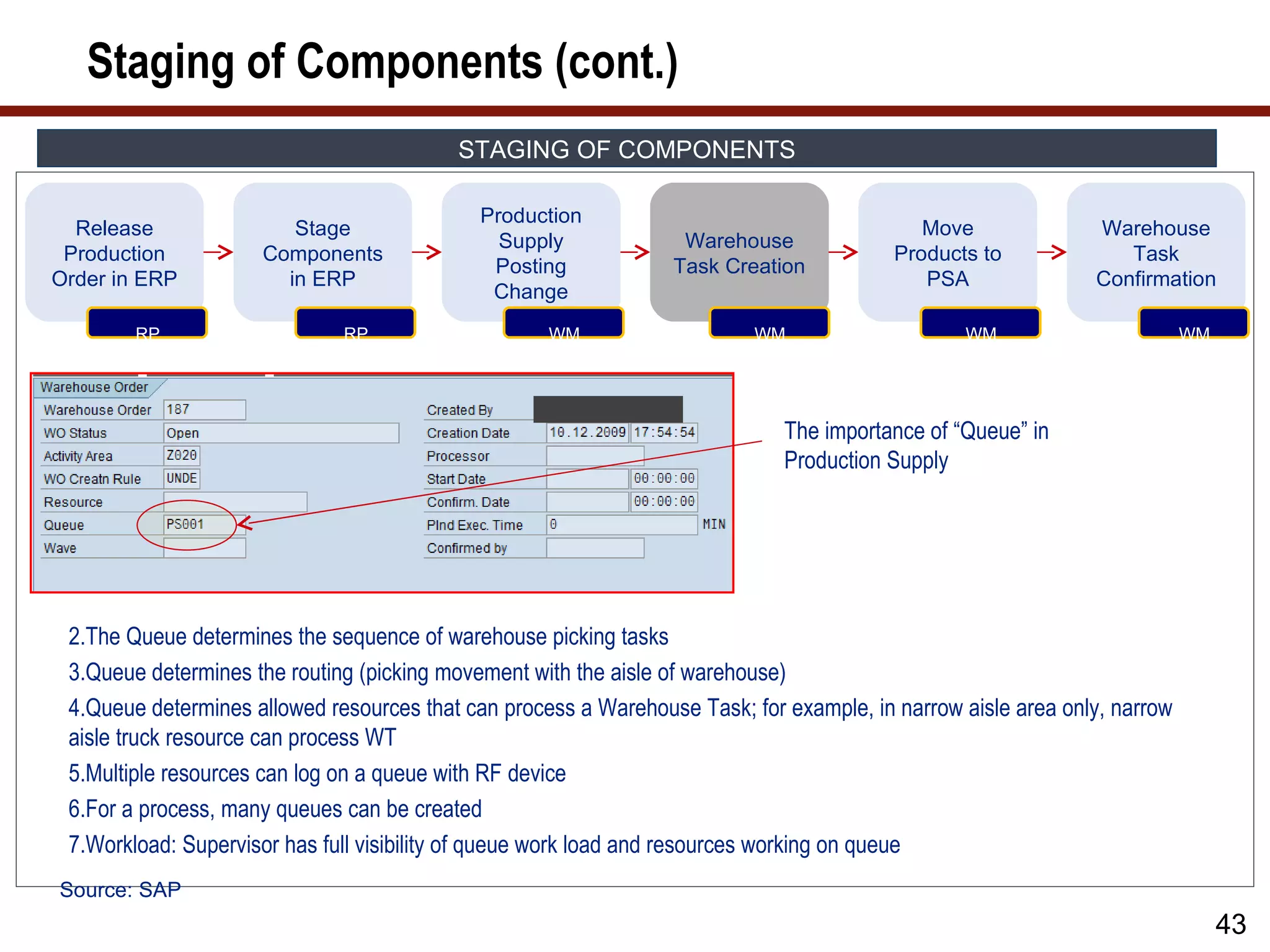
The importance of “Queue” in
Production Supply
2.The Queue determines the sequence of warehouse picking tasks
3.Queue determines the routing (picking movement with the aisle of warehouse)
4.Queue determines allowed resources that can process a Warehouse Task; for example, in narrow aisle area only, narrow
aisle truck resource can process WT
5.Multiple resources can log on a queue with RF device
6.For a process, many queues can be created
7.Workload: Supervisor has full visibility of queue work load and resources working on queue
Source: SAP
43
44.
Staging of Components(cont.)
STAGING OF COMPONENTS
Production
Release Stage Move Warehouse
Supply Warehouse
Production Components Products to Task
Posting Task Creation
Order in ERP in ERP PSA Confirmation
Change
Page 44
RP RP WM WM WM WM
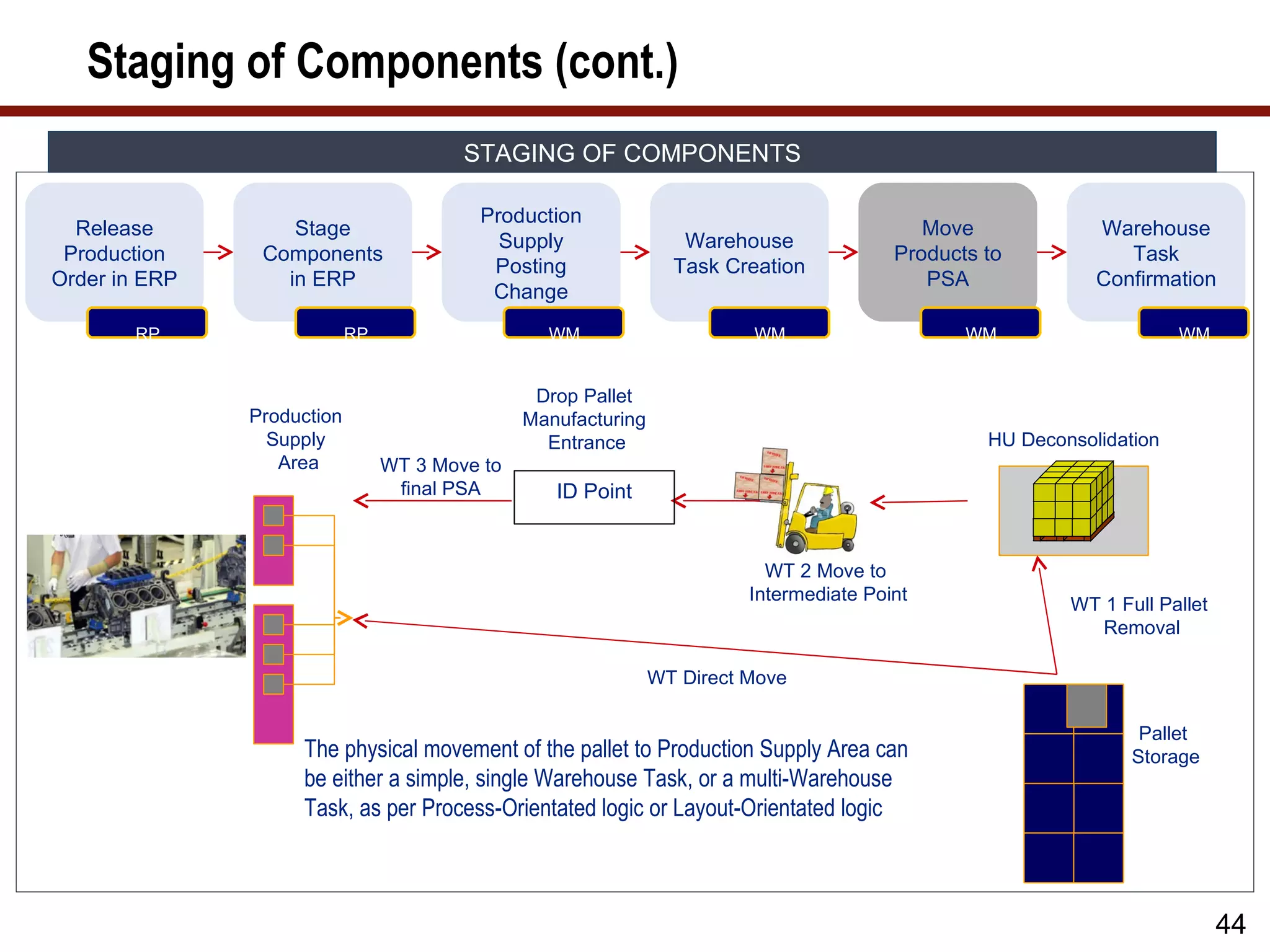
Drop Pallet
Production Manufacturing
Supply Entrance HU Deconsolidation
Area WT 3 Move to
final PSA ID Point
WT 2 Move to
Intermediate Point
WT 1 Full Pallet
Removal
WT Direct Move
Pallet
The physical movement of the pallet to Production Supply Area can Storage
be either a simple, single Warehouse Task, or a multi-Warehouse
Task, as per Process-Orientated logic or Layout-Orientated logic
44
45.
Staging of Components(cont.)
STAGING OF COMPONENTS
Release Move Warehouse
Warehouse
Production Products to Task
Task Creation
Order in ERP PSA Confirmation
RP WM WM WM
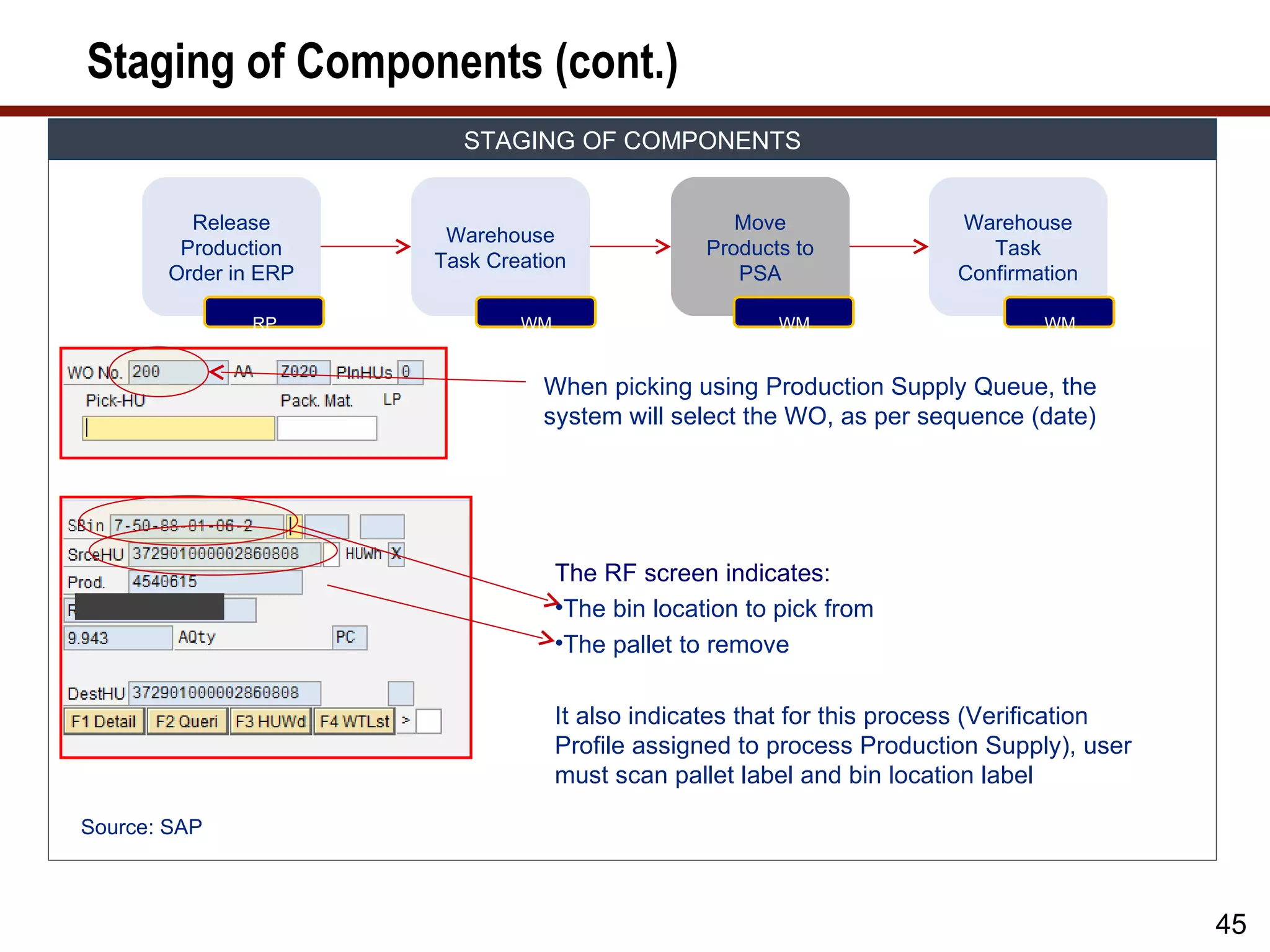
When picking using Production Supply Queue, the
system will select the WO, as per sequence (date)
The RF screen indicates:
•The bin location to pick from
•The pallet to remove
It also indicates that for this process (Verification
Profile assigned to process Production Supply), user
must scan pallet label and bin location label
Source: SAP
45
46.
Staging of Components(cont.)
STAGING OF COMPONENTS
Release Move Warehouse
Warehouse
Production Products to Task
Task Creation
Order in ERP PSA Confirmation
RP WM WM WM
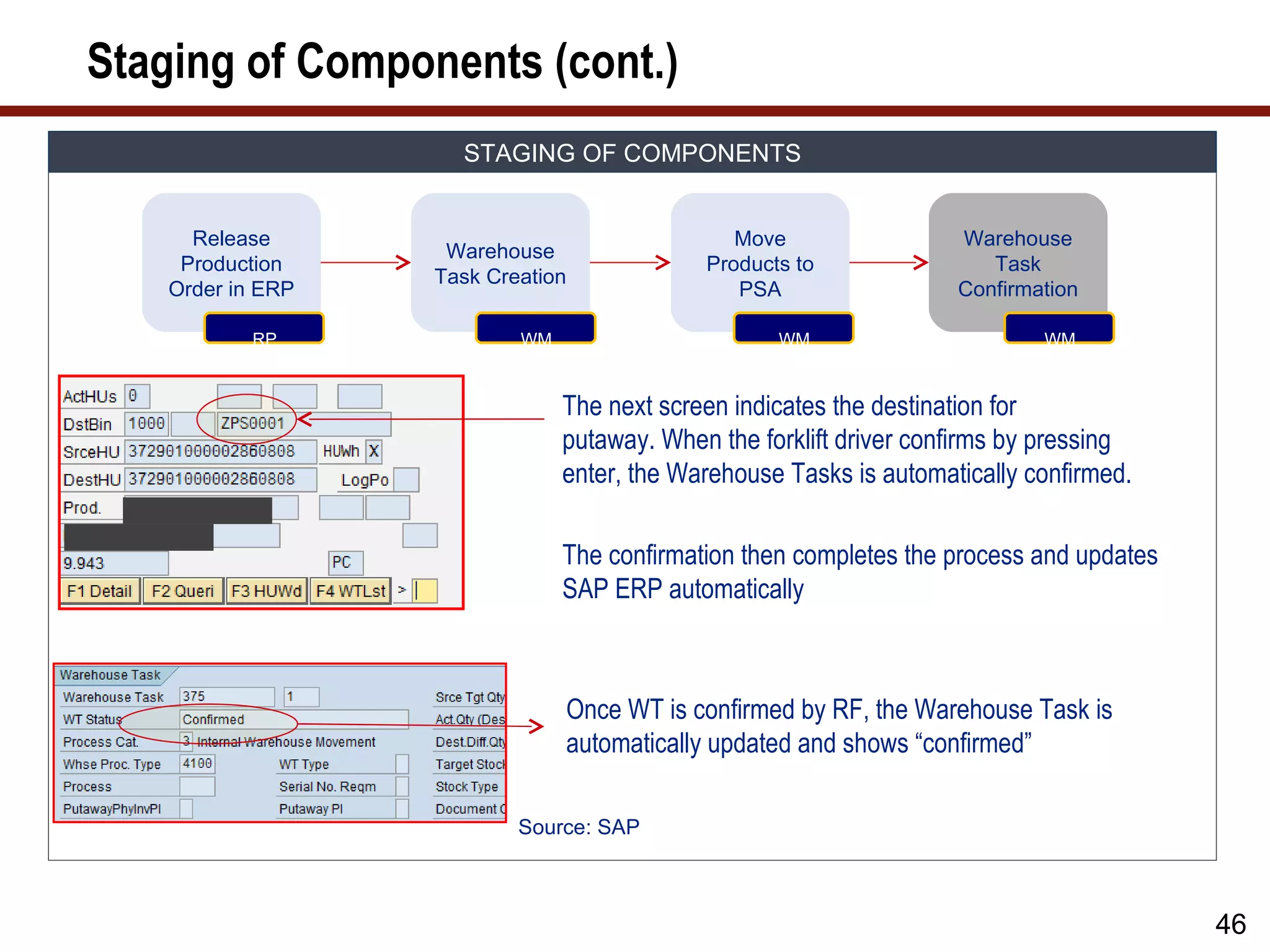
The next screen indicates the destination for
putaway. When the forklift driver confirms by pressing
enter, the Warehouse Tasks is automatically confirmed.
The confirmation then completes the process and updates
SAP ERP automatically
Once WT is confirmed by RF, the Warehouse Task is
automatically updated and shows “confirmed”
Source: SAP
46
47.
Staging of Components(cont.)
STAGING OF COMPONENTS
Production
Release Stage Move Warehouse
Supply Warehouse
Production Components Products to Task
Posting Task Creation
Order in ERP in ERP PSA Confirmation
Change
Page 47
RP RP WM WM WM WM
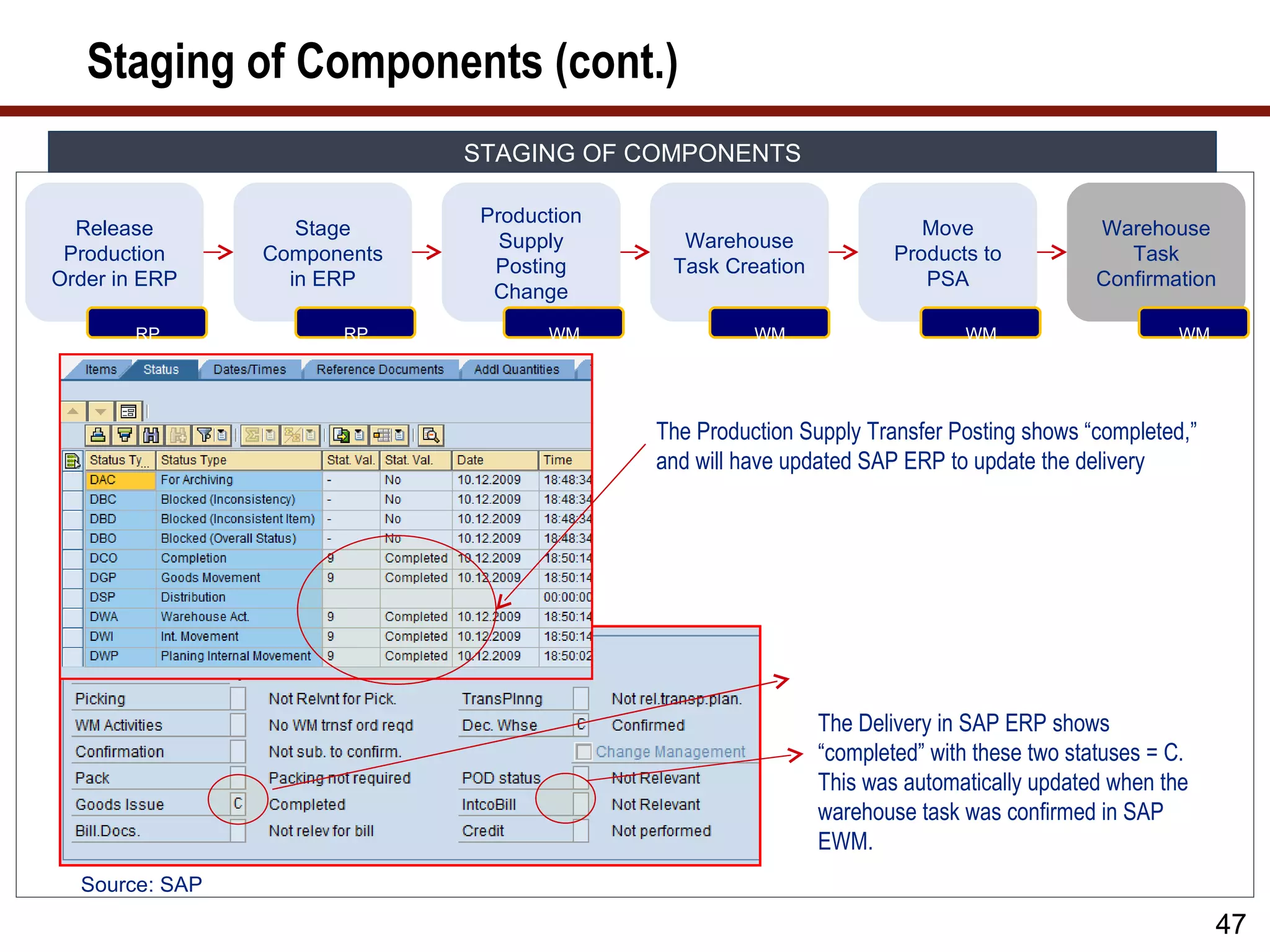
The Production Supply Transfer Posting shows “completed,”
and will have updated SAP ERP to update the delivery
The Delivery in SAP ERP shows
“completed” with these two statuses = C.
This was automatically updated when the
warehouse task was confirmed in SAP
EWM.
Source: SAP
47
48.
Staging of Components– Production Order Changes
STAGING OF COMPONENTS FLOW – PRODUCTION ORDER CHANGES
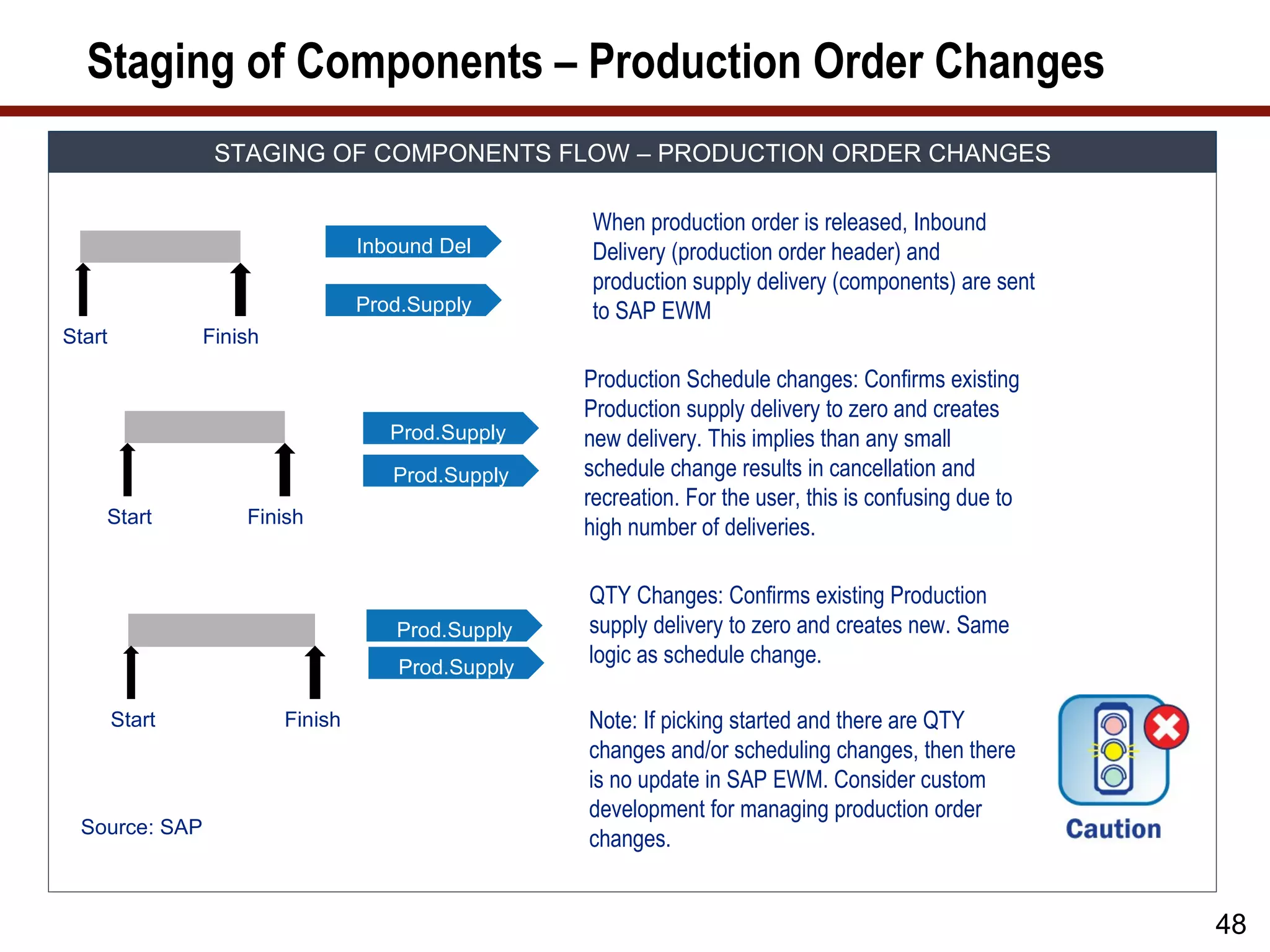
When production order is released, Inbound
Inbound Del Delivery (production order header) and
production supply delivery (components) are sent
Prod.Supply to SAP EWM
Start Finish
Production Schedule changes: Confirms existing
Production supply delivery to zero and creates
Prod.Supply new delivery. This implies than any small
Prod.Supply schedule change results in cancellation and
recreation. For the user, this is confusing due to
Start Finish
high number of deliveries.
QTY Changes: Confirms existing Production
Prod.Supply supply delivery to zero and creates new. Same
Prod.Supply
logic as schedule change.
Start Finish Note: If picking started and there are QTY
changes and/or scheduling changes, then there
is no update in SAP EWM. Consider custom
development for managing production order
Source: SAP
changes.
48
49.
Bulk Supply
BULK SUPPLY
Move Warehouse
Verification of Execute Bulk Warehouse
Products to Task
Bulk Situation Replenishment Task Creation
PSA Confirmation
WM WM WM WM WM
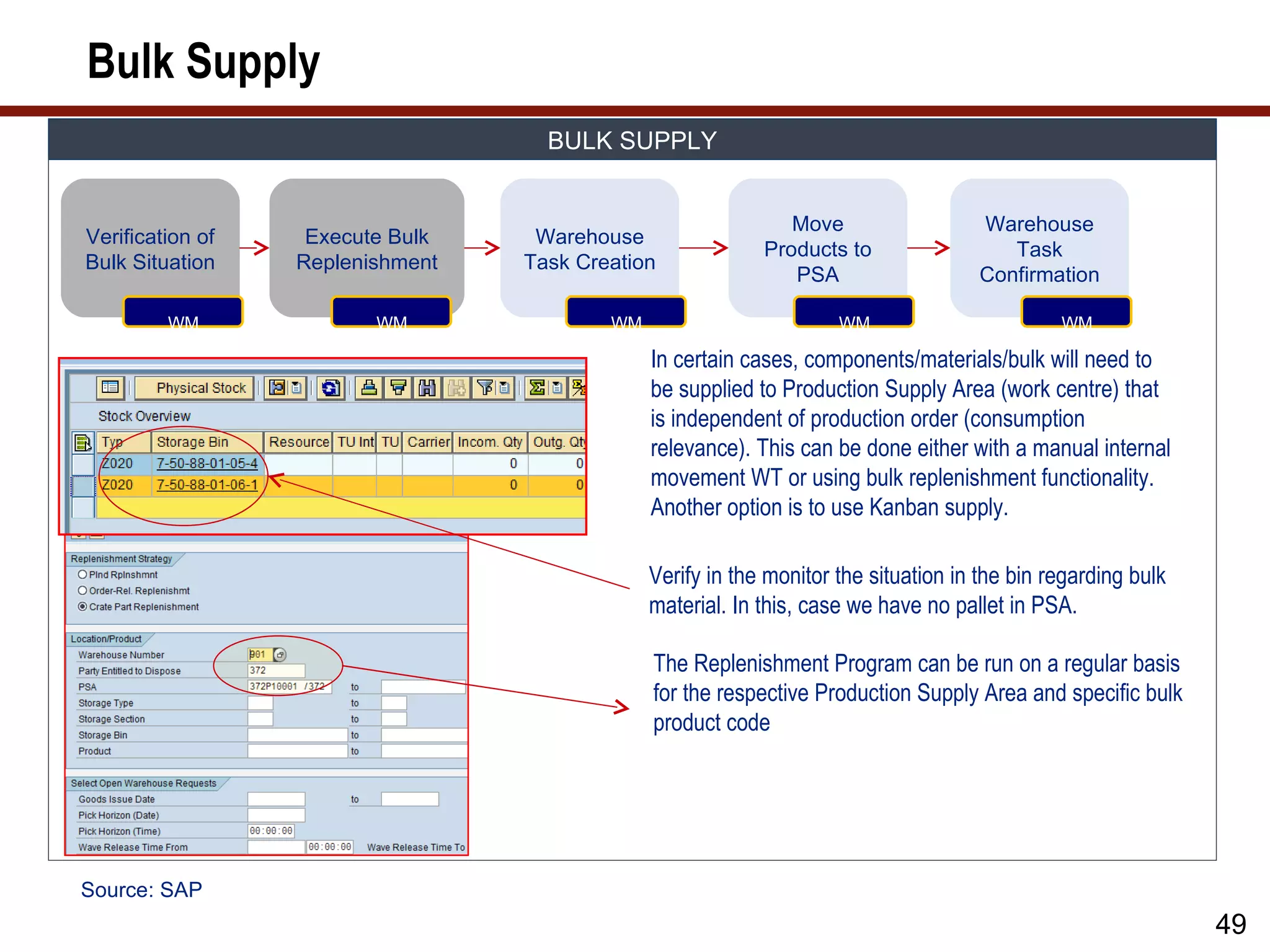
In certain cases, components/materials/bulk will need to
be supplied to Production Supply Area (work centre) that
is independent of production order (consumption
relevance). This can be done either with a manual internal
movement WT or using bulk replenishment functionality.
Another option is to use Kanban supply.
Verify in the monitor the situation in the bin regarding bulk
material. In this, case we have no pallet in PSA.
The Replenishment Program can be run on a regular basis
for the respective Production Supply Area and specific bulk
product code
Source: SAP
49
50.
Bulk Supply (cont.)
BULK SUPPLY
Move Warehouse
Verification of Execute Bulk Warehouse
Products to Task
Bulk Situation Replenishment Task Creation
PSA Confirmation
WM WM WM WM WM
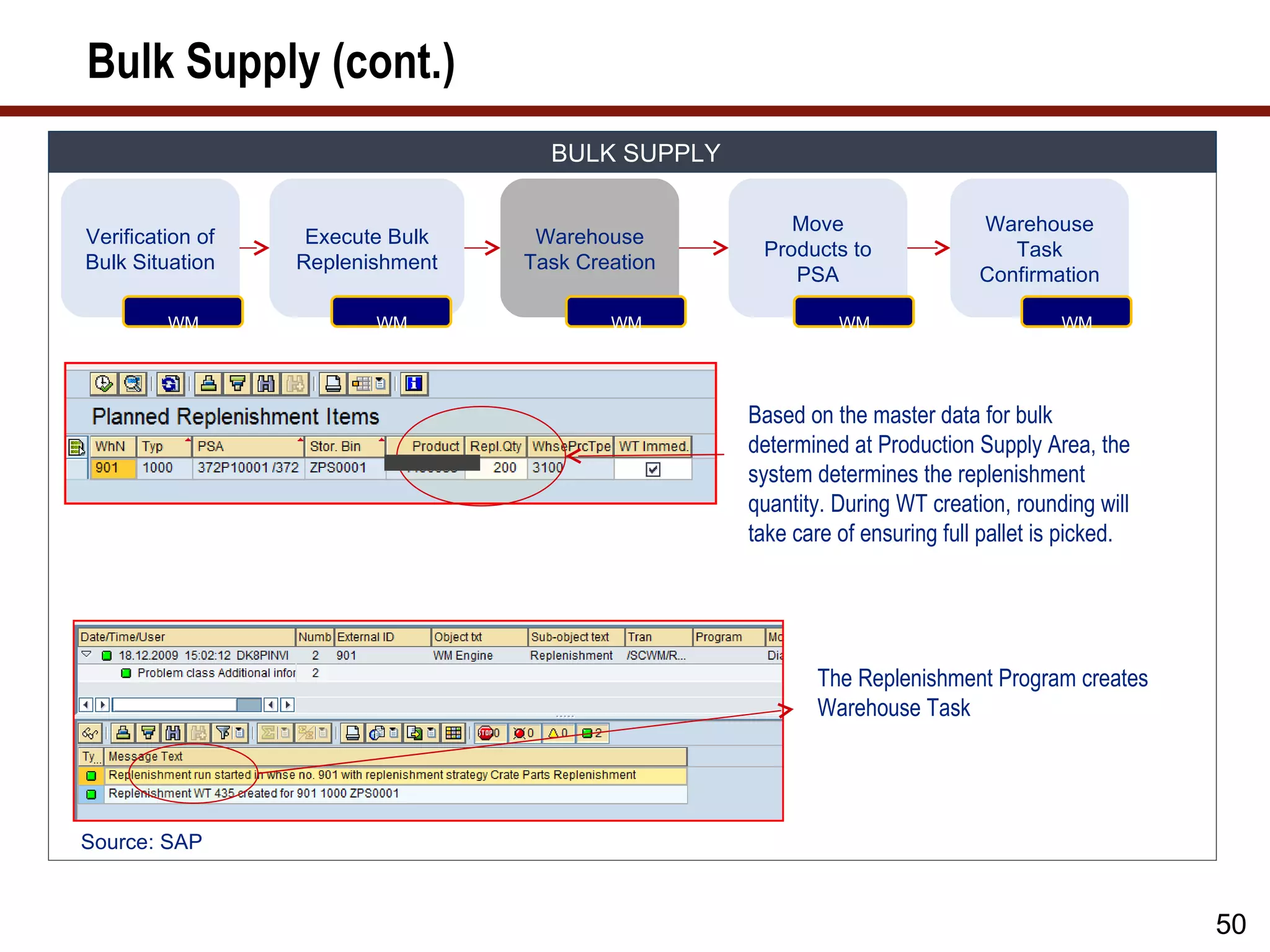
Based on the master data for bulk
determined at Production Supply Area, the
system determines the replenishment
quantity. During WT creation, rounding will
take care of ensuring full pallet is picked.
The Replenishment Program creates
Warehouse Task
Source: SAP
50
51.
Bulk Supply (cont.)
BULK SUPPLY
Move Warehouse
Verification of Execute Bulk Warehouse
Products to Task
Bulk Situation Replenishment Task Creation
PSA Confirmation
WM WM WM WM WM
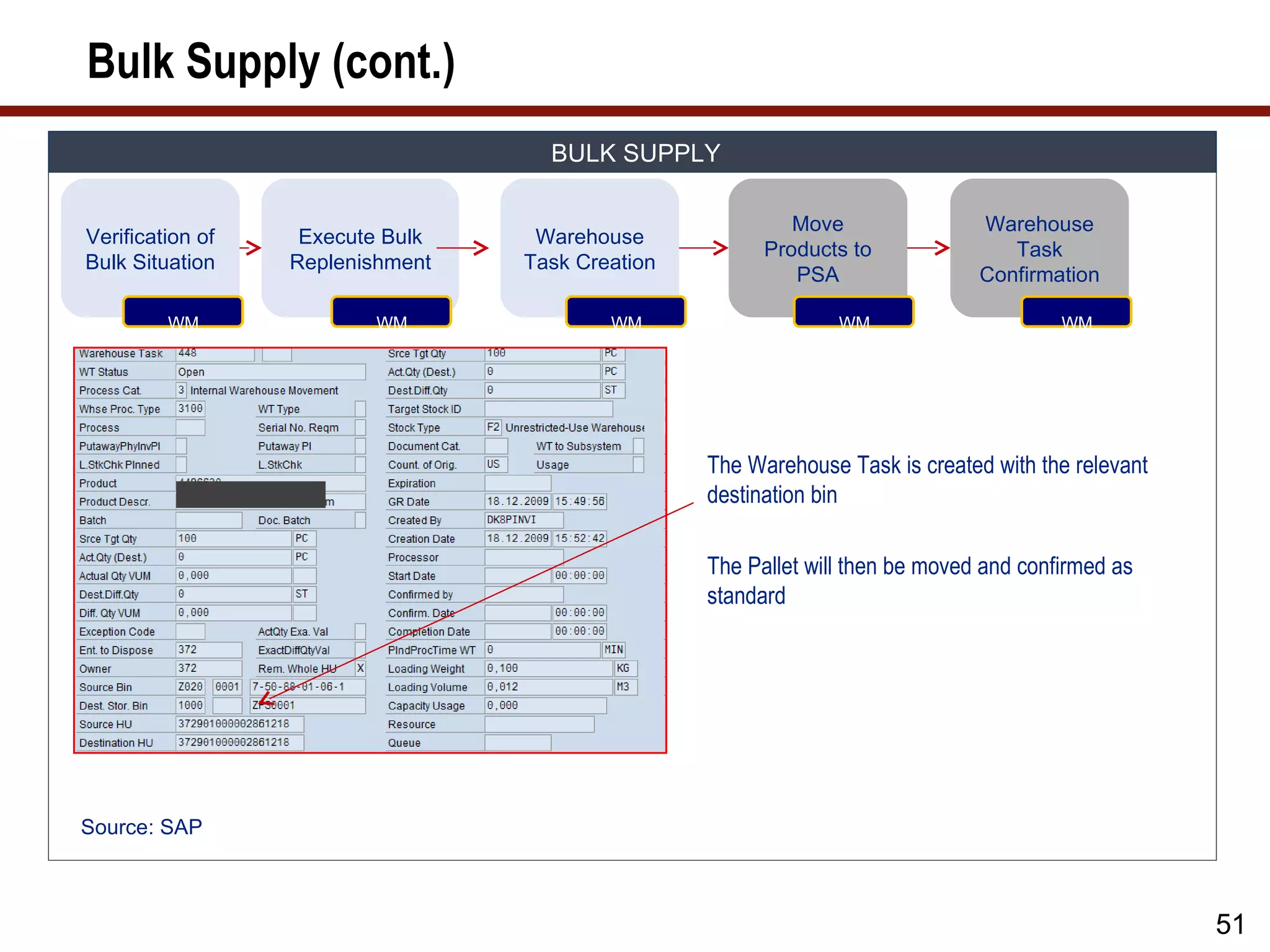
The Warehouse Task is created with the relevant
destination bin
The Pallet will then be moved and confirmed as
standard
Source: SAP
51
52.
Kanban Flow
KANBAN FLOW
Kanban Pick and
Kanban setup Kanban signal ERP Posting
Delivery Confirmation
RP RP RP WM RP
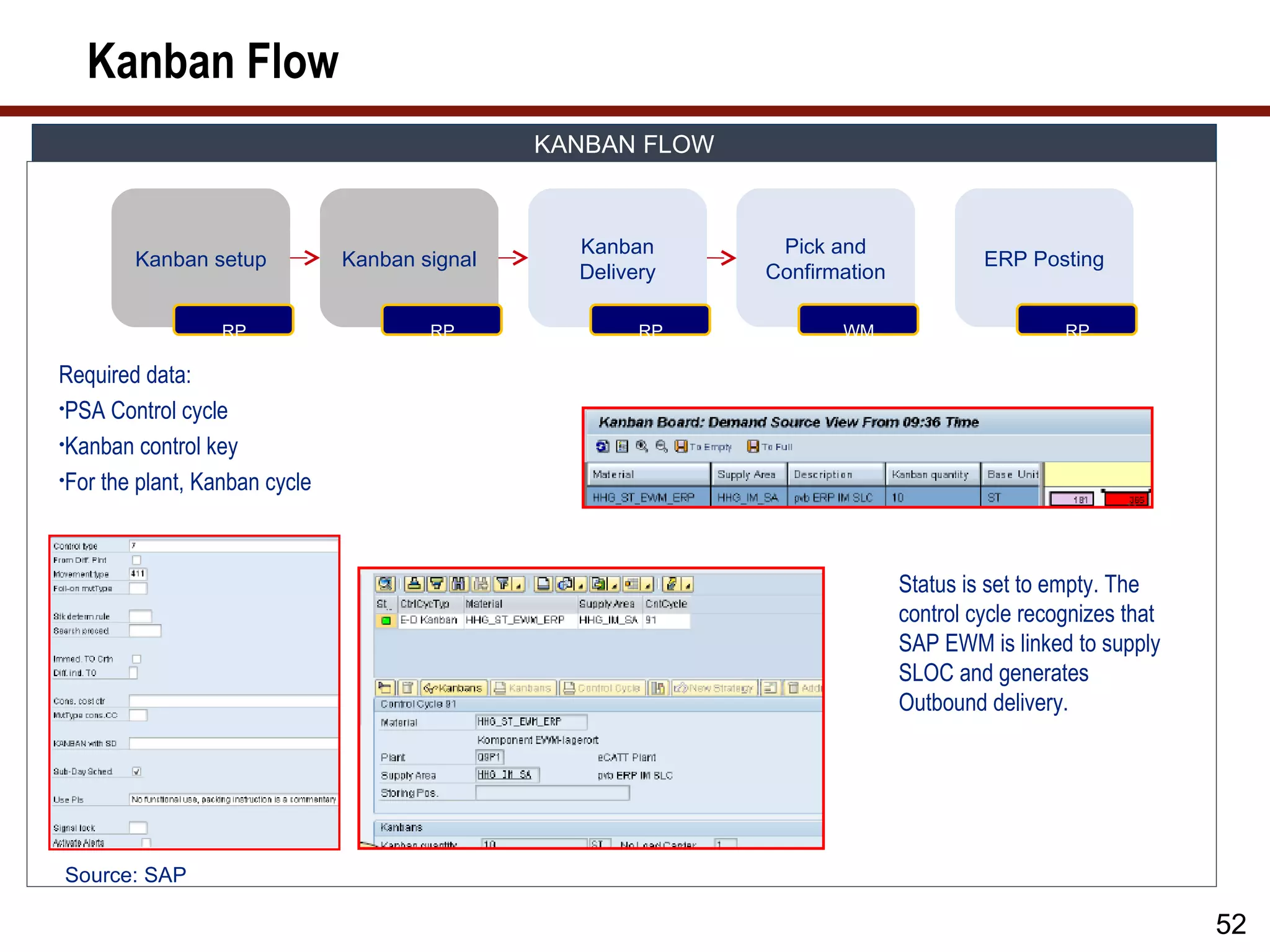
Required data:
•PSA Control cycle
•Kanban control key
•For the plant, Kanban cycle
Status is set to empty. The
control cycle recognizes that
SAP EWM is linked to supply
SLOC and generates
Outbound delivery.
Source: SAP
52
53.
Kanban Flow (cont.)
KANBAN FLOW
Kanban Pick and
Kanban setup Kanban signal ERP Posting
Delivery Confirmation
RP RP RP WM RP
For the Kanban In SAP EWM, Kanban supply delivery is created which will be of
container ID, delivery a unique type. Picking will then be carried out, as per normal
is created with the pick strategies. Important: It could be that quantity in SAP EWM
relevant SAP EWM does not correspond; therefore, consider rounding to multiple of
supply area pallet quantity.
Completion of picking requires Goods Issue of the delivery
Source: SAP
53
54.
Kanban Flow (cont.)
KANBAN FLOW
Kanban Pick and
Kanban setup Kanban signal ERP Posting
Delivery Confirmation
RP RP RP WM RP
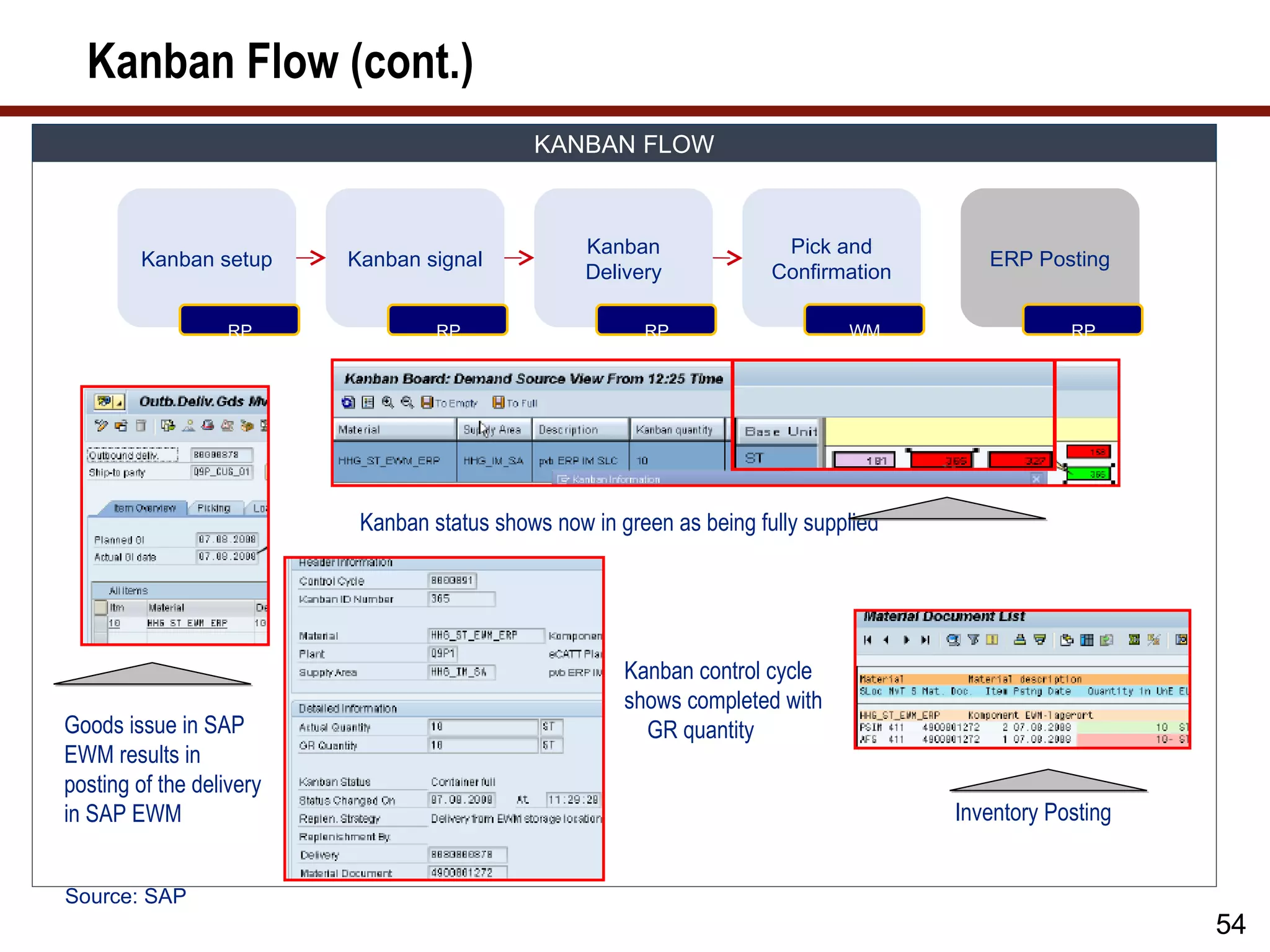
Kanban status shows now in green as being fully supplied
Kanban control cycle
shows completed with
Goods issue in SAP GR quantity
EWM results in
posting of the delivery
in SAP EWM Inventory Posting
Source: SAP
54
55.
Production Supply Monitoring
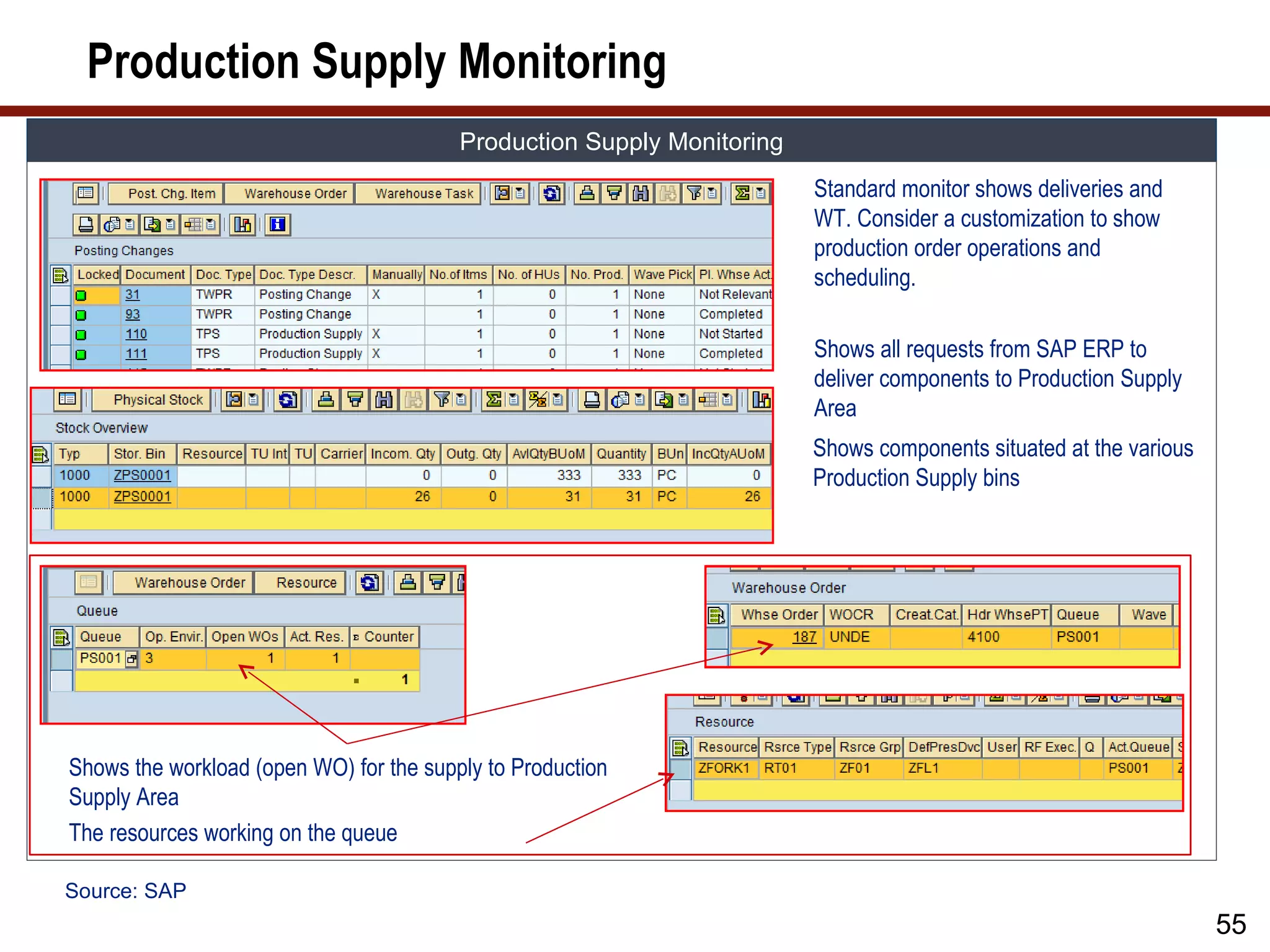
Warehouse Activity Monitor: The Monitor shows the following relevant information.
Production Supply Monitoring
Standard monitor shows deliveries and
WT. Consider a customization to show
production order operations and
scheduling.
Shows all requests from SAP ERP to
deliver components to Production Supply
Area
Shows components situated at the various
Production Supply bins
Shows the workload (open WO) for the supply to Production
Supply Area
The resources working on the queue
Source: SAP
55
56.
Production Supply Summary
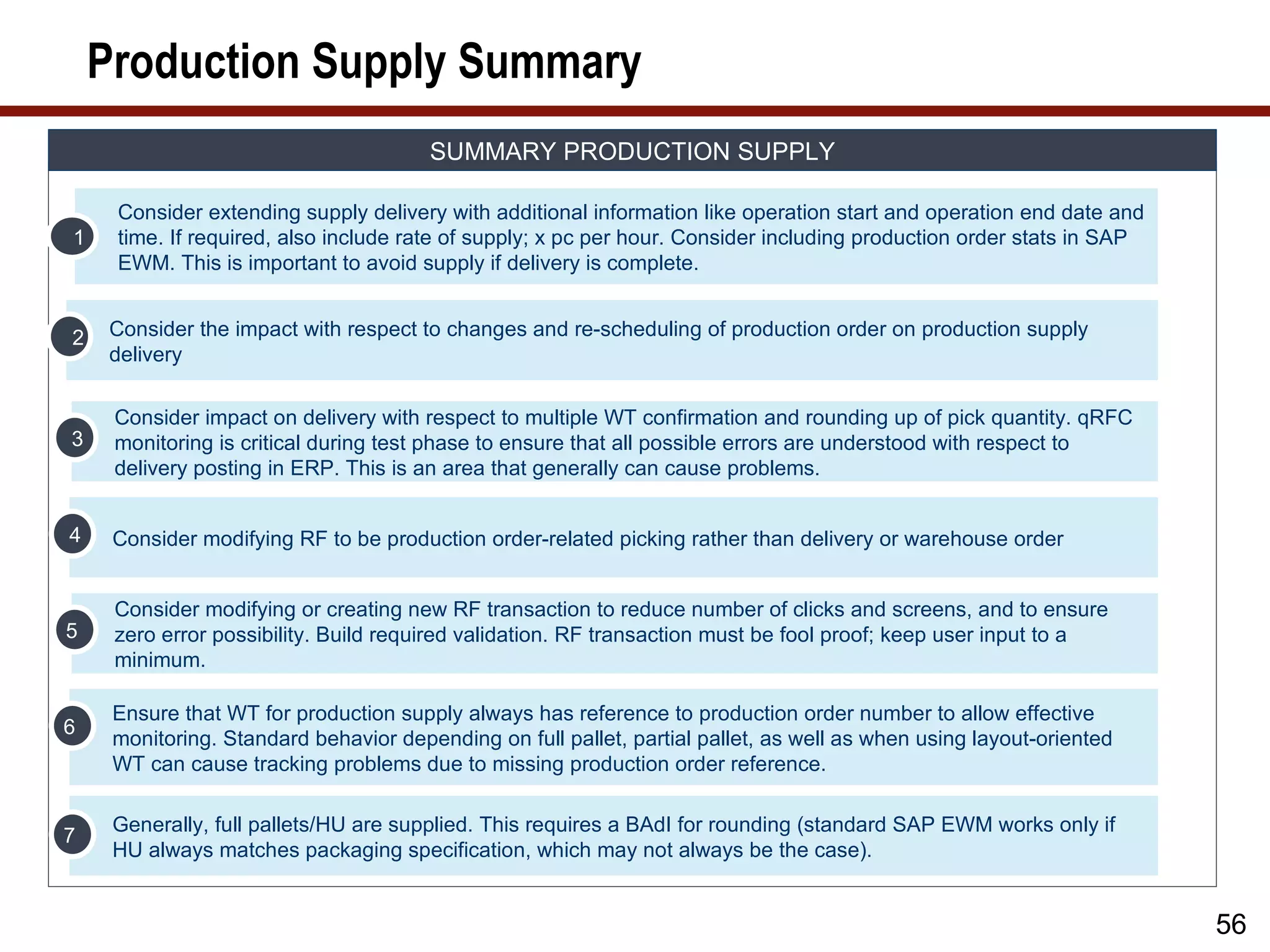
SUMMARY PRODUCTION SUPPLY
Consider extending supply delivery with additional information like operation start and operation end date and
1 time. If required, also include rate of supply; x pc per hour. Consider including production order stats in SAP
EWM. This is important to avoid supply if delivery is complete.
2 Consider the impact with respect to changes and re-scheduling of production order on production supply
delivery
Consider impact on delivery with respect to multiple WT confirmation and rounding up of pick quantity. qRFC
3 monitoring is critical during test phase to ensure that all possible errors are understood with respect to
delivery posting in ERP. This is an area that generally can cause problems.
4 Consider modifying RF to be production order-related picking rather than delivery or warehouse order
Consider modifying or creating new RF transaction to reduce number of clicks and screens, and to ensure
5 zero error possibility. Build required validation. RF transaction must be fool proof; keep user input to a
minimum.
Ensure that WT for production supply always has reference to production order number to allow effective
6
monitoring. Standard behavior depending on full pallet, partial pallet, as well as when using layout-oriented
WT can cause tracking problems due to missing production order reference.
Generally, full pallets/HU are supplied. This requires a BAdI for rounding (standard SAP EWM works only if
7
HU always matches packaging specification, which may not always be the case).
56
57.
Component Consumption
Consumption of Components
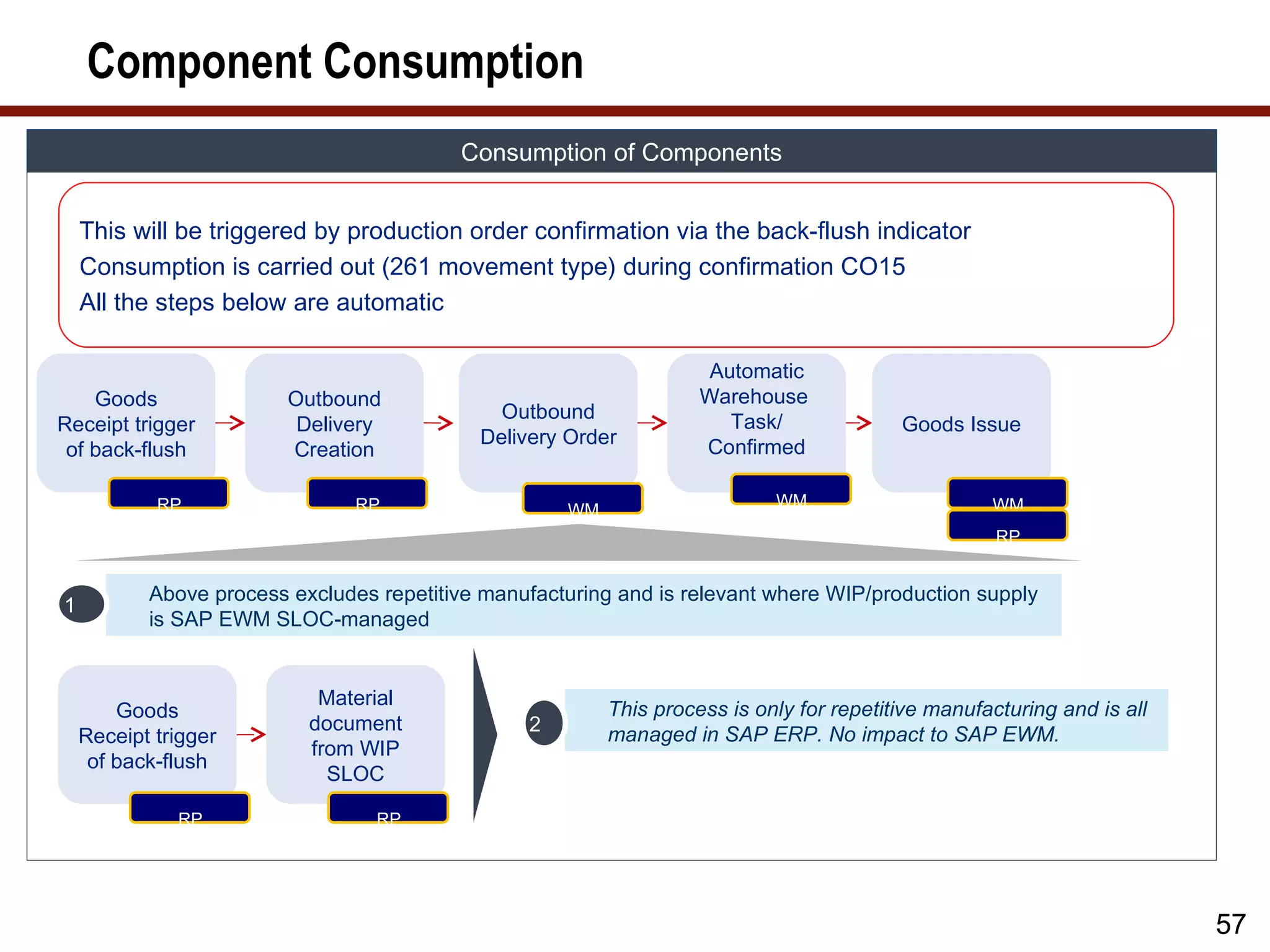
This will be triggered by production order confirmation via the back-flush indicator
Consumption is carried out (261 movement type) during confirmation CO15
All the steps below are automatic
Automatic
Goods Outbound Warehouse
Outbound Task/
Receipt trigger Delivery Goods Issue
Delivery Order Confirmed
of back-flush Creation
RP RP WM WM
WM
RP
Above process excludes repetitive manufacturing and is relevant where WIP/production supply
1
is SAP EWM SLOC-managed
Material
Goods This process is only for repetitive manufacturing and is all
document 2
Receipt trigger managed in SAP ERP. No impact to SAP EWM.
from WIP
of back-flush
SLOC
RP RP
57
58.
Component Consumption (cont.)
Consumption of Components
Picking and
Material Putaway of Consumption
Movement to Goods
Staging Manufactured of supply
Production Receipt
Request item components
Supply
PSA WT 1 PSA WT 2 PSA WT 3
Material Staging Request
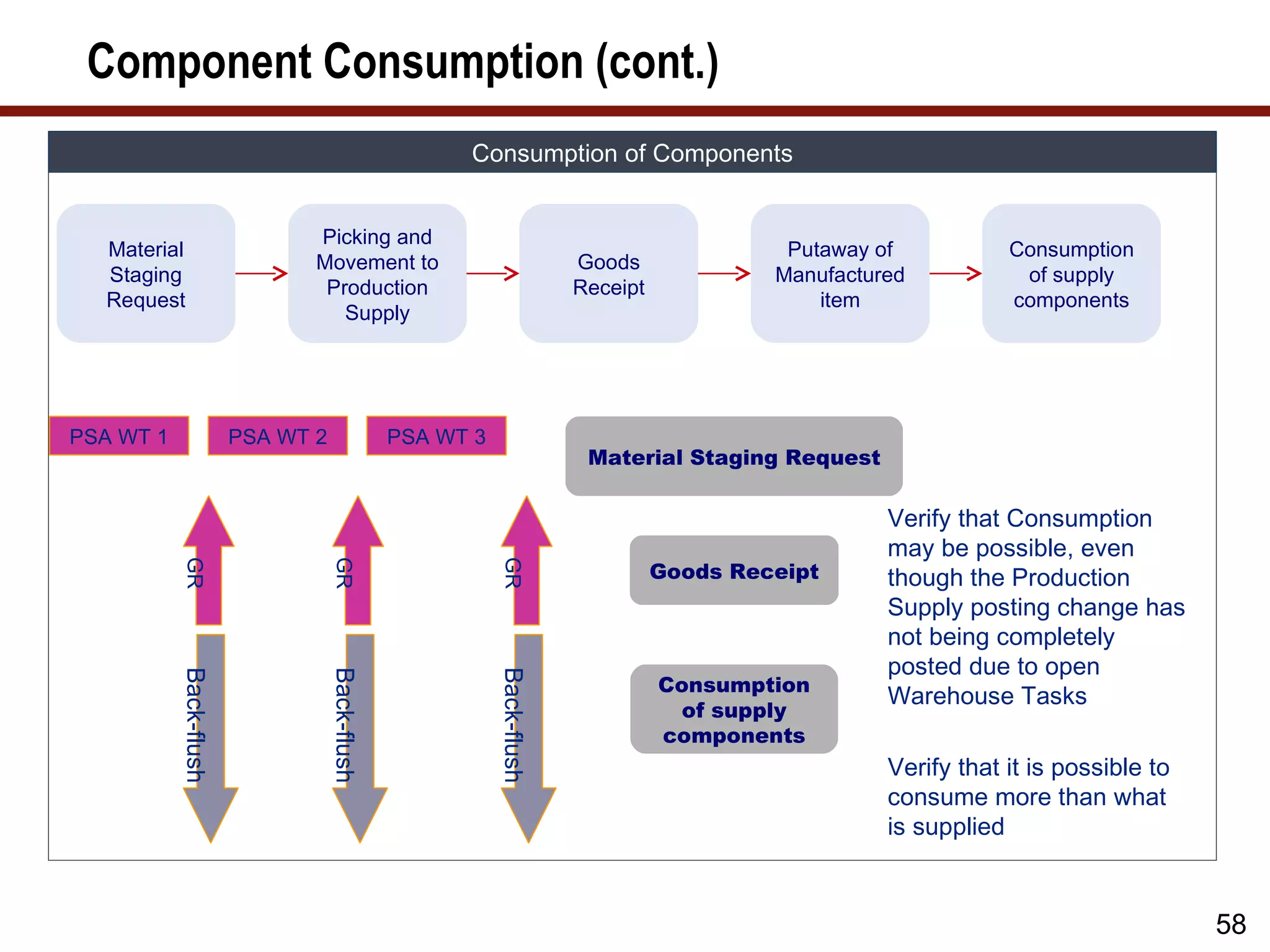
Verify that Consumption
may be possible, even
Goods Receipt
GR
GR
GR
though the Production
Supply posting change has
not being completely
posted due to open
Back-flush
Back-flush
Back-flush
Consumption
Warehouse Tasks
of supply
components
Verify that it is possible to
consume more than what
is supplied
58
59.
Component Consumption (cont.)
Consumption of Components
Outbound Automatic
Goods Outbound
Delivery Outbound Warehouse
Receipt trigger Delivery Goods Issue
Replication to Delivery Order Task/
of back-flush Creation
EWM Confirmed
RP RP WM WM WM WM
RP
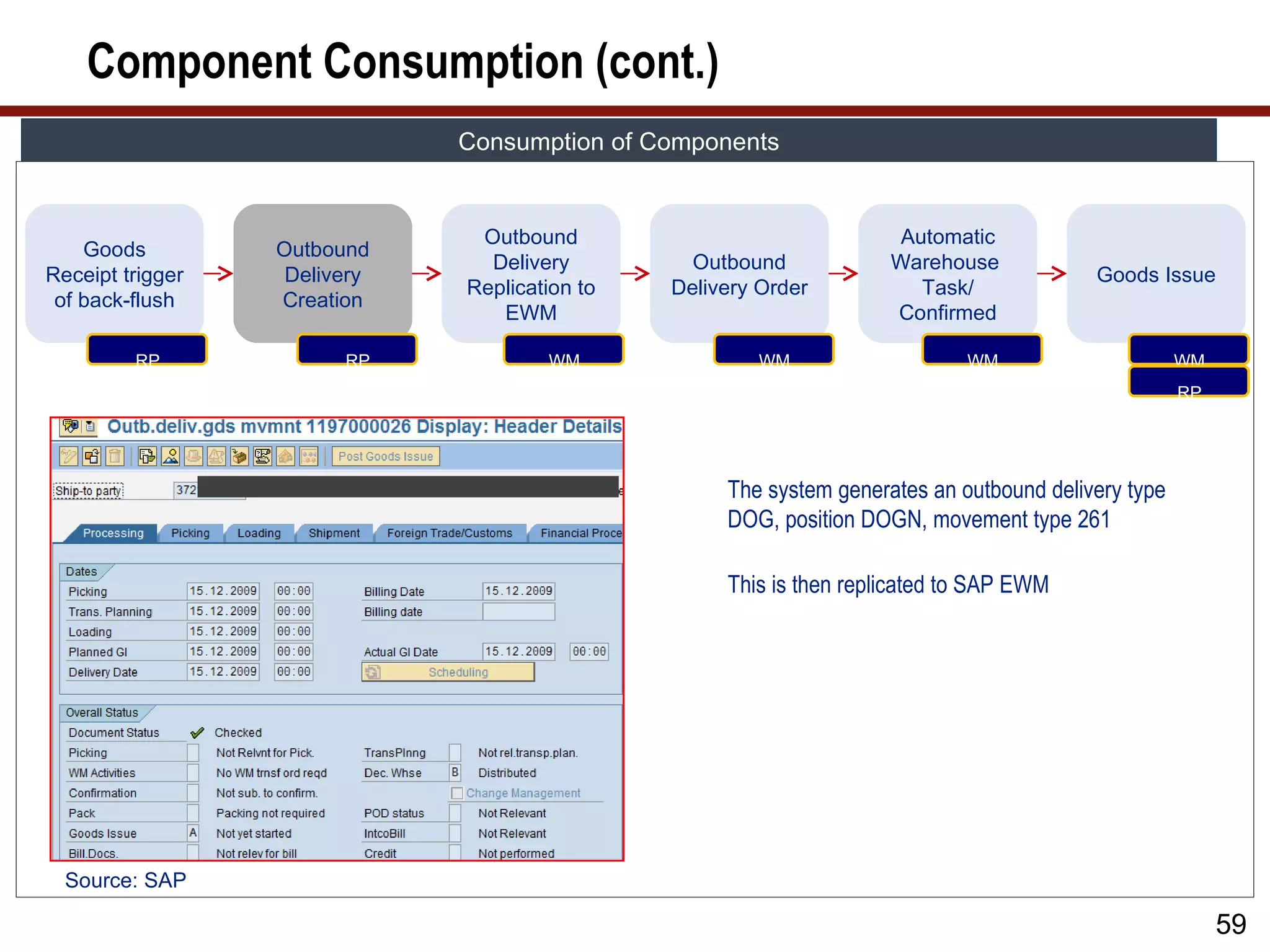
The system generates an outbound delivery type
DOG, position DOGN, movement type 261
This is then replicated to SAP EWM
Source: SAP
59
60.
Component Consumption (cont.)
Consumption of Components
Outbound Automatic
Goods Outbound
Delivery Outbound Warehouse
Receipt trigger Delivery Goods Issue
Replication to Delivery Order Task/
of back-flush Creation
EWM Confirmed
RP RP WM WM WM WM
RP
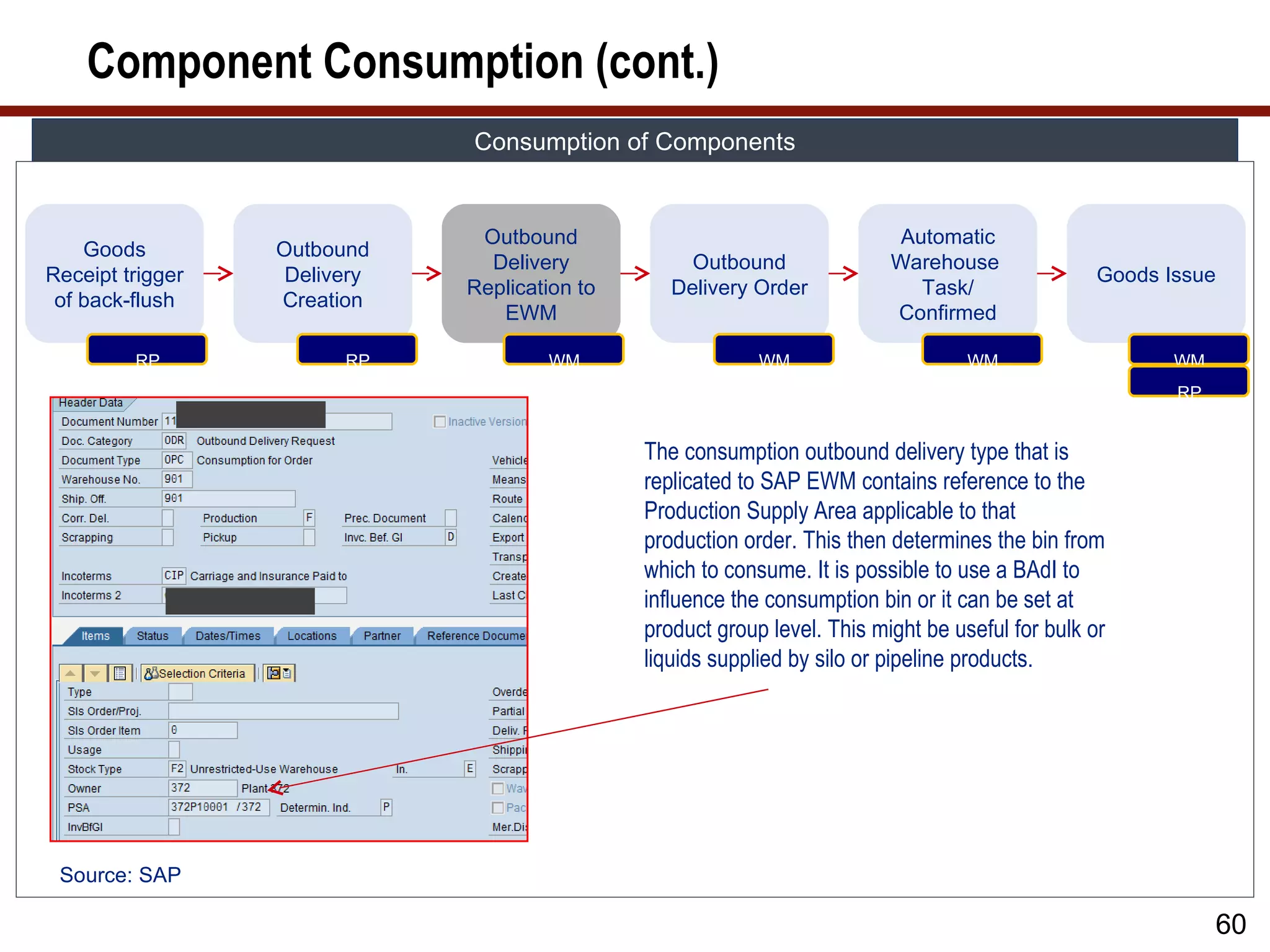
The consumption outbound delivery type that is
replicated to SAP EWM contains reference to the
Production Supply Area applicable to that
production order. This then determines the bin from
which to consume. It is possible to use a BAdI to
influence the consumption bin or it can be set at
product group level. This might be useful for bulk or
liquids supplied by silo or pipeline products.
Source: SAP
60
61.
Component Consumption (cont.)
Consumption of Components
Outbound Automatic
Goods Outbound
Delivery Outbound Warehouse
Receipt trigger Delivery Goods Issue
Replication to Delivery Order Task/
of back-flush Creation
EWM Confirmed
RP RP WM WM WM WM
RP
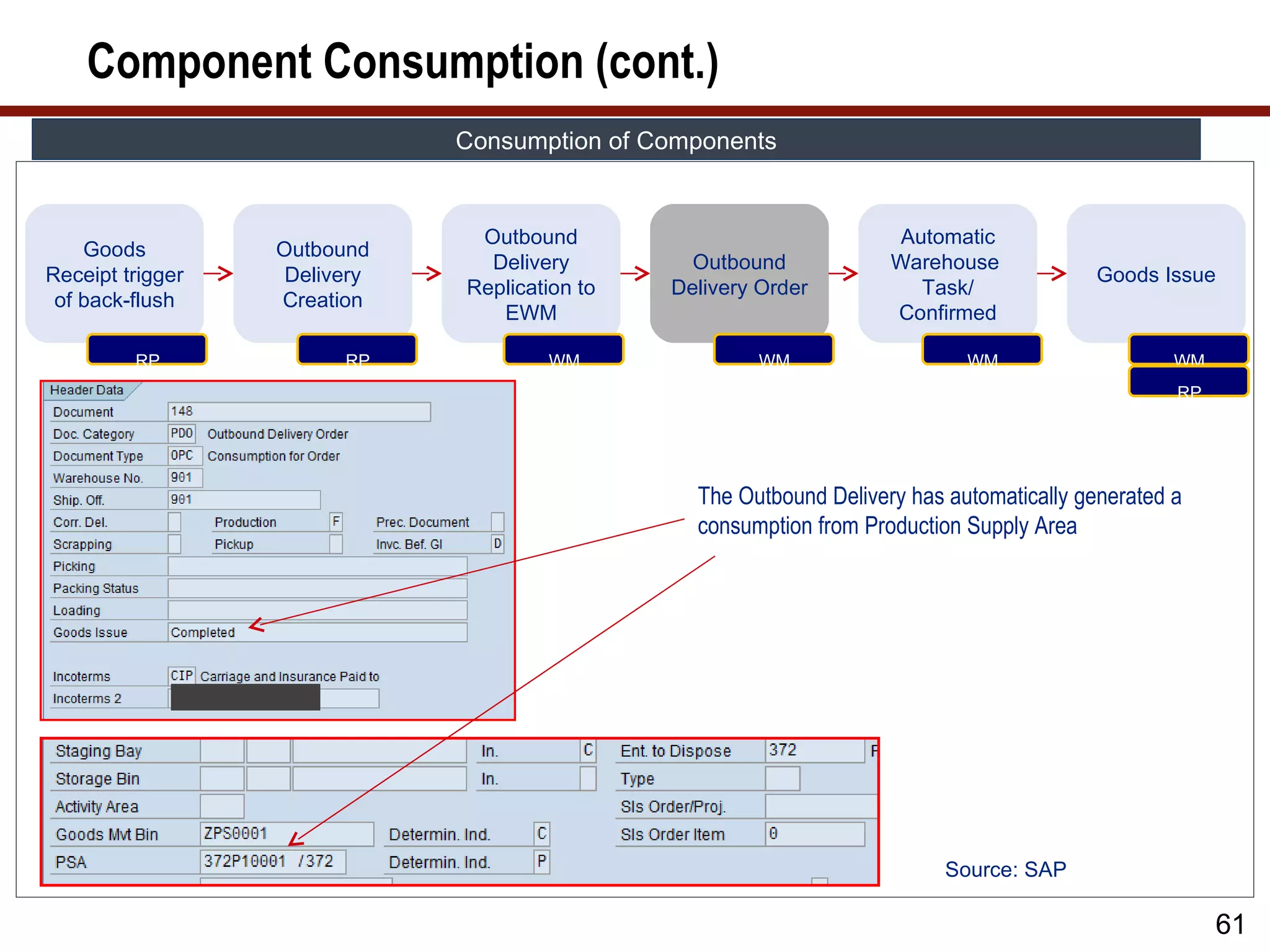
The Outbound Delivery has automatically generated a
consumption from Production Supply Area
Source: SAP
61
62.
Component Consumption (cont.)
Consumption of Components
Outbound Automatic
Goods Outbound
Delivery Outbound Warehouse
Receipt trigger Delivery Goods Issue
Replication to Delivery Order Task/
of back-flush Creation
EWM Confirmed
RP RP WM WM WM WM
RP
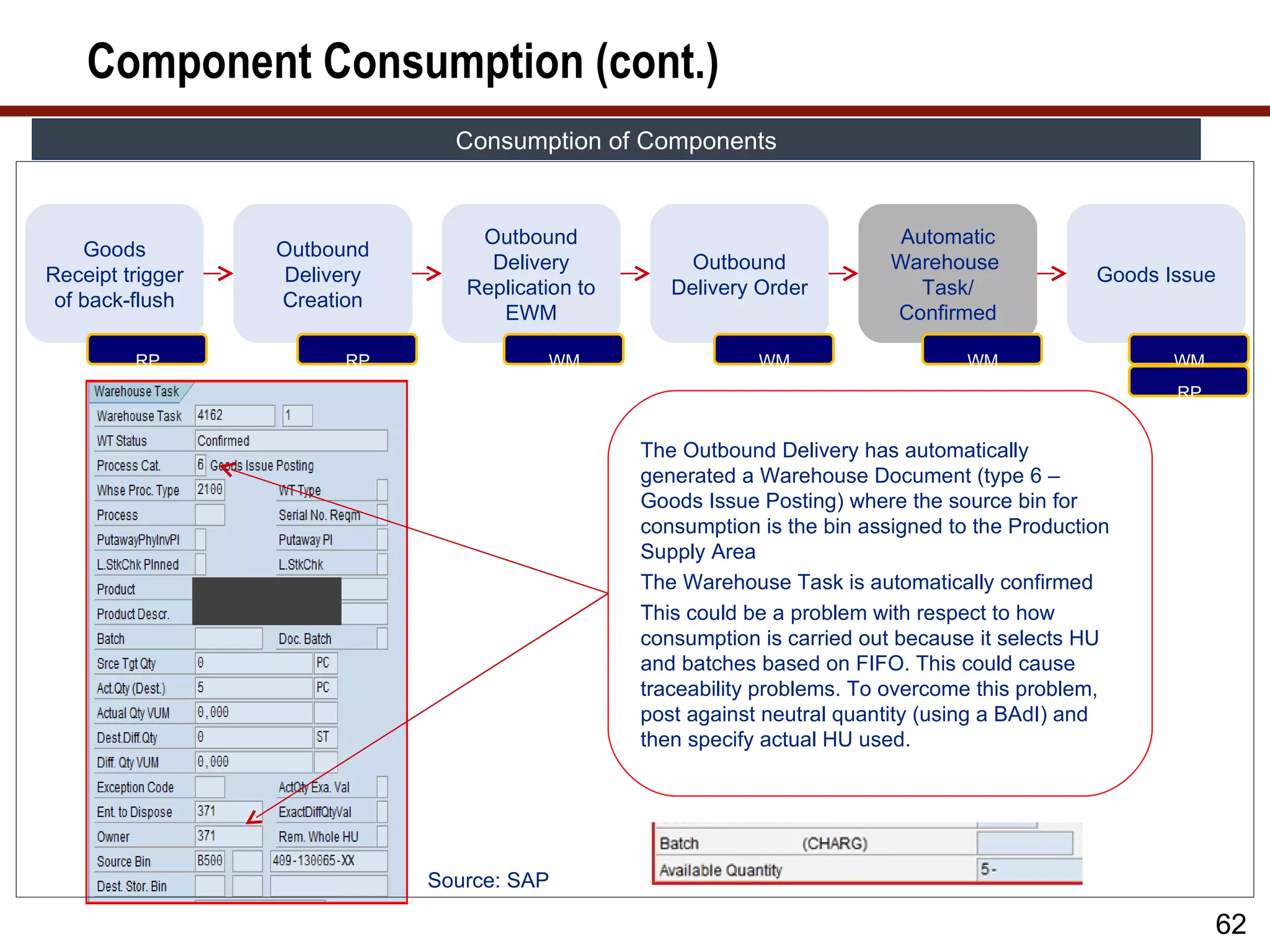
The Outbound Delivery has automatically
generated a Warehouse Document (type 6 –
Goods Issue Posting) where the source bin for
consumption is the bin assigned to the Production
Supply Area
The Warehouse Task is automatically confirmed
This could be a problem with respect to how
consumption is carried out because it selects HU
and batches based on FIFO. This could cause
traceability problems. To overcome this problem,
post against neutral quantity (using a BAdI) and
then specify actual HU used.
Source: SAP
62
63.
Component Consumption (cont.)
Consumption of Components
Outbound Automatic
Goods Outbound
Delivery Outbound Warehouse
Receipt trigger Delivery Goods Issue
Replication to Delivery Order Task/
of back-flush Creation
EWM Confirmed
RP RP WM WM WM WM
RP
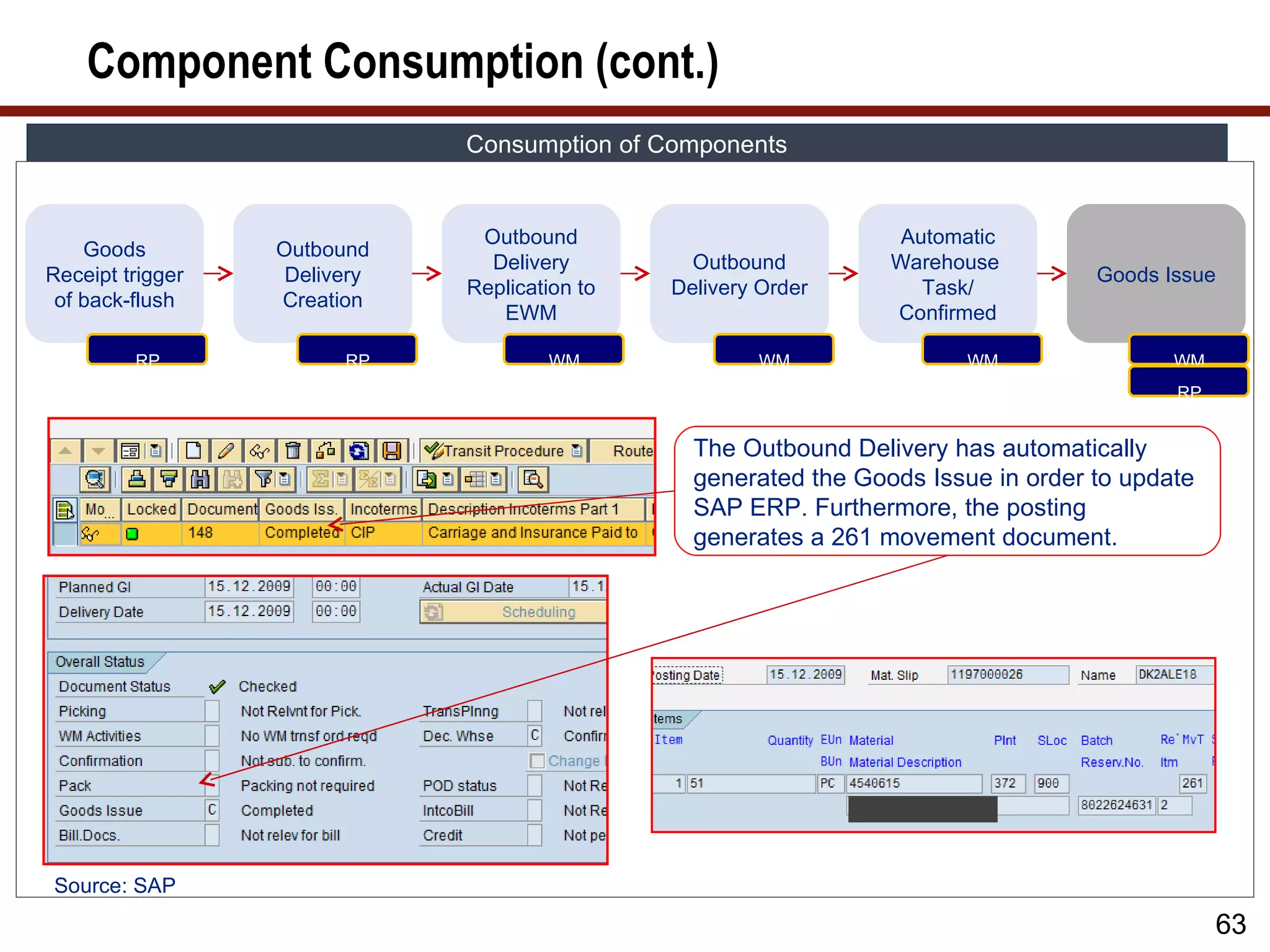
The Outbound Delivery has automatically
generated the Goods Issue in order to update
SAP ERP. Furthermore, the posting
generates a 261 movement document.
Source: SAP
63
64.
Component Consumption Example
Consumption of Components: Example
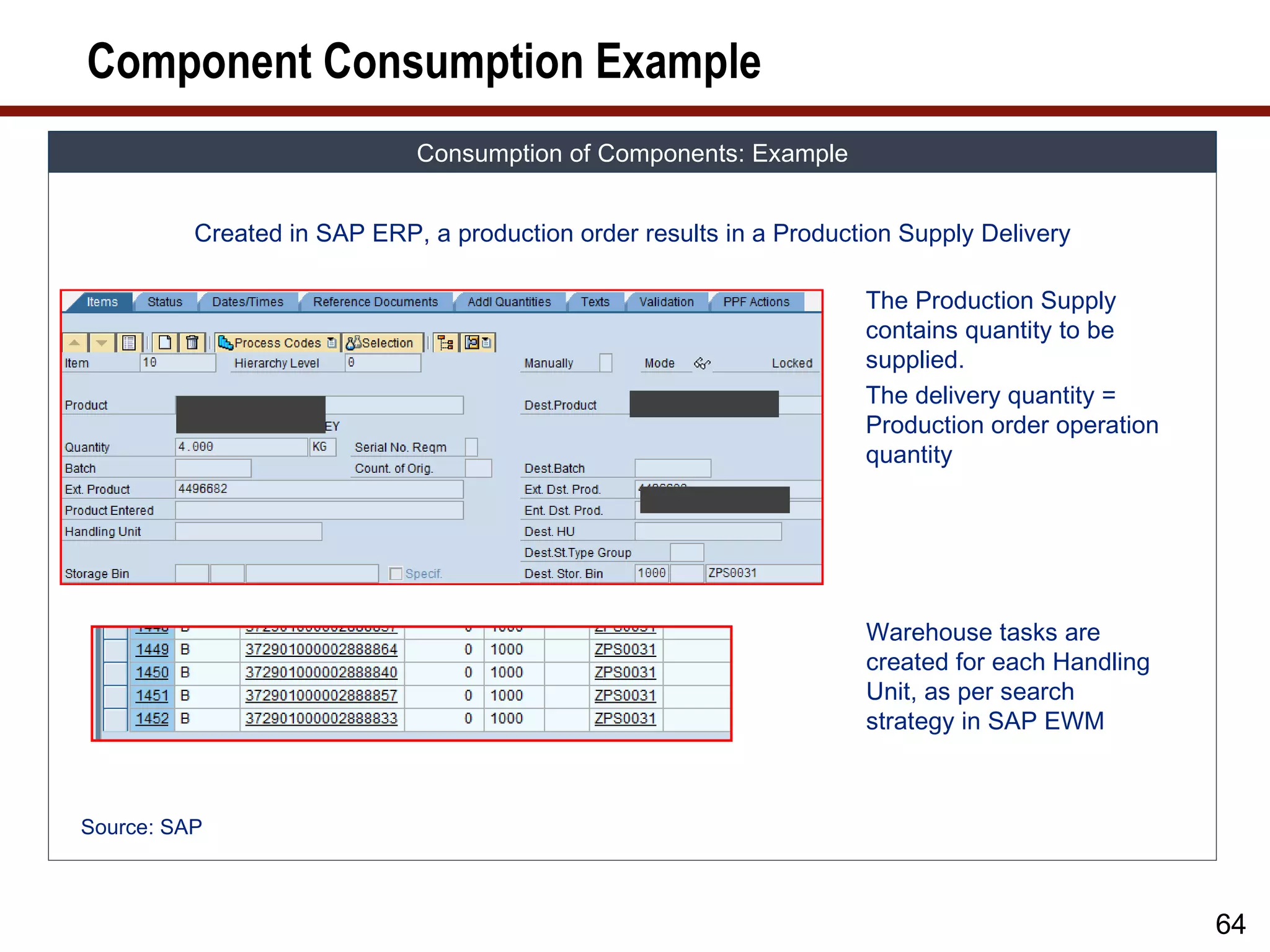
Created in SAP ERP, a production order results in a Production Supply Delivery
The Production Supply
contains quantity to be
supplied.
The delivery quantity =
Production order operation
quantity
Warehouse tasks are
created for each Handling
Unit, as per search
strategy in SAP EWM
Source: SAP
64
65.
Component Consumption
Consumption of Components
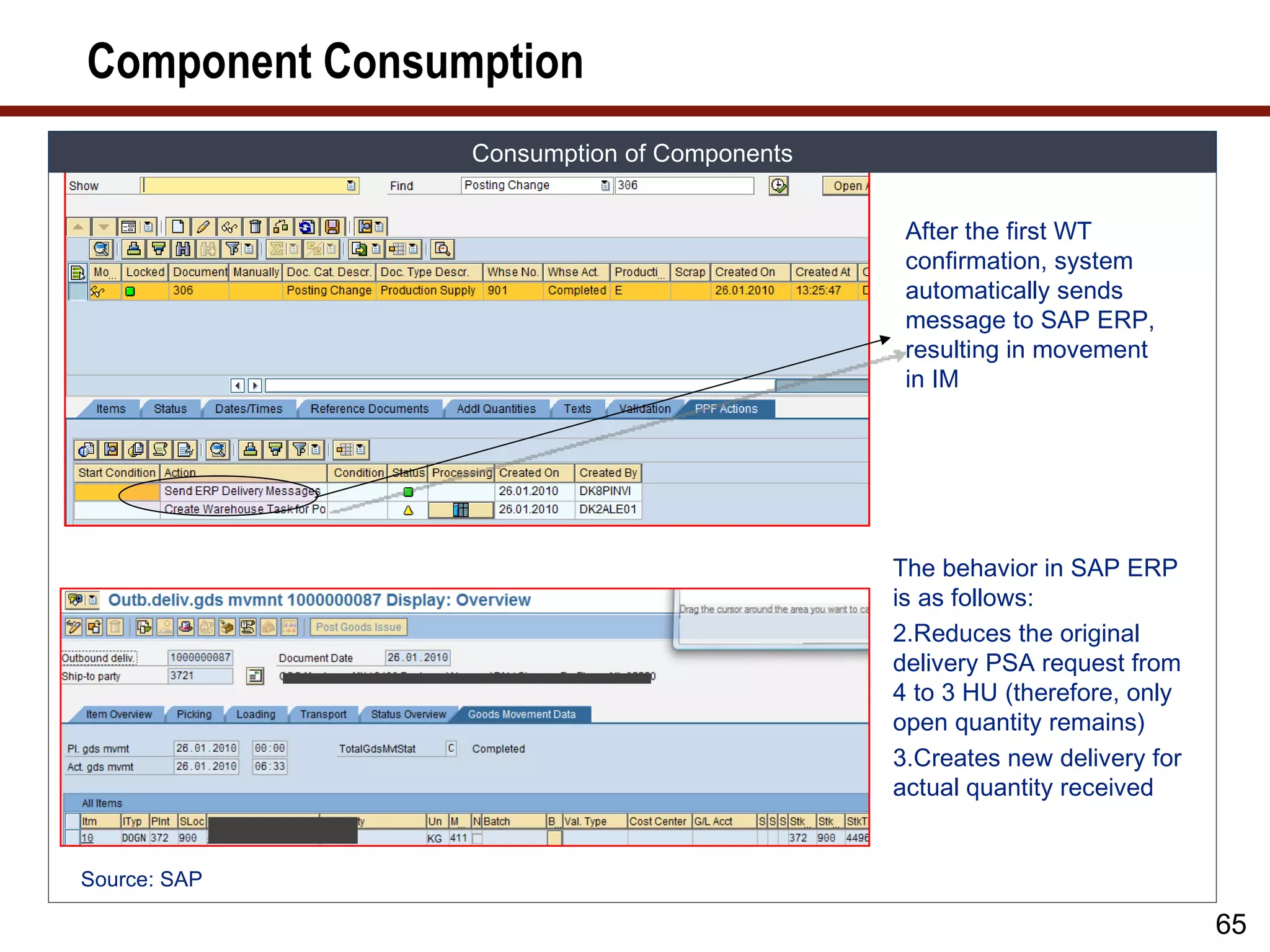
After the first WT
confirmation, system
automatically sends
message to SAP ERP,
resulting in movement
in IM
The behavior in SAP ERP
is as follows:
2.Reduces the original
delivery PSA request from
4 to 3 HU (therefore, only
open quantity remains)
3.Creates new delivery for
actual quantity received
Source: SAP
65
66.
Component Consumption (cont.)
Consumption of Components
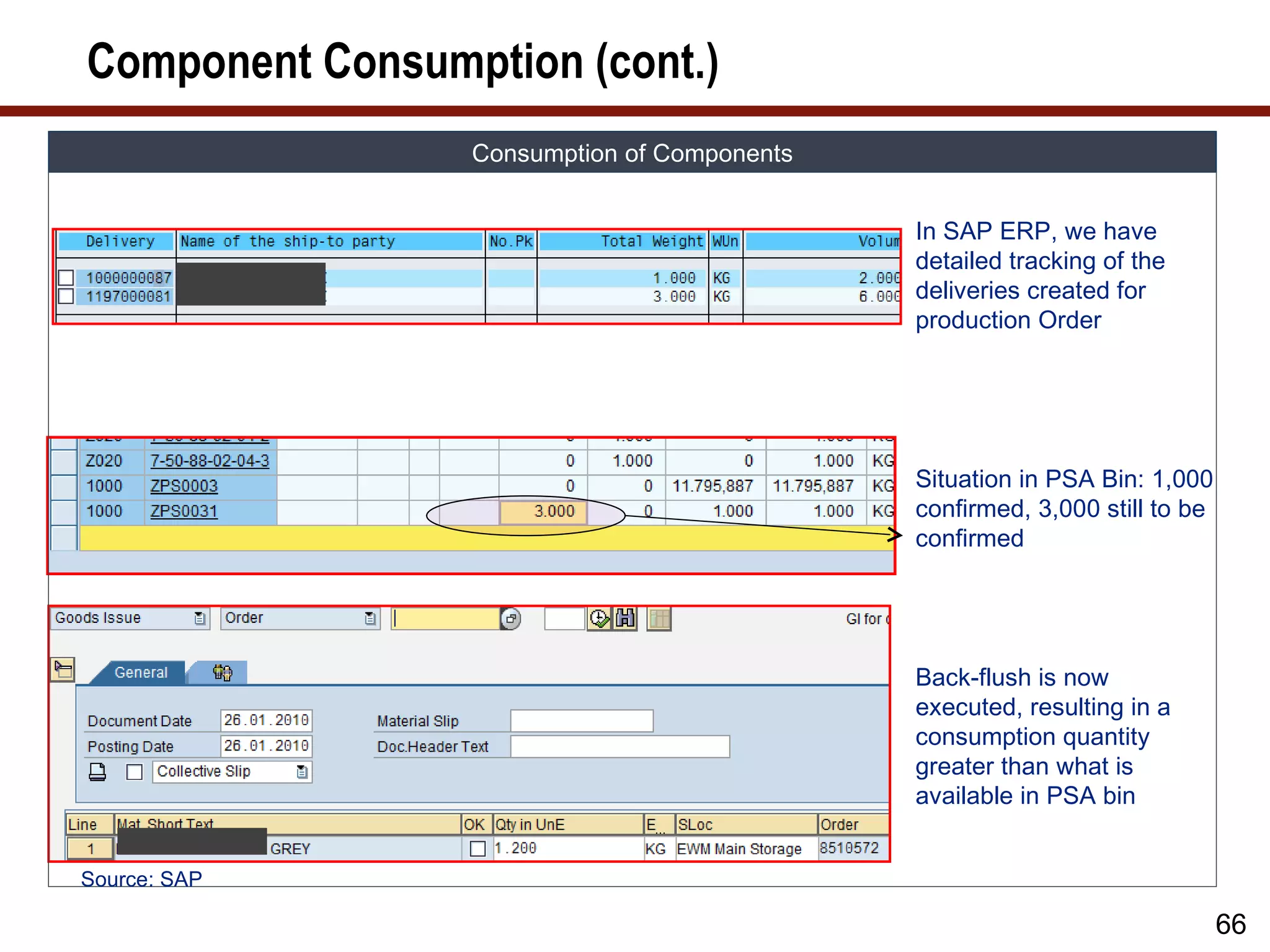
In SAP ERP, we have
detailed tracking of the
deliveries created for
production Order
Situation in PSA Bin: 1,000
confirmed, 3,000 still to be
confirmed
Back-flush is now
executed, resulting in a
consumption quantity
greater than what is
available in PSA bin
Source: SAP
66
67.
Component Consumption (cont.)
Consumption of Components
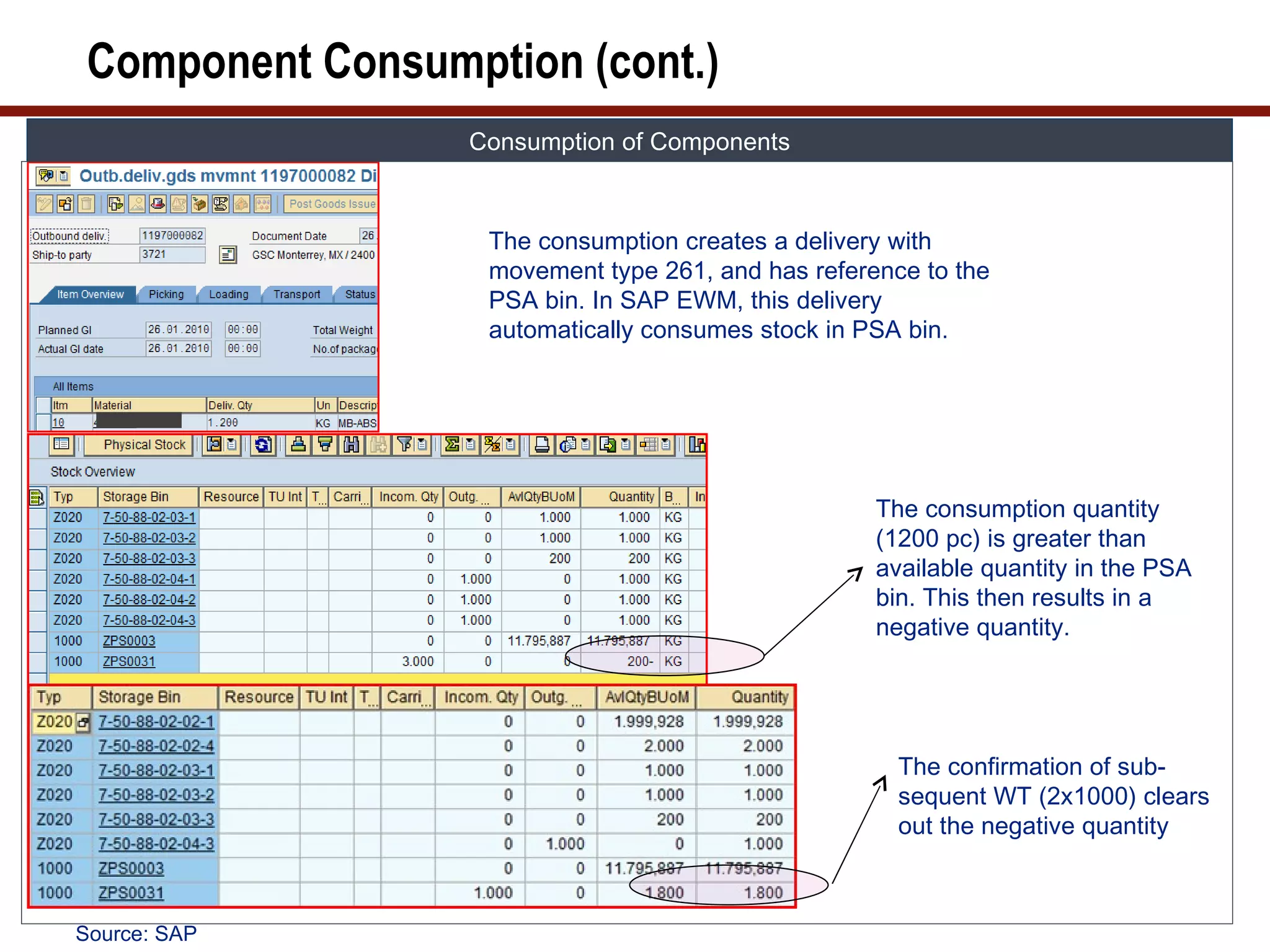
The consumption creates a delivery with
movement type 261, and has reference to the
PSA bin. In SAP EWM, this delivery
automatically consumes stock in PSA bin.
The consumption quantity
(1200 pc) is greater than
available quantity in the PSA
bin. This then results in a
negative quantity.
The confirmation of sub-
sequent WT (2x1000) clears
out the negative quantity
Source: SAP
68.
Component Consumption (cont.)
Consumption of Components
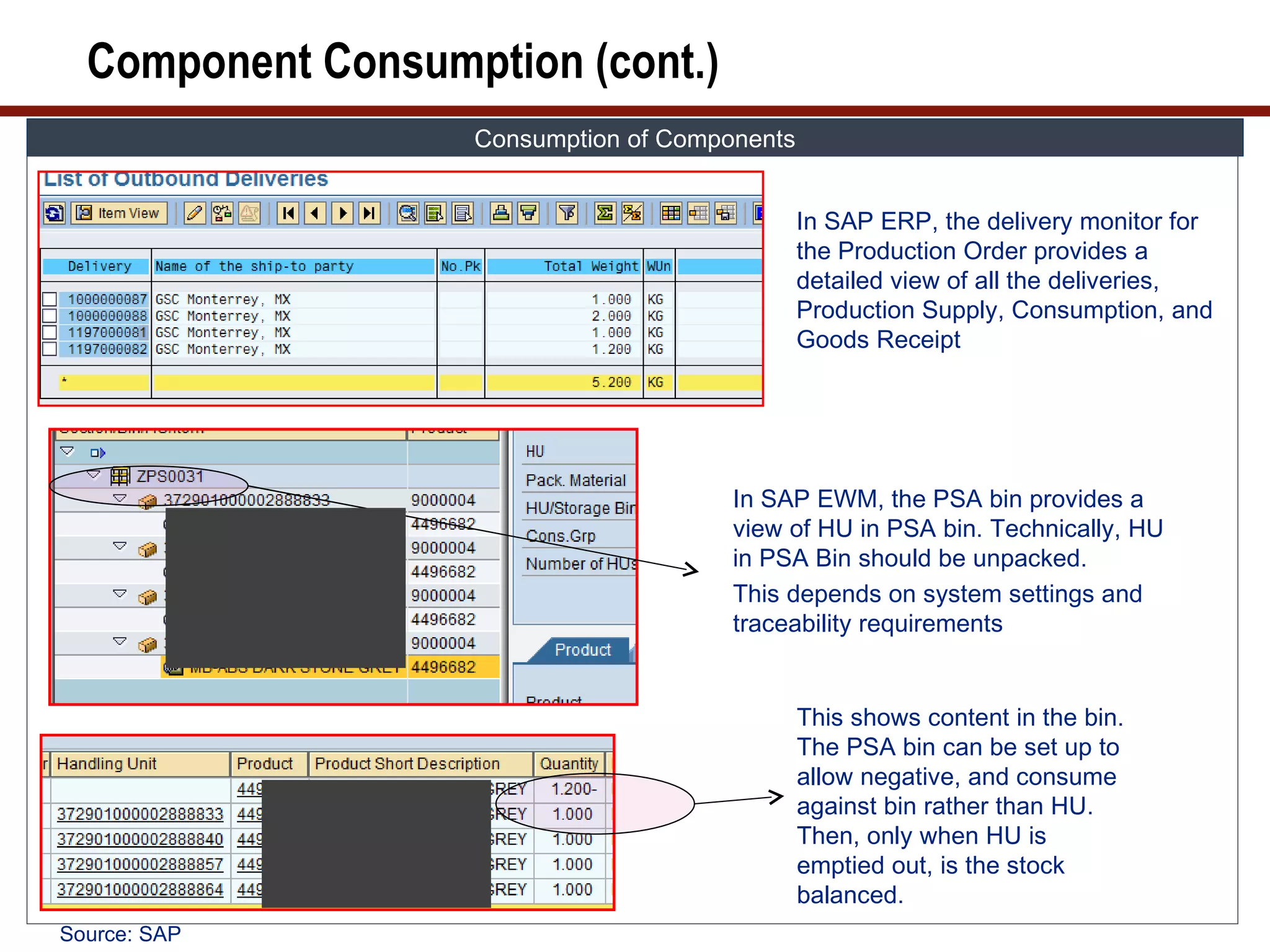
In SAP ERP, the delivery monitor for
the Production Order provides a
detailed view of all the deliveries,
Production Supply, Consumption, and
Goods Receipt
In SAP EWM, the PSA bin provides a
view of HU in PSA bin. Technically, HU
in PSA Bin should be unpacked.
This depends on system settings and
traceability requirements
This shows content in the bin.
The PSA bin can be set up to
allow negative, and consume
against bin rather than HU.
Then, only when HU is
emptied out, is the stock
balanced.
Source: SAP
69.
Component Consumption (cont.)
Consumption of Components
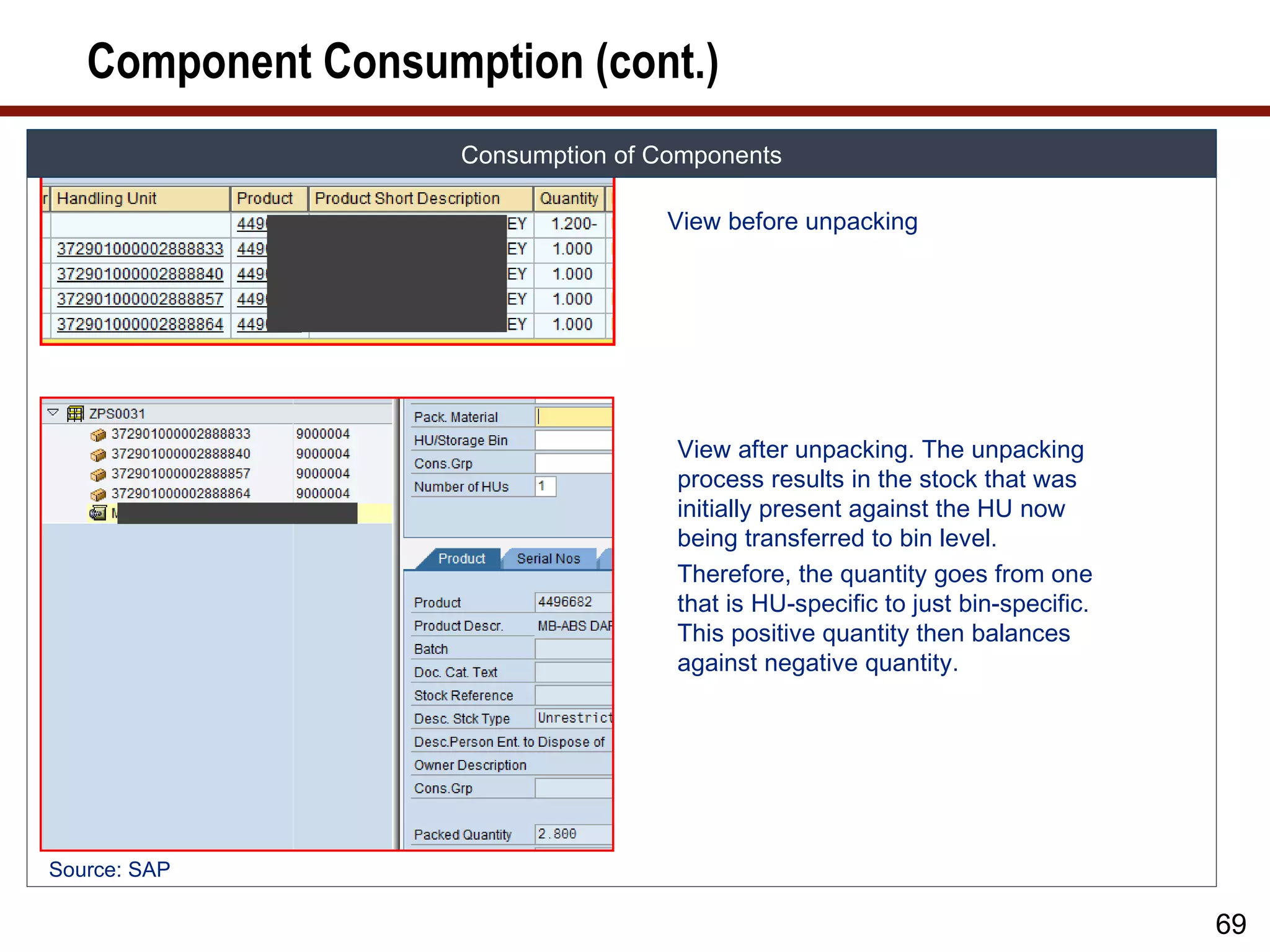
View before unpacking
View after unpacking. The unpacking
process results in the stock that was
initially present against the HU now
being transferred to bin level.
Therefore, the quantity goes from one
that is HU-specific to just bin-specific.
This positive quantity then balances
against negative quantity.
Source: SAP
69
70.
Component Consumption Summary
SUMMARY CONSUMPTION OF COMPONENTS
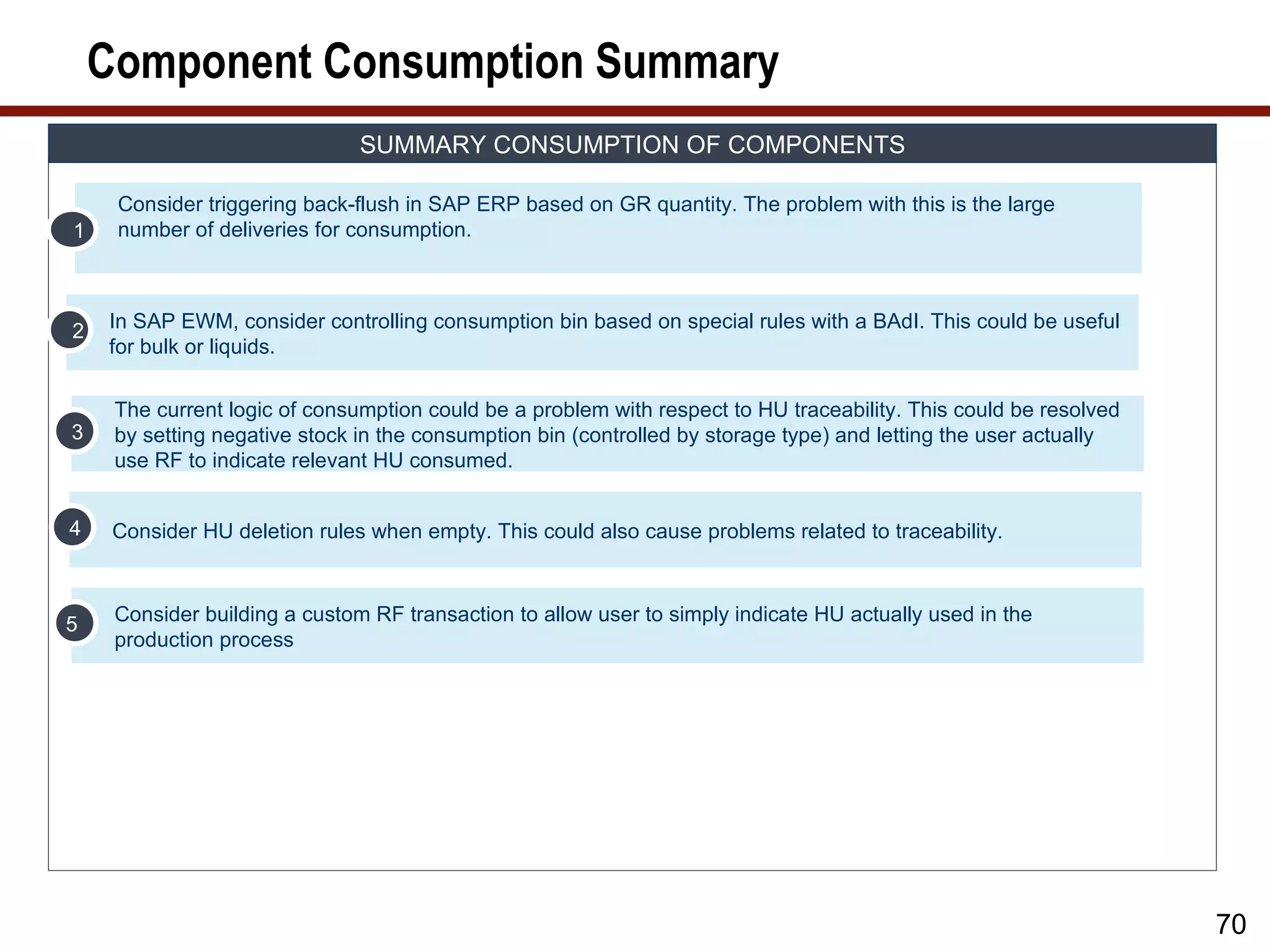
Consider triggering back-flush in SAP ERP based on GR quantity. The problem with this is the large
1 number of deliveries for consumption.
2 In SAP EWM, consider controlling consumption bin based on special rules with a BAdI. This could be useful
for bulk or liquids.
The current logic of consumption could be a problem with respect to HU traceability. This could be resolved
3 by setting negative stock in the consumption bin (controlled by storage type) and letting the user actually
use RF to indicate relevant HU consumed.
4 Consider HU deletion rules when empty. This could also cause problems related to traceability.
5 Consider building a custom RF transaction to allow user to simply indicate HU actually used in the
production process
70
71.
Production Considerations
OTHER CONSIDERATIONS FOR PRODUCTION
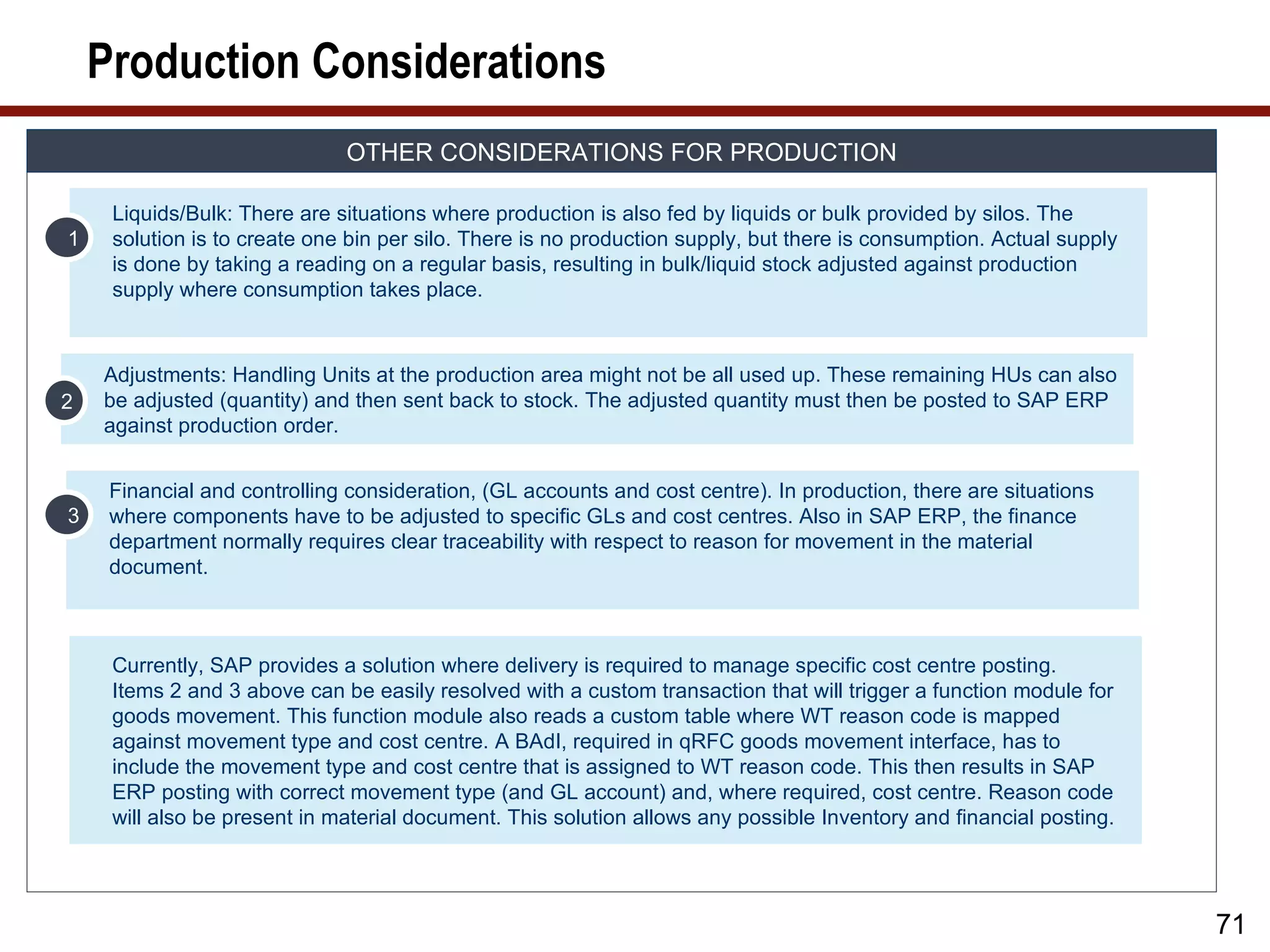
Liquids/Bulk: There are situations where production is also fed by liquids or bulk provided by silos. The
1 solution is to create one bin per silo. There is no production supply, but there is consumption. Actual supply
is done by taking a reading on a regular basis, resulting in bulk/liquid stock adjusted against production
supply where consumption takes place.
Adjustments: Handling Units at the production area might not be all used up. These remaining HUs can also
2 be adjusted (quantity) and then sent back to stock. The adjusted quantity must then be posted to SAP ERP
against production order.
Financial and controlling consideration, (GL accounts and cost centre). In production, there are situations
3 where components have to be adjusted to specific GLs and cost centres. Also in SAP ERP, the finance
department normally requires clear traceability with respect to reason for movement in the material
document.
Currently, SAP provides a solution where delivery is required to manage specific cost centre posting.
Items 2 and 3 above can be easily resolved with a custom transaction that will trigger a function module for
goods movement. This function module also reads a custom table where WT reason code is mapped
against movement type and cost centre. A BAdI, required in qRFC goods movement interface, has to
include the movement type and cost centre that is assigned to WT reason code. This then results in SAP
ERP posting with correct movement type (and GL account) and, where required, cost centre. Reason code
will also be present in material document. This solution allows any possible Inventory and financial posting.
71
72.
What We’ll Cover…
• About SAP EWM
• SAP EWM and production
• SAP EWM master data
• SAP EWM production process
• SAP EWM integration to radio frequency, barcode, and Material
Flow System (MFS)
• SAP EWM and compliance
• SAP EWM project considerations
• Wrap-up
72
73.
Radio Frequency (RF)Interface
FLOW OPTIONS
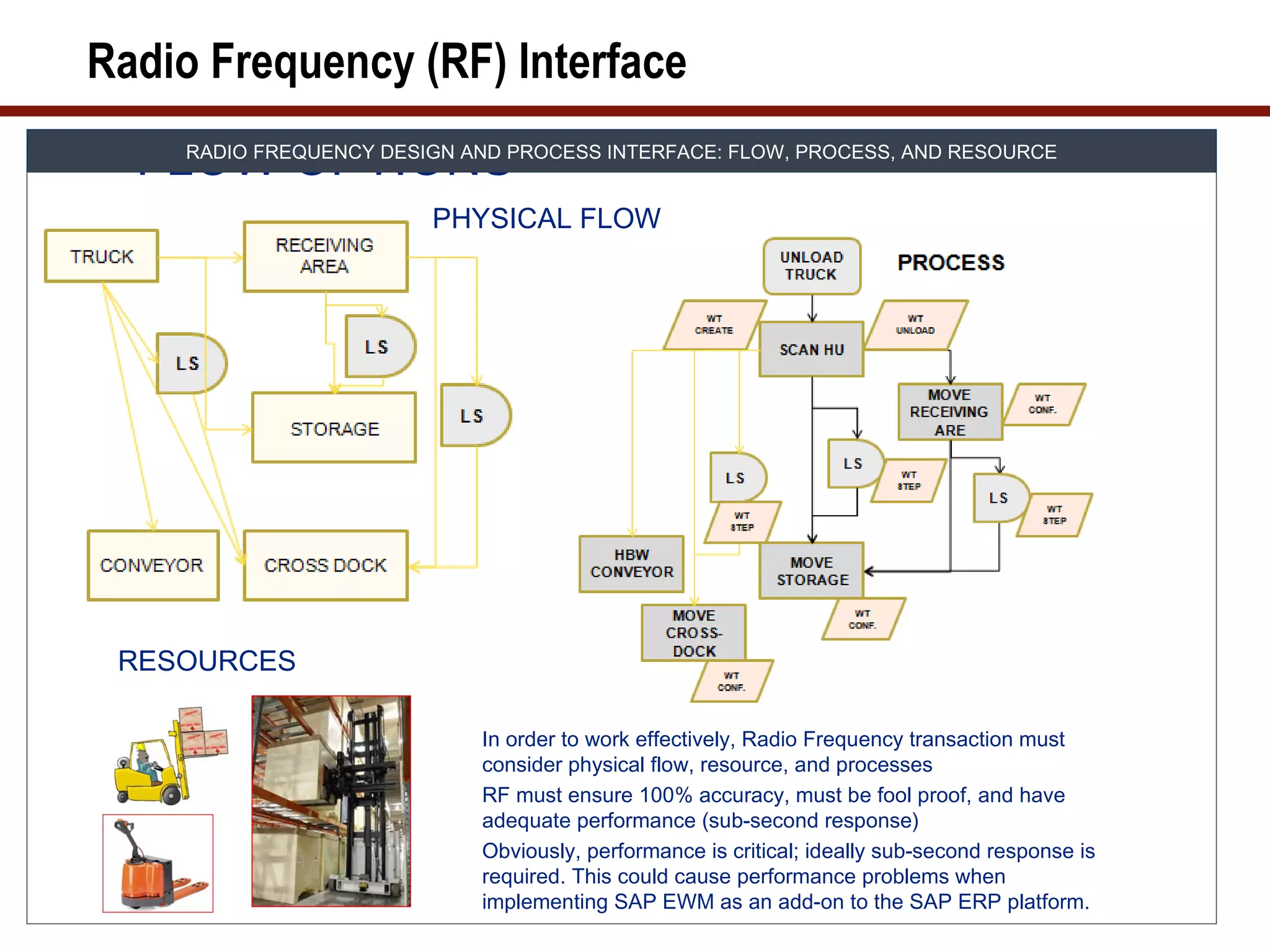
RADIO FREQUENCY DESIGN AND PROCESS INTERFACE: FLOW, PROCESS, AND RESOURCE
PHYSICAL FLOW
RESOURCES
In order to work effectively, Radio Frequency transaction must
consider physical flow, resource, and processes
RF must ensure 100% accuracy, must be fool proof, and have
adequate performance (sub-second response)
Obviously, performance is critical; ideally sub-second response is
required. This could cause performance problems when
implementing SAP EWM as an add-on to the SAP ERP platform.
74.
Radio Frequency DesignFramework
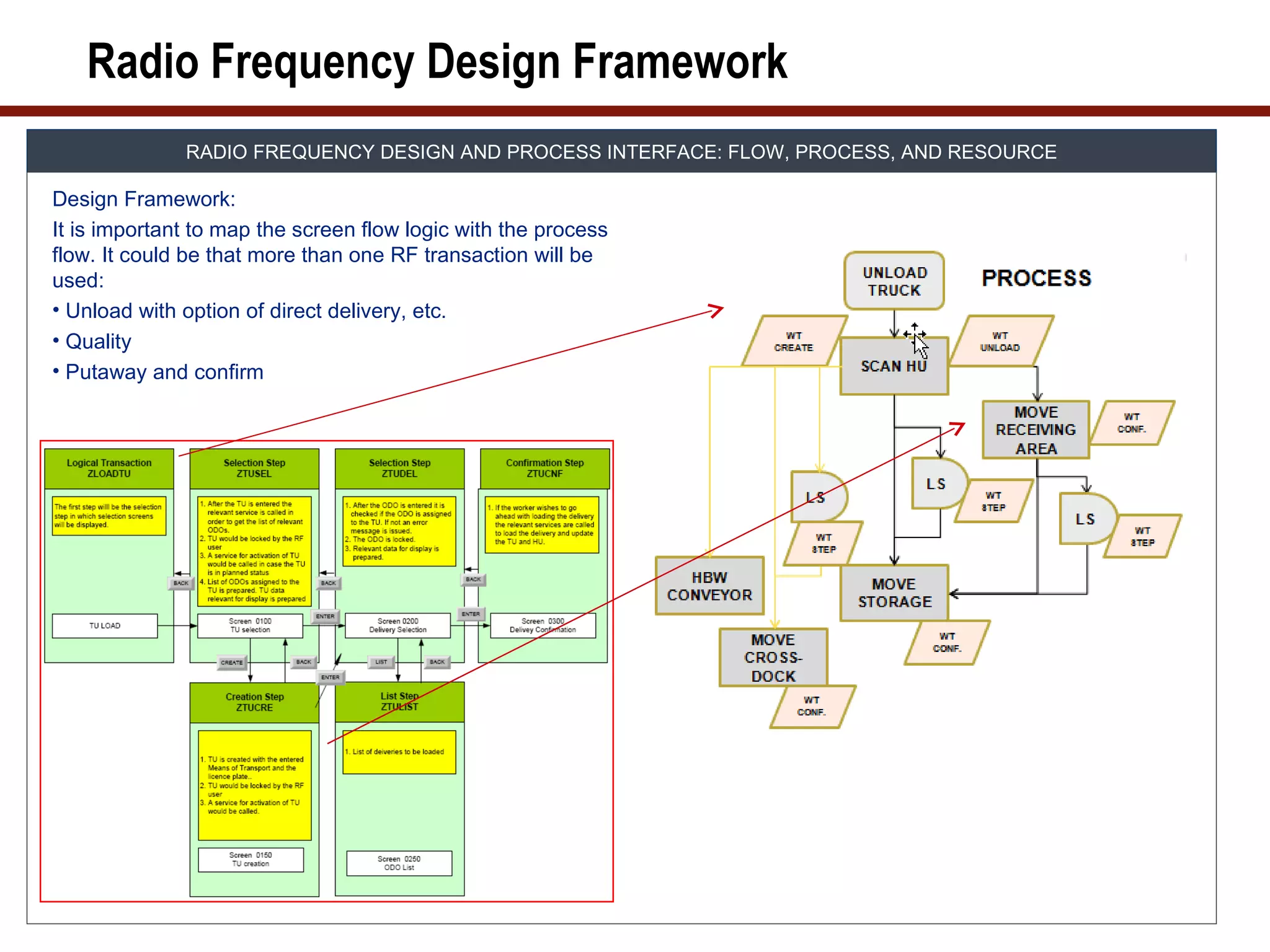
RADIO FREQUENCY DESIGN AND PROCESS INTERFACE: FLOW, PROCESS, AND RESOURCE
Design Framework:
It is important to map the screen flow logic with the process
flow. It could be that more than one RF transaction will be
used:
• Unload with option of direct delivery, etc.
• Quality
• Putaway and confirm
75.
RF Transactions
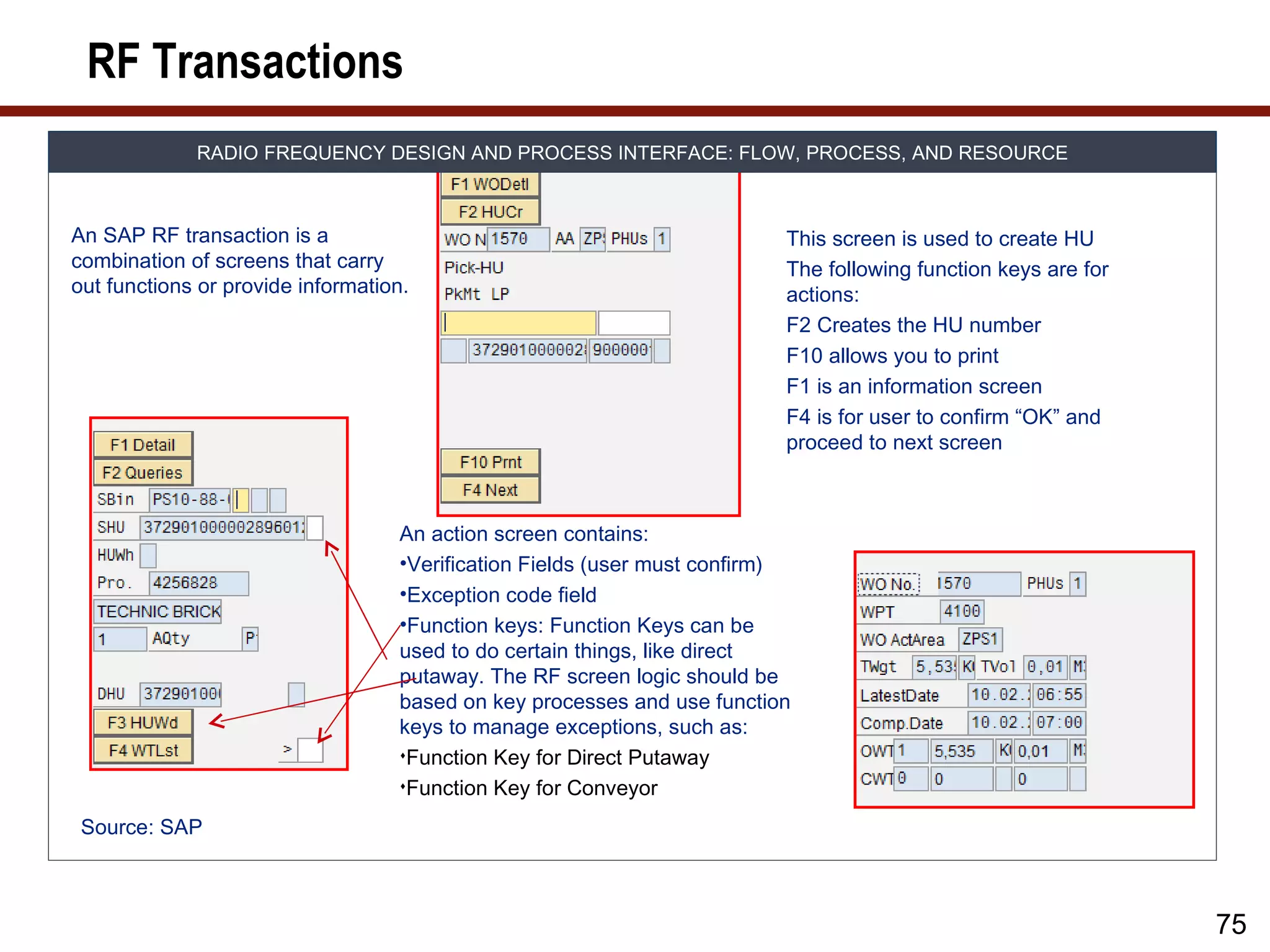
RADIO FREQUENCY DESIGN AND PROCESS INTERFACE: FLOW, PROCESS, AND RESOURCE
An SAP RF transaction is a This screen is used to create HU
combination of screens that carry The following function keys are for
out functions or provide information. actions:
F2 Creates the HU number
F10 allows you to print
F1 is an information screen
F4 is for user to confirm “OK” and
proceed to next screen
An action screen contains:
•Verification Fields (user must confirm)
•Exception code field
•Function keys: Function Keys can be
used to do certain things, like direct
putaway. The RF screen logic should be
based on key processes and use function
keys to manage exceptions, such as:
Function Key for Direct Putaway
Function Key for Conveyor
Source: SAP
75
76.
Example Screen Developmentfor Custom RF
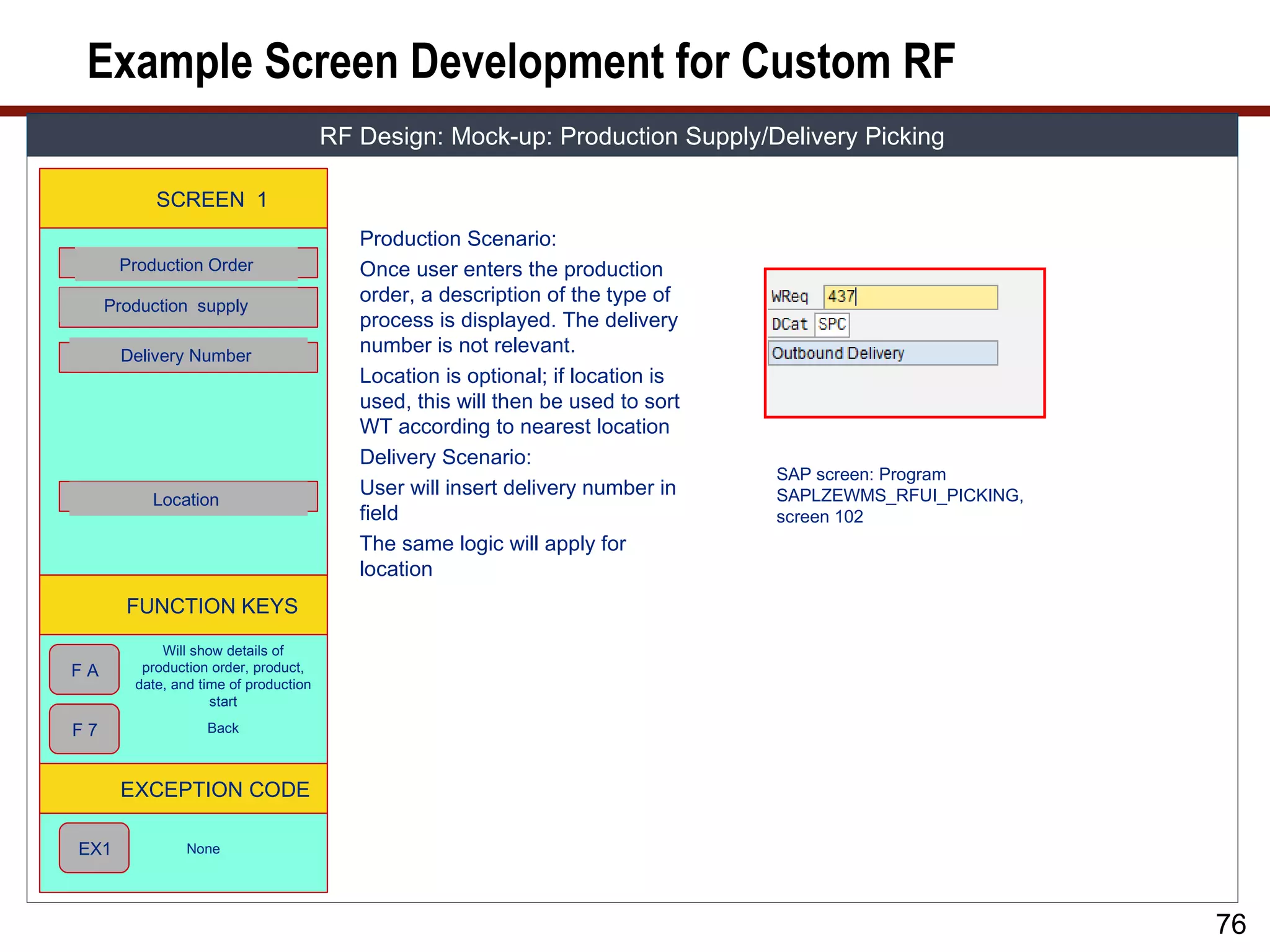
RF Design: Mock-up: Production Supply/Delivery Picking
SCREEN 1
Production Scenario:
Production Order Once user enters the production
Production supply
order, a description of the type of
process is displayed. The delivery
Delivery Number
number is not relevant.
Location is optional; if location is
used, this will then be used to sort
WT according to nearest location
Delivery Scenario:
SAP screen: Program
User will insert delivery number in SAPLZEWMS_RFUI_PICKING,
Location
field screen 102
The same logic will apply for
location
FUNCTION KEYS
Will show details of
FA production order, product,
date, and time of production
start
F7 Back
EXCEPTION CODE
EX1 None
76
77.
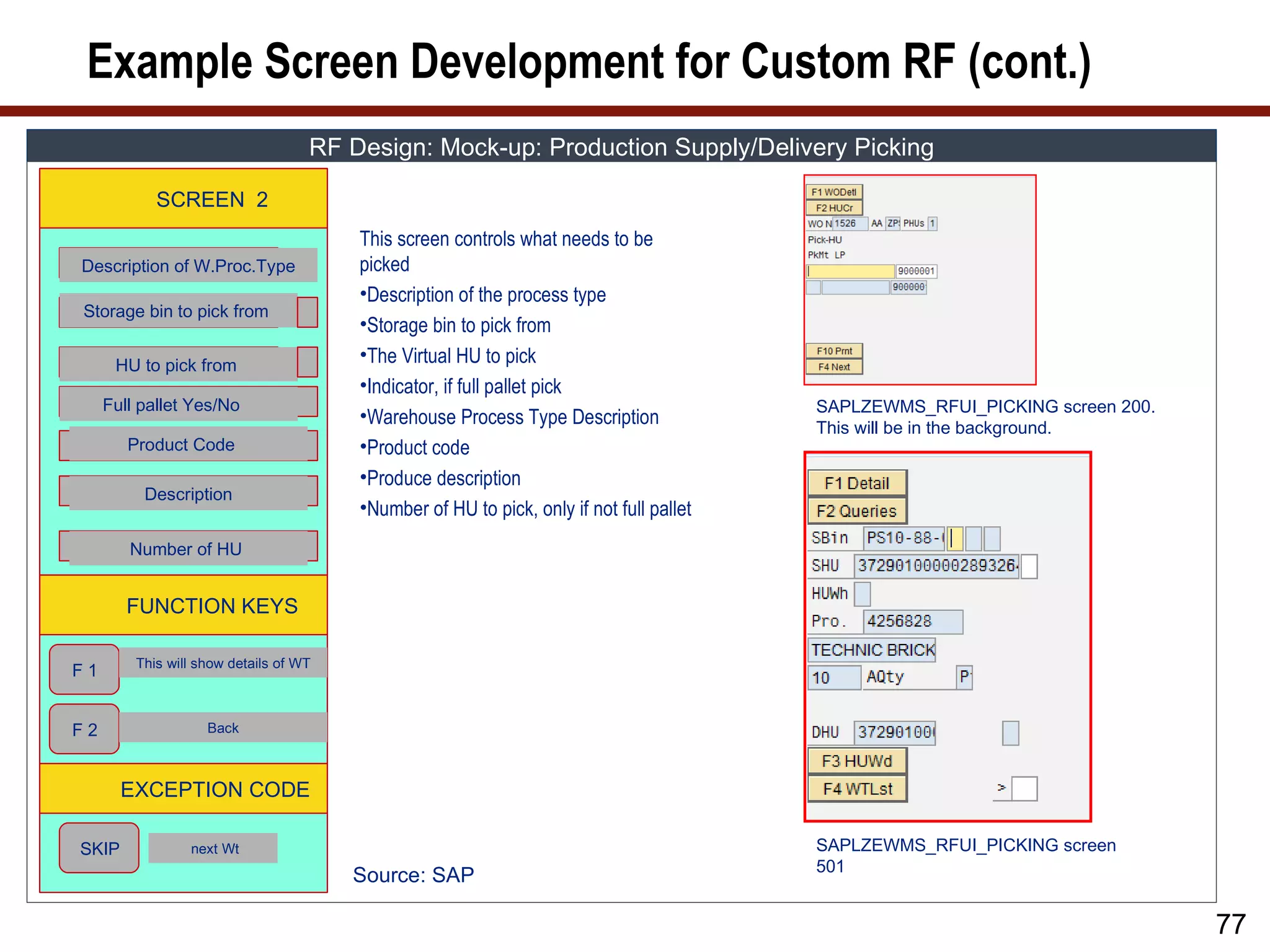
Example Screen Developmentfor Custom RF (cont.)
RF Design: Mock-up: Production Supply/Delivery Picking
SCREEN 2
This screen controls what needs to be
Description of W.Proc.Type picked
•Description of the process type
Storage bin to pick from
•Storage bin to pick from
HU to pick from
•The Virtual HU to pick
•Indicator, if full pallet pick
Full pallet Yes/No SAPLZEWMS_RFUI_PICKING screen 200.
•Warehouse Process Type Description
This will be in the background.
Product Code •Product code
•Produce description
Description
•Number of HU to pick, only if not full pallet
Number of HU
FUNCTION KEYS
This will show details of WT
F1
F2 Back
EXCEPTION CODE
SKIP next Wt SAPLZEWMS_RFUI_PICKING screen
501
Source: SAP
77
78.
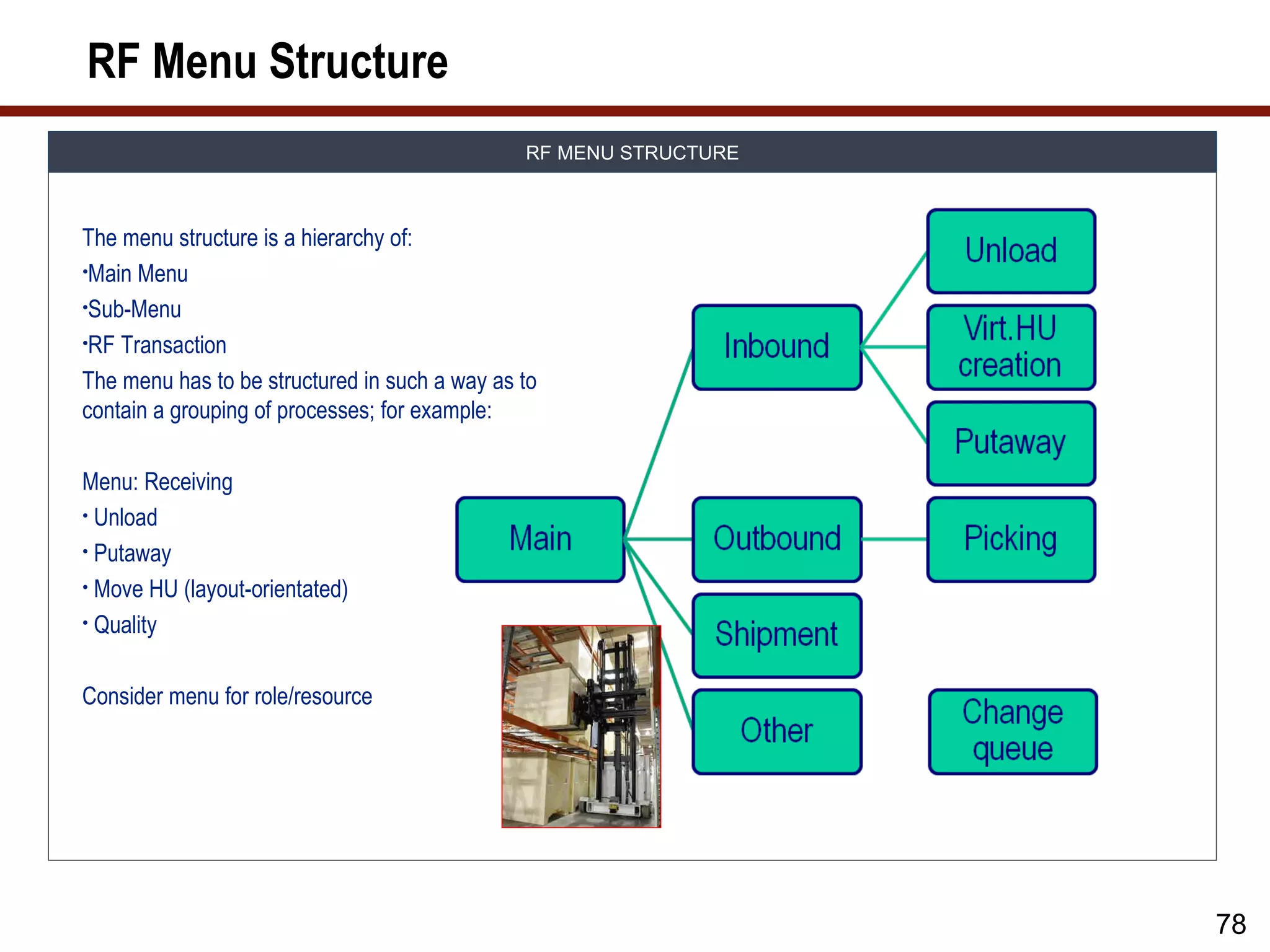
RF Menu Structure
RF MENU STRUCTURE
The menu structure is a hierarchy of:
•Main Menu
•Sub-Menu
•RF Transaction
The menu has to be structured in such a way as to
contain a grouping of processes; for example:
Menu: Receiving
• Unload
• Putaway
• Move HU (layout-orientated)
• Quality
Consider menu for role/resource
78
79.
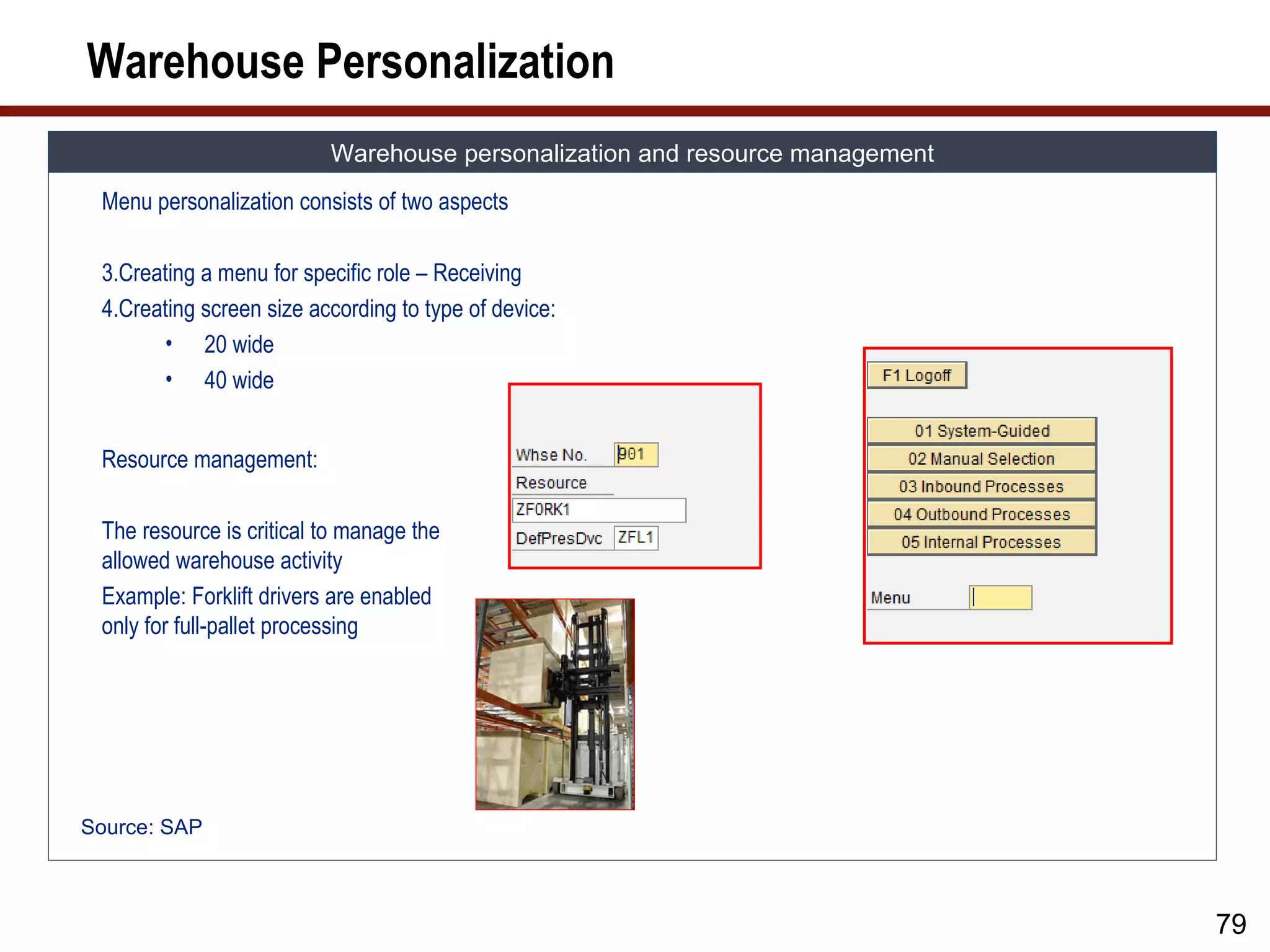
Warehouse Personalization
Warehouse personalization and resource management
Menu personalization consists of two aspects
3.Creating a menu for specific role – Receiving
4.Creating screen size according to type of device:
• 20 wide
• 40 wide
Resource management:
The resource is critical to manage the
allowed warehouse activity
Example: Forklift drivers are enabled
only for full-pallet processing
Source: SAP
79
80.
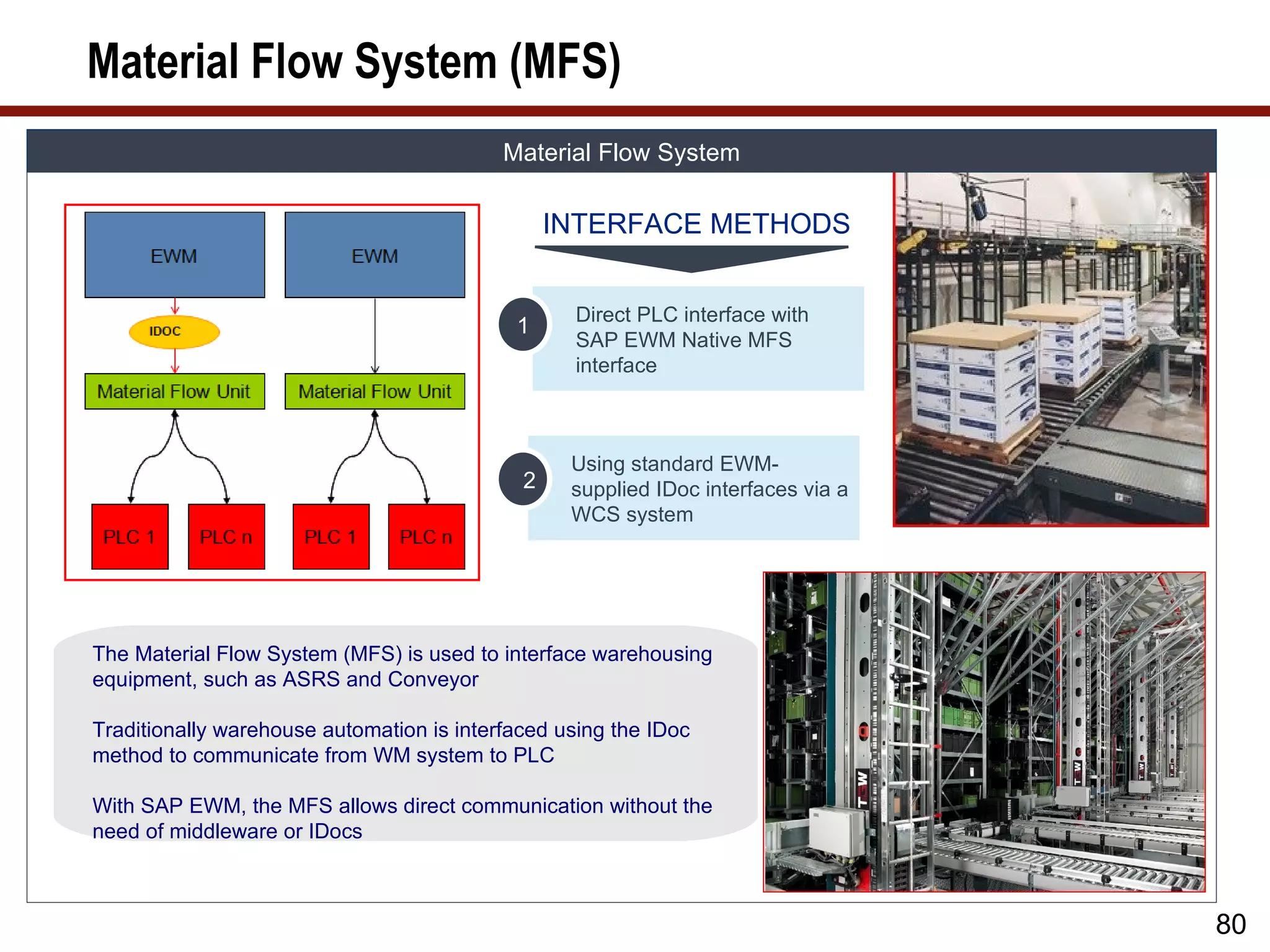
Material Flow System(MFS)
Material Flow System
INTERFACE METHODS
Direct PLC interface with
1
SAP EWM Native MFS
interface
Using standard EWM-
2 supplied IDoc interfaces via a
WCS system
The Material Flow System (MFS) is used to interface warehousing
equipment, such as ASRS and Conveyor
Traditionally warehouse automation is interfaced using the IDoc
method to communicate from WM system to PLC
With SAP EWM, the MFS allows direct communication without the
need of middleware or IDocs
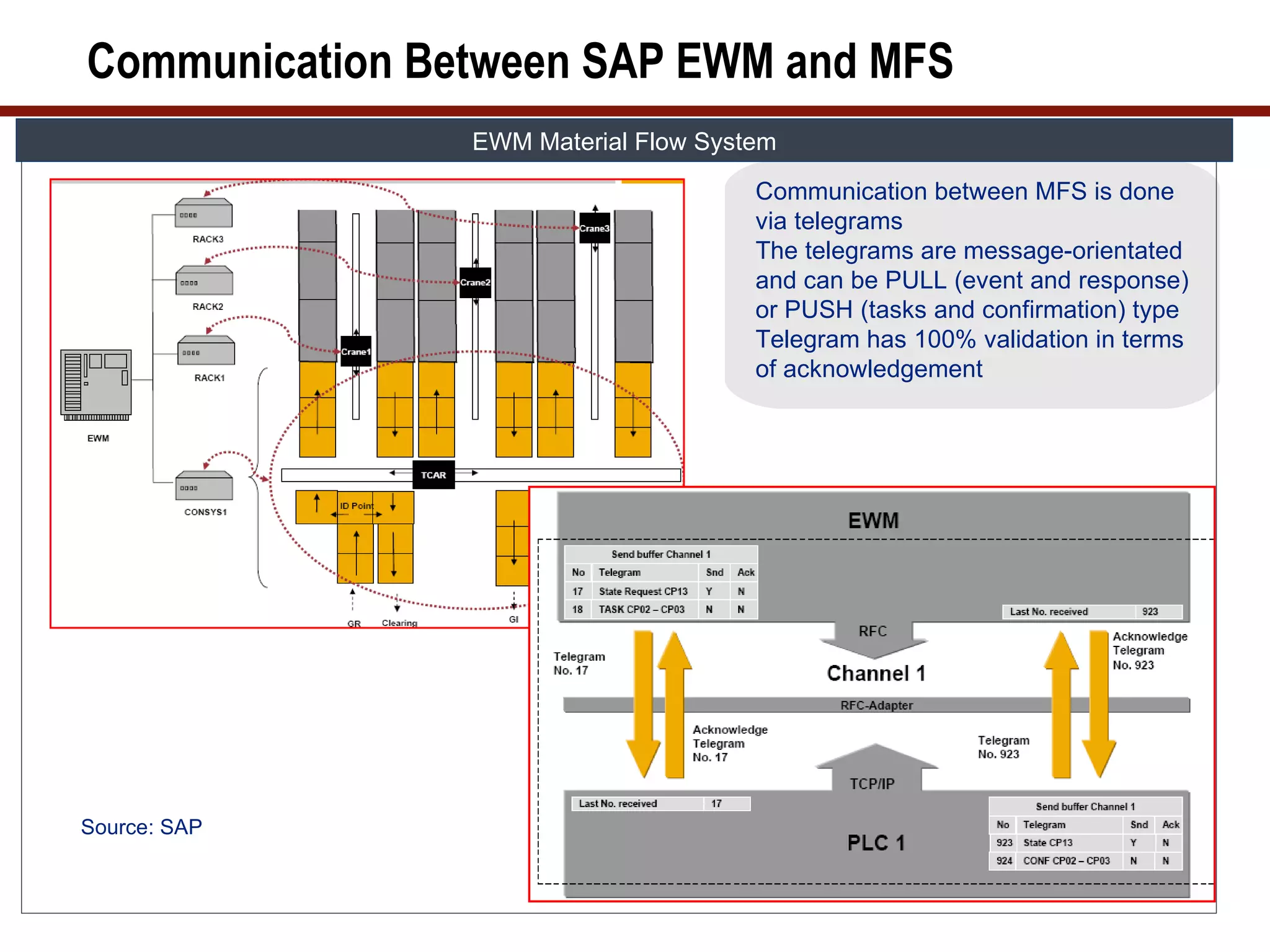
80
81.
Communication Between SAPEWM and MFS
EWM Material Flow System
Communication between MFS is done
via telegrams
The telegrams are message-orientated
and can be PULL (event and response)
or PUSH (tasks and confirmation) type
Telegram has 100% validation in terms
of acknowledgement
Source: SAP
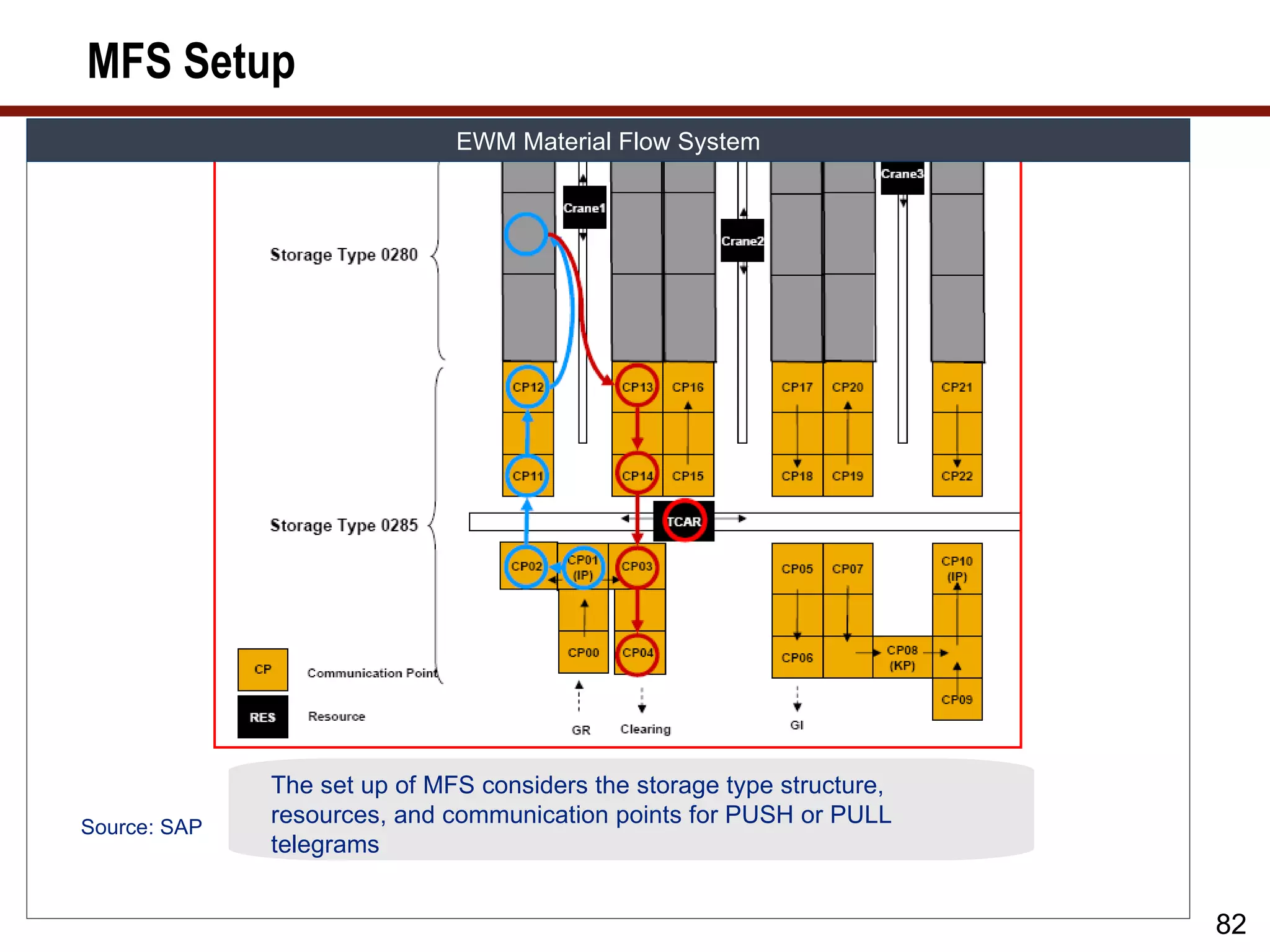
82.
MFS Setup
EWM Material Flow System
The set up of MFS considers the storage type structure,
Source: SAP
resources, and communication points for PUSH or PULL
telegrams
82
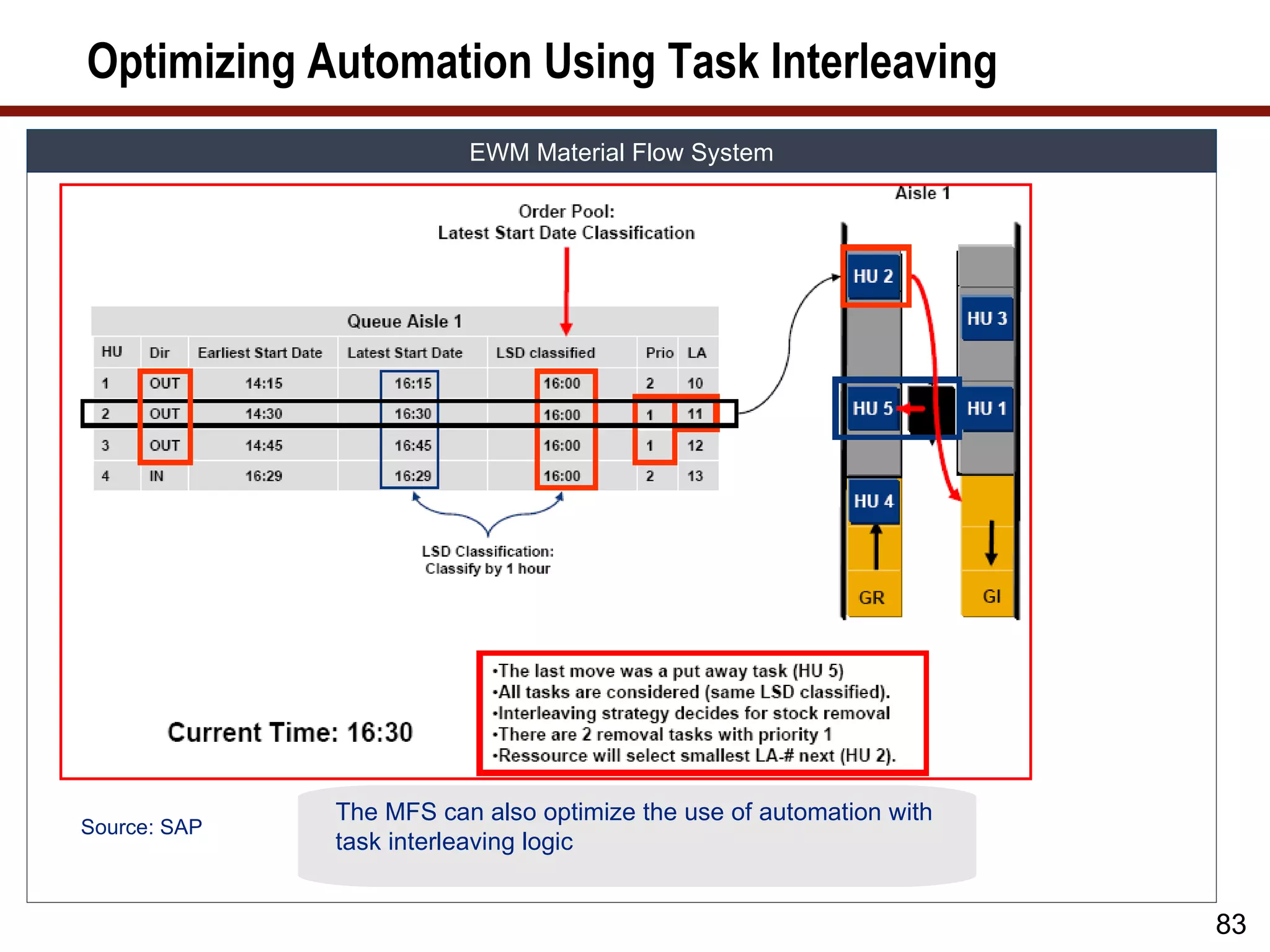
83.
Optimizing Automation UsingTask Interleaving
EWM Material Flow System
The MFS can also optimize the use of automation with
Source: SAP
task interleaving logic
83
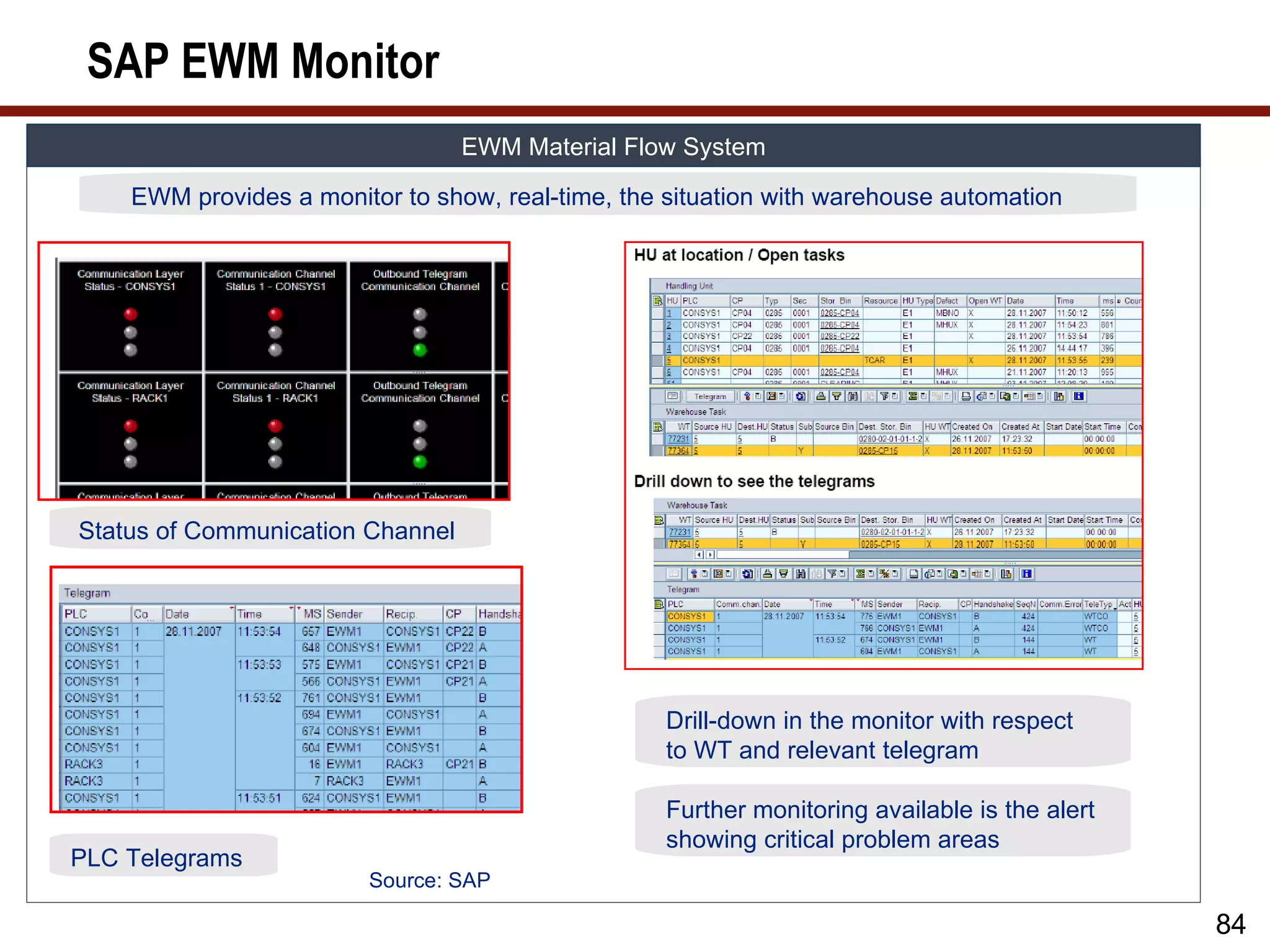
84.
SAP EWM Monitor
EWM Material Flow System
EWM provides a monitor to show, real-time, the situation with warehouse automation
Status of Communication Channel
Drill-down in the monitor with respect
to WT and relevant telegram
Further monitoring available is the alert
showing critical problem areas
PLC Telegrams
Source: SAP
84
85.
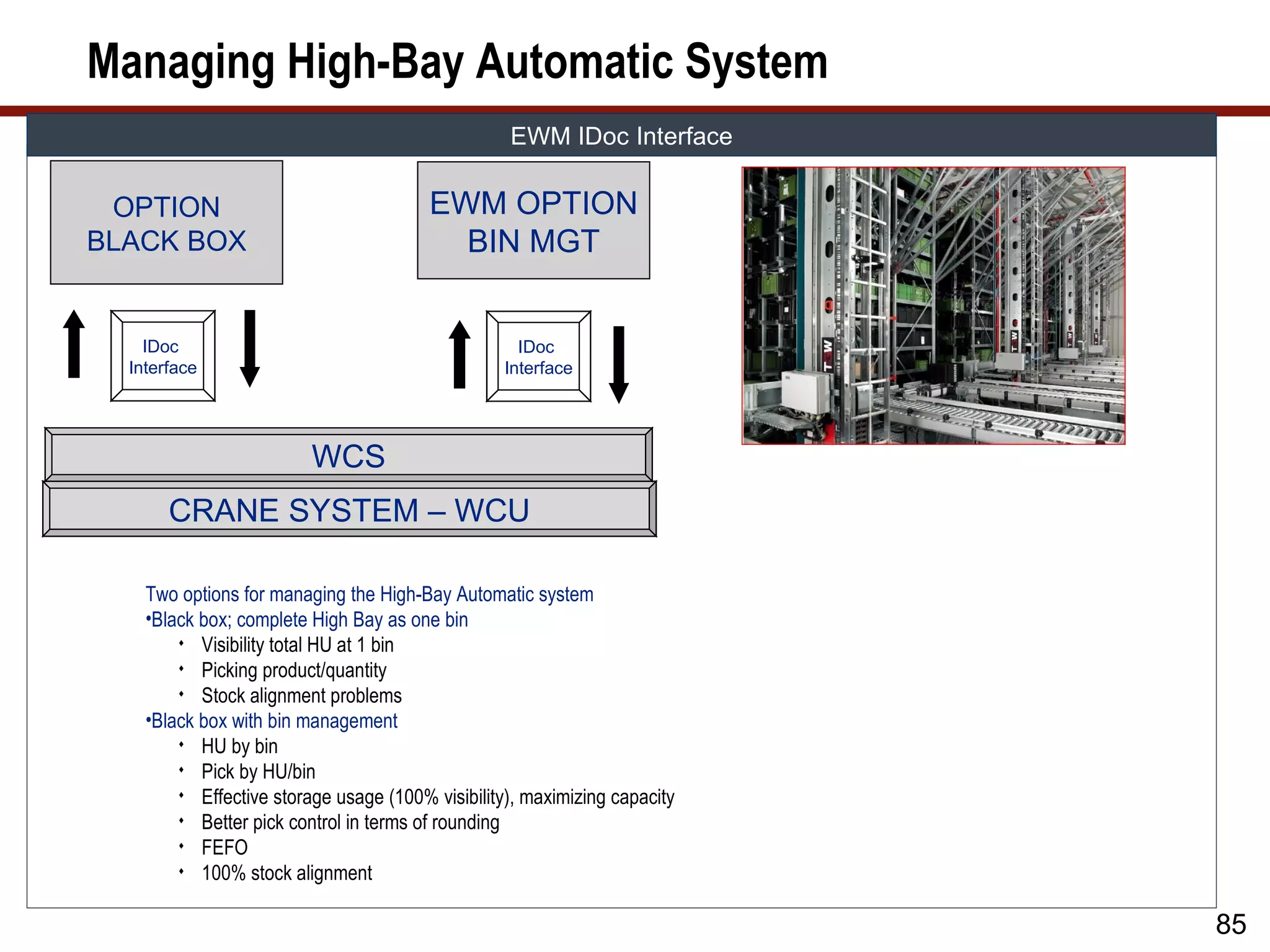
Managing High-Bay AutomaticSystem
EWM IDoc Interface
OPTION EWM OPTION
BLACK BOX BIN MGT
IDoc IDoc
Interface Interface
WCS
CRANE SYSTEM – WCU
Two options for managing the High-Bay Automatic system
•Black box; complete High Bay as one bin
Visibility total HU at 1 bin
Picking product/quantity
Stock alignment problems
•Black box with bin management
HU by bin
Pick by HU/bin
Effective storage usage (100% visibility), maximizing capacity
Better pick control in terms of rounding
FEFO
100% stock alignment
85
86.
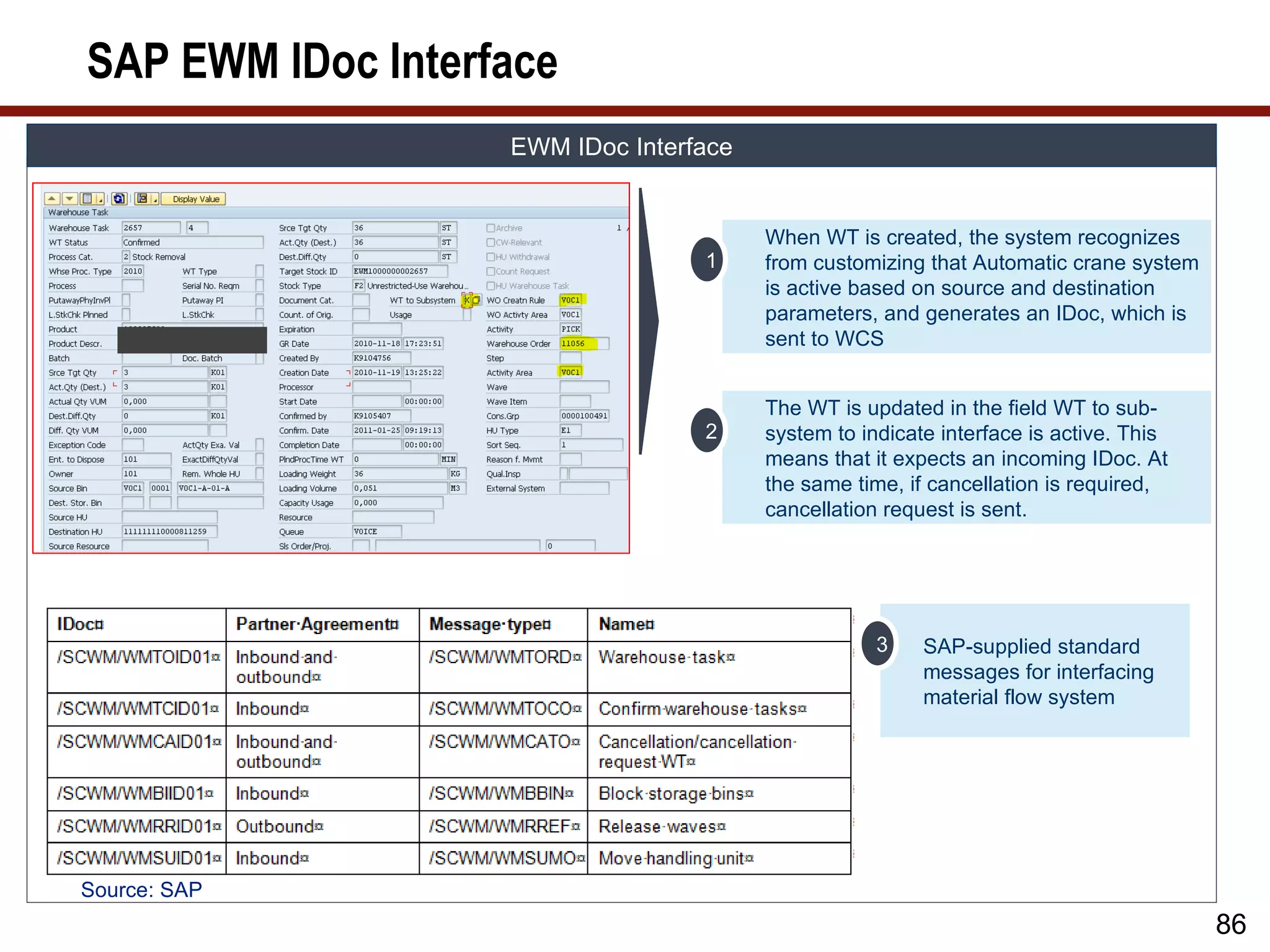
SAP EWM IDocInterface
EWM IDoc Interface
When WT is created, the system recognizes
1 from customizing that Automatic crane system
is active based on source and destination
parameters, and generates an IDoc, which is
sent to WCS
The WT is updated in the field WT to sub-
2 system to indicate interface is active. This
means that it expects an incoming IDoc. At
the same time, if cancellation is required,
cancellation request is sent.
3 SAP-supplied standard
messages for interfacing
material flow system
Source: SAP
86
87.
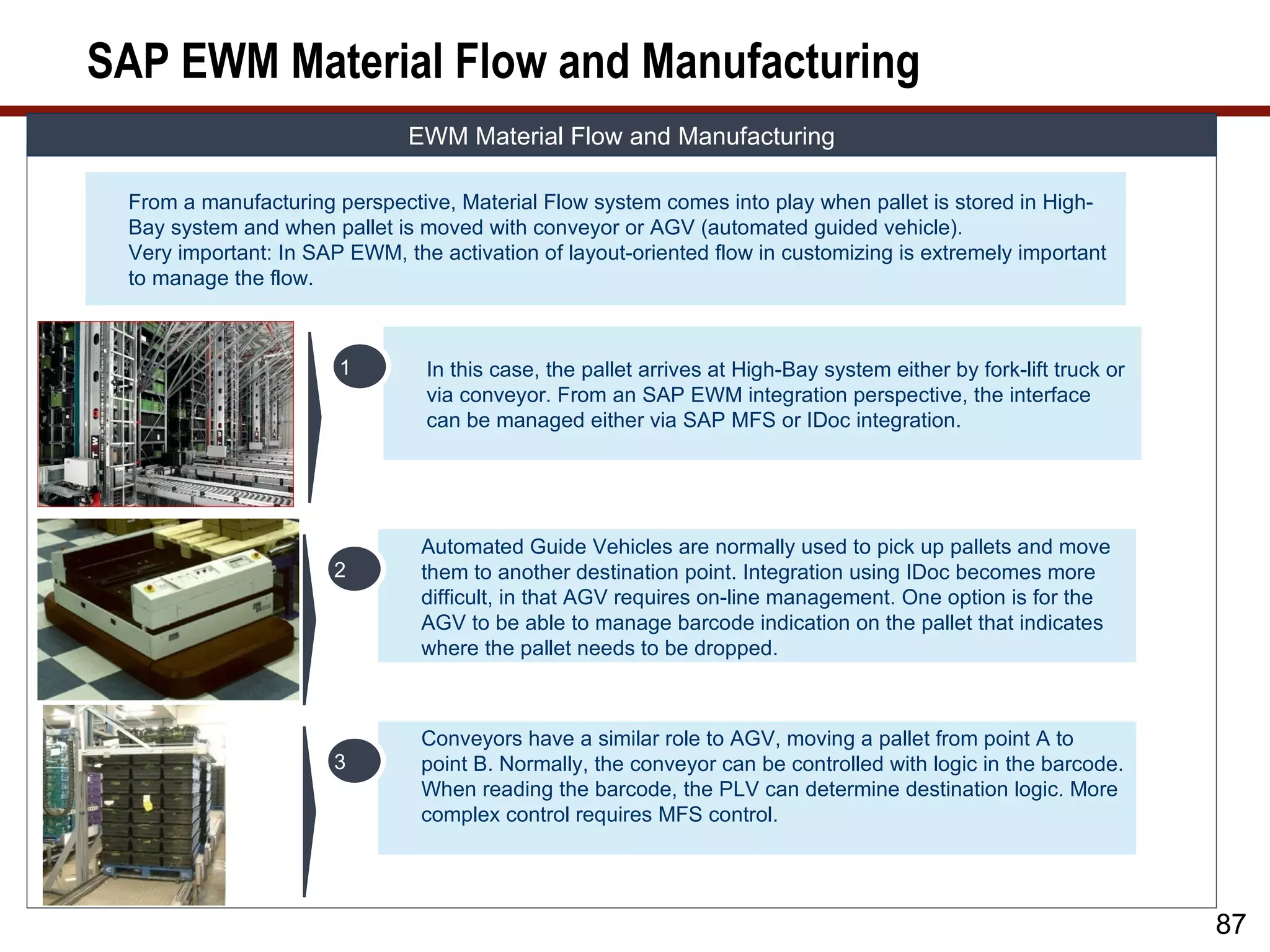
SAP EWM MaterialFlow and Manufacturing
EWM Material Flow and Manufacturing
From a manufacturing perspective, Material Flow system comes into play when pallet is stored in High-
Bay system and when pallet is moved with conveyor or AGV (automated guided vehicle).
Very important: In SAP EWM, the activation of layout-oriented flow in customizing is extremely important
to manage the flow.
1 In this case, the pallet arrives at High-Bay system either by fork-lift truck or
via conveyor. From an SAP EWM integration perspective, the interface
can be managed either via SAP MFS or IDoc integration.
Automated Guide Vehicles are normally used to pick up pallets and move
2 them to another destination point. Integration using IDoc becomes more
difficult, in that AGV requires on-line management. One option is for the
AGV to be able to manage barcode indication on the pallet that indicates
where the pallet needs to be dropped.
Conveyors have a similar role to AGV, moving a pallet from point A to
3 point B. Normally, the conveyor can be controlled with logic in the barcode.
When reading the barcode, the PLV can determine destination logic. More
complex control requires MFS control.
87
88.
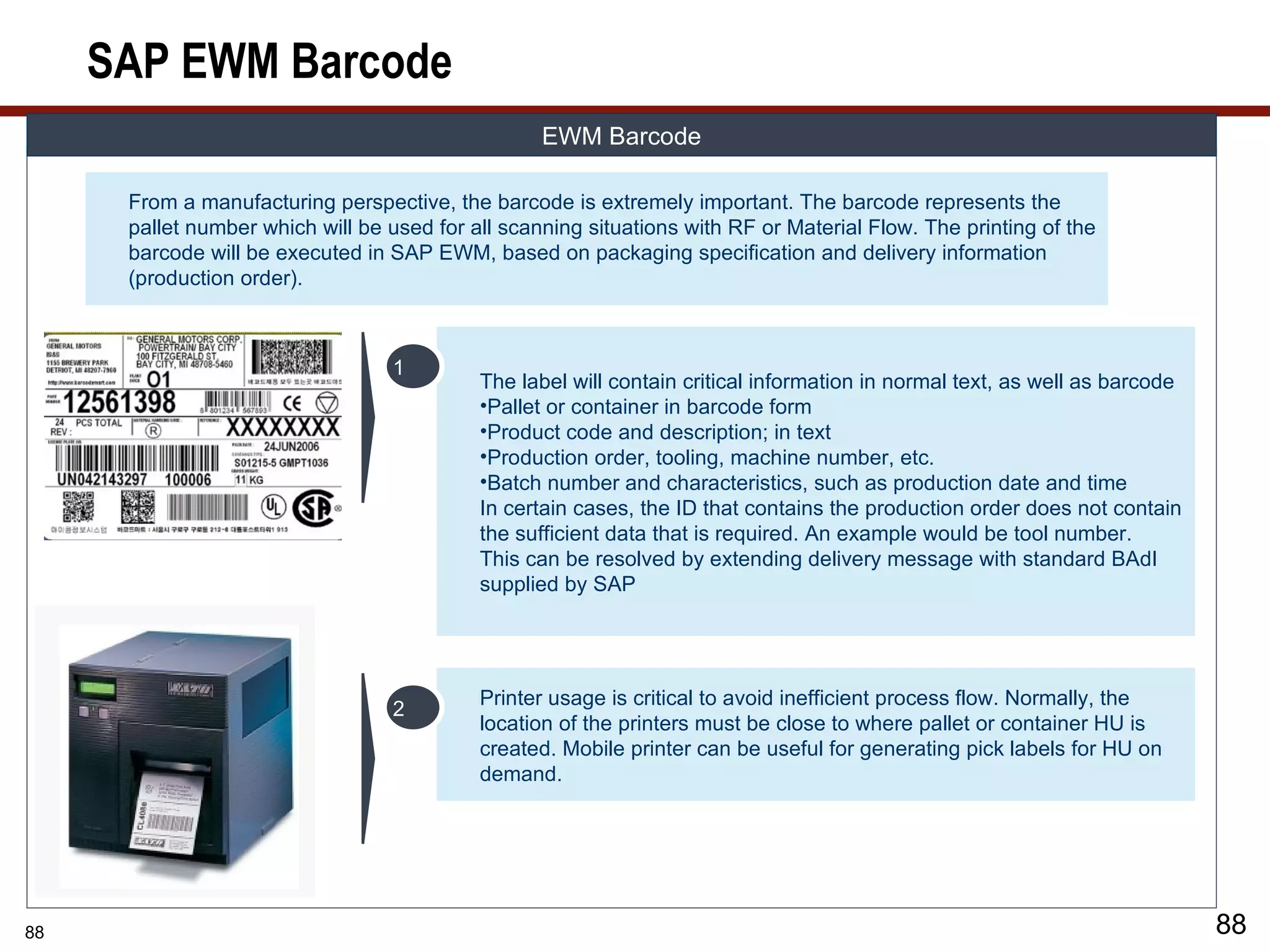
SAP EWM Barcode
EWM Barcode
From a manufacturing perspective, the barcode is extremely important. The barcode represents the
pallet number which will be used for all scanning situations with RF or Material Flow. The printing of the
barcode will be executed in SAP EWM, based on packaging specification and delivery information
(production order).
1
The label will contain critical information in normal text, as well as barcode
•Pallet or container in barcode form
•Product code and description; in text
•Production order, tooling, machine number, etc.
•Batch number and characteristics, such as production date and time
In certain cases, the ID that contains the production order does not contain
the sufficient data that is required. An example would be tool number.
This can be resolved by extending delivery message with standard BAdI
supplied by SAP
Printer usage is critical to avoid inefficient process flow. Normally, the
2
location of the printers must be close to where pallet or container HU is
created. Mobile printer can be useful for generating pick labels for HU on
demand.
88 88
89.
What We’ll Cover…
• About SAP EWM
• SAP EWM and production
• SAP EWM master data
• SAP EWM production process
• SAP EWM integration to radio frequency, barcode, and Material
Flow System (MFS)
• SAP EWM and compliance
• SAP EWM project considerations
• Wrap-up
89
90.
EWM and Compliance
Compliance
Compliance plays an important role with respect to manufacturing in SAP EWM. Depending on
1
the type of industry, this impacts complexity with respect to compliance. Compliance is mainly
governed by rules in areas such as Food, Pharmaceutical, and quality management standards.
All industries will be governed by at least the basic Quality Management Standards (ISO)
applicable within the organization or dictated by industry.
Bach Management: Batch control and update to central ERP is critical for compliance. This
2
includes all characteristics. The duplication of CIF model can cause update problems, resulting in
characteristics not being updated correctly. WT and resulting quantity may have missing data.
Consider a customization for validation and alignment.
3 Quality control: Decision to use QIE or ERP QM. ERP QM keeps centralized master data, such as
inspection plan and sampling procedure. ERP QM keep centralized processing by QM department
regarding quality checks and usage decision.
Handling Unit and Traceability. Organizations require traceability due to either legal or quality
control requirements.
4 Traceability normally consists of defining detailed characteristics of a Handling Unit and its product,
batch characteristics (expiration date, certificate, etc.), as well as tracking across their micro (within
plant) and macro (extra plant) supply chain.
SAP EWM design logic is that SAP EWM is the master with respect to HU traceability. The problem
with this is that WT gets archived, meaning that the required data is lost. Also, when an HU is
emptied out, the HU history and characteristics are also lost.
90
91.
Traceability
TRACEABILITY
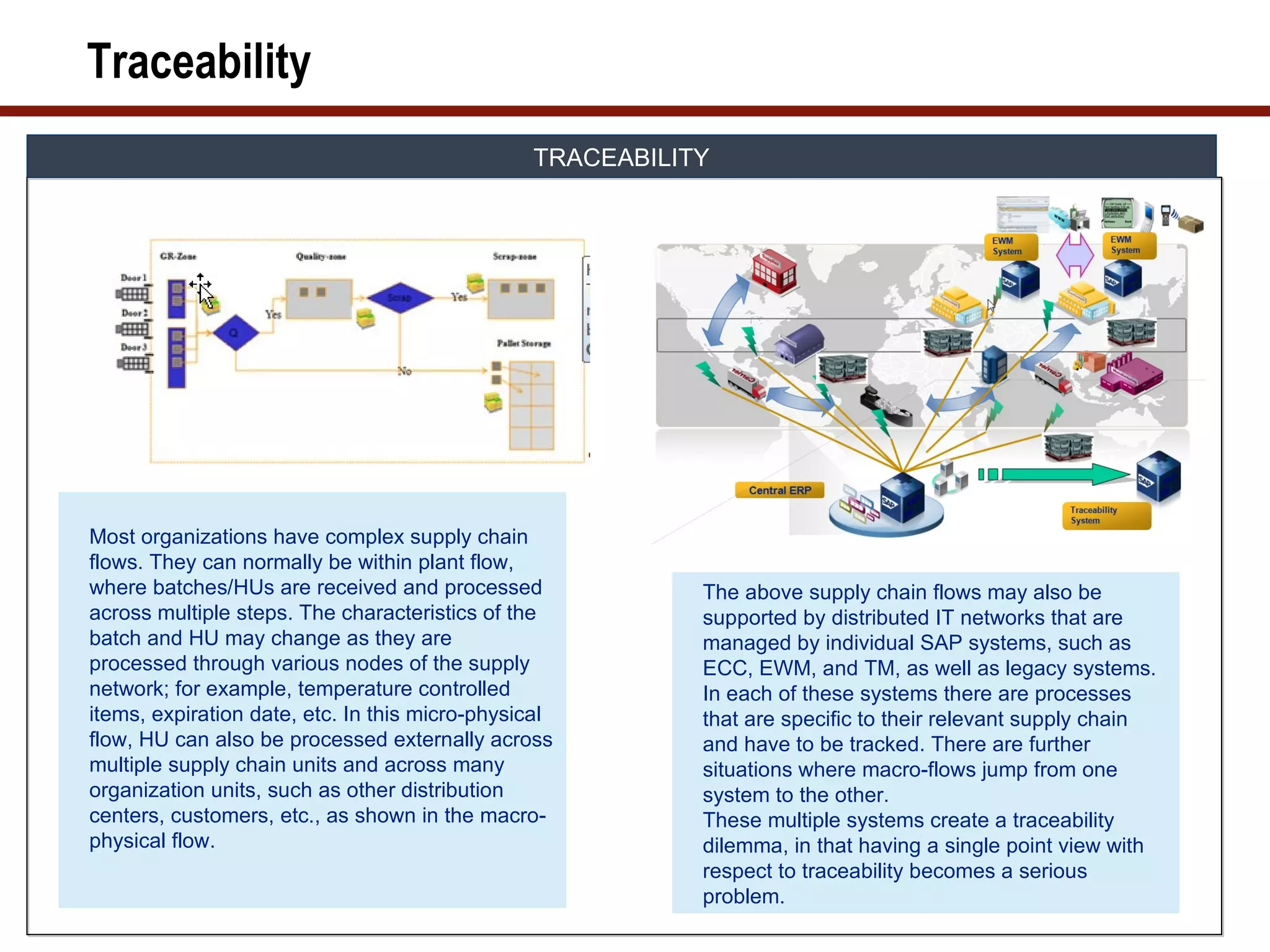
Most organizations have complex supply chain
flows. They can normally be within plant flow,
where batches/HUs are received and processed The above supply chain flows may also be
across multiple steps. The characteristics of the supported by distributed IT networks that are
batch and HU may change as they are managed by individual SAP systems, such as
processed through various nodes of the supply ECC, EWM, and TM, as well as legacy systems.
network; for example, temperature controlled In each of these systems there are processes
items, expiration date, etc. In this micro-physical that are specific to their relevant supply chain
flow, HU can also be processed externally across and have to be tracked. There are further
multiple supply chain units and across many situations where macro-flows jump from one
organization units, such as other distribution system to the other.
centers, customers, etc., as shown in the macro- These multiple systems create a traceability
physical flow. dilemma, in that having a single point view with
respect to traceability becomes a serious
problem.
92.
Handling Unit Traceability
Compliance Handling Unit Traceability
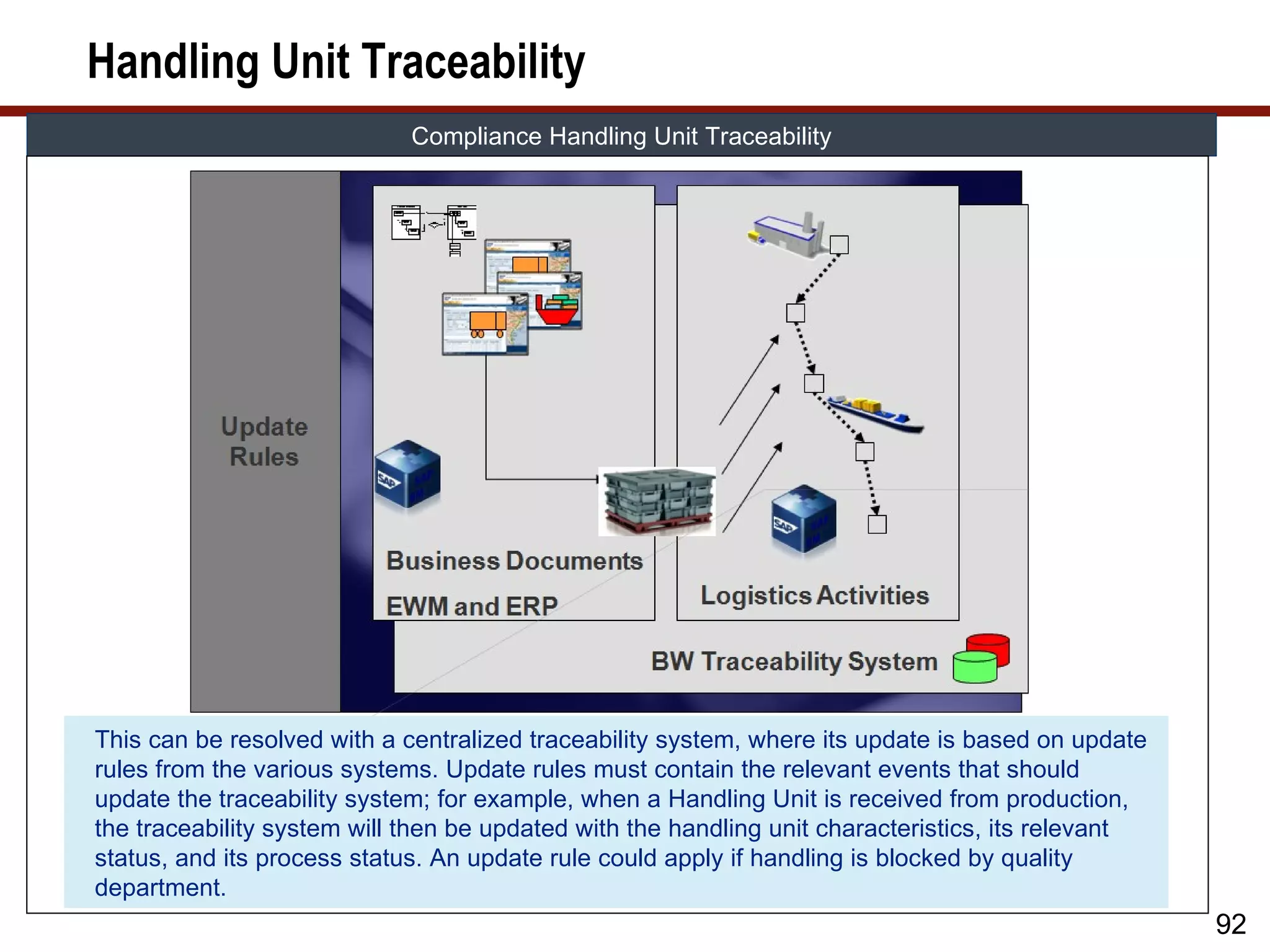
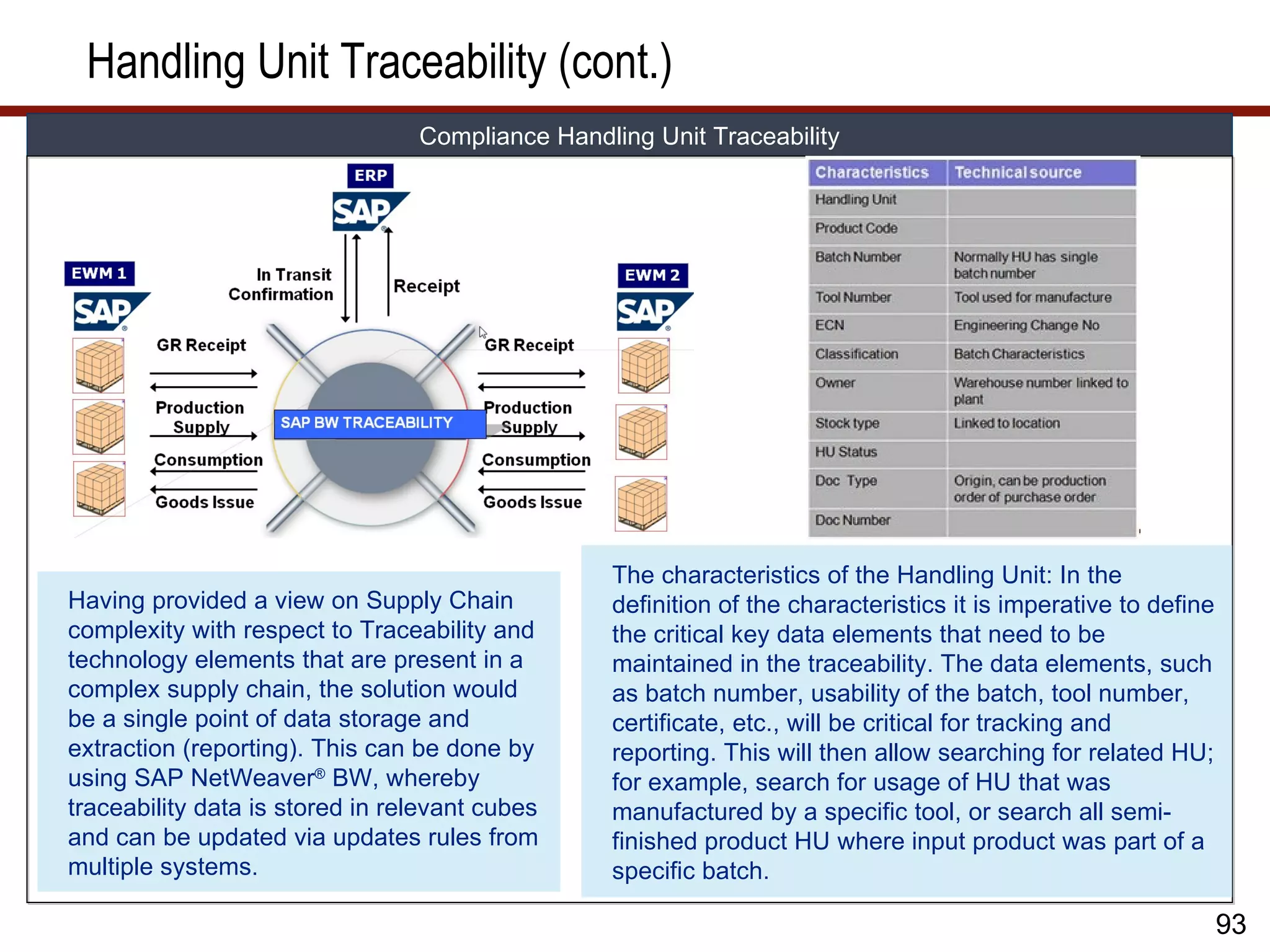
This can be resolved with a centralized traceability system, where its update is based on update
rules from the various systems. Update rules must contain the relevant events that should
update the traceability system; for example, when a Handling Unit is received from production,
the traceability system will then be updated with the handling unit characteristics, its relevant
status, and its process status. An update rule could apply if handling is blocked by quality
department.
92
93.
Handling Unit Traceability(cont.)
Compliance Handling Unit Traceability
The characteristics of the Handling Unit: In the
Having provided a view on Supply Chain definition of the characteristics it is imperative to define
complexity with respect to Traceability and the critical key data elements that need to be
technology elements that are present in a maintained in the traceability. The data elements, such
complex supply chain, the solution would as batch number, usability of the batch, tool number,
be a single point of data storage and certificate, etc., will be critical for tracking and
extraction (reporting). This can be done by reporting. This will then allow searching for related HU;
using SAP NetWeaver® BW, whereby for example, search for usage of HU that was
traceability data is stored in relevant cubes manufactured by a specific tool, or search all semi-
and can be updated via updates rules from finished product HU where input product was part of a
multiple systems. specific batch.
93
94.
Handling Unit Traceability(cont.)
Compliance Handling Unit Traceability
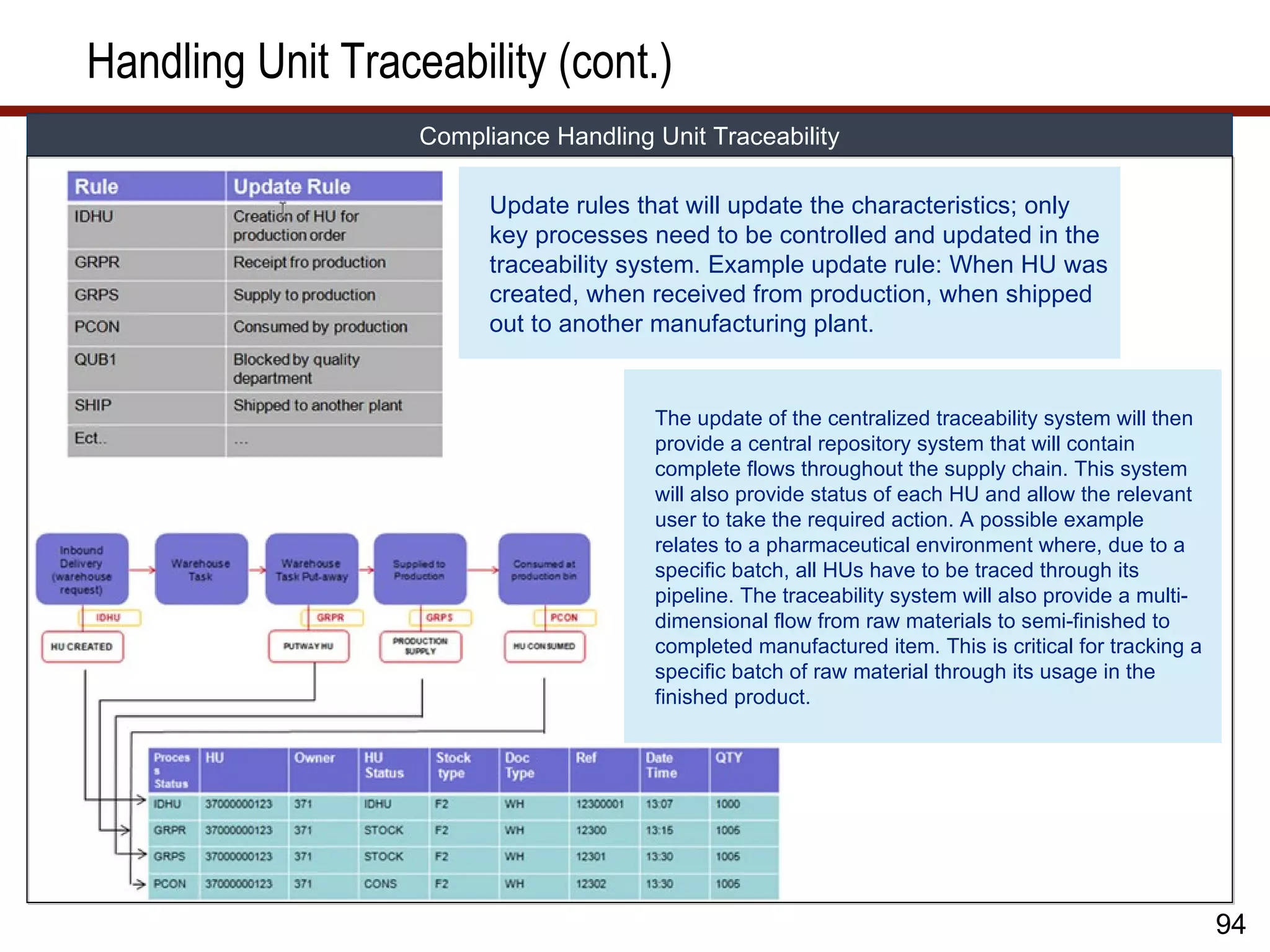
Update rules that will update the characteristics; only
key processes need to be controlled and updated in the
traceability system. Example update rule: When HU was
created, when received from production, when shipped
out to another manufacturing plant.
The update of the centralized traceability system will then
provide a central repository system that will contain
complete flows throughout the supply chain. This system
will also provide status of each HU and allow the relevant
user to take the required action. A possible example
relates to a pharmaceutical environment where, due to a
specific batch, all HUs have to be traced through its
pipeline. The traceability system will also provide a multi-
dimensional flow from raw materials to semi-finished to
completed manufactured item. This is critical for tracking a
specific batch of raw material through its usage in the
finished product.
94
95.
What We’ll Cover…
• About SAP EWM
• SAP EWM and production
• SAP EWM master data
• SAP EWM production process
• SAP EWM integration to radio frequency, barcode, and Material
Flow System (MFS)
• SAP EWM and compliance
• SAP EWM project considerations
• Wrap-up
95
96.
SAP EWM ProjectConsiderations
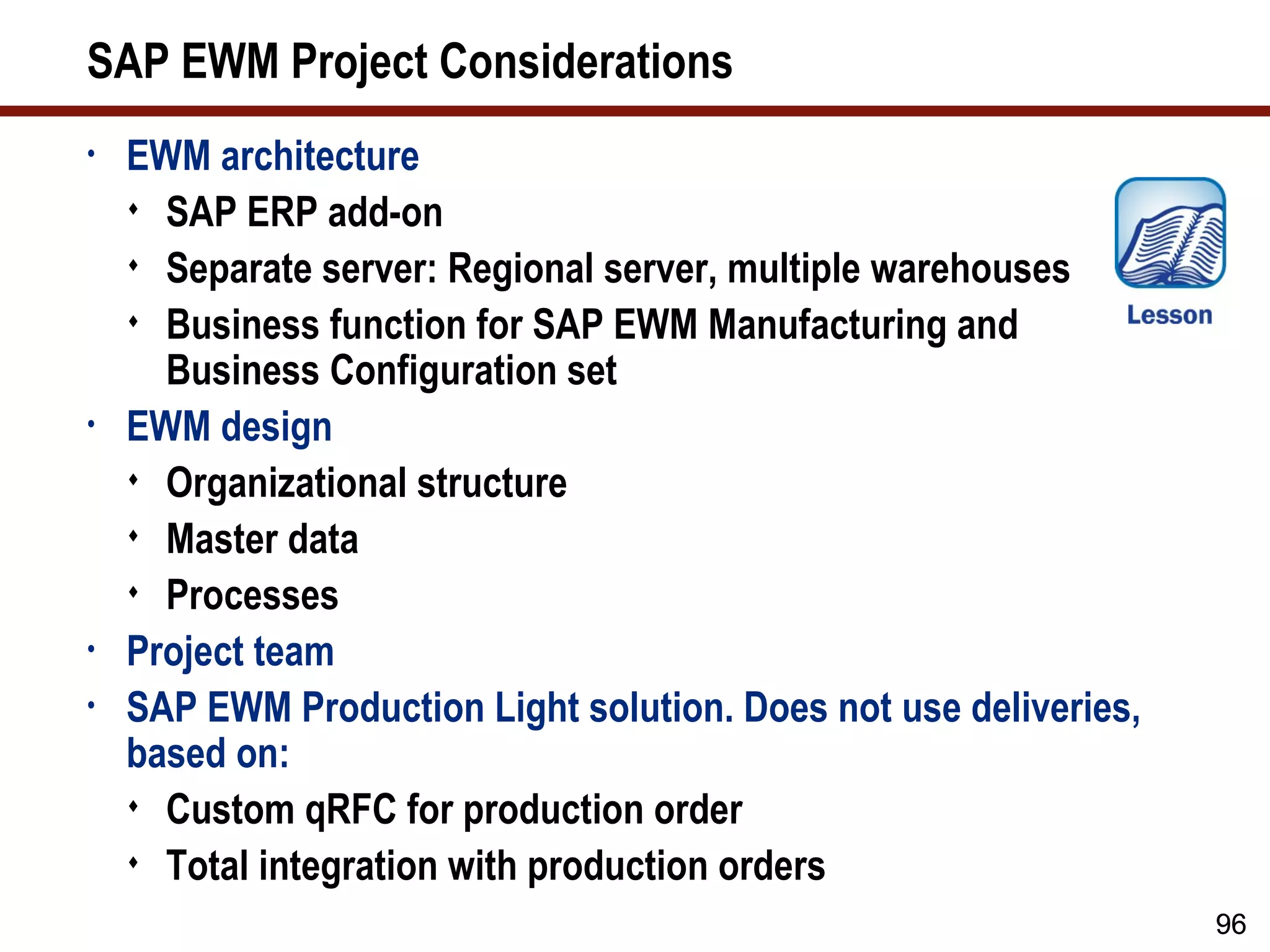
• EWM architecture
SAP ERP add-on
Separate server: Regional server, multiple warehouses
Business function for SAP EWM Manufacturing and
Business Configuration set
• EWM design
Organizational structure
Master data
Processes
• Project team
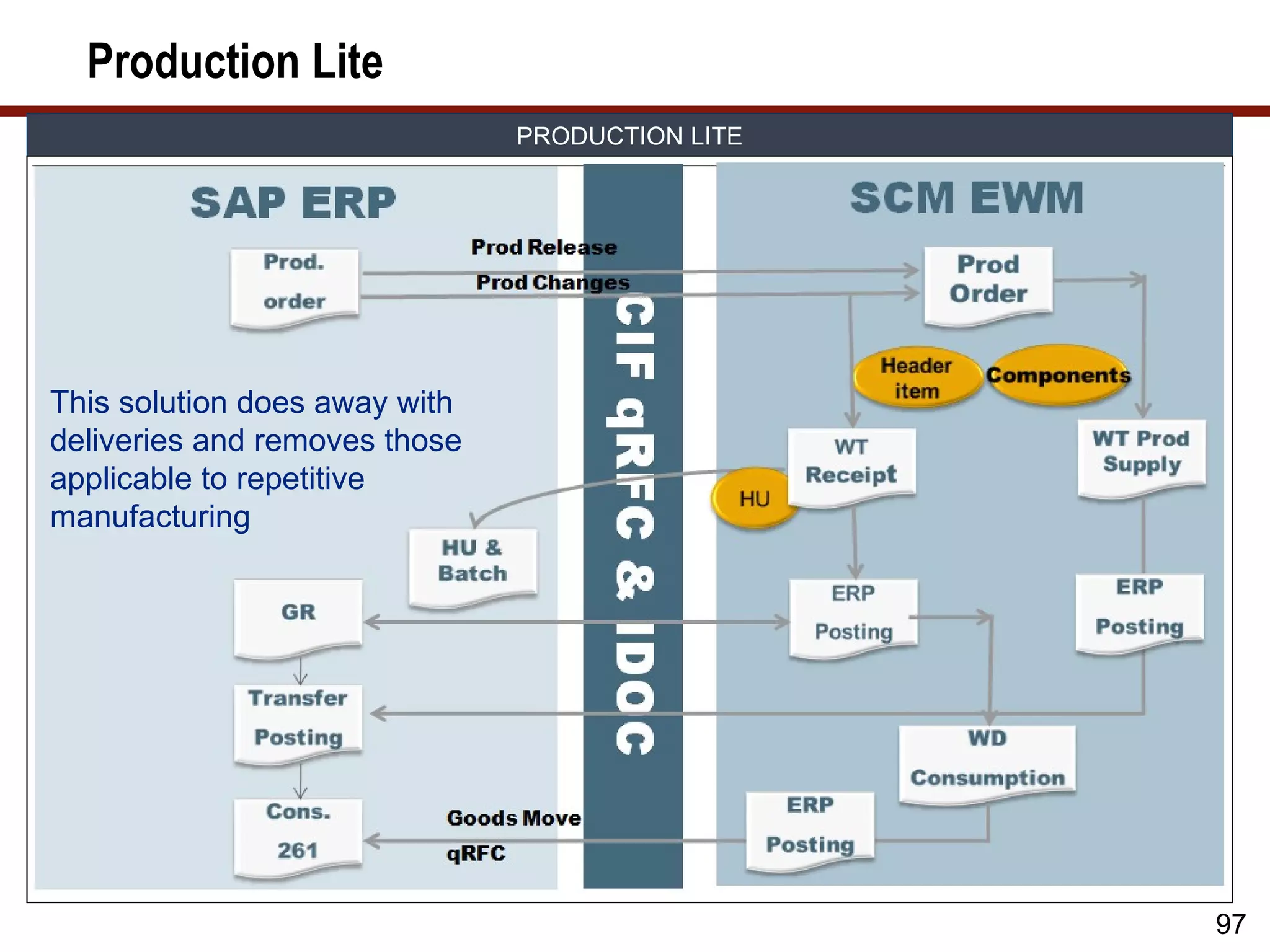
• SAP EWM Production Light solution. Does not use deliveries,
based on:
Custom qRFC for production order
Total integration with production orders
96
97.
Production Lite
PRODUCTION LITE
This solution does away with
deliveries and removes those
applicable to repetitive
manufacturing
97
98.
What We’ll Cover…
• About SAP EWM
• SAP EWM and production
• SAP EWM master data
• SAP EWM production process
• SAP EWM integration to radio frequency, barcode, and Material
Flow System (MFS)
• SAP EWM and compliance
• SAP EWM project considerations
• Wrap-up
98
99.
Additional Resources
• http://sapscminfo.blogspot.com
Speaker’s blog, including various topics related to SAP EWM
• http://wiki.sdn.sap.com/wiki/display/SCM/SAP+Extended+Wareho
use+Management+%28EWM%29
SAP Community Network page for SAP EWM
• http://help.sap.com/saphelp_ewm70/helpdata/en/4c/bc51af1f3243f
1e10000000a42189e/frameset.htm
SAP EWM Help
• http://wiki.sdn.sap.com/wiki/display/SCM/Useful+EWM+Consulting
+Notes
Important SAP Notes for SAP EWM
• http://wiki.sdn.sap.com/wiki/display/SCM/Useful+EWM+Performan
ce+Notes
Important SAP Notes for performance
99
100.
7 Key Pointsto Take Home
• The EWM architecture is fundamental as an ERP add-on or as an
SCM solution
• Manufacturing understanding is critical, including compliance
requirements
• Clearly map and document manual system activities; automate
where possible to reduce support resources to a minimum
• Integrate process with technology to ensure effectiveness
• 100% process accuracy is critical. RF should be fool proof.
• Have a good document framework, process document, functional
specification/tech specification
• Project staffing is critical
Good and skilled functional consultants (must have at least 2
implementations, must know SAP ERP)
Developers that are familiar with SAP EWM (offshore is not
beneficial due to complexity)
100
Editor's Notes
#93 Within the specific Engines – here Transportation – all decision support will be possible. The needed business context and content for this specific task will reside inside a specific engine. Information or Master Data which is needed to support the decision or evaluation process needs at the time of decision to be available. If the engine will not be in the situation to create content on their own, at least it has to be clear, which other service will be able to provide the necessary data. This means also, that other engines will request information about the transportation content from TMS. A good example is freight management. If TMS has to select a carrier on best price during carrier determination, there is the possibility to call a third pary service to evaluate shipments. These costs and the related contracts will be linked or attached to the shipment data within TMS. If later in the process the controlling services request structural information about these cost and revenue data for a specific shipment, a request to provide the information has to executed and reported back from TMS. The information broker between the different tasks will be Fulfillment Coordination. To standardize the communication between services, standard business documents like UBL or BOL/VICs will be used.