MvvmQuickCross
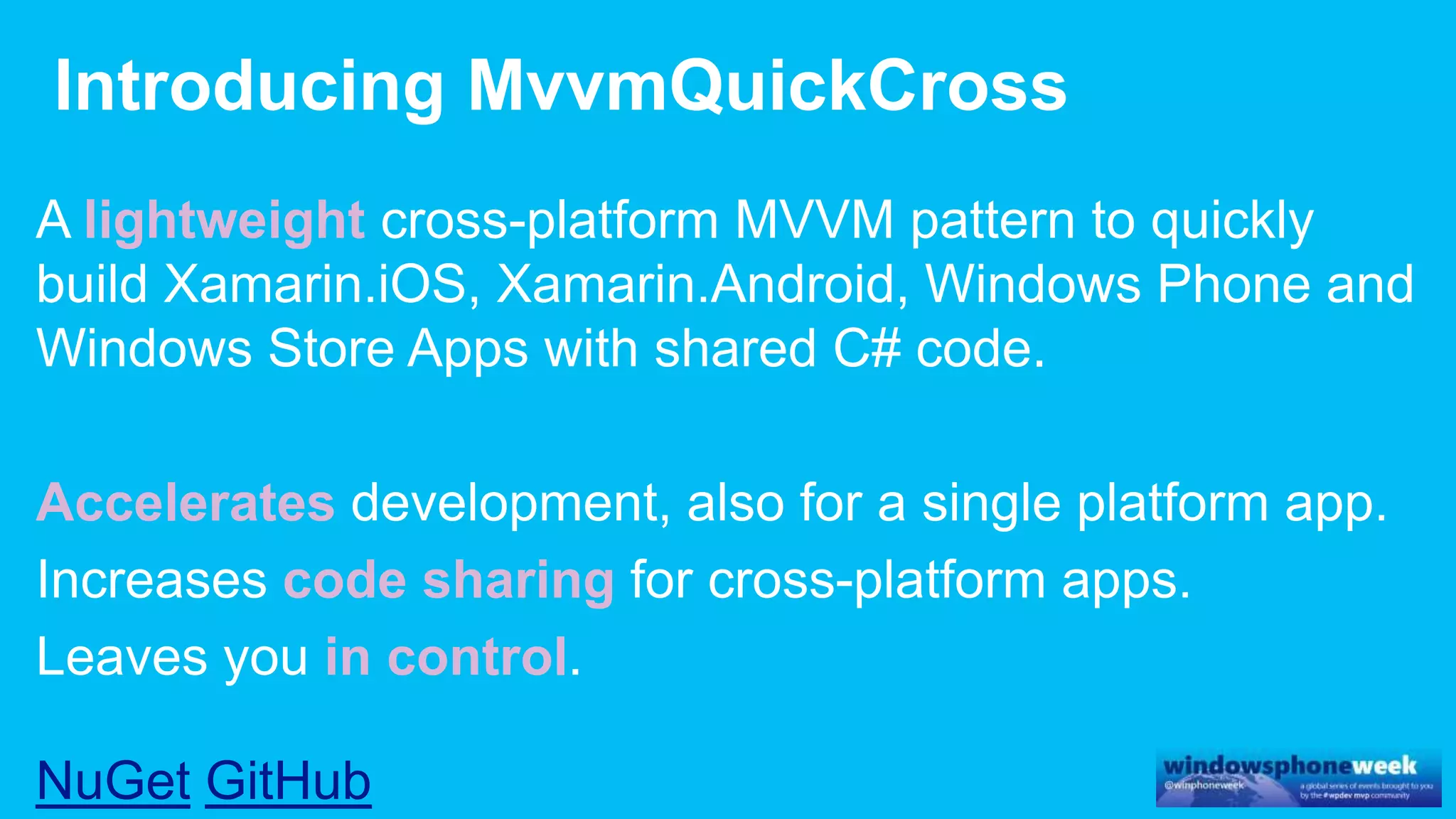
lightweight cross-platform
Accelerates
code sharing
in control
NuGet GitHub
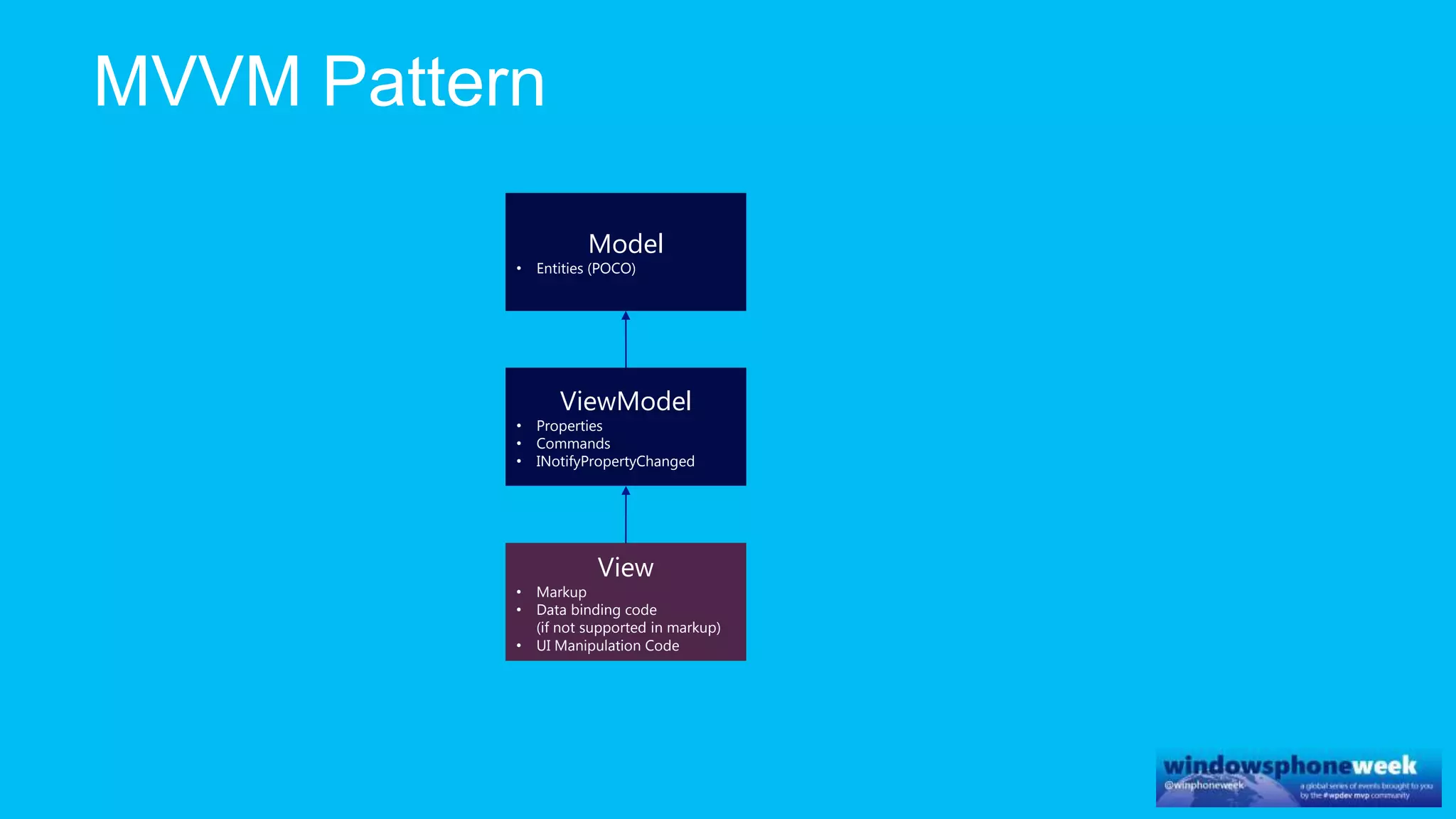
ViewModel
• Properties
• Commands
• INotifyPropertyChanged
Model
• Entities (POCO)
View
• Markup
• Data binding code
(if not supported in markup)
• UI Manipulation Code
ViewModel
• Properties
• Commands
• INotifyPropertyChanged
Model
• Entities (POCO)
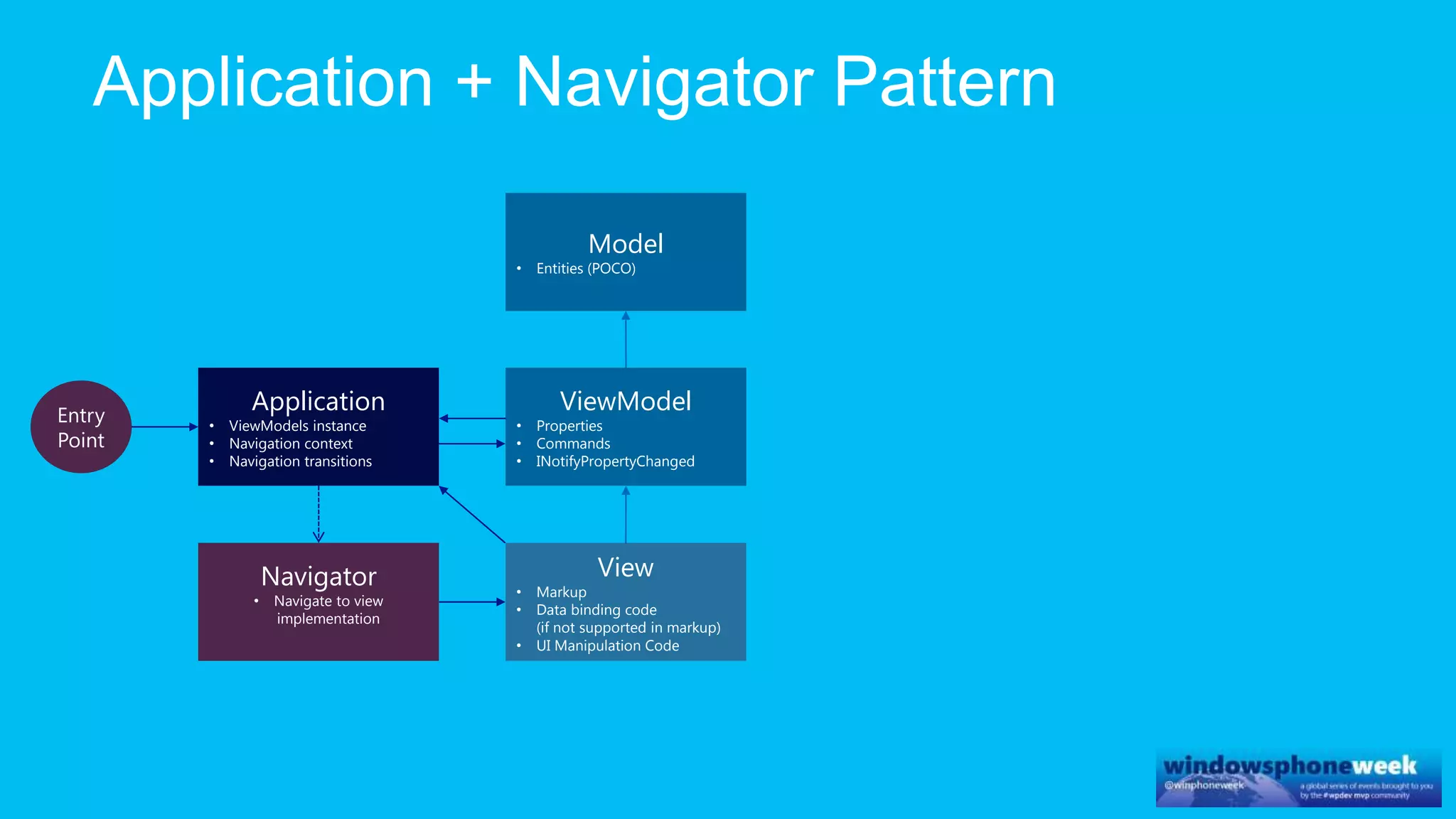
Application
• ViewModels instance
• Navigation context
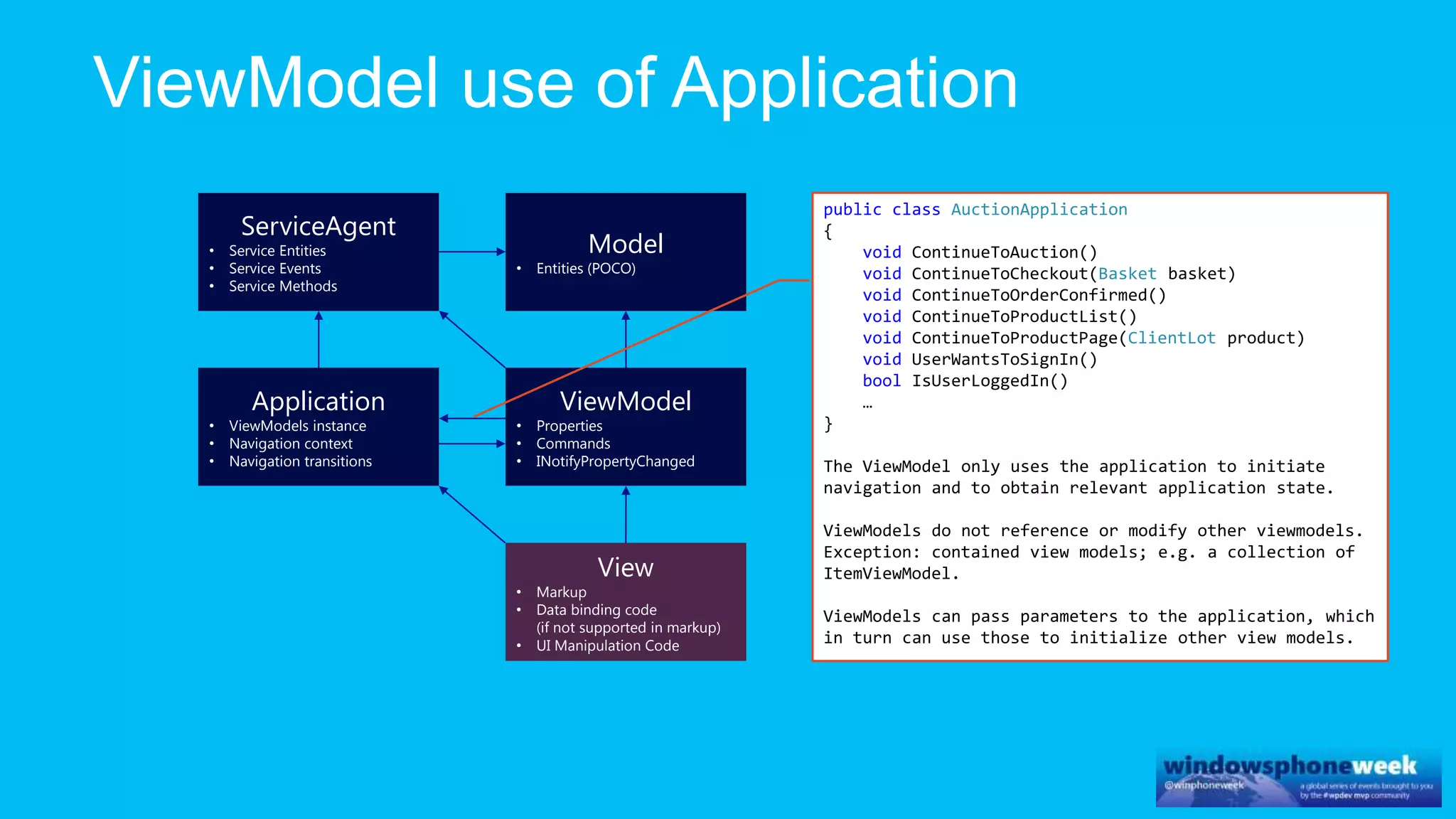
• Navigation transitions
View
• Markup
• Data binding code
(if not supported in markup)
• UI Manipulation Code
Navigator
• Navigate to view
implementation
Entry
Point
ViewModel
• Properties
• Commands
• INotifyPropertyChanged
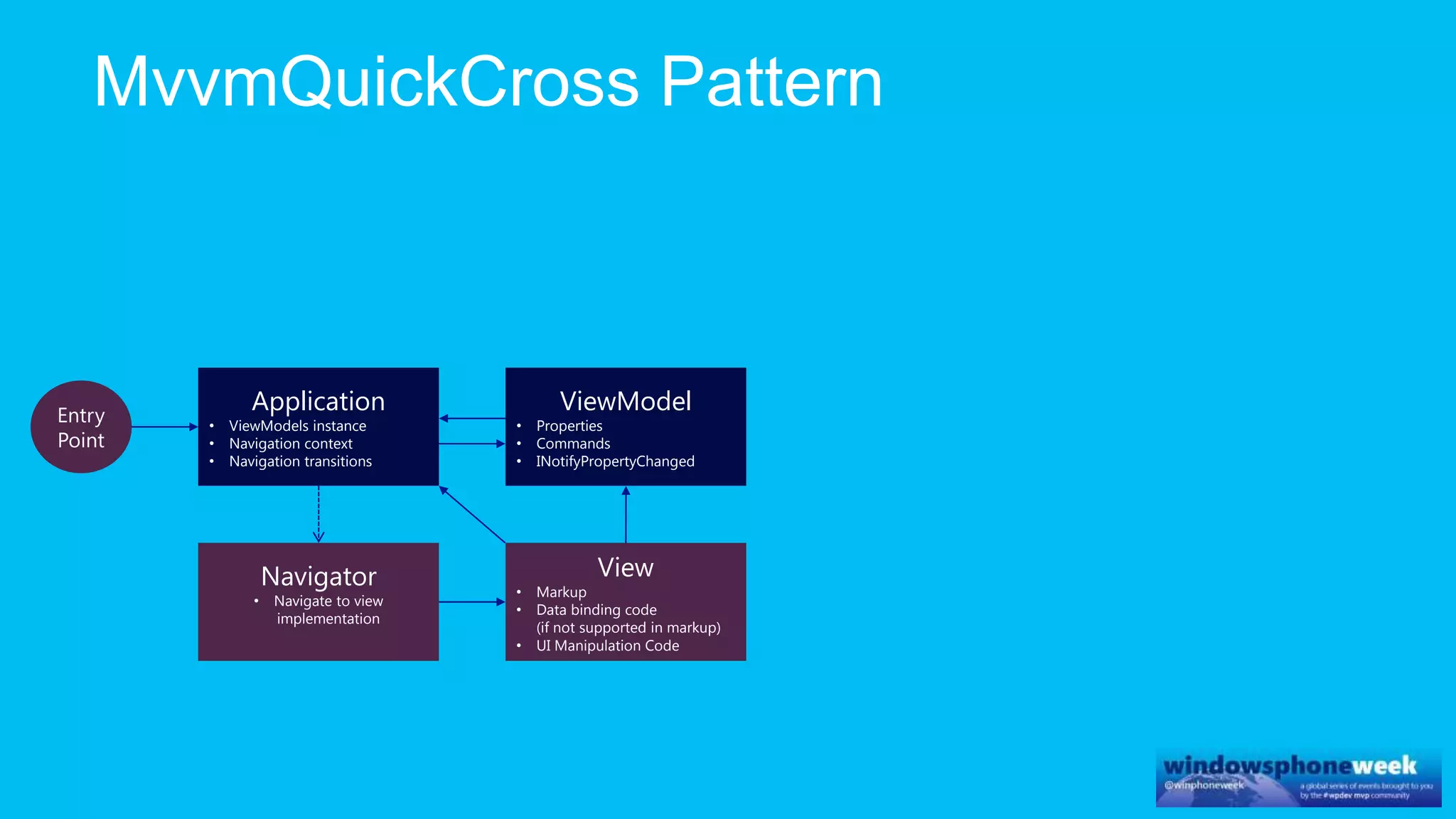
Application
• ViewModels instance
• Navigation context
• Navigation transitions
View
• Markup
• Data binding code
(if not supported in markup)
• UI Manipulation Code
Navigator
• Navigate to view
implementation
Entry
Point
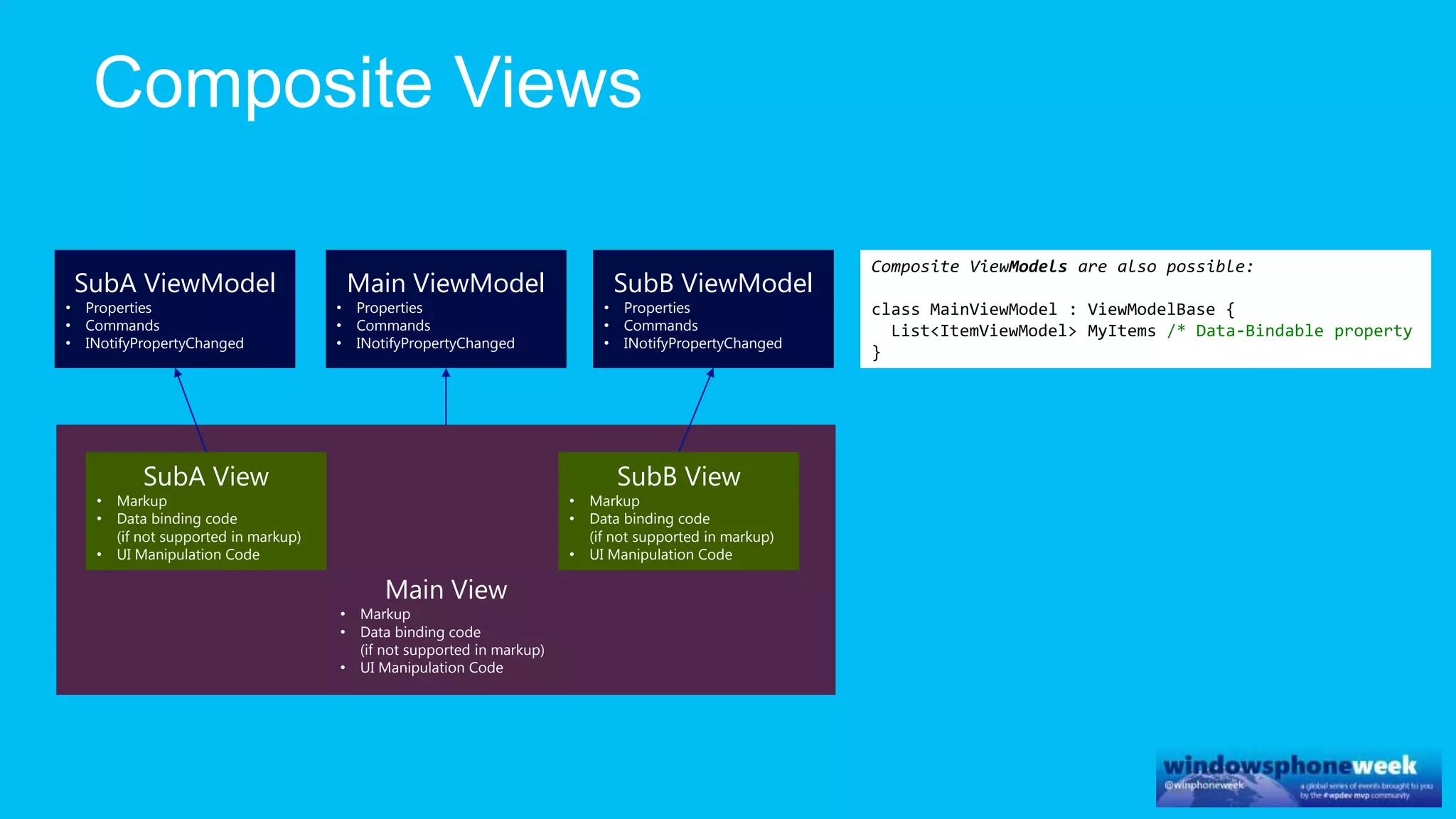
Main View
• Markup
• Data binding code
(if not supported in markup)
• UI Manipulation Code
Main ViewModel
• Properties
• Commands
• INotifyPropertyChanged
SubB ViewModel
• Properties
• Commands
• INotifyPropertyChanged
SubA ViewModel
• Properties
• Commands
• INotifyPropertyChanged
SubB View
• Markup
• Data binding code
(if not supported in markup)
• UI Manipulation Code
SubA View
• Markup
• Data binding code
(if not supported in markup)
• UI Manipulation Code
Composite ViewModels are also possible:
class MainViewModel : ViewModelBase {
List<ItemViewModel> MyItems /* Data-Bindable property
}
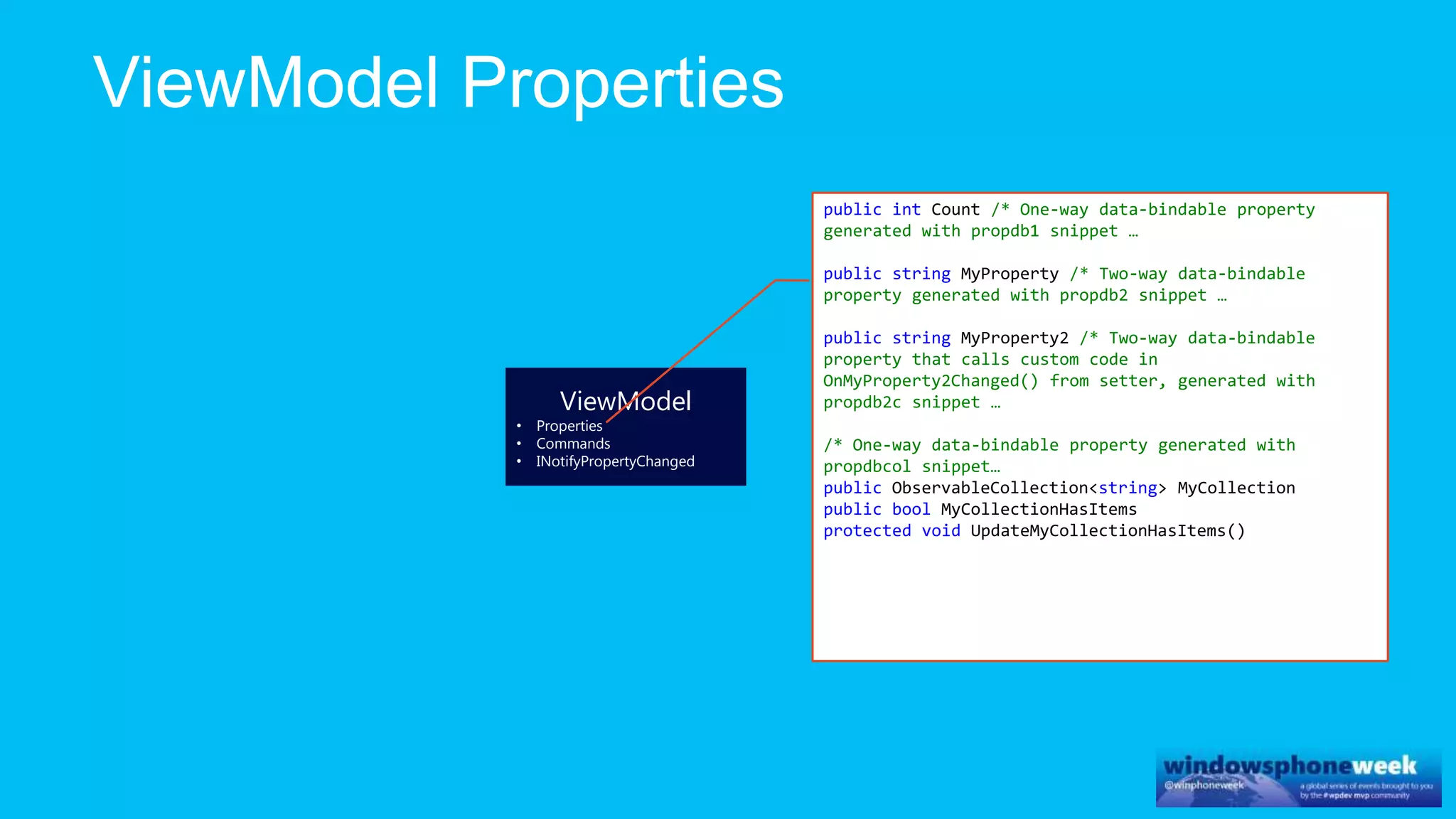
ViewModel
• Properties
• Commands
• INotifyPropertyChanged
public int Count /* One-way data-bindable property
generated with propdb1 snippet …
public string MyProperty /* Two-way data-bindable
property generated with propdb2 snippet …
public string MyProperty2 /* Two-way data-bindable
property that calls custom code in
OnMyProperty2Changed() from setter, generated with
propdb2c snippet …
/* One-way data-bindable property generated with
propdbcol snippet…
public ObservableCollection<string> MyCollection
public bool MyCollectionHasItems
protected void UpdateMyCollectionHasItems()
ViewModel
• Properties
• Commands
• INotifyPropertyChanged
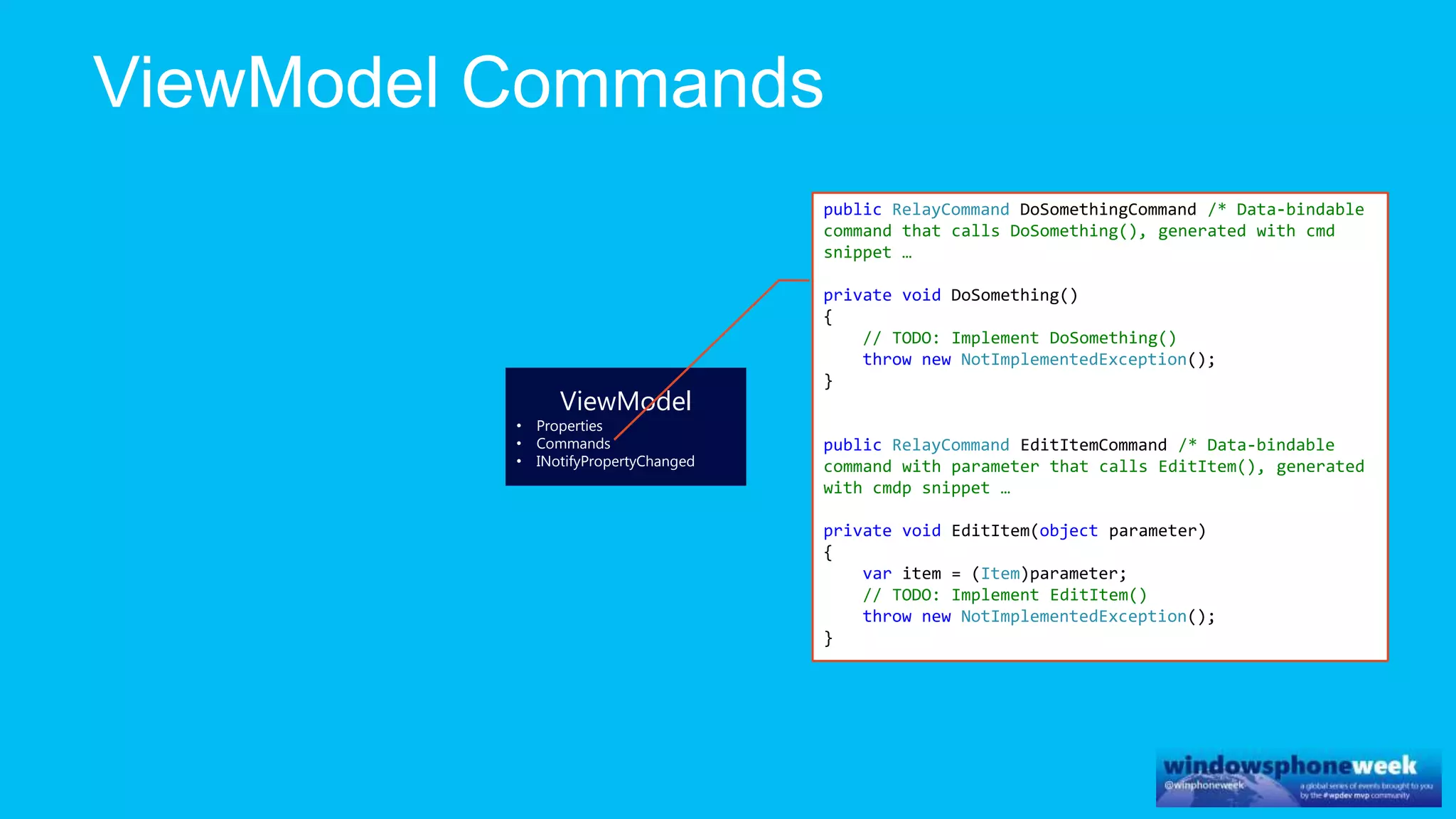
public RelayCommand DoSomethingCommand /* Data-bindable
command that calls DoSomething(), generated with cmd
snippet …
private void DoSomething()
{
// TODO: Implement DoSomething()
throw new NotImplementedException();
}
public RelayCommand EditItemCommand /* Data-bindable
command with parameter that calls EditItem(), generated
with cmdp snippet …
private void EditItem(object parameter)
{
var item = (Item)parameter;
// TODO: Implement EditItem()
throw new NotImplementedException();
}
ViewModel
• Properties
• Commands
• INotifyPropertyChanged
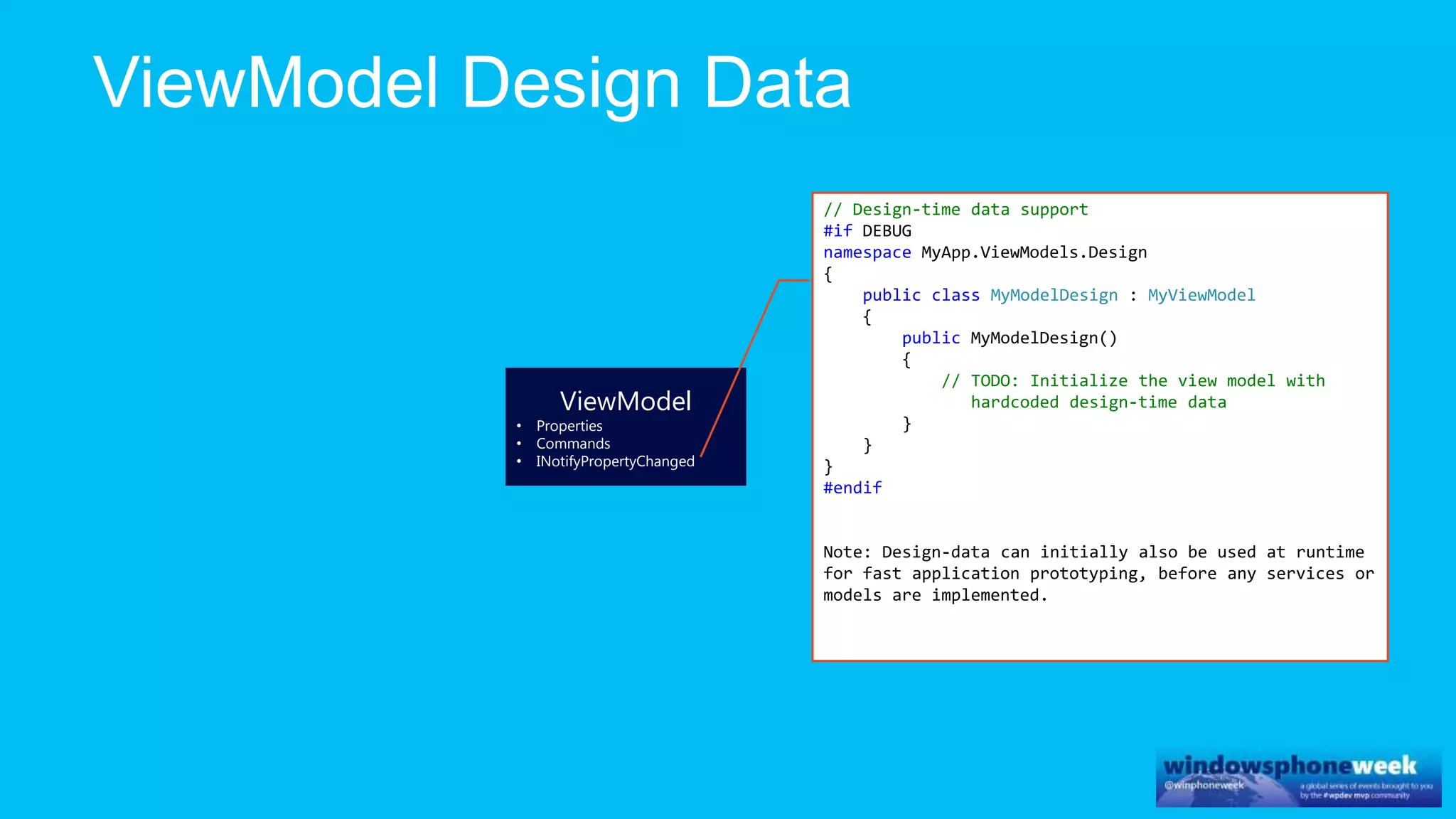
// Design-time data support
#if DEBUG
namespace MyApp.ViewModels.Design
{
public class MyModelDesign : MyViewModel
{
public MyModelDesign()
{
// TODO: Initialize the view model with
hardcoded design-time data
}
}
}
#endif
Note: Design-data can initially also be used at runtime
for fast application prototyping, before any services or
models are implemented.
ViewModel
• Properties
• Commands
• INotifyPropertyChanged
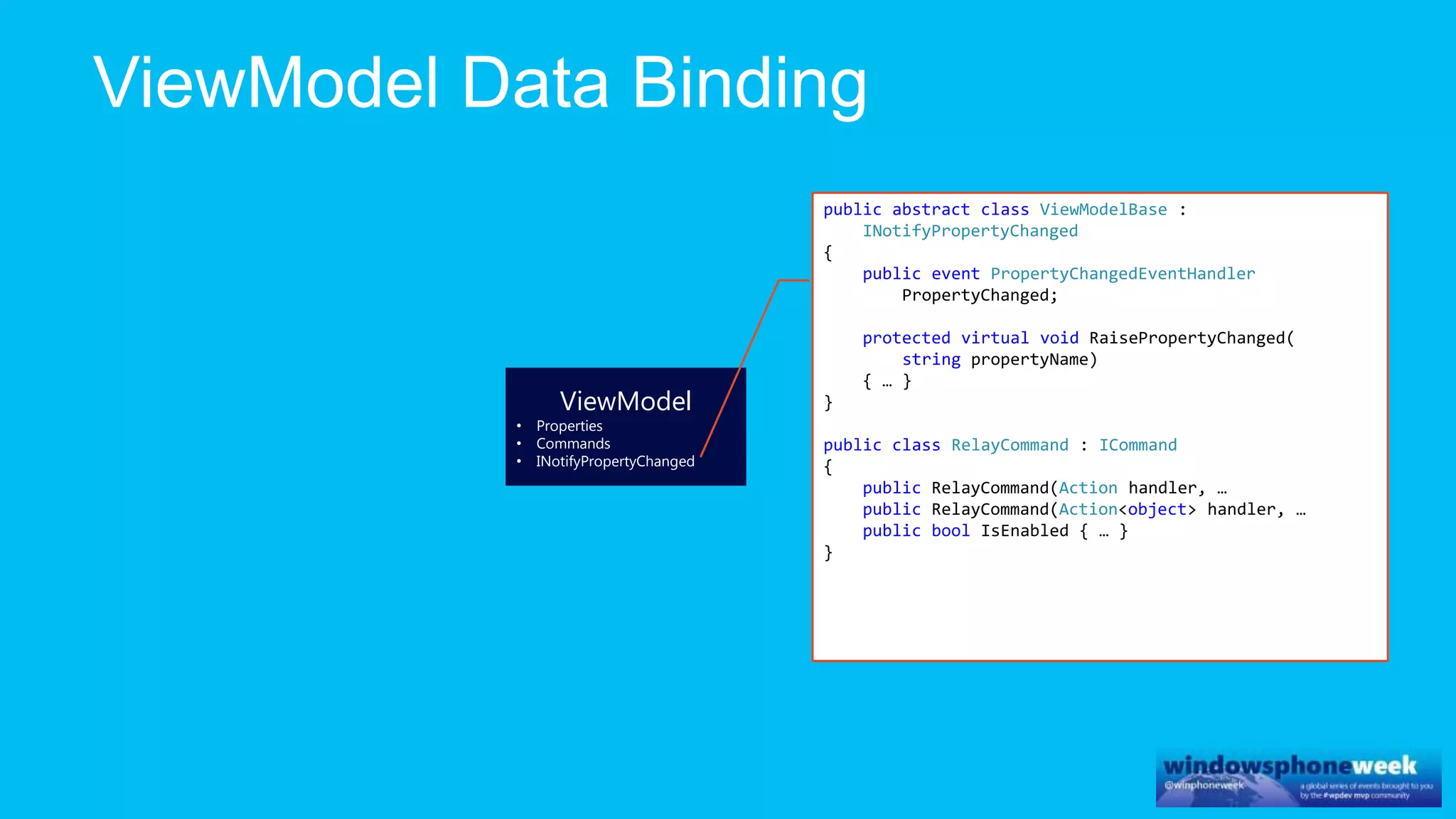
public abstract class ViewModelBase :
INotifyPropertyChanged
{
public event PropertyChangedEventHandler
PropertyChanged;
protected virtual void RaisePropertyChanged(
string propertyName)
{ … }
}
public class RelayCommand : ICommand
{
public RelayCommand(Action handler, …
public RelayCommand(Action<object> handler, …
public bool IsEnabled { … }
}
ViewModel
• Properties
• Commands
• INotifyPropertyChanged
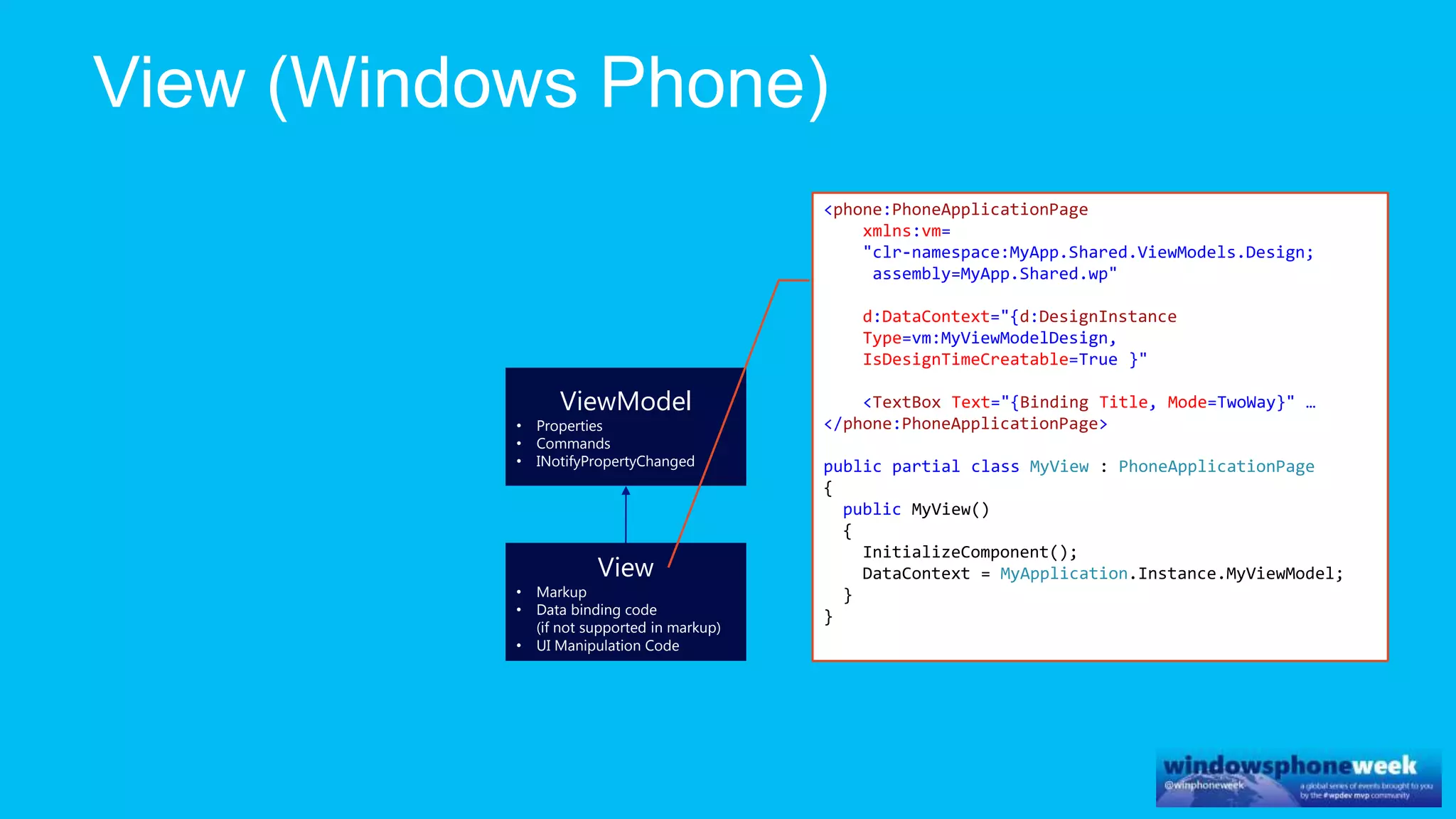
View
• Markup
• Data binding code
(if not supported in markup)
• UI Manipulation Code
<phone:PhoneApplicationPage
xmlns:vm=
"clr-namespace:MyApp.Shared.ViewModels.Design;
assembly=MyApp.Shared.wp"
d:DataContext="{d:DesignInstance
Type=vm:MyViewModelDesign,
IsDesignTimeCreatable=True }"
<TextBox Text="{Binding Title, Mode=TwoWay}" …
</phone:PhoneApplicationPage>
public partial class MyView : PhoneApplicationPage
{
public MyView()
{
InitializeComponent();
DataContext = MyApplication.Instance.MyViewModel;
}
}
ViewModel
• Properties
• Commands
• INotifyPropertyChanged
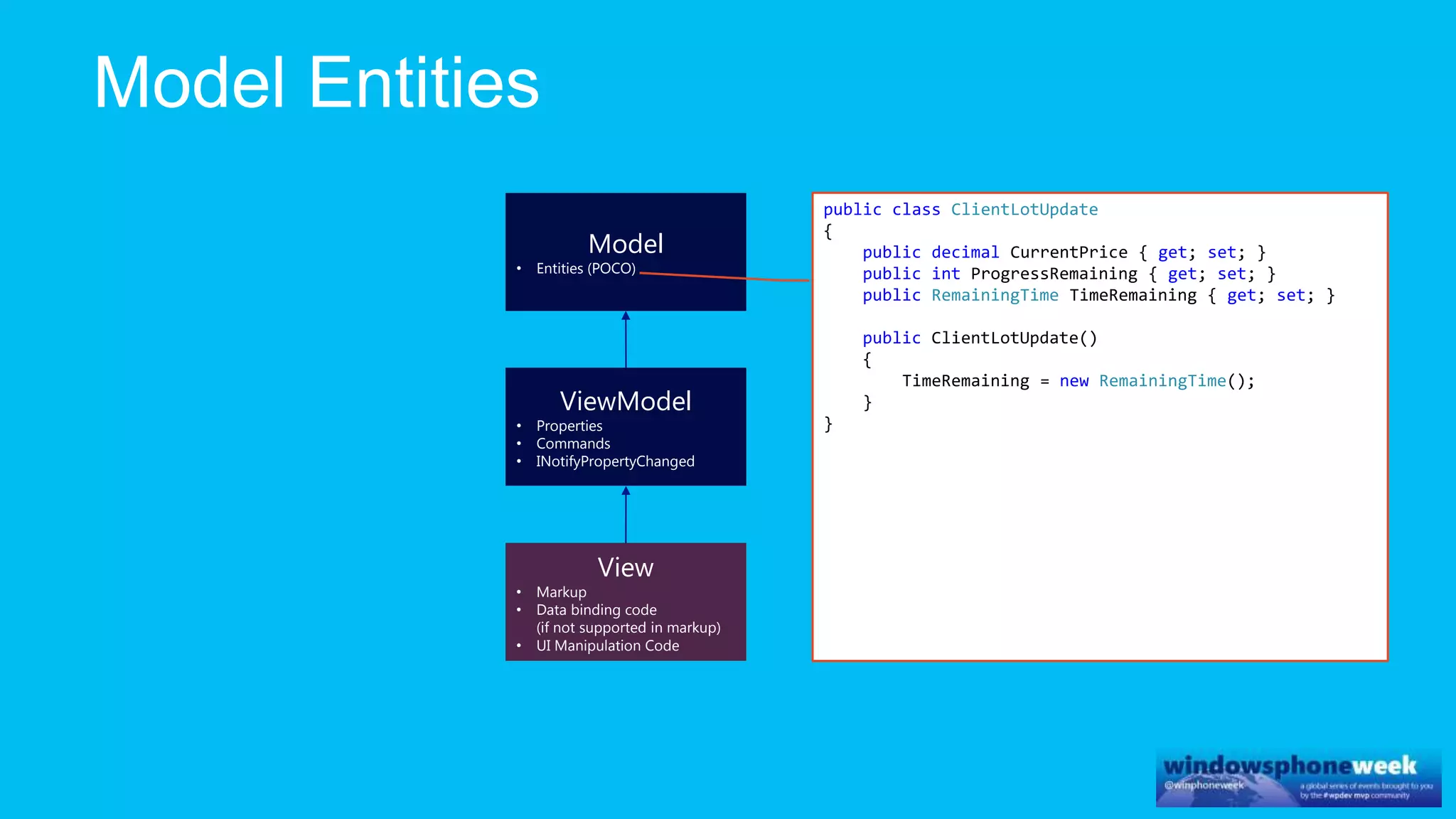
Model
• Entities (POCO)
View
• Markup
• Data binding code
(if not supported in markup)
• UI Manipulation Code
public class ClientLotUpdate
{
public decimal CurrentPrice { get; set; }
public int ProgressRemaining { get; set; }
public RemainingTime TimeRemaining { get; set; }
public ClientLotUpdate()
{
TimeRemaining = new RemainingTime();
}
}
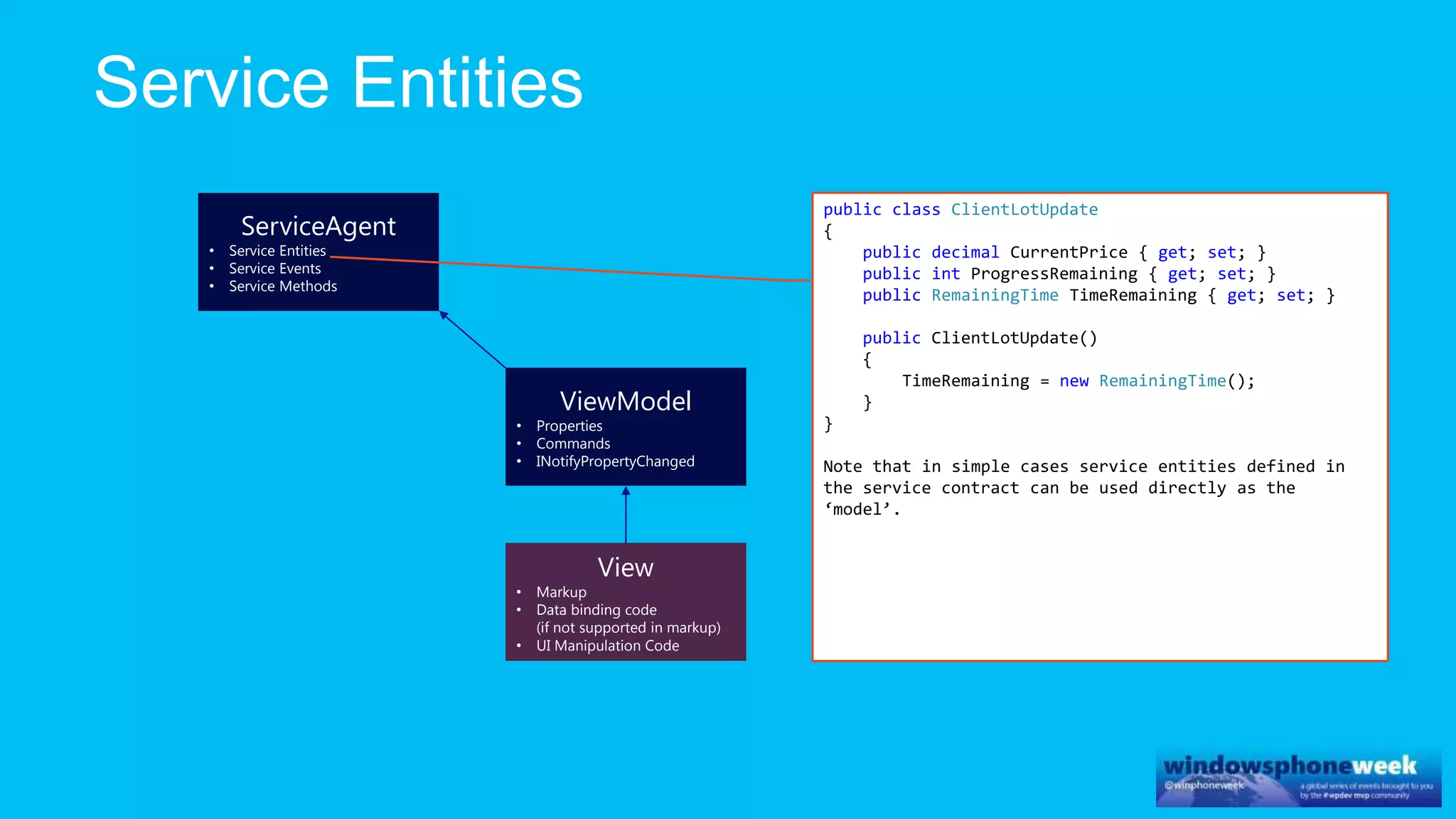
ViewModel
• Properties
• Commands
• INotifyPropertyChanged
ServiceAgent
• Service Entities
• Service Events
• Service Methods
View
• Markup
• Data binding code
(if not supported in markup)
• UI Manipulation Code
public class ClientLotUpdate
{
public decimal CurrentPrice { get; set; }
public int ProgressRemaining { get; set; }
public RemainingTime TimeRemaining { get; set; }
public ClientLotUpdate()
{
TimeRemaining = new RemainingTime();
}
}
Note that in simple cases service entities defined in
the service contract can be used directly as the
‘model’.
ViewModel
• Properties
• Commands
• INotifyPropertyChanged
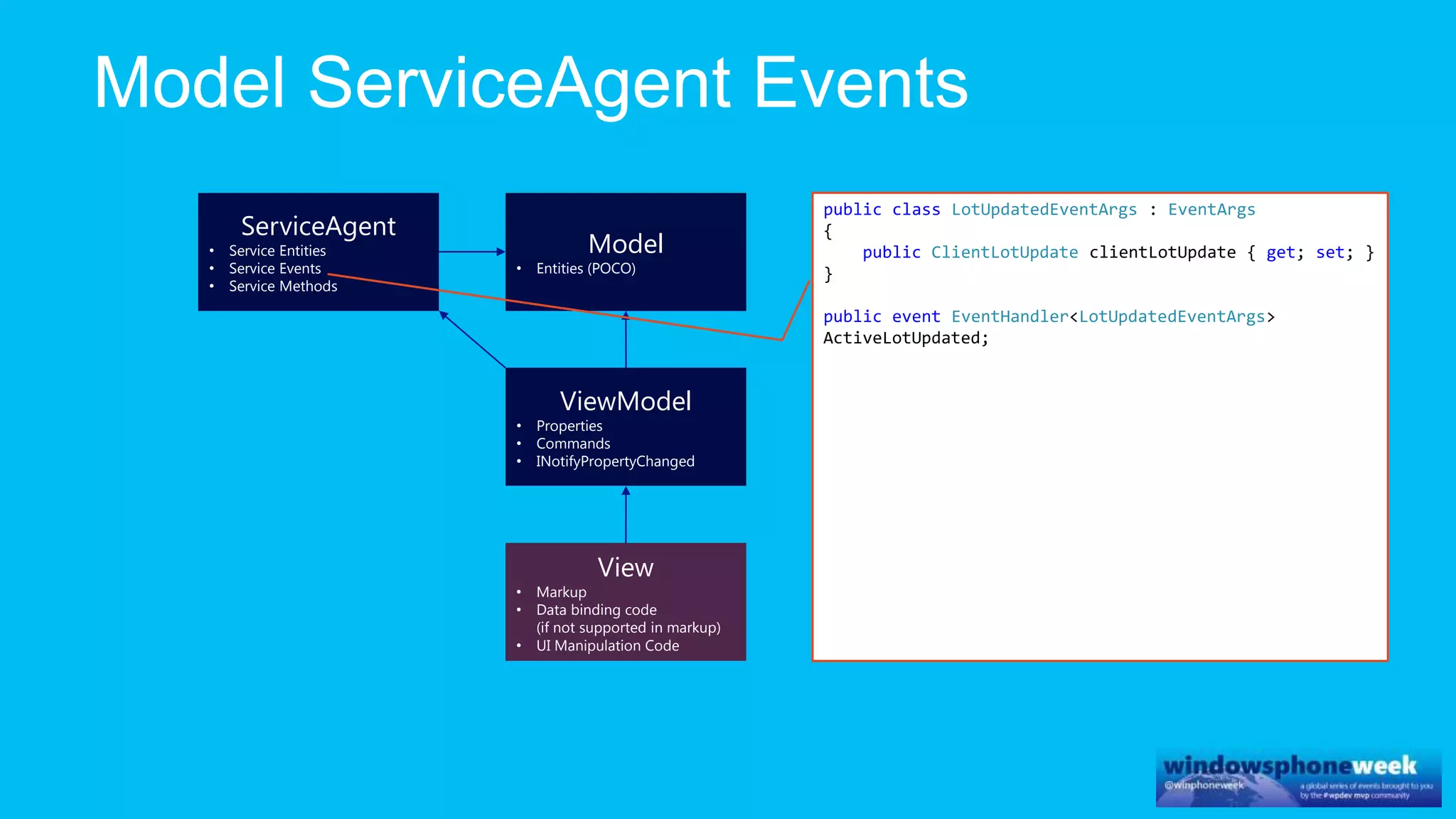
Model
• Entities (POCO)
ServiceAgent
• Service Entities
• Service Events
• Service Methods
View
• Markup
• Data binding code
(if not supported in markup)
• UI Manipulation Code
public class LotUpdatedEventArgs : EventArgs
{
public ClientLotUpdate clientLotUpdate { get; set; }
}
public event EventHandler<LotUpdatedEventArgs>
ActiveLotUpdated;
ViewModel
• Properties
• Commands
• INotifyPropertyChanged
Model
• Entities (POCO)
ServiceAgent
• Service Entities
• Service Events
• Service Methods
View
• Markup
• Data binding code
(if not supported in markup)
• UI Manipulation Code
public class PlaceBidRequest
{
public int LotId { get; set; }
public decimal Price { get; set; }
}
public Task RaisePlaceBidAsync(PlaceBidRequest
placeBidRequest)
{
return _hubProxy.Invoke(
"PlaceBid",
new object[] { placeBidRequest });
}
ViewModel
• Properties
• Commands
• INotifyPropertyChanged
Model
• Entities (POCO)
ServiceAgent
• Service Entities
• Service Events
• Service Methods
Application
• ViewModels instance
• Navigation context
• Navigation transitions
View
• Markup
• Data binding code
(if not supported in markup)
• UI Manipulation Code
public class AuctionApplication
{
void ContinueToAuction()
void ContinueToCheckout(Basket basket)
void ContinueToOrderConfirmed()
void ContinueToProductList()
void ContinueToProductPage(ClientLot product)
void UserWantsToSignIn()
bool IsUserLoggedIn()
…
}
The ViewModel only uses the application to initiate
navigation and to obtain relevant application state.
ViewModels do not reference or modify other viewmodels.
Exception: contained view models; e.g. a collection of
ItemViewModel.
ViewModels can pass parameters to the application, which
in turn can use those to initialize other view models.
ViewModel
• Properties
• Commands
• INotifyPropertyChanged
Model
• Entities (POCO)
ServiceAgent
• Service Entities
• Service Events
• Service Methods
Application
• ViewModels instance
• Navigation context
• Navigation transitions
View
• Markup
• Data binding code
(if not supported in markup)
• UI Manipulation Code
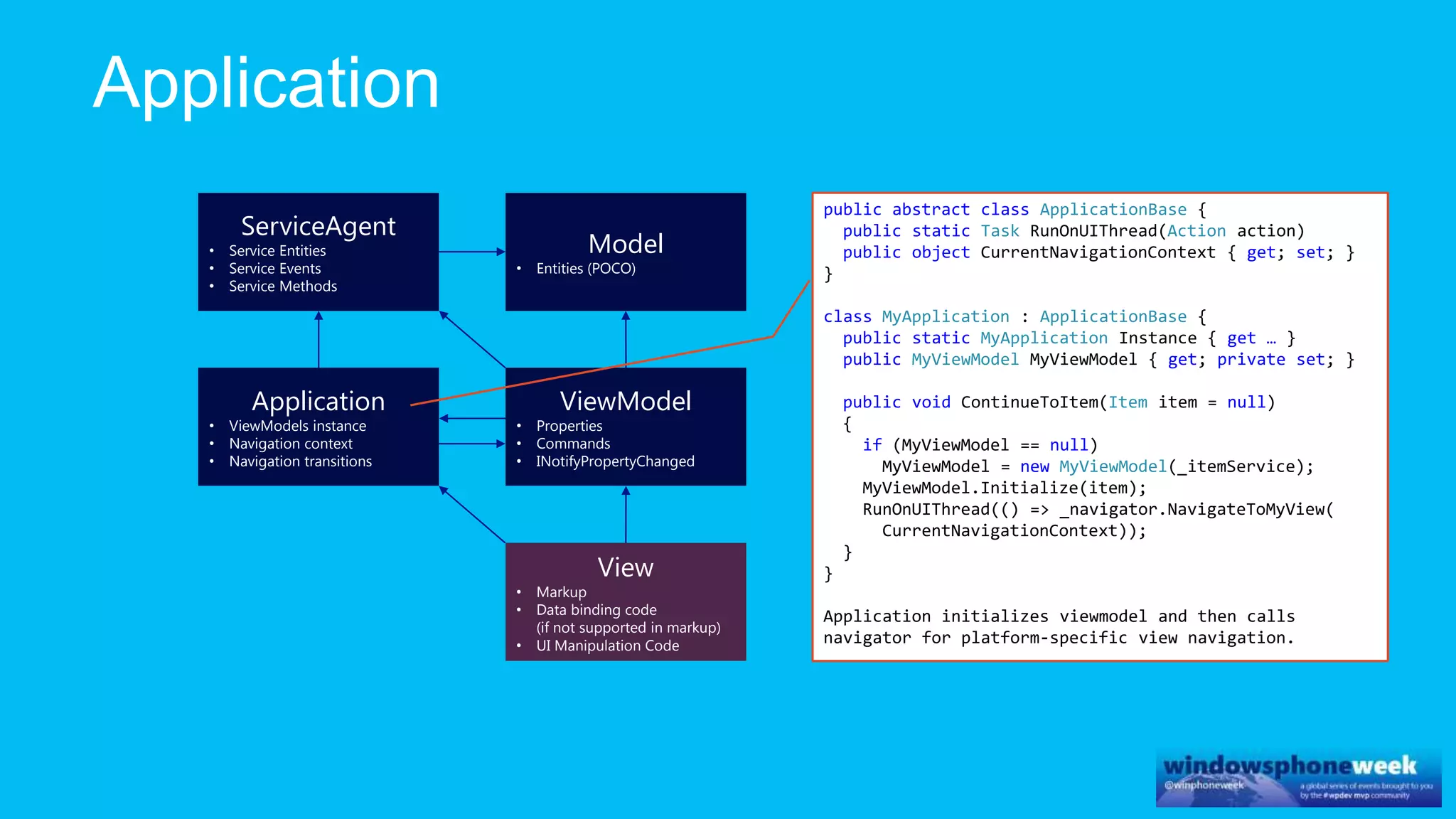
public abstract class ApplicationBase {
public static Task RunOnUIThread(Action action)
public object CurrentNavigationContext { get; set; }
}
class MyApplication : ApplicationBase {
public static MyApplication Instance { get … }
public MyViewModel MyViewModel { get; private set; }
public void ContinueToItem(Item item = null)
{
if (MyViewModel == null)
MyViewModel = new MyViewModel(_itemService);
MyViewModel.Initialize(item);
RunOnUIThread(() => _navigator.NavigateToMyView(
CurrentNavigationContext));
}
}
Application initializes viewmodel and then calls
navigator for platform-specific view navigation.
ViewModel
• Properties
• Commands
• INotifyPropertyChanged
Model
• Entities (POCO)
ServiceAgent
• Service Entities
• Service Events
• Service Methods
Application
• ViewModels instance
• Navigation context
• Navigation transitions
View
• Markup
• Data binding code
(if not supported in markup)
• UI Manipulation Code
Navigator
• Navigate to view
implementation
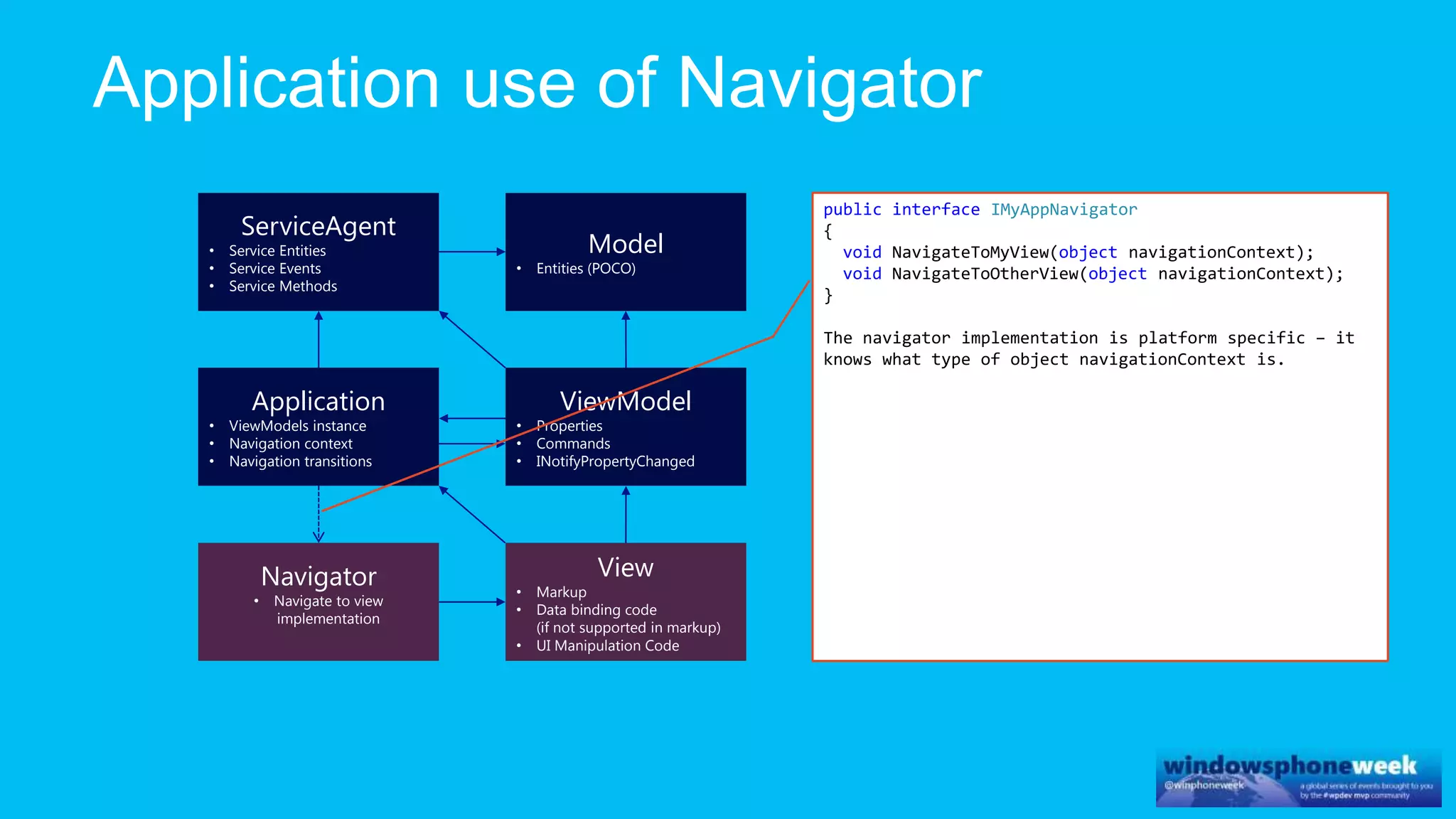
public interface IMyAppNavigator
{
void NavigateToMyView(object navigationContext);
void NavigateToOtherView(object navigationContext);
}
The navigator implementation is platform specific – it
knows what type of object navigationContext is.
ViewModel
• Properties
• Commands
• INotifyPropertyChanged
Model
• Entities (POCO)
ServiceAgent
• Service Entities
• Service Events
• Service Methods
Application
• ViewModels instance
• Navigation context
• Navigation transitions
View
• Markup
• Data binding code
(if not supported in markup)
• UI Manipulation Code
Navigator
• Navigate to view
implementation
Entry
Point
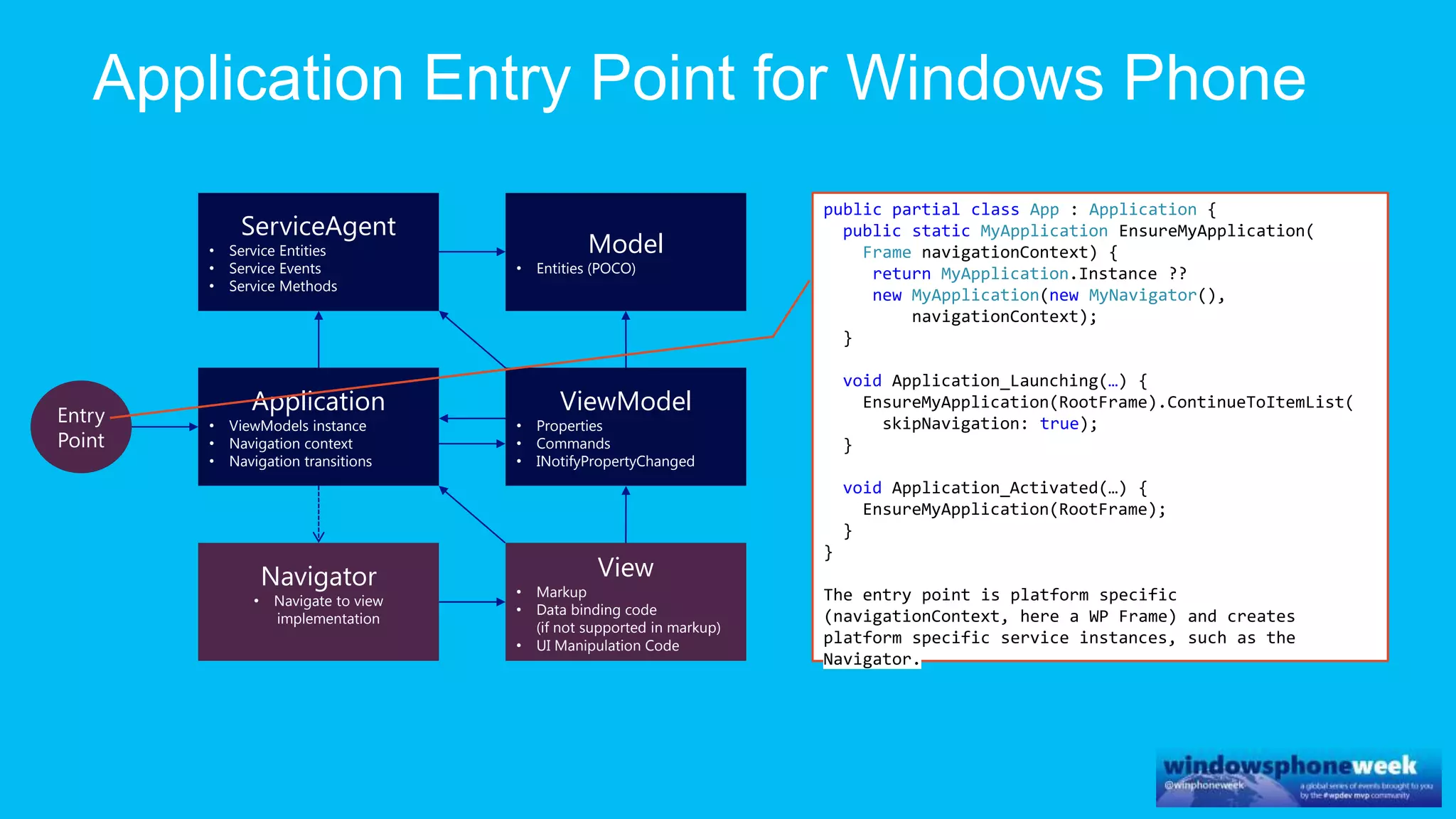
public partial class App : Application {
public static MyApplication EnsureMyApplication(
Frame navigationContext) {
return MyApplication.Instance ??
new MyApplication(new MyNavigator(),
navigationContext);
}
void Application_Launching(…) {
EnsureMyApplication(RootFrame).ContinueToItemList(
skipNavigation: true);
}
void Application_Activated(…) {
EnsureMyApplication(RootFrame);
}
}
The entry point is platform specific
(navigationContext, here a WP Frame) and creates
platform specific service instances, such as the
Navigator.
ViewModel
• Properties
• Commands
• INotifyPropertyChanged
Model
• Entities (POCO)
ServiceAgent
• Service Entities
• Service Events
• Service Methods
Application
• ViewModels instance
• Navigation context
• Navigation transitions
View
• Markup
• Data binding code
(if not supported in markup)
• UI Manipulation Code
Navigator
• Navigate to view
implementation
Entry
Point
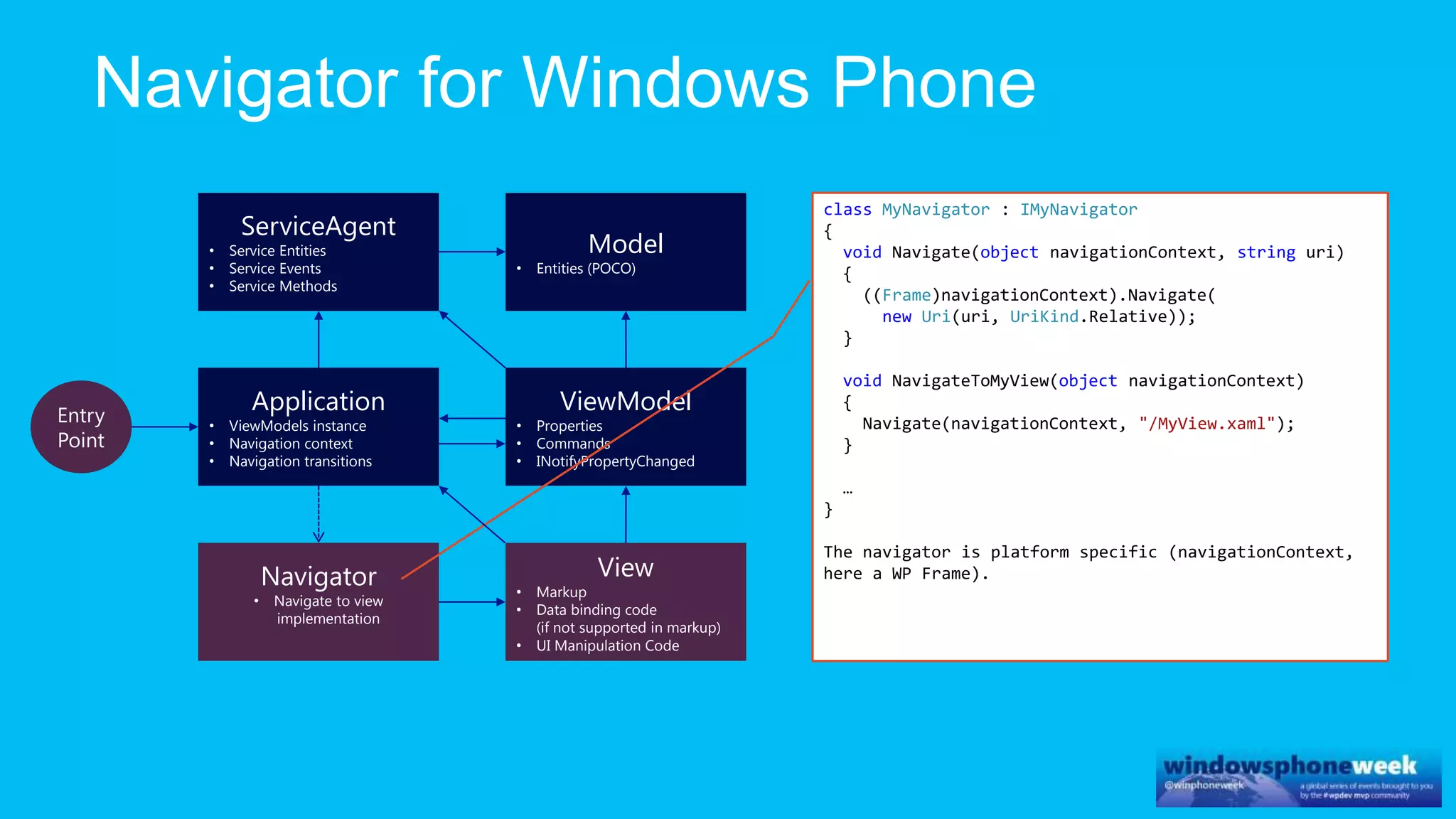
class MyNavigator : IMyNavigator
{
void Navigate(object navigationContext, string uri)
{
((Frame)navigationContext).Navigate(
new Uri(uri, UriKind.Relative));
}
void NavigateToMyView(object navigationContext)
{
Navigate(navigationContext, "/MyView.xaml");
}
…
}
The navigator is platform specific (navigationContext,
here a WP Frame).
ViewModel
• Properties
• Commands
• INotifyPropertyChanged, INoti
fyCollectionChanged
Model
• Entities (POCO)
ServiceAgent
• Service Entities
• Service Events
• Service Methods
Application
• ViewModels instance
• Navigation context
• Navigation transitions
View
• Markup
• Data binding code
(if not supported in markup)
• UI Manipulation Code
Navigator
• Navigate to view
implementation
Entry
Point
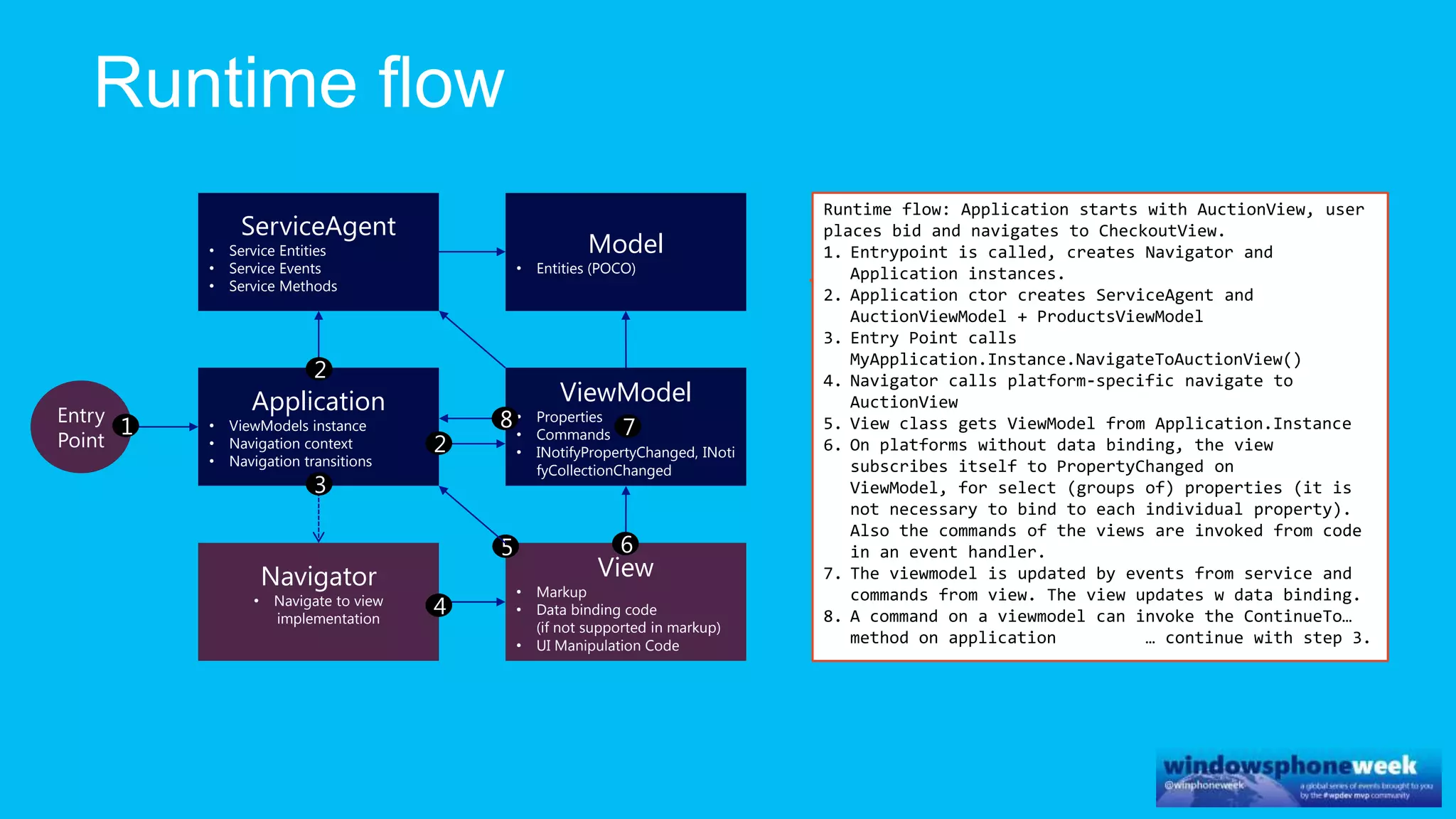
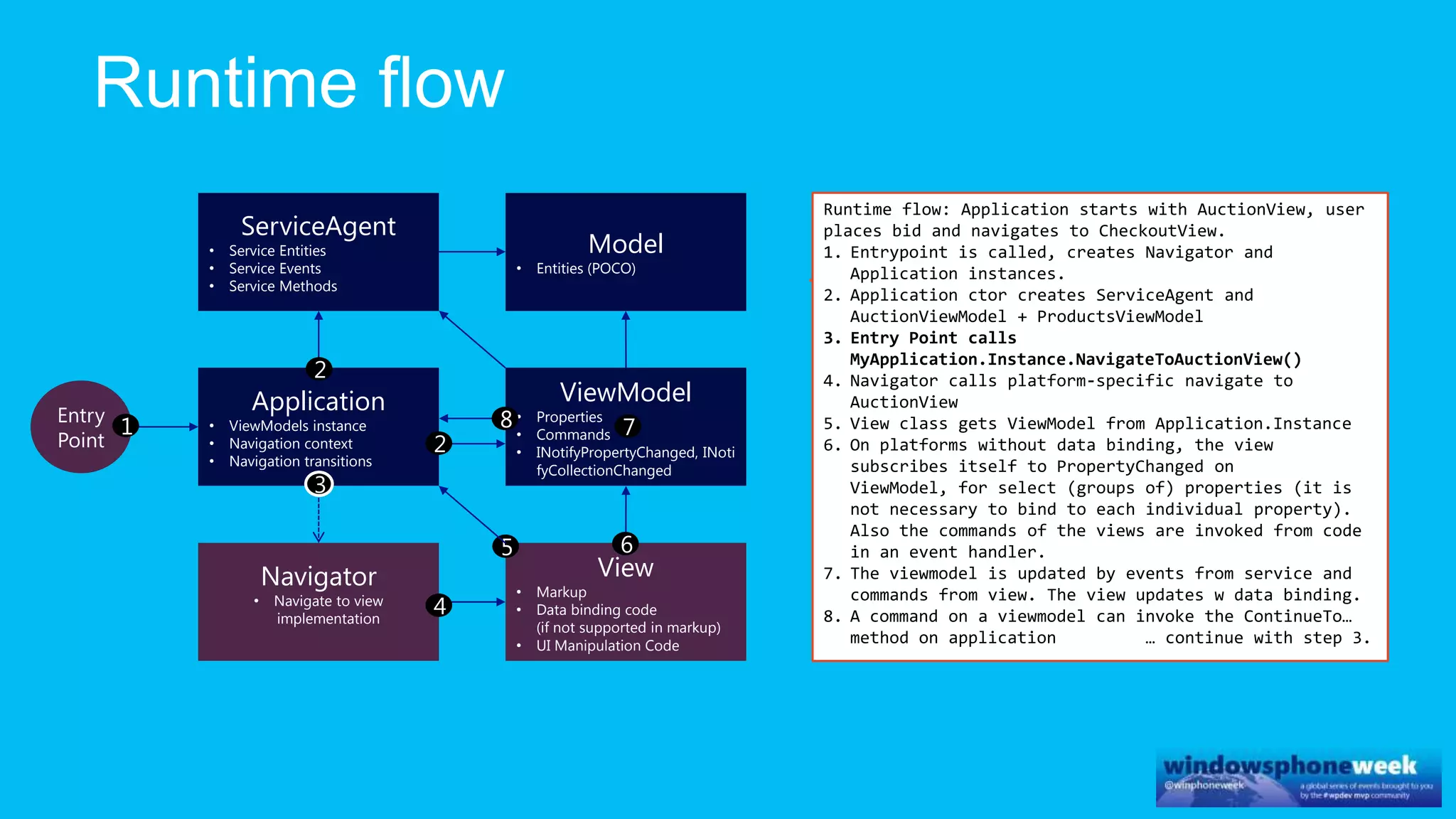
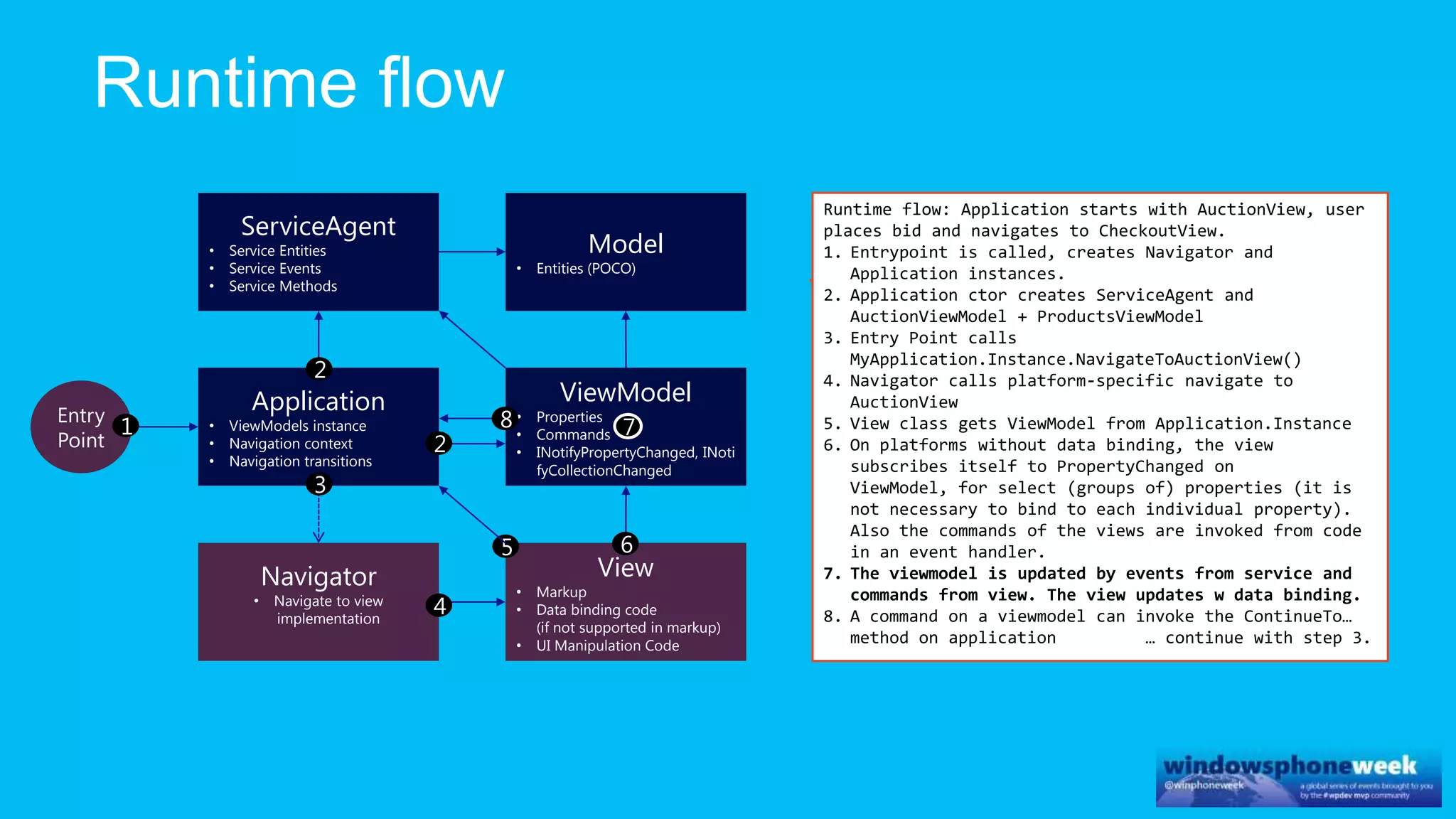
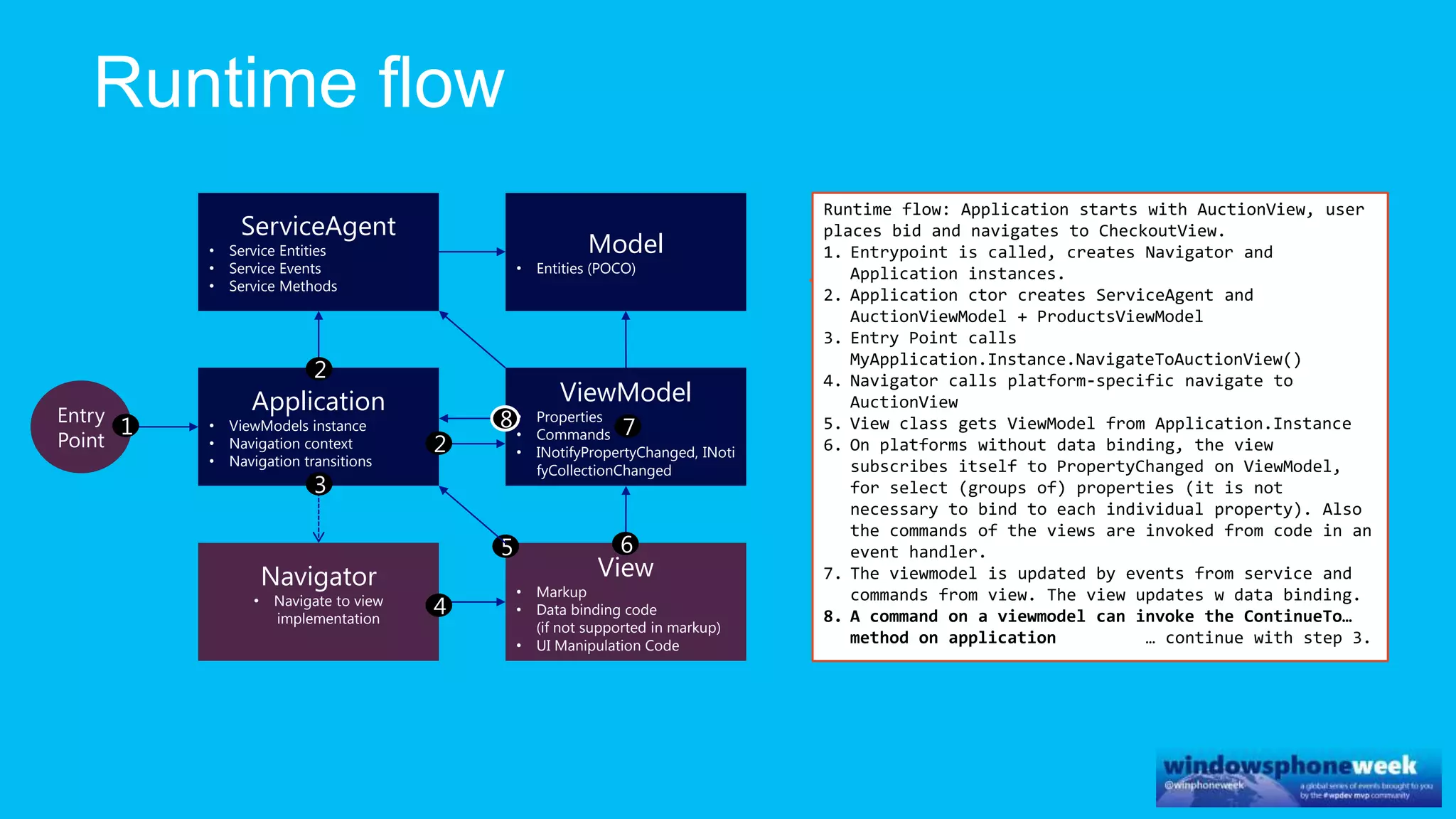
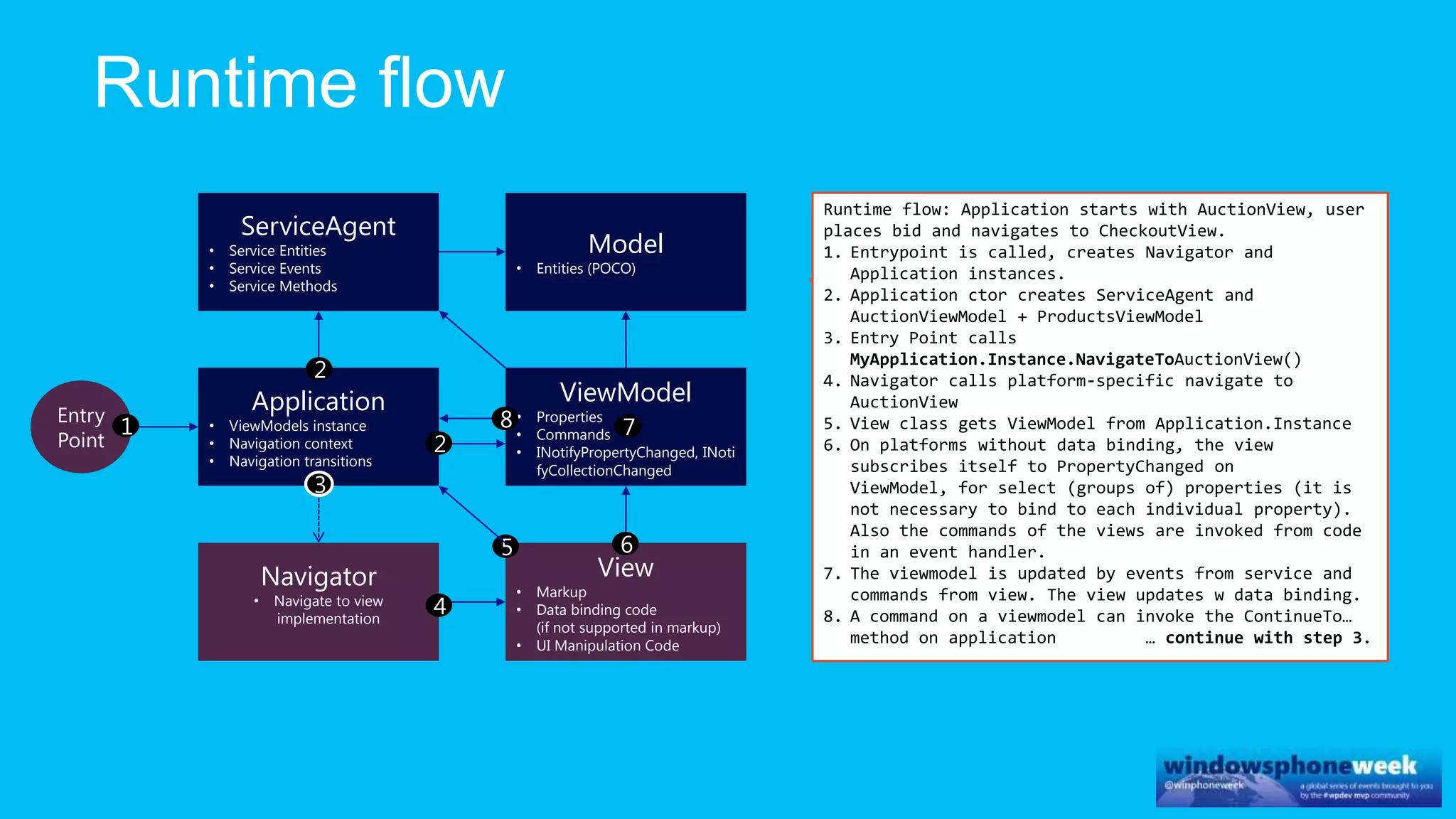
Runtime flow: Application starts with AuctionView, user
places bid and navigates to CheckoutView.
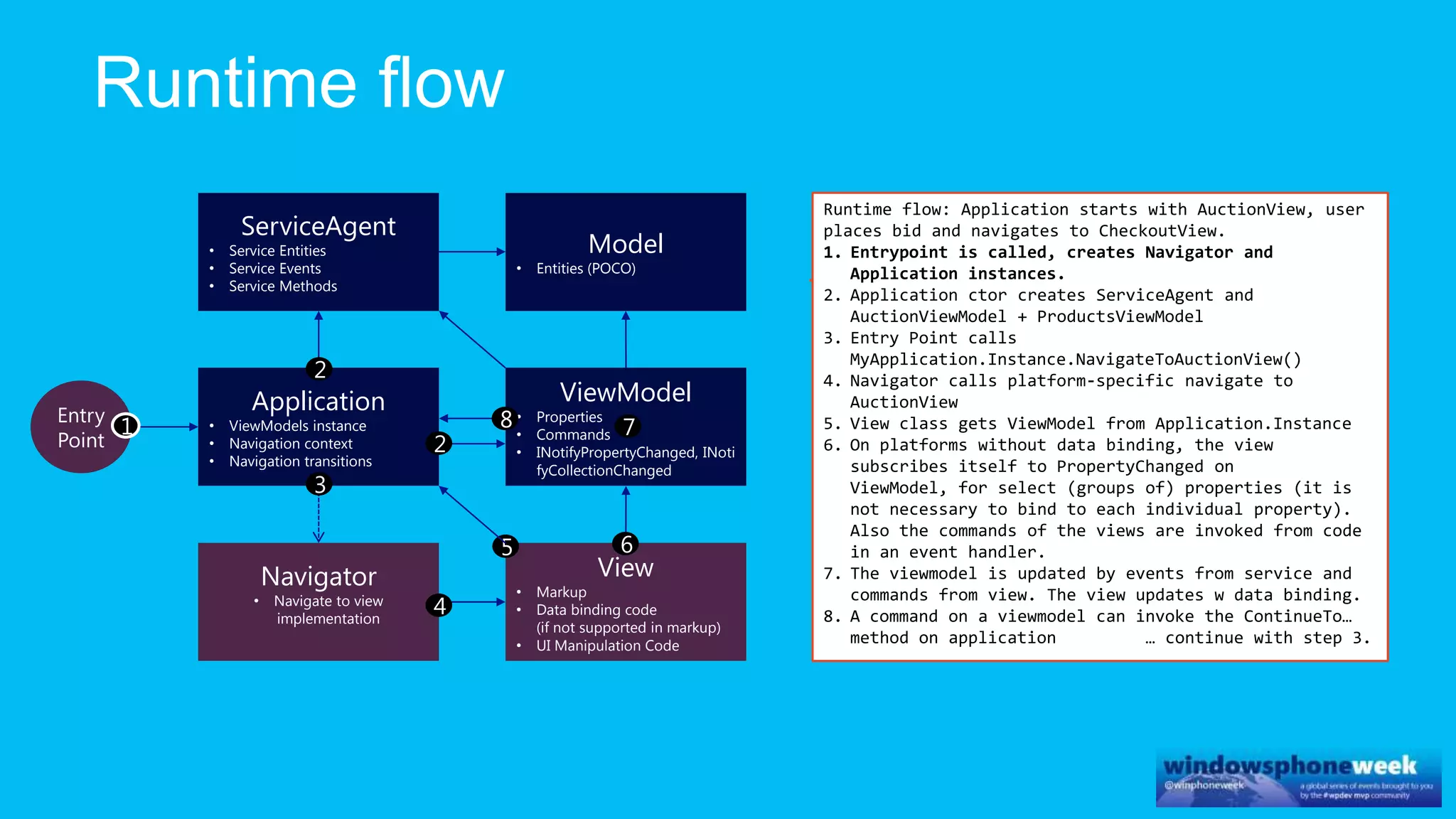
1. Entrypoint is called, creates Navigator and
Application instances.
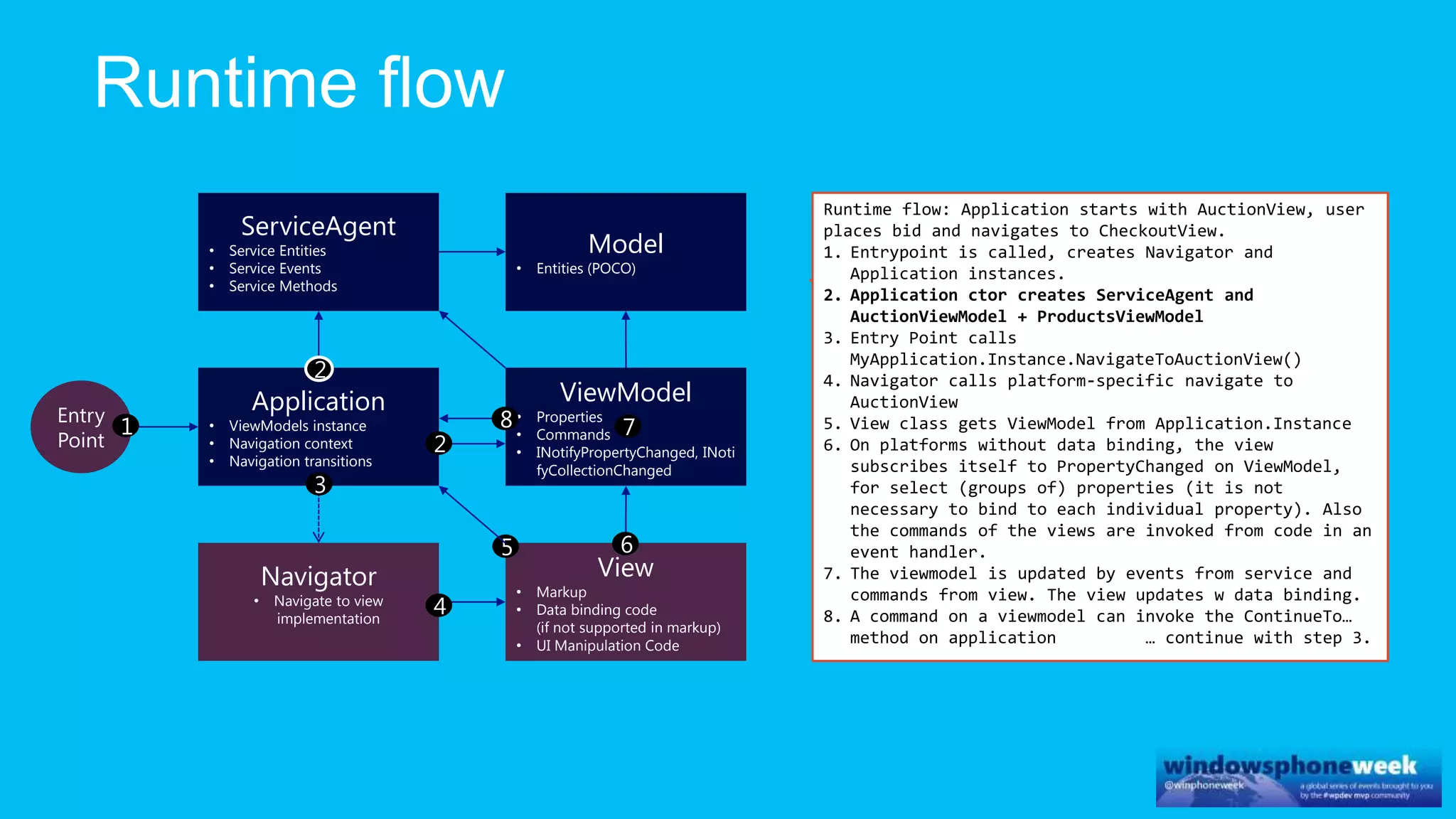
2. Application ctor creates ServiceAgent and
AuctionViewModel + ProductsViewModel
3. Entry Point calls
MyApplication.Instance.NavigateToAuctionView()
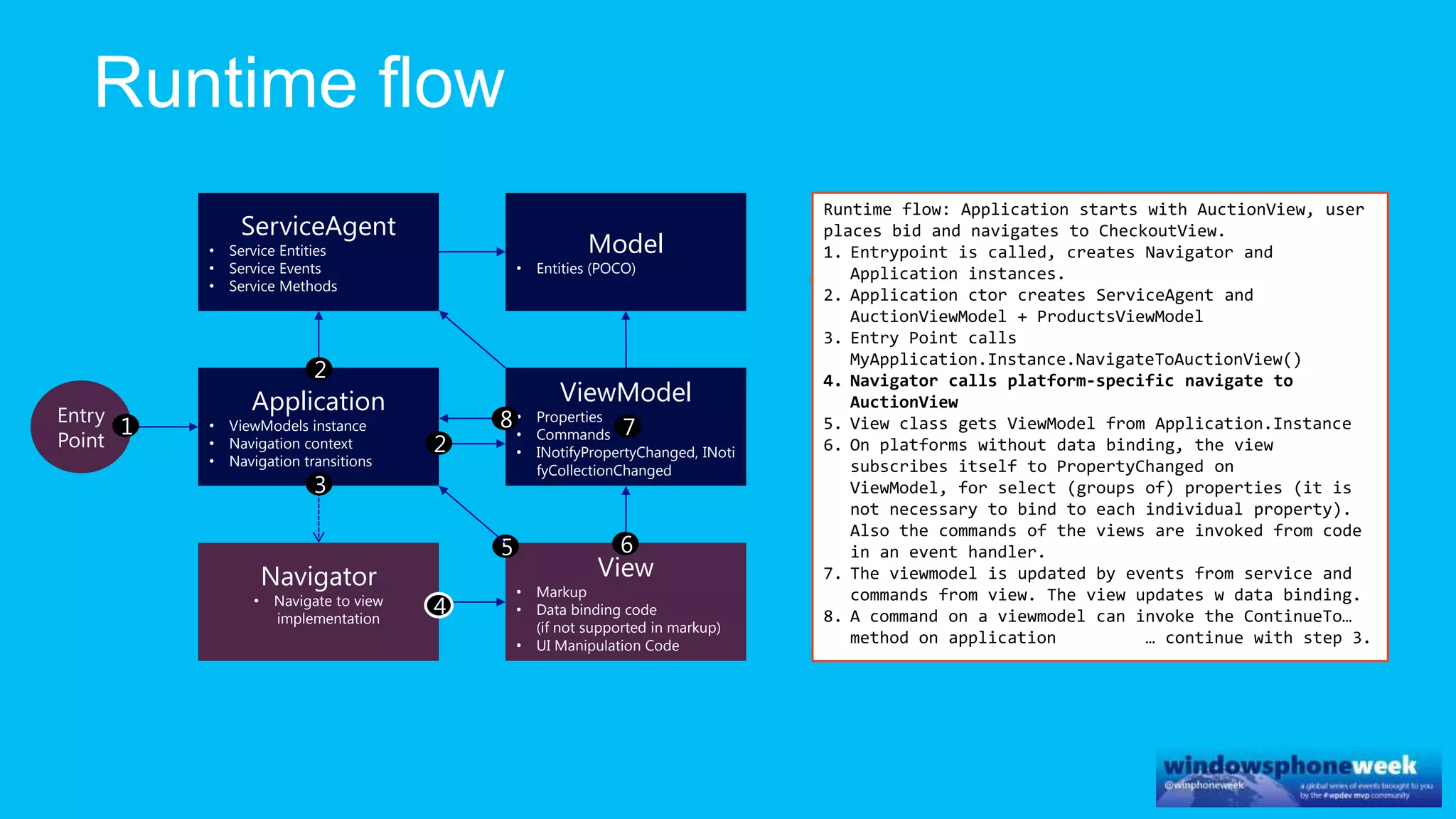
4. Navigator calls platform-specific navigate to
AuctionView
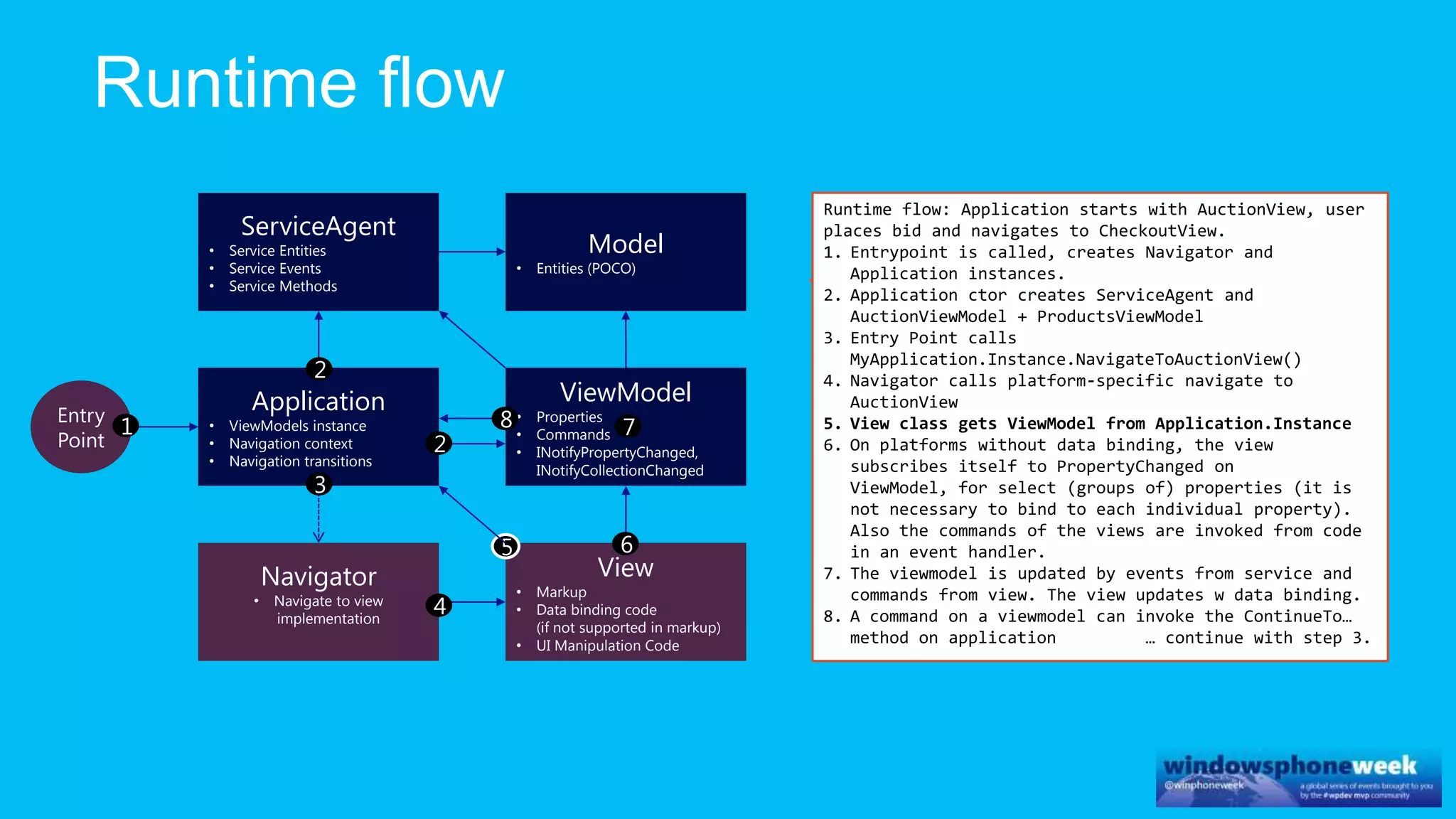
5. View class gets ViewModel from Application.Instance
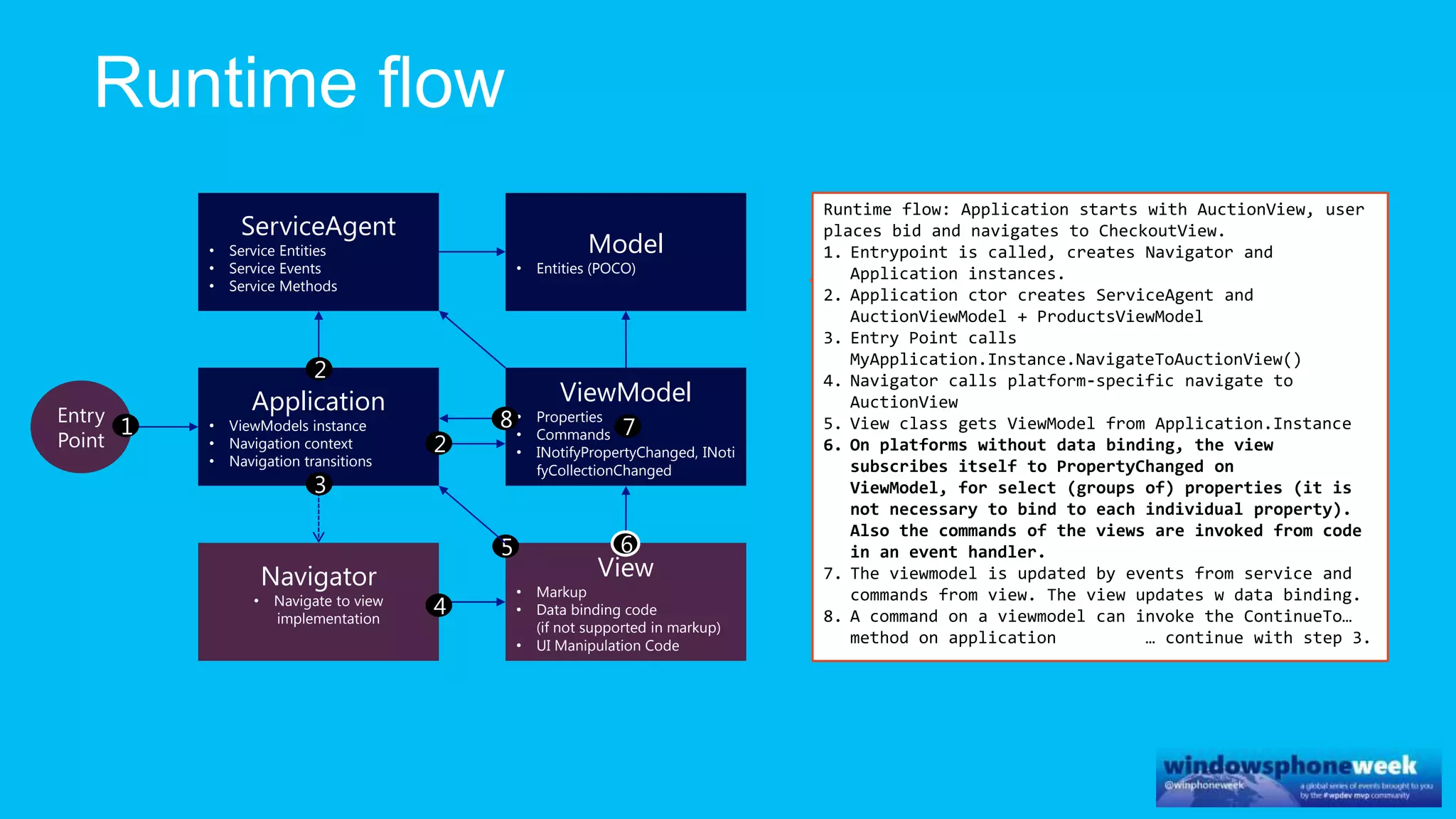
6. On platforms without data binding, the view
subscribes itself to PropertyChanged on
ViewModel, for select (groups of) properties (it is
not necessary to bind to each individual property).
Also the commands of the views are invoked from code
in an event handler.
7. The viewmodel is updated by events from service and
commands from view. The view updates w data binding.
8. A command on a viewmodel can invoke the ContinueTo…
method on application … continue with step 3.
1
2
3
4
5 6
78
2
ViewModel
• Properties
• Commands
• INotifyPropertyChanged, INoti
fyCollectionChanged
Model
• Entities (POCO)
ServiceAgent
• Service Entities
• Service Events
• Service Methods
Application
• ViewModels instance
• Navigation context
• Navigation transitions
View
• Markup
• Data binding code
(if not supported in markup)
• UI Manipulation Code
Navigator
• Navigate to view
implementation
Entry
Point
Runtime flow: Application starts with AuctionView, user
places bid and navigates to CheckoutView.
1. Entrypoint is called, creates Navigator and
Application instances.
2. Application ctor creates ServiceAgent and
AuctionViewModel + ProductsViewModel
3. Entry Point calls
MyApplication.Instance.NavigateToAuctionView()
4. Navigator calls platform-specific navigate to
AuctionView
5. View class gets ViewModel from Application.Instance
6. On platforms without data binding, the view
subscribes itself to PropertyChanged on
ViewModel, for select (groups of) properties (it is
not necessary to bind to each individual property).
Also the commands of the views are invoked from code
in an event handler.
7. The viewmodel is updated by events from service and
commands from view. The view updates w data binding.
8. A command on a viewmodel can invoke the ContinueTo…
method on application … continue with step 3.
1
2
3
4
5 6
78
2
ViewModel
• Properties
• Commands
• INotifyPropertyChanged, INoti
fyCollectionChanged
Model
• Entities (POCO)
ServiceAgent
• Service Entities
• Service Events
• Service Methods
Application
• ViewModels instance
• Navigation context
• Navigation transitions
View
• Markup
• Data binding code
(if not supported in markup)
• UI Manipulation Code
Navigator
• Navigate to view
implementation
Entry
Point
Runtime flow: Application starts with AuctionView, user
places bid and navigates to CheckoutView.
1. Entrypoint is called, creates Navigator and
Application instances.
2. Application ctor creates ServiceAgent and
AuctionViewModel + ProductsViewModel
3. Entry Point calls
MyApplication.Instance.NavigateToAuctionView()
4. Navigator calls platform-specific navigate to
AuctionView
5. View class gets ViewModel from Application.Instance
6. On platforms without data binding, the view
subscribes itself to PropertyChanged on ViewModel,
for select (groups of) properties (it is not
necessary to bind to each individual property). Also
the commands of the views are invoked from code in an
event handler.
7. The viewmodel is updated by events from service and
commands from view. The view updates w data binding.
8. A command on a viewmodel can invoke the ContinueTo…
method on application … continue with step 3.
1
2
3
4
5 6
78
2
ViewModel
• Properties
• Commands
• INotifyPropertyChanged, INoti
fyCollectionChanged
Model
• Entities (POCO)
ServiceAgent
• Service Entities
• Service Events
• Service Methods
Application
• ViewModels instance
• Navigation context
• Navigation transitions
View
• Markup
• Data binding code
(if not supported in markup)
• UI Manipulation Code
Navigator
• Navigate to view
implementation
Entry
Point
Runtime flow: Application starts with AuctionView, user
places bid and navigates to CheckoutView.
1. Entrypoint is called, creates Navigator and
Application instances.
2. Application ctor creates ServiceAgent and
AuctionViewModel + ProductsViewModel
3. Entry Point calls
MyApplication.Instance.NavigateToAuctionView()
4. Navigator calls platform-specific navigate to
AuctionView
5. View class gets ViewModel from Application.Instance
6. On platforms without data binding, the view
subscribes itself to PropertyChanged on
ViewModel, for select (groups of) properties (it is
not necessary to bind to each individual property).
Also the commands of the views are invoked from code
in an event handler.
7. The viewmodel is updated by events from service and
commands from view. The view updates w data binding.
8. A command on a viewmodel can invoke the ContinueTo…
method on application … continue with step 3.
1
2
3
4
5 6
78
2
ViewModel
• Properties
• Commands
• INotifyPropertyChanged, INoti
fyCollectionChanged
Model
• Entities (POCO)
ServiceAgent
• Service Entities
• Service Events
• Service Methods
Application
• ViewModels instance
• Navigation context
• Navigation transitions
View
• Markup
• Data binding code
(if not supported in markup)
• UI Manipulation Code
Navigator
• Navigate to view
implementation
Entry
Point
Runtime flow: Application starts with AuctionView, user
places bid and navigates to CheckoutView.
1. Entrypoint is called, creates Navigator and
Application instances.
2. Application ctor creates ServiceAgent and
AuctionViewModel + ProductsViewModel
3. Entry Point calls
MyApplication.Instance.NavigateToAuctionView()
4. Navigator calls platform-specific navigate to
AuctionView
5. View class gets ViewModel from Application.Instance
6. On platforms without data binding, the view
subscribes itself to PropertyChanged on
ViewModel, for select (groups of) properties (it is
not necessary to bind to each individual property).
Also the commands of the views are invoked from code
in an event handler.
7. The viewmodel is updated by events from service and
commands from view. The view updates w data binding.
8. A command on a viewmodel can invoke the ContinueTo…
method on application … continue with step 3.
1
2
3
4
5 6
78
2
ViewModel
• Properties
• Commands
• INotifyPropertyChanged,
INotifyCollectionChanged
Model
• Entities (POCO)
ServiceAgent
• Service Entities
• Service Events
• Service Methods
Application
• ViewModels instance
• Navigation context
• Navigation transitions
View
• Markup
• Data binding code
(if not supported in markup)
• UI Manipulation Code
Navigator
• Navigate to view
implementation
Entry
Point
Runtime flow: Application starts with AuctionView, user
places bid and navigates to CheckoutView.
1. Entrypoint is called, creates Navigator and
Application instances.
2. Application ctor creates ServiceAgent and
AuctionViewModel + ProductsViewModel
3. Entry Point calls
MyApplication.Instance.NavigateToAuctionView()
4. Navigator calls platform-specific navigate to
AuctionView
5. View class gets ViewModel from Application.Instance
6. On platforms without data binding, the view
subscribes itself to PropertyChanged on
ViewModel, for select (groups of) properties (it is
not necessary to bind to each individual property).
Also the commands of the views are invoked from code
in an event handler.
7. The viewmodel is updated by events from service and
commands from view. The view updates w data binding.
8. A command on a viewmodel can invoke the ContinueTo…
method on application … continue with step 3.
1
2
3
4
5 6
78
2
ViewModel
• Properties
• Commands
• INotifyPropertyChanged, INoti
fyCollectionChanged
Model
• Entities (POCO)
ServiceAgent
• Service Entities
• Service Events
• Service Methods
Application
• ViewModels instance
• Navigation context
• Navigation transitions
View
• Markup
• Data binding code
(if not supported in markup)
• UI Manipulation Code
Navigator
• Navigate to view
implementation
Entry
Point
Runtime flow: Application starts with AuctionView, user
places bid and navigates to CheckoutView.
1. Entrypoint is called, creates Navigator and
Application instances.
2. Application ctor creates ServiceAgent and
AuctionViewModel + ProductsViewModel
3. Entry Point calls
MyApplication.Instance.NavigateToAuctionView()
4. Navigator calls platform-specific navigate to
AuctionView
5. View class gets ViewModel from Application.Instance
6. On platforms without data binding, the view
subscribes itself to PropertyChanged on
ViewModel, for select (groups of) properties (it is
not necessary to bind to each individual property).
Also the commands of the views are invoked from code
in an event handler.
7. The viewmodel is updated by events from service and
commands from view. The view updates w data binding.
8. A command on a viewmodel can invoke the ContinueTo…
method on application … continue with step 3.
1
2
3
4
5 6
78
2
ViewModel
• Properties
• Commands
• INotifyPropertyChanged, INoti
fyCollectionChanged
Model
• Entities (POCO)
ServiceAgent
• Service Entities
• Service Events
• Service Methods
Application
• ViewModels instance
• Navigation context
• Navigation transitions
View
• Markup
• Data binding code
(if not supported in markup)
• UI Manipulation Code
Navigator
• Navigate to view
implementation
Entry
Point
Runtime flow: Application starts with AuctionView, user
places bid and navigates to CheckoutView.
1. Entrypoint is called, creates Navigator and
Application instances.
2. Application ctor creates ServiceAgent and
AuctionViewModel + ProductsViewModel
3. Entry Point calls
MyApplication.Instance.NavigateToAuctionView()
4. Navigator calls platform-specific navigate to
AuctionView
5. View class gets ViewModel from Application.Instance
6. On platforms without data binding, the view
subscribes itself to PropertyChanged on
ViewModel, for select (groups of) properties (it is
not necessary to bind to each individual property).
Also the commands of the views are invoked from code
in an event handler.
7. The viewmodel is updated by events from service and
commands from view. The view updates w data binding.
8. A command on a viewmodel can invoke the ContinueTo…
method on application … continue with step 3.
1
2
3
4
5 6
78
2
ViewModel
• Properties
• Commands
• INotifyPropertyChanged, INoti
fyCollectionChanged
Model
• Entities (POCO)
ServiceAgent
• Service Entities
• Service Events
• Service Methods
Application
• ViewModels instance
• Navigation context
• Navigation transitions
View
• Markup
• Data binding code
(if not supported in markup)
• UI Manipulation Code
Navigator
• Navigate to view
implementation
Entry
Point
Runtime flow: Application starts with AuctionView, user
places bid and navigates to CheckoutView.
1. Entrypoint is called, creates Navigator and
Application instances.
2. Application ctor creates ServiceAgent and
AuctionViewModel + ProductsViewModel
3. Entry Point calls
MyApplication.Instance.NavigateToAuctionView()
4. Navigator calls platform-specific navigate to
AuctionView
5. View class gets ViewModel from Application.Instance
6. On platforms without data binding, the view
subscribes itself to PropertyChanged on ViewModel,
for select (groups of) properties (it is not
necessary to bind to each individual property). Also
the commands of the views are invoked from code in an
event handler.
7. The viewmodel is updated by events from service and
commands from view. The view updates w data binding.
8. A command on a viewmodel can invoke the ContinueTo…
method on application … continue with step 3.
1
2
3
4
5 6
78
2
ViewModel
• Properties
• Commands
• INotifyPropertyChanged, INoti
fyCollectionChanged
Model
• Entities (POCO)
ServiceAgent
• Service Entities
• Service Events
• Service Methods
Application
• ViewModels instance
• Navigation context
• Navigation transitions
View
• Markup
• Data binding code
(if not supported in markup)
• UI Manipulation Code
Navigator
• Navigate to view
implementation
Entry
Point
Runtime flow: Application starts with AuctionView, user
places bid and navigates to CheckoutView.
1. Entrypoint is called, creates Navigator and
Application instances.
2. Application ctor creates ServiceAgent and
AuctionViewModel + ProductsViewModel
3. Entry Point calls
MyApplication.Instance.NavigateToAuctionView()
4. Navigator calls platform-specific navigate to
AuctionView
5. View class gets ViewModel from Application.Instance
6. On platforms without data binding, the view
subscribes itself to PropertyChanged on
ViewModel, for select (groups of) properties (it is
not necessary to bind to each individual property).
Also the commands of the views are invoked from code
in an event handler.
7. The viewmodel is updated by events from service and
commands from view. The view updates w data binding.
8. A command on a viewmodel can invoke the ContinueTo…
method on application … continue with step 3.
1
2
3
4
5 6
78
2
http://nuget.org/packages/mvvmquickcross
http://github.com/MacawNL/MvvmQuickCross/
http://xamarin.com/
http://propertycross.com/
http://twitter.com/vincenth_net http://vincenth.net

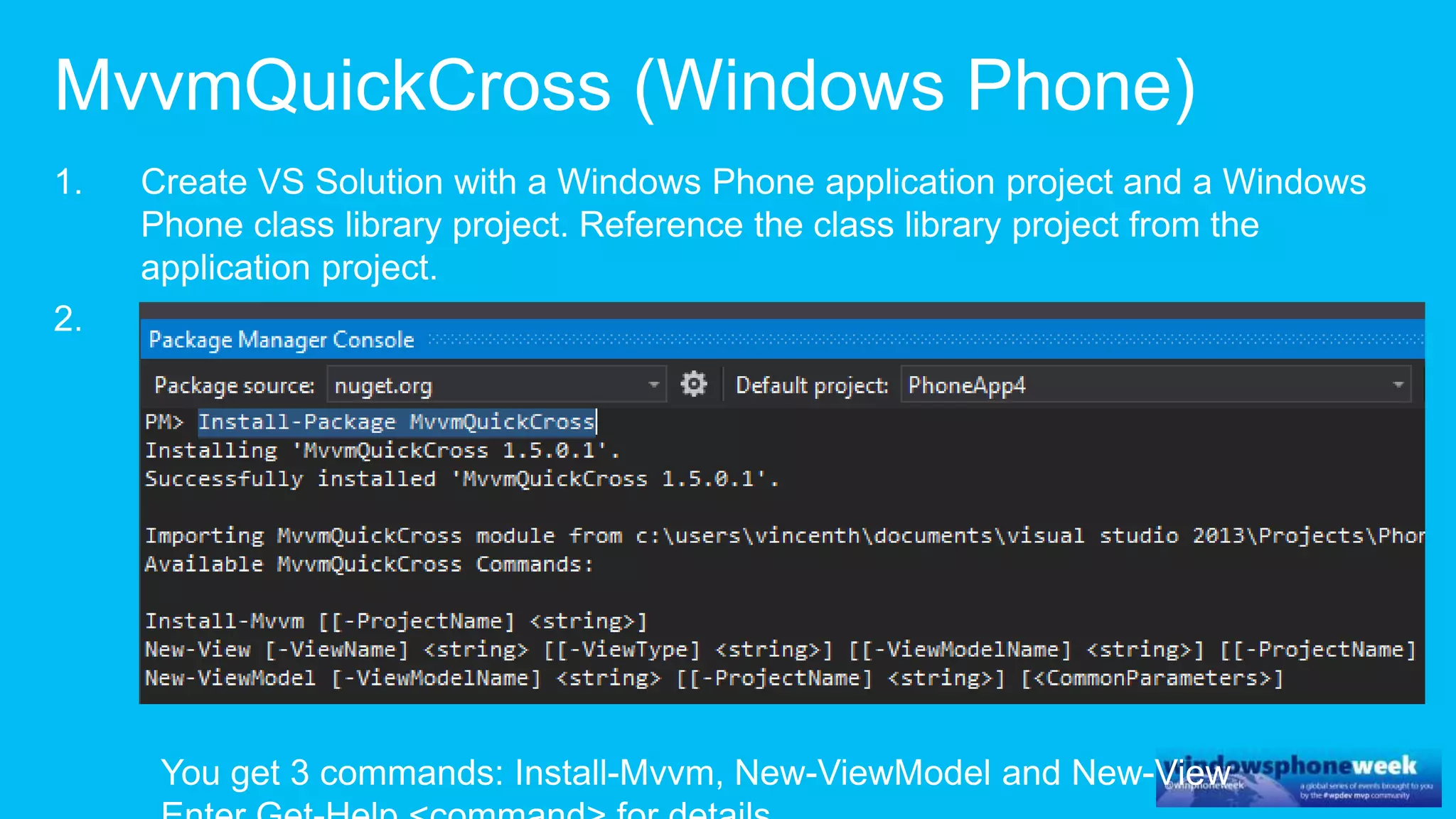
MvvmQuickCross for Windows Phone

  • 2.
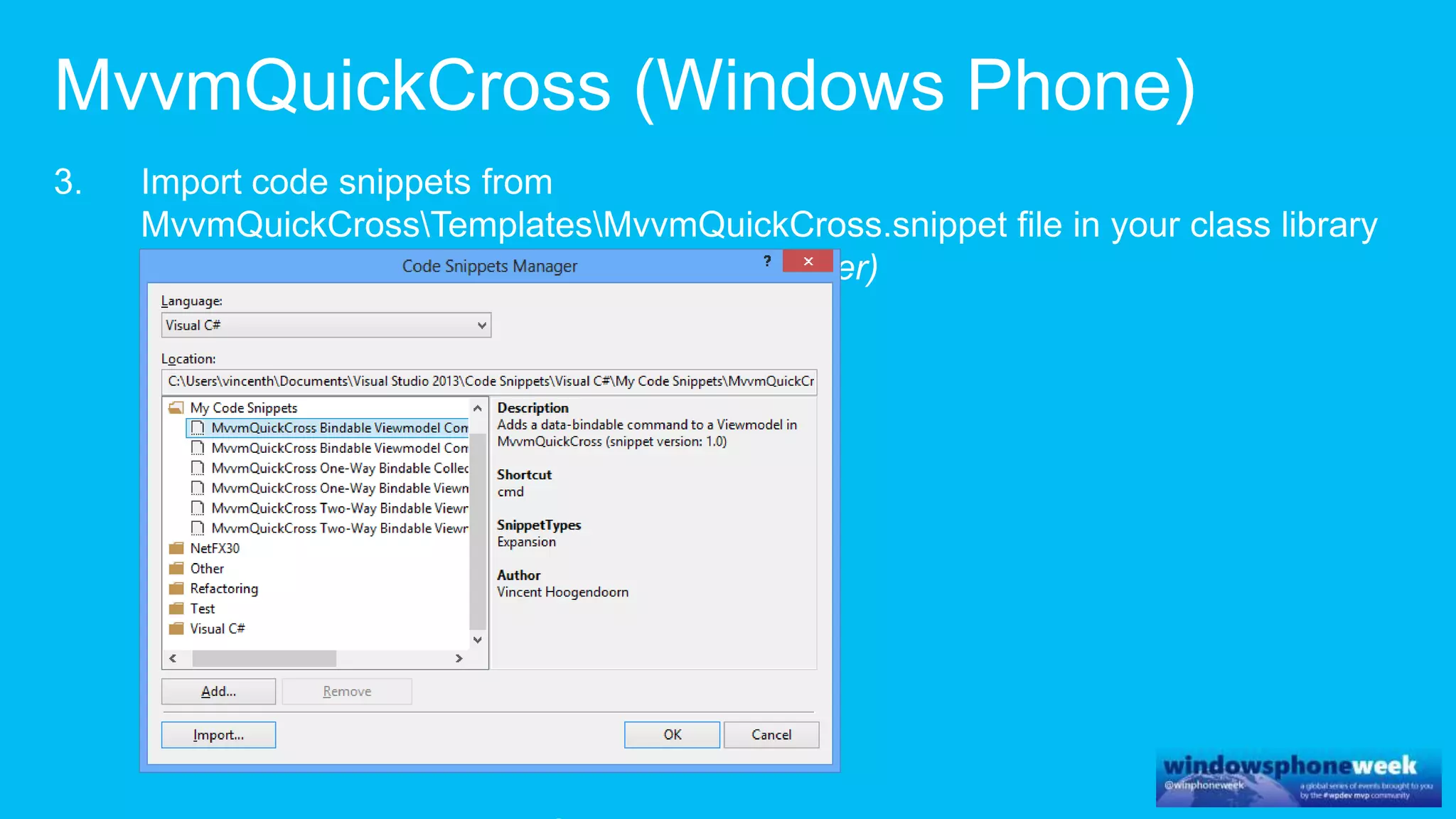
  • 3.
  • 4.
    ViewModel • Properties • Commands •INotifyPropertyChanged Model • Entities (POCO) View • Markup • Data binding code (if not supported in markup) • UI Manipulation Code
  • 5.
    ViewModel • Properties • Commands •INotifyPropertyChanged Model • Entities (POCO) Application • ViewModels instance • Navigation context • Navigation transitions View • Markup • Data binding code (if not supported in markup) • UI Manipulation Code Navigator • Navigate to view implementation Entry Point
  • 6.
    ViewModel • Properties • Commands •INotifyPropertyChanged Application • ViewModels instance • Navigation context • Navigation transitions View • Markup • Data binding code (if not supported in markup) • UI Manipulation Code Navigator • Navigate to view implementation Entry Point
  • 14.
    Main View • Markup •Data binding code (if not supported in markup) • UI Manipulation Code Main ViewModel • Properties • Commands • INotifyPropertyChanged SubB ViewModel • Properties • Commands • INotifyPropertyChanged SubA ViewModel • Properties • Commands • INotifyPropertyChanged SubB View • Markup • Data binding code (if not supported in markup) • UI Manipulation Code SubA View • Markup • Data binding code (if not supported in markup) • UI Manipulation Code Composite ViewModels are also possible: class MainViewModel : ViewModelBase { List<ItemViewModel> MyItems /* Data-Bindable property }
  • 17.
    ViewModel • Properties • Commands •INotifyPropertyChanged public int Count /* One-way data-bindable property generated with propdb1 snippet … public string MyProperty /* Two-way data-bindable property generated with propdb2 snippet … public string MyProperty2 /* Two-way data-bindable property that calls custom code in OnMyProperty2Changed() from setter, generated with propdb2c snippet … /* One-way data-bindable property generated with propdbcol snippet… public ObservableCollection<string> MyCollection public bool MyCollectionHasItems protected void UpdateMyCollectionHasItems()
  • 18.
    ViewModel • Properties • Commands •INotifyPropertyChanged public RelayCommand DoSomethingCommand /* Data-bindable command that calls DoSomething(), generated with cmd snippet … private void DoSomething() { // TODO: Implement DoSomething() throw new NotImplementedException(); } public RelayCommand EditItemCommand /* Data-bindable command with parameter that calls EditItem(), generated with cmdp snippet … private void EditItem(object parameter) { var item = (Item)parameter; // TODO: Implement EditItem() throw new NotImplementedException(); }
  • 19.
    ViewModel • Properties • Commands •INotifyPropertyChanged // Design-time data support #if DEBUG namespace MyApp.ViewModels.Design { public class MyModelDesign : MyViewModel { public MyModelDesign() { // TODO: Initialize the view model with hardcoded design-time data } } } #endif Note: Design-data can initially also be used at runtime for fast application prototyping, before any services or models are implemented.
  • 20.
    ViewModel • Properties • Commands •INotifyPropertyChanged public abstract class ViewModelBase : INotifyPropertyChanged { public event PropertyChangedEventHandler PropertyChanged; protected virtual void RaisePropertyChanged( string propertyName) { … } } public class RelayCommand : ICommand { public RelayCommand(Action handler, … public RelayCommand(Action<object> handler, … public bool IsEnabled { … } }
  • 21.
    ViewModel • Properties • Commands •INotifyPropertyChanged View • Markup • Data binding code (if not supported in markup) • UI Manipulation Code <phone:PhoneApplicationPage xmlns:vm= "clr-namespace:MyApp.Shared.ViewModels.Design; assembly=MyApp.Shared.wp" d:DataContext="{d:DesignInstance Type=vm:MyViewModelDesign, IsDesignTimeCreatable=True }" <TextBox Text="{Binding Title, Mode=TwoWay}" … </phone:PhoneApplicationPage> public partial class MyView : PhoneApplicationPage { public MyView() { InitializeComponent(); DataContext = MyApplication.Instance.MyViewModel; } }
  • 22.
    ViewModel • Properties • Commands •INotifyPropertyChanged Model • Entities (POCO) View • Markup • Data binding code (if not supported in markup) • UI Manipulation Code public class ClientLotUpdate { public decimal CurrentPrice { get; set; } public int ProgressRemaining { get; set; } public RemainingTime TimeRemaining { get; set; } public ClientLotUpdate() { TimeRemaining = new RemainingTime(); } }
  • 23.
    ViewModel • Properties • Commands •INotifyPropertyChanged ServiceAgent • Service Entities • Service Events • Service Methods View • Markup • Data binding code (if not supported in markup) • UI Manipulation Code public class ClientLotUpdate { public decimal CurrentPrice { get; set; } public int ProgressRemaining { get; set; } public RemainingTime TimeRemaining { get; set; } public ClientLotUpdate() { TimeRemaining = new RemainingTime(); } } Note that in simple cases service entities defined in the service contract can be used directly as the ‘model’.
  • 24.
    ViewModel • Properties • Commands •INotifyPropertyChanged Model • Entities (POCO) ServiceAgent • Service Entities • Service Events • Service Methods View • Markup • Data binding code (if not supported in markup) • UI Manipulation Code public class LotUpdatedEventArgs : EventArgs { public ClientLotUpdate clientLotUpdate { get; set; } } public event EventHandler<LotUpdatedEventArgs> ActiveLotUpdated;
  • 25.
    ViewModel • Properties • Commands •INotifyPropertyChanged Model • Entities (POCO) ServiceAgent • Service Entities • Service Events • Service Methods View • Markup • Data binding code (if not supported in markup) • UI Manipulation Code public class PlaceBidRequest { public int LotId { get; set; } public decimal Price { get; set; } } public Task RaisePlaceBidAsync(PlaceBidRequest placeBidRequest) { return _hubProxy.Invoke( "PlaceBid", new object[] { placeBidRequest }); }
  • 26.
    ViewModel • Properties • Commands •INotifyPropertyChanged Model • Entities (POCO) ServiceAgent • Service Entities • Service Events • Service Methods Application • ViewModels instance • Navigation context • Navigation transitions View • Markup • Data binding code (if not supported in markup) • UI Manipulation Code public class AuctionApplication { void ContinueToAuction() void ContinueToCheckout(Basket basket) void ContinueToOrderConfirmed() void ContinueToProductList() void ContinueToProductPage(ClientLot product) void UserWantsToSignIn() bool IsUserLoggedIn() … } The ViewModel only uses the application to initiate navigation and to obtain relevant application state. ViewModels do not reference or modify other viewmodels. Exception: contained view models; e.g. a collection of ItemViewModel. ViewModels can pass parameters to the application, which in turn can use those to initialize other view models.
  • 27.
    ViewModel • Properties • Commands •INotifyPropertyChanged Model • Entities (POCO) ServiceAgent • Service Entities • Service Events • Service Methods Application • ViewModels instance • Navigation context • Navigation transitions View • Markup • Data binding code (if not supported in markup) • UI Manipulation Code public abstract class ApplicationBase { public static Task RunOnUIThread(Action action) public object CurrentNavigationContext { get; set; } } class MyApplication : ApplicationBase { public static MyApplication Instance { get … } public MyViewModel MyViewModel { get; private set; } public void ContinueToItem(Item item = null) { if (MyViewModel == null) MyViewModel = new MyViewModel(_itemService); MyViewModel.Initialize(item); RunOnUIThread(() => _navigator.NavigateToMyView( CurrentNavigationContext)); } } Application initializes viewmodel and then calls navigator for platform-specific view navigation.
  • 28.
    ViewModel • Properties • Commands •INotifyPropertyChanged Model • Entities (POCO) ServiceAgent • Service Entities • Service Events • Service Methods Application • ViewModels instance • Navigation context • Navigation transitions View • Markup • Data binding code (if not supported in markup) • UI Manipulation Code Navigator • Navigate to view implementation public interface IMyAppNavigator { void NavigateToMyView(object navigationContext); void NavigateToOtherView(object navigationContext); } The navigator implementation is platform specific – it knows what type of object navigationContext is.
  • 29.
    ViewModel • Properties • Commands •INotifyPropertyChanged Model • Entities (POCO) ServiceAgent • Service Entities • Service Events • Service Methods Application • ViewModels instance • Navigation context • Navigation transitions View • Markup • Data binding code (if not supported in markup) • UI Manipulation Code Navigator • Navigate to view implementation Entry Point public partial class App : Application { public static MyApplication EnsureMyApplication( Frame navigationContext) { return MyApplication.Instance ?? new MyApplication(new MyNavigator(), navigationContext); } void Application_Launching(…) { EnsureMyApplication(RootFrame).ContinueToItemList( skipNavigation: true); } void Application_Activated(…) { EnsureMyApplication(RootFrame); } } The entry point is platform specific (navigationContext, here a WP Frame) and creates platform specific service instances, such as the Navigator.
  • 30.
    ViewModel • Properties • Commands •INotifyPropertyChanged Model • Entities (POCO) ServiceAgent • Service Entities • Service Events • Service Methods Application • ViewModels instance • Navigation context • Navigation transitions View • Markup • Data binding code (if not supported in markup) • UI Manipulation Code Navigator • Navigate to view implementation Entry Point class MyNavigator : IMyNavigator { void Navigate(object navigationContext, string uri) { ((Frame)navigationContext).Navigate( new Uri(uri, UriKind.Relative)); } void NavigateToMyView(object navigationContext) { Navigate(navigationContext, "/MyView.xaml"); } … } The navigator is platform specific (navigationContext, here a WP Frame).
  • 31.
    ViewModel • Properties • Commands •INotifyPropertyChanged, INoti fyCollectionChanged Model • Entities (POCO) ServiceAgent • Service Entities • Service Events • Service Methods Application • ViewModels instance • Navigation context • Navigation transitions View • Markup • Data binding code (if not supported in markup) • UI Manipulation Code Navigator • Navigate to view implementation Entry Point Runtime flow: Application starts with AuctionView, user places bid and navigates to CheckoutView. 1. Entrypoint is called, creates Navigator and Application instances. 2. Application ctor creates ServiceAgent and AuctionViewModel + ProductsViewModel 3. Entry Point calls MyApplication.Instance.NavigateToAuctionView() 4. Navigator calls platform-specific navigate to AuctionView 5. View class gets ViewModel from Application.Instance 6. On platforms without data binding, the view subscribes itself to PropertyChanged on ViewModel, for select (groups of) properties (it is not necessary to bind to each individual property). Also the commands of the views are invoked from code in an event handler. 7. The viewmodel is updated by events from service and commands from view. The view updates w data binding. 8. A command on a viewmodel can invoke the ContinueTo… method on application … continue with step 3. 1 2 3 4 5 6 78 2
  • 32.
    ViewModel • Properties • Commands •INotifyPropertyChanged, INoti fyCollectionChanged Model • Entities (POCO) ServiceAgent • Service Entities • Service Events • Service Methods Application • ViewModels instance • Navigation context • Navigation transitions View • Markup • Data binding code (if not supported in markup) • UI Manipulation Code Navigator • Navigate to view implementation Entry Point Runtime flow: Application starts with AuctionView, user places bid and navigates to CheckoutView. 1. Entrypoint is called, creates Navigator and Application instances. 2. Application ctor creates ServiceAgent and AuctionViewModel + ProductsViewModel 3. Entry Point calls MyApplication.Instance.NavigateToAuctionView() 4. Navigator calls platform-specific navigate to AuctionView 5. View class gets ViewModel from Application.Instance 6. On platforms without data binding, the view subscribes itself to PropertyChanged on ViewModel, for select (groups of) properties (it is not necessary to bind to each individual property). Also the commands of the views are invoked from code in an event handler. 7. The viewmodel is updated by events from service and commands from view. The view updates w data binding. 8. A command on a viewmodel can invoke the ContinueTo… method on application … continue with step 3. 1 2 3 4 5 6 78 2
  • 33.
    ViewModel • Properties • Commands •INotifyPropertyChanged, INoti fyCollectionChanged Model • Entities (POCO) ServiceAgent • Service Entities • Service Events • Service Methods Application • ViewModels instance • Navigation context • Navigation transitions View • Markup • Data binding code (if not supported in markup) • UI Manipulation Code Navigator • Navigate to view implementation Entry Point Runtime flow: Application starts with AuctionView, user places bid and navigates to CheckoutView. 1. Entrypoint is called, creates Navigator and Application instances. 2. Application ctor creates ServiceAgent and AuctionViewModel + ProductsViewModel 3. Entry Point calls MyApplication.Instance.NavigateToAuctionView() 4. Navigator calls platform-specific navigate to AuctionView 5. View class gets ViewModel from Application.Instance 6. On platforms without data binding, the view subscribes itself to PropertyChanged on ViewModel, for select (groups of) properties (it is not necessary to bind to each individual property). Also the commands of the views are invoked from code in an event handler. 7. The viewmodel is updated by events from service and commands from view. The view updates w data binding. 8. A command on a viewmodel can invoke the ContinueTo… method on application … continue with step 3. 1 2 3 4 5 6 78 2
  • 34.
    ViewModel • Properties • Commands •INotifyPropertyChanged, INoti fyCollectionChanged Model • Entities (POCO) ServiceAgent • Service Entities • Service Events • Service Methods Application • ViewModels instance • Navigation context • Navigation transitions View • Markup • Data binding code (if not supported in markup) • UI Manipulation Code Navigator • Navigate to view implementation Entry Point Runtime flow: Application starts with AuctionView, user places bid and navigates to CheckoutView. 1. Entrypoint is called, creates Navigator and Application instances. 2. Application ctor creates ServiceAgent and AuctionViewModel + ProductsViewModel 3. Entry Point calls MyApplication.Instance.NavigateToAuctionView() 4. Navigator calls platform-specific navigate to AuctionView 5. View class gets ViewModel from Application.Instance 6. On platforms without data binding, the view subscribes itself to PropertyChanged on ViewModel, for select (groups of) properties (it is not necessary to bind to each individual property). Also the commands of the views are invoked from code in an event handler. 7. The viewmodel is updated by events from service and commands from view. The view updates w data binding. 8. A command on a viewmodel can invoke the ContinueTo… method on application … continue with step 3. 1 2 3 4 5 6 78 2
  • 35.
    ViewModel • Properties • Commands •INotifyPropertyChanged, INoti fyCollectionChanged Model • Entities (POCO) ServiceAgent • Service Entities • Service Events • Service Methods Application • ViewModels instance • Navigation context • Navigation transitions View • Markup • Data binding code (if not supported in markup) • UI Manipulation Code Navigator • Navigate to view implementation Entry Point Runtime flow: Application starts with AuctionView, user places bid and navigates to CheckoutView. 1. Entrypoint is called, creates Navigator and Application instances. 2. Application ctor creates ServiceAgent and AuctionViewModel + ProductsViewModel 3. Entry Point calls MyApplication.Instance.NavigateToAuctionView() 4. Navigator calls platform-specific navigate to AuctionView 5. View class gets ViewModel from Application.Instance 6. On platforms without data binding, the view subscribes itself to PropertyChanged on ViewModel, for select (groups of) properties (it is not necessary to bind to each individual property). Also the commands of the views are invoked from code in an event handler. 7. The viewmodel is updated by events from service and commands from view. The view updates w data binding. 8. A command on a viewmodel can invoke the ContinueTo… method on application … continue with step 3. 1 2 3 4 5 6 78 2
  • 36.
    ViewModel • Properties • Commands •INotifyPropertyChanged, INotifyCollectionChanged Model • Entities (POCO) ServiceAgent • Service Entities • Service Events • Service Methods Application • ViewModels instance • Navigation context • Navigation transitions View • Markup • Data binding code (if not supported in markup) • UI Manipulation Code Navigator • Navigate to view implementation Entry Point Runtime flow: Application starts with AuctionView, user places bid and navigates to CheckoutView. 1. Entrypoint is called, creates Navigator and Application instances. 2. Application ctor creates ServiceAgent and AuctionViewModel + ProductsViewModel 3. Entry Point calls MyApplication.Instance.NavigateToAuctionView() 4. Navigator calls platform-specific navigate to AuctionView 5. View class gets ViewModel from Application.Instance 6. On platforms without data binding, the view subscribes itself to PropertyChanged on ViewModel, for select (groups of) properties (it is not necessary to bind to each individual property). Also the commands of the views are invoked from code in an event handler. 7. The viewmodel is updated by events from service and commands from view. The view updates w data binding. 8. A command on a viewmodel can invoke the ContinueTo… method on application … continue with step 3. 1 2 3 4 5 6 78 2
  • 37.
    ViewModel • Properties • Commands •INotifyPropertyChanged, INoti fyCollectionChanged Model • Entities (POCO) ServiceAgent • Service Entities • Service Events • Service Methods Application • ViewModels instance • Navigation context • Navigation transitions View • Markup • Data binding code (if not supported in markup) • UI Manipulation Code Navigator • Navigate to view implementation Entry Point Runtime flow: Application starts with AuctionView, user places bid and navigates to CheckoutView. 1. Entrypoint is called, creates Navigator and Application instances. 2. Application ctor creates ServiceAgent and AuctionViewModel + ProductsViewModel 3. Entry Point calls MyApplication.Instance.NavigateToAuctionView() 4. Navigator calls platform-specific navigate to AuctionView 5. View class gets ViewModel from Application.Instance 6. On platforms without data binding, the view subscribes itself to PropertyChanged on ViewModel, for select (groups of) properties (it is not necessary to bind to each individual property). Also the commands of the views are invoked from code in an event handler. 7. The viewmodel is updated by events from service and commands from view. The view updates w data binding. 8. A command on a viewmodel can invoke the ContinueTo… method on application … continue with step 3. 1 2 3 4 5 6 78 2
  • 38.
    ViewModel • Properties • Commands •INotifyPropertyChanged, INoti fyCollectionChanged Model • Entities (POCO) ServiceAgent • Service Entities • Service Events • Service Methods Application • ViewModels instance • Navigation context • Navigation transitions View • Markup • Data binding code (if not supported in markup) • UI Manipulation Code Navigator • Navigate to view implementation Entry Point Runtime flow: Application starts with AuctionView, user places bid and navigates to CheckoutView. 1. Entrypoint is called, creates Navigator and Application instances. 2. Application ctor creates ServiceAgent and AuctionViewModel + ProductsViewModel 3. Entry Point calls MyApplication.Instance.NavigateToAuctionView() 4. Navigator calls platform-specific navigate to AuctionView 5. View class gets ViewModel from Application.Instance 6. On platforms without data binding, the view subscribes itself to PropertyChanged on ViewModel, for select (groups of) properties (it is not necessary to bind to each individual property). Also the commands of the views are invoked from code in an event handler. 7. The viewmodel is updated by events from service and commands from view. The view updates w data binding. 8. A command on a viewmodel can invoke the ContinueTo… method on application … continue with step 3. 1 2 3 4 5 6 78 2
  • 39.
    ViewModel • Properties • Commands •INotifyPropertyChanged, INoti fyCollectionChanged Model • Entities (POCO) ServiceAgent • Service Entities • Service Events • Service Methods Application • ViewModels instance • Navigation context • Navigation transitions View • Markup • Data binding code (if not supported in markup) • UI Manipulation Code Navigator • Navigate to view implementation Entry Point Runtime flow: Application starts with AuctionView, user places bid and navigates to CheckoutView. 1. Entrypoint is called, creates Navigator and Application instances. 2. Application ctor creates ServiceAgent and AuctionViewModel + ProductsViewModel 3. Entry Point calls MyApplication.Instance.NavigateToAuctionView() 4. Navigator calls platform-specific navigate to AuctionView 5. View class gets ViewModel from Application.Instance 6. On platforms without data binding, the view subscribes itself to PropertyChanged on ViewModel, for select (groups of) properties (it is not necessary to bind to each individual property). Also the commands of the views are invoked from code in an event handler. 7. The viewmodel is updated by events from service and commands from view. The view updates w data binding. 8. A command on a viewmodel can invoke the ContinueTo… method on application … continue with step 3. 1 2 3 4 5 6 78 2
  • 40.
    ViewModel • Properties • Commands •INotifyPropertyChanged, INoti fyCollectionChanged Model • Entities (POCO) ServiceAgent • Service Entities • Service Events • Service Methods Application • ViewModels instance • Navigation context • Navigation transitions View • Markup • Data binding code (if not supported in markup) • UI Manipulation Code Navigator • Navigate to view implementation Entry Point Runtime flow: Application starts with AuctionView, user places bid and navigates to CheckoutView. 1. Entrypoint is called, creates Navigator and Application instances. 2. Application ctor creates ServiceAgent and AuctionViewModel + ProductsViewModel 3. Entry Point calls MyApplication.Instance.NavigateToAuctionView() 4. Navigator calls platform-specific navigate to AuctionView 5. View class gets ViewModel from Application.Instance 6. On platforms without data binding, the view subscribes itself to PropertyChanged on ViewModel, for select (groups of) properties (it is not necessary to bind to each individual property). Also the commands of the views are invoked from code in an event handler. 7. The viewmodel is updated by events from service and commands from view. The view updates w data binding. 8. A command on a viewmodel can invoke the ContinueTo… method on application … continue with step 3. 1 2 3 4 5 6 78 2
  • 45.