IBM Collaboration Solutions
Open Mic
Date: 21st Oct , 2015
IBM SmartCloud Notes (SCN)
Mail Routing
IBM Corporation ©2015
2
Open Mic Team
 Naresh Luthra – L3 Smart Cloud Notes
Presenter
 Ranjit Rai - IBM ICS SWAT
Focusing on entire Notes/Domino
 Jayavel Rajendran - IBM ICS SWAT
Focusing on entire Notes/Domino
 Hansraj Mali - IBM ICS SWAT
Focusing on entire Notes/Domino
 Vinayak Tavargeri – IBM ICS Support Facilitator for Open Mics
2
IBM Corporation ©2015
Agenda
1 SmartCloud Notes (SCN) Mail Routing Overview
 Email Hygiene
 Email Retention
 Hybrid & Hosted Environments
2. Routing Topology & Server Roles
3. Sample Mail Flow Scenarios
4. Admin controls
5 Common issues, causes, best practices
6. Useful URLs
3
IBM Corporation ©2015
IBM SmartCloud Notes Overview
Email Hygiene ( Anti-virus / Anti-Spam)
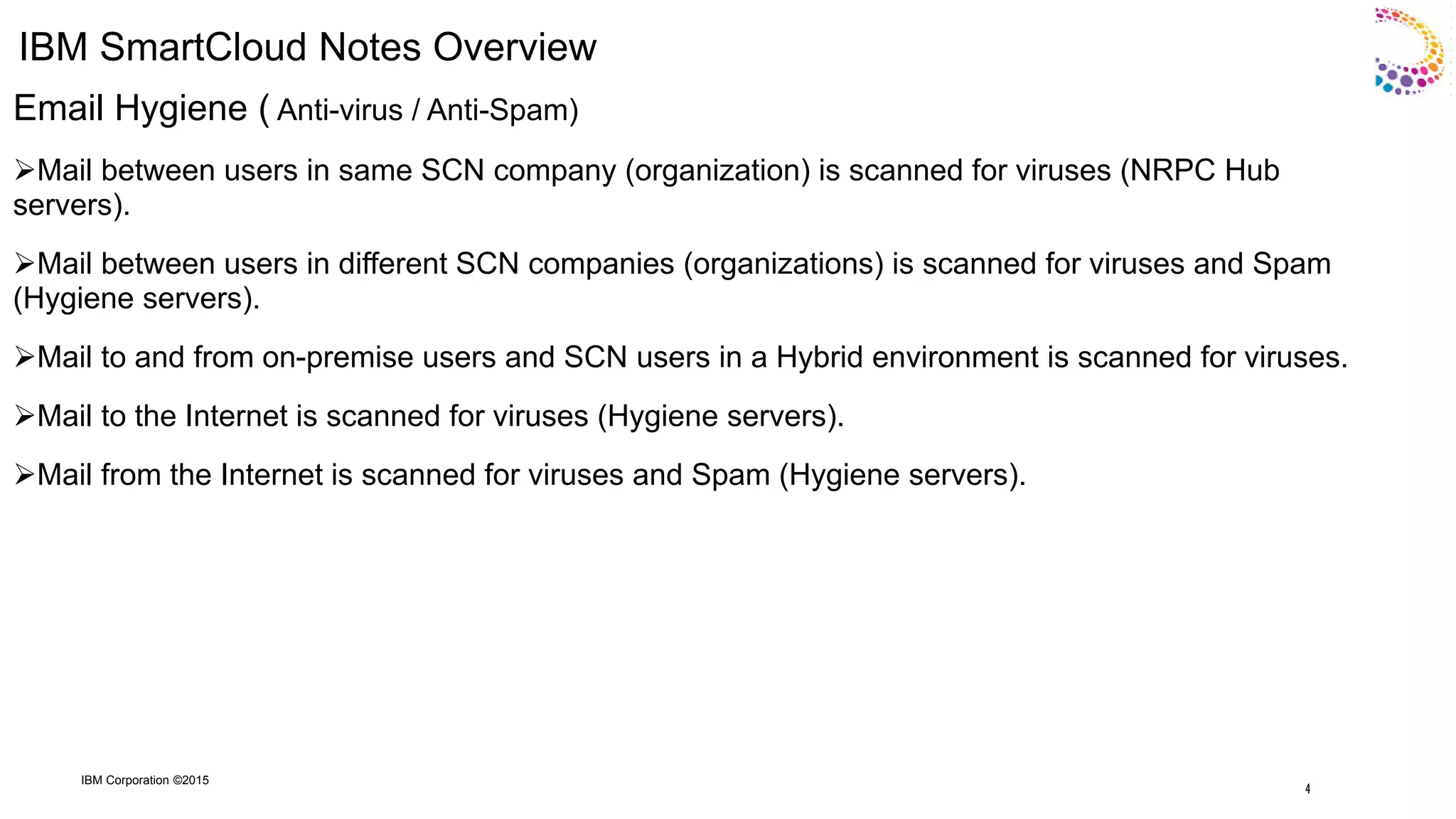
Mail between users in same SCN company (organization) is scanned for viruses (NRPC Hub
servers).
Mail between users in different SCN companies (organizations) is scanned for viruses and Spam
(Hygiene servers).
Mail to and from on-premise users and SCN users in a Hybrid environment is scanned for viruses.
Mail to the Internet is scanned for viruses (Hygiene servers).
Mail from the Internet is scanned for viruses and Spam (Hygiene servers).
4
IBM Corporation ©2015
IBM SmartCloud Notes Overview (continued)
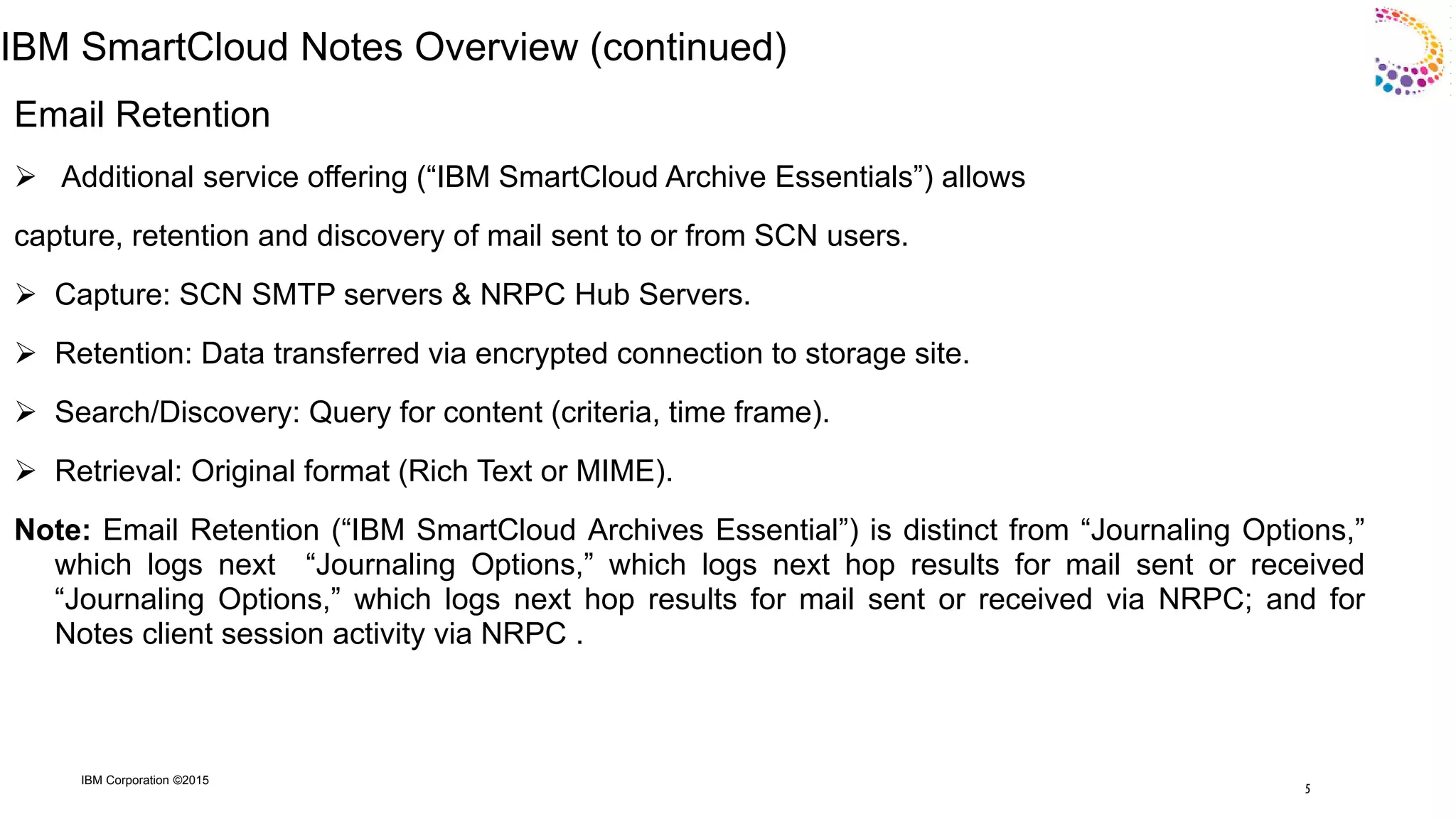
Email Retention
 Additional service offering (“IBM SmartCloud Archive Essentials”) allows
capture, retention and discovery of mail sent to or from SCN users.
 Capture: SCN SMTP servers & NRPC Hub Servers.
 Retention: Data transferred via encrypted connection to storage site.
 Search/Discovery: Query for content (criteria, time frame).
 Retrieval: Original format (Rich Text or MIME).
Note: Email Retention (“IBM SmartCloud Archives Essential”) is distinct from “Journaling Options,”
which logs next “Journaling Options,” which logs next hop results for mail sent or received
“Journaling Options,” which logs next hop results for mail sent or received via NRPC; and for
Notes client session activity via NRPC .
5
IBM Corporation ©2015
IBM SmartCloud Notes Overview (continued)
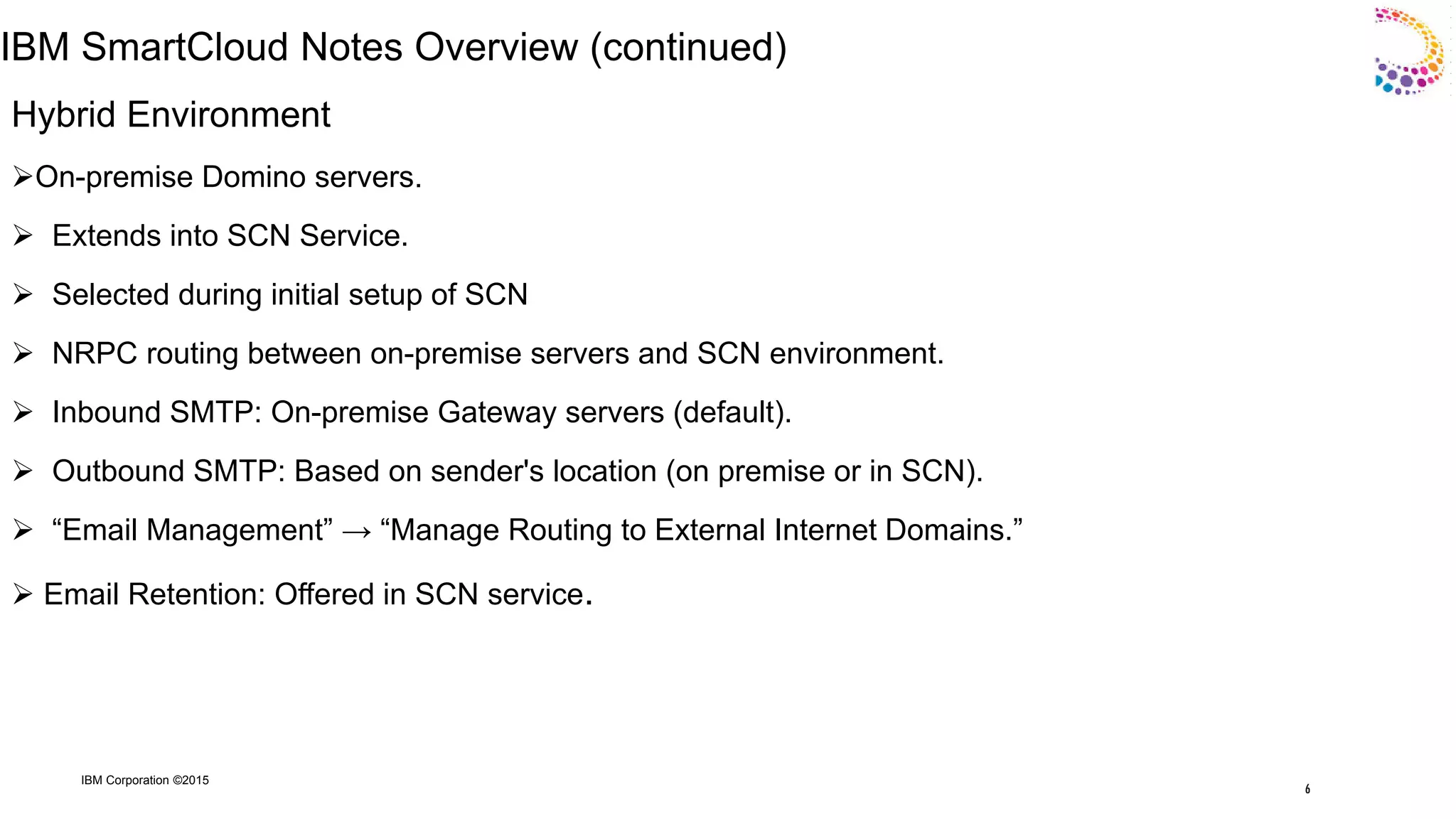
Hybrid Environment
On-premise Domino servers.
 Extends into SCN Service.
 Selected during initial setup of SCN
 NRPC routing between on-premise servers and SCN environment.
 Inbound SMTP: On-premise Gateway servers (default).
 Outbound SMTP: Based on sender's location (on premise or in SCN).
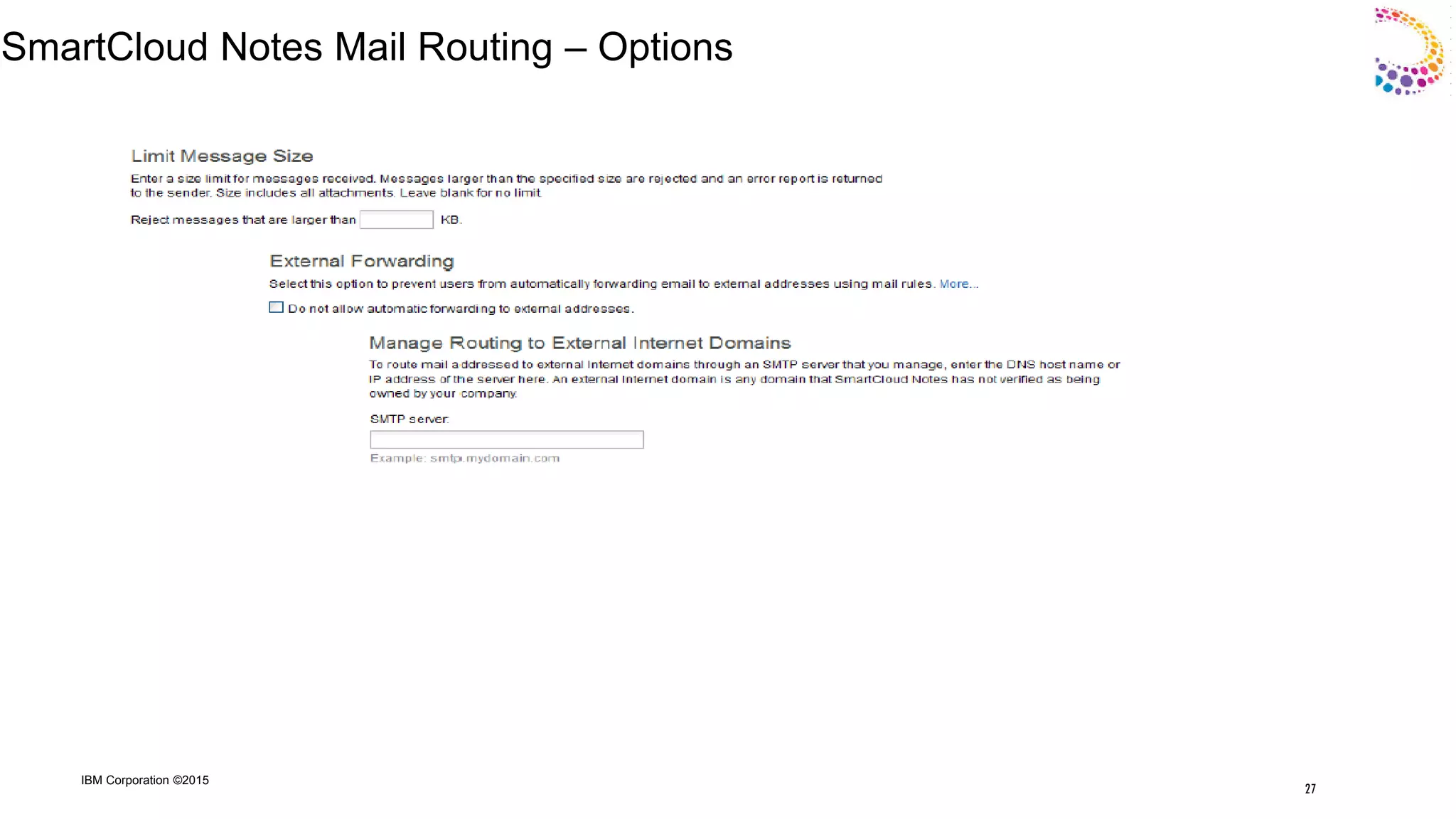
 “Email Management” → “Manage Routing to External Internet Domains.”
 Email Retention: Offered in SCN service.
6
IBM Corporation ©2015
IBM SmartCloud Notes Overview
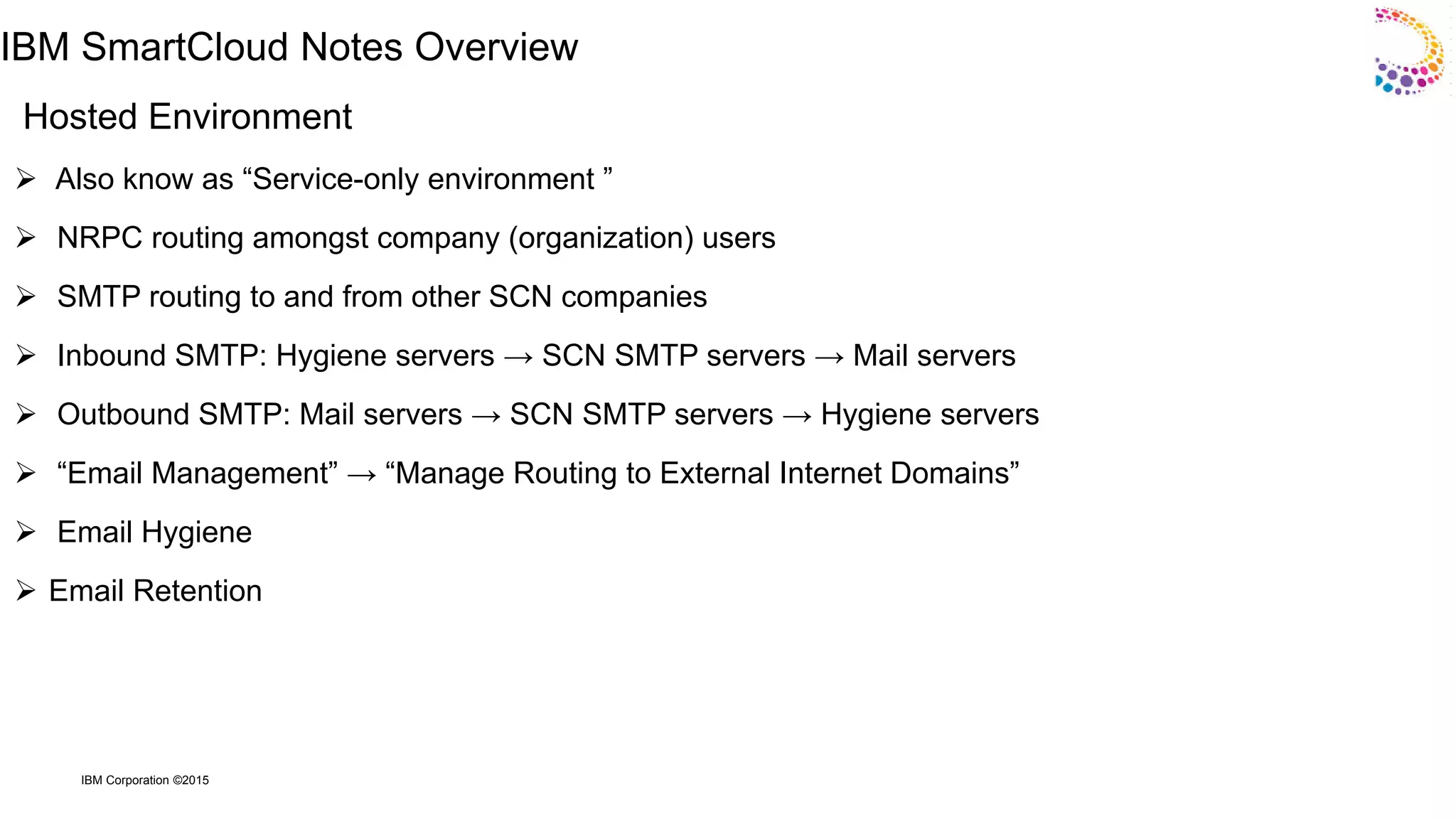
Hosted Environment
 Also know as “Service-only environment ”
 NRPC routing amongst company (organization) users
 SMTP routing to and from other SCN companies
 Inbound SMTP: Hygiene servers → SCN SMTP servers → Mail servers
 Outbound SMTP: Mail servers → SCN SMTP servers → Hygiene servers
 “Email Management” → “Manage Routing to External Internet Domains”
 Email Hygiene
 Email Retention
IBM Corporation ©2015
SmartCloud Notes Topology & Server Roles
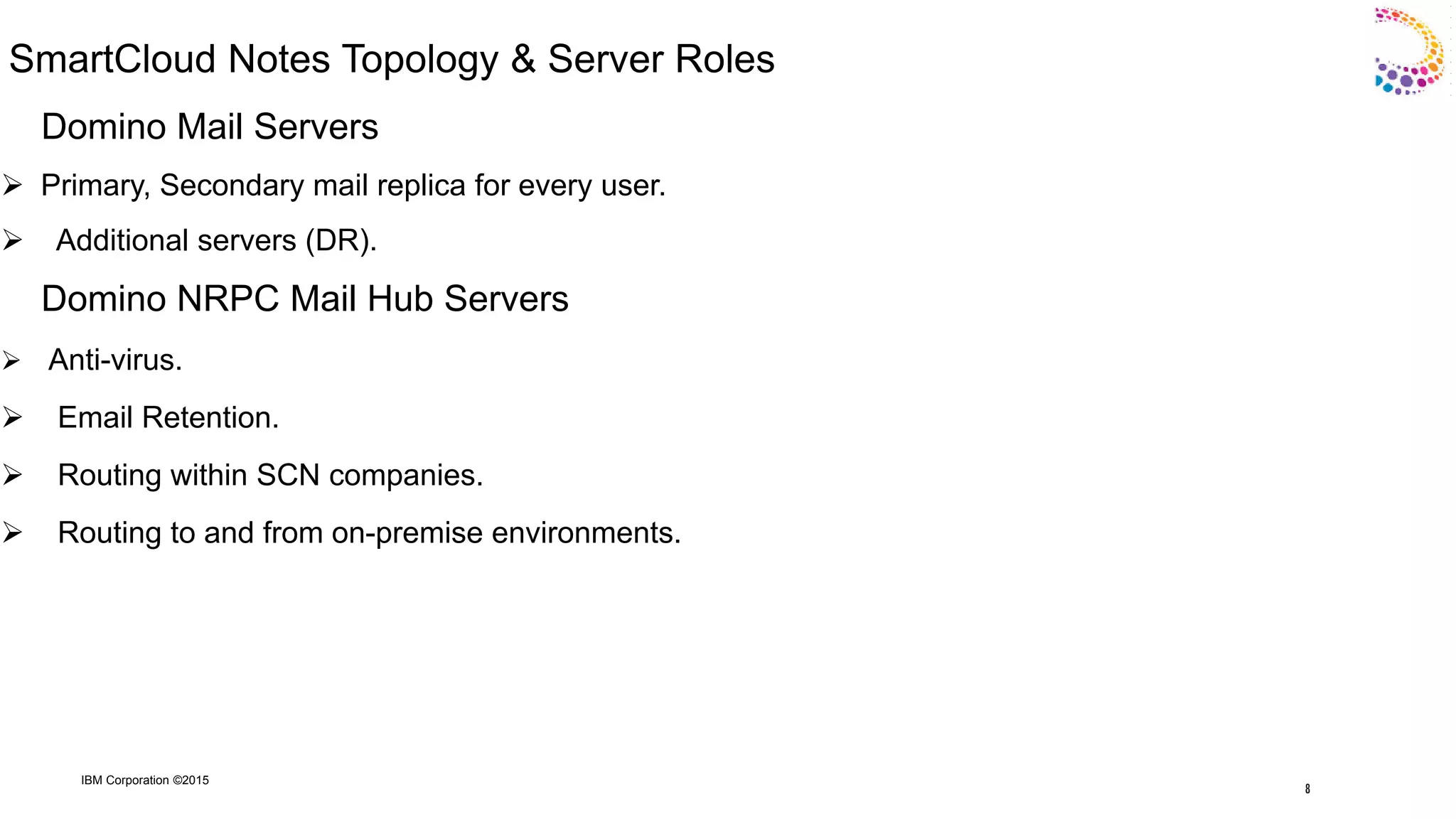
Domino Mail Servers
 Primary, Secondary mail replica for every user.
 Additional servers (DR).
Domino NRPC Mail Hub Servers
 Anti-virus.
 Email Retention.
 Routing within SCN companies.
 Routing to and from on-premise environments.
8
IBM Corporation ©2015
SmartCloud Notes Topology & Server Roles (Concluded)
Domino SMTP Hub Servers
 Between Hygiene servers and other SCN servers.
 Email Retention.
Mail Hygiene Servers
 Internet facing.
 Inbound and outbound SMTP mail.
 Opportunistic TLS (STARTTLS, Port 25).
 Anti-virus and anti-Spam (outbound: anti-virus; inbound: anti-virus and anti- Spam).
9
IBM Corporation ©2015
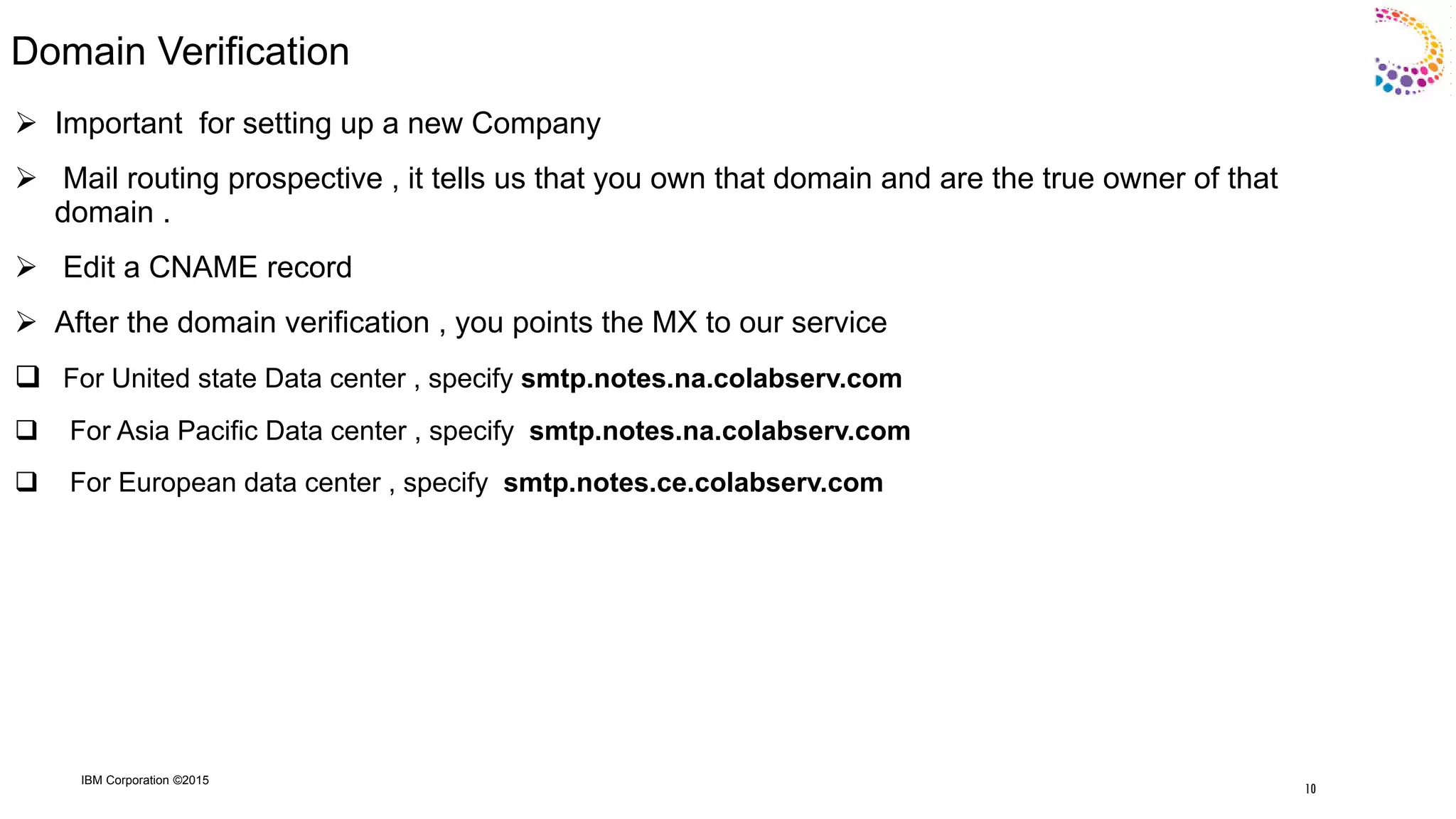
Domain Verification
 Important for setting up a new Company
 Mail routing prospective , it tells us that you own that domain and are the true owner of that
domain .
 Edit a CNAME record
 After the domain verification , you points the MX to our service
 For United state Data center , specify smtp.notes.na.colabserv.com
 For Asia Pacific Data center , specify smtp.notes.na.colabserv.com
 For European data center , specify smtp.notes.ce.colabserv.com
10
IBM Corporation ©2015
Hosted Only Scenarios
11
IBM Corporation ©2015
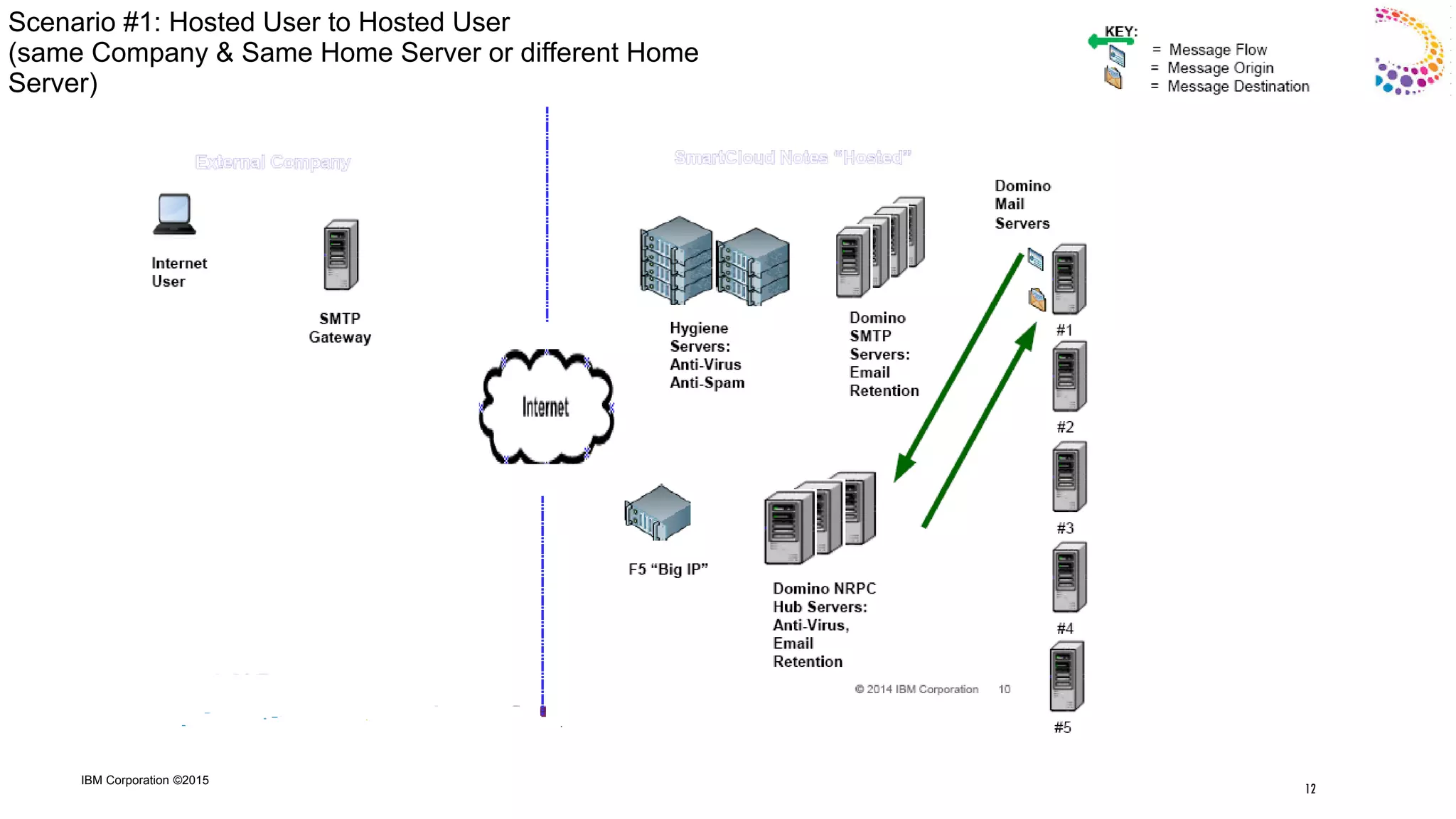
Scenario #1: Hosted User to Hosted User
(same Company & Same Home Server or different Home
Server)
12
IBM Corporation ©2015
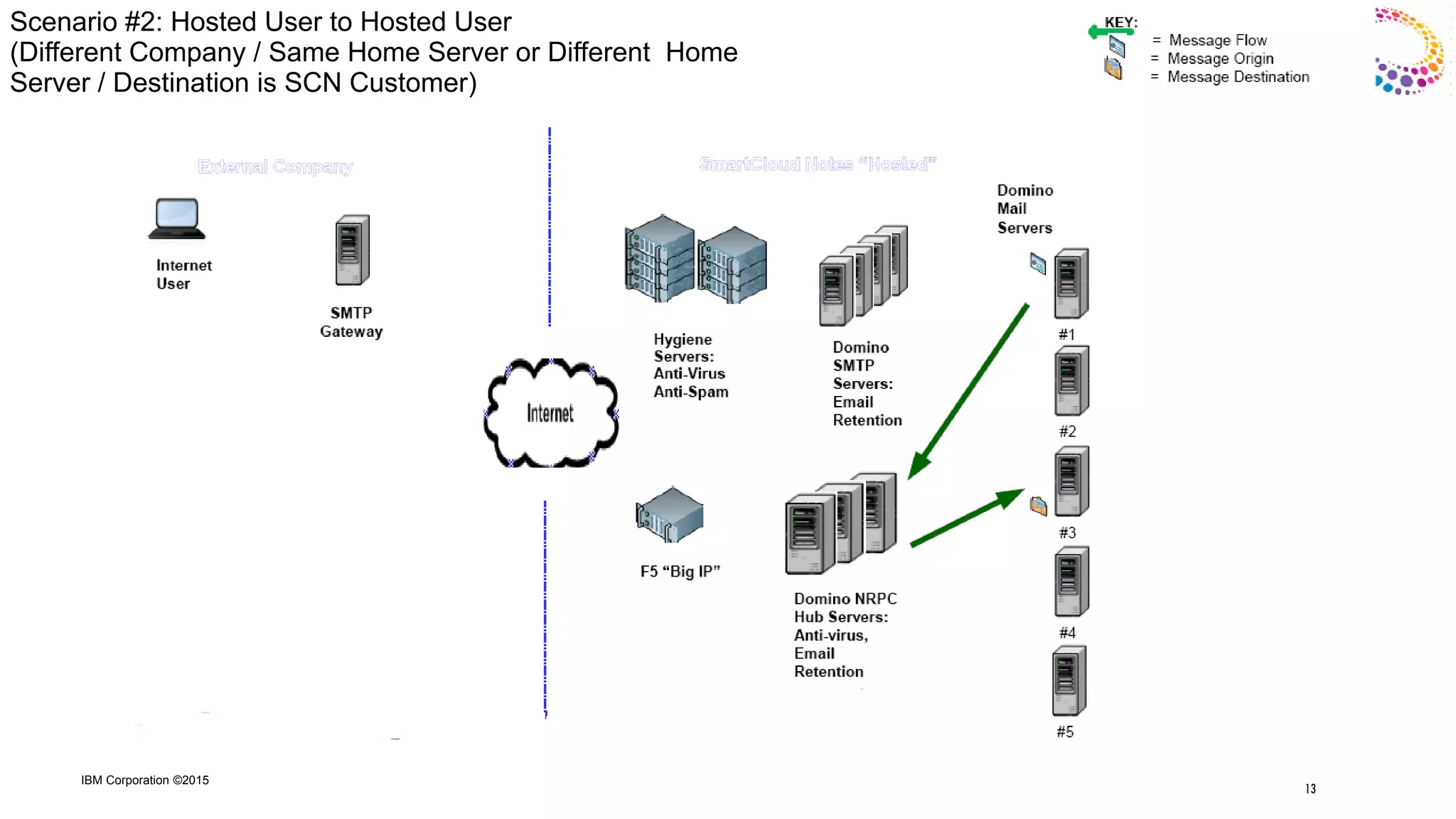
Scenario #2: Hosted User to Hosted User
(Different Company / Same Home Server or Different Home
Server / Destination is SCN Customer)
13
IBM Corporation ©2015
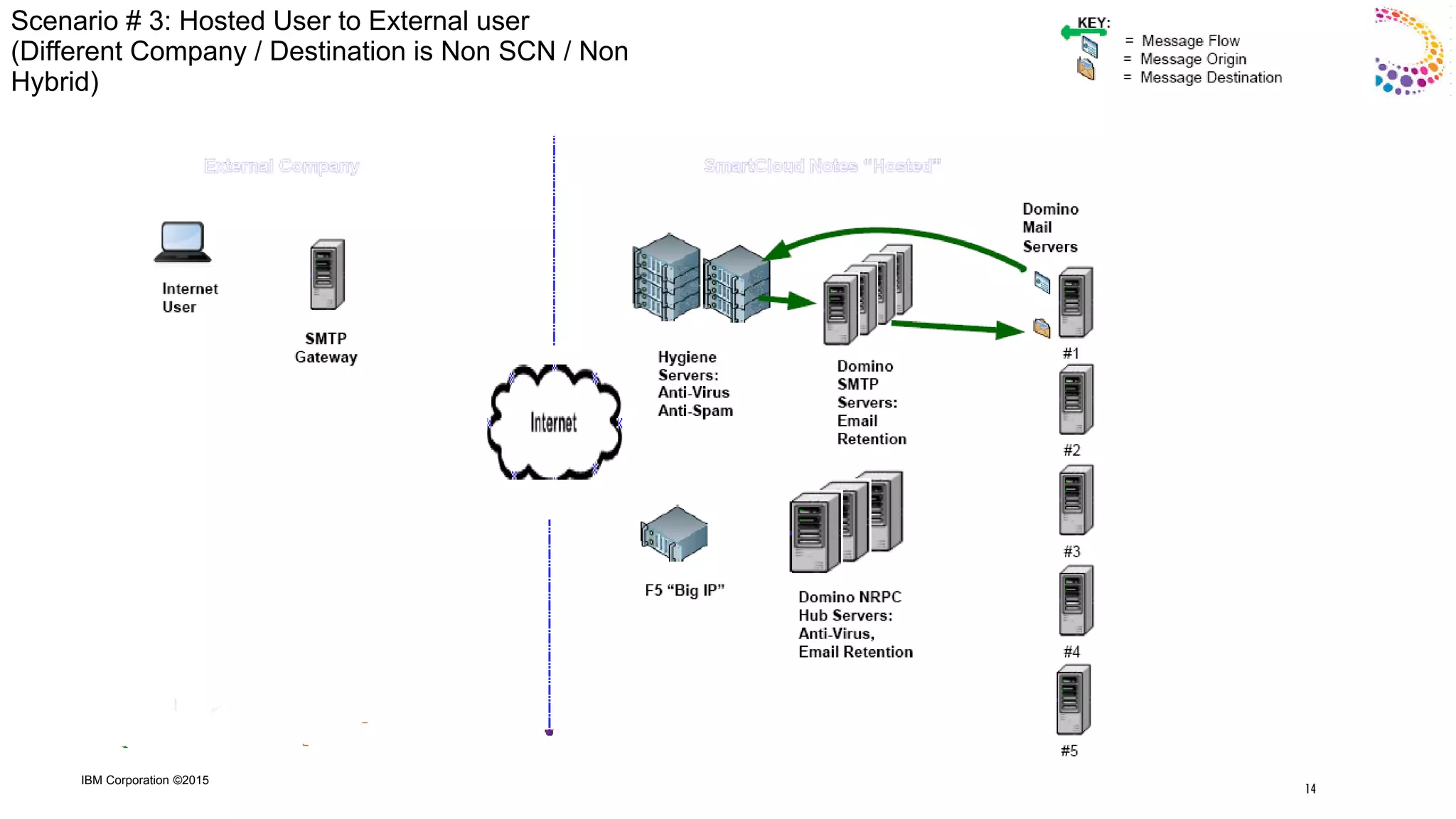
Scenario # 3: Hosted User to External user
(Different Company / Destination is Non SCN / Non
Hybrid)
14
IBM Corporation ©2015
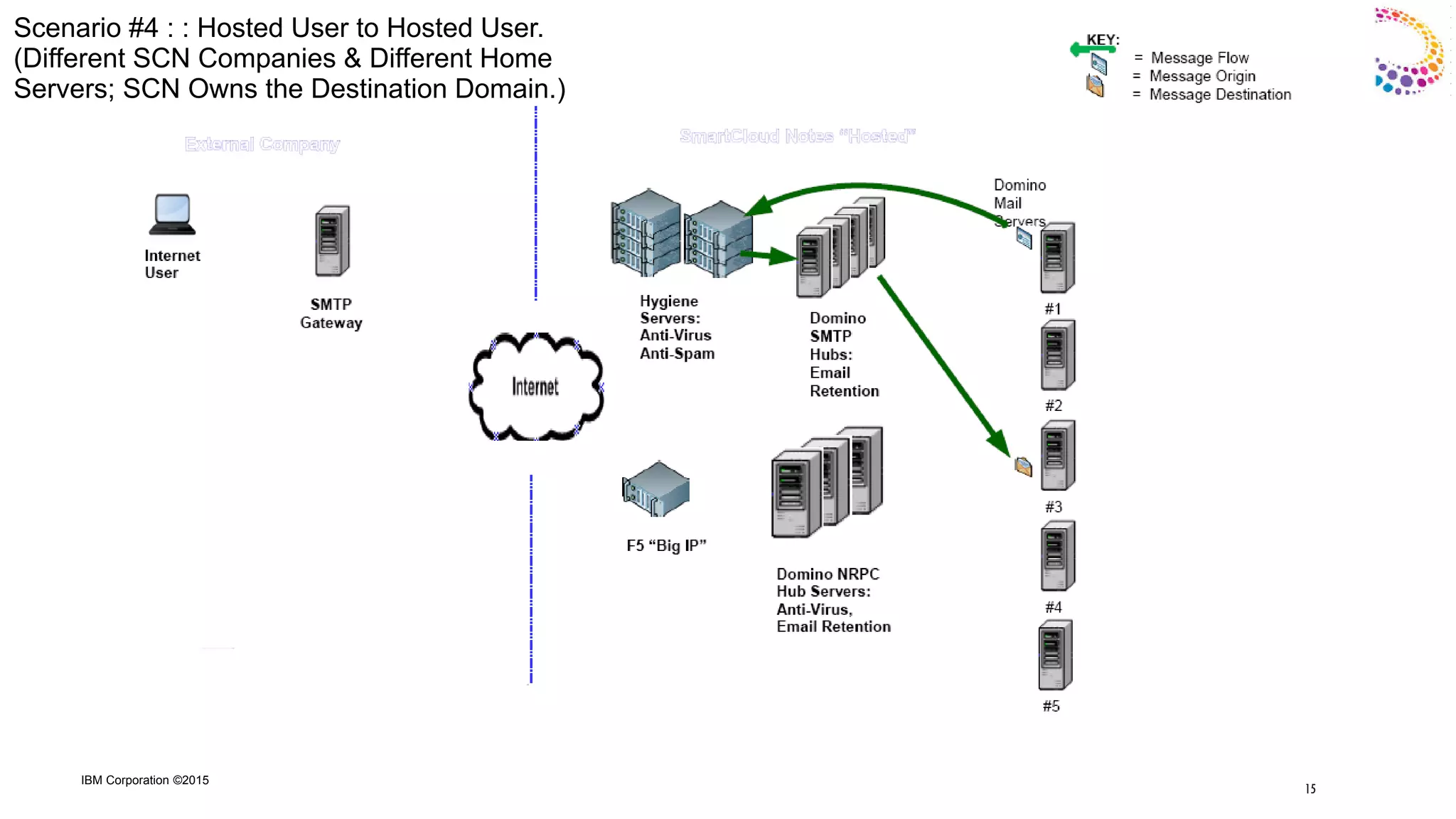
Scenario #4 : : Hosted User to Hosted User.
(Different SCN Companies & Different Home
Servers; SCN Owns the Destination Domain.)
15
IBM Corporation ©2015
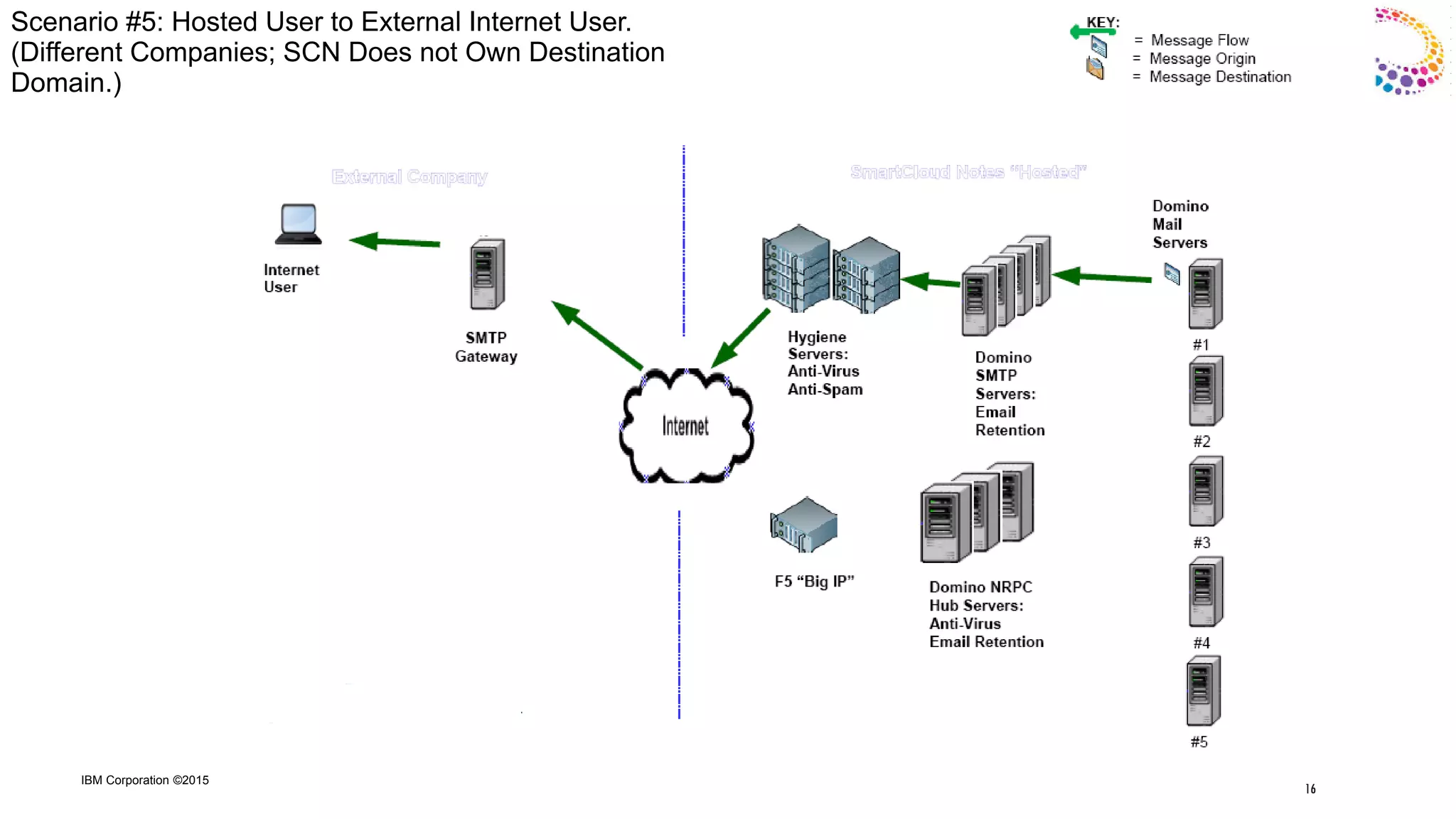
Scenario #5: Hosted User to External Internet User.
(Different Companies; SCN Does not Own Destination
Domain.)
16
IBM Corporation ©2015
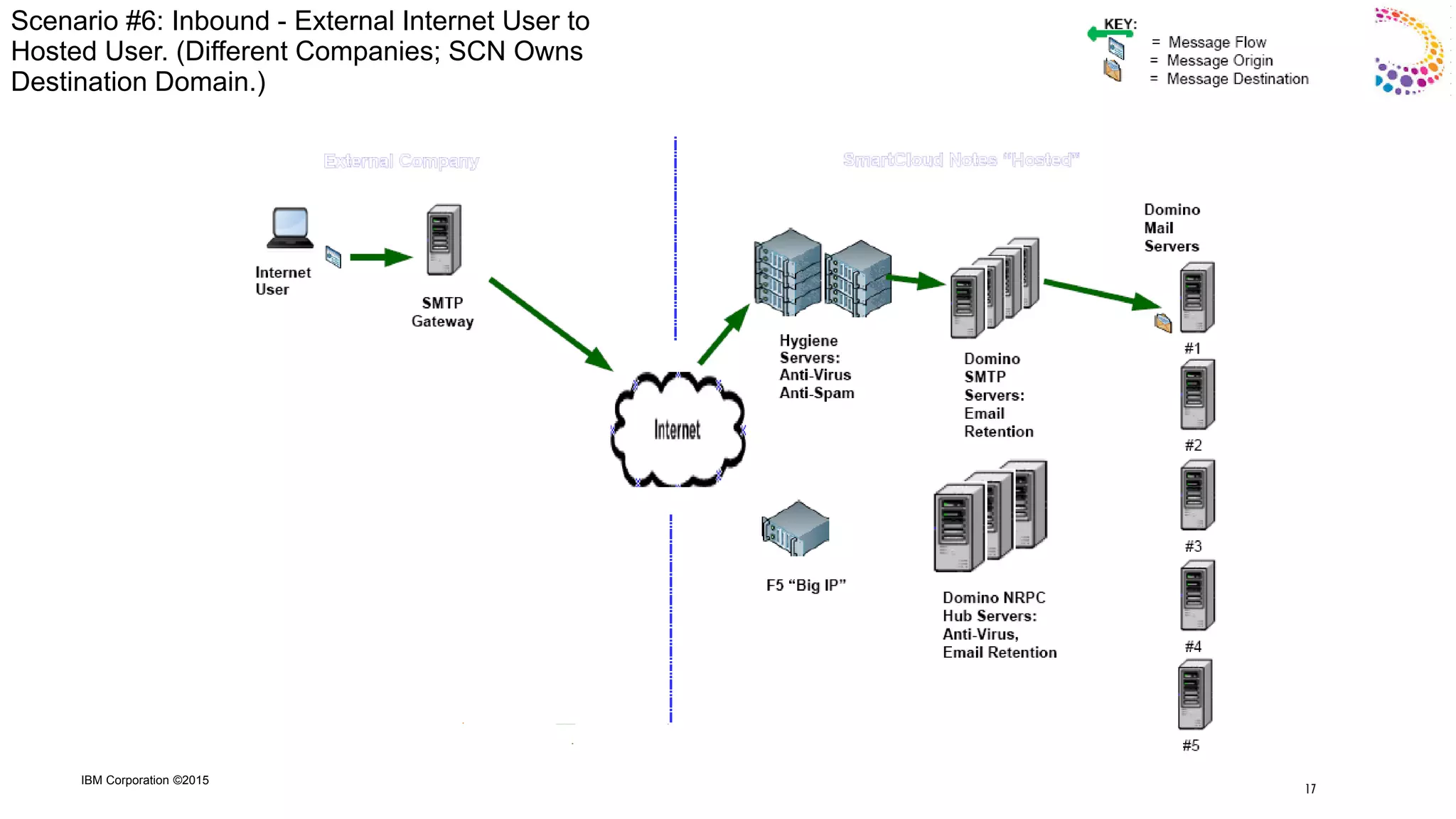
Scenario #6: Inbound - External Internet User to
Hosted User. (Different Companies; SCN Owns
Destination Domain.)
17
IBM Corporation ©2015
Hybrid “Typical” Scenarios
18
IBM Corporation ©2015
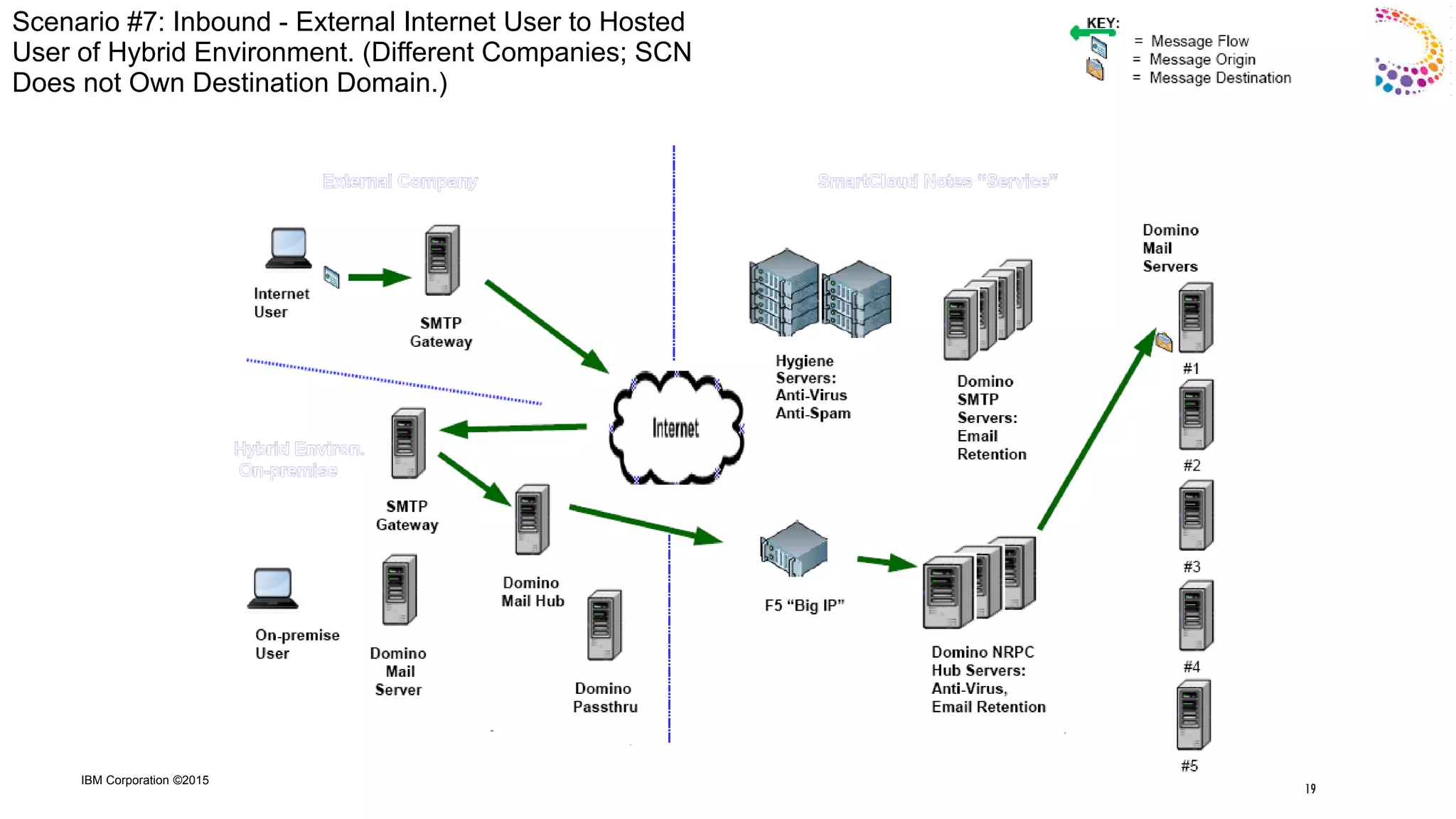
Scenario #7: Inbound - External Internet User to Hosted
User of Hybrid Environment. (Different Companies; SCN
Does not Own Destination Domain.)
19
IBM Corporation ©2015
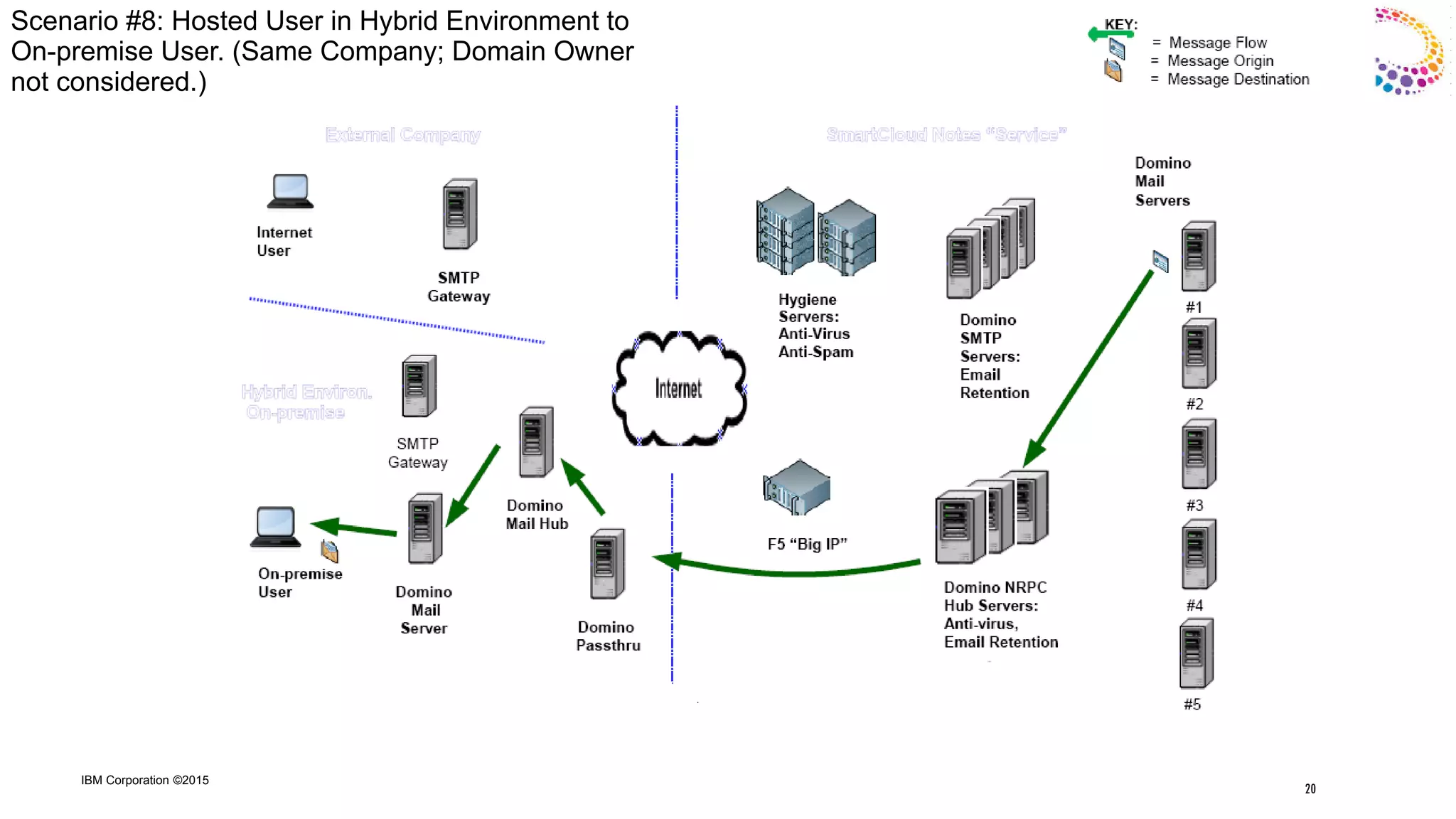
Scenario #8: Hosted User in Hybrid Environment to
On-premise User. (Same Company; Domain Owner
not considered.)
20
IBM Corporation ©2015
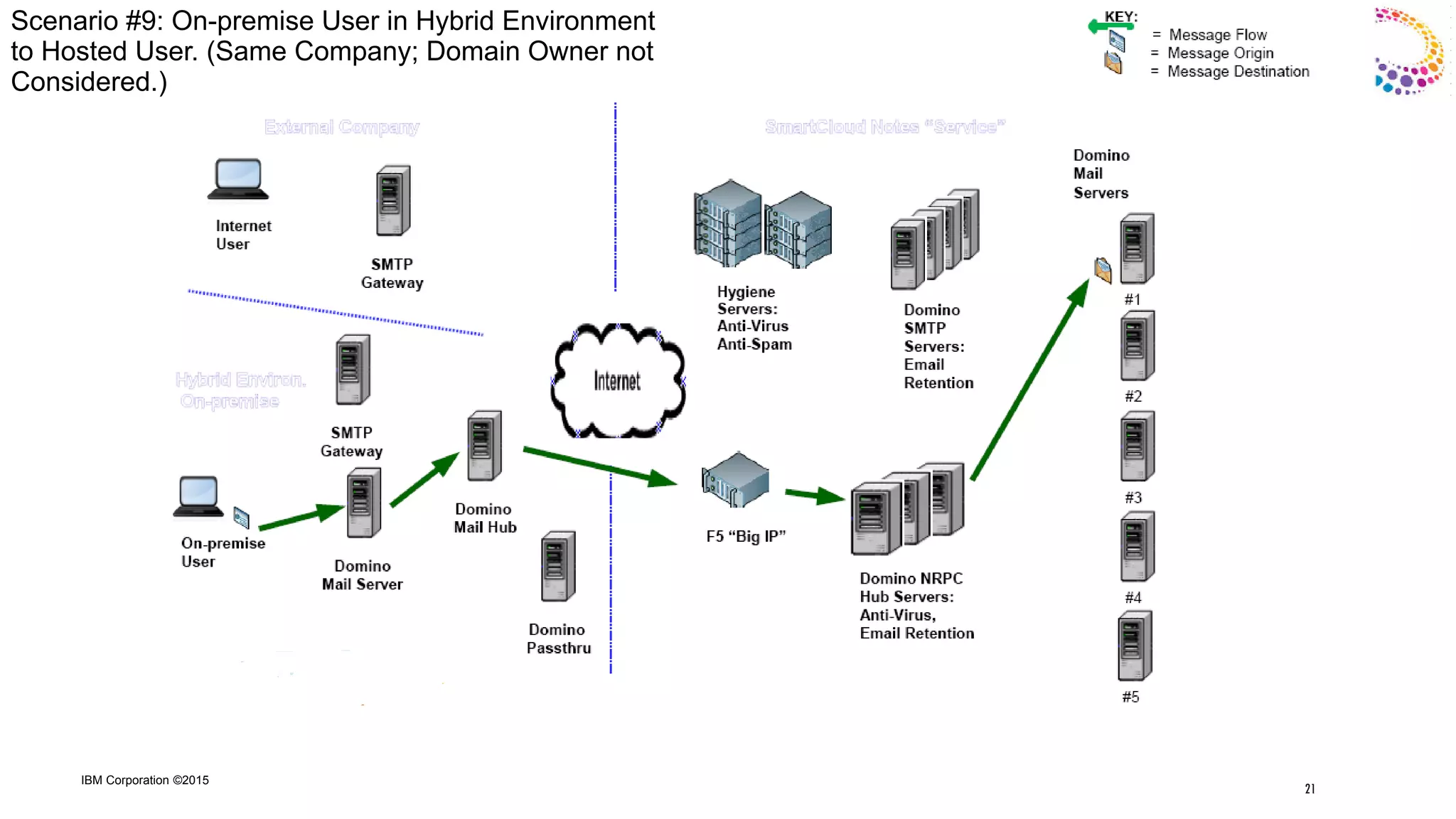
Scenario #9: On-premise User in Hybrid Environment
to Hosted User. (Same Company; Domain Owner not
Considered.)
21
IBM Corporation ©2015
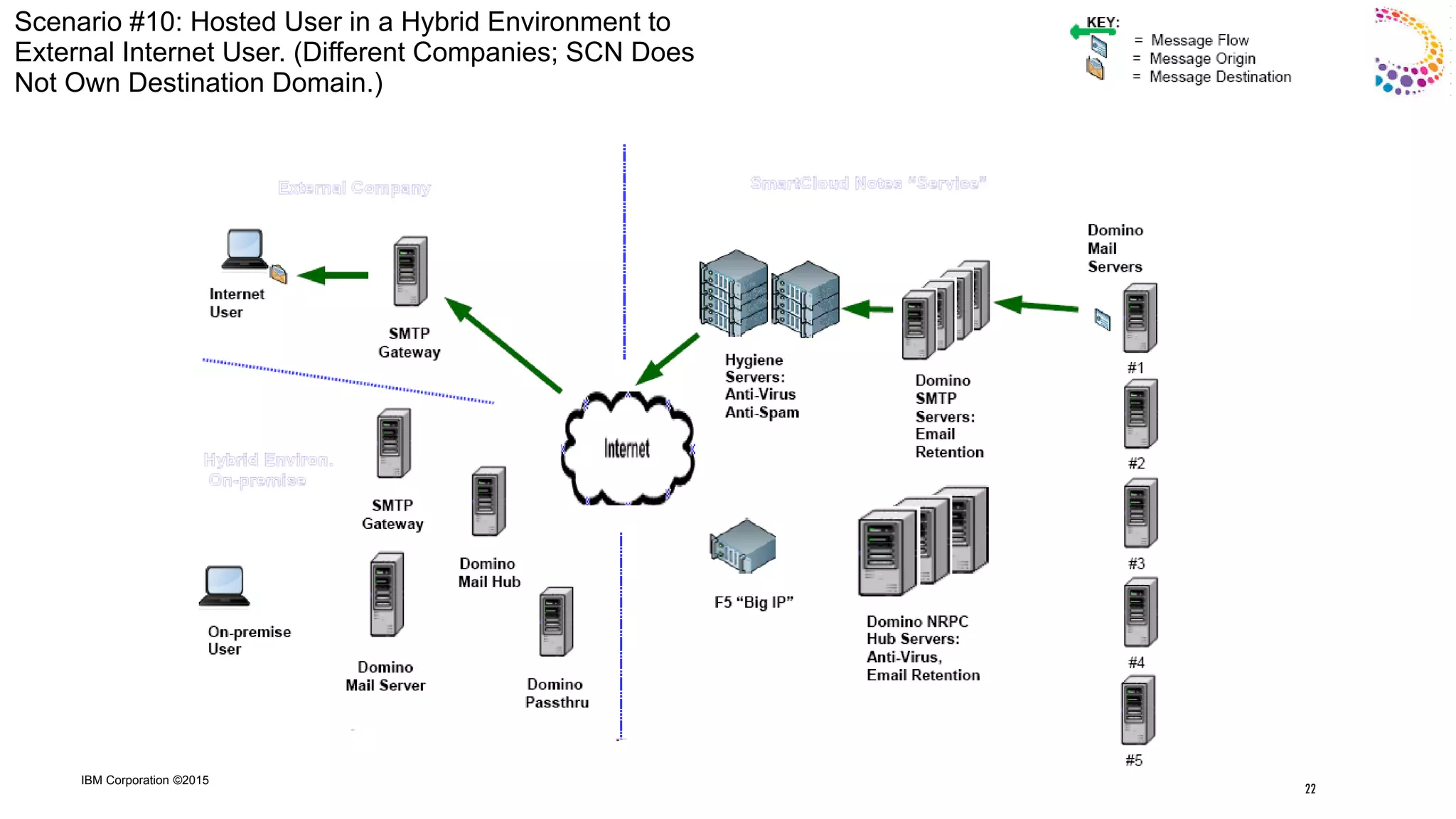
Scenario #10: Hosted User in a Hybrid Environment to
External Internet User. (Different Companies; SCN Does
Not Own Destination Domain.)
22
IBM Corporation ©2015
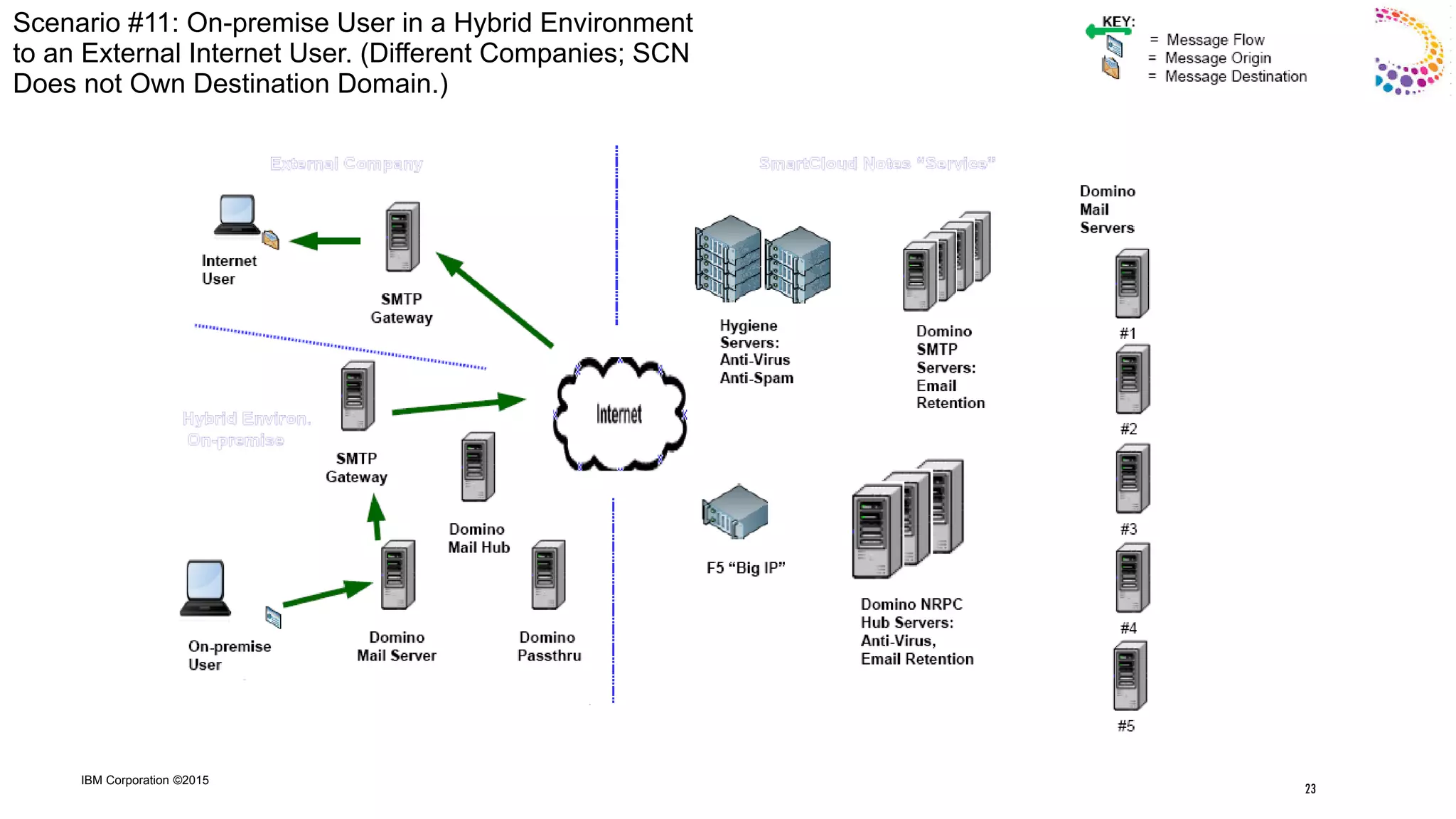
Scenario #11: On-premise User in a Hybrid Environment
to an External Internet User. (Different Companies; SCN
Does not Own Destination Domain.)
23
IBM Corporation ©2015
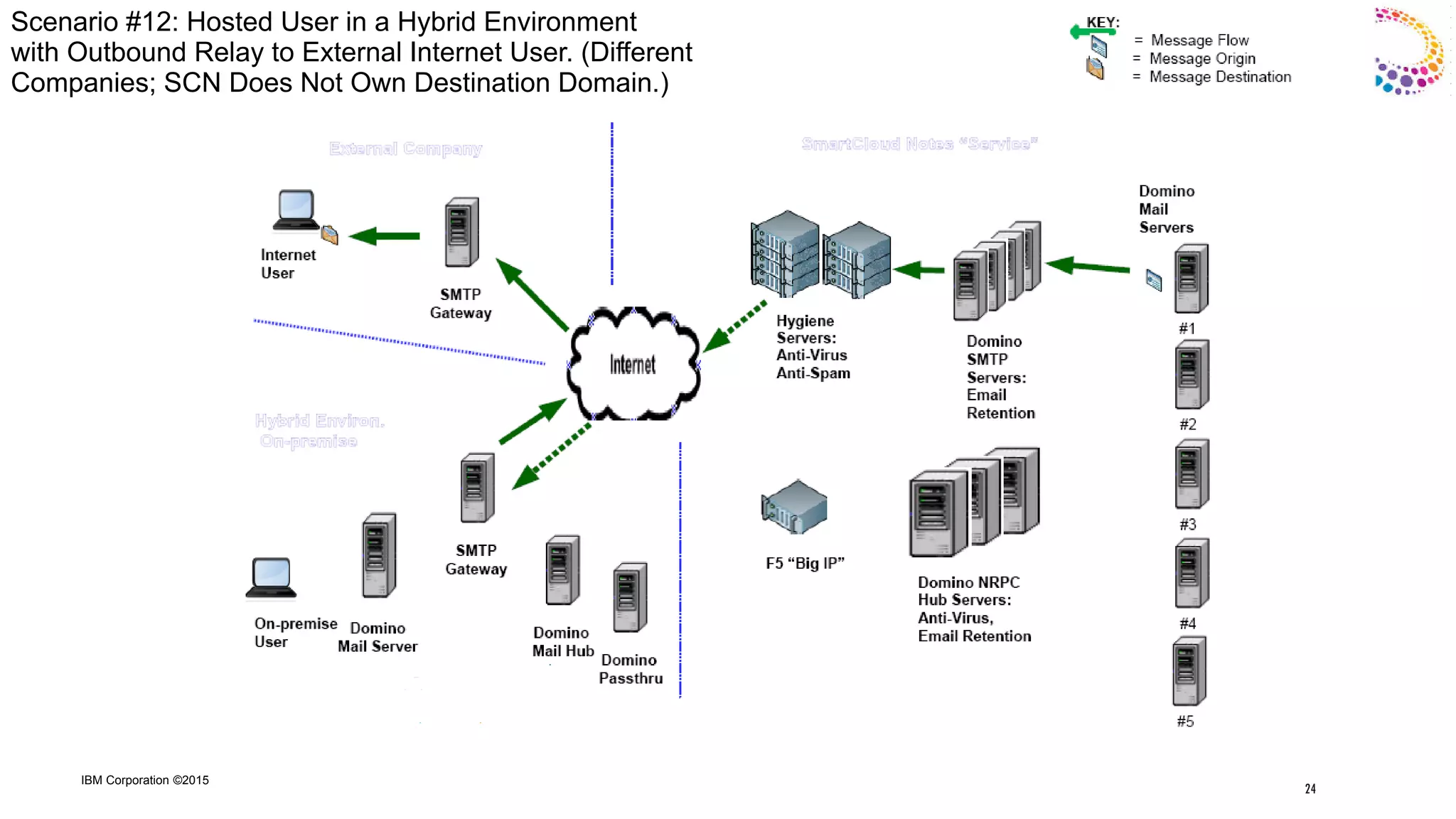
Scenario #12: Hosted User in a Hybrid Environment
with Outbound Relay to External Internet User. (Different
Companies; SCN Does Not Own Destination Domain.)
24
IBM Corporation ©2015
“SmartCloud Notes Mail Routing – Admin UI Options”
25
IBM Corporation ©2015
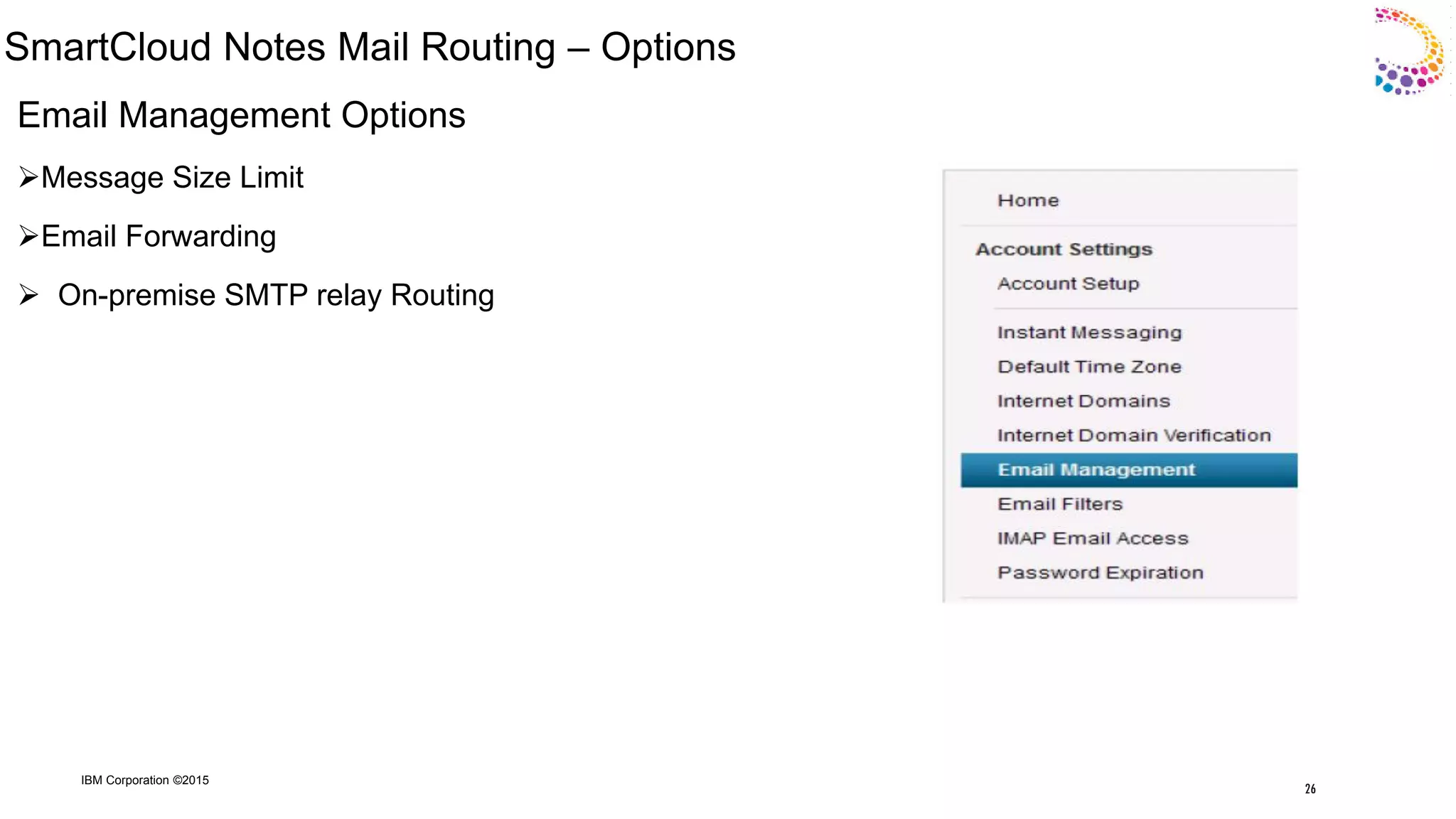
SmartCloud Notes Mail Routing – Options
Email Management Options
Message Size Limit
Email Forwarding
 On-premise SMTP relay Routing
26
IBM Corporation ©2015
SmartCloud Notes Mail Routing – Options
27
IBM Corporation ©2015
Recent Cases
Case 1
Issue : Hybrid Customer in service reported that one of it‟s user was not receiving mails from the
internet user and from also from the SC user ( different Company )
Analysis : Solution is based on Scenario 7 , We in service checked that the mail was send to the
hybrid user by the SC user by checking the logs from the Hygiene server . So we found that the mail
was transfer to the on premise Gateway server were Mx is hosted .The Incoming mails has to come
from the On-premise server via Nrpc Hub server . The issue has to be looked upon from the on-
premise end and not from the service end point .
28
IBM Corporation ©2015
Case 2
Issue : Hybrid Customer reported that after one of the user was migrated to service , Mail
forwarding stopped working . Earlier before Migration it was working for that user .
Analysis : Found out that domain used in mail forwarding was the local domain ,In order to make
it working for user , the forwarding mail domain should be listed as local domain via GDD. This
will allow the mail to be transfer to the on premise via Nrpc from the service .From the on
premise it will route to the forwarding address as before
As of now it was working as designed . The mail was transferred to the hygiene server as the
forwarding domain was define locally , the hygiene server when transferring the mail to the
internet was giving the error “Invalid domain”
29
IBM Corporation ©2015
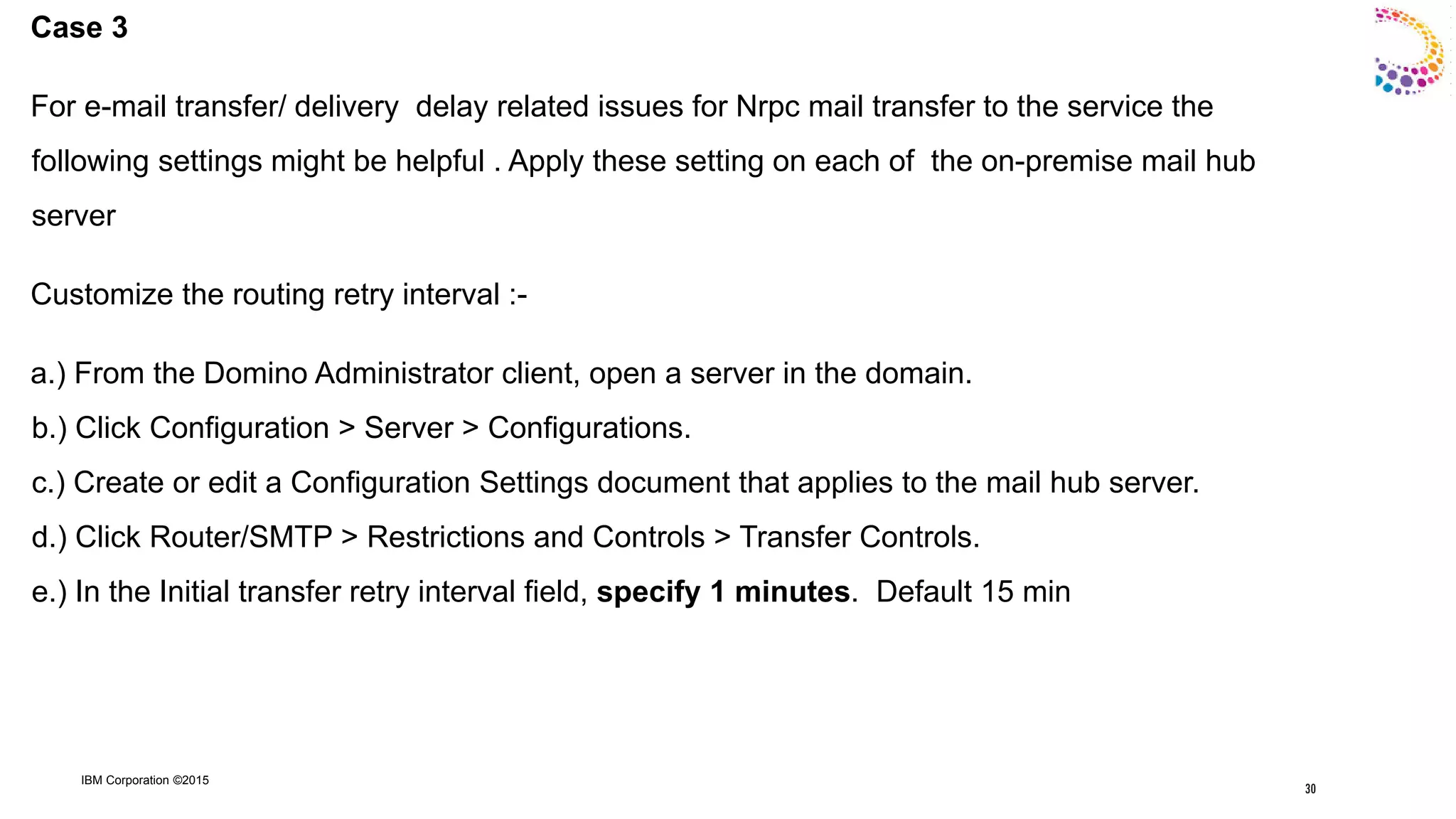
Case 3
For e-mail transfer/ delivery delay related issues for Nrpc mail transfer to the service the
following settings might be helpful . Apply these setting on each of the on-premise mail hub
server
Customize the routing retry interval :-
a.) From the Domino Administrator client, open a server in the domain.
b.) Click Configuration > Server > Configurations.
c.) Create or edit a Configuration Settings document that applies to the mail hub server.
d.) Click Router/SMTP > Restrictions and Controls > Transfer Controls.
e.) In the Initial transfer retry interval field, specify 1 minutes. Default 15 min
30
IBM Corporation ©2015
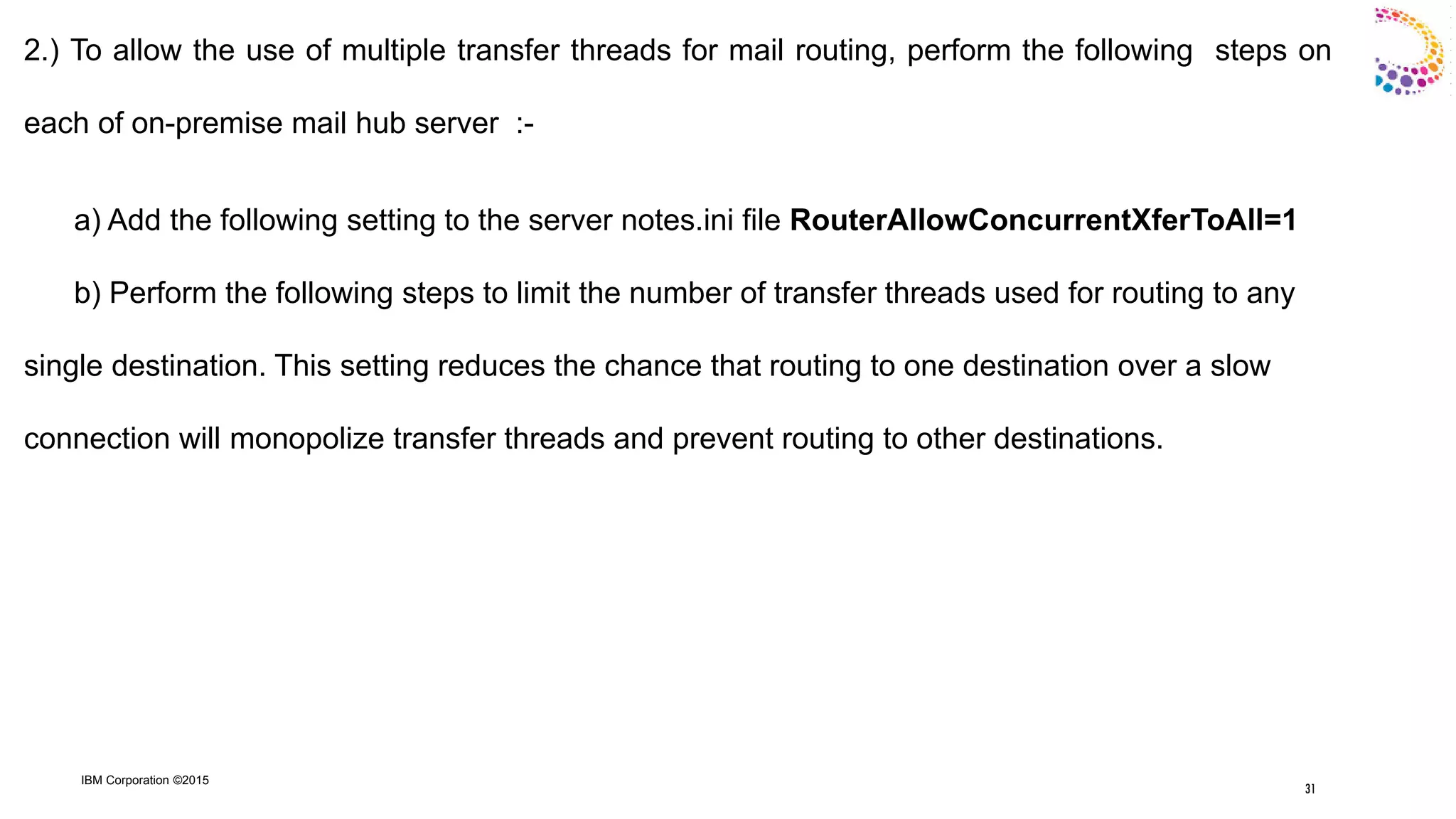
2.) To allow the use of multiple transfer threads for mail routing, perform the following steps on
each of on-premise mail hub server :-
a) Add the following setting to the server notes.ini file RouterAllowConcurrentXferToAll=1
b) Perform the following steps to limit the number of transfer threads used for routing to any
single destination. This setting reduces the chance that routing to one destination over a slow
connection will monopolize transfer threads and prevent routing to other destinations.
31
IBM Corporation ©2015
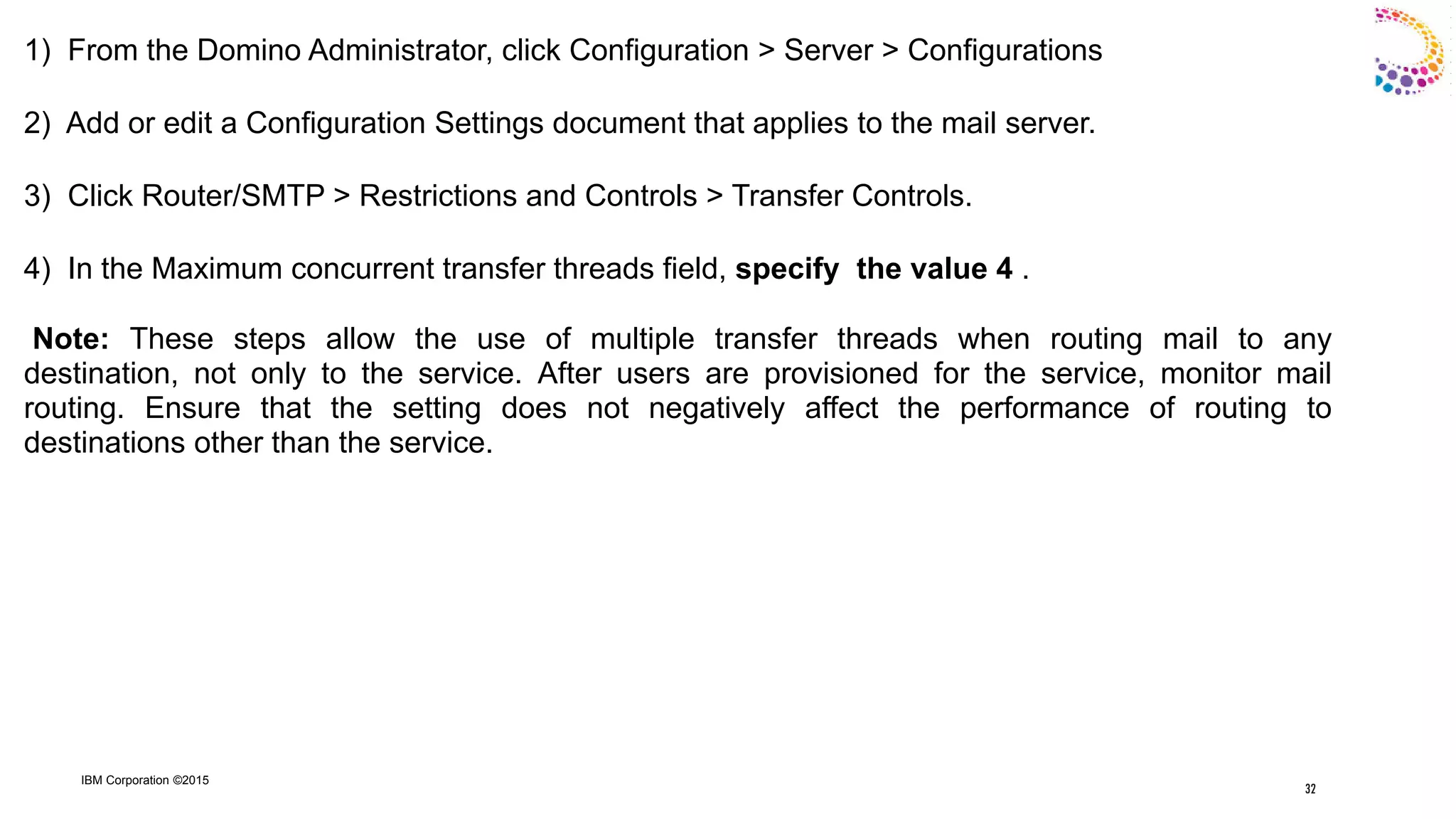
1) From the Domino Administrator, click Configuration > Server > Configurations
2) Add or edit a Configuration Settings document that applies to the mail server.
3) Click Router/SMTP > Restrictions and Controls > Transfer Controls.
4) In the Maximum concurrent transfer threads field, specify the value 4 .
Note: These steps allow the use of multiple transfer threads when routing mail to any
destination, not only to the service. After users are provisioned for the service, monitor mail
routing. Ensure that the setting does not negatively affect the performance of routing to
destinations other than the service.
32
IBM Corporation ©2015
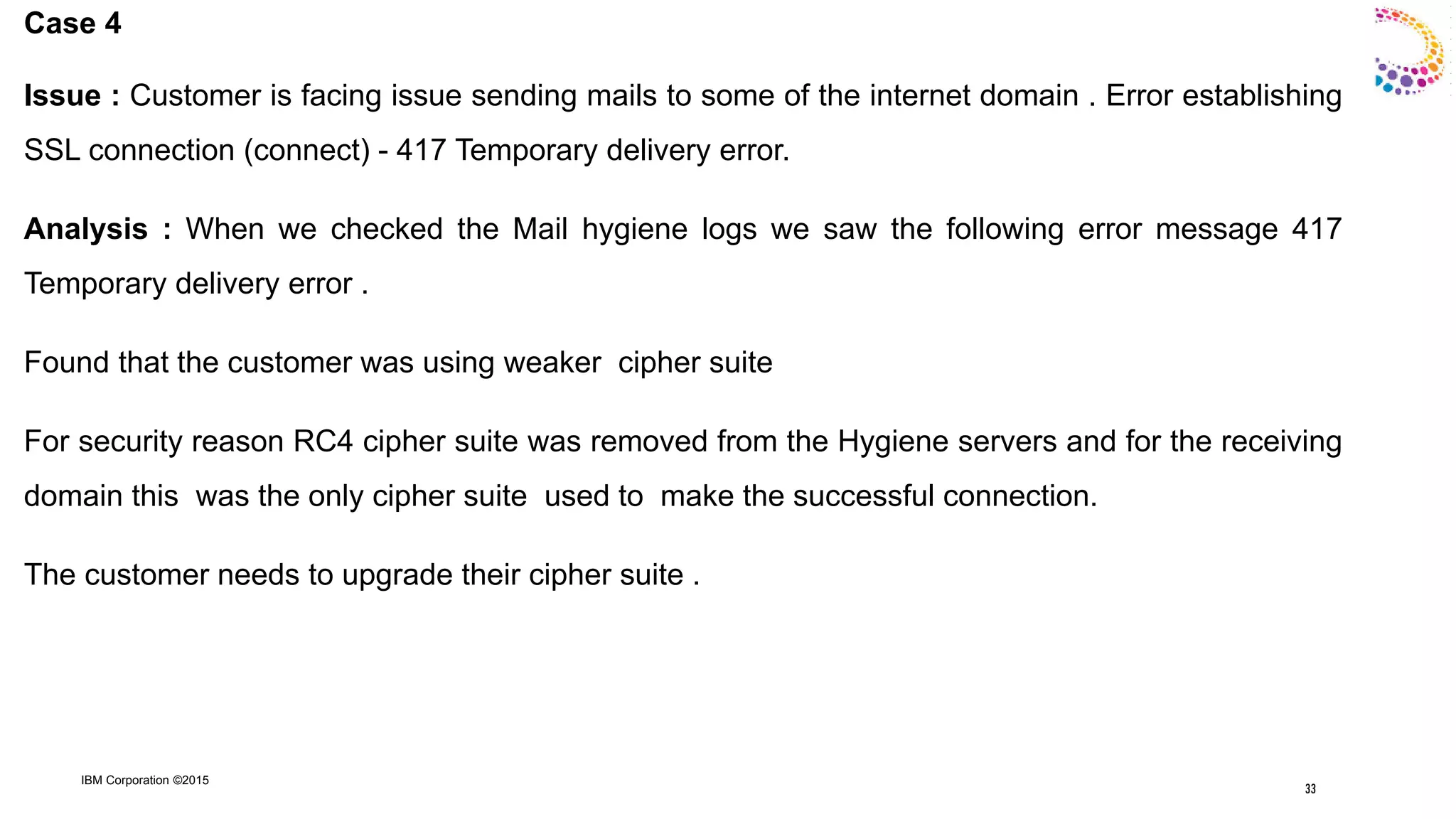
Case 4
Issue : Customer is facing issue sending mails to some of the internet domain . Error establishing
SSL connection (connect) - 417 Temporary delivery error.
Analysis : When we checked the Mail hygiene logs we saw the following error message 417
Temporary delivery error .
Found that the customer was using weaker cipher suite
For security reason RC4 cipher suite was removed from the Hygiene servers and for the receiving
domain this was the only cipher suite used to make the successful connection.
The customer needs to upgrade their cipher suite .
33
IBM Corporation ©2015
Case 5
Issue : User sent mail to two users . One user is able to see the content and the
Other user is unable to see the content .
Analysis : In case of user for whom the content wasn‟t visible . The mail
Was converted from mime to rich text .
The workaround was to keep the following setting
Format preference for incoming mail in the user‟s Person document to
"Keep in Senders Format".
34
IBM Corporation ©2015
Case 6
Issue : User sometime doesn‟t receives mail from a particular sender (hosted customer )
Reason : Sometime the mail from the sender are block by the Mail hygiene because they are
tagged as SPAM as per the current system filter .
Solution : If the customer thinks that the mail from the particular sender is falsely tagged as
SPAM by our service then Send the copy of the blocked mail to the Hygiene team ( for that you
need to work with IBM support team ) or send the mail again if you have the access to that mail
with CC to nospam@spam.iss.net . This will help to update the hygiene filters dynamically .
35
IBM Corporation ©2015
Case 7
Issue : Sender getting the DFR , Several matches found in Domino Directory ,
when sending mails to the user‟s in Smart cloud .
Reason : The e-mail used for the active user is also found in some other user‟s
service record as alias or short name . It doesn‟t matter if the user is suspended or
active .
Solution : Remove the suspended user‟s service record / if the alias or short name is
found in the other active user„s service record then it needs to be removed (Need to
work with IBM support for resolving this issue )
36
IBM Corporation ©2015
Case 8
Issue : Getting DFR When sending mail to the hosted SC company user
Error Message : Server error: '550 invalid DNS MX or A/AAAA resource record
Analysis : MX was listed at second level . To work properly it has to be listed in first
Level
<Domain> 74738 IN MX 5 <server name > ( 1st Level )
<server name >. 300 IN CNAME smtp.notes.na.collabserv.com. (2nd Level )
It should be as follows
<Domain> 74738 IN MX 5 smtp.notes.na.collabserv.com. ( 1st Level )
37
IBM Corporation ©2015
Basic Configuration Practices
 After provisioning users to SCN, then configure the MX record(s) to point to SCN (if applicable), not
before . Otherwise, there is a risk of Delivery Failure Reports.
 When the intent is for on-premise SMTP servers to receive mail from the Internet (rather than the
SCN Service receiving the mail), do not point MX record(s) to SCN. Otherwise, Delivery Failure Reports
result, as SCN does not own the destination domain in this configuration and , therefore, is not
prepared to accept the mail from the Internet.
 When the intent is for the SCN Service to receive mail from the Internet, be sure to validate the
Internet domain(s) first, and then point the MX records to SCN. Otherwise, Delivery Failure Reports
result, as SCN is not prepared to accept the mail from the Internet until domain Validation has taken
place .
 Alphabetic listing of the Domino name of the on-premise Primary and Secondary Mail Hub servers is
used to determine which server and SCN NRPC Hub server will first attempt to route mail to.
38
IBM Corporation ©2015
Useful Urls
Configuring the MX record for a domain
http://www-01.ibm.com/support/knowledgecenter/SSPS94/service/topics/cfg_hosted_domain_mx_t.dita?lang=en
Verifying ownership of a domain
http://www-01.ibm.com/support/knowledgecenter/SSPS94/service/topics/cfg_hosted_domain_verify_t.dita?lang=en
39
IBM Corporation ©2015
Questions?
Press *1 on your telephone to ask a question.
Visit our Support Technical Exchange page or our Facebook page for details on
future events.
To help shape the future of IBM software, take this quality survey and share your
opinion of IBM software used within your organization: https://ibm.biz/BdxqB2
40
IBM Collaboration Solutions Support page
http://www.facebook.com/IBMLotusSupport
IBM Collaboration Solutions Support
http://twitter.com/IBM_ICSSupport
40

IBM SmartCloud Notes Mail Routing - 21st Oct

  • 1.
    IBM Collaboration Solutions OpenMic Date: 21st Oct , 2015 IBM SmartCloud Notes (SCN) Mail Routing
  • 2.
    IBM Corporation ©2015 2 OpenMic Team  Naresh Luthra – L3 Smart Cloud Notes Presenter  Ranjit Rai - IBM ICS SWAT Focusing on entire Notes/Domino  Jayavel Rajendran - IBM ICS SWAT Focusing on entire Notes/Domino  Hansraj Mali - IBM ICS SWAT Focusing on entire Notes/Domino  Vinayak Tavargeri – IBM ICS Support Facilitator for Open Mics 2
  • 3.
    IBM Corporation ©2015 Agenda 1SmartCloud Notes (SCN) Mail Routing Overview  Email Hygiene  Email Retention  Hybrid & Hosted Environments 2. Routing Topology & Server Roles 3. Sample Mail Flow Scenarios 4. Admin controls 5 Common issues, causes, best practices 6. Useful URLs 3
  • 4.
    IBM Corporation ©2015 IBMSmartCloud Notes Overview Email Hygiene ( Anti-virus / Anti-Spam) Mail between users in same SCN company (organization) is scanned for viruses (NRPC Hub servers). Mail between users in different SCN companies (organizations) is scanned for viruses and Spam (Hygiene servers). Mail to and from on-premise users and SCN users in a Hybrid environment is scanned for viruses. Mail to the Internet is scanned for viruses (Hygiene servers). Mail from the Internet is scanned for viruses and Spam (Hygiene servers). 4
  • 5.
    IBM Corporation ©2015 IBMSmartCloud Notes Overview (continued) Email Retention  Additional service offering (“IBM SmartCloud Archive Essentials”) allows capture, retention and discovery of mail sent to or from SCN users.  Capture: SCN SMTP servers & NRPC Hub Servers.  Retention: Data transferred via encrypted connection to storage site.  Search/Discovery: Query for content (criteria, time frame).  Retrieval: Original format (Rich Text or MIME). Note: Email Retention (“IBM SmartCloud Archives Essential”) is distinct from “Journaling Options,” which logs next “Journaling Options,” which logs next hop results for mail sent or received “Journaling Options,” which logs next hop results for mail sent or received via NRPC; and for Notes client session activity via NRPC . 5
  • 6.
    IBM Corporation ©2015 IBMSmartCloud Notes Overview (continued) Hybrid Environment On-premise Domino servers.  Extends into SCN Service.  Selected during initial setup of SCN  NRPC routing between on-premise servers and SCN environment.  Inbound SMTP: On-premise Gateway servers (default).  Outbound SMTP: Based on sender's location (on premise or in SCN).  “Email Management” → “Manage Routing to External Internet Domains.”  Email Retention: Offered in SCN service. 6
  • 7.
    IBM Corporation ©2015 IBMSmartCloud Notes Overview Hosted Environment  Also know as “Service-only environment ”  NRPC routing amongst company (organization) users  SMTP routing to and from other SCN companies  Inbound SMTP: Hygiene servers → SCN SMTP servers → Mail servers  Outbound SMTP: Mail servers → SCN SMTP servers → Hygiene servers  “Email Management” → “Manage Routing to External Internet Domains”  Email Hygiene  Email Retention
  • 8.
    IBM Corporation ©2015 SmartCloudNotes Topology & Server Roles Domino Mail Servers  Primary, Secondary mail replica for every user.  Additional servers (DR). Domino NRPC Mail Hub Servers  Anti-virus.  Email Retention.  Routing within SCN companies.  Routing to and from on-premise environments. 8
  • 9.
    IBM Corporation ©2015 SmartCloudNotes Topology & Server Roles (Concluded) Domino SMTP Hub Servers  Between Hygiene servers and other SCN servers.  Email Retention. Mail Hygiene Servers  Internet facing.  Inbound and outbound SMTP mail.  Opportunistic TLS (STARTTLS, Port 25).  Anti-virus and anti-Spam (outbound: anti-virus; inbound: anti-virus and anti- Spam). 9
  • 10.
    IBM Corporation ©2015 DomainVerification  Important for setting up a new Company  Mail routing prospective , it tells us that you own that domain and are the true owner of that domain .  Edit a CNAME record  After the domain verification , you points the MX to our service  For United state Data center , specify smtp.notes.na.colabserv.com  For Asia Pacific Data center , specify smtp.notes.na.colabserv.com  For European data center , specify smtp.notes.ce.colabserv.com 10
  • 11.
  • 12.
    IBM Corporation ©2015 Scenario#1: Hosted User to Hosted User (same Company & Same Home Server or different Home Server) 12
  • 13.
    IBM Corporation ©2015 Scenario#2: Hosted User to Hosted User (Different Company / Same Home Server or Different Home Server / Destination is SCN Customer) 13
  • 14.
    IBM Corporation ©2015 Scenario# 3: Hosted User to External user (Different Company / Destination is Non SCN / Non Hybrid) 14
  • 15.
    IBM Corporation ©2015 Scenario#4 : : Hosted User to Hosted User. (Different SCN Companies & Different Home Servers; SCN Owns the Destination Domain.) 15
  • 16.
    IBM Corporation ©2015 Scenario#5: Hosted User to External Internet User. (Different Companies; SCN Does not Own Destination Domain.) 16
  • 17.
    IBM Corporation ©2015 Scenario#6: Inbound - External Internet User to Hosted User. (Different Companies; SCN Owns Destination Domain.) 17
  • 18.
    IBM Corporation ©2015 Hybrid“Typical” Scenarios 18
  • 19.
    IBM Corporation ©2015 Scenario#7: Inbound - External Internet User to Hosted User of Hybrid Environment. (Different Companies; SCN Does not Own Destination Domain.) 19
  • 20.
    IBM Corporation ©2015 Scenario#8: Hosted User in Hybrid Environment to On-premise User. (Same Company; Domain Owner not considered.) 20
  • 21.
    IBM Corporation ©2015 Scenario#9: On-premise User in Hybrid Environment to Hosted User. (Same Company; Domain Owner not Considered.) 21
  • 22.
    IBM Corporation ©2015 Scenario#10: Hosted User in a Hybrid Environment to External Internet User. (Different Companies; SCN Does Not Own Destination Domain.) 22
  • 23.
    IBM Corporation ©2015 Scenario#11: On-premise User in a Hybrid Environment to an External Internet User. (Different Companies; SCN Does not Own Destination Domain.) 23
  • 24.
    IBM Corporation ©2015 Scenario#12: Hosted User in a Hybrid Environment with Outbound Relay to External Internet User. (Different Companies; SCN Does Not Own Destination Domain.) 24
  • 25.
    IBM Corporation ©2015 “SmartCloudNotes Mail Routing – Admin UI Options” 25
  • 26.
    IBM Corporation ©2015 SmartCloudNotes Mail Routing – Options Email Management Options Message Size Limit Email Forwarding  On-premise SMTP relay Routing 26
  • 27.
    IBM Corporation ©2015 SmartCloudNotes Mail Routing – Options 27
  • 28.
    IBM Corporation ©2015 RecentCases Case 1 Issue : Hybrid Customer in service reported that one of it‟s user was not receiving mails from the internet user and from also from the SC user ( different Company ) Analysis : Solution is based on Scenario 7 , We in service checked that the mail was send to the hybrid user by the SC user by checking the logs from the Hygiene server . So we found that the mail was transfer to the on premise Gateway server were Mx is hosted .The Incoming mails has to come from the On-premise server via Nrpc Hub server . The issue has to be looked upon from the on- premise end and not from the service end point . 28
  • 29.
    IBM Corporation ©2015 Case2 Issue : Hybrid Customer reported that after one of the user was migrated to service , Mail forwarding stopped working . Earlier before Migration it was working for that user . Analysis : Found out that domain used in mail forwarding was the local domain ,In order to make it working for user , the forwarding mail domain should be listed as local domain via GDD. This will allow the mail to be transfer to the on premise via Nrpc from the service .From the on premise it will route to the forwarding address as before As of now it was working as designed . The mail was transferred to the hygiene server as the forwarding domain was define locally , the hygiene server when transferring the mail to the internet was giving the error “Invalid domain” 29
  • 30.
    IBM Corporation ©2015 Case3 For e-mail transfer/ delivery delay related issues for Nrpc mail transfer to the service the following settings might be helpful . Apply these setting on each of the on-premise mail hub server Customize the routing retry interval :- a.) From the Domino Administrator client, open a server in the domain. b.) Click Configuration > Server > Configurations. c.) Create or edit a Configuration Settings document that applies to the mail hub server. d.) Click Router/SMTP > Restrictions and Controls > Transfer Controls. e.) In the Initial transfer retry interval field, specify 1 minutes. Default 15 min 30
  • 31.
    IBM Corporation ©2015 2.)To allow the use of multiple transfer threads for mail routing, perform the following steps on each of on-premise mail hub server :- a) Add the following setting to the server notes.ini file RouterAllowConcurrentXferToAll=1 b) Perform the following steps to limit the number of transfer threads used for routing to any single destination. This setting reduces the chance that routing to one destination over a slow connection will monopolize transfer threads and prevent routing to other destinations. 31
  • 32.
    IBM Corporation ©2015 1)From the Domino Administrator, click Configuration > Server > Configurations 2) Add or edit a Configuration Settings document that applies to the mail server. 3) Click Router/SMTP > Restrictions and Controls > Transfer Controls. 4) In the Maximum concurrent transfer threads field, specify the value 4 . Note: These steps allow the use of multiple transfer threads when routing mail to any destination, not only to the service. After users are provisioned for the service, monitor mail routing. Ensure that the setting does not negatively affect the performance of routing to destinations other than the service. 32
  • 33.
    IBM Corporation ©2015 Case4 Issue : Customer is facing issue sending mails to some of the internet domain . Error establishing SSL connection (connect) - 417 Temporary delivery error. Analysis : When we checked the Mail hygiene logs we saw the following error message 417 Temporary delivery error . Found that the customer was using weaker cipher suite For security reason RC4 cipher suite was removed from the Hygiene servers and for the receiving domain this was the only cipher suite used to make the successful connection. The customer needs to upgrade their cipher suite . 33
  • 34.
    IBM Corporation ©2015 Case5 Issue : User sent mail to two users . One user is able to see the content and the Other user is unable to see the content . Analysis : In case of user for whom the content wasn‟t visible . The mail Was converted from mime to rich text . The workaround was to keep the following setting Format preference for incoming mail in the user‟s Person document to "Keep in Senders Format". 34
  • 35.
    IBM Corporation ©2015 Case6 Issue : User sometime doesn‟t receives mail from a particular sender (hosted customer ) Reason : Sometime the mail from the sender are block by the Mail hygiene because they are tagged as SPAM as per the current system filter . Solution : If the customer thinks that the mail from the particular sender is falsely tagged as SPAM by our service then Send the copy of the blocked mail to the Hygiene team ( for that you need to work with IBM support team ) or send the mail again if you have the access to that mail with CC to nospam@spam.iss.net . This will help to update the hygiene filters dynamically . 35
  • 36.
    IBM Corporation ©2015 Case7 Issue : Sender getting the DFR , Several matches found in Domino Directory , when sending mails to the user‟s in Smart cloud . Reason : The e-mail used for the active user is also found in some other user‟s service record as alias or short name . It doesn‟t matter if the user is suspended or active . Solution : Remove the suspended user‟s service record / if the alias or short name is found in the other active user„s service record then it needs to be removed (Need to work with IBM support for resolving this issue ) 36
  • 37.
    IBM Corporation ©2015 Case8 Issue : Getting DFR When sending mail to the hosted SC company user Error Message : Server error: '550 invalid DNS MX or A/AAAA resource record Analysis : MX was listed at second level . To work properly it has to be listed in first Level <Domain> 74738 IN MX 5 <server name > ( 1st Level ) <server name >. 300 IN CNAME smtp.notes.na.collabserv.com. (2nd Level ) It should be as follows <Domain> 74738 IN MX 5 smtp.notes.na.collabserv.com. ( 1st Level ) 37
  • 38.
    IBM Corporation ©2015 BasicConfiguration Practices  After provisioning users to SCN, then configure the MX record(s) to point to SCN (if applicable), not before . Otherwise, there is a risk of Delivery Failure Reports.  When the intent is for on-premise SMTP servers to receive mail from the Internet (rather than the SCN Service receiving the mail), do not point MX record(s) to SCN. Otherwise, Delivery Failure Reports result, as SCN does not own the destination domain in this configuration and , therefore, is not prepared to accept the mail from the Internet.  When the intent is for the SCN Service to receive mail from the Internet, be sure to validate the Internet domain(s) first, and then point the MX records to SCN. Otherwise, Delivery Failure Reports result, as SCN is not prepared to accept the mail from the Internet until domain Validation has taken place .  Alphabetic listing of the Domino name of the on-premise Primary and Secondary Mail Hub servers is used to determine which server and SCN NRPC Hub server will first attempt to route mail to. 38
  • 39.
    IBM Corporation ©2015 UsefulUrls Configuring the MX record for a domain http://www-01.ibm.com/support/knowledgecenter/SSPS94/service/topics/cfg_hosted_domain_mx_t.dita?lang=en Verifying ownership of a domain http://www-01.ibm.com/support/knowledgecenter/SSPS94/service/topics/cfg_hosted_domain_verify_t.dita?lang=en 39
  • 40.
    IBM Corporation ©2015 Questions? Press*1 on your telephone to ask a question. Visit our Support Technical Exchange page or our Facebook page for details on future events. To help shape the future of IBM software, take this quality survey and share your opinion of IBM software used within your organization: https://ibm.biz/BdxqB2 40 IBM Collaboration Solutions Support page http://www.facebook.com/IBMLotusSupport IBM Collaboration Solutions Support http://twitter.com/IBM_ICSSupport 40