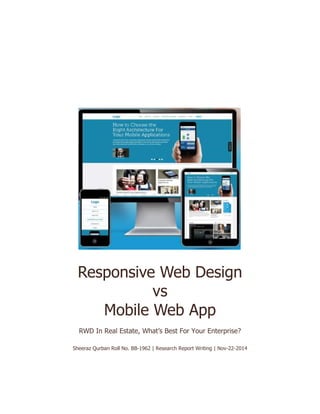
Responsive Web Design
vs
Mobile Web App
RWD In Real Estate, What’s Best For Your Enterprise?
Sheeraz Qurban Roll No. BB-1962 | Research Report Writing | Nov-22-2014
Responsive Website vs Mobile Web App
Semester Research Report Assignment
1ABSTRACT
The purpose of this report is to educate Readers on the utility of Responsive Web
Design. It is also intended to help readers communicate their needs more
effectively to a web developer. The report will also present a study for a site built
by which was built with Responsive Web Design principles. Finally, it will provide
resources that use to evaluate the landscape of what is available to them in the
arena of Responsive Web Design.
Overview
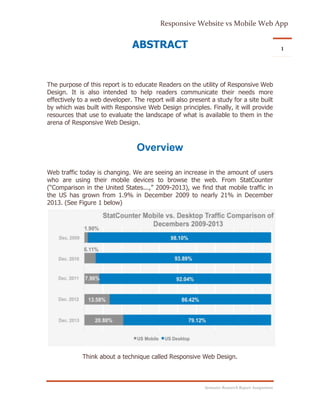
Web traffic today is changing. We are seeing an increase in the amount of users
who are using their mobile devices to browse the web. From StatCounter
(“Comparison in the United States...,” 2009-2013), we find that mobile traffic in
the US has grown from 1.9% in December 2009 to nearly 21% in December
2013. (See Figure 1 below)
Think about a technique called Responsive Web Design.
Responsive Website vs Mobile Web App
Semester Research Report Assignment
2
As we move into the future, it is more likely that the first impression members
give to a prospective clients will come from their website. If clients are driving
around a neighborhood and notice a property with a member's name and
website on it, they will most likely look up that member on their phone or tablet
first. This first exposure to the agent’s website will help define the experience
they expect to have with the agent. If your web presence is one that's hard to
navigate and doesn't consider what matters to them first, they will feel like they
weren't considered. When they come to your site, they should be able to do a
few things very easily from a desktop or mobile device:
 Determine how to contact you
 See what other properties you have listed
 Search properties
All of these things can be accomplished using Responsive Web Design techniques.
Responsive Website vs Mobile Web App
Semester Research Report Assignment
3
The Elements of Responsive Web Design
Using web standard technologies to build a website today is one way to future proof
your Website. Responsive Web Design is built with these technologies. These standards
are HTML, CSS and JavaScript. We will quickly outline the three technologies and talk
about why they matter.
HTML, CSS & JavaScript: The holy Trinity of
Web Development
It’s important to understand these concepts so you can better understand what a
developer or designer is talking about when building a site. To better highlight the
functionality of each of these technologies, we will think of them as parts of a house.
These corollaries will help illustrate the importance and necessity of each component in
the context of Responsive Web Design.
HTML stands for Hyper Text Markup Language and is the basic language of the web.
Think of HTML as the frame of the house. It's what holds your site up and allows you to
add your text, headlines, images, input field, etc.
The latest versions of HTML have begun to provide more functionality for CSS
and JavaScript to work with, but they’ve also replaced some of the functionality
as well.
CSS stands for Cascading Style Sheets. Think of CSS as all the elements you are
concerned about during a staging. How does the wall color appear? Is it visually
pleasing? Are the window treatments effective and attractive? Where should the
couch be in relation to the fireplace? CSS gives you control over the color, size
and type of text, color of your backgrounds and the placement of the content
boxes. JavaScript would be equivalent to things like the automatic garage door
opener, home security system and any other automated element. It controls the
interactive elements of your site.
The wonderful thing about these three technologies is that no one owns them.
They are all freely available to anyone. As such, building your site with these
technologies will future proof your site against the obsolescence of a proprietary
plug-in technology.
Responsive Website vs Mobile Web App
Semester Research Report Assignment
4What Responsive Web Design Is Not?
There is a lot of confusion about what Responsive Web Design is and what it
isn’t. Here is a list of what it is not:
 It is not a chat client: The word 'responsive' is loaded and causes people
to believe that it has to do with action they have to take. The truth is the
word responsive in ‘Responsive Web Design’ refers to how your site looks
and performs on different devices.
 It is not a way to be notified when someone views your website: CRT has
had questions along these lines in the past. Thankfully this is not
Responsive Web Design. Receiving constant alerts each time someone hits
your site would only add to the onslaught of communications you already
receive.
 It is not an app built for a specific device: Responsive Web Design doesn’t
care what device you have. Its main goal is to get what is important to
your target audience.
What Responsive Web Design Is?
Responsive Web Design as a concept was first proposed by a designer/developer
named Ethan Marcotte in May of 2010. It was influenced by another
designer/developer named Luke Wroblewski who wrote about how moving
forward; designs for web applications should be done with consideration for
mobile devices. Luke called it Mobile First. 2
Wroblewski cited the rising number of mobile devices and use of these devices
as core drivers for his pitch. He also touted the necessity for prioritizing web
content. What matters most to the person accessing a website? From his post in
2009:
…when a team designs mobile first, the end result is an experience focused on
the key tasks users want to accomplish without the extraneous detours and
general interface debris that litter today's desktop-accessed Web sites. That's
good user experience and good for business.
(Wroblewski, 2009)
This post was extremely prescient at the time and is still extremely relevant. As
mobile use grows, it only becomes more important.
Responsive Website vs Mobile Web App
Semester Research Report Assignment
5
Using Wroblewski’s Mobile First call-to- action as a base, Marcotte demonstrated
the concepts of
Responsive Web Design in an article on web design and development on A List
Apart.3
(Marcotte, 2010)
Marcotte created a demo site to show how his concepts would work. In short,
Responsive Web Design comprises three things:
 Fluid grids
 Flexible images
 Media queries
Fluid Grids & Flexible Images
These two items will be covered together because they have similar principles.
Both items refer to the fact that, as a container narrows, the item within that
container resizes to fit appropriately. The basic idea here is that all the parts of a
website are contained in boxes. In a traditionally built website, these boxes have
fixed dimensions that stay the same no matter what device is being used. In
Responsive Design, the idea is that these boxes will resize to work for specific
orientations.
MEDIA Queries
Media queries are new to HTML as of the latest version (what was referred to as
HTML5, but now just HTML). As a member, the important factor will be knowing
that a website will work on all devices at different orientations.
At a high level, media queries essentially ask a question of your device. An
important question is
‘What width would you like to view this website in?’ A browser answers this
question simply by passing its dimensions to the site, and the site then gives the
browser the appropriate code. A beautiful proof of concept can be found at Matt
Kersley’s site. Matt has 4 built a way to view multiple versions of the same site at
different widths. The link above is set to open repurposedapps.com in different
device orientation windows. When scrolling to the right of the page, all versions
of repurposedapps.com will be visible. This tool is valuable to see how a site
looks on different devices, such as a smartphone or tablet.
Responsive Website vs Mobile Web App
Semester Research Report Assignment
6Images
The largest issue that Responsive Web Design faces is how to handle images
when presented on a mobile display. At the heart of the matter is that when a
mobile device downloads the image from a site, it is pulling down the desktop-
sized version of the image. Because of this, developers have been working on a
solution to this problem. There are many libraries that can help with this
challenge and these mostly use JavaScript. Chris Coyier, a web developer who
runs the popular website CSS-Tricks and is widely regarded as an expert in this
field, has a write-up that will help members and their developers consider the
issue and what solution may work best for them.5
Along with another developer named Christopher Schmitt, Coyier put together a
Google spreadsheet 6 containing many responsive image options for
consideration. Using these tools, members can work with a developer to
determine which option works best for them.
The New Design Trend: Build a Website; Enable
Self-optimization Across All Mobile Devices
According to mobile industry reports, 7.12% of all website traffic worldwide
came from handheld devices in 2011. In 2012, that figure rose to 11.78%.1
According to eMarketer (a leading digital media market research firm), more than
58% of American adults will be regular mobile web users by the end of 2016.
Tablets and smartphones are becoming the default choice for connecting to the
internet. The web has become an essential part of our lives, and users are
connected to their internet devices from anywhere and all the time.
This revolution is influencing many companies to shift towards a “Mobile First,
Desktop Second” strategy for their business. However, the shift from desktop to
mobile requires web designers to refocus - not completely away from desktop
design, but certainly with an inclination towards mobile.
There are several ways to approach a mobile web presence, such as
implementing a separate mobile site or a mobile web app. The most recent and
popular approach seems to be Responsive Web Design.
This paper explains the difference between Mobile Web App and Responsive Web
Design, and provides a framework for resolving some of the key questions
decision makers have. These include what factors to consider when choosing
between Responsive Web Design and Mobile Web App, and what type of
Responsive Website vs Mobile Web App
Semester Research Report Assignment
7
industry Responsive Web Design is most suitable for. The paper examines the
pros and cons of each approach, and presents a sample scenario from the retail
industry as well as a case study. As the paper guides you in how to make the
right choice, it draws upon Rapid Value’s experience helping enterprises succeed
in the complex and evolving mobile ecosystem.
Device-Specific Approach: Mobile Web App
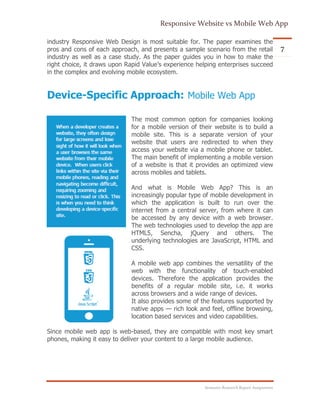
The most common option for companies looking
for a mobile version of their website is to build a
mobile site. This is a separate version of your
website that users are redirected to when they
access your website via a mobile phone or tablet.
The main benefit of implementing a mobile version
of a website is that it provides an optimized view
across mobiles and tablets.
And what is Mobile Web App? This is an
increasingly popular type of mobile development in
which the application is built to run over the
internet from a central server, from where it can
be accessed by any device with a web browser.
The web technologies used to develop the app are
HTML5, Sencha, jQuery and others. The
underlying technologies are JavaScript, HTML and
CSS.
A mobile web app combines the versatility of the
web with the functionality of touch-enabled
devices. Therefore the application provides the
benefits of a regular mobile site, i.e. it works
across browsers and a wide range of devices.
It also provides some of the features supported by
native apps — rich look and feel, offline browsing,
location based services and video capabilities.
Since mobile web app is web-based, they are compatible with most key smart
phones, making it easy to deliver your content to a large mobile audience.
Responsive Website vs Mobile Web App
Semester Research Report Assignment
8One Size Fits All: Responsive Web Design
From a technology standpoint, the framework consists of a combination of
flexible grids, flexible layouts, images and intelligent use of CSS media queries.
As the user switches from one device to another (for example, desktop to
iPhone), the website automatically adapts to accommodate for resolution, image
size and scripting abilities. This eliminates the need for resizing, panning and
scrolling by the user in order to view the website on the new device.
In simple terms, Responsive
Web Design is the methodology that recommends the design
and implementation of a website that responds to user
behavior and environment based on the screen size,
orientation and operating system of their device.
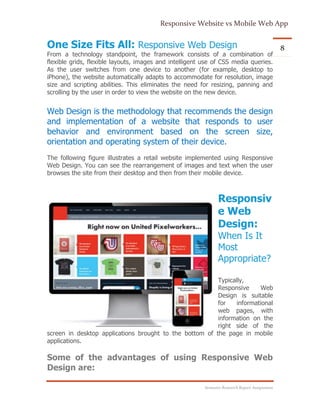
The following figure illustrates a retail website implemented using Responsive
Web Design. You can see the rearrangement of images and text when the user
browses the site from their desktop and then from their mobile device.
Responsiv
e Web
Design:
When Is It
Most
Appropriate?
Typically,
Responsive Web
Design is suitable
for informational
web pages, with
information on the
right side of the
screen in desktop applications brought to the bottom of the page in mobile
applications.
Some of the advantages of using Responsive Web
Design are:
Responsive Website vs Mobile Web App
Semester Research Report Assignment
9 Single code base – build once, run across all devices.
 Renders across any screen size – one can view the internet on 20″
monitors, 15″ laptops, 10″ netbooks, 7″ tablets, 3″ smartphones and
every size between. It also considers the huge difference in widths and
heights, whether the screen is landscape or portrait, and screen resolution.
 Improves SEO – a single version of the website improves page ranking.
Issues have arisen in which having two versions of a site (website and
mobile site) impact page ranking.
 Reduces maintenance cost and effort due to single link. Provides control
and flexibility – changes can be made at one centralized place. You do not
need to contact multiple vendors to make changes when your mobile site/
mobile application is built by different development companies.
Here are three main scenarios where Responsive
Web Design would be most applicable:
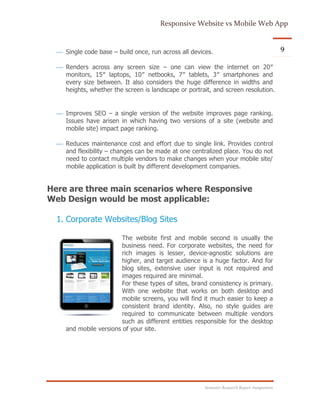
1. Corporate Websites/Blog Sites
The website first and mobile second is usually the
business need. For corporate websites, the need for
rich images is lesser, device-agnostic solutions are
higher, and target audience is a huge factor. And for
blog sites, extensive user input is not required and
images required are minimal.
For these types of sites, brand consistency is primary.
With one website that works on both desktop and
mobile screens, you will find it much easier to keep a
consistent brand identity. Also, no style guides are
required to communicate between multiple vendors
such as different entities responsible for the desktop
and mobile versions of your site.
Responsive Website vs Mobile Web App
Semester Research Report Assignment
10
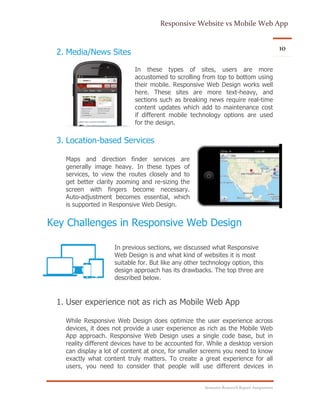
2. Media/News Sites
In these types of sites, users are more
accustomed to scrolling from top to bottom using
their mobile. Responsive Web Design works well
here. These sites are more text-heavy, and
sections such as breaking news require real-time
content updates which add to maintenance cost
if different mobile technology options are used
for the design.
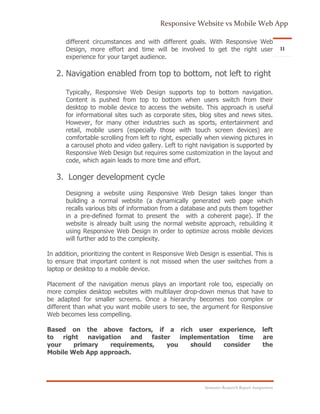
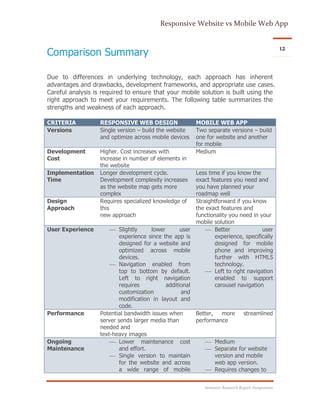
3. Location-based Services
Maps and direction finder services are
generally image heavy. In these types of
services, to view the routes closely and to
get better clarity zooming and re-sizing the
screen with fingers become necessary.
Auto-adjustment becomes essential, which
is supported in Responsive Web Design.
Key Challenges in Responsive Web Design
In previous sections, we discussed what Responsive
Web Design is and what kind of websites it is most
suitable for. But like any other technology option, this
design approach has its drawbacks. The top three are
described below.
1. User experience not as rich as Mobile Web App
While Responsive Web Design does optimize the user experience across
devices, it does not provide a user experience as rich as the Mobile Web
App approach. Responsive Web Design uses a single code base, but in
reality different devices have to be accounted for. While a desktop version
can display a lot of content at once, for smaller screens you need to know
exactly what content truly matters. To create a great experience for all
users, you need to consider that people will use different devices in
Responsive Website vs Mobile Web App
Semester Research Report Assignment
11
different circumstances and with different goals. With Responsive Web
Design, more effort and time will be involved to get the right user
experience for your target audience.
2. Navigation enabled from top to bottom, not left to right
Typically, Responsive Web Design supports top to bottom navigation.
Content is pushed from top to bottom when users switch from their
desktop to mobile device to access the website. This approach is useful
for informational sites such as corporate sites, blog sites and news sites.
However, for many other industries such as sports, entertainment and
retail, mobile users (especially those with touch screen devices) are
comfortable scrolling from left to right, especially when viewing pictures in
a carousel photo and video gallery. Left to right navigation is supported by
Responsive Web Design but requires some customization in the layout and
code, which again leads to more time and effort.
3. Longer development cycle
Designing a website using Responsive Web Design takes longer than
building a normal website (a dynamically generated web page which
recalls various bits of information from a database and puts them together
in a pre-defined format to present the with a coherent page). If the
website is already built using the normal website approach, rebuilding it
using Responsive Web Design in order to optimize across mobile devices
will further add to the complexity.
In addition, prioritizing the content in Responsive Web Design is essential. This is
to ensure that important content is not missed when the user switches from a
laptop or desktop to a mobile device.
Placement of the navigation menus plays an important role too, especially on
more complex desktop websites with multilayer drop-down menus that have to
be adapted for smaller screens. Once a hierarchy becomes too complex or
different than what you want mobile users to see, the argument for Responsive
Web becomes less compelling.
Based on the above factors, if a rich user experience, left
to right navigation and faster implementation time are
your primary requirements, you should consider the
Mobile Web App approach.
Responsive Website vs Mobile Web App
Semester Research Report Assignment
12
Comparison Summary
Due to differences in underlying technology, each approach has inherent
advantages and drawbacks, development frameworks, and appropriate use cases.
Careful analysis is required to ensure that your mobile solution is built using the
right approach to meet your requirements. The following table summarizes the
strengths and weakness of each approach.
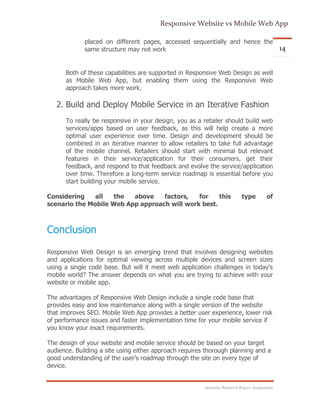
CRITERIA RESPONSIVE WEB DESIGN MOBILE WEB APP
Versions Single version – build the website
and optimize across mobile devices
Two separate versions – build
one for website and another
for mobile
Development
Cost
Higher. Cost increases with
increase in number of elements in
the website
Medium
Implementation
Time
Longer development cycle.
Development complexity increases
as the website map gets more
complex
Less time if you know the
exact features you need and
you have planned your
roadmap well
Design
Approach
Requires specialized knowledge of
this
new approach
Straightforward if you know
the exact features and
functionality you need in your
mobile solution
User Experience  Slightly lower user
experience since the app is
designed for a website and
optimized across mobile
devices.
 Navigation enabled from
top to bottom by default.
Left to right navigation
requires additional
customization and
modification in layout and
code.
 Better user
experience, specifically
designed for mobile
phone and improving
further with HTML5
technology.
 Left to right navigation
enabled to support
carousel navigation
Performance Potential bandwidth issues when
server sends larger media than
needed and
text-heavy images
Better, more streamlined
performance
Ongoing
Maintenance
 Lower maintenance cost
and effort.
 Single version to maintain
for the website and across
a wide range of mobile
 Medium
 Separate for website
version and mobile
web app version.
 Requires changes to
Responsive Website vs Mobile Web App
Semester Research Report Assignment
13
devices.
 Provides control and
flexibility to make changes
in website, which are
reflected across all mobile
devices
be made separately in
website and mobile
web app versions
How to Choose the Right Option for Your
Business — Retail Industry Example
A high quality user experience has always been the primary requirement for
consumers, a fact that mobile service providers now recognize. The mobile
service should be simple to use, easy to navigate and provide seamless
transactions, especially when it comes to online shopping.
Retailers can choose either design approach to build a mobile service for their
consumer. Your business requirements will determine the right technology option.
Here is one scenario: you are a retailer and you already have a website. You now
need a mobile solution which has an attractive user interface, can be launched in
6-8 weeks and is cost effective. Before making a decision, you need to consider a
few additional parameters which are important for your retail mobile service:
1. Right Content, Layout and User Preferences
The right content must be provided to your target audience. In order to
retain existing customers and reach a larger audience, capturing user
preferences and providing content, features and capabilities based on
their requirements should matter the most.
The mobile web experience is different from the desktop experience. For
retailers, where quality of experience is critical, a separate layout and
experience for the mobile web is strongly recommended. This is because:
 Retail consumers with mobile devices are usually accustomed to
scrolling from left to right for viewing the product catalog
(especially phones with touch screens)
 In a desktop website, multiple filters may be present on a single
page, but in mobile web, due to lack of real estate, these filters are
Responsive Website vs Mobile Web App
Semester Research Report Assignment
14
placed on different pages, accessed sequentially and hence the
same structure may not work
Both of these capabilities are supported in Responsive Web Design as well
as Mobile Web App, but enabling them using the Responsive Web
approach takes more work.
2. Build and Deploy Mobile Service in an Iterative Fashion
To really be responsive in your design, you as a retailer should build web
services/apps based on user feedback, as this will help create a more
optimal user experience over time. Design and development should be
combined in an iterative manner to allow retailers to take full advantage
of the mobile channel. Retailers should start with minimal but relevant
features in their service/application for their consumers, get their
feedback, and respond to that feedback and evolve the service/application
over time. Therefore a long-term service roadmap is essential before you
start building your mobile service.
Considering all the above factors, for this type of
scenario the Mobile Web App approach will work best.
Conclusion
Responsive Web Design is an emerging trend that involves designing websites
and applications for optimal viewing across multiple devices and screen sizes
using a single code base. But will it meet web application challenges in today's
mobile world? The answer depends on what you are trying to achieve with your
website or mobile app.
The advantages of Responsive Web Design include a single code base that
provides easy and low maintenance along with a single version of the website
that improves SEO. Mobile Web App provides a better user experience, lower risk
of performance issues and faster implementation time for your mobile service if
you know your exact requirements.
The design of your website and mobile service should be based on your target
audience. Building a site using either approach requires thorough planning and a
good understanding of the user’s roadmap through the site on every type of
device.
Responsive Website vs Mobile Web App
Semester Research Report Assignment
15
Therefore, if you want a solution that’s easy to maintain, makes use of existing
skills and that you can control, then Responsive Web Design is the approach for
you. If you want a high quality user experience, better performance, faster
implementation and seamless transactions, then you should select Mobile Web
App for your business.
Easily connecting with clients is essential to gaining their business. Making sure
information is easily accessible for the end user will help build and maintain a
robust client base.
Responsive Website vs Mobile Web App
Semester Research Report Assignment
16
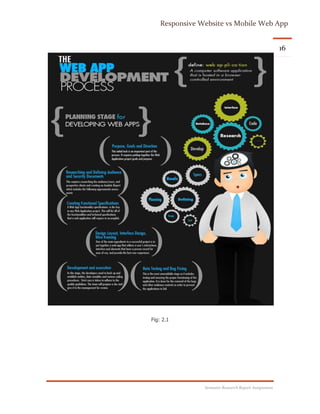
Fig: 2.1
Responsive Website vs Mobile Web App
Semester Research Report Assignment
17
Fig. 2.3 fig. 2.4
Fig. 2.5
Responsive Website vs Mobile Web App
Semester Research Report Assignment
18
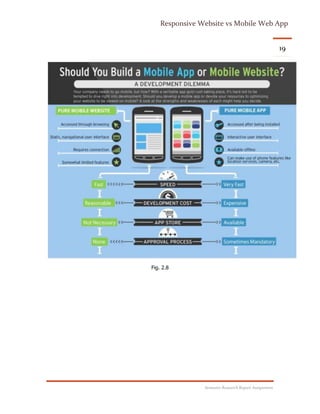
Fig. 2.6
Fig. 2.7
Responsive Website vs Mobile Web App
Semester Research Report Assignment
19
Fig. 2.8
Responsive Website vs Mobile Web App
Semester Research Report Assignment
20
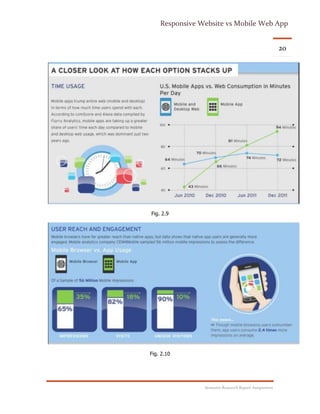
Fig. 2.9
Fig. 2.10
Responsive Website vs Mobile Web App
Semester Research Report Assignment
21
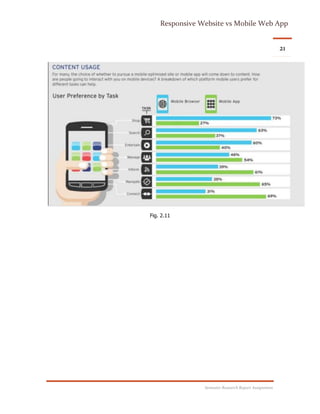
Fig. 2.11
Responsive Website vs Mobile Web App
Semester Research Report Assignment
22
Fig. 2.12
Responsive Website vs Mobile Web App
Semester Research Report Assignment
23References
1. http://repurposedapps.com
2. http://lukew.com/ff/entry.asp?933
3. http://alistapart.com/articles/responsive-web-design
4. http://mattkersley.com/responsive/?repurposedapps.com
5. http://css-tricks.com/which-responsive-images-solutionshould-you-use/
6. https://docs.google.com/spreadsheet/ccc?key=0Al0lI17fOl9DdDgxTFVoRzFpV3VCdHk2NTBmdVI2OXc#gid=0
7. Android Fragmentation Report July 2013 [WWW Document], 2013. URL
http://opensignal.com/reports/fragmentation-2013/8
http://www.google.com/about/company/philosophy/
9. Burslem, J., 2011. Responsive web design is the future of real estate online [WWW Document].
1000watt. URL http://1000watt.net/2011/09/responsive-web-design-is-the-futureof-real-estate-
online/
Fig. 2.1
http://www.pinterest.com/pin/263882859387620379/
Fig. 2.3 + 2.4 + 2.5
http://www.pinterest.com/pin/494903446521132351/
Fig. 2.6 + 2.7
http://www.pinterest.com/pin/494903446521132358/
Fig. 2.8 + 2.9 + 2.10 + 2.11 + 2.12
http://www.pinterest.com/pin/263882859387620374/

Responsive Web Design vs Mobile Web App

  • 1.
    Responsive Web Design vs MobileWeb App RWD In Real Estate, What’s Best For Your Enterprise? Sheeraz Qurban Roll No. BB-1962 | Research Report Writing | Nov-22-2014
  • 2.
    Responsive Website vsMobile Web App Semester Research Report Assignment 1ABSTRACT The purpose of this report is to educate Readers on the utility of Responsive Web Design. It is also intended to help readers communicate their needs more effectively to a web developer. The report will also present a study for a site built by which was built with Responsive Web Design principles. Finally, it will provide resources that use to evaluate the landscape of what is available to them in the arena of Responsive Web Design. Overview Web traffic today is changing. We are seeing an increase in the amount of users who are using their mobile devices to browse the web. From StatCounter (“Comparison in the United States...,” 2009-2013), we find that mobile traffic in the US has grown from 1.9% in December 2009 to nearly 21% in December 2013. (See Figure 1 below) Think about a technique called Responsive Web Design.
  • 3.
    Responsive Website vsMobile Web App Semester Research Report Assignment 2 As we move into the future, it is more likely that the first impression members give to a prospective clients will come from their website. If clients are driving around a neighborhood and notice a property with a member's name and website on it, they will most likely look up that member on their phone or tablet first. This first exposure to the agent’s website will help define the experience they expect to have with the agent. If your web presence is one that's hard to navigate and doesn't consider what matters to them first, they will feel like they weren't considered. When they come to your site, they should be able to do a few things very easily from a desktop or mobile device:  Determine how to contact you  See what other properties you have listed  Search properties All of these things can be accomplished using Responsive Web Design techniques.
  • 4.
    Responsive Website vsMobile Web App Semester Research Report Assignment 3 The Elements of Responsive Web Design Using web standard technologies to build a website today is one way to future proof your Website. Responsive Web Design is built with these technologies. These standards are HTML, CSS and JavaScript. We will quickly outline the three technologies and talk about why they matter. HTML, CSS & JavaScript: The holy Trinity of Web Development It’s important to understand these concepts so you can better understand what a developer or designer is talking about when building a site. To better highlight the functionality of each of these technologies, we will think of them as parts of a house. These corollaries will help illustrate the importance and necessity of each component in the context of Responsive Web Design. HTML stands for Hyper Text Markup Language and is the basic language of the web. Think of HTML as the frame of the house. It's what holds your site up and allows you to add your text, headlines, images, input field, etc. The latest versions of HTML have begun to provide more functionality for CSS and JavaScript to work with, but they’ve also replaced some of the functionality as well. CSS stands for Cascading Style Sheets. Think of CSS as all the elements you are concerned about during a staging. How does the wall color appear? Is it visually pleasing? Are the window treatments effective and attractive? Where should the couch be in relation to the fireplace? CSS gives you control over the color, size and type of text, color of your backgrounds and the placement of the content boxes. JavaScript would be equivalent to things like the automatic garage door opener, home security system and any other automated element. It controls the interactive elements of your site. The wonderful thing about these three technologies is that no one owns them. They are all freely available to anyone. As such, building your site with these technologies will future proof your site against the obsolescence of a proprietary plug-in technology.
  • 5.
    Responsive Website vsMobile Web App Semester Research Report Assignment 4What Responsive Web Design Is Not? There is a lot of confusion about what Responsive Web Design is and what it isn’t. Here is a list of what it is not:  It is not a chat client: The word 'responsive' is loaded and causes people to believe that it has to do with action they have to take. The truth is the word responsive in ‘Responsive Web Design’ refers to how your site looks and performs on different devices.  It is not a way to be notified when someone views your website: CRT has had questions along these lines in the past. Thankfully this is not Responsive Web Design. Receiving constant alerts each time someone hits your site would only add to the onslaught of communications you already receive.  It is not an app built for a specific device: Responsive Web Design doesn’t care what device you have. Its main goal is to get what is important to your target audience. What Responsive Web Design Is? Responsive Web Design as a concept was first proposed by a designer/developer named Ethan Marcotte in May of 2010. It was influenced by another designer/developer named Luke Wroblewski who wrote about how moving forward; designs for web applications should be done with consideration for mobile devices. Luke called it Mobile First. 2 Wroblewski cited the rising number of mobile devices and use of these devices as core drivers for his pitch. He also touted the necessity for prioritizing web content. What matters most to the person accessing a website? From his post in 2009: …when a team designs mobile first, the end result is an experience focused on the key tasks users want to accomplish without the extraneous detours and general interface debris that litter today's desktop-accessed Web sites. That's good user experience and good for business. (Wroblewski, 2009) This post was extremely prescient at the time and is still extremely relevant. As mobile use grows, it only becomes more important.
  • 6.
    Responsive Website vsMobile Web App Semester Research Report Assignment 5 Using Wroblewski’s Mobile First call-to- action as a base, Marcotte demonstrated the concepts of Responsive Web Design in an article on web design and development on A List Apart.3 (Marcotte, 2010) Marcotte created a demo site to show how his concepts would work. In short, Responsive Web Design comprises three things:  Fluid grids  Flexible images  Media queries Fluid Grids & Flexible Images These two items will be covered together because they have similar principles. Both items refer to the fact that, as a container narrows, the item within that container resizes to fit appropriately. The basic idea here is that all the parts of a website are contained in boxes. In a traditionally built website, these boxes have fixed dimensions that stay the same no matter what device is being used. In Responsive Design, the idea is that these boxes will resize to work for specific orientations. MEDIA Queries Media queries are new to HTML as of the latest version (what was referred to as HTML5, but now just HTML). As a member, the important factor will be knowing that a website will work on all devices at different orientations. At a high level, media queries essentially ask a question of your device. An important question is ‘What width would you like to view this website in?’ A browser answers this question simply by passing its dimensions to the site, and the site then gives the browser the appropriate code. A beautiful proof of concept can be found at Matt Kersley’s site. Matt has 4 built a way to view multiple versions of the same site at different widths. The link above is set to open repurposedapps.com in different device orientation windows. When scrolling to the right of the page, all versions of repurposedapps.com will be visible. This tool is valuable to see how a site looks on different devices, such as a smartphone or tablet.
  • 7.
    Responsive Website vsMobile Web App Semester Research Report Assignment 6Images The largest issue that Responsive Web Design faces is how to handle images when presented on a mobile display. At the heart of the matter is that when a mobile device downloads the image from a site, it is pulling down the desktop- sized version of the image. Because of this, developers have been working on a solution to this problem. There are many libraries that can help with this challenge and these mostly use JavaScript. Chris Coyier, a web developer who runs the popular website CSS-Tricks and is widely regarded as an expert in this field, has a write-up that will help members and their developers consider the issue and what solution may work best for them.5 Along with another developer named Christopher Schmitt, Coyier put together a Google spreadsheet 6 containing many responsive image options for consideration. Using these tools, members can work with a developer to determine which option works best for them. The New Design Trend: Build a Website; Enable Self-optimization Across All Mobile Devices According to mobile industry reports, 7.12% of all website traffic worldwide came from handheld devices in 2011. In 2012, that figure rose to 11.78%.1 According to eMarketer (a leading digital media market research firm), more than 58% of American adults will be regular mobile web users by the end of 2016. Tablets and smartphones are becoming the default choice for connecting to the internet. The web has become an essential part of our lives, and users are connected to their internet devices from anywhere and all the time. This revolution is influencing many companies to shift towards a “Mobile First, Desktop Second” strategy for their business. However, the shift from desktop to mobile requires web designers to refocus - not completely away from desktop design, but certainly with an inclination towards mobile. There are several ways to approach a mobile web presence, such as implementing a separate mobile site or a mobile web app. The most recent and popular approach seems to be Responsive Web Design. This paper explains the difference between Mobile Web App and Responsive Web Design, and provides a framework for resolving some of the key questions decision makers have. These include what factors to consider when choosing between Responsive Web Design and Mobile Web App, and what type of
  • 8.
    Responsive Website vsMobile Web App Semester Research Report Assignment 7 industry Responsive Web Design is most suitable for. The paper examines the pros and cons of each approach, and presents a sample scenario from the retail industry as well as a case study. As the paper guides you in how to make the right choice, it draws upon Rapid Value’s experience helping enterprises succeed in the complex and evolving mobile ecosystem. Device-Specific Approach: Mobile Web App The most common option for companies looking for a mobile version of their website is to build a mobile site. This is a separate version of your website that users are redirected to when they access your website via a mobile phone or tablet. The main benefit of implementing a mobile version of a website is that it provides an optimized view across mobiles and tablets. And what is Mobile Web App? This is an increasingly popular type of mobile development in which the application is built to run over the internet from a central server, from where it can be accessed by any device with a web browser. The web technologies used to develop the app are HTML5, Sencha, jQuery and others. The underlying technologies are JavaScript, HTML and CSS. A mobile web app combines the versatility of the web with the functionality of touch-enabled devices. Therefore the application provides the benefits of a regular mobile site, i.e. it works across browsers and a wide range of devices. It also provides some of the features supported by native apps — rich look and feel, offline browsing, location based services and video capabilities. Since mobile web app is web-based, they are compatible with most key smart phones, making it easy to deliver your content to a large mobile audience.
  • 9.
    Responsive Website vsMobile Web App Semester Research Report Assignment 8One Size Fits All: Responsive Web Design From a technology standpoint, the framework consists of a combination of flexible grids, flexible layouts, images and intelligent use of CSS media queries. As the user switches from one device to another (for example, desktop to iPhone), the website automatically adapts to accommodate for resolution, image size and scripting abilities. This eliminates the need for resizing, panning and scrolling by the user in order to view the website on the new device. In simple terms, Responsive Web Design is the methodology that recommends the design and implementation of a website that responds to user behavior and environment based on the screen size, orientation and operating system of their device. The following figure illustrates a retail website implemented using Responsive Web Design. You can see the rearrangement of images and text when the user browses the site from their desktop and then from their mobile device. Responsiv e Web Design: When Is It Most Appropriate? Typically, Responsive Web Design is suitable for informational web pages, with information on the right side of the screen in desktop applications brought to the bottom of the page in mobile applications. Some of the advantages of using Responsive Web Design are:
  • 10.
    Responsive Website vsMobile Web App Semester Research Report Assignment 9 Single code base – build once, run across all devices.  Renders across any screen size – one can view the internet on 20″ monitors, 15″ laptops, 10″ netbooks, 7″ tablets, 3″ smartphones and every size between. It also considers the huge difference in widths and heights, whether the screen is landscape or portrait, and screen resolution.  Improves SEO – a single version of the website improves page ranking. Issues have arisen in which having two versions of a site (website and mobile site) impact page ranking.  Reduces maintenance cost and effort due to single link. Provides control and flexibility – changes can be made at one centralized place. You do not need to contact multiple vendors to make changes when your mobile site/ mobile application is built by different development companies. Here are three main scenarios where Responsive Web Design would be most applicable: 1. Corporate Websites/Blog Sites The website first and mobile second is usually the business need. For corporate websites, the need for rich images is lesser, device-agnostic solutions are higher, and target audience is a huge factor. And for blog sites, extensive user input is not required and images required are minimal. For these types of sites, brand consistency is primary. With one website that works on both desktop and mobile screens, you will find it much easier to keep a consistent brand identity. Also, no style guides are required to communicate between multiple vendors such as different entities responsible for the desktop and mobile versions of your site.
  • 11.
    Responsive Website vsMobile Web App Semester Research Report Assignment 10 2. Media/News Sites In these types of sites, users are more accustomed to scrolling from top to bottom using their mobile. Responsive Web Design works well here. These sites are more text-heavy, and sections such as breaking news require real-time content updates which add to maintenance cost if different mobile technology options are used for the design. 3. Location-based Services Maps and direction finder services are generally image heavy. In these types of services, to view the routes closely and to get better clarity zooming and re-sizing the screen with fingers become necessary. Auto-adjustment becomes essential, which is supported in Responsive Web Design. Key Challenges in Responsive Web Design In previous sections, we discussed what Responsive Web Design is and what kind of websites it is most suitable for. But like any other technology option, this design approach has its drawbacks. The top three are described below. 1. User experience not as rich as Mobile Web App While Responsive Web Design does optimize the user experience across devices, it does not provide a user experience as rich as the Mobile Web App approach. Responsive Web Design uses a single code base, but in reality different devices have to be accounted for. While a desktop version can display a lot of content at once, for smaller screens you need to know exactly what content truly matters. To create a great experience for all users, you need to consider that people will use different devices in
  • 12.
    Responsive Website vsMobile Web App Semester Research Report Assignment 11 different circumstances and with different goals. With Responsive Web Design, more effort and time will be involved to get the right user experience for your target audience. 2. Navigation enabled from top to bottom, not left to right Typically, Responsive Web Design supports top to bottom navigation. Content is pushed from top to bottom when users switch from their desktop to mobile device to access the website. This approach is useful for informational sites such as corporate sites, blog sites and news sites. However, for many other industries such as sports, entertainment and retail, mobile users (especially those with touch screen devices) are comfortable scrolling from left to right, especially when viewing pictures in a carousel photo and video gallery. Left to right navigation is supported by Responsive Web Design but requires some customization in the layout and code, which again leads to more time and effort. 3. Longer development cycle Designing a website using Responsive Web Design takes longer than building a normal website (a dynamically generated web page which recalls various bits of information from a database and puts them together in a pre-defined format to present the with a coherent page). If the website is already built using the normal website approach, rebuilding it using Responsive Web Design in order to optimize across mobile devices will further add to the complexity. In addition, prioritizing the content in Responsive Web Design is essential. This is to ensure that important content is not missed when the user switches from a laptop or desktop to a mobile device. Placement of the navigation menus plays an important role too, especially on more complex desktop websites with multilayer drop-down menus that have to be adapted for smaller screens. Once a hierarchy becomes too complex or different than what you want mobile users to see, the argument for Responsive Web becomes less compelling. Based on the above factors, if a rich user experience, left to right navigation and faster implementation time are your primary requirements, you should consider the Mobile Web App approach.
  • 13.
    Responsive Website vsMobile Web App Semester Research Report Assignment 12 Comparison Summary Due to differences in underlying technology, each approach has inherent advantages and drawbacks, development frameworks, and appropriate use cases. Careful analysis is required to ensure that your mobile solution is built using the right approach to meet your requirements. The following table summarizes the strengths and weakness of each approach. CRITERIA RESPONSIVE WEB DESIGN MOBILE WEB APP Versions Single version – build the website and optimize across mobile devices Two separate versions – build one for website and another for mobile Development Cost Higher. Cost increases with increase in number of elements in the website Medium Implementation Time Longer development cycle. Development complexity increases as the website map gets more complex Less time if you know the exact features you need and you have planned your roadmap well Design Approach Requires specialized knowledge of this new approach Straightforward if you know the exact features and functionality you need in your mobile solution User Experience  Slightly lower user experience since the app is designed for a website and optimized across mobile devices.  Navigation enabled from top to bottom by default. Left to right navigation requires additional customization and modification in layout and code.  Better user experience, specifically designed for mobile phone and improving further with HTML5 technology.  Left to right navigation enabled to support carousel navigation Performance Potential bandwidth issues when server sends larger media than needed and text-heavy images Better, more streamlined performance Ongoing Maintenance  Lower maintenance cost and effort.  Single version to maintain for the website and across a wide range of mobile  Medium  Separate for website version and mobile web app version.  Requires changes to
  • 14.
    Responsive Website vsMobile Web App Semester Research Report Assignment 13 devices.  Provides control and flexibility to make changes in website, which are reflected across all mobile devices be made separately in website and mobile web app versions How to Choose the Right Option for Your Business — Retail Industry Example A high quality user experience has always been the primary requirement for consumers, a fact that mobile service providers now recognize. The mobile service should be simple to use, easy to navigate and provide seamless transactions, especially when it comes to online shopping. Retailers can choose either design approach to build a mobile service for their consumer. Your business requirements will determine the right technology option. Here is one scenario: you are a retailer and you already have a website. You now need a mobile solution which has an attractive user interface, can be launched in 6-8 weeks and is cost effective. Before making a decision, you need to consider a few additional parameters which are important for your retail mobile service: 1. Right Content, Layout and User Preferences The right content must be provided to your target audience. In order to retain existing customers and reach a larger audience, capturing user preferences and providing content, features and capabilities based on their requirements should matter the most. The mobile web experience is different from the desktop experience. For retailers, where quality of experience is critical, a separate layout and experience for the mobile web is strongly recommended. This is because:  Retail consumers with mobile devices are usually accustomed to scrolling from left to right for viewing the product catalog (especially phones with touch screens)  In a desktop website, multiple filters may be present on a single page, but in mobile web, due to lack of real estate, these filters are
  • 15.
    Responsive Website vsMobile Web App Semester Research Report Assignment 14 placed on different pages, accessed sequentially and hence the same structure may not work Both of these capabilities are supported in Responsive Web Design as well as Mobile Web App, but enabling them using the Responsive Web approach takes more work. 2. Build and Deploy Mobile Service in an Iterative Fashion To really be responsive in your design, you as a retailer should build web services/apps based on user feedback, as this will help create a more optimal user experience over time. Design and development should be combined in an iterative manner to allow retailers to take full advantage of the mobile channel. Retailers should start with minimal but relevant features in their service/application for their consumers, get their feedback, and respond to that feedback and evolve the service/application over time. Therefore a long-term service roadmap is essential before you start building your mobile service. Considering all the above factors, for this type of scenario the Mobile Web App approach will work best. Conclusion Responsive Web Design is an emerging trend that involves designing websites and applications for optimal viewing across multiple devices and screen sizes using a single code base. But will it meet web application challenges in today's mobile world? The answer depends on what you are trying to achieve with your website or mobile app. The advantages of Responsive Web Design include a single code base that provides easy and low maintenance along with a single version of the website that improves SEO. Mobile Web App provides a better user experience, lower risk of performance issues and faster implementation time for your mobile service if you know your exact requirements. The design of your website and mobile service should be based on your target audience. Building a site using either approach requires thorough planning and a good understanding of the user’s roadmap through the site on every type of device.
  • 16.
    Responsive Website vsMobile Web App Semester Research Report Assignment 15 Therefore, if you want a solution that’s easy to maintain, makes use of existing skills and that you can control, then Responsive Web Design is the approach for you. If you want a high quality user experience, better performance, faster implementation and seamless transactions, then you should select Mobile Web App for your business. Easily connecting with clients is essential to gaining their business. Making sure information is easily accessible for the end user will help build and maintain a robust client base.
  • 17.
    Responsive Website vsMobile Web App Semester Research Report Assignment 16 Fig: 2.1
  • 18.
    Responsive Website vsMobile Web App Semester Research Report Assignment 17 Fig. 2.3 fig. 2.4 Fig. 2.5
  • 19.
    Responsive Website vsMobile Web App Semester Research Report Assignment 18 Fig. 2.6 Fig. 2.7
  • 20.
    Responsive Website vsMobile Web App Semester Research Report Assignment 19 Fig. 2.8
  • 21.
    Responsive Website vsMobile Web App Semester Research Report Assignment 20 Fig. 2.9 Fig. 2.10
  • 22.
    Responsive Website vsMobile Web App Semester Research Report Assignment 21 Fig. 2.11
  • 23.
    Responsive Website vsMobile Web App Semester Research Report Assignment 22 Fig. 2.12
  • 24.
    Responsive Website vsMobile Web App Semester Research Report Assignment 23References 1. http://repurposedapps.com 2. http://lukew.com/ff/entry.asp?933 3. http://alistapart.com/articles/responsive-web-design 4. http://mattkersley.com/responsive/?repurposedapps.com 5. http://css-tricks.com/which-responsive-images-solutionshould-you-use/ 6. https://docs.google.com/spreadsheet/ccc?key=0Al0lI17fOl9DdDgxTFVoRzFpV3VCdHk2NTBmdVI2OXc#gid=0 7. Android Fragmentation Report July 2013 [WWW Document], 2013. URL http://opensignal.com/reports/fragmentation-2013/8 http://www.google.com/about/company/philosophy/ 9. Burslem, J., 2011. Responsive web design is the future of real estate online [WWW Document]. 1000watt. URL http://1000watt.net/2011/09/responsive-web-design-is-the-futureof-real-estate- online/ Fig. 2.1 http://www.pinterest.com/pin/263882859387620379/ Fig. 2.3 + 2.4 + 2.5 http://www.pinterest.com/pin/494903446521132351/ Fig. 2.6 + 2.7 http://www.pinterest.com/pin/494903446521132358/ Fig. 2.8 + 2.9 + 2.10 + 2.11 + 2.12 http://www.pinterest.com/pin/263882859387620374/