Privacy by Design:


                            1er Congreso Internacional Menores
                                                    en las TIC
                             Educando para una Internet más segura
                                                     Palacio de Congresos
                                       – Recinto Ferial Luis Adaro (Gijón)
  Estella Cohen,
  Information and Privacy                   27 y 28 de octubre de 2009

  Commissioner’s Office
  Ontario, Canada
Logo	
  del	
  
              Focus of our Discussion               ponente	


 The Office of Information and Privacy Commissioner’s
  Office of Ontario, Canada plays a major role in
  providing education and awareness to ensure strong
  privacy protections are in place.
        Fostering the value of privacy in a global
         environment;
        Using SmartPrivacy to ensure personal information is
         appropriately managed;
        Building in Privacy by Design principles from the
         outset;
        Advancing Privacy Enhancing Technologies- (PETs)
        Future of Privacy?
The Value of                Logo	
  del	
  
                                          ponente	
  
                Privacy


  rivacy is a key value in our democratic
  P
society. Critical component to our freedom and
rights;

  rivacy means that we control information
 P
about ourselves. Privacy lets us decide who will
know what about ourselves.
                               rivacy = Freedom
                               P
Technology... A    Logo	
  del	
  
           blessing or curse?   ponente	


  Privacy
   transcends
   jurisdiction…
  Technology
   knows no
   borders.
Logo	
  del	
  
                                                                                     ponente	


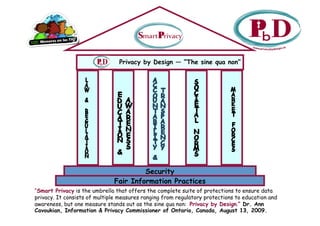
                                Privacy by Design — “The sine qua non”


                                       Security
                              Fair Information Practices
“Smart Privacy is the umbrella that offers the complete suite of protections to ensure data
privacy. It consists of multiple measures ranging from regulatory protections to education and
awareness, but one measure stands out as the sine qua non: Privacy by Design.” Dr. Ann
Cavoukian, Information & Privacy Commissioner of Ontario, Canada, August 13, 2009.
7 Foundational                             Logo	
  del	
  
                        Principles                               ponente	


1.    Proactive not Reactive;
      Preventative not Remedial
2.    Privacy as the Default
3.    Privacy Embedded into Design

4.    Full Functionality: Positive-Sum,
      not Zero-Sum
5.    End-to-End Lifecycle
      Protection
6.    Visibility and Transparency
7.    Respect for User Privacy

                                          Available at www.privacybydesign.ca
Our work with                   Logo	
  del	
  
                       FACEBOOK                       ponente	


 In 2005, Facebook approached our Office seeking input on
  their privacy measures;
 We convened a student focus group to determine if and how
  students are aware of their privacy options;
 Surprising discovery that none of them had set their privacy
  filters, and most were completely unaware of the privacy
  options available to them;
 Critical to get the message out that while social networking
  websites can be addictive, they can also be dangerous;
 Important to make students aware that when they choose to
  connect with their friends through a social networking
  website, they must remember that it is they who are
  ultimately responsible for determining what information they
  share with others – which led us to the 5Ps.
Talking to YOUTH:           Logo	
  del	
  
              Beware of the 5Ps           ponente	


 IPC has spoken at a number of schools and
  universities reaching out to students
  regarding how they can stay safe, and in
  control, while online. Our message to them has
  been to always beware of the 5 Ps:
     1. Predators
     2. Parents
     3. Professors (Teachers)
     4. Prospective employers
     5. Police
When Online       Logo	
  del	
  
                   Gets Out of Line   ponente	


  niversity and high school
 U
 students need to consider all the
 potential implications before
 posting personal information to
 online social networking sites;
  t is important that students
 I
 take the time to make informed
 choices about the site they use,
 the information they post and
 those with whom they choose to
 share their information;
 Going on “automatic pilot” online
 is a bad idea… always think
 before you click!
How to Protect your Privacy   Logo	
  del	
  
                     on Facebook            ponente	


  hen you sign up as a user
 W
 of Facebook, the default
 settings allow all other
 Facebook users to find you
 in searches;
  y default, your name and
 B
 thumbnail profile picture
 can also be found on public
 search engines. Facebook
 has selected these settings
 based on what it believes
 most users want, but you
 can always change them to
 restrict access to your
 information, as you see fit.
Be a Player: Take Control   Logo	
  del	
  
                      of your Privacy        ponente	


  ssues covered in our
 I
 Facebook video include:
    Weak privacy controls,
    Intrinsic risks involved in
     using them,
                                  I
    Some of the protections
     students should be aware of
     when posting their personal
     information online., such as
     being able to control access
     to one’s profile and being
     able to block access to
     specific information.

  his video can be viewed at
 T
 www.ipc.on.ca
IPC Youth                              Logo	
  del	
  

                             Conference                              ponente	


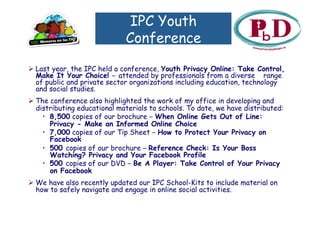
 Last year, the IPC held a conference, Youth Privacy Online: Take Control,
  Make It Your Choice! – attended by professionals from a diverse range
  of public and private sector organizations including education, technology
  and social studies.
 The conference also highlighted the work of my office in developing and
  distributing educational materials to schools. To date, we have distributed:
    •  8,500 copies of our brochure – When Online Gets Out of Line:
       Privacy - Make an Informed Online Choice
    •  7,000 copies of our Tip Sheet – How to Protect Your Privacy on
       Facebook
    •  500 copies of our brochure – Reference Check: Is Your Boss
       Watching? Privacy and Your Facebook Profile
    •  500 copies of our DVD – Be A Player: Take Control of Your Privacy
       on Facebook
 We have also recently updated our IPC School-Kits to include material on
  how to safely navigate and engage in online social activities.
Logo	
  del	
  
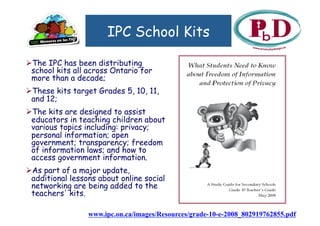
                      IPC School Kits                              ponente	


  he IPC has been distributing
 T
 school kits all across Ontario for
 more than a decade;
  hese kits target Grades 5, 10, 11,
 T
 and 12;
  he kits are designed to assist
 T
 educators in teaching children about
 various topics including: privacy;
 personal information; open
 government; transparency; freedom
 of information laws; and how to
 access government information.
  s part of a major update,
 A
 additional lessons about online social
 networking are being added to the
 teachers' kits.

                 www.ipc.on.ca/images/Resources/grade-10-e-2008_802919762855.pdf
Privacy Enhacing                  Logo	
  del	
  
                                                   ponente	
  
                   Technologies
 Privacy Enhancing Technologies include those that
  empower individuals to manage their own identities in
  a privacy enhancing manner. These include tools or
  systems to:
        ecurely manage login IDs and passwords and
       S
       other authentication requirements;
        estrict traceability and limit surveillance;
       R
        llow users to selectively disclose their
       A
       personal information to others and exert
       maximum control over their information once
       disclosed.
Future of             Logo	
  del	
  
                                    ponente	
  
               Privacy
  nsist / demand that privacy be built in
 I
 to the design of applications and
 processes;
  iven the extent and reach of
 G
 technology, without Privacy by Design,
 we will inevitably lose our ability to
 protect our privacy.
                         rivacy = Freedom
                         P
Contact Us!
                    Logo	
  del	
  
                    ponente	


         Gracias!

Youth Privacy

  • 1.
    Privacy by Design: 1er Congreso Internacional Menores en las TIC Educando para una Internet más segura Palacio de Congresos – Recinto Ferial Luis Adaro (Gijón) Estella Cohen, Information and Privacy 27 y 28 de octubre de 2009 Commissioner’s Office Ontario, Canada
  • 2.
    Logo  del   Focus of our Discussion ponente    The Office of Information and Privacy Commissioner’s Office of Ontario, Canada plays a major role in providing education and awareness to ensure strong privacy protections are in place.   Fostering the value of privacy in a global environment;   Using SmartPrivacy to ensure personal information is appropriately managed;   Building in Privacy by Design principles from the outset;   Advancing Privacy Enhancing Technologies- (PETs)   Future of Privacy?
  • 3.
    The Value of Logo  del   ponente   Privacy   rivacy is a key value in our democratic P society. Critical component to our freedom and rights;   rivacy means that we control information P about ourselves. Privacy lets us decide who will know what about ourselves.   rivacy = Freedom P
  • 4.
    Technology... A Logo  del   blessing or curse? ponente     Privacy transcends jurisdiction…   Technology knows no borders.
  • 5.
    Logo  del   ponente   Privacy by Design — “The sine qua non” Security Fair Information Practices “Smart Privacy is the umbrella that offers the complete suite of protections to ensure data privacy. It consists of multiple measures ranging from regulatory protections to education and awareness, but one measure stands out as the sine qua non: Privacy by Design.” Dr. Ann Cavoukian, Information & Privacy Commissioner of Ontario, Canada, August 13, 2009.
  • 6.
    7 Foundational Logo  del   Principles ponente   1.  Proactive not Reactive; Preventative not Remedial 2.  Privacy as the Default 3.  Privacy Embedded into Design 4.  Full Functionality: Positive-Sum, not Zero-Sum 5.  End-to-End Lifecycle Protection 6.  Visibility and Transparency 7.  Respect for User Privacy Available at www.privacybydesign.ca
  • 7.
    Our work with Logo  del   FACEBOOK ponente    In 2005, Facebook approached our Office seeking input on their privacy measures;  We convened a student focus group to determine if and how students are aware of their privacy options;  Surprising discovery that none of them had set their privacy filters, and most were completely unaware of the privacy options available to them;  Critical to get the message out that while social networking websites can be addictive, they can also be dangerous;  Important to make students aware that when they choose to connect with their friends through a social networking website, they must remember that it is they who are ultimately responsible for determining what information they share with others – which led us to the 5Ps.
  • 8.
    Talking to YOUTH: Logo  del   Beware of the 5Ps ponente    IPC has spoken at a number of schools and universities reaching out to students regarding how they can stay safe, and in control, while online. Our message to them has been to always beware of the 5 Ps: 1. Predators 2. Parents 3. Professors (Teachers) 4. Prospective employers 5. Police
  • 9.
    When Online Logo  del   Gets Out of Line ponente     niversity and high school U students need to consider all the potential implications before posting personal information to online social networking sites;   t is important that students I take the time to make informed choices about the site they use, the information they post and those with whom they choose to share their information;  Going on “automatic pilot” online is a bad idea… always think before you click!
  • 10.
    How to Protectyour Privacy Logo  del   on Facebook ponente     hen you sign up as a user W of Facebook, the default settings allow all other Facebook users to find you in searches;   y default, your name and B thumbnail profile picture can also be found on public search engines. Facebook has selected these settings based on what it believes most users want, but you can always change them to restrict access to your information, as you see fit.
  • 11.
    Be a Player:Take Control Logo  del   of your Privacy ponente     ssues covered in our I Facebook video include:  Weak privacy controls,  Intrinsic risks involved in using them, I  Some of the protections students should be aware of when posting their personal information online., such as being able to control access to one’s profile and being able to block access to specific information.   his video can be viewed at T www.ipc.on.ca
  • 12.
    IPC Youth Logo  del   Conference ponente    Last year, the IPC held a conference, Youth Privacy Online: Take Control, Make It Your Choice! – attended by professionals from a diverse range of public and private sector organizations including education, technology and social studies.  The conference also highlighted the work of my office in developing and distributing educational materials to schools. To date, we have distributed: •  8,500 copies of our brochure – When Online Gets Out of Line: Privacy - Make an Informed Online Choice •  7,000 copies of our Tip Sheet – How to Protect Your Privacy on Facebook •  500 copies of our brochure – Reference Check: Is Your Boss Watching? Privacy and Your Facebook Profile •  500 copies of our DVD – Be A Player: Take Control of Your Privacy on Facebook  We have also recently updated our IPC School-Kits to include material on how to safely navigate and engage in online social activities.
  • 13.
    Logo  del   IPC School Kits ponente     he IPC has been distributing T school kits all across Ontario for more than a decade;   hese kits target Grades 5, 10, 11, T and 12;   he kits are designed to assist T educators in teaching children about various topics including: privacy; personal information; open government; transparency; freedom of information laws; and how to access government information.   s part of a major update, A additional lessons about online social networking are being added to the teachers' kits. www.ipc.on.ca/images/Resources/grade-10-e-2008_802919762855.pdf
  • 14.
    Privacy Enhacing Logo  del   ponente   Technologies  Privacy Enhancing Technologies include those that empower individuals to manage their own identities in a privacy enhancing manner. These include tools or systems to:   ecurely manage login IDs and passwords and S other authentication requirements;   estrict traceability and limit surveillance; R   llow users to selectively disclose their A personal information to others and exert maximum control over their information once disclosed.
  • 15.
    Future of Logo  del   ponente   Privacy   nsist / demand that privacy be built in I to the design of applications and processes;   iven the extent and reach of G technology, without Privacy by Design, we will inevitably lose our ability to protect our privacy.   rivacy = Freedom P
  • 16.
    Contact Us! Logo  del   ponente   Gracias!