You Scored a 3D Printer!
Now What?
Jenn Scheller and Meredith Steele
Bentley School, Lafayette, CA
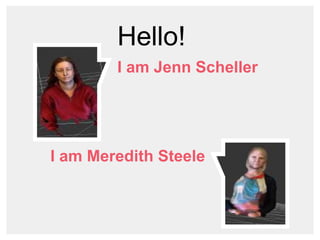
Hello!
I am Jenn Scheller
I am Meredith Steele
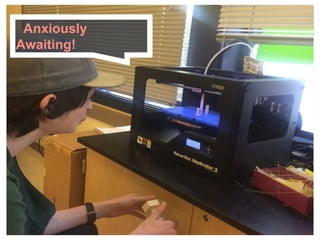
Anxiously Awaiting!
“
As the Makerbot website claims,
“3D Printing is one of the most
disruptive technologies around.”
View our class syllabus.
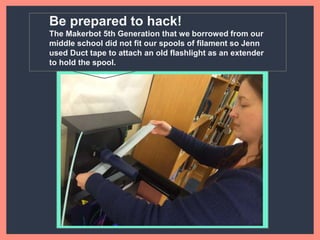
Be prepared to hack!
The Makerbot 5th Generation that we borrowed from our
middle school did not fit our spools of filament so Jenn used
Duct tape to attach an old flashlight as an extender to hold the
spool.
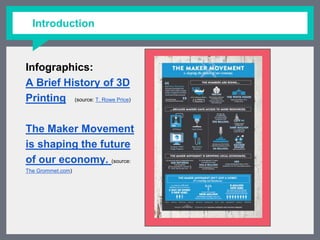
Infographics:
A Brief History of 3D
Printing (source: T. Rowe Price)
The Maker Movement is
shaping the future of
our economy. (source: The
Grommet.com)
Introduction
Software
Presented
We decided to use either open source or
free to student software
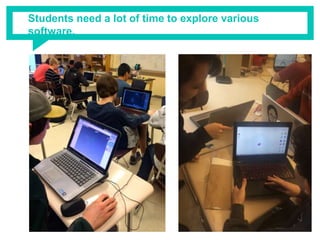
Students need a lot of time to explore various software.
Design Software
TinkerCAD - Tinkercad is an easy-to-use tool for creating digital designs that are ready to be 3D printed into physical
objects. Users are guided through the 3D design process through 'Lessons', which teach the basics before moving on to
more complex modeling techniques (great program for newbies to 3D design; no installs, get started immediately).
SketchUp Pro - is a 3D modeling program for applications such as architectural, interior design, civil and mechanical
engineering, film, and video game design. A freeware version, SketchUp Make, and a paid version with additional
functionality, SketchUp Pro, are available
Blender - Blender is a free and open source 3D animation suite. It supports the entirety of the 3D pipeline - modeling,
rigging, animation, simulation, rendering, composting and motion tracking, even video editing and game creation. You
can use Blender to check for any gaps, etc in your 3D images before printing.
AutoCAD - Create stunning designs with AutoCAD® design and documentation software. Speed documentation and
detailing work with productivity tools, and share your work with TrustedDWG™ technology. Connect your workflow across
integrated desktop, cloud, and mobile solutions. Select your CAD design software platform of choice with AutoCAD for
Windows or AutoCAD for Mac.
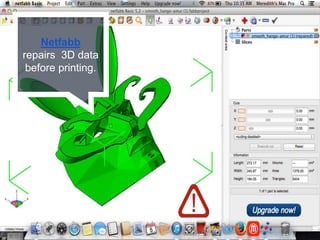
Netfabb Basic - Netfabb Basic is a easy way to check your files to verify that the mesh is printable. The program will also
administer “First Aid” to repair your file.
Software information from 3ders.org
Additional Software
3D Tin - is a web-based 3D modeling program that is considered one of the pioneers in browser-based 3D modeling. The
goal of 3DTin is to create a program simple enough for beginners to use but still allow the user to create some fairly
detailed models (no logins, just get on and go; no installs, get started immediately).
LeoCAD - LeoCAD is a CAD program for creating virtual LEGO models. It has an easy to use interface and currently includes
over 6000 different pieces created by the ​LDraw community.
Winds3D - Wings 3D is an advanced subdivision modeler that is both powerful and e3asy to use. It is open source and free
for use in personal and commercial projects.
Maya - Maya® 3D animation, modeling, simulation, rendering, and compositing software offers a comprehensive creative
feature set on a highly extensible production platform. Maya provides high-end character and effects toolsets along with
increased productivity for modeling, texturing, and shader creation tasks.
3DS Max - 3ds Max® 3D modeling software provides a comprehensive modeling, animation, simulation, and rendering
solution for games, film, and motion graphics artists. 3ds Max delivers efficient new tools, accelerated performance, and
streamlined workflows to help increase overall productivity for working with complex, high-resolution assets.
SolidWorks - SOLIDWORKS® Education Edition has everything your students need to learn 3D design and sharpen their
skills to get the job of their dreams. With SOLIDWORKS Education Edition, your students can work more efficiently and
have the data they need to make better design decisions (very popular and great for high school students).
MeshLab - MeshLab is an open source, portable, and extensible system for the processing and editing of unstructured 3D
triangular meshes. The system is aimed to help the processing of the typical not-so-small unstructured models arising in
3D scanning, providing a set of tools for editing, cleaning, healing, inspecting, rendering and converting this kind of
meshes.
Software information from 3ders.org
Netfabb
repairs 3D data
before printing.
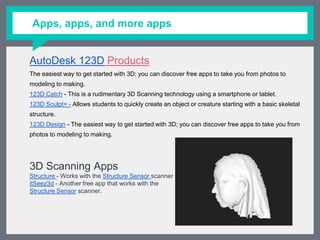
Apps, apps, and more apps
AutoDesk 123D Products
The easiest way to get started with 3D; you can discover free apps to take you from photos to modeling
to making.
123D Catch - This is a rudimentary 3D Scanning technology using a smartphone or tablet.
123D Sculpt+ - Allows students to quickly create an object or creature starting with a basic skeletal
structure.
123D Design - The easiest way to get started with 3D; you can discover free apps to take you from photos
to modeling to making.
3D Scanning Apps
Structure - Works with the Structure Sensor scanner
itSeez3d - Another free app that works with the
Structure Sensor scanner.
Class Projects
Here’s a brief overview of the
projects we completed in our
class.
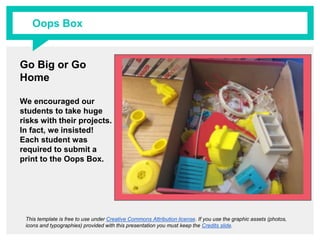
Go Big or Go Home
We encouraged our
students to take huge
risks with their projects.
In fact, we insisted! Each
student was required to
submit a print to the Oops
Box.
This template is free to use under Creative Commons Attribution license. If you use the graphic assets (photos, icons and
typographies) provided with this presentation you must keep the Credits slide.
Oops Box
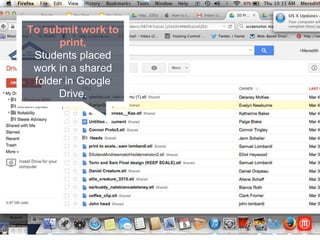
To submit work to
print,
Students placed work
in a shared folder in
Google Drive.
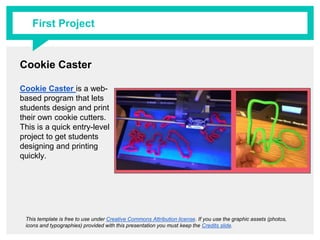
Cookie Caster
Cookie Caster is a web-
based program that lets
students design and print
their own cookie cutters.
This is a quick entry-level
project to get students
designing and printing
quickly.
This template is free to use under Creative Commons Attribution license. If you use the graphic assets (photos, icons and
typographies) provided with this presentation you must keep the Credits slide.
First Project
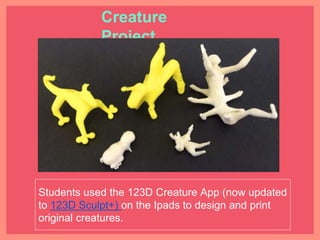
Students used the 123D Creature App (now updated to
123D Sculpt+) on the Ipads to design and print original
creatures.
Creature Project
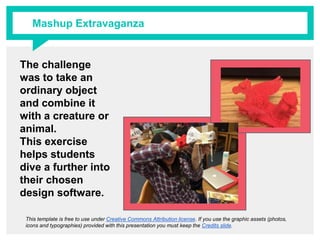
The challenge was
to take an ordinary
object and combine
it with a creature or
animal.
This exercise helps
students dive a
further into their
chosen design
software.
This template is free to use under Creative Commons Attribution license. If you use the graphic assets (photos, icons and
typographies) provided with this presentation you must keep the Credits slide.
Mashup Extravaganza
Mask Project
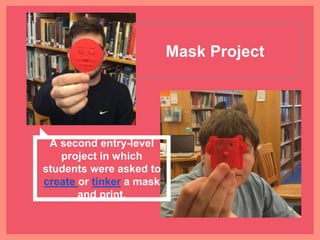
A second entry-level
project in which students
were asked to create or
tinker a mask and print.
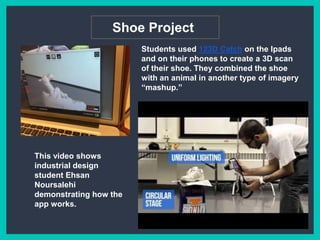
Shoe Project
Students used 123D Catch on the Ipads and
on their phones to create a 3D scan of their
shoe. They combined the shoe with an
animal in another type of imagery
“mashup.”
This video shows
industrial design student
Ehsan Noursalehi
demonstrating how the
app works.
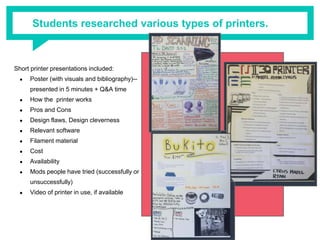
Students researched various types of printers.
Short printer presentations included:
● Poster (with visuals and bibliography)--
presented in 5 minutes + Q&A time
● How the printer works
● Pros and Cons
● Design flaws, Design cleverness
● Relevant software
● Filament material
● Cost
● Availability
● Mods people have tried (successfully or
unsuccessfully)
● Video of printer in use, if available
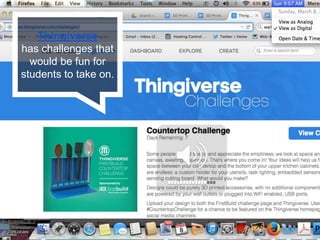
Thingiverse
has challenges that
would be fun for
students to take on.
HOMEWORK
Students kept journals and wrote
responses to assigned articles and
videos.
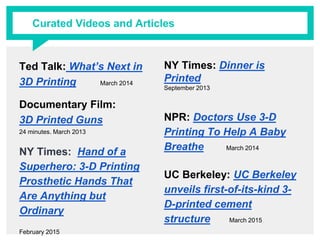
Ted Talk: What’s Next in 3D
Printing March 2014
Documentary Film:
3D Printed Guns
24 minutes. March 2013
NY Times: Hand of a
Superhero: 3-D Printing
Prosthetic Hands That Are
Anything but Ordinary
February 2015
NY Times: Dinner is Printed
September 2013
NPR: Doctors Use 3-D
Printing To Help A Baby
Breathe March 2014
UC Berkeley: UC Berkeley
unveils first-of-its-kind 3-
D-printed cement
structure March 2015
Curated Videos and Articles
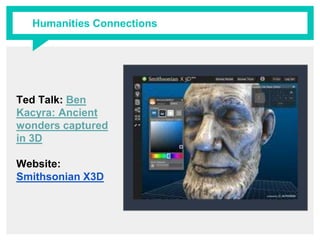
Humanities Connections
Ted Talk: Ben Kacyra:
Ancient wonders
captured in 3D
Website:
Smithsonian X3D
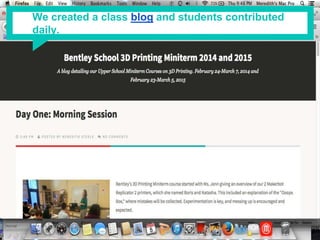
We created a class blog and students contributed daily.
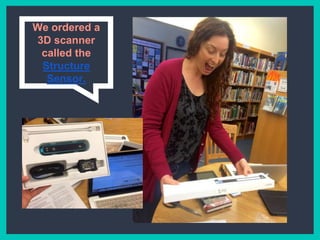
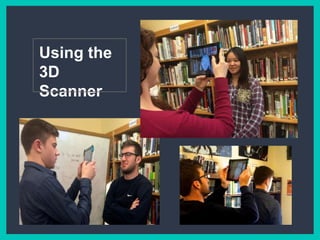
We ordered a 3D
scanner called
the Structure
Sensor.
Using the
3D Scanner
Portrait
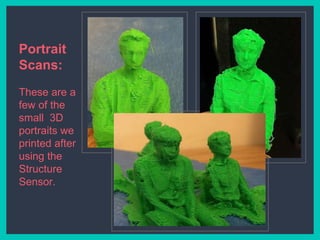
Scans:
These are a
few of the
small 3D
portraits we
printed after
using the
Structure
Sensor.
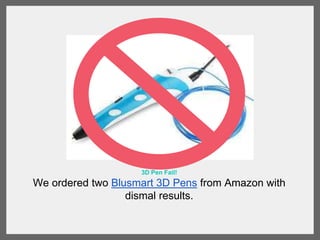
3D Pen Fail!
We ordered two Blusmart 3D Pens from Amazon with dismal
results.
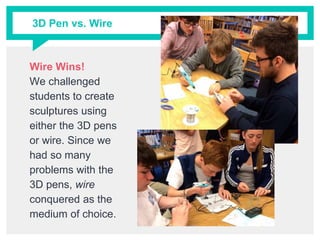
3D Pen vs. Wire
Wire Wins!
We challenged
students to create
sculptures using
either the 3D pens
or wire. Since we
had so many
problems with the
3D pens, wire
conquered as the
medium of choice.
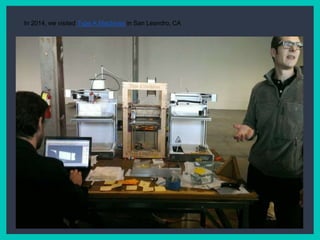
In 2014, we visited Type A Machines in San Leandro, CA
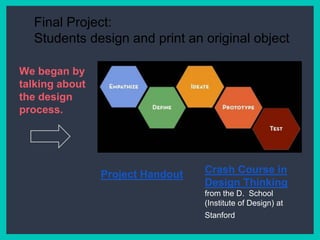
Final Project:
Students design and print an original object
Crash Course in
Design Thinking
from the D. School
(Institute of Design) at
Stanford
https://docs.
google.
com/docume
nt/d/1KwJlRF
X6UiUOsp=sh
aProject Handout
We began by
talking about
the design
process.
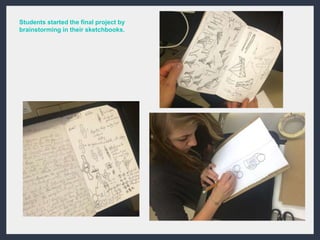
Students started the
final project by
brainstorming in
their sketchbooks.
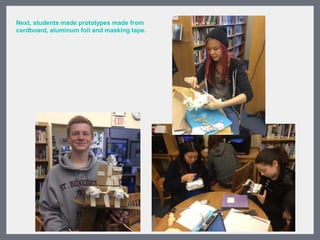
Next, students made
prototypes made
from cardboard,
aluminum foil and
masking tape.
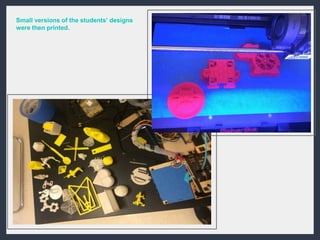
Small versions of
the students’
designs were then
printed.
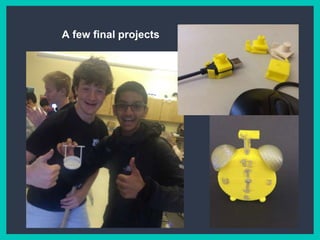
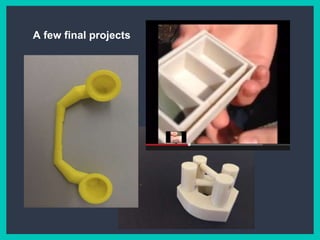
A few final projects
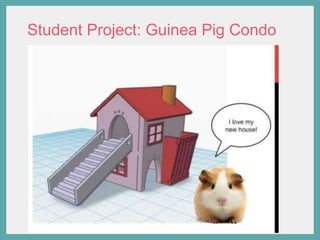
Student Project: Guinea Pig Condo
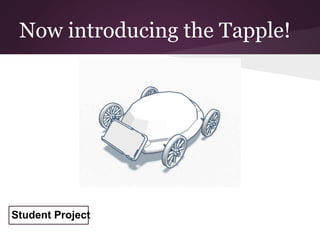
Now introducing the Tapple!
Student Project
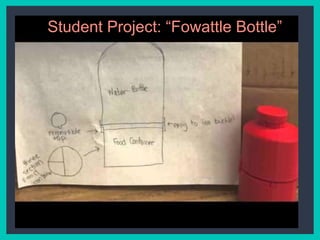
Student Project: “Fowattle Bottle”
Thanks!
Any questions?
You can find us at:
jscheller@bentleyschool.net
msteele@bentleyschool.net
http://www.slideshare.net/meredithsteele/you-scored-a-3-d-printer-now-what

You Scored a 3D Printer! Now What?

  • 1.
    You Scored a3D Printer! Now What? Jenn Scheller and Meredith Steele Bentley School, Lafayette, CA
  • 2.
    Hello! I am JennScheller I am Meredith Steele
  • 3.
  • 4.
    “ As the Makerbotwebsite claims, “3D Printing is one of the most disruptive technologies around.” View our class syllabus.
  • 5.
    Be prepared tohack! The Makerbot 5th Generation that we borrowed from our middle school did not fit our spools of filament so Jenn used Duct tape to attach an old flashlight as an extender to hold the spool.
  • 6.
    Infographics: A Brief Historyof 3D Printing (source: T. Rowe Price) The Maker Movement is shaping the future of our economy. (source: The Grommet.com) Introduction
  • 7.
    Software Presented We decided touse either open source or free to student software
  • 8.
    Students need alot of time to explore various software.
  • 9.
    Design Software TinkerCAD -Tinkercad is an easy-to-use tool for creating digital designs that are ready to be 3D printed into physical objects. Users are guided through the 3D design process through 'Lessons', which teach the basics before moving on to more complex modeling techniques (great program for newbies to 3D design; no installs, get started immediately). SketchUp Pro - is a 3D modeling program for applications such as architectural, interior design, civil and mechanical engineering, film, and video game design. A freeware version, SketchUp Make, and a paid version with additional functionality, SketchUp Pro, are available Blender - Blender is a free and open source 3D animation suite. It supports the entirety of the 3D pipeline - modeling, rigging, animation, simulation, rendering, composting and motion tracking, even video editing and game creation. You can use Blender to check for any gaps, etc in your 3D images before printing. AutoCAD - Create stunning designs with AutoCAD® design and documentation software. Speed documentation and detailing work with productivity tools, and share your work with TrustedDWG™ technology. Connect your workflow across integrated desktop, cloud, and mobile solutions. Select your CAD design software platform of choice with AutoCAD for Windows or AutoCAD for Mac. Netfabb Basic - Netfabb Basic is a easy way to check your files to verify that the mesh is printable. The program will also administer “First Aid” to repair your file. Software information from 3ders.org
  • 10.
    Additional Software 3D Tin- is a web-based 3D modeling program that is considered one of the pioneers in browser-based 3D modeling. The goal of 3DTin is to create a program simple enough for beginners to use but still allow the user to create some fairly detailed models (no logins, just get on and go; no installs, get started immediately). LeoCAD - LeoCAD is a CAD program for creating virtual LEGO models. It has an easy to use interface and currently includes over 6000 different pieces created by the ​LDraw community. Winds3D - Wings 3D is an advanced subdivision modeler that is both powerful and e3asy to use. It is open source and free for use in personal and commercial projects. Maya - Maya® 3D animation, modeling, simulation, rendering, and compositing software offers a comprehensive creative feature set on a highly extensible production platform. Maya provides high-end character and effects toolsets along with increased productivity for modeling, texturing, and shader creation tasks. 3DS Max - 3ds Max® 3D modeling software provides a comprehensive modeling, animation, simulation, and rendering solution for games, film, and motion graphics artists. 3ds Max delivers efficient new tools, accelerated performance, and streamlined workflows to help increase overall productivity for working with complex, high-resolution assets. SolidWorks - SOLIDWORKS® Education Edition has everything your students need to learn 3D design and sharpen their skills to get the job of their dreams. With SOLIDWORKS Education Edition, your students can work more efficiently and have the data they need to make better design decisions (very popular and great for high school students). MeshLab - MeshLab is an open source, portable, and extensible system for the processing and editing of unstructured 3D triangular meshes. The system is aimed to help the processing of the typical not-so-small unstructured models arising in 3D scanning, providing a set of tools for editing, cleaning, healing, inspecting, rendering and converting this kind of meshes. Software information from 3ders.org
  • 11.
  • 12.
    Apps, apps, andmore apps AutoDesk 123D Products The easiest way to get started with 3D; you can discover free apps to take you from photos to modeling to making. 123D Catch - This is a rudimentary 3D Scanning technology using a smartphone or tablet. 123D Sculpt+ - Allows students to quickly create an object or creature starting with a basic skeletal structure. 123D Design - The easiest way to get started with 3D; you can discover free apps to take you from photos to modeling to making. 3D Scanning Apps Structure - Works with the Structure Sensor scanner itSeez3d - Another free app that works with the Structure Sensor scanner.
  • 13.
    Class Projects Here’s abrief overview of the projects we completed in our class.
  • 14.
    Go Big orGo Home We encouraged our students to take huge risks with their projects. In fact, we insisted! Each student was required to submit a print to the Oops Box. This template is free to use under Creative Commons Attribution license. If you use the graphic assets (photos, icons and typographies) provided with this presentation you must keep the Credits slide. Oops Box
  • 15.
    To submit workto print, Students placed work in a shared folder in Google Drive.
  • 16.
    Cookie Caster Cookie Casteris a web- based program that lets students design and print their own cookie cutters. This is a quick entry-level project to get students designing and printing quickly. This template is free to use under Creative Commons Attribution license. If you use the graphic assets (photos, icons and typographies) provided with this presentation you must keep the Credits slide. First Project
  • 17.
    Students used the123D Creature App (now updated to 123D Sculpt+) on the Ipads to design and print original creatures. Creature Project
  • 18.
    The challenge was totake an ordinary object and combine it with a creature or animal. This exercise helps students dive a further into their chosen design software. This template is free to use under Creative Commons Attribution license. If you use the graphic assets (photos, icons and typographies) provided with this presentation you must keep the Credits slide. Mashup Extravaganza
  • 19.
    Mask Project A secondentry-level project in which students were asked to create or tinker a mask and print.
  • 20.
    Shoe Project Students used123D Catch on the Ipads and on their phones to create a 3D scan of their shoe. They combined the shoe with an animal in another type of imagery “mashup.” This video shows industrial design student Ehsan Noursalehi demonstrating how the app works.
  • 21.
    Students researched varioustypes of printers. Short printer presentations included: ● Poster (with visuals and bibliography)-- presented in 5 minutes + Q&A time ● How the printer works ● Pros and Cons ● Design flaws, Design cleverness ● Relevant software ● Filament material ● Cost ● Availability ● Mods people have tried (successfully or unsuccessfully) ● Video of printer in use, if available
  • 22.
    Thingiverse has challenges that wouldbe fun for students to take on.
  • 23.
    HOMEWORK Students kept journalsand wrote responses to assigned articles and videos.
  • 24.
    Ted Talk: What’sNext in 3D Printing March 2014 Documentary Film: 3D Printed Guns 24 minutes. March 2013 NY Times: Hand of a Superhero: 3-D Printing Prosthetic Hands That Are Anything but Ordinary February 2015 NY Times: Dinner is Printed September 2013 NPR: Doctors Use 3-D Printing To Help A Baby Breathe March 2014 UC Berkeley: UC Berkeley unveils first-of-its-kind 3- D-printed cement structure March 2015 Curated Videos and Articles
  • 25.
    Humanities Connections Ted Talk:Ben Kacyra: Ancient wonders captured in 3D Website: Smithsonian X3D
  • 26.
    We created aclass blog and students contributed daily.
  • 27.
    We ordered a3D scanner called the Structure Sensor.
  • 28.
  • 29.
    Portrait Scans: These are a fewof the small 3D portraits we printed after using the Structure Sensor.
  • 30.
    3D Pen Fail! Weordered two Blusmart 3D Pens from Amazon with dismal results.
  • 31.
    3D Pen vs.Wire Wire Wins! We challenged students to create sculptures using either the 3D pens or wire. Since we had so many problems with the 3D pens, wire conquered as the medium of choice.
  • 32.
    In 2014, wevisited Type A Machines in San Leandro, CA
  • 33.
    Final Project: Students designand print an original object Crash Course in Design Thinking from the D. School (Institute of Design) at Stanford https://docs. google. com/docume nt/d/1KwJlRF X6UiUOsp=sh aProject Handout We began by talking about the design process.
  • 34.
    Students started the finalproject by brainstorming in their sketchbooks.
  • 35.
    Next, students made prototypesmade from cardboard, aluminum foil and masking tape.
  • 36.
    Small versions of thestudents’ designs were then printed.
  • 37.
    A few finalprojects
  • 38.
    A few finalprojects
  • 39.
  • 40.
    Now introducing theTapple! Student Project
  • 41.
  • 42.
    Thanks! Any questions? You canfind us at: jscheller@bentleyschool.net msteele@bentleyschool.net http://www.slideshare.net/meredithsteele/you-scored-a-3-d-printer-now-what