ARCHIVES LIBRARIES
MUSEUMS
alm.axiell.com
Mimsy XG Action Request Andrea Boyes
Action Request Introduction
ARCHIVES LIBRARIES MUSEUMS
What is Action Request?
Web-based forms offering a tailored view of the Action Request activity in
Mimsy in a browser. The web forms allow:
Staff to request actions to be taken (framing, movement, etc)
Managers to grant approval for some or all of those tasks
Staff to be assigned to complete those tasks
Administrators to monitor open requests
Action Request The Request
ARCHIVES LIBRARIES MUSEUMS
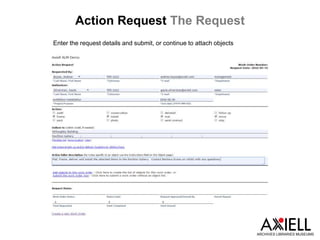
Enter the request details and submit, or continue to attach objects
Action Request Adding Objects
ARCHIVES LIBRARIES MUSEUMS
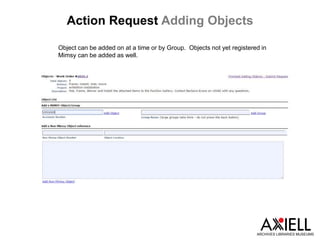
Object can be added on at a time or by Group. Objects not yet registered in
Mimsy can be added as well.
Action Request Object Specifics
ARCHIVES LIBRARIES MUSEUMS
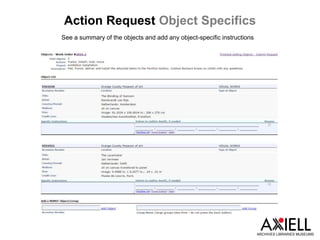
See a summary of the objects and add any object-specific instructions
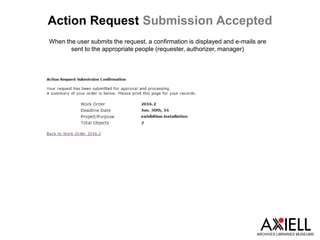
Action Request Submission Accepted
ARCHIVES LIBRARIES MUSEUMS
When the user submits the request, a confirmation is displayed and e-mails are
sent to the appropriate people (requester, authorizer, manager)
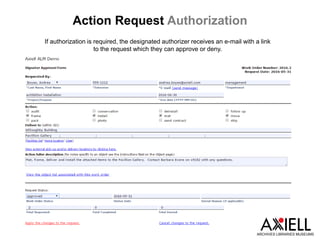
Action Request Authorization
ARCHIVES LIBRARIES MUSEUMS
If authorization is required, the designated authorizer receives an e-mail with a link
to the request which they can approve or deny.
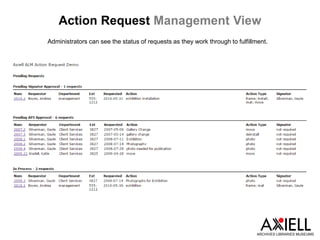
Action Request Management View
ARCHIVES LIBRARIES MUSEUMS
Administrators can see the status of requests as they work through to fulfillment.
Action Request In Process
ARCHIVES LIBRARIES MUSEUMS
Managers can review the request and assign staff
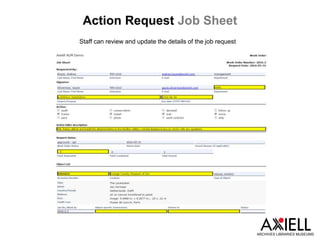
Action Request Job Sheet
ARCHIVES LIBRARIES MUSEUMS
Staff can review and update the details of the job request
Action Request Notes
ARCHIVES LIBRARIES MUSEUMS
At each stage of the request fulfillment, e-mail notifications are sent to the
appropriate people so that the request can be monitored.
Authorizers and managers can approve/deny requests on the whole or on an
object by object basis.
Data updates are visible in the Mimsy XG interface immediately, and requests can
be updated in the Mimsy interface if required.
Action Request Conclusion
ARCHIVES LIBRARIES MUSEUMS
The Action Request web forms are a great way to offer staff the
ability to make task requests without needing to be trained in the
full Mimsy XG interface. The notification system and
administration views give managers the ability to actively
monitor open requests and allocate the appropriate staff in a
timely manner.

You asked For It: Action Request Web Form

  • 1.
  • 2.
    Action Request Introduction ARCHIVESLIBRARIES MUSEUMS What is Action Request? Web-based forms offering a tailored view of the Action Request activity in Mimsy in a browser. The web forms allow: Staff to request actions to be taken (framing, movement, etc) Managers to grant approval for some or all of those tasks Staff to be assigned to complete those tasks Administrators to monitor open requests
  • 3.
    Action Request TheRequest ARCHIVES LIBRARIES MUSEUMS Enter the request details and submit, or continue to attach objects
  • 4.
    Action Request AddingObjects ARCHIVES LIBRARIES MUSEUMS Object can be added on at a time or by Group. Objects not yet registered in Mimsy can be added as well.
  • 5.
    Action Request ObjectSpecifics ARCHIVES LIBRARIES MUSEUMS See a summary of the objects and add any object-specific instructions
  • 6.
    Action Request SubmissionAccepted ARCHIVES LIBRARIES MUSEUMS When the user submits the request, a confirmation is displayed and e-mails are sent to the appropriate people (requester, authorizer, manager)
  • 7.
    Action Request Authorization ARCHIVESLIBRARIES MUSEUMS If authorization is required, the designated authorizer receives an e-mail with a link to the request which they can approve or deny.
  • 8.
    Action Request ManagementView ARCHIVES LIBRARIES MUSEUMS Administrators can see the status of requests as they work through to fulfillment.
  • 9.
    Action Request InProcess ARCHIVES LIBRARIES MUSEUMS Managers can review the request and assign staff
  • 10.
    Action Request JobSheet ARCHIVES LIBRARIES MUSEUMS Staff can review and update the details of the job request
  • 11.
    Action Request Notes ARCHIVESLIBRARIES MUSEUMS At each stage of the request fulfillment, e-mail notifications are sent to the appropriate people so that the request can be monitored. Authorizers and managers can approve/deny requests on the whole or on an object by object basis. Data updates are visible in the Mimsy XG interface immediately, and requests can be updated in the Mimsy interface if required.
  • 12.
    Action Request Conclusion ARCHIVESLIBRARIES MUSEUMS The Action Request web forms are a great way to offer staff the ability to make task requests without needing to be trained in the full Mimsy XG interface. The notification system and administration views give managers the ability to actively monitor open requests and allocate the appropriate staff in a timely manner.