XeroRisk Corporate Risk Governance
Enterprising risk management
Contents

   Risk Governance Overview
       Why manage risks ?
       Risk Maturity
       Integrated Risk Management


   Line Xero
       Background
       Services


   XeroRisk
       XeroRisk: A flexible deployment solution
       Roadmap
Why manage risks ?

“A company's objectives, its internal organisation and the environment in which it operates
    are continually evolving and as a result, the risks it faces are continually changing. A
    sound system of internal control therefore depends on a thorough and regular evaluation
    of the nature and extent of the risks to which the company is exposed. Since profits are,
    in part, the reward for successful risk-taking in business, the purpose of internal control is
    to help manage and control risk appropriately rather than to eliminate it.”

“The guidance is based on the adoption by a company's board of a risk-based approach to
   establishing a sound system of internal control and reviewing its effectiveness. This
   should be incorporated by the company within its normal management and governance
   processes. It should not be treated as a separate exercise undertaken to meet regulatory
   requirements.”


Turnbull Report, September 1999
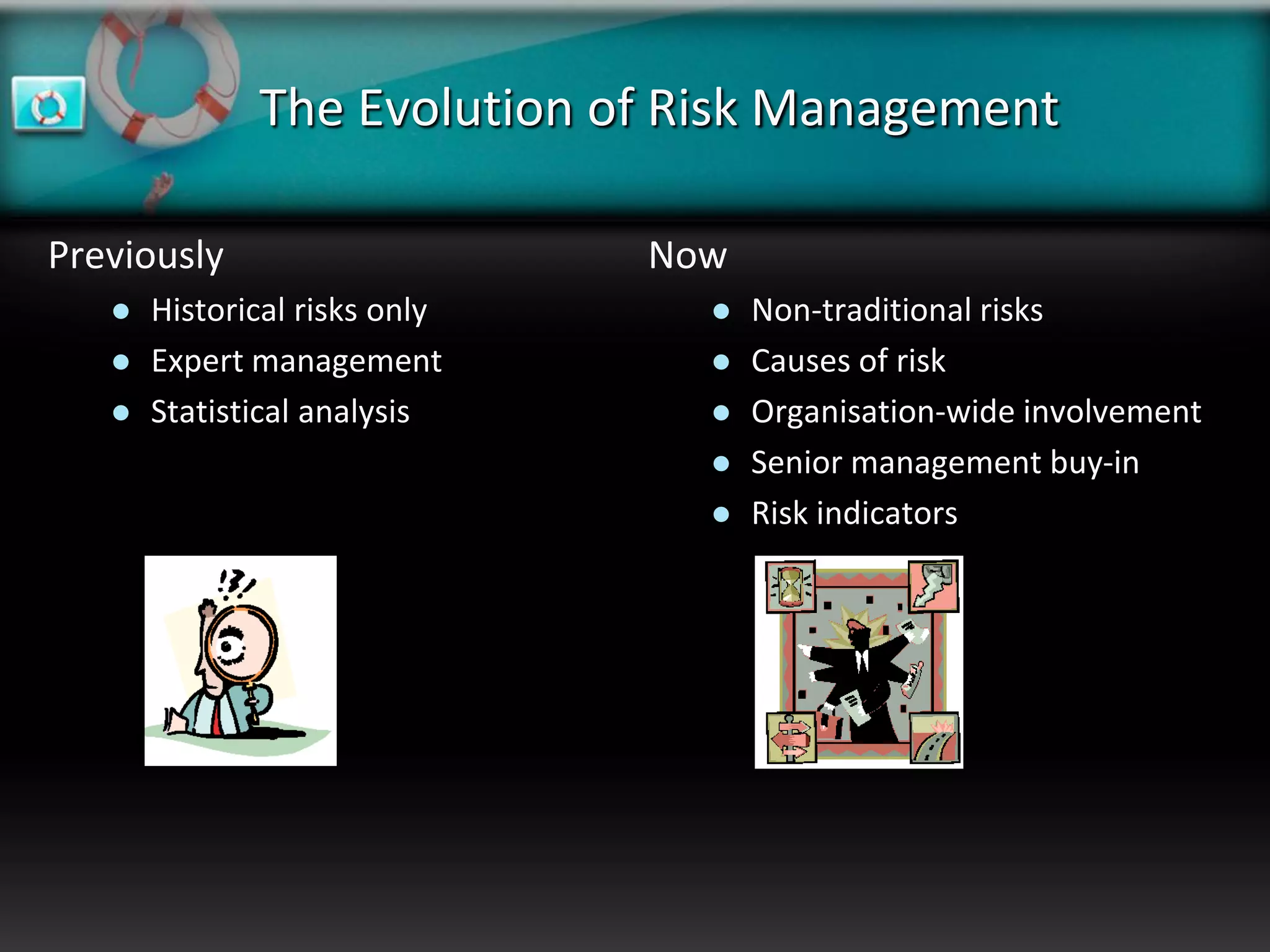
The Evolution of Risk Management

Previously                     Now
      Historical risks only        Non-traditional risks
      Expert management            Causes of risk
      Statistical analysis         Organisation-wide involvement
                                    Senior management buy-in
                                    Risk indicators
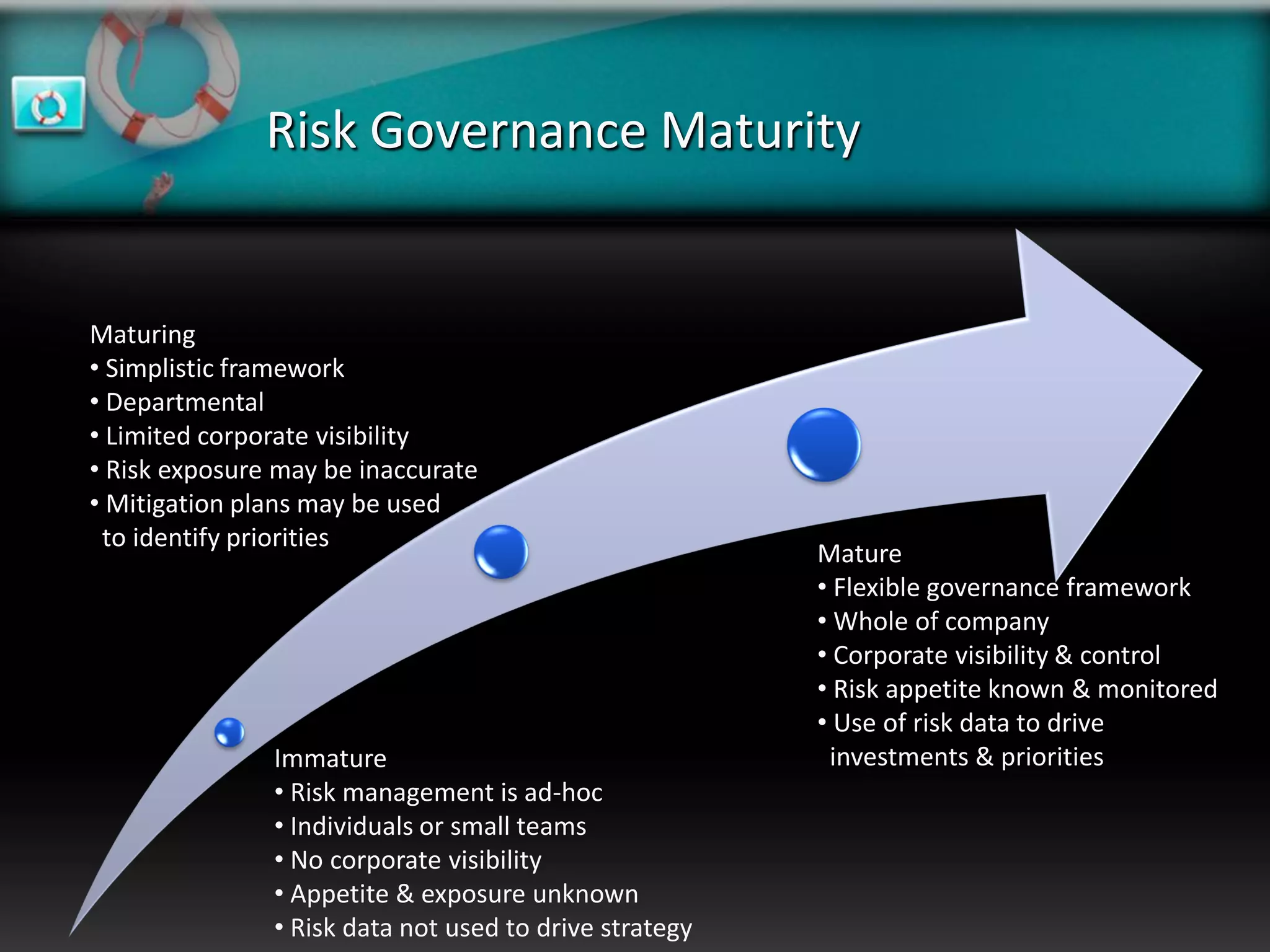
Risk Governance Maturity


Maturing
• Simplistic framework
• Departmental
• Limited corporate visibility
• Risk exposure may be inaccurate
• Mitigation plans may be used
 to identify priorities
                                                        Mature
                                                        • Flexible governance framework
                                                        • Whole of company
                                                        • Corporate visibility & control
                                                        • Risk appetite known & monitored
                                                        • Use of risk data to drive
               Immature                                  investments & priorities
               • Risk management is ad-hoc
               • Individuals or small teams
               • No corporate visibility
               • Appetite & exposure unknown
               • Risk data not used to drive strategy
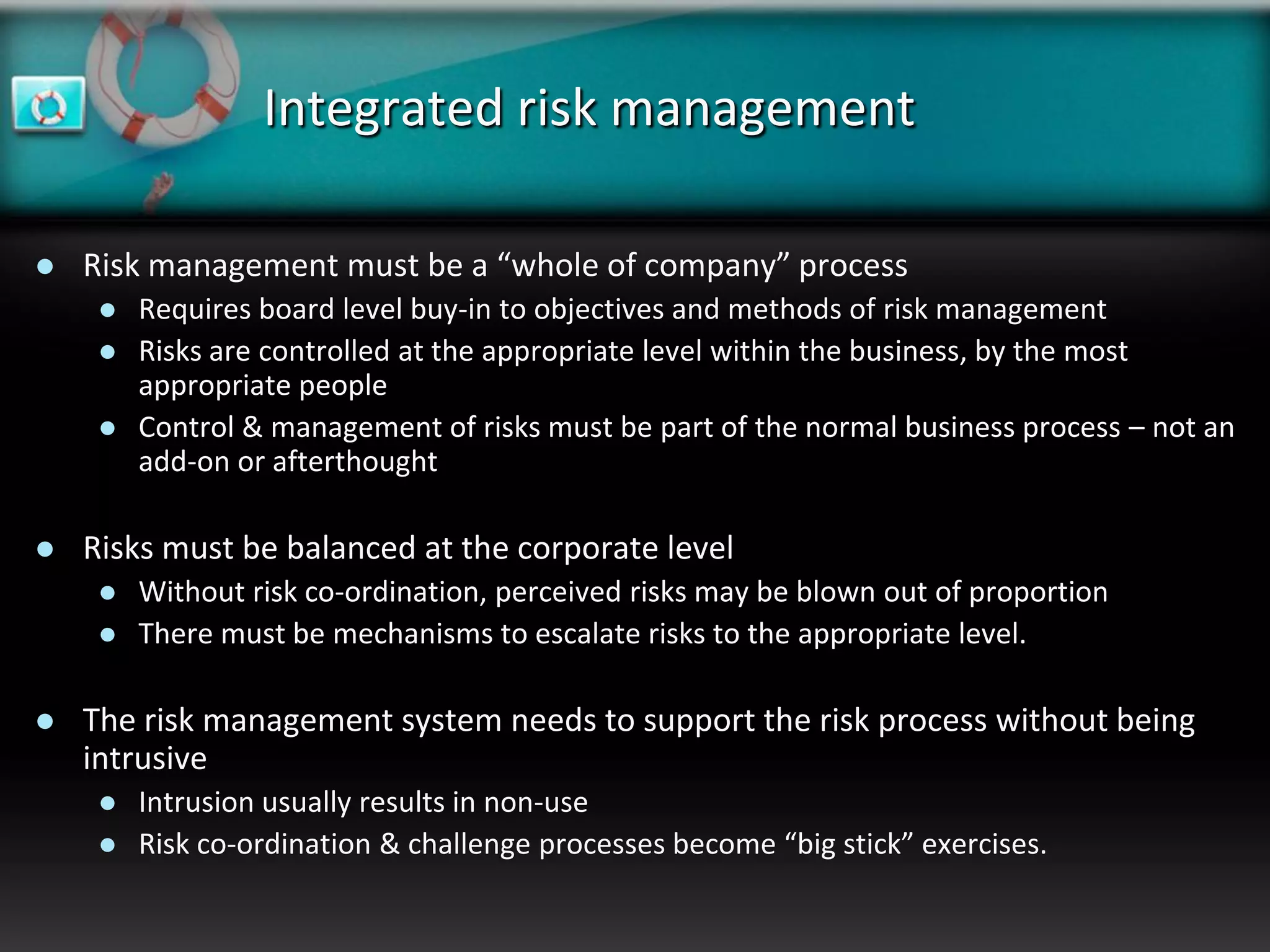
Integrated risk management

   Risk management must be a “whole of company” process
        Requires board level buy-in to objectives and methods of risk management
        Risks are controlled at the appropriate level within the business, by the most
         appropriate people
        Control & management of risks must be part of the normal business process – not an
         add-on or afterthought

   Risks must be balanced at the corporate level
        Without risk co-ordination, perceived risks may be blown out of proportion
        There must be mechanisms to escalate risks to the appropriate level.

   The risk management system needs to support the risk process without being
    intrusive
        Intrusion usually results in non-use
        Risk co-ordination & challenge processes become “big stick” exercises.
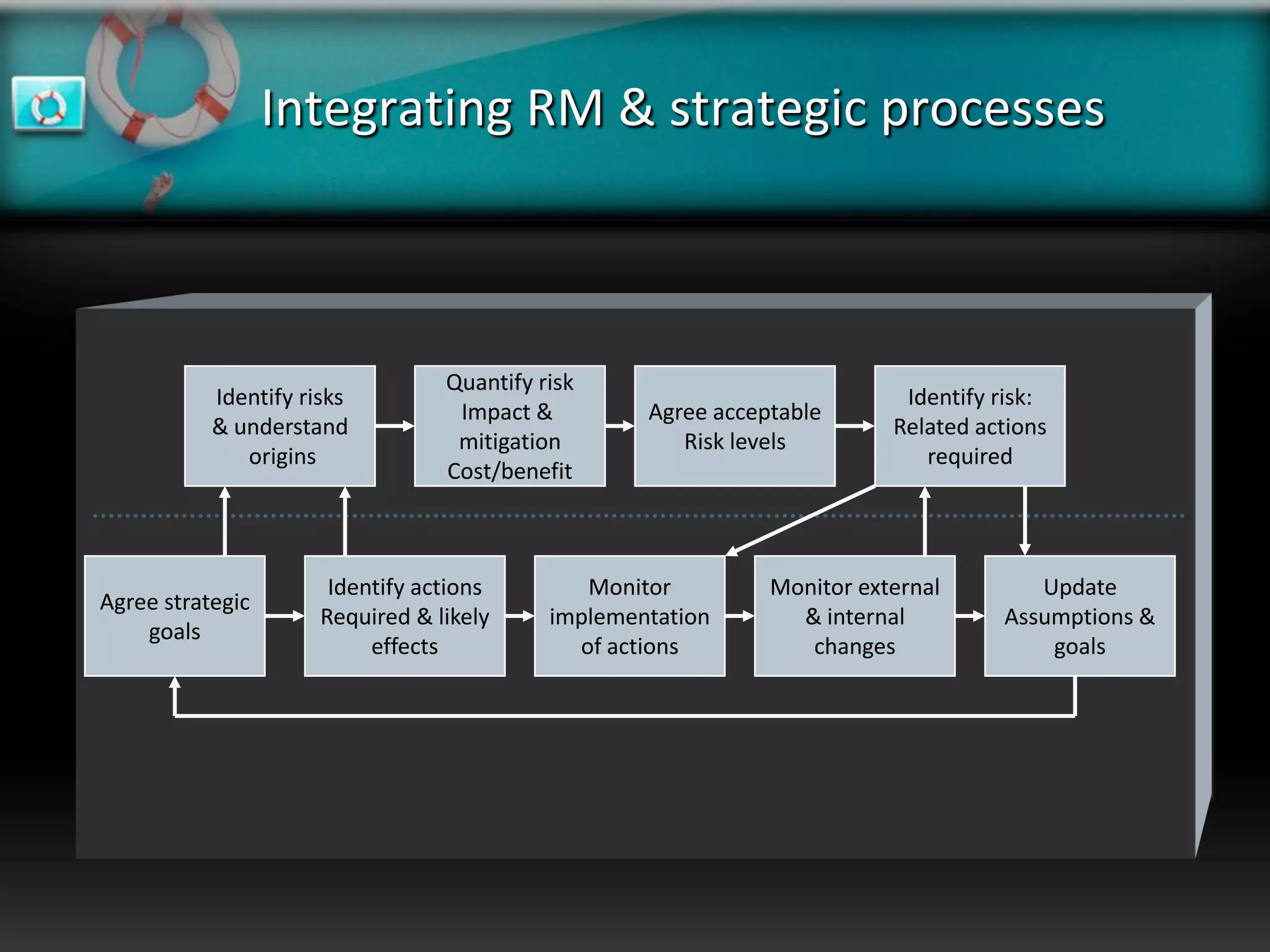
Integrating RM & strategic processes


                                  Quantify risk
           Identify risks                                                  Identify risk:
                                   Impact &         Agree acceptable
           & understand                                                   Related actions
                                   mitigation          Risk levels
              origins                                                        required
                                  Cost/benefit


                       Identify actions        Monitor         Monitor external        Update
Agree strategic
                      Required & likely     implementation       & internal         Assumptions &
    goals
                           effects            of actions          changes               goals
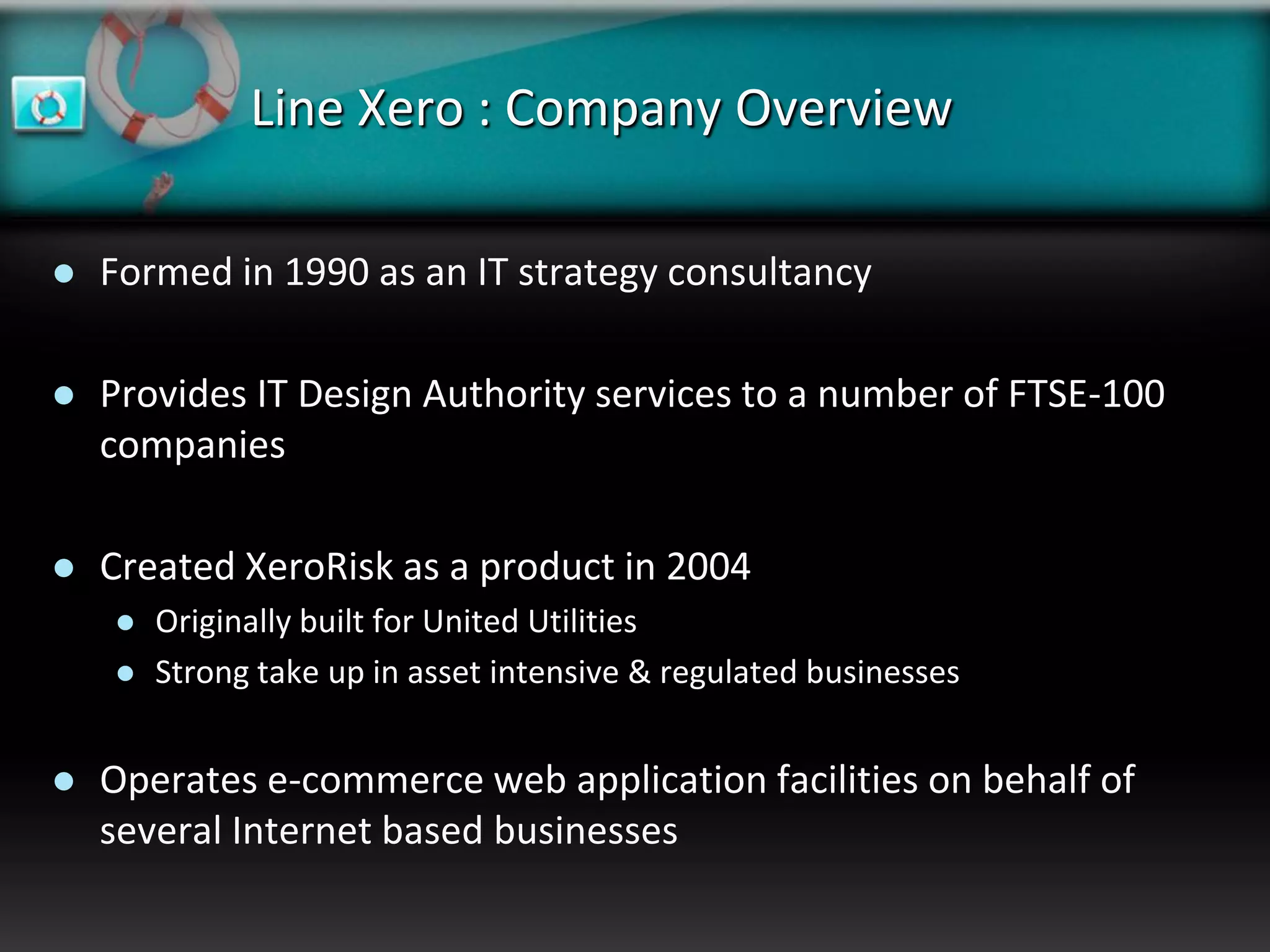
Line Xero : Company Overview

   Formed in 1990 as an IT strategy consultancy

   Provides IT Design Authority services to a number of FTSE-100
    companies

   Created XeroRisk as a product in 2004
       Originally built for United Utilities
       Strong take up in asset intensive & regulated businesses


   Operates e-commerce web application facilities on behalf of
    several Internet based businesses
Line Xero: XeroRisk Overview

   Simplicity
       Licensing
          Easy & flexible licensing schemes
          Trust based
          Clear commercials

       Support
          Dedicated support team
          Dedicated support telephone number & self-service portal

       Development
          Clear roadmap
          Zero cost upgrades   & functional improvements
Line Xero: Hosting Services

   Operate two datacentres
     Melton Mowbray – Production
     Maidenhead – Disaster Recovery

 1 DR failover in 2006 (for 3 hours) – network
  outage
 Mirrored database services – 15min recovery
 Clustered in-centre d/b services
 Tape backups & tape shipping
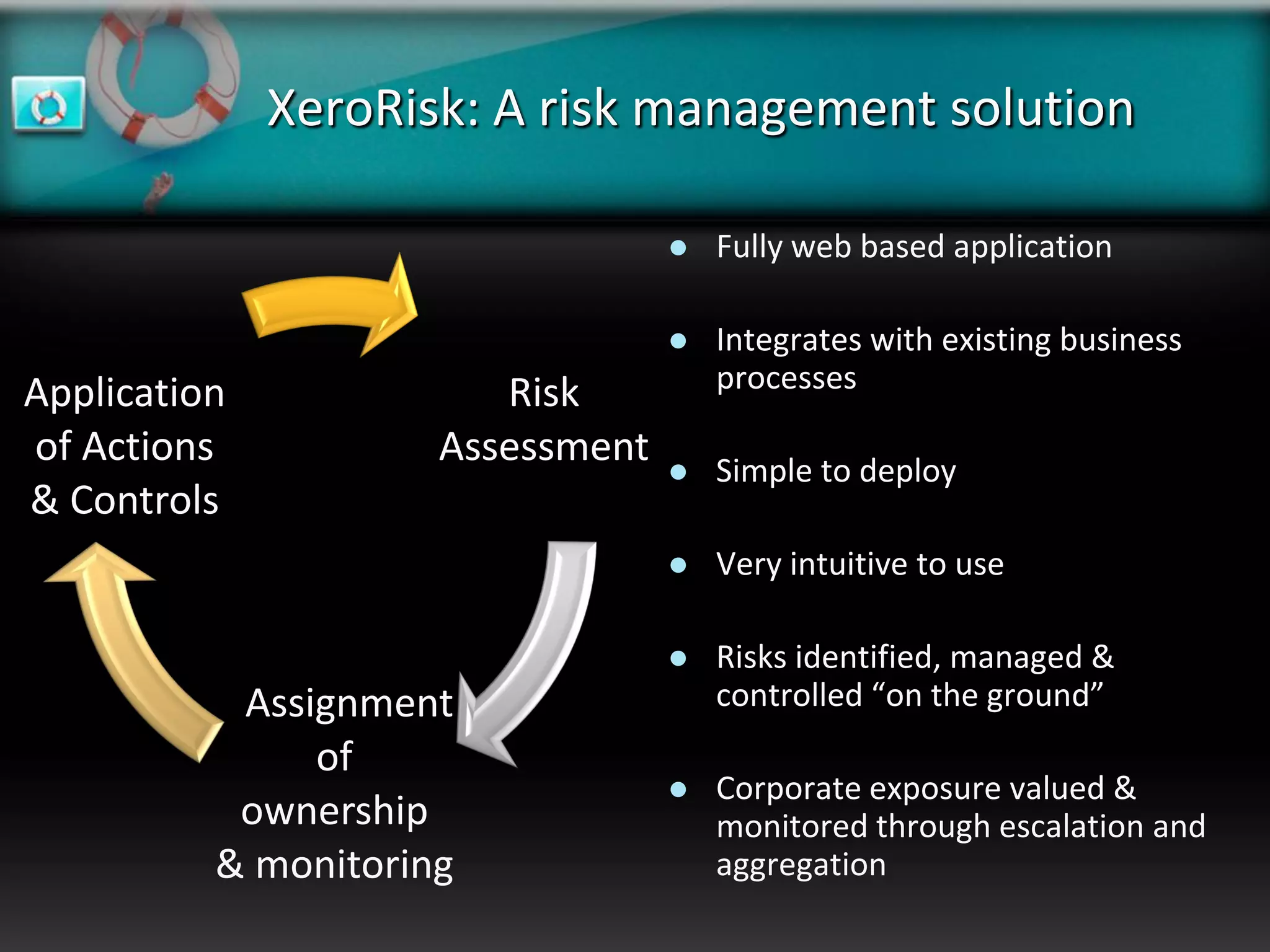
XeroRisk: A risk management solution

                                     Fully web based application

                                     Integrates with existing business
Application             Risk          processes

of Actions           Assessment      Simple to deploy
& Controls
                                     Very intuitive to use

                                     Risks identified, managed &
           Assignment                 controlled “on the ground”
               of
                                     Corporate exposure valued &
           ownership                  monitored through escalation and
          & monitoring                aggregation
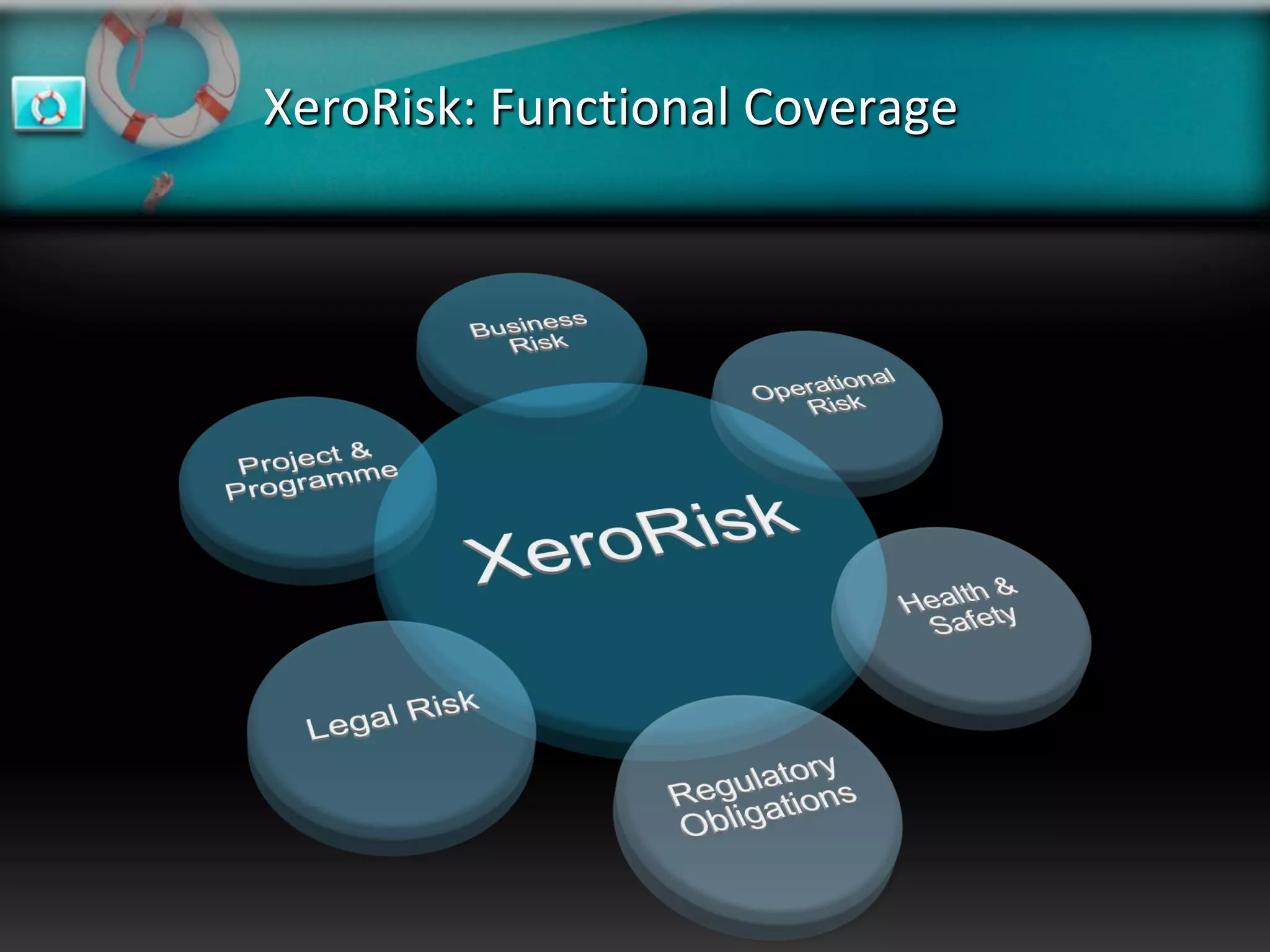
XeroRisk: Functional Coverage
Standards Based Compliance


   Supports the core requirements of AS/NZS 4360:1999

       The only recognised risk management standard approved by ISO
       Ensures the full traceability of risk management and mitigation actions


   Supports elements of Basel II

       A risk management process for banking & financial environments
       Requires the risk process and associated systems to support both
        Board & Senior Management oversight of risk exposure.
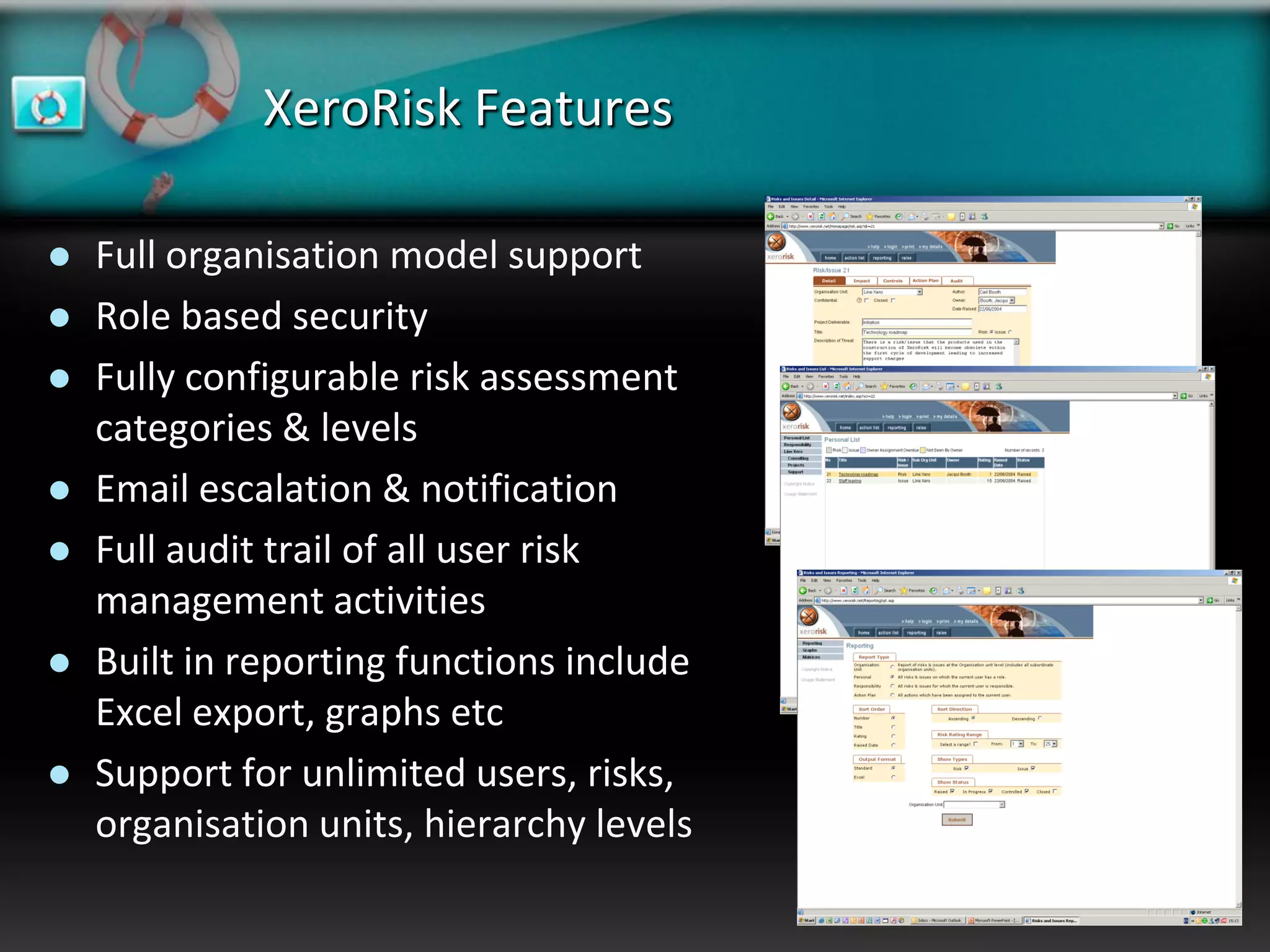
XeroRisk Features

   Full organisation model support
   Role based security
   Fully configurable risk assessment
    categories & levels
   Email escalation & notification
   Full audit trail of all user risk
    management activities
   Built in reporting functions include
    Excel export, graphs etc
   Support for unlimited users, risks,
    organisation units, hierarchy levels
A flexible deployment solution

   Quick Implementation
        XeroRisk doesn’t require installation on each client
        Generic branded product available “off the shelf”
        Branding to follow corporate styles can be quickly developed

   Reduced support costs
        New releases & updates are installed on central servers
        Does not impact corporate desktop builds or current security policies

   True Thin-Client
        There are no ActiveX or Java components downloaded to the client
        Partners or contractors can be quickly added without IS intervention

   Low client hardware demands
        Only a standard web browser is required for access
        Integrates with standard or thin client desktops (e.g. Citrix)

   Industry leading components
        Windows 2003 Server or higher (Windows 2003 server recommended)
        Microsoft SQL Server 2000 (Microsoft SQL Server 2005 SP2 recommended)
Deployment: Delivery mechanisms

   Intranet
        Installed on your hardware
        Managed by in-house team

   Internet
        Installed on your hardware
        Managed by your existing service provider

   Hosted (ASP) Dedicated Solution
        Installed on dedicated Line Xero hardware
        All system resources dedicated to you, with bespoke control over security, DR,
         backup regimes etc.
        Managed by Line Xero support personnel

   Hosted (ASP) Shared Solution
        Installed on Line Xero hardware
        You share the application server & database resources with other clients
        Managed by Line Xero support personnel
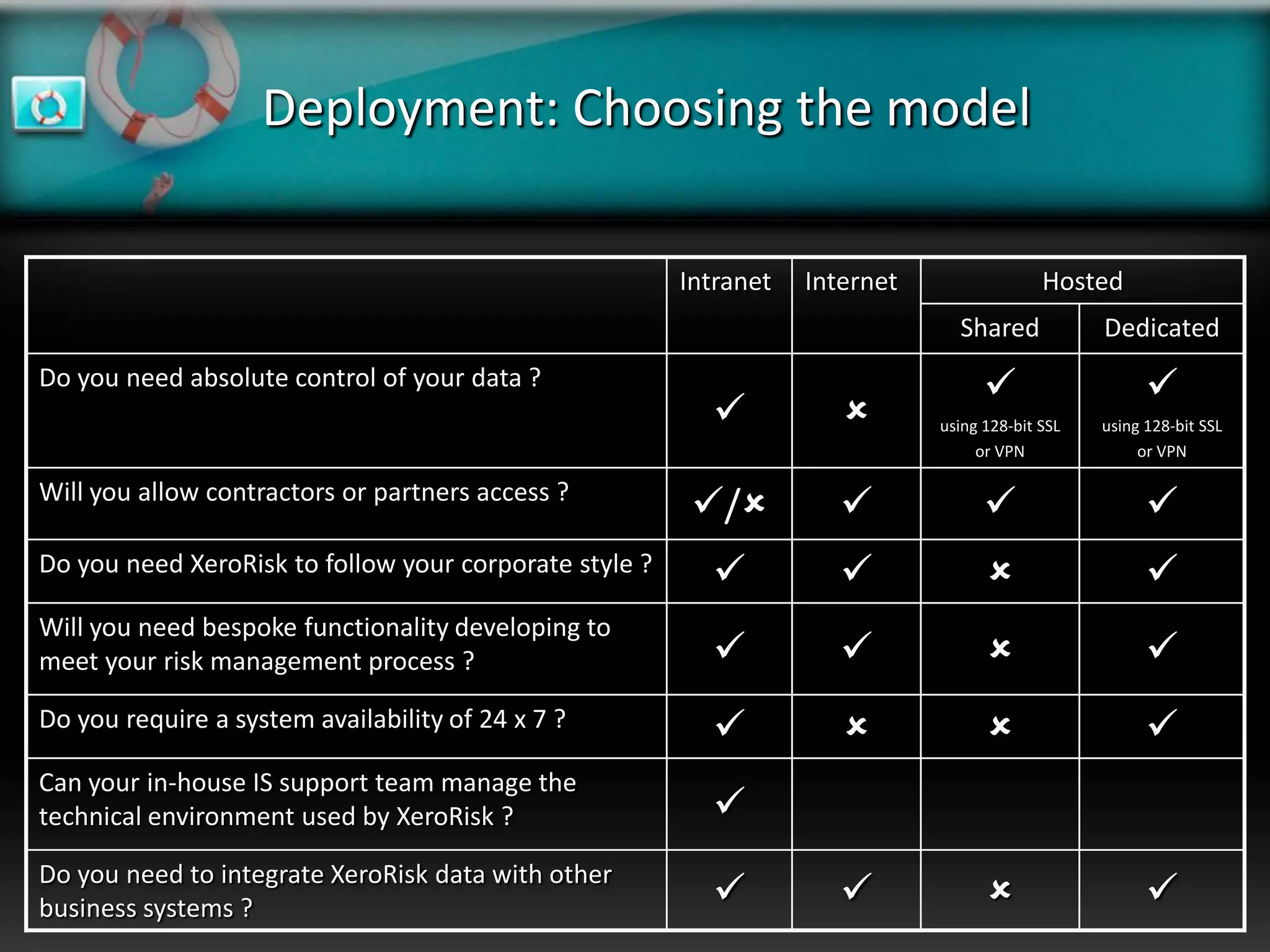
Deployment: Choosing the model

                                                        Intranet   Internet                 Hosted
                                                                                Shared            Dedicated
Do you need absolute control of your data ?                                                            
                                                                            using 128-bit SSL   using 128-bit SSL
                                                                                   or VPN              or VPN

Will you allow contractors or partners access ?
                                                         /                                          
Do you need XeroRisk to follow your corporate style ?                                                
Will you need bespoke functionality developing to
meet your risk management process ?                                                                  
Do you require a system availability of 24 x 7 ?                                                     
Can your in-house IS support team manage the
technical environment used by XeroRisk ?                  
Do you need to integrate XeroRisk data with other
business systems ?                                                                                   
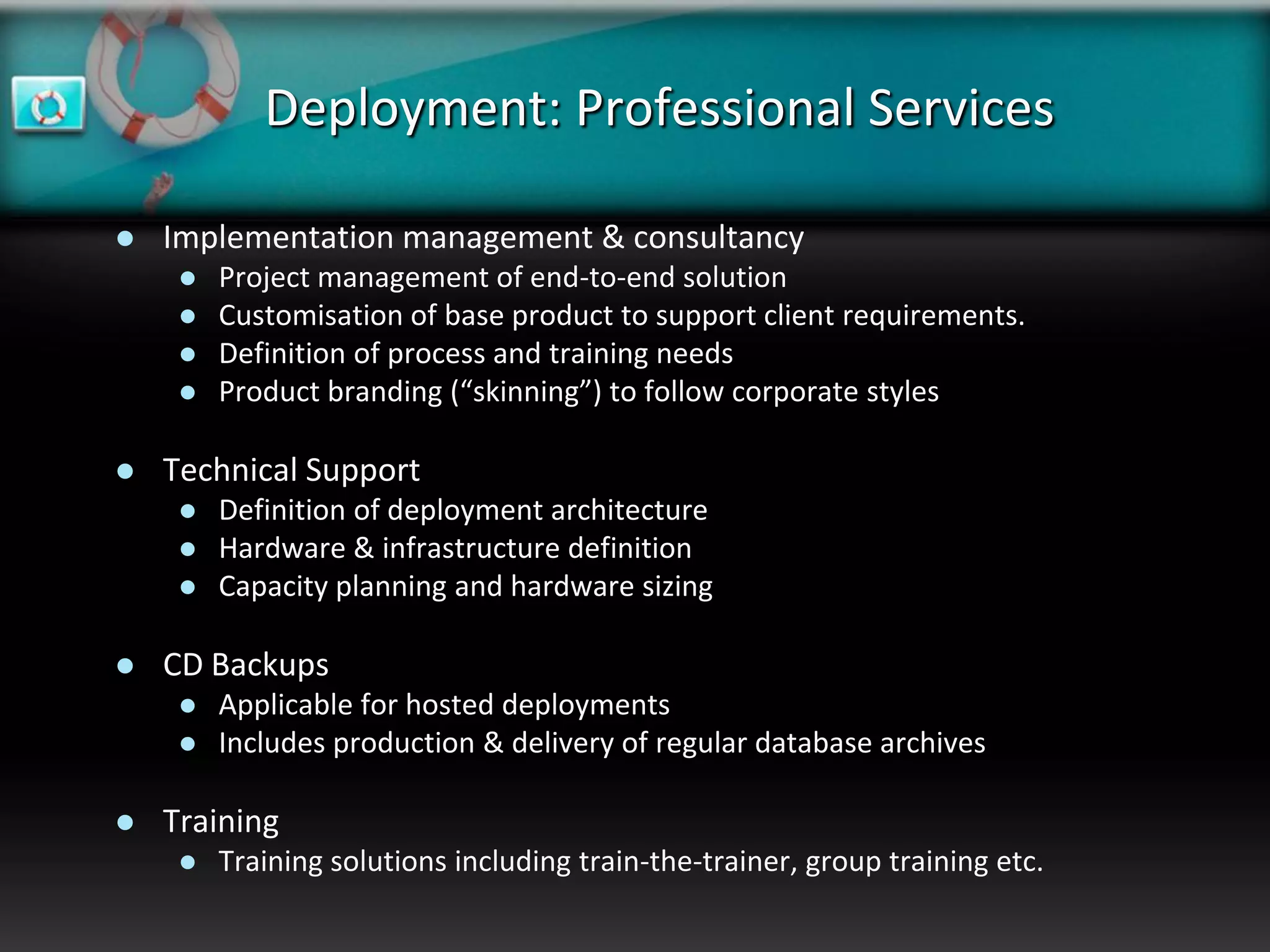
Deployment: Professional Services

   Implementation management & consultancy
        Project management of end-to-end solution
        Customisation of base product to support client requirements.
        Definition of process and training needs
        Product branding (“skinning”) to follow corporate styles

   Technical Support
        Definition of deployment architecture
        Hardware & infrastructure definition
        Capacity planning and hardware sizing

   CD Backups
        Applicable for hosted deployments
        Includes production & delivery of regular database archives

   Training
        Training solutions including train-the-trainer, group training etc.
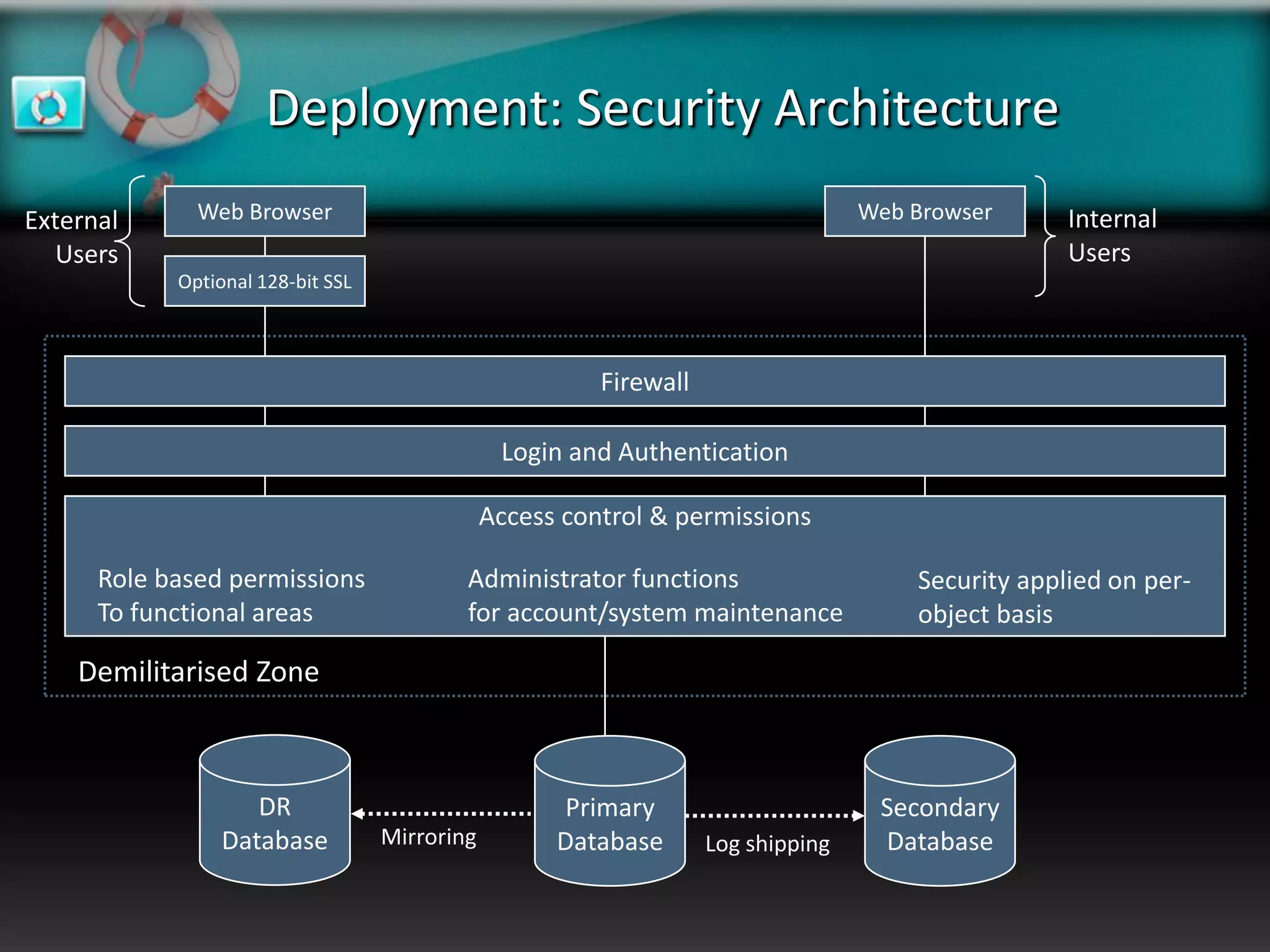
Deployment: Security Architecture
External      Web Browser                                                          Web Browser      Internal
   Users                                                                                            Users
            Optional 128-bit SSL


                                                         Firewall

                                                Login and Authentication

                                               Access control & permissions

      Role based permissions               Administrator functions                     Security applied on per-
      To functional areas                  for account/system maintenance              object basis

    Demilitarised Zone


                    DR                                Primary                       Secondary
                 Database          Mirroring         Database       Log shipping    Database
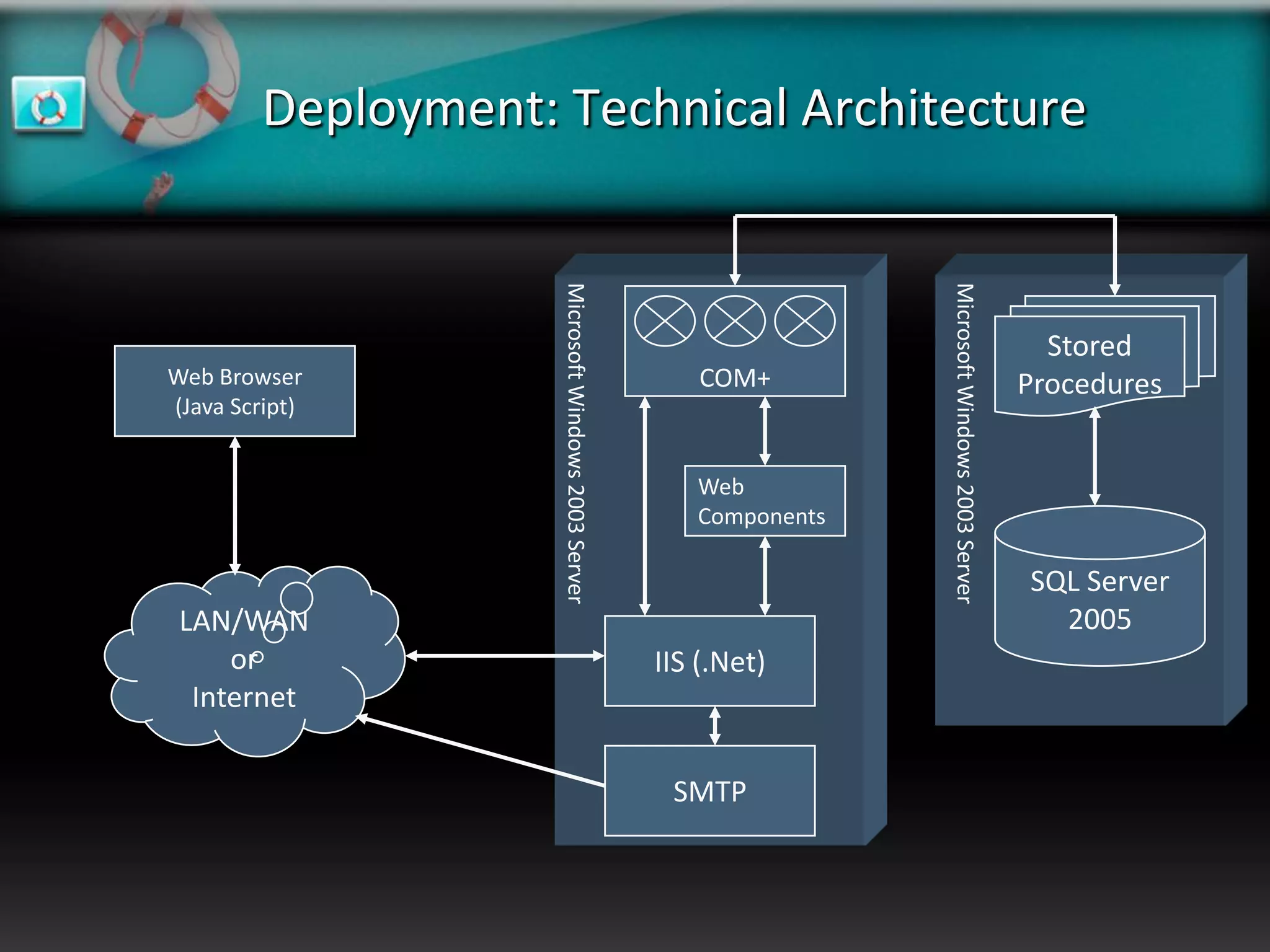
Deployment: Technical Architecture


                     Microsoft Windows 2003 Server


                                                                     Microsoft Windows 2003 Server
                                                                                                       Stored
Web Browser                                              COM+                                        Procedures
(Java Script)


                                                        Web
                                                        Components

                                                                                                     SQL Server
 LAN/WAN                                                                                               2005
     or                                              IIS (.Net)
  Internet

                                                      SMTP
Integration with Collaborative Products

   Business Process Management

        Integration with Business Objects Management suite

        Currently integrated at the portal level


   Reporting & Analytical tools

        Published database schema

        Accessible with most reporting toolkits e.g. Business Objects, Forest & Trees
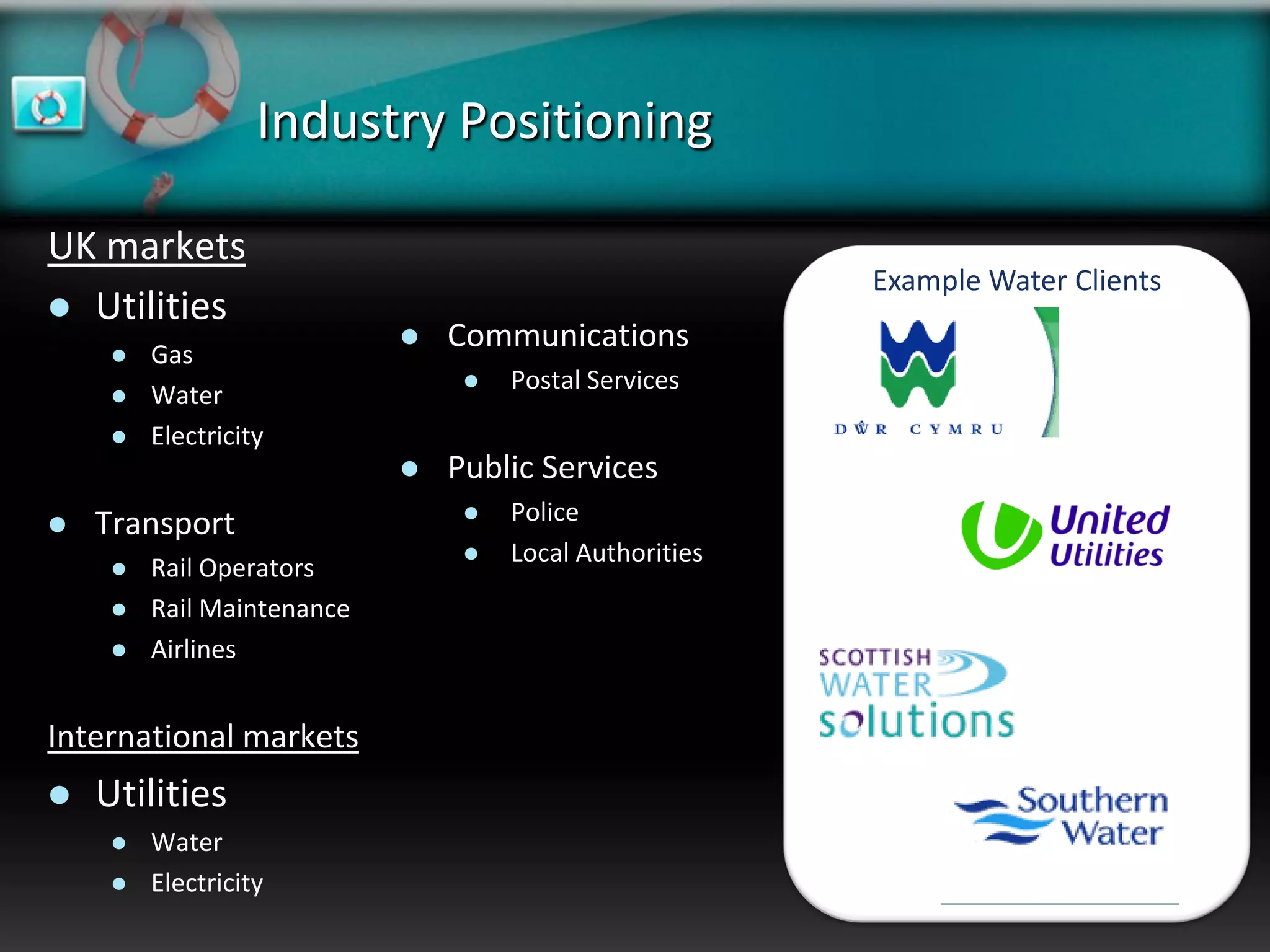
Industry Positioning

UK markets
                                                         Example Water Clients
 Utilities
        Gas
                               Communications
                                    Postal Services
        Water
        Electricity
                               Public Services
   Transport                       Police
                                    Local Authorities
        Rail Operators
        Rail Maintenance
        Airlines


International markets
   Utilities
        Water
        Electricity
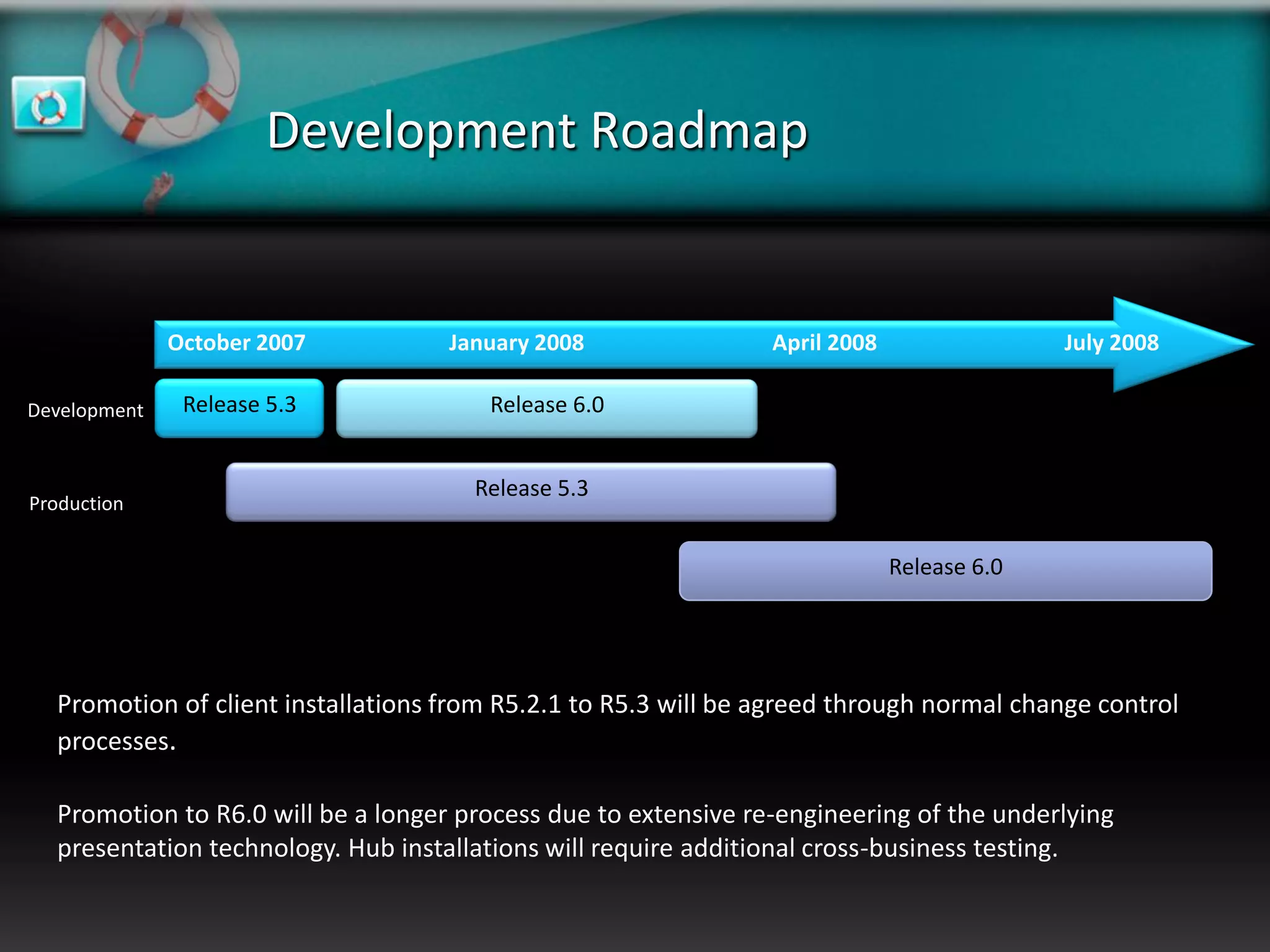
Development Roadmap


              October 2007          January 2008                April 2008                 July 2008

Development    Release 5.3             Release 6.0


                                      Release 5.3
Production


                                                                             Release 6.0


  Promotion of client installations from R5.2.1 to R5.3 will be agreed through normal change control
  processes.

  Promotion to R6.0 will be a longer process due to extensive re-engineering of the underlying
  presentation technology. Hub installations will require additional cross-business testing.
Release Features

   Release 6.0
       Hierarchical configuration                  Pie & 3D Charting
       Specific ordering (Organisation units)      ASP.Net Re-code
       On-screen calendaring                       Opportunities
       “Active indicator” for picklist items       Web Services/The Hub
       User groups & Teams improvements
       Action list tick boxes
       Straight to Action Plan tab
       Scheduled reporting improvements
       Flag high impact/low likelihood risks
       Integrated SMS notification
       Mobile XeroRisk
       Running commentary
       “My “Home” page
       XeroRisk Dashboard
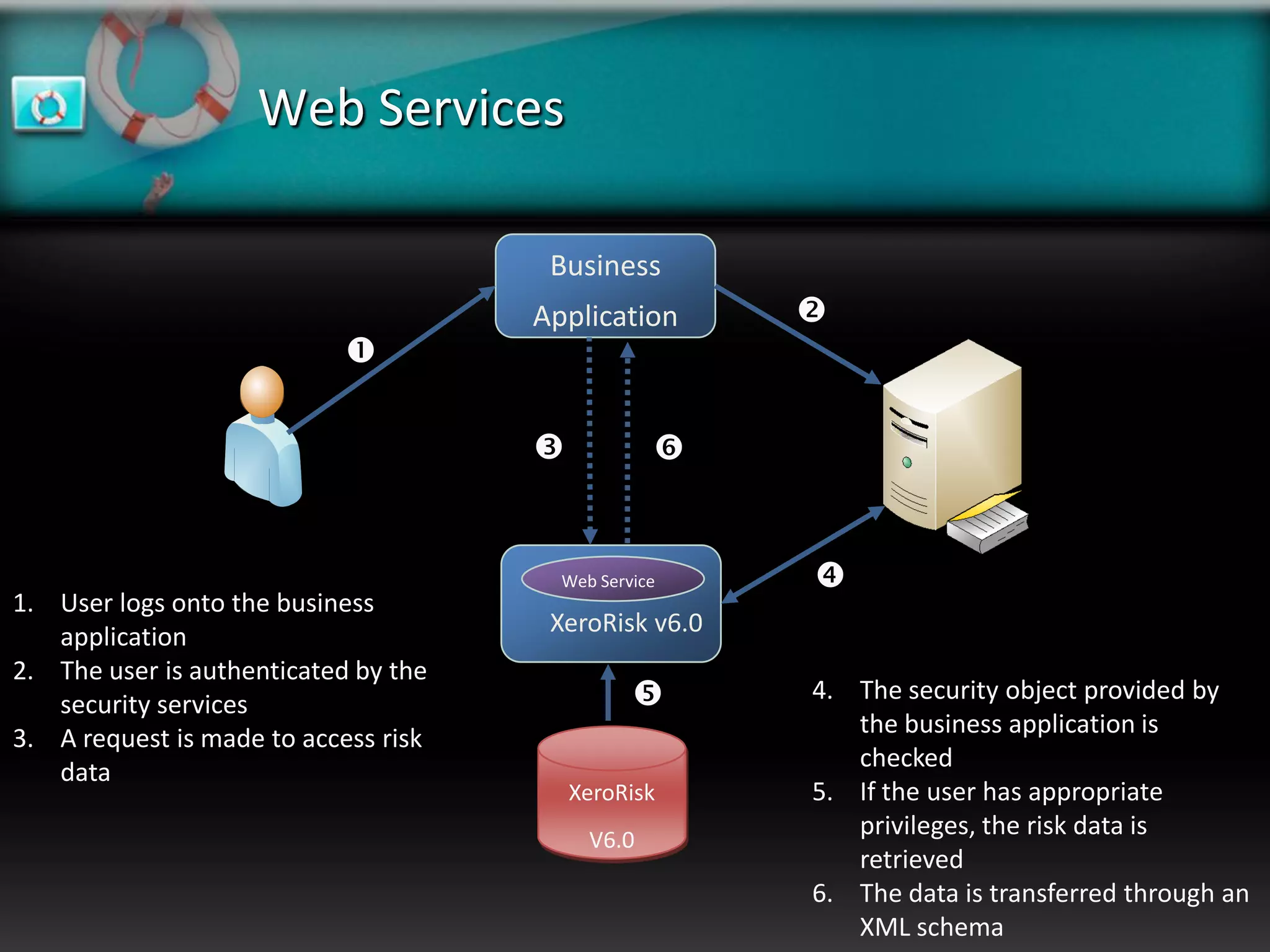
Web Services

                                       Business
                                      Application      
                            

                                                 


                                        Web Service    
1. User logs onto the business
   application                         XeroRisk v6.0
2. The user is authenticated by the
   security services                                  4. The security object provided by
                                                          the business application is
3. A request is made to access risk
                                                          checked
   data
                                          XeroRisk     5. If the user has appropriate
                                           V6.0
                                                          privileges, the risk data is
                                                          retrieved
                                                       6. The data is transferred through an
                                                          XML schema
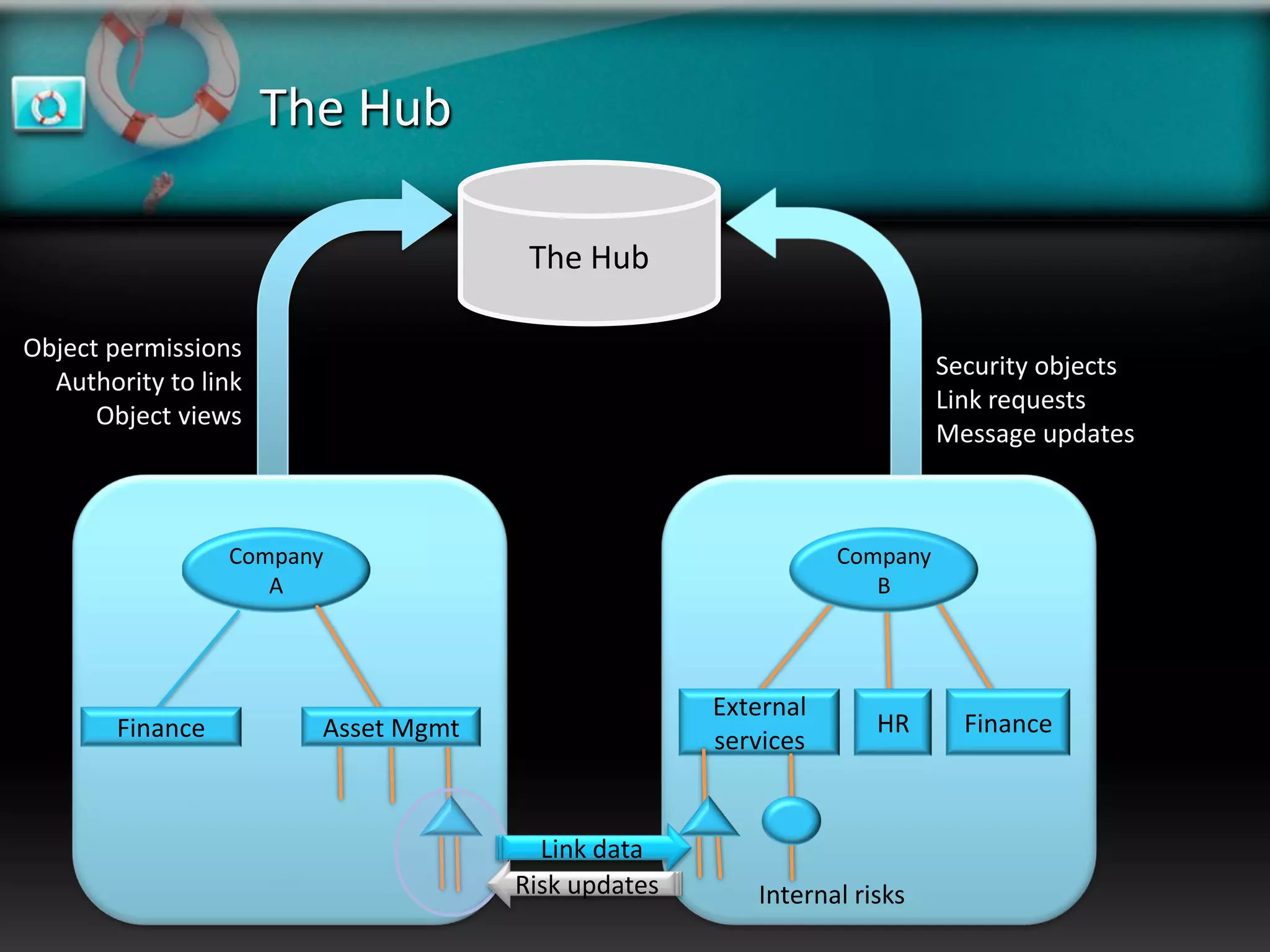
The Hub

                                      The Hub

Object permissions
                                                                         Security objects
  Authority to link
                                                                         Link requests
      Object views
                                                                         Message updates


                  Company                                      Company
                     A                                            B


                                                    External
        Finance         Asset Mgmt                                HR       Finance
                                                    services


                                       Link data
                                     Risk updates      Internal risks
Any Questions?
Demonstration
Thank you

Xero Risk Product Presentation V3.2

  • 1.
    XeroRisk Corporate RiskGovernance Enterprising risk management
  • 2.
    Contents  Risk Governance Overview  Why manage risks ?  Risk Maturity  Integrated Risk Management  Line Xero  Background  Services  XeroRisk  XeroRisk: A flexible deployment solution  Roadmap
  • 3.
    Why manage risks? “A company's objectives, its internal organisation and the environment in which it operates are continually evolving and as a result, the risks it faces are continually changing. A sound system of internal control therefore depends on a thorough and regular evaluation of the nature and extent of the risks to which the company is exposed. Since profits are, in part, the reward for successful risk-taking in business, the purpose of internal control is to help manage and control risk appropriately rather than to eliminate it.” “The guidance is based on the adoption by a company's board of a risk-based approach to establishing a sound system of internal control and reviewing its effectiveness. This should be incorporated by the company within its normal management and governance processes. It should not be treated as a separate exercise undertaken to meet regulatory requirements.” Turnbull Report, September 1999
  • 4.
    The Evolution ofRisk Management Previously Now  Historical risks only  Non-traditional risks  Expert management  Causes of risk  Statistical analysis  Organisation-wide involvement  Senior management buy-in  Risk indicators
  • 5.
    Risk Governance Maturity Maturing •Simplistic framework • Departmental • Limited corporate visibility • Risk exposure may be inaccurate • Mitigation plans may be used to identify priorities Mature • Flexible governance framework • Whole of company • Corporate visibility & control • Risk appetite known & monitored • Use of risk data to drive Immature investments & priorities • Risk management is ad-hoc • Individuals or small teams • No corporate visibility • Appetite & exposure unknown • Risk data not used to drive strategy
  • 6.
    Integrated risk management  Risk management must be a “whole of company” process  Requires board level buy-in to objectives and methods of risk management  Risks are controlled at the appropriate level within the business, by the most appropriate people  Control & management of risks must be part of the normal business process – not an add-on or afterthought  Risks must be balanced at the corporate level  Without risk co-ordination, perceived risks may be blown out of proportion  There must be mechanisms to escalate risks to the appropriate level.  The risk management system needs to support the risk process without being intrusive  Intrusion usually results in non-use  Risk co-ordination & challenge processes become “big stick” exercises.
  • 7.
    Integrating RM &strategic processes Quantify risk Identify risks Identify risk: Impact & Agree acceptable & understand Related actions mitigation Risk levels origins required Cost/benefit Identify actions Monitor Monitor external Update Agree strategic Required & likely implementation & internal Assumptions & goals effects of actions changes goals
  • 8.
    Line Xero :Company Overview  Formed in 1990 as an IT strategy consultancy  Provides IT Design Authority services to a number of FTSE-100 companies  Created XeroRisk as a product in 2004  Originally built for United Utilities  Strong take up in asset intensive & regulated businesses  Operates e-commerce web application facilities on behalf of several Internet based businesses
  • 9.
    Line Xero: XeroRiskOverview  Simplicity  Licensing  Easy & flexible licensing schemes  Trust based  Clear commercials  Support  Dedicated support team  Dedicated support telephone number & self-service portal  Development  Clear roadmap  Zero cost upgrades & functional improvements
  • 10.
    Line Xero: HostingServices  Operate two datacentres  Melton Mowbray – Production  Maidenhead – Disaster Recovery  1 DR failover in 2006 (for 3 hours) – network outage  Mirrored database services – 15min recovery  Clustered in-centre d/b services  Tape backups & tape shipping
  • 11.
    XeroRisk: A riskmanagement solution  Fully web based application  Integrates with existing business Application Risk processes of Actions Assessment  Simple to deploy & Controls  Very intuitive to use  Risks identified, managed & Assignment controlled “on the ground” of  Corporate exposure valued & ownership monitored through escalation and & monitoring aggregation
  • 12.
  • 13.
    Standards Based Compliance  Supports the core requirements of AS/NZS 4360:1999  The only recognised risk management standard approved by ISO  Ensures the full traceability of risk management and mitigation actions  Supports elements of Basel II  A risk management process for banking & financial environments  Requires the risk process and associated systems to support both Board & Senior Management oversight of risk exposure.
  • 14.
    XeroRisk Features  Full organisation model support  Role based security  Fully configurable risk assessment categories & levels  Email escalation & notification  Full audit trail of all user risk management activities  Built in reporting functions include Excel export, graphs etc  Support for unlimited users, risks, organisation units, hierarchy levels
  • 15.
    A flexible deploymentsolution  Quick Implementation  XeroRisk doesn’t require installation on each client  Generic branded product available “off the shelf”  Branding to follow corporate styles can be quickly developed  Reduced support costs  New releases & updates are installed on central servers  Does not impact corporate desktop builds or current security policies  True Thin-Client  There are no ActiveX or Java components downloaded to the client  Partners or contractors can be quickly added without IS intervention  Low client hardware demands  Only a standard web browser is required for access  Integrates with standard or thin client desktops (e.g. Citrix)  Industry leading components  Windows 2003 Server or higher (Windows 2003 server recommended)  Microsoft SQL Server 2000 (Microsoft SQL Server 2005 SP2 recommended)
  • 16.
    Deployment: Delivery mechanisms  Intranet  Installed on your hardware  Managed by in-house team  Internet  Installed on your hardware  Managed by your existing service provider  Hosted (ASP) Dedicated Solution  Installed on dedicated Line Xero hardware  All system resources dedicated to you, with bespoke control over security, DR, backup regimes etc.  Managed by Line Xero support personnel  Hosted (ASP) Shared Solution  Installed on Line Xero hardware  You share the application server & database resources with other clients  Managed by Line Xero support personnel
  • 17.
    Deployment: Choosing themodel Intranet Internet Hosted Shared Dedicated Do you need absolute control of your data ?     using 128-bit SSL using 128-bit SSL or VPN or VPN Will you allow contractors or partners access ? /    Do you need XeroRisk to follow your corporate style ?     Will you need bespoke functionality developing to meet your risk management process ?     Do you require a system availability of 24 x 7 ?     Can your in-house IS support team manage the technical environment used by XeroRisk ?  Do you need to integrate XeroRisk data with other business systems ?    
  • 18.
    Deployment: Professional Services  Implementation management & consultancy  Project management of end-to-end solution  Customisation of base product to support client requirements.  Definition of process and training needs  Product branding (“skinning”) to follow corporate styles  Technical Support  Definition of deployment architecture  Hardware & infrastructure definition  Capacity planning and hardware sizing  CD Backups  Applicable for hosted deployments  Includes production & delivery of regular database archives  Training  Training solutions including train-the-trainer, group training etc.
  • 19.
    Deployment: Security Architecture External Web Browser Web Browser Internal Users Users Optional 128-bit SSL Firewall Login and Authentication Access control & permissions Role based permissions Administrator functions Security applied on per- To functional areas for account/system maintenance object basis Demilitarised Zone DR Primary Secondary Database Mirroring Database Log shipping Database
  • 20.
    Deployment: Technical Architecture Microsoft Windows 2003 Server Microsoft Windows 2003 Server Stored Web Browser COM+ Procedures (Java Script) Web Components SQL Server LAN/WAN 2005 or IIS (.Net) Internet SMTP
  • 21.
    Integration with CollaborativeProducts  Business Process Management  Integration with Business Objects Management suite  Currently integrated at the portal level  Reporting & Analytical tools  Published database schema  Accessible with most reporting toolkits e.g. Business Objects, Forest & Trees
  • 22.
    Industry Positioning UK markets Example Water Clients  Utilities  Gas  Communications  Postal Services  Water  Electricity  Public Services  Transport  Police  Local Authorities  Rail Operators  Rail Maintenance  Airlines International markets  Utilities  Water  Electricity
  • 23.
    Development Roadmap October 2007 January 2008 April 2008 July 2008 Development Release 5.3 Release 6.0 Release 5.3 Production Release 6.0 Promotion of client installations from R5.2.1 to R5.3 will be agreed through normal change control processes. Promotion to R6.0 will be a longer process due to extensive re-engineering of the underlying presentation technology. Hub installations will require additional cross-business testing.
  • 24.
    Release Features  Release 6.0  Hierarchical configuration  Pie & 3D Charting  Specific ordering (Organisation units)  ASP.Net Re-code  On-screen calendaring  Opportunities  “Active indicator” for picklist items  Web Services/The Hub  User groups & Teams improvements  Action list tick boxes  Straight to Action Plan tab  Scheduled reporting improvements  Flag high impact/low likelihood risks  Integrated SMS notification  Mobile XeroRisk  Running commentary  “My “Home” page  XeroRisk Dashboard
  • 25.
    Web Services Business Application     Web Service  1. User logs onto the business application XeroRisk v6.0 2. The user is authenticated by the security services  4. The security object provided by the business application is 3. A request is made to access risk checked data XeroRisk 5. If the user has appropriate V6.0 privileges, the risk data is retrieved 6. The data is transferred through an XML schema
  • 26.
    The Hub The Hub Object permissions Security objects Authority to link Link requests Object views Message updates Company Company A B External Finance Asset Mgmt HR Finance services Link data Risk updates Internal risks
  • 27.
  • 28.
  • 29.