


Webtel Electrosoft Pvt. Ltd.
110-114, Rattan Jyoti Building, Rajendra Place, New Delhi – 110008
Contact: 011-45054040 Email: contact@webxbrl.com
XBRL PROCESS FLOW (VIA UNIQUE TAGGING APPROACH)
XBRL
Masters creation
Financial Tagging
Quality Tagging
Notes tagging
Penalty Provisions
About Webtel
Software Solutions and Business Process Outsourcing Activities
Team of professionals consisting of C.A, C.S, Legal and Software Professionals.
First Company to launch ‘e’ TDS product in 2004 after the declaration of mandatory
filing of TDS by Income Tax department.
Pioneer in ‘e’ compliance solutions for Income Tax, MCA and VAT
Registered with NSDL and Income Tax Department
Presence at Delhi, Mumbai, Kolkata, Chennai, Ahmedabad , Hyderabad, Bengaluru,
Punjab, Pune, HP.
More than 27000 customers all over India.
Edge in XBRL
Involved in ‘e’ filing process since last 11
years
Expert knowledge in Taxonomy and
Indian Reporting system.
Recognized and listed in MCA as
software vendor and service provider for
XBRL
Recognized and listed in HMRC-UK for
UK XBRL
Team engaged in MCA processes and
handling XBRL filing with a systematic
approach.
Webtel
Edge in XBRL
First company which passed through the
validation process of MCA
More than 300 Seminars/Training
Programs at various forums of ICAI, ICSI,
ICWAI, ASSOCHAM and CII etc.
Emerged as India’s Leading company in
XBRL Solution and XBRL Outsourcing.
Best rated support service in the industry
in XBRL space and other compliance
products
Webtel
eXtensible Business Reporting Language
Language For Electronic Communication of
Financial Data.
Based on Powerful Version of XML. (XML + Business
Rules=XBRL)
Identifying XBRL Tag for Each Line Item.
Regulatory Requirement
Circular Mandating XBRL Filing - General Circular No. 37/2011
Any company fulfilling any of the conditions is liable to file under XBRL
Format:
All listed companies & Their Indian Subsidiaries
Companies having a paid-up capital of Rs. 5 crores or more.
Companies having a turnover of Rs. 100 crores or more.
Automatic creation of Company/Directors’ Master through CIN, DIN etc.
Import of Balance Sheet and P&L Account Data from Excel to Software for Easy
Tagging.
Tagging of Financial Data for Current & Previous Year in One go.
Import Auditor's Report/Director's Report, Notes etc. from word file/excel file .
Easy Mapping of Non Financial Data i.e. Notes to Accounts etc.
Easy Mapping of Data with Tables etc. in Dimensions.
Facility to Add/Edit footnote
WEB-XBRL
Facility for Automatic import of Footnote from Excel Sheet when multiple items
tagged to single taxonomy element .
Facility to Load Previous Year Data, wherever needed (Fixed Asset , Related Party &
Investment etc)
In built Validations to Prevent Errors.
Easy to locate error from error list .
Validation of XBRL Instance Document through MCA Validation Tool from Software
Generation of XBRL Instance Document
Facility for Back up & Restoration of Data.
Live Updates.
WEB-XBRL
(Contd.)
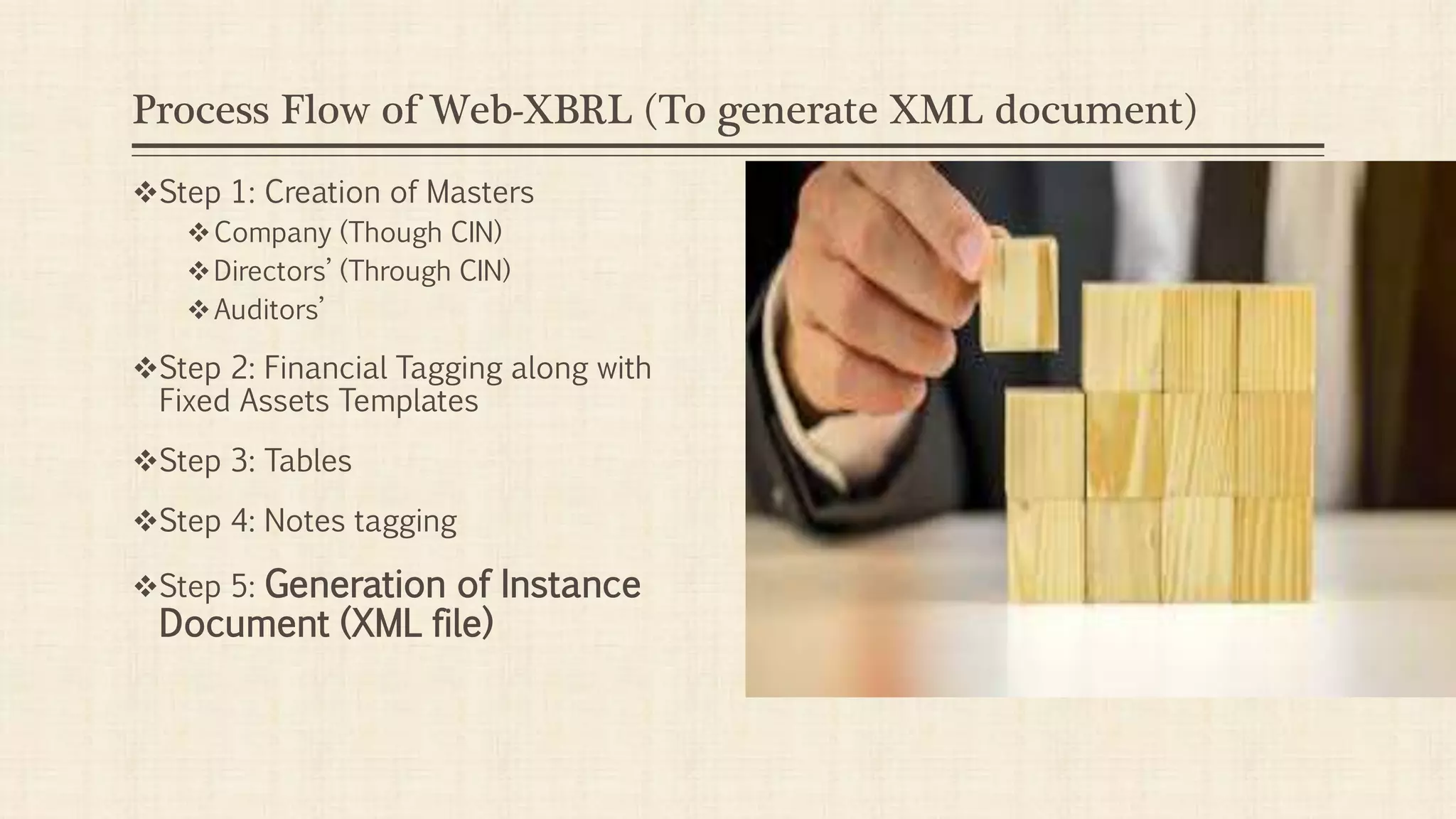
Process Flow of Web-XBRL (To generate XML document)
Step 1: Creation of Masters
Company (Though CIN)
Directors’ (Through CIN)
Auditors’
Step 2: Financial Tagging along with
Fixed Assets Templates
Step 3: Tables
Step 4: Notes tagging
Step 5: Generation of Instance
Document (XML file)
Process of XBRL
Generation of Instance Document.
XBRL Validation.
Removal of Validation errors (If Any).
Prescrutiny
Removal of Prescrutiny Errors (If Any).
Use of Form AOC - 4 for XBRL Filing.
Attach Instance Document to Form AOC-4.
Submission of Forms at MCA portal.
Detailed Filing
Steps...!!!
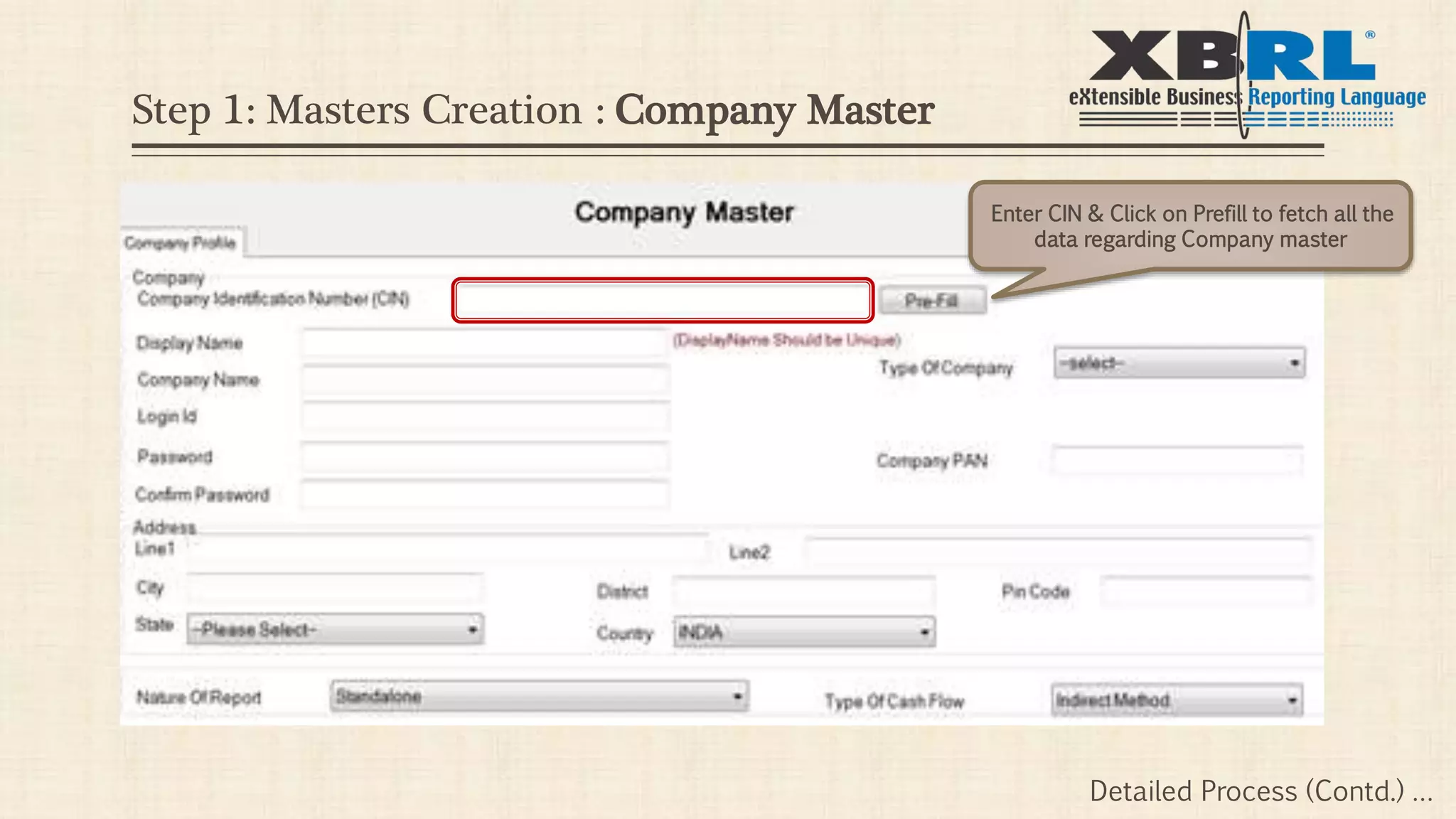
Enter CIN & Click on Prefill to fetch all the
data regarding Company master
Detailed Process (Contd.) …
Step 1: Masters Creation : Company Master
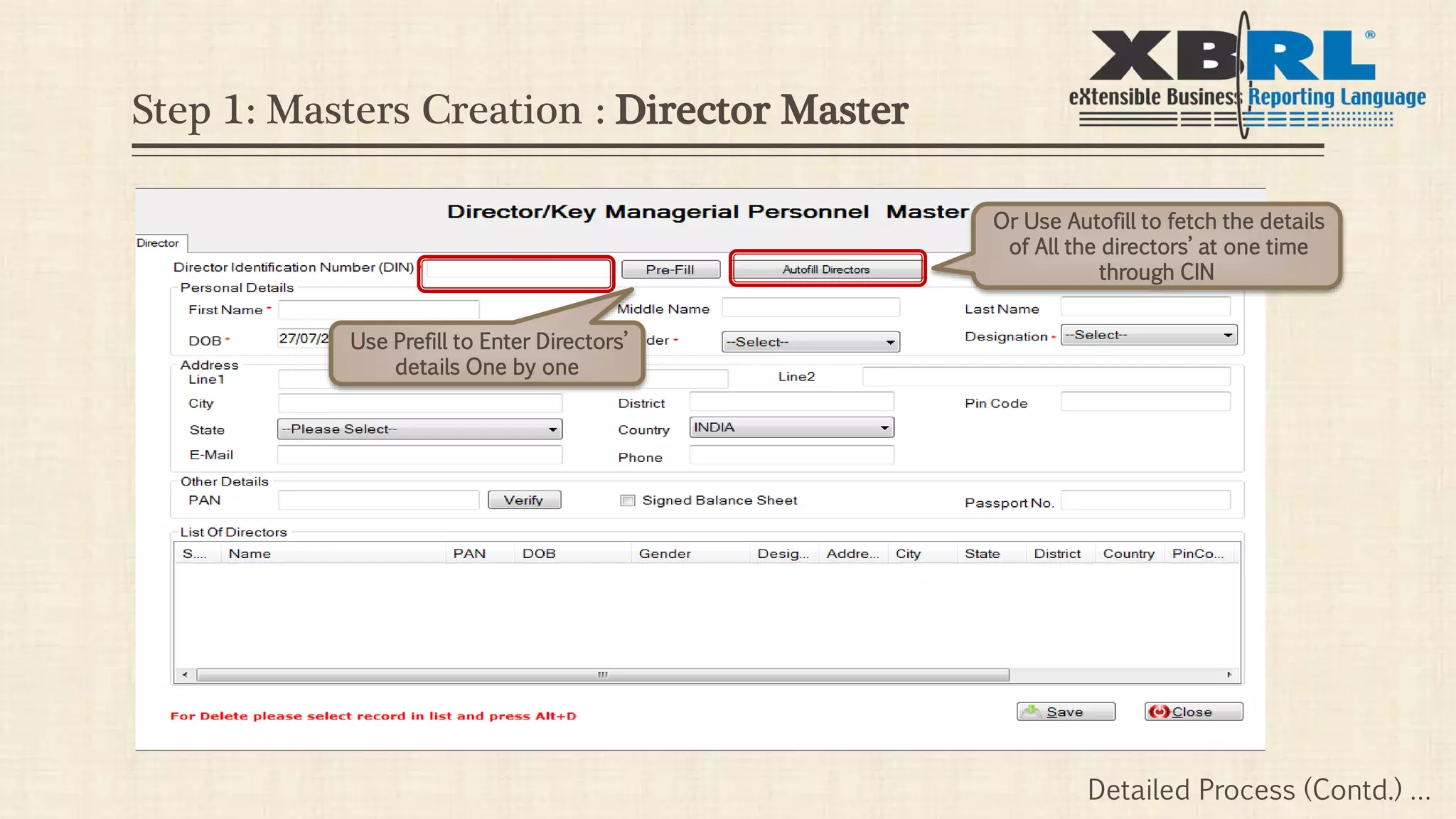
Step 1: Masters Creation : Director Master
Use Prefill to Enter Directors’
details One by one
Or Use Autofill to fetch the details
of All the directors’ at one time
through CIN
Detailed Process (Contd.) …
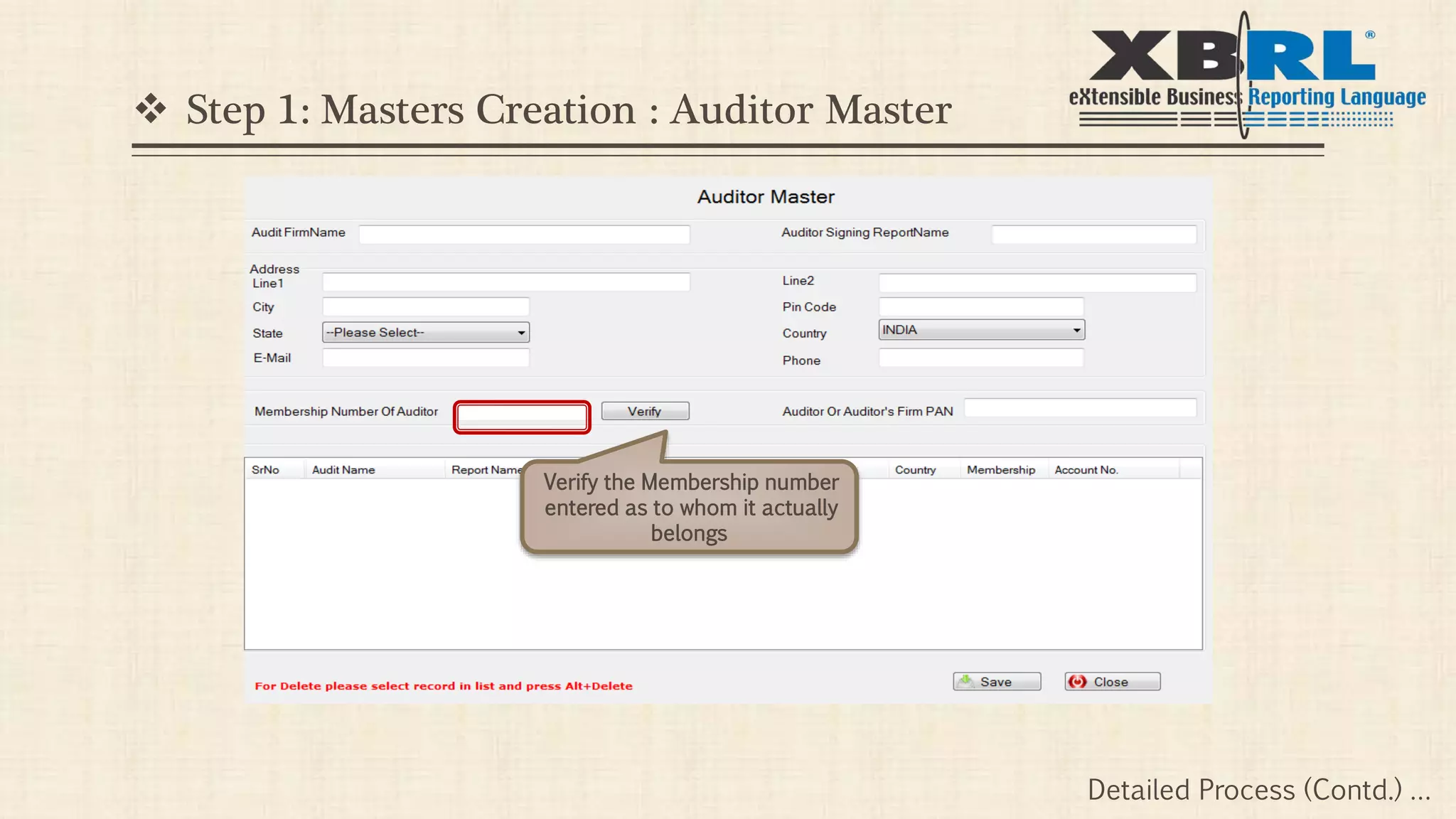
 Step 1: Masters Creation : Auditor Master
Verify the Membership number
entered as to whom it actually
belongs
Detailed Process (Contd.) …
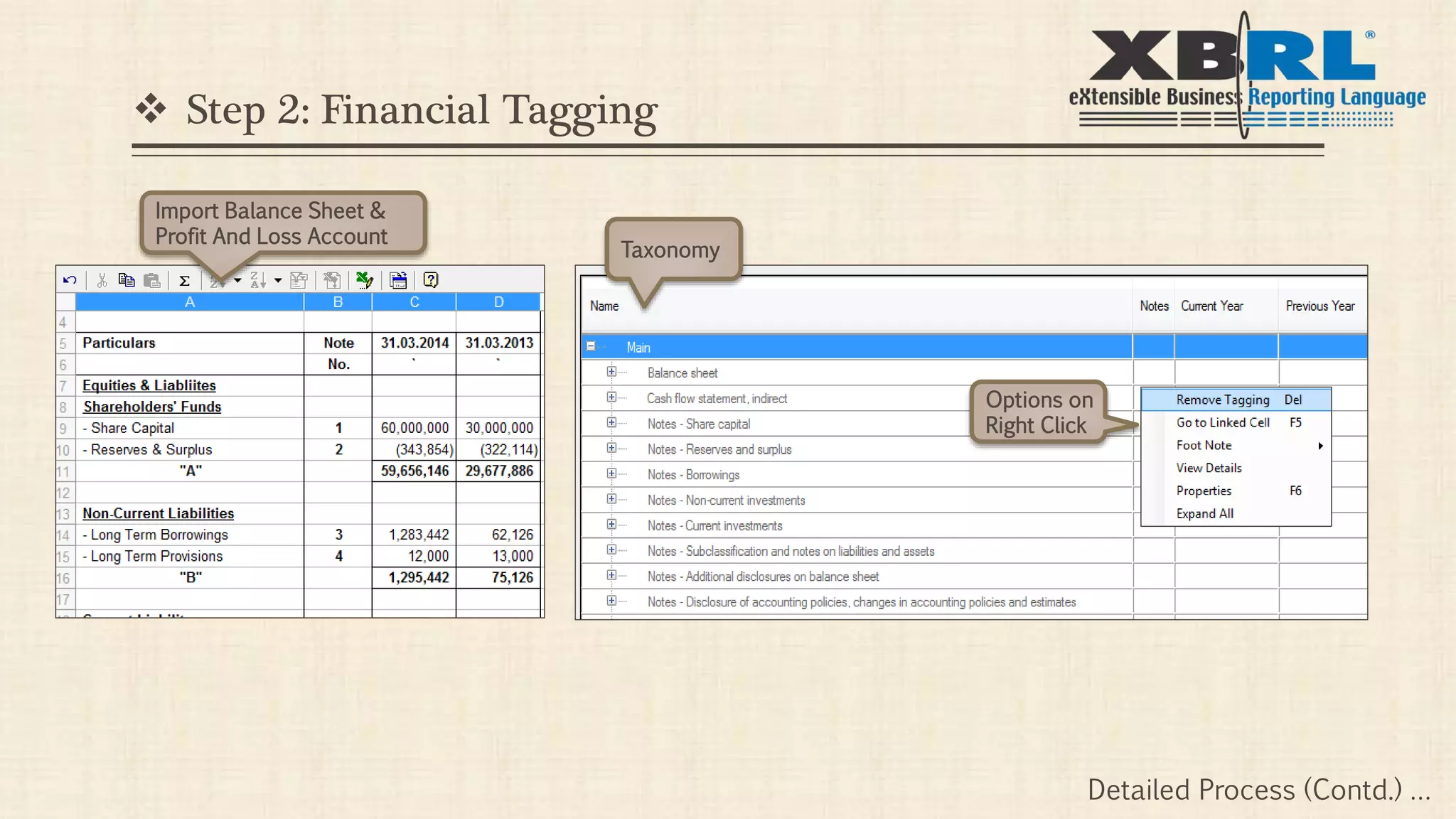
 Step 2: Financial Tagging
Import Balance Sheet &
Profit And Loss Account
Taxonomy
Options on
Right Click
Detailed Process (Contd.) …
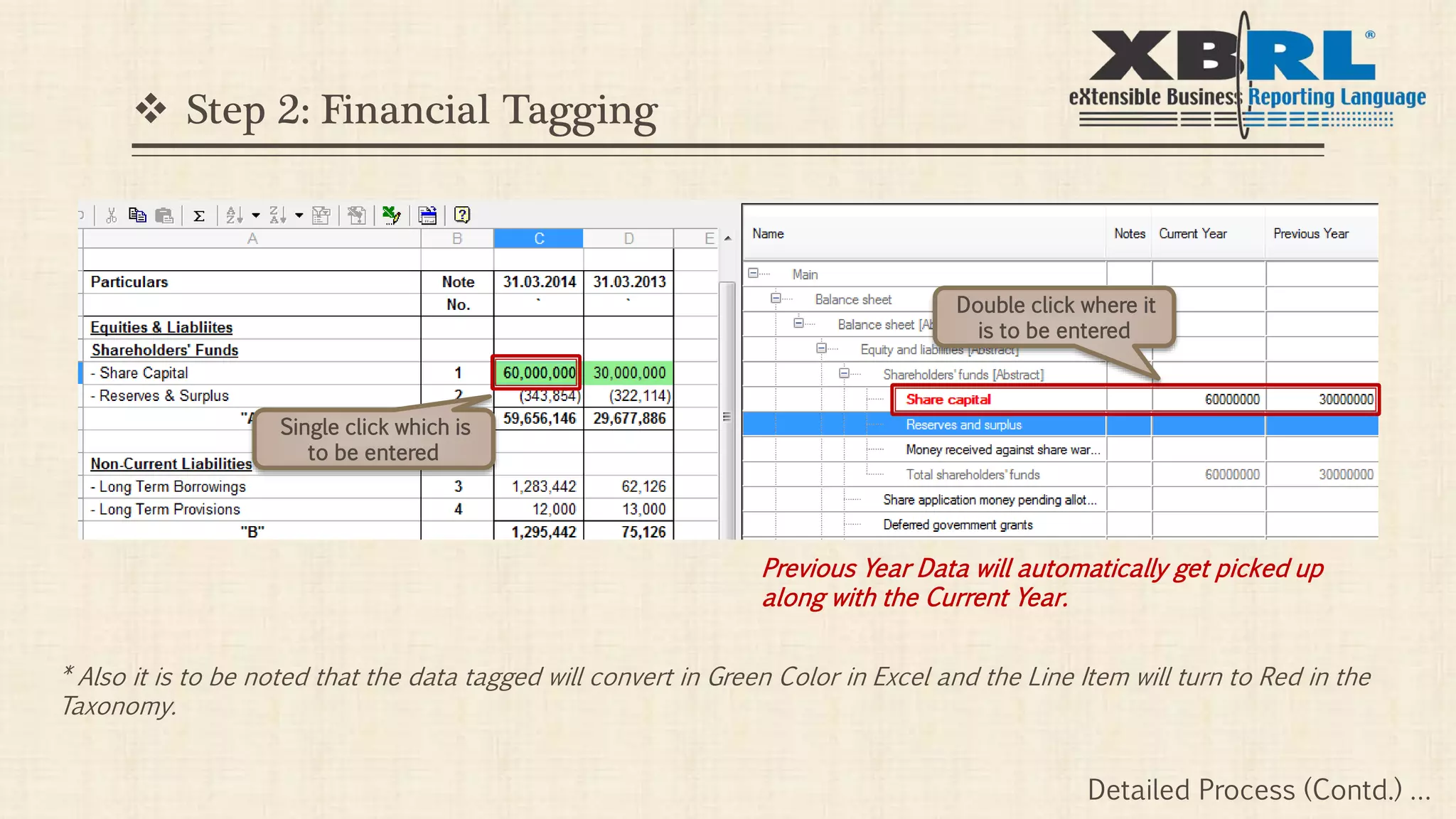
 Step 2: Financial Tagging
Single click which is
to be entered
Double click where it
is to be entered
* Also it is to be noted that the data tagged will convert in Green Color in Excel and the Line Item will turn to Red in the
Taxonomy.
Previous Year Data will automatically get picked up
along with the Current Year.
Detailed Process (Contd.) …
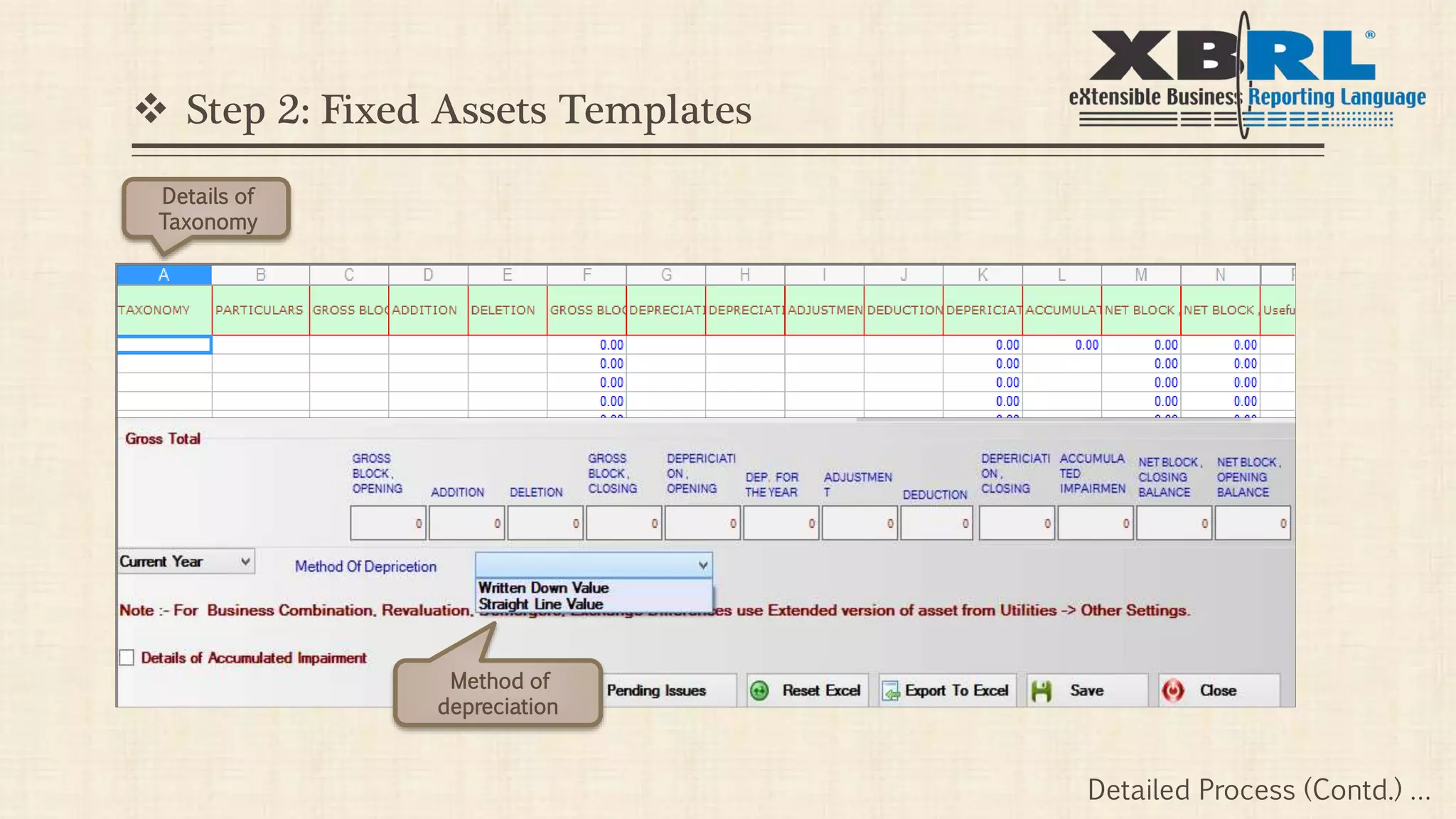
Method of
depreciation
 Step 2: Fixed Assets Templates
Details of
Taxonomy
Detailed Process (Contd.) …
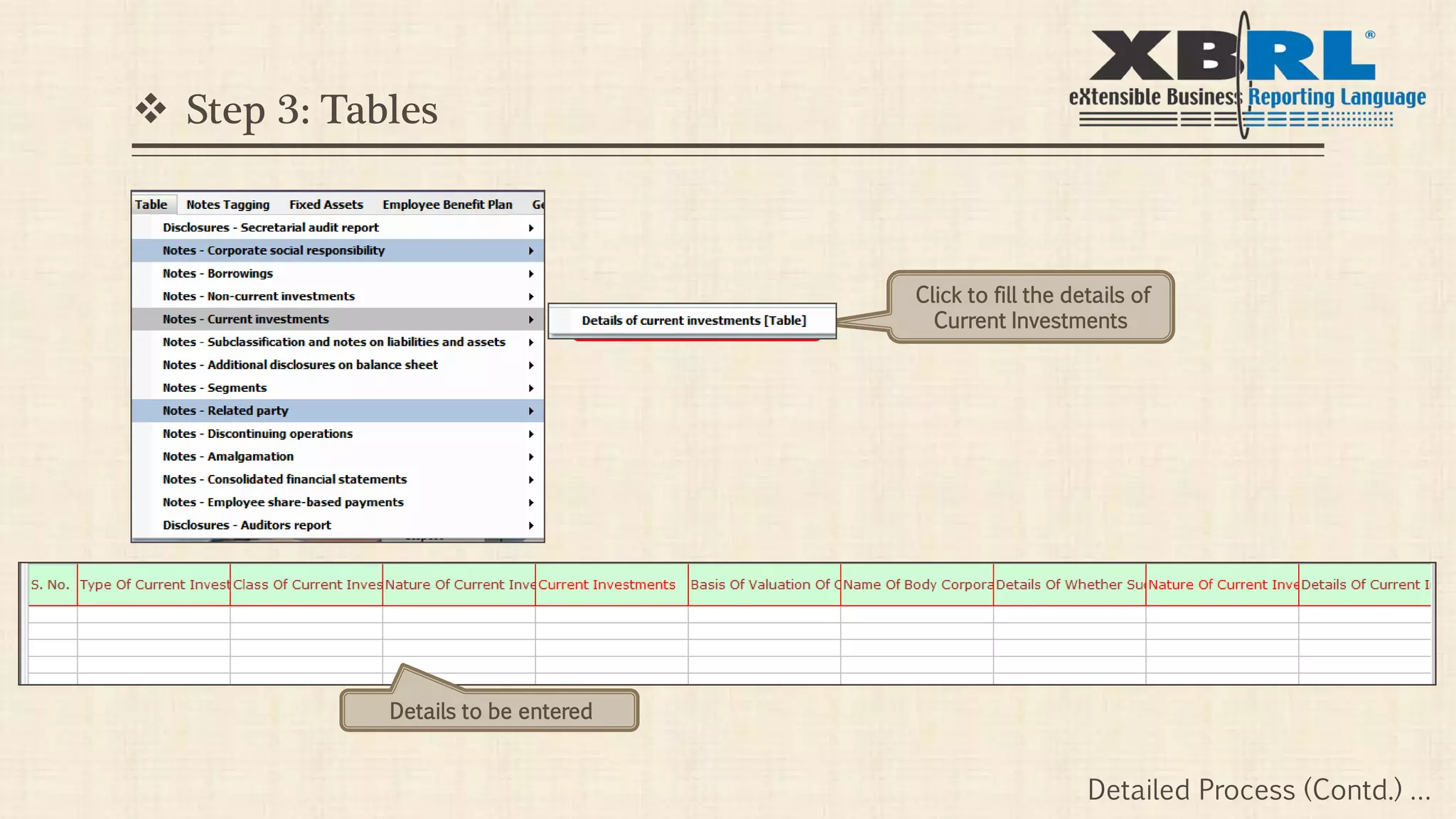
 Step 3: Tables
Click to fill the details of
Current Investments
Details to be entered
Detailed Process (Contd.) …
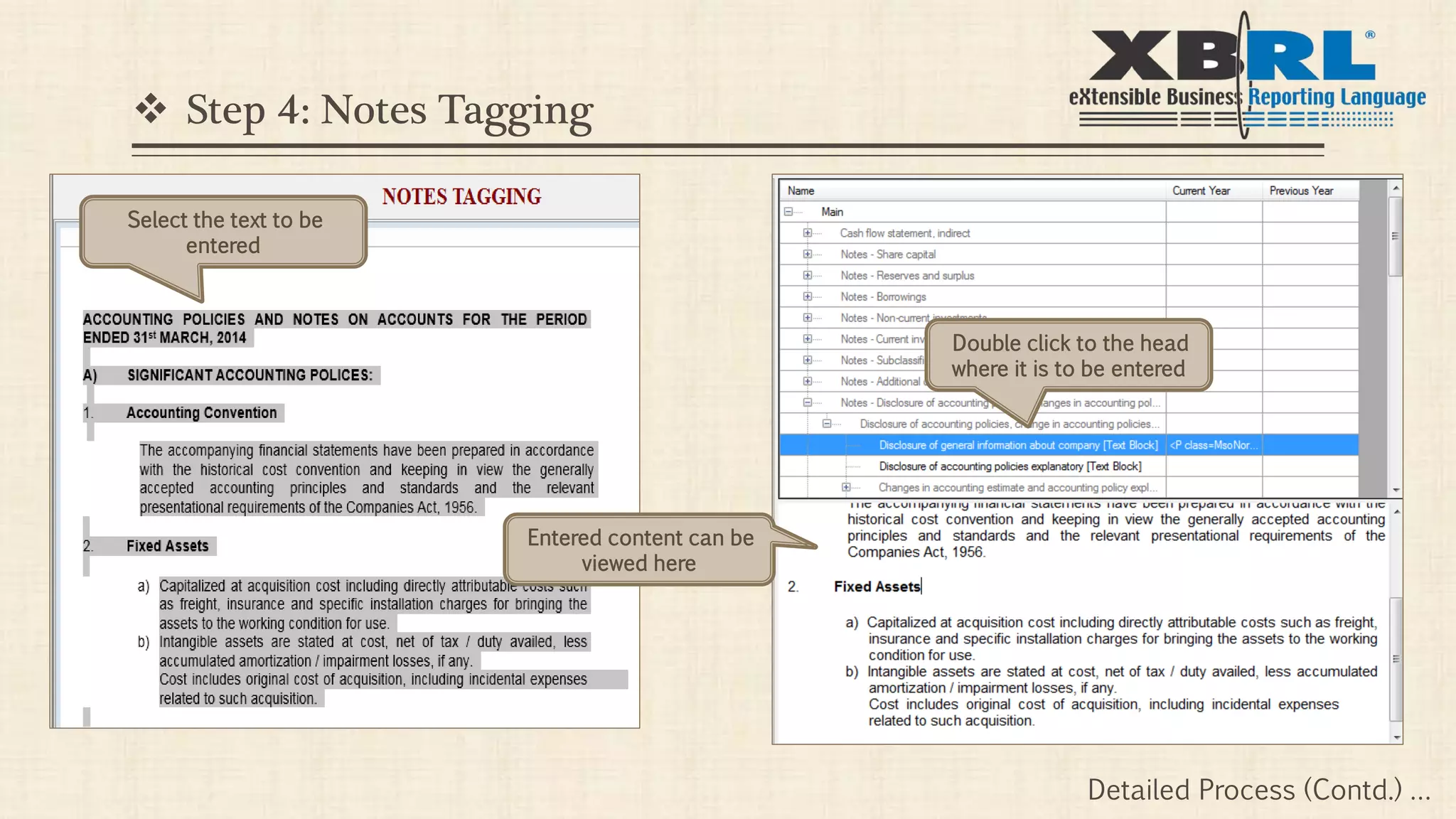
 Step 4: Notes Tagging
Select the text to be
entered
Double click to the head
where it is to be entered
Entered content can be
viewed here
Detailed Process (Contd.) …
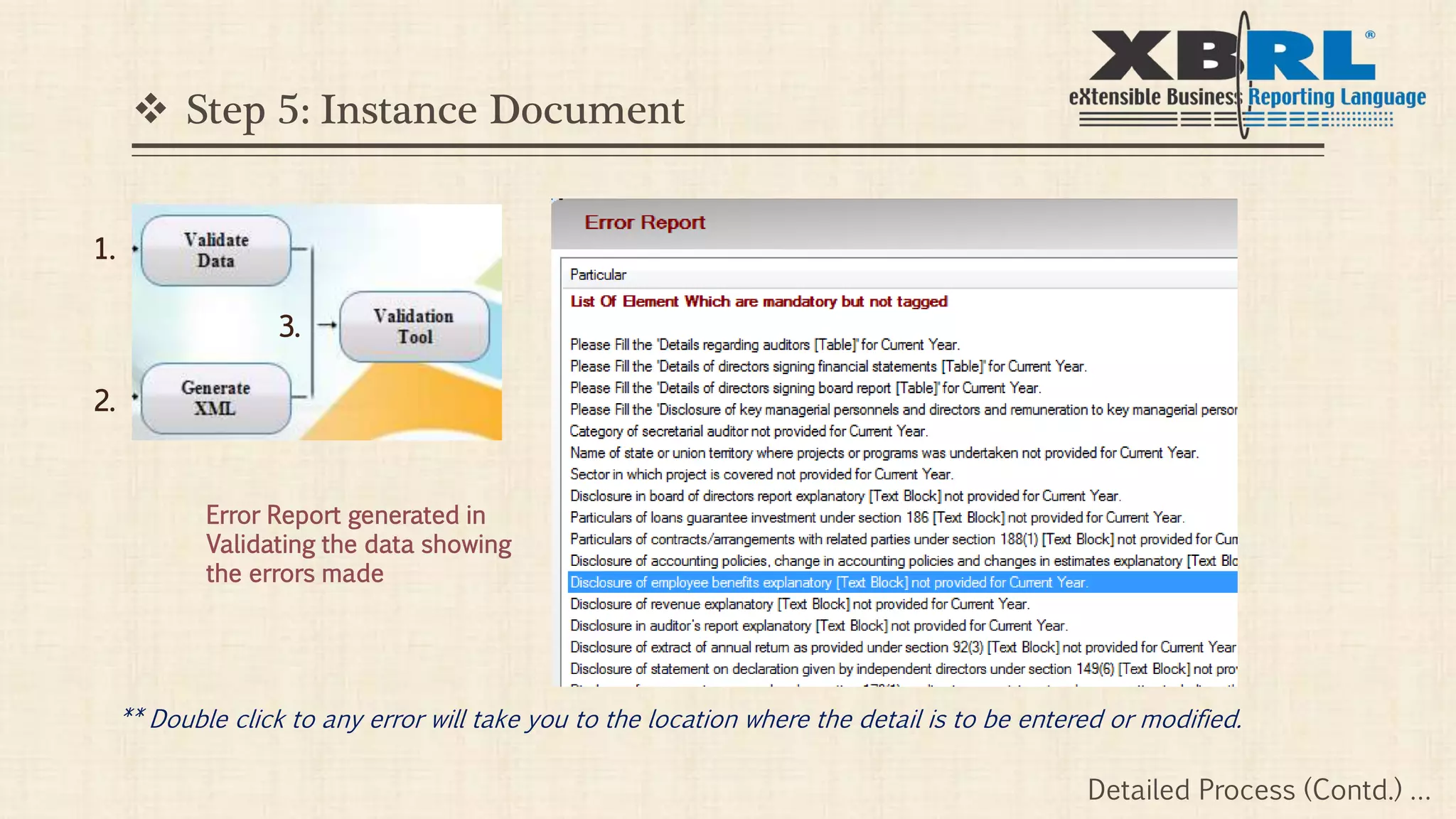
 Step 5: Instance Document
1.
2.
3.
Error Report generated in
Validating the data showing
the errors made
** Double click to any error will take you to the location where the detail is to be entered or modified.
Detailed Process (Contd.) …
 Step 5: Instance Document
1.
2.
3.
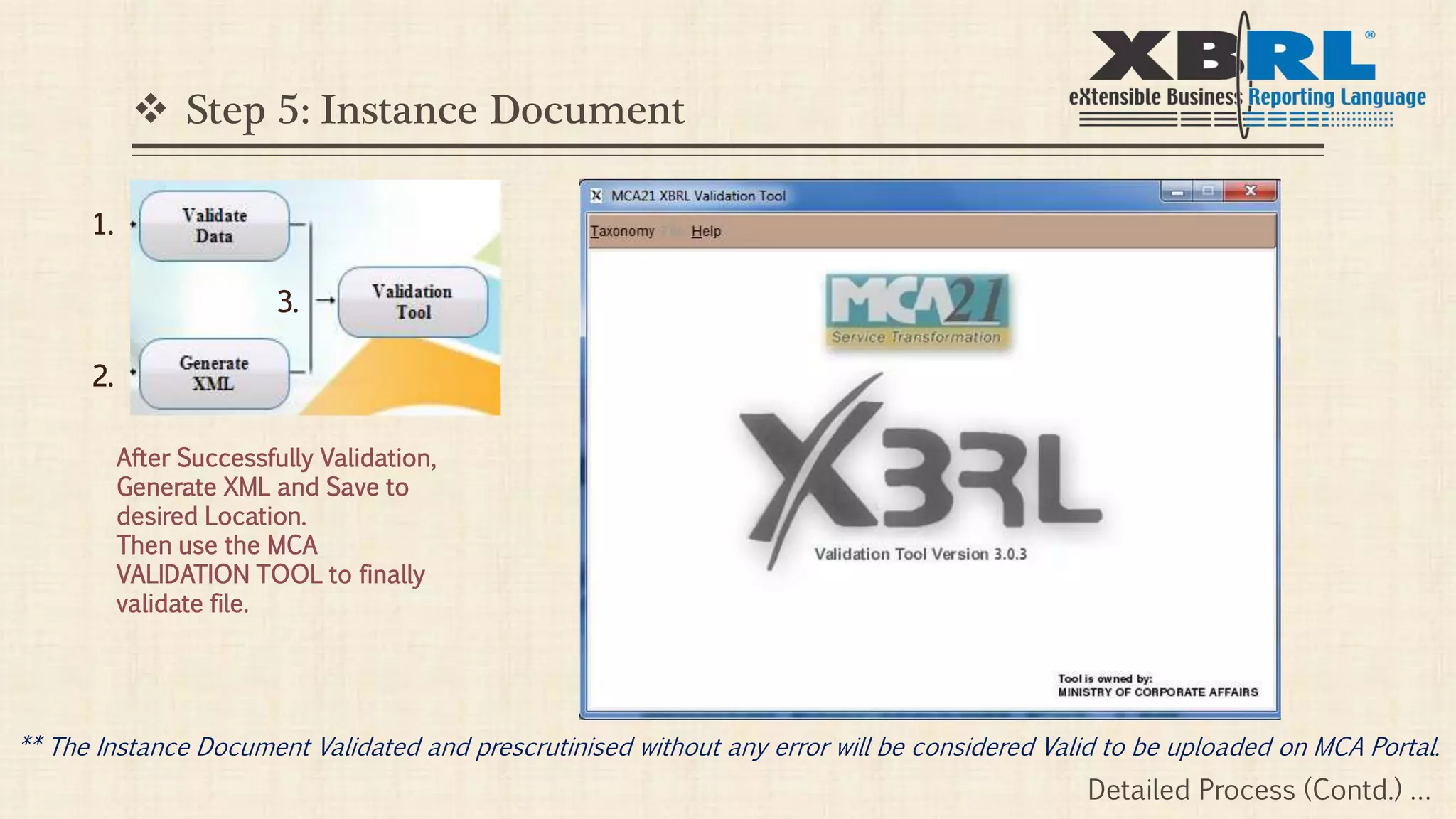
After Successfully Validation,
Generate XML and Save to
desired Location.
Then use the MCA
VALIDATION TOOL to finally
validate file.
** The Instance Document Validated and prescrutinised without any error will be considered Valid to be uploaded on MCA Portal.
Detailed Process (Contd.) …
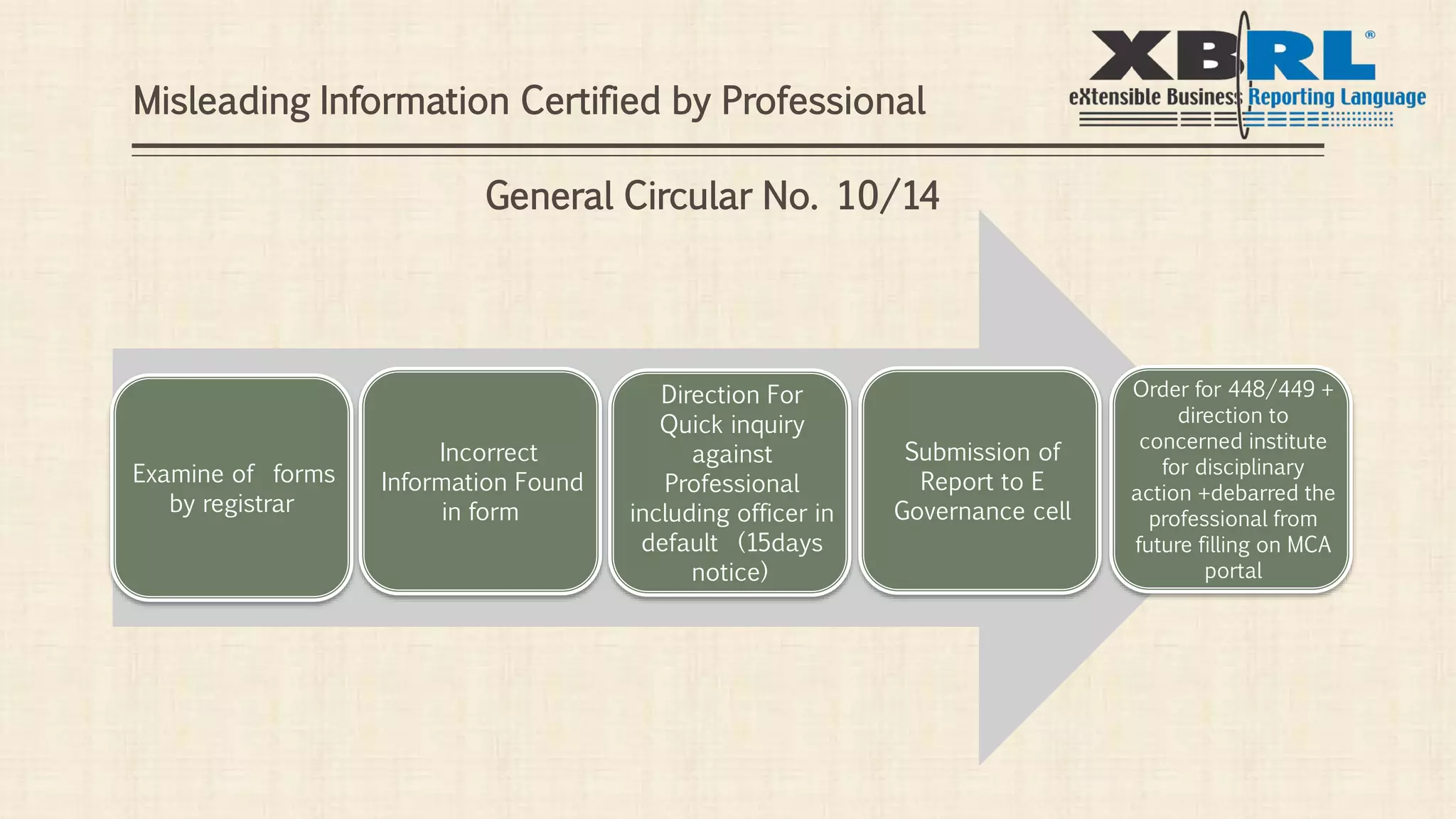
Examine of forms
by registrar
Submission of
Report to E
Governance cell
Direction For
Quick inquiry
against
Professional
including officer in
default (15days
notice)
Incorrect
Information Found
in form
Order for 448/449 +
direction to
concerned institute
for disciplinary
action +debarred the
professional from
future filling on MCA
portal
Misleading Information Certified by Professional
General Circular No. 10/14
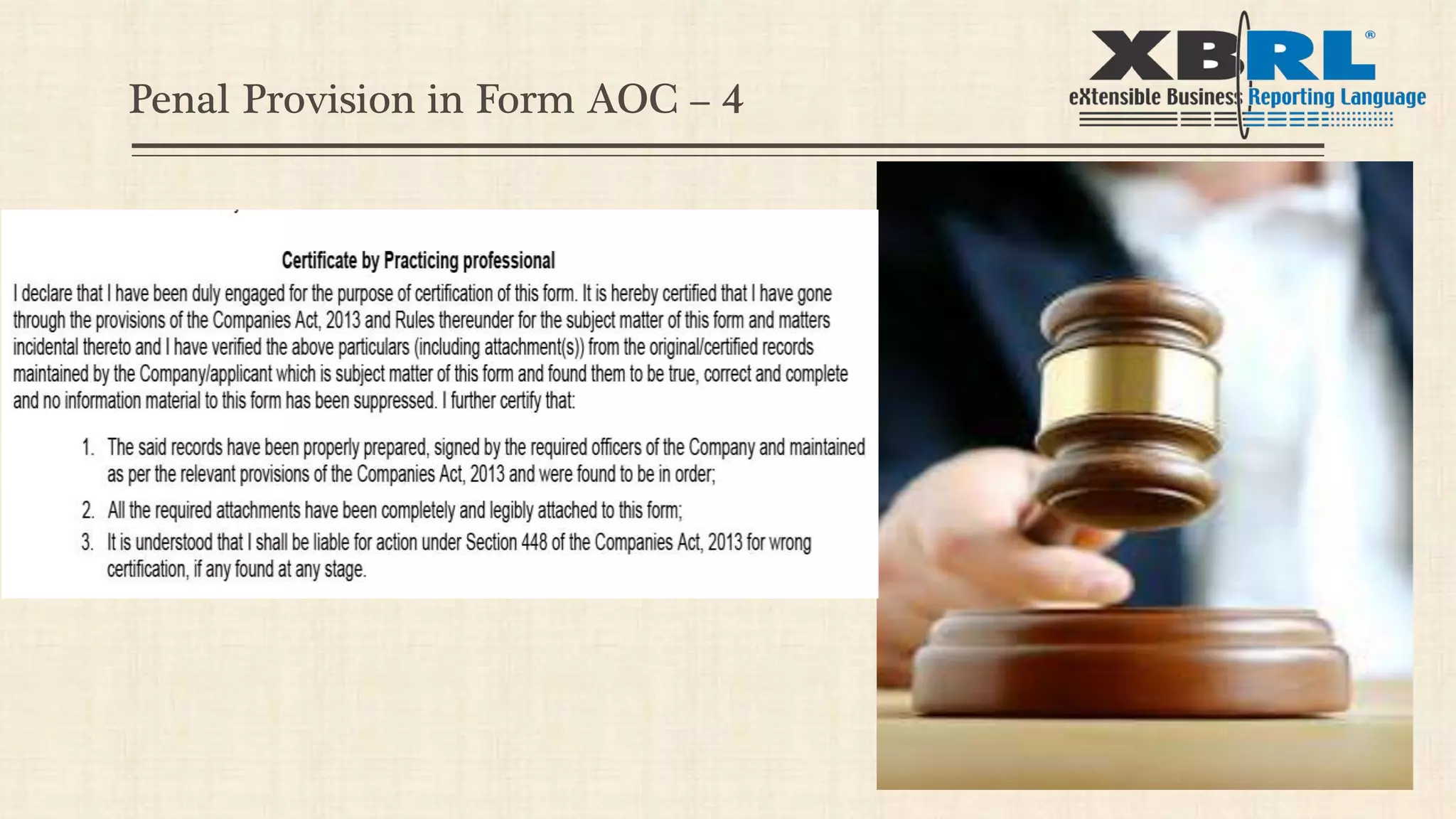
Penal Provision in Form AOC – 4
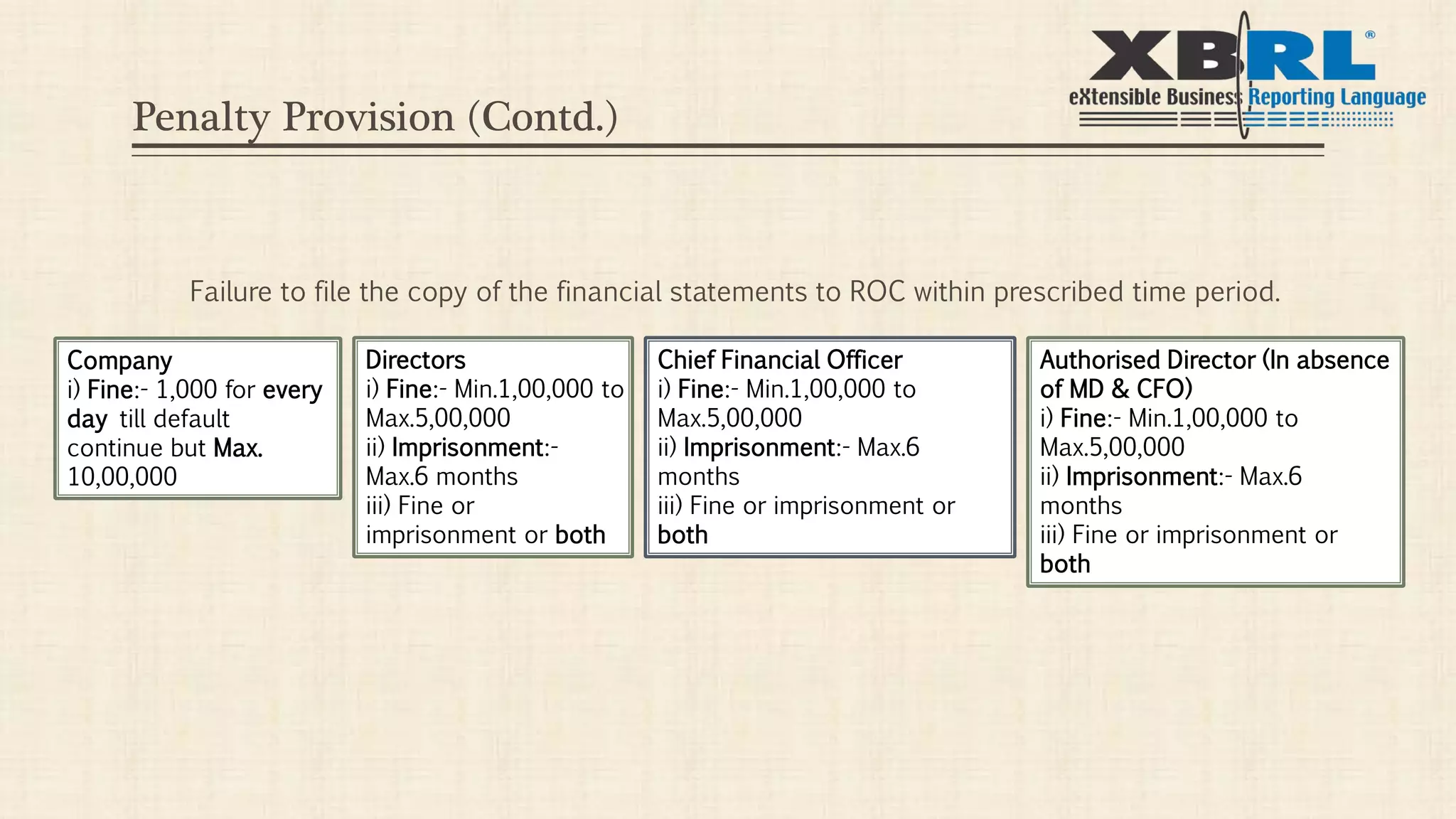
Penalty Provision (Contd.)
Failure to file the copy of the financial statements to ROC within prescribed time period.
Company
i) Fine:- 1,000 for every
day till default
continue but Max.
10,00,000
Directors
i) Fine:- Min.1,00,000 to
Max.5,00,000
ii) Imprisonment:-
Max.6 months
iii) Fine or
imprisonment or both
Chief Financial Officer
i) Fine:- Min.1,00,000 to
Max.5,00,000
ii) Imprisonment:- Max.6
months
iii) Fine or imprisonment or
both
Authorised Director (In absence
of MD & CFO)
i) Fine:- Min.1,00,000 to
Max.5,00,000
ii) Imprisonment:- Max.6
months
iii) Fine or imprisonment or
both
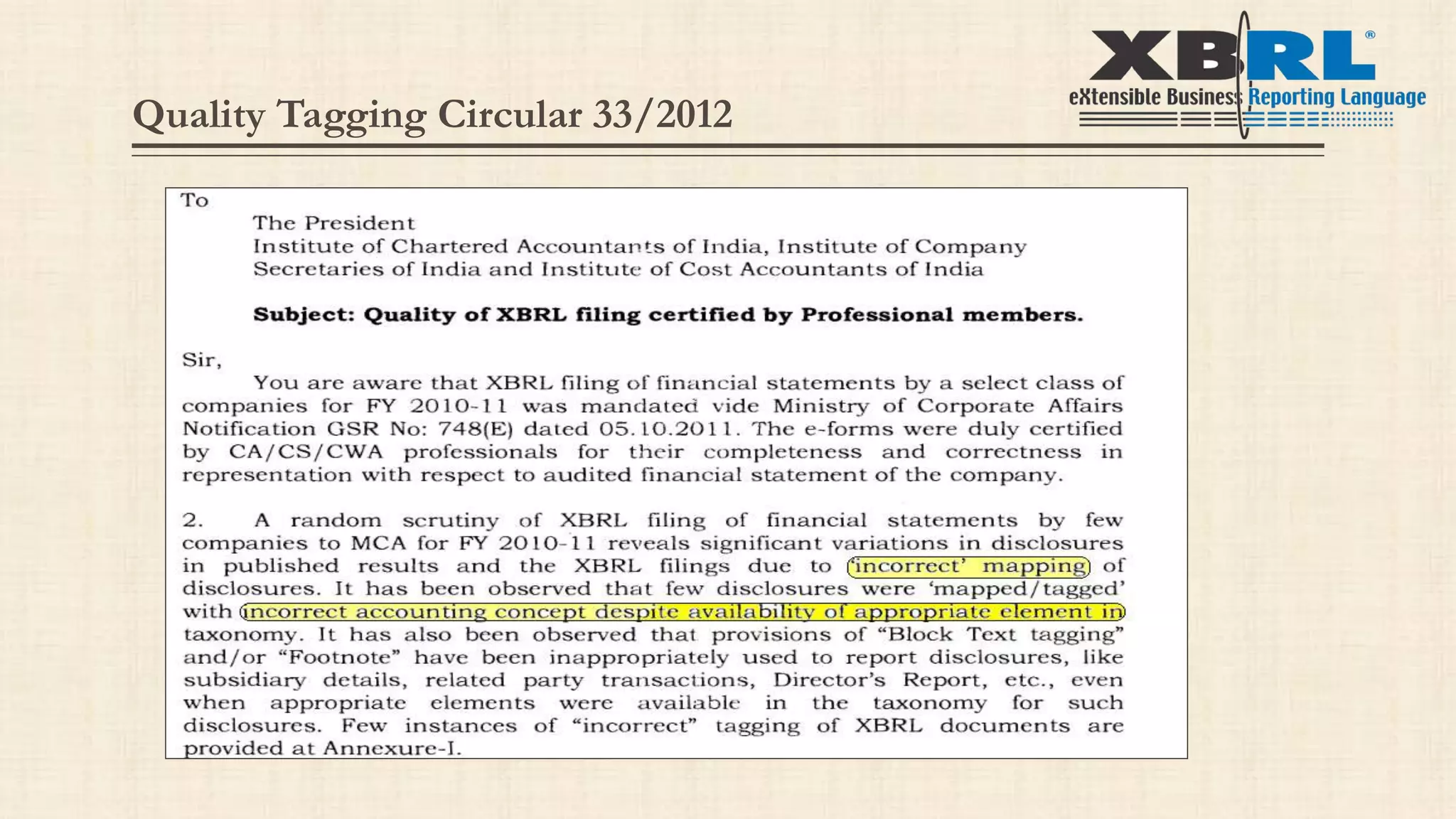
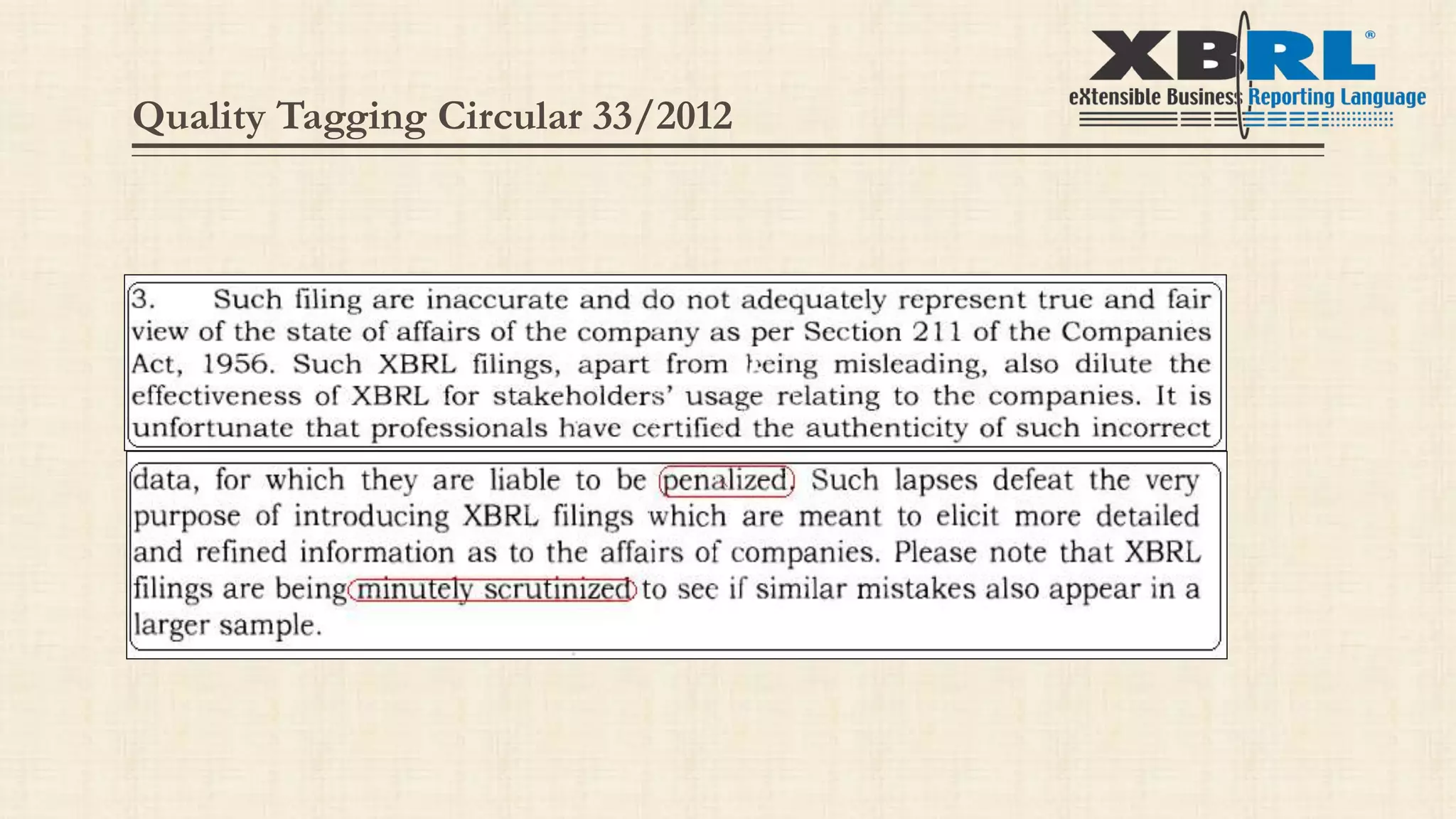
Quality Tagging Circular 33/2012
XBRL Process Flow

XBRL Process Flow

  • 1.
    Webtel Electrosoft Pvt.Ltd. 110-114, Rattan Jyoti Building, Rajendra Place, New Delhi – 110008 Contact: 011-45054040 Email: contact@webxbrl.com XBRL PROCESS FLOW (VIA UNIQUE TAGGING APPROACH) XBRL Masters creation Financial Tagging Quality Tagging Notes tagging Penalty Provisions
  • 2.
    About Webtel Software Solutionsand Business Process Outsourcing Activities Team of professionals consisting of C.A, C.S, Legal and Software Professionals. First Company to launch ‘e’ TDS product in 2004 after the declaration of mandatory filing of TDS by Income Tax department. Pioneer in ‘e’ compliance solutions for Income Tax, MCA and VAT Registered with NSDL and Income Tax Department Presence at Delhi, Mumbai, Kolkata, Chennai, Ahmedabad , Hyderabad, Bengaluru, Punjab, Pune, HP. More than 27000 customers all over India.
  • 3.
    Edge in XBRL Involvedin ‘e’ filing process since last 11 years Expert knowledge in Taxonomy and Indian Reporting system. Recognized and listed in MCA as software vendor and service provider for XBRL Recognized and listed in HMRC-UK for UK XBRL Team engaged in MCA processes and handling XBRL filing with a systematic approach. Webtel
  • 4.
    Edge in XBRL Firstcompany which passed through the validation process of MCA More than 300 Seminars/Training Programs at various forums of ICAI, ICSI, ICWAI, ASSOCHAM and CII etc. Emerged as India’s Leading company in XBRL Solution and XBRL Outsourcing. Best rated support service in the industry in XBRL space and other compliance products Webtel
  • 5.
    eXtensible Business ReportingLanguage Language For Electronic Communication of Financial Data. Based on Powerful Version of XML. (XML + Business Rules=XBRL) Identifying XBRL Tag for Each Line Item.
  • 6.
    Regulatory Requirement Circular MandatingXBRL Filing - General Circular No. 37/2011 Any company fulfilling any of the conditions is liable to file under XBRL Format: All listed companies & Their Indian Subsidiaries Companies having a paid-up capital of Rs. 5 crores or more. Companies having a turnover of Rs. 100 crores or more.
  • 7.
    Automatic creation ofCompany/Directors’ Master through CIN, DIN etc. Import of Balance Sheet and P&L Account Data from Excel to Software for Easy Tagging. Tagging of Financial Data for Current & Previous Year in One go. Import Auditor's Report/Director's Report, Notes etc. from word file/excel file . Easy Mapping of Non Financial Data i.e. Notes to Accounts etc. Easy Mapping of Data with Tables etc. in Dimensions. Facility to Add/Edit footnote WEB-XBRL
  • 8.
    Facility for Automaticimport of Footnote from Excel Sheet when multiple items tagged to single taxonomy element . Facility to Load Previous Year Data, wherever needed (Fixed Asset , Related Party & Investment etc) In built Validations to Prevent Errors. Easy to locate error from error list . Validation of XBRL Instance Document through MCA Validation Tool from Software Generation of XBRL Instance Document Facility for Back up & Restoration of Data. Live Updates. WEB-XBRL (Contd.)
  • 9.
    Process Flow ofWeb-XBRL (To generate XML document) Step 1: Creation of Masters Company (Though CIN) Directors’ (Through CIN) Auditors’ Step 2: Financial Tagging along with Fixed Assets Templates Step 3: Tables Step 4: Notes tagging Step 5: Generation of Instance Document (XML file)
  • 10.
    Process of XBRL Generationof Instance Document. XBRL Validation. Removal of Validation errors (If Any). Prescrutiny Removal of Prescrutiny Errors (If Any). Use of Form AOC - 4 for XBRL Filing. Attach Instance Document to Form AOC-4. Submission of Forms at MCA portal.
  • 11.
  • 12.
    Enter CIN &Click on Prefill to fetch all the data regarding Company master Detailed Process (Contd.) … Step 1: Masters Creation : Company Master
  • 13.
    Step 1: MastersCreation : Director Master Use Prefill to Enter Directors’ details One by one Or Use Autofill to fetch the details of All the directors’ at one time through CIN Detailed Process (Contd.) …
  • 14.
     Step 1:Masters Creation : Auditor Master Verify the Membership number entered as to whom it actually belongs Detailed Process (Contd.) …
  • 15.
     Step 2:Financial Tagging Import Balance Sheet & Profit And Loss Account Taxonomy Options on Right Click Detailed Process (Contd.) …
  • 16.
     Step 2:Financial Tagging Single click which is to be entered Double click where it is to be entered * Also it is to be noted that the data tagged will convert in Green Color in Excel and the Line Item will turn to Red in the Taxonomy. Previous Year Data will automatically get picked up along with the Current Year. Detailed Process (Contd.) …
  • 17.
    Method of depreciation  Step2: Fixed Assets Templates Details of Taxonomy Detailed Process (Contd.) …
  • 18.
     Step 3:Tables Click to fill the details of Current Investments Details to be entered Detailed Process (Contd.) …
  • 19.
     Step 4:Notes Tagging Select the text to be entered Double click to the head where it is to be entered Entered content can be viewed here Detailed Process (Contd.) …
  • 20.
     Step 5:Instance Document 1. 2. 3. Error Report generated in Validating the data showing the errors made ** Double click to any error will take you to the location where the detail is to be entered or modified. Detailed Process (Contd.) …
  • 21.
     Step 5:Instance Document 1. 2. 3. After Successfully Validation, Generate XML and Save to desired Location. Then use the MCA VALIDATION TOOL to finally validate file. ** The Instance Document Validated and prescrutinised without any error will be considered Valid to be uploaded on MCA Portal. Detailed Process (Contd.) …
  • 22.
    Examine of forms byregistrar Submission of Report to E Governance cell Direction For Quick inquiry against Professional including officer in default (15days notice) Incorrect Information Found in form Order for 448/449 + direction to concerned institute for disciplinary action +debarred the professional from future filling on MCA portal Misleading Information Certified by Professional General Circular No. 10/14
  • 23.
    Penal Provision inForm AOC – 4
  • 24.
    Penalty Provision (Contd.) Failureto file the copy of the financial statements to ROC within prescribed time period. Company i) Fine:- 1,000 for every day till default continue but Max. 10,00,000 Directors i) Fine:- Min.1,00,000 to Max.5,00,000 ii) Imprisonment:- Max.6 months iii) Fine or imprisonment or both Chief Financial Officer i) Fine:- Min.1,00,000 to Max.5,00,000 ii) Imprisonment:- Max.6 months iii) Fine or imprisonment or both Authorised Director (In absence of MD & CFO) i) Fine:- Min.1,00,000 to Max.5,00,000 ii) Imprisonment:- Max.6 months iii) Fine or imprisonment or both
  • 25.
  • 26.