About
1. CEO of DevRain Solutions – software development.
2. Microsoft Regional Director.
3. Microsoft Windows Phone Most Valuable Professional
(Windows Platform Development).
4. Best Professional in Software Architecture (Ukrainian IT
Award).
5. Ph.D. in Computer Science.
6. Speaker and blogger.
Agenda
1. Platform Convergence Journey and UWP
2. Xamarin Growth
3. Microsoft + Xamarin = Complete Mobile
Ecosystem
4. What’s new in Xamarin 2016
5. Q&A
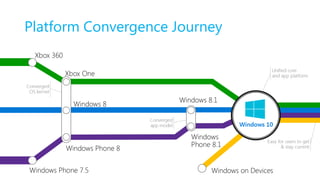
Platform Convergence Journey
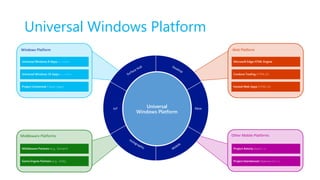
Universal Windows Platform
XboxIoT Universal
Windows Platform
Middleware Platforms
Middleware Partners (e.g., Xamarin)
Game Engine Partners (e.g., Unity)
Windows Platform
Universal Windows 8 Apps (C++/C#/JS)
Universal Windows 10 Apps (C++/C#/JS)
Project Centennial (Classic Apps)
Web Platform
Microsoft Edge HTML Engine
Cordova Tooling (HTML/JS)
Hosted Web Apps (HTML/JS)
Other Mobile Platforms
Project Astoria (Java/C++)
Project Islandwood (Objective C/C++)
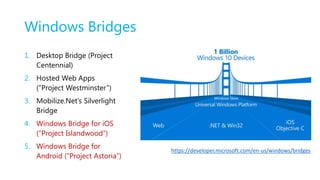
Windows Bridges
1. Desktop Bridge (Project
Centennial)
2. Hosted Web Apps
(”Project Westminster”)
3. Mobilize.Net’s Silverlight
Bridge
4. Windows Bridge for iOS
(“Project Islandwood”)
5. Windows Bridge for
Android (”Project Astoria”)
https://developer.microsoft.com/en-us/windows/bridges
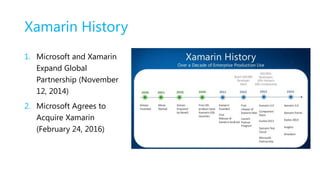
Xamarin History
1. Microsoft and Xamarin
Expand Global
Partnership (November
12, 2014)
2. Microsoft Agrees to
Acquire Xamarin
(February 24, 2016)
Anything you can do in Objective-C,
Swift, or Java can be done in C# and
Visual Studio with Xamarin.
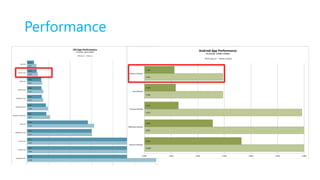
Performance
Drawbacks
1. Price. It’s not cheap.
2. Minor bugs & updates issues.
3. Applications binaries size is bigger.
4. Mac machine is required.
5. Harder to find Xamarin developers.
6. Xamarin.Forms are not suitable for all project types.
7. Not the best choice for rich UI apps with poor business logic.
8. Small community comparing to iOS/Android/.NET but it’s growing.
9. Suitable only for new apps.
10. Customers are afraid of cross-platform tools.
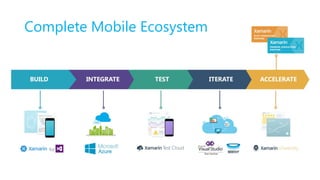
Complete Mobile Ecosystem
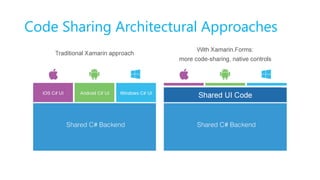
Code Sharing Architectural Approaches
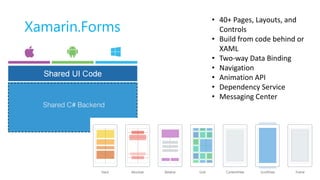
Xamarin.Forms
• 40+ Pages, Layouts, and
Controls
• Build from code behind or
XAML
• Two-way Data Binding
• Navigation
• Animation API
• Dependency Service
• Messaging Center
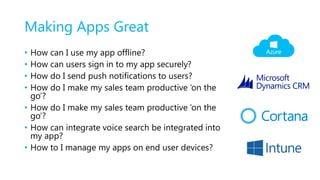
Making Apps Great
• How can I use my app offline?
• How can users sign in to my app securely?
• How do I send push notifications to users?
• How do I make my sales team productive ‘on the
go’?
• How do I make my sales team productive ‘on the
go’?
• How can integrate voice search be integrated into
my app?
• How to I manage my apps on end user devices?
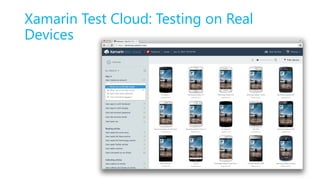
Xamarin Test Cloud: Testing on Real
Devices
Continuously Product Improvements
• Distribute app to beta users
• Monitor your app’s health
• Understand your users
• Measure adoption and usage
• Quickly resolve app crashes
• Continuous Integration & Delivery
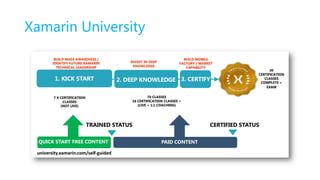
Xamarin University
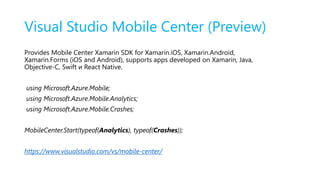
Visual Studio Mobile Center (Preview)
Provides Mobile Center Xamarin SDK for Xamarin.iOS, Xamarin.Android,
Xamarin.Forms (iOS and Android), supports apps developed on Xamarin, Java,
Objective-C, Swift и React Native.
using Microsoft.Azure.Mobile;
using Microsoft.Azure.Mobile.Analytics;
using Microsoft.Azure.Mobile.Crashes;
MobileCenter.Start(typeof(Analytics), typeof(Crashes));
https://www.visualstudio.com/vs/mobile-center/
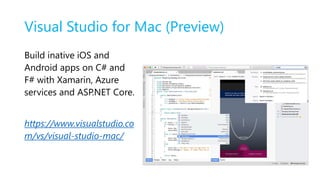
Visual Studio for Mac (Preview)
Build inative iOS and
Android apps on C# and
F# with Xamarin, Azure
services and ASP.NET Core.
https://www.visualstudio.co
m/vs/visual-studio-mac/
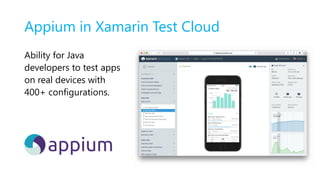
Appium in Xamarin Test Cloud
Ability for Java
developers to test apps
on real devices with
400+ configurations.
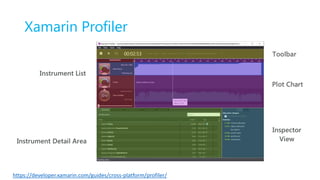
Xamarin Profiler
https://developer.xamarin.com/guides/cross-platform/profiler/
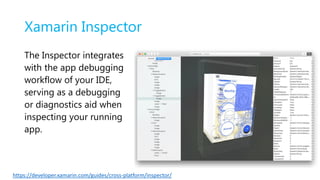
Xamarin Inspector
https://developer.xamarin.com/guides/cross-platform/inspector/
The Inspector integrates
with the app debugging
workflow of your IDE,
serving as a debugging
or diagnostics aid when
inspecting your running
app.
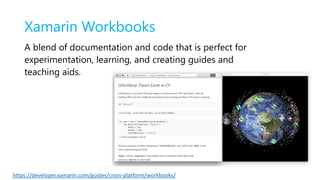
Xamarin Workbooks
https://developer.xamarin.com/guides/cross-platform/workbooks/
A blend of documentation and code that is perfect for
experimentation, learning, and creating guides and
teaching aids.
Q&A
Alex.Krakovetskiy@devrain.com
@msugvnua

Александр Краковецкий "Xamarin.vNext: жизнь после Microsoft"

  • 2.
    About 1. CEO ofDevRain Solutions – software development. 2. Microsoft Regional Director. 3. Microsoft Windows Phone Most Valuable Professional (Windows Platform Development). 4. Best Professional in Software Architecture (Ukrainian IT Award). 5. Ph.D. in Computer Science. 6. Speaker and blogger.
  • 3.
    Agenda 1. Platform ConvergenceJourney and UWP 2. Xamarin Growth 3. Microsoft + Xamarin = Complete Mobile Ecosystem 4. What’s new in Xamarin 2016 5. Q&A
  • 4.
  • 5.
    Universal Windows Platform XboxIoTUniversal Windows Platform Middleware Platforms Middleware Partners (e.g., Xamarin) Game Engine Partners (e.g., Unity) Windows Platform Universal Windows 8 Apps (C++/C#/JS) Universal Windows 10 Apps (C++/C#/JS) Project Centennial (Classic Apps) Web Platform Microsoft Edge HTML Engine Cordova Tooling (HTML/JS) Hosted Web Apps (HTML/JS) Other Mobile Platforms Project Astoria (Java/C++) Project Islandwood (Objective C/C++)
  • 6.
    Windows Bridges 1. DesktopBridge (Project Centennial) 2. Hosted Web Apps (”Project Westminster”) 3. Mobilize.Net’s Silverlight Bridge 4. Windows Bridge for iOS (“Project Islandwood”) 5. Windows Bridge for Android (”Project Astoria”) https://developer.microsoft.com/en-us/windows/bridges
  • 7.
    Xamarin History 1. Microsoftand Xamarin Expand Global Partnership (November 12, 2014) 2. Microsoft Agrees to Acquire Xamarin (February 24, 2016)
  • 8.
    Anything you cando in Objective-C, Swift, or Java can be done in C# and Visual Studio with Xamarin.
  • 9.
  • 10.
    Drawbacks 1. Price. It’snot cheap. 2. Minor bugs & updates issues. 3. Applications binaries size is bigger. 4. Mac machine is required. 5. Harder to find Xamarin developers. 6. Xamarin.Forms are not suitable for all project types. 7. Not the best choice for rich UI apps with poor business logic. 8. Small community comparing to iOS/Android/.NET but it’s growing. 9. Suitable only for new apps. 10. Customers are afraid of cross-platform tools.
  • 11.
  • 12.
  • 13.
    Xamarin.Forms • 40+ Pages,Layouts, and Controls • Build from code behind or XAML • Two-way Data Binding • Navigation • Animation API • Dependency Service • Messaging Center
  • 14.
    Making Apps Great •How can I use my app offline? • How can users sign in to my app securely? • How do I send push notifications to users? • How do I make my sales team productive ‘on the go’? • How do I make my sales team productive ‘on the go’? • How can integrate voice search be integrated into my app? • How to I manage my apps on end user devices?
  • 15.
    Xamarin Test Cloud:Testing on Real Devices
  • 16.
    Continuously Product Improvements •Distribute app to beta users • Monitor your app’s health • Understand your users • Measure adoption and usage • Quickly resolve app crashes • Continuous Integration & Delivery
  • 17.
  • 19.
    Visual Studio MobileCenter (Preview) Provides Mobile Center Xamarin SDK for Xamarin.iOS, Xamarin.Android, Xamarin.Forms (iOS and Android), supports apps developed on Xamarin, Java, Objective-C, Swift и React Native. using Microsoft.Azure.Mobile; using Microsoft.Azure.Mobile.Analytics; using Microsoft.Azure.Mobile.Crashes; MobileCenter.Start(typeof(Analytics), typeof(Crashes)); https://www.visualstudio.com/vs/mobile-center/
  • 20.
    Visual Studio forMac (Preview) Build inative iOS and Android apps on C# and F# with Xamarin, Azure services and ASP.NET Core. https://www.visualstudio.co m/vs/visual-studio-mac/
  • 21.
    Appium in XamarinTest Cloud Ability for Java developers to test apps on real devices with 400+ configurations.
  • 22.
  • 23.
    Xamarin Inspector https://developer.xamarin.com/guides/cross-platform/inspector/ The Inspectorintegrates with the app debugging workflow of your IDE, serving as a debugging or diagnostics aid when inspecting your running app.
  • 24.
    Xamarin Workbooks https://developer.xamarin.com/guides/cross-platform/workbooks/ A blendof documentation and code that is perfect for experimentation, learning, and creating guides and teaching aids.
  • 25.