Software Engineering
                                 Prof.Dr.ir. F. Gielen


Functional Requirements
Use cases & System Scenarios


  Vakgroep Informatietechnologie – IBCN
Use Cases & Scenarios
 Use  cases, sometimes called user scenarios,
  are narratives or flow diagrams that describe
  how users will interact with a system.
 Some people also refer to them as task
  analysis or user flows. Regardless of what
  you call them, the idea is the same:
       Illustrate to people scenarios or specific tasks
        which users will perform on the system.
       Illustrate how the system interacts with other
        systems.


Vakgroep Informatietechnologie – Onderzoeksgroep IBCN   p. 2
Use Case Diagram
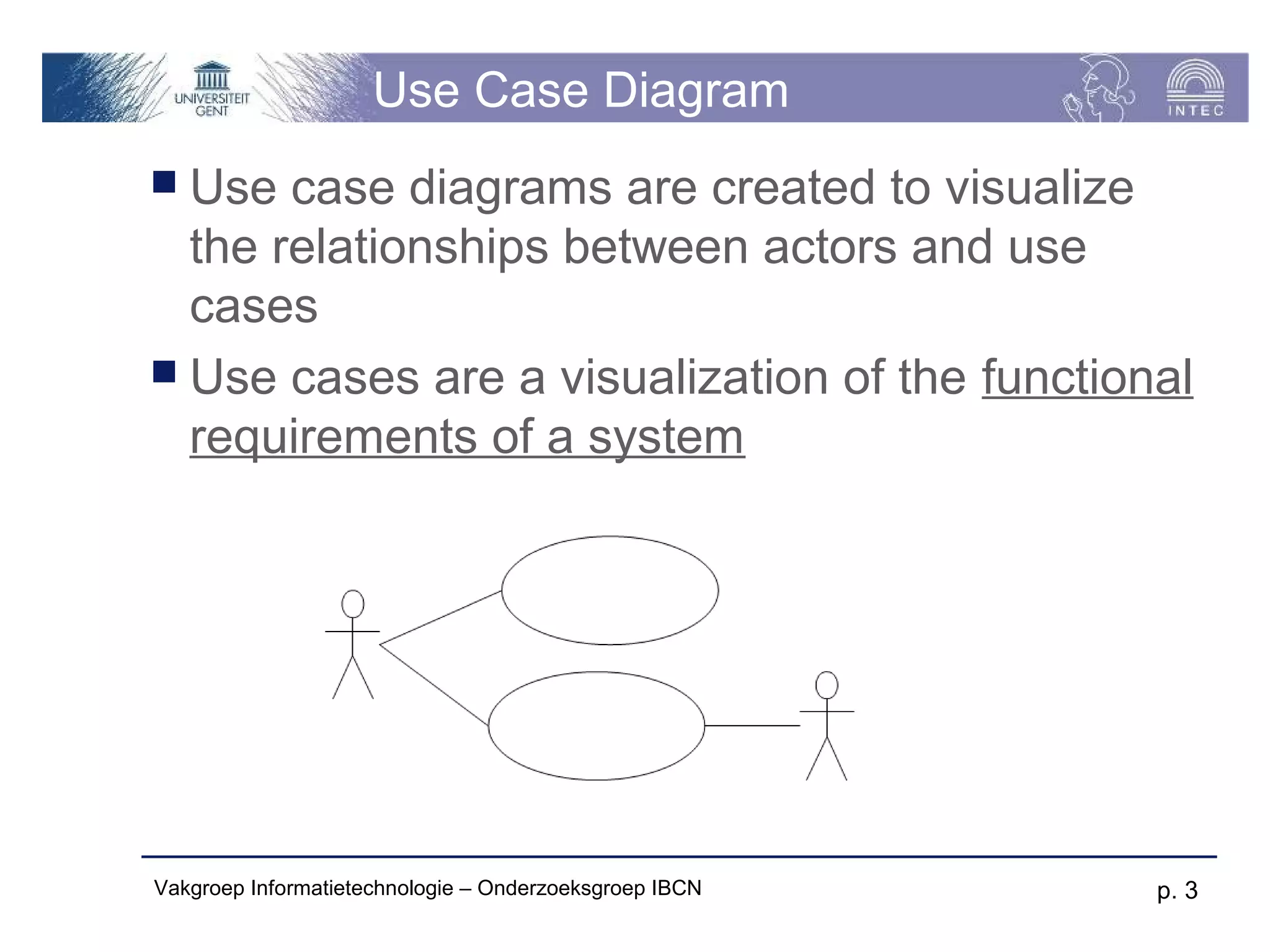
 Use  case diagrams are created to visualize
  the relationships between actors and use
  cases
 Use cases are a visualization of the functional
  requirements of a system


Vakgroep Informatietechnologie – Onderzoeksgroep IBCN   p. 3
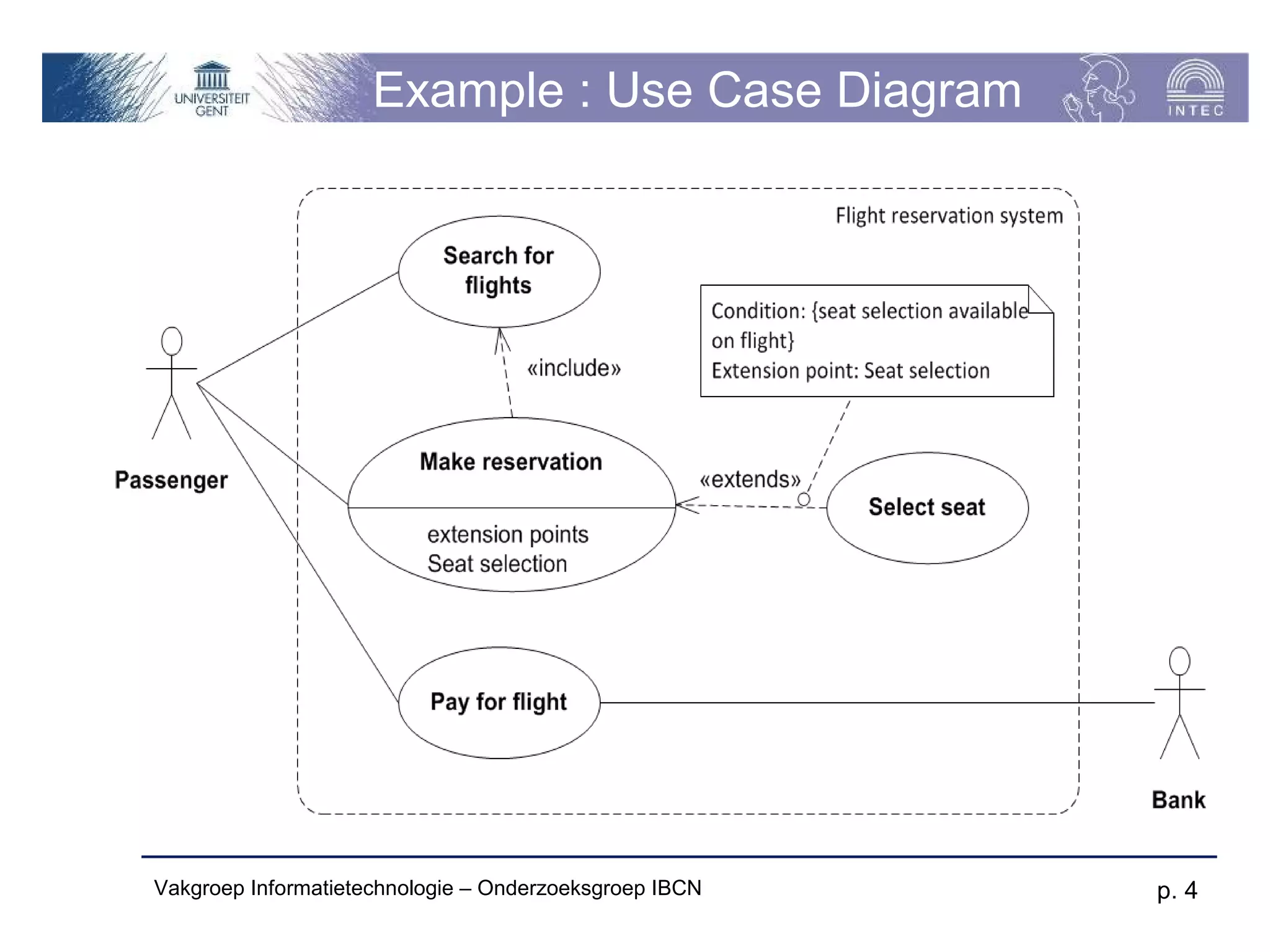
Example : Use Case Diagram


Vakgroep Informatietechnologie – Onderzoeksgroep IBCN   p. 4
Actors & user profiles (persona’s)
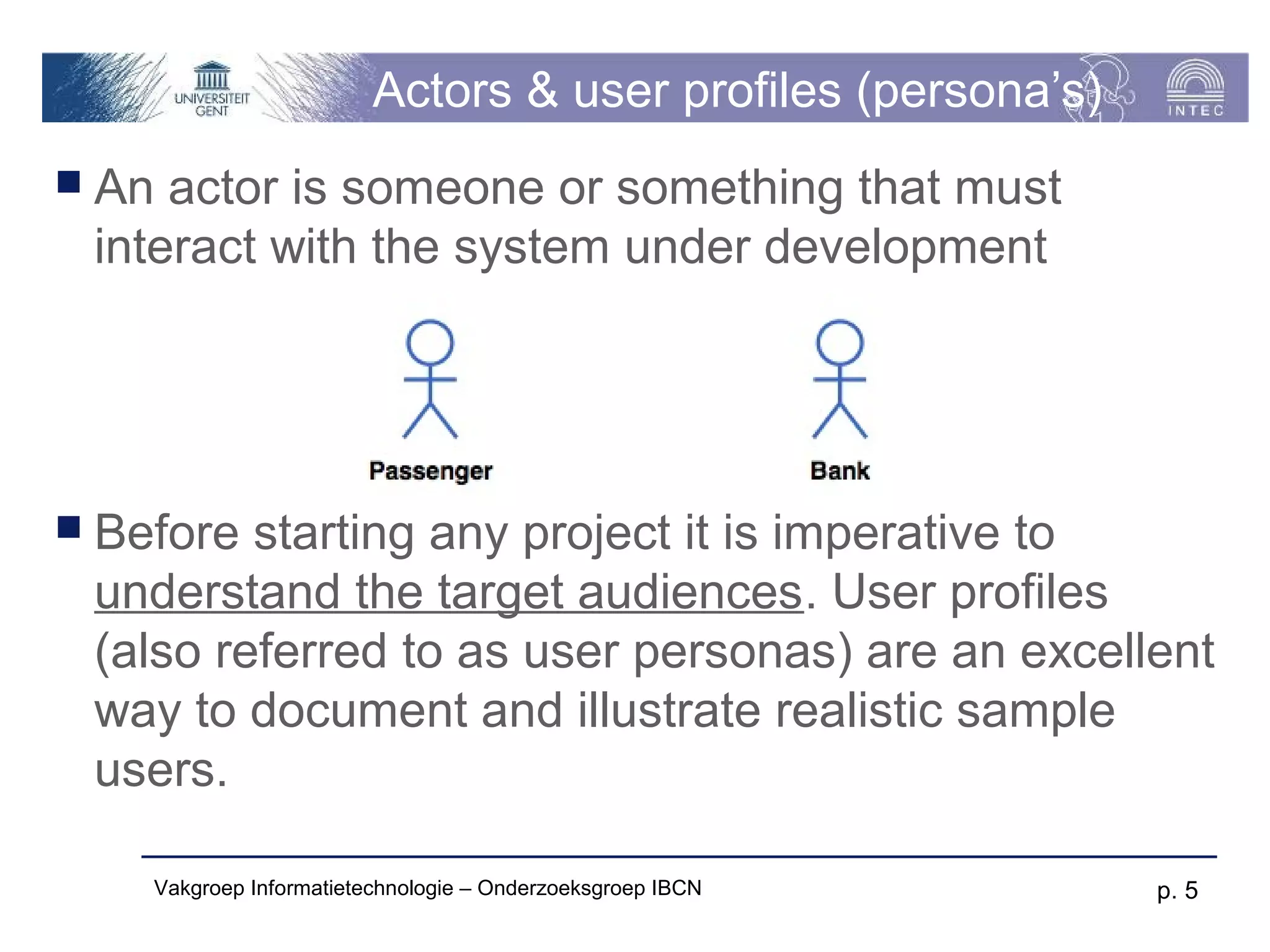
 An actor is someone or something that must
 interact with the system under development


 Before starting any project it is imperative to
 understand the target audiences. User profiles
 (also referred to as user personas) are an excellent
 way to document and illustrate realistic sample
 users.

    Vakgroep Informatietechnologie – Onderzoeksgroep IBCN     p. 5
Use Cases
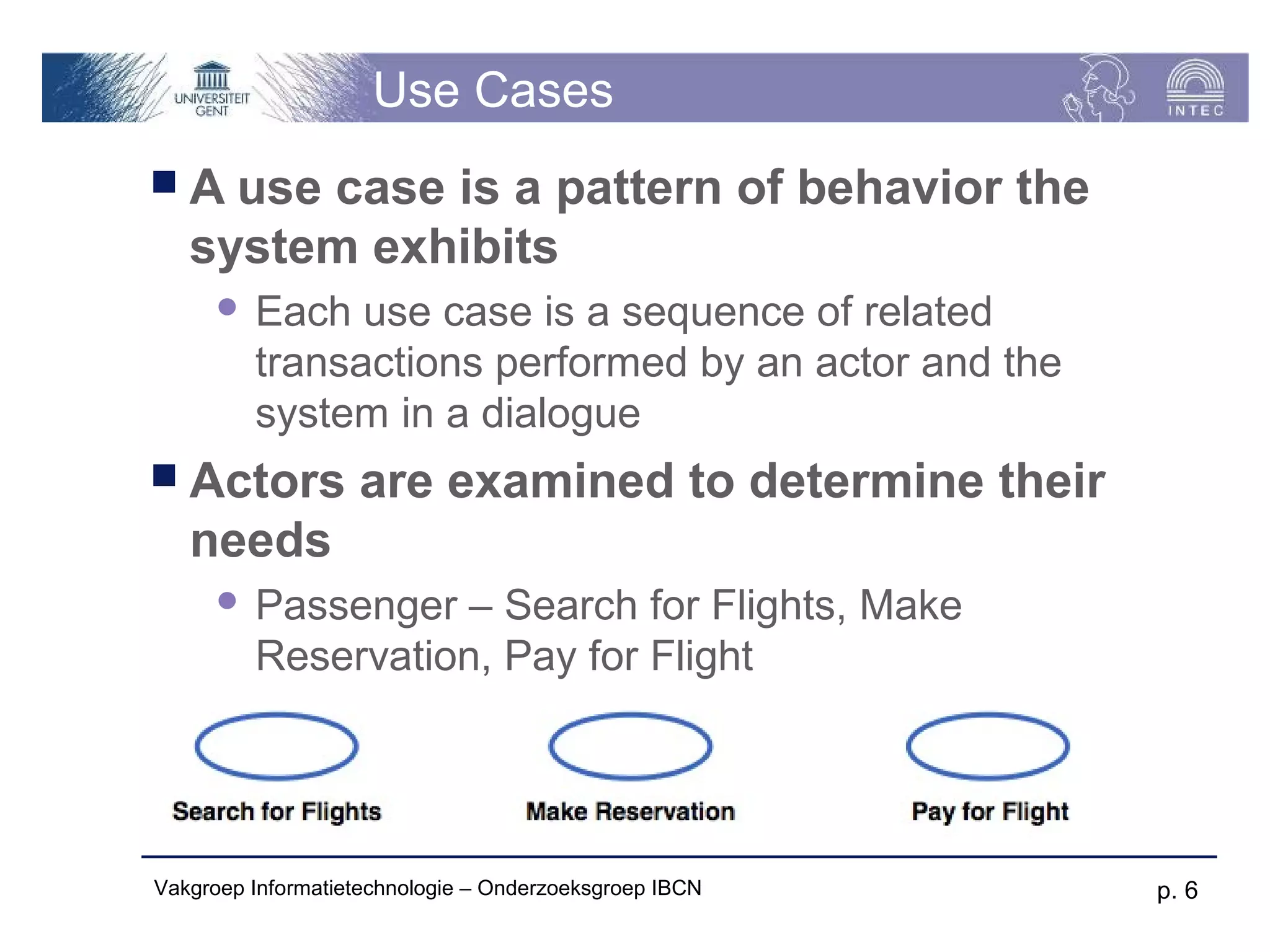
A   use case is a pattern of behavior the
   system exhibits
         Each use case is a sequence of related
          transactions performed by an actor and the
          system in a dialogue
 Actors           are examined to determine their
   needs
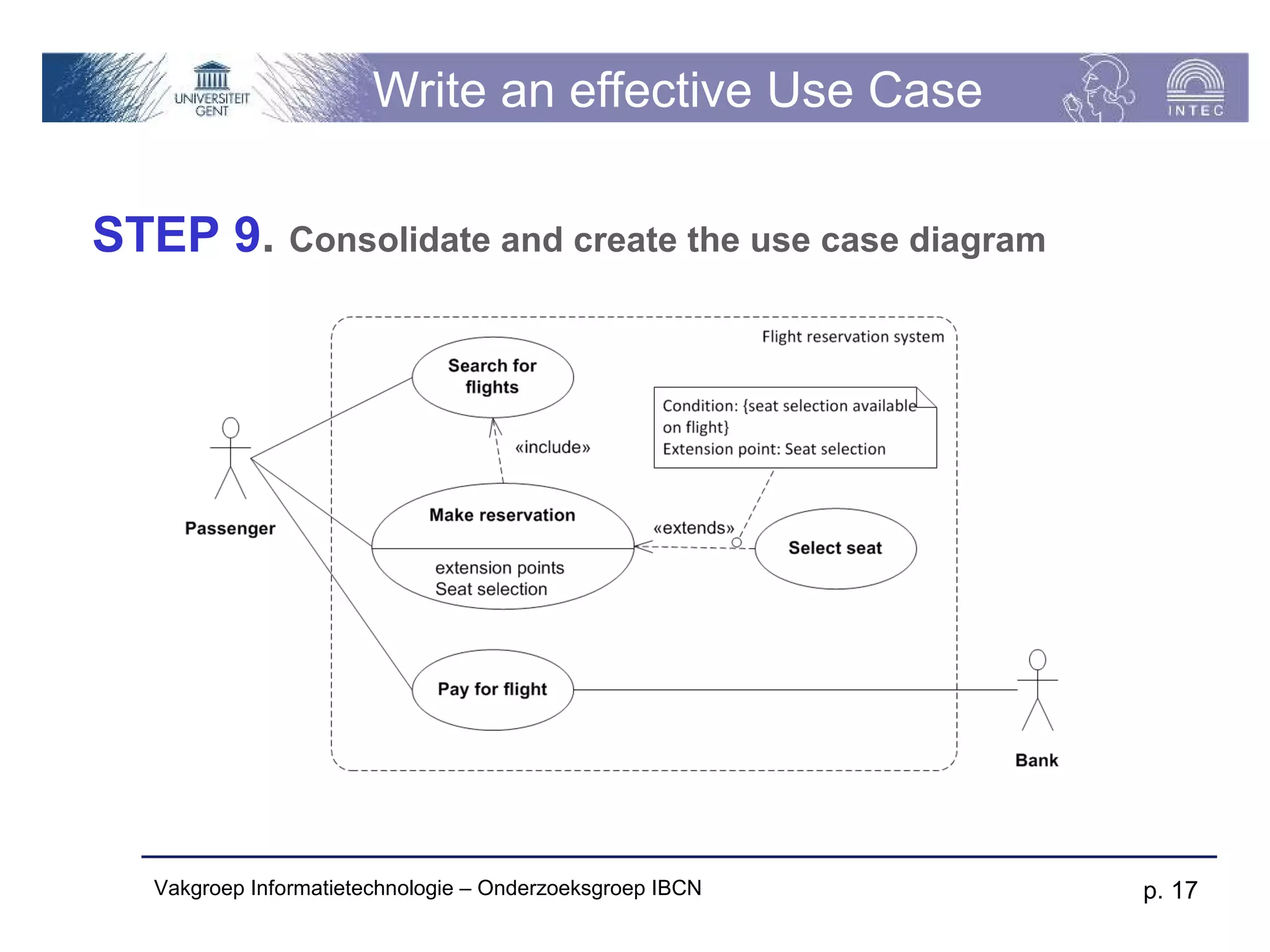
         Passenger – Search for Flights, Make
          Reservation, Pay for Flight


Vakgroep Informatietechnologie – Onderzoeksgroep IBCN   p. 6
Documenting Use Cases
A   use case specification document is
   created for each use case
         Written from an actor point of view
 Details what the system must provide to
  the actor when the use case is executed
 Typical contents
       How the use case starts and ends
       Normal flow of events

       Alternate flow of events

       Exceptional flow of events


Vakgroep Informatietechnologie – Onderzoeksgroep IBCN   p. 7
Template for Use Cases
 Textual  description in prose
 Priority|Complexity (High, Medium or Low)
 Related informal requirements
 Actors
 Events (triggering, during execution, ...)
 Preconditions
 Main success scenario (MSS - Diagram)
 Extensions on the MSS
 Postconditions after success and failure
 Related use cases

Vakgroep Informatietechnologie – Onderzoeksgroep IBCN   p. 8
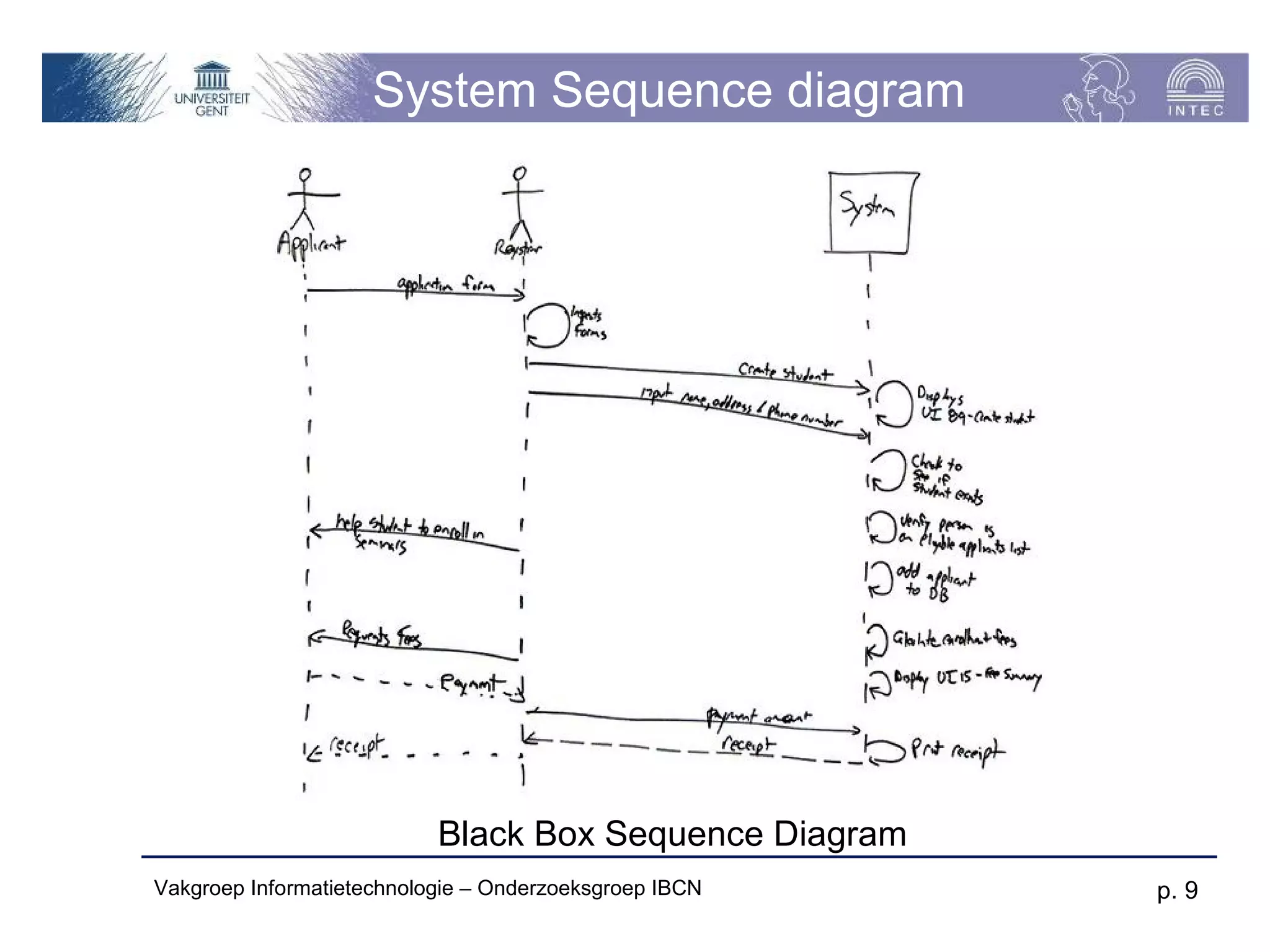
System Sequence diagram


                           Black Box Sequence Diagram
Vakgroep Informatietechnologie – Onderzoeksgroep IBCN   p. 9
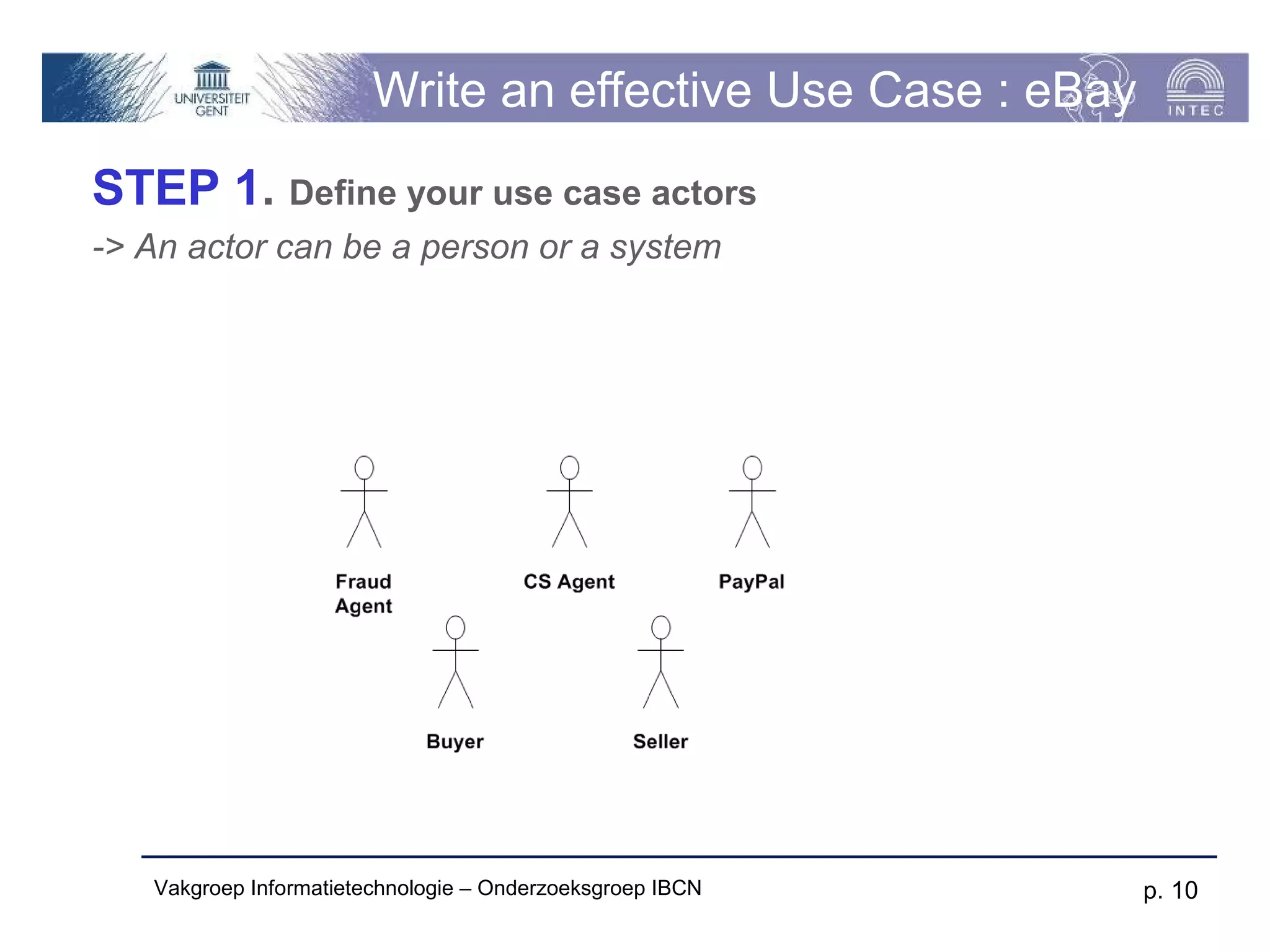
Write an effective Use Case : eBay
STEP 1. Define your use case actors
-> An actor can be a person or a system


   Vakgroep Informatietechnologie – Onderzoeksgroep IBCN     p. 10
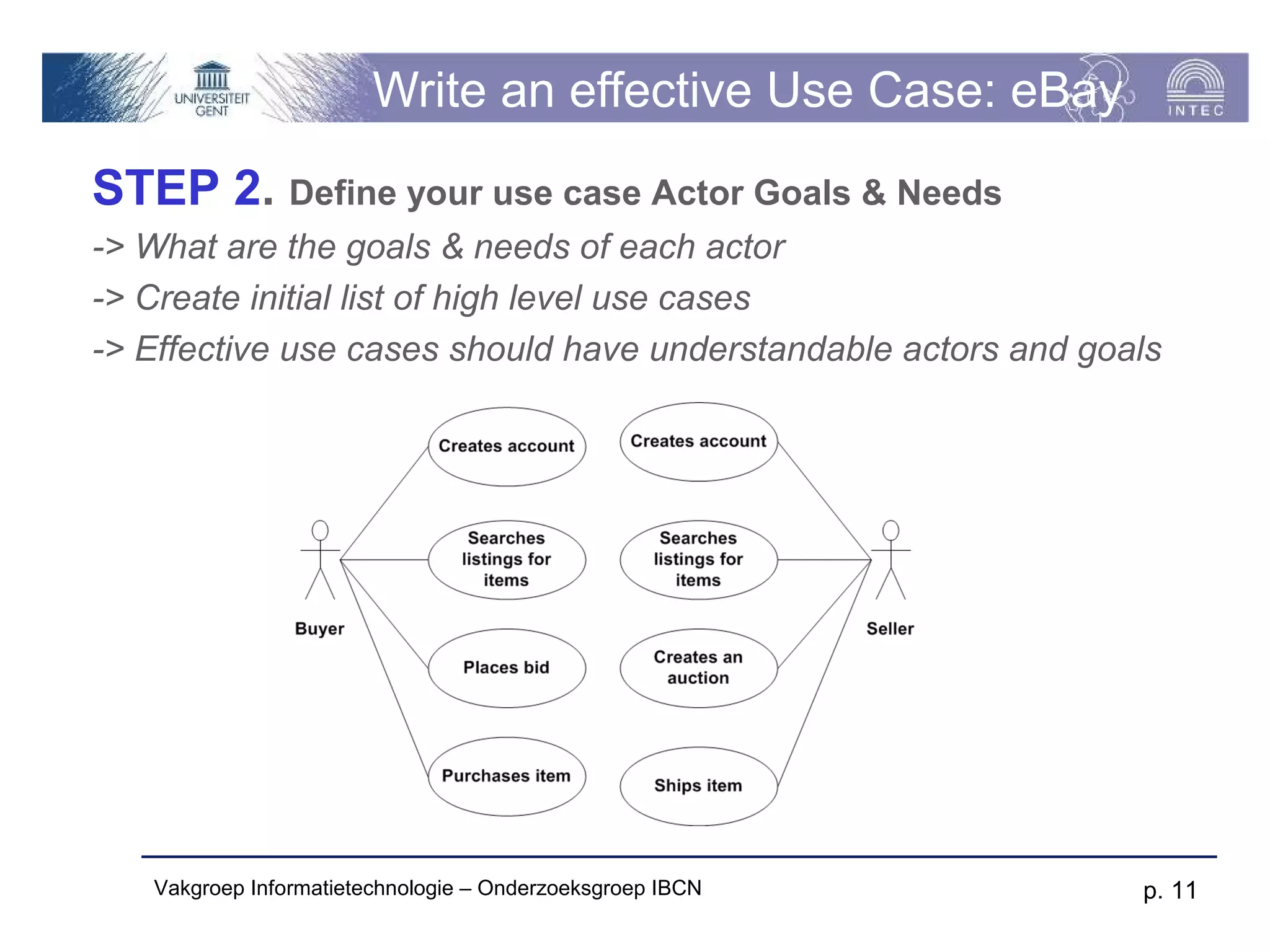
Write an effective Use Case: eBay
STEP 2. Define your use case Actor Goals & Needs
-> What are the goals & needs of each actor
-> Create initial list of high level use cases
-> Effective use cases should have understandable actors and goals


   Vakgroep Informatietechnologie – Onderzoeksgroep IBCN        p. 11
Write an effective Use Case: eBay
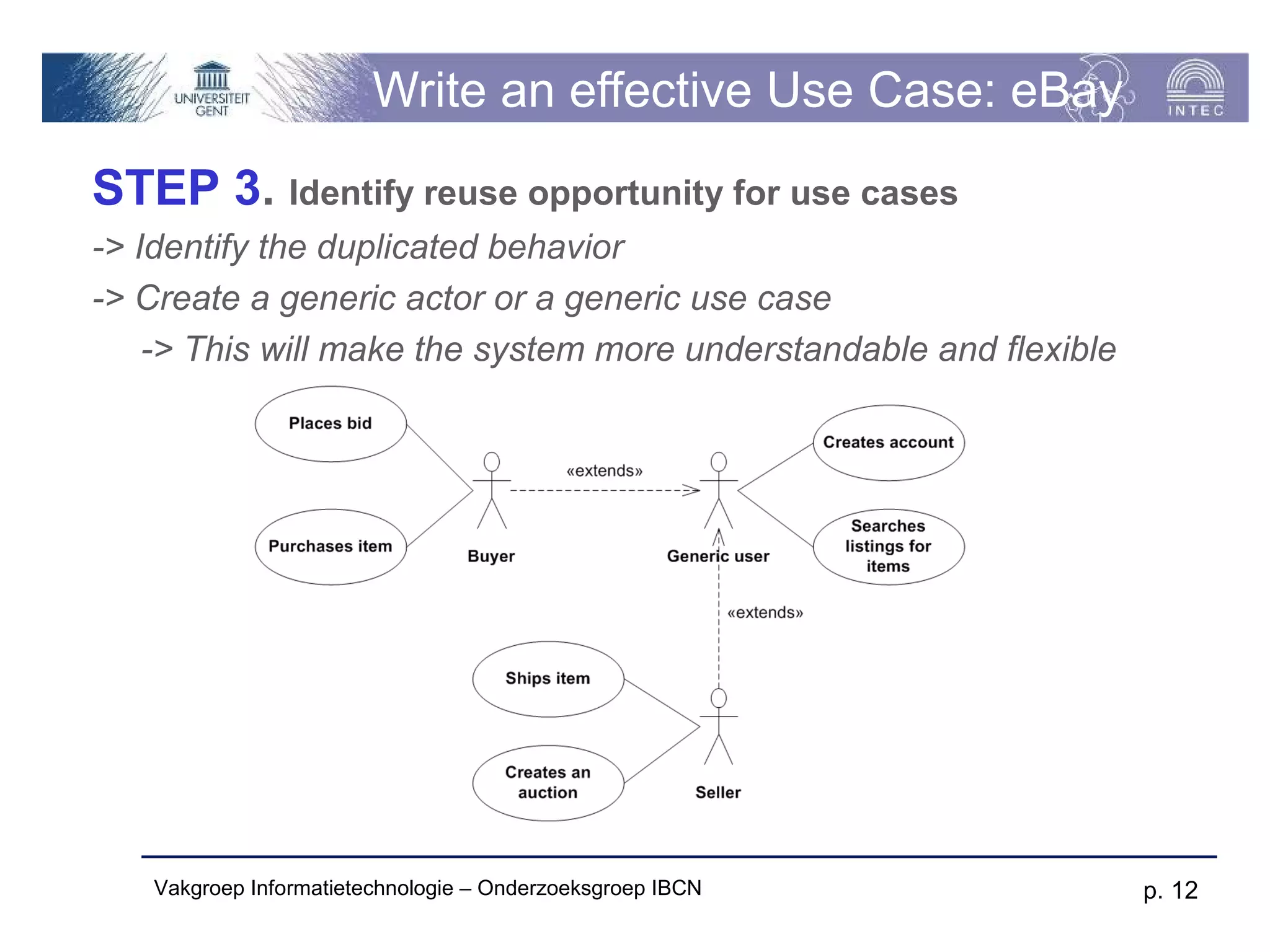
STEP 3. Identify reuse opportunity for use cases
-> Identify the duplicated behavior
-> Create a generic actor or a generic use case
    -> This will make the system more understandable and flexible


   Vakgroep Informatietechnologie – Onderzoeksgroep IBCN            p. 12
Write an effective Use Case: eBay
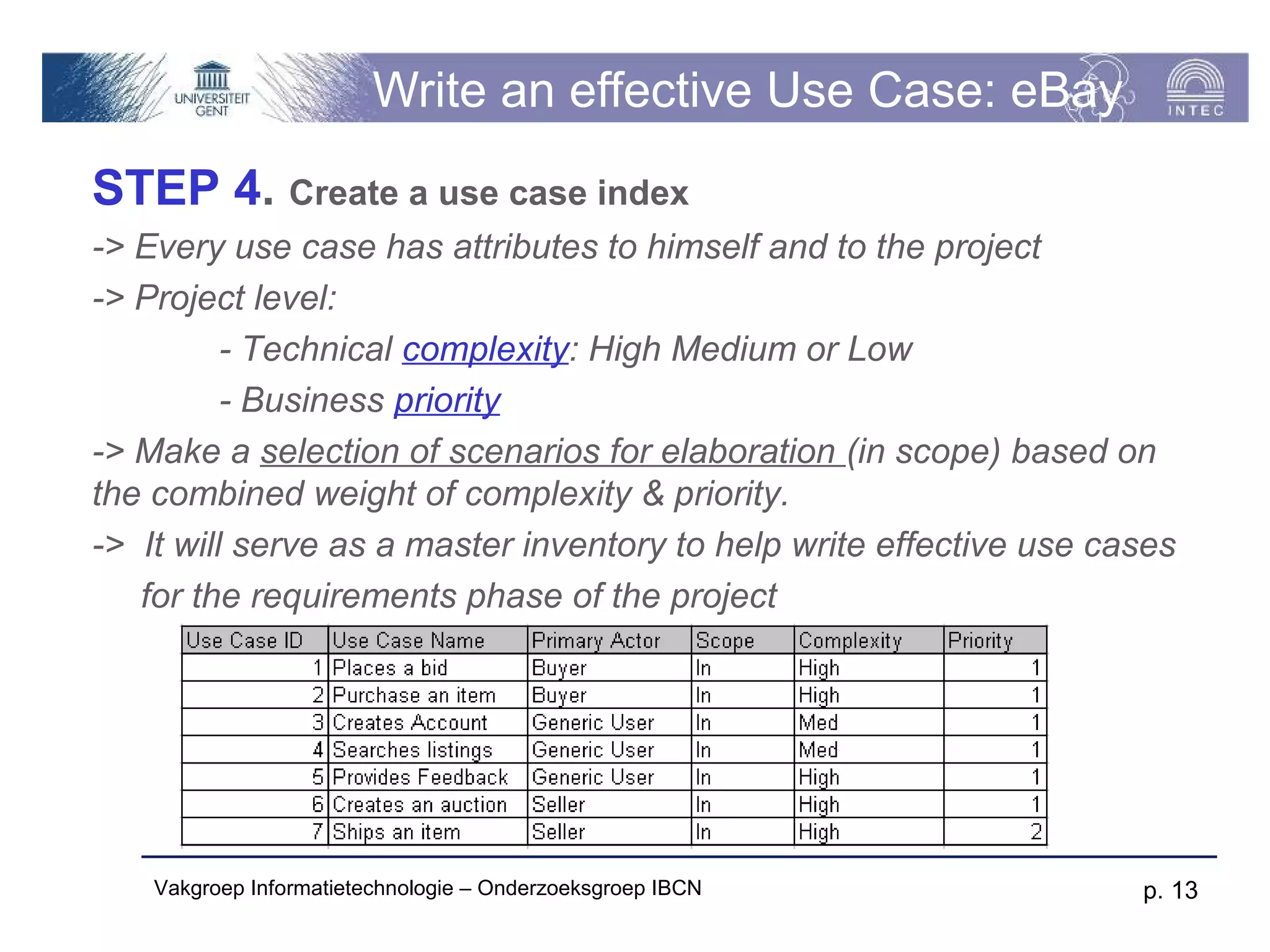
STEP 4. Create a use case index
-> Every use case has attributes to himself and to the project
-> Project level:
          - Technical complexity: High Medium or Low
          - Business priority
-> Make a selection of scenarios for elaboration (in scope) based on
the combined weight of complexity & priority.
-> It will serve as a master inventory to help write effective use cases
   for the requirements phase of the project


    Vakgroep Informatietechnologie – Onderzoeksgroep IBCN            p. 13
Write an effective Use Case: eBay
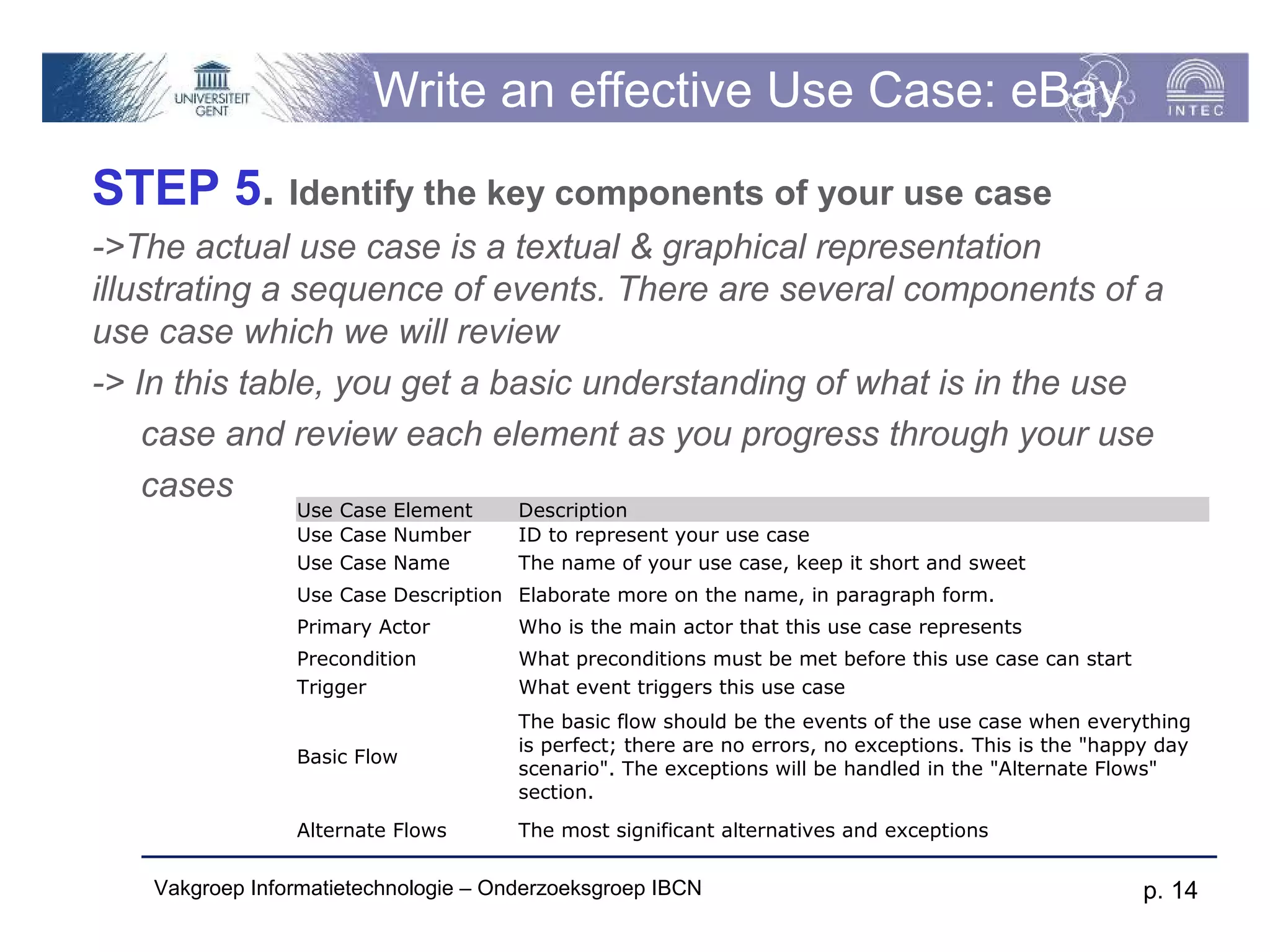
STEP 5. Identify the key components of your use case
->The actual use case is a textual & graphical representation
illustrating a sequence of events. There are several components of a
use case which we will review
-> In this table, you get a basic understanding of what is in the use
    case and review each element as you progress through your use
    cases
                Use Case Element      Description
                Use Case Number       ID to represent your use case
                Use Case Name         The name of your use case, keep it short and sweet
                Use Case Description Elaborate more on the name, in paragraph form.
                Primary Actor         Who is the main actor that this use case represents
                Precondition          What preconditions must be met before this use case can start
                Trigger               What event triggers this use case
                                      The basic flow should be the events of the use case when everything
                                      is perfect; there are no errors, no exceptions. This is the "happy day
                Basic Flow
                                      scenario". The exceptions will be handled in the "Alternate Flows"
                                      section.
                Alternate Flows       The most significant alternatives and exceptions

   Vakgroep Informatietechnologie – Onderzoeksgroep IBCN                                               p. 14
Write an effective Use Case: eBay
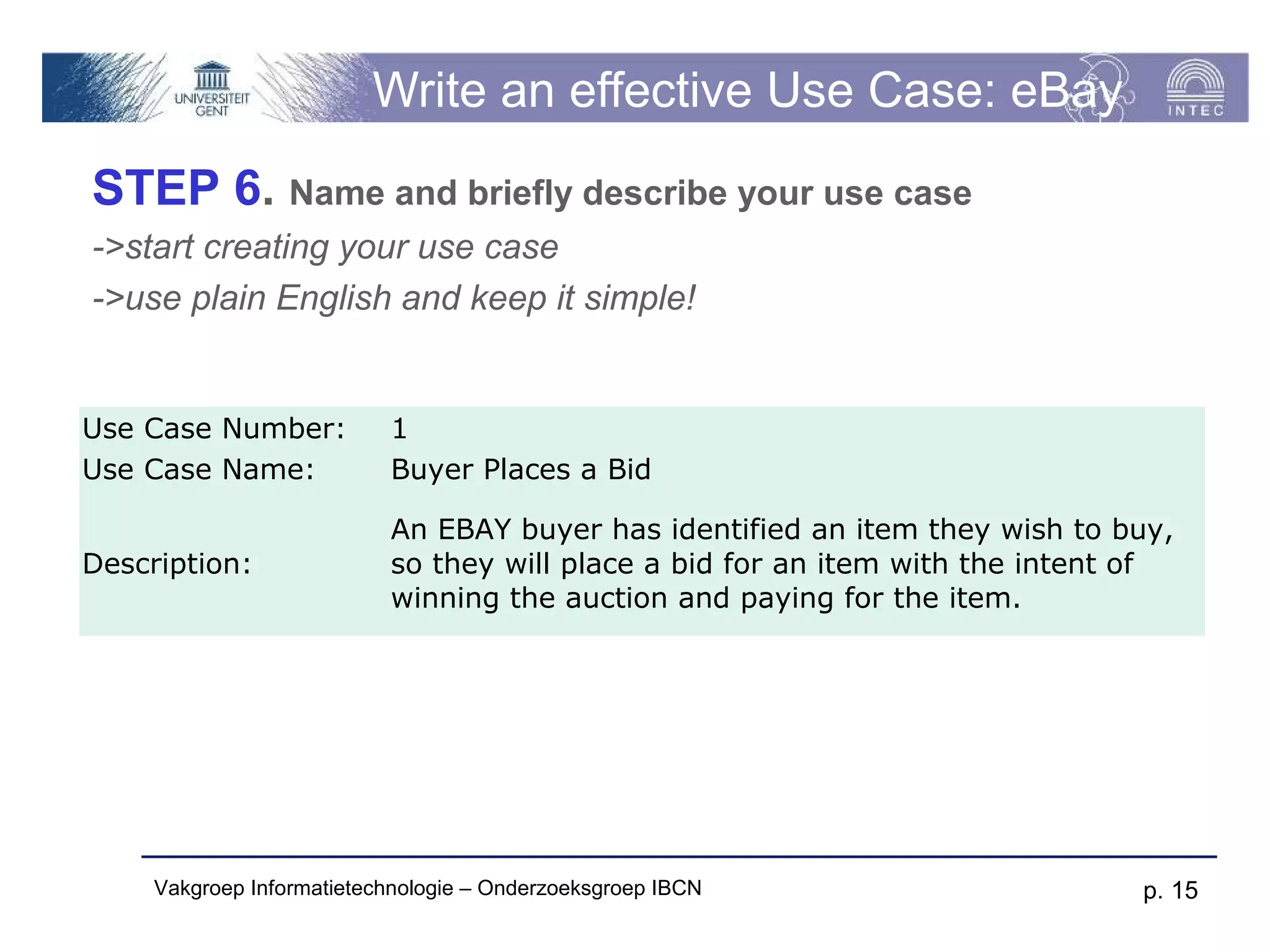
STEP 6. Name and briefly describe your use case
->start creating your use case
->use plain English and keep it simple!


Use Case Number:           1
Use Case Name:             Buyer Places a Bid

                           An EBAY buyer has identified an item they wish to buy,
Description:               so they will place a bid for an item with the intent of
                           winning the auction and paying for the item.


     Vakgroep Informatietechnologie – Onderzoeksgroep IBCN                     p. 15
Write an effective Use Case
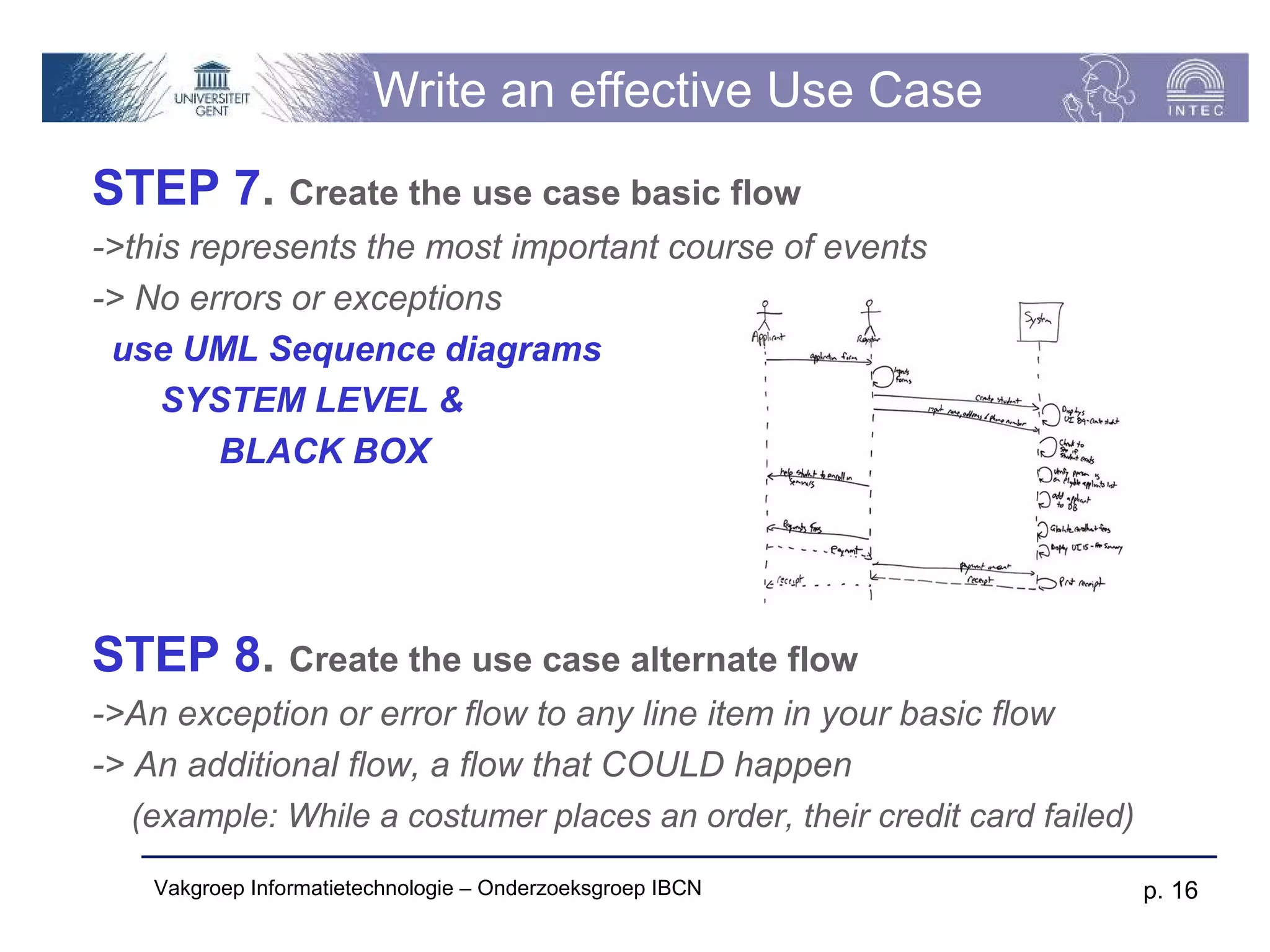
STEP 7. Create the use case basic flow
->this represents the most important course of events
-> No errors or exceptions
 use UML Sequence diagrams
     SYSTEM LEVEL &
         BLACK BOX


STEP 8. Create the use case alternate flow
->An exception or error flow to any line item in your basic flow
-> An additional flow, a flow that COULD happen
   (example: While a costumer places an order, their credit card failed)

    Vakgroep Informatietechnologie – Onderzoeksgroep IBCN                  p. 16
Write an effective Use Case

STEP 9. Consolidate and create the use case diagram


   Vakgroep Informatietechnologie – Onderzoeksgroep IBCN   p. 17
Scenario document – use case part
 Use case diagram: UML
 Use case index: TEXT
 Use case description for the top 3
  scenario’s: TEXT + UML
       sunny day
       rainy day


Vakgroep Informatietechnologie – Onderzoeksgroep IBCN   p. 18
Visio: Use Cases – Modeling tool

For modeling the Use Cases, we use the program
“Visio”
Athena: -> Office -> Extra -> Visio 2010

 If you want the right “Shapes”:
         Download the stencil from www.softwarestencils.com/uml
         Open stencil in Visio
         Use the right shapes


   Vakgroep Informatietechnologie – Onderzoeksgroep IBCN          p. 19
Agile Resources


 UML    & Agile:
     www.agilemodeling.com/essays/umlDiagrams.htm
 Use   Cases
   www.agilemodeling.com/artifacts/useCaseDiagram.htm
   Use case template: Minerva

 Sequence            Diagrams:
     www.agilemodeling.com/artifacts/sequenceDiagram.htm


   Vakgroep Informatietechnologie – Onderzoeksgroep IBCN   p. 20

Ws002 use cases

  • 1.
    Software Engineering Prof.Dr.ir. F. Gielen Functional Requirements Use cases & System Scenarios Vakgroep Informatietechnologie – IBCN
  • 2.
    Use Cases &Scenarios  Use cases, sometimes called user scenarios, are narratives or flow diagrams that describe how users will interact with a system.  Some people also refer to them as task analysis or user flows. Regardless of what you call them, the idea is the same:  Illustrate to people scenarios or specific tasks which users will perform on the system.  Illustrate how the system interacts with other systems. Vakgroep Informatietechnologie – Onderzoeksgroep IBCN p. 2
  • 3.
    Use Case Diagram Use case diagrams are created to visualize the relationships between actors and use cases  Use cases are a visualization of the functional requirements of a system Vakgroep Informatietechnologie – Onderzoeksgroep IBCN p. 3
  • 4.
    Example : UseCase Diagram Vakgroep Informatietechnologie – Onderzoeksgroep IBCN p. 4
  • 5.
    Actors & userprofiles (persona’s)  An actor is someone or something that must interact with the system under development  Before starting any project it is imperative to understand the target audiences. User profiles (also referred to as user personas) are an excellent way to document and illustrate realistic sample users. Vakgroep Informatietechnologie – Onderzoeksgroep IBCN p. 5
  • 6.
    Use Cases A use case is a pattern of behavior the system exhibits  Each use case is a sequence of related transactions performed by an actor and the system in a dialogue  Actors are examined to determine their needs  Passenger – Search for Flights, Make Reservation, Pay for Flight Vakgroep Informatietechnologie – Onderzoeksgroep IBCN p. 6
  • 7.
    Documenting Use Cases A use case specification document is created for each use case  Written from an actor point of view  Details what the system must provide to the actor when the use case is executed  Typical contents  How the use case starts and ends  Normal flow of events  Alternate flow of events  Exceptional flow of events Vakgroep Informatietechnologie – Onderzoeksgroep IBCN p. 7
  • 8.
    Template for UseCases  Textual description in prose  Priority|Complexity (High, Medium or Low)  Related informal requirements  Actors  Events (triggering, during execution, ...)  Preconditions  Main success scenario (MSS - Diagram)  Extensions on the MSS  Postconditions after success and failure  Related use cases Vakgroep Informatietechnologie – Onderzoeksgroep IBCN p. 8
  • 9.
    System Sequence diagram Black Box Sequence Diagram Vakgroep Informatietechnologie – Onderzoeksgroep IBCN p. 9
  • 10.
    Write an effectiveUse Case : eBay STEP 1. Define your use case actors -> An actor can be a person or a system Vakgroep Informatietechnologie – Onderzoeksgroep IBCN p. 10
  • 11.
    Write an effectiveUse Case: eBay STEP 2. Define your use case Actor Goals & Needs -> What are the goals & needs of each actor -> Create initial list of high level use cases -> Effective use cases should have understandable actors and goals Vakgroep Informatietechnologie – Onderzoeksgroep IBCN p. 11
  • 12.
    Write an effectiveUse Case: eBay STEP 3. Identify reuse opportunity for use cases -> Identify the duplicated behavior -> Create a generic actor or a generic use case -> This will make the system more understandable and flexible Vakgroep Informatietechnologie – Onderzoeksgroep IBCN p. 12
  • 13.
    Write an effectiveUse Case: eBay STEP 4. Create a use case index -> Every use case has attributes to himself and to the project -> Project level: - Technical complexity: High Medium or Low - Business priority -> Make a selection of scenarios for elaboration (in scope) based on the combined weight of complexity & priority. -> It will serve as a master inventory to help write effective use cases for the requirements phase of the project Vakgroep Informatietechnologie – Onderzoeksgroep IBCN p. 13
  • 14.
    Write an effectiveUse Case: eBay STEP 5. Identify the key components of your use case ->The actual use case is a textual & graphical representation illustrating a sequence of events. There are several components of a use case which we will review -> In this table, you get a basic understanding of what is in the use case and review each element as you progress through your use cases Use Case Element Description Use Case Number ID to represent your use case Use Case Name The name of your use case, keep it short and sweet Use Case Description Elaborate more on the name, in paragraph form. Primary Actor Who is the main actor that this use case represents Precondition What preconditions must be met before this use case can start Trigger What event triggers this use case The basic flow should be the events of the use case when everything is perfect; there are no errors, no exceptions. This is the "happy day Basic Flow scenario". The exceptions will be handled in the "Alternate Flows" section. Alternate Flows The most significant alternatives and exceptions Vakgroep Informatietechnologie – Onderzoeksgroep IBCN p. 14
  • 15.
    Write an effectiveUse Case: eBay STEP 6. Name and briefly describe your use case ->start creating your use case ->use plain English and keep it simple! Use Case Number: 1 Use Case Name: Buyer Places a Bid An EBAY buyer has identified an item they wish to buy, Description: so they will place a bid for an item with the intent of winning the auction and paying for the item. Vakgroep Informatietechnologie – Onderzoeksgroep IBCN p. 15
  • 16.
    Write an effectiveUse Case STEP 7. Create the use case basic flow ->this represents the most important course of events -> No errors or exceptions use UML Sequence diagrams SYSTEM LEVEL & BLACK BOX STEP 8. Create the use case alternate flow ->An exception or error flow to any line item in your basic flow -> An additional flow, a flow that COULD happen (example: While a costumer places an order, their credit card failed) Vakgroep Informatietechnologie – Onderzoeksgroep IBCN p. 16
  • 17.
    Write an effectiveUse Case STEP 9. Consolidate and create the use case diagram Vakgroep Informatietechnologie – Onderzoeksgroep IBCN p. 17
  • 18.
    Scenario document –use case part  Use case diagram: UML  Use case index: TEXT  Use case description for the top 3 scenario’s: TEXT + UML  sunny day  rainy day Vakgroep Informatietechnologie – Onderzoeksgroep IBCN p. 18
  • 19.
    Visio: Use Cases– Modeling tool For modeling the Use Cases, we use the program “Visio” Athena: -> Office -> Extra -> Visio 2010  If you want the right “Shapes”: Download the stencil from www.softwarestencils.com/uml Open stencil in Visio Use the right shapes Vakgroep Informatietechnologie – Onderzoeksgroep IBCN p. 19
  • 20.
    Agile Resources  UML & Agile:  www.agilemodeling.com/essays/umlDiagrams.htm  Use Cases  www.agilemodeling.com/artifacts/useCaseDiagram.htm  Use case template: Minerva  Sequence Diagrams:  www.agilemodeling.com/artifacts/sequenceDiagram.htm Vakgroep Informatietechnologie – Onderzoeksgroep IBCN p. 20