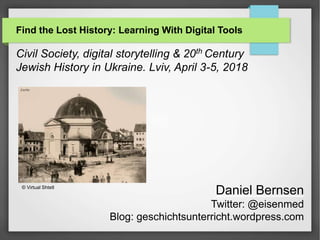
Find the Lost History: Learning With Digital Tools
Civil Society, digital storytelling & 20th Century
Jewish History in Ukraine. Lviv, April 3-5, 2018
Daniel Bernsen
Twitter: @eisenmed
Blog: geschichtsunterricht.wordpress.com
© Virtual Shtetl
Geocaching for history learning
 Discovering local/regional history
 Promoting active learning & creativity
 Working in groups
 Leaving the classroom for an outdoor activity
 Learning how to use digital tools & methodological skills:
researching, writing, publishing
 Facilitating cross-curricular teaching & learning:
history & geography (GPS, maps etc.) at the same time
Examples: geocaching & history
https://www.geocaching.com/geocache/GC3N9A3_citadel
Examples: geocaching & history
https://www.geocaching.com/geocache/GC3N9A3_citadel
Examples: geocaching & history
https://www.opencaching.de/viewcache.php?cacheid=165288
YouTube Channel: FlippedHistory
Geocache types
 For history learning most important are 3 types:
 Traditional cache
 a hidden box at given coordinates
 Mystery / puzzle cache
 discover information or solve a puzzle to find the cache
 Multi-Cache
 multiple discoveries of one or more intermediate points
containing the coordinates for the next stage
Practical aspects
What‘s your aim using Geocaching: Starting a new topic?
Motivating students? Acquiring skills? Creating a new
learning product? Or other?
Is there already a cache on this topic in your school town?
Are there topic-related places in your region? Is there enough
information available (online or in a library)?
What kind of cache do you want to use (tradi, mystery, multi)?
What size (micro, small, regular?) And why?
And (maybe) most importantly: Who do you expect to search
the cache (your students? Other students? General public?)
Technical aspects
 Get the geo data for your cache:
 → very easy: Google Earth (app or web browser)
 Welche Geräte werden genutzt?
 Choose your devices (smartphones or GPS devices)
 Respect the general geocaching guidelines
 https://www.geocaching.com/play/guidelines
 Publishing the cache or not publishing? (If you decide to
publish the cache, who takes care of it on the long run?)
Alternatives
 event-cache  photo-rallye  digital maps
 paper puzzle
tour
 google street
view
Abcd
Hji

i
Puzzle categories
For example:
 Multiple choice
 Open questions (without possible answers)
 Math problems
 Find the place
 Using codes
 Word puzzles (e.g. crosswords)
Multiple choice example
Open questions example
Math problems example
Find the place example
Using codes example
Creating puzzles: now it‘s up to you
Group 1:
Choose one of the
trans.history films
and create puzzles for
students about it:
http://trans-history.org/films/
Group 3:
Search for photos of the
center of old Lviv & create a
Puzzle photo-rallye:
https://commons.wikimedia.org/
https://www.flickr.com/commons
Group 2:
Choose a town you know,
use Google Maps or Street View
and create puzzle about the
history of the place.

Workshop lost places lviv

  • 1.
    Find the LostHistory: Learning With Digital Tools Civil Society, digital storytelling & 20th Century Jewish History in Ukraine. Lviv, April 3-5, 2018 Daniel Bernsen Twitter: @eisenmed Blog: geschichtsunterricht.wordpress.com © Virtual Shtetl
  • 2.
    Geocaching for historylearning  Discovering local/regional history  Promoting active learning & creativity  Working in groups  Leaving the classroom for an outdoor activity  Learning how to use digital tools & methodological skills: researching, writing, publishing  Facilitating cross-curricular teaching & learning: history & geography (GPS, maps etc.) at the same time
  • 3.
  • 4.
    Examples: geocaching &history https://www.geocaching.com/geocache/GC3N9A3_citadel
  • 5.
    Examples: geocaching &history https://www.geocaching.com/geocache/GC3N9A3_citadel
  • 6.
    Examples: geocaching &history https://www.opencaching.de/viewcache.php?cacheid=165288 YouTube Channel: FlippedHistory
  • 7.
    Geocache types  Forhistory learning most important are 3 types:  Traditional cache  a hidden box at given coordinates  Mystery / puzzle cache  discover information or solve a puzzle to find the cache  Multi-Cache  multiple discoveries of one or more intermediate points containing the coordinates for the next stage
  • 8.
    Practical aspects What‘s youraim using Geocaching: Starting a new topic? Motivating students? Acquiring skills? Creating a new learning product? Or other? Is there already a cache on this topic in your school town? Are there topic-related places in your region? Is there enough information available (online or in a library)? What kind of cache do you want to use (tradi, mystery, multi)? What size (micro, small, regular?) And why? And (maybe) most importantly: Who do you expect to search the cache (your students? Other students? General public?)
  • 9.
    Technical aspects  Getthe geo data for your cache:  → very easy: Google Earth (app or web browser)  Welche Geräte werden genutzt?  Choose your devices (smartphones or GPS devices)  Respect the general geocaching guidelines  https://www.geocaching.com/play/guidelines  Publishing the cache or not publishing? (If you decide to publish the cache, who takes care of it on the long run?)
  • 10.
    Alternatives  event-cache photo-rallye  digital maps  paper puzzle tour  google street view Abcd Hji  i
  • 11.
    Puzzle categories For example: Multiple choice  Open questions (without possible answers)  Math problems  Find the place  Using codes  Word puzzles (e.g. crosswords)
  • 12.
  • 13.
  • 14.
  • 15.
  • 16.
  • 17.
    Creating puzzles: nowit‘s up to you Group 1: Choose one of the trans.history films and create puzzles for students about it: http://trans-history.org/films/ Group 3: Search for photos of the center of old Lviv & create a Puzzle photo-rallye: https://commons.wikimedia.org/ https://www.flickr.com/commons Group 2: Choose a town you know, use Google Maps or Street View and create puzzle about the history of the place.