Extend the HR and Finance experience
with UiPath and Workday
Tech Integrations Series
Rohit Radhakrishnan
Regional Community Manager
APJ
@UiPath
Meet today’s team:
Cristina Vidu
Global Manager
Marketing Community
@UiPath
Meet today’s speaker:
Mo Roy
Senior Partner Engineer
Product Technology Alliances
@UiPath
About today’s meeting:
• The meetup will last 1 hr 30 mins
• You are encouraged to network and share your LinkedIn in the
chat box
• We apologize for keeping you on mute till Q&A time
• Please use the chat to place questions too till Q&A
• There will be some fun too: Menti quiz coming up & UiPath prize
5
1. Meetup Introduction with our Community Manager
2. Overview of UiPath + Workday technical integration and use cases in HR and Finance
3. Live Walkthrough:
1. Workday Setup
2. Configuring Workday Activity Pack in Studio
3. Simple Workday Operation Demo (Live)
4. More Advanced Demos (Video) – with Workday Extend and Adobe PDF Services
• UX via Chatbot (Live)
4. Q&A
Agenda
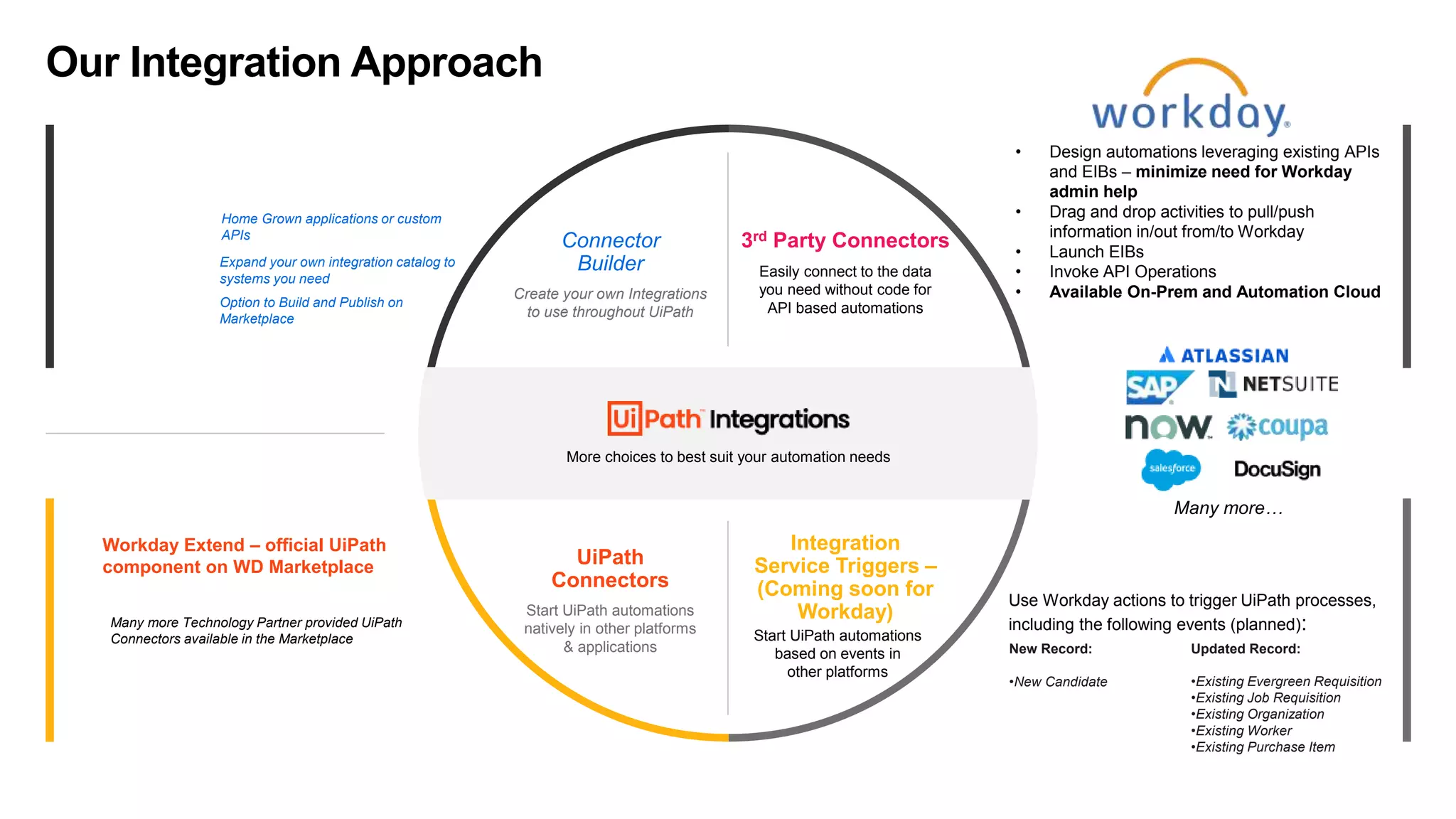
Many more Technology Partner provided UiPath
Connectors available in the Marketplace
Workday Extend – official UiPath
component on WD Marketplace
Home Grown applications or custom
APIs
Option to Build and Publish on
Marketplace
Many more…
More choices to best suit your automation needs
Connector
Builder
3rd Party Connectors
Create your own Integrations
to use throughout UiPath
Easily connect to the data
you need without code for
API based automations
UiPath
Connectors
Integration
Service Triggers –
(Coming soon for
Workday)
Start UiPath automations
natively in other platforms
& applications
Start UiPath automations
based on events in
other platforms
Expand your own integration catalog to
systems you need
Our Integration Approach
• Design automations leveraging existing APIs
and EIBs – minimize need for Workday
admin help
• Drag and drop activities to pull/push
information in/out from/to Workday
• Launch EIBs
• Invoke API Operations
• Available On-Prem and Automation Cloud
New Record:
•New Candidate
Updated Record:
•Existing Evergreen Requisition
•Existing Job Requisition
•Existing Organization
•Existing Worker
•Existing Purchase Item
Use Workday actions to trigger UiPath processes,
including the following events (planned):
7
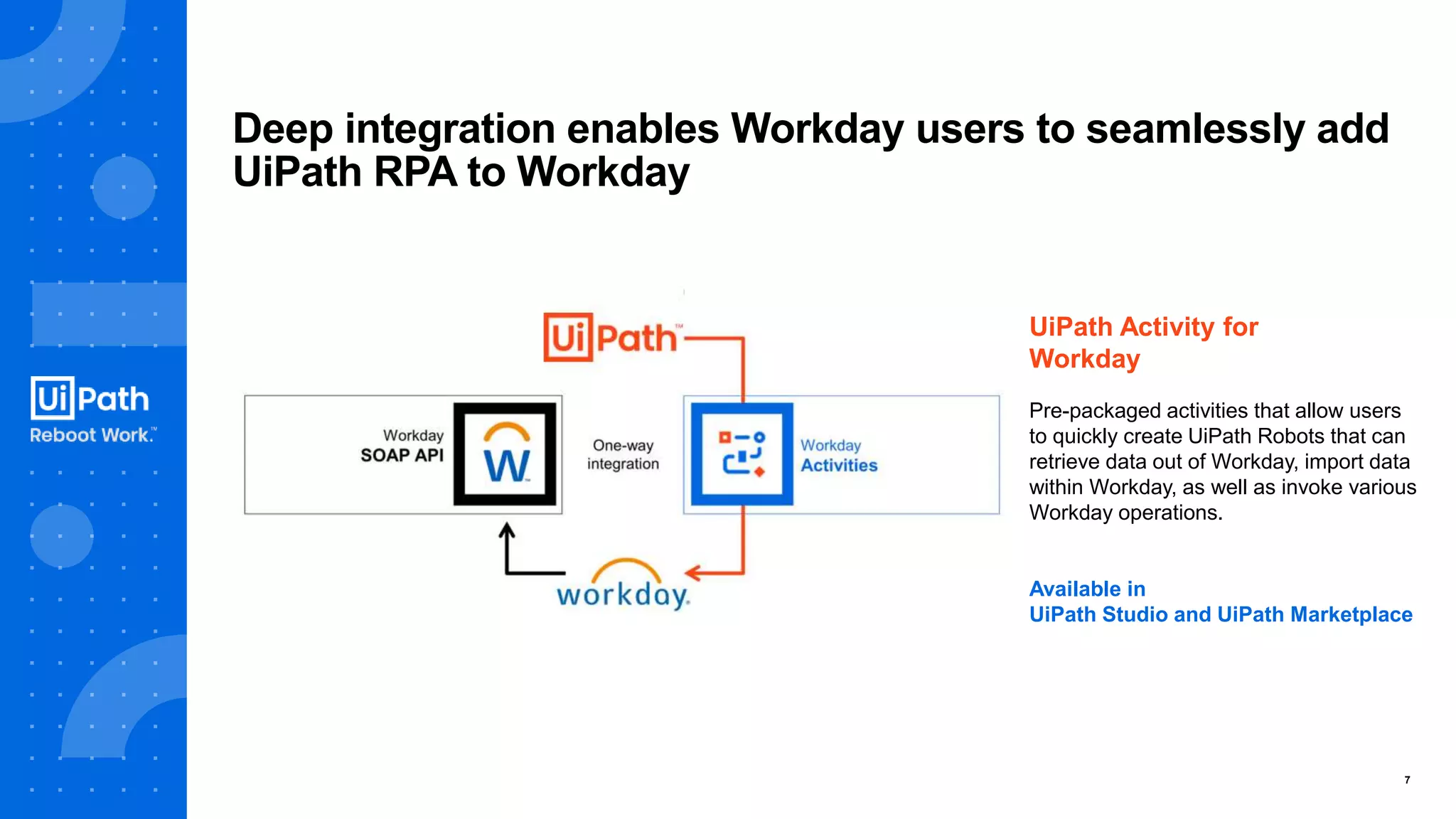
Deep integration enables Workday users to seamlessly add
UiPath RPA to Workday
UiPath Activity for
Workday
Pre-packaged activities that allow users
to quickly create UiPath Robots that can
retrieve data out of Workday, import data
within Workday, as well as invoke various
Workday operations.
Available in
UiPath Studio and UiPath Marketplace
8
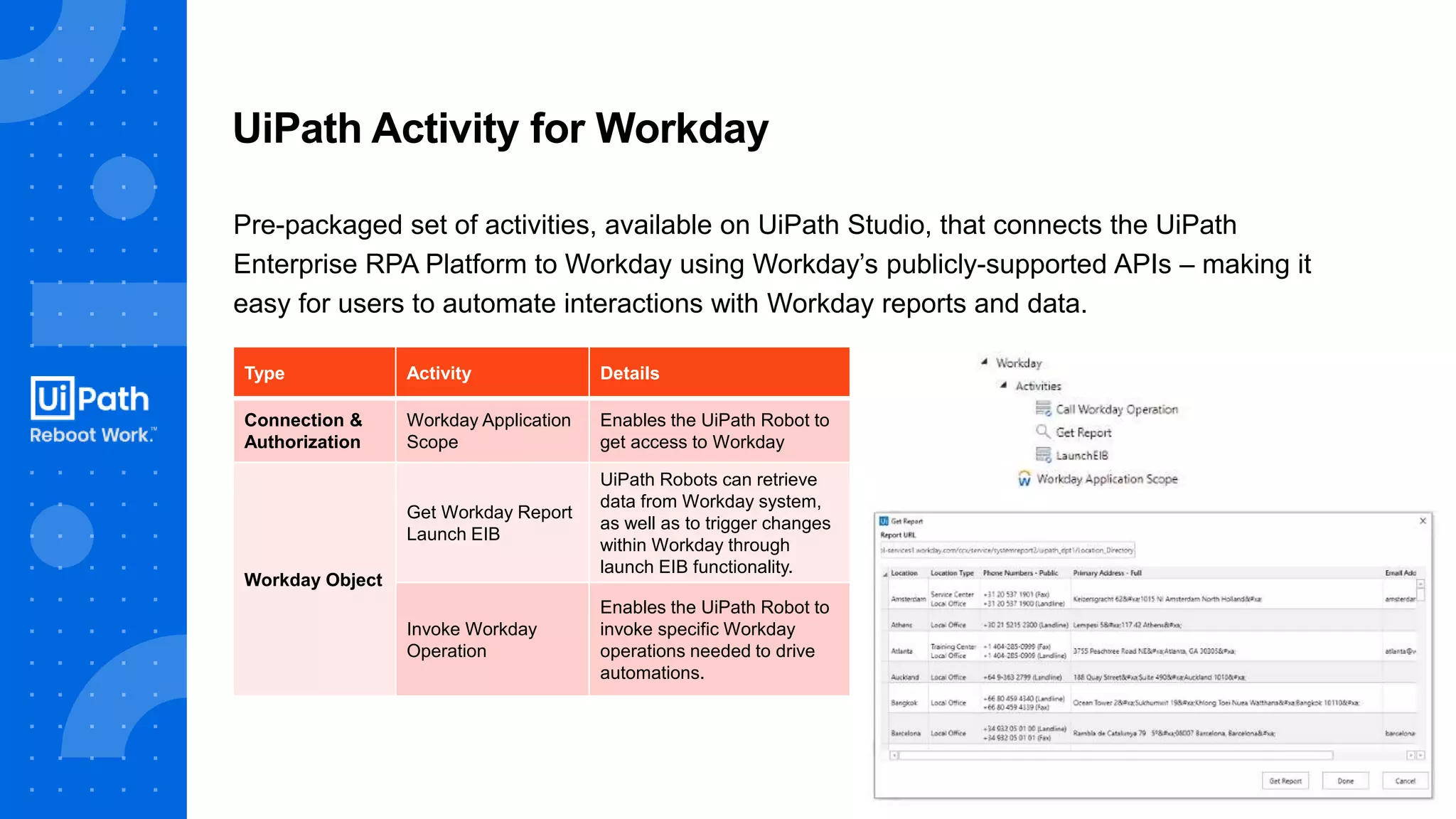
Pre-packaged set of activities, available on UiPath Studio, that connects the UiPath
Enterprise RPA Platform to Workday using Workday’s publicly-supported APIs – making it
easy for users to automate interactions with Workday reports and data.
UiPath Activity for Workday
Type Activity Details
Connection &
Authorization
Workday Application
Scope
Enables the UiPath Robot to
get access to Workday
Workday Object
Get Workday Report
Launch EIB
UiPath Robots can retrieve
data from Workday system,
as well as to trigger changes
within Workday through
launch EIB functionality.
Invoke Workday
Operation
Enables the UiPath Robot to
invoke specific Workday
operations needed to drive
automations.
9
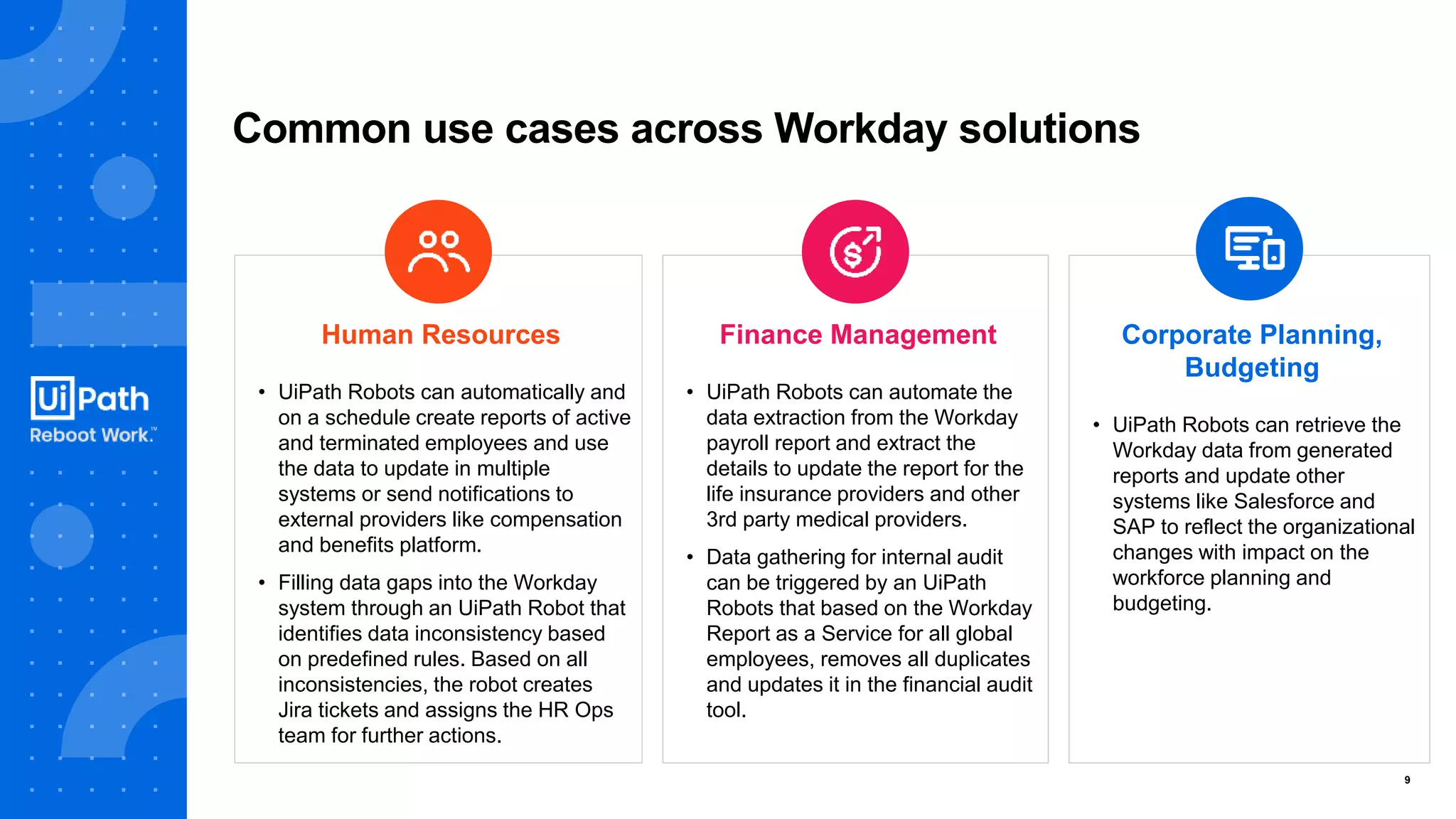
Common use cases across Workday solutions
Human Resources
• UiPath Robots can automatically and
on a schedule create reports of active
and terminated employees and use
the data to update in multiple
systems or send notifications to
external providers like compensation
and benefits platform.
• Filling data gaps into the Workday
system through an UiPath Robot that
identifies data inconsistency based
on predefined rules. Based on all
inconsistencies, the robot creates
Jira tickets and assigns the HR Ops
team for further actions.
Finance Management
• UiPath Robots can automate the
data extraction from the Workday
payroll report and extract the
details to update the report for the
life insurance providers and other
3rd party medical providers.
• Data gathering for internal audit
can be triggered by an UiPath
Robots that based on the Workday
Report as a Service for all global
employees, removes all duplicates
and updates it in the financial audit
tool.
Corporate Planning,
Budgeting
• UiPath Robots can retrieve the
Workday data from generated
reports and update other
systems like Salesforce and
SAP to reflect the organizational
changes with impact on the
workforce planning and
budgeting.
Quiz Time!
Use Cases
12
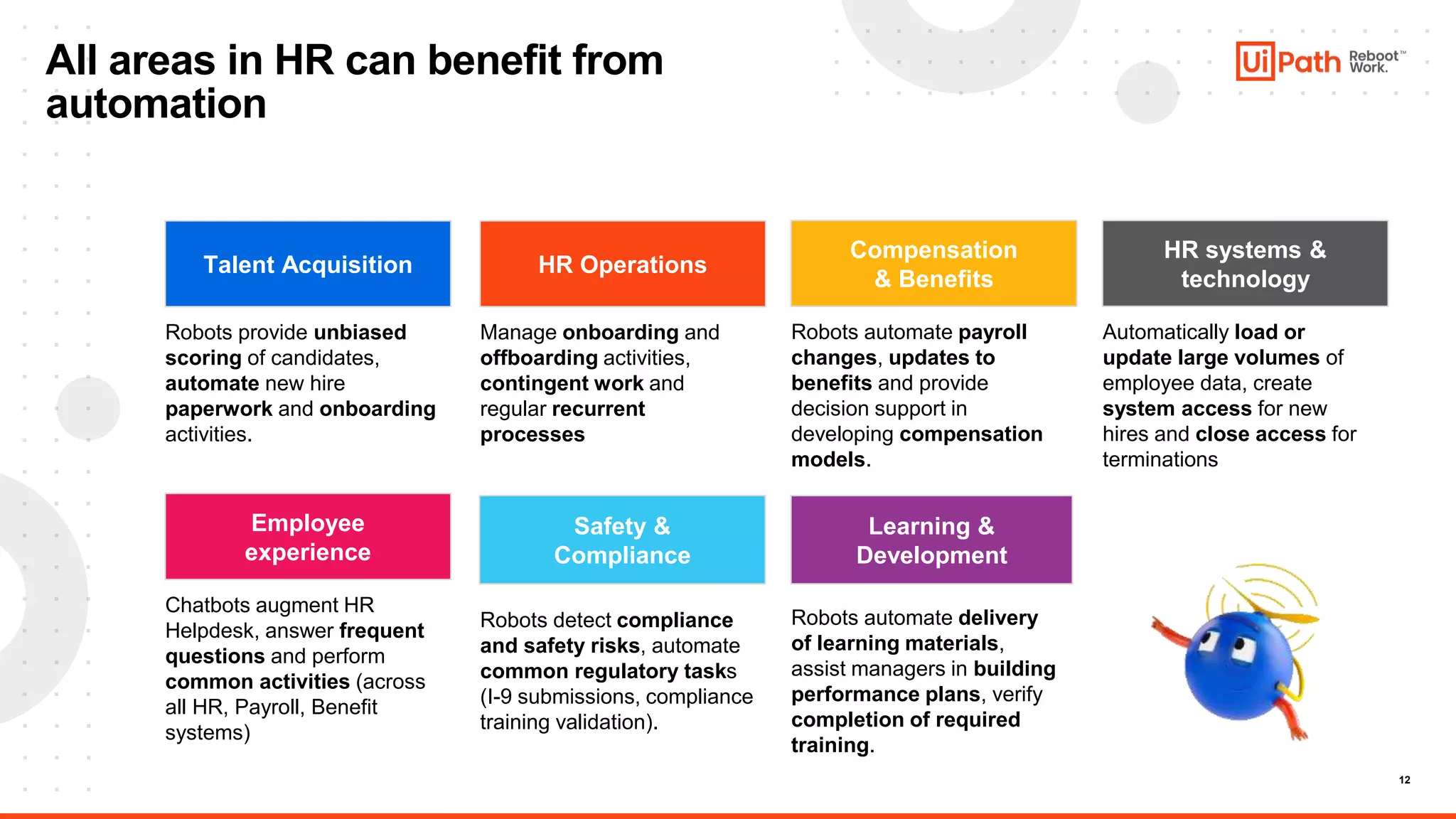
All areas in HR can benefit from
automation
Talent Acquisition
Compensation
& Benefits
Employee
experience
Safety &
Compliance
Learning &
Development
Robots provide unbiased
scoring of candidates,
automate new hire
paperwork and onboarding
activities.
Robots automate payroll
changes, updates to
benefits and provide
decision support in
developing compensation
models.
Chatbots augment HR
Helpdesk, answer frequent
questions and perform
common activities (across
all HR, Payroll, Benefit
systems)
Robots detect compliance
and safety risks, automate
common regulatory tasks
(I-9 submissions, compliance
training validation).
Robots automate delivery
of learning materials,
assist managers in building
performance plans, verify
completion of required
training.
HR Operations
Manage onboarding and
offboarding activities,
contingent work and
regular recurrent
processes
HR systems &
technology
Automatically load or
update large volumes of
employee data, create
system access for new
hires and close access for
terminations
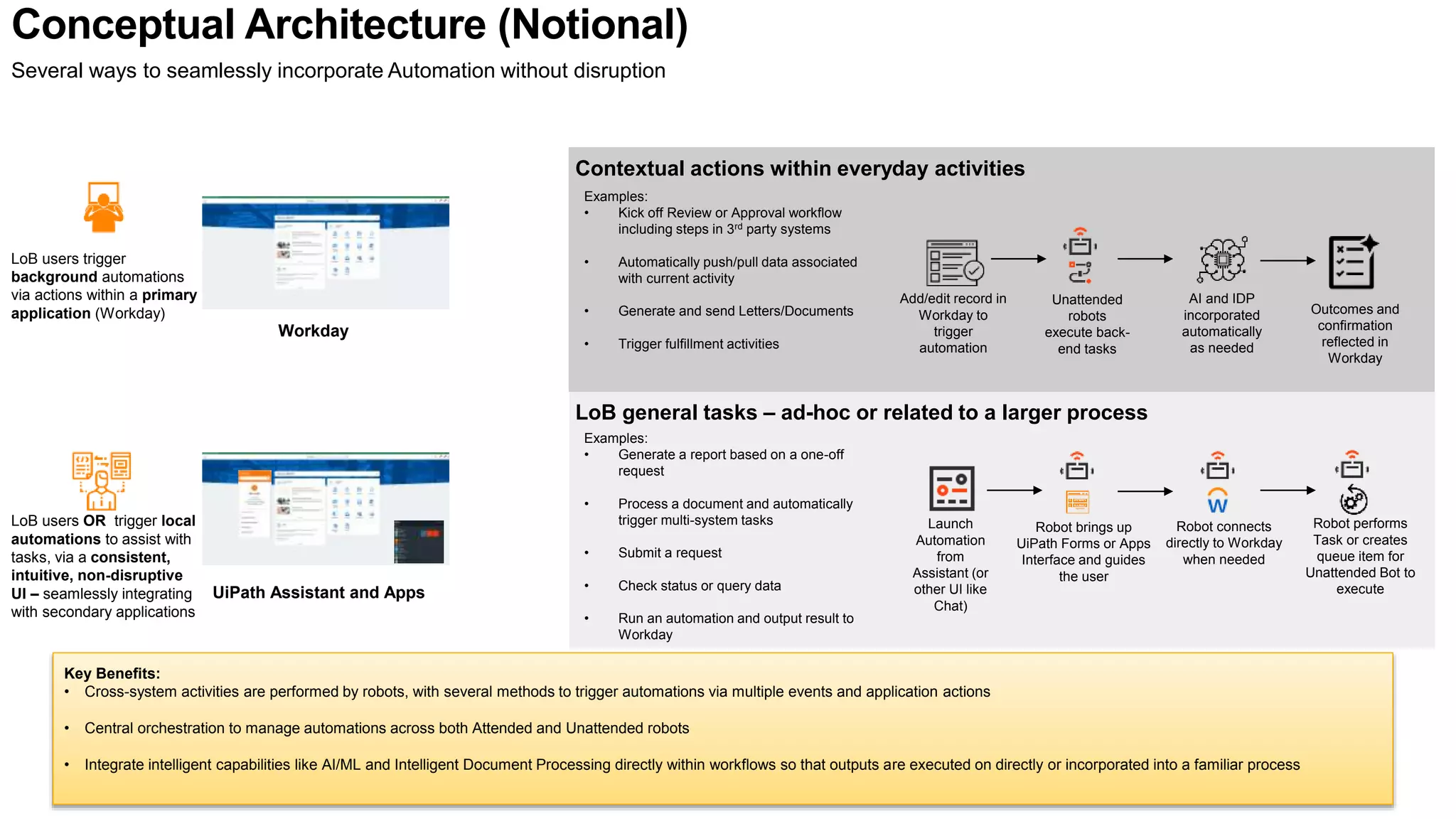
Conceptual Architecture (Notional)
Workday
UiPath Assistant and Apps
LoB users trigger
background automations
via actions within a primary
application (Workday)
LoB users OR trigger local
automations to assist with
tasks, via a consistent,
intuitive, non-disruptive
UI – seamlessly integrating
with secondary applications
Contextual actions within everyday activities
LoB general tasks – ad-hoc or related to a larger process
Examples:
• Kick off Review or Approval workflow
including steps in 3rd party systems
• Automatically push/pull data associated
with current activity
• Generate and send Letters/Documents
• Trigger fulfillment activities
Examples:
• Generate a report based on a one-off
request
• Process a document and automatically
trigger multi-system tasks
• Submit a request
• Check status or query data
• Run an automation and output result to
Workday
Add/edit record in
Workday to
trigger
automation
Unattended
robots
execute back-
end tasks
Outcomes and
confirmation
reflected in
Workday
Launch
Automation
from
Assistant (or
other UI like
Chat)
Robot performs
Task or creates
queue item for
Unattended Bot to
execute
Robot brings up
UiPath Forms or Apps
Interface and guides
the user
AI and IDP
incorporated
automatically
as needed
Several ways to seamlessly incorporate Automation without disruption
Key Benefits:
• Cross-system activities are performed by robots, with several methods to trigger automations via multiple events and application actions
• Central orchestration to manage automations across both Attended and Unattended robots
• Integrate intelligent capabilities like AI/ML and Intelligent Document Processing directly within workflows so that outputs are executed on directly or incorporated into a familiar process
Robot connects
directly to Workday
when needed
14
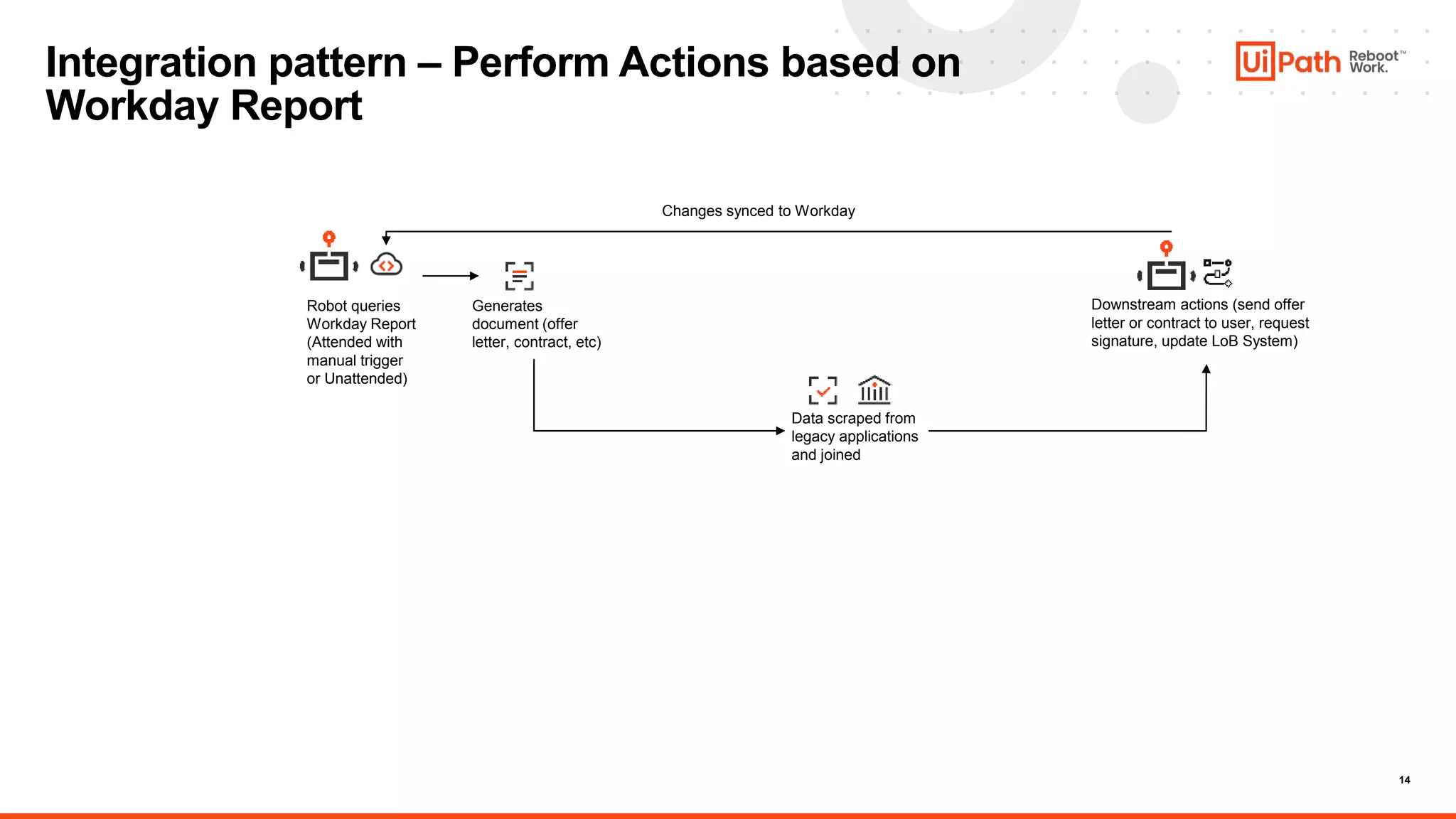
Integration pattern – Perform Actions based on
Workday Report
Robot queries
Workday Report
(Attended with
manual trigger
or Unattended)
Generates
document (offer
letter, contract, etc)
Data scraped from
legacy applications
and joined
Downstream actions (send offer
letter or contract to user, request
signature, update LoB System)
Changes synced to Workday
15
16
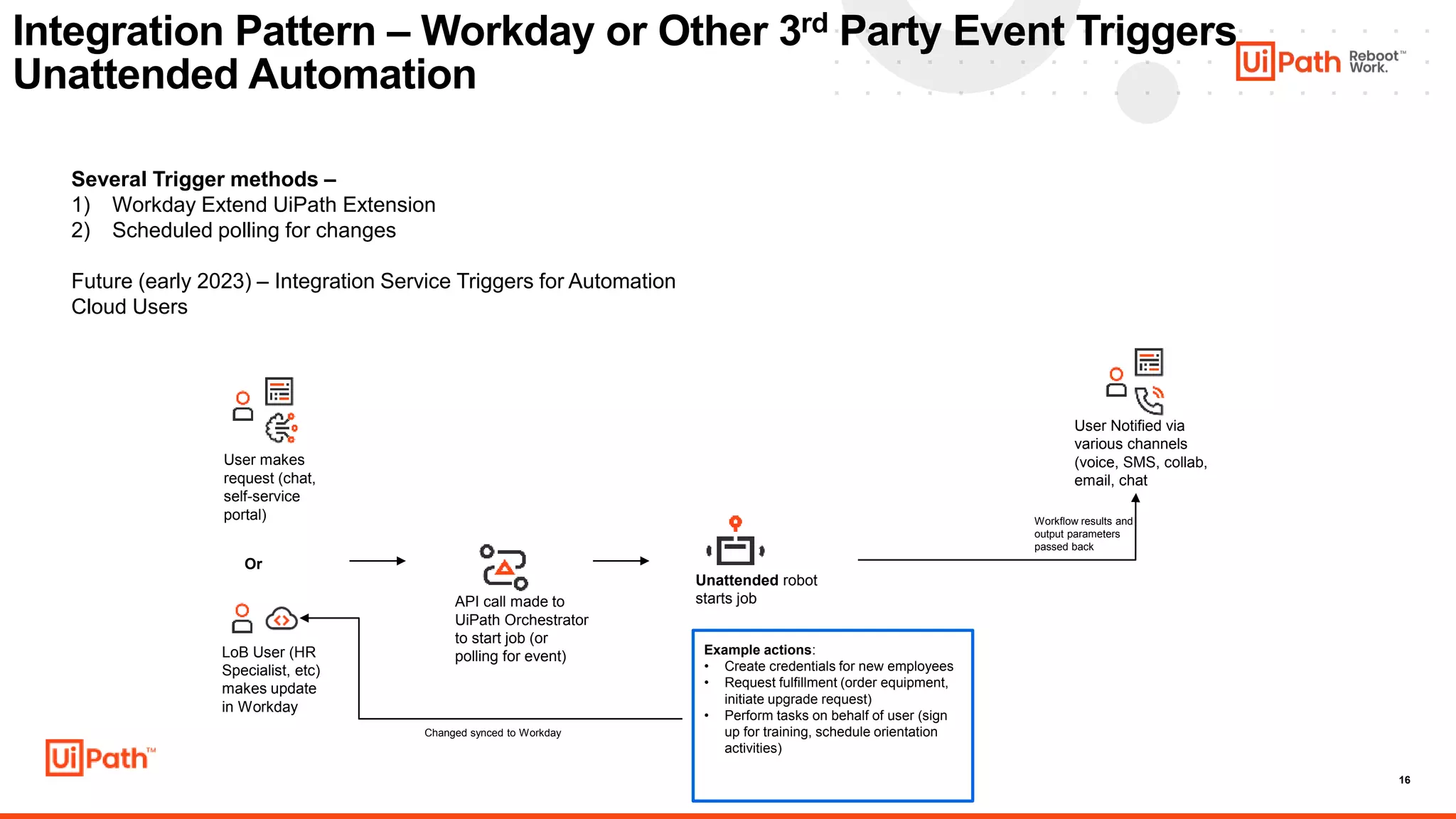
Integration Pattern – Workday or Other 3rd Party Event Triggers
Unattended Automation
Several Trigger methods –
1) Workday Extend UiPath Extension
2) Scheduled polling for changes
Future (early 2023) – Integration Service Triggers for Automation
Cloud Users
User makes
request (chat,
self-service
portal)
API call made to
UiPath Orchestrator
to start job (or
polling for event)
Unattended robot
starts job
User Notified via
various channels
(voice, SMS, collab,
email, chat
Workflow results and
output parameters
passed back
Example actions:
• Create credentials for new employees
• Request fulfillment (order equipment,
initiate upgrade request)
• Perform tasks on behalf of user (sign
up for training, schedule orientation
activities)
Or
LoB User (HR
Specialist, etc)
makes update
in Workday
Changed synced to Workday
17
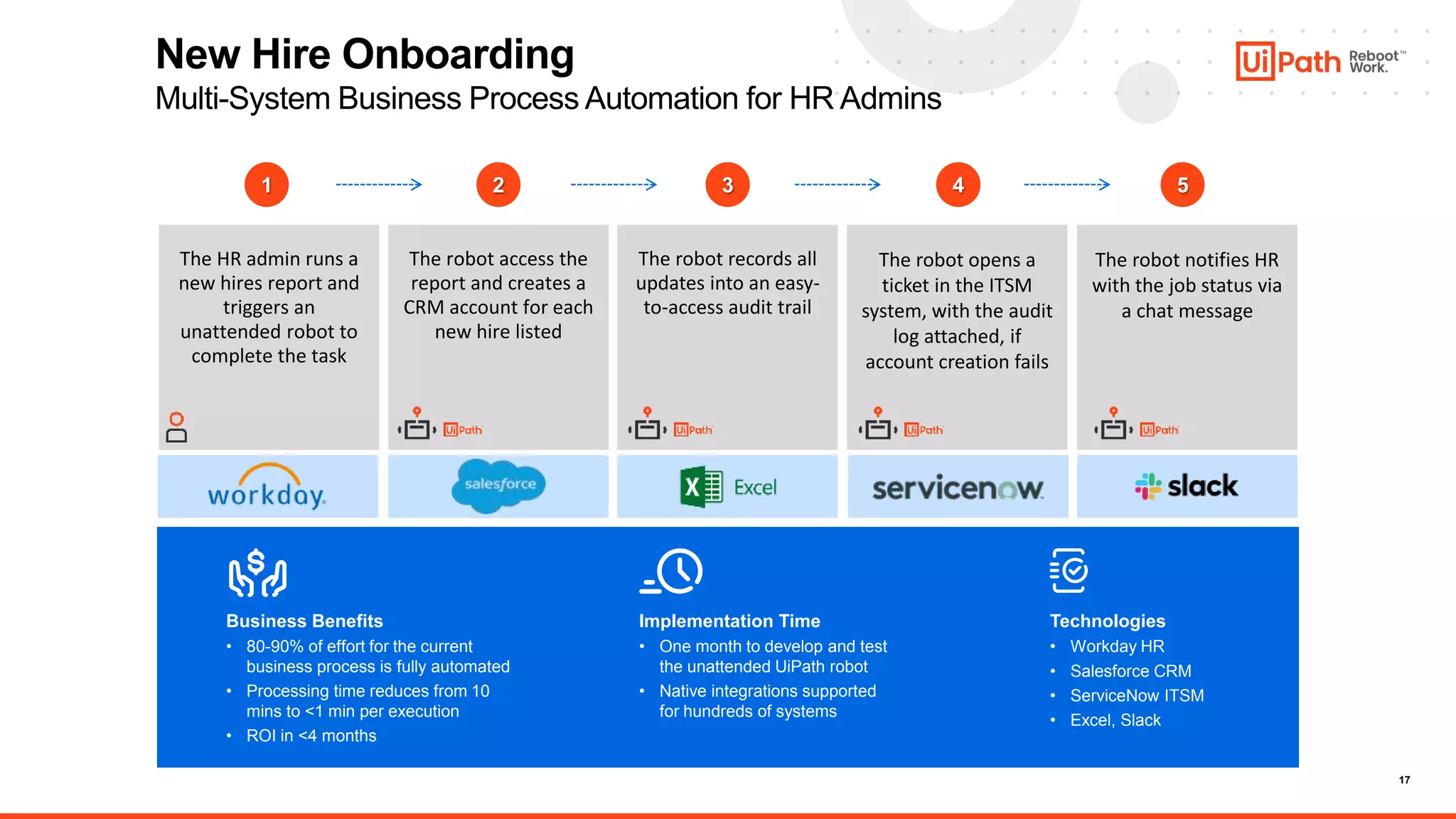
New Hire Onboarding
Multi-System Business Process Automation for HR Admins
Business Benefits
• 80-90% of effort for the current
business process is fully automated
• Processing time reduces from 10
mins to <1 min per execution
• ROI in <4 months
Implementation Time
• One month to develop and test
the unattended UiPath robot
• Native integrations supported
for hundreds of systems
Technologies
• Workday HR
• Salesforce CRM
• ServiceNow ITSM
• Excel, Slack
1 2 3 5
4
The robot access the
report and creates a
CRM account for each
new hire listed
The robot records all
updates into an easy-
to-access audit trail
The robot notifies HR
with the job status via
a chat message
The robot opens a
ticket in the ITSM
system, with the audit
log attached, if
account creation fails
The HR admin runs a
new hires report and
triggers an
unattended robot to
complete the task
Quiz Time!
19
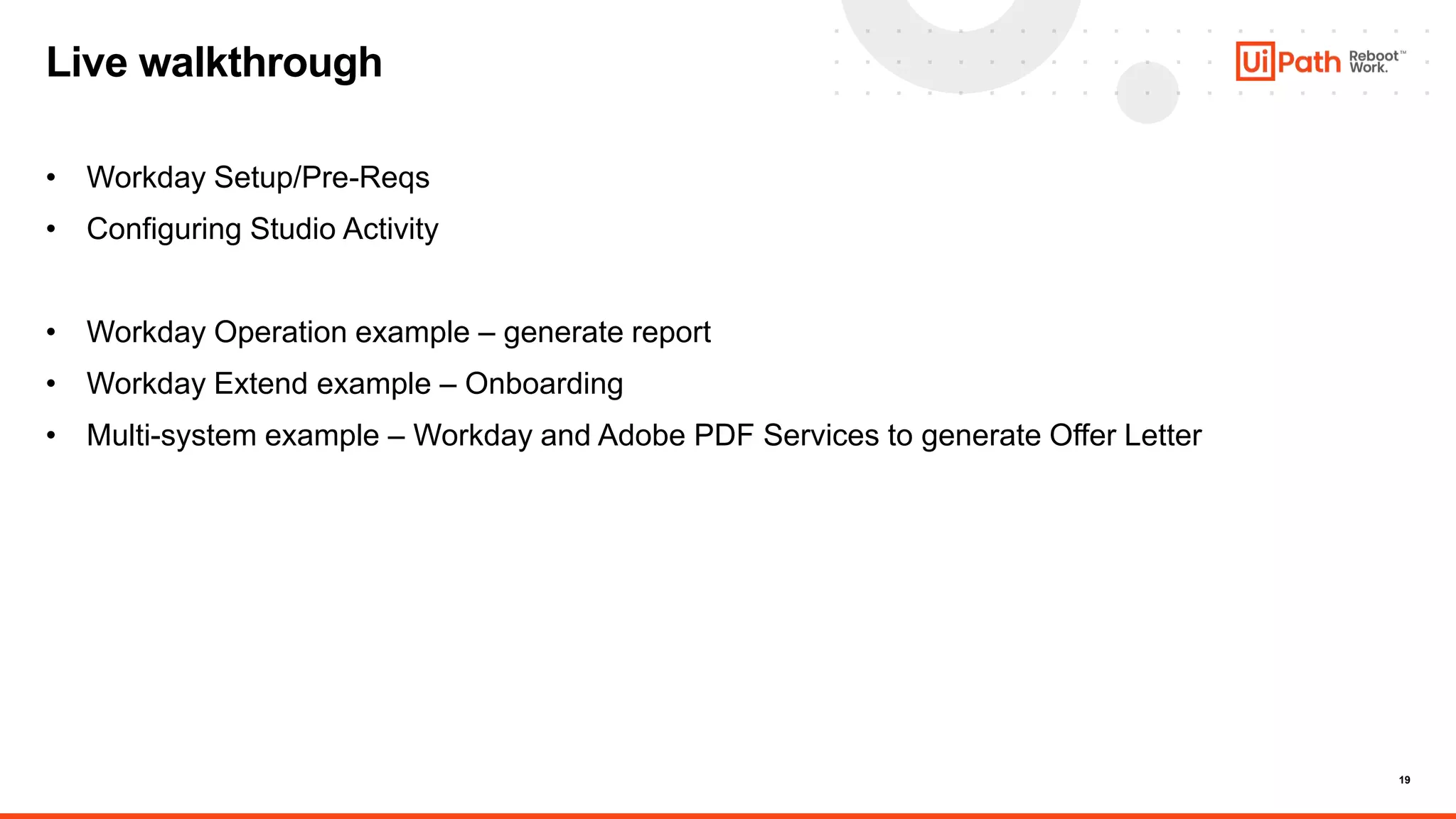
Live walkthrough
• Workday Setup/Pre-Reqs
• Configuring Studio Activity
• Workday Operation example – generate report
• Workday Extend example – Onboarding
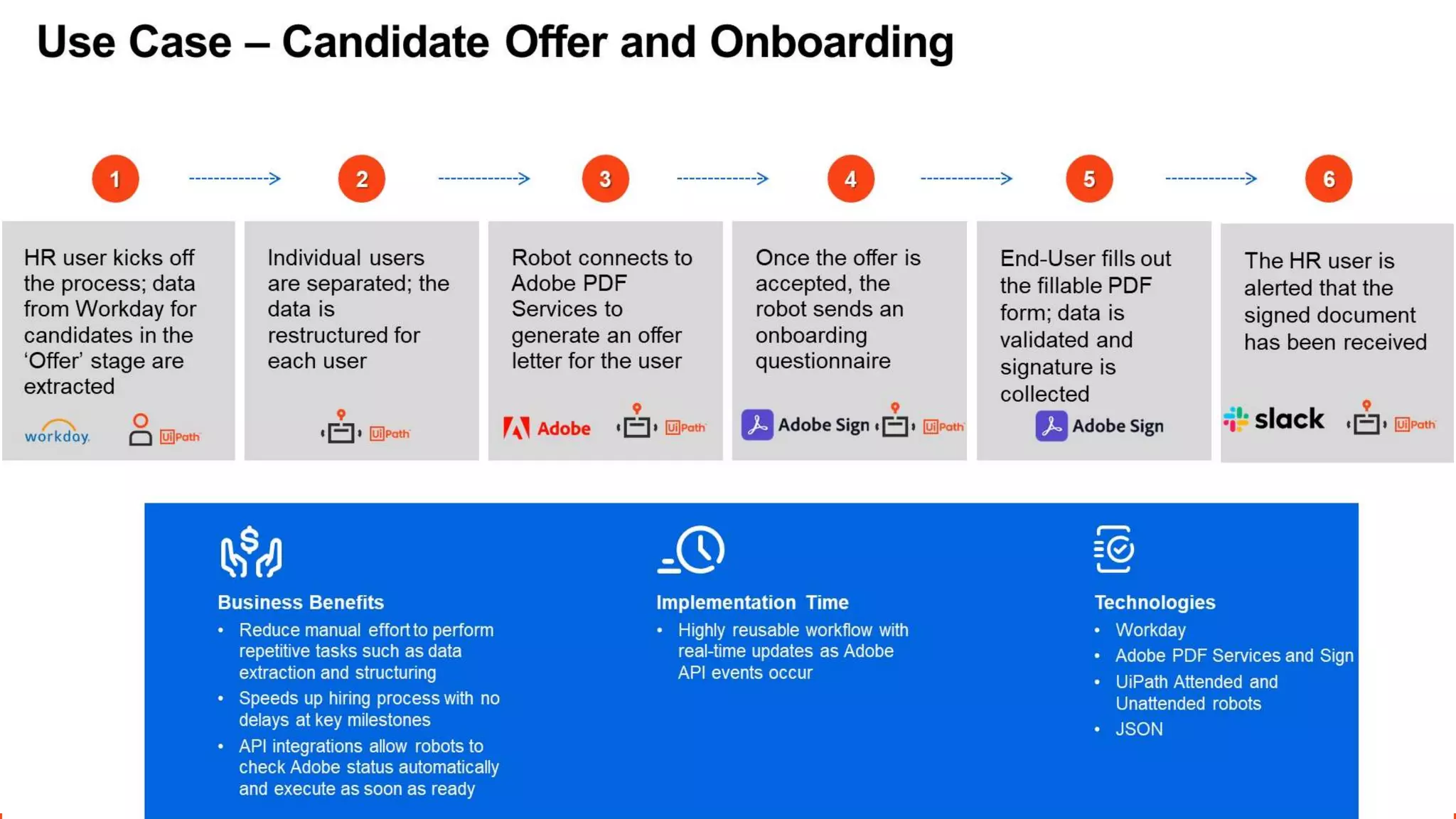
• Multi-system example – Workday and Adobe PDF Services to generate Offer Letter
Live Demo
Quiz Time!
Q&A
23
Resources and Helpful Links
UiPath Workday Studio Activities on Marketplace:
https://marketplace.uipath.com/listings/workday
UiPath Workday Solution Overview:
https://www.uipath.com/solutions/technology/workday-
automation#:~:text=The%20UiPath%20Activity%20for%20Workday,Workd
ay%20through%20its%20public%20API.
Workday Activities Documentation:
https://docs.uipath.com/activities/docs/workday-about
Workday Public Web Services reference:
https://community.workday.com/sites/default/files/file-
hosting/productionapi/operations/index.html
24
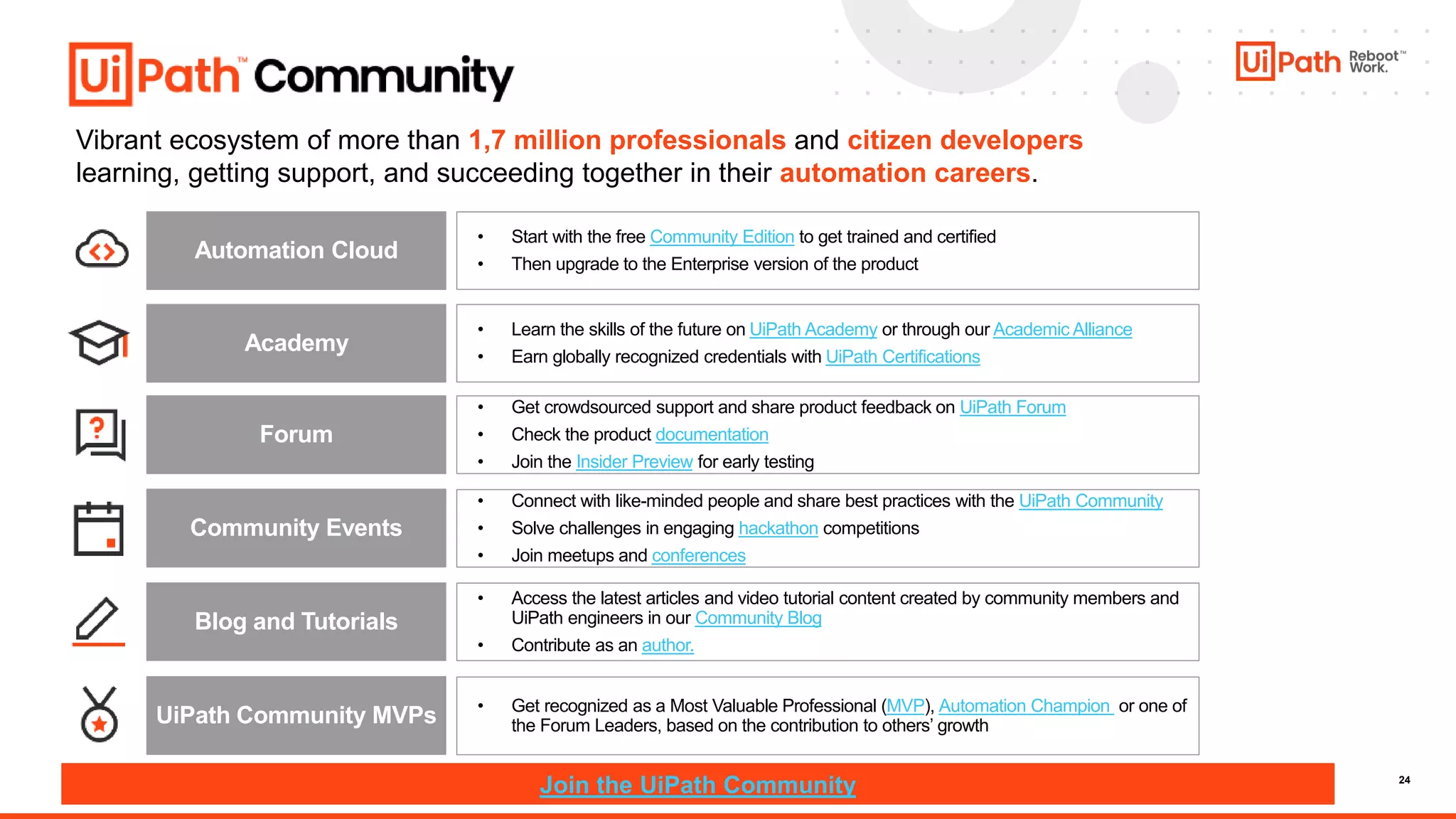
Vibrant ecosystem of more than 1,7 million professionals and citizen developers
learning, getting support, and succeeding together in their automation careers.
• Start with the free Community Edition to get trained and certified
• Then upgrade to the Enterprise version of the product
Academy
• Get crowdsourced support and share product feedback on UiPath Forum
• Check the product documentation
• Join the Insider Preview for early testing
Forum
Community Events
• Access the latest articles and video tutorial content created by community members and
UiPath engineers in our Community Blog
• Contribute as an author.
UiPath Community MVPs • Get recognized as a Most Valuable Professional (MVP), Automation Champion or one of
the Forum Leaders, based on the contribution to others’ growth
Join the UiPath Community
• Connect with like-minded people and share best practices with the UiPath Community
• Solve challenges in engaging hackathon competitions
• Join meetups and conferences
Blog and Tutorials
Automation Cloud
• Learn the skills of the future on UiPath Academy or through our Academic Alliance
• Earn globally recognized credentials with UiPath Certifications
25
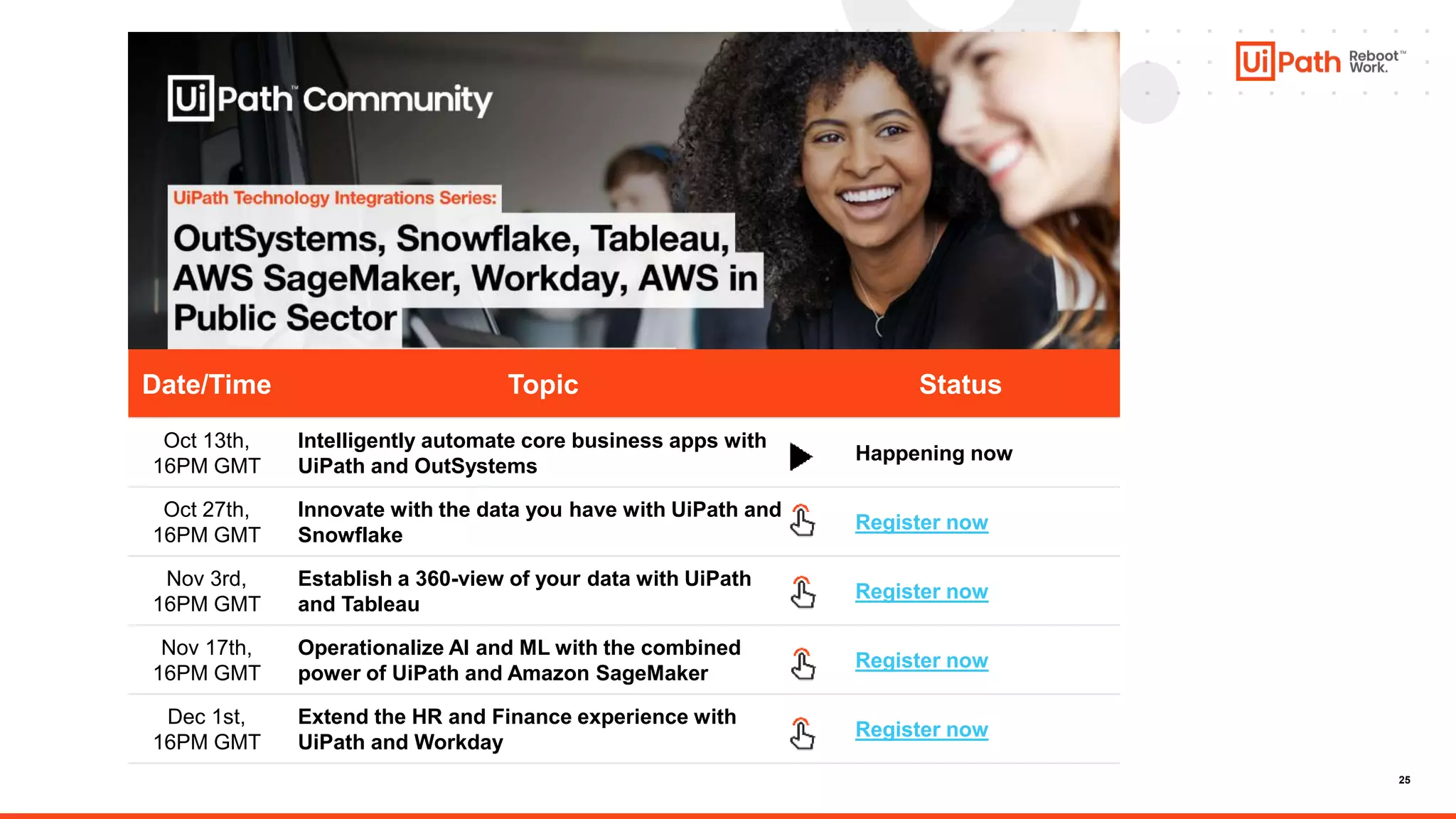
Date/Time Topic Status
Oct 13th,
16PM GMT
Intelligently automate core business apps with
UiPath and OutSystems
Happening now
Oct 27th,
16PM GMT
Innovate with the data you have with UiPath and
Snowflake
Register now
Nov 3rd,
16PM GMT
Establish a 360-view of your data with UiPath
and Tableau
Register now
Nov 17th,
16PM GMT
Operationalize AI and ML with the combined
power of UiPath and Amazon SageMaker
Register now
Dec 1st,
16PM GMT
Extend the HR and Finance experience with
UiPath and Workday
Register now
26
Last date to apply – Dec 10th
for your participation!
Join us: community.uipath.com
Thank You

Workday Community Session Final.pptx

  • 1.
    Extend the HRand Finance experience with UiPath and Workday Tech Integrations Series
  • 2.
    Rohit Radhakrishnan Regional CommunityManager APJ @UiPath Meet today’s team: Cristina Vidu Global Manager Marketing Community @UiPath
  • 3.
    Meet today’s speaker: MoRoy Senior Partner Engineer Product Technology Alliances @UiPath
  • 4.
    About today’s meeting: •The meetup will last 1 hr 30 mins • You are encouraged to network and share your LinkedIn in the chat box • We apologize for keeping you on mute till Q&A time • Please use the chat to place questions too till Q&A • There will be some fun too: Menti quiz coming up & UiPath prize
  • 5.
    5 1. Meetup Introductionwith our Community Manager 2. Overview of UiPath + Workday technical integration and use cases in HR and Finance 3. Live Walkthrough: 1. Workday Setup 2. Configuring Workday Activity Pack in Studio 3. Simple Workday Operation Demo (Live) 4. More Advanced Demos (Video) – with Workday Extend and Adobe PDF Services • UX via Chatbot (Live) 4. Q&A Agenda
  • 6.
    Many more TechnologyPartner provided UiPath Connectors available in the Marketplace Workday Extend – official UiPath component on WD Marketplace Home Grown applications or custom APIs Option to Build and Publish on Marketplace Many more… More choices to best suit your automation needs Connector Builder 3rd Party Connectors Create your own Integrations to use throughout UiPath Easily connect to the data you need without code for API based automations UiPath Connectors Integration Service Triggers – (Coming soon for Workday) Start UiPath automations natively in other platforms & applications Start UiPath automations based on events in other platforms Expand your own integration catalog to systems you need Our Integration Approach • Design automations leveraging existing APIs and EIBs – minimize need for Workday admin help • Drag and drop activities to pull/push information in/out from/to Workday • Launch EIBs • Invoke API Operations • Available On-Prem and Automation Cloud New Record: •New Candidate Updated Record: •Existing Evergreen Requisition •Existing Job Requisition •Existing Organization •Existing Worker •Existing Purchase Item Use Workday actions to trigger UiPath processes, including the following events (planned):
  • 7.
    7 Deep integration enablesWorkday users to seamlessly add UiPath RPA to Workday UiPath Activity for Workday Pre-packaged activities that allow users to quickly create UiPath Robots that can retrieve data out of Workday, import data within Workday, as well as invoke various Workday operations. Available in UiPath Studio and UiPath Marketplace
  • 8.
    8 Pre-packaged set ofactivities, available on UiPath Studio, that connects the UiPath Enterprise RPA Platform to Workday using Workday’s publicly-supported APIs – making it easy for users to automate interactions with Workday reports and data. UiPath Activity for Workday Type Activity Details Connection & Authorization Workday Application Scope Enables the UiPath Robot to get access to Workday Workday Object Get Workday Report Launch EIB UiPath Robots can retrieve data from Workday system, as well as to trigger changes within Workday through launch EIB functionality. Invoke Workday Operation Enables the UiPath Robot to invoke specific Workday operations needed to drive automations.
  • 9.
    9 Common use casesacross Workday solutions Human Resources • UiPath Robots can automatically and on a schedule create reports of active and terminated employees and use the data to update in multiple systems or send notifications to external providers like compensation and benefits platform. • Filling data gaps into the Workday system through an UiPath Robot that identifies data inconsistency based on predefined rules. Based on all inconsistencies, the robot creates Jira tickets and assigns the HR Ops team for further actions. Finance Management • UiPath Robots can automate the data extraction from the Workday payroll report and extract the details to update the report for the life insurance providers and other 3rd party medical providers. • Data gathering for internal audit can be triggered by an UiPath Robots that based on the Workday Report as a Service for all global employees, removes all duplicates and updates it in the financial audit tool. Corporate Planning, Budgeting • UiPath Robots can retrieve the Workday data from generated reports and update other systems like Salesforce and SAP to reflect the organizational changes with impact on the workforce planning and budgeting.
  • 10.
  • 11.
  • 12.
    12 All areas inHR can benefit from automation Talent Acquisition Compensation & Benefits Employee experience Safety & Compliance Learning & Development Robots provide unbiased scoring of candidates, automate new hire paperwork and onboarding activities. Robots automate payroll changes, updates to benefits and provide decision support in developing compensation models. Chatbots augment HR Helpdesk, answer frequent questions and perform common activities (across all HR, Payroll, Benefit systems) Robots detect compliance and safety risks, automate common regulatory tasks (I-9 submissions, compliance training validation). Robots automate delivery of learning materials, assist managers in building performance plans, verify completion of required training. HR Operations Manage onboarding and offboarding activities, contingent work and regular recurrent processes HR systems & technology Automatically load or update large volumes of employee data, create system access for new hires and close access for terminations
  • 13.
    Conceptual Architecture (Notional) Workday UiPathAssistant and Apps LoB users trigger background automations via actions within a primary application (Workday) LoB users OR trigger local automations to assist with tasks, via a consistent, intuitive, non-disruptive UI – seamlessly integrating with secondary applications Contextual actions within everyday activities LoB general tasks – ad-hoc or related to a larger process Examples: • Kick off Review or Approval workflow including steps in 3rd party systems • Automatically push/pull data associated with current activity • Generate and send Letters/Documents • Trigger fulfillment activities Examples: • Generate a report based on a one-off request • Process a document and automatically trigger multi-system tasks • Submit a request • Check status or query data • Run an automation and output result to Workday Add/edit record in Workday to trigger automation Unattended robots execute back- end tasks Outcomes and confirmation reflected in Workday Launch Automation from Assistant (or other UI like Chat) Robot performs Task or creates queue item for Unattended Bot to execute Robot brings up UiPath Forms or Apps Interface and guides the user AI and IDP incorporated automatically as needed Several ways to seamlessly incorporate Automation without disruption Key Benefits: • Cross-system activities are performed by robots, with several methods to trigger automations via multiple events and application actions • Central orchestration to manage automations across both Attended and Unattended robots • Integrate intelligent capabilities like AI/ML and Intelligent Document Processing directly within workflows so that outputs are executed on directly or incorporated into a familiar process Robot connects directly to Workday when needed
  • 14.
    14 Integration pattern –Perform Actions based on Workday Report Robot queries Workday Report (Attended with manual trigger or Unattended) Generates document (offer letter, contract, etc) Data scraped from legacy applications and joined Downstream actions (send offer letter or contract to user, request signature, update LoB System) Changes synced to Workday
  • 15.
  • 16.
    16 Integration Pattern –Workday or Other 3rd Party Event Triggers Unattended Automation Several Trigger methods – 1) Workday Extend UiPath Extension 2) Scheduled polling for changes Future (early 2023) – Integration Service Triggers for Automation Cloud Users User makes request (chat, self-service portal) API call made to UiPath Orchestrator to start job (or polling for event) Unattended robot starts job User Notified via various channels (voice, SMS, collab, email, chat Workflow results and output parameters passed back Example actions: • Create credentials for new employees • Request fulfillment (order equipment, initiate upgrade request) • Perform tasks on behalf of user (sign up for training, schedule orientation activities) Or LoB User (HR Specialist, etc) makes update in Workday Changed synced to Workday
  • 17.
    17 New Hire Onboarding Multi-SystemBusiness Process Automation for HR Admins Business Benefits • 80-90% of effort for the current business process is fully automated • Processing time reduces from 10 mins to <1 min per execution • ROI in <4 months Implementation Time • One month to develop and test the unattended UiPath robot • Native integrations supported for hundreds of systems Technologies • Workday HR • Salesforce CRM • ServiceNow ITSM • Excel, Slack 1 2 3 5 4 The robot access the report and creates a CRM account for each new hire listed The robot records all updates into an easy- to-access audit trail The robot notifies HR with the job status via a chat message The robot opens a ticket in the ITSM system, with the audit log attached, if account creation fails The HR admin runs a new hires report and triggers an unattended robot to complete the task
  • 18.
  • 19.
    19 Live walkthrough • WorkdaySetup/Pre-Reqs • Configuring Studio Activity • Workday Operation example – generate report • Workday Extend example – Onboarding • Multi-system example – Workday and Adobe PDF Services to generate Offer Letter
  • 20.
  • 21.
  • 22.
  • 23.
    23 Resources and HelpfulLinks UiPath Workday Studio Activities on Marketplace: https://marketplace.uipath.com/listings/workday UiPath Workday Solution Overview: https://www.uipath.com/solutions/technology/workday- automation#:~:text=The%20UiPath%20Activity%20for%20Workday,Workd ay%20through%20its%20public%20API. Workday Activities Documentation: https://docs.uipath.com/activities/docs/workday-about Workday Public Web Services reference: https://community.workday.com/sites/default/files/file- hosting/productionapi/operations/index.html
  • 24.
    24 Vibrant ecosystem ofmore than 1,7 million professionals and citizen developers learning, getting support, and succeeding together in their automation careers. • Start with the free Community Edition to get trained and certified • Then upgrade to the Enterprise version of the product Academy • Get crowdsourced support and share product feedback on UiPath Forum • Check the product documentation • Join the Insider Preview for early testing Forum Community Events • Access the latest articles and video tutorial content created by community members and UiPath engineers in our Community Blog • Contribute as an author. UiPath Community MVPs • Get recognized as a Most Valuable Professional (MVP), Automation Champion or one of the Forum Leaders, based on the contribution to others’ growth Join the UiPath Community • Connect with like-minded people and share best practices with the UiPath Community • Solve challenges in engaging hackathon competitions • Join meetups and conferences Blog and Tutorials Automation Cloud • Learn the skills of the future on UiPath Academy or through our Academic Alliance • Earn globally recognized credentials with UiPath Certifications
  • 25.
    25 Date/Time Topic Status Oct13th, 16PM GMT Intelligently automate core business apps with UiPath and OutSystems Happening now Oct 27th, 16PM GMT Innovate with the data you have with UiPath and Snowflake Register now Nov 3rd, 16PM GMT Establish a 360-view of your data with UiPath and Tableau Register now Nov 17th, 16PM GMT Operationalize AI and ML with the combined power of UiPath and Amazon SageMaker Register now Dec 1st, 16PM GMT Extend the HR and Finance experience with UiPath and Workday Register now
  • 26.
    26 Last date toapply – Dec 10th
  • 27.
    for your participation! Joinus: community.uipath.com Thank You

Editor's Notes

  • #10 Who is it for?
  • #13 Add HRIS / HR Tech section
  • #18 Here is a specific example where the ML model makes predictions about inventory levels for each of thousands of products. This model combines demand data with supplier data to set resupply thresholds that ensure that the least amount of product is warehoused to meet demand. This gets complex fast, as upstream suppliers differ in their ability to send products. The last thing you want to do is to have more demand than supply can handle. The COVID crisis was an extreme example of this, and we saw many companies improve their demand forecasting models in order to be better prepared next time. The steps you see occur mostly when the stock level dips. Without using the UiPath robots, this was the manual steps the procurement officer took to resupply a single SKU. Imagine the effort spent when a dozen or more of these occurred each day. You can see where the robot manages the process, interacting with Tableau, SAP, Excel, Outlook, and Slack, to ensure that a low inventory condition triggered a reliable reorder process. You can also see why this produces a 95% effort reduction – because the robot is doing the connecting and data sharing instead of the person. It all occurs with oversight and approval of the human officer, so there is no loss of governance or dilution of responsibility either. Let’s look at this from the user’s perspective.