NASEEMKHOODORUTH 1
WORK FROMHOME UNDER THE LOCKDOWN
#informationtechnology#cybersecurity#sophos#fortinet#microsoft#workfromhome#covid-19
#mauritius#staysafe #staycalm
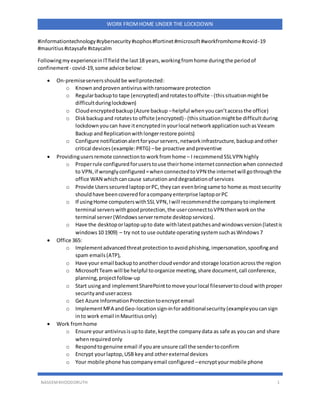
FollowingmyexperienceinITfield the last18 years,workingfromhome duringthe periodof
confinement- covid-19,some advice below:
 On-premiseserversshouldbe wellprotected:
o Knownandproven antiviruswithransomware protection
o Regularbackupto tape (encrypted) androtatestooffsite - (thissituationmightbe
difficultduringlockdown)
o Cloudencryptedbackup(Azure backup –helpful whenyoucan’taccessthe office)
o Diskbackupand rotatesto offsite (encrypted)- (thissituationmightbe difficultduring
lockdown youcan have itencryptedin yourlocal networkapplicationsuchasVeeam
Backup andReplicationwithlongerrestore points)
o Configure notificationalertforyourservers,networkinfrastructure, backupandother
critical devices(example:PRTG) –be proactive andpreventive
 Providingusersremote connectionto workfromhome – I recommend SSLVPN highly
o Properrule configured forusers touse theirhome internetconnectionwhen connected
to VPN,if wronglyconfigured=whenconnectedtoVPN the internetwill gothroughthe
office WAN whichcancause saturation anddegradationof services
o Provide UserssecuredlaptoporPC,theycan evenbringsame to home as mostsecurity
shouldhave beencoveredforacompanyenterprise laptoporPC
o If usingHome computerswithSSL VPN,Iwill recommendthe companytoimplement
terminal serverswithgoodprotection,the userconnecttoVPN thenworkonthe
terminal server(Windowsserverremote desktopservices).
o Have the desktoporlaptopupto date withlatestpatchesandwindowsversion(latestis
windows10 1909) – try not to use outdate operatingsystemsuchasWindows7
 Office 365:
o Implementadvancedthreatprotectiontoavoidphishing,impersonation,spoofingand
spam emails(ATP),
o Have your email backuptoanothercloudvendorand storage locationacrossthe region
o MicrosoftTeam will be helpful toorganize meeting,share document,call conference,
planning,projectfollow-up
o Start usingand implementSharePointtomove yourlocal fileservertocloud withproper
securityanduseraccess
o Get Azure InformationProtectiontoencryptemail
o ImplementMFA andGeo-locationsign-inforadditionalsecurity(exampleyoucansign
into work email inMauritiusonly)
 Work fromhome
o Ensure your antivirusisupto date,keptthe company data as safe as youcan and share
whenrequiredonly
o Respondtogenuine email if youare unsure call the sendertoconfirm
o Encrypt yourlaptop,USB key and otherexternal devices
o Your mobile phone hascompanyemail configured –encryptyourmobile phone
NASEEMKHOODORUTH 2
WORK FROMHOME UNDER THE LOCKDOWN
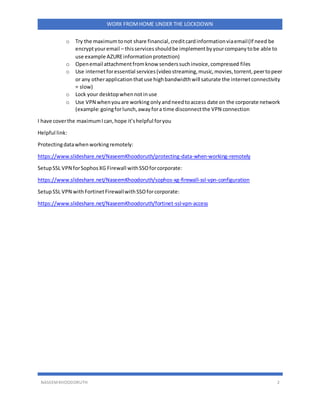
o Try the maximumtonot share financial,creditcardinformationviaemail(If need be
encryptyouremail – thisservicesshouldbe implementbyyourcompanytobe able to
use example AZUREinformationprotection)
o Openemail attachmentfromknow senderssuchinvoice,compressed files
o Use internetforessential services(videostreaming,music,movies,torrent,peertopeer
or any otherapplicationthatuse highbandwidthwill saturate the internetconnectivity
= slow)
o Lock your desktopwhennotinuse
o Use VPN whenyouare working onlyandneedtoaccess date on the corporate network
(example:goingforlunch,awayfora time disconnectthe VPN connection
I have coverthe maximumIcan,hope it’shelpful foryou
Helpful link:
Protectingdatawhenworkingremotely:
https://www.slideshare.net/NaseemKhoodoruth/protecting-data-when-working-remotely
SetupSSL VPN forSophosXG Firewall withSSOforcorporate:
https://www.slideshare.net/NaseemKhoodoruth/sophos-xg-firewall-ssl-vpn-configuration
SetupSSL VPN withFortinetFirewallwithSSOforcorporate:
https://www.slideshare.net/NaseemKhoodoruth/fortinet-ssl-vpn-access

Work from home under the lockdown

  • 1.
    NASEEMKHOODORUTH 1 WORK FROMHOMEUNDER THE LOCKDOWN #informationtechnology#cybersecurity#sophos#fortinet#microsoft#workfromhome#covid-19 #mauritius#staysafe #staycalm FollowingmyexperienceinITfield the last18 years,workingfromhome duringthe periodof confinement- covid-19,some advice below:  On-premiseserversshouldbe wellprotected: o Knownandproven antiviruswithransomware protection o Regularbackupto tape (encrypted) androtatestooffsite - (thissituationmightbe difficultduringlockdown) o Cloudencryptedbackup(Azure backup –helpful whenyoucan’taccessthe office) o Diskbackupand rotatesto offsite (encrypted)- (thissituationmightbe difficultduring lockdown youcan have itencryptedin yourlocal networkapplicationsuchasVeeam Backup andReplicationwithlongerrestore points) o Configure notificationalertforyourservers,networkinfrastructure, backupandother critical devices(example:PRTG) –be proactive andpreventive  Providingusersremote connectionto workfromhome – I recommend SSLVPN highly o Properrule configured forusers touse theirhome internetconnectionwhen connected to VPN,if wronglyconfigured=whenconnectedtoVPN the internetwill gothroughthe office WAN whichcancause saturation anddegradationof services o Provide UserssecuredlaptoporPC,theycan evenbringsame to home as mostsecurity shouldhave beencoveredforacompanyenterprise laptoporPC o If usingHome computerswithSSL VPN,Iwill recommendthe companytoimplement terminal serverswithgoodprotection,the userconnecttoVPN thenworkonthe terminal server(Windowsserverremote desktopservices). o Have the desktoporlaptopupto date withlatestpatchesandwindowsversion(latestis windows10 1909) – try not to use outdate operatingsystemsuchasWindows7  Office 365: o Implementadvancedthreatprotectiontoavoidphishing,impersonation,spoofingand spam emails(ATP), o Have your email backuptoanothercloudvendorand storage locationacrossthe region o MicrosoftTeam will be helpful toorganize meeting,share document,call conference, planning,projectfollow-up o Start usingand implementSharePointtomove yourlocal fileservertocloud withproper securityanduseraccess o Get Azure InformationProtectiontoencryptemail o ImplementMFA andGeo-locationsign-inforadditionalsecurity(exampleyoucansign into work email inMauritiusonly)  Work fromhome o Ensure your antivirusisupto date,keptthe company data as safe as youcan and share whenrequiredonly o Respondtogenuine email if youare unsure call the sendertoconfirm o Encrypt yourlaptop,USB key and otherexternal devices o Your mobile phone hascompanyemail configured –encryptyourmobile phone
  • 2.
    NASEEMKHOODORUTH 2 WORK FROMHOMEUNDER THE LOCKDOWN o Try the maximumtonot share financial,creditcardinformationviaemail(If need be encryptyouremail – thisservicesshouldbe implementbyyourcompanytobe able to use example AZUREinformationprotection) o Openemail attachmentfromknow senderssuchinvoice,compressed files o Use internetforessential services(videostreaming,music,movies,torrent,peertopeer or any otherapplicationthatuse highbandwidthwill saturate the internetconnectivity = slow) o Lock your desktopwhennotinuse o Use VPN whenyouare working onlyandneedtoaccess date on the corporate network (example:goingforlunch,awayfora time disconnectthe VPN connection I have coverthe maximumIcan,hope it’shelpful foryou Helpful link: Protectingdatawhenworkingremotely: https://www.slideshare.net/NaseemKhoodoruth/protecting-data-when-working-remotely SetupSSL VPN forSophosXG Firewall withSSOforcorporate: https://www.slideshare.net/NaseemKhoodoruth/sophos-xg-firewall-ssl-vpn-configuration SetupSSL VPN withFortinetFirewallwithSSOforcorporate: https://www.slideshare.net/NaseemKhoodoruth/fortinet-ssl-vpn-access