WordPress: Turn Your
                           Website into a Social
                              Media Engine


                                     the whole brain group


                             www.thewholebraingroup.com
                                        109 East Ann Street
                                        Ann Arbor, MI 48104
                                          (734) 929-0431


Sunday, October 10, 2010
Social Media: What’s the point?


Sunday, October 10, 2010
Social Media: What’s the point?

         • Listen to & learn from other people in your field


Sunday, October 10, 2010
Social Media: What’s the point?

         • Listen to & learn from other people in your field
         • Build relationships


Sunday, October 10, 2010
Social Media: What’s the point?

         • Listen to & learn from other people in your field
         • Build relationships
         • Establish expertise


Sunday, October 10, 2010
Social Media: What’s the point?

         • Listen to & learn from other people in your field
         • Build relationships
         • Establish expertise
         • Market your products or services


Sunday, October 10, 2010
Social Media: What’s the point?

         • Listen to & learn from other people in your field
         • Build relationships
         • Establish expertise
         • Market your products or services
         • Create fans & followers who can help you spread your
           message


Sunday, October 10, 2010
Social Media: What’s the point?

         • Listen to & learn from other people in your field
         • Build relationships
         • Establish expertise
         • Market your products or services
         • Create fans & followers who can help you spread your
           message
         • Search Engine Ranking


Sunday, October 10, 2010
Social Media: What’s the point?

         • Listen to & learn from other people in your field
         • Build relationships
         • Establish expertise
         • Market your products or services
         • Create fans & followers who can help you spread your
           message
         • Search Engine Ranking
         • Increase traffic to your website and/or blog


Sunday, October 10, 2010
What is Social Media
                              Integration?


Sunday, October 10, 2010
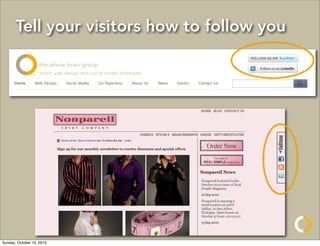
Tell your visitors how to follow you


Sunday, October 10, 2010
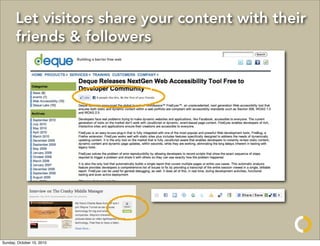
Let visitors share your content with their
       friends & followers


Sunday, October 10, 2010
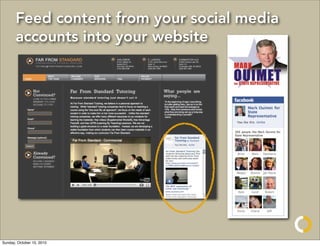
Feed content from your social media
       accounts into your website


Sunday, October 10, 2010
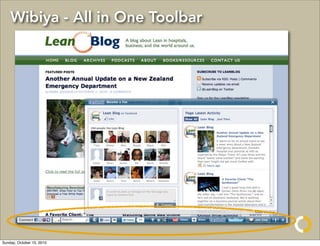
Wibiya - All in One Toolbar


Sunday, October 10, 2010
The problem with social media


Sunday, October 10, 2010
The Black Hole


Sunday, October 10, 2010
The Black Hole


Sunday, October 10, 2010
The Black Hole

         • Time consuming to update all of your different accounts


Sunday, October 10, 2010
The Black Hole

         • Time consuming to update all of your different accounts
         • Hard to tell if it’s worth all of your time & energy


Sunday, October 10, 2010
The Black Hole

         • Time consuming to update all of your different accounts
         • Hard to tell if it’s worth all of your time & energy
         • Is easy to get sucked into exploring links, living
           vicariously, and being a social media spy


Sunday, October 10, 2010
Your
                           Website


Sunday, October 10, 2010
Your
                           Website


Sunday, October 10, 2010
Your
                           Website


Sunday, October 10, 2010
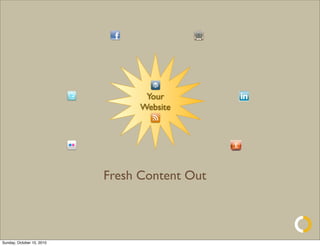
Your
                                 Website


                           Fresh Content Out


Sunday, October 10, 2010
Your
                                 Website


                           Fresh Content Out
                           Fresh Prospects In


Sunday, October 10, 2010
Why use your website as the center?

                           Fresh Content Out


Sunday, October 10, 2010
Why use your website as the center?

                           Fresh Content Out

         • Authoritative source of information about your business


Sunday, October 10, 2010
Why use your website as the center?

                           Fresh Content Out

         • Authoritative source of information about your business
         • Anything you post on your website is appropriate for
           the other social media tools/audiences


Sunday, October 10, 2010
Why use your website as the center?

                           Fresh Content Out

         • Authoritative source of information about your business
         • Anything you post on your website is appropriate for
           the other social media tools/audiences
         • Automated services can shorten URLs from posts and
           link people back to your site for more information = built
           in Call To Action


Sunday, October 10, 2010
Why use your website as the center?
                           Fresh Prospects In


Sunday, October 10, 2010
Why use your website as the center?
                           Fresh Prospects In

            • More traffic for your website = Google Juice


Sunday, October 10, 2010
Why use your website as the center?
                           Fresh Prospects In

            • More traffic for your website = Google Juice
            • More people learning about how cool you are =
              more prospects


Sunday, October 10, 2010
Why use your website as the center?
                           Fresh Prospects In

            • More traffic for your website = Google Juice
            • More people learning about how cool you are =
              more prospects
            • Easy to use Google Analytics to track your traffic
              and where it’s coming from to decide what to
              spend your time on, and what information people
              are interested in


Sunday, October 10, 2010
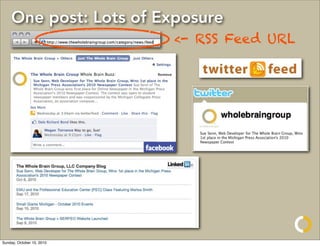
One post: Lots of Exposure
                           <- RSS Feed URL


Sunday, October 10, 2010
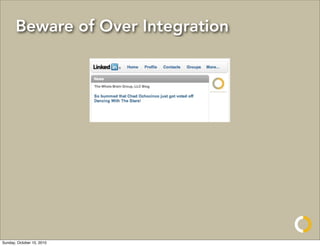
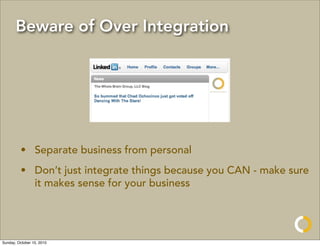
Beware of Over Integration


Sunday, October 10, 2010
Beware of Over Integration


         • Separate business from personal
         • Don’t just integrate things because you CAN - make sure
           it makes sense for your business


Sunday, October 10, 2010
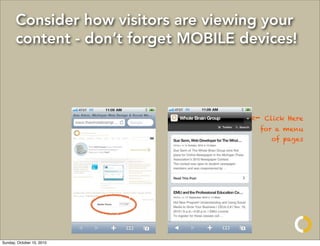
Consider how visitors are viewing your
       content - don’t forget MOBILE devices!


                                      <-   Click Here
                                        for a menu
                                            of pages


Sunday, October 10, 2010
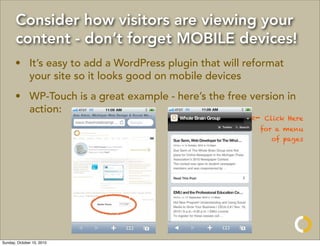
Consider how visitors are viewing your
       content - don’t forget MOBILE devices!
       • It’s easy to add a WordPress plugin that will reformat
         your site so it looks good on mobile devices
       • WP-Touch is a great example - here’s the free version in
         action:
                                                        <-   Click Here
                                                          for a menu
                                                              of pages


Sunday, October 10, 2010
Cool Tools
         • TwitterFeed -- http://www.twitterfeed.com
         • Dlvr.it -- http://www.dlvr.it
         • Nutshell Mail -- http://www.nutshellmail.com


  Cool Plugins
     • Share & Follow -- http://share-and-follow.com/
     • AddThis -- http://www.addthis.com/
     • Wibiya -- http://www.wibiya.com     <- Super Cool!
     • FB-Like -- http://www.travisballard.com/wordpress/
       fblike-wordpress-plugin/
Sunday, October 10, 2010
the whole brain group
                                  109 East Ann Street
                                  Ann Arbor, MI 48104
                                    (734) 929-0431


              http://www.thewholebraingroup.com

                           @wholebraingroup

                           @wholebrainprez

Sunday, October 10, 2010

WordPress: Turn Your Website into a Social Media Engine

  • 1.
    WordPress: Turn Your Website into a Social Media Engine the whole brain group www.thewholebraingroup.com 109 East Ann Street Ann Arbor, MI 48104 (734) 929-0431 Sunday, October 10, 2010
  • 2.
    Social Media: What’sthe point? Sunday, October 10, 2010
  • 3.
    Social Media: What’sthe point? • Listen to & learn from other people in your field Sunday, October 10, 2010
  • 4.
    Social Media: What’sthe point? • Listen to & learn from other people in your field • Build relationships Sunday, October 10, 2010
  • 5.
    Social Media: What’sthe point? • Listen to & learn from other people in your field • Build relationships • Establish expertise Sunday, October 10, 2010
  • 6.
    Social Media: What’sthe point? • Listen to & learn from other people in your field • Build relationships • Establish expertise • Market your products or services Sunday, October 10, 2010
  • 7.
    Social Media: What’sthe point? • Listen to & learn from other people in your field • Build relationships • Establish expertise • Market your products or services • Create fans & followers who can help you spread your message Sunday, October 10, 2010
  • 8.
    Social Media: What’sthe point? • Listen to & learn from other people in your field • Build relationships • Establish expertise • Market your products or services • Create fans & followers who can help you spread your message • Search Engine Ranking Sunday, October 10, 2010
  • 9.
    Social Media: What’sthe point? • Listen to & learn from other people in your field • Build relationships • Establish expertise • Market your products or services • Create fans & followers who can help you spread your message • Search Engine Ranking • Increase traffic to your website and/or blog Sunday, October 10, 2010
  • 10.
    What is SocialMedia Integration? Sunday, October 10, 2010
  • 11.
    Tell your visitorshow to follow you Sunday, October 10, 2010
  • 12.
    Let visitors shareyour content with their friends & followers Sunday, October 10, 2010
  • 13.
    Feed content fromyour social media accounts into your website Sunday, October 10, 2010
  • 14.
    Wibiya - Allin One Toolbar Sunday, October 10, 2010
  • 15.
    The problem withsocial media Sunday, October 10, 2010
  • 16.
  • 17.
    The Black Hole Sunday,October 10, 2010
  • 18.
    The Black Hole Sunday,October 10, 2010
  • 19.
    The Black Hole • Time consuming to update all of your different accounts Sunday, October 10, 2010
  • 20.
    The Black Hole • Time consuming to update all of your different accounts • Hard to tell if it’s worth all of your time & energy Sunday, October 10, 2010
  • 21.
    The Black Hole • Time consuming to update all of your different accounts • Hard to tell if it’s worth all of your time & energy • Is easy to get sucked into exploring links, living vicariously, and being a social media spy Sunday, October 10, 2010
  • 22.
    Your Website Sunday, October 10, 2010
  • 23.
    Your Website Sunday, October 10, 2010
  • 24.
    Your Website Sunday, October 10, 2010
  • 25.
    Your Website Fresh Content Out Sunday, October 10, 2010
  • 26.
    Your Website Fresh Content Out Fresh Prospects In Sunday, October 10, 2010
  • 27.
    Why use yourwebsite as the center? Fresh Content Out Sunday, October 10, 2010
  • 28.
    Why use yourwebsite as the center? Fresh Content Out • Authoritative source of information about your business Sunday, October 10, 2010
  • 29.
    Why use yourwebsite as the center? Fresh Content Out • Authoritative source of information about your business • Anything you post on your website is appropriate for the other social media tools/audiences Sunday, October 10, 2010
  • 30.
    Why use yourwebsite as the center? Fresh Content Out • Authoritative source of information about your business • Anything you post on your website is appropriate for the other social media tools/audiences • Automated services can shorten URLs from posts and link people back to your site for more information = built in Call To Action Sunday, October 10, 2010
  • 31.
    Why use yourwebsite as the center? Fresh Prospects In Sunday, October 10, 2010
  • 32.
    Why use yourwebsite as the center? Fresh Prospects In • More traffic for your website = Google Juice Sunday, October 10, 2010
  • 33.
    Why use yourwebsite as the center? Fresh Prospects In • More traffic for your website = Google Juice • More people learning about how cool you are = more prospects Sunday, October 10, 2010
  • 34.
    Why use yourwebsite as the center? Fresh Prospects In • More traffic for your website = Google Juice • More people learning about how cool you are = more prospects • Easy to use Google Analytics to track your traffic and where it’s coming from to decide what to spend your time on, and what information people are interested in Sunday, October 10, 2010
  • 35.
  • 36.
    One post: Lotsof Exposure <- RSS Feed URL Sunday, October 10, 2010
  • 37.
    Beware of OverIntegration Sunday, October 10, 2010
  • 38.
    Beware of OverIntegration • Separate business from personal • Don’t just integrate things because you CAN - make sure it makes sense for your business Sunday, October 10, 2010
  • 39.
    Consider how visitorsare viewing your content - don’t forget MOBILE devices! <- Click Here for a menu of pages Sunday, October 10, 2010
  • 40.
    Consider how visitorsare viewing your content - don’t forget MOBILE devices! • It’s easy to add a WordPress plugin that will reformat your site so it looks good on mobile devices • WP-Touch is a great example - here’s the free version in action: <- Click Here for a menu of pages Sunday, October 10, 2010
  • 41.
    Cool Tools • TwitterFeed -- http://www.twitterfeed.com • Dlvr.it -- http://www.dlvr.it • Nutshell Mail -- http://www.nutshellmail.com Cool Plugins • Share & Follow -- http://share-and-follow.com/ • AddThis -- http://www.addthis.com/ • Wibiya -- http://www.wibiya.com <- Super Cool! • FB-Like -- http://www.travisballard.com/wordpress/ fblike-wordpress-plugin/ Sunday, October 10, 2010
  • 42.
    the whole braingroup 109 East Ann Street Ann Arbor, MI 48104 (734) 929-0431 http://www.thewholebraingroup.com @wholebraingroup @wholebrainprez Sunday, October 10, 2010