WordPress Plugin #2
May 14th, 2015
Changwoo
Today’s Topics
1.Hooks in Nutshell
2.Database Tables in Nutshell
Recap
- Your first plugin
- Hello Dolly plugin
- action, and callback
Recap
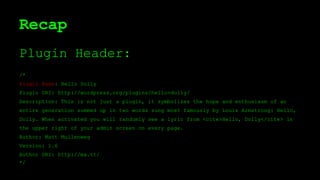
Plugin Header:
/*
Plugin Name: Hello Dolly
Plugin URI: http://wordpress.org/plugins/hello-dolly/
Description: This is not just a plugin, it symbolizes the hope and enthusiasm of an
entire generation summed up in two words sung most famously by Louis Armstrong: Hello,
Dolly. When activated you will randomly see a lyric from <cite>Hello, Dolly</cite> in
the upper right of your admin screen on every page.
Author: Matt Mullenweg
Version: 1.6
Author URI: http://ma.tt/
*/
Recap
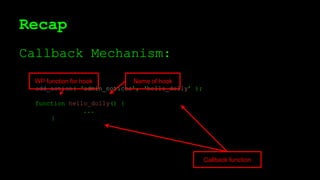
Callback Mechanism:
add_action( ‘admin_notices’, ‘hello_dolly’ );
function hello_dolly() {
...
}
Name of hook
Callback function
WP function for hook
Recap
Planning your own plugin, and ...
submission!
Hooks in Nutshell
Hook: an Event
Plugin programming:
- Hook-driven programming.
- A hook means an event.
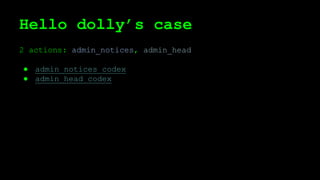
Hello dolly’s case
2 actions: admin_notices, admin_head
● admin_notices codex
● admin_head codex
Hello dolly’s case
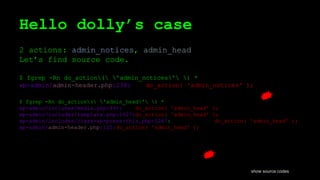
2 actions: admin_notices, admin_head
Let’s find source code.
$ fgrep -Rn do_action( 'admin_notices' ) *
wp-admin/admin-header.php:238: do_action( 'admin_notices' );
$ fgrep -Rn do_action( 'admin_head' ) *
wp-admin/includes/media.php:491: do_action( 'admin_head' );
wp-admin/includes/template.php:1627:do_action( 'admin_head' );
wp-admin/includes/class-wp-press-this.php:1267: do_action( 'admin_head' );
wp-admin/admin-header.php:125:do_action( 'admin_head' );
show source codes
Hook interface
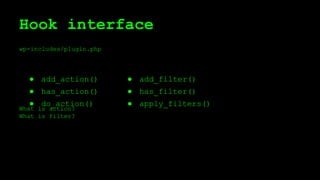
wp-includes/plugin.php
What is action?
What is filter?
● add_filter()
● has_filter()
● apply_filters()
● add_action()
● has_action()
● do_action()
Task Separation
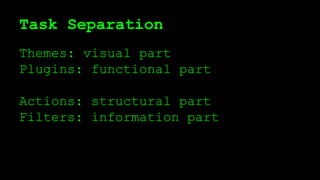
Themes: visual part
Plugins: functional part
Actions: structural part
Filters: information part
Task Separation
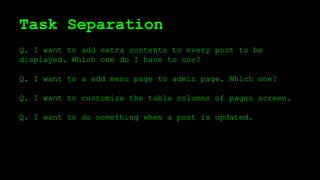
Q. I want to add extra contents to every post to be
displayed. Which one do I have to use?
Q. I want to a add menu page to admin page. Which one?
Q. I want to customize the table columns of pages screen.
Q. I want to do something when a post is updated.
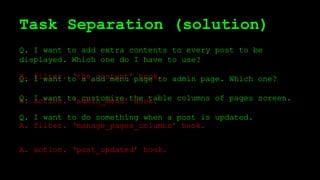
Task Separation (solution)
Q. I want to add extra contents to every post to be
displayed. Which one do I have to use?
Q. I want to a add menu page to admin page. Which one?
Q. I want to customize the table columns of pages screen.
Q. I want to do something when a post is updated.
A. filter. ‘the_content’ hook.
A. action. ‘admin_menu’ hook.
A. filter. ‘manage_pages_columns’ hook.
A. action. ‘post_updated’ hook.
Task separation
Do not have to remember them all.
Moreover, actually,
add_action == add_filter
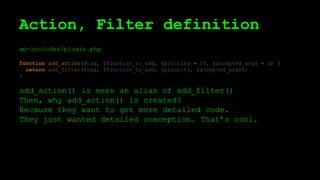
Action, Filter definition
wp-includes/plugin.php
function add_action($tag, $function_to_add, $priority = 10, $accepted_args = 1) {
return add_filter($tag, $function_to_add, $priority, $accepted_args);
}
add_action() is mere an alias of add_filter()
Then, why add_action() is created?
Because they want to get more detailed code.
They just wanted detailed conception. That’s cool.
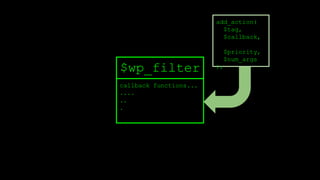
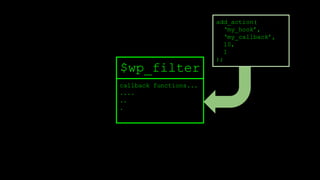
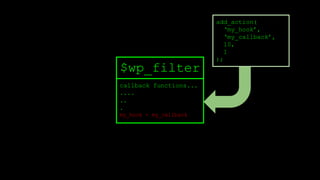
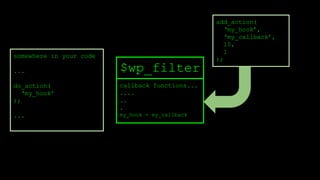
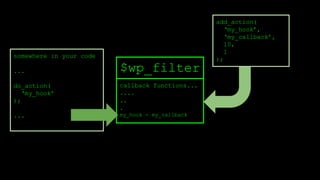
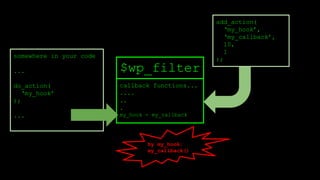
do_action, add_action feedback
do_action:
fires registered action
add_action:
loads any actions
No restriction. you can define your own
hooks.
callback functions...
....
..
.
$wp_filter
add_action(
$tag,
$callback,
$priority,
$num_args
);
callback functions...
....
..
.
$wp_filter
add_action(
‘my_hook’,
‘my_callback’,
10,
1
);
callback functions...
....
..
.
my_hook - my_callback
$wp_filter
add_action(
‘my_hook’,
‘my_callback’,
10,
1
);
callback functions...
....
..
.
my_hook - my_callback
$wp_filter
add_action(
‘my_hook’,
‘my_callback’,
10,
1
);
somewhere in your code
...
do_action(
‘my_hook’
);
...
callback functions...
....
..
.
my_hook - my_callback
$wp_filter
add_action(
‘my_hook’,
‘my_callback’,
10,
1
);
somewhere in your code
...
do_action(
‘my_hook’
);
...
callback functions...
....
..
.
my_hook - my_callback
$wp_filter
add_action(
‘my_hook’,
‘my_callback’,
10,
1
);
somewhere in your code
...
do_action(
‘my_hook’
);
...
by my_hook:
my_callback()
do_action
inside of do_action:
● retrieve the callback functions by their tags (hook)
● sort by priority
● call_user_func()
do {
foreach ( (array) current($wp_filter[$tag]) as $the_ )
if ( !is_null($the_['function']) )
call_user_func_array($the_['function'],
array_slice($args, 0, (int) $the_['accepted_args']));
} while ( next($wp_filter[$tag]) !== false );
add_action
function add_filter( $tag, $function_to_add, $priority = 10, $accepted_args = 1 ) {
global $wp_filter, $merged_filters;
$idx = _wp_filter_build_unique_id($tag, $function_to_add, $priority);
$wp_filter[$tag][$priority][$idx] = array('function' => $function_to_add,
'accepted_args' => $accepted_args);
unset( $merged_filters[ $tag ] );
return true;
}
$wp_filter is an array.
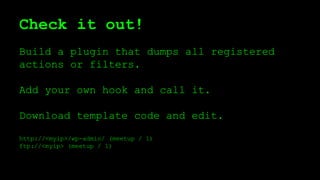
Check it out!
Build a plugin that dumps all registered
actions or filters.
Add your own hook and call it.
Download template code and edit.
http://<myip>/wp-admin/ (meetup / 1)
ftp://<myip> (meetup / 1)
Summary
● filter and action are the same. action is alias.
o structure, data separation
● In fact, this is like a fine wrapper for call_user_func.
o do_action() fires callback functions when the hook
is available
o add_action() loads callback functions.
● There are huge amount of hooks: see reference.
● You can also define your own hooks.
Database Tables in Nutshell
Database: the Root
Database: backbone of web apps.
A good app without understanding
its db structure: just an illusion.
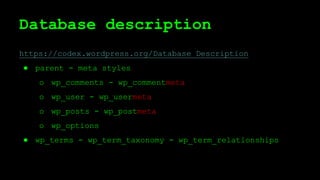
Database description
https://codex.wordpress.org/Database_Description
● parent - meta styles
o wp_comments - wp_commentmeta
o wp_user - wp_usermeta
o wp_posts - wp_postmeta
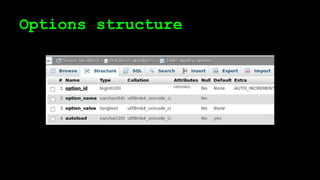
o wp_options
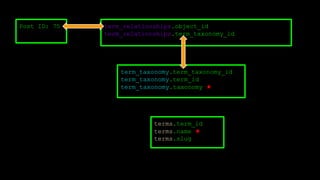
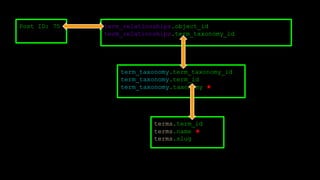
● wp_terms - wp_term_taxonomy - wp_term_relationships
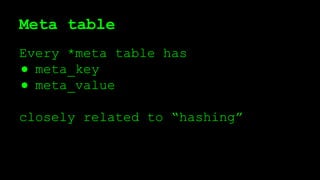
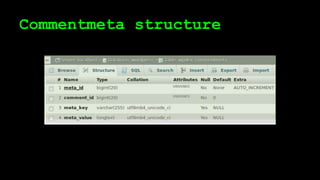
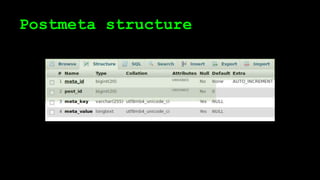
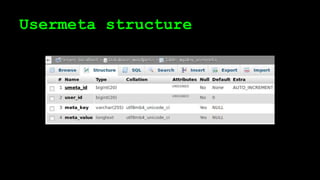
Meta table
Every *meta table has
● meta_key
● meta_value
closely related to “hashing”
Commentmeta structure
Postmeta structure
Usermeta structure
Options structure
Hashing
key - value pair.
key is short / value is often long.
key is searchable.
Hashing often called (implemented) as
“dictionary”, or “associative array”.
Meta key: benefits
Flexible, extendable
Ordinary tables can’t do these:
● Creating fields “on demands”
● This is one reason why WordPress is
a very versaitle, general, and
easy-to-customize CMS.
Meta key sample: user info
You want to add “Kakaotalk ID”
for every user:
just add “kakaotalk_id” meta key.
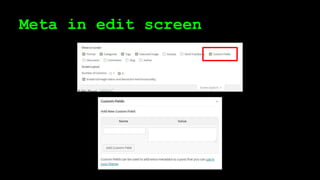
Meta in edit screen
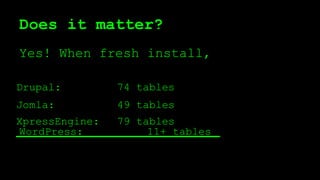
Does it matter?
Yes! When fresh install,
WordPress: 11+ tables
74 tables
49 tables
79 tables
Jomla:
Drupal:
XpressEngine:
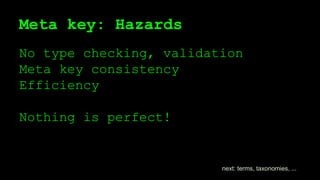
Meta key: Hazards
No type checking, validation
Meta key consistency
Efficiency
Nothing is perfect!
next: terms, taxonomies, ...
Terms and Taxonomies
Terms: a word
Taxonomy: classification of terms
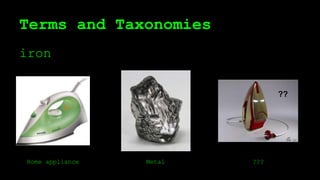
Terms and Taxonomies
iron
??
Home appliance Metal ???
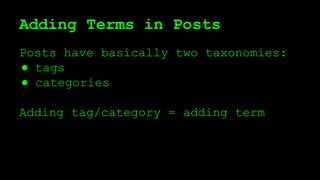
Adding Terms in Posts
Posts have basically two taxonomies:
● tags
● categories
Adding tag/category = adding term
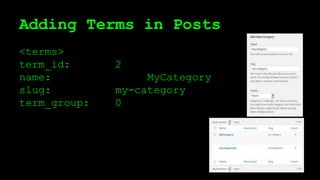
Adding Terms in Posts
<terms>
term_id: 2
name: MyCategory
slug: my-category
term_group: 0
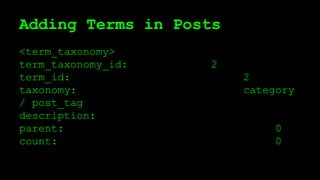
Adding Terms in Posts
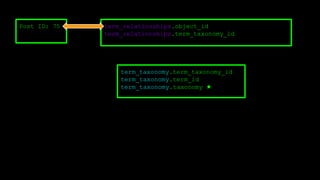
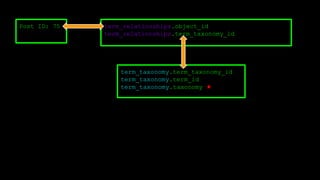
<term_taxonomy>
term_taxonomy_id: 2
term_id: 2
taxonomy: category
/ post_tag
description:
parent: 0
count: 0
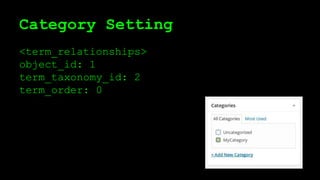
Category Setting
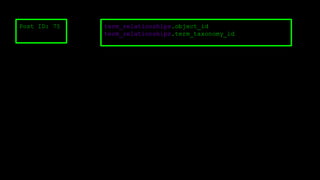
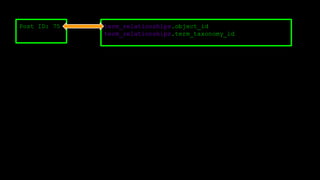
<term_relationships>
object_id: 1
term_taxonomy_id: 2
term_order: 0
Post ID: 75 term_relationships.object_id
term_relationships.term_taxonomy_id
Post ID: 75 term_relationships.object_id
term_relationships.term_taxonomy_id
Post ID: 75 term_relationships.object_id
term_relationships.term_taxonomy_id
term_taxonomy.term_taxonomy_id
term_taxonomy.term_id
term_taxonomy.taxonomy ★
Post ID: 75 term_relationships.object_id
term_relationships.term_taxonomy_id
term_taxonomy.term_taxonomy_id
term_taxonomy.term_id
term_taxonomy.taxonomy ★
Post ID: 75 term_relationships.object_id
term_relationships.term_taxonomy_id
terms.term_id
terms.name ★
terms.slug
term_taxonomy.term_taxonomy_id
term_taxonomy.term_id
term_taxonomy.taxonomy ★
Post ID: 75 term_relationships.object_id
term_relationships.term_taxonomy_id
terms.term_id
terms.name ★
terms.slug
term_taxonomy.term_taxonomy_id
term_taxonomy.term_id
term_taxonomy.taxonomy ★
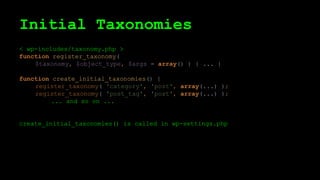
Initial Taxonomies
< wp-includes/taxonomy.php >
function register_taxonomy(
$taxonomy, $object_type, $args = array() ) { ... }
function create_initial_taxonomies() {
register_taxonomy( 'category', 'post', array(...) );
register_taxonomy( 'post_tag', 'post', array(...) );
... and so on ...
create_initial_taxonomies() is called in wp-settings.php
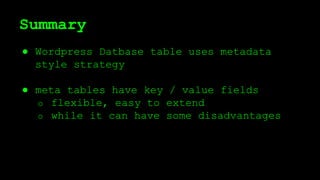
Summary
● Wordpress Datbase table uses metadata
style strategy
● meta tables have key / value fields
o flexible, easy to extend
o while it can have some disadvantages
Summary
● Taxonomy: classification of term
● You can add taxonomies (as well as terms)
● Taxonomy can be flat or hierarchical
● term_taxonomy: taxonomy -
term
● term_relationship: posts - taxonomy
Next week
Admin Menu
● Almost every plugin has its menu
● Easy WP Plugin API
Admin Post
● POST type data submission
URL Query
AJAX Data handling
Wordpress Posts in Nutshell

WordPress plugin #2

  • 1.
    WordPress Plugin #2 May14th, 2015 Changwoo
  • 2.
    Today’s Topics 1.Hooks inNutshell 2.Database Tables in Nutshell
  • 3.
    Recap - Your firstplugin - Hello Dolly plugin - action, and callback
  • 4.
    Recap Plugin Header: /* Plugin Name:Hello Dolly Plugin URI: http://wordpress.org/plugins/hello-dolly/ Description: This is not just a plugin, it symbolizes the hope and enthusiasm of an entire generation summed up in two words sung most famously by Louis Armstrong: Hello, Dolly. When activated you will randomly see a lyric from <cite>Hello, Dolly</cite> in the upper right of your admin screen on every page. Author: Matt Mullenweg Version: 1.6 Author URI: http://ma.tt/ */
  • 5.
    Recap Callback Mechanism: add_action( ‘admin_notices’,‘hello_dolly’ ); function hello_dolly() { ... } Name of hook Callback function WP function for hook
  • 6.
    Recap Planning your ownplugin, and ... submission!
  • 7.
  • 8.
    Hook: an Event Pluginprogramming: - Hook-driven programming. - A hook means an event.
  • 9.
    Hello dolly’s case 2actions: admin_notices, admin_head ● admin_notices codex ● admin_head codex
  • 10.
    Hello dolly’s case 2actions: admin_notices, admin_head Let’s find source code. $ fgrep -Rn do_action( 'admin_notices' ) * wp-admin/admin-header.php:238: do_action( 'admin_notices' ); $ fgrep -Rn do_action( 'admin_head' ) * wp-admin/includes/media.php:491: do_action( 'admin_head' ); wp-admin/includes/template.php:1627:do_action( 'admin_head' ); wp-admin/includes/class-wp-press-this.php:1267: do_action( 'admin_head' ); wp-admin/admin-header.php:125:do_action( 'admin_head' ); show source codes
  • 11.
    Hook interface wp-includes/plugin.php What isaction? What is filter? ● add_filter() ● has_filter() ● apply_filters() ● add_action() ● has_action() ● do_action()
  • 12.
    Task Separation Themes: visualpart Plugins: functional part Actions: structural part Filters: information part
  • 13.
    Task Separation Q. Iwant to add extra contents to every post to be displayed. Which one do I have to use? Q. I want to a add menu page to admin page. Which one? Q. I want to customize the table columns of pages screen. Q. I want to do something when a post is updated.
  • 14.
    Task Separation (solution) Q.I want to add extra contents to every post to be displayed. Which one do I have to use? Q. I want to a add menu page to admin page. Which one? Q. I want to customize the table columns of pages screen. Q. I want to do something when a post is updated. A. filter. ‘the_content’ hook. A. action. ‘admin_menu’ hook. A. filter. ‘manage_pages_columns’ hook. A. action. ‘post_updated’ hook.
  • 15.
    Task separation Do nothave to remember them all. Moreover, actually, add_action == add_filter
  • 16.
    Action, Filter definition wp-includes/plugin.php functionadd_action($tag, $function_to_add, $priority = 10, $accepted_args = 1) { return add_filter($tag, $function_to_add, $priority, $accepted_args); } add_action() is mere an alias of add_filter() Then, why add_action() is created? Because they want to get more detailed code. They just wanted detailed conception. That’s cool.
  • 17.
    do_action, add_action feedback do_action: firesregistered action add_action: loads any actions No restriction. you can define your own hooks.
  • 18.
  • 19.
  • 20.
    callback functions... .... .. . my_hook -my_callback $wp_filter add_action( ‘my_hook’, ‘my_callback’, 10, 1 );
  • 21.
    callback functions... .... .. . my_hook -my_callback $wp_filter add_action( ‘my_hook’, ‘my_callback’, 10, 1 ); somewhere in your code ... do_action( ‘my_hook’ ); ...
  • 22.
    callback functions... .... .. . my_hook -my_callback $wp_filter add_action( ‘my_hook’, ‘my_callback’, 10, 1 ); somewhere in your code ... do_action( ‘my_hook’ ); ...
  • 23.
    callback functions... .... .. . my_hook -my_callback $wp_filter add_action( ‘my_hook’, ‘my_callback’, 10, 1 ); somewhere in your code ... do_action( ‘my_hook’ ); ... by my_hook: my_callback()
  • 24.
    do_action inside of do_action: ●retrieve the callback functions by their tags (hook) ● sort by priority ● call_user_func() do { foreach ( (array) current($wp_filter[$tag]) as $the_ ) if ( !is_null($the_['function']) ) call_user_func_array($the_['function'], array_slice($args, 0, (int) $the_['accepted_args'])); } while ( next($wp_filter[$tag]) !== false );
  • 25.
    add_action function add_filter( $tag,$function_to_add, $priority = 10, $accepted_args = 1 ) { global $wp_filter, $merged_filters; $idx = _wp_filter_build_unique_id($tag, $function_to_add, $priority); $wp_filter[$tag][$priority][$idx] = array('function' => $function_to_add, 'accepted_args' => $accepted_args); unset( $merged_filters[ $tag ] ); return true; } $wp_filter is an array.
  • 26.
    Check it out! Builda plugin that dumps all registered actions or filters. Add your own hook and call it. Download template code and edit. http://<myip>/wp-admin/ (meetup / 1) ftp://<myip> (meetup / 1)
  • 27.
    Summary ● filter andaction are the same. action is alias. o structure, data separation ● In fact, this is like a fine wrapper for call_user_func. o do_action() fires callback functions when the hook is available o add_action() loads callback functions. ● There are huge amount of hooks: see reference. ● You can also define your own hooks.
  • 28.
  • 29.
    Database: the Root Database:backbone of web apps. A good app without understanding its db structure: just an illusion.
  • 30.
    Database description https://codex.wordpress.org/Database_Description ● parent- meta styles o wp_comments - wp_commentmeta o wp_user - wp_usermeta o wp_posts - wp_postmeta o wp_options ● wp_terms - wp_term_taxonomy - wp_term_relationships
  • 31.
    Meta table Every *metatable has ● meta_key ● meta_value closely related to “hashing”
  • 32.
  • 33.
  • 34.
  • 35.
  • 36.
    Hashing key - valuepair. key is short / value is often long. key is searchable. Hashing often called (implemented) as “dictionary”, or “associative array”.
  • 37.
    Meta key: benefits Flexible,extendable Ordinary tables can’t do these: ● Creating fields “on demands” ● This is one reason why WordPress is a very versaitle, general, and easy-to-customize CMS.
  • 38.
    Meta key sample:user info You want to add “Kakaotalk ID” for every user: just add “kakaotalk_id” meta key.
  • 39.
  • 40.
    Does it matter? Yes!When fresh install, WordPress: 11+ tables 74 tables 49 tables 79 tables Jomla: Drupal: XpressEngine:
  • 41.
    Meta key: Hazards Notype checking, validation Meta key consistency Efficiency Nothing is perfect! next: terms, taxonomies, ...
  • 42.
    Terms and Taxonomies Terms:a word Taxonomy: classification of terms
  • 43.
  • 44.
    Adding Terms inPosts Posts have basically two taxonomies: ● tags ● categories Adding tag/category = adding term
  • 45.
    Adding Terms inPosts <terms> term_id: 2 name: MyCategory slug: my-category term_group: 0
  • 46.
    Adding Terms inPosts <term_taxonomy> term_taxonomy_id: 2 term_id: 2 taxonomy: category / post_tag description: parent: 0 count: 0
  • 47.
  • 48.
    Post ID: 75term_relationships.object_id term_relationships.term_taxonomy_id
  • 49.
    Post ID: 75term_relationships.object_id term_relationships.term_taxonomy_id
  • 50.
    Post ID: 75term_relationships.object_id term_relationships.term_taxonomy_id term_taxonomy.term_taxonomy_id term_taxonomy.term_id term_taxonomy.taxonomy ★
  • 51.
    Post ID: 75term_relationships.object_id term_relationships.term_taxonomy_id term_taxonomy.term_taxonomy_id term_taxonomy.term_id term_taxonomy.taxonomy ★
  • 52.
    Post ID: 75term_relationships.object_id term_relationships.term_taxonomy_id terms.term_id terms.name ★ terms.slug term_taxonomy.term_taxonomy_id term_taxonomy.term_id term_taxonomy.taxonomy ★
  • 53.
    Post ID: 75term_relationships.object_id term_relationships.term_taxonomy_id terms.term_id terms.name ★ terms.slug term_taxonomy.term_taxonomy_id term_taxonomy.term_id term_taxonomy.taxonomy ★
  • 54.
    Initial Taxonomies < wp-includes/taxonomy.php> function register_taxonomy( $taxonomy, $object_type, $args = array() ) { ... } function create_initial_taxonomies() { register_taxonomy( 'category', 'post', array(...) ); register_taxonomy( 'post_tag', 'post', array(...) ); ... and so on ... create_initial_taxonomies() is called in wp-settings.php
  • 55.
    Summary ● Wordpress Datbasetable uses metadata style strategy ● meta tables have key / value fields o flexible, easy to extend o while it can have some disadvantages
  • 56.
    Summary ● Taxonomy: classificationof term ● You can add taxonomies (as well as terms) ● Taxonomy can be flat or hierarchical ● term_taxonomy: taxonomy - term ● term_relationship: posts - taxonomy
  • 57.
    Next week Admin Menu ●Almost every plugin has its menu ● Easy WP Plugin API Admin Post ● POST type data submission URL Query AJAX Data handling Wordpress Posts in Nutshell