WordPress Hooks,
Actions & Filters
Bengaluru WordPress Meetup - 19th Jan 2019 A Guide By: Nirav D. Mehta
● Purpose
● What are hooks?
● How they work - Life cycle of hooks
● Types of Hooks ( Action & Filter Hooks )
● Understanding Hook Parameters
● Key to success - Understanding Hook Priority
● Best Practices on custom Hooks
● Removing a Hook
● Advance hooks - Dynamic hooks
● The Codex - Bible for WordPress
● Introduction to Customization Technique 2
What we cover
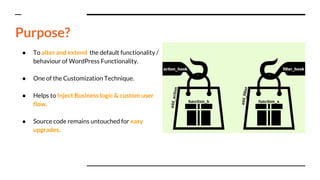
● To alter and extend the default functionality /
behaviour of WordPress Functionality.
● One of the Customization Technique.
● Helps to Inject Business logic & custom user
flow.
● Source code remains untouched for easy
upgrades.
Purpose?
● In general hooks are used to tie things
on.
● Hooks in WordPress allow developers to
easily tie their own code in with the
WordPress core code base, themes, and
plugins.
● Functions that can be applied to an event
or a filter data in WordPress.
What are hooks ?
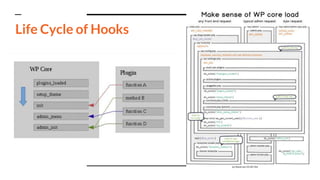
Life Cycle of Hooks
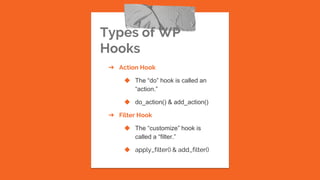
Types of WP
Hooks
➔ Action Hook
◆ The “do” hook is called an
“action.”
◆ do_action() & add_action()
➔ Filter Hook
◆ The “customize” hook is
called a “filter.”
◆ apply_filter() & add_filter()
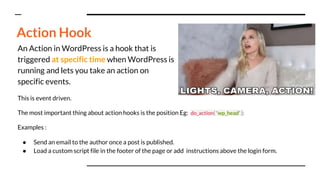
An Action in WordPress is a hook that is
triggered at specific time when WordPress is
running and lets you take an action on
specific events.
This is event driven.
The most important thing about action hooks is the position Eg: do_action( 'wp_head' );
Examples :
● Send an email to the author once a post is published.
● Load a custom script file in the footer of the page or add instructions above the login form.
Action Hook
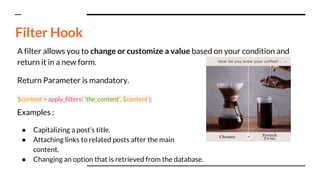
A filter allows you to change or customize a value based on your condition and
return it in a new form.
Return Parameter is mandatory.
$content = apply_filters( 'the_content', $content );
Examples :
● Capitalizing a post’s title.
● Attaching links to related posts after the main
content.
● Changing an option that is retrieved from the database.
Filter Hook
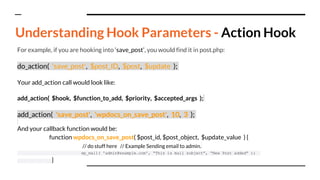
For example, if you are hooking into ‘save_post’, you would find it in post.php:
do_action( 'save_post', $post_ID, $post, $update );
Your add_action call would look like:
add_action( $hook, $function_to_add, $priority, $accepted_args );
add_action( 'save_post', 'wpdocs_on_save_post', 10, 3 );
And your callback function would be:
function wpdocs_on_save_post( $post_id, $post_object, $update_value ) {
// do stuff here // Example Sending email to admin.
wp_mail( 'admin@example.com', “This is mail subject”, “New Post added” );
}
Understanding Hook Parameters - Action Hook
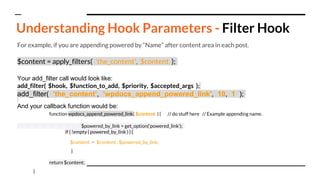
For example, if you are appending powered by “Name” after content area in each post.
$content = apply_filters( 'the_content', $content );
Your add_filter call would look like:
add_filter( $hook, $function_to_add, $priority, $accepted_args );
add_filter( ’the_content’, 'wpdocs_append_powered_link', 10, 1 );
And your callback function would be:
function wpdocs_append_powered_link( $content ) { // do stuff here // Example appending name.
$powered_by_link = get_option(‘powered_link’);
if ( !empty ( powered_by_link ) ) {
$content .= $content . $powered_by_link;
}
return $content;
}
Understanding Hook Parameters - Filter Hook
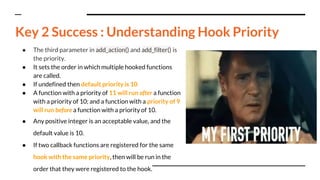
● The third parameter in add_action() and add_filter() is
the priority.
● It sets the order in which multiple hooked functions
are called.
● If undefined then default priority is 10
● A function with a priority of 11 will run after a function
with a priority of 10; and a function with a priority of 9
will run before a function with a priority of 10.
● Any positive integer is an acceptable value, and the
default value is 10.
● If two callback functions are registered for the same
hook with the same priority, then will be run in the
order that they were registered to the hook.
Key 2 Success : Understanding Hook Priority
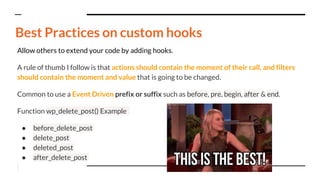
Allow others to extend your code by adding hooks.
A rule of thumb I follow is that actions should contain the moment of their call, and filters
should contain the moment and value that is going to be changed.
Common to use a Event Driven prefix or suffix such as before, pre, begin, after & end.
Function wp_delete_post() Example
● before_delete_post
● delete_post
● deleted_post
● after_delete_post
Best Practices on custom hooks
Best Practices on custom hooks - 2
Plugin Prefix Examples :
● wpseo_ from Yoast SEO,
● genesis_ from the Genesis framework,
● advanced_ads_ from my Advanced Ads plugin
Prevent conflicts with hooks in other plugins or themes.
Easy to understand where exactly the hook originates.
● Add Prefix on callback function names as well
● Start filters with the return $value statement at the end
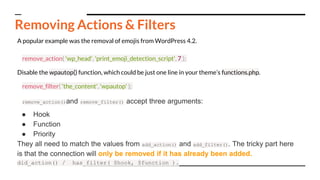
A popular example was the removal of emojis from WordPress 4.2.
remove_action( 'wp_head', 'print_emoji_detection_script', 7 );
Disable the wpautop() function, which could be just one line in your theme’s functions.php.
remove_filter( 'the_content', 'wpautop' );
remove_action()and remove_filter() accept three arguments:
● Hook
● Function
● Priority
They all need to match the values from add_action() and add_filter(). The tricky part here
is that the connection will only be removed if it has already been added.
did_action() / has_filter( $hook, $function ).
Removing Actions & Filters
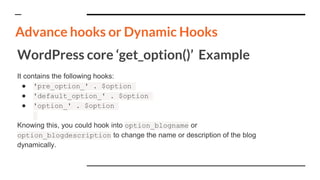
WordPress core ‘get_option()’ Example
It contains the following hooks:
● 'pre_option_' . $option
● 'default_option_' . $option
● 'option_' . $option
Knowing this, you could hook into option_blogname or
option_blogdescription to change the name or description of the blog
dynamically.
Advance hooks or Dynamic Hooks
Scary ? No need to be.
No need to remember it.
You only need to know that, whatever you’d like to
change or add, there is probablya hook for it.
Success Mantra : The Codex - Bible for WordPress Hooks
Beginners can start from: https://codex.wordpress.org/Plugin_API
How to find Hooks ?
Any Questions ?
Introduction to Customization
Technique 2 : Child Theme &
Templating.
Recap ..
Be in touch!
Slack NiravMehta9
Email niravmehta2891@gmail.com
LinkedIn nirav-mehta-28051991
Twitter @99_niravmehta
Github niravmehta999

WordPress Hooks Action & Filters

  • 1.
    WordPress Hooks, Actions &Filters Bengaluru WordPress Meetup - 19th Jan 2019 A Guide By: Nirav D. Mehta
  • 2.
    ● Purpose ● Whatare hooks? ● How they work - Life cycle of hooks ● Types of Hooks ( Action & Filter Hooks ) ● Understanding Hook Parameters ● Key to success - Understanding Hook Priority ● Best Practices on custom Hooks ● Removing a Hook ● Advance hooks - Dynamic hooks ● The Codex - Bible for WordPress ● Introduction to Customization Technique 2 What we cover
  • 3.
    ● To alterand extend the default functionality / behaviour of WordPress Functionality. ● One of the Customization Technique. ● Helps to Inject Business logic & custom user flow. ● Source code remains untouched for easy upgrades. Purpose?
  • 4.
    ● In generalhooks are used to tie things on. ● Hooks in WordPress allow developers to easily tie their own code in with the WordPress core code base, themes, and plugins. ● Functions that can be applied to an event or a filter data in WordPress. What are hooks ?
  • 5.
  • 6.
    Types of WP Hooks ➔Action Hook ◆ The “do” hook is called an “action.” ◆ do_action() & add_action() ➔ Filter Hook ◆ The “customize” hook is called a “filter.” ◆ apply_filter() & add_filter()
  • 7.
    An Action inWordPress is a hook that is triggered at specific time when WordPress is running and lets you take an action on specific events. This is event driven. The most important thing about action hooks is the position Eg: do_action( 'wp_head' ); Examples : ● Send an email to the author once a post is published. ● Load a custom script file in the footer of the page or add instructions above the login form. Action Hook
  • 8.
    A filter allowsyou to change or customize a value based on your condition and return it in a new form. Return Parameter is mandatory. $content = apply_filters( 'the_content', $content ); Examples : ● Capitalizing a post’s title. ● Attaching links to related posts after the main content. ● Changing an option that is retrieved from the database. Filter Hook
  • 9.
    For example, ifyou are hooking into ‘save_post’, you would find it in post.php: do_action( 'save_post', $post_ID, $post, $update ); Your add_action call would look like: add_action( $hook, $function_to_add, $priority, $accepted_args ); add_action( 'save_post', 'wpdocs_on_save_post', 10, 3 ); And your callback function would be: function wpdocs_on_save_post( $post_id, $post_object, $update_value ) { // do stuff here // Example Sending email to admin. wp_mail( 'admin@example.com', “This is mail subject”, “New Post added” ); } Understanding Hook Parameters - Action Hook
  • 10.
    For example, ifyou are appending powered by “Name” after content area in each post. $content = apply_filters( 'the_content', $content ); Your add_filter call would look like: add_filter( $hook, $function_to_add, $priority, $accepted_args ); add_filter( ’the_content’, 'wpdocs_append_powered_link', 10, 1 ); And your callback function would be: function wpdocs_append_powered_link( $content ) { // do stuff here // Example appending name. $powered_by_link = get_option(‘powered_link’); if ( !empty ( powered_by_link ) ) { $content .= $content . $powered_by_link; } return $content; } Understanding Hook Parameters - Filter Hook
  • 11.
    ● The thirdparameter in add_action() and add_filter() is the priority. ● It sets the order in which multiple hooked functions are called. ● If undefined then default priority is 10 ● A function with a priority of 11 will run after a function with a priority of 10; and a function with a priority of 9 will run before a function with a priority of 10. ● Any positive integer is an acceptable value, and the default value is 10. ● If two callback functions are registered for the same hook with the same priority, then will be run in the order that they were registered to the hook. Key 2 Success : Understanding Hook Priority
  • 12.
    Allow others toextend your code by adding hooks. A rule of thumb I follow is that actions should contain the moment of their call, and filters should contain the moment and value that is going to be changed. Common to use a Event Driven prefix or suffix such as before, pre, begin, after & end. Function wp_delete_post() Example ● before_delete_post ● delete_post ● deleted_post ● after_delete_post Best Practices on custom hooks
  • 13.
    Best Practices oncustom hooks - 2 Plugin Prefix Examples : ● wpseo_ from Yoast SEO, ● genesis_ from the Genesis framework, ● advanced_ads_ from my Advanced Ads plugin Prevent conflicts with hooks in other plugins or themes. Easy to understand where exactly the hook originates. ● Add Prefix on callback function names as well ● Start filters with the return $value statement at the end
  • 14.
    A popular examplewas the removal of emojis from WordPress 4.2. remove_action( 'wp_head', 'print_emoji_detection_script', 7 ); Disable the wpautop() function, which could be just one line in your theme’s functions.php. remove_filter( 'the_content', 'wpautop' ); remove_action()and remove_filter() accept three arguments: ● Hook ● Function ● Priority They all need to match the values from add_action() and add_filter(). The tricky part here is that the connection will only be removed if it has already been added. did_action() / has_filter( $hook, $function ). Removing Actions & Filters
  • 15.
    WordPress core ‘get_option()’Example It contains the following hooks: ● 'pre_option_' . $option ● 'default_option_' . $option ● 'option_' . $option Knowing this, you could hook into option_blogname or option_blogdescription to change the name or description of the blog dynamically. Advance hooks or Dynamic Hooks
  • 16.
    Scary ? Noneed to be. No need to remember it. You only need to know that, whatever you’d like to change or add, there is probablya hook for it. Success Mantra : The Codex - Bible for WordPress Hooks Beginners can start from: https://codex.wordpress.org/Plugin_API How to find Hooks ?
  • 17.
    Any Questions ? Introductionto Customization Technique 2 : Child Theme & Templating. Recap ..
  • 18.
    Be in touch! SlackNiravMehta9 Email niravmehta2891@gmail.com LinkedIn nirav-mehta-28051991 Twitter @99_niravmehta Github niravmehta999