Presentation by,
Suveeksha Jain
Wireless Content Types
 Creation of wireless Internet applications involves many types of
contents.
 Markup languages
 Images
 Multimedia
 Phone based applications concerned with markup languages and
basic images.
 Higher end devices such as windows CE or Symbian OS will have the
options of multimedia content and Microsoft word business files.
Markup Languages
• HDML: Handheld Device Markup Languages
• Advantage
 Suitable for use on cellular phones
 Quotes are not required around the attribute
• Limitation
 Lack of scripting capabilities
 Restricted for executing logic locally on the device
 Device specific tasks using HDML have to be driven from the server
rather than client. This increase network traffic, hence reducing
performance.
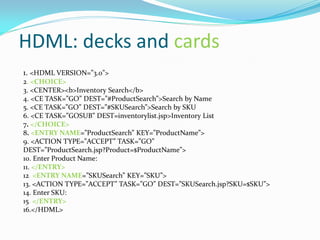
HDML: decks and cards
1. <HDML VERSION=”3.0”>
2. <CHOICE>
3. <CENTER><b>Inventory Search</b>
4. <CE TASK=”GO” DEST=”#ProductSearch”>Search by Name
5. <CE TASK=”GO” DEST=”#SKUSearch”>Search by SKU
6. <CE TASK=”GOSUB” DEST=inventorylist.jsp>Inventory List
7. </CHOICE>
8. <ENTRY NAME=”ProductSearch” KEY=”ProductName”>
9. <ACTION TYPE=”ACCEPT” TASK=”GO”
DEST=”ProductSearch.jsp?Product=$ProductName”>
10. Enter Product Name:
11. </ENTRY>
12. <ENTRY NAME=”SKUSearch” KEY=”SKU”>
13. <ACTION TYPE=”ACCEPT” TASK=”GO” DEST=”SKUSearch.jsp?SKU=$SKU”>
14. Enter SKU:
15. </ENTRY>
16.</HDML>
Fig 1: HDML Emulator output
Wireless Markup Language : WML
 Wireless markup language is based on XML derived from xhtml, is a
markup language intended for WAP devices such as mobile phones.
 It provides navigational support, data input, hyperlinks, text and image
presentation, and forms, much like HTML
 The role of WML in mobile Internet applications is the same as that of
HTML in web applications. WAP sites are written in WML, while web
sites are written in HTML.WAP sites can also be opened in pc just we
have to install plugins for our browser.
 WML files have the extension “.wml”.
 Many companies develop application in XHTML and use conversion
tools to transcode into markup language.
 Difference between HDML and WML
 All WML elements must be closed making syntax stricter.
 WML elements must be properly nested.
 WML documents must be well-formed.
 WML tag names must be lowercase.
 Attribute value must be quoted.
Difference between WML and HTML
WML HTML
Makes use of variables Does not use variables
WML script stored in a separate file Javascript is embedded in the same
HTML file
Images stored as WBMP Images are stored as GIF, JPEG or
PNG
WBMP is a 2 bit image Size of the images are much larger in
HTML
Case sensitive Not case sensitive
WML has fewer tags than HTML HTML has more tags than WML
A set of 'WML Cards' make a 'DECK' A set of 'HTML pages' make a 'SITE'
WML Advantages
 Very easy to use and understand.
 Transmission of WML documents requires less bandwidth than
HTML documents because WML documents are simpler and WML is
compressed before it is sent to the WAP device.
 Compared to HTML documents, displaying WML documents requires
less processing power and memory.
 WML provides support for limited graphics.
WML Limitation
 Like HTML, WML does specify how the content is to be displayed.
Thus micro browsers on different WAP devices display the WML
content differently.
 WAP devices such as WAP phones will not accept large decks.
 There are many variations between WAP phones, for example Screen
sizes, keypads, and soft keys can be different .This variation is similar to
the variation found with Web browsers and their platforms .The
problem is harder in case of WML because there are many more WAP
devices than Web browsers and their platforms.
WML elements
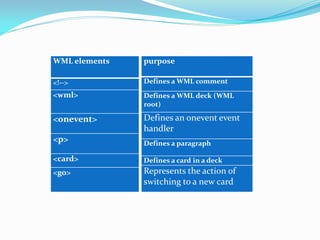
<!-->
<wml>
<onevent>
<p>
<card>
<go>
purpose
Defines a WML comment
Defines a WML deck (WML
root)
Defines an onevent event
handler
Defines a paragraph
Defines a card in a deck
Represents the action of
switching to a new card
WML decks and cards
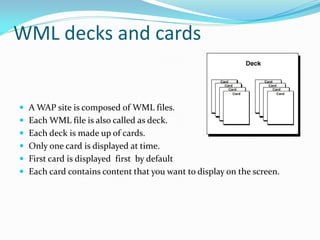
 A WAP site is composed of WML files.
 Each WML file is also called as deck.
 Each deck is made up of cards.
 Only one card is displayed at time.
 First card is displayed first by default
 Each card contains content that you want to display on the screen.
• <?xml version="1.0"?><!DOCTYPE wml PUBLIC "-
//WAPFORUM//DTD WML
1.2//EN""http://www.wapforum.org/DTD/wml12.dt>
• <wml>
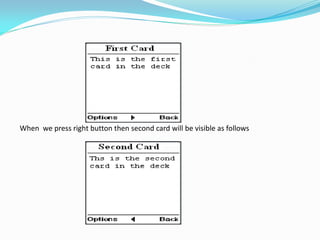
• <card id="one" title="First Card">
• <p>This is the first card in the deck </p></card>
• <card id="two" title="Second Card">
• <p>This is the second card in the deck</p>
• </card>
• </wml>
When we press right button then second card will be visible as follows
WMLScript
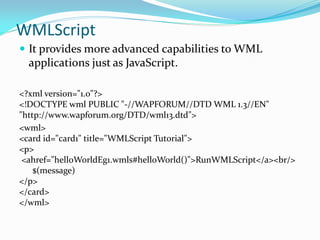
 It provides more advanced capabilities to WML
applications just as JavaScript.
<?xml version="1.0"?>
<!DOCTYPE wml PUBLIC "-//WAPFORUM//DTD WML 1.3//EN"
"http://www.wapforum.org/DTD/wml13.dtd">
<wml>
<card id="card1" title="WMLScript Tutorial">
<p>
<ahref="helloWorldEg1.wmls#helloWorld()">RunWMLScript</a><br/>
$(message)
</p>
</card>
</wml>
extern function helloWorld()
{
WMLBrowser.setVar("message", "Hello World. Welcome to our
WMLScript tutorial.");
WMLBrowser.refresh();
}

Wireless languages and content generation technologies

  • 1.
  • 2.
    Wireless Content Types Creation of wireless Internet applications involves many types of contents.  Markup languages  Images  Multimedia  Phone based applications concerned with markup languages and basic images.  Higher end devices such as windows CE or Symbian OS will have the options of multimedia content and Microsoft word business files.
  • 3.
    Markup Languages • HDML:Handheld Device Markup Languages • Advantage  Suitable for use on cellular phones  Quotes are not required around the attribute • Limitation  Lack of scripting capabilities  Restricted for executing logic locally on the device  Device specific tasks using HDML have to be driven from the server rather than client. This increase network traffic, hence reducing performance.
  • 4.
    HDML: decks andcards 1. <HDML VERSION=”3.0”> 2. <CHOICE> 3. <CENTER><b>Inventory Search</b> 4. <CE TASK=”GO” DEST=”#ProductSearch”>Search by Name 5. <CE TASK=”GO” DEST=”#SKUSearch”>Search by SKU 6. <CE TASK=”GOSUB” DEST=inventorylist.jsp>Inventory List 7. </CHOICE> 8. <ENTRY NAME=”ProductSearch” KEY=”ProductName”> 9. <ACTION TYPE=”ACCEPT” TASK=”GO” DEST=”ProductSearch.jsp?Product=$ProductName”> 10. Enter Product Name: 11. </ENTRY> 12. <ENTRY NAME=”SKUSearch” KEY=”SKU”> 13. <ACTION TYPE=”ACCEPT” TASK=”GO” DEST=”SKUSearch.jsp?SKU=$SKU”> 14. Enter SKU: 15. </ENTRY> 16.</HDML>
  • 5.
    Fig 1: HDMLEmulator output
  • 6.
    Wireless Markup Language: WML  Wireless markup language is based on XML derived from xhtml, is a markup language intended for WAP devices such as mobile phones.  It provides navigational support, data input, hyperlinks, text and image presentation, and forms, much like HTML  The role of WML in mobile Internet applications is the same as that of HTML in web applications. WAP sites are written in WML, while web sites are written in HTML.WAP sites can also be opened in pc just we have to install plugins for our browser.  WML files have the extension “.wml”.
  • 7.
     Many companiesdevelop application in XHTML and use conversion tools to transcode into markup language.  Difference between HDML and WML  All WML elements must be closed making syntax stricter.  WML elements must be properly nested.  WML documents must be well-formed.  WML tag names must be lowercase.  Attribute value must be quoted.
  • 8.
    Difference between WMLand HTML WML HTML Makes use of variables Does not use variables WML script stored in a separate file Javascript is embedded in the same HTML file Images stored as WBMP Images are stored as GIF, JPEG or PNG WBMP is a 2 bit image Size of the images are much larger in HTML Case sensitive Not case sensitive WML has fewer tags than HTML HTML has more tags than WML A set of 'WML Cards' make a 'DECK' A set of 'HTML pages' make a 'SITE'
  • 9.
    WML Advantages  Veryeasy to use and understand.  Transmission of WML documents requires less bandwidth than HTML documents because WML documents are simpler and WML is compressed before it is sent to the WAP device.  Compared to HTML documents, displaying WML documents requires less processing power and memory.  WML provides support for limited graphics.
  • 10.
    WML Limitation  LikeHTML, WML does specify how the content is to be displayed. Thus micro browsers on different WAP devices display the WML content differently.  WAP devices such as WAP phones will not accept large decks.  There are many variations between WAP phones, for example Screen sizes, keypads, and soft keys can be different .This variation is similar to the variation found with Web browsers and their platforms .The problem is harder in case of WML because there are many more WAP devices than Web browsers and their platforms.
  • 11.
    WML elements <!--> <wml> <onevent> <p> <card> <go> purpose Defines aWML comment Defines a WML deck (WML root) Defines an onevent event handler Defines a paragraph Defines a card in a deck Represents the action of switching to a new card
  • 12.
    WML decks andcards  A WAP site is composed of WML files.  Each WML file is also called as deck.  Each deck is made up of cards.  Only one card is displayed at time.  First card is displayed first by default  Each card contains content that you want to display on the screen.
  • 13.
    • <?xml version="1.0"?><!DOCTYPEwml PUBLIC "- //WAPFORUM//DTD WML 1.2//EN""http://www.wapforum.org/DTD/wml12.dt> • <wml> • <card id="one" title="First Card"> • <p>This is the first card in the deck </p></card> • <card id="two" title="Second Card"> • <p>This is the second card in the deck</p> • </card> • </wml>
  • 14.
    When we pressright button then second card will be visible as follows
  • 15.
    WMLScript  It providesmore advanced capabilities to WML applications just as JavaScript. <?xml version="1.0"?> <!DOCTYPE wml PUBLIC "-//WAPFORUM//DTD WML 1.3//EN" "http://www.wapforum.org/DTD/wml13.dtd"> <wml> <card id="card1" title="WMLScript Tutorial"> <p> <ahref="helloWorldEg1.wmls#helloWorld()">RunWMLScript</a><br/> $(message) </p> </card> </wml>
  • 16.
    extern function helloWorld() { WMLBrowser.setVar("message","Hello World. Welcome to our WMLScript tutorial."); WMLBrowser.refresh(); }