Wireframes


    1
After this lecture, You will be familiar with

 ✓ reason and purpose in creating wireframes
 ✓ wireframe types
 ✓ creating wireframe documentation
 ✓ building working interface prototype with
   wireframes
 ✓ various tools used in domain


                          2
Agenda

1. Reasons for wireframes
2. Layers of interaction design
3. What wireframes are
4. Groups which will use our wireframes
5. Types of wireframes
6. Linking different artifacts with wireframes
7. Building prototype
8. Tools description
9. [time] Simple layout


                                  3
Why do we need them anyway?

✓ Gather [additional] requirements from stakeholders
✓ Ensure common view to a project interface
✓ [improve] Communication between groups, people
✓ Introduce unanimous documentation
✓ design and introduce prototypes in a blink
✓ Provide interaction design on quality level


                          4
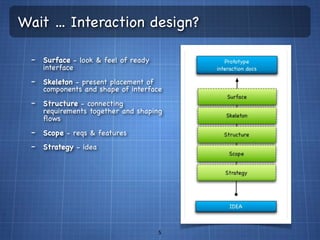
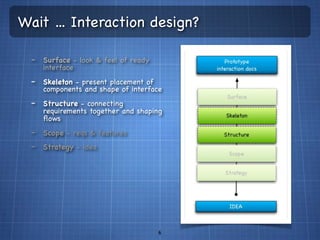
Wait ... Interaction design?

  - Surface - look & feel of ready
     interface
  - Skeleton - present placement of
     components and shape of interface
  - Structure - connecting
     requirements together and shaping
     flows
  - Scope - reqs & features
  - Strategy - idea


                                      5
Wait ... Interaction design?

  - Surface - look & feel of ready
     interface
  - Skeleton - present placement of
     components and shape of interface
  - Structure - connecting
     requirements together and shaping
     flows
  - Scope - reqs & features
  - Strategy - idea


                                      6
Actually, what is a wireframe?
✓ wireframe aka mockup aka blueprint
✓ visual representation of interface
✓ consistent documentation of interface and user
   interaction with it
  ✓   interface, navigation and flow structure & hierarchy
  ✓   possible user behavior
  ✓   shape of functionalities
  ✓   information [also content] hierarchy and placement

✓ instructions & hints for separate teams and
   employees how to approach interface design in
   project
✓ [...]                               7
We are working with
✓ business stakeholders
✓ managers
✓ developers
✓ designers
✓ testers


                          8
We are working with
✓ business stakeholders
  -   gather requirements
  -   build fast&dirty prototype
  -   sketch up features flows and their scope
  -   give client a bound with a project

✓ managers
✓ developers
✓ designers
✓ testers

                                   9
We are working with
✓ business stakeholders
✓ managers
  - check out [pretty much] everything against business case and
    strategy
  - ship docs for future teams
  - is approach ok?
✓ developers
✓ designers
✓ testers

                                 10
We are working with
✓ business stakeholders
✓ managers
✓ developers
  - show front end of their logic
  - what is the user and functionality flow
  - provide hints and requirements for interface and interaction
✓ designers
✓ testers


                                11
We are working with
✓ business stakeholders
✓ managers
✓ developers
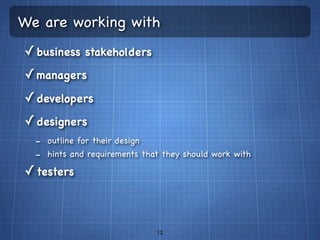
✓ designers
  - outline for their design
  - hints and requirements that they should work with
✓ testers


                              12
We are working with
✓ business stakeholders
✓ managers
✓ developers
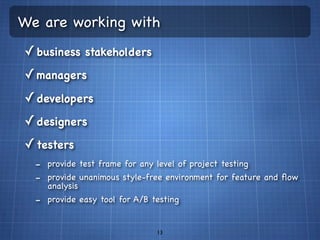
✓ designers
✓ testers
  - provide test frame for any level of project testing
  - provide unanimous style-free environment for feature and flow
    analysis
  - provide easy tool for A/B testing

                               13
Types
✓ Low fidelity
  ✓ Layout [aka reference zones]
  ✓ Sketches
✓ High Fidelity
  ✓ Standalone
  ✓ Developer [system] Standalone
✓ Storyboards [uase flows]


                        14
Types - Low fidelity
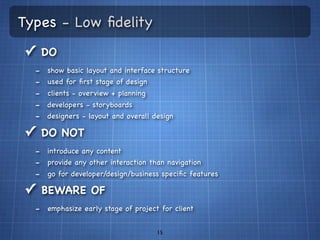
✓ DO
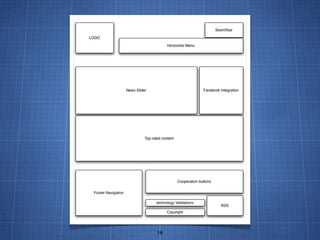
  -   show basic layout and interface structure
  -   used for first stage of design
  -   clients - overview + planning
  -   developers - storyboards
  -   designers - layout and overall design

✓ DO NOT
  - introduce any content
  - provide any other interaction than navigation
  - go for developer/design/business specific features
✓ BEWARE OF
  - emphasize early stage of project for client

                                      15
16
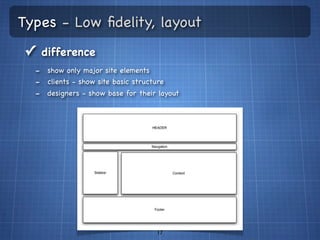
Types - Low fidelity, layout
✓ difference
  - show only major site elements
  - clients - show site basic structure
  - designers - show base for their layout


                                   17
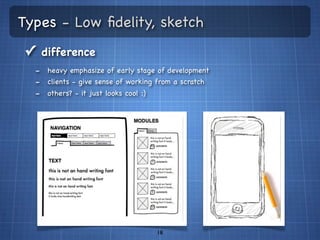
Types - Low fidelity, sketch
✓ difference
  - heavy emphasize of early stage of development
  - clients - give sense of working from a scratch
  - others? - it just looks cool :)


                                   18
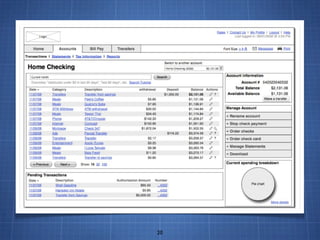
Types - High fidelity
✓ DO
  -   show details
  -   provide final view of system with navigation and interactions
  -   provide standalone wireframes
  -   provide lot of specification concerning flow and usage

✓ DO NOT
  - get in to many details
  - leaving elements without documented purpose
✓ BEWARE OF
  - emphasize the lack of logic behind simple interactions for client


                                      19
20
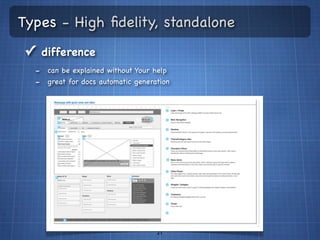
Types - High fidelity, standalone
✓ difference
  - can be explained without Your help
  - great for docs automatic generation


                                   21
Types - High fidelity, standalone developer
✓ difference
  -   heavy linkage to implementation level stuff
  -   triggers
  -   module structure
  -   logic and data flow
  -   validations
  -   spec for each developer-matter element


                                      22
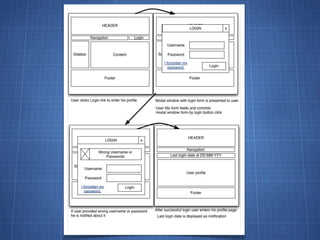
Types - Storyboards
✓ DO
  -   sequence of simple screens with emphasize on one feature
  -   show interaction flow
  -   feature path of usage
  -   base on other artifacts (use cases and user stories)

✓ DO NOT
  -   get messed in details
  -   work with several features at one time
  -   do not create epic stories
  -   forgot what triggers actions and state changes


                                      23
24
Artifact + Wireframe = LVL UP!
✓ Why
  - provide better docs (featuring more linkage between WHAT and HOW)
  - provide tools for specific tasks (UX designer use case based usage flows)
✓ What we will mix up
  -   different types of wireframes
  -   use cases
  -   user stories
  -   any functional requirements we can find

✓ what would we get
  - story boards
  - diagram flows
      •   state based
      •   action/reaction based
                                      25
Your own prototype
✓ Site structure
✓ provide navigation
✓ Automated flow building
✓ State dependent flow
✓ Dynamic data for controls
✓ interface specific features - validations,
  notifications
✓ generate html prototype
✓ generate docs
                          26
Tools
 ✓ price
 ✓ navigable prototype generation
 ✓ docs generation
 ✓ rich interaction suite
 ✓ OS
 ✓ collaboration
 ✓ prototype presentation for clients
 ✓ user feedback
 ✓ cloud integration
                           27
Tools
 ✓ Axure             ✓ crazy egg
 ✓ Protoshare        ✓ creately
 ✓ hotgloo           ✓ [...]
 ✓ mockin bird
 ✓ flair builder
 ✓ justproto
 ✓ omni graffle
 ✓ adobe in design
 ✓ iRise
                     28
Tools
 ✓ Axure             ✓ crazy egg
 ✓ Protoshare        ✓ creately
 ✓ hotgloo           ✓ [...]
 ✓ mockin bird
 ✓ flair builder
 ✓ justproto
 ✓ omni graffle
 ✓ adobe in design
 ✓ iRise
                     29
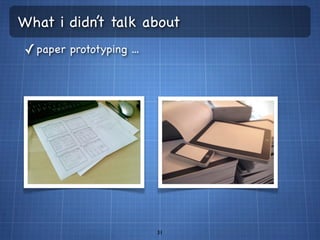
What i didn’t talk about
✓ paper prototyping ...


                          30
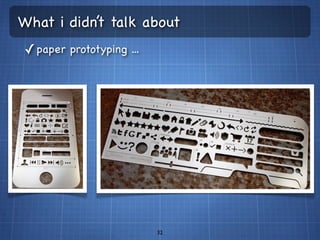
What i didn’t talk about
✓ paper prototyping ...


                          31
What i didn’t talk about
✓ paper prototyping ...


                          32
Q&A


 33
THANK YOU


    34

Wireframes

  • 1.
  • 2.
    After this lecture,You will be familiar with ✓ reason and purpose in creating wireframes ✓ wireframe types ✓ creating wireframe documentation ✓ building working interface prototype with wireframes ✓ various tools used in domain 2
  • 3.
    Agenda 1. Reasons forwireframes 2. Layers of interaction design 3. What wireframes are 4. Groups which will use our wireframes 5. Types of wireframes 6. Linking different artifacts with wireframes 7. Building prototype 8. Tools description 9. [time] Simple layout 3
  • 4.
    Why do weneed them anyway? ✓ Gather [additional] requirements from stakeholders ✓ Ensure common view to a project interface ✓ [improve] Communication between groups, people ✓ Introduce unanimous documentation ✓ design and introduce prototypes in a blink ✓ Provide interaction design on quality level 4
  • 5.
    Wait ... Interactiondesign? - Surface - look & feel of ready interface - Skeleton - present placement of components and shape of interface - Structure - connecting requirements together and shaping flows - Scope - reqs & features - Strategy - idea 5
  • 6.
    Wait ... Interactiondesign? - Surface - look & feel of ready interface - Skeleton - present placement of components and shape of interface - Structure - connecting requirements together and shaping flows - Scope - reqs & features - Strategy - idea 6
  • 7.
    Actually, what isa wireframe? ✓ wireframe aka mockup aka blueprint ✓ visual representation of interface ✓ consistent documentation of interface and user interaction with it ✓ interface, navigation and flow structure & hierarchy ✓ possible user behavior ✓ shape of functionalities ✓ information [also content] hierarchy and placement ✓ instructions & hints for separate teams and employees how to approach interface design in project ✓ [...] 7
  • 8.
    We are workingwith ✓ business stakeholders ✓ managers ✓ developers ✓ designers ✓ testers 8
  • 9.
    We are workingwith ✓ business stakeholders - gather requirements - build fast&dirty prototype - sketch up features flows and their scope - give client a bound with a project ✓ managers ✓ developers ✓ designers ✓ testers 9
  • 10.
    We are workingwith ✓ business stakeholders ✓ managers - check out [pretty much] everything against business case and strategy - ship docs for future teams - is approach ok? ✓ developers ✓ designers ✓ testers 10
  • 11.
    We are workingwith ✓ business stakeholders ✓ managers ✓ developers - show front end of their logic - what is the user and functionality flow - provide hints and requirements for interface and interaction ✓ designers ✓ testers 11
  • 12.
    We are workingwith ✓ business stakeholders ✓ managers ✓ developers ✓ designers - outline for their design - hints and requirements that they should work with ✓ testers 12
  • 13.
    We are workingwith ✓ business stakeholders ✓ managers ✓ developers ✓ designers ✓ testers - provide test frame for any level of project testing - provide unanimous style-free environment for feature and flow analysis - provide easy tool for A/B testing 13
  • 14.
    Types ✓ Low fidelity ✓ Layout [aka reference zones] ✓ Sketches ✓ High Fidelity ✓ Standalone ✓ Developer [system] Standalone ✓ Storyboards [uase flows] 14
  • 15.
    Types - Lowfidelity ✓ DO - show basic layout and interface structure - used for first stage of design - clients - overview + planning - developers - storyboards - designers - layout and overall design ✓ DO NOT - introduce any content - provide any other interaction than navigation - go for developer/design/business specific features ✓ BEWARE OF - emphasize early stage of project for client 15
  • 16.
  • 17.
    Types - Lowfidelity, layout ✓ difference - show only major site elements - clients - show site basic structure - designers - show base for their layout 17
  • 18.
    Types - Lowfidelity, sketch ✓ difference - heavy emphasize of early stage of development - clients - give sense of working from a scratch - others? - it just looks cool :) 18
  • 19.
    Types - Highfidelity ✓ DO - show details - provide final view of system with navigation and interactions - provide standalone wireframes - provide lot of specification concerning flow and usage ✓ DO NOT - get in to many details - leaving elements without documented purpose ✓ BEWARE OF - emphasize the lack of logic behind simple interactions for client 19
  • 20.
  • 21.
    Types - Highfidelity, standalone ✓ difference - can be explained without Your help - great for docs automatic generation 21
  • 22.
    Types - Highfidelity, standalone developer ✓ difference - heavy linkage to implementation level stuff - triggers - module structure - logic and data flow - validations - spec for each developer-matter element 22
  • 23.
    Types - Storyboards ✓DO - sequence of simple screens with emphasize on one feature - show interaction flow - feature path of usage - base on other artifacts (use cases and user stories) ✓ DO NOT - get messed in details - work with several features at one time - do not create epic stories - forgot what triggers actions and state changes 23
  • 24.
  • 25.
    Artifact + Wireframe= LVL UP! ✓ Why - provide better docs (featuring more linkage between WHAT and HOW) - provide tools for specific tasks (UX designer use case based usage flows) ✓ What we will mix up - different types of wireframes - use cases - user stories - any functional requirements we can find ✓ what would we get - story boards - diagram flows • state based • action/reaction based 25
  • 26.
    Your own prototype ✓Site structure ✓ provide navigation ✓ Automated flow building ✓ State dependent flow ✓ Dynamic data for controls ✓ interface specific features - validations, notifications ✓ generate html prototype ✓ generate docs 26
  • 27.
    Tools ✓ price ✓ navigable prototype generation ✓ docs generation ✓ rich interaction suite ✓ OS ✓ collaboration ✓ prototype presentation for clients ✓ user feedback ✓ cloud integration 27
  • 28.
    Tools ✓ Axure ✓ crazy egg ✓ Protoshare ✓ creately ✓ hotgloo ✓ [...] ✓ mockin bird ✓ flair builder ✓ justproto ✓ omni graffle ✓ adobe in design ✓ iRise 28
  • 29.
    Tools ✓ Axure ✓ crazy egg ✓ Protoshare ✓ creately ✓ hotgloo ✓ [...] ✓ mockin bird ✓ flair builder ✓ justproto ✓ omni graffle ✓ adobe in design ✓ iRise 29
  • 30.
    What i didn’ttalk about ✓ paper prototyping ... 30
  • 31.
    What i didn’ttalk about ✓ paper prototyping ... 31
  • 32.
    What i didn’ttalk about ✓ paper prototyping ... 32
  • 33.
  • 34.